1
SCSI user guide
4.1.3
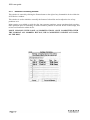
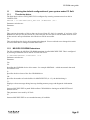
Harddisc Formatting window
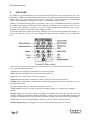
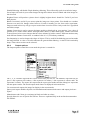
This window is entered by clicking the Format button to the right of any formattable device within the
SCSI Devices window.
This window is used to initialise or modify the format of a hard disc and to adjust the size of any
partitions on it.
Menu entries are available to split the disc into separate partitions, merge partitions back together,
name partitions prior to formatting, to define whether a partition is used for Acorn or DOS usage, and
to low level format the whole device.
MAKE CHANGES WITH CARE, AS MODIFICATIONS, ONCE COMMITTED WITH
THE 'FORMAT ALL MARKED' BUTTON, WILL COMPLETELY DELETE ANY DATA
ON THE DISC.