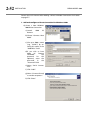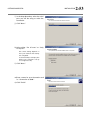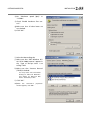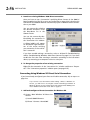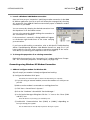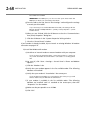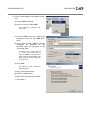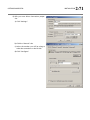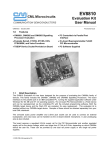
1
Operating Manual OPTIMOD-AM 9300 Digital Audio Processor Version 1.0 Software IMPORTANT NOTE: Refer to the unit’s rear panel for your Model Number. Model Number: Description: 9300 OPTIMOD 9300, Digital I/O, Five-band monophonic processing, 85-264 VAC, 50-60 Hz using universal switching power supply. MANUAL: Part Number: Description: 96126.105.03 9300 Operating Manual CAUTION: TO REDUCE THE RISK OF ELECTRICAL SHOCK, DO NOT REMOVE COVER (OR BACK). NO USER SERVICEABLE PARTS INSIDE. REFER SERVICING TO QUALIFIED SERVICE PERSONNEL. WARNING: TO REDUCE THE RISK OF FIRE OR ELECTRICAL SHOCK, DO NOT EXPOSE THIS APPLIANCE TO RAIN OR MOISTURE. This symbol, wherever it appears, alerts you to the presence of uninsulated dangerous voltage inside the enclosure voltage that may be sufficient to constitute a risk of shock. This symbol, wherever it appears, alerts you to important operating and maintenance instructions in the accompanying literature. Read the manual. In accordance to the WEEE (waste electrical and electronic equipment) directive of the European Parliament, this product must not be discarded into the municipal waste stream in any of the Member States. This product may be sent back to your Orban dealer at end of life where it will be reused or recycled at no cost to you. If this product is discarded into an approved municipal WEEE collection site or turned over to an approved WEEE recycler at end of life, your Orban dealer must be notified and supplied with model, serial number and the name and location of site/facility. Please contact your Orban dealer for further assistance. www.orban.com IMPORTANT SAFETY INSTRUCTIONS All the safety and operating instructions should be read before the appliance is operated. Retain Instructions: The safety and operation instructions should be retained for future reference. Heed Warnings: All warnings on the appliance and in the operating instructions should be adhered to. Follow Instructions: All operation and user instructions should be followed. Water and Moisture: The appliance should not be used near water (e.g., near a bathtub, washbowl, kitchen sink, laundry tub, in a wet basement, or near a swimming pool, etc.). Ventilation: The appliance should be situated so that its location or position does not interfere with its proper ventilation. For example, the appliance should not be situated on a bed, sofa, rug, or similar surface that may block the ventilation openings; or, placed in a built-in installation, such as a bookcase or cabinet that may impede the flow of air through the ventilation openings. Heat: The appliance should be situated away from heat sources such as radiators, heat registers, stoves, or other appliances (including amplifiers) that produce heat. Power Sources: The appliance should be connected to a power supply only of the type described in the operating instructions or as marked on the appliance. Grounding or Polarization: Precautions should be taken so that the grounding or polarization means of an appliance is not defeated. Power-Cord Protection: Power-supply cords should be routed so that they are not likely to be walked on or pinched by items placed upon or against them, paying particular attention to cords at plugs, convenience receptacles, and the point where they exit from the appliance. Cleaning: The appliance should be cleaned only as recommended by the manufacturer. Non-Use Periods: The power cord of the appliance should be unplugged from the outlet when left unused for a long period of time. Object and Liquid Entry: Care should be taken so that objects do not fall and liquids are not spilled into the enclosure through openings. Damage Requiring Service: The appliance should be serviced by qualified service personnel when: The power supply cord or the plug has been damaged; or Objects have fallen, or liquid has been spilled into the appliance; or The appliance has been exposed to rain; or The appliance does not appear to operate normally or exhibits a marked change in performance; or The appliance has been dropped, or the enclosure damaged. Servicing: The user should not attempt to service the appliance beyond that described in the operating instructions. All other servicing should be referred to qualified service personnel. The Appliance should be used only with a cart or stand that is recommended by the manufacturer. Safety Instructions (European) Notice For U.K. Customers If Your Unit Is Equipped With A Power Cord. WARNING: THIS APPLIANCE MUST BE EARTHED. The cores in the mains lead are coloured in accordance with the following code: GREEN and YELLOW - Earth BLUE - Neutral BROWN - Live As colours of the cores in the mains lead of this appliance may not correspond with the coloured markings identifying the terminals in your plug, proceed as follows: The core which is coloured green and yellow must be connected to the terminal in the plug marked with the letter E, or with the earth symbol, or coloured green, or green and yellow. The core which is coloured blue must be connected to the terminal marked N or coloured black. The core which is coloured brown must be connected to the terminal marked L or coloured red. The power cord is terminated in a CEE7 / 7 plug (Continental Europe). The green / yellow wire is connected directly to the unit's chassis. If you need to change the plug and if you are qualified to do so, refer to the table below. WARNING: If the ground is defeated, certain fault conditions in the unit or in the system to which it is connected can result in full line voltage between chassis and earth ground. Severe injury or death can then result if the chassis and earth ground are touched simultaneously. Conductor L LIVE WIRE COLOR Normal Alt BROWN BLACK N NEUTRAL BLUE WHITE E EARTH GND GREEN-YELLOW GREEN AC Power Cord Color Coding Safety Instructions (German) Gerät nur an der am Leistungsschild vermerkten Spannung und Stromart betreiben. Sicherungen nur durch solche, gleicher Stromstärke und gleichen AbschalAMerhaltens ersetzen. Sicherungen nie überbrücken. Jedwede Beschädigung des Netzkabels vermeiden. Netzkabel nicht knicken oder quetschen. Beim Abziehen des Netzkabels den Stecker und nicht das Kabel enfassen. Beschädigte Netzkabel sofort auswechseln. Gerät und Netzkabel keinen übertriebenen mechanischen Beaspruchungen aussetzen. Um Berührung gefährlicher elektrischer Spannungen zu vermeiden, darf das Gerät nicht geöffnet werden. Im Fall von Betriebsstörungen darf das Gerät nur Von befugten Servicestellen instandgesetzt werden. Im Gerät befinden sich keine, durch den Benutzer reparierbare Teile. Zur Vermeidung von elektrischen Schlägen und Feuer ist das Gerät vor Nässe zu schützen. Eindringen von Feuchtigkeit und Flüssigkeiten in das Gerät vermeiden. Bei Betriebsstörungen bzw. nach Eindringen von Flüssigkeiten oder anderen Gegenständen, das Gerät sofort vom Netz trennen und eine qualifizierte Servicestelle kontaktieren. Safety Instructions (French) On s'assurera toujours que la tension et la nature du courant utilisé correspondent bien à ceux indiqués sur la plaque de l'appareil. N'utiliser que des fusibles de même intensité et du même principe de mise hors circuit que les fusibles d'origine. Ne jamais shunter les fusibles. Eviter tout ce qui risque d'endommager le câble seceur. On ne devra ni le plier, ni l'aplatir. Lorsqu'on débranche l'appareil, tirer la fiche et non le câble. Si un câble est endommagé, le remplacer immédiatement. Ne jamais exposer l'appareil ou le câble ä une contrainte mécanique excessive. Pour éviter tout contact averc une tension électrique dangereuse, on n'oouvrira jamais l'appareil. En cas de dysfonctionnement, l'appareil ne peut être réparé que dans un atelier autorisé. Aucun élément de cet appareil ne peut être réparé par l'utilisateur. Pour éviter les risques de décharge électrique et d'incendie, protéger l'appareil de l'humidité. Eviter toute pénétration d'humidité ou fr liquide dans l'appareil. En cas de dysfonctionnement ou si un liquide ou tout autre objet a pénétré dans l'appareil couper aussitôt l'appareil de son alimentation et s'adresser à un point de service aprésvente autorisé. Safety Instructions (Spanish) Hacer funcionar el aparato sólo con la tensión y clase de corriente señaladas en la placa indicadora de características. Reemplazar los fusibles sólo por otros de la misma intensidad de corriente y sistema de desconexión. No poner nunca los fusibles en puente. Proteger el cable de alimentación contra toda clase de daños. No doblar o apretar el cable. Al desenchufar, asir el enchufe y no el cable. Sustituir inmediatamente cables dañados. No someter el aparato y el cable de alimentación a esfuerzo mecánico excesivo. Para evitar el contacto con tensiones eléctricas peligrosas, el aparato no debe abrirse. En caso de producirse fallos de funcionamiento, debe ser reparado sólo por talleres de servicio autorizados. En el aparato no se encuentra ninguna pieza que pudiera ser reparada por el usuario. Para evitar descargas eléctricas e incendios, el aparato debe protegerse contra la humedad, impidiendo que penetren ésta o líquidos en el mismo. En caso de producirse fallas de funcionamiento como consecuencia de la penetración de líquidos u otros objetos en el aparato, hay que desconectarlo inmediatamente de la red y ponerse en contacto con un taller de servicio autorizado. Safety Instructions (Italian) Far funzionare l'apparecchio solo con la tensione e il tipo di corrente indicati sulla targa riportante i dati sulle prestazioni. Sostituire i dispositivi di protezione (valvole, fusibili ecc.) solo con dispositivi aventi lo stesso amperaggio e lo stesso comportamento di interruzione. Non cavallottare mai i dispositivi di protezione. Evitare qualsiasi danno al cavo di collegamento alla rete. Non piegare o schiacciare il cavo. Per staccare il cavo, tirare la presa e mai il cavo. Sostituire subito i cavi danneggiati. Non esporre l'apparecchio e il cavo ad esagerate sollecitazioni meccaniche. Per evitare il contatto con le tensioni elettriche pericolose, l'apparecchio non deve venir aperto. In caso di anomalie di funzionamento l'apparecchio deve venir riparato solo da centri di servizio autorizzati. Nell'apparecchio non si trovano parti che possano essere riparate dall'utente. Per evitare scosse elettriche o incendi, l'apparecchio va protetto dall'umidità. Evitare che umidità o liquidi entrino nell'apparecchio. In caso di anomalie di funzionamento rispettivamente dopo la penetrazione di liquidi o oggetti nell'apparecchio, staccare immediatamente l'apparecchio dalla rete e contattare un centro di servizio qualificato. PLEASE READ BEFORE PROCEEDING! Manual The Operating Manual contains instructions to verify the proper operation of this unit and initialization of certain options. You will find these operations are most conveniently performed on the bench before you install the unit in the rack. Please review the Manual, especially the installation section, before unpacking the unit. Trial Period Precautions If your unit has been provided on a trial basis: You should observe the following precautions to avoid reconditioning charges in case you later wish to return the unit to your dealer. (1) Note the packing technique and save all packing materials. It is not wise to ship in other than the factory carton. (Replacements cost $35.00). (2) Avoid scratching the paint or plating. Set the unit on soft, clean surfaces. (3) Do not cut the grounding pin from the line cord. (4) Use care and proper tools in removing and tightening screws to avoid burring the heads. (5) Use the nylon-washered rack screws supplied, if possible, to avoid damaging the panel. Support the unit when tightening the screws so that the threads do not scrape the paint inside the slotted holes. Packing When you pack the unit for shipping: (1) Tighten all screws on any barrier strip(s) so the screws do not fall out from vibration. (2) Wrap the unit in its original plastic bag to avoid abrading the paint. (3) Seal the inner and outer cartons with tape. If you are returning the unit permanently (for credit), be sure to enclose: The Manual(s) The Registration/Warranty Card The Line Cord All Miscellaneous Hardware (including the Rack Screws and Keys) The Extender Card (if applicable) The Monitor Rolloff Filter(s) (OPTIMOD-AM only) The COAX Connecting Cable (OPTIMOD-AM and OPTIMOD-AM only) Your dealer may charge you for any missing items. If you are returning a unit for repair, do not enclose any of the above items. Further advice on proper packing and shipping is included in the Manual (see Table of Contents). Trouble If you have problems with installation or operation: (1) Check everything you have done so far against the instructions in the Manual. The information contained therein is based on our years of experience with OPTIMOD and broadcast stations. (2) Check the other sections of the Manual (consult the Table of Contents and Index) to see if there might be some suggestions regarding your problem. (3) After reading the section on Factory Assistance, you may call Orban Customer Service for advice during normal California business hours. The number is (1) 510 / 351-3500. WARNING This equipment generates, uses, and can radiate radio-frequency energy. If it is not installed and used as directed by this manual, it may cause interference to radio communication. This equipment complies with the limits for a Class A computing device, as specified by FCC Rules, Part 15, subject J, which are designed to provide reasonable protection against such interference when this type of equipment is operated in a commercial environment. Operation of this equipment in a residential area is likely to cause interference. If it does, the user will be required to eliminate the interference at the user’s expense. WARNING This digital apparatus does not exceed the Class A limits for radio noise emissions from digital apparatus set out in the radio Interference Regulations of the Canadian Department of Communications. (Le present appareil numerique n’emet pas de bruits radioelectriques depassant les limites applicables aux appareils numeriques [de las class A] prescrites dans le Reglement sur le brouillage radioelectrique edicte par le ministere des Communications du Canada.) IMPORTANT Perform the installation under static control conditions. Simply walking across a rug can generate a static charge of 20,000 volts. This is the spark or shock you may have felt when touching a doorknob or some other conductive surface. A much smaller static discharge is likely to destroy one or more of the CMOS semiconductors employed in OPTIMOD-AM. Static damage will not be covered under warranty. There are many common sources of static. Most involve some type of friction between two dissimilar materials. Some examples are combing your hair, sliding across a seat cover or rolling a cart across the floor. Since the threshold of human perception for a static discharge is 3000 volts, you will not even notice many damaging discharges. Basic damage prevention consists of minimizing generation, discharging any accumulated static charge on your body or workstation, and preventing that discharge from being sent to or through an electronic component. You should use a static grounding strap (grounded through a protective resistor) and a static safe workbench with a conductive surface. This will prevent any buildup of damaging static. U.S. patents 4,208,548, 4,460,871, 5,737,434, 6,337,999, 6,434,241, 6,618,486, and 6.937,912 protect OPTIMOD 9300. Other patents pending. Orban and Optimod are registered trademarks. All trademarks are property of their respective companies. This manual is part number 96126.105.03 Published April 2009 © Copyright Orban 8350 East Evans Suite C4, Scottsdale, AZ 85260 USA Phone: (1) (480) 403-8300; Fax: (1) (480) 403-8301; E-Mail: [email protected]; Site: www.orban.com Operating Manual OPTIMOD-AM 9300 Digital Audio Processor Version 1.0 Software Table of Contents Index.........................................................................................................................0-8 Section 1 Introduction .........................................................................................................................................1-1 ABOUT THIS MANUAL.......................................................................................................1-1 THE OPTIMOD-AM 9300 DIGITAL AUDIO PROCESSOR ......................................................1-1 Making the Most of the AM Channel....................................................................1-2 Controllable and Adjustable...................................................................................1-2 Versatile Installation................................................................................................1-3 PRESETS IN OPTIMOD-AM..............................................................................................1-4 Factory Presets .........................................................................................................1-5 User Presets ..............................................................................................................1-5 INPUT/OUTPUT CONFIGURATION ........................................................................................1-5 Digital AES3 Input/Output ......................................................................................1-5 Analog Input/Outputs .............................................................................................1-6 Remote Control Interface .......................................................................................1-6 Computer Interface .................................................................................................1-7 RS-232 Serial Port ............................................................................................................. 1-7 RJ45 Ethernet Connector ................................................................................................. 1-7 LOCATION OF OPTIMOD-AM ..........................................................................................1-7 Optimal Control of Peak Modulation Levels .........................................................1-7 Best Location for OPTIMOD-AM ............................................................................1-8 If the transmitter is not accessible:.................................................................................. 1-8 If the transmitter is accessible: ........................................................................................ 1-9 STUDIO-TRANSMITTER LINK ...............................................................................................1-9 Transmission from Studio to Transmitter...............................................................1-9 Digital Links .................................................................................................................... 1-10 Analog Microwave STLs ................................................................................................. 1-11 Analog Landline (PTT/Post Office Line)......................................................................... 1-12 AM Transmitters and Antennas............................................................................1-12 Bypassing the Transmitter's Internal Filters and Clippers...................................1-12 Power Supplies ......................................................................................................1-13 Pre-1965 Transmitters............................................................................................1-14 Asymmetry .............................................................................................................1-15 System Presets and Transmitter Equalization......................................................1-15 Antenna System.....................................................................................................1-17 USING LOSSY DATA REDUCTION IN THE STUDIO..................................................................1-17 ABOUT TRANSMISSION LEVELS AND METERING ..................................................................1-18 Meters ....................................................................................................................1-18 Figure 1-1: Absolute Peak Level, VU and PPM Reading ............................................... 1-19 Studio Line-up Levels and Headroom ..................................................................1-19 Transmission Levels................................................................................................1-20 LINE-UP FACILITIES .........................................................................................................1-20 Metering of Levels.................................................................................................1-20 Built-in Calibrated Line-up Tones.................................................................................. 1-20 Built-in Calibrated Bypass Test Mode............................................................................ 1-20 MONITORING.................................................................................................................1-21 Modulation Monitors and Their RF Amplifiers ...................................................1-21 Monitoring on Loudspeakers and Headphones..................................................1-21 Monitor Rolloff Filter ..................................................................................................... 1-21 EAS TEST ......................................................................................................................1-22 PC CONTROL AND SECURITY PASSCODE.............................................................................1-23 WHY THE NORTH AMERICAN NRSC STANDARD?...............................................................1-23 AM Stereo Introduces a Preemphasis Dilemma ............................................................ 1-23 Figure 1-2: NRSC Modified 75 µs Deemphasis ............................................................... 1-24 NRSC Standard Preemphasis and Low-pass Filtering .................................................... 1-24 Figure 1-3: NRSC Lowpass Filter ..................................................................................... 1-25 WARRANTY, USER FEEDBACK...........................................................................................1-26 User Feedback........................................................................................................1-26 LIMITED WARRANTY .............................................................................................1-26 INTERNATIONAL WARRANTY ...............................................................................1-26 EXTENDED WARRANTY ........................................................................................1-27 Section 2 Installation .........................................................................................................................................2-1 INSTALLING THE 9300.......................................................................................................2-1 Figure 2-1: AC Line Cord Wire Standard)......................................................................... 2-2 Figure 2-2: Wiring the 25-pin Remote Interface Connector ........................................... 2-3 Figure 2-3: 9300 Serial Port Pin Identification................................................................. 2-4 Figure 2-4: Jumper Positions, Monitor Roll-Off Filter ..................................................... 2-4 Figure 2-5: Frequency Response Curves as Function of ROLLOFF Control, Monitor Rolloff Filter Strapped for 18 dB/Octave...................................................................................... 2-5 Figure 2-6: Monitor Rolloff Filter Schematic Diagram.................................................... 2-6 9300 REAR PANEL ...........................................................................................................2-7 INPUT AND OUTPUT CONNECTIONS .....................................................................................2-8 Cable.........................................................................................................................2-8 Connectors ...............................................................................................................2-8 Analog Audio Input.................................................................................................2-8 Analog Audio Outputs ............................................................................................2-9 AES3 Digital Input and Output.............................................................................2-10 Grounding..............................................................................................................2-10 Power Ground........................................................................................................2-11 Circuit Ground .......................................................................................................2-11 9300 FRONT PANEL .......................................................................................................2-11 QUICK SETUP .................................................................................................................2-13 ANALOG AND DIGITAL I/O SETUP .....................................................................................2-20 Figure 2-7: Effect of Lowpass Filter Shape Control on 5 kHz Lowpass Filter ............... 2-23 Overview of Transmitter Equalization........................................................................... 2-28 Description of the TX EQ Controls ................................................................................. 2-28 Procedure for LF Equalization........................................................................................ 2-28 Figure 2-8: Unequalized RF envelope (showing tilt)..................................................... 2-29 Figure 2-9: RF envelope requiring no tilt equalization................................................. 2-29 Figure 2-10: Unequalized RF envelope (showing ringing) ........................................... 2-31 Figure 2-11: RF envelope showing successful HF equalization..................................... 2-31 AUTOMATION USING THE 9300’S INTERNAL CLOCK ............................................................2-34 SECURITY AND PASSCODE PROGRAMMING .........................................................................2-37 To Create a Passcode: ............................................................................................2-38 To Edit a Passcode:.................................................................................................2-38 To Delete a Passcode: ............................................................................................2-38 To Lock the Front Panel Immediately:..................................................................2-39 To Program local lockout: .....................................................................................2-39 To Unlock the Front Panel: ...................................................................................2-39 Dial-up Networking and the Passcode.................................................................2-40 If You Have Forgotten Your Passcode..................................................................2-40 REMOTE CONTROL INTERFACE PROGRAMMING ..................................................................2-40 NETWORKING AND REMOTE CONTROL ..............................................................................2-42 INSTALLING 9300 PC REMOTE CONTROL SOFTWARE ..........................................................2-44 Installing the Necessary Windows Services..........................................................2-44 Check Hardware Requirements............................................................................2-45 Running the Orban Installer Program .................................................................2-46 Setting Up Ethernet, LAN, and VPN Connections ...............................................2-46 Conclusion..............................................................................................................2-47 SYNCHRONIZING OPTIMOD TO A NETWORK TIMESERVER .....................................................2-47 Table 2-1: NIST-referenced timeservers (2006).............................................................. 2-48 APPENDIX: SETTING UP SERIAL COMMUNICATIONS .............................................................2-51 Preparing for Communication through Null Modem Cable ..............................2-51 Connecting Using Windows 2000 Direct Serial Connection:..............................2-51 Connecting Using Windows XP Direct Serial Connection ..................................2-56 Preparing for Communication through Modems ...............................................2-61 Connecting Using Windows 2000 Modem Connection ......................................2-61 Connecting using Windows XP Modem Connection ..........................................2-67 UPDATING YOUR 9300’S SOFTWARE.................................................................................2-73 Section 3 Operation .........................................................................................................................................3-1 9300 FRONT PANEL .........................................................................................................3-1 SOME AUDIO PROCESSING CONCEPTS...................................................................................3-2 Loudness and density ....................................................................................................... 3-3 OPTIMOD-AM PROCESSING............................................................................................3-4 AM Processing: The Art of Compromise ................................................................3-4 Shortwave/HF Processing ................................................................................................. 3-6 Working Together............................................................................................................ 3-6 Fundamental Requirements: High-Quality Source Material and Accurate Monitoring...............................................................................................................3-6 Monitor Rolloff Filter ....................................................................................................... 3-7 Reference Radios for the Processing ............................................................................... 3-7 Modulation Monitors....................................................................................................... 3-8 More About Audio Processing ...............................................................................3-8 Judging Loudness............................................................................................................. 3-9 Reverberation ................................................................................................................... 3-9 CUSTOMIZING THE 9300’S SOUND .....................................................................................3-9 Basic Control ..........................................................................................................3-10 Full Control ............................................................................................................3-11 Advanced Control..................................................................................................3-11 Gain Reduction Metering .....................................................................................3-12 To Create or Save a User Preset ............................................................................3-12 FACTORY PROGRAMMING PRESETS ...................................................................................3-13 Description of the Factory Presets ................................................................................. 3-14 Table 3-1: Factory Programming Presets....................................................................... 3-15 EQUALIZER CONTROLS ....................................................................................................3-17 Table 3-2: Equalization Controls ................................................................................... 3-17 Figure 3-1: HF Receiver Equalizer Curves ...................................................................... 3-21 AGC CONTROLS ............................................................................................................3-23 Table 3-3: AGC Controls.................................................................................................. 3-24 Advanced AGC Controls........................................................................................3-26 CLIPPER CONTROLS .........................................................................................................3-28 Table 3-4: Clipper Controls ............................................................................................. 3-28 MULTIBAND DYNAMICS PROCESSING ................................................................................3-30 Table 3-5: Multiband Controls ....................................................................................... 3-30 Table 3-6: MB Attack/Release Controls .......................................................................... 3-31 Table 3-7: MB Band Mix Controls................................................................................... 3-33 Advanced Multiband Controls..............................................................................3-34 TEST MODES .................................................................................................................3-37 Table 3-8: Test Modes ..................................................................................................... 3-37 USING THE 9300 PC REMOTE CONTROL SOFTWARE ...........................................................3-37 To set up a new connection: .................................................................................3-38 To initiate communication: ...................................................................................3-39 To modify a control setting:..................................................................................3-39 To recall a preset:...................................................................................................3-40 To save a user preset you have created: ..............................................................3-40 To back up User Presets, system files, and automation files onto your computer’s hard drive:..............................................................................................................3-40 To restore archived presets, system files, and automation files:........................3-41 To modify INPUT/OUTPUT and SYSTEM SETUP: ...........................................................3-43 To modify AUTOMATION: .........................................................................................3-43 To group multiple 9300s: ......................................................................................3-43 Navigation Using the Keyboard ...........................................................................3-43 To Quit the Program..............................................................................................3-43 About Aliases created by Optimod 9300 PC Remote Software .........................3-43 Multiple Installations of Optimod 9300 PC Remote ...........................................3-44 To share an archived User Preset between 9300s: ........................................................ 3-45 Section 4 Maintenance .........................................................................................................................................4-1 ROUTINE MAINTENANCE ...................................................................................................4-1 SUBASSEMBLY REMOVAL AND REPLACEMENT .......................................................................4-2 FIELD AUDIT OF PERFORMANCE..........................................................................................4-5 Section 5 Troubleshooting .........................................................................................................................................5-1 PROBLEMS AND POTENTIAL SOLUTIONS ...............................................................................5-1 RFI, Hum, Clicks, or Buzzes ............................................................................................... 5-1 Poor Peak Modulation Control ........................................................................................ 5-1 Excessively Low Positive Peak Modulation ...................................................................... 5-2 Audible Distortion On-Air ................................................................................................ 5-2 Audible Noise on Air ........................................................................................................ 5-3 Shrill, Harsh Sound............................................................................................................ 5-3 Audible Lowpass Filter Ringing........................................................................................ 5-3 Dull Sound......................................................................................................................... 5-4 Excessive Occupied Bandwidth ........................................................................................ 5-4 System Will Not Pass Line-Up Tones at 100% Modulation ............................................. 5-5 System Will Not Pass Emergency Alert System (“EAS” USA Standard) Tones at the Legally Required Modulation Level ................................................................................. 5-5 System Receiving 9300’s Digital Output Will Not Lock................................................... 5-5 General Dissatisfaction with Subjective Sound Quality.................................................. 5-5 Security Passcode Lost (When Unit is Locked Out) ......................................................... 5-6 Connection Issues between the 9300 and a PC, Modem, or Network ................5-6 Troubleshooting Connections.................................................................................5-6 You Cannot Access the Internet After Making a Direct or Modem Connection to the 9300: ..................................................................................................................5-7 OS-SPECIFIC TROUBLESHOOTING ADVICE ............................................................................5-8 Troubleshooting Windows 2000 Direct Connect:..................................................5-8 Troubleshooting Windows 2000 Modem Connect:...............................................5-9 Troubleshooting Windows XP Direct Connect: ...................................................5-10 Troubleshooting Windows XP Modem Connect: ................................................5-11 TROUBLESHOOTING IC OPAMPS .......................................................................................5-12 TECHNICAL SUPPORT.......................................................................................................5-13 FACTORY SERVICE...........................................................................................................5-13 SHIPPING INSTRUCTIONS ..................................................................................................5-13 Section 6 Technical Data .........................................................................................................................................6-1 SPECIFICATIONS ................................................................................................................6-1 Performance.............................................................................................................6-1 Installation ...............................................................................................................6-2 CIRCUIT DESCRIPTION .......................................................................................................6-4 Overview ..................................................................................................................6-4 Control Circuits ........................................................................................................6-5 User Control Interface and LCD Display Circuits ...................................................6-5 Input Circuits............................................................................................................6-7 Output Circuits.........................................................................................................6-8 DSP Circuit..............................................................................................................6-10 Power Supply .........................................................................................................6-10 ABBREVIATIONS .............................................................................................................6-11 PARTS LIST ....................................................................................................................6-13 Obtaining Spare Parts ...........................................................................................6-13 Control Board ........................................................................................................6-13 Combined Input/Output and DSP (I/O+DSP) Board ............................................6-15 Display Board (Front) ............................................................................................6-18 Display Board (Back)..............................................................................................6-19 SCHEMATICS AND PARTS LOCATOR DRAWINGS ...................................................................6-19 Function Chassis Control board I/O+DSP Board Display Board DSP Block Diagram Description Drawing Page Circuit Board Locator and Basic Interconnections Control microprocessor. Services front panel, serial port, Ethernet, and DSP+I/O board. Contains: General Purpose bus, address decoder, DSP, and I/O interface Memory and clock generation Ethernet Miscellaneous input/output Power and Ground Analog Input/output AES3 Input/output DSP Chips; Local regulators. Contains: L and R Analog Inputs Analog Outputs Digital Input and Sync Input Digital Outputs DSP Extended Serial Audio Interface (ESAI) and Host Interface DSP Serial Peripheral Interface, Power, and Ground General Purpose bus 8-bit I/O Serial Audio Interface and Clock Generation Power Distribution Front-Panel LCD, LEDs, Buttons, and Rotary Encoder Contains: Front of board Rear of board Shows signal processing Top view (not to scale) Parts Locator Drawing 6-21 6-22 Schematic 1 of 5 6-23 Schematic 2 of 5 Schematic 3 of 5 Schematic 4 of 5 Schematic 5 of 5 Parts Locator Drawing 6-24 6-25 6-26 6-27 6-28 Schematic 1 of 9 Schematic 2 of 9 Schematic 3 of 9 Schematic 4 of 9 Schematic 5 of 9 6-29 6-30 6-31 6-32 6-33 Schematic 6 of 9 6-34 Schematic 7 of 9 Schematic 8 of 9 6-35 6-36 Schematic 9 of 9 Parts Locator Drawing 6-37 6-38 Schematic 1 of 2 Schematic 2 of 2 6-39 6-40 6-41 Index analog input 2- · 8 analog landline 1- · 12 analog output 6 circuit description 6- · 9 6300 2- · 13 9 9300 OPTIMOD-AM 1- · 1 compensating for 600 ohm load 2- · 24 analog output 2- · 9 antenna system 1- · 17 archiving presets 3- · 40 asymmetry inverting 2- · 32 A A/D converter asymmetry 1- · 15, 16 attack 3- · 28 attack time controls 3- · 35 audio circuit description 5- · 8 connections 2- · 8 specification 6- · 2 input, connecting 2- · 8 Abbreviations 6- · 11 AC Line Cord Standard 2- · 2 Advanced Control 3- · 11 AES/EBU I/O 2- · 10 AGC output 2- · 10 output, connecting 2- · 9 Audio Precision 4- · 5 auditing performance 4- · 5 automation bass attack control 3- · 28 add event 2- · 35 bass coupling control 3- · 26 delete event 2- · 37 bass release control 3- · 28 edit event 2- · 36 bass threshold control 3- · 27 control list 3- · 23 automation 2- · 34 automation 3- · 43 defeating 3- · 24 drive control 3- · 24 dual band 3- · 26 B gate threshold control 3- · 25 idle gain control 3- · 27 master attack control 3- · 28 master release control 3- · 25 meter 2- · 12, 2 ratio control 3- · 27 studio 2- · 13 window release control 3- · 26 window size control 3- · 26 AGC Meter Display control 3- · 26 AM processing general remarks 3- · 4 AM transmitters 1- · 12 analog I/O 1- · 6 analog input circuit description 6- · 7 ref level, I/O setup 2- · 20 backing up presets 3- · 40 balanced inputs 2- · 9 output, simulates transformer 2- · 9 base board removing 4- · 2 replacing 4- · 4 Basic Control 3- · 10 bass clip threshold 3- · 28 bass punch and the bass clipper 3- · 28 bass threshold 3- · 27 battery replacing 6- · 5 bit depth of internal processing 6- · 1 block diagram 6- · 42 bounce 1- · 13 buttons Windows XP 5- · 10 computer interface RS-232 2- · 7 escape 2- · 12, 1 serial 2- · 7 modify 2- · 12, 1 next 2- · 12, 1 previous 2- · 12, 1 computer interface 1- · 7 connecting through Win XP direct serial 2- · 56 RECALL 2- · 12, 1 setup 2- · 12, 1 connection to PC soft buttons 2- · 12, 1 buzz 5- · 1 bypass troubleshooting 5- · 6 connectors audio 2- · 8 input and output 2- · 8 local 1- · 22 PC remote 1- · 23 remote interface 1- · 22 test mode 1- · 20 contrast 2- · 11, 1 control knob 2- · 12, 1 controls contrast 2- · 11, 1 description 3- · 1 C corrosion 4- · 1 cable shielding 2- · 11 D type recommended for analog I/O 2- · 8 chassis getting inside 4 · 2 ground 2- · 11 circuit board locator drawing 6- · 21 circuit description control 6- · 5 LCD display 6- · 5 user control interface 6- · 5 circuit description 6- · 4 cleaning front panel 4- · 1 clipper bass clip threshold control 3- · 28 control list 3- · 28 final clip drive control 3- · 29 Clipping Defined 3- · 3 clock battery 6- · 5 setting 2- · 34 common-mode rejection 2- · 11 components obtaining 6- · 13 Compression Defined 3- · 2 compressor gate 3- · 25 computer connecting to 2- · 5 interface, specifications 6- · 3 troubleshooting connections 5- · 6 Windows 2000 5- · 8 D/A converter circuit description 6- · 9 specification 6- · 2 delta release control 3- · 36 density 3- · 3 digital I/O 1- · 5 digital input circuit description 6- · 8 digital links 1- · 10 digital output circuit description 6- · 9 display assembly removing 4 · 2 display board parts list 6- · 18, 19 distortion excessive 5- · 5 specification 6- · 1 testing 4- · 8 troubleshooting 5- · 2 dither 2- · 25 DJ Bass control 3- · 22 downward expander 3- · 33 DSP block diagram 6- · 42 circuit description 6- · 10 DSP board replacing 4- · 4 dual microwave STLs 1- · 11 dull sound troubleshooting 5- · 4 G gain reduction E meters 2- · 13, 2 EAS gate threshold control 3- · 33 modulation low 5- · 5 test tones 1- · 22 easy setup 2- · 13 equalizer control list 3- · 17 parametric 3- · 17 transmitter 1- · 15 escape button 2- · 12, 1 Ethernet 2- · 42, 46, 39 Ethernet cable crossover 5- · 7 gate 3- · 25 gate LED 2- · 12, 2 Gateway 2- · 46, 39 gateway address 2- · 42 getting inside the unit 4 · 2 GPI specifications 6- · 3 GPI interface testing 4- · 10 grounding circuit 2- · 11 loss of 4- · 1 F power 2- · 11 factory presets grounding 2- · 10 grouping 9300s 3- · 43 selecting 2- · 18 tv 3- · 15 factory presets 1- · 5 factory service 5- · 13 final clip drive 3- · 29 Firewall 2- · 46, 39 Firmware updating 9300 2- · 73 five-band attack time controls 3- · 35 band on/off switch 3- · 35 band threshold control 3- · 32 H HF Clipping 3- · 29 HF Curve frequency response 2- · 23 HF Curve control 3- · 21 HF Gain control 3- · 20 HF processing 3- · 6 High Frequency Enhancer 3- · 23 high frequency limiter delta release control 3- · 36 downward expander thresold control 3- · 33 threshold 3- · 34 highpass filter HF clipper threshold 3- · 34 in user preset 3- · 23 multiband drive control 3- · 30 quick setup 2- · 22 multiband gate threshold control 3- · 33 mutiband release control 3- · 31 output mix controls 3- · 35 five-band 3- · 30 frequency response specification 6- · 1 setting 1- · 16 highpass filter 1- · 16 hum 5- · 1 I testing 4- · 8 front panel 3- · 1 front panel description 2- · 11 Full Control 3- · 11 fuse 6- · 10 I/O AES/EBU 2- · 10 connections 2- · 3 I/O board replacing 4- · 4 IC opamps troubleshooting 5- · 12 idle gain 3- · 27 input analog, connecting 2- · 8 optimum · 8 lock driven equipment cannot lock to 9300 output 5- · 5 analog, specifications 6- · 2 digital, specifications 6- · 3 meters 2- · 12, 2 input level line-up 1- · 19 lockout immediate 2- · 39 programming local 2- · 39 unlocking front panel 2- · 39 maximum 2- · 8 lossy data reduction input meters 1- · 20 input selector in studio 1- · 17 I/O setup 2- · 20 input/output board removing 4- · 3 inspection of package contents 2- · 1 installation procedure 2- · 1 Internet cannot access 5- · 7 IP address 2- · 42 IP port 2- · 43 NICAM 1- · 10 used in STLs · 10 loudness insufficient 5- · 5 insufficient due to poor peak control 5- · 1 judging 3- · 9 loudness 3- · 3 loudness/distortion tradeoff 3- · 29 lowpass filter in user preset 3- · 23 quick setup 2- · 22 setting 1- · 16 lowpass filter 1- · 16 J J.17 and 9300 digital I/O 1- · 6 and NICAM 1- · 10 deemphasis applied to digital audio input 6·3 defined 1- · 6 preemphasis applied to digital audio output 6- · 3 M MAC address 5- · 6 main board reattaching 4 · 4 MB Clip control 3- · 29 measuring performance 4- · 5 meter circuit description 6- · 6 L gain reduction 3- · 12 meters LEDs AGC 2- · 12, 2 gate 2- · 12, 2 circuit description 6- · 6 Less-More 3- · 24 level gain reduction 2- · 13, 2 metering 1- · 20 setup 2- · 17 transmission 1- · 20 Limiting Defined 3- · 3 line voltage 2- · 2 line-up tones system will not pass at 100% modulation 5- · 5 line-up tones 1- · 20 location 1- · 7 location of 9300 input 2- · 12, 2 studio 1- · 18 modem preparing for connection 2- · 61 recommended baud rate 2- · 62 setting up 2- · 43 specification for 2- · 45 Windows 2000 configuration 2- · 61 Windows XP configuration 2- · 67 modify button 2- · 12, 1 modulation control troubleshooting poor 5- · 1 modulation monitor accuracy of 3- · 8 modulation monitors 1- · 21 monitor rolloff filter · 7 Monitor Rolloff Filter 1- · 21 monitor rolloff filter 2- · 5 multiband drive 3- · 30 parts list base board 6- · 13 display board 6- · 18, 19 I/O board 6- · 15 parts list 6- · 13 passcode and dial-up networking 2- · 40 creating 2- · 38 N deleting 2- · 38 editing 2- · 38 NAB Broadcast and Audio System Test CD 4- · 5 network timeserver 2- · 47 networking 2- · 42 NEXT button 2- · 12, 1 NICAM 1- · 10 noise troubleshooting 5- · 3 NRSC 3- · 3 NRSC deemphasis 1- · 24 NRSC standard 1- · 23 null modem cable programming 2- · 37 recovering from lost 2- · 40 PC Orban installer program 2- · 46 PC board locator diagram 6- · 21 PC control security 1- · 23 PC hardware requirements 2- · 45 PC Remote aliases 3- · 43 moving alias folders 3- · 45 multiple coexisting versions 3- · 44 upgrading versions 3- · 44 null modem cable 2- · 45 PC Remote Software 3- · 37 peak control criteria 1- · 7 performance O phase-linear output port, IP 2- · 43 Ports 2- · 46, 39 positive peak threshold 1- · 16 positive peaks communicating through 2- · 51 measuring 4- · 5 system group delay spec · 7 analog output level trim adjustment 4- · 7 analog, connecting 2- · 9 analog, specifications 6- · 2 compensating for 600 ohm load 2- · 24 digital, setting dither 2- · 25 digital, setting sync 2- · 25 digital, setting word length · 25 digital, specifications 6- · 3 output level I/O setup 2- · 24, 26 quick setup 2- · 17 output mix controls 3- · 35 overshoot in transmitter 1- · 12 overshoot excessive 5- · 1 cannot achieve desired 5- · 2 positive peaks 1- · 15 power cord 2- · 2, 7 power supply circuit description 6- · 10 Orban part # 6- · 10 transmitter 1- · 13 power supply board reattaching 4 · 4 preemphasis quick setup 2- · 14 preemphasis 1- · 23 preset restoring archived 3- · 41 P presets parts obtaining 6- · 13 backup 3- · 40 customizing 3- · 9 factory 1- · 5 factory programming 3- · 13 ringing saving user 3- · 5, 12 photo showing 2- · 31 sharing between 9300s 3- · 42, 45 reducing audible 3- · 22 user presets 1- · 5 PREVIOUS button 2- · 12, 1 processing block diagram 6- · 42 Proof of Performance 1- · 3 Proof of Performance 3- · 20, 37 testing for 2- · 27 RJ45 jack 2- · 43 routine maintenance 4- · 1 RS232 testing 4- · 10 RS-232 connector 2- · 7 RS-232 interface circuit description 6- · 6 Q quick setup 2- · 13 S sample rate R at digital output 6- · 3 radio reference for processor adjustment 3- · 7, 20 ratio AGC 3- · 27 rear panel 2- · 7 RECALL button 2- · 12, 1 receiver HF rolloff 3- · 3 receiver equalizer 3- · 20 registration card 2- · 1 release fast 3- · 32 medium-fast 3- · 32 medium-slow 3- · 32 slow 3- · 31 remote PC Remote software 3- · 37 remote control bypass 1- · 22 connecting 2- · 3 GPI, specifications 6- · 3 wiring 2- · 3 remote control 2- · 7 remote interface functions controllable by 2- · 41 GPI 1- · 6 programming GPI 2- · 40 testing 4- · 10 wiring 2- · 3 remote interface connector 2- · 7 resolution specification 6- · 1 reveberation 3- · 9 RFI 5- · 1 internal, specification 6- · 1 setting output 2- · 17 sample rate converter testing 4- · 9 saving user presets 3- · 5, 12 screen display 2- · 11, 1 screens System Setup 2- · 13 Security lock immediately 2- · 39 security 1- · 23 security 2- · 37 Serial Communications setting up 2- · 51 serial connection setting up direct 2- · 44 serial connector 2- · 7 service 5- · 13 setup I/O 2- · 20 quick 2- · 13 setup button 2- · 12, 1 shipping instructions 5- · 13 shortwave processing 3- · 6 shrill sound troubleshooting 5- · 3 signal flow diagram 6- · 42 soft buttons 2- · 12, 1 Software updating 9300 2- · 73 software updates 1- · 3 Sound Technology 4- · 5 spare parts obtaining 6- · 13 specifications 6- · 1 spectrum analyzer 4- · 5 sports 3- · 32 Stanford Research Systems 4- · 5 station ID setting 2- · 19 STL compatibility with 32 kHz sample rate 2- · 10 overshoot in uncomressed digital 2- · 10 systems 1- · 9 studio AGC 2- · 13 studio chassis mode 2- · 16 studio-transmitter link 1- · 9 subassembly removal and replacement 4- · 2 subnet mask 2- · 42 system setup installation 5- · 1 tv presets 3- · 15 U unlock front panel 2- · 39 unpacking 2- · 1 Updating software 2- · 73 user presets archiving 3- · 13 creating 3- · 5, 10, 12 user presets 1- · 5 V VPN, setting up 2- · 46, 39 quick setup 2- · 13 System Setup screen 2- · 13 W T talk 3- · 32 TCP/IP warranty 1- · 26 Warranty 1- · 26 warranty 6- · 4 window setting parameters 2- · 42 technical support 5- · 26, 13 telephone support 5- · 26, 13 test transmission facility · 27 release control 3- · 26 window size control 3- · 26 Windows installing services 2- · 44 Windows 2000 test modes 3- · 20, 37 threshold control 3- · 32 tilt adding direct serial connection 2- · 52, 56, 62, 69 Direct Connect 5- · 8 photo showing 2- · 29 direct serial connection 2- · 51 testing for 2- · 27 modem connect 5- · 9 tilt 1- · 13 time & date 2- · 14 timeserver 2- · 47 Timeservers Table of 2- · 48 top cover modem connection 2- · 61 Windows XP direct connect 5- · 10 modem configuration 2- · 67 modem connect 5- · 11 word length at output, specification 6- · 3 reattaching 4 · 5 setting output 2- · 25 removing 4 · 2 transmission preset 1- · 15 transmitter X pre-1965 1- · 14 transmitter equalization 2- · 28 transmitter equalizer 1- · 15 transmitter overshoot 1- · 12 troubleshooting XLR connector wiring standard 2- · 9 OPTIMOD-AM DIGITAL INTRODUCTION Section 1 Introduction About this Manual The Adobe pdf form of this manual contains numerous hyperlinks and bookmarks. A reference to a numbered step or a page number (except in the Index) is a live hyperlink; click on it to go immediately to that reference. If the bookmarks are not visible, click the “Bookmarks” tab on the left side of the Acrobat Reader window. This manual has a table of contents and index. To search for a specific word or phrase, you can also use the Adobe Acrobat Reader’s text search function. The OPTIMOD-AM 9300 Digital Audio Processor Orban's all-digital 9300 OPTIMOD-AM Audio Processor can help you achieve the highest possible audio quality in monophonic AM shortwave, medium wave and long wave broadcasts. OPTIMOD-AM delivers louder, cleaner, brighter, FM-like audio with an open, fatigue-free quality that attracts listeners and holds them. Because all processing is performed by high-speed mathematical calculations within Motorola DSP56367 digital signal processing chips, the processing has cleanliness, quality, and stability over time and temperature that is unmatched by analog processors. OPTIMOD-AM 9300 is descended from the industry-standard 9100 and 9200 OPTIMOD-AM audio processors. Thousands of these processors are on the air all over the world. They have proven that the “OPTIMOD sound” attracts and keeps an audience even in the most competitive commercial environment. Because OPTIMOD-AM incorporates several audio processing innovations exclusive to Orban products, you should not assume that it can be operated in the same way as less sophisticated processors. If you do, you may get disappointing results. Take a little time now to familiarize yourself with OPTIMOD-AM. A small investment of your time now will yield large dividends in audio quality. OPTIMOD-AM was designed to deliver a high-quality FM-like sound to the listener's ear by pre-processing for the limitations of the average car or table radio (while 1-1 1-2 INTRODUCTION ORBAN MODEL 9300 avoiding audible side effects and compromises in loudness or coverage). Because such processing can make audible many defects ordinarily lost in the usual sea of AM mud, it is very important that the source audio be as clean as possible. Orban's publication Maintaining Audio Quality in the Broadcast Facility (available in .pdf form from ftp.orban.com) contains valuable information and specific suggestions for improving the quality of your audio. The rest of Section 1 explains how OPTIMOD-AM fits into the AM broadcast facility. Section 2 explains how to install it and set it up. Section 3 tells how to operate OPTIMOD-AM. Sections 4 through 6 provide reference information. For best results, feed OPTIMOD-AM unprocessed audio. No other audio processing is necessary or desirable. If you wish to place level protection prior to your studio / transmitter link (STL), use an Orban studio level control system expressly designed for this purpose. (At the time of this writing, this is the Orban 6300 Multipurpose Digital audio Processor.) The 6300 can be set up so that it substitutes for the broadband AGC circuitry in OPTIMOD-AM, which is then defeated. Making the Most of the AM Channel OPTIMOD-AM rides gain over an adjustable range of up to 25dB, compressing dynamic range and compensating for operator gain-riding errors and for gain inconsistencies in automated systems. OPTIMOD-AM increases the density and loudness of the program material by multiband limiting and multiband distortion-canceling clipping, improving the consistency of the station's sound and increasing loudness and definition without producing audible side effects. OPTIMOD-AM precisely controls peak levels to prevent overmodulation. OPTIMOD-AM compensates for the high- and low-frequency rolloffs of typical AM receivers with a fully adjustable program equalizer providing up to 20dB of high-frequency boost (at 5 kHz) without producing the side effects encountered in conventional processors. This equalizer can thus produce extreme preemphasis that is appropriate for very narrow-band radios. OPTIMOD-AM's fully parametric low- and mid-frequency equalizers allow you to tailor your air sound to your precise requirements and desires. OPTIMOD-AM also fully supports the NRSC standard preemphasis curve. Controllable and Adjustable OPTIMOD-AM comes with a wide variety of factory presets to accommodate almost any user requirement. A single LESS-MORE control easily modifies any factory preset. The user (via FULL CONTROL) can further customize the presets, and OPTIMOD-AM DIGITAL INTRODUCTION these can be stored and recalled on command. Advanced Control (accessible from the PC Remote application) facilitates detailed sound design using the same controls that were available to the factory programmers. An LCD and full-time LED meters make setup, adjustment and programming of OPTIMOD-AM easy — you can always see the metering while you’re adjusting the processor. Navigation is by dedicated buttons, soft buttons (whose functions are context-sensitive), and a large rotary knob. The LEDs show all metering functions of the processing structure (Two-Band or Five-Band) in use. OPTIMOD-AM contains a versatile real-time clock, which allows automation of various events (including recalling presets) at pre-programmed times. A Bypass Test Mode can be invoked locally, by remote control (from either the 9300’s GPI port or the 9300 PC Remote application), or by automation to permit broadcast system test and alignment or “proof of performance” tests. OPTIMOD-AM contains a built-in line-up tone generator that offers sine, square, and triangle waves, facilitating quick and accurate level setting in any system. OPTIMOD-AM's software can be upgraded by running Orban-supplied downloadable upgrade software on a PC. The upgrade can occur remotely through the 9300’s Ethernet port or serial port (connected to an external modem), or locally (by connecting a Windows® computer to the 9300’s serial port through a null modem cable). The 9300 can be remote-controlled by 5-12V pulses applied to eight programmable, optically isolated “general-purpose interface” (GPI) ports. 9300 PC Remote software runs under Windows 2000 and XP. It communicates with a given 9300 via TCP/IP over modem, direct serial, and Ethernet connections. You can configure PC Remote to switch between many 9300s via a convenient organizer that supports giving any 9300 an alias and grouping multiple 9300s into folders. Clicking a 9300’s icon causes PC Remote to connect to that 9300 through an Ethernet network, or initiates a Windows Dial-Up or Direct Cable Connection if appropriate. The PC Remote software allows the user to access all 9300 features (including advanced controls not available from the 9300’s front panel), and allows the user to archive and restore presets, automation lists, and system setups (containing I/O levels, digital word lengths, GPI functional assignments, etc.). Versatile Installation OPTIMOD-AM controls the transmitter bandwidth as necessary to meet government regulations, regardless of program material or equalization. OPTIMOD-AM's high-frequency bandwidth can be switched instantly in 500Hz 1-3 1-4 INTRODUCTION ORBAN MODEL 9300 increments between 4.5 kHz and 9.5 kHz. The lower cutoff frequencies meet the output power spectral density requirements of ITU-R 328-5 without further lowpass filtering at the transmitter, while the 9.5 kHz filter meets the requirements of the NRSC-1 standard (North America). The 5.0 kHz filter makes the analog AM bandwidth compatible with HD-AM transmission. The lowpass filters have parametric cutoff shapes, allowing you to trade off filter ringing against frequency response flatness. OPTIMOD-AM compensates for inaccuracies in the pulse response (tilt, overshoot, ringing) of transmitters and antenna systems with a powerful four-parameter transmitter equalizer. A built-in square-wave generator makes adjustment easy. Four sets of equalizer parameters can be stored and recalled, allowing you to program day and night variations for two transmitters. Two mono analog outputs and one AES3 output accommodate as many as three transmitters. OPTIMOD-AM is usually installed at the transmitter, replacing all processing normally employed at the transmitter site, including compressor, protection peak limiters, clippers, and high- and low-pass filters normally included within the transmitter. It can also be installed at the studio if an uncompressed digital STL is available. OPTIMOD-AM comes with a Monitor Rolloff Filter for use in studio monitoring. This filter emulates the frequency response of an average receiver. The 9300 includes analog and AES3 digital inputs and outputs. Both the digital input and the digital output are equipped with sample-rate converters and can operate at 32 kHz, 44.1 kHz, 48, 88.2, and 96 kHz sample rates. The digital output can be pre-emphasized to the J.17 standard. The analog inputs are transformerless, balanced 10k instrumentationamplifier circuits, and the analog outputs are transformerless balanced, and floating (with 50 impedance) to ensure highest transparency and accurate pulse response. All input, output, and power connections are rigorously RFI-suppressed to Orban’s traditional exacting standards, ensuring trouble-free installation. The 9300 is designed and certified to meet all applicable international safety and emissions standards. Presets in OPTIMOD-AM There are two distinct kinds of presets in OPTIMOD-AM: factory presets and user presets. OPTIMOD-AM DIGITAL INTRODUCTION Factory Presets The Factory Presets are our “factory recommended settings” for various program formats or types. The description indicates the processing structure and the type of processing. Each Factory Preset on the Preset list is really a library of more than 20 separate presets, selected by navigating to MODIFY PROCESSING > > BASIC CONTROLS > LESS-MORE and using the LESS-MORE control to adjust OPTIMOD-AM for less or more processing. The factory presets are listed and described on page 3-13. Factory Presets are stored in OPTIMOD-AM’s non-volatile memory and cannot be erased. You can change the settings of a Factory Preset, but you must then store those settings as a User Preset, which you are free to name as you wish. The Factory Preset remains unchanged. User Presets User Presets permit you to change a Factory Preset to suit your requirements and then store those changes. You can store more than 100 User Presets, limited only by available memory in your 9300 (which will vary depending on the version of your 9300’s software). You can give your preset a name up to 18 characters long. User Presets cannot be created from scratch. You must always start by recalling a Factory Preset. Make the changes, and then store your modified preset as a User Preset. You can also recall a previously created user preset, modify it, and save it again, either overwriting the old version or saving under a new name. In all cases, the original Factory Preset remains for you to return to if you wish. User Presets are stored in non-volatile memory that does not require battery backup. To Create or Save a User Preset on page 3-12 has more about User Presets. Input/Output Configuration OPTIMOD-AM simultaneously accommodates: A digital AES3 left/right input and an AES3 mono output. A stereo analog left/right input and two mono outputs. Digital AES3 Input/Output The digital input and output conform to the professional AES3 standard. They have sample rate converters to allow operation at 32, 44.1, 48, 88.2, and 96 kHz sample frequency. 1-5 1-6 INTRODUCTION ORBAN MODEL 9300 The left/right digital input is on one XLR-type female connector on the rear panel; the mono digital output is on an XLR-type male connector on the rear panel. You can select whether OPTIMOD-AM uses its digital or analog input either locally or by remote interface. If OPTIMOD-AM is set to accept a digital input and the feed fails, you can configure OPTIMOD-AM so that it automatically switches back to the analog input. The 9300 can process the signal from the left, right, or sum of the left and right channels of either the analog or the digital input. Level control of the AES3 input is accomplished via software control via System Setup (see step 5 on page 2-22) or via PC Remote. Both analog and digital outputs are active continuously. The 9300’s output sample rate can be locked either to the 9300’s internal crystal clock or to the sample rate present at its AES3 input. The 9300 can apply J.17 deemphasis to signals applied to its digital input and J.17 preemphasis to the processed signal emitted from its digital output. J.17 is a 6 dB/octave shelving preemphasis/deemphasis standard with break points at 477 Hz and 4.13 kHz. It is primarily used in older studio/transmitter links that use NICAM technology. The 9300’s provisions for J.17 make it fully compatible with systems using this standard. Analog Input/Outputs The left and right analog inputs are on XLR-type female connectors on the rear panel. Input impedance is greater than 10k; balanced and floating. Inputs can accommodate up to +27dBu (0dBu = 0.775Vrms). Although the 9300’s processing is monophonic, we have supplied stereo inputs so that the 9300 can process the L+R, Lonly, or R-only signals without needing an external mixer. The two mono analog outputs are on XLR-type male connectors on the rear panel. Output impedance is 50; balanced and floating. The outputs can drive 600 or higher impedances, balanced or unbalanced. The peak output level is adjustable from –6 dBu to +20 dBu. Level control of the analog inputs and outputs is accomplished via software control through System Setup (see step 4 on page 2-20 and step 10 on page 2-26) or via PC Remote. Remote Control Interface The Remote Control Interface is a set of eight optically isolated GPI inputs on a DB25 connector, which can be activated by 5-12V DC. They can control various functions of the 9300. See page 2-40 for a list of functions and information on programming the remote control interface. OPTIMOD-AM DIGITAL INTRODUCTION Computer Interface On the rear panel of the 9300 are an RS-232 serial port and a 100 Mbps Ethernet port for interfacing to IBM-compatible PCs either locally or through a TCP/IP network. These computer interfaces support remote control and metering, and allow downloading software upgrades. Each 9300 package ships with 9300 PC Remote software, an application for any IBMcompatible PC running Microsoft Windows 2000 (Service Pack 3 or higher) or XP. 9300 PC Remote permits you to adjust any 9300 preset by remote control or to do virtually anything else that you can do from the 9300’s front panel controls. The program displays all of the 9300’s LCD meters on the computer screen to aid remote adjustment. RS-232 Serial Port 9300 PC Remote can communicate at up to 115 kbps via modem or direct connection between the computer and the 9300 through their RS-232 serial ports. RJ45 Ethernet Connector The 9300 can be connected to any Ethernet network that supports the TCP/IP protocol. See Networking and Remote Control on page 2-42 for more information. Location of OPTIMOD-AM Optimal Control of Peak Modulation Levels The audio processing circuitry in OPTIMOD-AM produces a waveform that is precisely peak-controlled to prevent overmodulation, and is lowpass filtered to protect adjacent channels and to conform to government regulations. Severe changes in the shape of the waveform can be caused by passing it through a circuit with nonconstant group delay and/or non-flat frequency response in the 30-9500Hz range. Deviation from flatness and phase linearity will cause spurious modulation peaks because the shape of the peak-limited waveform is changed. Such peaks add nothing to average modulation. Thus, the average modulation must be lowered to accommodate those peaks so that they do not overmodulate. Transformers can cause such problems. Landline equalizers, transformers, and low-pass filters in transmitters typically introduce frequency response errors and non-constant group delay. There are three criteria for preservation of peak levels through the audio system: 1) The system group delay must be essentially constant throughout the frequency range containing significant energy (30-9,500Hz). If low-pass filters are present, this may require the use of delay equalization. The deviation from linear-phase must not exceed 1 from 30-9,500Hz. 1-7 1-8 INTRODUCTION ORBAN MODEL 9300 2) The low-frequency 3 dB point of the system must be placed at 0.15Hz or lower (this is not a misprint!). This is necessary to ensure less than 1% overshoot in a 50Hz square wave and essentially constant group delay to 30Hz. 3) Any preemphasis used in the audio transmission system prior to the transmitter (such as in an STL) must be canceled by a precisely complementary deemphasis: Every pole and zero in the preemphasis filter must be complemented by a zero and pole of identical complex frequency in the deemphasis network. An all-pole deemphasis network (like the classic series resistor feeding a grounded capacitor) is not appropriate. In this example, the network could be corrected by adding a second resistor between ground and the capacitor, which would introduce a zero. Low-pass filters (including anti-aliasing filters in digital links), high-pass filters, transformers, distribution amplifiers, and long transmission lines can all cause the above criteria to be violated, and must be tested and qualified. It is clear that the above criteria for optimal control of peak modulation levels are met most easily when the audio processor directly feeds the transmitter. While OPTIMOD-AM’s transmitter equalizer can mitigate the effects of group delay and frequency response errors in the signal path, an accurate path will still achieve the best results. Best Location for OPTIMOD-AM The best location for OPTIMOD-AM is as close as possible to the transmitter so that OPTIMOD-AM’s output can be connected to the transmitter through a circuit path that introduces the least possible change in the shape of OPTIMOD-AM’s carefully peak-limited waveform. This connection could be short lengths of shielded cable (for transmitters with analog inputs) or a direct AES3 connection (if the transmitter has a digital input available). If this is impossible, the next best arrangement is to feed the 9300’s AES3 digital output through an all-digital, uncompressed path to the transmitter's exciter. If the programming agency’s jurisdiction ends at the link connecting the audio facility to the transmitter, a variety of problems can occur downstream. (The link might be telephone/post lines, analog microwave radio, or various types of digital paths.) The link, the transmitter, the transmitter peak limiters, or the transmitter itself can all introduce artifacts that a studio-located audio processor cannot control. If the transmitter is not accessible: All audio processing must be done at the studio and you must tolerate any damage that occurs later. If an uncompressed AES3 digital link is available to the transmitter, this is an excellent, accurate means of transmission. However, if the digital link employs lossy compression, it will disturb peak levels by up to 4 dB. Lossy compression is also inappropriate for another reason: it cannot accommodate pre-emphasized audio (like OPTIMOD-AM‘s output) without introducing serious artifacts. Unlike FM, where the transmitter usually can be set up to provide preemphasis, AM transmitters are universally “flat.” Therefore, unlike FM, there is no option when using lossy compression to de-emphasize at the OPTIMOD-AM DIGITAL INTRODUCTION output of OPTIMOD-AM and then to restore the preemphasis at the transmitter. The best one can do is to use NRSC preemphasis, apply NRSC deemphasis before the lossy link’s input, and then re-apply NRSC preemphasis at the link’s output. If only an analog link is available, use a 9300’s audio output and feed the audio directly into the link. If possible, request that any transmitter protection limiters be adjusted for minimum possible action — OPTIMOD-AM does most of that work. Transmitter protection limiters should respond only to signals caused by faults or by spurious peaks introduced by imperfections in the link. To ensure maximum quality, all equipment in the signal path after the studio should be carefully aligned and qualified to meet the appropriate standards for bandwidth, distortion, group delay and gain stability, and such equipment should be re-qualified at reasonable intervals. (See Optimal Control of Peak Modulation Levels on page 1-7). If the transmitter is accessible: You can achieve the most accurate control of modulation peaks by locating OPTIMOD-AM at the transmitter site or by connecting it to the transmitter through an uncompressed digital STL. Because OPTIMOD-AM controls peaks, it is irrelevant whether the audio link feeding OPTIMOD-AM’s input terminals is phase-linear. However, the link should have low noise, the flattest possible frequency response from 30-9,500, and low nonlinear distortion. Studio-Transmitter Link Transmission from Studio to Transmitter There are several types of studio-transmitter links (STLs) in common use in broadcast service: uncompressed digital, digital with lossy compression (like MPEG, Dolby®, or APT-x®), microwave, analog landline (telephone/post line), and audio subcarrier on a video microwave STL. STLs in AM service are used in two fundamentally different ways. They can either: pass unprocessed audio for application to the 9300’s input, or pass the 9300’s peak-controlled analog or digital audio outputs for application to the transmitter. These applications have different performance requirements. In general, a link that passes unprocessed audio should have very low noise and low nonlinear distortion, but its transient response is not important. A link passing processed audio does not need as low a noise floor as a link passing unprocessed audio. However, its transient response is critical. At the current state of the art, an uncompressed digital link using digital inputs and outputs to pass audio in left/right format achieves best results. We will elaborate below. 1-9 1-10 INTRODUCTION ORBAN MODEL 9300 Digital Links Digital links may pass audio as straightforward PCM encoding or they may apply lossy data reduction processing to the signal to reduce the number of bits per second required for transmission through the digital link. Such processing will almost invariably distort peak levels; such links must therefore be carefully qualified before you use them to carry the peak-controlled output of the 9300 to the transmitter. For any lossy compression system the higher the data rate, the less the peak levels will be corrupted by added noise, so use the highest data rate practical in your system. As stated above, links using lossy data reduction cannot pass an OPTIMOD-AM– processed signal without distorting it. However, it is practical (though not ideal) to use lossy data reduction to pass unprocessed audio to the 9300’s input. The data rate should be at least of “contribution quality” — the higher, the better. If any part of the studio chain is analog, we recommend using at least 20-bit A/D conversion before encoding. Because the 9300 uses multiband limiting, it can dynamically change the frequency response of the channel. This can violate the psychoacoustic masking assumptions made in designing the lossy data reduction algorithm. Therefore, you need to leave “headroom” in the algorithm so that the 9300’s multiband processing will not unmask quantization noise. This is also true of any lossy data reduction applied in the studio (such as hard disk digital delivery systems). For MPEG Layer 2 encoding, we recommend 384 kB/second or higher. Some links may use straightforward PCM (pulse-code modulation) without lossy data reduction. If you connect to these through an AES3 digital interface, these can be very transparent if they do not truncate the digital words produced by the devices driving their inputs. Because the 9300’s output is tightly band-limited to 9.5 kHz or lower (depending on the 9300’s lowpass filter setting), any link with 32 kHz or higher sample frequency can pass either output without additional overshoot. Currently available sample rate converters use phase-linear filters. These have constant group delay at all frequencies. Sample rate conversion, whether upward or downward, will not add overshoot to the signal if it does not remove spectral energy from the original signal. If the link does not have an AES3 input, you must drive its analog input from the 9300’s analog output. This is less desirable because the link’s analog input circuitry may not meet all requirements for passing processed audio without overshoot. NICAM is a sort of hybrid between PCM and lossy data reduction systems. It uses a block-companded floating-point representation of the signal with J.17 preemphasis. Older technology converters (including some older NICAM encoders) may exhibit quantization distortion unless they have been correctly dithered. Additionally, they can exhibit rapid changes in group delay around cutoff because their analog filters are ordinarily not group-delay equalized. The installing engineer should be aware of all of these potential problems when designing a transmission system. Any problems can be minimized by always driving a digital STL with an AES3 digital output, which will provide the most accurate interface to the STL. The 9300’s digital OPTIMOD-AM DIGITAL INTRODUCTION input and output accommodate sample rates of 32 kHz, 44.1 kHz, 48 kHz, 88.2 kHz, and 96 kHz. Analog Microwave STLs Potential problems include overloads induced by preemphasis and requirements that the audio applied to the microwave transmitter be processed to prevent overmodulation of the microwave system. Lack of transparency in the path will cause overshoot. Unless carefully designed, analog microwave STLs can introduce non-constant group delay in the audio spectrum, distorting peak levels when used to pass processed audio. Nevertheless, in a system using a microwave STL, the 9300 is sometimes located at the studio and any overshoots induced by the link are tolerated or removed by the transmitter’s protection limiter (if any). The 9300 can only be located at the transmitter if the signal-to-noise ratio of the STL is good enough to pass unprocessed audio. The signal-to-noise ratio of the STL can be used optimally if an Orban Optimod-PC 1101, Optimod 6300, 8200ST Compressor / Limiter / HF Limiter / Clipper or an 4000 Transmission Limiter protects the link from overload. Of these, the 1101 and 6300 are currently manufactured as of this writing and are the preferred choices because their AGCs are identical to the AGC in the 8500. If the 9300 is located at the transmitter and fed unprocessed audio from a microwave STL, it may be useful to use a companding-type noise reduction system (like dbx Type 2 or Dolby SR) around the link. This will minimize any audible noise buildup caused by compression within the 9300. Some microwave links can be modified such that the deviation from linear phase is less than +10 from 20 Hz to 9.5 kHz and frequency response is less than 3 dB down at 0.15Hz and less than 0.1 dB down at 20 kHz. This specification results in less than 1% overshoot with processed audio. Many such links have been designed to be easily configured at the factory for composite operation, where an entire FM stereo baseband is passed. The requirements for maintaining stereo separation in composite operation are similar to the requirements for high waveform fidelity with low overshoot. Therefore, most links have the potential for excellent waveform fidelity if they are configured for composite operation. Nevertheless, in an analog microwave system, the 9300 is usually located at the main AM transmitter and is driven by the microwave receiver. One of Orban’s studio level control systems (like our 6300) protects the microwave transmitter at the studio from overload. This unit also performs the gain riding function ordinarily executed by the AGC section of the 9300’s processing and it optimizes the signal-to-noise ratio obtainable from the dual-microwave link. If the STL microwave uses preemphasis, its input preemphasis filter will probably introduce overshoots that will increase peak modulation without increasing average modulation. If the studio level control system is capable of producing a preemphasized output, we strongly recommend that the microwave STL’s preemphasis be defeated and preemphasis performed in the studio level control system. This 1-11 1-12 INTRODUCTION ORBAN MODEL 9300 frees the system from potential overshoot. (The Orban 6300 can be configured to produce a pre-emphasized output.) Further, it is common for a microwave STL to bounce because of a large infrasonic peak in its frequency response caused by an under-damped automatic frequency control (AFC) phase-locked loop. This bounce can increase the STL’s peak carrier deviation by as much as 2dB, reducing average modulation. Many commercial STLs have this problem. Analog Landline (PTT/Post Office Line) Analog landline quality is extremely variable, ranging from excellent to poor. Whether landlines should be used or not depends upon the quality of the lines locally available and upon the availability of other alternatives. Due to line equalizer characteristics and phase shifts, even the best landlines tend to veil audio quality slightly. Moreover, slight frequency response irregularities and non-constant group delay characteristics will alter the peak-to-average ratio, and will thus reduce the effectiveness of any peak limiting performed prior to their inputs. AM Transmitters and Antennas The behavior of an FM station is more or less determined by the behavior of the exciter. Alas, this is not true in AM broadcast! The performance of an AM broadcast station is highly dependent upon the high-power sections of the transmitter and upon the behavior of the antenna system. The extremely high average power and the pre-emphasized high-frequency component of audio processed by OPTIMOD-AM put great demands upon the performance of the transmitter and antenna system. While improved results can be expected from most facilities, outstanding results can only be achieved by facilities having transmitters that can accurately reproduce OPTIMOD-AM's output without changing the shape of the waveform, and having wide-band, symmetrical antenna arrays. Any AGCs, compressors, limiters, and clippers that follow OPTIMOD-AM in the circuit should be bypassed. OPTIMOD-AM provides all of these functions itself. Bypassing the Transmitter's Internal Filters and Clippers Some AM transmitters, especially those supplied to stations outside of North or South America, contain built-in filters and clippers after their audio inputs. The filters may have various purposes: A low-pass filter is often included to ensure that the transmitter's output spectrum adheres to the occupied bandwidth specifications of the governing authority. A high-pass filter may be present to protect the transmitter from damage. Safety clippers are often present to prevent the modulator from being over-driven. As discussed in earlier sections, accurate reproduction of OPTIMOD-AM's output requires that the deviation from linear phase must be less than 10 degrees, 30-9500Hz. Frequency response must be less than 3dB down at 0.15Hz, and less than 0.1dB down at 9.5 kHz. OPTIMOD-AM DIGITAL INTRODUCTION The highly processed output of OPTIMOD-AM is carefully band-limited and peakcontrolled. This output will often contain waveforms with flattops like square waves. If the transmitter has constant group delay above 30Hz, these difficult waveforms will be transmitted intact and peak modulation will be accurately controlled. However, if low-frequency response is more than 3dB down at 0.15Hz, as would be true if a high-pass filter is present, the group delay above 30Hz will not be constant. For example, a typical 50Hz high-pass filter introduces significant non-constant group delay to 500Hz — ten times the cutoff frequency. This non-constant group delay will tilt the flattops produced by OPTIMOD-AM. The tilt increases the peak level of the audio waveform, but not the average level. This will force you to decrease the average modulation to prevent the spurious peaks from overmodulating. Similarly, a typical EBU 4.5 kHz filter will introduce significant non-constant group delay down to 1 kHz about one-fourth the cutoff frequency. This will cause overshoot in the highly processed waveforms produced by OPTIMOD-AM. The overshoot increases the peak level of the audio waveform, but not the average level. This will force you to decrease average modulation even more. Alternatively, if you do not decrease the average modulation to accommodate the spurious peaks introduced by the filters, the transmitter’s safety clipper will clip the peaks. This will introduce out-of-band energy that will almost certainly violate the limits on occupied bandwidth specified by the governing authority and will greatly degrade the spectral control provided by OPTIMOD-AM. To achieve the full performance capability built into OPTIMOD-AM, any filters in the transmitter must be bypassed. This is essential! OPTIMOD-AM contains low-pass and high-pass filters that are fully capable of protecting the transmitter and controlling occupied bandwidth. Because of their location within OPTIMOD-AM, the internal filters do not introduce spurious modulation peaks. Any built-in peak clippers in the transmitter should be defeated. OPTIMOD-AM contains a clipping system that is fully capable of controlling transmitter modulation without introducing out-of-band energy. If the drive level to the transmitter is even slightly excessive, the transmitter clipper will be driven hard enough to create excessive spurious spectrum. Defeating any clippers in the transmitter prevents this possibility. This problem will be even worse if OPTIMOD-AM's transmitter equalizer is in use. OPTIMOD-AM's output level will frequently exceed 100% modulation because it is pre-distorted to complement the transmitter's pulse response. The transmitter's built-in safety clipper will surely clip this pre-distorted waveform. Power Supplies An AM transmitter is required to provide 150% of equivalent unmodulated carrier power when it is modulating 100%. High-voltage power supplies are subject to two major problems: sag and resonance. 1-13 1-14 INTRODUCTION ORBAN MODEL 9300 Sag is a result of inadequate steady-state regulation. It causes the conventional carrier shift that is seen on a modulation monitor. Good transmitter engineering practice usually limits this shift to -5% (which corresponds to about 0.5dB — not a highly significant loudness loss). A more serious problem is dynamic carrier shift, or bounce. This has been known to cause up to 3dB loudness loss. Resonances in the power supply's LC filter network usually cause it. Any LC network has a resonant frequency. In order to achieve reasonable efficiency, the power supply filter network must be underdamped. Therefore, high modulation excites this resonance, which can cause overmodulation on the low-voltage peaks of the resonance. Curing bounce is not straightforward because of the requirement that the power supply filter smooth the DC sufficiently to achieve low hum. One approach that has been employed is use of a 12-phase power supply. Upon rectification, the ripple component of the DC is down about -40dB without filtering. A single-capacitor filter can thus be used, eliminating the filter inductor as a potential source of resonance with the capacitor. Other sources of resonance include the modulation reactor and modulation transformer in conventional plate-modulated transmitters. Such transmitters will not greatly benefit from a 12-phase power supply. The newer generations of transmitters employ switching modulation techniques to control bounce far better than do older plate-modulated designs. The latest transmitters using digital modulation techniques have even better performance and most are essentially transparent. Pre-1965 Transmitters Some older transmitters were under-designed by today's standards because modern audio processing techniques to increase average modulation had not yet been developed and because the designers of those transmitters assumed that average power demands on the modulator would be relatively small. If you have a transmitter designed before 1965, you should monitor it carefully to make sure that OPTIMOD-AM processing is not overheating the modulation transformer, the modulation reactor, or the power supply. The high-frequency boost performed by OPTIMOD-AM can cause unusually high voltages in the final amplifier, which could cause arcing and/or component breakdown (although the latter is very rare). There are no simple cures for such problems. Pre-1965 transmitters usually require substantial modification, including the addition of heavier-duty components and perhaps a completely new power supply for the modulator alone. Because of dramatic improvements in transmitter design since these transmitters were built, we recommend that such transmitters be replaced. The latest solid-state transmitters sound audibly better on-air and their higher efficiency substantially reduces operating power costs. OPTIMOD-AM DIGITAL INTRODUCTION Asymmetry While the physics of carrier pinch-off limit any AM modulation system to an absolute negative modulation limit of 100%, it is possible to modulate positive peaks as high as desired. In the United States, the FCC permits positive peaks of up to 125% modulation. Many countries have similar restrictions. However, many transmitters cannot achieve such modulation without substantial distortion, if they can achieve it at all. The transmitter's power supply can sometimes be strengthened to correct this. Sometimes, RF drive capability to the final power amplifier must be increased. Voice, by its nature, is substantially asymmetrical. Therefore, asymmetrical modulation was popular at one time in an attempt to increase the loudness of voice. Traditionally, this was achieved by preserving the natural asymmetry of the voice signal. An asymmetry detector reversed the polarity of the signal to maintain greater positive modulation. The peaks were then clipped to a level of -100%, +125%. OPTIMOD-AM takes a different approach: OPTIMOD-AM's input conditioning filter contains a time dispersion circuit (phase scrambler) that makes asymmetrical input material, like voice, substantially symmetrical. OPTIMOD-AM permits symmetrical or asymmetrical operation of both the safety clipper and multiband distortion-canceling clipper. Asymmetrical clipping slightly increases loudness and brightness, and can produce dense positive peaks up to 125%. However, such asymmetrical processing by its very nature produces both odd and even-order harmonic and IM distortion. While even-order harmonic distortion may sound pleasingly bright, IM distortion of any order sounds nasty. There is really nothing lost by not modulating asymmetrically: Listening tests easily demonstrate that modulating symmetrically, if time dispersion has been applied to the audio, produces a considerably louder and cleaner sound than does asymmetrical modulation that retains the natural asymmetry of its program material. Some of the newer transmitters of the pulse-width modulation type have circuitry for holding the carrier shift constant with modulation. Since artificial asymmetry can introduce short-term DC components (corresponding to dynamic upward carrier shift), such carrier shift cancellation circuitry can become confused, resulting in further distortion. System Presets and Transmitter Equalization OPTIMOD-AM's transmitter equalizer can cure linear problems caused by the transmitter or antenna system. However, the transmitter equalizer cannot cure nonlinear problems, particularly those caused by inadequate power supplies, modulation transformers, or reactors. If any of these components saturate or otherwise fail to perform under heavy power demands, no amount of small-signal equalization will solve their problems. 1-15 1-16 INTRODUCTION ORBAN MODEL 9300 OPTIMOD-AM was designed with the assumption that one audio processor would be devoted to no more than two transmitters, usually called main and standby (or main and alternate). Each transmitter might be required to change power at night or to drive a different antenna array. Only one transmitter is assumed to be on the air at a given time. To drive two transmitters, OPTIMOD-AM provides two mono analog outputs (called Analog Output 1 and Analog Output 2) and one AES3 digital output, which can alternatively be used to drive the main transmitter if it has a digital input. OPTIMOD-AM provides four system presets for its transmitter equalizer controls and certain other controls. Only one preset can be active at a given time; all three outputs receive the same transmitter equalization. This is consistent with the principle that only one transmitter will be on the air. Transmitter equalizer controls in a given system preset include: LF Gain for the LF tilt equalizer [LF GAIN] LF Breakpoint Frequency for the LF tilt equalizer [LF FREQ] HF Shelf tuning [HF FREQ] HF Delay equalization [HF DELAY] System presets also contain the following controls: System Lowpass Filter Cutoff Frequency [LOW PASS] System Lowpass Filter Cutoff Shape [LPF SHAPE] System Highpass Filter Cutoff Frequency [HIGH PASS] Positive Peak Threshold (Asymmetry) [POS PEAK] For convenience and to describe their most common application, the four transmitter equalizer presets are labeled TX1/DAY, TX1/NIGHT, TX2/DAY, and TX2/NIGHT, although they can be applied in a completely general way to the requirements of your transmission facility. For example, in countries observing NRSC standards you might want to transmit the full 9.5 kHz bandwidth during the day, and, in cooperation with other stations on first-adjacent channels, reduce audio bandwidth to 5 kHz at night. This will eliminate any skywave-induced monkey-chatter interference between first-adjacent channels. Alternatively, your nighttime directional antenna array might have poor VSWR performance at high modulating frequencies, so you might find that your transmitter works better and produces less distortion if you limit the audio bandwidth to those frequencies where the antenna is well behaved. Further, if you operate a talk format during certain parts of the day, you will probably find that you can operate the processing for a louder on-air sound if you restrict the transmitted bandwidth below the maximum permitted by government regulation. (Bear in mind that most AM radios have an audio bandwidth of 2.5 to 3 kHz and changing trans- OPTIMOD-AM DIGITAL INTRODUCTION mission bandwidth from 5 kHz to 9.5 kHz will produce virtually no audible difference on these radios.) Antenna System AM antenna systems, whether directional or non-directional, frequently exhibit inadequate bandwidth or asymmetrical impedance. Often, a system will exhibit both problems simultaneously. An antenna with inadequate bandwidth couples RF energy into space with progressively less efficiency at higher sideband frequencies (corresponding to higher modulation frequencies). It reflects these higher-frequency sideband components back into the transmitter or dissipates them in the tuning networks. This not only causes dull sound on the air (and defeats OPTIMOD-AM's principal advantage: its ability to create a highly pre-emphasized signal without undesirable side effects), but it also wastes energy, can cause distortion, and can shorten the life of transmitter components. Asymmetrical impedance is the common point impedance's not being symmetrical on either side of the carrier frequency when plotted on a Smith Chart. This problem can cause transmitter misbehavior and sideband asymmetry, resulting in on-air distortion in receivers with envelope detectors. Both of these limitations can cause severe problems in AM stereo and even worse ones in HD-AM installations. Neither problem is easily solved. Unless the radio station engineer is a knowledgeable antenna specialist, a reputable outside antenna consultant should be employed to design correction networks for the system. Note that many antenna systems are perfectly adequate, particularly for ordinary mono analog transmission. However, if the transmitter sounds significantly brighter and/or cleaner into a dummy load than it does into your antenna, the antenna system should be evaluated and corrected if necessary. As noted above, if your circumstances or budget precludes correcting your antenna's bandwidth and/or symmetry, you will often get lower on-air distortion if you set OPTIMOD-AM's low-pass filter to a lower frequency than the maximum permitted by the government. Because OPTIMOD-AM's output bandwidth is easily adjustable in real time, it is very easy to experiment to see which bandwidth gives the best audio quality on an average AM radio, given the quality of your transmitter and antenna. Using Lossy Data Reduction in the Studio Many stations are now using lossy data reduction algorithms like MPEG-1 Layer 2 to increase the storage time of digital playback media. In addition, source material has often been passed through a lossy data reduction algorithm, whether from satellite 1-17 1-18 INTRODUCTION ORBAN MODEL 9300 or over landlines. Sometimes, several encode/decode cycles will be cascaded before the material is finally presented to OPTIMOD-AM’s input. All such algorithms operate by increasing the quantization noise in discrete frequency bands. If not psychoacoustically masked by the program material, this noise may be perceived as distortion, “gurgling,” or other interference. Psychoacoustic calculations are used to ensure that the added noise is masked by the desired program material and not heard. Cascading several stages of such processing can raise the added quantization noise above the threshold of masking into audibility. In addition, at least one other mechanism can cause the noise to become audible at the radio. OPTIMOD-AM’s multiband limiter performs an “automatic equalization” function that can radically change the frequency balance of the program. This can cause noise that would otherwise have been masked to become unmasked because the psychoacoustic masking conditions under which the masking thresholds were originally computed have changed. Accordingly, if you use lossy data reduction in the studio, you should use the highest data rate possible. This maximizes the headroom between the added noise and the threshold where it will be heard. In addition, you should minimize the number of encode and decode cycles because each cycle moves the added noise closer to the threshold where the added noise is heard. About Transmission Levels and Metering Meters Studio engineers and transmission engineers consider audio levels and their measurements differently, so they typically use different methods of metering to monitor these levels. The VU meter is an average-responding meter (measuring the approximate RMS level) with a 300ms rise time and decay time; the VU indication usually under-indicates the true peak level by 8 to 14dB. The Peak Program Meter (PPM) indicates a level between RMS and the actual peak. The PPM has an attack time of 10ms, slow enough to cause the meter to ignore narrow peaks and under-indicate the true peak level by 5 dB or more. The absolute peak-sensing meter or LED indicator shows the true peak level. It has an instantaneous attack time, and a release time slow enough to allow the engineer to read the peak level easily. Figure 1-1 shows the relative difference between the absolute peak level, and the indications of a VU meter and a PPM for a few seconds of music program. OPTIMOD-AM DIGITAL INTRODUCTION ABSOLUTE PEAK PPM VU Figure 1-1: Absolute Peak Level, VU and PPM Reading Studio Line-up Levels and Headroom The studio engineer is primarily concerned with calibrating the equipment to provide the required input level for proper operation of each device, and so that all devices operate with the same input and output levels. This facilitates patching devices in and out without recalibration. For line-up, the studio engineer uses a calibration tone at a studio standard level, commonly called line-up level, reference level, or operating level. Metering at the studio is by a VU meter or PPM (Peak Program Meter). As discussed above, the VU or PPM indication under-indicates the true peak level. Most modern studio audio devices have a clipping level of no less than +21dBu, and often +24dBu or more. So the studio standardizes on a maximum program indication on the meter that is lower than the clipping level, so peaks that the meter does not indicate will not be clipped. Line-up level is usually at this same maximum meter indication. In facilities that use VU meters, this level is usually at 0VU, which corresponds to the studio standard level, typically +4 or +8dBu. For facilities using +4dBu standard level, instantaneous peaks can reach +18dBu or higher (particularly if the operator overdrives the console or desk). Older facilities with +8dBu standard level and equipment that clips at +18 or +21dBu will experience noticeable clipping on some program material. In facilities that use the BBC-standard PPM, maximum program level is usually PPM4 for music, PPM6 for speech. Line-up level is usually PPM4, which corresponds to +4dBu. Instantaneous peaks will reach +17dBu or more on voice. In facilities that use PPMs that indicate level directly in dBu, maximum program and line-up level is often +6dBu. Instantaneous peaks will reach +11dBu or more. 1-19 1-20 INTRODUCTION ORBAN MODEL 9300 Transmission Levels The transmission engineer is primarily concerned with the peak level of a program to prevent overloading or overmodulation of the transmission system. This peak overload level is defined differently, system to system. In FM modulation, it is the maximum-permitted RF carrier frequency deviation. In AM modulation, it is negative carrier pinch-off. In analog telephone/post/PTT transmission, it is the level above which serious crosstalk into other channels occurs, or the level at which the amplifiers in the channel overload. In digital, it is the largest possible digital word. For metering, the transmission engineer uses an oscilloscope, absolute peak-sensing meter, calibrated peak-sensing LED indicator, or a modulation meter. A modulation meter usually has two components — a semi-peak reading meter (like a PPM), and a peak-indicating light, which is calibrated to turn on whenever the instantaneous peak modulation exceeds the overmodulation threshold. Line-Up Facilities Metering of Levels The meters on the 9300 show left/right input levels and both positive and negative output modulation. Input metering is stereo because the 9300 will most often be fed by a stereo source even though the 9300 processing is mono. Left and right input level is shown on a VU-type scale, while the metering indicates absolute instantaneous peak (much faster than a standard PPM or VU meter). The input meter is scaled so that 0 dB corresponds to the absolute maximum peak level that the 9300 can accept. If you are using the AES3 digital input, the maximum digital word at the input corresponds to the 0 dB point on the 9300’s input meter. Built-in Calibrated Line-up Tones To facilitate matching the output level of the 9300 to the transmission system that it is driving, the 9300 contains an adjustable test tone oscillator that produces sine waves at 9300’s (analog or digital) left and right outputs. The frequency and modulation level of the line-up tones can be adjusted from the front panel (as described in Test Modes on page 3-37). You can adjust the frequency and modulation level of the built-in line-up tone. You can use the front panel, the PC Control software, or the opto-isolated remote control interface ports to activate the Test Tone. Built-in Calibrated Bypass Test Mode A BYPASS Test Mode is available to pass line-up tones generated earlier in the system. This mode applies a DC servo, a highpass filter, a 15 kHz lowpass filter, a safety OPTIMOD-AM DIGITAL INTRODUCTION clipper, and transmitter equalization. The negative safety clipper threshold is set to 105% modulation. The positive threshold is determined by the active transmission preset (see System Presets and Transmitter Equalization on page1-15), as are the settings of the highpass filter and transmitter equalizer. Monitoring Modulation Monitors and Their RF Amplifiers Many AM modulation monitors (particularly older ones) indicate dynamic modulation inaccurately even though they may accurately measure sine-wave modulation. This occurs producing overshoot and ringing. An incorrectly designed modulation monitor may indicate that modulation is as much as 3dB higher than it actually is. When modulation monitors are used at locations distant from the transmitter, they are driven from highly selective RF amplifiers. These sometimes suffer from similar problems. They can overshoot and ring if the passband filters are too sharp, causing the monitor to falsely indicate high modulation. If your modulation monitor does not agree with an oscilloscope monitoring the RF envelope at the common point, do not assume that the monitor is indicating fast peaks that your eye cannot see. A probable cause of the disparity is overshoot in the modulation monitor or its RF amplifier. If you observe this problem, we recommend that you assume that what you see on the oscilloscope is correct; oscilloscopes are designed to display pulse waveforms accurately. (Make sure the oscilloscope’s input is set for DC coupling.) Note also that modulation percentages will vary depending on where in the transmission system the RF sample is taken. Depending on the location observed, actual modulation can be either lower or higher than modulation observed at the common point. What is crucial is whether the carrier is actually pinched off at the final amplifier because this carrier pinch-off is what causes splatter. On the other hand, if the carrier appears is suppressed because of a particular choice of monitoring point within the system, negative peaks will fold around zero instead of cutting off. This causes no problem with out-of-band radiation, and far-field radiation is likely to show normal AM modulation envelopes. We therefore recommend that you use an RF sample from the final amplifier. Monitoring on Loudspeakers and Headphones Monitor Rolloff Filter The output of a loudspeaker fed from the modulation monitor typically sounds shrill and strident because, unlike virtually all real AM radios, the modulation monitor and loudspeaker have a flat response. Rolloff filtering can be used to supply monitors with audio that more closely resembles that heard over a typical receiver. 1-21 1-22 INTRODUCTION ORBAN MODEL 9300 Orban offers the optional model MRF-023 Monitor Rolloff Filter for this purpose. This filter is a small passive unit designed to be installed between the modulation monitor and the monitor amplifier. (See step 8 on page 2-5 for installation instructions). It provides complementary deemphasis and a 10 kHz notch for off-air monitoring of NRSC standard audio. The output of the rolloff filter accurately simulates the sound of a standard NRSC receiver. Alternately, for use in non-NRSC countries, an adjustable 18dB/octave rolloff that complements the 9300's HF GAIN control can be selected with jumpers (see Figure 2-4 on page 2-4). Figure 2-5 on page 2-5 shows the frequency response of the Monitor Rolloff Filter for various settings of its ROLLOFF control. If a different tonal balance is desired for off-the-air monitoring, install a simple program equalizer after the Monitor Rolloff Filter and adjust the 5 kHz region to taste. EAS Test For stations participating in the Emergency Alert System (EAS) in the United States, broadcast of EAS tones and data can be accomplished in three different ways: 1. Run EAS tones and data through the 9300. Note that 9300 processing may not allow the full modulation level as required by EAS standards. It may therefore be necessary to temporarily defeat the 9300’s processing during the broadcast of EAS tones and data. Placing the 9300 in its BYPASS Test Mode can defeat the processing. The BYPASS GAIN control allows a fixed gain trim through the 9300. See “Test Modes,” on page 3-37 for more information. 2. Place the 9300 in Bypass mode locally. A) Navigate to SETUP > TEST > MODE and set MODE to BYPASS. You can set the bypass gain with the BYPASS GAIN control located to the right of the MODE control. B) Begin EAS broadcast. After the EAS broadcast, resume normal processing: C) Set the MODE to OPERATE. This will restore the processing preset in use prior to the Test Mode. 3. Place the 9300 in Bypass mode by remote control. Then program any two Remote Interface inputs for “Bypass” and “Exit Test,” respectively. A) Connect two outputs from your station remote control system to the REMOTE INTERFACE connector on the rear panel of the 9300, according to the wiring diagram in Figure 2-2 on page 2-3. B) Program two GPI ports for BYPASS and EXIT TEST according to the instructions in Remote Control Interface Programming starting on page 2-40. OPTIMOD-AM DIGITAL INTRODUCTION C) Place the 9300 in bypass mode by remote control. a) Switch the 9300 into BYPASS mode by a momentary command from your station’s remote control to the GPI port programmed as BYPASS. b) Begin EAS broadcast. c) When the EAS broadcast is finished, switch the 9300 from BYPASS mode by a momentary command from your station’s remote control to the GPI port programmed as EXIT TEST. You may also choose to insert EAS broadcast tones and data directly into the transmitter, thus bypassing the 9300 for the duration of the EAS tones and data broadcast. PC Control and Security Passcode PC software control provides access to OPTIMOD-AM via network, modem or direct (null modem cable) connection, with IBM PC-compatible computers running Windows. PC access is permitted only with a valid user-defined passcode. PC remote control can be ended from the front panel; this feature effectively prevents simultaneous remote and local control. See Security and Passcode Programming (starting on page 2-38) for more detail. Why the North American NRSC Standard? Over the years, as the North American air waves have become more crowded, interference from first and second adjacent stations has become more and more of a problem. Receiver manufacturers responded by producing receivers with decreased audio bandwidth so that an adjacent station's modulation extremes would not be audible as interference. This cutting of the bandwidth had the effect of reducing the receiver's high-frequency response, but it was felt that lower fidelity would be less obnoxious than interference. As long ago as 1978, Orban proposed and implemented preemphasis and low-pass filtering for AM broadcast to provide brighter sound at the receiver while minimizing interference. This approach has become widely accepted. The NRSC-formalized standard is acceptable to all industry segments, and when implemented, can result in a vast improvement in AM radio. AM Stereo Introduces a Preemphasis Dilemma Certain AM receivers manufactured since 1984 for sale in North America, particularly those designed for domestic AM stereo reception, have a frequency response that is substantially wider than that of the typical mono AM receiver. The frequency response was widened largely to enhance the sales potential of AM stereo by presenting a dramatic, audible improvement in fidelity in the showroom. As these new receivers became more prevalent, broadcasters had to choose whether the station's preemphasis would be optimized for the new AM stereo receivers or for the existing conventional receivers that form the vast majority of the market. If the choice was 1-23 1-24 INTRODUCTION ORBAN MODEL 9300 for conventional receivers (which implies a relatively extreme preemphasis), the newer receivers might sound strident or exceptionally bright. If the choice favored the newer receivers (less preemphasis and probably less processing), the majority of receivers would be deprived of much high-end energy and would sound both quieter and duller. NRSC Standard Preemphasis and Low-pass Filtering In response to this dilemma, the National Radio Systems Committee (NRSC) undertook the difficult task of defining a voluntary recommended preemphasis curve for AM radio that would be acceptable to broadcasters (who want the highest quality sound on the majority of their listeners' radios) and to receiver manufacturers (who are primarily concerned with interference from first- and second-adjacent stations). After a year of deliberation, a modified 75-microsecond preemphasis/deemphasis standard was approved (See Figure 1-2). This provides a moderate amount of improvement for existing narrowband radios while optimizing the sound of wideband radios. Most importantly, it generates substantially less first-adjacent interference than do steeper preemphasis curves. The second part of the NRSC standard calls for a sharp upper limit of 10 kHz (at –15dB) for the audio presented to the transmitter. (See Figure 1-3.) OPTIMOD-AM's NRSC low-pass setting is essentially flat to 9.5 kHz and substantially exceeds the NRSC standards above that frequency. This essentially eliminates interference to second and higher adjacencies. While some have protested that this is inadequate and that 15 kHz audio should be permitted, the unfortunate fact is that interference-free 15 kHz audio could only be achieved by a complete re-allocation of the AM band. On April 27, 1989, The FCC (U.S.A.) released a Report and Order that amended section 73.44 of the FCC Rules by requiring all U.S. AM stations to comply with the oc- Figure 1-2: NRSC Modified 75 µs Deemphasis OPTIMOD-AM DIGITAL INTRODUCTION cupied bandwidth specifications of the NRSC-2 standard by June 30, 1990. The NRSC2 standard is an RF mask that was derived from the NRSC-1 audio standard. The purpose of the NRSC-2 RF mask is to provide a transmitted RF occupied bandwidth standard that any station with a properly operating transmitter will meet if NRSC-1 audio processing is used prior to the transmitter and if the station is not overmodulating. 100% -10 31.6% -20 10% Stopband Area -30 3.2% -40 1% -50 Modulation Relative Amplitude (dB) 0 0.32% 10 10.5 11 12 13 14 15 Audio Frequency (kHz) Figure 1-3: NRSC Lowpass Filter OPTIMOD-AM complies fully with the NRSC-1 standard when the 9.5 kHz NRSC lowpass filter is in use and the HF CURVE control is set to NRSC. Unfortunately, at this writing, the trend towards wider band receivers has reversed and most receivers are no wider than they were in the 1970s. For this reason, many engineers feel that using a third-order equalizer with 10 dB of ultimate boost provides a more intelligible sound on the average radio than does the NRSC curve. The 9300’s HF shelving equalizer can provide such a boost. When a station is transmitting with 5 kHz audio bandwidth, the 9300’s 5 kHz lowpass filter can produce audible ringing that some find objectionable. Using the 9300’s bell-shaped HF parametric EQ tuned to 3 kHz can reduce the effects of this ringing by reducing the boost at 5 kHz by comparison to the 9300’s HF shelving EQ, which maintains full boost all the way to 5 kHz. Additionally, you can use the LPF SHAPE control to trade off brightness against ringing. 1-25 1-26 INTRODUCTION ORBAN MODEL 9300 Warranty, User Feedback User Feedback We are very interested in your comments about this product. We will carefully review your suggestions for improvements to either the product or the manual. Please email us at [email protected]. LIMITED WARRANTY [Valid only for products purchased and used in the United States] Orban warrants Orban products against defects in material or workmanship for a period of two years from the date of original purchase for use, and agrees to repair or, at our option, replace any defective item without charge for either parts or labor. IMPORTANT: This warranty does not cover damage resulting from accident, misuse or abuse, lack of reasonable care, the affixing of any attachment not provided with the product, loss of parts, or connecting the product to any but the specified receptacles. This warranty is void unless service or repairs are performed by an authorized service center. No responsibility is assumed for any special, incidental, or consequential damages. However, the limitation of any right or remedy shall not be effective where such is prohibited or restricted by law. Simply take or ship your Orban products prepaid to our service department. Be sure to include a copy of your sales slip as proof of purchase date. We will not repair transit damage under the no-charge terms of this warranty. Orban will pay return shipping. (See Technical Support on page 5-13.) No other warranty, written or oral, is authorized for Orban Products. This warranty gives you specific legal rights and you may have other rights that vary from state to state. Some states do not allow the exclusion of limitations of incidental or consequential damages or limitations on how long an implied warranty lasts, so the above exclusions and limitations may not apply to you. INTERNATIONAL WARRANTY Orban warrants Orban products against evident defects in material and workmanship for a period of two years from the date of original purchase for use. This warranty does not cover damage resulting from misuse or abuse, or lack of reasonable care, or inadequate repairs performed by unauthorized service centers. Performance of repairs or replacements under this warranty is subject to submission of this Warranty/Registration Card, completed and signed by the dealer on the day of purchase, and the sales slip. Shipment of the defective item is for repair under this warranty will be at the customer’s own risk and expense. This warranty is valid for the original purchaser only. OPTIMOD-AM DIGITAL INTRODUCTION EXTENDED WARRANTY Any time during the initial two-year Warranty period (but not thereafter), you may purchase a three-year extension to the Warranty (yielding a total Warranty period of five years) by remitting to Orban ten percent of the gross purchase price of your Orban product. This offer applies only to new Orban products purchased from an authorized Orban Dealer. To accept the extended five-year warranty, please sign and date below and fax this copy along with a copy of your original invoice (showing date of purchase) to Gareth Paredes at the fax number shown under his name at http://www.orban.com/contact/. I ACCEPT THE EXTENDED FIVE-YEAR WARRANTY __________________________________________________________________________ DATE______________________________________________________________________ MODEL NUMBER: 9300 SERIAL NUMBER____________________________________________________________ 1-27 OPTIMOD-AM DIGITAL INSTALLATION Section 2 Installation Installing the 9300 Allow about 2 hours for installation. Installation consists of: (1) unpacking and inspecting the 9300, (2) mounting the 9300 in a rack, (3) connecting inputs, outputs and power, (4) optional connecting of remote control leads and (5) optional connecting of computer interface control leads. When you have finished installing the 9300, proceed to “Quick Setup,” on page 213. 1. Unpack and inspect. If you note obvious physical damage, contact the carrier immediately to make a damage claim. Packed with the 9300 are: 2ea. 4ea. 1ea. Line Cords (domestic, European) Rack-mounting screws, 10-32 x ½ — with washers, #10 PC Remote Software and Operating Manual CD Save all packing materials! If you should ever have to ship the 9300 (e.g., for servicing), it is best to ship it in the original carton with its packing materials because both the carton and packing material have been carefully designed to protect the unit. Complete the Registration Card and return it to Orban. (please) The Registration Card enables us to inform you of new applications, performance improvements, software updates, and service aids that may be developed, and it helps us respond promptly to claims under warranty without our having to request a copy of your bill of sale or other proof of purchase. Please fill in the Registration Card and send it to us today. Customer names and information are confidential and are not sold to anyone. 2-1 2-2 INSTALLATION ORBAN MODEL 9300 2. Install the appropriate power cord. TYPE 18/3 SVT COR, TYP (3 x .82 mm 2 ) WIRE COLOR CONDUCTOR NORMAL ALT BLACK L LINE BROWN N NEUTRAL BLUE WHITE E EARTH GND GREEN-YELLOW GREEN PLUG FOR 115 VAC (USA) TYPE H05VV - F - 0.75 CONDUCTOR WIRE COLOR L LINE BROWN N NEUTRAL BLUE E EARTH GND GREEN-YELLOW PLUG FOR 230 VAC (EUROPEAN) Figure 2-1: AC Line Cord Wire Standard) A) Check the power cord. AC power passes through an IEC-standard mains connector and an RF filter designed to meet the standards of all international safety authorities. The power cord is terminated in a “U-ground” plug (USA standard), or CEE7/7 plug (Continental Europe), as appropriate to your 9300’s Model Number. The green/yellow wire is connected directly to the 9300 chassis. If you need to change the plug to meet your country’s standard and you are qualified to do so, see Figure 2-1. Otherwise, purchase a new mains cord with the correct line plug attached. The 9300 uses a universal switching power supply that will operate without readjustment from 95 to 264 volts AC, 50 or 60 Hz. 3. Mount the 9300 in a rack. The 9300 requires one standard rack unit (1¾ inches / 4.45 cm). There should be a good ground connection between the rack and the 9300 chassis — check this with an ohmmeter to verify that the resistance is less than 0.5. Mounting the unit over large heat-producing devices (such as a vacuum-tube power amplifier) may shorten component life and is not recommended. Ambient temperature should not exceed 45C (113F) when equipment is powered. Equipment life will be extended if the unit is mounted away from sources of vibration, such as large blowers and is operated as cool as possible. OPTIMOD-AM DIGITAL INSTALLATION PIN ASSIGNMENT 1. 2. 3. 4. 5. 6. 7. 8. 9. 10. 11. 12. 13. 14. 15. 16. 17. 18. 19. 20. 21. 22-24. 25. DIGITAL GOUND REMOTE 1+ REMOTE 2+ REMOTE 3+ REMOTE 4+ REMOTE 5+ REMOTE 6+ REMOTE 7+ REMOTE 8+ TALLY 1 TALLY 2 N/C ANALOG GROUND REMOTE 1REMOTE 2REMOTE 3REMOTE 4REMOTE 5REMOTE 6REMOTE 7REMOTE 8N/C +12 VOLTS DC REMOTE INTERFACE Figure 2-2: Wiring the 25-pin Remote Interface Connector 4. Connect inputs and outputs. See the hookup and grounding information on the following pages. TOPIC PAGE Audio Input and Audio Output Connections.............................................2-8 AES3 Digital Input and Output .................................................................2-10 Grounding ..................................................................................................2-10 5. Connect remote control interface. (optional) For a full listing of 9300’s extensive remote control provisions, refer to Remote Control Interface Programming on page 2-40. Optically isolated remote control connections are terminated in a type DB-25 male connector located on the rear panel. It is wired according to Figure 2-2 on page 2-3. To select the desired function, apply a 5-12V AC or DC pulse between the appropriate REMOTE INTERFACE terminals. The () terminals can be connected together and then connected to ground at pin 1 to create a Remote Common. A current-limited +12VDC source is available on pin 25. If you use 48V, connect a 2k 10%, 2-watt carbon composition resistor in series with the Remote Common or the (+) terminal to provide current limiting. 2-3 2-4 INSTALLATION ORBAN MODEL 9300 Figure 2-3: 9300 Serial Port Pin Identification In a high-RF environment, these wires should be short and should be run through foil-shielded cable, with the shield connected to CHASSIS GROUND at both ends. 6. Connect tally outputs (optional) See the schematic on page 6-26. The 9300 supports two hardware tally outputs, which are NPN open-collector and operate with respect to pin 1 (common). Therefore, the voltage applied to the load (such as a relay or opto-isolator) must be positive. You can use the 12 VDC source on pin 25 to drive the high side of the load, taking into account the fact that the voltage on pin 25 is current limited by a 310 resistor. The tally outputs are protected against reverse polarity. To avoid damaging the 6300, limit the current into a tally output to 30 mA. DO NOT connect a tally output directly to a low-impedance voltage source! The tally outputs are not protected against this abuse and the output transistors are likely to burn out. When driving a relay or other inductive load, connect a diode in re- Figure 2-4: Jumper Positions, Monitor Roll-Off Filter OPTIMOD-AM DIGITAL INSTALLATION verse polarity across the relay coil to protect the driver transistors from reverse voltage caused by inductive kickback. Note that the tally outputs have no special RFI protection. Therefore, it is wise to use shielded cable to make connections to them. See step 9 on page 2-25 for instructions on programming the tally outputs. 7. Connect to a computer You can connect to a computer via the 9300’s serial connector or via an Ethernet network. You must have the 9300 PC Remote application installed on your computer before you upgrade your 9300’s firmware because 9300 PC Remote manages the upgrade. See Networking and Remote Control on page 2-42, Appendix: Setting Up Serial Communications on page 2-51, Installing 9300 PC Remote Control Software on page 2-44, and Using the 9300 PC Remote Control Software on page 3-37 for more detail. 8. Install Monitor Rolloff Filter. (optional) Orban Monitor Rolloff Filters are accessories that can be ordered from your authorized Orban Broadcast Dealer. The Orban model number is MRF-023. The Orban Monitor Rolloff Filter alters the flat response typical of a modulation monitor's audio output to one that more closely resembles that of an actual AM Figure 2-5: Frequency Response Curves as Function of ROLLOFF Control, Monitor Rolloff Filter Strapped for 18 dB/Octave 2-5 2-6 INSTALLATION ORBAN MODEL 9300 receiver. It is a passive filter, requiring no power supply. It can be mounted to one rail of a standard rack. (See page 1-21 for more about studio monitoring.) A) Select rolloff response. The Monitor Rolloff Filter is supplied jumpered for NRSC NOTCH, unless otherwise noted. WITH 10 KHZ NRSC with 10 kHz notch: Accurately simulates the sound of a standard NRSC receiver. Also useful for remote off-air monitoring because it filters out the 10 kHz whistles caused by interfering first-adjacent stations (in countries with 10 kHz channel spacing). Intended to complement the HF CURVE NRSC setting in OPTIMOD-AM. Note that very few consumer radios have a frequency response resembling the NRSC standard. Therefore, the NRSC rolloff will result in substantially brighter sound than most radios provide, and the 18dB/OCTAVE setting provides a more realistic simulation of a typical radio. NRSC: NRSC rolloff without 10 kHz notch. 18dB/OCTAVE: Simulates the sound of an average narrowband AM/MW receiver except that it shelves off above 6 kHz instead of continuing to rolloff as a real radio would. This rolloff complements an HF CURVE setting of 0 in OPTIMOD-AM. The amount of rolloff is adjustable with the filter's high frequency ROLLOFF control to complement the setting of the HF GAIN control on OPTIMOD-AM. B) Change the jumpers to the desired rolloff. See Figure 2-4. C) Connect the output of your modulation monitor to the Input terminals of the Monitor Rolloff Filter. Figure 2-6: Monitor Rolloff Filter Schematic Diagram OPTIMOD-AM DIGITAL INSTALLATION If the output impedance of the source is between 0 and 35 ohms (such as the output of an opamp), connect the source between the 0 OHM SOURCE and COM terminals on the rolloff filter chassis. If the output impedance of the source is 600 ohms, connect the source between the 600-OHM SOURCE and COM terminals. If the output impedance is some value in between, connect a resistor between the source's output and the Monitor Rolloff Filter's 600-OHM SOURCE terminal so that the total source impedance seen by the Monitor Rolloff Filter is 600Ω (external resistor + output impedance of source = 600Ω). If your console monitor or monitor amplifier input is bridging (like virtually all modern amplifiers), set the TERMINATION switches on the Rolloff Filter to ON. If the console monitor or monitor amplifier input impedance is a true 600Ω, set the TERMINATION switch on the Rolloff Filter to OFF. D) Connect the input of your console monitor or monitor amplifier to the OUTPUT terminals on the Monitor Rolloff Filter. E) Connect the earth ground terminals on the Rolloff Filter to earth ground for shielding. To avoid potential ground loops, the earth ground is not connected to the COM terminals. F) Set the ROLLOFF control of the Rolloff Filter to taste. See Figure 2-5 on page 25. 9300 Rear Panel The Power Cord is detachable and is terminated in a “U-ground” plug (USA standard) or CEE7/7 plug (Continental Europe). An RS-232 (PC Remote) Computer Interface, labeled SERIAL PORT, is provided to connect the 9300 to IBM PC-compatible computers, directly or via modem, for remote control, metering and software downloads. A Remote Interface Connector allows you to connect the 9300 to your existing transmitter remote control or other simple contact-closure control devices. The 9300 remote control supports user-programmable selection of up to eight optically isolated inputs for any one of the following parameters: recalling any factory- or user presets, tone or bypass modes, selecting stereo input modes (mono-left, mono-right, mono-sum), selecting analog, digital or digital+J.17 input, and clock synchronization. (See Remote Control Interface Programming on page 2-40.) The 9300 remote control accepts a DB-25 connector. A valid signal is a momentary transition from no-current to current flowing through the particular remote signal pins. Current must flow for at least 50ms for the signal to be interpreted as valid. It is acceptable to apply current continuously to an input, 2-7 2-8 INSTALLATION ORBAN MODEL 9300 DC or AC. Do not exceed 12 volts unless you use an external current-limiting resistor that limits current to 10mA. Voltage is available at this connector to facilitate use of contact closures. The Ethernet Port accepts an Ethernet cable terminated with an RJ45 connector. Digital AES3 Input and Output are provided to support two-channel AES3standard digital audio signals through XLR-type connectors. Analog Inputs and Outputs use XLR-type connectors The analog inputs support left and right audio signals (to allow the 9300 to mix these to mono or to choose one of the two channels as a mono source). There are two analog outputs for two transmitters. When the POLARITY CONTROL (located in the active System Preset) is set to POSITIVE, a positive-going signal at pin 2 of the XLR-type connector corresponds to positive modulation. Input and Output Connections Cable We recommend using two-conductor foil-shielded cable (such as Belden 8451 or equivalent) for the audio input and output connections because signal current flows through the two conductors only. The shield does not carry signal and is used only for shielding. Connectors Input and output connectors are XLR-type connectors. In the XLR-type connectors, pin 1 is CHASSIS GROUND, while pin 2 and pin 3 are a balanced, floating pair. This wiring scheme is compatible with any studio-wiring standard: If pin 2 or 3 is considered LOW, the other pin is automatically HIGH. Analog Audio Input Nominal input level between –14dBu and +8dBu will result in normal operation of the 9300. (0dBu = 0.775Vrms. For this application, the dBm @600 scale on voltmeters can be read as if it were calibrated in dBu.) The peak input level that causes overload is +27.0dBu. OPTIMOD-AM DIGITAL INSTALLATION The electronically balanced input uses an ultra low noise and distortion differential amplifier for best common mode rejection, and is compatible with most professional and semi-professional audio equipment, balanced or unbalanced, having a source impedance of 600 or less. The input is EMI suppressed. Input connections are the same whether the driving source is balanced or unbalanced. Connect the red (or white) wire to the pin on the XLR-type connector (#2 or #3) that is considered HIGH by the standards of your organization. Connect the black wire to the pin on the XLR-type connector (#3 or #2) that is considered LOW by the standards of your organization. In low RF fields (like a studio site), connect the cable shield at 9300 input only — it should not be connected at the source end. In high RF fields (like a transmitter site), also connect the shield to pin 1 of the male XLR-type connector at the 9300 input. If the output of the driving unit is unbalanced and does not have separate CHASSIS GROUND and (–) (or LOW) output terminals, connect both the shield and the black wire to the common (–) or ground terminal of the driving unit. Analog Audio Outputs There are two monophonic outputs (for two transmitters). Electronically balanced and floating outputs simulate a true transformer output. Because of the built-in high-order EMI suppression filter, the source impedance is 351. The output is capable of driving loads of 600 or higher; the 100% modulation level is adjustable with the AO 100% control over a –6dBu to +24dBu range. Loading the output with 600 will decrease the output level by 4.0 dB compared to a high impedance (bridging) load and will reduce the maximum available output level by 4.0 dB. A software switch in Analog Output screen allows the output level calibration to be set for a bridging or 600 load. If an unbalanced output is required (to drive unbalanced inputs of other equipment), it should be taken between pin 2 and pin 3 of the XLR-type connector. Connect the LOW pin of the XLR-type connector (#3 or #2, depending on your organization’s standards) to circuit ground; take the HIGH output from the remaining pin. No special precautions are required even though one side of the output is grounded. Use two-conductor foil-shielded cable (Belden 8451, or equivalent). At the 9300’s output (and at the output of other equipment in the system), do not connect the cable’s shield to the CHASSIS GROUND terminal (pin 1) on the XLR-type connector. Instead, connect the shield to the input destination. Con- 2-9 2-10 INSTALLATION ORBAN MODEL 9300 nect the red (or white) wire to the pin on the XLR-type connector (#2 or #3) that is considered HIGH by the standards of your organization. Connect the black wire to the pin on the XLR-type connector (#3 or #2) that is considered LOW by the standards of your organization. AES3 Digital Input and Output There is one AES3 input and one AES3 output. The program input and output are both equipped with sample rate converters and can operate at 32, 44.1, 48, 88.2, and 96 kHz. Per the AES3 standard, each digital input or output line carries two channels. The input accepts stereo, which the 9300 can process as monofrom-left, mono-from-right, or mono-from-sum. The output carries two identical mono-processed channels. The connection is 110 balanced. The AES3 standard specifies a maximum cable length of 100 meters. While almost any balanced, shielded cable will work for relatively short runs (5 meters or less), longer runs require used of 110 balanced cable like Belden 1800B, 1801B (plenum rated), multi-pair 180xF, 185xF, or 78xxA. Single-pair category 5, 5e, and 6 Ethernet cable will also work well if you do not require shielding. (In most cases, the tight balance of Category 5/5e/6 cable makes shielding unnecessary.) The AES3id standard is best for very long cable runs (up to 1000 meters). This specifies 75 unbalanced coaxial cable, terminated in BNC connectors. A 110/75 balun transformer is required to interface an AES3id connection to your Optimod’s digital input or output. The digital input clip level is fixed at 0 dB relative to the maximum digital word. The maximum digital input will make the 9300 input meters display 0dB. The reference level is adjustable using the DI REF control. The 9300 is a “multirate” system; its internal sample rate is 32 kHz and multiples thereof (up to 128 kHz). The output is strictly band-limited to 16 kHz or less. Therefore, the output can pass through a 32 kHz uncompressed link with bit-for-bit transparency. Because sample rate conversion is a phase-linear process that does not add bandwidth, the 9300’s output signal will continue to be compatible with 32 kHz links even if it undergoes intermediate sample rate conversions (for example, 32 kHz to 48 kHz to 32 kHz). Grounding Very often, grounding is approached in a “hit or miss” manner. But with care it is possible to wire an audio studio so that it provides maximum protection from power faults and is free from ground loops (which induce hum and can cause oscillation). In an ideal system: All units in the system should have balanced inputs. In a modern system with low output impedances and high input impedances, a balanced input will pro- OPTIMOD-AM DIGITAL INSTALLATION vide common-mode rejection and prevent ground loops regardless of whether it is driven from a balanced or unbalanced source. The 9300 has balanced inputs. All equipment circuit grounds must be connected to each other; all equipment chassis grounds must be connected together. In a low RF field, cable shields should be connected at one end only — preferably the source (output) end. In a high RF field, audio cable shields should be connected to a solid earth ground at both ends to achieve best shielding against RFI. Power Ground Ground the 9300 chassis through the third wire in the power cord. Proper grounding techniques never leave equipment chassis unconnected to power/earth ground. A proper power ground is essential for safe operation. Lifting a chassis from power ground creates a potential safety hazard. Circuit Ground To maintain the same potential in all equipment, the circuit (audio) grounds must be connected together. In high RF fields, the system is usually grounded through the equipment rack in which the 9300 is mounted. The rack should be connected to a solid earth ground by a wide copper strap — wire is ineffective at RF frequencies because of the wire’s self-inductance. The 9300’s chassis and circuit grounds are internally connected. There is no ground lift switch. A ground lift switch should never be necessary on any piece of equipment connected entirely via balanced I/O. 9300 Front Panel Screen Display labels the four soft buttons and provides control-setting information. Screen Contrast button adjusts the optimum viewing angle of the screen display. 2-11 2-12 INSTALLATION ORBAN MODEL 9300 Four Soft buttons provide access to all 9300 functions and controls. The functions of the soft buttons change with each screen, following the labels at the bottom of each screen. Next and Prev ( and ) buttons scroll the screen horizontally to accommodate menus that cannot fit in the available space. They also allow you to move from one character to the next when you enter data into your 9300. These flash when such a menu is in use. Otherwise, they are inactive. Control Knob is used to change the setting that is selected by the soft buttons. To change a value, you ordinarily have to hold down a soft button while you are turning the control knob. Recall button allows you recall a Factory or User Preset. Selecting the Recall button does not immediately recall a preset. See step 16 on page 2-18 for instructions on recalling a preset. Modify button brings you to list of controls that you can use to edit a Factory or User Preset. If you edit a Factory Preset, you must save it as a new User Preset to retain your edit. Setup button accesses the technical parameters necessary to match the 9300 to your transmission system. Escape button provides an escape from the currently active screen, returning the user to the next higher-level screen. Repeatedly pressing Escape will always return you to the Idle screen, which is at the top level of the screen hierarchy. Input meters show the peak input level applied to the 9300’s analog or digital inputs with reference to 0 = digital full-scale. If the input meter’s red segment lights up, you are overdriving the 9300’s analog to digital converter. This clips at +27 dBu. AGC meter shows the gain reduction of the slow two-band AGC processing that precedes the separate analog and digital processing chains. Full-scale is 25 dB gain reduction. You can switch the meter so that it either reads the gain reduction of the Master (above-200 Hz) band, the Bass (below-200 Hz) band, or the difference between the gain reduction in the Master and Bass bands. The latter reading is useful for assessing the dynamic bass equalization that the AGC produces and it helps you set the AGC BASS COUPLING control. Gate LED indicates gate activity, lighting when the input audio falls below the threshold set by the AGC gate threshold control (via the Full Control screen’s AGC GATE control). When this happens, the AGC’s recovery time is slowed to prevent noise rush-up during low-level passages. OPTIMOD-AM DIGITAL INSTALLATION There is also an independent gate for the multiband compressor. You can only see its action from the Optimod PC Remote software. Gain Reduction meters show the gain reduction in the multiband compressors. Full-scale is 25 dB gain reduction. Output meters show the instantaneous peak output of the processed audio in units of percentage modulation. The right-hand meter shows positive peaks and the left-hand meter shows negative peaks. Quick Setup Quick Setup guides you through 9300 setup for your primary transmitter. It is appropriate for users with modern transmitter facilities. Following this section, you can find more detailed information regarding setup beyond the Quick Setup screens. In most cases, you will not need this extra information. Quick Setup assumes that your transmission facility does not need to use the 9300’s Transmitter Equalizer. This should be true if you are using a modern solid-state transmitter and have a reasonably wideband antenna system. If you need to correct tilt, overshoot, or ringing in the RF envelope, adjust the Transmitter Equalizer after Quick Setup is completed. For the following adjustments, use the appropriately labeled soft button to choose the parameter you wish to adjust. To change a parameter (like an output level), you must usually hold down the soft button while turning the knob. However, if there is only one parameter on a screen, you can change this with the knob alone. (You do not have to hold down a button.) Let the text on the screen guide you through the process. 1. If your signal path includes a studio level controller, set it up. We recommend Orban’s 6300 Multipurpose Digital Audio Processor. The 6300 substitutes for the AGC in the 9300 at the transmitter and provides protection limiting for the STL. See Using OPTIMOD 6300 as a Studio Level Controller in the 6300’s operating manual. The 6300’s AGC uses the same dual-band, window-gated technology as the 9300’s AGC. It can therefore accurately substitute for this AGC and can help maintain an all-digital signal path throughout the facility. 2. Make sure that the transmitter is turned off. This avoids potential damage caused by overdriving it. You will set the modulation level later in Quick Setup. 2-13 2-14 INSTALLATION ORBAN MODEL 9300 3. Press the front-panel Setup button. 4. Press the Quick Setup soft button when its label appears on the display. Quick Setup presents a guided sequence of screens into which you must insert information about your particular requirements. In general, the screens are selfexplanatory. Use the NEXT and PREV buttons to navigate between screens. These buttons will flash to indicate that they are active. 5. Set the time, date, and Daylight Saving Time. [Skip this step if you will be using an Internet timeserver to set time, date, and Daylight Saving Time. See Synchronizing Optimod to a Network Timeserver on page 2-47. To skip this step, press the NEXT button four times.] The set time screen appears when you enter Quick Setup for the first time. A) Hold down the appropriate soft button while turning the knob to enter the hour, minute, and seconds. Enter seconds slightly ahead of the correct time. B) Wait until the entered time agrees with the correct time. Then press the ENTER TIME button to set the clock. C) After you press ENTER TIME, you will see the ENTER DATE screen. Hold down the appropriate soft button while turning the knob to enter the day, month, and year. D) After you press ENTER DATE, you will see the SET DAYLIGHT SAVING screen. Turn the knob to specify the month at which Daylight Saving Time (Summer Time) begins in your area. E) Press the NEXT button. F) Turn the knob to specify the week of the month when Daylight Saving Time begins. G) Press the NEXT button. H) Turn the knob to specify the month at which Standard Time begins in your area. I) Press the NEXT button. J) Turn the knob to specify the week of the month when Standard Time begins. 6. Set output bandwidth. This step sets the lowpass filter bandwidth in the default system preset (TX1/DAY). A) Press the NEXT button. B) Select the lowpass filter cutoff frequency you need by turning the knob. OPTIMOD-AM DIGITAL INSTALLATION The setting of the lowpass filter controls your RF occupied bandwidth. It is very important to set it to meet the government standards in your country. OPTIMOD-AM can be readily programmed from its front panel or by remote control for any lowpass filter cutoff frequency from 4.5 kHz to 9.5 kHz (NRSC) in 0.5 kHz steps. Default is 9.5 kHz (NRSC). Quick Setup programs the filter so that it is down 0.1 dB at the assigned cutoff frequency. However, you can later edit any system preset to shape the transition region of the input section of the filter to trade off ringing against bright sound. This may be particularly useful when using a low cutoff frequency like 5.0 kHz. (See step 6.C) on page 2-23.) The LPF SHAPE control in the system preset does this by allowing you to set the cutoff frequency so that it is –0.1 dB, –3 dB, or –6 dB down. By making the transition between the passband and stopband progressively more rounded and gentle, each step trades off duller sound against less ringing. 7. Set highpass filter cutoff frequency. This step sets the highpass filter bandwidth in the default system preset (TX1/DAY). A) Press the NEXT button. B) Select the highpass filter cutoff frequency you need by turning the knob. OPTIMOD-AM can be programmed for any highpass filter cutoff frequency from 50 to 100Hz in 10Hz steps. Default is 50 Hz. The appropriate setting of the highpass filter is not determined by government regulations, but instead depends on both your programming format and transmitter. Modern transmitters can accommodate frequencies below 50Hz without loss of performance due to bounce or tilt. However, virtually no AM radio can satisfactorily reproduce frequencies below 50Hz. Many produce distortion when attempting to reproduce such frequencies because their RF AGC circuits are poorly designed and they mistake low-frequency modulation for changes in carrier level. Simultaneously, 50Hz is a low enough cutoff frequency to retain significant bass punch and slam with music. We therefore recommend that you set the highpass filter to 50Hz unless you have a good reason for setting it differently. One reason to set it higher would be if you have an oldertechnology transmitter that cannot reproduce low frequencies without bounce or tilt. (You should experiment by setting the highpass filter to various frequencies higher than 50Hz to determine if you can get more average modulation from your transmitter by doing so.) Another reason would be if your format is predominantly talk, because talk does not require frequencies below approximately 80Hz. All highpass filters have greater than 30dB/octave rolloff and have a notch at 25Hz to remove any cueing tones and to protect transmitters that might be adversely affected by modulating frequencies in this area. Technically, what you have just done is to set the highpass filter cutoff frequency in the TX1/DAY(default) system preset. 2-15 2-16 INSTALLATION ORBAN MODEL 9300 8. Set external AGC mode. Most of the processing structures in the 9300 control level with a preliminary AGC (Automatic Gain Control). If you are using a suitable automatic gain control at the studio, the AGC in the 9300 should be defeated. This is so that the two AGCs do not “fight” each other and so they do not simultaneously increase gain, resulting in increased noise. As of this writing, the currently manufactured Orban products that can be used as external AGCs are Optimod-PC 1101 and Optimod 6300. Their manuals contain instructions on how to use them in this application. They are the preferred choices because their AGCs are identical to the AGC in the 9300. Discontinued Orban products usable as external AGCs include the 8200ST, 464A “Co-Operator,” 8100AST, and 1100 OPTIMOD-PC. In this manual, we do not provide step-by-step instructions for setting up all of these older products A) Press the NEXT button. B) Set external AGC mode by turning the knob. Set the field to YES if you have a external AGC installed at your studio feeding the studio-to-transmitter link. This setting appropriately defeats the 9300’s AGC for all presets. Set the field to NO If you do not have an external AGC installed; this setting enables the 9300 AGC status to be determined by the selected preset. If you are using an Orban 4000 Transmission Limiter, set field to NO (so that the AGC function in the 9300 continues to work). The Orban 4000 is a transmission system overload protection device and is normally operated below threshold. It is not designed to perform an AGC or gainriding function, and it cannot substitute for the AGC function in the 9300. 9. Select your primary input (analog or digital). A) Press the NEXT button. B) If your main input source is digital, turn the knob to select DIGITAL or DIGITAL+J17. Otherwise, select ANALOG. The only digital encoding that typically uses J.17 preemphasis (of which we are aware) is NICAM. DIGITAL, not DIGITAL+J17, is appropriate for almost anyone using the digital input. 10. Choose how the processing will be fed from the active input. A) Press the NEXT button. B) Choose either MONO L (mono sourced from the left input channel), MONO R (mono sourced from the right input channel), or MONO L+R (mono sourced from the sum of the left and right input channels. If you are sourcing the 9300 with stereo audio, choose MONO L+R. OPTIMOD-AM DIGITAL INSTALLATION 11. Set input operating levels. In this step, you set the operating levels of the 9300 to match the input levels it is receiving so the 9300’s AGC can operate in the range for which it was designed. There are separate settings for the analog and digital inputs. If you provide both analog and digital inputs to the 9300, optimum adjustment is achieved when the AGC gain reduction meters show the same amount of processing when you switch between both analog and digital inputs. This will allow you to switch between analog and digital inputs without sudden level changes. A) Press the NEXT button. B) Feed normal program material to the 9300. C) Play program material from your studio, peaking at normal program levels (typically 0 VU if your console or mixing desk uses VU meters). D) [Skip this step if you are not using the analog input.] Hold down the ANALOG soft button and adjust the knob so that the AGC meter indicates an average of 10 dB gain reduction. E) [Skip this step if you are not using the digital input.] Hold down the DIGITAL soft button and adjust the knob so that the AGC meter indicates an average of 10 dB gain reduction. 12. Set the digital output sample rate. A) Press the NEXT button. B) [Skip this step if you will not be using the digital output(s).] Turn the knob to set the Digital OUTPUT SAMPLE RATE to 32, 44.1, 48, 88.2, or 96 kHz. The internal sample rate converter sets the rate at the 9300’s digital outputs. This adjustment allows you to set the output sample rate to ensure compatibility with equipment requiring a fixed sample rate. In all cases, the 9300’s sample rate is 32 kHz and multiples thereof up to 128 kHz. 13. Prepare to set output levels. A) Press the NEXT button. The positive peak threshold for all outputs is now set to 100%. You can set asymmetry as desired after you have completed Quick Setup. The POSPEAKTHR control in the active system preset determines asymmetry. For Quick Setup, the active system preset is TX1/DAY. You can use either program material or tone to set the output level (and thus, the on-air modulation). To use tone, press the YES button. To use program material, press the NO button. 2-17 2-18 INSTALLATION ORBAN MODEL 9300 We recommend using program material because it automatically takes into account any bounce, overshoot, and ringing in the transmission plant. A tone setup can cause overmodulation with program material unless the modulation control in your facility is “textbook perfect.” 14. Set the digital output level. A) Press the NEXT button. B) [Skip this step if you are not using the digital output.] Turn the knob to set the desired digital output level corresponding to 100% modulation, in units of dB below full-scale. If you plan to modulate asymmetrically, you must leave headroom for the positive peaks. For example, you must set the DO 100% control lower than –2.0 dBfs to support 125% modulation. The most accurate way to set this control is by observing a modulation monitor or oscilloscope connected to your transmitter’s common point. An oscilloscope is the most reliable method because it will unambiguously show negative carrier pinch-off, whereas some monitors have overshoot that can cause them to under-indicate peak modulation. 15. Set the analog output level. A) Press the NEXT button. B) [Skip this step if you are not using the analog output.] This Quick Setup procedure adjusts Analog Output #1. If you are also using Analog Output #2 (to drive a second transmitter, for example), you can adjust it after you complete Quick Setup. Turn the knob to set the desired analog output level corresponding to 100% modulation, in units of dBu (0 dBu = 0.776 Vrms). The most accurate way to set this control is by observing a modulation monitor or oscilloscope connected to your transmitter. C) Press the NEXT button. If you activated the modulation setup tone in step (13.A) on page 2-17, the tone will turn off automatically. D) Press the NEXT button. 16. Choose a processing preset. A) Turn the knob until your desired preset is visible in the lower line of the display. B) Press the RECALL NEXT button to put your desired preset on-air. This step selects the processing to complement various program formats. After this step, you can always select a different processing preset, program the 9300 to automatically change presets on a time/date schedule, OPTIMOD-AM DIGITAL INSTALLATION use a GPI input to trigger preset changes, modify presets to customize your sound, and store these presets as User Presets. Preset names are just suggestions. Feel free to audition different presets and to choose those whose sound you prefer. Your preferred preset might not be named for your format. You can easily modify a preset later with the 9300’s one-knob LESS-MORE feature. Refer to Section 3. Note that factory processing presets (but not user presets) change their sonic characteristics depending on the setting of the system lowpass filter. The switch occurs between 7.0 and 7.5 kHz. The presets for bandwidths of 7.5 kHz and above are oriented toward radios with higher audio bandwidth than are the presets for 7.0 kHz and below. In most cases, the difference is the amount of HF equalization applied and the curve shape of the equalizer. Congratulations! You are now on the air with your initial sound. Feel free to read the material in Section 3 of this manual, which describes the various presets and how you can customize them to achieve your desired signature sound. If your transmitter plant is not “textbook-perfect,” we recommend using the instructions in the detailed setup procedure (following Quick Setup) to achieve highest average modulation by equalizing your transmitter and/or antenna system with the 9300’s Transmitter Equalizer. 17. Complete Station ID (optional). The Station ID is an optional setting that you can provide to associate the 9300 with the station providing the program material (e.g., “KABC”). The name can be up to eight characters long. It is used to identify your 9300 to Orban’s 9300 PC Remote application and appears on the Main Screen when the 9300 is being controlled by the PC Remote application. A) Navigate to SETUP > NEXT > TIME DATE AND ID > STATION ID. B) Use the knob to set the each character in the ID. Use the NEXT and PREV buttons to control the cursor position. C) When finished entering your name, press the SAVE button. If you escape to the main screen from Setup, you can now see the station name toggle on the main screen. The following material provides detailed instructions on how to set up the 9300. If QUICK SETUP does not fully address your setup needs or if you wish to customize your system beyond those provided with QUICK SETUP, then you may need the additional information in the sections below. However, for most users, this material is only for reference because QUICK SETUP has enabled them to set up the 9300 correctly. 2-19 2-20 INSTALLATION ORBAN MODEL 9300 Analog and Digital I/O Setup For the following adjustments, use the appropriately labeled soft button to choose the parameter to be adjusted. To change a parameter (like an output level), it is usually necessary to hold down the soft button while turning the knob. 1. Make sure that the transmitter is turned off. This avoids potential damage caused by overdriving it. You will set the modulation level later in this setup procedure. 2. Temporarily set the external AGC mode to “No.” Navigate to SETUP > NEXT > NEXT > EXT AGC and set EXT AGC to NO. If you are using a external AGC like the Orban 6300, you should restore this setting to YES after the setup procedure is complete. 3. Adjust Input selector. A) Navigate to SETUP > IO CALIB > INPUT > ANLG IN CALIB. B) Set the INPUT to ANALOG. The 9300 will automatically switch to its analog input if signal lock is unavailable at its AES3 input. 4. Adjust Analog Input Reference Level. [9dBu to +13dBu (VU), or –2 to +20dBu (PPM)] in 0.5 dB steps [Skip this step if you will not be using the analog input.] The reference level VU and PPM (Peak) settings track each other with an offset of 7 dB. This compensates for the typical indications with program material of a VU meter versus the higher indications on a PPM. (See About Transmission Levels and Metering on page 1-18.) This step sets the center of the 9300’s gain reduction range to the level to which your studio operators peak their program material on the studio meters. This assures that the 9300’s processing presets will operate in their preferred range. You may adjust this level with a standard reference/line-up level tone from your studio or with program material. Note that in this step, you are calibrating to the normal indication of the studio meters; this is quite different from the actual peak level. If you know the reference VU or PPM level that will be presented to the 9300, set the reference level to this level, but please verify it with the steps shown directly below. A) Press the RECALL button. OPTIMOD-AM DIGITAL INSTALLATION B) Turn the knob until GEN PURPOSE MEDIUM appears in the lower line of the display. C) Press the RECALL NEXT button. D) Navigate to SETUP > IO CALIB > INPUT > ANLG IN CALIB > AI REF (VU or PPM, depending on which metering system you use). E) Calibrate using Tone. [Skip to step (F) if you are using Program material to calibrate the 9300 to your standard studio level.] a) Verify EXT AGC is set to NO. Refer to step 1 on page 2-20. b) Feed a tone at your reference level to the 9300. If you are not using a studio level controller, feed a tone through your console at normal program levels (typically 0VU if your console uses VU meters). If you are using a studio level controller that performs an AGC function, such as an Orban 6300, adjust it for normal operation. c) Adjust the AI REF (VU or PPM) control to make the 9300’s AGC meter indicate 10 dB gain reduction. d) Skip to step (G). F) Calibrate using Program. [Skip this step if you are using Tone to calibrate the 9300 to your standard studio level — see step (E) above.] a) Verify EXT AGC is set to NO. Refer to step 1 on page 2-20. b) Feed normal program material to the 9300 Play program material from your studio, peaking at the level to which you normally peak program material (typically 0VU if your console uses VU meters). c) Adjust the AI REF (VU or PPM) control to make the 9300’s AGC meters indicate an average of 10 dB gain reduction when the console’s VU meter or PPM is peaking at its normal level. If the AGC gain reduction meter averages less than 10 dB gain reduction (higher on the meter), re-adjust the AI REF (VU or PPM) to a lower level. If the AGC gain reduction meter averages more gain reduction (lower on the meter), re-adjust the AI REF (VU or PPM) to a higher level. G) When finished, reset EXT AGC to YES if required (e.g., if that was its setting prior to setting AI REF (VU or PPM) level). Refer to step 1 on page 2-20. 2-21 2-22 INSTALLATION ORBAN MODEL 9300 5. Adjust the Digital Input Reference Level control. [Skip this step if you will not be using the digital input.] A) Navigate to SETUP > IO CALIB > INPUT > DIGITAL INPUT CALIB > INPUT and set the input source to DIGITAL. B) Repeat steps 3 and 4 (starting on page 2-20), but use the DI REF (VU OR PPM) control. 6. Set output bandwidth and highpass filter cutoff frequency. A) Navigate to SETUP > MODIFY TX PRESET > TX1/DAY . To describe their most common application, the four system presets are labeled TX1/DAY, TX1/NIGHT, TX2/DAY, and TX2/NIGHT, although they can be applied in a completely general way to the requirements of your transmission facility. System presets can be recalled by remote control (GPI or PC Remote) and/or at preset times by the 9300’s clock-based automation. TX1/DAY is the default system preset and many stations will always use it once they have set it up. The controls within a given system preset include lowpass filter cutoff frequency, lowpass filter shape, highpass filter cutoff frequency, positive peak threshold (asymmetry), and four transmitter equalizer controls. Only one system preset can be active at a given time; that preset determines the parameters applied to all outputs. Once you have selected a system preset, that preset will be active until you explicitly select another via the front panel, remote control, or clockbased automation. This is true even if AC power is interrupted. However, if clock-based automation was scheduled to recall a different preset during the period when the 9300 was powered down, upon power-up, the 9300 will automatically recall the preset that would have been on-air at that time if power had stayed on. B) Hold down the soft key under LOWPASS and Select the desired lowpass filter cutoff frequency by turning the knob. Lowpass filter cutoff frequencies range from 4.5 kHz to 9.5 kHz (NRSC) in 0.5 kHz steps. The setting of the lowpass filter controls your RF occupied bandwidth, so it is very important to set it to meet the government standards in your country. Note that the user processing presets can only lower the low-pass cutoff frequency below its setting in active system preset. For example, if you have set the low-pass cutoff frequency in the active system preset to 6.5 kHz, this can be lowered to 6.0 kHz or below in a processing preset, but cannot be raised above 6.5 kHz. This is to prevent accidentally creating presets that violate the occupied bandwidth standards of your governing authority. In Region-2 countries, we recommend configuring the 9300 for 9.5 kHz NRSC-1 lowpass filtering (via the active system preset) and the 18dB/octave HF equalizer active with a GAIN of 10dB and a CURVE of 10 (via the active processing preset). This is similar in spirit to the NRSC preemphasis, which also has a maximum gain of 10dB. However, it provides more midrange boost than the NRSC preemphasis, which helps the vast OPTIMOD-AM DIGITAL INSTALLATION majority of radios in the field. These are narrowband radios with 2 to 3 kHz audio bandwidth (3dB down). They do not meet the EIA's AMAX standard (or even come close to it). Of course, if you wish to broadcast with strict NRSC preemphasis, you can easily adjust the 9300's HF Equalizer to do this by setting the HF curve to NRSC. Some broadcasters have now chosen to reduce their output bandwidth below the NRSC limit voluntarily. Setting the output bandwidth to 7.0 kHz or below in a system preset will automatically invoke the narrowband versions of the factory presets. However, it will not change a user processing preset. It is wise to develop user presets while using the same lowpass filter cutoff frequency that you will employ when these presets are on air. For countries where narrowband lowpass filtering is required, we recommend setting OPTIMOD-AM’s lowpass filter to 6.0 kHz. This will meet the requirements of ITU-R 328-5 without further lowpass filtering in the transmitter. Any such lowpass filters already in the transmitter should be removed to prevent overmodulation caused by the filter's overshoot and ringing. For HF/international shortwave use, set the lowpass filter to 4.5 kHz. C) Hold down the soft key under LPF SHAPE and turn the knob to determine whether the input lowpass filter is down 0.1 dB, 3 dB, or 6 dB at the lowpass filter cutoff frequency. By making the transition between the passband and stopband progressively more rounded and gentle, each step trades off duller sound against less ringing. See Figure 2-7 on page 2-23. Figure 2-7: Effect of Lowpass Filter Shape Control on 5 kHz Lowpass Filter 2-23 2-24 INSTALLATION ORBAN MODEL 9300 D) Hold down the soft key under HIGHPASS and Select the highpass filter cutoff frequency you need by turning the knob. OPTIMOD-AM can be programmed for any highpass filter cutoff frequency from 50 to 100Hz in 10Hz steps. Default is 50 Hz. See the text in step (7.B) on page 2-15 for guidance on where to set the frequency. Refer to the text in step (B) on page 2-22 regarding global system settings in the 9300’s Transmission Presets versus setting in user processing presets. E) Set the lowpass and highpass filter cutoff frequencies for any other System Presets you will be using. Note that each preset has an independent setting for lowpass cutoff, lowpass shape, highpass cutoff, and asymmetry. a) Press ESC. b) Press the soft key labeled with the system preset you wish to adjust. c) Adjust the filter frequencies as you did in the steps above. 7. Configure analog output(s). [Skip this step if you will not be using the analog output(s).] A) Navigate to SETUP > IO CALIB > OUTPUT > ANALOG1. If necessary, use the NEXT button to scroll horizontally. B) Set the LOAD control to BRIDGING or 600 OHMS. The normal setting is BRIDGING. Only set this control to 600 OHMS if your transmitter has been verified to have a 600-ohm input impedance. Functionally, the control increases the output level by 4.0 dB when the control is changed from BRIDGING to 600 OHM. This compensates for the 4 dB loss in the 9400’s EMI filtering network when this network is loaded by 600 ohms. If you are using Analog Output #2, navigate to Navigate to SETUP > IO CALIB > OUTPUT > ANALOG2 and repeat this step. 8. Configure digital output(s). [Skip this step if you will not be using the digital output(s).] A) Navigate to SETUP > IO CALIB > OUTPUT > DIGITAL. If necessary, use the NEXT button to scroll horizontally. B) Set the PRE-EMPH control to J.17 or FLAT. Almost all systems will require FLAT output. J.17 is only used if you are driving a STL employing J.17 preemphasis (like certain NICAM STLs) and you have bypassed the J.17 emphasis filter in the STL.) C) Set the DO RATE to 32, 44.1, 48, 88.2, or 96 kHz. The 9300’s fundamental sample rate is always 32 kHz. However, the internal sample rate converter sets the rate at the 9300’s digital output. OPTIMOD-AM DIGITAL INSTALLATION This adjustment allows you to set the output sample rate to ensure compatibility with equipment requiring a fixed sample rate. D) Set FORMAT to AES3 or SPDIF. Professional equipment usually requires AES3. E) Set the desired output WORD LEN (word length). [14], [16], [18], [20], or [24], in bits The largest available word length is 24 bits. The 9300 can truncate its output word length to 20, 18, 16 or 14 bits. The 9300 can add dither for input material that is insufficiently dithered for these lower word lengths (see the next step). F) Adjust DITHER to IN or OUT, as desired. [In] or [Out] When set to In, the 9300 adds “high-pass” dither before any truncation of the output word. The amount of dither automatically tracks the setting of the WORD LGTH control. This first-order noise shaped dither considerably reduces added noise in the midrange by comparison to white PDF dither. However, unlike extreme noise shaping, it adds a maximum of 3 dB of excess total noise power when compared to white PDF dither. Thus, it is a good compromise between white PDF dither and extreme noise shaping. If the source material has already been correctly dithered (as is true for virtually all commercially recorded material), you may set this control to OUT. However, particularly if you use the Noise Reduction feature, the processing can sometimes attenuate input dither so that it is insufficient to dither the output correctly. In this case, you should add dither within the 9300. G) Set the DO SYNC. You can choose INTERNAL (the output sample rate is synchronized to the 9300’s internal crystal-controlled clock) or EXTERNAL (the output sample rate is synchronized to the sample rate appearing at the 9300’s AES3 input). 9. Program Tally Outputs. [Skip this step if you do not wish to use the tally outputs.] See step 6 on page 2-4 for wiring instructions. You can program the two tally outputs to indicate several operational and fault conditions. A) Navigate to SETUP > TALLY > TALLY OUT1. B) Program tally output #1. To program a given tally output, press and hold the soft button associated with the output you are programming. As you turn the control knob, the functions listed below will appear in the highlighted field. 2-25 2-26 INSTALLATION ORBAN MODEL 9300 Input: Analog: Indicates that the 6300 is processing audio from its analog input. Input: Digital: Indicates that the 6300 is processing audio from its AES3 digital input. AES Input Error: Indicates that the 6300's AES input receiver chip has detected that the input data is unusable. When the chip detects such an error, it automatically switches the in-put to ANALOG. No Function: Tally output is disabled. C) Program tally output #2 if you wish, following the procedure in step (B) above with the TALLY OUT2 button. 10. Set output and configuration level. This is a preliminary level adjustment. Later in this installation procedure, you will set 9300 for the highest modulation level that your facility can produce. If your transmission facility proves to have overshoot, tilt, or ringing when you test it in step 11 on page 2-27, you will have to go through the Transmitter Equalizer adjustment procedure, which starts with step 12 on page 2-28. A) Make sure that the transmitter is turned off. B) Turn on the 400Hz calibration tone. To do this: a) Navigate to SETUP > TEST. b) Set the MODE to SINE. c) Press the NEXT key twice. d) Set SINE/TRNGL MOD to 50%. e) Press NEXT. f) Set SINE/TRNGL FREQ to 400 HZ. C) Set modulation. If you plan to modulate asymmetrically, you must leave headroom for the positive peaks. For example, you must set the DO 100% control lower than –2.0 dBfs to support 125% modulation. a) Set to its minimum level the AOX 100% or DO 100% control associated with the output you are using to drive the transmitter under adjustment. b) Turn the transmitter on. c) Set the control you adjusted in step (a) to produce 40% modulation. This leaves 2 dB of headroom to accommodate overshoot in the transmission plant. This should suffice for most facilities. The most accurate way to set this control is by observing a modulation analyzer or oscilloscope connected to your transmitter. D) In SETUP > TEST, set the MODE to OPERATE. OPTIMOD-AM DIGITAL INSTALLATION E) Drive the 9300 with program material and observe the negative modulation level. Trim the AOX 100% or DO 100% control associated with the output you are using to drive the transmitter under adjustment so that you observe 99% modulation on negative peaks. Spend time observing the modulation with different program material. If you see the peak modulation level vary significantly depending on program material, the 9300’s transmitter equalizer can often improve this situation. Note that if you set the processing up for asymmetrical modulation (which is done by editing the active System Preset) and you observe negative peaks that are higher than positive peaks, you can correct this by changing the setting of the POLARITY control, located next to the AOX 100% or DO 100% control in the active System Preset. 11. Test the equipment downstream from OPTIMOD-AM. Test the RF envelope at the transmitter’s output to determine if it exhibits tilt, overshoot, or ringing. If you observe these problems, you can often adequately equalize it them with the 9300’s transmitter equalizer, whose settings are determined by the on-air System Preset. Dealing with tilt and overshoot may seem fussy, but every dB of tilt or overshoot is a dB of loudness lost! Use the 9300's built-in square wave generator to make this test: A) Navigate to SETUP > TEST. B) Set the SQUARE MOD to 0%. C) Set the MODE to SQUARE. D) You may now turn the final amplifier on. Observe the RF envelope at the common point with a DC-coupled oscilloscope and advance the SQUARE MOD LVL control until you can easily see the shape of the square wave. Sweep the TONE FREQ control from 125 to 1000 Hz and observe the shape of the square wave as you do so. If you are driving more than one transmitter and/or your antenna load changes between day and night, test all combinations that you will be using. If the square wave is free from tilt and ringing at all frequencies in the sweep, you do not need to set up the transmitter equalizer in steps 12 through 13.H)a) below. Otherwise, you must do so to achieve the highest loudness and coverage that your facility can produce. If you observe problems with some combinations of transmitter and load but not others, record which combinations cause problems. You will only need to set up set up the Transmitter Equalizer for these combinations. You will dedicate one System Preset for each problematic combination so that each combination can be equalized independently. Figure 2-8 on page 2-29 shows what tilt looks like and Figure 2-10 on page 2-31 shows ringing. 2-27 2-28 INSTALLATION ORBAN MODEL 9300 Caution: To avoid damaging the transmitter, do not exceed 50% modulation with square waves. Important: Do not place additional clipping devices after OPTIMOD-AM! The additional distortion introduced by these devices will totally nullify the advantages of OPTIMOD-AM's distortion-canceling clipper and will cause the out-ofband energy induced by clipping to violate FCC or ITU-R standards. In HD-AM installations, this energy will interfere with the HD digital carriers. 12. Equalize the transmitter’s low frequency square wave response. [Skip the Transmitter Equalizer adjustment steps [(steps 12 though 13.H)a)] if the RF envelope square wave test you preformed in step 11 above showed no sign of tilt, overshoot, or ringing.] Overview of Transmitter Equalization The Transmitter Equalizer has a low frequency section to equalize tilt and a high frequency section to equalize overshoot and ringing. The Transmitter Equalizer setup parameters are stored independently in the four System Presets (See page 1-15). If you are driving two transmitters, you will usually dedicate either one or two System Presets to each transmitter. Using two system presets per transmitter allows you to equalize that transmitter and its antenna load independently for day and night operation. This may be desirable if the transmission parameters (power or antenna pattern) change between day and night. In addition to the Transmitter Equalizer controls, you must set the LOWPASS, HIGHPASS, and POS PEAK controls in each preset you use. If you are only driving one transmitter and the transmitter plant’s parameters do not change between day and night, then you only need to use and adjust the default TX1/DAY System Preset. Description of the TX EQ Controls LF FREQ: Determines the frequency at which the response of the Tilt Equalizer section of the Transmitter Equalizer is up approximately +3dB. LF GAIN: Determines the maximum amount of low frequency correction provided by the Tilt Equalizer section of the Transmitter Equalizer. HF DELAY: Determines the frequency at which the delay equalizer section of the Transmitter Equalizer begins to add phase shift to correct for non-constant delay in the transmitter and antenna system. HF GAIN: Determines the frequency at which the High Frequency Shelving Equalizer section of the Transmitter Equalizer begins to roll off the high frequency response, compensating for overshoot in the transmitter and antenna system. Procedure for LF Equalization You will set up one 9300 System Preset at a time. A) Connect the vertical input of the oscilloscope to the transmitter’s sampling loop (or other convenient source of RF). OPTIMOD-AM DIGITAL INSTALLATION B) Connect the sync (or external trigger) input of the oscilloscope to an available 9300 analog output. There are two analog outputs and you will be using one at most while adjusting any given System Preset. You may have to move the sync connection between outputs if you need to set up System Presets for two transmitters. C) Turn on the 9300's built-in square wave generator: a) Navigate to SETUP > TEST. b) Set the SQUARE MOD to 0%. c) Set the MODE to SQUARE. d) Set SQUARE FREQ to 125 HZ. D) Turn on the carrier. E) Observe the RF envelope at the common point with a DC-coupled oscilloscope and advance the SQUARE MOD control to produce 30% modulation. F) Navigate to SETUP > MODIFY SYS PST > TX1/DAY. G) If necessary, press NEXT until you see the screen containing the four transmitter equalizer controls. H) Review the RF envelope display. Many transmitters (particularly older designs) will produce an RF envelope resembling Figure 2-8. If the oscilloscope display looks like this, continue to step (I). If the oscilloscope display looks like Figure 2-9, low frequency equalization is unnecessary. Skip to step 13 on page 2-30. I) Set the LF GAIN to 10.0 dB. Setting the LF GAIN control to maximum low-frequency boost ensures response that is closest to true DC-coupling, optimizing square wave re- Figure 2-8: Unequalized RF envelope (showing tilt) Figure 2-9: RF envelope requiring no tilt equalization 2-29 2-30 INSTALLATION ORBAN MODEL 9300 sponse. Depending on the transmitter, this large amount of boost at sub-audible frequencies might cause bounce and/or distortion on heavy bass transients in music. In step 14 on page 2-32, you will be instructed to turn the LF GAIN control down until these problems are no longer observed. This will make the measured square wave response poorer. However, engineering realities force a compromise between best small signal (i.e., square wave) response and best large signal (i.e., bounce and distortion) performance. This compromise is best made by careful experimentation with program material to find the setting of the LF GAIN control that gives the highest average modulation without audible distortion. J) Adjust the LF FREQ to make the square wave as flat as possible. Work quickly to avoid overheating the transmitter. Figure 2-9 shows the result of a successful adjustment. If a display like that in Figure 2-9 could not be produced by adjusting the LF FREQ control, transmitter lowfrequency response is inadequate and there is too much low-frequency rolloff. Because equalization occurs below the audible frequency range, a transmitter that cannot be fully equalized can cost up to 4dB average modulation even though audible frequency response measures essentially flat. This problem cannot be corrected without modifying the transmitter. In many cases, such modification is easy: it merely requires bypassing the highpass filter(s) in the input stage of the transmitter. It also may require replacing coupling capacitors with capacitors of a larger value. In other cases, fundamental inadequacies in the input, interstage transformers (if used), and/or modulation transformers (if used) are the cause. See the discussion on page 1-13. Unless the transmitter is of a relatively modern solid-state design, being unable to equalize it fully is a good reason to replace it with an up-todate solid-state design using a switching or digital modulator. In most cases, this purchase will pay for itself in reduced power bills and the new transmitter will sound far better on the air. K) Turn off the transmitter and allow it to cool down for several minutes. 13. Equalize transmitter high-frequency response. A) Set the 9300's square wave controls to produce a 1 kHz square wave at 30% modulation: a) Navigate to SETUP > TEST. b) If necessary, set the MODE to SQUARE. c) Set SQUARE FREQ to 1000 HZ. Note: Because the 9300 is digital, its square wave generator cannot produce any harmonics higher than 16 kHz (one-half of its 32 kHz sampling frequency). To prevent visible ringing of the square wave due to this sharp cutoff of its higher harmonics, we have applied an internal digital filter to the output of the 9300's square wave generator. This filter rounds off the edges and prevents significant ringing. You may want to OPTIMOD-AM DIGITAL INSTALLATION look directly with the scope at the unequalized output of the 9300 to get a feel for what this waveform looks like before it is applied to your transmitter. B) Make sure that the oscilloscope is synchronized to the square wave. C) Turn on the carrier. Observe the RF envelope at the common point with a DCcoupled oscilloscope and trim the SQUARE LVL control (if necessary) to produce 30% modulation. D) Navigate to SETUP > MODIFY TX PST > TX1/DAY. E) If necessary, press NEXT until you see the screen containing the four transmitter equalizer controls. To avoid overheating the transmitter, perform steps (C) through (G) quickly. Adjustment of the high frequency transmitter equalizer controls cannot be done into a dummy load because the transmitter will overshoot and ring differently when loaded by the reactance of your antenna system. F) Set the HF DELAY and HF GAIN controls to OFF. If no overshoot is observed, skip to step (H). G) Adjust the HF FREQ and HF DELAY controls to minimize ringing and overshoot. The HF FREQ and HF GAIN controls interact. First, adjust the HF FREQ control until any ringing is reduced to the same level as the flat part of the square wave (you will still have ringing, but no overshoot). Then adjust the HF DELAY control (which will further reduce the amplitude of the ringing on the leading edge of the square wave while introducing a new ring on the trailing edge) until the amplitudes of the ringing at the leading and trailing edges are equal. The peaks of the ringing at both edges should approach the flattop modulation level as closely as possible without exceeding it. Note that the HF GAIN control does most of the work. Note also that the HF DELAY control will produce little or no visible effect until you set it beyond 40. Adjusting the HF DELAY control like this usually reduces the level of the Figure 2-10: Unequalized RF envelope (showing ringing) Figure 2-11: RF envelope showing successful HF equalization 2-31 2-32 INSTALLATION ORBAN MODEL 9300 ringing to below the flattop modulation level. Reducing the setting of the HF FREQ control until the ringing is again at the flattop modulation level will unbalance the ringing at the leading and trailing edge of the square wave, and necessitate further adjustment of the HF DELAY control. Alternate between these two interactive controls until the peaks of ringing at both the leading and trailing edges of the square wave are at the flattop modulation level. Figure 2-10 illustrates a typical waveform before adjustment and Figure 2-11 shows the result of a successful adjustment. The waveform produced by your system may look quite different. H) Turn off the square wave generator and turn off the carrier to allow the transmitter to cool down for several minutes: a) Navigate to SETUP > TEST. b) Set the MODE to OPERATE. 14. Test the polarity and LF transmitter equalization settings under program conditions. A) Apply program material to OPTIMOD-AM's input at normal operating levels. B) Recall the GEN PURPOSE MEDIUM preset: a) Press the RECALL button. b) Turn the control knob until you see next: GEN PURPOSE MEDIUM. c) Press the RECALL NEXT soft key button to select the GEN PURPOSE MEDIUM preset. C) Turn on the carrier. D) Navigate to SETUP > MODIFY TX PRESET > TX1/DAY. E) Set the POS PEAK control to 125%: F) Check modulation asymmetry with the oscilloscope or with your modulation monitor. If negative peaks are modulating higher than positive peaks: a) Navigate to SETUP > I/O CALIB > OUTPUT. b) Press the button corresponding to the active output c) Change the setting of the POLARITY control. d) Navigate to SETUP > MODIFY TX PRESET > TX1/DAY. G) Set the POS PEAK control to 100%. The 100% setting yields the cleanest sound. (See page 1-15 for an explanation.) However, if absolute maximum loudness is desired at the expense of cleanest possible sound, the POS PEAK control may be set as high as OPTIMOD-AM DIGITAL INSTALLATION your government regulations and transmitter performance will allow. In the U.S., FCC Rules limit this to 125%. Note too that the distortion of older transmitters and most receivers tends to increase radically when negative modulation of more than 85% is attempted. In the case of receivers, the major cause of this distortion is cheaply designed envelope detectors with incorrectly biased diodes. Consider reducing clipping in the processing so that the last 15% or so of modulation consists of low duty-cycle spikes that can be soft-clipped by the receiver’s detector. This trades off about 1.5dB loudness loss for substantially cleaner sound. If you choose to modulate asymmetrically with a transmitter that compresses peaks in the positive direction, do not attempt to modulate beyond the performance limitations of your transmitter. Doing so would only cause distortion beyond the distortion intrinsic to asymmetrical operation. H) Navigate to SETUP > I/O CALIB > OUTPUT. I) Press the button corresponding to the active output. J) Observe the oscilloscope. Adjust the output level control (AO1 100%, AO2 100%, or DO 100%) to achieve as high negative peak modulation as possible without carrier pinch-off. If all is well, the negative peaks of the envelope modulation will usually hang close to 100% at all times except during pauses. If the correct adjustment of the output level control seems dependent on the nature of the program material, the transmitter probably suffers from power supply bounce. See the next step. To achieve highest possible modulation without carrier pinch-off (and therefore most efficient utilization of available transmitter power), the output level control must be adjusted with program material (not test tones), because the transmitter will usually behave somewhat differently with program material than with tone. For example, tone cannot excite power supply bounce. K) Adjust the LF GAIN control. (optional) Some transmitters cannot be corrected fully because the bass boost produced by the equalizer exaggerates power supply bounce problems and/or causes actual saturation or clipping of modulator stages, transformers, reactors, etc. (see page 1-13). In some cases, a compromise between full tilt correction and these other problems may have to be achieved by careful experimentation with program material. The 9300's LF GAIN control is designed to permit such a compromise. The preceding transmitter equalization adjustment (using square waves) was done using the maximum low-frequency boost to ensure response that is closest to true DC coupling, which optimizes square wave response. If this large amount of boost at sub-audible frequencies causes bounce and/or distortion on heavy bass transients in music, turn the LF GAIN control counterclockwise until these problems are no longer observed. This will make the measured square wave response poorer. However, engineering realities force a compromise between best small signal (i.e., square wave) response and best large signal (i.e., bounce and distortion) performance. This compromise is best made by careful experimenta- 2-33 2-34 INSTALLATION ORBAN MODEL 9300 tion with program material to find the setting of the LF GAIN control that gives the highest average modulation without audible distortion. If the tilt correction trips overload relays when program material is broadcast, it is often possible to readjust the trip point of these relays to avoid this problem but do this with the greatest care, because the transmitter will be endangered by an improperly adjusted overload relay. Orban accepts no responsibility for transmitter failures introduced by such re-adjustments, or by the high average power, bass and treble preemphasis, or by any other characteristics of OPTIMOD-AM audio processing. The care and feeding of your transmitter requires the application of sound engineering judgment: inadequate transmitters (typically of old vacuum-tube plate-modulated design) may fail, may have their tube life shortened, etc. Such transmitters are simply incapable of supplying the average power demands of OPTIMOD-AM processing regardless of transmitter equalization. If the station is to achieve the full benefits of OPTIMOD-AM processing, these transmitters must be either repaired, modified, or replaced. 15. If you will be using other System Presets, repeat steps 11 through 14 to adjust them. Substitute the name of the System Preset under adjustment for “TX1/DAY” in these steps. Do not forget the set the LOWPASS, HIGHPASS, and POS PEAK controls for each System Preset that you use. 16. End I/O setup. If you are using a external AGC and you temporarily set the EXT AGC to NO in step 1 on page 2-20, set the EXT AGC to YES. 17. Select a processing preset. See step 16 on page 2-18. Automation Using the 9300’s Internal Clock 1. If you have not already done so, set the system clock. [You can also set the clock automatically via PC Remote or the Internet. See Synchronizing Optimod to a Network Timeserver starting on page 2-47.] A) Navigate to SETUP > NEXT > TIME DATE AND ID > SET TIME. a) Set hours and minutes. b) Enter seconds slightly ahead of the correct time. OPTIMOD-AM DIGITAL INSTALLATION c) Wait until the entered time agrees with the correct time. Then press the ENTER TIME button to set the clock. B) Press the SET DATE button. a) Set today’s date, using the days, month, and year buttons. b) Press the ENTER DATE button. C) Press the DAYLIGHT TIME button. a) Using the Daylight Saving (DT MONTH and DT WEEK) buttons, Set the month and week when Daylight Saving Time (Summer Time) begins, or OFF. b) Using the Standard Time (ST MONTH and ST WEEK) buttons, Set the month and week when Daylight Saving Time (Summer Time) ends. Note that setting DT MONTH, DT WEEK, ST MONTH, or ST WEEK to OFF will defeat Daylight Time functionality. c) Press the ESCAPE key to back out of the daylight saving screen. D) (Optional) Press the STATION ID button to specify your station’s identifier (call sign or call letters). a) Use the knob to select characters. Use the PREV and NEXT buttons to move the cursor. b) When you are finished, press SAVE. 2. Navigate to Setup > Next > Automation. If the AUTOMATION button reads DISABLED, hold it down and turn the knob to enable automation. This button allows you to easily enable or disable all automation events without having to edit individual automation events. 3. To add an automation event: A) Push the ADD EVENT button. B) Choose whether you wish to program an event that occurs only once or an event that follows a daily or weekly schedule. C) For events that occur only once: a) Use the PREV and NEXT buttons to move the cursor over the word “DAILY:” and turn the knob so that is reads “DATE:” instead. b) Use the PREV and NEXT buttons to move the cursor to the day, month, and year when the automation event will occur. Set the desired values with the knob. c) Use the PREV and NEXT buttons to move the cursor set the hour, minute, and second (in 24-hour format) when the automation event is to occur. Set the desired values with the knob. D) For events that occur on a daily or weekly schedule: 2-35 2-36 INSTALLATION ORBAN MODEL 9300 a) Use the PREV and NEXT buttons to move the cursor the each day of the week in turn, and use the rotary encoder to turn the day on or off. You can program the event to occur on as many days of the week as you wish. b) Use the PREV and NEXT buttons to move the cursor set the hour, minute, and second (in 24-hour format — e.g., 18:00:00 for 6:00 PM) when the automation event is to occur. Set the desired values with the knob. Automation events have a “start” time but no “stop” time. The 9300 will indefinitely remain in the state specified by an existing automation event until its state is changed by another automation event or by another action (such as a user’s interacting with the front panel or PC Remote software). E) For all events: a) Press the SELECT EVENT button. b) Turn the knob to set the desired event. The available events are: No function Recall factory preset Recall user preset Recall System TX preset Mono-from left-channel (MONO-L) mode Mono-from right-channel (MONO-R) mode Mono-from-sum-of-channels (MONO-SUM) Bypass mode (Bypasses the processing except for highpass filtering and transmitter equalization, applying the signal at the 9300’s active input to all outputs with a gain set by the SETUP > TEST > BYPASS GAIN control. To protect the transmitter, applies a clipper set to 105% negative modulation and the positive modulation set in the active System Preset.) Exit test (restores the operating preset that was on-air before a test mode was invoked) F) When you have finished programmed an event, press the SAVE EVENT button. You will return to the automation menu. 4. To edit an existing event: A) Press the VIEW > EDIT EVENT button. B) Turn the knob until you see the event you wish to edit. C) Press the EDIT EVENT button. OPTIMOD-AM DIGITAL INSTALLATION D) Edit the event as desired. Use the same technique as adding an event. See step 3 on page 2-35. E) Press the SAVE EVENT button to store your edits. 5. To delete an event: A) Press the DELETE EVENT button. B) Choose the event to delete with the knob. You can search by date or by event (i.e., recalling a given preset). Use the NEXT button to navigate from one type of search to the other type. C) When you have located the event you want to remove, press the DELETE EVENT button. This action will immediately delete the event. There is no “are you sure” warning message. To abort the deletion, press the ESC button, not the DELETE EVENT button. Security and Passcode Programming [Skip this step if you do not plan to use PC Remote software or do not plan to lock out the front panel locally.] The 9300 has several levels of security to prevent unauthorized people from changing its programming or operating state. Security controls access to the front panel and to anyone connecting to the 9300 through a direct serial connection, dial-up networking (through modems), or its Ethernet port. The security levels are: 1. All Access (i.e., administrator level) 2. All Access except SECURITY 3. All screens except MODIFY and SECURITY 4. RECALL PRESETS, MODIFY, and AUTOMATION 5. RECALL PRESETS and AUTOMATION 6. RECALL PRESETS There is no default passcode. The Optimod’s front panel cannot be locked out unless the Optimod has been assigned at least one All Access passcode. Your Optimod secures User Presets by encrypting them (using the Advanced Encryption Standard algorithm with the session passcode as its key) when PC Remote fetches them. Hence, a packet sniffer cannot intercept User Presets in plaintext form. PC Remote then writes the fetched User Presets in encrypted form on your hard drive, where they remain for the duration of your PC Remote session. 2-37 2-38 INSTALLATION ORBAN MODEL 9300 If PC Remote exits normally, it will erase these temporary User Preset files from your computer’s hard disk. If it does not exit normally, these files will remain in encrypted form. However, the next time that PC Remote starts up, it will automatically clean up any orphaned files. To Create a Passcode: A) Navigate to SETUP > SECURITY > ADD PASSCODES. If the front panel is already password protected, you can only access this screen by entering a passcode with All Access privileges. B) Use the four soft buttons, labeled“1,” “2,” “3,” and “4,” to create a passcode. Passcodes can be up to eight characters long but can only contain the characters “1,” “2,” “3,” and “4.” This limitation makes it easy to enter a passcode using the four available soft buttons. C) When you have finished entering your new passcode, write it down so you do not forget it. Then press the NEXT button. If you wish to discard the passcode you just entered, press the ESC button instead. Then return to step (B). D) The PERMISSIONS screen appears. Turn the knob to choose the permission level for the passcode you just created. If you wish to discard the passcode you just entered, press the PREV button to return to the Enter Passcode screen or ESC to return to the Security screen. E) Press the NEXT button to save your new passcode. To Edit a Passcode: A) Navigate to SETUP > SECURITY > VIEW-EDIT PASSCODES. If the front panel is already password protected, you can only access this screen by entering a passcode with ALL ACCESS privileges. B) Turn the knob until you see the passcode you want to edit. C) Press the NEXT button. The Permissions screen appears. D) Turn the knob to set the desired permission level for the passcode you are editing. E) Press the NEXT button to confirm your choice. Your new permission level is stored and the Security menu appears. To Delete a Passcode: A) Navigate to SETUP > SECURITY > DELETE PASSCODES. If the front panel is already password protected, you can only access this screen by entering a passcode with All Access privileges. OPTIMOD-AM DIGITAL INSTALLATION B) Turn the knob until you see the passcode you want to delete. C) Press the NEXT button. The Confirm Delete screen appears. D) Press the YES soft button to delete the passcode. Press the NO or ESCAPE buttons to abort deleting the passcode. To Lock the Front Panel Immediately: After you have adjusted the processor, to maximize security you will often want to lock it immediately without waiting for the timeout. To do so: A) Press the SETUP button. B) If the LOCK NOW soft button is not visible, press the NEXT button until you see it. C) Press the LOCK NOW soft button. To Program local lockout: A) Navigate to SETUP > SECURITY. If the front panel is already password protected, you can only access this screen by entering a passcode with ALL ACCESS privileges. B) Hold down the AUTOLOCK soft button and turn the knob to set the desired lockout time (if any). You can program the lockout delay time (in hours:minutes) from 1 minute to 8 hours, or OFF. This is the time delay between the last access to a local front panel control and when the front panel automatically locks itself out, requiring entering a passcode to obtain front panel control of the 9300. Autolock can only be turned on if at least one passcode exists with ALL ACCESS privileges because an ALL ACCESS passcode is required to fully unlock the panel or to turn off the Autolock function. C) Press the ESCAPE button to leave the Security menu. To Unlock the Front Panel: A) On the 9300 front panel, operate any button or the knob. The ENTER PASSCODE screen will appear. B) Enter a passcode using the four soft buttons. The 9300 functionality that you can access depends on the security level of the passcode that you entered. After you have finished working, the panel will automatically re-lock after the time delay you set in SETUP > SECURITY > AUTOLOCK. (You can set a new delay at any time if you have an ALL ACCESS passcode.) 2-39 2-40 INSTALLATION ORBAN MODEL 9300 Dial-up Networking and the Passcode When you make a Windows Dial-up Networking connection, Windows will ask you for your passcode. To allow the connection to occur, enter any passcode that you set at the 9300’s front panel. Once your PC is connected to the 9300, you will be able to access the 9300 functionality corresponding to the security level of your passcode. If you have not set a passcode, leave the Windows dialog box blank. If You Have Forgotten Your Passcode You can reset factory defaults and wipe out security passcodes (in case you forgot your ALL ACCESS passcode). A) Remove power from the 9300. B) While pressing both the ESCAPE and SETUP buttons, restore power. The Restore Defaults screen appears. C) To gain access to the 9300, press the ERASE ALL PASSCODES soft button. D) Reprogram passcodes as necessary; see To Create a Passcode on page 2-38. The RESTORE DEFAULTS button (in the Restore Defaults screen) restores all System Setup and Input/Output parameters to their factory default settings. It also erases all passcodes. You should never need to use this button in an existing installation, although it is a convenient way to make the 9300 “factory fresh” if it is being installed in a different facility. The RESTORE DEFAULTS button takes you to a screen that allows you to keep or erase any user presets that exist in your unit. Remote Control Interface Programming [Skip this step if you do not wish to program the GPI (contact closure) remote control interface.] 1. Navigate to SETUP > NEXT > NETWORK & REMOTE > REMOTE INTERFACE. 2. Program one or more remote control interfaces. A) Navigate to the desired Remote Contact button (1 through 8) by repeatedly pressing the NEXT button. B) Hold down the button while turning the knob to select the desired function for the interface. Use either button below the appropriate graphics; both work the same. A momentary pulse of voltage will switch most functions, except as noted. OPTIMOD-AM DIGITAL INSTALLATION Preset Name: switches the named preset on the air. The control interface can recall any factory or user preset. Input: Analog: selects the analog inputs. Input: Digital: selects the digital input and but does not apply deemphasis to it. Input: Digital+J.17: selects the digital input and applies J.17 deemphasis to it. Bypass: switches the Bypass Test Mode on the air. Tone: switches the Tone Test Mode preset on the air. Exit Test: If a test preset is presently on the air, EXIT TEST reverts to the previous processing preset. AM Mono from Left, Mono from Right, or Mono from Sum: Applies the left channel, right channel, or sum (L+R) of the input audio channels to the processing chain, which is monophonic. Reset Clock To Hour: resets the internal clock to the nearest hour. For example, 3:03:10 would be reset to 3:00:00, while 3:53:40 would be reset to 4:00:00. Use this function to periodically re-sync the 9300’s internal clock to your station’s master clock. Reset Clock to Midnight: Resets the clock to 0:00:00. You can use this function to periodically re-sync the 9300’s internal clock to your station’s master clock. Pass User Bits: Passes User Bits (as defined in the AES3 standard) from the AES digital input through to the AES digital output. Block User Bits TX1/DAY: Recalls the TX1/DAY transmission preset. TX1/Night TX2/Day TX2/Night No Function: remote input is disabled. 3. End remote control interface programming. When you are finished programming the remote control interface, press the Escape button to return to higher menu levels. 2-41 2-42 INSTALLATION ORBAN MODEL 9300 Networking and Remote Control [Skip this step if you do not wish to connect to your 9300 remotely, either for downloading software upgrades or for PC Remote Control.] The 9300 has a built-in Ethernet connector that can be used with 10 Mbps or 100 Mbps networks using the TCP/IP protocol. You can also connect a PC to the 9300 through the 9300’s RS-232 serial port, either by modem or directly through a null modem cable. 1. Prepare the 9300 for an Ethernet network connection: [Skip this step if you will not be using an Ethernet connection.] See your network administrator to get the data required in the following procedure. Note that if you wish to do this from the 9300 PC Remote software, you must first be able to connect to the 9300. Therefore, you will usually perform this procedure from the 9300’s front panel to prepare it for connection. A) Navigate to SETUP > NETWORK & REMOTE > NEXT. B) Press the SET IP ADDRESS soft button. The IP Address Screen appears. a) Use the NEXT and PREV keys to move the cursor in turn to each digit in the IP address. Use the knob to set the digit to the desired value. Repeat until you have selected all the numbers in the IP address assigned by your network administrator b) Press the SAVE soft button to confirm your setting. C) Set the Subnet Mask assigned by your network administrator if necessary: a) Press the SET SUBNET MASK soft button. b) Use the NEXT and PREV keys to move the cursor in turn to each digit in the subnet mask. Use the knob to set the digit to the desired value. Repeat until you have selected all the numbers in the subnet mask assigned by your network administrator c) Press the SAVE soft button to confirm your setting. D) Set the Gateway Address assigned by your network administrator if necessary: a) Press the GATEWAY ADDRESS soft button. b) Use the NEXT and PREV keys to move the cursor in turn to each digit in the gateway address. Use the knob to set the digit to the desired value. Repeat until you have selected all the numbers in the gateway address assigned by your network administrator OPTIMOD-AM DIGITAL INSTALLATION c) Press the SAVE soft button to confirm your setting. E) Set the IP Port assigned by your network administrator if necessary: a) Press the IP PORT soft button. b) Use the NEXT and PREV keys to move the cursor in turn to each digit in the IP port. Use the knob to set the digit to the desired value. Repeat until you have selected all the numbers in the IP port assigned by your network administrator c) Press the SAVE soft button to confirm your setting. F) Connect your Ethernet network to the RJ45 jack on the rear panel of your 9300. If you are connecting to a hub or router, use a standard Ethernet cable. If you are connecting directly to the Ethernet jack on a computer, use a “crossover” or “reverse” Ethernet cable. G) Press the NEXT button. 2. Prepare the 9300 for modem connection through the serial port: [Skip this step if you will not be using a modem connection.] A) Navigate to SETUP > NETWORK & REMOTE. B) Hold down the PC CONNECT soft button and turn the knob until you see MODEM on the display. C) Press the MODEM INIT soft button. D) If the string that appears in the display is S0=4, this is correct. Press the ESCAPE button and skip steps (E) and (F) below. S0=4 is the 9300 default setting. This activates auto-answer functionality in the modem. E) Set the InIT STRING to S0=4. Use the NEXT and PREV KEYs to move the cursor in turn to each character in the modem initialization string. Use the knob to set the character to the desired value. Repeat until you have set all the characters in the initialization string. F) Press the SAVE soft button to confirm your setting. 3. Modem setup: You will need two modems and two available phone lines, one of each for your PC and your 9300. Orban Customer Service supports only the 3Com / U.S. Robotics® 56kbps fax modem EXT on the 9300 side of your connection, although other 56kbps modems will usually work OK. You can use either an internal or an external modem with your PC. A) Connect the telephone line from the wall phone jack to the wall connection icon on the back of the modem (modem in). 2-43 2-44 INSTALLATION ORBAN MODEL 9300 B) Connect the modem to the 9300’s serial port with a standard (not null) modem cable. C) Set the modem to AUTO ANSWER and turn it on. For 3Com / U.S. Robotics® 56kbps fax modem EXT, set dipswitches 3, 5, and 8 in the down position to activate the AUTO ANSWER setting. All other dipswitches should be set to the up position. 4. Prepare the 9300 for direct serial connection through the serial port: [Skip this step if you will not be using a modem connection.] A) Navigate to SETUP > NETWORK & REMOTE. B) Hold down the PC CONNECT soft button and turn the knob until you see DIRECT on the display. You are now ready to connect your computer to your 9300 through a null modem cable connected to your computer’s serial port. Refer to Installing 9300 PC Remote Control Software on page 2-44. Installing 9300 PC Remote Control Software This section briefly summarizes the procedure for installing 9300 PC Remote software on existing 9300s. If required, you will find more detailed instructions in the .pdf file automatically installed on your computer by Orban’s installer program, Setup9300_x.x.x.x.exe, where “x.x.x.x” represents the software version you are installing. (For example, for version 1.0 software, this would be 1.0.0.0.) The PC Remote software is supplied on a CD shipped with your 9300. You can also download it from ftp.orban.com/9300. Instructions for using the PC Remote software are found in Section 3 of this manual. Installing the Necessary Windows Services The 9300 PC Remote application uses Windows’ built-in communications and networking services to deal with the low-level details necessary to communicate with the 9300’s serial port. (These services are also used to upgrade your 9300’s firmware when updates are available from Orban.) The exact process will vary, depending on how you wish to set up the communications. That is: If you want to communicate through a local PC without using an Ethernet network, you have two choices: Establish a connection between a serial (COM) port of the PC and the COM port of your 9300 through a null modem cable and use Windows Direct Se- OPTIMOD-AM DIGITAL INSTALLATION rial Connect to make the basic connection. Use a crossover Ethernet cable to communicate directly to your PC through its Ethernet port. In this case, you must set your computer’s Windows networking to provide a static IP address for your computer because your Optimod does not contain a DHCP server. If you want to communicate through a pair of modems, use the Windows DialUp networking service to make the connection. You must install the appropriate communications services in Windows (if they are not already installed) before you can run 9300 Remote software. You may therefore need to have access to the Windows install disk(s) — or have their image copied onto your computer’s hard drive — before you attempt to use the 9300 PC Remote application. Regardless of whether your PC communicates to the 9300 through its serial port or Ethernet connector, it uses the ppp and the TCP/IP protocols to communicate with the 9300. Check Hardware Requirements To connect your PC to your 9300, regardless of the method you choose, you will need the following: Orban 9300 OPTIMOD-AM. If connecting by serial cable: a null modem cable (also called a “reverse” cable). This cable has DB9 female connectors at both ends for connecting the 9300 to the serial port on your computer. If your computer has a DB25 connector, you will need to obtain an adapter. If connecting by modem: a 3Com / U.S. Robotics® 56kbps fax modem EXT and normal (not null) modem cable for the 9300 side of the connection. Note that Orban Customer Service does not support any other type of modem for connecting to the 9300. If connecting by network: a standard Ethernet cable (with RJ45 connectors) to connect to a network hub or router, or a crossover Ethernet cable to connect directly to your PC’s Ethernet jack. PC running Windows 2000 (SP3 or higher) or XP. 9300 PC Remote will not run on older Windows versions. Recommended Components Computer.................................................................... Pentium II or higher Available Disk Space .......................................................................... 25MB RAM .................................................................................................. 256MB 2-45 2-46 INSTALLATION ORBAN MODEL 9300 Display................................................................................. SVGA or higher Microsoft Windows................. 2000 SP3 (or higher) or XP (Home or Pro) COM Port .......................................................16550 (or compatible) UART WARNING! When connecting your 9300, use shielded cable to protect the pins in the RS-232 connector from electrostatic discharge. The following subsections provide steps for connecting to your 9300 OPTIMOD-AM software using the Windows 2000/XP Direct Cable Connect or via modem connection. Running the Orban Installer Program Insert the installer CD into your computer’s CD drive. The installer should start up and ask you if you wish to install the PC Remote application on your computer. If it fails to do so, navigate to Start \ Run on your computer, and type X:setup (where “X” is the drive letter of your CD drive). Follow the prompts on your screen to install the PC Remote software automatically on your computer. You might have obtained the automatic installer application from some other source than Orban’s CD, like Orban’s ftp site or another computer on your network. If so, just run the application and follow the on-screen instructions. This program installs the necessary files and adds an Orban / Optimod 9300 folder to your computer’s Start Menu. This folder contains shortcuts to the PC Remote application and to the documentation. If you accepted the option during installation, there is also a shortcut to the PC Remote application on your desktop. You have now installed all files necessary to use the PC Remote software. If you are using a direct serial or a modem connection, the next step is to install and configure the Windows communications services that allow your computer to communicate with your 9300. Appendix: Setting Up Serial Communications on page 2-51 provides details. Setting Up Ethernet, LAN, and VPN Connections If you are using an Ethernet connection and your computer can successfully connect to the Internet through its Ethernet port, it already has the correct (TCP/IP) networking set up to communicate with the 9300. In most cases, all you need is your 9300’s IP address, Port, and Gateway number, as set in step 1 on page 2-42. You will enter these when you create a “connection” to your 9300 from the 9300 PC Remote application — see step (E) on page 3-38. If your computer does not have a working OPTIMOD-AM DIGITAL INSTALLATION Ethernet port, you will need to add one and then following the instructions provided by Microsoft to set it up to enable TCP/IP networking. If you are using a crossover Ethernet cable to connect your Optimod directly to your computer, you must set your computer’s Windows networking to provide a static IP address for your computer because your Optimod does not contain a DHCP server. If you wish to connect to your 9300 through your LAN or VPN (through a WAN or the Internet), consult your network administrator. Note that to cross subnets, you must specify a gateway. If the PC and 9300 are on the same subnet, then it is unnecessary to specify a gateway. If you are behind a firewall, you must open the port you specified in step (1.E) on page 2-43. If the gateway, port, and firewall (if used) are configured correctly, it is possible to connect 9300 PC Remote to a 9300 via a VPN. Conclusion By carefully following the instructions in the Appendix, you should have successfully installed the necessary Windows services and connected to your 9300. However, if you experience any problems with this process, or have any other 9300 questions, please contact Orban Customer Service. Contact information is found at http://www.orban.com/contact/ For details on your new 9300 software, from new features to operational suggestions, refer to our FTP site (ftp.orban.com/9300). Synchronizing Optimod to a Network Timeserver [Skip this section if you do not wish to automatically synchronize your Optimod’s internal clock to a network timeserver, which may be part of your local network or located on the Internet.] 1. Navigate to SETUP > NEXT > TIME DATE AND ID > NEXT > TIME SYNC. A) Use the PROTOCOL control to choose either TIME PROT or SNTP. Select TIME PROT if the Optimod is behind a firewall that does not pass UPD packets. TIME PROT selects the Time Protocol as described in the standard RFC868. This method uses TCP on port 37. Select SNTP if your network timeserver supports the Simple Network Time Protocol as described in standard RFC1769. This method uses UDP on port 123. 2-47 2-48 INSTALLATION ORBAN MODEL 9300 Ask your network administrator which protocols are available. SNTP is slightly more accurate. B) Using SYNC PERIOD, choose how often your Optimod will automatically update its internal clock to the timeserver you selected. The choices are OFF, 8 HOURS, and 24 HOURS. If the connection to the timeserver fails (due to network overload or other problems), your Optimod will try once per hour to synchronize until it is successful. C) Set the OFFSET to the difference (in hours) between your time zone and Universal Time (UTC). UTC is also known as GMT, or Greenwich Mean Time. The value can range between –12 and +12 hours. If this value is set to 0, your Optimod’s time will be the same as UTC. You can empirically adjust this value until the correct time for your location is displayed after you synchronize your Optimod to a timeserver. 2. Choose a timeserver. http://www.boulder.nist.gov/timefreq/service/time-servers.html provides a current list of timeservers available on the Internet. You network may also have a local timeserver; ask your network administrator. 3. Press the NEXT button to set up timeserver parameters. The TIME SERVER button is located on the second page of the TIME SYNC functions. (You can access this function from anywhere in the Optimod menu tree by navigating to SETUP > NEXT > TIME DATE AND ID > NEXT > TIME SYNC > NEXT > TIMESERVER.) Name time-a.nist.gov time-b.nist.gov time-a.timefreq.bldrdoc.gov time-b.timefreq.bldrdoc.gov time-c.timefreq.bldrdoc.gov utcnist.colorado.edu time.nist.gov time-nw.nist.gov nist1.symmetricom.com nist1-dc.glassey.com nist1-ny.glassey.com nist1-sj.glassey.com nist1.aol-ca.truetime.com IP Address 129.6.15.28 129.6.15.29 132.163.4.101 132.163.4.102 132.163.4.103 128.138.140.44 192.43.244.18 131.107.1.10 69.25.96.13 216.200.93.8 208.184.49.9 207.126.98.204 207.200.81.113 nist1.aol-va.truetime.com nist1.columbiacountyga.gov 205.188.185.33 68.216.79.113 Location NIST, Gaithersburg, Maryland NIST, Gaithersburg, Maryland NIST, Boulder, Colorado NIST, Boulder, Colorado NIST, Boulder, Colorado University of Colorado, Boulder NCAR, Boulder, Colorado Microsoft, Redmond, Washington Symmetricom, San Jose, California Abovenet, Virginia Abovenet, New York City Abovenet, San Jose, California TrueTime, AOL facility, Sunnyvale, California TrueTime, AOL facility, Virginia Columbia County, Georgia Table 2-1: NIST-referenced timeservers (2006) OPTIMOD-AM DIGITAL INSTALLATION You can specify the timeserver either from your Optimod’s front panel or from its PC Remote software. From the front panel, you can only enter the timeserver’s IP address (for example, 192.43.244.18). If you specify the timeserver from PC Remote, you can specify either its named address (for example, time.nist.gov) or its IP address. 4. Specify the time sync parameters from your Optimod’s front panel: [Skip this step if you wish to specify the timeserver and time sync parameters from your Windows XP computer.] A) Press the TIME SERVER button. The timeserver IP Address Screen appears. a) Use the NEXT and PREV keys to move the cursor in turn to each digit in the IP address. Use the knob to set the digit to the desired value. Repeat until you have selected all the numbers in the desired IP address. b) Press the SAVE soft button to confirm your setting. B) Press the SYNC NOW soft button to test your settings. Your Optimod’s display should indicate that it is connecting to the IP address that you specified. When the connection is successful, the Optimod’s clock will automatically synchronize to the timeserver. If the connection is not successful within five seconds, the display will indicate that the connection failed. This means either that the timeserver is too busy or that your setup cannot connect to the timeserver. Double-check the IP address. If you are behind a firewall, make sure that port 123 is open. If your connection failed, the gateway address might not be set correctly on your Optimod. The gateway address for the timeserver connection is the same gateway address that you set in step (1.D) on page 2-42. If you do not know the correct gateway address, you can often discover it by connecting a Windows computer to the same Ethernet cable that is ordinarily plugged into your Optimod. Ascertain that the computer can connect to the Internet. At the command prompt, type ipconfig. The computer will return the “Default Gateway.” 5. Specify the time sync from the Optimod PC Remote software: [Skip this step if you wish to specify the timeserver and time sync parameters from your Optimod’s front panel.] Optimod PC Remote software can automatically set your Optimod’s local time, OFFSET, and TIME SERVER to reflect the Windows settings in the machine running PC Remote software. If you are running Windows 2000, you cannot specify the timeserver from your computer. However, you can still set your Optimod’s clock and offset. A) In Windows, navigate to the CONTROL PANEL > DATE AND TIME > TIME ZONE tab. 2-49 2-50 INSTALLATION ORBAN MODEL 9300 B) Set time zone to correspond to your local time zone. C) In Windows, navigate to the CONTROL PANEL > DATE tab. AND TIME > INTERNET TIME D) If you are running Windows XP: a) Check “Automatically synchronize with an Internet time server” to set your Optimod’s SYNC PERIOD to “24.” b) Set “Server” to the desired timeserver. c) Click the “Update Now” button to synchronize your computer’s clock to the selected timeserver. If this is successful, this means that you can connect to the selected timeserver over your network. The INTERNET TIME tab is not available in Windows 2000. If you are running Optimod PC Remote on Windows 2000, you must enter the timeserver from your Optimod’s front panel as an IP address (step 4 on page 2-49). If the timeserver you selected in Windows is a named address (not a numerical IP address), the 9300 will resolve it correctly but the IP address that appears in your Optimod’s display will be 0.0.0.0. To use PC Remote to turn off your Optimod’s automatic synchronization, uncheck “Automatically synchronize with an Internet time server” on your PC. Then click the “Update Now” button on PC Remote. E) Navigate to Optimod PC Remote’s I/O SETUP > UTILITY tab and click the SET 9300 CLOCK button. If you are running Windows XP, PC Remote will download your computer’s currently specified timeserver into your Optimod. PC Remote will adjust your Optimod’s OFFSET setting to correspond to your computer’s time zone setting. PC Remote will synchronize your Optimod’s clock with your computer’s clock. F) It is wise to disconnect from PC Remote and then to press the SYNC NOW button on your Optimod [step (4.B) on page 2-49]. This is to test the ability of your Optimod to synchronize to the selected timeserver and to ensure that your Optimod’s clock is set accurately. NOTE: Manually setting your Optimod’s clock via Set Time, Set Date, Daylight Time, and the remote contact closure Reset to Hour and Reset to Midnight will not work when the automatic synchronization function is active. To inactivate this function (thereby permitting manual setting to work), set the SYNC PERIOD to OFF. OPTIMOD-AM DIGITAL INSTALLATION Appendix: Setting Up Serial Communications This appendix provides instructions for setting up both direct serial and modem connections from your 9300 to your PC. You must do this when you define a new connection from the 9300 PC Remote application. The appendix provides procedures for both the Windows 2000 and Windows XP operating systems. (Note that the screen shots were prepared for Orban’s Optimod-FM 8300 and refer to that product. They are directly applicable to the 9300 as well.) Preparing for Communication through Null Modem Cable 1. Configure your 9300. A) On your 9300’s front panel, navigate to SETUP > NETWORK & REMOTE. B) Hold down the PC CONNECT soft button and turn the knob until you see DIRECT on the display. 2. Connect the cable. A) Connect one end of a null modem cable to the DB9 serial connector on the 9300’s rear panel. Be sure to use a null modem cable. A normal serial cable will not work. B) Connect the other end of the cable to your computer’s COM port. Connecting Using Windows 2000 Direct Serial Connection: Ordinarily, a direct serial connection through a null modem cable is used only when you are controlling one 9300 per available COM port on your computer. If you wish to control multiple local 9300s, it is better to use an Ethernet network connection. However, in principle you could control multiple 9300s serially from one COM port, using a hardware serial switch to select the 9300 you wish to control. In this case, you should set up a separate 9300 “connection” for each 9300 to be controlled, following the instructions below. All connections should reference the same COM port. This connection is used both for upgrading your 9300 and for connecting the 9300 PC Remote application to your 9300. Important: The Direct Serial Connection must have exclusive access to the PC COM port that connects to your 9300. Make sure than any software that monitors this COM port (such as HotSync manager, etc) is disabled before running Direct Serial Connection. If you have already configured your direct serial cable connection, skip to step 2 on page 2-56. If you cannot access the Internet after making a Direct or Modem connection, you will have to reconfigure certain networking parameters in Windows. Please see You 2-51 2-52 INSTALLATION ORBAN MODEL 9300 Cannot Access the Internet After Making a Direct or Modem Connection of the 9300 on page 5-7. 1. Add and configure a Direct Connection for Windows 2000: A) Create a New Windows 2000 Direct Connection: a) Launch Remote. 9300 PC b) Choose “Connect > New 9300” c) Give your 9300 a name (e.g., “KABC”) by entering this name in the “9300 Alias” field. d) If you wish to have 9300 PC Remote remember the password for this Optimod, enter the pass-word in the “Password“ field. e) Select “Serial Connection.” f) Click “Add.” g) Select “Connect Directly to another computer.” h) Click “Next.” OPTIMOD-AM DIGITAL i) In the drop-down box, select the serial port you will be using to make the connection. j) Click “Next.” k) Select either “For all users” or “Only for myself.” The correct setting depends on how your network and security are configured. Your wizard may not display this field if your computer is set up for a single user only. l) Click “Next.” m)Enter a name for your Connection such as: “Connection to 9300.” n) Click “Finish.” INSTALLATION 2-53 2-54 INSTALLATION o) Click “Yes.” B) Edit your new Direct Connection properties: a) Click “Settings.” b) Click the “General” tab. c) Select the device you set up in step (i) on page 2-53. This will usually be “Communications cable between two computers (COM1).” d) Click “Configure.” ORBAN MODEL 9300 OPTIMOD-AM DIGITAL e) Set “Maximum “115200.” INSTALLATION speed (bps)” to f) Check “Enable hardware flow control.” g) Make sure that all other boxes are not checked. h) Click “OK.” i) Select the Networking tab. j) Make sure that “PPP: Windows 95 / 98 / NT 4 / 2000, Internet” appears in the “Type of dial-up server I am calling” field. k) Make sure that “Internet Protocol (TCP/IP) is checked. You may leave “File and Printer Sharing for Microsoft Networks” and “Client for Microsoft Networks” checked if you like. l) Click “OK.” m)When the “Connection properties” window appears, click “OK.” 2-55 2-56 INSTALLATION ORBAN MODEL 9300 2. Launch an existing Windows 2000 Direct connection. Once you have set up a “connection” specifying Direct Connect in the 9300 PC Remote application (see To set up a new connection on page 3-38), choosing this connection from 9300 PC Remote automatically opens a Windows Direct Connection to your 9300. You can connect by selecting the desired connection from the drop-down list in the CONNECT menu. You can also connect by double-clicking the connection in the “Connection List” window. A dialog bubble will appear on the bottom right hand corner of the screen verifying your connection if the connection is successful. If you have trouble making a connection, refer to OS Specific Troubleshooting Advice: Troubleshooting Windows 2000 Direct Connect on page 5-8. If you have trouble the first time after creating a connection according to the instructions above, try restarting your computer to clear its serial port. 3. To change the properties of an existing connection: Right-click the connection in the “connection List” window and choose “Properties.” The “Connection properties” window opens (see page 2-52). Connecting Using Windows XP Direct Serial Connection If you have already configured your direct serial cable connection, skip to step 2 on page 2-60. If you cannot access the Internet after making a Direct or Modem connection, you will have to reconfigure certain networking parameters in Windows. Please see You Cannot Access the Internet After Making a Direct or Modem Connection of the 9300 on page 5-7. 1. Add and configure a Direct Connection for Windows XP: A) Create a New Windows XP Direct Connection: a) Launch 9300 PC Remote. b) Choose “Connect > New 9300” OPTIMOD-AM DIGITAL c) Give your 9300 a name (e.g., “KABC”) by entering this name in the “9300 Alias” field. d) If you wish to have 9300 PC Remote remember the password for this Optimod, enter the password in the “Password“ field. e) Select “Serial Connection.” f) Click the “Add” button. g) Choose “Connect directly to another computer.” h) Click “Next.” i) In the drop-down box, select the serial port you will be using to make the connection. j) Click “Next.” INSTALLATION 2-57 2-58 INSTALLATION k) Type in a name for your Connection such as: “Connection to 9300.” l) Click “Finish.” m)Click “Yes.” B) Edit your new Direct Connection properties: a) Click “Settings.” ORBAN MODEL 9300 OPTIMOD-AM DIGITAL b) Click the “General” tab. c) Select the device you set up in step (i) on page 2-57. This will usually be “Communications cable between two computers (COM1).” d) Click “Configure.” e) Set the “Maximum Speed (bps)” to 115200. f) Check “Enable hardware flow control.” g) Make sure all other hardware features are unchecked. h) Click “OK.” INSTALLATION 2-59 2-60 INSTALLATION ORBAN MODEL 9300 i) Select the Networking tab. j) Make sure that “PPP: Windows 95 / 98 / NT 4 / 2000, Internet” appears in the “Type of dial-up server I am calling” field. k) Make sure that “Internet Protocol (TCP/IP) is checked. You may leave “File and Printer Sharing for Microsoft Networks” and “Client for Microsoft Networks” checked if you like l) Click “OK.” m)When the “Connection properties” window appears, click “OK.” 2. Launch an existing Windows XP Direct connection. Once you have set up a “connection” specifying Direct Connect in the 9300 PC Remote application (see To set up a new connection on page 3-38), choosing this connection from 9300 PC Remote automatically opens a Windows Direct Connection to your 9300. You can connect by selecting the desired connection from the dropdown list in the CONNECT menu. You can also connect by doubleclicking the connection in the “Connection List” window. A dialog bubble will appear on the bottom right hand corner of the screen verifying your connection if the connection is successful. If you have trouble making a connection, refer to Troubleshooting Windows XP Direct Connect on page 5-10. If you have trouble the first time after creating a connection according to the instructions above, try restarting your computer to clear its serial port. OPTIMOD-AM DIGITAL INSTALLATION 3. To change the properties of an existing connection: Right-click the connection in the “connection List” window and choose “Properties.” The “Connection properties” window opens (see page 2-52). Preparing for Communication through Modems 1. Prepare your 9300 for a modem connection through the serial port. See step 2 on page 2-43. 2. If you have not already done so, create a 9300 passcode. See To Create a Passcode on page 2-38. 3. Modem setup: You will need two modems and two available phone lines, one of each for your PC and your 9300. Reminder: Orban supports only the 3Com / U.S. Robotics® 56kbps fax modem EXT on the 9300 side (although other 56kbps modems will often work OK). Connect the modem to the 9300’s serial port with a standard (not null) modem cable. You can use either an internal or an external modem with your PC. A) Connect the telephone line from the wall phone jack to the wall connection icon on the back of the modem (modem in). B) Connect the modem cable from the modem to the serial port of the 9300. C) Set the modem to AUTO ANSWER and turn it on. For 3Com / U.S. Robotics® 56kbps fax modem EXT, set dipswitches 3, 5, and 8 in the down position to activate the AUTO ANSWER setting. All other dipswitches should be set to the up position. Connecting Using Windows 2000 Modem Connection This connection is used both for upgrading your 9300 and for connecting the 9300 PC Remote application to your 9300. 1. Add and configure modem for Windows 2000: If your modem is already installed, skip to Launch a Windows 2000 Modem connection on page 2-67. A) Install Windows 2000 modem: 2-61 2-62 INSTALLATION ORBAN MODEL 9300 Use either an internal modem or external modem with your computer. a) If you are using an external modem, connect the modem to a serial port on your PC and make sure the modem is connected to a working phone line. b) On your PC, click “Start > Settings > Control Panel > Phone and Modem Options.” c) Click the “Modems” tab. d) Verify that your modem appears in the list available under “The following Modems are installed.” e) Verify that your modem is “Attached to” the correct port. If your modem is unavailable or not attached to the correct port, you will need to Add it. See your Windows documentation. f) If your modem is available in the list available under “The following Modems are installed” and it is attached to the correct port, then click “Properties” for that modem. g) Make sure the port speed is set at 115200. h) Click “OK.” B) Create a New Windows 2000 Dial-Up Connection: a) Click “Start > Settings > Network and Dial-up Connections > Make New Connection.” b) Once the New Connection Wizard has opened, Click “Next.” C) Create a New Windows 2000 Direct Connection: a) Launch 9300 PC Remote. b) Choose “Connect > New 9300” OPTIMOD-AM DIGITAL c) Give your 9300 a name (e.g., “KABC”) by entering this name in the “9300 Alias” field. d) If you wish to have 9300 PC Remote remember the password for this Optimod, enter the password in the “Password“ field. e) Select “Serial Connection.” f) Click the “Add” button. g) Select “Dial-up to private network.” h) Click “Next.” i) Enter the phone number of the modem connected to the 9300 that you are setting up. j) Click the “Next” button. INSTALLATION 2-63 2-64 INSTALLATION ORBAN MODEL 9300 k) Select either “For all users” or “Only for myself.” The correct setting depends on how your network and security are configured. This screen may not appear in computers set up for single users. l) Click the “Next” button. m)Type in a name for your Connection such as: “Connection to 9300–Modem.” n) Click the “Finish” button. o) Click “Yes.” OPTIMOD-AM DIGITAL D) Edit your new Direct Connection properties: a) Click “Settings.” b) Click the “General” tab. c) In the “Connect using” field, select the modem you will be using to make the connection on the PC side. d) Click “Configure.” INSTALLATION 2-65 2-66 INSTALLATION ORBAN MODEL 9300 e) Set “Maximum speed (bps)” to “115200.” f) Check “Enable hardware flow control.” g) Check “Enable modem error control.” h) Check “Enable mcdem compression.” i) Make sure that all other boxes are not checked. j) Click “OK.” k) Select the Networking tab. l) Make sure that “PPP: Windows 95 / 98 / NT 4 / 2000, Internet” appears in the “Type of dial-up server I am calling” field. m)Make sure that “Internet Protocol (TCP/IP) is checked. You may leave “Client for Microsoft Neworks” checked if you like. n) Click “OK.” o) When the “Connection properties” window appears, click “OK.” OPTIMOD-AM DIGITAL INSTALLATION 2. Launch a Windows 2000 Modem connection. Once you have set up a “connection” specifying a modem connection in the 9300 PC Remote application (see To set up a new connection on page 3-38), choosing this connection from 9300 PC Remote automatically opens a Windows modem connection to your 9300. You can connect by selecting the desired connection from the drop-down list in the CONNECT menu. You can also connect by double-clicking the connection in the “Connection List” window. If the connection is successful, a dialog bubble will appear on the bottom right hand corner of the screen verifying your connection. If you have trouble making a connection, refer to OS Specific Troubleshooting Advice: Troubleshooting Windows 2000 Modem Connect on page 5-9. If you have trouble the first time after creating a connection according to the instructions above, try restarting your computer to clear its serial port. 3. To change the properties of an existing connection: Right-click the connection in the “connection List” window and choose “Properties.” The “Connection properties” window opens (see page 2-63). Connecting using Windows XP Modem Connection 1. Add and configure modem for Windows XP: Skip this step if your modem is already configured and working. A) Configure the Windows XP PC ports: Use either an internal modem or external modem with your computer. a) If you are using an external modem, connect the modem to a serial port on your PC. b) Make sure the modem is connected to a working phone line. c) Click “Start > Control Panel > Systems.” d) Go to the “Hardware” tab and click “Device Manager.” e) In the Device Manager dialog box click the “+” next to the “Ports (COM and LPT)” icon. A list will branch off, showing your available ports. f) Double-click “Communications Port (COM1) or (COM2),” depending on how you set up your system. The “Communications Port (Comx) Properties” dialog box opens. 2-67 2-68 INSTALLATION ORBAN MODEL 9300 Not all PCs have a COM2. IMPORTANT: The COM port you choose at this point must match the COM port to which you connected your modem. g) From the tabs at the top, choose “Port Settings” and configure the settings to match your PC modem. If you are using a U.S. Robotics® external modem, the settings will be: Bits per second= 115200, Data bits = 8, Parity = None, Stop bits = 1, Flow Control = None. h) When you are finished, click the OK button to close the “Communications Port (Comx) Properties” dialog box. i) Click the OK button in the “Systems Properties” dialog window. j) Close the “Control Panel” window. If your modem is already installed, skip to Launch an existing Windows XP modem connection on page 2-72. B) Install the Windows XP modem: a) Use either an internal modem or external modem with your computer. If you are using an external modem, connect the modem to a serial port on your PC and make sure the modem is connected to a working phone line. b) On your PC, click “Start > Settings > Control Panel > Phone and Modem Options.” c) Click the “Modems” tab. d) Verify that your modem appears in the list available under “The following Modems are installed.” e) Verify that your modem is “Attached to” the correct port. If your modem is unavailable or not attached to the correct port, you will need to Add it. See your Windows documentation. f) If your modem is available in the list available under “The following Modems are installed” and it is attached to the correct port, then click “Properties” for that modem. g) Make sure the port speed is set at 115200. h) Click “OK.” OPTIMOD-AM DIGITAL C) Create a new Windows XP modem connection: a) Launch 9300 PC Remote. b) Choose “Connect > New 9300.” The Connection Properties window opens. c) Give your 9300 a name (e.g., “KABC”) by entering this name in the “9300 Alias” field. d) If you wish to have 9300 PC Remote remember the password for this Optimod, enter the password in the “Password“ field. You must enter a valid password to connect. This means that at least one 9300 passcode must have been assigned via the 9300’s front panel. (See To Create a Passcode on page 2-38.) e) Click “Add.” The Windows New Connection Wizard starts up. f) Select “Serial Connection.” g) Click the “Add” button. h) Select “Dial-up to private network.” i) Click “Next.” INSTALLATION 2-69 2-70 INSTALLATION ORBAN MODEL 9300 j) Enter the phone number of the modem connected to the 9300 you are setting up. k) Click “Next.” l) Type in a name for your Connection such as: “Connection to 9300 – Modem” m)Click the button. n) Click “Yes.” “Finish” OPTIMOD-AM DIGITAL D) Edit your new Direct Connection properties: a) Click “Settings.” b) Click the “General” tab. c) Select the modem you will be using to make the connection on the PC side. d) Click “Configure.” INSTALLATION 2-71 2-72 INSTALLATION ORBAN MODEL 9300 e) Set “Maximum speed (bps)” to “115200.” f) Check “Enable hardware flow control.” g) Check “Enable modem error control.” h) Check “Enable mcdem compression.” i) Make sure that no other box is checked. j) Click “OK.” k) Select the Networking tab. l) Make sure that “PPP: Windows 95 / 98 / NT4 / 2000, Internet” ap– pears in the “Type of dial-up server I am calling” field. m)Make sure that “Internet Protocol (TCP/IP) is checked. You may leave “Client for Microsoft Networks” checked if you like. n) Click “OK.” o) When the “Connection properties” window appears, click “OK.” 2. Launch an existing Windows XP modem connection. Once you have set up a “connection” specifying a modem connection in the 9300 PC Remote application (see To set up a new connection on page 3-38), choosing this connection from 9300 PC Remote automatically opens a Windows modem connection to your 9300. OPTIMOD-AM DIGITAL INSTALLATION You can connect by selecting the desired connection from the drop-down list in the CONNECT menu. You can also connect by double-clicking the connection in the “Connection List” window. If the connection is successful, a dialog bubble will appear on the bottom right hand corner of the screen verifying your connection. If you have trouble making a connection, refer to Troubleshooting Windows XP Modem Connect on page 5-11. If you have trouble the first time after creating a connection according to the instructions above, try restarting your computer to clear its serial port. 3. To change the properties of an existing connection: Right-click the connection in the “connection List” window and choose “Properties.” The “Connection properties” window opens (see page 2-63). Updating your 9300’s Software The software version number of PC Remote must be the same as the version number of the software running within your 9300. If the software version of PC Remote is higher than the version running in your 9300, PC Remote will automatically detect this and will offer to update your 9300’s software automatically. 1. If you have not already done so, prepare your computer and the 9300 for a direct serial, modem, or Ethernet connection. See Networking and Remote Control starting on page 2-42. 2. Install the latest version of 9300 PC Remote software on your computer. This is available from ftp://orban.com/9300 See Installing 9300 PC Remote Control Software on page 2-44. See the readme9300_x.x.x.x.htm file (where x.x.x.x is the version number) for details about the upgrade not given in this manual. The PC Remote installer will install this file on your computer’s hard drive. 3. If you have not previously done so, start 9300 PC Remote and set up a “connection” to the 9300 you will be updating. See To set up a new connection on page 3-38. 2-73 2-74 INSTALLATION ORBAN MODEL 9300 4. Update your 9300. A) Attempt to initiate communication to your 9300 via your connection. See To initiate communication on page 3-39. 9300 PC Remote will automatically detect that the 9300 software version on your 9300 is not the same as the version of 9300 PC Remote. PC Remote will then offer to update your 9300 automatically. This procedure will only work for a connection using an “all-screens” (administrator) passcode. B) Choose YES and wait for the update to complete. Note that this will cause an interruption in the audio of approximately 3 seconds when your 9300 automatically reboots after the update is complete. If you cannot tolerate such an interruption, choose NO or CANCEL to abort the update. Please be patient; this will take several minutes. (The exact time will depend on whether the 9300 has to do any “housekeeping” to its flash memory as part of the update.) Completion will be indicated by the updater’s command-line window’s closing automatically and your 9300’s rebooting. Your 9300 will continue to pass audio normally while the update is occurring. However, the audio will be interrupted for approximately 3 seconds when your 9300 reboots. Do not interrupt power to your 9300 or your computer, close PC Remote or the update application’s command-line window, or reboot your computer during this time. While doing any of these things is unlikely to damage your 9300 (because of extensive backup and error-checking provisions in your 9300), they will certainly cause the update to fail. C) When the 9300 screen display returns after its automatic reboot, the 9300 will be running with the updated software. If the update fails for some reason, try repeating the procedure in steps (A) through (C) again. D) If the 9300 screen remains blank for more than one minute after the update has completed, manually reboot the 9300 by removing AC power from the 9300 for at least ten seconds and then powering the 9300 back up. E) The 9300 software update is now complete. You should now be able to connect to your 9300 via PC Remote. NOTE: If you cannot make a connection after a software upgrade, manually reboot the 9300 with a normal “power-off/power-on” sequence. OPTIMOD-AM DIGITAL OPERATION Section 3 Operation 9300 Front Panel Screen Display labels the four soft buttons and provides control-setting information. Screen Contrast button adjusts the optimum viewing angle of the screen display. Four Soft buttons provide access to all 9300 functions and controls. The functions of the soft buttons change with each screen, according to the labels at the bottom of each screen. Next and Prev ( and ) buttons scroll the screen horizontally to accommodate menus that cannot fit in the available space. They also allow you to move from one character to the next when you enter data into your 9300. These flash when such a menu is in use. Otherwise, they are inactive. Control Knob is used to change the setting that is selected by the soft buttons. To change a value, you ordinarily have to hold down a soft button while you are turning the control knob. Recall button allows you recall a Factory or User Preset. Selecting the Recall button does not immediately recall a preset. See step 16 on page 2-18 for instructions on recalling a preset. Modify button brings you to list of controls that you can use to edit a Factory or User Preset. If you edit a Factory Preset, you must save it as a new User Preset to retain your edit. Setup button accesses the technical parameters necessary to match the 9300 to your transmission system. Escape button provides an escape from current screen and returns user to the next higher-level screen. Repeatedly pressing Escape will always return you to the Idle screen, which is at the top level of the screen hierarchy. 3-1 3-2 OPERATION ORBAN MODEL 9300 Input meters show the peak input level applied to the 9300’s analog or digital inputs with reference to 0 = digital full-scale. If the input meter’s red segment lights up, you are overdriving the 9300’s analog to digital converter, which is a very common cause of audible distortion. AGC meter shows the gain reduction of the slow two-band AGC processing that precedes the multiband compressor. Full-scale is 25 dB gain reduction. You can switch the meter so that it either reads the gain reduction of the Master (above200 Hz) band, the Bass (below-200 Hz) band, or the difference between the gain reduction in the Master and Bass bands. The latter reading is useful for assessing the dynamic bass equalization that the AGC produces, and it helps you set the AGC BASS COUPLING control. Gate LED indicates gate activity, lighting when the input audio falls below the threshold set by the AGC gate threshold control (via the Full Control screen’s AGC GATE control). When this happens, the AGC’s recovery time is slowed to prevent noise rush-up during low-level passages. Gain Reduction meters show the gain reduction in the multiband compressor. Full-scale is 25 dB gain reduction. Output meters show the instantaneous peak output of the processed audio in units of percentage modulation. The right-hand meter shows positive peaks and the left-hand meter shows negative peaks. Some audio processing concepts Loudness and coverage are increased by reducing the peak-to-average ratio of the audio. If peaks are reduced, the average level can be increased within the permitted modulation limits. The effectiveness with which this can be accomplished without introducing objectionable side effects (like clipping distortion) is the single best measure of audio processing effectiveness. Density is the extent to which the short-term RMS amplitude of audio envelope peaks is made uniform (at the expense of dynamic range). Programs with large amounts of short-term dynamic range have low density; highly compressed programs have high density. Reducing the peak-to-average ratio of the audio increases loudness. If peaks are reduced, the average level can be increased within the permitted modulation limits. The effectiveness with which this can be accomplished without introducing objectionable side effects (such as pumping or intermodulation distortion) is the single best measure of audio processing effectiveness. Compression reduces the difference in level between the soft and loud sounds to make more efficient use of permitted peak level limits, resulting in a subjective in- OPTIMOD-AM DIGITAL OPERATION crease in the loudness of soft sounds. It cannot make loud sounds seem louder. Compression reduces dynamic range relatively slowly in a manner similar to riding the gain: Limiting and clipping, on the other hand, reduce the short-term peak-toaverage ratio of the audio. Limiting increases audio density. Increasing density can make loud sounds seem louder, but can also result in an unattractive busier, flatter, or denser sound. It is important to be aware of the many negative subjective side effects of excessive density when setting controls that affect the density of the processed sound. Clipping sharp peaks does not produce any audible side effects when done moderately. Excessive clipping will be perceived as audible distortion. Loudness and density The amount of gain reduction determines how much the loudness of soft passages will be increased (and, therefore, how consistent overall loudness will be). The automatic gain control (AGC) and the multiband limiter both provide gain reduction, although their effects are quite different. In a competently-designed processor, audibly objectionable distortion occurs only when the processor is clipping peaks to prevent the audio from exceeding the peak modulation limits of the transmission channel. The less clipping that occurs, the less likely that the listener will hear distortion. However, to reduce clipping, you must decrease the drive level to the clipper, which causes the average level (and thus, the loudness) to decrease proportionally. Receiver high frequency rolloff introduces further complications. A typical receiver’s severe HF rolloff reduces the headroom available at high frequencies and makes it difficult to achieve a bright sound. This is because bright sound requires considerable high frequency power to appear at the output of the receiver, thus requiring a very large amount of high frequency power to be transmitted so that a sufficient amount will survive the receiver’s rolloff. To increase brightness and intelligibility at the receiver, the 9300’s NRSC preemphasis boosts the treble at 6dB/octave starting at 2.1 kHz. HF CURVE settings from 0 to 10 produce more severe preemphasis than NRSC, boosting at 18dB/octave with 2 kHz up about 3 dB. Without very artful processing, this preemphasis will radically increase the level of the peaks and force you to decrease the average level proportionally. Orban's high frequency limiting and distortion-cancelling clipping systems greatly ease this trade-off, but cannot eliminate it. Therefore, you can only increase brightness by reducing average modulation (loudness) unless you accept the increased distortion caused by driving the final clippers harder. In processing, there is a direct trade-off between loudness, brightness, and distortion. You can improve one only at the expense of one or both of the other two. Thanks to Orban's psychoacoustically-optimized designs, this is less true of Orban processors than of any others. Nevertheless, all intelligent processor designers must acknowledge and work within the laws of physics and psychoacoustics as they apply to these trade-offs. 3-3 3-4 OPERATION ORBAN MODEL 9300 OPTIMOD-AM Processing OPTIMOD-AM processing occurs in the following main stages. A gentle AGC that is ordinarily used to slowly ride gain, keeping long-term average drive levels into the following multiband compressor stage constant. A program equalizer. This starts with a three stage parametric equalizer that allows you to adjust bass, midrange, and high-frequency equalization. There are three fully parametric sections, each with non-interacting control over the amount of EQ (in dB), the bandwidth, and the center frequency. They are used to color the audio to achieve a “signature sound” for the station. The program equalizer also contains a high frequency shelving section we call the “receiver equalizer.” While the parametric equalizers are designed to produce program coloration as desired, the HF shelving section of the program equalizer is ordinarily used to pre-emphasize the signal to help overcome the high-frequency rolloff of typical AM radios. The shelving section can be operated as a fixed, first-order shelf to provide NRSC standard preemphasis or as a third-order semi-parametric shelf with adjustable gain and curve shape. In general, if you use a great deal of HF boost, you will have to turn down the LESSMORE control to avoid audible distortion. A five-band compressor with Orban's exclusive multiband distortion-cancelling clipper. This system embeds the clipper within the multiband crossover to permit the crossover to filter out clipping distortion products that would otherwise be audible. A feedforward sidechain provides further, highly selective cancellation of difference-frequency intermodulation distortion. The five-band compressor also incorporates a single-ended dynamic noise reduction system, which can be activated or defeated as desired. A safety clipper and overshoot compensator. These elements precisely control peak modulation without adding out-of-band frequencies, as a simple clipper would. A transmitter equalizer with four presets. The TX EQ allows you to pre-distort OPTIMOD-AM's output waveform to compensate for low-frequency tilt, high-frequency ringing, and high-frequency group delay distortion in the transmitter and antenna system. The active transmission preset also determines the positive peak threshold and the highpass filter and lowpass filter cutoff frequencies, AM Processing: The Art of Compromise Noise, interference, and narrow bandwidth inherently restrict AM audio quality. Because of this, purist goals (“the output should sound just like the input”) are irrelevant because receiver design makes them impossible to achieve. Instead, the goal of processing should be to deliver the highest subjective quality through this limited transmission channel to the listener's ear. This always requires substantial compres- OPTIMOD-AM DIGITAL OPERATION sion and limiting to ensure that the received signal will override the noise and interference over the maximum possible geographical area. It also requires high frequency boost to compensate for the high-frequency rolloff in all AM radios. The 9300’s GEN PURPOSE MEDIUM factory preset at a LESS-MORE setting of 7 meets these requirements and provides a sound that is subjectively undistorted even on high-quality automobile radios. This is the default preset upon initial power-up of the 9300. You may continue using this preset or choose another preset as you deem appropriate. You must also choose a setting of the system bandwidth control for the active System Preset (in System Setup). Depending on whether the bandwidth is 4.5 - 7 kHz or 7.5 - 9.5 kHz, the characteristics of any factory preset will change to complement the chosen bandwidth. For example, if the frequency is set at 7.5 kHz or above, the HF CURVE of the GEN PURPOSE MEDIUM preset will be automatically set to 10 and the HF GAIN will be set to +10dB. If the frequency is set at 7.0 kHz or below (as appropriate for areas such as Europe and Asia), the HF CURVE will be set to 0 and the HF GAIN will be set to +17dB. This matches OPTIMOD-AM's HF preemphasis to the bandwidth of the radios that will most likely be in use in a given part of the world. If the amount of transmitter power available is limited and you wish to cover the widest possible area, you may choose to process harder (by advancing the LESSMORE control at the cost of some audible distortion and increased compression). You may also wish to reduce the amount of high frequency receiver equalization and/or decrease the audio bandwidth of the processing (by adjusting the system low-pass filter) because you will discover that you can achieve a louder sound with the same amount of distortion if you do this. You will find out that in any setup there is a direct trade-off between loudness, brightness, and distortion. You can improve any single parameter, but only at the expense of one or both of the other two. This is true of any processor, not just OPTIMOD-AM. Perhaps the most difficult part of adjusting a processor is determining the best trade-off for a given situation. If most of your listeners are located where your signal is strong, it is wiser to give up ultimate loudness to achieve brightness and low distortion. A listener can compensate for loudness by simply adjusting the volume control. But there is nothing the listener can do to make a dirty signal sound clean again, or to undo the effects of excessive high-frequency limiting. If processing for high quality is done carefully, the sound will also be excellent on small radios. Although such a signal might fall slightly short of ultimate loudness, it will tend to compensate with an openness, depth, and punch (even on small radios) that cannot be obtained when the signal is excessively squashed. On the other hand, if many listeners receive a weak signal or one that is frequently contaminated by interference, then processing harder to achieve maximum loudness, uniformity, and average modulation will let the station be heard more easily. You may therefore wish to process quite differently during the day than at night, when skywave interference is often a problem. OPTIMOD-AM's programmable presets make this easy. If women form a significant portion of the station's audience, bear in mind that women are more sensitive to distortion and listening fatigue than men are. In any 3-5 3-6 OPERATION ORBAN MODEL 9300 format requiring long-term listening to achieve market share, great care should be taken not to alienate women by excessive stridency, harshness, or distortion. AM radio has been losing its market share to FM in many countries because the public perceives that AM has lower sound quality. While this is inevitably true (except in the automobile, where multipath often degrades FM reception below “entertainment quality”), the damage can be minimized by processing the audio to make the best of the limitations of the AM channel and to avoid processing artifacts. OPTIMOD-AM is uniquely effective in optimizing these trade-offs, and the discussion below tells you in more detail how to do this. Shortwave/HF Processing The goals for HF broadcasters are likely to be quite different than they would be in MW, LW, or FM broadcast. Listeners to HF broadcasts are often highly motivated and will continue to listen even when the signal is severely degraded by poor propagation conditions or by interference that would almost certainly cause the average LW, MW, or FM listener to tune to another station. In LW and MW, the audio processor set-up controls are usually used to match the processor’s ”sound” to a certain type of music or talk programming. HF is different. In HF, the audio processor is usually adjusted to provide a sound at the receiver that is as esthetically satisfying as possible, given the probable signal quality at the receiver. The broadcasting organization usually does not have the luxury of making fine adjustments to match different types of program material, because such fine adjustments will almost certainly be masked by the variability of the propagation and interference experienced by the listener. This fact considerably simplifies the adjustment procedure. We have tuned the 9300’s “HF” presets with these compromises in mind. There is a general-purpose preset and a preset tuned to optimize voice intelligibility. We believe that further subtleties are inappropriate for the medium. Working Together Best results will be achieved if Engineering, Programming, and Management go out of their way to communicate and cooperate with each other. It is important that Engineering understands well the sound that Programming desires, and that Management fully understands the trade-offs involved in optimizing certain parameters (such as loudness and coverage) at the cost of others (such as brightness or distortion). Fundamental Requirements: High-Quality Source Material and Accurate Monitoring Very clean audio can be processed harder without producing objectionable distortion. If the source material is even slightly distorted, OPTIMOD-AM can greatly exaggerate this distortion, particularly if a large amount of gain reduction is used. Potential causes for distortion are poor-quality source material, including the effects of the station's playback machines, electronics, and studio-transmitter link, as well as excessive clipping settings in the OPTIMOD-AM processing. See Maintaining Audio OPTIMOD-AM DIGITAL OPERATION Quality in the Broadcast Facility (an Orban publication downloadable from ftp.orban.com) for a discussion of how to improve source quality. A high-quality monitor system is essential. To modify your air sound effectively, you must be able to hear the results of your adjustments. Maintaining Audio Quality in the Broadcast Facility also contains a detailed discussion of how to efficiently create an accurate monitoring environment. Monitor Rolloff Filter The response curve of the monitor system is as important as its quality. Because the studio monitor typically has a flat response, and because OPTIMOD-AM's output is ordinarily significantly pre-emphasized, the sound that emerges from the monitor will be shrill and unpleasant if the supplied Monitor Rolloff Filter is not installed before the monitor amplifier. The response of this filter can be jumpered to emulate an “ideal” NRSC radio or to complement the frequency response of the HF equalizer with its HF CURVE set to 0. Because there are so few radios with anything approaching NRSC response (even in NRSC countries), we believe that it is wiser to jumper the Monitor Rolloff Filter for non-NRSC operation in almost all situations. If this 18dB/octave rolloff is used, the response of this filter is approximately complementary to the frequency response of the HF Equalizer with HF CURVE set to 0. (See Figure 3-1 on page 3-21 and Figure 2-5 on page 2-5.). Because the filter shelves off at high frequencies (to match the receiver equalization) instead of continuing to roll off like a real radio, the monitor will sound somewhat brighter than a real radio and cannot be used to make final subjective adjustments of OPTIMOD-AM setup controls. Nevertheless, it is suitable as a reference for assessing quality, as it will clearly reveal distortion and other problems that may arise in the plant. Indeed, it will be somewhat more revealing than a real radio. Reference Radios for the Processing However, do not rely on your monitor alone for subjectively evaluating your air sound. It is a good idea to develop a set of “reference radios” with which you are familiar and which are similar to those used by a majority of your audience. Too often, just one radio (typically the Program Director or General Manager's car radio) is used to evaluate air sound. Unless all of your listeners happen to have the same radio, this approach will not give an accurate indication of what your audience is hearing. Based on their high-frequency response, AM radios can be divided into three groups: Group 1: Wideband AM radios, typically with response that approximately follows the recommended NRSC “modified 75µs” deemphasis to 5 kHz or above. There are very few such radios available. Group 2: Radios with a response down 3dB at approximately 2 kHz, with a gentle rolloff above that frequency. Because the rolloff is gentle, preemphasis can be used to brighten the sound. Group 3: Radios with a response down 3dB at approximately 2 kHz, with a very 3-7 3-8 OPERATION ORBAN MODEL 9300 steep rolloff above that frequency. The steepness of the rolloff eliminates the possibility of improving the audio through preemphasis. In our opinion, these radios must be written off as producing hopelessly bad sound. Very few people would enjoy listening to music on these radios although they could be used for listening to talk programs, or for repelling pigeons and muggers. The vast majority of present-day radios are in the second and third categories. In all three types of radio, bass performance is completely unpredictable from model to model. The best-sounding “Group 1” AM receiver we know of is the Sony SRF-A100 AM stereo radio (now discontinued), which can be switched between wideband and narrowband operation. Use headphones, or drive an external amplifier and speaker with the Sony's headphone output (its own tiny speakers cannot be used for reference purposes). A representative good-sounding wideband mono radio is the General Electric Superadio. In “Group 2,” we are fond of the Radio Shack MTA- series of small table radios. The last time we looked, the model number was up to MTA-17, but these numbers are updated periodically. Moreover, there is no guarantee that Radio Shack will continue to sell this series. Be aware that many radios produce excessive distortion all by themselves, especially if they are located near the transmitter. If the station monitor (driven through OPTIMOD-AM's monitor rolloff filter) sounds clean but your radio audio is distorted, don't trust the radio! If the General Manager's auto radio sounds distorted, he or she should not jump to the conclusion that there is something wrong with the station or with the engineer's ears. Modulation Monitors Many modulation monitors and RF amplifiers indicate higher modulation than the transmitter is actually producing. This forces the engineer to reduce transmitter modulation unnecessarily, which can cost you up to 3dB of loudness! It is very important to be sure that your modulation monitor is accurately calibrated and that it does not exhibit overshoot on program material. Several newer monitors are designed for accurate pulse response without overshoot. Any of these monitors will enable you to obtain the highest loudness achievable from your transmitter and antenna system. If the monitor is used remotely, be sure that the RF amp doesn't overshoot. Overshoots in RF amps have been observed to be as high as 3dB. Monitor readings should be compared with an oscilloscope observing the modulated RF envelope. If the monitor indicates 100% negative peaks when the oscilloscope reveals no carrier pinch-off, suspect inaccuracy in the monitor. More About Audio Processing Psychoacoustic factors were considered carefully during the design and construction of OPTIMOD-AM. The resulting audio processor is easy to use (the LESS-MORE control greatly simplifies setup) and produces a sound that is remarkably free from unwanted processing artifacts. Although the controls on OPTIMOD-AM provide the flexibility you need to customize your station's sound, proper adjustment of these controls consists of balancing the trade-offs between loudness, density, brightness, and audible distortion. In OPTIMOD-AM DIGITAL OPERATION programming the LESS-MORE curves, we have made it easy for you to make this trade-off. As you advance the LESS-MORE control for a given factory preset, the sound gets louder but distortion increases. However, for each setting of the LESS-MORE control, other processing parameters are automatically adjusted to give you the lowest possible distortion for the amount of loudness you are getting. If you want to go beyond LESS-MORE and into the FULL CONTROL and EXPERT MODIFY adjustments, you should carefully read and understand the following section. It provides the information you need to adjust OPTIMOD-AM controls to suit your format, taste, and competitive situation. Judging Loudness Apparent loudness in an analog AM channel will vary with the frequency response of the radio and with the accuracy with which the radio is tuned. Narrowband radios will usually get very much louder if tuned off center while a highly equalized signal is being received. Loudness is a very complex psychoacoustic phenomenon. One station cannot be judged louder than another unless it is consistently louder on many different receivers with many different types of program material. Because a wideband radio reproduces more of the frequency range in which the highly-equalized signal concentrates its energy (and to which the ear is most sensitive), a highly equalized signal may sound quieter than an unequalized signal on a narrowband radio, while the reverse is true on a wideband radio. Reverberation In the distant past, the addition of artificial reverberation was touted as an easy method of achieving greater loudness in AM broadcasting. Given the limitations of the audio processing equipment of that time, this was true: reverberation increased the signal density and average modulation without the pumping or other side effects that heavy limiting would cause if equivalent density were to be achieved by compression or limiting alone. However, because reverberation “smeared” the sound, it exacted a price of decreased definition and intelligibility in many instances. Because OPTIMOD-AM is to augment density without producing audible artifacts, reverberation is neither necessary nor desirable for achieving high loudness and density. Moreover, OPTIMOD-AM actually increases definition and intelligibility. If you still wish to use reverb to achieve a nostalgic sound in an oldies format, we recommend using it in extreme moderation and applying it to the signal before it reaches OPTIMOD-AM. OPTIMOD-AM will effectively increase the amount of reverb by increasing the level of the reverb decay and keeping the reverb before OPTIMOD-AM will allow OPTIMOD-AM to control peak modulation accurately. Customizing the 9300’s Sound The subjective setup controls on the 9300 give you the flexibility to customize your station’s sound. Nevertheless, as with any audio processing system, proper adjustment of these controls consists of balancing the trade-offs between loudness, density, and audible distortion. The following pages provide the information you need to adjust the 9300 controls to suit your format, taste, and competitive situation. 3-9 3-10 OPERATION ORBAN MODEL 9300 When you start with one of our Factory Presets, there are two levels of subjective adjustment available to you to let you customize the Factory Preset to your requirements: Basic Control and Full Control. A third level, Advanced Control, is accessible only from the 9300’s PC Remote software. Spend some time listening critically to your on-air sound. Listen to a wide range of program material typical of your format. Listen on several types of car, table, and portable radios, not just your studio monitors. Then, if you wish to customize your sound, read the rest of Section 3 it is important to understand the functions and interactions of the audio processing controls before experimenting with them. See page 6-41 for a block diagram of the processing. Basic Control There are three sections in Basic Control: Equalization AGC (automatic gain control) LESS-MORE for the dynamics processing Basic Control allows you to control three important elements of 9300 processing: the AGC, equalizer and the dynamics section (multiband compression, limiting, and clipping), which is adjusted via the LESS-MORE control. LESS-MORE changes several different subjective setup control settings simultaneously according to a table that we have created in the 9300’s permanent ROM (Read-Only Memory). In this table are sets of subjective setup control settings that provide, in our opinion, the most favorable trade-off between loudness, density, and audible distortion for a given amount of dynamics processing. We believe that most 9300 users will never need to go beyond the Basic level of control. Orban’s audio processing experts have optimized the combinations of subjective setup control settings produced by this control by drawing on years of experience designing audio processing and hundred of hours of listening tests. As you increase the setting of given LESS-MORE control, the air sound in that channel will become louder, but (as with any processor) processing artifacts will increase. Please note that the highest LESS-MORE setting is purposely designed to cause unpleasant distortion and processing artifacts! This helps assure you that you have chosen the optimum setting of the LESS-MORE control, because turning the control up to this point will cause the sound quality to become obviously unacceptable. You need not (in fact, cannot) create a sound entirely from scratch. All User Presets are created by modifying Factory Presets or by further modifying Factory Presets that have been previously modified with a LESS-MORE adjustment. It is wise to set the LESS-MORE control to achieve a sound as close as possible to your desired sound before you make further modifications at the Advanced Control level. This is be- OPTIMOD-AM DIGITAL OPERATION cause the LESS-MORE control gets you close to an optimum trade-off between loudness and artifacts, so any changes you make are likely to be smaller and to require resetting fewer controls. You can change EQ or stereo enhancement and not lose the ability to use LESSMORE. When you create a user preset, the 9300 will automatically save your EQ settings along with your LESS-MORE setting. When you recall the user preset, you will still be able to edit your LESS-MORE setting if you wish. There are actually two sets of LESS-MORE tables for each factory preset one optimized for Wideband (7.5 kHz and above) operation, the other for Narrowband (7.0 kHz and below) operation. The table set in use is determined by the low-pass filter frequency you choose in Setup. These tables were programmed by assuming that during wideband operation you would use less boost in the HF Equalizer than you would during narrowband operation. Full Control Full Control is the most detailed control level available from the 9300’s front panel. It allows you to adjust the dynamics section at approximately the level of “full control” available in Orban’s 9200 processor. These controls are somewhat risky (although not as much as the controls in Advanced Control). Most people will never have any reason to go beyond Full Control, even if they want to create a “signature sound” for their station. Note: Full Control does not provide LESS-MORE control. Furthermore, once you have edited a preset’s multiband dynamics parameters in Full Control or Advanced Control, LESS-MORE control is no longer available in Basic Control and will be grayed-out if you access its screen. As noted above, we recommend using the Basic Control LESS-MORE control to achieve a sound as close as possible to your desired sound before you make further modifications at the Full or Advanced levels. Advanced Control If you want to create a signature sound for your station that is far out of the ordinary or if your taste differs from the people who programmed the LESS-MORE tables, Advanced Control is available to you from the 9300 PC Remote software only (not from the 9300’s front panel). At this level, you can customize or modify any subjective setup control setting to create a sound exactly to your taste. You can then save the settings in a User Preset and recall it whenever you wish. Maladjustment of these controls can cause the 9300 to produce unexpected distortion or artifacts only on certain program material, even though it might sound good on most other material. Placement of a control in the Advanced Control group emphasizes the risk of adjusting this control casually. Compressor attack times and thresholds are available. These controls can be exceedingly dangerous in inexperienced hands, leading you to create presets that sound 3-11 3-12 OPERATION ORBAN MODEL 9300 great on some program material and fall apart embarrassingly on other material. We therefore recommend that you create custom presets at the Advanced Control level only if you are experienced with on-air sound design, and if you are willing to take the time to double-check your work on many different types of program material. The PC Remote software organizes its controls in tabbed screens. The EQUALIZATION, and LESS-MORE tabs access the Basic Control controls. The remaining tabs combine the Full Control and Advanced Control controls, logically organized by functionality. See the note on page 3-11 regarding the unavailability of LESS-MORE after you have edited a control in Full Control or Advanced Control. Gain Reduction Metering Unlike the metering on some processors, when any OPTIMOD-AM gain reduction meter indicates full-scale (at its bottom), it means that its associated compressor has run out of gain reduction range, that the circuitry is being overloaded, and that various nastinesses are likely to commence. Because the various compressors have 25 dB of gain reduction range, the meter should never come close to 25 dB gain reduction if OPTIMOD-AM has been set up for a sane amount of gain reduction under ordinary program conditions. To accommodate the boosts introduced by the HF EQ control, Band 5 is capable of 30 dB of gain reduction. Further, be aware of the different peak factors on voice and music — if voice and music are peaked identically on a VU meter, voice may cause up to 10 dB more peak gain reduction than does music! (A PPM will indicate relative peak levels much more accurately.) To Create or Save a User Preset Once you have edited a preset, you can save it as a user preset. The 9300 can store an indefinite number of user presets, limited only by available memory. The 9300 will offer to save any edited, unsaved preset when the main screen is visible. To save a preset: A) Press the ESC button repeatedly until you see the main screen, which shows the current time and the preset presently on air. If there is an unsaved preset on air, the rightmost button will be labeled SAVE PRESET. B) Press the SAVE PRESET button. The Save Preset screen appears. C) Choose a name for your preset. OPTIMOD-AM DIGITAL OPERATION Some non-alphanumeric characters (such as < and >) are reserved and cannot be used in preset names. D) Use the knob to set the each character in the preset name. Use the NEXT and PREV buttons to control the cursor position. E) Press the SAVE CHANGES button. You cannot give a user preset the same name as a factory preset. If the name that you have selected duplicates the name of a factory preset, the 9300 will suggest an alternate name. If the name you have selected duplicates the name of an existing user preset, the 9300 warns you that you are about to overwrite that preset. Answer YES if you wish to overwrite the preset and NO otherwise. If you answer NO, the 9300 will give you an opportunity to choose a new name for the preset you are saving. You can save user presets from the 9300 PC Remote application. (See Using the 9300 PC Remote Control Software on page 3-37.) Please note that when you save presets from the PC Remote application, you save them in the 9300’s memory (as if you had saved them from the 9300’s front panel). The PC Remote application also allows you to archive presets to your computer’s hard drive (or other storage device) and to restore them. However, archiving a preset is not the same as saving it. Archived presets reside on a storage medium supported by your computer, while saved presets reside in the 9300’s local non-volatile memory. You cannot archive a preset until you have saved it. (See To back up user presets, system files, and automation files onto your computer’s hard drive on page 3-40.) Note that if, for some reason, you wish to save an unmodified preset (either Factory or user) under a new name, you must temporarily make an arbitrary edit to that preset in order to make the SAVE PRESET button appear. After you have saved the preset, reverse the edit and save the preset again. Factory Programming Presets Factory Programming Presets are our “factory recommended settings” for various program formats or types. The Factory Programming Presets are starting points to help you get on the air quickly without having to understand anything about adjusting the 9300’s sound. You can edit any of these presets with the LESS-MORE control to optimize the trade-off between loudness and distortion according to the needs of your format. Because it is so easy to fine-tune the sound at the LESS-MORE level, we believe that many users will quickly want to customize their chosen preset to complement their market and competitive position after they had time to familiarize themselves with the 9300’s programming facilities. It is OK to use unmodified factory presets on the air. These represent the best efforts of some very experienced on-air sound designers. We are sometimes asked about unpublished “programming secrets” for Optimods. In fact, there are no “secrets” 3-13 3-14 OPERATION ORBAN MODEL 9300 that we withhold from users. Our “secrets” are revealed in this manual and the presets embody all of our craft as processing experts. The presets are editable because other sound designers may have different preferences from ours, not because the presets are somehow mediocre or improvable by those with special, arcane knowledge that we withhold from most of our customers. Start with one of these presets. Spend some time listening critically to your on-air sound. Listen to a wide range of program material typical of your format and listen on several types of AM radios (not just on your studio monitors). Then, if you wish, customize your sound using the information that follows. Each Orban factory preset has LESS-MORE capability. The table shows the presets, including the source presets from which they were taken and the nominal LESS-MORE setting of each preset. Some of the Five-Band presets appear several times under different names because we felt that these presets were appropriate for more than one format; these can be identified by a shared source preset name. Important! If you are dissatisfied with the sound available from the factory presets, please understand that each named preset is actually 19 presets that can be accessed via the LESS-MORE control. Try using this control to trade off loudness against processing artifacts and side effects. Once you have used LESS-MORE, save your edited preset as a User Preset. Do not be afraid to choose a preset other than the one named for the type of programming on-air if you believe this other preset has a more appropriate sound. Also, if you want to fine-tune the frequency balance of the programming, feel free to use Basic Control and make small changes to the Bass, Mid EQ, and HF EQ controls. Unlike some earlier Orban’s processors, the 9300 lets you make changes in EQ, AGC, and stereo enhancement without losing the ability to use LESS-MORE settings. Of course, LESS-MORE is still available for the unedited preset if you want to go back to it. There is no way you can erase or otherwise damage the Factory Presets. So, feel free to experiment. Description of the Factory Presets Presets with “HF” in their names are narrowband presets intended for international shortwave transmission where 4.5 kHz audio bandwidth and difficult propagation conditions are the norm. All other presets are intended for medium wave transmission. GENERAL PURPOSE MEDIUM is the default factory preset. It is based on the Medium-Fast multiband release time and is adjusted to sound equally good on voice and music. It is most appropriate for listeners in strong signal areas because it does not bring up low-level material as much as presets based on the Fast multiband release time. GENERAL PURPOSE HEAVY is based on the Fast multiband release time, and is designed to sound good on voice and music. Because it processes harder than the GENERAL PURPOSE MEDIUM preset it can be louder but does not sound as punchy or dynamic. It is a good choice when many listeners are subject to noise and interference and you want the highest possible loudness. OPTIMOD-AM DIGITAL OPERATION NEWS is based on the Fast multiband release time. Because of this, the unit adapts quickly to different program material, providing excellent source-to-source consistency. This “automatic equalization” action of the multiband compressor has been adjusted to produce less bass than in the GENERAL PURPOSE presets, and the gating threshold is set considerably higher. This maximizes voice intelligibility, including low-quality sources like telephone. The high gating threshold resists noise pumping even with noisy material. NEWS + NR is identical to the News preset except that the Dynamic Noise Reduction function is also activated, producing even more noise reduction on moderately noisy program material. However, the Dynamic Noise Reduction function can produce audible side effects that include noise pumping on very noisy material and a subtle loss of crispness on high-quality voice. So you should listen carefully to decide if it is preferable to News for your situation. SPORTS is based on the Fast multiband release time. Compared to NEWS, the AGC is operated with a slower release time to avoid pumping up crowd noise as much as the News preset would. Yet the Fast multiband release time still provides excellent consistency, intelligibility, and loudness. FINE ARTS is based on the Slow multiband release time. It is designed for classical and jazz programming where an open, unprocessed sound is more desirable than the last bit of loudness. Unlike the other factory presets, the FINE ARTS LESS-MORE curves are designed to produce more compression as they are advanced, but not to significantly increase clipping distortion. So setting LESS-MORE higher will mostly increase the level of quiet passages instead of increasing the loudness of loud passages in the source material. MUSIC MEDIUM is based on the Medium-Slow multiband release time. It is designed for various adult-oriented music formats where an easy, relaxed sound is considered more important than the highest possible loudness. MUSIC HEAVY is based on the Fast multiband release time. However, its tuning is very different than GEN PURPOSE HEAVY. It is tuned so that the AGC operates with a fast release time, doing most of the work in compressing the program. This gives more of a FACTORY PROGRAMMING PRESETS Preset Names GEN PURPOSE MEDIUM GEN PURPOSE HEAVY NEWS NEWS+NR SPORTS FINE ARTS MUSIC MEDIUM MUSIC HEAVY GREGG PRESENCE HF GENERAL Source Preset GEN PURPOSE MEDIUM GEN PURPOSE HEAVY NEWS NEWS+NR SPORTS FINE ARTS MUSIC MEDIUM MUSIC HEAVY GREGG PRESENCE HF GENERAL Table 3-1: Factory Programming Presets Normal LESS-MORE 7.0 7.0 7.0 7.0 7.0 7.0 7.0 7.0 7.0 9.0 7.0 3-15 3-16 OPERATION ORBAN MODEL 9300 “wideband compression” sound than the other factory presets. Meanwhile, the multiband compressor is operated lightly with relatively little gain reduction so it acts more like a limiter than a compressor. Music Heavy is therefore an alternative to General Purpose Fast, providing a different “flavor” of processing. Either preset could be used to achieve a highly-processed sound with music programming. The GREGG preset is designed for general-purpose voice/music programming, particularly on music-oriented formats. Although not the loudest 9300 preset, it has a smooth, well-balanced quality that keeps audiences listening. We tuned it to sound very similar to the legendary Gregg Laboratories 2540 AM processor (designed by Orban’s Vice President of New Product Development, Greg Ogonowski, in the 1980s), using a direct A/B comparison with the Gregg processor to ensure accuracy. This required setting the B1/B2 CROSSOVER to 200 Hz and setting other controls appropriately. The PRESENCE preset, as its name suggests, emphasizes the spectrum around 3 kHz. It is a very loud preset, particularly useful for talk formats. Unlike the “HF” presets, it is set for full NRSC bandwidth and tuned for a moderate amount of bass. As always, the actual audio cutoff frequency will depend on the setting of the bandwidth control in System Setup. MW stations seeking to increase their coverage and to cut through co-channel interference are appropriate candidates for this preset, which renders speech crisp, loud, and highly intelligible. This preset is targeted for the typical narrowband MW radio and will sound shrill and unpleasant on wideband radios (of which there are very few in the market). If you feel that the preset has too much distortion, feel free to turn it down it with LESS-MORE to taste. The factory LESS-MORE setting is 9.0, so there is plenty of room to turn the preset down without seriously compromising loudness and coverage. You can also reduce the midrange boost if you feel this is excessive. Part of the boost is implemented in the Equalization section and part is implemented by the B4 and B5 output band mix controls, which are found in Advanced Control. HF GENERAL is a 4.5 kHz-bandwidth preset for international shortwave transmission. In recognition of the severe noise and interference problems often encountered in HF propagation, the HF GENERAL preset has been ``tuned" to emphasize loudness and intelligibility. By comparison to the medium-wave-oriented presets, HF GENERAL has a more ``forward" midrange balance and less bass. This is because bass costs modulation without contributing proportional intelligibility (it also can make intermodulation distortion worse during selective fading), and because a boosted midrange can most effectively cut through noise to provide intelligibility. HF VOICE is a 4.5 kHz-bandwidth preset for international shortwave transmission. Compared to HF GENERAL, it emphasizes voice-range frequencies and has less bass. It is carefully crafted to maximize speech intelligibility in the presence of noise, interference, and jamming. If you need even more average modulation at the expense of distortion, turn up LESS-MORE as necessary. OPTIMOD-AM DIGITAL OPERATION Equalizer Controls Table 3-2 summarizes the equalization controls available for the 9300. “Advanced” controls are accessible only from 9300 PC Remote software. Any equalization that you set will be automatically stored in any User Preset that you create and save. For example, you can use a User Preset to combine an unmodified Factory Programming Preset with your custom equalization. Of course, you can also modify the Factory Preset (with Basic Control, Full Control, or Advanced Control) before you create your User Preset. In general, you should be conservative when equalizing modern, well-recorded program material. This is particularly true with general-purpose AM programming. Low Frequency Parametric Equalizer is a specially designed parametric equalizer whose boost and cut curves closely emulate those of a classic Orban analog parametric equalizer with conventional bell-shaped curves (within 0.15 dB worst-case). This provides warm, smooth, “analog-sounding” equalization. Equalizer Controls Group Basic / Full Control Name LF FREQ LF GAIN LF WIDTH MID FREQ MID GAIN Advanced Name Range Low Frequency Low Gain Low Width Mid Frequency Mid Gain 20 ... 500 Hz –10.0 … +10.0 dB 0.8 ... 4 octaves 250 ... 6000 Hz –10.0 … +10.0 dB MID WIDTH HIGH FREQ HIGH GAIN Mid Width High Frequency High Gain 0.8 ... 4 octaves 1.0 … 15.0 kHz –10.0 … +10.0 dB HF Enhancer HIGH WIDTH HF ENHANCE 0.8 ... 4 octaves 0 … 15 HF Gain HF GAIN HF Curve HF CURVE DJ Bass DJ BASS B1 DRIVE B2 DRIVE B3 DRIVE B4 DRIVE B5 DRIVE LOW PASS High Width High Frequency Enhancer High Frequency Shelf Gain High Frequency Shelf Curve DJ Bass Boost Band 1 Input Drive Band 2 Input Drive Band 3 Input Drive Band 4 Input Drive Band 5 Input Drive Lowpass LPF SHAPE HIGH PASS LPF Shape Highpass Low Mid High System Filters 0 … 22 dB 0 … 10, NRSC Off, On dB –3.0 … +3.0 –3.0 … +3.0 –3.0 … +3.0 –3.0 … +3.0 –3.0 … +3.0 4.5, 5.0, 5.5, 6.0, 6.5, 7.0, 7.5, 8.0, 8.5 ,9.0. 9.5(NRSC) kHz –0.1, –3.0, –6.0 dB 50 ,60, 70, 80, 90, 100 Hz Table 3-2: Equalization Controls 3-17 3-18 OPERATION ORBAN MODEL 9300 LF FREQ determines the center frequency of the equalization, in Hertz. Range is 20-500Hz. LF GAIN determines the amount of peak boost or cut (in dB) over a 10 dB range. LF WIDTH determines the bandwidth of the equalization, in octaves. The range is 0.8-4.0 octaves. If you are unfamiliar with using a parametric equalizer, 1.5 octaves is a good starting point. These curves are relatively broad because they are designed to provide overall tonal coloration, rather than to notch out small areas of the spectrum. Although a certain amount of low-frequency boost must be used along with the high frequency boost in order to obtain a balanced sound on analog AM radios for MW, do so conservatively! Use the bassiest auto radios (all of which usually have a peaky mid-bass when you listen through the standard dashboard speaker) as a “worst case” reference. Do not boost the bass so much that your reference radio becomes muddy or boomy. With correct bass boost, your table radio will have only moderate bass and your pocket radio will sound thin and tinny. For example, a 6dB boost corresponds to a 400% increase in power! More than 6dB of bass boost will strain many transmitters, unnecessarily increasing power supply bounce and IM distortion problems. (The bass boost is further limited dynamically in the multiband clipper see immediately below.) Excessive bass boost will also cause many dashboard speakers to sound unacceptably muddy. Use of a narrow bandwidth, a low boost frequency (like 65 Hz), and a relatively large boost can produce a very punchy sound in a car, or on a radio with significant bass response. It can also cost you loudness (bass frequencies take lots of modulation without giving you proportionate perceived loudness) and can cause thin sound on radios with only moderate bass response. A smaller amount of boost can often produce a better compromise. In HF broadcast, perhaps the most difficult of all processing tradeoffs is choosing bass equalization. This is why the 9300’s a bass equalizer can cut as well as boost. When propagation conditions are good and the signal strength is high, a certain amount of bass boost (perhaps +3dB) provides the most pleasing sound. However, robust bass can easily induce intermodulation distortion in the clippers, so the amount of clipping must be reduced to provide acceptable distortion performance. In turn, this may compromise loudness by up to 3dB — the equivalent of cutting transmitter power in half! Bass boost tends to reduce the life of power tubes in most high-powered transmitters. It will often induce intermodulation distortion in envelope detectors under selective fading, when detection becomes markedly nonlinear because of sideband asymmetry. In short, the arguments for bass cut are usually more persuasive than those for bass boost. Yet if an HF broadcasting organization seeks the highest possible subjective quality regardless of transmitter operating cost and feels that it usually delivers a strong RF signal, free from selective fading, to its listeners, then such an organization may still wish to boost bass slightly. OPTIMOD-AM DIGITAL OPERATION It is important to understand that the effect of the bass equalizer is relatively subtle, because bass balances are also affected by the action of the 150Hz and 420Hz bands of the multiband limiter and multiband distortion-canceling clipper. These bands will make bass balances more uniform (partially ``fighting'' bass-balance changes made with the bass equalizer) by increasing bass in program material that is thinsounding, and by limiting heavy bass to a user-settable threshold below 100% modulation to prevent disturbing intermodulation between bass and higherfrequency program material. By comparison to the 9300’s preset for MW broadcasting , in the HF presets the threshold of limiting of the 150Hz band has been substantially lowered so that more gain reduction (and thus, less bass) is produced. The multiband distortion-cancelling clipper prevents hard-clipped bass square waves from appearing at OPTIMOD-AM's output. Older transmitters may respond much better to this well-controlled, benign waveform than to the hard-clipped bass square waves produced by less sophisticated processing. The equalizer, like the classic Orban analog parametrics such as the 622B, has constant “Q” curves. This means that the cut curves are narrower than the boost curves. The width (in octaves) is calibrated with reference to 10 dB boost. As you decrease the amount of EQ gain (or start to cut), the width in octaves will decrease. However, the “Q” will stay constant. “Q” is a mathematical parameter that relates to how fast ringing damps out. (Technically, we are referring to the “Q” of the poles of the equalizer transfer function, which does not change as you adjust the amount of boost or cut.) The curves in the 9300’s equalizer were created by a so-called “minimax” (“minimize the maximum error,” or “equal-ripple”) IIR digital approximation to the curves provided by the Orban 622B analog parametric equalizer. Therefore, unlike less sophisticated digital equalizers that use the “bilinear transformation” to generate EQ curves, the shapes of the 9300’s curves are not distorted at high frequencies. Midrange Parametric Equalizer is a parametric equalizer whose boost and cut curves closely emulate those of an analog parametric equalizer with conventional bell-shaped curves. MID FREQ determines the center frequency of the equalization, in Hertz. Range is 250-6000Hz. MID GAIN determines the amount of peak boost or cut (in dB) over a 10 dB range. MID WIDTH determines the bandwidth of the equalization, in octaves. The range is 0.8-4.0 octaves. If you are unfamiliar with using a parametric equalizer, 1 octave is a good starting point. The audible effect of the midrange equalizer is closely associated with the amount of gain reduction in the midrange bands. With small amounts of gain reduction, it boosts power in the presence region. This can increase the loudness of such material substantially. As you increase the gain reduction in the midrange bands (by turning the MULTIBAND DRIVE (Multiband Drive) control up), the MID GAIN control will have progressively less audible effect. The compressor for the midrange bands will tend to reduce the effect of the MID frequency boost (in an attempt to keep the gain con- 3-19 3-20 OPERATION ORBAN MODEL 9300 stant) to prevent excessive stridency in program material that already has a great deal of presence power. Therefore, with large amounts of gain reduction, the density of presence region energy will be increased more than will the level of energy in that region. We advise using this control conservatively, because excessive midrange boost can sound strident and fatiguing. Further, bear in mind that any equalization that affects frequencies above about 3kHz will affect wideband and narrowband radios very differently; the narrowband radios will reproduce very little of the above-3kHz equalization. So, if there are wideband radios in the hands of your audience, be sure to double-check your sound on both wideband and narrowband radios before settling on a setting for the midrange equalization. A 1 kHz boost is particularly effective in increasing the loudness of the low-quality radios that are down about 3dB at 2kHz with steep-slope rolloff thereafter (the third group of radios described in Reference Radios for the Processing on page 3-7). If you are going to do this, set the equalizer's BANDWIDTH to approximately two octaves. We do not recommend this 1 kHz equalization if you want a sound that is competitive with FM, because it will produce the old-fashioned AM honk. We do not believe that type of sound is appropriate for the tastes of today's audiences. The 1kHz boost should be used only as a last resort - the resulting sound will be louder, but it will also be far less competitive with FM. High Frequency Parametric Equalizer is a parametric equalizer whose boost and cut curves closely emulate those of an analog parametric equalizer with conventional bell-shaped curves. HIGH FREQ determines the center frequency of the equalization, in Hertz. The range is 1-15 kHz. HIGH GAIN determines the amount of peak boost or cut over a 10 dB range. HIGH WIDTH determines the bandwidth of the equalization, in octaves. The range is 0.8-4.0 octaves. If you are unfamiliar with using a parametric equalizer, one octave is a good starting point. Excessive high frequency boost can exaggerate hiss and distortion in program material that is less than perfectly clean. We suggest no more than 4 dB boost as a practical maximum, unless source material is primarily from compact discs of recently recorded material. In several of our presets, we use this equalizer to boost the upper presence band (4.4 kHz) slightly, leaving broadband HF boost to the BRILLIANCE and/or HF ENHANCE controls. HF Gain (“High Frequency Shelf Gain”) determines the amount of high frequency boost provided by the 9300’s receiver equalizer. HF Curve (“High Frequency Shelf Curve”) determines the shape of the high frequency shelving curves curve produced by the 9300’s receiver equalizer. (See Figure 3-1.) OPTIMOD-AM DIGITAL OPERATION The high-frequency receiver equalizer is designed to compensate for the high frequency rolloff in average AM radios. The typical AM radio is down 3dB at 2kHz and rolls off at least 18dB/octave after that. The HF equalizer provides an 18dB/octave shelving preemphasis that can substantially improve the brightness and intelligibility of sound through narrowband radios that do not have an abrupt rolloff. The HF equalizer has two controls: a gain control that determines the height of the shelving curve (dB), and a curve control, calibrated with an arbitrary number that determines how abruptly the shelving equalizer increases its gain as frequency increases. 0 provides the most abrupt curve; 10 provides the gentlest. The HF CURVE control is used to trade off harshness on wider band radios against brightness in narrowband radios. An HF CURVE of 0 provides the same equalization that was originally supplied as standard on early OPTIMOD-AM 9100 units and was later provided by the 9100’s green module. Compared to higher settings of the HF Curve control, it provides much more boost in the 5 kHz region, and tends to sound strident on wideband radios. However, it can be very effective where narrowband radios remain the norm. With an HF CURVE setting of 0, an HF GAIN control setting of 22 dB will result in a perceived bandwidth of 6 kHz on “Group 2” AM radios (see page 3-7); a 15 dB setting yields a 5 kHz perceived bandwidth, 10 dB yields 4 kHz, and 5 dB yields 3 kHz. Advancing the HF GAIN control will result in a brighter, higher fidelity sound, but it Figure 3-1: HF Receiver Equalizer Curves 3-21 3-22 OPERATION ORBAN MODEL 9300 will also require that the listener tune the radio more carefully. If most of your listeners have wider-band radios (as may be the case in North America), use the NRSC curve, which can be chosen with the HF CURVE control. For a somewhat brighter sound that can benefit narrowband radios more, yet is still compatible with wideband NRSC radios, use HF CURVE = 10 and HF GAIN = 10dB. HF CURVE = 10 corresponds to the RED preemphasis module in Orban's analog 9100-series OPTIMOD-AM processors. Note that the added brightness caused by using an HF CURVE of 10 (as opposed to using NRSC) may tend to increase the first-adjacent interference being generated by your station, contrary to the purpose and intentions of the NRSC. HF CURVE settings between 0 and 10 smoothly interpolate between the two extremes, and provide more flexibility for user adjustment. An HF CURVE setting of 5 provides the curve family associated with the YELLOW preemphasis module in Orban's analog 9100-series OPTIMOD-AM processors. With the HF CURVE control at any setting other than NRSC, extreme amounts of high-frequency boost may result in a slight `lisping' quality on certain voices. This is because the high-frequency boost will increase the high-frequency content of sibilant voices, which can only be boosted to 100% modulation. Since the spectral balance of the voice is altered, this may be perceived as a lisping sound. The receiver equalizer is of limited benefit to narrowband radios with abrupt rolloffs. We believe that these radios benefit more from a boost at 3 kHz, combined with very little HF shelving EQ. These radios have almost no response at 5 kHz and above, so boosting frequencies above 5 kHz wastes modulation. Using a bell-shaped boost at 3 kHz causes the boost to decline naturally at frequencies that the radio cannot reproduce. You can use either the midrange or HF parametric equalizer to create such a boost. This technique can also be useful if you are limiting your transmitted audio bandwidth to 5 or 6 kHz, which is required in much of the world and is becoming more common in North America. OPTIMOD-AM’s sharp lowpass filters (necessary to control occupied RRF bandwidth adequately) can produce audible ringing, which many people find objectionable. By limiting the amount of boost at the cutoff frequency of the OPTIMOD-AM lowpass filter, you can reduce the audibility of filter ringing. DJ BASS (“DJ Bass Boost“) control determines the amount of bass boost produced on some male voices. In its default OFF position, it causes the gain reduction of the lowest frequency band to move quickly to the same gain reduction as its nearest neighbor when gated. This fights any tendency of the lowest frequency band to develop significantly more gain than its neighbor when processing voice because voice will activate the gate frequently. Each time it does so, it resets the gain of the lowest frequency band so that the gains of the two bottom bands are equal and the response in this frequency range is flat. The result is natural-sounding bass on male voice. If you like a larger-than-life, “chesty” sound on male voice, set this control ON, which allows band 1 and band 2 to be gated independently. OPTIMOD-AM DIGITAL OPERATION The amount of bass boost will depend on the fundamental frequency of a given voice. If the fundamental frequency is far above 100Hz, there will be little voice energy in the bottom band and little or no audio bass boost can occur even if the gain of the bottom band is higher than the gain of its neighbor. As the fundamental frequency moves lower, more of this energy leaks into the bottom band, so you hear more bass boost. If the fundamental frequency is very low (a rarity), there will be enough energy in the bottom band to force significant gain reduction, and you will hear less bass boost than if the fundamental frequency were a bit higher. If the GATE THRESH (Gate Threshold) control is turned OFF, the DJ BASS boost setting is disabled. HF ENHANCER (“High Frequency Enhancer”) is a program-adaptive 6 dB/octave shelving equalizer with a 4 kHz turnover frequency. It constantly monitors the ratio between high frequency and broadband energy and adjusts the amount of equalization in an attempt to make this ratio constant as the program material changes. It can therefore create a bright, present sound without over-equalizing material that is already bright. B1-B5 DRIVE (“Band 1-5 Input Drive”) controls provide further equalization capability. This set of controls can be used like a graphic equalizer to get a different “flavor” of equalization from that provided by the other equalizer controls. Because the crossovers have 18dB/octave slopes, this equalization is quite frequency-selective by comparison to graphic equalizers with which you may be familiar. To prevent excessive coloration and headroom problems, the range of these controls is limited to 3dB. Thus, the multiband drive controls should be used to fine-tune equalization provided by the other equalizers. LOWPASS (“Lowpass Filter Cutoff Frequency”) allows you to decrease (but not increase) the low-pass cutoff frequency compared to its setting in active transmission preset. See step (6.B) on page 2-22. LPF SHAPE (“Lowpass Filter Shape”) allows you to decrease (but not increase) the low-pass filter’s shape compared to its setting in active transmission preset. See step (6.C) on page 2-23. HIGHPASS (“Highpass Filter Cutoff Frequency”) allows you to increase (but not decrease) the highpass cutoff frequency compared to its setting in active transmission preset. See step (6.D) on page 2-24. AGC Controls Several of the AGC controls are common to the Full Control and Advanced Control screens, with additional AGC controls available in the Advance Modify screen, as noted in the following table. (Note that “advanced” controls are accessible only from 9300 PC Remote software.) 3-23 3-24 OPERATION ORBAN MODEL 9300 These controls are explained in detail below. Each Factory Preset has a LESS-MORE control that adjusts on-air loudness by altering the amount of processing. LESS-MORE simultaneously adjusts all of the processing controls to optimize the trade-offs between unwanted side effects. If you wish, you may adjust the Advanced Control parameters to your own taste. Always start with LESS-MORE to get as close to your desired sound as possible. Then edit the Advanced Control parameters using the Advanced Control screen, and save those edits to a User Preset. AGC (“AGC Off/On”) control activates or defeats the AGC. It is usually used to defeat the AGC when you want to create a preset with minimal processing (such as a classical or fine arts preset). The AGC is also ordinarily defeated if you are using a studio level controller (like Orban’s 6300). However, in this case it is better to defeat the AGC globally in System Setup. AGC DRIVE control adjusts signal level going into the slow dual-band AGC, and therefore determines the amount of gain reduction in the AGC. This also adjusts the “idle gain” — the amount of gain reduction in the AGC section when the structure is gated. (It gates whenever the input level to the structure is below the threshold of gating.) The total amount of gain reduction in the 9300 processing is the sum of the gain reduction in the AGC and the gain reduction in the multiband compressor. The total system gain reduction determines how much the loudness of quiet passages will be increased (and, therefore, how consistent overall loudness will be). It is determined by the setting of the AGC DRIVE control, by the level at which the console VU meter or PPM is peaked, and by the setting of the MULTIBAND DRIVE (compressor) control. AGC REL (“AGC Master Release”) control provides an adjustable range from 0.5 dB/second (slow) to 20 dB/second (fast). The increase in density caused by setting the AGC Controls Full Control Name AGC AGC DRIVE AGC REL AGC GATE AGC B CPL AGC METR ----------------- Advanced Name AGC Off/On AGC Drive AGC Master Release AGC Gate Threshold AGC Bass Coupling AGC Meter Display AGC Window Size AGC Ratio AGC Window Release AGC Bass Threshold AGC Idle Gain AGC Bass Attack AGC Master Attack AGC Bass Release Table 3-3: AGC Controls Range Off/On –10 ... 25 dB 0.5, 1.0, 1.5, 2 … 20 dB/S Off, –44 ... –15 dB Off, 12 … 0 dB Master, Delta –25 … 0 dB 2:1, 3:1, 4:1, infinity:1 0.5 … 20 dB –12.0 … 2.5 dB –10 … +10 dB 1 … 10 0.2 … 6 1 … 10 dB/sec OPTIMOD-AM DIGITAL OPERATION AGC RELEASE control to fast settings sounds different from the increase in density caused by setting the multiband compressor’s MULTIBAND RELEASE control to FAST, and you can trade the two off to produce different effects. Unless it is purposely speeded-up (with the AGC RELEASE control), the automatic gain control (AGC) that occurs in the AGC prior to the multiband compressor makes audio levels more consistent without significantly altering texture. Then the multiband compression and associated multiband clipper audibly change the density of the sound and dynamically re-equalize it as necessary (booming bass is tightened; weak, thin bass is brought up; highs are always present and consistent in level). The various combinations of AGC and compression offer great flexibility: Light AGC + light compression yields a wide sense of dynamics, with a small amount of automatic re-equalization. Moderate AGC + light compression produces an open, natural quality with automatic re-equalization and increased consistency of frequency balance. Moderate AGC + moderate compression gives a more dense sound, particularly as the release time of the multiband compressor is sped up. Moderate AGC + heavy compression (particularly with a FAST multiband release time) results in a “wall of sound” effect, which may cause listener fatigue. Adjust the AGC (with the AGC DRIVE control) to produce the desired amount of AGC action, and then fine-tune the compression and clipping with the 9300 processing’s controls. AGC GATE (“AGC Gate Threshold”) control determines the lowest input level that will be recognized as program by OPTIMOD-AM; lower levels are considered to be noise or background sounds and cause the AGC or multiband compressor to gate, effectively freezing gain to prevent noise breathing. There are two independent gating circuits in the 9300. The first affects the AGC and the second affects the multiband compressor. Each gate has its own threshold control. The multiband compressor gate causes the gain reduction in bands 2 and 3 of the multiband compressor to move quickly to the average gain reduction occurring in those bands when the gate first turns on. This prevents obvious midrange coloration under gated conditions, because bands 2 and 3 have the same gain. The gate also independently freezes the gain of the two highest frequency bands (forcing the gain of the highest frequency band to be identical to its lower neighbor), and independently sets the gain of the lowest frequency band according to the setting of the DJ BASS boost control (in the Equalization screen). Thus, without introducing obvious coloration, the gating smoothly preserves the average overall frequency response “tilt” of the multiband compressor, broadly maintaining the “automatic equalization” curve it generates for a given piece of program material. 3-25 3-26 OPERATION ORBAN MODEL 9300 If the MB GATE THR (Gate Threshold) control is turned OFF, the DJ BASS control is disabled. AGC B CPL (“AGC Bass Coupling”) control clamps the amount of dynamic bass boost (in units of dB) that the two-band AGC can provide. The AGC processes audio in a master band for all audio above approximately 200Hz, and a bass band for audio below approximately 200Hz. The AGC B CPL control determines how closely the on-air balance of material below 200Hz matches that of the program material above 200Hz. The AGC Master and Bass compressor sidechains operate without internal coupling. The gain reduction in the Bass audio path is either the output of the Bass compressor sidechain or the output of the Master band sidechain. The AGC BASS COUPLING control sets the switching threshold. For example, if the AGC BASS COUPLING control is set to 4 dB and the master gain reduction is 10 dB, the bass gain reduction in the audio path cannot decrease below 6 dB (10 – 4 = 6 dB) even if the gain reduction signal from the Bass compressor sidechain is lower. However, the bass gain reduction can be larger than the master gain reduction without limit. In the previous example, the bass gain reduction could be 25 dB. The normal setting of the AGC BASS COUPLING control is 0 dB, which allows the AGC bass band to correct excessive bass as necessary but does not permit it to provide a bass boost. AGC METR (“AGC Meter Display”) determines what the AGC meter shows the gain reduction of the slow two-band AGC processing that precedes the multiband compressor. Full-scale is 25 dB gain reduction. MASTER displays the gain reduction of the Master (above-200 Hz) band. DELTA displays the difference between the gain reduction in the Master and Bass bands. Although it is located in the Full Control screen (to make it easy for a preset developer to switch meter modes), this control is not part of the active preset and its setting is not saved in User Presets, unlike the other controls in the Full Control screens. The meter mode always reverts to MASTER when the user leaves Full Control. Advanced AGC Controls The following AGC controls are available only in the 9300 PC Remote software. AGC Window Size determines the size of the floating “slow zone” window in the master band of the AGC. (The Bass band is not windowed.) The window works by slowing down changes in the AGC gain reduction that are smaller than the AGC WINDOW SIZE. The window has 2:1 asymmetry around the current AGC gain reduction. For example, if the AGC WINDOW SIZE is set to 4 dB, the window extends 4 dB in the release direction and 2 dB in the attack direction. If the AGC needs to respond to a large change in its input level by making a gain change that is larger than the window, then the AGC’s attack and release controls OPTIMOD-AM DIGITAL OPERATION determine the AGC’s response time. However, if the change in input level is smaller than the window size, the AGC WINDOW RELEASE control determines the attack and release times. This is usually much slower than the normal AGC time constants. This prevents the AGC from building up density in material whose level is already well controlled. The previous explanation was somewhat simplified. In fact, the window has “soft edges.” Instead of switching abruptly between time constants, the attack and release times morph smoothly between the setting of the WINDOW RELEASE control and the setting of the AGC master release and attack controls. The normal setting for the AGC WINDOW SIZE is 3dB. AGC Window Release (see AGC WINDOW SIZE above.) AGC Bass Threshold determines the compression threshold of the bass band in the AGC. It can be used to set the target spectral balance of the AGC. As the AGC B CPL control is moved towards “100%,” the AGC BASS THRESHOLD control affects the sound less and less. The interaction between the AGC BASS THRESHOLD control and the AGC B CPL control is a bit complex, so we recommend leaving the AGC BASS THRESHOLD control at its factory setting unless you have a good reason for readjusting it. AGC Ratio determines the compression ratio of the AGC. The compression ratio is the ratio between the change in input level and the resulting change in output level, both measured in units of dB. AGC Idle Gain. The “idle gain” is the target gain of the AGC when the silence gate is active. Whenever the silence gate turns on, the gain of the AGC slowly moves towards the idle gain. The idle gain is primarily determined by the AGC DRIVE setting — a setting of 10 dB will ordinarily produce an idle gain of –10 dB (i.e., 10 dB of gain reduction). However, sometimes you may not want the idle gain to be the same as the AGC DRIVE setting. The AGC IDLE GAIN control allows you to add or subtract gain from the idle gain setting determined by the AGC DRIVE setting. You might want to do this if you make a custom preset that otherwise causes the gain to increase or decrease unnaturally when the AGC is gated. For example, to make the idle gain track the setting of the AGC DRIVE control, set the AGC IDLE GAIN control to zero. To make the idle gain 2 dB lower than the setting of the AGC DRIVE control, set the AGC IDLE GAIN control to –2. AGC Bass Attack sets the attack time of the AGC bass compressor (below 200Hz). AGC Master Attack sets the attack time of the AGC master compressor (above 200Hz). 3-27 3-28 OPERATION ORBAN MODEL 9300 AGC Bass Release sets the release time of the AGC bass compressor. Clipper Controls B1-B5 Clip Thresh controls set the thresholds of four clippers in Orban’s patented embedded multiband distortion-canceled clipper in units of dB with reference to the final clipper. These clippers are embedded in the multiband crossover so that any distortion created by clipping is rolled off by part of the crossover filters. The band 1+2 clipper operates on the sum of bands 1 and 2; these bands are not clipped separately. The threshold of the Band 1+2 clipper is usually set between 2 dB and 6 dB below the threshold of the final limiter in the processing chain, depending on the setting of the LESS-MORE control in the parent preset on which you are basing your Modify adjustments. This provides headroom for contributions from the other three bands so that bass transients don’t smash against the back-end clipping system, causing overt intermodulation distortion between the bass and higher frequency program material. Some 9300 users feel that the band 1+2 clipper unnecessarily reduces bass punch at its factory settings. As you raise the threshold of the clipper, you will get more bass but also more distortion and pumping. Be careful when setting this control; do not adjust it casually. Listen to program material with heavy bass combined with spectrally sparse midrange material (like a singer accompanied by a bass guitar) and listen for IM distortion induced by the bass’ pushing the midrange into the clipping system. In general, unless you have a very good reason to set the control elsewhere, we recommend leaving it at the factory settings, which were determined following extensive listening tests with many types of critical program material. This advice also holds for the thresholds of the other band clippers. These clippers prevent audible distortion in the final clipper and their settings are very critical. MB CLIP (“Multiband Clipper”) control adjusts signal level going into the multiband clippers and therefore determines the amount of peak limiting done by clipping. Range is –4dB to +5dB. Clipper Controls Full Control Name FINAL CLIP MB CLIP ----------- Advanced Name Final Clip Drive Multiband Clipping B1+B2 Clip Threshold Band 3 Clip Threshold Band 4 Clip Threshold Band 5 Clip Threshold High Frequency Clipping Table 3-4: Clipper Controls Range 0 … +5.0 dB –4.0 … +5.0 –16.00 … –1.25 dB, Off –16.00 … –1.25 dB, Off –16.00 … –1.25 dB, Off –16.00 … –1.25 dB, Off 0…6 OPTIMOD-AM DIGITAL OPERATION This control and the FINAL CLIP DRIVE control govern the trade-off between loudness and distortion. Note that these ranges are relative, and do not indicate the exact amount of clipping. 0dB refers to the average setting that we have found to be the best compromise for many settings of the other controls. If the MB RELEASE control is set to FAST or MFAST (medium-fast), perceived clipping distortion will increase as the MB DRIVE control is advanced, and the MB CLIP control may have to be turned down to compensate. To best understand how to make loudness/distortion trade-offs, perhaps the wisest thing to do is to recall a factory preset and then to adjust the LESS-MORE control to several settings throughout its range. At each setting of the LESS-MORE control, examine the settings of the MB DRIVE control, the MB CLIP control, and the FINAL CLIP drive control. This way, you can see how the factory programmers made the trade-offs between the settings of the various distortion-determining controls at various levels of processing. HF Clipping determines the amount of protection provided by the 9300’s Band 5 multiband clipper. “0” is the preferred setting. Higher values will increase both brightness and high frequency distortion. This control is for audio processing experts only; it is important to listen to a very wide range of program material before deciding to set this control above 0. When the control is set above 0, there will definitely be some program material that sounds harsh and distorted, so you must decide if the trade-off against brighter sound and more vocal presence is acceptable to your taste. Final Clip (“Final Clip Drive”) adjusts the level of the audio driving the back end clipping system that OPTIMOD-AM uses to control fast peaks. This control primarily determines the loudness/distortion trade-off. Turning up the FINAL CLIP control drives the final clipper and overshoot compensator harder, reducing the peak-to-average ratio, and increasing the loudness on the air. When the amount of clipping is increased, the audible distortion caused by clipping also increases. Although lower settings of the FINAL CLIP control reduce loudness, they make the sound cleaner. If the RELEASE control is set to its faster settings, the distortion produced by the back-end clipping system will increase as the MULTIBAND DRIVE control is advanced. The FINAL CLIP DRIVE and/or the MULTIBAND LIMIT THRESHOLD controls may have to be turned down to compensate. To best understand how to make loudness/distortion trade-offs, perhaps the wisest thing to do is to recall a factory multiband preset, and then to adjust the LESS-MORE control to several settings throughout its range. At each setting of the LESS-MORE control, examine the settings of the MULTIBAND DRIVE and MULTIBAND LIMIT THRESHOLD controls. This way, you can see how the factory programmers made the trade-offs between the settings of the various distortiondetermining controls at various levels of processing. The 9300’s multiband clipping and distortion control system works to help prevent audible distortion in the final clipper. As factory programmers, we prefer to adjust the FINAL CLIP control through a very narrow range and to determine almost all of the loudness/distortion trade-off by the setting of the Multiband Clipping control. 3-29 3-30 OPERATION ORBAN MODEL 9300 Multiband Dynamics Processing Multiband Controls Full Name MB DRIVE MB GATE DWNEXP TH MB CLIP HF CLIP LESS-MORE PARENT PRESET ----- Advanced Name Multiband Drive Multiband Gate Threshold Downward Expander Multiband Clipping High Frequency Clip Threshold LESS-MORE Index Parent Preset High Frequency Limiter B1/B2 XOVER Range 0 ... 25 Off, –44 ... –15 dB Off, –6.0 … 12.0 dB –4.0 … +5.0 –16.00 … 0.0, Off [read-only]; 1.0 … 10.0 [read-only] Off, –23.8 ... 0.0 dB 100 Hz, 200 Hz Table 3-5: Multiband Controls MB DRIVE (“Multiband Drive”) control adjusts the signal level going into the fiveband compressor, hence determining the average amount of gain reduction in the multiband compressor. Range is 25dB. Adjust the MULTIBAND DRIVE control to your taste and format requirements. Used lightly with slower multiband release times, the multiband compressor produces an open, re-equalized sound. The multiband compressor can increase audio density when operated at faster release times because it acts increasingly like a fast limiter (not a compressor) as the release time is shortened. With faster release times, density also increases when you increase the drive level into the multiband compressor because these faster release times produce more limiting action. Increasing density can make sounds seem louder, but can also result in an unattractive busier, flatter, or denser sound. It is very important to be aware of the many negative subjective side effects of excessive density when setting controls that affect the density of the processed sound. The MULTIBAND DRIVE interacts with the MULTIBAND RELEASE setting. With slower release time settings, increasing the MULTIBAND DRIVE control scarcely affects density. Instead, the primary danger is that the excessive drive will cause noise to be increased excessively when the program material becomes quiet. You can minimize this effect by carefully setting the MULTIBAND GATE THRESHOLD control to “freeze” the gain when the input gets quiet and/or by activating the singleended noise reduction. When the release time of the multiband compressor is set to its faster settings, the setting of the MULTIBAND DRIVE control becomes much more critical to sound quality because density increases as the control is turned up. Listen carefully as you adjust it. With these fast release times, there is a point beyond which increasing multiband compressor drive will no longer yield more loudness, and will simply degrade the punch and definition of the sound. OPTIMOD-AM DIGITAL OPERATION We recommend no more than 10 dB gain reduction as shown on the meters for band 3. More than 10dB, particularly with the FAST release time, will often create a “wall of sound” effect that many find fatiguing. To avoid excessive density with the FAST multiband release time, we recommend using no more than 5 dB gain reduction in band 3, and compensating for any lost loudness by speeding up the MULTIBAND RELEASE instead. This is what we did in the factory LESS-MORE presets for the FAST multiband release time. MB REL (“Multiband Release”) control can be switched to any one of seven settings: The Slow (SLOW and SLOW2) settings produce a very punchy, clean, open sound that is ideal for Adult Contemporary, Soft Rock, Soft Urban, New Age, and other adult-oriented formats whose success depends on attracting and holding audiences for very long periods of time. The SLOW and SLOW2 settings produce an unprocessed sound with a nice sense of dynamic range. With these settings, the 9300 processing provides gentle automatic equalization to keep the frequency balance consistent from record to record (especially those recorded in different eras). And for background music formats, these settings ensure that your sound doesn’t lose its highs and lows. Because it creates a more consistent frequency balance between different pieces of source material than does the Two-Band structure, SLOW is almost always preferable to the TwoBand structure for any popular music format. The Medium Slow settings (MED and MED2) are appropriate for more adult-oriented formats that need a glossy show-business sound, yet whose ratings depend on maintaining a longer time spent listening than do conventional Contemporary Hit Radio (CHR) formats. With the singleended noise reduction activated, it is also appropriate for Talk and News MB Attack / Release / Threshold Full Name MB REL Advanced Name Multiband Release ------------------------------- B1 Compression Threshold B2 Compression Threshold B3 Compression Threshold B4 Compression Threshold B5 Compression Threshold B1 Attack B2 Attack B3 Attack B4 Attack B5 Attack B1 Delta Release B2 Delta Release B3 Delta Release B4 Delta Release B5 Delta Release Range Slow, Slow2, Med, Med2, MFast, MFast2, Fast –16.0 … –1.5, Off –16.0 … –1.5, Off –16.0 … –1.5, Off –16.0 … –1.5, Off –16.0 … –1.5, Off 8 … 23ms, Off 8 … 23ms, Off 8 … 23ms, Off 8 … 23ms, Off 8 … 23ms, Off –6 … 6 –6 … 6 –6 … 6 –6 … 6 –6 … 6 Table 3-6: MB Attack/Release Controls 3-31 3-32 OPERATION ORBAN MODEL 9300 formats. This is the sound texture for the station that values a clean, easyto-listen-to sound with a tasteful amount of punch, presence, and brightness added when appropriate. This is an unprocessed sound that sounds just right on music and voice when listened to on small table radios, car radios, portables, or home hi-fi systems. The Medium Fast settings (MFAST and MFAST2) are ideal for a highly competitive Contemporary Hit Radio (CHR) format whose ratings depend on attracting a large number of listeners (high “cume”) but which does not assume that a listener will listen to the station for hours at a time. This is the major market competitive sound, emphasizing loudness as well as clean audio. The sound from cut to cut and announcer to announcer is remarkably consistent as the texture of music is noticeably altered to a standard. Bass has an ever-present punch, there is always a sense of presence, and highs are in perfect balance to the mids, no matter what was on the original recording. The Fast setting is used for the TALK and SPORTS factory programming formats. Processing for this sound keeps the levels of announcers and guests consistent, pulls low-grade telephone calls out of the mud, and keeps a proper balance between voice and commercials. Voice is the most difficult audio to process, but these settings result in a favorable tradeoff between consistency, presence, and distortion. It is possible to experiment with this sound for music-oriented programming as well. However, even with these settings, your sound is getting farther away from the balance and texture of the input. We think that this is as far as processing can go without causing unacceptable listener fatigue. However, this sound may be quite useful for stations that are ordinarily heard very softly in the background because it improves intelligibility under these quiet listening conditions. Stations that are ordinarily played louder will probably prefer one of the slower release times, where the multiband compressor takes more gain reduction and where the AGC is operated slowly for gentle gain riding only. These slower sounds are less consistent than those produced by the FAST setting. Using SLOW preserves more of the source’s frequency balance, making the sound less dense and fatiguing when the radio is played loudly. Bx THR (“Band x Compression Threshold”) controls set the compression threshold in each band, in units of dB below the final clipper threshold. We recommend making only small changes around the factory settings to avoid changing the range over which the MB CLIPPING control operates. These controls will affect the spectral balance of the processing above threshold, but are also risky because they can strongly affect the amount of distortion produced by the back-end clipping system. MB GATE (“Multiband Gate Threshold”) control determines the lowest input level that will be recognized as program by OPTIMOD-AM; lower levels are considered to be noise or background sounds and cause the AGC or multiband compressor to gate, effectively freezing gain to prevent noise breathing. There are two gating circuits in the 9300. The first affects the AGC and the second affects the multiband compressor. Each has its own threshold control. The 9300’s in- OPTIMOD-AM DIGITAL OPERATION put drives the AGC gate detector; the output of the 9300’s AGC drives the MB gate detector. The multiband compressor gate causes the gain reduction in bands 2 and 3 of the applicable multiband compressor to move quickly to the average gain reduction occurring in those bands when the gate first turns on. This prevents obvious midrange coloration under gated conditions, because bands 2 and 3 have the same gain. The gate also independently freezes the gain of the two highest frequency bands (forcing the gain of the highest frequency band to be identical to its lower neighbor), and independently sets the gain of the lowest frequency band according to the setting of the DJ BASS boost control (in the Equalization screen). Thus, without introducing obvious coloration, the gating smoothly preserves the average overall frequency response “tilt” of the multiband compressor, broadly maintaining the “automatic equalization” curve it generates for a given piece of program material. Note: If the MB GATE THRESH (Gate Threshold) control is turned OFF, the DJ BASS control (in the Equalization screen) is disabled. DwnExp Thr (“Downward Expander Threshold”) determines the level below which the single-ended noise reduction system’s downward expander begins to decrease system gain, and below which the high frequencies begin to become low-pass filtered to reduce perceived noise. Activate the single-ended dynamic noise reduction by setting the DWNEXP THR control to a setting other than OFF. The single-ended noise reduction system combines a broadband downward expander with a program-dependent low-pass filter. These functions are achieved by introducing extra gain reduction in the multiband compressor. You can see the effect of this extra gain reduction on the gain reduction meters. Ordinarily, the gating on the AGC and multiband limiter will prevent objectionable build-up of noise, so you will want to use the single-ended noise reduction only on unusually noisy program material. Modern commercial recordings will almost never need it. We expect that its main use will be in talk-oriented programming, including sports. Band Mix Full Name B2>B1 CPL B1 OUT B2 OUT B3 OUT B4 OUT B5 OUT ----------- Advanced Name B2>B1 Coupling B1 Output Mix B2 Output Mix B3 Output Mix B4 Output Mix B5 Output Mix B1 On/Off B2 On/Off B3 On/Off B4 On/Off B5 On/Off Range 0 ... 100 % –3.0 … +3.0 –3.0 … +3.0 –3.0 … +3.0 –3.0 … +3.0 –3.0 … +3.0 Band On, Band Off Band On, Band Off Band On, Band Off Band On, Band Off Band On, Band Off Table 3-7: MB Band Mix Controls 3-33 3-34 OPERATION ORBAN MODEL 9300 Please note that it is impossible to design such a system to handle all program material without audible side effects. You will get best results if you set the DWNEXP THR control of the noise reduction system to complement the program material you are processing. The DWNEXP THR should be set higher when the input is noisy and lower when the input is relatively quiet. The best way to adjust the DWNEXP THR control is to start with the control set very high. Reduce the control setting while watching the gain reduction meters. Eventually, you will see the gain increase in sync with the program. Go further until you begin to hear noise modulation — a puffing or breathing sound (the input noise) in sync with the input program material. Set the DWNEXP THR control higher until you can no longer hear the noise modulation. This is the best setting. Obviously, the correct setting will be different for a sporting event than for classical music. It may be wise to define several presets with different settings of the DWNEXP THR control, and to recall the preset that complements the program material of the moment. Note also that it is virtually impossible to achieve undetectable dynamic noise reduction of program material that is extremely noisy to begin with, because the program never masks the noise. It is probably wiser to defeat the dynamic noise reduction with this sort of material (traffic reports from helicopters and the like) to avoid objectionable side effects. You must let your ears guide you. B2>B1 CPL control determines the extent to which the gain of band 1 (below 100Hz or 200Hz, depending on crossover setting) is determined by and follows the gain of band 2 (centered at 400Hz). Set towards 100% (fully coupled) it reduces the amount of dynamic bass boost, preventing unnatural bass boost in light pop and talk formats. Set towards 0% (independent), it permits frequencies below 100Hz (the “slam” region) to have maximum impact in modern rock, urban, dance, rap, and other music where bass punch is crucial. HF CLIP (“High Frequency Clipper Threshold”) sets the threshold of clipping in bands 4 and 5 with reference to the overall threshold set by the MB CLIP control. The range is 0 to +6dB. We have made this control available for some major-market customers who prefer a brighter sound at the expense of audible distortion on a significant amount of program material. We recommend a setting of 0 for all program material. This control is for audio processing experts only; it is important to listen to a very wide range of program material before deciding to set this control above 0. When the control is set above 0, there will definitely be some program material that sounds harsh and distorted and you must decide if the trade-off against brighter sound and more vocal presence is acceptable to your taste. Advanced Multiband Controls The following Advanced Multiband controls are available only from 9300 PC Remote software. B1-B5 Out (“Band 1-5 Output Mix”) controls determine the relative balance of the bands in the multiband compressor. Because these controls mix after the band compressors, they do not affect the compressors’ gain reductions and can be used as a OPTIMOD-AM DIGITAL OPERATION graphic equalizer to fine-tune the spectral balance of the program material over a 3 dB range. Their range has been purposely limited because the only gain control element after these controls is the back-end clipping system (including the final clipper and overshoot compensator), which can produce considerable audible distortion if overdriven. We have carefully tuned the thresholds of the individual compressors to prevent audible distortion with almost any program material. Large changes in the frequency balance of the compressor outputs will change this tuning, leaving the 9300 more vulnerable to unexpected audible distortion with certain program material. Because all these controls are located before the compressor, you should make large changes in EQ with the bass and parametric equalizers, the HF enhancer, and the individual band drive controls. The compressors will protect the system from unusual overloads caused the chosen equalization. Use the output mix controls only for finetuning and spend time with a variety of program material to make sure that your adjustments have not caused excessive clipping distortion. You can also get a similar effect by adjusting the compression threshold of the individual bands. This is comparably risky with reference to clipper overload, but unlike the MB BAND MIX controls, does not affect the frequency response when a given band is below threshold and is thus producing no gain reduction. B1-B5 On/Off switches allow you to listen to any band (or any combination of bands) independently. This is a feature designed for intermediate or advanced users and developers when they are creating new 9300 presets. Please note that a single band will interact with the back-end clipping system quite differently than will that band when combined with all of the other bands. Therefore, do not assume that you can tune each band independently and have it sound the same when the clipping system is processing all bands simultaneously. B1-B5 Attack (Time) controls set the speed with which the gain reduction in each band responds to level changes at the input to a given band’s compressor. These controls are risky and difficult to adjust appropriately. They affect the sound of the processor in many subtle ways. The main trade-off is “punch” (achieved with slower attack times) versus distortion (because slower attack times increase overshoots that must be eliminated in the clipping system). The results are strongly programdependent and must be verified with listening tests to a wide variety of program material. The ATTACK time controls are calibrated in arbitrary units. Higher numbers correspond to slower attacks. Delta Release controls are differential controls. They allow you to vary the release time in any band of the Five-Band compressor/limiter by setting an offset between the MULTIBAND RELEASE setting and the actual release time you achieve in a given band. For example, if you set the MULTIBAND RELEASE control to medium-fast and the BAND 3 DELTA GR control to –2, then the band 3 release time will be the same as if you had set the MULTIBAND RELEASE control to medium and set the BAND 3 DELTA GR control to 0. Thus, your settings automatically track any changes you make in the 3-35 3-36 OPERATION ORBAN MODEL 9300 MULTIBAND RELEASE control. In our example, the release time in band 3 will always be two “click stops” slower than the setting of the MULTIBAND RELEASE control. If your setting of a given DELTA RELEASE control would otherwise create a release slower than “slow” or faster than “fast” (the two end-stops of the MULTIBAND RELEASE control), the band in question will instead set its release time at the appropriate end-stop. B1/B2 Xover (Band 1 to Band 2 Crossover Frequency) sets the crossover frequency between bands 1 and 2 to either 150 Hz or 200 Hz. It significantly affects the bass texture, and the best way to understand the differences between the two crossover frequencies is to listen. OPTIMOD-AM DIGITAL OPERATION Test Modes The Test Modes screen allows you to switch between OPERATE, BYPASS, and SINE, and SQUARE. When you switch to BYPASS or either tone mode (sine wave or square wave), the preset you have on air is saved and will be restored when you switch back to OPERATE. The sine and square frequencies are adjustable. The triangle frequency is fixed at 100 Hz. Table 3-8: Test Modes (below) shows the facilities available. BYPASS PROTECT sets the threshold of a clipper in the bypass signal chain. It allows you to protect a transmitter in case excessive signal level is applied to the input of the 9300 while in BYPASS mode. BYPASS HPF (Highpass Filter) allows you to protect your transmitter by keeping the 9300’s highpass filter to the bypass signal chain. The active System Preset determines the filter’s cutoff frequency. Setup: Test Parameter Labels MODE Units Default Range (CCW to CW) Step --- Operate --- BYPASS GAIN BYPASS PROTECT BYPASS HPF SINE FREQ dB % --Hz 0.0 100 Out 400 SQUARE FREQ Hz 400 SINE/TRINGL MOD SQUARE MOD % % 100 30 Operate, Bypass, Sine, Square, Triangle 18 … +25 50, 60, 70, 80, 90, 100, 105 Out, In 16, 20, 25, 31.5, 40, 50, 63, 80, 100, 125, 160, 200, 250, 315, 400, 500, 630, 800, 1000, 1250, 1600, 2000, 2500, 3150, 4000, 5000, 6300, 8000, 9500, 10000, 12500, 15000 16, 20, 25, 31.5, 40, 50, 63, 80, 100, 125, 160, 200, 250, 315, 400, 500, 630, 800, 1000 0 … 121 0 … 50 1 LOG LOG 1 1 Table 3-8: Test Modes Using the 9300 PC Remote Control Software 9300 PC Remote control software allows you to access any front-panel 9300 control. In addition, you can access all of the Advanced Control controls that are unavailable from the 9300’s front panel. The software also gives you the ability to backup user 3-37 3-38 OPERATION ORBAN MODEL 9300 presets, system files, and automation files on your computer’s storage devices (hard drives, floppy drives, etc.) and to restore them later to your 9300. The 9300 PC Remote software can connect to your 9300 via modem, direct serial cable connection, or Ethernet network. It communicates with your 9300 via the TCP/IP protocol, regardless of how it is connected to your 9300. PC Remote works best on displays of 1024x768 pel or higher. Scroll bars will appear when using lower resolutions. Before running 9300 PC Remote, you must have installed the appropriate Windows communications services on your computer. By default, the installer installs a shortcut to 9300PC.exe on your desktop and in your Start Menu under Orban\Optimod 9300. 9300 PC Remote can control only one 9300 at a time, but it can readily switch between several 9300s. 9300 PC Remote has a built-in “address book” that allows it to select and connect to: any 9300 on the same network as the PC, a 9300 that can be accessed through a modem connected to the PC via dial-up networking, and, a 9300 that is connected directly to the PC’s serial port. Before your PC can communicate with a given 9300, you must first set up a “connection,” which is information that allows PC Remote to locate and communicate with the 9300. To set up a new connection: A) Launch 9300PC.exe. B) Create a new 9300 connection by choosing NEW 9300 from the CONNECT file menu or by right-clicking on the ALL CONNECTIONS icon in the Connections List and selecting NEW 9300. The Connection Properties dialog box opens. C) Enter an Alias name for your 9300 (like “KABC”). D) Leave the password field blank to prompt the user to enter a password when initiating a connection. Refer to Security And Passcode Programming on page 2-38. Otherwise, enter a password to allow PC Remote to connect to your 9300 without requiring a password when the connection is initiated. To initiate a successful connection, a password must have already been entered into your 9300 unit. E) If you are communicating with your 9300 through a network, select the Ethernet radio button and enter the appropriate IP address, subnet mask, OPTIMOD-AM DIGITAL OPERATION port, and gateway data. Note that these values must agree with the values that you set in your 9300 (see step 1 on page 2-42). See also Setting Up Ethernet, LAN, and VPN Connections on page 2-46. If you are communicating via a direct serial cable connection or a modem connection, follow the appropriate procedure described in Appendix: Setting up Serial Communications, starting on page 2-51. F) Click OK after entering all required information. To initiate communication: Initiate communication by double-clicking on the desired 9300 alias in the Connections List, or by selecting the desired 9300 alias from the CONNECT drop down menu. If the connection is successful, a dialog bubble will appear on the bottom right hand corner of the screen verifying your connection. If a warning message appears stating: “No password is set at the 9300…” go to your 9300 unit and enter a passcode. If an Enter Passcode dialog box appears, enter a valid passcode and the 9300 PC Remote software will initiate a connection to the 9300 unit. A window will appear saying, “Connecting to the 9300, please wait.” A few moments later, a new message will appear: “Loading system files, please wait.” When run, the Orban PC Remote software installer makes copies of all 9300 factory preset files on your local hard drive. The PC Remote software reads these files to speed up its initialization. If any of these files have been deleted or damaged, the PC Remote software will refresh them by downloading them from the 9300. If the PC Remote software needs to do this, it can substantially increase the time required for the software to initialize, particularly through a slow modem connection. All communications between your Optimod and PC Remote are encrypted and all transient files that PC Remote writes to your computer’s hard drive are encrypted as well. When this download is finished, the main meters will appear. A wheel mouse is the quickest and easiest interface to use — you will rarely (if ever) have to use the keyboard. The help box at the bottom of the screen always presents a short help message for the function you have selected. To modify a control setting: A) Choose PROCESSING PARAMETERS from the EDIT menu. 3-39 3-40 OPERATION ORBAN MODEL 9300 B) Select menu tabs for LESS-MORE, Stereo Enhancer, and EQ to access Basic Control controls. All other menu tabs contain Full or Advanced Control controls. You can reset any Basic Control Control without losing LESS-MORE functionality; Full and Advanced Control control adjustments will cause LESSMORE to be grayed-out. To set a control, click it (it will become highlighted) and then adjust it by dragging it with the mouse or moving the wheel on the mouse. You can also use the + and – keys on the numeric keypad to adjust any control. To recall a preset: A) Choose RECALL PRESET from the FILE menu to bring up the OPEN PRESET FILE dialog box. B) Click the desired preset within the dialog box to select it. C) Double-click the desired preset or select it and click the RECALL PRESET button to put it on-air. Continually clicking the RECALL PRESET button will toggle between the current and previous on-air presets. D) Click DONE to dismiss the OPEN PRESET FILE dialog box. The folder on your hard drive containing the preset files (both Factory and User) is automatically synchronized to the contents of its associated 9300’s memory each time 9300 PC Remote connects to that 9300. The 9300’s memory is the “master.” This means that if you delete a user preset from the 9300’s memory (whether locally via its front panel or via 9300 PC Remote), 9300 PC Remote will automatically erase this preset from this folder on your computer. To archive a preset permanently, you must use the Backup function (see page 3- 40). To save a user preset you have created: A) Select SAVE PRESET AS from the FILE menu to bring up the SAVE AS Dialog Box. The current preset name will appear in the File Name field. B) Click in the field, and edit it. C) Click SAVE to save the preset to the 9300 as a User Preset. If you have made edits to a previously existing user preset, you can select SAVE PRESET from the FILE menu to overwrite the pre-existing user preset automatically. To back up User Presets, system files, and automation files onto your computer’s hard drive: A) Select BACKUP TO PC from the FILE Menu. OPTIMOD-AM DIGITAL OPERATION B) Click OK. PC Remote will offer three options: Save User Presets, system files, and automation in plain text. This allows the presets and files to be read with any text editor program and to be readily exchanged between Optimod users. Save User Presets, system files, and automation files using the session passcode to encrypt them. Save User Presets, system files, and automation files using the password of your choice to encrypt them. The encryption options prevent archived presets, system files, and automation files from being restored if the user does not have the password used for the encryption. There is no “back door” — Orban cannot help you to decrypt a preset whose password is unknown. All User Preset, system, and automation files are copied from your Optimod’s internal memory to a folder called “backup” on your PC. This folder is a subfolder of the folder named the same as the alias of the Optimod that you are backing up. This folder name (“backup”) and location are hard-coded into the software. If you wish to move the backup files somewhere else later, use a file manager (like Explorer) on your computer. To make more than one backup archive, rename the current backup folder (for example, to “Backup1”). 9300 PC Remote will create a new backup folder the next time you do a backup, leaving your renamed backup folder untouched. Later, you will be able to restore from any folder — the Restore dialog box allows you to choose the folder containing the files to be restored If you attempt to back up a preset with the same name as a preset existing in the Backup folder, but with a different date, 9300 PC Remote will warn you and will allow you to overwrite the preset in the Backup folder or to cancel the operation. If you wish to keep the existing archived preset, you can first use a file manager to move the existing user preset in the Backup folder to another folder and then repeat the backup operation. To restore archived presets, system files, and automation files: In addition to restoring an archived preset to its original Optimod, you can also copy archived presets from one Optimod to another. The Optimod whose connection is active will receive the preset. If the preset, system file, or automation file was encrypted when it was originally saved, PC Remote will request the password under which it was encrypted. All User Presets are compatible with all 9300 software versions. If Orban adds new controls to a software version, the new software will assign a reasonable default value to any control missing in an old User Preset. If you archive such a User Preset after restoring it, the newly written ar- 3-41 3-42 OPERATION ORBAN MODEL 9300 chive file will now include the new controls (with the default values, unless you edit any of these values before you re-archive the preset). A) Select RESTORE FROM PC from the FILE menu. A standard Windows dialog box will open. B) Select the type of files you want to restore using the FILES OF TYPE field at the bottom of the dialog box. You can select to restore all 9300 user presets (*.orb93user), system files (*.orb93setup), and automation files (*.orb93autom). If you want to restore files from a different directory (i.e., that might have been created on a different 9300), navigate to that directory from within the dialog box. C) To restore a single user preset: a) Set the FILES OF TYPE field to a user preset file type (*.orb93user, *.orbu). b) Select the desired preset in the dialog box. c) Click the RESTORE button. D) To restore all the user presets from a specific location: a) Set the FILES OF TYPE field to a user preset file type (*.orb93user, *.orbu) b) Highlight all the user presets in the dialog window c) Click the RESTORE button. E) To restore a system file: a) Set the FILES OF TYPE field to the System Setup file type (*.orb93setup). b) Select the desired system file in the dialog box. c) Click the RESTORE button. F) To restore an automation file: a) Set the FILES OF TYPE field to the Automation file type (*.orb93autom) b) Select the desired automation file in the dialog box c) Click the RESTORE button. G) Click DONE to dismiss the RESTORE dialog box. To share an archived User Preset between 9300s: A) Navigate to the directory containing the desired User Preset from within the RESTORE FROM PC dialog box B) Click the RESTORE button. This User Preset will be downloaded to the 9300 to which 9300 PC Remote is currently connected. If the User Preset is encrypted, PC Remote will request its password. OPTIMOD-AM DIGITAL OPERATION To modify INPUT/OUTPUT and SYSTEM SETUP: Choose SETUP from the TOOLS menu. To set a control, click it (it will become highlighted) and then use the wheel on the mouse to adjust it. You can also use the + and – keys on the numeric keypad to adjust any control. To modify AUTOMATION: C) Choose AUTOMATION from the TOOLS menu. An Automation Dialog box will open. D) Click the NEW EVENT to create a new event Controls to set the event type and time are available on the right hand side of the dialog box. E) Check the ENABLE AUTOMATION check box at the top of the dialog box to enable automation. To group multiple 9300s: Right-click ALL CONNECTIONS in the Connections List and select NEW GROUP. You can add multiple 9300 to a single group to help organize a network of 9300. However, only one 9300 from within a group can be connected to 9300 PC Remote at any one time. Navigation Using the Keyboard In general, PC Remote uses standard Windows conventions for navigation. Navigate around the screens using the TAB key. Use CTRL-TAB to move to the next tabbed screen in PC Remote. Use the + and – keys or the left and right arrow keys on the numeric keypad to adjust control settings. To Quit the Program Use standard Windows conventions: Press ALT-F4 on the keyboard, or click the X on the upper right corner with the mouse. About Aliases created by Optimod 9300 PC Remote Software When you ADD A NEW 9300 using Optimod 9300 PC Remote, your 9300 is automatically given a 9300 Alias name to differentiate it from other 9300s. You can change the name anytime in the 9300 Properties window inside 9300 PC Remote. 3-43 3-44 OPERATION ORBAN MODEL 9300 When you add a new 9300 or change the name of an existing 9300 Alias, an Alias folder is created in the same location as the executable for Optimod 9300 PC Remote (usually \Program Files\Orban\Optimod 9300). The folder has the same name as the Alias name. Once you establish the initial connection to the 9300, all presets for that 9300 are automatically copied to the Alias folder; thus, the folder contains all the preset files for that 9300, both Factory and User. If you have backed up the 9300 using 9300 PC Remote, there will also be a “backup” subfolder located within the Alias folder. Archived user preset files are text files and can be opened in a text editor (like Notepad) if you want to examine their contents. Alias folders and their associated backup subfolders are registered in your PC’s Registry. This prevents folders from being accidentally deleted or moved. If you move or delete Alias folders from the PC, the Alias folders recreate themselves in the previous location and restore their contents by copying it from their associated 9300s when 9300 PC Remote connects to such a 9300. Multiple Installations of Optimod 9300 PC Remote Rarely, you may want to have more than one installation of 9300 PC Remote on your computer. There are a few extra things to know if you have multiple installations. If you install a new version of the Optimod 9300 PC Remote software on your PC, any Alias folders and backup subfolders created in an earlier software version still remain in their original location on your PC (and in its registry). The version of 9300 PC Remote must match the version of the software in the 9300 controlled by it. Therefore, you will only need multiple installations of PC Remote (having separate version numbers) if: you are controlling multiple 9300s, and not all of your 9300s are running the same version of 9300 software, and you do not want to upgrade at least one controlled 9300 to the latest version of 9300 PC Remote software. Each version of 9300 PC Remote has its own top-level folder, normally under \Program Files\Orban. (The default folder is \Program Files\Orban\Optimod 9300.) When you install a new version of 9300 PC Remote, the default behavior is to overwrite the old version, which is usually the desired behavior. To prevent the installer from overwriting the old version, you must specify a different installation folder when you install the new version (for example, \Program Files\Orban\Optimod 9300v2). Each version of 9300 PC Remote will display all 9300 Aliases, even those pointing to 9300s with incompatible version numbers. If you attempt to connect to an older version of 9300 from a newer version of 9300 PC Remote, 9300 PC Remote will offer to upgrade the software in the target 9300 so that it corresponds to the version of 9300 PC Remote that is active. If you attempt to connect to newer version of 9300 OPTIMOD-AM DIGITAL OPERATION from an older version of 9300 PC Remote, it will refuse to connect and will emit an error message regarding incompatible versions. If you decide to install the new software to a different location on your PC, new Aliases created using the new software will not be located in the same place as the old Aliases. To Move Alias Folders: Even though each version of 9300 PC Remote can see all aliases, you may wish to move the corresponding folders so they are under the folder corresponding to the highest version of 9300 PC Remote that is currently installed on your computer (although this is not required). If your Alias folders reside in different locations, you can move all the Alias folders to the same location by using the PC Remote software. Do not use an external file manager to do this. The old Alias folders need to be recreated under the Optimod 9300 PC Remote software you wish to use (so that the registry entries can be correctly updated). You can do this two different ways. Rename the Alias (preferred): Start the Optimod 9300 PC Remote executable you wish to use and rename your old Aliases with a slightly different name. A new Alias folder with the new name will be created in the same location as the Optimod 9300 PC Remote executable. Delete and Recreate the Alias: Start the Optimod 9300 PC Remote executable you wish to use. Delete the old 9300 Aliases and create new ones to replace them. New Alias folders will be created in the same location as the Optimod 9300 PC Remote executable. Important: The deletion process will automatically erase its associated folder, including the Backup directory. If you have anything in the Backup directory that you wish to keep, you should therefore move that directory elsewhere (or transfer the desired files to another, active backup directory). Ordinarily, the erasure process will move the Backup directory to your computer’s Recycle Bin, so you can recover a Backup directory that you have accidentally deleted in this way. To share an archived User Preset between 9300s: A) Navigate to the directory containing the desired User Preset from within the RESTORE FROM PC dialog box B) Click the RESTORE button. This User Preset will be downloaded to the 9300 to which 9300 PC Remote is currently connected. 3-45 OPTIMOD-AM DIGITAL MAINTENANCE Section 4 Maintenance Routine Maintenance The 9300 OPTIMOD-AM Audio Processor uses highly stable analog and digital circuitry throughout. Recommended routine maintenance is minimal. 1. Periodically check audio level and gain reduction meter readings. Become familiar with normal audio level meter readings, and with the normal performance of the G/R metering. If any meter reading is abnormal, see Section 5 for troubleshooting information. 2. Listen to the 9300's output. A good ear will pick up many faults. Familiarize yourself with the “sound” of the 9300 as you have set it up, and be sensitive to changes or deterioration. However, if problems arise, please do not jump to the conclusion that the 9300 is at fault. The troubleshooting information in Section 5 will help you determine if the problem is with OPTIMOD-AM or is somewhere else in the station's equipment. 3. Periodically check for corrosion. Particularly in humid or salt-spray environments, check for corrosion at the input and output connectors and at those places where the 9300 chassis contacts the rack. 4. Periodically check for loss of grounding. Check for loss of grounding due to corrosion or loosening of rack mounting screws. 5. Clean the front panel when it is soiled. Wash the front panel with a mild household detergent and a damp cloth. Do not use stronger solvents; they may damage plastic parts, paint, or the silk-screened lettering. Do not use paper-based cleaning towels, or use cleaning agents containing ammonia, or alcohol. An acceptable cleaning product is “Glass Plus.” For best results when cleaning the lens, use a clean, lint-free cloth. 4-1 4-2 MAINTENANCE ORBAN MODEL 9300 Subassembly Removal and Replacement See page 6-21 for the Circuit Board Locator and Basic Interconnections diagram. 1. Removing the Top Cover: To access any internal board (including the display assembly), you must remove the top cover. A) Disconnect the 6300 and remove it from the rack. Be sure power is disconnected before removing the cover. Warning: Hazardous voltage is exposed with the unit open and the power ON. Parts of the power supply that are shielded by an insulating cover are hot to the AC line. These parts are labeled with a warning symbol like the one to the left of this paragraph. The insulating cover should always be in place when the 6300 is connected to the AC line. B) Set the unit upright on a padded surface with the front panel facing you. C) Remove all screws holding the top cover in place and lift the top cover off. Use a #1 Phillips screwdriver. 2. Removing the Front Panel Assembly: A) Detach the cables that connect the display board assembly to the control board. Avoid bending or breaking the pins. Note the lead dress so you can reassemble the unit correctly. B) Detach the front panel from the unit. a) On each side of the chassis, remove the three screws close to the front panel. b) Remove the front panel by sliding it out. C) Set the front panel, face down, on a soft cloth to prevent scratches. D) Using a 3/16-inch hex nut driver, remove the four hex nuts holding the two side brackets and central shield to the front panel. Remove the brackets and shield and set them aside. E) Using a #1 Philips screwdriver, remove and reserve the eight screws and spacers that fasten the display board assembly to the front panel. F) Lift the display board assembly off its supporting standoffs. G) Separate the two boards in the display board assembly by carefully unplugging the top board from the bottom board. Note that there are four plugs and jacks. 3. Removing the Control board: A) If you have not done so yet, remove the top cover (step 1, above). OPTIMOD-AM DIGITAL MAINTENANCE B) Using a 3/16-inch hex nut driver, remove the four hex nuts holding the DB-25 and DB-9 connectors to the rear panel of the chassis. C) If you have not done so yet, remove the cables that connect the display assembly to the control board (step 2 on page 4-2). D) Disconnect the ribbon cable connecting the control board to the I/O+DSP board. E) Using a #1 Philips screwdriver, remove the four corner screws holding the control board to the chassis standoffs. F) The control board is now free and can be removed from the chassis. 4. Removing the I/O+DSP (Input/Output+DSP) Board: A) If you have not done so yet, remove the top cover (step 1, above). B) Unlock all XLR connectors, using a jeweler's screwdriver: engage the locking mechanism (in the center of the triangle formed by the three contact pins) and turn counterclockwise until the XLR connector is no longer attached. C) Remove the cable that connects the I/O board to the control board. D) Remove the short two-conductor cable that connects the I/O+DSP board to the control board. E) Disconnect the ribbon cable connecting the power supply to the control board. There are two connectors; unplug both. Note the lead dress so you can reassemble the unit correctly. F) Remove the twelve #1 Phillips screws (and their washers) that connect the I/O+DSP board to the chassis. G) Carefully pull the I/O+DSP board toward the front panel to clear the XLRs from their housings. Then lift the board out of the chassis. 5. Removing the Power Supply: IMPORTANT: The power supply has no user serviceable components because replacing components with other than exact replacements could cause the supply to become unsafe and/or to generate unacceptable EMI. If the power supply fails, please contact Orban Customer Service ([email protected]) to obtain an exact replacement. A) Verify that the 6300 is disconnected from the AC line. B) If you have not done so yet, remove the top cover (step 1, above). C) Remove the screw holding the power supply’s insulating cover and remove the cover. For safety, this cover must always be in place when the 6300 is connected to the AC line. D) Remove the plug that connects the power supply to the AC line socket. 4-3 4-4 MAINTENANCE ORBAN MODEL 9300 E) Unplug the cable connecting the output of the power supply to the I/O+DSP board. F) Using a hex nutdriver, remove the threaded standoff that supports the power supply’s insulating cover. G) Remove the three Phillips screws holding the power supply to the main chassis. H) Carefully lift the power supply up to remove it. 6. Reattaching the Power Supply: A) Set power supply into main chassis, so that it aligns with its associated standoffs. B) Thread, but do not tighten, the three Phillips screws that hold the power supply board to the main chassis. C) Thread the long threaded standoff in the remaining mounting hole. Tighten it firmly. D) Tighten the three Phillips screws that hold the power supply board to the main chassis. E) Reattach the plug that connects the power supply to the AC line socket. F) Reattach the cable that connects the power supply board to the I/O+DSP board. G) Secure the insulating cover to the long standoff. This cover must be replaced for safety. 7. Replacing the Control board and I/O Board+DSP board: Referring to steps 3 and 4, follow the instructions in reverse. 8. Replacing the Front Panel Assembly: A) Set the front panel, face down, on a soft cloth to prevent scratches. B) Lightly reattach the bottom and top circuit boards by mating the four plugs and jacks. Use care to align the pins with the jacks so that all pins are correctly aligned and no pins are bent. Do not push the pins all the way into the jacks yet; leave room between the upper and lower boards for spacers. C) Reattach the board assembly to the front panel using the eight #1 Philipshead screws and spacers removed in step (2.E) on page 4-2: a) Thread each screw through a spacer placed between the upper and lower circuit boards. b) Push down the top board until it rests on the spacers. c) Align the screws with the threaded standoffs on the front panel. d) Evenly tighten all eight screws to reattach the board assembly to the panel. OPTIMOD-AM DIGITAL MAINTENANCE D) Place the two side brackets over the captive screws located on each side of the front panel. Be sure that the large side of each bracket is oriented toward the rack-screw cutouts in the panel. E) Place the metal shield over the captive screws on each side of the front panel. Align the shield so that its cutouts are aligned with the cables attached to the circuit board assembly. Using a 3/16” nut driver, screw four hex nuts onto the captive screws. F) Attach the front panel assembly to the unit: a) Verify that all cables are dressed through cutouts in the shield. b) Slide the front panel assembly into the front of the chassis so that the three threaded holes in the side brackets line up with the holes in the sides of the chassis. c) Attach the front panel assembly by screwing the six screws removed in step 2.B)a) on page 4-2 into the holes in the sides of the chassis. G) Reattach the four cables that connect the display board to the base board. Each cable has a different type or size of connector, so it is obvious which cable mates with which jack on the base board. Carefully align the cables and connectors to avoid bending the pins. 9. Replacing the Top Cover: A) Place the cover on the unit and reattach the Phillips screws. (Be careful not to pinch any cables.) Field Audit of Performance Required Equipment: Ultra-low distortion sine-wave oscillator / THD analyzer / audio voltmeter (With verified residual distortion below 0.01%. Audio Precision System One, or similar high-performance system.) (The NAB Broadcast and Audio System Test CD is an excellent source of test signals when used with a high-quality CD player.) Spectrum analyzer with tracking generator (for making frequency response tests) (Stanford Research Systems SR760 or equivalent. Alternatively, a sweep generator with 50-9,500 Hz logarithmic sweep can be used with an oscilloscope in X/Y mode, or you can use a computer-controlled test set like the Audio Precision System One. ) Digital voltmeter 4-5 4-6 MAINTENANCE ORBAN MODEL 9300 Accurate to ±0.1%. Oscilloscope DC-coupled, triggered sweep, with 5M Hz or greater vertical bandwidth. Two 620 ±5% resistors. Optional: Audio Precision System 1 (without digital option) or System 2 (for digital tests). It is assumed that the technician is thoroughly familiar with the operation of this equipment. This procedure is useful for detecting and diagnosing problems with the 9300's performance. It includes checks of frequency response, noise and distortion performance, and output level capability. This performance audit assesses the performance of the analog-to-digital and digital-to-analog converters and verifies that the digital signal processing section (DSP) is passing signal correctly. Ordinarily, there is a high probability that the DSP is performing the dynamic signal processing correctly. There is therefore no need to measure such things as attack and release times — these are defined by software and will automatically be correct if the DSP is otherwise operating normally. It is often more convenient to make measurements on the bench away from high RF fields which could affect results. For example, in a high RF field it is very difficult to accurately measure the very low THD produced by a properly operating 9300 at most frequencies. However, in an emergency it is usually possible to detect many of the more severe faults that could develop in the 9300 circuitry even in high-RF environments. See the assembly drawings in Section 6 for component locations. Be sure to turn the power off before removing or installing circuit boards. Follow these instructions in order without skipping steps. Note: To obtain an unbalanced output, jumper pin 1 (ground) to pin 3, and measure between pin 1 (ground) and pin 2 (hot). Note: All analog output measurements are taken with a 620 ±5% resistor tied between pin 2 and 3 of the XLR connector. 1. Prepare the unit. A) Use the front panel controls to set the 9300's software controls to their default settings, as follows: a) Navigate to SETUP > IO CALIB > ANLG IN CALIB. After writing down the old settings (so you can restore them later), set controls as follows: Input ............................................................................................. analog AI Ref VU ................................................................................... +4.0 dBu OPTIMOD-AM DIGITAL MAINTENANCE R CH BAL.........................................................................................0.0 dB b) Navigate to SETUP > IO CALIB > INPUT > DIG IN CALIB. Set controls as in the table below: DI Ref VU ................................................................................ –15.0 dBFS R CH BAL.........................................................................................0.0 dB c) Navigate to SETUP > IO CALIB > OUTPUT > ANALOG1/ANALOG2. Set controls as follows: AO #1 100% ............................................................................ +10.0 dBu AO #2 100% ............................................................................ +10.0 dBu POLARITY .................................................................................... Positive d) Navigate to SETUP > IO CALIB > OUTPUT > DIGITAL. Set controls as follows, using the NEXT button to access controls as necessary: DO 100% ................................................................................. –2.8 dBFS DO RATE .......................................................................................32 kHz DO SYNC.....................................................................................internal DO Word Len ...................................................................................... 20 DO Dither ..........................................................................................Out DO FORMAT ....................................................................................AES3 POLARITY .................................................................................... Positive PRE EMPH ...........................................................................................Flat e) Navigate to SETUP > TEST. Set controls as follows: MODE ........................................................................................... Bypass NOTE: Bypass defeats all compression, limiting, and program equalization, providing a “flat” bypass channel. BYPASS GAIN ....................................................................................0 dB BYPASS HPF ........................................................................................Out BYPASS PROTECT ........................................................................... 100% SINE TRNGL MOD........................................................................... 100% SQUARE MOD .................................................................................. 25% SINE/TRNGLE FREQ.......................................................................... 400.0 SQUARE FREQ ................................................................................. 400.0 2. Adjust Analog Output Level Trim. A) Verify 9300 software controls are set to their default settings. [Refer to step (1.A) on page 4-6.] B) Feed the 9300 output with the built-in 400 Hz test tone: a) Navigate to SETUP > TEST. b) Set the MODE to SINE. C) Connect the audio voltmeter to the Left Analog Output. 4-7 4-8 MAINTENANCE ORBAN MODEL 9300 D) Adjust output trim VR200 to make the meter read +10.6 dBu. (0 dBu = 0.775V rms.) Verify a frequency reading of 400 Hz. E) Verify THD+N reading of <0.05% (0.02% typical) using a 22 kHz low pass filter in the distortion analyzer. F) Set the MODE to BYPASS. BYPASS defeats all compression, limiting, and program equalization but retains preemphasis. G) Verify a reading (noise) of <–80 dBu at the output of the unit. H) Using VR201, repeat steps (C) through (G) for the Right Analog Output. 3. Check frequency response of Analog I/O. A) Verify 9300 software controls are set to their default settings. [Refer to step (1.A) on page 4-6.] B) Be sure you are still in BYPASS mode [see step (2.F)]. C) Connect the oscillator to the Left Analog Input XLR connector. D) Inject the Analog Input XLR connector with a level of +10 dBu with the oscillator set to 100 Hz. E) Connect the audio analyzer to the 9300's Left Analog Output XLR connector. F) Verify a level of +10 dBu ±1 dB. Use this level as the reference level. G) Verify that frequency response at 50 Hz, 100 Hz, 400 Hz, 5 kHz, and 15 kHz is within ±0.1 dB of the reference level. This procedure tests the analog input circuitry, the A/D converter, the DSP, the DAC, and the analog output circuitry. H) Repeat steps (C) through (G) for the right channel. 4. Check distortion performance of Analog I/O. A) Verify 9300 software controls are set to their default settings. (Refer to page 4-6.) B) Be sure you are still in BYPASS mode [see step (2.F)]. C) Connect a THD analyzer to the Left Analog Output #1 XLR connector. Set the THD analyzer's bandwidth to 22 kHz. D) Connect the oscillator to the Left Analog Input XLR connector. E) For each frequency used to measure THD, adjust the output level of the oscillator to make the COMP meter on the 9300 read 100. F) Measure the THD+N at the frequency levels listed below. Frequency 50 Hz 100 Hz THD+N Typical 0.015% 0.015% THD+N Maximum 0.03% 0.03% OPTIMOD-AM DIGITAL Frequency 400 Hz 1 kHz 2.5 kHz 5 kHz 7.5 kHz 9.5 kHz MAINTENANCE THD+N Typical 0.015% 0.015% 0.015% 0.015% 0.015% 0.015% THD+N Maximum 0.03% 0.03% 0.03% 0.03% 0.03% 0.03% G) Repeat these measurements for Analog Output #2. H) Disconnect the oscillator and THD analyzer from the 9300. 5. Test Digital Sample Rate Converter (Receiver). A) Verify 9300 software controls are set to their default settings. (Refer to page 4-6.) B) Be sure you are still in BYPASS mode [see step (2.F)]. C) Navigate to SETUP > DIG IN CALIB and Set the INPUT to DIGITAL. D) Connect the digital source generator to the AES3 Digital Input XLR connector of the 9300. E) Set the frequency of the digital source generator to 400 Hz and its output level to 6 dB below full scale. F) Set the word length of the digital source generator to 24-bit. In turn, set the generator to emit 32 kHz, 44.1 kHz, 48 kHz, 88.2 kHz, and 96 kHz sample rates. Listen to the analog outputs of the 9300 and verify that the output sounds clean and glitch-free regardless of the source sample rate. G) Leave the digital source generator connected to the 9300. 6. Test Digital Sample Rate Converter (Transmitter). A) Connect an AES3 analyzer (like the Audio Precision System 2) to the 9300’s AES3 digital output. B) Set the sample rate of the digital source generator to 48 kHz. C) On the 9300, navigate to SETUP > DIG OUT CALIB. D) Change the 9300’s DO RATE to 32 kHz, 44.1 kHz, 48 kHz, 88.2 kHz, and 96 kHz, and verify that the frequencies measured at the 9300’s AES3 output follow the values in the chart below within given tolerances: Sample Rate 32.0 kHz 44.1 kHz 48.0 kHz 88.2 kHz 96.0 kHz Tolerance (PPM) 100 PPM 100 PPM 100 PPM 100 PPM 100 PPM E) Disconnect the digital source generator from the 9300. Tolerance ( Hz) ±1.60 Hz ±4.41 Hz ±2.40 Hz ±8.82 Hz ±4.80 Hz 4-9 4-10 MAINTENANCE ORBAN MODEL 9300 7. Optional tests. A) You can test each GPI (Remote Interface) input for functionality in the obvious way, by programming a function for it and then verifying that the function executes when you activate the input. To program a GPI input, see Remote Control Interface Programming on page 2-40. B) You can test the RS-232 port for functionality by verifying that you can connect to a PC through a null modem cable. See Networking and Remote Control starting on page 2-42 (in particular, step 4 on page 2-44). C) You have made all of the previous tests with the 9300 is BYPASS mode. In most cases, these tests are sufficient to determine that the 9300 is working correctly. However, the BYPASS mode does not use all of the DSP chips, so the previous tests may fail to detect faults in certain DSP chips. To verify that all of the DSP chips are working correctly: a) Connect the oscillator to both 9300’s analog inputs. b) Navigate to SETUP > TEST and set the 8400’s operating mode to OPERATE. c) Recall the GEN PURP MED preset. d) Set the oscillator’s frequency to 400 Hz and its output level to create 10 dB of gain reduction as indicated on the AGC MASTER gain reduction meter. e) Connect the N&D test set to the 9300’s left Analog Output #1. f) Navigate to SETUP > IO CALIB > OUTPUT > ANALOG1 > SOURCE and set the 9300’s left Analog Output #1 to emit the analog AM signal. g) Verify that combined noise and distortion are below 0.1%. h) Repeat steps (f) and (g) for the right Analog Output #2. 8. Return OPTIMOD-AM to service. A) Remove the 620 resistors connected across the outputs. B) Restore your normal operating parameters, using the notes you made in step (1.A) on page 4-6. C) Navigate to SETUP > TEST > MODE and choose OPERATE. D) Recall your normal operating preset. OPTIMOD-AM DIGITAL TROUBLESHOOTING Section 5 Troubleshooting Problems and Potential Solutions Always verify that the problem is not the source material being fed to the 9300, or in other parts of the system. RFI, Hum, Clicks, or Buzzes A grounding problem is likely. Review the information on grounding on page 2-10. The 9300 has been designed with very substantial RFI suppression on its analog and digital input and output ports, and on the AC line input. It will usually operate adjacent to high-powered transmitters without difficulty. In the most unusual circumstances, it may be necessary to reposition the unit to reduce RF interference, and/or to reposition its input and output cables to reduce RF pickup on their shields. The AES3 inputs and output are transformer-coupled and have very good resistance to RFI. If you have RFI problems and are using analog connections on either the input or output, using digital connections will almost certainly eliminate the RFI. Poor Peak Modulation Control The 9300 ordinarily controls peak modulation to an accuracy of ±2%. This accuracy will be destroyed if the signal path (including the STL and transmitter) following the 9300 has poor transient response. Almost any link can cause problems. The transmitter itself is particularly likely to cause problems, especially if it is plate-modulated. Section 1 of this manual contains a complete discussion of the various things that can go wrong. Digital STLs using lossy compression algorithms (including MPEG1 Layer 2, MPEG1 Layer 3, Dolby AC2, and APT-X) will overshoot severely (up to 3 dB) on some program material. The amount of overshoot will depend on data rate — the higher the rate, the lower the overshoot. Even if the transmission system is operating properly, the AM modulation monitor or reference receiver can falsely indicate peak program modulation higher than that actually being transmitted if the monitor overshoots at high and low frequencies. Many commercial monitors have this problem, but most of these problem units can be modified to indicate peak levels accurately. Orban uses the Belar “Wizard” series of DSP-based monitors internally for testing, because these units do not have this difficulty. 5-1 5-2 TROUBLESHOOTING ORBAN MODEL 9300 Excessively Low Positive Peak Modulation The polarity of the 9300’s active output might be reversed. You can test this by editing the POLARITY field in the active System Preset. You may have not allowed enough peak headroom in the 9300’s output level setting. Achieving 125% modulation requires 2 dB of headroom. To achieve 125% positive modulation, you must therefore set the AOX OUT control to +18 dBu or lower, or the DO OUT control to –2.0 dBfs or lower. If you have a tube-type transmitter with high-level plate modulation, the modulator tubes may be flat. Audible Distortion On-Air Make sure that the problem can be observed on more than one receiver and at several locations. Multipath distortion at the monitoring site can be mistaken for real distortion (and will also cause falsely high modulation readings). Verify that the source material at the 9300's audio inputs is clean. Heavy processing can exaggerate even slightly distorted material, pushing it over the edge into unacceptability. The subjective adjustments available to the user have enough range to cause audible distortion at their extreme settings. Many controls can cause distortion, including MULTIBAND CLIPPING and FINAL CLIP DRIVE. Setting the LESS-MORE control beyond “9” will cause audible distortion of some program material with all but the Classical and Protect presets. Further, the “Loud” family of presets can sometimes cause audible distortion with certain program material; this is the price to be paid for “competitive” loudness as it is defined in certain markets. If you are using analog inputs, the peak input level must not exceed +27 dBu or the 9300's A/D converter will clip and distort. Unlike earlier digital Optimods, there is no input peak level adjustment for the A/D converter. Instead, we have provided adequate headroom for virtually any plant. This is possible because the A/D converter in the 9300 has higher dynamic range than older designs, so we could eliminate a control that was frequently misadjusted without compromising the 9300’s noise level. If you are using an external processor ahead of the 9300, be sure it is not clipping or otherwise causing problems. The 9300's highly processed output puts great demands on transmitter performance Some transmitters cannot handle the very high average power in the 9300's output Section 1 discusses this in detail The distortion of tube-type transmitters will increase substantially as the tubes go flat with use The first thing to go is asymmetrical positive peak capability, so if it is impractical to replace the modulator tubes at this time, reduce the setting of the 9300 POSITIVE PEAK control until the transmitter no longer compresses the peaks. In- OPTIMOD-AM DIGITAL TROUBLESHOOTING deed, some transmitters cannot handle asymmetrical positive peaks without compression even with good tubes, Never try to run these transmitters with asymmetry. Audible Noise on Air (See also “RFI, Hums, Clicks, or Buzzes” on page 5-1.) Excessive compression will always exaggerate noise in the source material. The 9300 has two systems that fight this problem. 1. The compressor gate freezes the gain of the AGC and compressor systems whenever the input noise drops below a level set by the threshold control for the processing section in question, preventing noise below this level from being further increased. There are two independent compressor gate circuits in the 9300. The first affects the AGC, while the second affects the Multiband Compressor. Each has its own independent threshold control. (See MB GATE on page 3-32.) 2. The dynamic single-ended noise reduction (see DWNEXP THR on page 3-33) can be used to reduce the level of the noise below the level at which it appears at the input. If you are using the 9300's analog input, the overall noise performance of the system is usually limited by the overload-to-noise ratio of the analog-to-digital converter used by the 9300 to digitize the input. (This ratio is better than 108 dB.) It is important to drive the 9300 with professional levels (more than 0 dBu reference level) to achieve adequately low noise. (Clipping occurs at +27 dBu.) The 9300's AES3 input is capable of receiving words of up to 24 bits. A 24-bit word has a dynamic range of approximately 144 dB. The 9300's digital input will thus never limit the unit's noise performance even with very high amounts of compression. If an analog studio-to-transmitter link (STL) is used to pass unprocessed audio to the 9300, the STL's noise level can severely limit the overall noise performance of the system because compression in the 9300 can exaggerate the STL noise. For example, the overload-to-noise ratio of a typical analog microwave STL may only be 70-75 dB. In this case, it is wise to use the Orban 6300 Studio AGC to perform the AGC function prior to the STL transmitter and to control the STL's peak modulation. This will optimize the signal-to-noise ratio of the entire transmission system. An uncompressed digital STL will perform much better than any analog STL. (See StudioTransmitter Link, starting on page 1-9.) Shrill, Harsh Sound This problem can be caused by excessively high settings of the HF EQ control It can also be caused (or at least exaggerated) by a transmitter with substantial distortion, particularly at higher modulating frequencies Audible Lowpass Filter Ringing If you have set the system’s lowpass filter cutoff frequency at 5 or 6 kHz, you may hear the filter ring audibly on some radios. This is an inevitable side effect of filter- 5-3 5-4 TROUBLESHOOTING ORBAN MODEL 9300 ing that is selective enough to protect the RF channel to various government standards. To reduce the audible effect of such ringing, minimize the amount of 5 or 6 kHz energy applied to the filter. The most effective way to do this is to implement preemphasis with the HF parametric equalizer instead of the HF shelving equalizer. By boosting 3 kHz with the parametric equalizer, you will improve speech intelligibility on narrowband radios, yet the parametric’s bell-shaped boost curve will produce considerably less boost at 5 or 6 kHz than the HF shelving equalizer would have otherwise produced. You can also exploit the LPF SHAPE control in the system presets. This control allows you to set the system lowpass filter’s frequency response curve so that it is –0.1 dB, –3 dB, or –6 dB at the cutoff frequency. By making the transition between the passband and stopband progressively more rounded and gentle, each step trades off duller sound against less ringing. Dull Sound A narrowband antenna that truncates higher modulating frequencies is the most likely cause. Inappropriately low settings of the HF EQ control can also cause it. Also, bear in mind that most analog AM receivers have less than 3 kHz audio bandwidth so they will inevitably sound dull compared to full-bandwidth media. Excessive Occupied Bandwidth The active system preset determines the maximum audio bandwidth at the 9300’s output. (This can be reduced within a User Preset, but not increased higher than the setting in the active system preset.) The 9300 has very tight spectral control that significantly exceeds the requirements of all international regulatory authorities, including the FCC and ITU-R. Because DSP software does the processing, there is very little that can go wrong with the 9300 that will increase its output bandwidth without causing an all-out failure of the unit. If a spectrum analyzer determines that the 9300 is creating excessive bandwidth by itself, the likely culprits are the output D/A converter and the output line amplifier. However, a far more likely cause is a misbehaving transmitter Any problem in the transmitter that causes audio distortion will also increase occupied bandwidth Flat tubes are particularly suspect. Some older designs (like out-phasing modulation schemes) are notorious for causing out-of-band radiation when processing audio with substantial preemphasis, like that supplied by the 9300. After the out-phasing transmitter's exciter has been carefully realigned, the only cure for any remaining excessive out-of-band radiation is to reduce the setting of the 9300's lowpass filter until the transmission is within specification. These old transmitters are prime candidates for replacement with a modern transmitter, which will reduce AC power costs and sound much better on-air. Negative overmodulation that causes carrier pinch-off will also cause the bandwidth to increase rapidly. Older transmitters may respond better to negative modulation OPTIMOD-AM DIGITAL TROUBLESHOOTING slightly below 100%, as their distortion can rise rapidly as they approach 100% modulation. System Will Not Pass Line-Up Tones at 100% Modulation This is normal. Sine waves have a very low peak-to-average ratio by comparison to program material. The processing thus automatically reduces their peak level to bring their average level closer to program material, promoting a more consistent and well-balanced sound quality. The 9300 can generate test tones itself. The 9300 can also be put into Bypass mode (locally or by remote control) to enable it to pass externally generated tones at any desired level. (See Test Modes on page 3-37.) System Will Not Pass Emergency Alert System (“EAS” USA Standard) Tones at the Legally Required Modulation Level See System Will Not Pass Line-Up Tones at 100% Modulation (directly above) for an explanation. These tones should be injected into the transmitter after the 9300 or the 9300 should be temporarily switched to BYPASS to pass the tones. System Receiving 9300’s Digital Output Will Not Lock Be sure that the 9300’s output sample rate is set match the sample rate that the driven system expects. Be sure that the 9300’s FORMAT control (AES3 or SPDIF; in System Setup) is set to match the standard expected by the driven system. General Dissatisfaction with Subjective Sound Quality The 9300 is a complex processor that can be adjusted for many different tastes. For most users, the factory presets, as augmented by the gamut offered by the LESSMORE control for each preset, are sufficient to find a satisfactory “sound.” However, some users will not be satisfied until they have accessed other Modify Processing controls and have adjusted the subjective setup controls in detail to their satisfaction. Such users must fully understand the material in Section 3 of this manual to achieve the best results from this exercise. Compared to competitive processors, the 9300 offers a uniquely favorable set of trade-offs between loudness, brightness, distortion, and buildup of program density. If your radio station does not seem to be competitive with others in your market, the cause is usually problems with the source material, overshoot in the transmission link (particularly the transmitter/antenna system) following the 9300, or an inaccurate modulation monitor that is causing you to undermodulate the carrier. A station may suffer from any combination of these problems, and they can have a remarkable effect upon the overall competitiveness of a station's sound. Section 1 of this manual provides a thorough discussion of system engineering considerations, particularly with regard to minimizing overshoot and noise. Orban's publication Maintaining Audio Quality in the Broadcast Facility (available for download from www.orban.com) provides many suggestions for maximizing source quality Bear in mind that the average AM receiver has an audio bandwidth of 2-3 kHz and relatively high amounts of nonlinear distortion. 9300 processing is specifically de- 5-5 5-6 TROUBLESHOOTING ORBAN MODEL 9300 signed to make the best of this class of receiver Nevertheless, even at their best, such radios can never yield truly high quality sound. Further, almost all AM transmitters have a sound of their own. The very latest transmitters (using digital modulation schemes) will create an on-air sound that is audibly superior to transmitters of older design because the new transmitters have dramatically lower nonlinear distortion. This improvement is not subtle and is readily audible even on average consumer radios. Security Passcode Lost (When Unit is Locked Out) Please see If You Have Forgotten Your Passcode on page 2-40. Connection Issues between the 9300 and a PC, Modem, or Network Presets: The more user presets you make, the more slowly the 9300 will respond to front-panel commands. Delete any user presets you do not need. Quick Setup: On the Station ID screen (Quick Setup 9): Use Escape in place of Cancel. The Cancel button will not work. Software Updates: Close any running Windows programs before attempting to update. Interrupted Software Updates: If you canceled an update before it completed, wait at least one minute before attempting your next update. Software Updates via Modem: If you are updating via the modem, do not change the “connection type” parameter on the 9300 while the modem is connected or attempting to connect. Security Passcode: An ALL SCREENS (administrator) security passcode is required for upgrading, regardless of whether you are using a Direct, Modem, or Ethernet connection. Passcode Format: The passcode is case-sensitive. When entering it into Windows’ Dial-up Connection dialog box, it must be typed exactly as it was originally entered into the Security screen. MAC Address: To see the MAC address of your Optimod’s Ethernet hardware, hold down the SETUP button until the address appears. Troubleshooting Connections If you get an error message such as “the specified port is not connected” or “There is no answer”… OPTIMOD-AM DIGITAL TROUBLESHOOTING You may have the wrong interface type set on your 9300. Navigate to SETUP > NETWORK & REMOTE > PC CONNEC and check the interface setting. If you are connecting via Direct Serial Connection or modem, review the Properties you have set on that connection. Double-check to ensure that you have set Windows parameters as described in Appendix: Setting Up Serial Communications on page 2- 51. If your Direct Connect does not work: A) Check to make sure that the cables are connected properly. B) Check that you are using a null modem cable. C) Ensure that the null modem cable is connected to the 9300’s serial connector. If your Modem Connect does not work: A) Ensure that the modem cables and phone lines are connected properly. B) Check that you have entered the correct phone number for connection. C) Check that you have entered the passcode correctly on the 9300 and the passcode has been entered correctly on your PC. D) Ensure that you enabled the correct PC modem port settings. E) Ensure that the external modem attached to your 9300 is set to AUTO ANSWER. F) Make sure that the only “Allowed Network Protocol” is TCP/IP. “NetBUI” and “IPX/SPX Compatible” must not be checked. If you cannot connect to your computer through a crossover Ethernet cable: You must set your Windows networking to provide a static IP address for your computer because your Optimod does not contain a DHCP server. You Cannot Access the Internet After Making a Direct or Modem Connection to the 9300: If you are connected to the 9300 via modem or direct connect, you cannot access any other TCP/IP connection. The PPP connection becomes the default protocol and the default gateway defaults to the 9300 unit’s IP address. This means that all existing network connections point to the 9300 unit. To correct this: A) In Start > Settings > Network and Dialup Connections, open the direct or modem connection you are using to connect to 9300. B) Select “Properties.” C) Click the tab that reads “Networking.” D) Highlight “Internet protocol (TCP/IP).” E) Select “Properties.” F) Select “Advanced.” 5-7 5-8 TROUBLESHOOTING ORBAN MODEL 9300 G) Uncheck the “Use default gateway on remote network” box. H) Select “OK.” If this “Use default gateway on remote network” box is not selected, the gateway will not point to the 9300 unit when you establish a direct or modem connection. OS-Specific Troubleshooting Advice Troubleshooting Windows 2000 Direct Connect: If you are having trouble establishing a connection, check your New Connection’s properties to make sure they are set up correctly: A) Click “Start > Programs > Accessories > Communications > Network and Dialup Connections” to bring up the Network Connections screen. B) In the “Network Connections” window, right-click “Optimod 9300 - Direct” and choose “Properties.” C) The “Properties” window opens for “Optimod 9300 - Direct D) Click the “Networking” tab. E) Set “Type of dial-up server I am calling” to “PPP: Windows 95 / 98 / NT4 / 2000, Internet.” F) Select the “Settings” button and make sure all PPP settings are unchecked. Then click “OK.” G) In “Components checked are used by this connection,” uncheck all except for “Internet Protocol (TCP/IP).” H) Select “Internet Protocol (TCP/IP)” and then click the “Properties” button. The “Internet Protocol (TCP/IP) Properties” window opens. I) Choose “Obtain an IP address automatically” and “Obtain DNS server address automatically” J) Click the “Advanced…” button on the “Internet Protocol (TCP/IP)” Window. K) In the “Advanced TCP/IP Settings” select the “General” Tab; make sure that no check boxes are checked. L) In the “Advanced TCP/IP Settings” select the “DNS” Tab. M) In the “Advanced TCP/IP Settings” select the “WINS” Tab. N) Click “OK” to dismiss the “Advanced TCP/IP Settings” window. O) Click “OK” to dismiss the “Internet Protocol (TCP/IP) Properties” window. P) Click “OK” to dismiss the window whose name is your new connection. Q) Click “Cancel” to dismiss the “Connect [nnnn]” dialog box OPTIMOD-AM DIGITAL TROUBLESHOOTING R) Restart your computer. (This resets the serial port and reduces the likelihood that you will encounter problems connecting to the 9300.) S) If you see: “Error 777: The connection failed because the modem (or other connecting device) on the remote computer is out of order”: The “remote computer” is actually the 9300 and it is not out of order; you just need to set the Maximum Speed (Bits per second) to 115200. If you already set this speed when you configured your PC ports, you shouldn’t have this problem. The 9300 communicates at 115200 bps. COM ports on some older PCs are incapable of communications at this rate and may not work reliably. Most newer PCs use 16550-compatible UARTS, which support the 115200 bps rate. If you do see this warning message, you can reset the Maximum BPS Speed by accessing PROPERTIES for the connection: a) Click START > PROGRAMS > ACCESSORIES > COMMUNICATIONS > NETWORK DIAL-UP CONNECTIONS. AND b) Right click the name of your connection and access “PROPERTIES.” c) Go to the “GENERALS” TAB and select the “CONFIGURE” button. d) Set the MAXIMUM SPEED (BPS) to 115200. e) Select OK and try your connection again. T) If you see: “Error 619: The specified port is not connected.” Make sure the INTERFACE TYPE on the 9300 is correct: a) On the 9300, go to SETUP > NETWORK & REMOTE > PC CONNEC. b) Set PC CONNECT to DIRECT. c) Try your connection again. Troubleshooting Windows 2000 Modem Connect: If you are having trouble establishing a connection, check your New Connection’s properties to make sure they are set up correctly: A) Click “Start > Programs > Accessories > Communications > Network and Dialup Connections” to bring up the Network Connections screen. B) In the “Network Connections” window, right-click “Optimod 9300 - Modem” and choose “Properties.” C) The “Properties” window opens for “Optimod 9300 – Modem”. D) Click the “Properties” button. E) Select the “General” tab and make sure that “Connect Using” displays the correct modem and port. 5-9 5-10 TROUBLESHOOTING ORBAN MODEL 9300 F) Click the “Configure…” button. G) Set the “Maximum Speed (bps) to 115200. H) Check the “Enable hardware flow control,” make sure all other hardware features are unchecked. Then click “OK.” I) Click the “Networking” tab on the “Properties” window. J) Set “Type of dial-up server I am calling” to “PPP: Windows 95 / 98 / NT4 / 2000, Internet.” K) Select the “Settings” button and make sure all PPP settings are unchecked. Then click “OK.” L) In “Components checked are used by this connection,” uncheck all except for “Internet Protocol (TCP/IP).” M) Select “Internet Protocol (TCP/IP)” and then click the “Properties” button. The “Internet Protocol (TCP/IP) Properties” window opens. N) Choose “Obtain an IP address automatically” and “Obtain DNS server address automatically” O) Click the “Advanced…” button on the “Internet Protocol (TCP/IP)” Window. P) In the “Advanced TCP/IP Settings” select the “General” Tab; make sure that no check boxes are checked. Q) Click “OK” to dismiss the “Advanced TCP/IP Settings” window. R) Click “OK” to dismiss the “Internet Protocol (TCP/IP) Properties” window. S) Click “OK” to dismiss the window whose name is your new connection. T) Click “Cancel” to dismiss the “Connect [nnnn]” dialog box U) Restart your computer. Although not strictly necessary, this resets the serial port and reduces the likelihood that you will encounter problems connecting to the 9300. Troubleshooting Windows XP Direct Connect: If you are having trouble establishing a connection, check your New Connection’s properties to make sure they are set up correctly: A) Click “Start > Programs > Accessories > Communications > Network Connections” to bring up the Network Connections screen. B) In the “Network Connections” window, right-click “Optimod 9300 - Direct” and choose “Properties.” C) The “Properties” window opens for “Optimod 9300 - Direct.” D) Click the “Networking” tab. OPTIMOD-AM DIGITAL TROUBLESHOOTING E) Set “Type of dial-up server I am calling” to “PPP: Windows 95 / 98 / NT4 / 2000, Internet” F) Select the “Settings” button and make sure all PPP settings are unchecked, then click “OK.” G) In “This connection uses the following items,” uncheck all except for “Internet Protocol (TCP/IP).” You can also leave “QoS Packet Scheduler” checked if you like. H) In “This connection uses the following items,” select “Internet Protocol (TCP/IP)” and then click the “Properties” button. The “Internet Protocol (TCP/IP) Properties” window opens. I) Choose “Obtain an IP address automatically” and “Obtain DNS server address automatically” J) Click the “Advanced…” button on the “Internet Protocol (TCP/IP)” Window. K) In the “Advanced TCP/IP Settings” select the “General” Tab; make sure that no check boxes are checked. L) Click “OK” to dismiss the “Advanced TCP/IP Settings” window. M) On the “Properties” window for “Optimod 9300 – Modem” click the “Advanced” tab. N) Click “OK” to dismiss the window whose name is your new connection. O) Click “Cancel” to dismiss the “Connect [nnnn]” dialog box P) Restart your computer. This resets the serial port and reduces the likelihood that you will encounter problems connecting to the 9300. Troubleshooting Windows XP Modem Connect: If you are having trouble establishing a connection, check your New Connection’s properties to make sure they are set up correctly. A) Click “Start > Programs > Accessories > Communications > Network Connections” to bring up the Network Connections screen. B) In the “Network Connections” window, right-click “Optimod 9300 - Modem” and choose “Properties.” The “Properties” window opens for “Optimod 9300 - Modem.” C) Click the “Networking” tab. D) Set “Type of dial-up server I am calling” to “PPP: Windows 95 / 98 / NT4 / 2000, Internet” E) Select the “Settings” button. Make sure all PPP settings are unchecked, and then click “OK.” 5-11 5-12 TROUBLESHOOTING ORBAN MODEL 9300 F) In “This connection uses the following items,” uncheck all except for “Internet Protocol (TCP/IP).” You can also leave “QoS Packet Scheduler” checked if you like. G) In “This connection uses the following items,” select “Internet Protocol (TCP/IP)” and then click the “Properties” button. The “Internet Protocol (TCP/IP) Properties” window opens. H) Choose “Obtain an IP address automatically” and “Obtain DNS server address automatically.” I) Click the “Advanced…” button on the “Internet Protocol (TCP/IP)” Window. J) In the “Advanced TCP/IP Settings,” select the “General” Tab; make sure that no check boxes are checked. K) Click “OK” to dismiss the “Advanced TCP/IP Settings” window. L) Click “OK” to dismiss the window whose name is your new connection. M) Restart your computer. (This resets the serial port and reduces the likelihood that you will encounter problems connecting to the 9300.) Troubleshooting IC Opamps IC opamps are operated such that the characteristics of their associated circuits are essentially independent of IC characteristics and dependent only on external feedback components. The feedback forces the voltage at the (–) input terminal to be extremely close to the voltage at the (+) input terminal. Therefore, if you measure more than a few millivolts difference between these two terminals, the IC is probably bad. Exceptions are opamps used without feedback (as comparators) and opamps with outputs that have been saturated due to excessive input voltage because of a defect in an earlier stage. However, if an opamp's (+) input is more positive than its (–) input, yet the output of the IC is sitting at –14 volts, the IC is almost certainly bad. The same holds true if the above polarities are reversed. Because the characteristics of the 9300's circuitry are essentially independent of IC opamp characteristics, an opamp can usually be replaced without recalibration. A defective opamp may appear to work, yet have extreme temperature sensitivity. If parameters appear to drift excessively, freeze-spray may aid in diagnosing the problem. Freeze-spray is also invaluable in tracking down intermittent problems. But use it sparingly, because it can cause resistive short circuits due to moisture condensation on cold surfaces. OPTIMOD-AM DIGITAL TROUBLESHOOTING Technical Support If you require technical support, contact Orban customer service. Be prepared to describe the problem accurately. Know the serial number of your 9300 this is printed on the rear panel of the unit. Current contact information is found at http://www.orban.com/contact/. Please check Orban’s website, www.orban.com, for Frequently Asked Questions and other technical tips about 9300 that we may post from time to time. Manuals (in .pdf form) and 9300 software upgrades will be posted there too—click “Downloads” from the home page. Factory Service Before you return a product to the factory for service, we recommend that you refer to this manual. Make sure you have correctly followed installation steps and operation procedures. If you are still unable to solve a problem, contact our Customer Service for consultation. Often, a problem is relatively simple and can be quickly fixed after telephone consultation. If you must return a product for factory service, please notify Customer Service by telephone, before you ship the product; this helps us to be prepared to service your unit upon arrival. When you return a product to the factory for service, we recommend that you include a letter describing the problem. Please refer to the terms of your Limited Standard Warranty (see page 1-26), which extends to the first end user. After expiration of the warranty, a reasonable charge will be made for parts, labor, and packing if you choose to use the factory service facility. Returned units will be returned C.O.D. if the unit is not under warranty. Orban will pay return shipping if the unit is still under warranty. In all cases, the customer pays transportation charges to the factory (which are usually quite nominal). Shipping Instructions Use the original packing material if it is available. If it is not, use a sturdy, doublewalled carton no smaller than 7 (H) x 15.5 (D) x 22 (W) 18 cm (H) x 40 cm (D) x 56 cm (W), with a minimum bursting test rating of 200 pounds (91 kg). Place the chassis in a plastic bag (or wrap it in plastic) to protect the finish, then pack it in the carton with at least 1.5 inches (4 cm) of cushioning on all sides of the unit. “Bubble” packing sheets, thick fiber blankets, and the like are acceptable cushioning materials; foam “popcorn” and crumpled newspaper are not. Wrap cushioning materials tightly around the unit and tape them in place to prevent the unit from shifting out of its packing. Close the carton without sealing it and shake it vigorously. If you can hear or feel the unit move, use more packing. Seal the carton with 3-inch (8 cm) reinforced fi- 5-13 5-14 TROUBLESHOOTING ORBAN MODEL 9300 berglass or polyester sealing tape, top and bottom in an “H” pattern. Narrower or parcel-post type tapes will not withstand the stresses applied to commercial shipments. Mark the package with the name of the shipper, and with these words in red: DELICATE INSTRUMENT, FRAGILE! Insure the package properly. Ship prepaid, not collect. Do not ship parcel post. Your Return Authorization Number must be shown on the label or the package will not be accepted. OPTIMOD-AM DIGITAL TECHNICAL DATA Section 6 Technical Data Specifications It is impossible to characterize the listening quality of even the simplest limiter or compressor based on specifications, because such specifications cannot adequately describe the crucial dynamic processes that occur under program conditions. Therefore, the only way to evaluate the sound of an audio processor meaningfully is by subjective listening tests. Certain specifications are presented here to assure the engineer that they are reasonable, to help plan the installation, and make certain comparisons with other processing equipment. Performance Except as noted, specifications apply for measurements from the analog left/right input to the analog left/right output. Frequency Response (Bypass Mode): ±0.2 dB, 50 Hz–15 kHz, or as determined by usersettable high-pass filter in the active transmission preset. Noise: Output noise floor will depend upon how much gain the processor is set for (Limit Drive, AGC Drive, Two-Band Drive, and/or Multiband Drive), gating level, equalization, noise reduction, etc. The dynamic range of the A/D Converter, which has a specified overload-to–noise ratio of 110 dB, primarily governs it. The dynamic range of the digital signal processing is 144 dB. Total System Distortion (de-emphasized, 100% modulation): <0.01% THD, 20 Hz–1 kHz, rising to <0.05% at 9.5 kHz. <0.02% SMPTE IM Distortion. Polarity: The processing employs phase rotation to maximize loudness. Therefore, the polarity is frequency-dependent. Processing Sample Rate: The 9300 is a “multirate” system, using internal rates from 32 kHz to 128 kHz as appropriate for the processing being performed. Audio clippers operate at 128 kHz. Processing Resolution: Internal processing has 24 bit (fixed point) or higher resolution; uses Motorola DSP56362 DSP chips. Low-Pass Filter: 4.5, 5.0, 5.5, 6.0, 6.5, 7.0, 7.5, 8.0, 8.5, 9.0, or 9.5 (NRSC) kHz as set by user. Unit can be set up to comply easily with ITU-R and NRSC spectrum masks. Lowpass filter shape is parametric and can be set to be –0.1, –3, or –6 dB down at the cutoff frequency (see Figure 2-7 on page 2-23). 6-1 6-2 TECHNICAL DATA ORBAN MODEL 9300 High-Pass Filter: Constrained by user settable fifth-order “quasi-elliptical” highpass filter to 50, 60, 70, 80, 90, or 100 Hz. All filters have equal-ripple (Chebychev-like) passbands and a 25 Hz notch for transmitter protection. Channel Configuration: Processing is monophonic. Installation Analog Audio Input Configuration: Stereo (Configurable to drive the processing selection with mono from left, mono from right, or mono from sum). Impedance: >10k load impedance, electronically balanced 1. Nominal Input Level: Software adjustable from –4.0 to +13.0 dBu (VU). Maximum Input Level: +27 dBu. Connectors: Two XLR-type, female, EMI-suppressed. Pin 1 chassis ground, Pins 2 (+) and 3 electronically balanced, floating and symmetrical. A/D Conversion: 24 bit 128x oversampled delta sigma converter with linear-phase antialiasing filter. Converter outputs 64 kHz sample rate, which the 9300 then decimates to 32 kHz in DSP using an ultra-high-quality image-free synchronous sample rate converter. Filtering: RFI filtered, with high-pass filter at 0.15 Hz (–3 dB). Analog Audio Output Configuration: Two monophonic outputs, capable to driving two transmitters. The two outputs have independent level controls. Source Impedance: 351 (includes the third-order output EMI suppression network), electronically balanced and floating. The user can specify the output impedance in software to calibrate the output level accurately into a bridging or 600 load. Load Impedance: 600 or greater, balanced or unbalanced. Termination not required or recommended. Output Level (100% peak modulation): Adjustable from –6 dBu to +24 dBu peak, into 600 or greater load, software-adjustable. Polarity: When the POLARITY control (located in the active System Preset) is set to POSITIVE, a positive-going signal at pin 2 of the XLR-type connector corresponds to positive modulation. Signal-to-Noise: >= 90 dB unweighted (Bypass mode, de-emphasized, 20 Hz–9.5 kHz bandwidth, referenced to 100% modulation). Distortion: <= 0.01% THD (Bypass mode, de-emphasized) 20 Hz–9.5 kHz bandwidth. Connectors: Two XLR-type, male, EMI-suppressed. Pin 1 chassis ground, Pins 2 (+) and 3 electronically balanced, floating and symmetrical. D/A Conversion: 24 bit 128x oversampled. Filtering: RFI filtered. 1 No jumper selection available for 600. Through-hole pads are available on I/O module for userinstalled 600 termination. OPTIMOD-AM DIGITAL TECHNICAL DATA Digital Audio Input Configuration: Stereo per AES3 standard, 24 bit resolution, software processing selection of mono from left, mono from right or mono from sum. Sampling Rate: 32, 44.1, 48, 88.2, or 96 kHz, automatically selected. Connector: XLR-type, female, EMI-suppressed. Pin 1 chassis ground, pins 2 and 3 transformer balanced and floating, 110 impedance. Input Reference Level: Variable within the range of –30 dBFS to –10 dBFS. J.17 Deemphasis: Software-selectable. Filtering: RFI filtered. Digital Audio Output Configuration: Dual-channel per AES3 standard. Each channel carries an identical monophonic signal. Sample Rate: Internal free running at 32, 44.1, 48, 88.2 or 96 kHz, selected in software. Can also be synced to the AES3 digital input at 32, 44.1, 48, 88.2 or 96 kHz, as configured in software. Word Length: Software selected for 24, 20, 18, 16 or 14-bit resolution. First-order highpass noise-shaped dither can be optionally added. Dither level automatically adjusted appropriately for the word length. Connector: XLR-type, male, EMI-suppressed. Pin 1 chassis ground, pins 2 and 3 transformer balanced and floating, 110 impedance. Output Level (100% peak modulation): –20.0 to 0.0 dBFS software controlled. Level must be set lower than –2.0 dBfs to prevent clipping positive peaks at 125% modulation. Filtering: RFI filtered. Remote Computer Interface Configuration: TCP/IP protocol via direct cable connect, modem, or Ethernet interface. Modem is not supplied. Serial Port: 115 kbps RS–232 port DB–9 male, EMI-suppressed. Ethernet Port: 10 or 100 Mbit/sec on RJ45 female connector. Remote Control (GPI) Interface Configuration: Eight (8) inputs, opto-isolated and floating. Voltage: 6–15V AC or DC, momentary or continuous. 12 VDC provided to facilitate use with contact closure. Connector: DB-25 male, EMI-suppressed. Control: User-programmable for any four of user presets, factory presets, bypass, test tone, mono L mode, mono R mode, mono sum mode, analog input, digital input, clock reset, status bit pass/block, and Transmission presets. Filtering: RFI filtered. Power Voltage: Universal switching power supply, 85–264 VAC, 50–60 Hz, 30 VA. Connector: IEC, EMI-suppressed. Detachable 3-wire power cord supplied. Fuse: 2.5A 20mm Quick Acting HBC, mounted on the power supply circuit board. Grounding: Circuit ground is hard-wired to chassis ground. 6-3 6-4 TECHNICAL DATA ORBAN MODEL 9300 Safety Standards: ETL listed to UL standards, CE marked. Environmental Operating Temperature: 32 to 122 F / 0 to 50 C for all operating voltage ranges. Humidity: 0–95% RH, non-condensing. Dimensions (W x H x D): 19” x 1.75” x 14.25” / 48.3 cm x 4.5 cm x 36.2 cm. One rack unit high. Humidity: 0–95% RH, non-condensing. RFI/EMI: Tested according to Cenelec procedures. FCC Part 15 Class A device. Shipping Weight: 19 lbs / 8.7 kg Warranty Two Years, Parts and Service: Subject to the limitations set forth in Orban's Standard Warranty Agreement. Because engineering improvements are ongoing, specifications are subject to change without notice. Circuit Description This section provides a detailed description of user-serviceable circuits used in the 9300. We do not provide detailed descriptions of the digital circuitry because most of this is built with surface-mount components that cannot be removed or replaced with tools typically available in the field. Field repair ordinarily consists of swapping entire PC boards. The section starts with an overview of the 9300 system, identifying circuit sections and describing their purpose. Then each user-repairable section is treated in detail by first giving an overview of the circuits followed by a component-by-component description. The drawing on page 6-21 shows circuit board locations. Overview The Control Circuits control the DSP, display, and Input/Output sections of the 9300 system. The Input Circuits include the connectors and RF filtering for the analog and digital audio inputs, the digital sync input, and the circuitry to interface these inputs to the digital processing. The Output Circuits include the connectors and RF filtering for the analog and digital audio outputs, and the circuitry to interface the digital processing to these outputs. The DSP Circuits implement the bypass, test tone, and audio processing using digital signal processing. OPTIMOD-AM DIGITAL TECHNICAL DATA The Power Supply provides power for all 9300 circuit sections. A block diagram of the DSP signal processing appears on page 6-41. Control Circuits The control circuit is based on an AMD Elan SC520 microprocessor, which is a 586class processor running an Orban executable program over a third-party real-time operating system. A flash memory emulates a hard drive. The memory is non-volatile and does not rely on a battery to retain information when mains power is off. The flash memory holds the operating system, the Orban executable program, and all preset files, both factory and user. It also contains a write-protected “boot segment” that functions as a boot ROM. The control circuits process and execute user-initiated requests to the system. The source of these requests is the front panel buttons and rotary encoder, the rear panel RS-232 port, Ethernet port, and the remote contact closures. These changes affect hardware function and/or DSP processing. The control circuits also send information to the LCD display, the LED bar graphs, and the control status indicators. The control circuit communicates with the DSP and display circuitry through the SC520’s General Purpose bus. The SC520 periodically refreshes a watchdog timer. If the timer times out without being refreshed, it assumes that the control program has crashed and automatically reboots the SC520. The DSP chips will continue to process audio until the time comes to reload DSP program code into them. At this point, the audio will mute for about a second until the DSP code download has finished. If you hear a short audio mute on air, this may be because the 9300 has rebooted for some reason. (Of course, it could also be caused by the 9300’s audio feed’s being interrupted.) Be prepared to convey this fact to Orban customer service if you call for technical assistance. The control board contains interface circuitry, the CPU, the Ethernet interface chip, the flash memory, the DRAM, the RS-232 serial interface circuitry, the GPI/O interface circuitry, and the real-time clock, which keeps time for the 9300’s automation functions. The real-time clock is backed up by a DL2032 battery so that it keeps accurate time even when the 9300 is powered down. The battery is socketed and can be readily accessed by removing the 9300’s top cover; the battery is located on the control board. User Control Interface and LCD Display Circuits The user control interface enables the user to control the 9300’s functionality. A rear panel GPI connector allows optically isolated remote control of certain functions, such as recalling presets, via contact closure. An RS-232 serial port and an Ethernet port allow you to connect a modem or computer to the 9300. Front panel pushbutton switches select between various operational modes and functions. A rotary encoder allows the user to adjust parameters and enter data. 6-5 6-6 TECHNICAL DATA ORBAN MODEL 9300 1. Remote Interface and RS-232 Interfaces Located on control board A remote interface connector and circuitry implements remote control of certain operating modes; Optimod 9300 has eight remote contact closure inputs. A valid remote signal is a momentary pulse of current flowing through remote signal pins. Current must flow consistently for 50msec for the signal to be interpreted as valid. Generally, the 9300 will respond to the most recent control operation, regardless of whether it came from the front panel, remote interface, or RS-232. Component-Level Description: After being current limited by resistors, the GPI control signals are applied to two quad optoisolators, U17, 19, and then to the control circuitry. U12 is the RS323 port interface chip. It is socketed for easy field replacement in the event of overload, lightning damage, etc. All other circuitry is surfacemount and is not field-repairable. 2. Switch Matrix and LED Indicators Located on display board Eleven front panel pushbutton switches are arranged in a matrix, configured as three columns and four rows. These switches are the primary element of the physical user interface to the 9300 control software. The host microprocessor controls the system setup and function of the DSP according to the switch / rotary encoder entered commands, the AES status bits from the digital input signal, the RS-232, and the remote control interface status. The microprocessor updates the LED control status indicators accordingly. Component-Level Description: S1-S11 are the front panel pushbutton switches. CR11-CR15 are the front panel LED control status indicators. The control microprocessor communicates with these components through the General Purpose bus, which is buffered via IC3. 3. LED Meter Circuits Located on display board The meter LEDs are arranged in an 8x16 matrix, in rows and columns. Each row of LEDs in the matrix has a 1/8 duty cycle ON time. The rows are multiplexed at a fast rate so that the meters appear continuously illuminated. Via the General Purpose bus, the DSP sends meter data values to the control microprocessor, which sends the appropriate LED control words (eight bits at a time) to the data latches that drive the LEDs directly. OPTIMOD-AM DIGITAL TECHNICAL DATA Component-Level Description: The meter LED matrix consists of ten 10-segment LED bar graph assemblies (CR1-CR9, CR16) and one discrete LED (CR10). Row selector latches IC4, IC5, IC6, and IC9 are controlled by the host microprocessor and alternately sink current through the LEDs selected by column selector latches IC1 and IC2, which are also controlled by the SC520. IC1 and IC2 drive the selected row of LEDs through current limiting resistor packs RP1 and RP2. Input Circuits This circuitry interfaces the analog and digital inputs to the DSP. The analog input stages scale and buffer the input audio level to match it to the analog-to-digital (A/D) converter. The A/D converts the analog input audio to digital audio. The digital input receiver accepts AES3-format digital audio signals from the digital input connector and sample rate-converts them as necessary. The digital audio from the A/D and SRC is transmitted to the DSP. 1. Analog Input Stages Located on input/output/DSP board The RF-filtered left and right analog input signals are each applied to a floating, balanced amplifier that has an adjustable (digitally controlled) gain. Analog switches set the gain. The outputs of a latch set the state of the switches. By writing data to the latch, the control circuits set the gain to correspond to what the user specifies via the front panel controls. The gain amplifier’s output feeds a circuit that scales, balances, and DC-biases the signal. This circuit feeds an RC lowpass filter that applies the balanced signal to the analog-to-digital (A/D) converter. The digitally controlled gain circuitry was included on the circuit board for possible use in future products. In the 9300, its gain is preset so that the A/D will clip at +27 dBu with respect to the 9300’s analog inputs. Note that the small RFI “tee” filter assemblies connected to the input and output connectors are socketed and user-replaceable. Component-Level Description: The left channel balanced audio input signal is applied to the filter / load network made up of L100-103 and associated resistors and capacitors. (There are solder pads available in the PC board to accept an optional 600 termination load [R106] on the input signal if the user wishes to install one.) A conventional three-opamp instrumentation amplifier (IC100 and associated circuitry) receives the input signal. R110-114 and quad analog switch IC101 make up the circuit that sets the gain of IC100. The switches in IC101 set the gain of the instrumentation amplifier by switching resistors in parallel with R104. (Smaller total resistances produce larger gains.) IC100 feeds IC104 and associated components. This stage balances, DC-biases, and scales the signal to the proper level for the analog-to-digital (A/D) con- 6-7 6-8 TECHNICAL DATA ORBAN MODEL 9300 verter IC107. IC105A and associated components comprise a servo amp to correctly DC-bias the signal feeding the A/D converter. R137-139, C109, C110 make an attenuator / RC filter necessary to filter high frequency energy that would otherwise cause aliasing distortion in the A/D converter. The corresponding right channel circuitry is functionally identical to that just described. IC100, 102 are socketed for easy field replacement. All other circuitry is surface-mounted and is not field-replaceable. 2. Stereo Analog-to-Digital (A/D) Converter Located on input/output/DSP board The A/D converter, IC107, is a stereo 24-bit sigma-delta converter. (This is a surface-mount part and is not field-replaceable,) The A/D oversamples the audio, applies noise shaping, and emits a bitstream at 64 kHz sample rate. The 9300 decimates this to 32 kHz using a high-quality synchronous sample rate converter realized in DSP. The 9300’s audio processing operates at a 32 kHz sample rate and multiples thereof. 3. Digital Input Receiver and Sample Rate Converter (SRC) Located on input/output/DSP board The receiver IC300 accepts digital audio signals using the AES3 interface format (AES3-1992). It applies its output to sample rate converter IC302. This accepts and sample-rate converts any of the “standard” 32 kHz, 44.1 kHz, 48 kHz, 88.2 kHz, and 96 kHz rates in addition to any digital audio sample rate within the range of 32 kHz and 96 kHz. The SRC converts the input sample rate to 48 kHz for processing by the DSP. Receiver IC301 accepts sync signals in either AES11 or word clock formats and generate a reference sample rate for the 9300’s output sample rate converters. Relay IC304 determines if the 9300’s sync input will accept AES11 or word clock. These chips are surface-mounted and not field-replaceable. Output Circuits This circuitry interfaces the DSP to the analog and digital audio outputs. The digital audio from the DSP is transmitted to the digital-to-analog converter (D/A) and output sample rate converter (SRC). The digital-to-analog (D/A) converter converts the digital audio words generated by the DSP to analog audio. The analog output stages scale and buffer the D/A output signal to drive the analog output XLR connectors with a low impedance balanced output. The digital output transmitter accepts the digital audio words from the output sample rate converter (SRC) and transmits them in AES3-format digital audio signals on the digital output connector. OPTIMOD-AM DIGITAL TECHNICAL DATA 1. Stereo Digital-to-Analog (D/A) Converter Located on input/output/DSP board The D/A, IC211, is a stereo, 24-bit delta-sigma converter. It receives the serial left and right audio data samples from the DSP at 64 kHz sample rate, and converts them into audio signals requiring further, relatively undemanding analog filtering. IC211 is surface-mounted and is not field-replaceable. 2. Analog Output Stages Located on input/output/DSP board The 9300 uses the two channels of the stereo D/A converter to drive the 9300’s Analog 1 and Analog 2 outputs. This allows the 9300 to use DSP to obtain separate independent control of the two outputs in DSP. The left (Analog Output 1) and right (Analog Output 2) signals emerging from are each filtered, amplified, and applied to a floating-balanced integrated line driver, which has a 50 output impedance. The line driver outputs are applied to the RF-filtered left and right analog output connectors. Component-Level Description: IC201 and associated components filter the left channel signal emerging from IC211. The purpose of these stages is to reduce the out-of-band noise energy resulting from the delta-sigma D/A’s noise shaping filter and to translate the differential output of the D/A converter into single-ended form. These components apply a 3rd order low-pass filter to the differential signal from the D/A. This filter does not induce significant overshoot of the processed audio, which would otherwise waste modulation. IC212 and associated components form a low-frequency servo amplifier to remove residual DC from the signal. The 0.15Hz 3 dB frequency prevents tiltinduced overshoot in the processed audio. The buffered output of IC201 is applied to IC213, a balanced output line driver. This driver emulates a floating transformer; its differential output level is independent of whether one side of its output is floating or grounded. IC213 and its right channel counterpart IC214 are socketed for easy field replacement. All other circuitry is surface-mounted. The corresponding right channel circuitry is functionally identical to that just described. 3. Digital Sample Rate Converter (SRC) and Output Transmitter Located on input/output/DSP board Output sample rate converter (SRC) chips IC400 and IC402 convert the 64 kHz 9300 DSP output sample rate to any of the standard 32 kHz, 44.1 kHz, 48 kHz, 88.2 kHz, and 96 kHz rates for the 9300’s Digital Out 1 and Digital Out 2 respectively. The sample rate converters drive digital audio interface transmitters IC403, 6-9 6-10 TECHNICAL DATA ORBAN MODEL 9300 IC404, which encode digital audio signals using the AES3 interface format (AES31992). These chips are surface-mounted and are not field-replaceable. DSP Circuit The DSP circuit consists of four Motorola DSP56367 24-bit fixed-point DSP chips, which execute DSP software code to implement digital signal processing algorithms. The algorithms filter, compress, and limit the audio signal. The four DSP chips, each operating at approximately 150 million instructions per second (MIPS), for a total of 600 MIPS, provide the necessary signal processing. A sampling rate of 48 kHz is used. System initialization normally occurs when power is first applied to the 9300 and can occur abnormally if the 9300’s watchdog timer forces the SC520 to reboot. Upon initialization, the SC520 CPU downloads the DSP executable code stored in the flash memory. This typically takes about 7 seconds. Once a DSP chip begins executing its program, execution is continuous. The SC520 provides the DSP program with parameter data (representing information like the settings of various processing controls), and extracts the front panel metering data from the DSP chips. During system initialization, the SC520 queries the DSP hardware about its operational status and will display an error message on-screen if the DSP fails to initialize normally. Please note any such messages and be ready to report them to Orban Customer Service. The DSP chips are located on the I/O+DSP board—see the drawings starting on page 6-29. Power Supply Warning! Hazardous voltages are present in the power supply when it is connected to the AC line. Several parts, including the heat sink, are hot to the AC power line. Except for servicing, do not remove the insulating shield from the power supply. The power supply is a modular switching supply to minimize heat buildup and power consumption. It converts an AC line voltage input to +15, –15, and +5 volts. All other supply voltages are derived from these three voltages via local regulation. The supply accepts inputs from 95 to 264 VAC, 50 – 60 Hz. The only fuse in your Optimod is a 2.5A 20mm Quick Acting HBC fuse mounted on the power supply’s circuit board. Because the supply’s outputs are automatically current-limited, the fuse will usually open only if the power supply fails. Be sure to disconnect your Optimod from AC power before replacing the fuse! Because of safety and EMI suppression requirements in the power supply, there are no user-serviceable parts in it. In case of failure, replace the entire supply with an Orban-supplied replacement (Orban part number 29270.000.01.1), which ensures that your Optimod will continue to meet all regulatory requirements for safety and emissions. OPTIMOD-AM DIGITAL TECHNICAL DATA Abbreviations Some of the abbreviations used in this manual may not be familiar to all readers: A/D (or A to D) AES AGC A-I A-O BAL BBC BNC CALIB CIT CMOS COFDM COM D/A (or D to A) dBm dBu DI DJ DO DOS DSP EBU EBS EMI ESC FCC FDNR FET FFT FIFO G/R HD Radio HF HP IBOC IC IM I/O ITU JFET analog-to-digital converter Audio Engineering Society automatic gain control analog input analog output balanced (refers to an audio connection with two active conductors and one shield surrounding them). British Broadcasting Corporation a type of RF connector calibrate composite isolation transformer complementary metal-oxide semiconductor Coded Orthogonal Frequency Division Multiplex — a robust type of digital modulation using many narrow-bandwidth, low data rate, mutually non-interfering carriers to achieve an aggregate high data rate with excellent multipath rejection. serial data communications port digital-to-analog converter decibel power measurement. 0 dBm = 1mW applied to a specified load. In audio, the load is usually 600. In this case only, 0 dBm = 0.775V rms. decibel voltage measurement. 0 dBu = 0.775V RMS. For this application, the dBm-into600 scale on voltmeters can be read as if it were calibrated in dBu. digital input disk jockey, an announcer who plays records in a club or on the air digital output Microsoft disk operating system for IBM-compatible PC digital signal processor (or processing). May also refer to a special type of microprocessor optimized for efficiently executing arithmetic. European Broadcasting Union Emergency Broadcasting System (U.S.A.) electromagnetic interference escape Federal Communications Commission (USA regulatory agency) frequency-dependent negative resistoran element used in RC-active filters field effect transistor fast Fourier transform first-in, first-out gain reduction See IBOC high-frequency high-pass “In-Band On-Channel” — a form of digital radio commercialized by iBiquity Corporation where the digital carriers use a form of COFDM modulation and share the frequency allocation of the analog carriers. Also known by its trademarked name of “HD Radio.” integrated circuit intermodulation (or “intermodulation distortion”) Input/Output International Telecommunications Union (formerly CCIR). ITU-R is the arm of the ITU dedicated to radio. junction field effect transistor 6-11 6-12 TECHNICAL DATA LC LCD LED LF LP LVL MHF MLF MOD N&D N/C OSHOOT PC PCM PPM RAM RC RDS/RBDS REF RF RFI RMS ROM SC SCA S/PDIF TRS THD TX s VCA VU XLR XTAL ORBAN MODEL 9300 inductor/capacitor liquid crystal display light-emitting diode low-frequency low-pass level midrange / high-frequency midrange / low-frequency modulation noise and distortion no connection overshoot IBM-compatible personal computer pulse code modulation peak program meter random-access memory resistor/capacitor Radio (Broadcasting) Data Service — a narrowband digital subcarrier centered at 57 kHz in the AM baseband that usually provides program or network-related data to the consumer in the form of text that is displayed on the radio. Occupied bandwidth is ±2500 Hz. reference radio frequency radio-frequency interference root-mean-square read-only memory subcarrier subsidiary communications authorization a non program-related subcarrier in the AM baseband above 23 kHz (monophonic) or 57 kHz (stereophonic) Sony/Philips digital interface tip-ring-sleeve (2-circuit phone jack) total harmonic distortion transmitter Microseconds. For AM preemphasis, the +3 dB frequency is 1 / (2 ), where is the preemphasis time constant, measured in seconds. voltage-controlled amplifier volume unit (meter) a common style of 3-conductor audio connector crystal OPTIMOD-AM DIGITAL TECHNICAL DATA Parts List Many parts used in the 9300 are surface-mount devices (“SMT”) and are not intended for field replacement because specialized equipment and skills are necessary to remove and replace them. The list below includes substantially all of the parts used in the 9300 (including surface-mount devices), and inclusion of a part in this list does not imply that the part is field-replaceable. The input amplifiers, output amplifiers, and tee-filters (used for EMI suppression) are socketed and easily replaceable. These are the components most vulnerable to damage caused by severe EM surges, such as those caused by lightning strikes at a broadcast transmitter site. See the following assembly drawings for locations of components. Obtaining Spare Parts Special or subtle characteristics of certain components are exploited to produce an elegant design at a reasonable cost. It is therefore unwise to make substitutions for listed parts. Consult the factory if the listing of a part includes the note “selected” or “realignment required.” Orban normally maintains an inventory of tested, exact replacement parts that can be supplied quickly at nominal cost. Standardized spare parts kits are also available. When ordering parts from the factory, please have available the following information about the parts you want: Orban part number Reference designator (e.g., C3, R78, IC14) Brief description of part Model, serial, and “M” (if any) number of unit see rear-panel label To facilitate future maintenance, parts for this unit have been chosen from the catalogs of well-known manufacturers whenever possible. Most of these manufacturers have extensive worldwide distribution and may be contacted through their web sites. Control Board Control Board PART # 20128.000.01 20128.010.01 20128.022.01 20128.332.01 20128.499.01 20129.301.01 20130.100.01 20130.200.01 DESCRIPTION RESISTOR, 0 Ω, 0805 RESISTOR, 10 Ω, 0805 RESISTOR 22 Ω 1% 0805 RESISTOR, 33.2 Ω, 0805 RESISTOR 49.9 Ω 1% 0805 RESISTOR, 301Ω, 0805 RESISTOR, 1.00K 1% 0805 RESISTOR, 2.00K, 0805 COMPONENT IDENTIFIER R21, R46 R31, R34, R86, R89 R5, R6 R10, R11 R19, R20, R22, R23 R24, R25, R47, R66 R17, R35 R71, R79, R84, R88, R3, R4, R7, 6-13 6-14 TECHNICAL DATA ORBAN MODEL 9300 Control Board PART # DESCRIPTION 20130.475.01 RESISTOR, 4.75K, 0805 20130.562.01 20131.100.01 RESISTOR, 1/8W, 1%, 5.62K, 0805 RESISTOR, 10K, 0805 20131.113.01 20131.147.01 20132.100.01 RESISTOR, 1/8W, 1%, 11.3K, 0805 RESISTOR, 1/8W, 1%, 14.7K, 0805 RESISTOR, 100K, 0805 20135.002.01 20136.000.01 20233.472.01 21139.000.01 RESISTOR, 0805, 5%, 2Ω RESISTOR 300 Ω 5% 1/2W 2010 RESISTOR NETWORK 4.7K CTS745C 8R BUS RESISTOR NETWORK 8R, ISO, 5% CAPACITOR-SURFACE MOUNT 120610PF-5 CAPACITOR, X7R, 0.1UF, 10%, 0805 21141.000.01 21142.000.01 CAPACITOR, NPO, 1000PF, 1%, 0805 CAPACITOR, NPO, 100PF, 1%, 0805 21146.310.01 CAPACITOR, .01uf, 0805, 10% 21167.047.01 21170.018.01 21171.105.01 CAPACITOR 4.7pf 50V X7R 0805 CAPACITOR 18pf 1% 50V COG 0805 CAPACITOR 1uf X7R 0805 21322.547.01 CAPACITOR, 4.7uf, TANTALUM, 3528 10% CAPACITOR 10UF 10% TANTALUM 3528 DIODE, 1N4148WT/R DIODE, SHOT 1A, 60V, SMD IC VOLTAGE REGULATOR LT1963-2.5 SOT223 IC VOLTAGE REGULATOR LT1963-3.3 SOT223 IC OCT D-TYPE FLIPFLOP W/ IC SDRAM MT48LC16 TSOP54P IC, OCTAL BUS TRANS W/3 IC, PWRST MIC8115 IC, PWRST MCP120 SOT-23 IC, HEX INVERTER, SURFACE MOUNT IC, 74ALVC164245DGG 20237.472.01 21136.010.01 21325.610.01 22101.001.01 22209.000.01 24331.025.01 24331.033.01 24417.000.01 24541.000.01 24638.000.01 24654.000.01 24656.475.01 24900.000.01 24965.000.01 COMPONENT IDENTIFIER R8, R26, R27, R28, R29, R30, R32 (R36, NO, STUFF), R205, R207, R209, R211, R213, R215, R217 R74 R1, R2, R9, R33, R37, R38, R39, R72 R87 R18, R73 R40, R41, R42, R43, R44, R45, R50, R54, R57, R59 R65, R70, R78, R83, R85 R63, R67, R75 R81 RN1, RN2, RN3, RN4 RN5 C5 C6, C7, C8, C9, C19, C20, C21, C23, C24, C25, C26, C27, C28, C29, C30, C31, C32, C33, C39, C43, C45, C177, C179, C182, C184, C186, C187, C188, C200 C11 C22, C34, C40, C46, C47, C48, C49, C50, C51, C52, C53, C54, C55, C56, C58, C59, C61, C62, C63, C64, C65, C66, C67, C68, C69, C70, C71, C72 C10, C126, C127, C133, C134, C156, C158, C160, C162, C180, C185 C1 C3, C4 C14, C17, C36, C37, C38, C125, C132, C151, C153, C155, C157, C159, C161, C175, C176, C178, C181, C183, (C201, NO, STUFF) C12 C13, C15, C16, C18, C35, C42, C44, C202 CR1, CR2, CR3, CR4, CR5 CR6, CR7, CR8, CR9 U14 U15 U20 U2, U3 U22 U5 U16 U23, U24 U7, U8, U9 OPTIMOD-AM DIGITAL TECHNICAL DATA Control Board PART # 24968.000.01 24972.520.01 24979.000.01 24983.000.01 25008.000.01 27017.009.01 27017.025.01 27147.124.01 27306.000.01 27406.014.01 27421.004.01 27421.006.01 27421.010.01 27421.016.01 27451.005.01 27630.001.01 28031.000.01 28041.000.01 28089.000.01 28090.000.01 28091.000.01 44099.100.01 20129.604.01.1 20238.000.01.1 22210.000.01.1 23216.000.01.1 24646.000.01.1 24674.000.01.1 24761.000.01.1 27374.000.01.1 27375.000.01.1 27479.002.01.1 29535.000.01.1 29536.000.01.1 43050.014.01.1 DESCRIPTION IC, MAX208ECNG IC MICROPROCESSOR ELANSC520 BGA388 IC, BAT54C-7 IC, 7064STC100-10 IC, PS2506-4 * CONNECTOR, RT AGL, PC MNT, 9P CONNECTOR, RT AGL, PC MNT, 25P IC, SCKT, DIP, 24 PIN, DUAL CONNECTOR RJ45 PCMT W/MAGS CONNECTOR, SOCKET, STRIP, 14 PIN CONNECTOR, HDR, DBL RW, 4P, 2 X 2 CONNECTOR, HDR, DBL RW, 6P, 2 X 3 CONNECTOR, HDR, DBL RW, 23", 2 X 5 CONNECTOR, HDR, STR, .23", 2 X 8 CONNECTOR, STR, DBL ROW, 26 PIN JUMPER, PC MNT, TEST POINT HOLDER, BATTERY, LITH CELL CELL, COIN, BATTERY, LITHIUM, 3V OSCILLATOR 33MHZ SG636PCE 4P SMD IC TCXO DS32KHZ 36P BGA XTAL 25MHZ RXD MP35L SMD FIRMWARE 8300 U4 28F128 R0805 604Ω 1% 1/8W RESISTOR NET 100K 8RESISTOR 2512 DIODE MBR530 SOD123 TRANSISTOR MMBT4400 SOT23 IC 74ACT244 OCTAL TSSOP IC 10/100BT ETHERNET CONTROLLER (NATIONAL SEMICONDUCTOR) IC LO POWER DC/DC CONVERT HEADER, 2MM 2 X 10 HEADER, 2MM 2 X 6 CONNECTOR HEADER .156 CENTER 2 PIN INDUCTOR 3.9uH CHIP 1008 INDUCTOR SURFACE MOUNT 10uH 10% SASY CBL IDC 60PIN 1.4" COMPONENT IDENTIFIER U12 U1 CR11, CR12 U6 U17, U19 J5 J9 SU12 J1 JP1 J8, J10, J13 J14 J3 (J6, NO, STUFF) J11 TP100 BT1, HLDR BT1 X1 U13 Y1 U4 R48, R49, R51, R53, R55, R56, R58, R60, R62, R64, R68, R69, R76, R77, R80, R82 RN52, RN61 CR10 Q1, Q2, Q3 U18 U10 U21 (J4, NO, STUFF) J7 J12 L1, L2, L3 L4 J2 Combined Input/Output and DSP (I/O+DSP) Board I/O+DSP BOARD 20040.604.01 20128.000.01 RESISTOR, MF, 1/8W, 1%, 604 Ω RESISTOR, 0Ω, 0805 (R106, R119, NO, STUFF) (R600, R601, R602, R603, NO STUFF) 6-15 6-16 TECHNICAL DATA ORBAN MODEL 9300 I/O+DSP BOARD 20128.022.01 RESISTOR 22 Ω 1% 0805 20128.075.01 20129.100.01 20129.110.01 20129.150.01 20129.249.01 20129.768.01 20130.150.01 RESISTOR, 75Ω, 1%, 0805 RESISTOR, 100 Ω, 0805 RESISTOR 110Ω 0805 1% RESISTOR, 1/8W, 1%, 150Ω, 0805 RESISTOR, 1/8W, 1%, 249Ω, 0805 RESISTOR, 1/8W, 1%, 768Ω, 0805 RESISTOR, MF 1/8W 1% 1.50K SMT 20130.162.01 20130.210.01 20130.348.01 RESISTOR, 1/8W, 1%, 1.62K, 0805 RESISTOR, 1/8W, 1%, 2.10K, 0805 RESISTOR, 1/8W, 1%, 3.48K, 0805 20130.499.01 RESISTOR 4.99K 1% 0805 20130.562.01 20130.845.01 RESISTOR, 1/8W, 1%, 5.62K, 0805 RESISTOR, 1/8W, 1%, 8.45K, 0805 20131.100.01 RESISTOR, 10K, 0805 20131.113.01 20131.147.01 20131.499.01 RESISTOR, 1/8W, 1%, 11.3K, 0805 RESISTOR, 1/8W, 1%, 14.7K, 0805 RESISTOR, 1/8W, 1%, 49.9K, 0805 20131.825.01 RESISTOR, 1/8W, 1%, 82.5K, 0805 20132.100.01 20135.100.01 20151.365.01 RESISTOR, 100K, 0805 RESISTOR MF 1/8W 1% 1.00M SMT RESISTOR, 0.1% 3.65K, 0805 20151.536.01 20221.101.01 20511.310.01 21137.447.01 RESISTOR, 0.1%, 5.36K, 0805 RESISTOR, NET, SIP, 2%, 100K, 10PIN TRMPTS, 10K, 20%, TOP ADJ CAPACITOR .47UF 25V 10% 1206 21138.247.01 CAPACITOR, SMD1206, 4700PF, 50V, 5% CAPACITOR, X7R, 0.1UF, 10%, 0805 21139.000.01 R806, R807, R808, R809, R810, R811, R813, R820 R158, R303 R257, R258, R259, R260 R249, R250, R300, R400 R138, R151, R815 R137, R139, R149, R150, R155 R111, R126 R131, R134, R140, R141, R144, R146, R159, R160, R161, R162 R132, R153, R156, R157, R302 R112, R127, R902, R905 R204, R210, R217, R220, R245, R246 R103, R105, R118, R124, R725, R800, R903 R113, R128 R201, R202, R205, R207, R208, R211, R212, R214, R215, R218 R237, R251, R252, R406, R407, R703 R206, R219, R233, R234 R114, R129 R301, R304, R310, R311, R317, R318, R401, R402, R700, R706, R707, R900, R901, R904 R104, R123, R203, R209, R213, R216 R704, R705, R816, R817, R818 R142, R152, R247, R248 R101, R108, R116, R121, R130, R133, R135, R136, R143, R145, R147, R148 R102, R109, R117, R122 RN701 VR200, VR201 C113, C117, C234, C235, C502, C504, C506, C508 C109, C110, C115, C116, C306 C111, C118, C119, C120, C121, C123, C124, C125, C126, C127, C128, C202, C203, C233, C300, C301, C302, C309, C400, C700, C802, C803, C805, C809, C916, C932, C933, C934, C935, C936, C937, C938, C939, C940, C941, C942, C943, C944, C945, C947, C948, C949, C950, C951, C952, C953, C954, C955, C956, C957, C958, C959, C960, C961, C962, C963, C964, C965, C967, C968, C969, C970, C971, C972, C973, C974, C975, C976, C977, C978, C979, C988, C996, C1003, C1004, C1012, C1013 OPTIMOD-AM DIGITAL TECHNICAL DATA I/O+DSP BOARD 21140.000.01 21141.000.01 21142.000.01 21143.000.01 CAPACITOR, NPO, 470PF, 1%, 0805 CAPACITOR, NPO, 1000PF, 1%, 0805 CAPACITOR, NPO, 100PF, 1%, 0805 CAPACITOR, NPO, 1500PF, 1%, 0805 21144.000.01 CAPACITOR, 5%, 100V, 47PF, 1206 21146.310.01 CAPACITOR, .01uf, 0805, 10% 21154.433.01 21171.105.01 CAPACITOR, .33uf, 0805, 20% CAPACITOR 1uf X7R 0805 21175.000.01 21227.747.01 CAPACITOR 6800pF 10% X7R 0805 CAPACITOR RADIAL LEADS 470UF 16V HFS CAPACITOR, 10uf, TANT, SMT 21319.610.01 22083.068.01 22101.001.01 22102.001.01 22104.000.01 22106.000.01 DIODE, VOLTAGE SUPPRESSOR, 6.8 VLT DIODE, 1N4148WT/R DIODE, SIGNAL, 1N5711TR DIODE, RECTIFIER 1N5818 DIODE, SMCJ26C, TRANZORB 23214.000.01 24024.000.01 24307.901.01 24334.000.01 24417.000.01 24753.000.01 24757.000.01 24858.000.01 24945.000.01 24946.000.01 24951.000.01 24958.000.01 24960.000.01 TRANSISTOR NPN MMBT3904 IC, OPA2134PA IC, LINEAR, DC REG, 5V POS IC 1.5A SWITCH REG 1.8V IC OCT D-TYPE FLIPFLOP W/ IC AD1895 SRC 192KHZ IC, DSPB56367PV150 150MHZ IC, SO/14, SMT IC 74AHC541 OCTLBUF SOL20 IC-8 BIT-DUAL TRANSVR W/3 IC HC151 8CH MUX SOIC16 IC, DRV134PA-DIP IC, OPA2134UA 24963.000.01 24980.000.01 24994.000.01 24997.000.01 27053.003.01 IC, 5383 VS IC, 74ACT32D IC, 74ACT04, SOIC 14P IC, DAC AK4393 SSOP28 CONNECTOR, MALE, INSERT, RT ANGL CONNECTOR, FEM, INSERT, RT ANGLE IC, SCKT, DIP, 8 PINS, DUAL IC, SCKT, 44 PIN, LOW PROFIL CONNECTOR, 3P SCKT STRIP 27054.003.01 27147.008.01 27174.044.01 27408.003.01 27421.002.01 27421.010.01 CONNECTOR, HEADER, DBL RW, 2P, 2 X1 CONNECTOR, HEADER, DBL RW, 23", C217, C218, C219, C220 C236, C237, C238, C239, C305 C989 C221, C222, C240, C241, C242, C243, C987, C990, C993 C101, C103, C105, C107, C108, C114, C136 C900, C901, C902, C903, C904, C905, C906, C907, C908, C909, C910, C911, C912, C913, C914, C915 C303 C200, C201, C232, C701, C985, C986, C991, C992, C1011, C1014 C501, C503, C505, C507 C994 C112, C122, C129, C130, C131, C804, C917, C918, C919, C920, C922, C923, C946, C995, C1010 CR902 CR900, CR901 CR700 CR903, CR904 CR100, CR103, CR104, CR105, CR202, CR203, CR204, CR205 Q900 IC100, IC102 IC902 IC901 IC108, IC406, IC700 IC302, IC400 IC501, IC502, IC503, IC504 IC804 IC701 IC702 IC407 IC213, IC214 IC104, IC105, IC106, IC201, IC202, IC212 IC107 IC410, IC704 IC409, IC807 IC211 J201, J202, J400 J100, J103, J300 SIC100, SIC102, SIC213, SIC214 SIC703 SL100, SL102, SL104, SL106, SL200, SL201, SL202, SL203 J700 J800, J903 6-17 6-18 TECHNICAL DATA ORBAN MODEL 9300 I/O+DSP BOARD 27451.009.01 27630.001.01 2X5 CONNECTOR, HEADER, 3 PIN, SINGLE RW HEADER STR DBLRW 60P PCMT JUMPER, PC MNT, TEST POINT 28083.000.01 29015.000.01 29506.001.01 29508.210.01 OSC-XTAL CLOCK-27MHZ-3 VO XF-SMT- SCIENTI BEAD- FERRITE- ON WIRE FLTR-EMI SUPPRESSION-50V- 29522.000.01 INDUCTOR, 1200UH, 5%, 1-M-10-22 29527.000.01 44110.100.01 24672.000.011 20128.499.01.1 20129.301.01.1 20129.475.01.1 20129.604.01.1 20130.100.01.1 21170.282.01.1 21170.310.01.1 24676.000.01.1 24760.000.01.1 24762.000.01.1 24763.000.01.1 24766.000.01.1 27479.002.01.1 27479.004.01.1 27479.006.01.1 29537.102.01.1 32296.000.03.1 INDUCTOR, FIT44-4 FIRMWARE PIC16C IC703 IC DIG INTERFACE TRANSMIT R0805 49.9Ω 1% R0805 301Ω 1% 1/8W R0805 475Ω 1% 1/8W R0805 604Ω 1% 1/8W R0805 1K 1% CCC 0805 .0082U 50 5% COG CCC 0805 .01U 50 5% COG IC TRANS CS8427 28 PIN IC QUAD CMOS SPST SWITCH IC QUAD BUFFER 3-STATE OUTP IC EPM7064AETC100-10 IC, PLL1707DBQ CONNECTOR HEADER .156CTR 2 PIN CONNECTOR HEADER .156CTR 4 PIN CONNECTOR HEADER .156CTR 6 PIN INDUCTOR 0805 FERRITE 1000 Ω PCB I/O + DSP BOARD 27426.003.01 J801 J701 TP900, TP903, (TP901, TP902, TP904, NO, STUFF) IC805 T300, T400 L300, L301, L400, L401 L100, L102, L104, L106, L200, L201, L202, L203 L101, L103, L105, L107, L208, L209, L210, L211 L900 IC703 IC403 R253, R254, R255, R256 R100, R107, R115, R120 R261, R262, R263, R264 R306 R702 C132, C133, C134, C135 C100, C102, C104, C106 IC300 IC101, IC103 IC401 IC800 IC801 J901 J902 J900 L800, L801, L802 Display Board (Front) PART # DESCRIPTION COMPONENT IDENTIFIER 15057.010.01 SPACER, .100" HIGH 15061.005.01 25106.001.01 LED MNT, 1 POS'N, .240"HIGH LED, YELLOW, T-1, HIGH EFFICIENCY LMP LED, RED, T-1, HIGH EFFICIENCY LMP LED, ARRAY, 1 RED, 1 YEL, 8 GRN LED, ARRAY, 9 YELLOW, 1 RED CONNECTOR, 100 SCKT, 5X2 LOPRO CONNECTOR, 100 SCKT, 8X2, LOPRO LED ARRAY ALL YELLOW CR1, CR2, CR3, CR4, CR5, CR6, CR7, CR8, CR9, CR16 MNTCR10 CR11, CR12, CR13, CR14, CR15 25106.003.01 25167.000.01 25168.000.01 27368.000.01 27369.000.01 25172.000.01.1 CR10 CR7, CR16 CR1, CR2, CR3, CR4, CR5, CR6 J1 J2, J3, J4 CR8, CR9 OPTIMOD-AM DIGITAL TECHNICAL DATA Display Board (Back) PART # DESCRIPTION COMPONENT IDENTIFIER 42007.100 15065.355.01 20122.110.01 FLAT CABLE 26P 10" LED-MNT-1 POS-0.355 RESISTOR, TF, 1/8W, 1%, 110 ohm 20124.100.01 20125.100.01 20226.000.01 RESISTOR TF 1/8W 1% 1206 10K RESISTOR, TF, 1/8W, 1%, 100K RESISTOR, NETWORK, DIL, 2%, 100 OHM CAPACITOR, SURFACE MOUNT 1206, .1UF, 50V, 20% CAPACITOR, 5%, 100V, 47PF, 1206 JP203 FOR, CR1 USE 2 R17, R18, R19, R20, R21, R22, R23, R24 R29, R30 R25, R26, R27, R28 RP1, RP2 21131.410.01 21144.000.01 21313.568.01 24635.000.01 24636.000.01 24900.000.01 24905.000.01 24967.000.01 25112.001.01 26085.000.01 27366.000.01 27367.000.01 27404.000.01 27420.002.01 43008.501.01 43008.503.01 CAPACITOR, TANT, 6.8UF, 25V, 10% IC 74HCT374 IC 74ACT574 IC, HEX INVERTER, SURFACE MOUNT IC, CMOS OCTAL D REG. 3 ST IC, 74ACT245DW LED, RED/GREEN, BI-COLOR/POLAR SWITCH, ROT, VERTICAL MOUNT, 2 BIT CONNECTOR, 100 POSTS, 5X2 MLE CONNECTOR, 100 POSTS, 8X2 CONNECTOR, PLUG, POLAR, WHITE, NYL CONNECTOR 2 PIN RIGHT ANGLE ASSEMBLY-WIRE-BLK-12 ASSEMBLY-WIRE-RED-12 C2, C3, C4, C5, C6, C7, C8 C9, C10, C11, C12, C13, (C14, NO, STUFF) C1 IC3 IC1, IC2 IC7 IC4, IC5, IC6, IC9 IC8 CR1 S12 P1 P2, P3, P4 P5-6 J1 Schematics and Parts Locator Drawings These drawings reflect the actual construction of your unit as accurately as possible. Any differences between the drawings and your unit are probably due to product improvements or production changes since the publication of this manual. If you intend to replace parts, please read page 6-13. Please note that because surface-mount parts are used extensively in the 9300, few parts are field-replaceable. Servicing ordinarily occurs by swapping circuit board assemblies. However, many vulnerable parts connected to the outside world are socketed and can be readily replaced in the field. 6-19 6-20 TECHNICAL DATA Function Chassis Control board I/O+DSP Board Display Board DSP Block Diagram ORBAN MODEL 9300 Description Drawing Page Circuit Board Locator and Basic Interconnections Control microprocessor. Services front panel, serial port, Ethernet, and DSP+I/O board. Contains: General Purpose bus, address decoder, DSP, and I/O interface Memory and clock generation Ethernet Miscellaneous input/output Power and Ground Analog Input/output AES3 Input/output DSP Chips; Local regulators. Contains: L and R Analog Inputs Analog Outputs Digital Input and Sync Input Digital Outputs DSP Extended Serial Audio Interface (ESAI) and Host Interface DSP Serial Peripheral Interface, Power, and Ground General Purpose bus 8-bit I/O Serial Audio Interface and Clock Generation Power Distribution Front-Panel LCD, LEDs, Buttons, and Rotary Encoder Contains: Front of board Rear of board Shows signal processing Top view (not to scale) Parts Locator Drawing 6-21 6-22 Schematic 1 of 5 6-23 Schematic 2 of 5 Schematic 3 of 5 Schematic 4 of 5 Schematic 5 of 5 Parts Locator Drawing 6-24 6-25 6-26 6-27 6-28 Schematic 1 of 9 Schematic 2 of 9 Schematic 3 of 9 Schematic 4 of 9 Schematic 5 of 9 6-29 6-30 6-31 6-32 6-33 Schematic 6 of 9 6-34 Schematic 7 of 9 Schematic 8 of 9 6-35 6-36 Schematic 9 of 9 Parts Locator Drawing 6-37 6-38 Schematic 1 of 2 Schematic 2 of 2 6-39 6-40 6-41 OPTIMOD-AM DIGITAL TECHNICAL DATA WARNING: PARTS UNDER SHIELD ARE EXPOSED TO AC LINE INPUT/OUTPUT SECTION CONTROL BOARD INPUT/OUTPUT+DSP BOARD POWER SUPPLY DSP SECTION DISPLAY ASSEMBLY 6-21 6-22 TECHNICAL DATA ORBAN MODEL 9300 CONTROL BOARD PARTS LOCATOR OPTIMOD-AM DIGITAL TECHNICAL DATA +3.3V + +5V C44 10UF C45 R1 10.0K 1 SYSTEM_RESET-N /RST U5 MIC8115TU 3 VSS VDD VCC GND RESET-n +3.3V U1B SC520 4 2 C20 PWRGOOD PIO14/GPIRQ9 PWRGOOD 3 1 MR-n (SHT 5) MCP120-475I/TT GPRESET PRGRESET AE8 PIO14/GPIRQ9 AC22 D20 GP_RESET PRGRESET TV1 R2 10.0K (SHT 5) +5V PIO26/GPMEMCS16 PIO25/GPIOCS16 PIO13/GPIRQ10 PIO23/GPIRQ0 PIO22/GPIRQ1 PIO21/GPIRQ2 PIO15/GPIRQ8 PIO12/GPDACK0 PIO8/GPDRQ0 RN2 DREQ1 10 9 8 7 6 R215 R211 R205 GPD[0..15] GPA15 GPA14 GPA13 GPA12 GPA11 GPA10 GPA9 GPA8 GPA7 GPA6 GPA5 GPA4 GPA3 GPA2 GPA1 GPA0 +3.3V AD4 AC4 AD8 AE5 AF5 AF6 AF8 AC8 AF9 PIO26/GPMEMCS16-N PIO25/GPIOCS16-N PIO13/GPIRQ10 PIO23/GPIRQ0 PIO22/GPIRQ1 PIO21/GPIRQ2 PIO15/GPIRQ8 DACK0-N DREQ0 1 24 1A1 1A2 1A3 1A4 1A5 1A6 1A7 1A8 2A1 2A2 2A3 2A4 2A5 2A6 2A7 2A8 1B1 1B2 1B3 1B4 1B5 1B6 1B7 1B8 2B1 2B2 2B3 2B4 2B5 2B6 2B7 2B8 1DIR 2DIR 1OE 2OE 2 3 5 6 8 9 11 12 13 14 16 17 19 20 22 23 ISA_A15 ISA_A14 ISA_A13 ISA_A12 ISA_A11 ISA_A10 ISA_A9 ISA_A8 ISA_A7 ISA_A6 ISA_A5 ISA_A4 ISA_A3 ISA_A2 ISA_A1 ISA_A0 62 73 15 TDO TMS TDI U8A 74ALVC164245 GPA23 GPA22 GPA21 GPA20 GPA25 GPA24 TV52 TV53 TV14 TV15 TV16 GPA19 GPA18 GP_RESET GP_AEN GPA17 GPA16 GP_MEMRD-N GP_MEMWR-N DREQ0 +3.3V 47 46 44 43 41 40 38 37 36 35 33 32 30 29 27 26 1 24 1A1 1A2 1A3 1A4 1A5 1A6 1A7 1A8 2A1 2A2 2A3 2A4 2A5 2A6 2A7 2A8 1B1 1B2 1B3 1B4 1B5 1B6 1B7 1B8 2B1 2B2 2B3 2B4 2B5 2B6 2B7 2B8 1DIR 2DIR 1OE 2OE 2 3 5 6 8 9 11 12 13 14 16 17 19 20 22 23 ISA_A23 ISA_A22 ISA_A21 ISA_A20 ISA_A25 ISA_A24 ISA_IOWR-N ISA_IORD-N ISA_A19 ISA_A18 ISA_RESET ISA_AEN ISA_A17 ISA_A16 ISA_MEMRD-N ISA_MEMWR-N (SHT 5) (SHT 5) 82 66 51 34 N.C. N.C. N.C. N.C. N.C. N.C. N.C. N.C. N.C. N.C. N.C. N.C. N.C. N.C. N.C. N.C. TCK 48 25 4 VCCIO VCCIO VCCIO VCCIO VCCIO 91 18 3 ISA_A0 ISA_A1 ISA_A2 ISA_A3 ISA_A4 ISA_A5 ISA_A6 ISA_A7 ISA_A8 ISA_A9 ISA_A10 ISA_A11 BUFFRD-N ISA_A12 ISA_A13 RESETDRV-N ISA_A14 DSPRST-N ISA_A15 SYSTEM_RESET-N ISA_A16 ISA_RESET ISA_A17 SMEMRD-N ISA_A18 ISA_MEMRD-N ISA_A19 ISA_MEMWR-N ISA_A20 PRGRESET ISA_A21 START ISA_A22 ISA_IORD-N ISA_A23 ISA_AEN ISA_A24 ISA_IOWR-N ISA_A25 GND GPDBUFOE-N 48 25 OE2 86 AD5 TV41 TV42 TV43 TV44 TV45 TV46 TV47 TV48 16 94 96 12 10 9 8 6 13 14 17 19 20 21 23 25 29 30 31 32 33 35 36 37 93 92 GND GP_IOWR-N GP_IORD-N ISA_A0 ISA_A1 ISA_A2 ISA_A3 ISA_A4 ISA_A5 ISA_A6 ISA_A7 ISA_A8 ISA_A9 ISA_A10 ISA_A11 ISA_A12 ISA_A13 ISA_A14 ISA_A15 ISA_A16 ISA_A17 ISA_A18 ISA_A19 ISA_A20 ISA_A21 ISA_A22 ISA_A23 ISA_A24 ISA_A25 OE1 GND C16 G24 90 U9A 74ALVC164245 47 46 44 43 41 40 38 37 36 35 33 32 30 29 27 26 88 FP_COL_A-N FP_COL_B-N FP_ROW_A-N FP_ROW_B-N FP_ROW_C-N FP_ROW_D-N FP_BUSEN-N SMEMWR-N DSP_BUSEN-N DSPEN0-N DSPEN1-N DSPEN2-N DSPEN3-N SEL1 SEL0 REMOTE_IN-N GND GP_MEMRD-N GP_MEMWR-N (SHT 5) GCLRn 74 F24 C18 (SHT3) GPA[0..25] TV13 GPA15 GPA14 GPA13 GPA12 GPA11 GPA10 GPA9 GPA8 GPA7 GPA6 GPA5 GPA4 GPA3 GPA2 GPA1 GPA0 1OE 2OE ISA_D7 ISA_D6 ISA_D5 ISA_D4 ISA_D3 ISA_D2 ISA_D1 ISA_D0 ISA_D15 ISA_D14 ISA_D13 ISA_D12 ISA_D11 ISA_D10 ISA_D9 ISA_D8 (SHT3) GPA[0..25] C24 R24 P24 N24 N23 M23 C2 M24 F23 C1 H24 L24 J23 K24 G4 J24 1DIR 2DIR 2 3 5 6 8 9 11 12 13 14 16 17 19 20 22 23 C24 0.1UF C23 0.1UF 60 57 58 48 84 46 54 45 47 52 56 79 76 80 65 71 64 42 41 40 44 MISC_OUT-N DISPLAY LED-N ENCODER-N FP_COL_A-N FP_COL_B-N FP_ROW_A-N FP_ROW_B-N FP_ROW_C-N FP_ROW_D-N FP_BUSEN-N SMEMWR-N DSP_BUSEN-N DSPEN0-N DSPEN1-N DSPEN2-N DSPEN3-N SEL1 SEL0 REMOTE IN-N C25 0.1UF (SHT (SHT (SHT (SHT TV51 (SHT (SHT (SHT (SHT (SHT (SHT (SHT (SHT (SHT (SHT (SHT R217 R213 5) 5) 5) 5) 5) 5) 5) 5) ISA_A[0..9] 5) 5) 5) 5) 5) 5) 5) (SHT 5) +5V R39 10.0K (SHT5) R38 10.0K 61 BUFFRD-N (SHT 5) +3.3V (SHT 5) 63 RESETDRV-N (SHT3) 67 DSPRST-N 68 SYSTEM_RESET-N 1 2 69 ISA_RESET 3 4 75 SMEMRD-N 81 ISA_MEMRD-N J13 HDR 2X2 83 ISA_MEMWR-N ADDRESS DECODE CONFIGURATION 85 PRGRESET 97 START (NOT USED ON CURRENT CONFIGURATION) 98 ISA_IORD-N 99 ISA_AEN 100 ISA_IOWR-N 1 2 3 4 BUFFRD-N 1 24 1B1 1B2 1B3 1B4 1B5 1B6 1B7 1B8 2B1 2B2 2B3 2B4 2B5 2B6 2B7 2B8 C19 0.1UF 1 2 5 7 22 24 27 28 49 50 53 55 70 72 77 78 +5V CABLE ASSY FLAT, 60 PIN ISA_D[0..7] TO I/O & DSP PCA GND R3 4.75K AF12 PIO1/GPBHE-N 60 59 58 START 57 ROMCS2-N/GPCS2-N 56 ROMCS1-N/GPCS1-N 55 PITGATE2/GPCS3-N 54 PIO2/GPRDY 53 SIN2 52 SOUT2 51 RTS2-N 50 PIO28/CTS2-N 49 DSPEN3-N 48 DSPEN2-N 47 DSPEN1-N 46 DSPEN0-N 45 PIO27/GPCS0-N 44 PIO26/GPMEMCS16-N 43 PIO25/GPIOCS16-N 42 MHZ24 41 40 ISA_A0 39 ISA_A2 38 ISA_A1 37 36 ISA_A3 35 ISA_A5 34 ISA_A4 33 ISA_A7 32 31 ISA_A6 30 ISA_A8 29 SSI_DO 28 ISA_A9 27 26 DREQ1 25 DACK1-N 24 SSI_CLK 23 22 SSI_DI 21 20 ISA_IORD-N 19 ISA_IOWR-N 18 SMEMRD-N 17 16 SMEMWR-N 15 ISA_AEN 14 ISA_D0 13 ISA_D1 12 11 ISA_D2 10 ISA_D3 9 ISA_D5 8 ISA_D4 7 6 ISA_D6 5 ISA_D7 4 DSP_BUSEN-N 3 2 ISA_RESET 1 95 R4 4.75K DACK0-N RNET4.7K 1 2 3 4 5 GPA24 GPA23 1A1 1A2 1A3 1A4 1A5 1A6 1A7 1A8 2A1 2A2 2A3 2A4 2A5 2A6 2A7 2A8 MISC_OUT-N DISPLAY LED-N ENCODER-N GND PIO24/GPDBUFOE (NO STUFF) +3.3V R36 4.75K 47 46 44 43 41 40 38 37 36 35 33 32 30 29 27 26 GCLK1 59 DACK1-N 10 9 8 7 6 GPA25 GPA24 GPA23 GPA22 GPA21 GPA20 GPA19 GPA18 GPA17 GPA16 U7A 74ALVC164245 GPD7 GPD6 GPD5 GPD4 GPD3 GPD2 GPD1 GPD0 GPD15 GPD14 GPD13 GPD12 GPD11 GPD10 GPD9 GPD8 87 89 (SHT 5) 43 GPIOWR GPIORD RN3 C3 D4 D3 F3 C19 C14 C21 B22 E24 D24 MHZ24 ISA_D[0..7] 38 GPMEMRD GPMEMWR GPD15 GPD14 GPD13 GPD12 GPD11 GPD10 GPD9 GPD8 GPD7 GPD6 GPD5 GPD4 GPD3 GPD2 GPD1 GPD0 ISA_A[0..25] GPA15 GPA14 GPA13 GPA12 GPA11 GPA10 GPA9 GPA8 GPA7 GPA6 GPA5 GPA4 GPA3 GPA2 GPA1 GPA0 D17 C17 C15 D14 D13 C13 C12 C11 C10 D10 D9 C9 C8 C7 B5 C4 VCCIO U6 EPM7064STC100-10 PIO1/GPBHE 1 2 3 4 5 39 TMROUT1/GPCS6 TMROUT0/GPCS7 PIO5/GPDRQ3 PIO9/GPDACK3 GPA25/DEBUG_ENTER GPA24/INST_TRACE GPA23/AMDEBUG_DIS GPA22 GPA21 GPA20 GPA19 GPA18 GPA17 GPA16 +3.3V PIO2/GPRDY GP_AEN PIO27/GPCS0-N +5V PIO2/GPRDY PIO3/GPAEN PIO27/GPCS0 VCCINT PIO6/GPDRQ2 PIO10/GPDACK2 J2 DSPRST-N ROMCS1/GPCS1 ROMCS2/GPCS2 PITGATE2/GPCS3 TMRIN1/GPCS4 TMRIN0/GPCS5 GPD15 GPD14 GPD13 GPD12 GPD11 GPD10 GPD9 GPD8 GPD7 GPD6 GPD5 GPD4 GPD3 GPD2 GPD1 GPD0 +3.3V AF11 AE11 AE4 TV5 TV6 VCCINT TMROUT1/GPCS6-N AC23 TMROUT0/GPCS7-N AD23 PIO5/GPDRQ3 AD10 AE9 PIO9/GPDACK3-N TV9 TV10 TV11 TV12 PIO4/GPTC PIO0/GPALE 7x 4.75K +5V GND AE10 AD9 AD11 AE12 TV2 TV3 TV4 TV49 TV50 GND FLASHSTATUS (SHT 3) PIO16/GPIRQ7 PIO17/GPIRQ6 PIO18/GPIRQ5 PIO19/GPIRQ4 PIO20/GPIRQ3 26 TV7 TV8 PIO4/GPTC PIO0/GPALE AF7 AE7 AD7 AD6 AE6 11 ROMCS1-N/GPCS1-N B24 ROMCS2-N/GPCS2-N C23 PITGATE2/GPCS3-N AC21 AA24 TMRIN1/GPCS4-N AC20 TMRIN0/GPCS5-N DACK1-N DREQ1 R209 PIO16/GPIRQ7 PIO17/GPIRQ6 PIO18/GPIRQ5 PIO19/GPIRQ4 PIO20/GPIRQ3 AC9 AF10 R207 PIO11/GPDACK1 PIO7/GPDRQ1 R40 100K R41 100K R42 100K CONTROL BOARD: GENERAL PURPOSE BUS ADDRESS DECODER DSP AND I/O INTERFACE +5V 48 25 RNET4.7K 9 JTAG (CPLD) J3 1 2 3 4 5 6 7 8 9 10 U16 2 0.1UF HDR 5X2 10 1 2 6-23 6-24 TECHNICAL DATA ORBAN MODEL 9300 MD[0..31] MA[0..12] U2A MT48LC16 U3A MT48LC16 U1A SC520 MD31 MD30 MD29 MD28 MD27 MD26 MD25 MD24 MD23 MD22 MD21 MD20 MD19 MD18 MD17 MD16 MD15 MD14 MD13 MD12 MD11 MD10 MD9 MD8 MD7 MD6 MD5 MD4 MD3 MD2 MD1 MD0 +3.3V +3.3V RN1 1 2 3 4 5 10 9 8 7 6 MECC6 MECC5 MECC4 MECC3 MECC2 MECC1 MECC0 A24 A23 B21 A20 A19 B18 A17 B16 A15 B14 A13 B12 A11 B10 A9 B8 B23 A22 A21 B20 A18 B17 A16 B15 A14 B13 A12 B11 A10 B9 A8 B7 Y26 D25 C26 Y25 W26 D26 C25 MD31 MD30 MD29 MD28 MD27 MD26 MD25 MD24 MD23 MD22 MD21 MD20 MD19 MD18 MD17 MD16 MD15 MD14 MD13 MD12 MD11 MD10 MD9 MD8 MD7 MD6 MD5 MD4 MD3 MD2 MD1 MD0 MECC6 MECC5 MECC4 MECC3 MECC2 MECC1 MECC0 MA12 MA11 MA10 MA9 MA8 MA7 MA6 MA5 MA4 MA3 MA2 MA1 MA0 BA1 BA0 V26 U26 T26 R26 R25 P25 P26 N26 N25 M25 M26 L26 L25 MA12 MA11 MA10 MA9 MA8 MA7 MA6 MA5 MA4 MA3 MA2 MA1 MA0 MA12 MA11 MA10 MA9 MA8 MA7 MA6 MA5 MA4 MA3 MA2 MA1 MA0 U25 T25 BA1 BA0 E26 F25 K25 V25 RAMWE-N RAMCAS-N RAMRAS-N RAMCS-N 16 17 18 19 H25 G26 H26 G25 SDQM3 SDQM2 SDQM1 SDQM0 38 +3.3V R7 4.75K 36 35 22 34 33 32 31 30 29 26 25 24 23 21 20 37 CKELOW SWEA SCASA SRASA SCS0 SDQM3 SDQM2 SDQM1 SDQM0 SRASB SCASB SWEB SCS1 SCS2 SCS3 CLKMEMOUT A12 A11 A10/AP A9 A8 A7 A6 A5 A4 A3 A2 A1 A0 DQ15 DQ14 DQ13 DQ12 DQ11 DQ10 DQ9 DQ8 DQ7 DQ6 DQ5 DQ4 DQ3 DQ2 DQ1 DQ0 BA1 BA0 CKE UDQM LDQM 53 51 50 48 47 45 44 42 13 11 10 8 7 5 4 2 MD15 MD14 MD13 MD12 MD11 MD10 MD9 MD8 MD7 MD6 MD5 MD4 MD3 MD2 MD1 MD0 39 15 SDQM1 SDQM0 MA12 MA11 MA10 MA9 MA8 MA7 MA6 MA5 MA4 MA3 MA2 MA1 MA0 +3.3V R8 4.75K 36 35 22 34 33 32 31 30 29 26 25 24 23 21 20 37 CKEHIGH 16 17 18 19 WE-n CAS-n RAS-n CS-n 38 CLK A12 A11 A10/AP A9 A8 A7 A6 A5 A4 A3 A2 A1 A0 DQ15 DQ14 DQ13 DQ12 DQ11 DQ10 DQ9 DQ8 DQ7 DQ6 DQ5 DQ4 DQ3 DQ2 DQ1 DQ0 BA1 BA0 CKE UDQM LDQM 53 51 50 48 47 45 44 42 13 11 10 8 7 5 4 2 MD31 MD30 MD29 MD28 MD27 MD26 MD25 MD24 MD23 MD22 MD21 MD20 MD19 MD18 MD17 MD16 39 15 SDQM3 SDQM2 WE-n CAS-n RAS-n CS-n CLK K26 F26 E25 W25 J25 J26 B19 R5 CLKMEMOUT DRAMCLK 22 OHM R6 SDQM[0..3] 22 OHM CLKMEMIN A4 CLKMEMIN RNET4.7K C1 4.7PF (SHT2) GPA[0..24] +2.5V +3.3V L5 1000 ohm C11 1000PF C10 0.01UF LF_PLL R32 R31 10 OHM 4.75K +3.3V + C12 4.7UF U1E SC520 +3.3V X1 4 VCC_OSC 2 C9 0.1UF VDD GND OE OUT 1 AF24 AC26 AB26 U13 DS32KHZS 14 2 13 3 4 5 6 7 VBAT VCC GND N.C. N.C. N.C. N.C. N.C. 32KHZ N.C. N.C. N.C. N.C. N.C. N.C. N.C. LF_PLL1 1 16 15 12 11 10 9 8 R37 10.0K 33MXTAL2 (SHT5) (SHT5) 33MXTAL1 (SHT5) ROMRD-N FLASHWR-N 54 55 BOOTCS-N 14 2 29 RESETDRV-N 16 C22 RTC_CLOCK AE26 32KXTAL2 (SHT2) 100PF AF26 56 30 1 3 4 5 6 7 8 10 11 12 13 17 18 19 20 22 23 24 25 26 27 28 32 31 3 SG-636PCE-33MC2 VBAT U4A E28F128 GPA24 GPA23 GPA22 GPA21 GPA20 GPA19 GPA18 GPA17 GPA16 GPA15 GPA14 GPA13 GPA12 GPA11 GPA10 GPA9 GPA8 GPA7 GPA6 GPA5 GPA4 GPA3 GPA2 GPA1 GPA0 A24 A23 A22 A21 A20 A19 A18 A17 A16 A15 A14 A13 A12 A11 A10 A9 A8 A7 A6 A5 A4 A3 A2 A1 A0 GPD[0..15] D15 D14 D13 D12 D11 D10 D9 D8 D7 D6 D5 D4 D3 D2 D1 D0 VPEN RP-N 32KXTAL1 CONTROL BOARD: MEMORY AND CLOCK GENERATION +3.3V +3.3V 10.0K STS CE0-N CE1-N CE2-N 15 GPD15 GPD14 GPD13 GPD12 GPD11 GPD10 GPD9 GPD8 GPD7 GPD6 GPD5 GPD4 GPD3 GPD2 GPD1 GPD0 R9 BYTE-N OE-N WE-N 52 50 47 45 41 39 36 34 51 49 46 44 40 38 35 33 53 FLASHSTATUS (SHT2) (SHT2) OPTIMOD-AM DIGITAL TECHNICAL DATA 6-25 +3.3V RN4 1 2 3 4 5 10 9 8 7 6 PCI_AD[0..31] RNET4.7K +3.3V U1C SC520 U10A DP83816AVNG +3.3V H4 H3 J3 GNT4 GNT3 GNT2 GNT1 INTD INTC INTB AD31 AD30 AD29 AD28 AD27 AD26 AD25 AD24 AD23 AD22 AD21 AD20 AD19 AD18 AD17 AD16 AD15 AD14 AD13 AD12 AD11 AD10 AD9 AD8 AD7 AD6 AD5 AD4 AD3 AD2 AD1 AD0 CBE3 CBE2 CBE1 CBE0 RST DEVSEL STOP IRDY TRDY FRAME PERR SERR PAR REQ0 GNT0 INTA A2 A1 B1 B2 D2 D1 E1 E2 F1 G1 G2 H2 H1 J1 J2 K2 R2 T2 T1 U1 U2 V2 V1 W1 Y2 Y1 AA1 AA2 AB2 AB1 AC1 AC2 PCI_AD31 PCI_AD30 PCI_AD29 PCI_AD28 PCI_AD27 PCI_AD26 PCI_AD25 PCI_AD24 PCI_AD23 PCI_AD22 PCI_AD21 PCI_AD20 PCI_AD19 PCI_AD18 PCI_AD17 PCI_AD16 PCI_AD15 PCI_AD14 PCI_AD13 PCI_AD12 PCI_AD11 PCI_AD10 PCI_AD9 PCI_AD8 PCI_AD7 PCI_AD6 PCI_AD5 PCI_AD4 PCI_AD3 PCI_AD2 PCI_AD1 PCI_AD0 F2 K1 R1 W2 PCI_CBE3-N PCI_CBE2-N PCI_CBE1-N PCI_CBE0-N A5 M1 N1 L2 M2 L1 N2 P2 P1 PCI_RESET-N PCI_DEVSEL-N PCI_STOP-N PCI_IRDY-N PCI_TRDY-N PCI_FRAME-N PCI_PERR-N PCI_SERR-N PCI_PARITY 62 95 96 92 93 91 97 98 99 L3 M3 K3 PCI_REQ0-N PCI_GNT0-N PCI_INTA-N 64 63 61 PCI_AD31 PCI_AD30 PCI_AD29 PCI_AD28 PCI_AD27 PCI_AD26 PCI_AD25 PCI_AD24 PCI_AD23 PCI_AD22 PCI_AD21 PCI_AD20 PCI_AD19 PCI_AD18 PCI_AD17 PCI_AD16 PCI_AD15 PCI_AD14 PCI_AD13 PCI_AD12 PCI_AD11 PCI_AD10 PCI_AD9 PCI_AD8 PCI_AD7 PCI_AD6 PCI_AD5 PCI_AD4 PCI_AD3 PCI_AD2 PCI_AD1 PCI_AD0 +3.3V 8 7 6 5 4 3 2 1 U4 T3 P3 N4 REQ4 REQ3 REQ2 REQ1 RN5 4.7K 9 10 11 12 13 14 15 16 U3 R3 P4 N3 66 67 68 70 71 72 73 74 78 79 81 82 83 86 87 88 101 102 104 105 106 108 109 110 112 113 115 116 118 119 120 121 75 89 100 111 AD31 AD30 AD29 AD28 AD27 AD26 AD25 AD24 AD23 AD22 AD21 AD20 AD19 AD18 AD17 AD16 AD15 AD14 AD13 AD12 AD11 AD10 AD9 AD8 AD7 AD6 AD5 AD4 AD3 AD2 AD1 AD0 R21 0 OHM TPTDP 54 TXDATA+ R19 49.9 OHM ETHERNET C5 10PF 76 TPTDM 53 TXDATA- TXCT TPRDP 46 RXDATA+ 4 R22 49.9 OHM CBE3N CBE2N CBE1N CBE0N RSTN DEVSELN STOPN IRDYN TRDYN FRAMEN PERRN SERRN PAR 2 3 TX+ CT1 TXRX+ C8 RXCT R23 49.9 OHM TPRDM 45 C7 0.1UF 5 6 7 +3.3V REQN GNTN INTAN X1 IDSEL X2 17 R25 301 OHM 10 9 X1 12 11 R24 301 OHM 18 8 13 14 X2 25MHZ 3VAUX PWRGOOD PMEN/CLKRUNN CT2 0.1UF RXDATA- +3.3V 122 123 59 1 R20 49.9 OHM Y1 PCI_AD24 J1 C6 0.1UF RXNC YELLEDA YELLEDC GRNLEDA GRNLEDC GND GND GND RJ-45 MagJack SI-40138 C3 18PF C4 18PF R10 33.2 OHM PCI_CLKOUT PCI_CLK 60 CLKPCIOUT A6 28 29 6 15 14 12 11 10 7 31 R11 33.2 OHM CLKPCIIN G3 PCI_CLKRETURN CNFGDISN R17 1.00K 141 140 139 138 135 134 133 132 PCICLK COL/MA16 CRS RXCLK RXDV/MA11 RXER/MA10 RXD3/MA9 RXD2/MA8 RXD1/MA7 RXD0/MA6 TXCLK MD7 MD6 MD5 MD4/EEDO MD3 MD2 MD1/CFGDISN MD0 MDC MDIO RXOE TXEN TXD3/MA15 TXD2/MA14 TXD1/MA13 TXD0/MA12 MWRN MRDN MCSN EESEL MA5 MA4/EECLK MA3/EEDI MA2/LED100N MA1/LED10N MA0/LEDACTN 5 4 13 30 25 24 23 22 131 130 129 128 3 2 1 144 143 142 MDIO R18 14.7K LED100LINK LEDACTIVITY CONTROL BOARD: ETHERNET 6-26 TECHNICAL DATA ORBAN MODEL 9300 +3.3V +3.3V R43 100K R26 U1D SC520 R44 100K (SHT2) PWRGOOD R45 100K R46 0 OHM J4 AF25 AF23 AF1 AE25 AE24 AE1 AD26 AD25 AD2 AD1 AC25 AC3 AA26 AB4 AB3 E23 D23 C22 E3 C6 C5 B6 B4 B3 A3 +5V C26 C27 1 2 3 4 5 6 7 8 9 MT C30 0.1UF SOUT1 RTS1-N DTR1-N 13 14 5 18 19 21 7 3 23 16 11 DB9_M C40 HSM160J CR7 C46 C51 C47 C49 C2+ C2- V+ V- T1IN T2IN T3IN T4IN T1OUT T2OUT T3OUT T4OUT R1IN R2IN R3IN R4IN R1OUT R2OUT R3OUT R4OUT C48 11 C29 15 0.1UF 2 1 24 20 6 4 22 17 SIN1 CTS1-N DSR1-N DCD1-N GND CR6 C1+ C1- 0.1UF C28 0.1UF 9 10 12 0.1UF 1 2 3 4 5 6 7 8 9 VCC MT U12 10 MAX208ECAG C50 AE17 AD17 AC17 AC16 AD16 AE16 AF16 AF15 AE15 AD15 AD14 AE14 AF14 AF13 AE13 AD13 SU12 8 J5 HSM160J 24 PIN DIP SOCKET L3 3.9uH 7x 100pF SPARES 14 +5V U24E TV26 JPV1 11 10 TV28 TV29 JPV2 U24F 12 13 AD18 AE18 AF18 74HC14A 7 74HC14A TV31 AC12 T24 T23 AF20 AE20 AD12 +5V TV35 JPV3 11 10 TV37 14 U23E TV38 JPV4 13 7 74HC14A U23F 12 NC NC NC NC NC NC NC NC NC NC NC NC NC NC NC NC NC NC NC NC NC NC NC NC NC TRIG/TRACE BR/TC JTAG_TMS JTAG_TDI JTAG_TCK PIO31/RIN2 PIO30/DCD2 PIO29/DSR2 PIO28/CTS2 RIN1 DCD1 DSR1 CTS1 SSI_CLK CF_DRAM/CFG2 PITOUT2/CFG3 CLKTIMER/CLKTEST TRIG/TRACE BR/TC JTAG_TMS JTAG_TDI JTAG_TCK AD3 AE3 AF3 AF4 AA3 V4 Y3 V3 PIO31/RING2-N PIO30/DCD2-N PIO29/DSR2-N PIO28/CTS2-N RING1-N DCD1-N DSR1-N CTS1-N TV17 TV18 TV19 (SHT2) TV20 +3.3V AD19 SSI_CLK (SHT2) W24 CF_DRAM-N/CFG2 Y24 A7 TV21 PITOUT2/CFG3 CLKTIMER/CLKTEST STOP/TX CMDACK JTAG_TDO JTAG_TRST AF17 U24 AF22 AE22 KEY R28 4.75K TV22 TV23 HDR, 2mm,2x10 +3.3V J6 (NO-STUFF) 1 2 3 4 5 6 7 8 9 10 11 12 13 14 15 16 R29 4.75K R27 4.75K NC NC NC NC NC NC NC NC NC NC NC NC NC NC NC NC STOP/TX CMD ACK JTAG_TDO JTAG_TRST-N TV24 DTR2 RTS2 SIN2 SOUT2 DTR1 RTS1 SIN1 SOUT1 SSI_DI SSI_DO NC NC NC NC NC NC NC NC NC AC13 AD24 AE21 AF21 AD21 DATASTRB/CFG1 CF_ROM_GPCS/CFG0 AE23 AD22 V24 U23 W3 W4 AE2 AF2 RESERVED DTR2-N RTS2-N SIN2 SOUT2 DTR1-N RTS1-N SIN1 SOUT1 TV25 (SHT2) (SHT2) (SHT2) TV40 ORBAN USE ONLY HDR 8X2 J7 AE19 SSI_DI AF19 SSI_DO 1 2 3 4 5 6 7 8 9 10 11 12 (SHT2) (SHT2) AC24 DATASTRB/CFG1 AD20 CF_ROM_GPCS-N/CFG0 TV32 TV33 R30 4.75K ROMRD FLASHWR BOOTCS ROMBUFOE (NO-STUFF) 1 2 3 4 5 6 7 8 9 10 11 12 13 14 15 16 17 18 19 20 4.75K +3.3V (SHT3) (SHT3) (SHT3) TV34 AB23 ROMRD-N AB24 FLASHWR-N AB25 BOOTCS-N AA25 (SHT2) SYSTEM_RESET-N KEY J14 6 5 4 3 2 1 KEY 74HC14A KEY +5V 6 5 4 3 2 1 TO FRONT PANEL DISPLAY PCA (REVISIONS 01,02,03) KEY KEY +5V R47 301 OHM TRIMMED FOR KEY 2 6 hdr,2mm,2x6 J8 4 TO POWER-ON LED 3 2 1 HDR 2X2 C31 +5V 0.1UF 12 5 11 R57 C32 0.1UF 7 U17D 10 9 604 OHM 1 U19A 16 C65 C66 15 U19B R76 C68 27 C70 C71 8x 100pF R81 300 OHM CR10 MBR0530 R70 U18 74ACT244 A1 A2 A3 A4 A5 A6 A7 A8 G G Y1 Y2 Y3 Y4 Y5 Y6 Y7 Y8 18 16 14 12 9 7 5 3 (SHT2) ISA_D0 ISA_D1 ISA_D2 ISA_D3 ISA_D4 ISA_D5 ISA_D6 ISA_D7 U20 74HCT374 (SHT2) 74HC14A 11 R78 U19D 100K 10 604 OHM R82 8 PS2506-4 +12V (SHT2) 100K R86 CR3 10 OHM 1N4148W ISA_D[0..15] 3 4 7 8 13 14 17 18 Q2 MMBT4400 74HC14A R83 9 604 OHM U24D 8 9 ISA_D0 ISA_D1 ISA_D2 ISA_D3 ISA_D4 ISA_D5 ISA_D6 ISA_D7 TALLY 2 CR2 1N4148W D0 D1 D2 D3 D4 D5 D6 D7 R84 2.00K SW FB 4 C38 1.0UF 1 Vin VCC C33 GND 2 R73 14.7K 0.1UF Q0 Q1 Q2 Q3 Q4 Q5 Q6 Q7 2 5 6 9 12 15 16 19 R74 5.62K R85 100K C34 100PF R87 11.3K C37 1.0UF C36 1.0UF R89 10 OHM CR4 Q3 MMBT4400 CR1 1N4148W (SHT2) R88 2.00K 1N4148W TALLY 1 R71 2.00K BKLITE_ON R79 2.00K C 3 EN R67 2.0 OHM R66 301 OHM U21 TPS61041 5 R63 2.0 OHM ISA_D7 ISA_D6 ISA_D5 ISA_D4 RNET 100K REMOTE IN-N KEY J10 TO LCD BACKLIGHT 4 3 2 TRIMMED FOR KEY 1 4 HDR 2X2 1 J11 +5V 10 9 8 7 6 +5V 6 +5V RN61 MISC_OUT-N TO LCD RNET 100K CONTRAST ISA_D0 1 ISA_D1 2 ISA_D2 3 ISA_D3 4 5 74HC14A 5 10 9 FP_D7 8 FP_D6 7 FP_D5 6 FP_D4 +5V +5V 100K PS2506-4 7 U24B 4 3 12 604 OHM R77 6 R80 1 19 U24C U19C 604 OHM L2 3.9uH L4 10uH C69 U24A 2 100K 14 PS2506-4 5 74HC14A 2 4 6 8 11 13 15 17 R65 13 604 OHM C67 R59 1 PS2506-4 604 OHM R69 4 C64 U23D 8 74HC14A 604 OHM 3 9 100K PS2506-4 604 OHM R64 2 R68 100K PS2506-4 604 OHM R60 8 R62 +5V 6 74HC14A FP_D01 FP_D12 FP_D23 FP_D34 5 +5V 1 2 3 ISA_A0 4 ISA_IOWR-N 5 DISPLAY 6 FP_D0 7 FP_D1 8 FP_D2 9 FP_D3 10 FP_D4 11 FP_D5 12 FP_D6 13 FP_D7 14 Q1 MMBT4400 R75 2.0 OHM CR5 1N4148W MMBT4400 OUTLINE SOT-23 (SHT2) (SHT2) (SHT2) R72 10.0K (SHT2) (SHT2) (SHT2) (SHT2) (SHT2) FP_COL_B-N FP_ROW_C-N FP_ROW_B-N FP_ROW_A-N FP_COL_A-N (RESERVED) ENCODER-N FP_ROW_D-N LED-N FP_D7 FP_D6 FP_D5 FP_D4 FP_D3 FP_D2 FP_D1 FP_D0 TO FRONT PANEL DISPLAY PCA 1 2 9 10 19 20 25 26 HDR 13X2 E B +5V 26 25 24 23 22 21 20 19 18 17 16 15 14 13 12 11 10 9 8 7 6 5 4 3 2 1 +5V C35 + R58 20 U23C U17C 5 FP_D7 FP_D6 FP_D5 FP_D4 FP_D3 FP_D2 FP_D1 FP_D0 GND R55 604 OHM C72 100PF +5V CR8 604 OHM R56 6 1 2 3 4 5 6 7 8 9 10 11 12 13 14 15 16 17 18 19 20 21 22 23 24 25 MT CR9 18 17 16 15 14 13 12 11 RN52 10 26 FP_D[0..7] +5V B0 B1 B2 B3 B4 B5 B6 B7 20 MT 74HC14A 100K PS2506-4 DIR A0 A1 A2 A3 A4 A5 A6 A7 E VCC J9 R54 13 604 OHM ISA_IORD-N 1 ISA_D7 2 ISA_D6 3 ISA_D5 4 ISA_D4 5 ISA_D3 6 ISA_D2 7 ISA_D1 8 ISA_D0 9 FP_BUSEN-N19 CLK C59 (SHT2) OE C56 C58 U22 74ACT245 11 C55 C63 U23B 4 3 10 C54 C62 14 20 C53 C61 U17B 3 (SHT2) (SHT2) (SHT2) +5V 100K PS2506-4 604 OHM R53 4 2 74HC14A VCC C52 DB25-M R51 2x HSM160J 15 R50 GND 10x 100pF 1 GND 604 OHM 16 1 1 604 OHM R49 2 10 R48 L1 3.9uH 5 1 U23A U17A FRONT PANEL CONNECTIONS JP1 +5V 10UF C39 0.1UF CONTROL BOARD: MISCELLANEOUS I/O OPTIMOD-AM DIGITAL TECHNICAL DATA +3.3V U10B DP83816AVNG +3.3V (NO-STUFF) 34 42 43 48 C201 1.0UF NC NC NC RESERVED RESERVED RESERVED 28 41 54 +3.3V 35 20 32 8 16 26 84 136 65 77 90 103 114 57 124 51 52 55 38 44 37 49 126 6 12 46 52 36 VSS VSS VSS AUXVDD AUXVDD VSS VSS VSS AUXVDD VSS AUXVDD VSS VSS VSS VSS VSS PCIVDD PCIVDD PCIVDD PCIVDD PCIVDD VSS AUXVDD VSS AUXVDD AUXVDD +3.3V U2B MT48LC16 127 50 41 21 33 VSS VSS VSS VDD VDD VDD VSSQ VSSQ VSSQ VSSQ +3.3V U3B MT48LC16 VDDQ VDDQ VDDQ VDDQ NC 1 14 27 28 41 54 3 9 43 49 40 6 12 46 52 9 19 27 85 137 VSS VSS VSS U4B E28F128 1 14 27 VDD VDD VDD VSSQ VSSQ VSSQ VSSQ VCC VCC 3 9 43 49 40 VDDQ VDDQ VDDQ VDDQ NC VCCQ 21 42 48 37 9 43 GND GND GND +3.3V +3.3V C200 0.1UF 69 80 94 107 117 + C202 10UF +3.3V C187 0.1UF C125 1.0UF 58 125 C126 0.01UF C132 1.0UF C127 0.01UF C133 0.01UF C188 0.1UF C134 0.01UF 56 VSS VSS +3.3V VSS VSS IAUXVDD IAUXVDD VSS VREF 39 47 40 R33 10.0K +3.3V +3.3V U7B 74ALVC164245 C175 1.0UF C176 1.0UF C178 1.0UF C181 1.0UF C183 1.0UF 4 10 15 21 C184 0.1UF 28 34 39 45 +3.3V C177 0.1UF C179 0.1UF C182 0.1UF GND GND GND GND VCC VCC GND GND GND GND VCC VCC +5V 28 34 39 45 18 7 +2.5V C161 1.0UF 3 2 BAT54C BBATSENSE 1.00K C21 0.1UF B25 T16 T15 T14 T13 T12 T11 R16 R15 R14 R13 R12 R11 P16 P15 P14 P13 P12 P11 N16 N15 N14 N13 N12 N11 M16 M15 M14 M13 M12 M11 L16 L15 L14 L13 L12 L11 BBATSEN GND GND GND GND GND GND GND GND GND GND GND GND GND GND GND GND GND GND GND GND GND GND GND GND GND GND GND GND GND GND GND GND GND GND GND GND VCC_I/O VCC_I/O VCC_I/O VCC_I/O VCC_I/O VCC_I/O VCC_I/O VCC_I/O VCC_I/O VCC_I/O VCC_I/O VCC_I/O VCC_I/O VCC_I/O VCC_I/O VCC_I/O VCC_I/O VCC_I/O VCC_I/O VCC_I/O VCC_I/O VCC_I/O VCC_I/O VCC_I/O AC15 AC14 AC7 AC6 AC5 R23 P23 T4 R4 H23 G23 F4 E4 D19 D18 D12 D11 C186 0.1UF 28 34 39 45 18 7 GND GND GND GND VCC VCC +5V 18 7 C162 0.01UF C151 1.0UF C155 1.0UF C156 0.01UF C159 1.0UF C160 0.01UF C185 0.01UF +3.3V AC19 AC18 AC11 AC10 AA4 Y4 AA23 Y23 W23 V23 L23 K23 M4 L4 K4 J4 D22 D21 D16 D15 D8 D7 D6 D5 +2.5V +5V 1 J12 FROM I/O /DSP PCA 1 2 C43 0.1UF + C42 10UF + GND_ANLG VCC_ANLG IN C13 10UF OUT 3 C14 1.0UF + C15 10UF HDR 2 TP100 DGND +3.3V 1 +2.5V A25 U14 LT1963-2.5 4 1 VCC_CORE VCC_CORE VCC_CORE VCC_CORE VCC_CORE VCC_CORE VCC_CORE VCC_CORE VCC_CORE VCC_CORE VCC_CORE VCC_CORE VCC_CORE VCC_CORE VCC_CORE VCC_CORE VCC_CORE TAB GND VCC_RTC 2 BAT54C 1 C158 0.01UF U15 LT1963-3.3 4 C20 0.1UF CR12 2 C157 1.0UF B26 IN TAB GND A26 3 2 BT1 BATTERY VCC VCC VCC VCC 42 31 U1F SC520 1 10 OHM R35 GND GND GND GND +5V GND GND GND GND +2.5V 2 R34 VCC VCC +3.3V U9B 74ALVC164245 4 10 15 21 42 31 +5V C153 1.0UF VBAT CR11 GND GND GND GND C180 0.01UF +3.3V +3.3V +3.3V U8B 74ALVC164245 4 10 15 21 42 31 + C16 10UF OUT 3 C17 1.0UF + C18 10UF CONTROL BOARD: POWER AND GROUND DISTRIBUTION 6-27 6-28 TECHNICAL DATA ORBAN MODEL 9300 OPTIMOD-AM DIGITAL 2 CR103 TRANSZORB C103 OPA2134PA C133 R160 INPUT 4.99K 1% 5 C135 R122 5.36K 0.1% Vdd IN4 14.7K 1% + C112 10µF 20V C121 0.1µF 50V 2 OPA2134UA R157 R146 1.62K 1% 1.50K 1% R145 3.65K 0.1% 5 DD7 AGND 249OHM 1% R147 3.65K 0.1% R148 R151 150OHM 1% 3.65K 0.1% AGND2 + C122 10µF 20V C115 4700PF 5%,50V C116 4700PF 5%,50V -15V IC106A 1 2 IC105B 5 7 SMODE1 AINL+ HPFE AINL- AINR+ AGND C123 0.1µF 50V C124 0.1µF 50V FSYNC 26 C126 0.1µF 50V VCOMR LRCK 28 C125 0.1µF 50V AINR- VREFR SDATA 27 TEST GNDR 6 10 9 RSTAD-N (SHT9) ?? DFS 18 (SHT9) 12 11 19 17 AIN_MCLK 14 IN_BCLK (SHT9) (SHT9) C136 47PF 5%,100V 16 13 IN_FCLK 15 R158 20 75OHM 1% R155 249OHM 1% (SHT9) AIN_DATA (SHT9) E205 R149 3 7 6 DFS VCOML SCLK R150 5 AGND2 RST GNDL AGND 47PF 5%,100V IC106B 7 6 ZCAL VREFL SMODE2 R141 1.50K 1% + C130 10µF 20V IC107 AK5383-VS CAL 25 C114 OPA2134UA +15V 249OHM 1% AGND OPA2134UA C117 0.47µF 25V DD[4..7] R152 1.00M 1% AGND 47PF 5%,100V R162 AGND2 E204 +5V 3.65K, 0.1%, 0805 NO-STUFF 1.50K, 1%, 0805 C100, C102, C104, C106 1000pF, 1%, 50V, 0805 0.01uF, 5%, 50V, 0805 C132, C133, C134, C135 NO-STUFF 8200pF, 5%, 50V, 0805 (SHT8) D[0..7] 2 5 6 9 12 15 16 19 DD0 DD1 DD2 DD3 DD4 DD5 DD6 DD7 CLK 4.99K, 1%, 0805 R159, R160, R161, R162 OE R101, R108, R116, R121 IC108 Q0 Q1 Q2 Q3 Q4 Q5 Q6 Q7 AGND4 AGND3 AGND2 AGND1 AGND DD[0..7] I/O+DSP BOARD: LEFT AND RIGHT ANALOG INPUTS 74HCT374PW 11 301OHM, 1%, 0805 VCC 20 1.00K, 1%, 0805 D0 D1 D2 D3 D4 D5 D6 D7 1 9300 VA LUE 3 4 7 8 13 14 17 18 GND D0 D1 D2 D3 D4 D5 D6 D7 10 6300 VA LUE 5.62K 1% R129 8 IN3 9 1 OPA2134PA C107 AGND2 REF. DESIGNA T OR 1.50K 1% 5 DD4 2 CR105 TRANSZORB R121 1200µH 5% C106 1000PF 7 6 S4 DD6 AGND2 IC102B L107 Vss GND 6 R120 3.65K 0.1% 2.10K 1% R128 11 S3 IN1 4.99K 1% 14 S2 R126 768OHM 1% R127 3 S1 D1 D2 D3 D4 IN2 R124 3 4 NC 2 15 10 7 13 IC103 ADG442ABRZ (NO-STUFF) L106 FILTER 1 R144 1.62K 1% C128 0.1µF 50V MCLK R143 R153 -15V+15V R118 R123 82.5K 1% R119 604OHM-TH 1% C120 0.1µF 50V 1 21 R117 5.36KAGND2 0.1% -15V 12 R161 C119 0.1µF 50V 3 4 C105 2 47PF 5%,100V C134 AGND C118 0.1µF 50V 24 AGND2 R100, R107, R115, R120 1.00M 1% 8 8 CR104 TRANSZORB COMPONENT R140 1.50K 1% R142 0.47µF 25V E103 16 3 1000PF IC102A OPA2134PA 1 3 1200µH 5% C104 + C131 10µF 20V +5VA +15V C111 0.1µF 50V R116 L105 2 ????? R115 3 249OHM 1% E102 DD5 2 C113 C127 0.1µF 50V 4 4 1 4 + C129 10µF 20V R139 OPA2134UA AGND1 L104 FILTER 1 C110 4700PF 5%,50V VD 13 Vss Vdd 14.7K 1% +15V J103 FEMALE OPA2134UA 2 -15V C109 4700PF 5%,50V 47PF 5%,100V AGND1 RIGHT ANALOG 3 1 DD[0..3] R109 5.36K 0.1% IC104A 1 2 IC105A 3 5 1200µH 5% C102 1000PF 5.62K 1% R114 3.65K 0.1% -15V AGND1 +3.3V +5VA R138 150OHM 1% DGND 7 R108 1.50K 1% R133 3.65K 0.1% +15V AGND1 DD3 L103 DD0 R107 3 1 6 L102 FILTER 1 1.62K 1% 249OHM 1% R135 3.65K 0.1% R136 R134 8 IC100B 6 S4 IN4 AGND1 11 R137 OPA2134UA R156 2.10K 1% R113 8 IN1 4.99K 1% GND 5 23 5 14 S3 IN3 R105 768OHM 1% R112 3 S2 IN2 (NO-STUFF) IC101 ADG442ABRZ R111 S1 D1 D2 D3 D4 DD1 R106 604OHM-TH 1% 2 15 10 7 16 AGND1 NC R104 82.5K 1% 4 12 4.99K 1% 6 1.62K 1% 47PF 5%,100V IC104B 7 VA -15V+15V R103 AGND1 R132 AGND -15V BGND R102 5.36K 0.1% C108 22 R159 1.50K 1% E101 9 C132 CR100 TRANSZORB R131 3.65K 0.1% 4 1 C101 2 47PF 5%,100V R130 8 3 1200µH 5% C100 1000PF 3 R101 DD2 L101 2 ????? R100 3 4 2 IC100A OPA2134PA 8 L100 FILTER 1 8 +15V J100 FEMALE 1 4 6-29 INPUT 4 LEFT ANALOG TECHNICAL DATA INGAINCS-N (SHT8) 6-30 TECHNICAL DATA ORBAN MODEL 9300 LEFT ANALOG OUTPUT (6300) ANALOG OUTPUT 1 (9300) L204 2 C218 470PF 1%,50V 2 R217 1 3 AK4393VF R214 R215 R216 8.45K 1% 8.45K 1% 82.5K 1% C220 470PF 1%,50V AGND4 AGND4 AGND R219 11.3K 1% CR203 8 2 1 2 5 R220 3.48K 1% 8.45K R246 1% 3.48K R234 1% 11.3K 1% +15V AGND3 6 R218 C235 3.48K 1% R248 1.00M 1% 0.47µF 25V -15V IC212A 1 AGND4 ANALOG OUTPUT 2 (9300) AGND3 OPA2134UA L206 R250 110OHM 1% RIGHT/2 OUTPUT TRIM 10K R252 10.0K 1% 3 C238 C242 C239 C243 R263 3 1000PF +15V AGND4 4 IC214 DRV134PA AGND4 AGND4 3 R264 L203 FILTER 5 2 1 +15V J202 MALE L210 2 OPA2134UA R259 R255 VR201 L202 FILTER 1 R256 R260 L211 -15V 1 3 2 1 4 ????? 3 16 AGND3 5 1500PF 1%,50V IC202A OPA2134UA RIGHT ANALOG OUTPUT (6300) 6 TRANSZORB VREFL 4 E200 L205 R251 10.0K 1% IC212B 7 AGND3 5 ????? 1000PF -15V VR200 3 1 1 4 10K C222 82.5K 1% -15V AGND3 0.47µF 25V IC202B OPA2134UA 7 R258 L209 2 TRANSZORB 8.45K 1% AGND3 AGND3 R254 CR204 82.5K 1% R213 C234 3.48K 1% L201 FILTER CR205 8.45K 1% 8.45K 1% R212 C219 470PF 1%,50V R206 11.3K 1% R262 2 8.45K 1% R211 R209 R208 R205 C241 1000PF 2 R207 R210 3.48K 1% 8.45K R245 1% 3.48K R233 1% 11.3K 1% +15V 110OHM R247 1% 1.00M 1% 7 20 E203 21 R204 1 3 R249 6 8 22 E202 23 IC201A OPA2134UA 7 6 ?? E201 5 C237 R261 IC213 DRV134PA 3 6 C217 470PF 1%,50V 25 2 1500PF 1%,50V IC201B OPA2134UA 7 CW 4 82.5K 1% -15V 4 LEFT/ 1 OUTPUT TRIM CW 8.45K 1% 8 24 VCOM 18 AVDD AOUTR+ 17 C221 R203 C240 +15V 4 C202 0.1µF 50V AOUTR- CKS0 CKS1 CKS2 R202 8 26 27 28 AOUTL+ DIF0 DIF1 DIF2 8.45K 1% AGND 8 C200 1.0µF CKS01 DEM0 DEM1 BVSS (SHT9) AOUTL- 15 12 13 14 P/S AVSS DFS AGND IC211 VREFH 19 (SHT9) 10 11 DVSS 10.0K 1% MCLK PD BICK SDATA LRCK SMUTE DFS 1 (SHT9) (SHT9) (SHT9) (SHT9) (SHT9) R237 DVDD 2 R201 C236 CR202 Servo f-3dB = 0.10Hz C203 0.1µF 50V +3.3V 3 4 5 6 7 8 9 3 L208 C233 0.1µF 50V AOUT_MCLK RSTDA-N AOUT_BCLK AOUT_DATA AOUT_FCLK J201 MALE 3 R257 R253 C232 1.0µF L200 FILTER 1 TRANSZORB C201 1.0µF TRANSZORB +5VA 1000PF L207 AGND4 COMPONENT AGND4 AGND3 AGND2 AGND1 REF. DESIGNA T OR 6300 VA LUE 9300 VA LUE L204, L205, L206, L207 3.9uH, 1008 NO-STUFF L208, L209, L210, L211 NO-STUFF 1200uH, 5% R253, R254, R255, R256 NO-STUFF 49.9ohm, 1%, 0805 R257, R258, R259, R260 NO-STUFF 100ohm, 1%, 0805 R261, R262, R263, R264 NO-STUFF 475ohm, 1%, 0805 C236, C237, C238, C239 NO-STUFF 1000pF, 1%, 50V, 0805 C240, C241, C242, C243 NO-STUFF 1500pF, 1%, 50V, 0805 AGND I/O+DSP BOARD: ANALOG OUTPUTS OPTIMOD-AM DIGITAL TECHNICAL DATA PICSDI (SHT8) AES/EBU DIGITAL INPUT E313 AESINCS-N (SHT8) J300 FEMALE R301 49.9K 1% L300 AESINLRCK AESINSCLK PICSCK C300 1 4 2 FERRITE 0.1µF IC300 R300 1% 110OHM 1 2 3 ????? T300 SC937-02 1 5 L301 3 4 4 2 8 5 +5V FERRITE C301 0.1µF C303 0.33µF 10% R302 1.62K 1% 6 C305 1000PF 1%,50v 7 8 9 C306 4700PF 5%,NPO 10 11 E300 E301 E302 (SHT8) (SHT5) SRCRST-N AESINRMCK 6-31 12 13 14 R310 49.9K ?? SDA/CDOUT SCL/CCLK AD0/CS AD1/CDIN EMPH RXP RXN VA+ AGND FILT RST RMCK RERR TXR TXN H/S VL+ DGND OMCK U INT SDOUT ILRCK OLRCK ISCLK OSCLK SDIN CS8427-CSZ TCBL 28 (SHT5) (SHT5) (SHT8) PICSDO IC302 (SHT8) 1 27 26 25 E303 (SHT9) E315 MCLK_A +5V 2 3 24 23 21 20 19 18 4 C302 0.1µF 22 (SHT9) MCLK_A 5 6 R304 E312 DIINT 49.9K 1% (SHT9) NC MMODE_2 MCLK_IN MMODE_1 MCLK_OUT MMODE_0 SDATA_I SCLK_I LRCLK_I SCLK_O LRCLK_O SDATA_O 28 27 26 25 IN_BCLK 24 IN_FCLK 23 75OHM 1% +5V 7 17 R303 8 VDD_IO DGND VDD_CORE DGND DIN_DATA +3.3V 22 21 C309 0.1µF 16 9 15 E316 R311 49.9K ?? 10 11 12 (SHT8) SRCRST-N 13 14 BYPASS TDM_IN SMODE_IN_0 SMODE_OUT_0 SMODE_IN_1 SMODE_OUT_1 SMODE_IN_2 WLNGTH_OUT_0 RESET MUTE_IN WLNGTH_OUT_1 MUTE_OUT 20 19 18 17 16 15 AD1895AYRS I/O+DSP BOARD: DIGITAL INPUT (SHT9) (SHT9) (SHT9) 6-32 TECHNICAL DATA IC400 +5V 4 (SHT9) 6 MCLK_C 5 7 74ACT32 (SHT9) (SHT9) DOUT1_DATA 4 DOUT1_BCLK 5 DOUT1_FCLK 6 74ACT32 7 +5V 4 3 2 1 15 14 13 12 11 1 10 (SHT8) D0 D1 D2 D3 D4 D5 D6 D7 10 Y 5 12 (SHT8) W 16 IC409D (SHT4) (SHT4) (SHT4) (SHT4) IC408 LRCLK_O LRCLK_I SDATA_O 24 5 23 4 VDD_IO DGND VDD_CORE DGND 22 7 C400 0.1µF 21 BYPASS TDM_IN 20 SRCRST-N 9 SMODE_IN_0 SMODE_OUT_0 SMODE_IN_1 SMODE_OUT_1 19 10 18 11 SMODE_IN_2 WLNGTH_OUT_0 17 12 RESET WLNGTH_OUT_1 16 13 MUTE_IN MUTE_OUT 15 14 7 5 1 MCKOUT2 (SHT9) W MCLK_C 2 3 6 (SHT9) (SHT9) 74HC151 DOUT2_BCLK 5 DOUT2_FCLK 6 1OE 2OE 3OE 4OE GND 7 9 74ACT32 11 12 74ACT32 (SHT8) IC409C 6 SRCRST-N NC MMODE_2 MCLK_IN MMODE_1 MCLK_OUT MMODE_0 SDATA_I SCLK_O 28 (SHT8) 27 (SHT8) 11 AESOUT2CS-N 2 3 H/S L401 24 VD VL FERRITE 23 TEST DGND TEST OMCK 22 21 MCKOUT1 RST U TEST INT TEST TEST ILRCK TEST ISCLK TEST SDIN TCBL R401 20 19 E401 49.9K 1% DO1INT 18 17 16 15 R402 SDA/CDOUT SCL/CCLK AD0/CS AD1/CDIN AD2 TXP 28 PICSCK 27 PICSDO (SHT8) 4 25 RXP TXN 1 T401 SCLK_I LRCLK_O LRCLK_I SDATA_O VDD_IO VDD_CORE DGND DGND BYPASS TDM_IN SMODE_IN_0 SMODE_OUT_0 SMODE_IN_1 SMODE_OUT_1 13 SMODE_IN_2 WLNGTH_OUT_0 RESET MUTE_IN WLNGTH_OUT_1 MUTE_OUT (SHT4) (SHT4) (SHT4) (SHT4) AESINLRCK AESINSCLK SYNCINLRCK SYNCINSCLK 5 5 24 DGND H/S +5V 6 7 22 C401 0.1µF 21 8 VD VL TEST DGND TEST OMCK RST U 22 21 MCKOUT2 20 (SHT8) 10 19 TEST INT TEST TEST ILRCK TEST ISCLK TEST SDIN TCBL SC937-02 FERRITE 23 E403 SRCRST-N 9 20 1 4 ????? 8 L403 24 +5V 23 2 FERRITE 4 25 J401 MALE L402 (SHT8) R403 26 AES/EBU DIGITAL OUTPUT 2 110OHM1% 19 R404 E404 49.9K 1% DO2INT Note: ALL THESE COMPONENTS ARE STUFFED ONLY ON THE 6300. THEYARE ALL NO-STUFFS ON 9300. (SHT8) 11 18 12 17 13 16 18 17 16 E405 14 15 15 R405 49.9K 1% CS8406-CZZ 1 4 10 13 74ACT04D E412 1 PICSDI 26 +5V IC405 IC409G 74ACT04D 74ACT32 IC411D 12 DGND +5V E414 8 SC937-02 IC404 +3.3V 8 10 5 4 25 3 6 8 11 1Y 2Y 3Y 4Y AD1895AYRS E413 TXN 1 4 ????? 14 VCC 1A 2A 3A 4A +5V 14 11 RXP 2 +5V 8 E409 5 FERRITE 2 DOUT2_DATA 4 IC411C 9 SPARES 1 T400 R400 26 CS8406-CZZ 2 5 9 12 10 74ACT04D 13 8 5 10 TXP J400 MALE L400 (SHT8) +5V 6 IC402 6 IC409E 74ACT32 4 IC411B 74ACT32 8 11 13 SCLK_I AESINLRCK AESINSCLK SYNCINLRCK SYNCINSCLK 74ACT04D E411 25 1 4 10 13 7 2 9 E410 SCLK_O 74HC151 14 3 E408 SDATA_I IC401 +5V IC411A 1 AD2 E402 (SHT9) IC410D 12 3 AD1895AYRS Y 8 E406 10.0K 1% PICSDO 49.9K 1% R406 E407 26 74ACT125 S D0 D1 D2 D3 D4 D5 D6 D7 13 VCC A B C SRCRST-N 14 GND 4 3 2 1 15 14 13 12 33.8688MHZ SYNCINRMCK 36.864MHZB R407 10.0K 1% AESOUT1CS-N 2 6 14 (SHT9) (SHT4) (SHT9) 12.288MHZ 16.9344MHZ AESINRMCK 18.432MHZ 7 (SHT9) (SHT9) (SHT4) (SHT9) (SHT8) MCKOUT1 +5V 7 27 (SHT8) (SHT8) 11 S DOUTSRCS-N 11 10 9 AD1/CDIN PICSCK (SHT8) VCC A B C IC407 8 (SHT8) 9 16 7 AD0/CS 28 E400 GND 11 10 9 CLK 20 VCC OE GND IC406 74HCT374PW 2 5 6 9 12 15 16 19 SCL/CCLK +3.3V 8 D[0..7] 27 +5V +5V Q0 Q1 Q2 Q3 Q4 Q5 Q6 Q7 MMODE_0 SDA/CDOUT +5V 10 4 74ACT04D D0 D1 D2 D3 D4 D5 D6 D7 MCLK_OUT 1 PICSDI 8 3 3 4 7 8 13 14 17 18 MMODE_1 (SHT8) 2 (SHT9) D0 D1 D2 D3 D4 D5 D6 D7 MCLK_IN 28 110OHM1% IC410C 9 IC409B 2 3 74ACT32 74ACT04D MMODE_2 3 3 NC AES/EBU DIGITAL OUTPUT 1 IC410B 2 2 1 1 IC403 3 14 IC410A 1 IC409A ORBAN MODEL 9300 2 5 9 12 7 1OE 2OE 3OE 4OE VCC 1A 2A 3A 4A GND 74ACT125 1Y 2Y 3Y 4Y 14 3 6 8 11 I/O+DSP BOARD: DIGITAL OUTPUT OPTIMOD-AM DIGITAL TECHNICAL DATA IC501A DSP56367-150 E36 E37 SD03 SD04 SD01 IN_FCLK IN_BCLK (SHT9) (SHT9) (SHT9) (SHT9) (SHT9) (SHT9) (SHT9) +1.8V SD02 EXTALA +3.3V C501 11 10 7 13 15 17 59 60 48 55 61 45 46 47 E28 SDO0 SDI0 SDO1 SDI1 SDO3/SDI2 SDO2/SD13 FST FSR SCKT SCKR HCKT HCKR FSR_1 FST_1 SCKR_1 SDO5_1/SDI0_1 SCKT_1 EXTAL SDO4_1/SDI1_1 MODA/IRQA PINIT/NMI MODB/IRQB VCCP MODC/IRQC PCAP MODD/IRQD GNDP 4 5 6 12 14 16 50 53 138 137 136 135 134 SD00 FSYNCA BCLKA 11 10 7 13 15 17 59 60 48 55 61 45 46 47 E30 SDO0 SDI0 SDO1 SDI1 SDO3/SDI2 SDO2/SD13 FST FSR SCKT SCKR HCKT HCKR FSR_1 FST_1 SCKR_1 SDO5_1/SDI0_1 SCKT_1 EXTAL SDO4_1/SDI1_1 MODA/IRQA PINIT/NMI MODB/IRQB VCCP MODC/IRQC PCAP MODD/IRQD GNDP 4 5 6 12 14 16 50 53 138 137 136 135 134 FSYNCA BCLKA SD11 IC503A DSP56367-150 E31 (SHT9) (SHT9) (SHT9) (SHT9) +1.8V +3.3V SD20 EXTALA +3.3V C505 6800PF C504 11 10 7 13 15 17 59 60 48 55 61 45 46 47 SDO0 SDI0 SDO1 SDI1 SDO3/SDI2 SDO2/SD13 FST FSR SCKT SCKR HCKT HCKR FSR_1 FST_1 SCKR_1 SDO5_1/SDI0_1 SCKT_1 EXTAL SDO4_1/SDI1_1 MODA/IRQA PINIT/NMI MODB/IRQB VCCP MODC/IRQC PCAP MODD/IRQD GNDP E32 4 5 6 12 14 16 FSYNCA BCLKA SD21 (SHT9) (SHT9) SD30 EXTALA (SHT9) +1.8V +3.3V +3.3V C507 11 10 7 13 15 17 59 60 48 55 61 45 46 47 6800PF C508 0.47µF E49 E34 E35 E38 IC504A DSP56367-150 E33 E39 50 53 138 137 136 135 134 6800PF C506 0.47µF 0.47µF (SHT8) (SHT9) (SHT9) (SHT9) SD10 (SHT9) (SHT9) EXTALA +1.8V +3.3V +3.3V C503 6800PF C502 (SHT8) IC502A DSP56367-150 E29 SDO0 SDI0 SDO1 SDI1 SDO3/SDI2 SDO2/SD13 FST FSR SCKT SCKR HCKT HCKR FSR_1 FST_1 SCKR_1 SDO5_1/SDI0_1 SCKT_1 EXTAL SDO4_1/SDI1_1 MODA/IRQA PINIT/NMI MODB/IRQB VCCP MODC/IRQC PCAP MODD/IRQD GNDP 6-33 4 5 6 12 14 16 SD32 SD33 SD34 FSYNCA BCLKA 50 53 138 137 136 135 134 OUT_FCLK OUT_BCLK SD31 (SHT9) (SHT9) (SHT9) (SHT9) (SHT9) (SHT9) (SHT9) (SHT9) +3.3V 0.47µF IRQB-N (SHT9) HA[0..2] HD[0..7] IC501B DSP56367-150 HD7 HD6 HD5 HD4 HD3 HD2 HD1 HD0 34 35 36 37 40 41 42 43 H7 H6 H5 H4 H3 H2 H1 H0 HA2 HA1 HA0 HRD HCS HOREQ HACK HWR RESET IC502B DSP56367-150 31 32 33 22 30 24 23 21 44 HA2 HA1 HA0 HRD-N (SHT8) DSPEN0-N (SHT8) HWR-N (SHT8) DSPRST-N (SHT8) HD7 HD6 HD5 HD4 HD3 HD2 HD1 HD0 34 35 36 37 40 41 42 43 H7 H6 H5 H4 H3 H2 H1 H0 HA2 HA1 HA0 HRD HCS HOREQ HACK HWR RESET IC503B DSP56367-150 31 32 33 22 30 24 23 21 44 HA2 HA1 HA0 HRD-N (SHT8) DSPEN1-N (SHT8) HWR-N (SHT8) DSPRST-N (SHT8) HD7 HD6 HD5 HD4 HD3 HD2 HD1 HD0 34 35 36 37 40 41 42 43 H7 H6 H5 H4 H3 H2 H1 H0 HA2 HA1 HA0 HRD HCS HOREQ HACK HWR RESET IC504B DSP56367-150 31 32 33 22 30 24 23 21 44 HA2 HA1 HA0 HRD-N (SHT8) DSPEN2-N (SHT8) HWR-N (SHT8) DSPRST-N (SHT8) HD7 HD6 HD5 HD4 HD3 HD2 HD1 HD0 34 35 36 37 40 41 42 43 H7 H6 H5 H4 H3 H2 H1 H0 HA2 HA1 HA0 HRD HCS HOREQ HACK HWR RESET 31 32 33 22 30 24 23 21 44 HA2 HA1 HA0 HRD-N (SHT8) DSPEN3-N (SHT8) HWR-N (SHT8) DSPRST-N (SHT8) I/O+DSP BOARD: DSP ESAI AND HOST INTERFACE 6-34 IC501C DSP56367-150 AA0/RAS0 AA1/RAS1 AA2/RAS2 CAS RD WR TA BR BG BB 70 69 51 52 68 67 62 63 71 64 D23 D22 D21 D20 D19 D18 D17 D16 D15 D14 D13 D12 D11 D10 D9 D8 D7 D6 D5 D4 D3 D2 D1 D0 A17 A16 A15 A14 A13 A12 A11 A10 A9 A8 A7 A6 A5 A4 A3 A2 A1 A0 AA0/RAS0 AA1/RAS1 AA2/RAS2 CAS RD WR TA BR BG BB IC504C DSP56367-150 133 132 131 128 125 124 123 122 121 118 117 116 115 114 113 110 109 108 107 106 105 102 101 100 99 98 97 94 93 92 89 88 85 84 83 82 79 78 77 76 73 72 AA0/RAS0 AA1/RAS1 AA2/RAS2 52 68 67 62 63 71 64 133 132 131 128 125 124 123 122 121 118 117 116 115 114 113 110 109 108 107 106 105 102 101 100 D23 D22 D21 D20 D19 D18 D17 D16 D15 D14 D13 D12 D11 D10 D9 D8 D7 D6 D5 D4 D3 D2 D1 D0 A17 A16 A15 A14 A13 A12 A11 A10 A9 A8 A7 A6 A5 A4 A3 A2 A1 A0 70 69 51 CAS RD WR TA BR BG BB TCK TDI GNDQ GNDQ GNDQ GNDQ GNDA GNDA GNDA GNDA GNDD GNDD TDO 1 144 143 2 3 28 E603 27 29 141 140 139 142 GNDS GNDS TMS 9 (NO-STUFF) R603 0 OHM 1% 25 8 VCCS VCCC 38 65 57 VCCC VCCH TIO0 (SHT8) 26 142 ADO GNDH 139 19 54 90 127 75 81 87 96 104 112 120 130 SCK MISO MOSI SS HREQ ACI 39 140 GNDC 141 66 +1.8V VCCD VCCD VCCA VCCA VCCA VCCQH VCCQH VCCQH VCCQL VCCQL VCCQL VCCQL GNDC E602 129 119 111 103 86 80 74 95 49 20 126 91 56 18 58 TMS +3.3V 27 29 IC504D DSP56367-150 +3.3V 1 144 143 2 3 28 DSPEN3-N (SHT8) (NO-STUFF) R602 0 OHM 1% 25 8 VCCS 38 VCCH 57 65 VCCC TDO GNDS 142 TDI GNDQ GNDQ GNDQ GNDQ GNDA GNDA GNDA GNDA GNDD GNDD 26 139 19 54 90 127 75 81 87 96 104 112 120 130 TCK GNDS 140 TIO0 9 141 ADO GNDH 29 SCK MISO MOSI SS HREQ ACI 39 +1.8V VCCD VCCD VCCA VCCA VCCA VCCQH VCCQH VCCQH VCCQL VCCQL VCCQL VCCQL GNDC TMS 27 VCCC 25 8 VCCS 38 VCCH 57 65 VCCC TDO E601 129 119 111 103 86 80 74 95 49 20 126 91 56 18 66 142 TDI GNDQ GNDQ GNDQ GNDQ GNDA GNDA GNDA GNDA GNDD GNDD +3.3V 1 144 143 2 3 28 IC503D DSP56367-150 +3.3V GNDC 139 19 54 90 127 75 81 87 96 104 112 120 130 (NO-STUFF) R601 0 OHM 1% DSPEN2-N (SHT8) 58 140 TCK GNDS 141 TIO0 26 GNDS 26 GNDS 9 GNDH 39 GNDC TMS 29 ADO GNDS TDO +1.8V 9 TCK 27 SCK MISO MOSI SS HREQ ACI GNDH TIO0 E600 VCCD VCCD VCCA VCCA VCCA VCCQH VCCQH VCCQH VCCQL VCCQL VCCQL VCCQL 39 ADO 28 129 119 111 103 86 80 74 95 49 20 126 91 56 18 GNDC ACI 1 144 143 2 3 IC502D DSP56367-150 66 SCK MISO MOSI SS HREQ TDI 66 99 98 97 94 93 92 89 88 85 84 83 82 79 78 77 76 73 72 DSPEN1-N +3.3V R600 0 OHM 1% +3.3V 25 38 8 VCCS VCCC VCCH 65 57 VCCC CAS RD WR TA BR BG BB 133 132 131 128 125 124 123 122 121 118 117 116 115 114 113 110 109 108 107 106 105 102 101 100 (SHT8) (NO-STUFF) IC501D DSP56367-150 GNDQ GNDQ GNDQ GNDQ GNDA GNDA GNDA GNDA GNDD GNDD GNDC 19 54 90 127 75 81 87 96 104 112 120 130 AA0/RAS0 AA1/RAS1 AA2/RAS2 52 68 67 62 63 71 64 DSPEN0-N VCCD VCCD VCCA VCCA VCCA VCCQH VCCQH VCCQH VCCQL VCCQL VCCQL VCCQL 58 +1.8V 129 119 111 103 86 80 74 95 49 20 126 91 56 18 70 69 51 IC503C DSP56367-150 D23 D22 D21 D20 D19 D18 D17 D16 D15 D14 D13 D12 D11 D10 D9 D8 D7 D6 D5 D4 D3 D2 D1 D0 A17 A16 A15 A14 A13 A12 A11 A10 A9 A8 A7 A6 A5 A4 A3 A2 A1 A0 ORBAN MODEL 9300 SSI_DO SSI_DI SSI_CLK (SHT8) (SHT8) (SHT8) +3.3V 99 98 97 94 93 92 89 88 85 84 83 82 79 78 77 76 73 72 VCCC 52 68 67 62 63 71 64 133 132 131 128 125 124 123 122 121 118 117 116 115 114 113 110 109 108 107 106 105 102 101 100 GNDC 70 69 51 +3.3V D23 D22 D21 D20 D19 D18 D17 D16 D15 D14 D13 D12 D11 D10 D9 D8 D7 D6 D5 D4 D3 D2 D1 D0 A17 A16 A15 A14 A13 A12 A11 A10 A9 A8 A7 A6 A5 A4 A3 A2 A1 A0 58 99 98 97 94 93 92 89 88 85 84 83 82 79 78 77 76 73 72 IC502C DSP56367-150 TECHNICAL DATA I/O+DSP BOARD: DSP, SPI, POWER, GROUND & NC OPTIMOD-AM DIGITAL TECHNICAL DATA IC702 74LVX4245 +3.3V +5V +5V D[0..7] (SHT6) +3.3V (SHT2) E700 (SHT5) E701 E702 1 2 3 4 5 6 7 8 9 10 (SHT9) 3 INGAINCS-N 4 5 DOUTSRCS-N 6 7 8 12.288MHZ 14 15 R703 10.0K 1% RN701 100K-RESNET RD0/PSP0 RC0/T1OSO/T1CKI RD1/PSP1 RC1/T1OSI/CCP2 RC2/CCP1 RD2/PSP2 RC3/SCK/SCL RD3/PSP3 RC4/SDI/SDA RD4/PSP4 RC5/SDO RD5/PSP5 RC6/TX/CK RD6/PSP6 RC7/RX/DT RD7/PSP7 RE0/RD RE1/WR RE2/CS RA0 RB0/INT RA1 RB1 RA2 RB2 RA3 RB3 RA4/T0CKI RB4 RA5/SS RB5 RB6 OSC1/CLKIN RB7 OSC2/CLKOUT MCLR/Vpp 16 18 19 20 25 26 27 29 9 10 11 36 37 38 39 41 42 43 44 E703 E704 E705 PICSCK PICSDI PICSDO SIN2 (SHT4,5) (SHT4,5) (SHT4,5) IC704A 1 R700 49.9K 1% SOUT2 3 2 PIO28/CTS2-N RTS2-N E706 AESOUT1CS-N (SHT5) AESOUT2CS-N (SHT5) AESINCS-N (SHT4) SYNCCS-N (SHT4) E707 E708 E709 74ACT32 +5V 14 (SHT2,5) 21 22 23 24 30 31 32 33 IC704B 4 6 IC704C 5 NC NC (SHT9) (SHT9) R725 4.99K 1% Note: +3.3V come from CONTROL COMBO PCA via J701. (SHT5) (SHT5) IC409F 12 13 ISA_RESET 74ACT04D DACK1-N SSI_DO ISA_A6 ISA_A7 ISA_A5 (SHT7) NC NC NC IC701 74AHC541 +3.3V ISA_A2 PIO25/GPIOCS16-N PIO27/GPCS0-N DSPEN1-N DSPEN3-N RTS2-N SIN2 PITGATE2/GPCS3-N ROMCS2-N/GPCS2-N +5V IDC HEADER 30X2 FROM CONTROL COMBO PCA ISA_IORD-N ISA_IOWR-N ISA_A0 ISA_A1 ISA_A2 NC NC (SHT6,7) (SHT6,7) DACK1-N NC NC ISA_IORD-N R704 100.0K 1% R705 100.0K 1% 2 3 4 5 6 7 8 9 1 19 D1 D2 D3 D4 D5 D6 D7 D8 E1 E2 VCC (SHT9) NC (SHT6,7) (SHT6,7) DO2INT C701 ????? GND NC NC ISA_A4 ISA_A3 ISA_A1 ISA_A0 24.576MHZB PIO26/GPMEMCS16-N DSPEN0-N DSPEN2-N PIO28/CTS2-N SOUT2 PIO2/GPRDY ROMCS1-N/GPCS1-N START DSPRST-N ISA_IOWR-N 13 20 NC NC 5082-2800 +3.3V DO1INT 49.9K 1% ISA_D7 NC 12 R707 74ACT32 IO_RESET-N 10 (SHT7) (SHT7) ISA_D0 SMEMWR-N SMEMRD-N ISA_IORD-N SSI_DI SSI_CLK DREQ1 ISA_A9 ISA_A8 (SHT4) 49.9K 1% 1 17 28 40 34 13 NC NC (SHT4) R706 IC704D R702 1.00K 1% CR700 ISA_D5 ISA_D2 ISA_D1 ISA_AEN SIINT 11 J701 2 4 6 8 10 12 14 16 18 20 22 24 26 28 30 32 34 36 38 40 42 44 46 48 50 52 54 56 58 60 10 74ACT32 2 +5V 1 3 5 7 9 11 13 15 17 19 21 23 25 27 29 31 33 35 37 39 41 43 45 47 49 51 53 55 57 59 DIINT 74ACT32 +5V ISA_RESET DSP_BUSEN-N ISA_D6 ISA_D4 ISA_D3 9 8 7 74HCT374PW MISCCS-N HD[0..7] 35 VDD D0 D1 D2 D3 D4 D5 D6 D7 NC NC NC NC ADRST-N DARST-N SRCRST-N VDD 12 AES E712 E713 E714 (SHT4) E715 (SHT9) (SHT9) (SHT4,5) VSS 2 5 6 9 12 15 16 19 VSS Q0 Q1 Q2 Q3 Q4 Q5 Q6 Q7 CLK VCC IC700 11 HD0 HD1 HD2 HD3 HD4 HD5 HD6 HD7 OE DSP_BUSEN-N 13 12 NC OE B0 B1 B2 B3 B4 B5 B6 B7 D0 D1 D2 D3 D4 D5 D6 D7 GND B to A A0 A1 A2 A3 A4 A5 A6 A7 GND 23 22 21 20 19 18 17 16 15 14 3 4 7 8 13 14 17 18 1 24 VccB D0 D1 D2 D3 D4 D5 D6 D7 10 2 3 4 5 6 7 8 9 10 11 GND IORD-N ISA_D0 ISA_D1 ISA_D2 ISA_D3 ISA_D4 ISA_D5 ISA_D6 ISA_D7 GND VccA ISA_D[0..7] 1 0.1µF 50V IC703 PIC16C67-20L +5V 20 C700 6-35 Q1 Q2 Q3 Q4 Q5 Q6 Q7 Q8 18 17 16 15 14 13 12 11 HRD-N HWR-N HA0 HA1 HA2 (SHT6) (SHT6) (SHT6) (SHT6) (SHT6) IORD-N J700 DREQ1 1 2 HDR 2X1 UNSHRD I/O+DSP BOARD: 8-BIT I/O CONTROL INTERFACE 6-36 TECHNICAL DATA ORBAN MODEL 9300 +5V +3.3V +3.3V 14 +3.3V R816 100.0K 1% IC807G 74ACT04D C809 0.1µF R817 100.0K 1% R818 100.0K 1% JTAG PORT IC800 +3.3V 7 4 IC804A PR + L800 D Q 5 10 11 10µF 20V 6 7 10 11 13 6 +5V Vdd3 14 15 3 4 74ACT04D 6 5 R807 33.8688MHZ (SHT5) 22OHM 1% DGND3 R811 36.864MHZB (SHT5) 22OHM 1% R806 1 +3.3V IC807A 2 22OHM 1% R809 74ACT04D 22OHM 1% R819 L802 HZ0805G102R-10 14 24.576MHZB (SHT8) 24.576MHZ 22OHM 1% +5V 10 36.864MHZ IC804B CMX-309FBC-27.000000M CLK C803 0.1µF +5V VCC GND 11 CLR 1 13 150OHM ?? OE D 7 4 GND +3 OSC 2 3 12 PR IC807D R815 R800 4.99K 1% Note: J801 is for diagnostic purposes - jumpering J801 pins and 3 together causes IC800 to re-route AOUT_DATA, DOUT1_DATA, and DOUT2_DATA so as to come directly from AIN_DATA, directly bypassing all DSP circuitry . 36.864MHZ (SHT8) (SHT8) (SHT6) (SHT6) (SHT6) (SHT6) (SHT6) (SHT6) (SHT6) (SHT6) (SHT6) (SHT6) (SHT6) (SHT6) (SHT6) (SHT6) (SHT2) (SHT4) 17 16 4 AGND DGND1 DGND2 74ACT04D 9 J801 HDR 3 IC807C XT2 IC805 24.576MHZ +3.3V 1 2 3 E800 E801 18 19 2 3 SCK00 SCK01 SCK02 SCK03 XT1 (SHT5) 22OHM 1% IC807B FS1 SR 16.9344MHZ 74HC74 IC801 PLL1707 MCK01 MCK02 FS2 74ACT04D R808 20 Vdd2 Vdd1 Vcc 5 N/C 1 8 0.1µF CSEL Q 1 C805 0.1µF 12 CLK 4 15 62 73 CLR HZ0805G102R-10 C802 +3.3V 3 3 18 34 51 66 82 IC807E C804 2 2 4 6 8 10 HDR 5X2 UNSHRD +5V +3.3V HZ0805G102R-10 39 91 J800 1 3 5 7 9 L801 +3.3V Q Q 9 8 9 8 74ACT04D R810 22OHM 1% 18.432MHZ DSPRST-N START SD00 SD01 SD02 SD03 SD04 SD10 SD11 SD20 SD21 SD30 SD31 SD32 SD33 SD34 AIN_DATA DIN_DATA 87 88 89 90 16 17 19 54 56 58 61 69 80 92 98 VCCINT VCCINT VCCIO VCCIO VCCIO VCCIO VCCIO VCCIO TDI TMS TCK TDO GCLK1 OE1 GCLRN OE2/GCLK2 6 8 9 67 35 36 37 33 32 31 30 29 12 10 99 100 25 13 14 1 2 5 7 22 24 27 28 49 50 53 55 70 72 77 78 NC NC NC NC NC NC NC NC NC NC NC NC NC NC NC NC GNDIO GNDIO GNDINT GNDIO GNDIO GNDIO GNDINT GNDIO 60 76 79 81 93 94 96 97 DFS AIN_MCLK CKS01 AOUT_MCLK DARST-N RSTDA-N ADRST-N RSTAD-N 52 75 68 40 41 42 64 63 48 47 85 IRQB-N 1.536MHZ MCLK_C EXTALA FSYNCA BCLKA OUT_BCLK OUT_FCLK 46 65 IN_BCLK IN_FCLK 23 57 71 AOUT_DATA AOUT_BCLK AOUT_FCLK 21 44 83 DOUT1_DATA DOUT1_BCLK DOUT1_FCLK 20 45 84 DOUT2_DATA DOUT2_BCLK DOUT2_FCLK (SHT2,3) (SHT2) (SHT3) (SHT3) (SHT8) (SHT3) (SHT8) (SHT2) (SHT6) (SHT10) MCLK_A IC807F 12 13 (SHT4) (SHT5) (SHT6) (SHT6) (SHT6) (SHT6) (SHT6) 74ACT04D R820 R813 12.288MHZ (SHT5,8) 22OHM 1% MCLK_B (SHT4) 22OHM 1% (SHT2,4,6) (SHT2,4,6) (SHT3) (SHT3) (SHT3) (SHT5) (SHT5) (SHT5) (SHT5) (SHT5) (SHT5) 11 26 38 43 59 74 86 95 (SHT5) EPM7064AETC100-10 74HC74 I/O+DSP BOARD: SAI AND CLOCK GENERATION OPTIMOD-AM DIGITAL 6-37 TECHNICAL DATA FROM POWER SUPPLY TP902 (NO-STUFF) TP-DUAL +5V J900 TO CONTROL COMBO PCA +5V +5V 1 2 3 4 5 6 +5V + C995 10µF 20V + C946 10µF 20V C996 0.1µF J901 C947 0.1µF C948 0.1µF C949 0.1µF C950 0.1µF C951 0.1µF C952 0.1µF C953 0.1µF C954 0.1µF C955 0.1µF C956 0.1µF C957 0.1µF C958 0.1µF C1003 0.1µF C959 0.1µF 1 2 C1004 0.1µF HDR 2 TP903 TP-DUAL HDR 6 M1 M2 M3 M4 M5 M6 TESTING ACCESS +15V AGND HDR 4 C932 0.1µF + C923 10µF 20V AGND C936 0.1µF C933 0.1µF C934 0.1µF AGND4 C937 0.1µF C938 0.1µF C935 0.1µF C939 0.1µF C940 0.1µF AGND3 C942 0.1µF AGND2 C941 0.1µF C943 0.1µF 4 + C922 10µF 20V C944 0.1µF C945 0.1µF 1 AGND1 C1012 0.1µF IN TAB GND -15V +15V 1 2 3 4 +15V OUT IC902 78MO5CT +1.8V +5VA J903 1 3 5 7 9 +15V 3 +5V +3.3V C1013 0.1µF 2 TP900 TP-DUAL J902 C1014 1.0µF 2 4 6 8 10 KEY -15V +5VA HDR 5X2 2 10 PIN 10 TRIMMED FOR KEY -15V Note: +3.3V come from CONTROL COMBO PCA via J701. AGND 1 +3.3V 9 TP901 (NO-STUFF) TP-DUAL + C1010 10µF ??? + C919 10µF 20V C1011 1.0µF + C920 10µF 20V CR902 C960 0.1µF C961 0.1µF C962 0.1µF C964 0.1µF C963 0.1µF C965 0.1µF C967 0.1µF C968 0.1µF C969 0.1µF C970 0.1µF C971 0.1µF C972 0.1µF C973 0.1µF C974 0.1µF C975 0.1µF C976 0.1µF C977 0.1µF C978 0.1µF C979 0.1µF C916 0.1µF DIODE_VOL 6.8 +5V CR900 C988 1N4148W CR901 0.1µF 1 1N4148W R901 49.9K 1% C987 1500PF 1% (SHT9) Vc BODY FB TP904 TP-DUAL 5.22UH FIT44-4 CR903 1N5818 6 1.536MHZ Q900 MMBT3904 R902 2.10K 1% +1.8V L900 3 C991 1.0µF 16V C992 1.0µF 16V + C994 470µF/16V 7 SHDN Vsw 9 5 Vin GND C986 1.0µF 16V 4 C985 1.0µF 16V 8 R900 49.9K 1% SYNC 2 CR904 1N5818 (NO-STUFF) IC901 LT1767EMS8E-1.8 BOOST +3.3V +3.3V C989 100PF 1% C990 1500PF 1% R903 4.99K 1% R905 2.10K 1% R904 49.9K 1% C993 1500PF 1% +1.8V + C917 10µF 20V + C918 10µF 20V C900 0.01µF C901 0.01µF C902 0.01µF C903 0.01µF C904 0.01µF C905 0.01µF C906 0.01µF C907 0.01µF C908 0.01µF C909 0.01µF C910 0.01µF C911 0.01µF C912 0.01µF C913 0.01µF C914 0.01µF I/O+DSP BOARD: POWER DISTRIBUTION C915 0.01µF 6-38 TECHNICAL DATA ORBAN MODEL 9300 FRONT VIEW REAR VIEW FRONT PANEL PARTS LOCATOR DIAGRAM SOF T 4 SOF T 3 12 1 R Y 14 4 13 R Y 14 15 R Y 15 2 7 R Y 15 16 14 5 R Y 14 8 19 R Y 15 6 17 R Y 14 FRONT PANEL SCHEMATIC DIAGRAM -- FRONT SIDE CR7D GRN 18 CR8I YEL CR8J RED 20 20 11 R Y 13 12 3 R Y 13 4 15 R Y 13 16 NOT E : BAR GR APHS AR E NUMB E R E D LIK E AN IDC. S1 RS10 RS11 RS12 RS13 ESCAP E RECAL L MODI FY SYSTEM CONTRAST PRESET PROSETUP CESSI NG 3 R Y 15 10 8 19 R Y 13 6 17 R Y 12 18 9 R Y 12 10 1 R Y 12 2 13 R Y 12 14 GAT E 20 CR16J GRN 11 R Y 15 9 R Y 14 7 R Y 13 5 R Y 12 3 R Y 11 4 16 7 R Y 11 8 19 R Y 11 20 11 R Y 11 12 1 R Y 10 CR10 RED 2 20 19 R Y 9 17 R Y 8 15 R Y 11 2 13 R Y 10 14 5 R Y 10 6 17 R Y 10 18 9 R Y 10 10 8 19 R Y 9 CR9J RED CR16I GRN 18 1 R Y 10 19 R Y 9 20 12 3 RY 9 4 16 7 RY 9 5 RY 8 6 17 R Y 8 18 CR9I YEL CR16H GRN 16 15 R Y 9 2 13 R Y 8 14 12 3 RY 7 4 15 R Y 7 15 R Y 7 13 R Y 6 11 R Y 9 18 9 RY 8 10 1 RY 8 19 R Y 7 20 11 R Y 7 18 9 RY 6 10 1 RY 6 2 13 R Y 6 14 16 CR9H GRN CR16G GRN 14 CR16F GRN 17 R Y 8 15 R Y 7 16 8 6 17 R Y 6 4 15 R Y 5 16 7 RY 5 8 19 R Y 5 20 11 R Y 5 12 10 CR16E GRN 7 RY 7 3 RY 5 5 RY 6 14 12 10 1 RY 4 2 13 R Y 4 14 5 RY 4 6 17 R Y 4 18 9 RY 4 16 CR16D GRN 13 R Y 6 11 R Y 5 9 RY 4 7 RY 3 19 R Y 3 20 11 R Y 3 12 3 RY 3 4 15 R Y 3 20 11 R Y 1 2 8 6 18 10 CR16C GRN CR9G GRN CR5H YEL CR7C GRN CR8H YEL 1 S2 1 CR16B YEL CR16A RED CR9F GRN 11 R Y 5 RS5 RS7 RS9 RS11 RS13 CR9E GRN 12 2 4 6 8 10 CR9D GRN CR8G YEL CR4B YEL CR5G YEL CR7B YEL 2 2 2 S3 1 S4 1 S5 1 1 S6 SOF T 1 PREVI OUS NEXT 2 2 2 2 S7 1 S8 1 S9 1 1 2 2 2 2 1 SOF T 2 S10 . . . . . R24 R25 R26 RS7 RS8 RS9 S11 . . . . . 5x2 SKT RS6 RS5 J1 CR9C GRN CR8F YEL CR2F YEL CR4A YEL CR5F YEL CR7A RED 6-39 CR2E YEL CR3J RED CR5E YEL CR6J RED CR8E YEL CR2D YEL CR3I YEL CR5D YEL CR6I YEL CR8D YEL CR2C YEL CR3H YEL CR5C YEL CR6H GRN CR8C YEL CR2B YEL CR3G YEL CR5B YEL CR6G GRN CR8B YEL CR2A YEL CR3F YEL CR5A YEL CR6F GRN CR8A YEL CR1J RED CR3E YEL CR4J RED CR6E GRN CR7J GRN CR1I YEL CR3D YEL CR4I YEL CR6D GRN CR7I GRN 9 RY 4 CR15 YEL 1 3 5 7 9 3 RY 1 CR14 YEL RS6 RS8 RS10 RS12 4 NEXT 1 RY 0 PREVI OUS R21 R22 R23 2 +5V CR9B GRN 4 CR9A GRN CR7H GRN CR1H YEL CR3C YEL CR4H YEL CR6C GRN 10 RS3 CR7G GRN 7 RY 3 R17 R18 R19 R20 CR7F GRN CR1G YEL CR3B YEL CR4G YEL CR6B GRN 8 RS4 CR7E GRN CR6A GRN CR1F YEL CR3A YEL CR4F YEL 7 RY 3 8x2 SKT R16 R18 R20 R22 R24 R26 RS2 RS4 12 2 4 6 8 10 12 14 16 9 RY 0 . . . . . . . . 3 RY 1 RS2 CR13 YEL . . . . . . . . CR4E YEL CR5J RED CR1E YEL CR2J RED 8 CR12 YEL J3 10 SYSTEM SETUP 1 3 5 7 9 11 13 15 1 RY 0 CR11 YEL 2 RS1 MODI FY PROCESSI NG 1 RECAL L PRESET R15 R17 R19 R21 R23 R25 RS1 RS3 18 CR5I YEL R13 R14 R15 R16 9 RY 2 CR4D YEL 1 RY 2 R9 R10 R11 R12 8x2 SKT 16 CR4C YEL 2 GNDF R2 R4 R6 R8 R10 R12 R14 13 R Y 2 2 4 6 8 10 12 14 16 14 . . . . . . . . 5 RY 2 . . . . . . . . 6 J4 17 R Y 0 8x2 SKT 1 3 5 7 9 11 13 15 5 RY 2 GNDF R1 R3 R5 R7 R9 R11 R13 CR1D YEL CR2I YEL 6 GNDF T O GND PLA NE ON LY RY1 RY3 RY5 RY7 RY9 RY11 RY13 RY15 2 4 6 8 10 12 14 16 7 RY 1 . . . . . . . . 8 . . . . . . . . CR2H YEL 19 R Y 1 J2 5 RY 0 1 3 5 7 9 11 13 15 R5 R6 R7 R8 6 RY0 RY2 RY4 RY6 RY8 RY10 RY12 RY14 14 CR2G YEL CR1C YEL 17 R Y 2 15 R Y 1 13 R Y 0 R1 R2 R3 R4 CR1B YEL 4 2 CR1A YEL 5 RY 2 3 RY 1 TECHNICAL DATA 1 RY 0 OPTIMOD-AM DIGITAL 6-40 P2 74AC574 1 3 5 7 9 11 13 15 FY0 FY2 FY4 FY6 FY8 FY10 FY12 FY14 RP 1 . . . . . . . . 2 4 6 8 10 12 14 16 . . . . . . . . FY1 FY3 FY5 FY7 FY9 FY11 FY13 FY15 DI SROW B DI SCOL B N/C N/C +5V N/C N/C N/C N/C N/C FS2 +5V 74HC374 DI SROW D IN_SENSI T DI SROW A FS4 R18 110.0 R19 110.0 1% 1% 1% 1 3 5 7 9 P1 . . . . . . . . . . Q0 Q1 Q2 Q3 Q4 Q5 Q6 Q7 C11 47PF L ED R20 N/C N/C N/C 1 3 5 110.0 1% R22 FS7 110.0 1% R23 +5V FS8 110.0 1% R24 FS9 +5V +5V R27 100K 1% +5V +5V R28 100K 1% 110.0 1% +5V +5V R29 10.0K R30 10.0K 1% IC7A 1 2 IC8 +5V FS10 FS11 FS12 FS13 4 C3 0.1UF 50V C4 0.1UF 50V C5 0.1UF 50V 14 7 C6 0.1UF 50V 2 4 6 (POLARIZING PIN) R26 100K 1% R25 100K 1% S12 ROTARY ENCODER C2 0.1UF 50V VIEW FROM CONTACT END FS5 FS6 + C1 6.8UF 25V ALL VERSIONS DI SROW C 5x2 POSTS 110.0 1% R21 +9VB HDR 4 FS5 FS7 FS9 FS11 FS13 2 4 6 8 10 1 2 3 4 4 IN_SENSI T 1 2 3 4 5 6 7 8 9 DI R A0 A1 A2 A3 A4 A5 A6 A7 74HC14A 1% IC7B 3 C14 E B0 B1 B2 B3 B4 B5 B6 B7 19 18 17 16 15 14 13 12 11 47PF ENCODER D7 D6 D5 D4 D3 D2 D1 D0 74HC245 D[0..7] 4 74HC14A 2 3 1 D0 D1 D2 D3 D4 D5 D6 D7 2 5 6 9 12 15 16 19 CL K D[0..7] 3 4 7 8 13 14 17 18 11 D0 D1 D2 D3 D4 D5 D6 D7 FS3 R17 110.0 FS6 FS8 FS10 FS12 ???????????? +5V JP202 1 3 20 DI SROW D P5 D1 D3 D5 D7 CABL E_26P F24 F25 F26 IC3 2 4 6 8 10 12 14 16 18 20 22 24 26 2 20 1 3 5 7 9 11 13 15 17 19 21 23 25 L ED ENCODER DI SCOL A F16 F18 F20 F22 F24 F26 FS2 FS4 SPARES D[0..7] JP203 D0 D2 D4 D6 2 4 6 8 10 12 14 16 1 1 2 ???????? 8x2 POSTS CK 19 18 17 16 15 14 13 12 . . . . . . . . N/C ??? ?? V CC FS3 . . . . . . . . 10 SOEARTH MNT HOL E FRONT PANEL REAR SIDE SCHEMATIC DIAGRAM C7 0.1UF 50V N/C 74HC14A N/C 74HC14A G ND +5V P3 12 IC7E 10 DI SROW C 1 3 5 7 9 11 13 15 8 11 FY15 FY14 FY13 FY12 FY11 FY10 FY9 FY8 16 15 14 13 12 11 10 9 MAI N BOARD D[0..7] F15 F17 F19 F21 F23 F25 IC7F 74HC14A RES_NET 100 OHM CK OC V CC 20 1 2 3 4 5 6 7 8 19 18 17 16 15 14 13 12 1Q 2Q 3Q 4Q 5Q 6Q 7Q 8Q 11 10 F17 F18 F19 F20 F21 F22 F23 19 18 17 16 15 14 13 12 N/C N/C 13 IC7D 9 DI SCOL B 47PF V CC CK V CC OC V CC OC 74AC574 6 74HC14A DI SCOL A 20 1Q 2Q 3Q 4Q 5Q 6Q 7Q 8Q 5 RES_NET 100 OHM CK OC V CC 20 11 10 1D 2D 3D 4D 5D 6D 7D 8D IC7C FY7 FY6 FY5 FY4 FY3 FY2 FY1 FY0 C13 G ND 74FCT574 DI SROW B 47PF 11 D[0..7] 10 G ND 1D 2D 3D 4D 5D 6D 7D 8D 1 IC9 2 3 4 5 6 7 8 9 G ND CK OC V CC 20 +5V 2 3 4 5 6 7 8 9 D0 D1 D2 D3 D4 D5 D6 D7 16 15 14 13 12 11 10 9 8x2 POSTS 20 1Q 2Q 3Q 4Q 5Q 6Q 7Q 8Q C10 D0 D1 D2 D3 D4 D5 D6 D7 F9 F10 F11 F12 F13 F14 F15 F16 RP 2 47PF +5V IC1 1 2 3 4 5 6 7 8 19 18 17 16 15 14 13 12 1Q 2Q 3Q 4Q 5Q 6Q 7Q 8Q C12 8x2 POSTS OE 74FCT574 10 D[0..7] F2 F4 F6 F8 F10 F12 F14 +5V 47PF 11 1D 2D 3D 4D 5D 6D 7D 8D 1 2 3 4 5 6 7 8 9 G ND D0 D1 D2 D3 D4 D5 D6 D7 . . . . . . . . D[0..7] 2 4 6 8 10 12 14 16 D[0..7] C9 +5V IC6 . . . . . . . . 1 74FCT574 10 D[0..7] 19 18 17 16 15 14 13 12 1Q 2Q 3Q 4Q 5Q 6Q 7Q 8Q 11 1D 2D 3D 4D 5D 6D 7D 8D 1 2 3 4 5 6 7 8 9 G ND D0 D1 D2 D3 D4 D5 D6 D7 P4 1 F1 F3 F5 F7 F9 F11 F13 +5V IC5 1 3 5 7 9 11 13 15 1D 2D 3D 4D 5D 6D 7D 8D G ND CK DI SROW A 2 3 4 5 6 7 8 9 1 20 V CC OC D0 D1 D2 D3 D4 D5 D6 D7 F1 F2 F3 F4 F5 F6 F7 F8 19 18 17 16 15 14 13 12 1Q 2Q 3Q 4Q 5Q 6Q 7Q 8Q 10 74FCT574 10 D[0..7] IC2 11 1D 2D 3D 4D 5D 6D 7D 8D G ND 2 3 4 5 6 7 8 9 1 D0 D1 D2 D3 D4 D5 D6 D7 ORBAN MODEL 9300 +5V +5V IC4 TECHNICAL DATA C8 0.1UF 50V OPTIMOD-AM DIGITAL TECHNICAL DATA R INPUT 50 - 100 HZ + HIGH PASS FILTER 4.5 - 9.5 KHZ TWO-BAND LOWPASS FILTER AGC EQUALIZER HF ENHANCER 5-BAND 5-BAND COMPRESSOR LIMITER L INPUT (SWITCHABLE BETWEEN ANALOG & DIGITAL) COMPRESSOR/LIMITER CONTROL COUPLING ANALOG OUTPUT #1 DISTORTIONCANCELLED CLIPPER OVERSHOOT COMPENSATOR LOWPASS FILTER TRANSMITTER EQUALIZER ANALOG OUTPUT #2 4.5 - 9.5 KHZ DIGITAL OUTPUT 6-41 6-42 [NOTES] TECHNICAL DATA ORBAN MODEL 9300