1
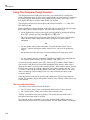
Operating the Meter Using the Computer Interface
Computer Interface Command Set
5
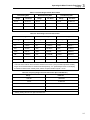
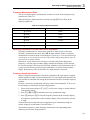
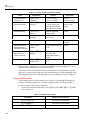
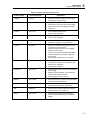
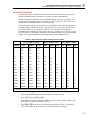
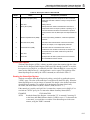
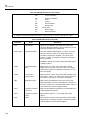
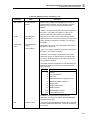
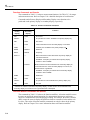
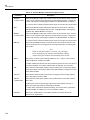
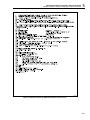
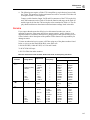
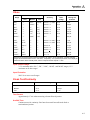
Table 5-10. IEEE-488 Common Commands (cont)
Command
*SRE <value>
Name
Service Request
Enable
Description
Sets the "Service Request Enable Register" to <value>, an
integer between 0 and 255. The value of bit six is ignored
because it is not used by the Service Request Enable
Register.
<value> is an integer whose binary equivalent corresponds to
the state (1 or 0) of bits in the register. If <value> is not
between 0 and 255, an Execution Error is generated.
*SRE?
*STB?*TRG
*TST
Service Request
Enable Query
Read Status Byte
Trigger
Self-Test Query
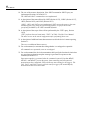
Meter returns the <value> of the "Service Request Enable
Register" (with bit six set to zero) <value> is an integer whose
binary equivalent corresponds to the state (1 or 0) of bits in
the register.
Meter returns the <value> of the "Status Byte" with bit six as
the "Master Summary" bit.
<value> is an integer whose binary equivalent corresponds to
the state (1 or 0) of bits in the register.
Causes the meter to trigger a measurement when parsed.
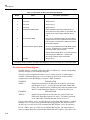
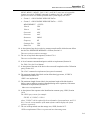
Causes the meter to run internal self-test. Test takes about
15 seconds. All display segments are lit during the test. No
user interaction is required.
The number returned corresponds to a state described in the
table below. Meter reverts to power-up configuration after
tests performed.
Number
State
0
Passes
1
A/ D self-test failed
2
A/D dead
4
EEPROM instrument configuration bad
8
EEPROM calibration data bad
16
Display dead
32
Display self-test failed
64
ROM test failed
128
External RAM test failed
256
Internal RAM test failed
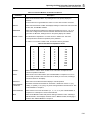
EXAMPLE: Decimal 9 (8 plus 1) converts to binary
000010010, meaning the A/D self-test failed and EEPROM
calibration data are bad.
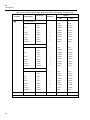
*WAI
Wait-to-continue
Command required by IEEE-488.2 standard. Non-operational
in Fluke 45 Dual Display Multimeter. Command accepted but
has no effect.
5-21