1
SECTION 2 - Email Alerts & Periodic Email Reports
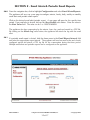
2.6.0 From the navigation bar, click to highlight Configuration and select Email Alerts/Reports.
The appliance will serve up a new page to configure minute, hourly, daily, weekly or monthly
email alerts and periodic email reports.
Click on the desired email alert/periodic report. A new page will open for the specific time
period. If an email alert is desired, click on the Alert Enable radio button. Enter the value in
the Alert Value field. The value can be 1 to 155575069890.
The appliance also logs consumption by the minute, hour, day, week and month in a CSV file.
By clicking on the Attach Log radio button, the appliance will attach the log with the email
alert.
2.6.1 If a periodic email report is desired, click the down arrow in the Email Report Interval field
and select the appropriate report interval. The appliance will send an email at the end of each
configured period and attach a CSV log file for the consumption during that time period.
Multiple email alerts and periodic reports can be configured on the appliance.
DN IS-IPSM101.1
® Registered trademark MAMAC SYSTEMS, Inc.
12 of 17
© Copyright 2009