1
SECTION 2 - Initial Configuration
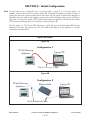
2.0.0 For first time start-up, a laptop/PC and a crossover cable is required. If a crossover cable is not
available, a hub can also be used as shown in Figure 4B. Terminate the appliance as shown in Figure 3.
Unplug the input and output terminal blocks and leave only the power terminal block plugged in.
Attach the crossover cable to the appliance and the other end to the laptop ethernet jack as shown in
Figure 4A. If using a hub, attach a CAT 5 patchcord between the appliance and the hub and another
CAT 5 patchcord between the hub and laptop as shown in Figure 4B.
Turn the power on. The Power LED will come on. After 10 seconds the Heartbeat LED will start
blinking at one pulse per second rate. The Link LED should light up if the appliance is correctly
connected to the laptop/PC.
Figures 4A and 4B
Figure 4A
Configuration 1
IP Sub Metering
Appliance
Laptop/PC
Cat 5 Crossover Cable
Figure 4B
Configuration 2
IP Sub Metering
Appliance
Ethernet Hub
Laptop/PC
Cat 5 Patchcord Cable
DN IS-IPSM101.1
® Registered trademark MAMAC SYSTEMS, Inc.
7 of 17
© Copyright 2009