1
Index
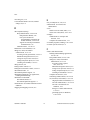
G
HiQ and MATLAB functionality for
Windows, 2-15 to 2-22
integration of mathematics and signal
processing VIs, 2-22 to 2-24
integration of Picture Control VIs,
2-24 to 2-25
property and invoke nodes, 2-9
Report Generation VI descriptions,
2-28 to 2-38
ring enhancements, 2-11 to 2-13
sound VIs for Windows and
Macintosh, 2-25
VI server properties in reserved VIs
and runtime systems, 2-9 to 2-11
VISA enhancements, 2-40 to 2-41
File Manager tool, manual changes for,
A-3 to A-5
files, recently opened, accessing, 2-4 to 2-5
Find All Instances dialog box, 2-5 to 2-6
Find dialog box, 2-5
front panel images for the Web
animated front panel image (.monitor
URL), 2-60 to 2-62
determining which front panels are
visible, 2-57
front panel image formats, 2-58
publishing, 2-56
retrieving static image of VI front
panel, 2-56
static front panel image (.snap URL),
2-58 to 2-60
URLs for front panel images, 2-58
viewing animated version of front
panel, 2-57
front panel objects, scaling, 2-1 to 2-3
defining minimum window size, 2-3
limitations (note), 2-1
maintaining window proportions, 2-3
rules for, 2-1 to 2-2
setting all objects to scale, 2-3
setting one object to scale, 2-2
© National Instruments Corporation
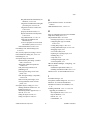
general interface features. See interface
features.
GPIB installation notes, 1-10 to 1-11
H
help. See information resources for LabVIEW.
Help menu, adding VIs to, A-7
HiQ and MATLAB, 2-15 to 2-22
choosing script server, 2-19 to 2-20
configuring data type of terminal,
2-20 to 2-21
creating HiQ scripts, 2-16 to 2-17
creating MATLAB scripts, 2-18 to 2-19
debugging scripts, 2-21
error codes (table), 2-22
importing or exporting scripts, 2-19
installing HiQ, 1-12
script node, 2-16
scrolling through scripts, 2-20
versions required, 2-15
HP VUE Window Manager, configuring, 1-14
HP-UX systems
installation requirements (table), 1-4
installing LabVIEW for HP-UX 10.x, 1-8
HTTP services. See Internet/HTTP services.
I
Icon Editor changes, A-6
Icon palette, manual changes for, A-2 to A-3
indicators. See controls and indicators.
information resources for LabVIEW, 1-10,
1-17
installing LabVIEW, 1-6 to 1-11. See also
upgrading to LabVIEW 5.1.
data acquisition notes, 1-10 to 1-11
HiQ for Windows, 1-12
HP-UX 10.x, 1-8
LabVIEW RT, 1-6
I-3
LabVIEW 5.1 Addendum