1
Cat. No. W394-E1-05
SYSMAC CS Series
CS1G/H-CPU@@-EV1
CS1G/H-CPU@@H
CS1D-CPU@@H
SYSMAC CJ Series
CJ1G-CPU@@
CJ1G/H-CPU@@H
CJ1M-CPU@@
Programmable Controllers
PROGRAMMING MANUAL
SYSMAC CS Series
CS1G/H-CPU@@-EV1
CS1G/H-CPU@@H
CS1D-CPU@@H
SYSMAC CJ Series
CJ1G-CPU@@
CJ1G/H-CPU@@H
CJ1M-CPU@@
Programmable Controllers
Programming Manual
Revised April 2003
iv
Notice:
OMRON products are manufactured for use according to proper procedures by a qualified operator
and only for the purposes described in this manual.
The following conventions are used to indicate and classify precautions in this manual. Always heed
the information provided with them. Failure to heed precautions can result in injury to people or damage to property.
!DANGER
Indicates an imminently hazardous situation which, if not avoided, will result in death or
serious injury.
!WARNING
Indicates a potentially hazardous situation which, if not avoided, could result in death or
serious injury.
!Caution
Indicates a potentially hazardous situation which, if not avoided, may result in minor or
moderate injury, or property damage.
OMRON Product References
All OMRON products are capitalized in this manual. The word “Unit” is also capitalized when it refers to
an OMRON product, regardless of whether or not it appears in the proper name of the product.
The abbreviation “Ch,” which appears in some displays and on some OMRON products, often means
“word” and is abbreviated “Wd” in documentation in this sense.
The abbreviation “PLC” means Programmable Controller. “PC” is used, however, in some Programming Device displays to mean Programmable Controller.
Visual Aids
The following headings appear in the left column of the manual to help you locate different types of
information.
Note Indicates information of particular interest for efficient and convenient operation of the product.
1,2,3...
1. Indicates lists of one sort or another, such as procedures, checklists, etc.
OMRON, 2001
All rights reserved. No part of this publication may be reproduced, stored in a retrieval system, or transmitted, in any form, or
by any means, mechanical, electronic, photocopying, recording, or otherwise, without the prior written permission of
OMRON.
No patent liability is assumed with respect to the use of the information contained herein. Moreover, because OMRON is constantly striving to improve its high-quality products, the information contained in this manual is subject to change without
notice. Every precaution has been taken in the preparation of this manual. Nevertheless, OMRON assumes no responsibility
for errors or omissions. Neither is any liability assumed for damages resulting from the use of the information contained in
this publication.
v
vi
TABLE OF CONTENTS
PRECAUTIONS . . . . . . . . . . . . . . . . . . . . . . . . . . . . . . . . . . .
1
2
3
4
5
6
xi
Intended Audience . . . . . . . . . . . . . . . . . . . . . . . . . . . . . . . . . . . . . . . . . . . . . . . . . . . . . . . .
General Precautions . . . . . . . . . . . . . . . . . . . . . . . . . . . . . . . . . . . . . . . . . . . . . . . . . . . . . . .
Safety Precautions. . . . . . . . . . . . . . . . . . . . . . . . . . . . . . . . . . . . . . . . . . . . . . . . . . . . . . . . .
Operating Environment Precautions . . . . . . . . . . . . . . . . . . . . . . . . . . . . . . . . . . . . . . . . . . .
Application Precautions . . . . . . . . . . . . . . . . . . . . . . . . . . . . . . . . . . . . . . . . . . . . . . . . . . . .
Conformance to EC Directives . . . . . . . . . . . . . . . . . . . . . . . . . . . . . . . . . . . . . . . . . . . . . . .
xii
xii
xii
xiv
xiv
xix
SECTION 1
CPU Unit Operation. . . . . . . . . . . . . . . . . . . . . . . . . . . . . . . .
1
1-1
1-2
1-3
1-4
1-5
1-6
Initial Setup (CS1 CPU Units Only) . . . . . . . . . . . . . . . . . . . . . . . . . . . . . . . . . . . . . . . . . . .
Using the Internal Clock (CS1 CPU Units Only) . . . . . . . . . . . . . . . . . . . . . . . . . . . . . . . . .
Internal Structure of the CPU Unit . . . . . . . . . . . . . . . . . . . . . . . . . . . . . . . . . . . . . . . . . . . .
Operating Modes. . . . . . . . . . . . . . . . . . . . . . . . . . . . . . . . . . . . . . . . . . . . . . . . . . . . . . . . . .
Programs and Tasks. . . . . . . . . . . . . . . . . . . . . . . . . . . . . . . . . . . . . . . . . . . . . . . . . . . . . . . .
Description of Tasks . . . . . . . . . . . . . . . . . . . . . . . . . . . . . . . . . . . . . . . . . . . . . . . . . . . . . . .
2
5
6
8
12
14
SECTION 2
Programming . . . . . . . . . . . . . . . . . . . . . . . . . . . . . . . . . . . . .
19
2-1
2-2
2-3
Basic Concepts . . . . . . . . . . . . . . . . . . . . . . . . . . . . . . . . . . . . . . . . . . . . . . . . . . . . . . . . . . .
Precautions . . . . . . . . . . . . . . . . . . . . . . . . . . . . . . . . . . . . . . . . . . . . . . . . . . . . . . . . . . . . . .
Checking Programs . . . . . . . . . . . . . . . . . . . . . . . . . . . . . . . . . . . . . . . . . . . . . . . . . . . . . . . .
20
55
64
SECTION 3
Instruction Functions . . . . . . . . . . . . . . . . . . . . . . . . . . . . . . .
71
3-1
3-2
3-3
3-4
3-5
3-6
3-7
3-8
3-9
3-10
3-11
3-12
3-13
3-14
3-15
3-16
3-17
3-18
3-19
3-20
3-21
3-22
3-23
3-24
3-25
Sequence Input Instructions . . . . . . . . . . . . . . . . . . . . . . . . . . . . . . . . . . . . . . . . . . . . . . . . .
Sequence Output Instructions . . . . . . . . . . . . . . . . . . . . . . . . . . . . . . . . . . . . . . . . . . . . . . . .
Sequence Control Instructions . . . . . . . . . . . . . . . . . . . . . . . . . . . . . . . . . . . . . . . . . . . . . . .
Timer and Counter Instructions. . . . . . . . . . . . . . . . . . . . . . . . . . . . . . . . . . . . . . . . . . . . . . .
Comparison Instructions . . . . . . . . . . . . . . . . . . . . . . . . . . . . . . . . . . . . . . . . . . . . . . . . . . . .
Data Movement Instructions . . . . . . . . . . . . . . . . . . . . . . . . . . . . . . . . . . . . . . . . . . . . . . . . .
Data Shift Instructions . . . . . . . . . . . . . . . . . . . . . . . . . . . . . . . . . . . . . . . . . . . . . . . . . . . . .
Increment/Decrement Instructions . . . . . . . . . . . . . . . . . . . . . . . . . . . . . . . . . . . . . . . . . . . .
Symbol Math Instructions . . . . . . . . . . . . . . . . . . . . . . . . . . . . . . . . . . . . . . . . . . . . . . . . . . .
Conversion Instructions. . . . . . . . . . . . . . . . . . . . . . . . . . . . . . . . . . . . . . . . . . . . . . . . . . . . .
Logic Instructions . . . . . . . . . . . . . . . . . . . . . . . . . . . . . . . . . . . . . . . . . . . . . . . . . . . . . . . . .
Special Math Instructions . . . . . . . . . . . . . . . . . . . . . . . . . . . . . . . . . . . . . . . . . . . . . . . . . . .
Floating-point Math Instructions . . . . . . . . . . . . . . . . . . . . . . . . . . . . . . . . . . . . . . . . . . . . .
Double-precision Floating-point Instructions (CS1-H, CJ1-H, CJ1M, or CS1D Only) . . . .
Table Data Processing Instructions . . . . . . . . . . . . . . . . . . . . . . . . . . . . . . . . . . . . . . . . . . . .
Data Control Instructions . . . . . . . . . . . . . . . . . . . . . . . . . . . . . . . . . . . . . . . . . . . . . . . . . . .
Subroutine Instructions . . . . . . . . . . . . . . . . . . . . . . . . . . . . . . . . . . . . . . . . . . . . . . . . . . . . .
Interrupt Control Instructions . . . . . . . . . . . . . . . . . . . . . . . . . . . . . . . . . . . . . . . . . . . . . . . .
High-speed Counter and Pulse Output Instructions (CJ1M-CPU22/23 Only) . . . . . . . . . . .
Step Instructions . . . . . . . . . . . . . . . . . . . . . . . . . . . . . . . . . . . . . . . . . . . . . . . . . . . . . . . . . .
Basic I/O Unit Instructions . . . . . . . . . . . . . . . . . . . . . . . . . . . . . . . . . . . . . . . . . . . . . . . . . .
Serial Communications Instructions . . . . . . . . . . . . . . . . . . . . . . . . . . . . . . . . . . . . . . . . . . .
Network Instructions. . . . . . . . . . . . . . . . . . . . . . . . . . . . . . . . . . . . . . . . . . . . . . . . . . . . . . .
File Memory Instructions . . . . . . . . . . . . . . . . . . . . . . . . . . . . . . . . . . . . . . . . . . . . . . . . . . .
Display Instructions . . . . . . . . . . . . . . . . . . . . . . . . . . . . . . . . . . . . . . . . . . . . . . . . . . . . . . .
72
74
77
80
84
88
91
95
96
101
107
109
110
114
118
122
125
127
129
130
131
132
133
135
136
vii
TABLE OF CONTENTS
3-26
3-27
3-28
3-29
3-30
3-31
3-32
Clock Instructions . . . . . . . . . . . . . . . . . . . . . . . . . . . . . . . . . . . . . . . . . . . . . . . . . . . . . . . . .
Debugging Instructions . . . . . . . . . . . . . . . . . . . . . . . . . . . . . . . . . . . . . . . . . . . . . . . . . . . . .
Failure Diagnosis Instructions. . . . . . . . . . . . . . . . . . . . . . . . . . . . . . . . . . . . . . . . . . . . . . . .
Other Instructions . . . . . . . . . . . . . . . . . . . . . . . . . . . . . . . . . . . . . . . . . . . . . . . . . . . . . . . . .
Block Programming Instructions . . . . . . . . . . . . . . . . . . . . . . . . . . . . . . . . . . . . . . . . . . . . .
Text String Processing Instructions. . . . . . . . . . . . . . . . . . . . . . . . . . . . . . . . . . . . . . . . . . . .
Task Control Instructions . . . . . . . . . . . . . . . . . . . . . . . . . . . . . . . . . . . . . . . . . . . . . . . . . . .
136
137
138
139
140
146
149
SECTION 4
Tasks . . . . . . . . . . . . . . . . . . . . . . . . . . . . . . . . . . . . . . . . . . . . 151
4-1
4-2
4-3
4-4
Task Features. . . . . . . . . . . . . . . . . . . . . . . . . . . . . . . . . . . . . . . . . . . . . . . . . . . . . . . . . . . . .
Using Tasks . . . . . . . . . . . . . . . . . . . . . . . . . . . . . . . . . . . . . . . . . . . . . . . . . . . . . . . . . . . . . .
Interrupt Tasks. . . . . . . . . . . . . . . . . . . . . . . . . . . . . . . . . . . . . . . . . . . . . . . . . . . . . . . . . . . .
Programming Device Operations for Tasks . . . . . . . . . . . . . . . . . . . . . . . . . . . . . . . . . . . . .
152
161
171
183
SECTION 5
File Memory Functions . . . . . . . . . . . . . . . . . . . . . . . . . . . . . 185
5-1
5-2
5-3
File Memory . . . . . . . . . . . . . . . . . . . . . . . . . . . . . . . . . . . . . . . . . . . . . . . . . . . . . . . . . . . . .
Manipulating Files . . . . . . . . . . . . . . . . . . . . . . . . . . . . . . . . . . . . . . . . . . . . . . . . . . . . . . . .
Using File Memory . . . . . . . . . . . . . . . . . . . . . . . . . . . . . . . . . . . . . . . . . . . . . . . . . . . . . . . .
186
201
228
SECTION 6
Advanced Functions . . . . . . . . . . . . . . . . . . . . . . . . . . . . . . . . 235
6-1
6-2
6-3
6-4
6-5
6-6
6-7
6-8
6-9
6-10
6-11
Cycle Time/High-speed Processing . . . . . . . . . . . . . . . . . . . . . . . . . . . . . . . . . . . . . . . . . . .
Index Registers . . . . . . . . . . . . . . . . . . . . . . . . . . . . . . . . . . . . . . . . . . . . . . . . . . . . . . . . . . .
Serial Communications . . . . . . . . . . . . . . . . . . . . . . . . . . . . . . . . . . . . . . . . . . . . . . . . . . . . .
Changing the Timer/Counter PV Refresh Mode. . . . . . . . . . . . . . . . . . . . . . . . . . . . . . . . . .
Using a Scheduled Interrupt as a High-precision Timer (CJ1M Only). . . . . . . . . . . . . . . . .
Startup Settings and Maintenance. . . . . . . . . . . . . . . . . . . . . . . . . . . . . . . . . . . . . . . . . . . . .
Diagnostic Functions. . . . . . . . . . . . . . . . . . . . . . . . . . . . . . . . . . . . . . . . . . . . . . . . . . . . . . .
CPU Processing Modes. . . . . . . . . . . . . . . . . . . . . . . . . . . . . . . . . . . . . . . . . . . . . . . . . . . . .
Peripheral Servicing Priority Mode . . . . . . . . . . . . . . . . . . . . . . . . . . . . . . . . . . . . . . . . . . .
Battery-free Operation . . . . . . . . . . . . . . . . . . . . . . . . . . . . . . . . . . . . . . . . . . . . . . . . . . . . .
Other Functions. . . . . . . . . . . . . . . . . . . . . . . . . . . . . . . . . . . . . . . . . . . . . . . . . . . . . . . . . . .
237
254
263
278
286
288
298
303
308
314
316
SECTION 7
Program Transfer, Trial Operation, and Debugging . . . . . 319
7-1
7-2
Program Transfer. . . . . . . . . . . . . . . . . . . . . . . . . . . . . . . . . . . . . . . . . . . . . . . . . . . . . . . . . .
Trial Operation and Debugging. . . . . . . . . . . . . . . . . . . . . . . . . . . . . . . . . . . . . . . . . . . . . . .
320
320
Appendices
A
B
PLC Comparison Charts: CJ-series, CS-series, C200HG/HE/HX,
CQM1H, CVM1, and CV-series PLCs . . . . . . . . . . . . . . . . . . . . . . . . . . . . . . . . . . . . . . . .
329
Changes from Previous Host Link Systems . . . . . . . . . . . . . . . . . . . . . . . . . . . . . . . . . . . . .
351
Index . . . . . . . . . . . . . . . . . . . . . . . . . . . . . . . . . . . . . . . . . . . . 355
Revision History . . . . . . . . . . . . . . . . . . . . . . . . . . . . . . . . . . . 361
viii
About this Manual:
This manual describes the programming of the CPU Units for CS/CJ-series Programmable Controllers
(PLCs) and includes the sections described on the following page. The CS Series and CJ Series are
subdivided as shown in the following table.
Unit
CPU Units
CS Series
CS1-H CPU Units: CS1H-CPU@@H
CS1G-CPU@@H
CJ Series
CJ1-H CPU Units: CJ1H-CPU@@H
CJ1G-CPU@@H
CS1 CPU Units:
CS1H-CPU@@-EV1
CS1G-CPU@@-EV1
CS1D CPU Units: CS1D-CPU@@H
CJ1 CPU Units:
CJ1G-CPU@@-EV1
CJ1M CPU Units: CJ1M-CPU@@
Basic I/O Units
Special I/O Units
CS-series Basic I/O Units
CS-series Special I/O Units
CJ-series Basic I/O Units
CJ-series Special I/O Units
CPU Bus Units
Power Supply Units
CS-series CPU Bus Units
CS-series Power Supply Units
CJ-series CPU Bus Units
CJ-series Power Supply Units
Please read this manual and all related manuals listed in the table on the next page and be sure you
understand information provided before attempting to install or use CS/CJ-series CPU Units in a PLC
System.
This manual contains the following sections.
Section 1 describes the basic structure and operation of the CPU Unit.
Section 2 describes basic information required to write, check, and input programs.
Section 3 outlines the instructions that can be used to write user programs.
Section 4 describes the operation of tasks.
Section 5 describes the functions used to manipulate file memory.
Section 6 provides details on advanced functions: Cycle time/high-speed processing, index registers,
serial communications, startup and maintenance, diagnostic and debugging, Programming Devices,
and CJ Basic I/O Unit input response time settings.
Section 7 describes the processes used to transfer the program to the CPU Unit and the functions that
can be used to test and debug the program.
The Appendices provide a comparison of CS/CJ-series, restrictions in using C200H Special I/O Units,
and changes made to Host Link Systems.
ix
About this Manual, Continued
Name
SYSMAC CS/CJ Series
CS1G/H-CPU@@-EV1, CS1G/H-CPU@@H, CS1DCPU@@H, CJ1G-CPU@@, CJ1G/H-CPU@@H
Programmable Controllers Programming Manual
Cat. No.
Contents
W394
This manual describes programming and other
methods to use the functions of the CS/CJ-series
PLCs. (This manual)
SYSMAC CS Series
CS1G/H-CPU@@-EV1, CS1G/H-CPU@@H
Programmable Controllers Operation Manual
SYSMAC CJ Series
CJ1G-CPU@@, CJ1G/H-CPU@@H
Programmable Controllers Operation Manual
W339
SYSMAC CJ Series
CJ1M-CPU22/23
Built-in I/O Functions Operation Manual
SYSMAC CS Series
CS1D-CPU@@H CPU Units
CS1D-DPL01 Duplex Unit
CS1D-PA207R Power Supply Unit
Duplex System Operation Manual
W395
Describes the functions of the built-in I/O for
CJ1M CPU Units.
W405
Provides an outline of and describes the design,
installation, maintenance, and other basic operations for a Duplex System based on CS1D CPU
Units.
SYSMAC CS/CJ Series
CS1G/H-CPU@@-EV1, CS1G/H-CPU@@H, CS1DCPU@@H, CJ1G-CPU@@, CJ1G/H-CPU@@H
Programmable Controllers Instructions Reference Manual
SYSMAC CS/CJ Series
CQM1H-PRO01-E, C200H-PRO27-E, CQM1-PRO01-E
Programming Consoles Operation Manual
SYSMAC CS/CJ Series
CS1G/H-CPU@@-EV1, CS1G/H-CPU@@H, CJ1GCPU@@, CJ1G/H-CPU@@H, CS1W-SCB21/41, CS1WSCU21, CJ1W-SCU41
Communications Commands Reference Manual
W340
Describes the ladder diagram programming
instructions supported by CS/CJ-series PLCs.
W341
Provides information on how to program and
operate CS/CJ-series PLCs using a Programming
Console.
Describes the C-series (Host Link) and FINS
communications commands used with CS/CJseries PLCs.
SYSMAC WS02-CXP@@-E
CX-Programmer User Manual
SYSMAC WS02-CXP@@-E
CX-Server User Manual
W361
SYSMAC CS/CJ Series
CS1W-SCB21/41, CS1W-SCU21, CJ1W-SCU41
Serial Communications Boards/Units Operation Manual
W336
SYSMAC WS02-PSTC1-E
CX-Protocol Operation Manual
W344
SYSMAC CS/CJ Series
CJ1W-ETN01/ENT11, CJ1W-ETN11 Ethernet Unit
Operation Manual
W343
W393
W342
W362
Provides an outlines of and describes the design,
installation, maintenance, and other basic operations for the CS-series PLCs.
Provides an outlines of and describes the design,
installation, maintenance, and other basic operations for the CJ-series PLCs.
Provide information on how to use the CX-Programmer, a programming device that supports
the CS/CJ-series PLCs, and the CX-Net contained within CX-Programmer.
Describes the use of Serial Communications Unit
and Boards to perform serial communications
with external devices, including the usage of standard system protocols for OMRON products.
Describes the use of the CX-Protocol to create
protocol macros as communications sequences
to communicate with external devices.
Describes the installation and operation of CJ1WETN01, CJ1W-ENT11, and CJ1W-ETN11 Ethernet Units.
!WARNING Failure to read and understand the information provided in this manual may result in personal injury or death, damage to the product, or product failure. Please read each section
in its entirety and be sure you understand the information provided in the section and
related sections before attempting any of the procedures or operations given.
x
PRECAUTIONS
This section provides general precautions for using the CS/CJ-series Programmable Controllers (PLCs) and related devices.
The information contained in this section is important for the safe and reliable application of Programmable
Controllers. You must read this section and understand the information contained before attempting to set up or
operate a PLC system.
1
Intended Audience . . . . . . . . . . . . . . . . . . . . . . . . . . . . . . . . . . . . . . . . . . . . .
2
General Precautions . . . . . . . . . . . . . . . . . . . . . . . . . . . . . . . . . . . . . . . . . . . .
xii
3
Safety Precautions. . . . . . . . . . . . . . . . . . . . . . . . . . . . . . . . . . . . . . . . . . . . . .
xii
4
Operating Environment Precautions . . . . . . . . . . . . . . . . . . . . . . . . . . . . . . . .
xiv
5
Application Precautions . . . . . . . . . . . . . . . . . . . . . . . . . . . . . . . . . . . . . . . . .
xiv
6
xii
Conformance to EC Directives . . . . . . . . . . . . . . . . . . . . . . . . . . . . . . . . . . . .
xix
6-1
Applicable Directives . . . . . . . . . . . . . . . . . . . . . . . . . . . . . . . . . . . .
xix
6-2
Concepts . . . . . . . . . . . . . . . . . . . . . . . . . . . . . . . . . . . . . . . . . . . . . .
xix
6-3
Conformance to EC Directives . . . . . . . . . . . . . . . . . . . . . . . . . . . . .
xix
6-4
Relay Output Noise Reduction Methods . . . . . . . . . . . . . . . . . . . . .
xx
xi
1
Intended Audience
1
Intended Audience
This manual is intended for the following personnel, who must also have
knowledge of electrical systems (an electrical engineer or the equivalent).
• Personnel in charge of installing FA systems.
• Personnel in charge of designing FA systems.
• Personnel in charge of managing FA systems and facilities.
2
General Precautions
The user must operate the product according to the performance specifications described in the operation manuals.
Before using the product under conditions which are not described in the
manual or applying the product to nuclear control systems, railroad systems,
aviation systems, vehicles, combustion systems, medical equipment, amusement machines, safety equipment, and other systems, machines, and equipment that may have a serious influence on lives and property if used
improperly, consult your OMRON representative.
Make sure that the ratings and performance characteristics of the product are
sufficient for the systems, machines, and equipment, and be sure to provide
the systems, machines, and equipment with double safety mechanisms.
This manual provides information for programming and operating the Unit. Be
sure to read this manual before attempting to use the Unit and keep this manual close at hand for reference during operation.
!WARNING It is extremely important that a PLC and all PLC Units be used for the specified purpose and under the specified conditions, especially in applications that
can directly or indirectly affect human life. You must consult with your OMRON
representative before applying a PLC System to the above-mentioned applications.
3
Safety Precautions
!WARNING The CPU Unit refreshes I/O even when the program is stopped (i.e., even in
PROGRAM mode). Confirm safety thoroughly in advance before changing the
status of any part of memory allocated to I/O Units, Special I/O Units, or CPU
Bus Units. Any changes to the data allocated to any Unit may result in unexpected operation of the loads connected to the Unit. Any of the following operation may result in changes to memory status.
• Transferring I/O memory data to the CPU Unit from a Programming
Device.
• Changing present values in memory from a Programming Device.
• Force-setting/-resetting bits from a Programming Device.
• Transferring I/O memory files from a Memory Card or EM file memory to
the CPU Unit.
• Transferring I/O memory from a host computer or from another PLC on a
network.
!WARNING Do not attempt to take any Unit apart while the power is being supplied. Doing
so may result in electric shock.
xii
3
Safety Precautions
!WARNING Do not touch any of the terminals or terminal blocks while the power is being
supplied. Doing so may result in electric shock.
!WARNING Do not attempt to disassemble, repair, or modify any Units. Any attempt to do
so may result in malfunction, fire, or electric shock.
!WARNING Do not touch the Power Supply Unit while power is being supplied or immediately after power has been turned OFF. Doing so may result in electric shock.
!WARNING Provide safety measures in external circuits (i.e., not in the Programmable
Controller), including the following items, to ensure safety in the system if an
abnormality occurs due to malfunction of the PLC or another external factor
affecting the PLC operation. Not doing so may result in serious accidents.
• Emergency stop circuits, interlock circuits, limit circuits, and similar safety
measures must be provided in external control circuits.
• The PLC will turn OFF all outputs when its self-diagnosis function detects
any error or when a severe failure alarm (FALS) instruction is executed.
As a countermeasure for such errors, external safety measures must be
provided to ensure safety in the system.
• The PLC outputs may remain ON or OFF due to deposition or burning of
the output relays or destruction of the output transistors. As a countermeasure for such problems, external safety measures must be provided
to ensure safety in the system.
• When the 24-V DC output (service power supply to the PLC) is overloaded or short-circuited, the voltage may drop and result in the outputs
being turned OFF. As a countermeasure for such problems, external
safety measures must be provided to ensure safety in the system.
!Caution Confirm safety before transferring data files stored in the file memory (Memory Card or EM file memory) to the I/O area (CIO) of the CPU Unit using a
peripheral tool. Otherwise, the devices connected to the output unit may malfunction regardless of the operation mode of the CPU Unit.
!Caution Fail-safe measures must be taken by the customer to ensure safety in the
event of incorrect, missing, or abnormal signals caused by broken signal lines,
momentary power interruptions, or other causes. Abnormal operation may
result in serious accidents.
!Caution Interlock circuits, limit circuits, and similar safety measures in external circuits
(i.e., not in the Programmable Controller) must be provided by the customer.
Abnormal operation may result in serious accidents.
!Caution The CS1-H, CJ1-H, CJ1M, and CS1D CPU Units automatically back up the
user program and parameter data to flash memory when these are written to
the CPU Unit. I/O memory (including the DM, EM, and HR Areas), however, is
not written to flash memory. The DM, EM, and HR Areas can be held during
power interruptions with a battery. If there is a battery error, the contents of
these areas may not be accurate after a power interruption. If the contents of
the DM, EM, and HR Areas are used to control external outputs, prevent inappropriate outputs from being made whenever the Battery Error Flag (A40204)
is ON.
xiii
Operating Environment Precautions
4
!Caution Execute online edit only after confirming that no adverse effects will be
caused by extending the cycle time. Otherwise, the input signals may not be
readable.
!Caution Confirm safety at the destination node before transferring a program to
another node or changing contents of the I/O memory area. Doing either of
these without confirming safety may result in injury.
!Caution Tighten the screws on the terminal block of the AC Power Supply Unit to the
torque specified in the operation manual. The loose screws may result in
burning or malfunction.
4
Operating Environment Precautions
!Caution Do not operate the control system in the following locations:
• Locations subject to direct sunlight.
• Locations subject to temperatures or humidity outside the range specified
in the specifications.
• Locations subject to condensation as the result of severe changes in temperature.
• Locations subject to corrosive or flammable gases.
• Locations subject to dust (especially iron dust) or salts.
• Locations subject to exposure to water, oil, or chemicals.
• Locations subject to shock or vibration.
!Caution Take appropriate and sufficient countermeasures when installing systems in
the following locations:
• Locations subject to static electricity or other forms of noise.
• Locations subject to strong electromagnetic fields.
• Locations subject to possible exposure to radioactivity.
• Locations close to power supplies.
!Caution The operating environment of the PLC System can have a large effect on the
longevity and reliability of the system. Improper operating environments can
lead to malfunction, failure, and other unforeseeable problems with the PLC
System. Be sure that the operating environment is within the specified conditions at installation and remains within the specified conditions during the life
of the system.
5
Application Precautions
Observe the following precautions when using the PLC System.
• You must use the CX-Programmer (programming software that runs on
Windows) if you need to program more than one task. A Programming
Console can be used to program only one cyclic task plus interrupt tasks.
A Programming Console can, however, be used to edit multitask programs originally created with the CX-Programmer.
xiv
5
Application Precautions
• There are restrictions in the areas and addresses that can be accessed in
I/O memory of the CS-series CS1 CPU Units when using the C200H Special I/O Units in combination with the following functions.
• There are restrictions in data transfer with the CPU Unit when programming transfers inside an ASCII Unit using the PLC READ, PLC
WRITE, and similar commands.
• There are restrictions in data transfer with the CPU Unit for allocated
bits and DM area specifications (areas and addresses for source and
destination specifications).
• The DeviceNet (CompoBus/D) output area for a DeviceNet (CompoBus/D) Master Unit (CIO 0050 to CIO 0099) overlaps with the I/O bit
area (CIO 0000 to CIO 0319). Do not use automatic allocations for I/O
in any system where allocations to the DeviceNet system will overlap
with allocations to I/O Units. Instead, use a Programming Device or the
CX-Programmer to manually allocate I/O for the DeviceNet devices,
being sure that the same words and bits are not allocated more than
once, and transfer the resulting I/O table to the CPU Unit. If DeviceNet
communications are attempted when the same bits are allocated to
both DeviceNet devices and I/O Units (which can occur even if automatic allocation is used), the DeviceNet devices and I/O Units may
both exhibit faulty operation.
• Special bits and flags for PLC Link Units (CIO 0247 to CIO 0250) overlap with the I/O bit area (CIO 0000 to CIO 0319). Do not use automatic
allocations for I/O in any system where allocations to the I/O Units will
overlap with allocations to I/O Units. Instead, use a Programming Device or the CX-Programmer to manually allocate I/O to I/O Units, being
sure that the special bits and flags for PLC Link Units are not used, and
transfer the resulting I/O table to the CPU Unit. If operation is attempted when the special bits and flags for PLC Link Units are also allocated
to I/O Units (which can occur even if automatic allocation is used), the
PLC Link Units and I/O Units may both exhibit faulty operation.
!WARNING Always heed these precautions. Failure to abide by the following precautions
could lead to serious or possibly fatal injury.
• Always connect to a ground of 100 Ω or less when installing the Units. Not
connecting to a ground of 100 Ω or less may result in electric shock.
• A ground of 100 Ω or less must be installed when shorting the GR and LG
terminals on the Power Supply Unit.
• Always turn OFF the power supply to the PLC before attempting any of
the following. Not turning OFF the power supply may result in malfunction
or electric shock.
• Mounting or dismounting Power Supply Units, I/O Units, CPU Units, Inner Boards, or any other Units.
• Assembling the Units.
• Setting DIP switches or rotary switches.
• Connecting cables or wiring the system.
• Connecting or disconnecting the connectors.
!Caution Failure to abide by the following precautions could lead to faulty operation of
the PLC or the system, or could damage the PLC or PLC Units. Always heed
these precautions.
xv
Application Precautions
5
• The user program and parameter area data in the CS1-H, CS1D, CJ1-H,
and CJ1M CPU Units are backed up in the built-in flash memory. The
BKUP indicator will light on the front of the CPU Unit when the backup
operation is in progress. Do not turn OFF the power supply to the CPU
Unit when the BKUP indicator is lit. The data will not be backed up if
power is turned OFF.
• A CJ-series CPU Unit is shipped with the battery installed and the time
already set on the internal clock. It is not necessary to clear memory or
set the clock before application, as it is for the CS-series CS1 CPU Units.
• When using a CS-series CS1 CPU Unit for the first time, install the
CS1W-BAT1 Battery provided with the Unit and clear all memory areas
from a Programming Device before starting to program. When using the
internal clock, turn ON power after installing the battery and set the clock
from a Programming Device or using the DATE(735) instruction. The clock
will not start until the time has been set.
• When the CPU Unit is shipped from the factory, the PLC Setup is set so
that the CPU Unit will start in the operating mode set on the Programming
Console mode switch. When a Programming Console is not connected, a
CS-series CS1 CPU Unit will start in PROGRAM mode, but a CS1-H,
CS1D, CJ1, CJ1-H, or CJ1M CPU Unit will start in RUN mode and operation will begin immediately. Do not advertently or inadvertently allow operation to start without confirming that it is safe.
• When creating an AUTOEXEC.IOM file from a Programming Device (a
Programming Console or the CX-Programmer) to automatically transfer
data at startup, set the first write address to D20000 and be sure that the
size of data written does not exceed the size of the DM Area. When the
data file is read from the Memory Card at startup, data will be written in
the CPU Unit starting at D20000 even if another address was set when
the AUTOEXEC.IOM file was created. Also, if the DM Area is exceeded
(which is possible when the CX-Programmer is used), the remaining data
will be written to the EM Area.
• Always turn ON power to the PLC before turning ON power to the control
system. If the PLC power supply is turned ON after the control power supply, temporary errors may result in control system signals because the
output terminals on DC Output Units and other Units will momentarily turn
ON when power is turned ON to the PLC.
• Fail-safe measures must be taken by the customer to ensure safety in the
event that outputs from Output Units remain ON as a result of internal circuit failures, which can occur in relays, transistors, and other elements.
• Fail-safe measures must be taken by the customer to ensure safety in the
event of incorrect, missing, or abnormal signals caused by broken signal
lines, momentary power interruptions, or other causes.
• Interlock circuits, limit circuits, and similar safety measures in external circuits (i.e., not in the Programmable Controller) must be provided by the
customer.
• Do not turn OFF the power supply to the PLC when data is being transferred. In particular, do not turn OFF the power supply when reading or
writing a Memory Card. Also, do not remove the Memory Card when the
BUSY indicator is lit. To remove a Memory Card, first press the memory
card power supply switch and then wait for the BUSY indicator to go out
before removing the Memory Card.
• If the I/O Hold Bit is turned ON, the outputs from the PLC will not be
turned OFF and will maintain their previous status when the PLC is
xvi
5
Application Precautions
switched from RUN or MONITOR mode to PROGRAM mode. Make sure
that the external loads will not produce dangerous conditions when this
occurs. (When operation stops for a fatal error, including those produced
with the FALS(007) instruction, all outputs from Output Unit will be turned
OFF and only the internal output status will be maintained.)
• The contents of the DM, EM, and HR Areas in the CPU Unit are backed
up by a Battery. If the Battery voltage drops, this data may be lost. Provide
countermeasures in the program using the Battery Error Flag (A40204) to
re-initialize data or take other actions if the Battery voltage drops.
• When supplying power at 200 to 240 V AC with a CS-series PLC, always
remove the metal jumper from the voltage selector terminals on the Power
Supply Unit (except for Power Supply Units with wide-range specifications). The product will be destroyed if 200 to 240 V AC is supplied while
the metal jumper is attached.
• Always use the power supply voltages specified in the operation manuals.
An incorrect voltage may result in malfunction or burning.
• Take appropriate measures to ensure that the specified power with the
rated voltage and frequency is supplied. Be particularly careful in places
where the power supply is unstable. An incorrect power supply may result
in malfunction.
• Install external breakers and take other safety measures against short-circuiting in external wiring. Insufficient safety measures against short-circuiting may result in burning.
• Do not apply voltages to the Input Units in excess of the rated input voltage. Excess voltages may result in burning.
• Do not apply voltages or connect loads to the Output Units in excess of
the maximum switching capacity. Excess voltage or loads may result in
burning.
• Disconnect the functional ground terminal when performing withstand
voltage tests. Not disconnecting the functional ground terminal may result
in burning.
• Install the Units properly as specified in the operation manuals. Improper
installation of the Units may result in malfunction.
• With CS-series PLCs, be sure that all the Unit and Backplane mounting
screws are tightened to the torque specified in the relevant manuals.
Incorrect tightening torque may result in malfunction.
• Be sure that all terminal screws, and cable connector screws are tightened to the torque specified in the relevant manuals. Incorrect tightening
torque may result in malfunction.
• Leave the label attached to the Unit when wiring. Removing the label may
result in malfunction if foreign matter enters the Unit.
• Remove the label after the completion of wiring to ensure proper heat dissipation. Leaving the label attached may result in malfunction.
• Use crimp terminals for wiring. Do not connect bare stranded wires
directly to terminals. Connection of bare stranded wires may result in
burning.
• Wire all connections correctly.
• Double-check all wiring and switch settings before turning ON the power
supply. Incorrect wiring may result in burning.
• Mount Units only after checking terminal blocks and connectors completely.
xvii
5
Application Precautions
• Be sure that the terminal blocks, Memory Units, expansion cables, and
other items with locking devices are properly locked into place. Improper
locking may result in malfunction.
• Check switch settings, the contents of the DM Area, and other preparations before starting operation. Starting operation without the proper settings or data may result in an unexpected operation.
• Check the user program for proper execution before actually running it on
the Unit. Not checking the program may result in an unexpected operation.
• Confirm that no adverse effect will occur in the system before attempting
any of the following. Not doing so may result in an unexpected operation.
• Changing the operating mode of the PLC.
• Force-setting/force-resetting any bit in memory.
• Changing the present value of any word or any set value in memory.
• Resume operation only after transferring to the new CPU Unit the contents of the DM Area, HR Area, and other data required for resuming
operation. Not doing so may result in an unexpected operation.
• Do not pull on the cables or bend the cables beyond their natural limit.
Doing either of these may break the cables.
• Do not place objects on top of the cables or other wiring lines. Doing so
may break the cables.
• Do not use commercially available RS-232C personal computer cables.
Always use the special cables listed in this manual or make cables
according to manual specifications. Using commercially available cables
may damage the external devices or CPU Unit.
• Never connect pin 6 (5-V power supply) on the RS-232C port on the CPU
Unit to any device other than an NT-AL001 or CJ1W-CIF11 Adapter.The
external device or the CPU Unit may be damaged.
• When replacing parts, be sure to confirm that the rating of a new part is
correct. Not doing so may result in malfunction or burning.
• Before touching a Unit, be sure to first touch a grounded metallic object in
order to discharge any static build-up. Not doing so may result in malfunction or damage.
• When transporting or storing circuit boards, cover them in antistatic material to protect them from static electricity and maintain the proper storage
temperature.
• Do not touch circuit boards or the components mounted to them with your
bare hands. There are sharp leads and other parts on the boards that
may cause injury if handled improperly.
• Do not short the battery terminals or charge, disassemble, heat, or incinerate the battery. Do not subject the battery to strong shocks. Doing any
of these may result in leakage, rupture, heat generation, or ignition of the
battery. Dispose of any battery that has been dropped on the floor or otherwise subjected to excessive shock. Batteries that have been subjected
to shock may leak if they are used.
• UL standards required that batteries be replaced only by experienced
technicians. Do not allow unqualified persons to replace batteries.
• With a CJ-series PLC, the sliders on the tops and bottoms of the Power
Supply Unit, CPU Unit, I/O Units, Special I/O Units, and CPU Bus Units
must be completely locked (until they click into place). The Unit may not
operate properly if the sliders are not locked in place.
xviii
6
Conformance to EC Directives
• With a CJ-series PLC, always connect the End Plate to the Unit on the
right end of the PLC. The PLC will not operate properly without the End
Plate
• Unexpected operation may result if inappropriate data link tables or
parameters are set. Even if appropriate data link tables and parameters
have been set, confirm that the controlled system will not be adversely
affected before starting or stopping data links.
• CPU Bus Units will be restarted when routing tables are transferred from
a Programming Device to the CPU Unit. Restarting these Units is
required to read and enable the new routing tables. Confirm that the system will not be adversely affected before allowing the CPU Bus Units to
be reset.
6
Conformance to EC Directives
6-1
Applicable Directives
• EMC Directives
• Low Voltage Directive
6-2
Concepts
EMC Directives
OMRON devices that comply with EC Directives also conform to the related
EMC standards so that they can be more easily built into other devices or the
overall machine. The actual products have been checked for conformity to
EMC standards (see the following note). Whether the products conform to the
standards in the system used by the customer, however, must be checked by
the customer.
EMC-related performance of the OMRON devices that comply with EC Directives will vary depending on the configuration, wiring, and other conditions of
the equipment or control panel on which the OMRON devices are installed.
The customer must, therefore, perform the final check to confirm that devices
and the overall machine conform to EMC standards.
Note Applicable EMC (Electromagnetic Compatibility) standards are as follows:
EMS (Electromagnetic Susceptibility):
CS Series: EN61131-2 and EN61000-6-2
CJ Series: EN61000-6-2
EMI (Electromagnetic Interference):
EN50081-2
(Radiated emission: 10-m regulations)
Low Voltage Directive
Always ensure that devices operating at voltages of 50 to 1,000 V AC and 75
to 1,500 V DC meet the required safety standards for the PLC (EN61131-2).
6-3
Conformance to EC Directives
The CS/CJ-series PLCs comply with EC Directives. To ensure that the
machine or device in which the CS/CJ-series PLC is used complies with EC
Directives, the PLC must be installed as follows:
1,2,3...
1. The CS/CJ-series PLC must be installed within a control panel.
2. You must use reinforced insulation or double insulation for the DC power
supplies connected to DC Power Supply Units and I/O Units.
xix
6
Conformance to EC Directives
3. CS/CJ-series PLCs complying with EC Directives also conform to the
Common Emission Standard (EN50081-2). Radiated emission characteristics (10-m regulations) may vary depending on the configuration of the
control panel used, other devices connected to the control panel, wiring,
and other conditions. You must therefore confirm that the overall machine
or equipment complies with EC Directives.
6-4
Relay Output Noise Reduction Methods
The CS/CJ-series PLCs conforms to the Common Emission Standards
(EN50081-2) of the EMC Directives. However, noise generated by relay output switching may not satisfy these Standards. In such a case, a noise filter
must be connected to the load side or other appropriate countermeasures
must be provided external to the PLC.
Countermeasures taken to satisfy the standards vary depending on the
devices on the load side, wiring, configuration of machines, etc. Following are
examples of countermeasures for reducing the generated noise.
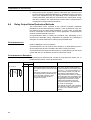
Countermeasures
(Refer to EN50081-2 for more details.)
Countermeasures are not required if the frequency of load switching for the
whole system with the PLC included is less than 5 times per minute.
Countermeasures are required if the frequency of load switching for the whole
system with the PLC included is more than 5 times per minute.
Countermeasure Examples
When switching an inductive load, connect an surge protector, diodes, etc., in
parallel with the load or contact as shown below.
Circuit
Current
AC
Yes
C
Power
supply
R
xx
Inductive
load
CR method
DC
Yes
Characteristic
Required element
If the load is a relay or solenoid, there is
a time lag between the moment the circuit is opened and the moment the load
is reset.
If the supply voltage is 24 or 48 V, insert
the surge protector in parallel with the
load. If the supply voltage is 100 to
200 V, insert the surge protector
between the contacts.
The capacitance of the capacitor must
be 1 to 0.5 µF per contact current of
1 A and resistance of the resistor must
be 0.5 to 1 Ω per contact voltage of 1 V.
These values, however, vary with the
load and the characteristics of the
relay. Decide these values from experiments, and take into consideration that
the capacitance suppresses spark discharge when the contacts are separated and the resistance limits the
current that flows into the load when
the circuit is closed again.
The dielectric strength of the capacitor
must be 200 to 300 V. If the circuit is an
AC circuit, use a capacitor with no
polarity.
6
Conformance to EC Directives
Circuit
Current
AC
DC
Power
supply
Inductive
load
Varistor method
Power
supply
No
Yes
Yes
Yes
Inductive
load
Diode method
Characteristic
Required element
The diode connected in parallel with
the load changes energy accumulated
by the coil into a current, which then
flows into the coil so that the current will
be converted into Joule heat by the
resistance of the inductive load.
This time lag, between the moment the
circuit is opened and the moment the
load is reset, caused by this method is
longer than that caused by the CR
method.
The varistor method prevents the imposition of high voltage between the contacts by using the constant voltage
characteristic of the varistor. There is
time lag between the moment the circuit is opened and the moment the load
is reset.
If the supply voltage is 24 or 48 V, insert
the varistor in parallel with the load. If
the supply voltage is 100 to 200 V,
insert the varistor between the contacts.
The reversed dielectric strength value
of the diode must be at least 10 times
as large as the circuit voltage value.
The forward current of the diode must
be the same as or larger than the load
current.
The reversed dielectric strength value
of the diode may be two to three times
larger than the supply voltage if the
surge protector is applied to electronic
circuits with low circuit voltages.
---
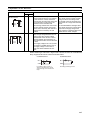
When switching a load with a high inrush current such as an incandescent
lamp, suppress the inrush current as shown below.
Countermeasure 1
Countermeasure 2
R
OUT
OUT
R
COM
Providing a dark current of
approx. one-third of the rated
value through an incandescent
lamp
COM
Providing a limiting resistor
xxi
Conformance to EC Directives
xxii
6
SECTION 1
CPU Unit Operation
This section describes the basic structure and operation of the CPU Unit.
1-1
Initial Setup (CS1 CPU Units Only) . . . . . . . . . . . . . . . . . . . . . . . . . . . . . . . .
1-2
Using the Internal Clock (CS1 CPU Units Only) . . . . . . . . . . . . . . . . . . . . . .
5
1-3
Internal Structure of the CPU Unit . . . . . . . . . . . . . . . . . . . . . . . . . . . . . . . . .
6
1-3-1
Overview. . . . . . . . . . . . . . . . . . . . . . . . . . . . . . . . . . . . . . . . . . . . . .
6
1-3-2
Block Diagram of CPU Unit Memory . . . . . . . . . . . . . . . . . . . . . . .
7
1-4
2
Operating Modes. . . . . . . . . . . . . . . . . . . . . . . . . . . . . . . . . . . . . . . . . . . . . . .
8
1-4-1
Description of Operating Modes . . . . . . . . . . . . . . . . . . . . . . . . . . .
8
1-4-2
Initialization of I/O Memory . . . . . . . . . . . . . . . . . . . . . . . . . . . . . .
10
1-4-3
Startup Mode . . . . . . . . . . . . . . . . . . . . . . . . . . . . . . . . . . . . . . . . . .
11
1-5
Programs and Tasks. . . . . . . . . . . . . . . . . . . . . . . . . . . . . . . . . . . . . . . . . . . . .
12
1-6
Description of Tasks . . . . . . . . . . . . . . . . . . . . . . . . . . . . . . . . . . . . . . . . . . . .
14
1
Initial Setup (CS1 CPU Units Only)
1-1
Initial Setup (CS1 CPU Units Only)
Battery Installation
Before using a CS1CPU Unit, you must install the Battery Set in the CPU Unit
using the following procedure.
1,2,3...
2
Section 1-1
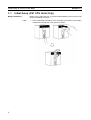
1. Insert a flat-blade screwdriver in the small gap at the bottom of the battery
compartment and flip the cover upward to open it.
Section 1-1
Initial Setup (CS1 CPU Units Only)
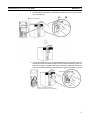
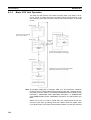
2. Hold the Battery Set with the cable facing outward and insert it into the battery compartment.
Battery compartment
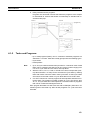
3. Connect the battery connector to the battery connector terminals. Connect
the red wire to the top and the white wire to the bottom terminal. There are
two sets of battery connector terminals; connect the battery to either one.
It does not matter whether the top terminals or bottom terminals are used.
Red
White
Battery connector terminals
(Connect to either set of terminals.)
3
Section 1-1
Initial Setup (CS1 CPU Units Only)
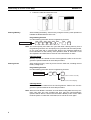
4. Fold in the cable and close the cover.
Clearing Memory
After installing the battery, clear memory using the memory clear operation to
initialize the RAM inside the CPU Unit.
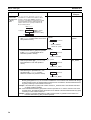
Programming Console
Use the following procedure from a Programming Console.
Initial display
SET
NOT
RESET
MON
0
0
(or
1
)
MON
Note You cannot specify more than one cyclic task when clearing memory from a
Programming Console. You can specify one cyclic task and one interrupt task,
or one cyclic task and no interrupt task. Refer to the Operation Manual for
more information on the memory clear operation. Refer to SECTION 1 CPU
Unit Operation and SECTION 4 Tasks for more information on tasks.
CX-Programmer
Memory can also be cleared from the CX-Programmer. Refer to the CX-Programmer Operation Manual for the actual procedure.
Clearing Errors
After clearing memory, clear any errors from the CPU Unit, including the low
battery voltage error.
Programming Console
Use the following procedure from a Programming Console.
Initial display
FUN
MON
MON
(Displayed error will be cleared.)
MON
(Returns to the initial display.)
CX-Programmer
Errors can also be cleared from the CX-Programmer. Refer to the CX-Programmer Operation Manual for the actual procedure.
Note When an Inner Board is mounted, an Inner Board routing table error may continue even after you have cancelled the error using the CX-Programmer.
(A42407 will be ON for a Serial Communications Board.) If this occurs, either
reset the power or restart the Inner Board, then cancel the error again.
4
Section 1-2
Using the Internal Clock (CS1 CPU Units Only)
1-2
Using the Internal Clock (CS1 CPU Units Only)
The internal clock of the CPU Unit is set to “00 year, 01 month, 01 day (00-0101), 00 hours, 00 minutes, 00 seconds (00:00:00), and Sunday (SUN)” when
the Battery Set is mounted in the CS-series CPU Unit.
When using the internal clock, turn ON the power supply after mounting the
Battery Set and 1) use a Programming Device (Programming Console or CXProgrammer) to set the clock time, 2) execute the CLOCK ADJUSTMENT
(DATE) instruction, or 3) send a FINS command to start the internal clock from
the correct current time and date.
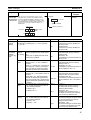
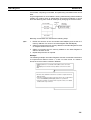
The Programming Console operation used to set the internal clock is shown
below.
Key Sequence
Initial display
FUN
SHIFT
MON
0
CHG
↑
Data
WRITE
↓
Specify: Yr Mo Day Hr Min S
5
Section 1-3
Internal Structure of the CPU Unit
1-3
1-3-1
Internal Structure of the CPU Unit
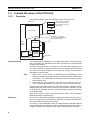
Overview
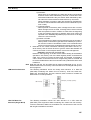
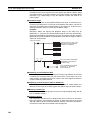
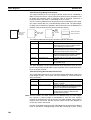
The following diagram shows the internal structure of the CPU Unit.
CPU Unit
Task 1
Task 2
User program
Access
Automatic
backup
The programm is divided
into tasks and the tasks
are executed in order by
task number.
Task n
Memory Card
I/O memory, PC Setup,
programs and the EM area
can be saved as files.
I/O memory
EM file memory
Flash
memory
Automatic PLC Setup
backup and other
parameters
DIP switch
(CS1-H, CS1D, CJ1-H,
or CJ1M CPU Units only)
The User Program
The user program is created from up to 288 program tasks, including interrupt
tasks. The tasks are transferred to the CPU Unit from the CX-Programmer
programming software.
There are two types of tasks. The first is a cyclic task that is executed once
per cycle (maximum of 32) and the other is an interrupt task that is executed
only when the interrupt conditions occur (maximum of 256). Cyclic tasks are
executed in numerical order.
Note
1. With a CS1-H, CJ1-H, CJ1M, or CS1D CPU Unit, interrupt tasks can be
executed cyclically in the same way as cyclic tasks. These are called “extra
cyclic tasks.” The total number of tasks that can be executed cyclically
must be 288 or less.
2. When using the CX-Programmer, use version 2.1 or later for a CS1-H or
CJ1-H CPU Unit and version 3.0 or later for a CJ1M or CS1D CPU Unit.
Program instructions read and write to I/O memory and are executed in order
starting at the top of the program. After all cyclic tasks are executed, the I/O
for all Units are refreshed, and the cycle repeats again starting at the lowest
cyclic task number.
Refer to the section on CPU Unit operation in the CS/CJ Series Operation
Manual for details on refreshing I/O.
I/O Memory
I/O memory is the RAM area used for reading and writing from the user program. It is comprised of one area that is cleared when power is turned ON and
OFF, and another area that will retain data.
I/O memory is also partitioned into an area that exchanges data with all Units
and an area strictly for internal use. Data is exchanged with all Units once per
program execution cycle and also when specific instructions are executed.
6
Internal Structure of the CPU Unit
Section 1-3
PLC Setup
The PLC Setup is used to set various initial or other settings through software
switches.
DIP Switches
DIP switches are used to set initial or other settings through hardware
switches.
Memory Cards
Memory Cards are used as needed to store data such as programs, I/O memory data, the PLC Setup, and I/O comments created by Programming
Devices. Programs and various system settings can be written automatically
from the Memory Card when power is turned ON (automatic transfer at startup).
Flash Memory (CS1-H,
CJ1-H, CJ1M, or CS1D
CPU Unit Only)
With a CS1-H, CJ1-H, CJ1M, or CS1D CPU Unit, the user program and
parameter area data, such as the PLC Setup, are automatically backed up in
the built-in flash memory whenever the user writes data to the CPU Unit. This
enables battery-free operation without using a Memory Card. I/O memory,
including most of the DM Area, are not backed up without a battery.
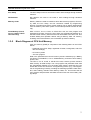
1-3-2
Block Diagram of CPU Unit Memory
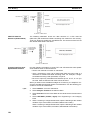
CPU Unit memory (RAM) is comprised of the following blocks in the CS/CJ
Series:
• Parameter area (PLC Setup, registered I/O table, routing table, and CPU
Bus Unit settings)
• I/O memory areas
• The user program
Data in the parameter area and I/O memory areas is backed up by a Battery
(CS Series: CS1W-BAT01, CJ1-H: CPM2A-BAT01), and will be lost if battery
power is low.
The CS1-H, CJ1-H, CJ1M, or CS1D CPU Units, however, provide a built-in
flash memory for data backup. The user program and parameter area data
are automatically backed up in the built-in flash memory whenever the user
writes data to the CPU Unit from a Programming Device (e.g., CX-Programmer or Programming Console), including the following operations: Data transfers, online editing, transfers from Memory Cards, etc. This means that the
user program and parameter area data will not be lost even if the battery voltage drops.
7
Section 1-4
Operating Modes
CPU Unit
Built-in RAM
I/O memory area
Flash Memory
(CS1-H, CJ1-H, CJ1M, or
CS1D CPU Units only)
Drive 1: EM file memory
(See note 2.)
Autowritten
User program
User program
Backup
Battery
A newly mounted battery will be good up to
five years at an ambient temperature of 25°C
Drive 0: Memory card
(flash memory)
Autowritten
Parameter area
(See note 1.)
Parameter area
File memory
Automatically backed up to flash memory whenever
a write operation for the user program or parameter
area is performed from a Programming Device.
Note
1. The parameter area and user program (i.e., the user memory) can be
write-protected by turning ON pin 1 of the DIP switch on the front of the
CPU Unit.
2. EM file memory is part of the EM Area that has been converted to file
memory in the PLC Setup. All EM banks from the specified bank to the end
of the EM Area can be used only as file memory for storage of data and
program files.
3. Be sure to install the battery provided (CS1W-BAT01) before using a CS1
CPU Unit for the first time. After installing the battery, use a Programming
Device to clear the PLC’s RAM (parameter area, I/O memory area, and
user program).
4. A Battery is mounted to a CS1-H, CJ1, CJ1-H, CJ1M, or CS1D CPU Unit
when it is shipped from the factory. There is no need to clear memory or
set the time.
5. The BKUP indicator on the front of the CPU Unit will light while data is being written to flash memory. Do not turn OFF the power supply to the CPU
Unit until the backup operation has been completed (i.e., until the BKUP
indicator goes out). Refer to 6-6-10 Flash Memory for details.
1-4
1-4-1
Operating Modes
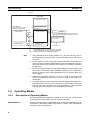
Description of Operating Modes
The following operating modes are available in the CPU Unit. These modes
control the entire user program and are common to all tasks.
PROGRAM Mode
8
Program execution stops in PROGRAM mode, and the RUN indicator is not lit.
This mode is used when editing the program or making other preparations
operation, such as the following:
Section 1-4
Operating Modes
• Registering the I/O table.
• Changing PLC Setup and other settings.
• Transferring and checking programs.
• Force-setting and resetting bits to check wiring and bit allocation.
In this mode, all cyclic and interrupt tasks are non-executing (INI), that is they
stop. See 1-6 Description of Tasks for more details on tasks.
I/O refreshing is performed in PROGRAM mode. Refer to the Operation Manual for information on refreshing I/O.
!WARNING The CPU Unit refreshes I/O even when the program is stopped (i.e., even in
PROGRAM mode). Confirm safety thoroughly in advance before changing the
status of any part of memory allocated to I/O Units, Special I/O Units, or CPU
Bus Units. Any changes to the data allocated to any Unit may result in unexpected operation of the loads connected to the Unit. Any of the following operation may result in changes to memory status.
• Transferring I/O memory data to the CPU Unit from a Programming
Device.
• Changing present values in memory from a Programming Device.
• Force-setting/-resetting bits from a Programming Device.
• Transferring I/O memory files from a Memory Card or EM file memory to
the CPU Unit.
• Transferring I/O memory from a host computer or from another PLC on a
network.
MONITOR Mode
The following operations can be performed through Programming Devices
while the program is executing in MONITOR mode. The RUN indicator will be
lit. This mode is used to make test runs or other adjustments.
• Online Editing.
• Force-setting and force-resetting bits.
• Changing values in I/O memory.
In this mode, the cyclic tasks specified for execution at startup (see note) and
those are made executable by TKON(820) will be executed when program
execution reaches their task number. Interrupt tasks will be executed if their
interrupt conditions occur.
Note The tasks that are executed at startup are specified in the program properties
from the CX-Programmer.
RUN Mode
This mode is used for normal program execution. The RUN indicator will be lit.
Some Programming Device operations like online editing, force-set/forcereset, and changing I/O memory values are disabled in this mode, but other
Programming Device operations like monitoring the status of program execution (monitoring programs and monitoring I/O memory) are enabled.
Use this mode for normal system operation. Task execution is the same as in
MONITOR mode.
See 10-2 CPU Unit Operating Modes in the Operation Manual for more details
on operations that are available in each operating mode.
9
Section 1-4
Operating Modes
1-4-2
Initialization of I/O Memory
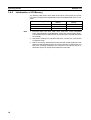
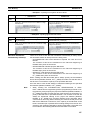
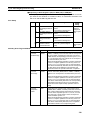
The following table shows which data areas will be cleared when the operating mode is changed from PROGRAM mode to RUN/MONITOR mode or viceversa.
Mode change
Note
Non-held Areas
(Note 1)
Held Areas
(Note 2)
RUN/MONITOR → PROGRAM
PROGRAM → RUN/MONITOR
Clear (Note 3)
Clear (Note 3)
Retained
Retained
RUN ↔ MONITOR
Retained
Retained
1. Non-held areas: CIO Area, Work Area, Timer PVs, Timer Completion
Flags, Index Registers, Data Registers, Task Flags, and Condition Flags.
(The statuses of some addresses in the Auxiliary Area are held and others
are cleared.)
2. Held areas: Holding Area, DM Area, EM Area, Counter PVs, and Counter
Completion Flags.
3. Data in I/O memory will be retained when the IOM Hold Bit (A50012) is ON.
When the IOM Hold Bit (A50012) is ON and operation is stopped due to a
fatal error (including FALS(007)), the contents of I/O memory will be retained but outputs on Output Units will all be turned OFF.
10
Section 1-4
Operating Modes
1-4-3
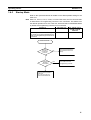
Startup Mode
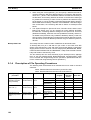
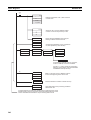
Refer to the Operation Manual for details on the Startup Mode setting for the
CPU Unit.
Note With CJ1, CS1-H, CJ1-H, CJ1M, or CS1D CPU Units, the CPU Unit will start
in RUN Mode if a Programming Console is not connected. This differs from
the default operation for a CS1 CPU Unit, which will start in PROGRAM Mode
by default if a Programming Console is not connected.
Conditions
CS1 CPU Unit
PLC Setup is set to start according to
PROGRAM mode
the mode set on the Programming Console, but a Programming Console is not
connected.
CJ1, CS1-H, CJ1-H,
CJ1M, or CS1D
CPU Unit
RUN mode
Power turned ON.
PLC Setup set
for mode on
Programming
Console?
No
The CPU Unit will start in
the mode set in the PLC
Setup.
Yes
The CPU Unit will start in
the mode set on the
Programming Console.
Yes
Programming
Console
connected?
No
CJ1, CS1-H, CJ1-H, or CJ1M
CPU Unit: CPU Unit starts in
RUN mode.
CS1 CPU Unit: CPU Unit
starts in PROGRAM mode.
11
Section 1-5
Programs and Tasks
1-5
Programs and Tasks
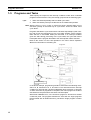
Tasks specify the sequence and interrupt conditions under which individual
programs will be executed. They are broadly grouped into the following types:
1,2,3...
1. Tasks executed sequentially that are called cyclic tasks.
2. Tasks executed by interrupt conditions that are called interrupt tasks.
Note With the CS1-H, CJ1-H, CJ1M, or CS1D CPU Units, interrupt tasks can be
executed cyclically in the same way as cyclic tasks. These are called “extra
cyclic tasks.”
Programs allocated to cyclic tasks will be executed sequentially by task number and I/O will be refreshed once per cycle after all tasks (more precisely
tasks that are in executable status) are executed. If an interrupt condition
goes into effect during processing of the cyclic tasks, the cyclic task will be
interrupted and the program allocated to the interrupt task will be executed.
Refer to the section on CPU Unit operation in the CS/CJ Series Operation
Manual for information in refreshing I/O.
Program A
Allocation
Cyclic
task 0 Interrupt condition
goes into effect
Program B
Interrupt
task 100
Allocation
Cyclic
task 1
Program C
Allocation
Program D
Cyclic
task n
Allocation
I/O refreshing
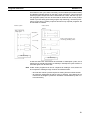
In the above example, programming would be executed in the following order:
start of A, B, remainder of A, C, and then D. This assumes that the interrupt
condition for interrupt task 100 was established during execution of program
A. When execution of program B is completed, the rest of program A would be
executed from the place where execution was interrupted.
With earlier OMRON PLCs, one continuous program is formed from several
continuous parts. The programs allocated to each task are single programs
that terminate with an END instruction, just like the single program in earlier
PLCs.
12
Section 1-5
Programs and Tasks
One feature of the cyclic tasks is that they can be enabled (executable status)
and disabled (standby status) by the task control instructions. This means that
several program components can be assembled as a task, and that only specific programs (tasks) can then be executed as needed for the current product
model or process being performed (program step switching). Therefore performance (cycle time) is greatly improved because only required programs will
be executed as needed.
CS/CJ Series
Earlier system
Task 1
One continuous
subprogram
Allocation
Tasks can be put into nonexecuting (standby) status.
Task 2
Task 3
I/O refreshing
I/O refreshing
A task that has been executed will be executed in subsequent cycles, and a
task that is on standby will remain on standby in subsequent cycles unless it is
executed again from another task.
Note Unlike earlier programs that can be compared to reading a scroll, tasks can
be compared to reading through a series of individual cards.
• All cards are read in a preset sequence starting from the lowest number.
• All cards are designated as either active or inactive, and cards that are
inactive will be skipped. (Cards are activated or deactivated by task control instructions.)
13
Section 1-6
Description of Tasks
• A card that is activated will remain activated and will be read in subsequent sequences. A card that is deactivated will remain deactivated and
will be skipped until it is reactivated by another card.
Earlier program:
Like a scroll
CS/CJ-series program:
Like a series of cards that can be activated
or deactivated by other cards.
Activated
1-6
Deactivated
Description of Tasks
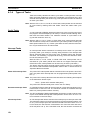
Tasks are broadly grouped into the following types:
1,2,3...
1. Cyclic tasks (32 max.)
Tasks that will be executed once per cycle if executable. Execution can
also be disabled for cyclic tasks if required.
2. Interrupt tasks
Tasks that are executed when the interrupt occurs whether or not a cyclic
task is being executed. Interrupt tasks (see notes 1 and 2) are grouped into
the following four types (five types including the extra cyclic tasks for CS1H, CJ1-H, CJ1M, or CS1D CPU Units):
a) Power OFF interrupt task (Not supported by CS1D CPU Units):
Executed when power is interrupted. (1 max.)
b) Scheduled interrupt task (Not supported by CS1D CPU Units):
Executed at specified intervals. (2 max.).
c) I/O interrupt task (Not supported by CJ1 or CS1D CPU Units):
Executed when an Interrupt Input Unit input turns ON (32 max.).
d) External interrupt task (Not supported by CJ1 or CS1D CPU Units):
Executed (256 max.) when requested by an Special I/O Unit, CPU
Bus Unit, or Inner Board (CS Series only).
e) Extra cyclic tasks (Supported only by CS1-H, CJ1-H, CJ1M, and
CS1D CPU Units):
Interrupt tasks that are treated as cyclic tasks. Extra cyclic tasks
are executed once every cycle as long as they are in an executable
condition.
A total of 288 tasks with 288 programs can be created and controlled with the
CX-Programmer. These include up to 32 cyclic tasks and 256 interrupt tasks.
Note
14
1. CJ1 CPU Units do not currently support I/O interrupt tasks and external interrupt tasks. The maximum number of tasks for a CJ1 CPU Unit is thus
35, i.e., 32 cyclic tasks and 3 interrupt tasks. The total number of programs
that can be created and managed is also 35.
Section 1-6
Description of Tasks
2. The CS1D CPU Units do not support any interrupt tasks. Interrupt tasks,
however, can be used as extra cyclic tasks with CS1D CPU Units.
Each program is allocated 1:1 to a task through individual program property
settings set with the CX-Programmer.
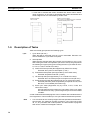
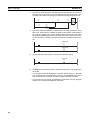
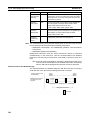
Cyclic task 0
Interrupt task 5
Executed in order starting
from the lowest number.
Cyclic task 1
Interrupt occurs
Cyclic task 2
Note Condition Flags (ER, >, =, etc.) and instruction
conditions (interlock ON, etc.) are cleared at the
beginning of each task.
I/O refreshing
Peripheral processing
Program Structure
Standard subroutine programs can be created and allocated to tasks as
needed to create programs. This means that programs can be created in
modules (standard components) and that tasks can be debugged individually.
Standard subroutine programs
User program ABC
User program ABD
Task 1 (A)
Task 1 (A)
Task 2 (B)
Task 2 (B)
Task 3 (C)
Task 3 (D)
When creating modular programs, addresses can be specified by symbols to
facilitate standardization.
15
Section 1-6
Description of Tasks
Executable and Standby
Status
The TASK ON and TASK OFF instructions (TKON(820) and TKOF(821)) can
be executed in one task to place another task in executable or standby status.
Instructions in tasks that are on standby will not be executed, but their I/O status will be maintained. When a task is returned to executable status, instructions will be executed with the I/O status that was maintained.
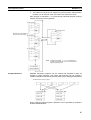
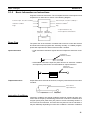
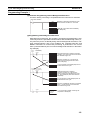
Example: Programming with a Control Task
In this example, task 0 is a control task that is executed first at the start of
operation. Other tasks can be set from the CX-Programmer (but not a Programming Console) to start or not to start at the beginning of operation.
Once program execution has been started, tasks can be controlled with
TKON(820) and TKOF(821).
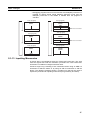
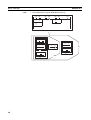
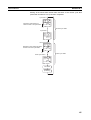
Task 0
Program
Task 0 (control task)
Task 1
Task 2
Task 3
Example: Task 0 is set to be executed at the start of operation
(set in the program properties from the CX-Programmer).
Task 1 is executable when a is ON.
Task 1 is put on standby when b is ON.
Tasks 2 and 3 are executable when c is ON.
Tasks 2 and 3 are put on standby when d is ON.
Task 0
Task 0
Put task 1 on
standby when
b is ON.
Task 0
Task 1
Task 1
Task 1
Task 2
Task 2
Task 2
Task 3
Task 3
Task 3
Task 0
16
Start task 1
when a is
ON.
Start tasks 2
and 3 when
c is ON.
Task 0
Put tasks 2
and 3 on
standby
when d is
ON.
Task 0
Task 1
Task 1
Task 2
Task 2
Task 2
Task 3
Task 3
Task 3
Task 1
Section 1-6
Description of Tasks
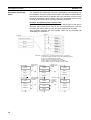
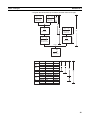
Example: Each Task Controlled by Another Task
In this example, each task is controlled by another task.
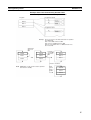
Program
Program for task 0
Task 0
Task 1
Task 2
Program for task 1
Example: Task 1 is set to be executed at the start of operation
unconditionally.
Task 1 executable when a is ON.
Task 1 put on standby when b is ON.
Task 2 is executable when c is ON and task 1 has
been executed.
Start task 1
when a is
ON.
Task 0
Task 0
Task 1
Task 1
Task 2
Task 2
Put task 1
on standby
when b is
ON.
Task 0
Task 1
Task 2
If task 1 executed
Note TKOF(821) can be used in a task to put that
task itself on standby.
Start
task 2
when c
is ON.
Task 0
Task 1
Task 2
17
Description of Tasks
Section 1-6
Task Execution Time
While a task is on standby, instructions in that task are not executed, so their
OFF instruction execution time will not be added to the cycle time.
Note From this standpoint, instructions in a task that is on standby are just like
instructions in a jumped program section (JMP-JME).
Since instructions in a non-executed task do not add to the cycle time, the
overall system performance can be improved significantly by splitting the system into an overall control task and individual tasks that are executed only
when necessary.
Earlier system
Most instructions
are executed.
(Instructions in
subroutines and
jumps are
executed only
when neces
sary.)
18
CS/CJ-series PLCs
Task 0
Task 1
Task 2
Task 3
Instructions are
executed only
when necessary.
SECTION 2
Programming
This section basic information required to write, check, and input programs.
2-1
2-2
2-3
Basic Concepts . . . . . . . . . . . . . . . . . . . . . . . . . . . . . . . . . . . . . . . . . . . . . . . .
20
2-1-1
Programs and Tasks . . . . . . . . . . . . . . . . . . . . . . . . . . . . . . . . . . . . .
20
2-1-2
Basic Information on Instructions . . . . . . . . . . . . . . . . . . . . . . . . . .
21
2-1-3
Instruction Location and Execution Conditions . . . . . . . . . . . . . . . .
23
2-1-4
Addressing I/O Memory Areas. . . . . . . . . . . . . . . . . . . . . . . . . . . . .
24
2-1-5
Specifying Operands. . . . . . . . . . . . . . . . . . . . . . . . . . . . . . . . . . . . .
25
2-1-6
Data Formats. . . . . . . . . . . . . . . . . . . . . . . . . . . . . . . . . . . . . . . . . . .
30
2-1-7
Instruction Variations . . . . . . . . . . . . . . . . . . . . . . . . . . . . . . . . . . . .
34
2-1-8
Execution Conditions . . . . . . . . . . . . . . . . . . . . . . . . . . . . . . . . . . . .
34
2-1-9
I/O Instruction Timing . . . . . . . . . . . . . . . . . . . . . . . . . . . . . . . . . . .
37
2-1-10 Refresh Timing . . . . . . . . . . . . . . . . . . . . . . . . . . . . . . . . . . . . . . . . .
39
2-1-11 Program Capacity . . . . . . . . . . . . . . . . . . . . . . . . . . . . . . . . . . . . . . .
42
2-1-12 Basic Ladder Programming Concepts . . . . . . . . . . . . . . . . . . . . . . .
42
2-1-13 Inputting Mnemonics . . . . . . . . . . . . . . . . . . . . . . . . . . . . . . . . . . . .
47
2-1-14 Program Examples . . . . . . . . . . . . . . . . . . . . . . . . . . . . . . . . . . . . . .
50
Precautions . . . . . . . . . . . . . . . . . . . . . . . . . . . . . . . . . . . . . . . . . . . . . . . . . . .
55
2-2-1
Condition Flags. . . . . . . . . . . . . . . . . . . . . . . . . . . . . . . . . . . . . . . . .
55
2-2-2
Special Program Sections . . . . . . . . . . . . . . . . . . . . . . . . . . . . . . . . .
60
Checking Programs . . . . . . . . . . . . . . . . . . . . . . . . . . . . . . . . . . . . . . . . . . . . .
64
2-3-1
Errors during Programming Device Input . . . . . . . . . . . . . . . . . . . .
64
2-3-2
Program Checks with the CX-Programmer . . . . . . . . . . . . . . . . . . .
64
2-3-3
Program Execution Check . . . . . . . . . . . . . . . . . . . . . . . . . . . . . . . .
66
2-3-4
Checking Fatal Errors . . . . . . . . . . . . . . . . . . . . . . . . . . . . . . . . . . . .
68
19
Section 2-1
Basic Concepts
2-1
2-1-1
Basic Concepts
Programs and Tasks
CS/CJ-series PLCs execute ladder-diagram programs contained in tasks. The
ladder-diagram program in each task ends with an END(001) instruction just
as with conventional PLCs.
Tasks are used to determine the order for executing the ladder-diagram programs, as well as the conditions for executing interrupts.
Program A
Allocated
Cyclic
task 1
Interrupt condition met.
Interrupt
task
Program B
Allocated
Each ladder-diagram
program ends with an
END(001) instruction.
Cyclic
task n
Allocated
Program C
I/O refresh
This section describes the basic concepts required to write CS/CJ-series programs. See SECTION 4 Tasks for more information on tasks and their relationship to ladder-diagram programs.
Note Tasks and Programming Devices
Tasks are handled as described below on the Programming Devices. Refer to
4-4 Programming Device Operations for Tasks and to the CS/CJ-series Programming Consoles Operation Manual (W341) and CX-Programmer Operation Manual for more details.
CX-Programmer
The CX-Programmer is used to designate task types and task numbers as
attributes for individual programs.
Programming Console
Programs are accessed and edited on a Programming Console by specifying
CT00 to CT 31 for cyclic tasks and IT00 to IT255 for interrupt tasks. When the
memory clear operation is performed with a Programming Console, only
cyclic task 0 (CT00) can be written in a new program. Use CX-Programmer to
create cyclic tasks 1 through 31 (CT01 through CT31).
20
Section 2-1
Basic Concepts
2-1-2
Basic Information on Instructions
Programs consist of instructions. The conceptual structure of the inputs to and
outputs from an instruction is shown in the following diagram.
Power flow (P.F., execution condition)*1
Power flow (P.F., execution condition)
Instruction condition
Instruction
Instruction condition*2
Flag
Flags
*1: Input instructions only.
Operands
(sources)
Operands
(destinations)
*2: Not output for all instructions.
Memory
Power Flow
The power flow is the execution condition that is used to control the execute
and instructions when programs are executing normally. In a ladder program,
power flow represents the status of the execution condition.
Input Instructions
• Load instructions indicate a logical start and outputs the execution condition.
Outputs the
execution condition.
• Intermediate instructions input the power flow as an execution condition
and output the power flow to an intermediate or output instruction.
Outputs the
execution condition.
=
D00000
#1215
Output Instructions
Output instructions execute all functions, using the power flow as an execution
condition.
LD power flow
Input block
Power flow for
output instruction
Output block
Instruction Conditions
Instruction conditions are special conditions related to overall instruction execution that are output by the following instructions. Instruction conditions have
a higher priority than power flow (P.F.) when it comes to deciding whether or
not to execute an instruction. An instruction may become not be executed or
may act differently depending on instruction conditions. Instruction conditions
21
Section 2-1
Basic Concepts
are reset (canceled) at the start of each task, i.e., they are reset when the task
changes.
The following instructions are used in pairs to set and cancel certain instruction conditions. These paired instructions must be in the same task.
Instruction
condition
Interlocked
Description
Setting
instruction
An interlock turns OFF part of the program. Special conditions, such as IL(002)
turning OFF output bits, resetting timers, and holding counters are in
effect.
Canceling
instruction
ILC(003)
BREAK(514)
execution
Ends a FOR(512) - NEXT(513) loop during execution. (Prevents execu- BREAK(514)
tion of all instructions until to the NEXT(513) instruction.)
Executes a JMP0(515) to JME0(516) jump.
JMP0(515)
NEXT(513)
Block program Executes a program block from BPRG(096) to BEND(801).
execution
BPRG(096)
JME0(516)
BEND(801)
Flags
In this context, a flag is a bit that serves as an interface between instructions.
Input flags
Output flags
• Differentiation Flags
• Differentiation Flags
Differentiation result flags. The status of these
Differentiation result flags. The status of these flags are output
flags are input automatically to the instruction for
automatically from the instruction for all differentiated up/down
all differentiated up/down output instructions and
output instructions and the UP(521)/DOWN(522) instruction.
the DIFU(013)/DIFD(014) instructions.
• Condition Flags
• Carry (CY) Flag
Condition Flags include the Always ON/OFF Flags, as well as
The Carry Flag is used as an unspecified operand
flags that are updated by results of instruction execution. In user
in data shift instructions and addition/subtraction
programs, these flags can be specified by labels, such as ER,
instructions.
CY, >, =, A1, A0, rather than by addresses.
• Flags for Special Instructions
• Flags for Special Instructions
These include teaching flags for FPD(269) instrucThese include memory card instruction flags and MSG(046)
tions and network communications enabled flags
execution completed flags.
Operands
Operands specify preset instruction parameters (boxes in ladder diagrams)
that are used to specify I/O memory area contents or constants. An instruction
can be executed entering an address or constant as the operands. Operands
are classified as source, destination, or number operands.
Example
N (number)
S (source)
D (destination)
Operand types
Source
Specifies the address of the data
to be read or a constant.
Operand
symbol
S
Source Operand
Source operand other than control
data (C)
C
Control data
Compound data in a source operand that has different meanings
depending bit status.
D (R)
---
Destination
(Results)
Specifies the address where data
will be written.
Number
Specifies a particular number used N
in the instruction, such as a jump
number or subroutine number.
22
Description
---
Section 2-1
Basic Concepts
Note Operands are also called the first operand, second operand, and so on, starting from the top of the instruction.
First operand
Second operand
2-1-3
Instruction Location and Execution Conditions
The following table shows the possible locations for instructions. Instructions
are grouped into those that do and those do not require execution conditions.
See SECTION 3 Instruction Functions Instructions for details on individual
instructions.
Instruction type
Input instructions
Possible location
Execution
condition
Diagram
Examples
Logical start (Load Connected directly Not required.
instructions)
to the left bus bar
or is at the beginning of an instruction block.
LD, LD TST(350),
LD > (and other
symbol comparison instructions)
Intermediate
instructions
AND, OR, AND
TEST(350), AND
> (and other ADD
symbol comparison instructions),
UP(521),
DOWN(522),
NOT(520), etc.
Most instructions
including OUT and
MOV(021).
Output instructions
Between a logical
start and the output instruction.
Required.
Connected directly Required.
to the right bus
bar.
Not required.
Note
END(001),
JME(005),
FOR(512),
ILC(003), etc.
1. There is another group of instruction that executes a series of mnemonic
instructions based on a single input. These are called block programming
instructions. Refer to the CS/CJ Series CPU Units Instruction Reference
Manual for details on these block programs.
2. If an instruction requiring an execution condition is connected directly to
the left bus bar without a logical start instruction, a program error will occur
when checking the program on a Programming Device (CX-Programmer
or Programming Console).
23
Section 2-1
Basic Concepts
2-1-4
Addressing I/O Memory Areas
Bit Addresses
@@@@ @@
Bit number (00 to 15)
Indicates the word address
Example: The address of bit 03 in word 0001 in the CIO Area would be as
shown below. This address is given as “CIO 000103” in this manual.
0001 03
Bit number (03)
Word address: 0001
Bit: CIO 000103
Word
15
14
13
12
11
10
09 08
07
06
05
04
03
02
01
00
0000
0001
0002
Word Addresses
@@@@
Indicates the word address
Example: The address of bits 00 to 15 in word 0010 in the CIO Area would be
as shown below. This address is given as “CIO 0010” in this manual.
0010
Word address
DM and EM Areas addresses are given with “D” or “E” prefixes, as shown
below for the address D00200.
D00200
Word address
24
Section 2-1
Basic Concepts
Example: The address of word 2000 in the current bank of the Extended Data
Memory would be as follows:
E00200
Word address
The address of word 2000 in the bank 1 of the Extended Data Memory would
be as follows:
E1_00200
Word address
Bank number
2-1-5
Specifying Operands
Operand
Specifying bit
addresses
Description
The word and bit numbers are specified di
rectly to specify a bit (input input bits).
Notation
0001
02
0001 02
@@@@ @@
Application
examples
Bit number (02)
Bit number
(00 to 15)
Word number: 0001
Indicates the word address.
Note The same addresses are used to access
timer/counter Completion Flags and
Present Values. There is also only one
address for a Task Flag.
Specifying
word
addresses
The word number is specified directly to specify the 16-bit word.
MOV 0003
D00200
0003
Word number: 0003
@@@@
D00200
Indicates the word address.
Word number: 00200
25
Section 2-1
Basic Concepts
Operand
Specifying
indirect DM/
EM addresses
in Binary
Mode
Description
Notation
Application
examples
The offset from the beginning of the area is
specified. The contents of the address will be
treated as binary data (00000 to 32767) to
specify the word address in Data Memory (DM)
or Extended Data Memory (EM). Add the @
symbol at the front to specify an indirect address in Binary Mode.
@D@@@@@
00000 to 32767
(0000 Hex to
7FFF Hex in BIN)
Contents
D
1) D00000 to D32767 are specified if
@D00300
@D(@@@@@) contains 0000 Hex to 7FFF
Hex (00000 to 32767).
0100
MOV #0001
@00300
Contents
Binary: 256
Specifies D00256.
Add the @ symbol.
2) E0 _00000 to E0 _32767 of bank 0 in
@D00300
Extended Data Memory (EM) are specified
if @D(@@@@@) contains 8000 Hex to
8001
Contents
FFFF Hex (32768 to 65535).
Binary: 32769
Specifies E0 00001.
3) E@_00000 to E@_32767 in the specified
bank are specified if @E@_@@@@@ contains 0000 Hex to 7FFF Hex (00000 to
32767).
@E1_00200
MOV #0001
@E1_00200
Contents
0101
Binary: 257
Specifies E1_00257.
4) E(@+1)_00000 to E(@+1)_32767 in the
bank following the specified bank @ are
specified if @E@_@@@@@ contains
8000 Hex to FFFF Hex (32768 to 65535).
@E1_00200
Contents
8002
Binary: 32770
Specifies E2_00002.
Note When specifying an indirect address in Binary Mode, treat Data Memory (DM) and Extended Data
Memory (EM) (banks 0 to C) as one series of addresses. If the contents of an address with the @
symbol exceeds 32767, the address will be assumed to be an address in the Extended Data Memory (EM) continuing on from 00000 in bank No. 0.
Example: If the Data Memory (DM) word contains 32768, E1_00000 in bank 0 in Extended Data Memory (EM) would be specified.
Note If the Extended Data Memory (EM) bank number is specified as “n” and the contents of the word
exceeds 32767, the address will be assumed to be an address in the Extended Data Memory (EM)
continuing on from 00000 in bank N+1.
Example: If bank 2 in Extended Data Memory (EM) contains 32768, E3_00000 in bank number 3 in
Extended Data Memory (EM) would be specified.
26
Section 2-1
Basic Concepts
Operand
Specifying
indirect DM/
EM addresses
in BCD Mode
Description
The offset from the beginning of the area is
specified. The contents of the address will be
treated as BCD data (0000 to 9999)to specify
the word address in Data Memory (DM) or Extended Data Memory (EM). Add an asterisk (*)
at the front to specify an indirect address in
BCD Mode.
Notation
*D00200
*D@@@@@
0100
Application
examples
MOV #0001
*D00200
Contents
Specifies D0100
Add an asterisk (*).
00000 to 9999
(BCD)
Contents
D
Operand
Description
Notation
Specifying a An index register (IR) or a data register (DR) is speci- IR0
register
fied directly by specifying IR@ (@: 0 to 15) or DR@
directly
(@: 0 to 15).
IR1
Specifying
an indirect
address
using a register
Indirect
address
(No offset)
Constant
offset
DR offset
The bit or word with the PLC memory
address contained in IR@ will be specified.
Specify ,IR@ to specify bits and words
for instruction operands.
,IR0
The bit or word with the PLC memory
address in IR@ + or – the constant is
specified.
Specify +/– constant ,IR@. Constant offsets range from –2048 to +2047 (decimal). The offset is converted to binary
data when the instruction is executed.
The bit or word with the PLC memory
address in IR@ + the contents of DR@ is
specified.
Specify DR@ ,IR@. DR (data register)
contents are treated as signed-binary
data. The contents of IR@ will be given a
negative offset if the signed binary value
is negative.
+5,IR0
,IR1
+31,IR1
DR0 ,IR0
DR0 ,IR1
Auto Incre- The contents of IR@ is incremented by
ment
+1 or +2 after referencing the value as
an PLC memory address.
+1: Specify ,IR@+
+2: Specify ,IR@ + +
,IR0 ++
Auto Decrement
,– –IR0
The contents of IR@ is decremented by
–1 or –2 after referencing the value as
an PLC memory address.
–1: Specify ,–IR@
–2: Specify ,– –IR@
,IR1 +
,–IR1
Application examples
MOVR 000102 IR0
Stores the PLC memory address for
CIO 0010 in IR0.
MOVR 0010 IR1
Stores the PLC memory address for
CIO 0010 in IR1.
LD ,IR0
Loads the bit with the PLC memory
address in IR0.
MOV #0001 ,IR1
Stores #0001 in the word with the PLC
memory in IR1.
LD +5 ,IR0
Loads the bit with the PLC memory
address in IR0 + 5.
MOV #0001 +31 ,IR1
Stores #0001 in the word with the PLC
memory address in IR1 + 31
LD DR0 ,IR0
Loads the bit with the PLC memory
address in IR0 + the value in DR0.
MOV #0001 DR0 ,IR1
Stores #0001 in the word with the PLC
memory address in IR1 + the value in
DR0.
LD ,IR0 ++
Increments the contents of IR0 by 2
after the bit with the PLC memory
address in IR0 is loaded.
MOV #0001 ,IR1 +
Increments the contents of IR1 by 1
after #0001 is stored in the word with
the PLC memory address in IR1.
LD ,– –IR0
After decrementing the contents of IR0
by 2, the bit with the PLC memory
address in IR0 is loaded.
MOV #0001 ,–IR1
After decrementing the contents of IR1
by 1, #0001 is stored in the word with
the PLC memory address in IR1.
27
Section 2-1
Basic Concepts
Data
16-bit constant
32-bit constant
Operand
Data form
All binary data or Unsigned binary
a limited range of Signed decimal
binary data
Unsigned decimal
All BCD data or a BCD
limited range of
BCD data
All binary data or Unsigned binary
a limited range of
binary data
Signed binary
Unsigned decimal
Text string
All BCD data or a BCD
limited range of
BCD data
Description
Symbol
#
±
Range
#0000 to #FFFF
Application example
---
& (See Note.)
–32768 to
+32767
&0 to &65535
---
#
#0000 to #9999
---
#
#00000000 to
#FFFFFFFF
–2147483648 to
+2147483647
&0 to
&429467295
---
#00000000 to
#99999999
---
Examples
---
+
& (See Note.)
#
Text string data is stored in ASCII
--(one byte except for special characters) in order from the leftmost to the
rightmost byte and from the rightmost (smallest) to the leftmost word.
00 Hex (NUL code) is stored in the
rightmost byte of the last word if
there is an odd number of characters.
0000 Hex (2 NUL codes) is stored in
the leftmost and rightmost vacant
bytes of the last word + 1 if there is
an even number of characters.
Symbol
'ABCDE'
---
-----
MOV$ D00100 D00200
'A'
'C'
'E'
'B'
'D'
NUL
D00100
D00101
D00102
41
43
45
42
44
00
41
43
45
42
44
00
D00200
D00201
D00202
41
43
45
42
44
00
'ABCD'
'A'
'C'
NUL
'B'
'D'
NUL
41
43
00
42
44
00
ASCII characters that can be used in a text string includes alphanumeric characters, Katakana and symbols (except for special characters). The characters are shown in the following table.
Note Unsigned decimal notation if used for the CX-Programmer only.
28
Section 2-1
Basic Concepts
ASCII Characters
Bits 0 to 3
Binary
0000
Hex
0
0001
0010
Bits 4 to 7
0000 0001 0010 0011 0100 0101 0110 0111 1000 1001 1010 1011 1100 1101 1110 1111
0
1
Space
2
3
0
4
@
5
P
6
`
7
p
1
2
!
”
1
2
A
B
Q
R
a
b
q
r
0011
0100
3
4
#
$
3
4
C
D
S
T
c
d
0101
0110
5
6
%
&
5
6
E
F
U
V
0111
1000
7
8
’
(
7
8
G
H
1001
1010
9
A
)
*
9
:
1011
1100
B
C
+
,
1101
1110
D
E
1111
F
8
9
A
B
0
C
@
D
P
!
”
1
2
A
B
Q
R
s
t
#
$
3
4
C
D
S
T
e
f
u
v
%
&
5
6
E
F
U
V
W
X
g
h
w
x
’
(
7
8
G
H
W
X
I
J
Y
Z
i
j
y
z
)
*
9
:
I
J
Y
Z
;
<
K
L
[
\
k
l
{
|
+
,
;
<
K
L
[
\
.
=
>
M
N
]
^
m
n
}
~
.
=
>
M
N
]
^
/
?
O
_
o
/
?
O
_
E
F
29
Section 2-1
Basic Concepts
2-1-6
Data Formats
The following table shows the data formats that the CS/CJ Series can handle.
Data type
Data format
Unsigned
binary
15 14 13
Binary
Decimal
Hex
Signed
binary
Decimal
Hex
10 9
8
215 214 213 212 211 210 29
7
6
5
4
28 27
26
3276816384 8192 4092 2048 1024 512 256 128
64
12
22
21 20
23
22
21 20
15 14 13
Binary
12 11
Decimal
23
12 11
22
21 20 23
10 9
8
215 214 213 212 211 210 29
7
6
25 24
5
4
26
3276816384 8192 4092 2048 1024 512 256 128
64
12
22
21 20
22
21 2 0
23
22
21 20 23
25 24
2
23
22
8
4
23
22
16
28 27
23
3
3
2
23
22
8
4
23
22
16
1
0
0 to
65535
4-digit
hexadecimal
0000 to FFFF
21 20
2
1
21 20
1
0
–32768 to 8000 to 7FFF
+32767
21 20
2
1
21 20
Sign bit: 0: Positive, 1: Negative
BCD
(binary
coded decimal)
15 14 13
Binary
Decimal
30
23
22
12 11
21 2 0
0 to 9
23
10 9
22
21
0 to 9
8
7
20 23
6
5
22
4
21 20
0 to 9
3
23
2
22
1
21
0 to 9
0
20
0 to 9999
0000 to 9999
Section 2-1
Basic Concepts
Data type
Single-precision
floatingpoint decimal
Data format
31 30 29
Sign of
mantissa
23
22
21
20 19 18 17
Exponent
Binary
Decimal
3
2
1
0
---
4-digit
hexadecimal
---
---
---
Mantissa
Value = (−1)Sign x 1.[Mantissa] x 2Exponent
Sign (bit 31)
1: negative or 0: positive
Mantissa
The 23 bits from bit 00 to bit 22 contain the mantissa,
i.e., the portion below the decimal point in 1.@@@.....,
in binary.
Exponent
The 8 bits from bit 23 to bit 30 contain the exponent.
The exponent is expressed in binary as 127 plus n
in 2n.
Note This format conforms to IEEE754 standards for single-precision floating-point
data and is used only with instructions that convert or calculate floating-point
data. It can be used to set or monitor from the I/O memory Edit and Monitor
Screen on the CX-Programmer (not supported by the Programming Consoles).
As such, users do not need to know this format although they do need to know
that the formatting takes up two words.
Doubleprecision
floatingpoint decimal
63 62 61
Sign of
mantissa
52
51 50 49 48 47 46
Exponent
Binary
3
2
1
0
Mantissa
Value = (−1)Sign x 1.[Mantissa] x 2Exponent
Sign (bit 63)
1: negative or 0: positive
Mantissa
The 52 bits from bit 00 to bit 51 contain the mantissa,
i.e., the portion below the decimal point in 1.@@@.....,
in binary.
Exponent
The 11 bits from bit 52 to bit 62 contain the exponent
The exponent is expressed in binary as 1023 plus n
in 2n.
Note This format conforms to IEEE754 standards for double-precision floating-point
data and is used only with instructions that convert or calculate floating-point
data. It can be used to set or monitor from the I/O memory Edit and Monitor
Screen on the CX-Programmer (not supported by the Programming Consoles).
As such, users do not need to know this format although they do need to know
that the formatting takes up four words..
Signed Binary Data
In signed binary data, the leftmost bit indicates the sign of binary 16-bit data.
The value is expressed in 4-digit hexadecimal.
Positive Numbers: A value is positive or 0 if the leftmost bit is 0 (OFF). In 4digit hexadecimal, this is expressed as 0000 to 7FFF Hex.
Negative Numbers: A value is negative if the leftmost bit is 1 (ON). In 4-digit
hexadecimal, this is expressed as 8000 to FFFF Hex. The absolute of the
negative value (decimal) is expressed as a two’s complement.
Example: To treat –19 in decimal as signed binary, 0013 Hex (the absolute
value of 19) is subtracted from FFFF Hex and then 0001 Hex is added to yield
FFED Hex.
31
Section 2-1
Basic Concepts
F
1111
True number
0
0000
−)
F
1111
0
0000
+)
Two's complement
F
1111
F
1111
0
0000
F
1111
0
0000
F
1111
F
1111
1
0001
E
1110
0
0000
E
1110
F
1111
3
0011
C
1100
1
0001
D
1101
Complements
Generally the complement of base x refers to a number produced when all
digits of a given number are subtracted from x – 1 and then 1 is added to the
rightmost digit. (Example: The ten’s complement of 7556 is 9999 – 7556 + 1 =
2444.) A complement is used to express a subtraction and other functions as
an addition.
Example: With 8954 – 7556 = 1398, 8954 + (the ten’s complement of 7556) =
8954 + 2444 = 11398. If we ignore the leftmost bit, we get a subtraction result
of 1398.
Two’s Complements
A two’s complement is a base-two complement. Here, we subtract all digits
from 1 (2 – 1 = 1) and add one.
Example: The two’s complement of binary number 1101 is 1111 (F Hex) –
1101 (D Hex) + 1 (1 Hex) = 0011 (3 Hex). The following shows this value
expressed in 4-digit hexadecimal.
The two’s complement b Hex of a Hex is FFFF Hex – a Hex + 0001 Hex =
b Hex. To determine the two’s complement b Hex of “a Hex,” use b Hex =
10000 Hex – a Hex.
Example: to determine the two’s complement of 3039 Hex, use 10000 Hex –
3039 Hex = CFC7 Hex.
Similarly use a Hex = 10000 Hex – b Hex to determine the value a Hex from
the two’s complement b Hex.
Example: To determine the real value from the two’s complement CFC7 Hex
use 10000 Hex – CFC7 Hex = 3039 Hex.
The CS/CJ Series has two instructions: NEG(160)(2’S COMPLEMENT) and
NEGL(161) (DOUBLE 2’S COMPLEMENT) that can be used to determine the
two’s complement from the true number or to determine the true number from
the two’s complement.
Signed BCD Data
Signed BCD data is a special data format that is used to express negative
numbers in BCD. Although this format is found in applications, it is not strictly
defined and depends on the specific application. The CS/CJ Series supports
the following instructions to convert the data formats: SIGNED BCD-TOBINARY: BINS(470), DOUBLE SIGNED BCD-TO-BINARY: BISL(472),
32
Section 2-1
Basic Concepts
SIGNED BINARY-TO-BCD: BCDS(471), and DOUBLE SIGNED BINARY-TOBCD: BDSL(473). Refer to the CS/CJ-series Programmable Controllers Programming Manual (W340) for more information.
0
Decimal
Hexadecimal
Binary
0
0000
1
2
1
2
0001
0010
0001
0010
3
4
3
4
0011
0100
0011
0100
5
6
5
6
0101
0110
0101
0110
7
8
7
8
0111
1000
0111
1000
9
10
9
A
1001
1010
0001
1001
0000
11
12
B
C
1011
1100
0001
0001
0001
0010
13
14
D
E
1101
1110
0001
0001
0011
0100
15
16
F
10
1111
10000
0001
0001
0101
0110
Decimal
BCD
0000
+65,535
Unsigned binary (4-digit
Signed binary (4-digit
hexadecimal)
hexadecimal)
FFFF
Cannot be expressed.
+65534
.
.
.
+32,769
FFFE
.
.
.
8001
+32,768
+32,767
8000
7FFF
+32,766
.
.
.
7FFE
.
.
.
7FFE
+2
+1
0002
0001
0002
0001
0
–1
0000
Cannot be expressed.
0000
FFFF
7FFF
–2
.
.
.
–32,767
FFFE
–32,768
8000
8001
33
Section 2-1
Basic Concepts
2-1-7
Instruction Variations
The following variations are available for instructions to differentiate executing
conditions and to refresh data when the instruction is executed (immediate
refresh).
Variation
Differentiation
Symbol
Description
ON @
Instruction that differentiates when the execution condition turns ON.
OFF %
Instruction that differentiates when the execution condition turns OFF.
Immediate refreshing
!
Refreshes data in the I/O area specified by
the operands or the Special I/O Unit words
when the instruction is executed.
(Immediate refreshing is not supported by the
CS1D CPU Units.)
@
Instruction (mnemonic)
Differentiation variation
Immediate refresh variation
2-1-8
Execution Conditions
The CS/CJ Series offers the following types of basic and special instructions.
• Non-differentiated instructions executed every cycle
• Differentiated instructions executed only once
Non-differentiated Instructions
Output instructions that required execution conditions are executed once
every cycle while the execution condition is valid (ON or OFF).
Example
Non-differentiated
output instruction
Input instructions that create logical starts and intermediate instructions read
bit status, make comparisons, test bits, or perform other types of processing
every cycle. If the results are ON, power flow is output (i.e., the execution condition is turned ON).
Example
Non-differentiated input instruction
34
Section 2-1
Basic Concepts
Input-differentiated Instructions
Upwardly Differentiated Instructions (Instruction Preceded by @)
• Output Instructions: The instruction is executed only during the cycle in
which the execution condition turned ON (OFF → ON) and are not executed in the following cycles.
Example
(@) Upwardly-differ
entiated instruction
@MOV
Executes the MOV instruction once when
CIO 000102 goes OFF → ON.
• Input Instructions (Logical Starts and Intermediate Instructions): The
instruction reads bit status, makes comparisons, tests bits, or perform
other types of processing every cycle and will output an ON execution
condition (power flow) when results switch from OFF to ON. The execution condition will turn OFF the next cycle.
Example
Upwardly differentiated input instruction
ON execution condition created for one
cycle only when CIO 000103 goes from
OFF to ON.
• Input Instructions (Logical Starts and Intermediate Instructions): The
instruction reads bit status, makes comparisons, tests bits, or perform
other types of processing every cycle and will output an OFF execution
condition (power flow stops) when results switch from OFF to ON. The
execution condition will turn ON the next cycle.
Example
Upwardly differentiated input instruction
0001
03
OFF execution condition created for one
cycle only when CIO 00103 goes from
OFF to ON.
Downwardly Differentiated Instructions (Instruction preceded by %)
• Output instructions: The instruction is executed only during the cycle in
which the execution condition turned OFF (ON → OFF) and is not executed in the following cycles.
Example
(%) Downwardly differentiated instruction
%SET
Executes the SET instruction once
when CIO 000102 goes ON to OFF..
35
Section 2-1
Basic Concepts
• Input Instructions (Logical Starts and Intermediate Instructions): The
instruction reads bit status, makes comparisons, tests bits, or perform
other types of processing every cycle and will output the execution condition (power flow) when results switch from ON to OFF. The execution condition will turn OFF the next cycle.
Example
Downwardly differentiated instruction
Will turn ON when the CIO 000103 switches from
ON → OFF and will turn OFF after one cycle.
Note Unlike the upwardly differentiated instructions, downward differentiation variation (%) can only be added to LD, AND, OR, SET and RSET
instructions. To execute downward differentiation with other instructions, combine the instructions with a DIFD or a DOWN instruction.
NOT can be added to instructions only when using a CS1-H/CJ1-H/
CJ1M CPU Unit.
• Input Instructions (Logical Starts and Intermediate Instructions): The
instruction reads bit status, makes comparisons, tests bits, or perform
other types of processing every cycle and will output an OFF execution
condition (power flow stops) when results switch from ON to OFF. The
execution condition will turn ON the next cycle.
Example
Downwardly differentiated input instruction
0001
03
OFF execution condition created for one
cycle only when CIO 00103 goes from
ON to OFF.
36
Section 2-1
Basic Concepts
2-1-9
I/O Instruction Timing
The following timing chart shows different operating timing for individual
instructions using a program comprised of only LD and OUT instructions.
A
B1
Input
read
A
B2
Input
read
A
B3
A
B4
Input
read
B5
Input
read
!
A
!
A
B6
A
B7
A
B8
Input
read
Input
read
!
Input
read
Input read
Input
read
B9
!
A
Input
read
Input
read
!
A
Input
read
B10
!
!
A
B11
!
!
A
B12
!
CPU processing
Instruction I/O refresh
executed.
Differentiated Instructions
• A differentiated instruction has an internal flag that tells whether the previous value is ON or OFF. At the start of operation, the previous value flags
for upwardly differentiated instruction (DIFU and @ instructions) are set to
ON and the previous value flags for downwardly differentiated instructions
(DIFD and % instructions) are set to OFF. This prevents differentiation
outputs from being output unexpectedly at the start of operation.
• An upwardly differentiated instruction (DIFU or @ instruction) will output
ON only when the execution condition is ON and flag for the previous
value is OFF.
37
Section 2-1
Basic Concepts
• Use in Interlocks (IL - ILC Instructions)
In the following example, the previous value flag for the differentiated
instruction maintains the previous interlocked value and will not output a
differentiated output at point A because the value will not be updated
while the interlock is in effect.
0000
00
(002)
IL
0000
01
(013)
DIFU
001000
(003)
ILC
IL is
executing
IL is
executing
• Use in Jumps (JMP - JME Instructions): Just as for interlocks, the previous value flag for a differentiated instruction is not changed when the
instruction is jumped, i.e., the previous value is maintained. Upwardly and
downwardly differentiate instructions will output the execution condition
only when the input status has changed from the status indicated by the
previous value flag.
Note a) Do not use the Always ON Flag or A20011 (First Cycle Flag) as
the input bit for an upwardly differentiated instruction. The instruction will never be executed.
b) Do not use Always OFF Flag as the input bit for a downwardly differentiated instruction. The instruction will never be executed.
38
Section 2-1
Basic Concepts
2-1-10 Refresh Timing
The following methods are used to refresh external I/O.
• Cyclic refresh
• Immediate refresh (! specified instruction, IORF instruction)
Refer to the section on CPU Unit operation in the CS/CJ Series Operation
Manual for details on the I/O refresh.
Cyclic Refresh
Every program allocated to a ready cyclic task or a task where interrupt condition has been met will execute starting from the beginning program address
and will run until the END(001) instruction. After all ready cyclic tasks or tasks
where interrupt condition have been met have executed, cyclic refresh will
refresh all I/O points at the same time.
Note Programs can be executed in multiple tasks. I/O will be refreshed after the
final END(001) instruction in the program allocated to the highest number
(among all ready cyclic tasks) and will not be refreshed after the END(001)
instruction in programs allocated to other cyclic tasks.
Top
! LD 000101
15
0
15
0
CIO 0001
! OUT 000209
16-bit units
CIO 0002
END
Top
15
0
15
0
CIO 0003
! MOV 0003
16-bit units
CIO 0004
END
Cyclic refresh
(batch processing)
I/O refresh
All real data
Execute an IORF instruction for all required words prior to the END(001)
instruction if I/O refreshing is required in other tasks.
Immediate Refresh
Instructions with Refresh
Variation (!)
I/O will be refreshed as shown below when an instruction is executing if an
real I/O bit is specified as an operand.
Units
C200H Basic I/O Units (CS Series only)
CJ Basic I/O Units
Refreshed data
I/O will be refreshed for the 16 bits containing the bit.
39
Section 2-1
Basic Concepts
• When a word operand is specified for an instruction, I/O will be refreshed
for the 16 bits that are specified.
• Inputs will be refreshed for input or source operand just before an instruction is executed.
• Outputs will be refreshed for outputs or destination (D) operands just after
an instruction is execute.
Add an exclamation mark (!) (immediate refresh option) in front of the instruction.
Note Immediate refreshing is not supported by the CS1D CPU Units, but they do
support refreshing for IORF(097) and DLNK(226) instructions.
Units Refreshed for I/O REFRESH Instruction
Location
CPU or Expansion I/O Rack (but not SYSMAC BUS Slave Racks)
Units
Basic I/O Units
CS/CJ-series Basic I/O
Units
Refreshed
C200H Basic I/O Unit (See Refreshed
note.)
C200H Group-2 High-density I/O Units (See note.)
Special I/O Units
Not refreshed
Not refreshed
Note C200H I/O Units cannot be mounted to CJ-series PLCs.
Top
.
.
.
!LD 000101
.
.
.
!OUT 000209
.
.
.
END
Top
.
.
.
!MOV
.
.
.
END
Immediate refresh
Input
15
0
15
0
15
0
15
0
CIO 0001
16-bit units
Output
CIO 0002
I/O refresh
S
CIO 0003
0003
0004
16-bit units
D
CIO 0004
Cyclic refresh
(batch processing)
I/O refresh
40
All real I/O
Section 2-1
Basic Concepts
Units Refreshed for
IORF(097) or DLNK(226)
An I/O REFRESH (IORF(097)) instruction that refreshes real I/O data in a
specified word range is available as a special instruction. All or just a specified
range of real I/O data can be refreshed during a cycle with this instruction.
IORF can also be used to refresh words allocated to Special I/O Units.
Another instruction, CPU BUS UNIT REFRESH (DLNK(226)) is available to
refresh the words allocated to CPU Bus Units in the CIO and DM Areas, as
well as to perform special refreshing for the Unit, such as refreshing data
links. DLNK(226) is supported only by CS1-H, CJ1-H, CJ1M, or CS1D CPU
Units.
Units Refreshed for IORF(097)
Location
Units
CPU or Expansion I/O Rack (but not SYSMAC BUS Slave Racks)
Basic I/O Units CS/CJ-series Basic I/O Units Refreshed
C200H Basic I/O Units
C200H Group-2 High-density I/O Units
Refreshed
Refreshed
Special I/O Units
Refreshed
CPU Bus Units
Not refreshed
A
A
B
R1
C
E
D
R2
C
E
A
E
C
Units Refreshed for DLNK(226)
Location
CPU or Expansion I/O Rack (but not SYSMAC BUS Slave Racks)
Units
Basic I/O Units
Special I/O Units
Not refreshed
Not refreshed
CPU Bus Units
Words allocated to the Unit in CIO Area
Words allocated to the Unit in DM Area
Special refreshing for the Unit (data links for
Controller Link Units and SYSMAC Link Units
or remote I/O for DeviceNet Units)
Refreshed
Words allocated in
CIO Area and DM
Area and any
special refreshing
DLNK
#F
CPU Bus Unit with
unit number F.
41
Section 2-1
Basic Concepts
2-1-11 Program Capacity
The maximum program capacities of the CS/CJ-series CPU Units for all user
programs (i.e., the total capacity of all tasks) are given in the following table.
All capacities are given as the maximum number of steps. The capacities
must not be exceeded, and writing the program will be disabled if an attempt
is made to exceed the capacity.
Each instruction is from 1 to 7 steps long. Refer to 10-5 Instruction Execution
Times and Number of Steps in the Operation Manual for the specific number
of steps in each instruction. (The length of each instruction will increase by 1
step if a double-length operand is used.)
Series
CS Series
CJ Series
CPU Unit
CS1H-CPU67H/CPU67-E
Max. program capacity
250K steps
I/O points
5,120
CS1D-CPU67H
CS1H-CPU66H/CPU66-E
250K steps
120K steps
CS1H-CPU65H/CPU65-E
CS1D-CPU65H
60K steps
60K steps
CS1H-CPU64H/CPU64-E
CS1H-CPU63H/CPU63-E
30K steps
20K steps
CS1G-CPU45H/CPU45-E
60K steps
CS1G-CPU44H/CPU44-E
CS1G-CPU43H/CPU43-E
30K steps
20K steps
1,280
960
CS1G-CPU42H/CPU42-E
CJ1H-CPU66H
10K steps
120K steps
2,560
CJ1H-CPU65H
CJ1G-CPU45H/CPU45
60K steps
60K steps
1280
CJ1G-CPU44H/CPU44
CJ1G-CPU43H
30K steps
20K steps
960
CJ1G-CPU42H
CJ1M-CPU23/CPU13
10K steps
20K steps
640
CJ1M-CPU22/CPU12
10K steps
320
Note Memory capacity for CS/CJ-series PLCs is measured in steps, whereas
memory capacity for previous OMRON PLCs, such as the C200HX/HG/HE
and CV-series PLCs, was measured in words. Refer to the information at the
end of10-5 Instruction Execution Times and Number of Steps in the Operation
Manual for your PLC for guidelines on converting program capacities from
previous OMRON PLCs.
2-1-12 Basic Ladder Programming Concepts
Instructions are executed in the order listed in memory (mnemonic order). The
basic programming concepts as well as the execution order must be correct.
42
Section 2-1
Basic Concepts
General Structure of the
Ladder Diagram
Left bus bar
A ladder diagram consists of left and right bus bars, connecting lines, input
bits, output bits, and special instructions. A program consists of one or more
program runs. A program rung is a unit that can be partitioned when the bus is
split horizontally. In mnemonic form, a rung is all instructions from a LD/LD
NOT instruction to the output instruction just before the next LD/LD NOT
instructions. A program rung consists of instruction blocks that begin with an
LD/LD NOT instruction indicating a logical start.
Special
Output bit
Input bit
instruction
Connecting line
Right bus bar
Rungs
Mnemonics
Instruction blocks
A mnemonic program is a series of ladder diagram instructions given in their
mnemonic form. It has program addresses, and one program address is
equivalent to one instruction. Program addresses contain six digits starting
from 000000.
Example
Program Address
000000
Instruction (Mnemonic)
LD
000000
Operand
000001
000002
AND
LD
000001
000002
000003
000004
AND NOT
LD NOT
000003
000100
000005
000006
AND
OR LD
000101
000007
000008
AND LD
OUT
000009
END
000200
43
Section 2-1
Basic Concepts
Basic Ladder Program Concepts
1,2,3...
1. When ladder diagrams are executed by PLCs, the signal flow (power flow)
is always from left to right. Programming that requires power flow from right
to left cannot be used. Thus, flow is different from when circuits are made
up of hard-wired control relays. For example, when the circuit “a” is implemented in a PLC program, power flows as though the diodes in brackets
were inserted and coil R2 cannot be driven with contact D included. The
actual order of execution is indicated on the right with mnemonics. To
achieve operation without these imaginary diodes, the circuit must be rewritten. Also, circuit “b” power flow cannot be programmed directly and
must be rewritten.
Circuit "a"
A (1) Signal flow
((5))
B
(6)
(7)
R1
C (2) ((3)) D (4)
((8))
E (9)
(10)
Order of execution (mnemonic)
(1) LD A
(6) AND B
(2) LD C
(7) OUT R1
(3) OUT TR0 (8) LD TR0
(4) AND D
(9) AND E
(5) OR LD
(10) OUT R2
R2
Circuit " b"
A
B
R1
E
C
D
R2
In circuit “a,” coil R2 cannot be driven with contact D included.
In circuit “b,” contact E included cannot be written in a ladder diagram. The
program must be rewritten.
2. There is no limit to the number of I/O bits, work bits, timers, and other input
bits that can be used. Rungs, however, should be kept as clear and simple
as possible even if it means using more input bits to make them easier to
understand and maintain.
3. There is no limit to the number of input bits that can be connected in series
or in parallel in series or parallel rungs.
4. Two or more output bits can be connected in parallel.
0000
00
0000
05
TIM
0000
0002
00
44
#0100
Section 2-1
Basic Concepts
5. Output bits can also be used as input bits.
0002
00
0002
00
Restrictions
1,2,3...
1. A ladder program must be closed so that signals (power flow) will flow from
the left bus bar to the right bus bar. A rung error will occur if the program is
not closed (but the program can be executed).
2. Output bits, timers, counters and other output instructions cannot be connected directly to the left bus bar. If one is connected directly to the left bus
bar, a rung error will occur during the programming check by a Programming Device. (The program can be executed, but the OUT and MOV(021)
will not be executed.)
Input condition must be provided.
MOV
Insert an unused N.C. work bit or the ON Condition Flag (Always ON Flag) if
the input must be kept ON at all times.
Unused work bit
ON (Always ON Flag)
MOV
45
Section 2-1
Basic Concepts
3. An input bit must always be inserted before and never after an output instruction like an output bit. If it is inserted after an output instruction, then
a location error will occur during a Programming Device program check.
0000
00
0000
01
0000
03
0002
01
0000
04
0002
01
4. The same output bit cannot be programmed in an output instruction more
than once. Instructions in a ladder program are executed in order from the
top rung in a single cycle, so the result of output instruction in the lower
rungs will be ultimately reflected in the output bit and the results of any previous instructions controlling the same bit will be overwritten and not output.
(Output bit)
0000
00
(Output bit)
0000
00
5. An input bit cannot be used in an OUTPUT instruction (OUT).
(Input bit)
0000
00
6. An END(001) instruction must be inserted at the end of the program in
each task.
• If a program without an END(001) instruction starts running, a program
error indicating No End Instruction will occur, the ERR/ALM LED on the
front of the CPU Unit will light, and the program will not be executed.
• If a program has more than one END(001) instruction, then the program
will only run until the first END(001) instruction.
46
Section 2-1
Basic Concepts
• Debugging programs will run much smoother if an END(001) instruction is
inserted at various break points between sequence rungs and the
END(001) instruction in the middle is deleted after the program is
checked.
Task (program)
000000
000001
Task (program)
000000
000001
END
END
Task (program)
000000
000001
END
Will not be executed.
Task (program)
000000
000001
END
END
Task (program)
Will not be executed.
END
Task (program)
000000
000001
000000
000001
END
END
2-1-13 Inputting Mnemonics
A logical start is accomplished using an LD/LD NOT instruction. The area
from the logical start until the instruction just before the next LD/LD NOT
instruction is considered a single instruction block.
Create a single rung consisting of two instruction blocks using an AND LD
instruction to AND the blocks or by using an OR LD instruction to OR the
blocks. The following example shows a complex rung that will be used to
explain the procedure for inputting mnemonics (rung summary and order).
47
Section 2-1
Basic Concepts
1,2,3...
1. First separate the rung into small blocks (a) to (f).
0000
00
0000
01
0010
00
0010
01
0000
02
0000
03
0000
04
0000
05
0005
00
0000
06
0005
00
(a) 0000
00
0000
01
(e) 0000
04
(b) 0010
00
0010
01
(d) 0000
02
0000
05
0000
03
(5)
(f)
0000
06
(1)
(c)
0005
00
(4)
(3)
(2)
48
Section 2-1
Basic Concepts
• Program the blocks from top to bottom and then from left to right.
(a) 0000
00
0000
01
(b) 0010
00
0010
01
(1)
LD 000000
AND 000001
LD 001000
AND 001001
OR LD
(2)
(c)
0005
00
(c) 0000
04
(3)
0000
05
(5)
OR 000500
LD 000004
AND 000005
(4)
(a) 0000
02
(f)
0000
03
0000
06
OR 000006
AND 000002
AND NOT 000003
AND LD
0005
00
OUT 000500
(a)
(b)
(c)
(d)
(e)
(f)
Address Instruction
Operand
000200
000201
000202
000203
000204
000205
000206
000207
000208
000209
000210
000211
000212
000000
000001
001000
001001
--000500
000002
000003
000004
000005
000006
--000500
LD
AND
LD
AND
OR LD
OR
AND
AND NOT
LD
AND
OR
AND LD
OUT
(1)
(2)
(3)
(5)
(4)
49
Section 2-1
Basic Concepts
2-1-14 Program Examples
1,2,3...
1. Parallel/Series Rungs
0000
00
0000
01
0000
02
0000
03
0002
00
LD
AND
OR
AND
AND NOT
OUT
0002
00
a
b
A block
B block
Instruction Operands
000000
000001
000200
000002
000003
000200
a
b
Program the parallel instruction in the A block and then the B block.
2. Series/Parallel Rungs
0000
00
0000
01
0000
02
0000
03
0002
01
LD
AND NOT
LD
AND
OR
OR
AND LD
OUT
0002
01
0000
04
a
b
A block
Instruction Operands
B block
000000
000001
000002
000003
000201
000004
--000201
a
b
• Separate the rung into A and B blocks, and program each individually.
• Connect A and B blocks with an AND LD.
• Program A block.
Instruction Operands
b1
B1 block
0000
00
0000
01
0000
02
0000
03
0000
04
0002
02
0002
02
b2
B2 block
a
A block
b
LD NOT
AND
LD
AND NOT
LD NOT
000000
000001
000002
000003
000004
AND
OR LD
AND LD
000202
-----
OUT
000202
a
b1
b2
b1 + b 2
a•b
B block
• Program B1 block and then program B2 block.
• Connect B1 and B2 blocks with an OR LD and then A and B blocks with an
AND LD.
50
Section 2-1
Basic Concepts
3. Example of series connection in a series rung
a1
A1 block
Instruction Operands
b1
B1 block
0000
00
0000
01
0000
04
0000
05
0000
02
0002
03
0002
06
0002
07
a2
b2
A2 block
B2 block
a
b
A block
0002
03
B block
LD
AND NOT
LD NOT
AND
OR LD
LD
AND
LD
AND
OR LD
AND LD
OUT
000000
000001
000002
000003
--000004
000005
000006
000007
----000203
a1
a2
a1 + a 2
b1
b2
b1 + b 2
a b
Program A1 block, program A2 block, and and then connect A1 and A2
blocks with an OR LD.
Program B1 and B2 the same way.
Connect A block and B block with an AND LD.
Repeat for as many A to n blocks as are present.
0005
00
a
A block
b
B block
c
C block
n
n block
51
Section 2-1
Basic Concepts
4. Complex Rungs
0000
00
0000
01
0000
02
0000
04
0000
06
LD
LD
LD
AND
OR LD
AND LD
LD
AND
OR LD
LD
AND
OR LD
OUT
0000
03
0000
05
0000
07
000000
000001
000002
000003
----000004
000005
--000006
000007
--000204
b
0000
01
0000
02
0002
04
a
d
Block
0000
03
0000
04
c
Block
0000
05
0000
06
Block
0000
07
e
Block
The above rung can be rewritten as follows:
52
0000
01
0000
02
Z
0000
03
Z
The diagram above is based on the diagram below.
0000
00
Z
A simpler program can be written by rewriting
this as shown below.
0000
02
0000
03
0000
00
0000
01
Instruction Operand
Block
0000
00
0000
00
Instruction Operand
0002
04
0000
00
0000
01
0000
02
0002
05
0000
00
0000
03
0000
04
0000
05
0000
00
0000
03
0000
04
0000
06
0000
07
LD
LD NOT
AND
LD
AND NOT
LD
LD
AND NOT
OR LD
AND LD
OR LD
AND LD
OUT
000000
000001
000002
000003
000004
000005
000006
000007
--------000205
a
b
c
d
e
d+e
(d + e) • c
(d + e) • c + b
((d + e) • c + b) • a
Section 2-1
Basic Concepts
Instruction Operand
Reset input
0000
00
0000
03
LD
OR
OR
OR
AND NOT
OUT
H00000
0000
01
Error input
0000
02
TIM
0001
#0100
10 sec
0002
06
T0001
TIM
Error display
AND
OUT
H00000
000000
000001
000002
H00000
000003
H00000
0001
0100
T0001
000206
If a holding bit is in use, the ON/OFF status would
be held in memory even if the power is turned OFF,
and the error signal would still be in effect when
power is turned back ON.
5. Rungs Requiring Caution or Rewriting
OR and OL LD Instructions
With an OR or OR NOT instruction, an OR is taken with the results of the ladder logic from the LD or LD NOT instruction to the OR or OR NOT instruction,
so the rungs can be rewritten so that the OR LD instruction is not required.
0000
00
0000
01
0002
07
0000
01
0002
07
0002
07
0000
00
0002
07
Example: An OR LD instruction will be needed if the rungs are programmed
as shown without modification. A few steps can be eliminated by rewriting the
rungs as shown.
Output Instruction Branches
A TR bit will be needed if there is a branch before an AND or AND NOT
instruction. The TR bit will not be needed if the branch comes at a point that is
connected directly to output instructions and the AND or AND NOT instruction
or the output instructions can be continued as is.
Output instruction 1
0000
00
TR0
0000
01
0002
08
0000
00
0002
09
0000
01
0002
09
0002
08
Output instruction 2
Example: A temporary storage bit TR0 output instruction and load (LD)
instruction are needed at a branch point if the rungs are programmed without
modification. A few steps can be eliminated by rewriting the rungs.
53
Section 2-1
Basic Concepts
Mnemonic Execution Order
PLCs execute ladder programs in the order the mnemonics are entered so
instructions may not operate as expected, depending on the way rungs are
written. Always consider mnemonic execution order when writing ladder diagrams.
0000
00
0010
00
0010
00
0000
00
0002
10
0000
00
0010
00
0002
10
0010
00
Example: CIO 000210 in the above diagram cannot be output. By rewriting
the rung, as shown above, CIO 000210 can be turned ON for one cycle.
Rungs Requiring Rewriting
PLCs execute instructions in the order the mnemonics are entered so the signal flow (power flow) is from left to right in the ladder diagram. Power flows
from right to left cannot be programmed.
0000
00
0000
01
0000 0002
03
11
0000
02
0000
03
0002
11
0000
00
0000
02
TR0
0000
01
0000
04
0002
12
0000
01
0000
04
0002
12
Example: The program can be written as shown in the diagram at the left
where TR0 receives the branch. The same value is obtained, however, by the
rungs at the right, which are easier to understand. It is recommended, therefore, that the rungs at the left be rewritten to the rungs at the right.
Rewrite the rungs on the left below. They cannot be executed.
The arrows show signal flow (power flow) when the rungs consist of control
relays.
A
B
R1
A
B
R1
C
E
D
R2
C
E
A
E
R2
C
54
D
Section 2-2
Precautions
2-2
2-2-1
Precautions
Condition Flags
Using Condition Flags
Conditions flags are shared by all instructions, and will change during a cycle
depending on results of executing individual instructions. Therefore, be sure
to use Condition Flags on a branched output with the same execution condition immediately after an instruction to reflect the results of instruction execution. Never connect a Condition Flag directly to the bus bar because this will
cause it to reflect execution results for other instructions.
Example: Using Instruction A Execution Results
Correct Use
Mnemonic
Instruction A
Reflects instruction A
Condition Flag execution results.
Example: =
Instruction Operand
LD
Instruction
AND
Instruction
a
A
=
B
Instruction B
The same execution condition (a) is used for instructions A and B to execute
instruction B based on the execution results of instruction A. In this case,
instruction B will be executed according to the Condition Flag only if instruction A is executed.
Incorrect Use
Preceding r ung
Instruction A
Condition Flag
Example: =
Reflects the execution results of
the preceding rung if instruction
A is not e xecuted.
Instruction B
If the Condition Flag is connected directly to the left bus bar, instruction B will
be executed based on the execution results of a previous rung if instruction A
is not executed.
Note Condition Flags are used by all instruction within a single program (task) but
they are cleared when the task switches. Therefore execution results in the
preceding task will not be reflected later tasks. Since conditions flags are
shared by all instructions, make absolutely sure that they do not interfere with
each other within a single ladder-diagram program. The following is an example.
55
Section 2-2
Precautions
Using Execution Results in N.C. and N.C. Inputs
The Condition Flags will pick up instruction B execution results as shown in
the example below even though the N.C. and N.O. input bits are executed
from the same output branch.
Instruction A
Incorrect
Use
Condition Flag
Example: =
Reflects instruction A execution
results.
Instruction B
Condition Flag
Example: =
Reflects instruction B execution
results.
Make sure each of the results is picked up once by an OUTPUT instruction to
ensure that execution results for instruction B will be not be picked up.
Reflects instruction A
execution results.
Correct
Use
Instruction A
Condition Flag
Example: =
Condition Flag
Example: =
Reflects instruction A
execution results.
Instruction B
56
Section 2-2
Precautions
Example: The following example will move #0200 to D00200 if D00100 contains #0010 and move #0300 to D00300 if D00100 does not contain #0010.
Incorrect
Use
Reflects CMP execution results.
(1)
Reflects MOV execution results.
(2)
The Equals Flag will turn ON if D00100 in the rung above contains #0010.
#0200 will be moved to D00200 for instruction (1), but then the Equals Flag
will be turned OFF because the #0200 source data is not 0000 Hex. The MOV
instruction at (2) will then be executed and #0300 will be moved to D0300. A
rung will therefore have to be inserted as shown below to prevent execution
results for the first MOVE instruction from being picked up.
Correct
Use
Reflects CMP execution results.
57
Section 2-2
Precautions
Using Execution Results from Differentiated Instructions
With differentiated instructions, execution results for instructions are reflected
in Condition Flags only when execution condition is met, and results for a previous rung (rather than execution results for the differentiated instruction) will
be reflected in Condition Flags in the next cycle. You must therefore be aware
of what Condition Flags will do in the next cycle if execution results for differentiated instructions to be used.
In the following for example, instructions A and B will execute only if execution
condition C is met, but the following problem will occur when instruction B
picks up execution results from instruction A. If execution condition C remains
ON in the next cycle after instruction A was executed, then instruction B will
unexpectedly execute (by the execution condition) when the Condition Flag
goes from OFF to ON because of results reflected from a previous rung.
Previous rung
Incorrect
Use
Instruction A
Reflects execution results for instruction A
when execution condition is met.
Reflects execution results for a previous
rung in the next cycle.
Condition Flag
Example: =
Instruction B
In this case then, instructions A and B are not differentiated instructions, the
DIFU (of DIFD) instruction is used instead as shown below and instructions A
and B are both upwardly (or downwardly) differentiated and executed for one
cycle only.
Previous rung
Correct
Use
Instruction A
Reflects instruction A execution results.
Condition Flag
Example: =
Instruction B
Note The CS1-H, CJ1-H, or CJ1M CPU Units support instructions to save and load
the Condition Flag status (CCS(282) and CCL(283)). These can be used to
access the status of the Condition Flags at other locations in a task or in a different task.
Main Conditions Turning ON Condition Flags
Error Flag
The ER Flag will turn ON under special conditions, such as when operand
data for an instruction is incorrect. The instruction will not be executed when
the ER Flag turns ON.
58
Section 2-2
Precautions
When the ER Flag is ON, the status of other Condition Flags, such as the <,
>, OF, and UF Flags, will not change and status of the = and N Flags will vary
from instruction to instruction.
Refer to the descriptions of individual instructions in the CS/CJ-series Programmable Controllers Programming Manual (W340) for the conditions that
will cause the ER Flag to turn ON. Caution is required because some instructions will turn OFF the ER Flag regardless of conditions.
Note The PLC Setup Settings for when an instruction error occurs determines
whether operation will stop when the ER Flag turns ON. In the default setting,
operation will continue when the ER Flag turns ON. If Stop Operation is specified when the ER Flag turns ON and operation stops (treated as a program
error), the program address at the point where operation stopped will be
stored at in A298 to A299. At the same time, A29508 will turn ON.
Equals Flag
The Equals Flag is a temporary flag for all instructions except when comparison results are equal (=). It is set automatically by the system, and it will
change. The Equals Flag can be turned OFF (ON) by an instruction after a
previous instruction has turned it ON (OFF). The Equals Flag will turn ON, for
example, when MOV or another move instruction moves 0000 Hex as source
data and will be OFF at all other times. Even if an instruction turns the Equals
Flag ON, the move instruction will execute immediately and the Equals Flag
will turn ON or OFF depending on whether the source data for the move
instruction is 0000 Hex or not.
Carry Flag
The CY Flag is used in shift instructions, addition and subtraction instructions
with carry input, addition and subtraction instruction borrows and carries, as
well as with Special I/O Unit instructions, PID instructions, and FPD instructions. Note the following precautions.
Note
1. The CY Flag can remain ON (OFF) because of execution results for a certain instruction and then be used in other instruction (an addition and subtraction instruction with carry or a shift instruction). Be sure to clear the
Carry Flag when necessary.
2. The CY Flag can be turned ON (OFF) by the execution results for a certain
instruction and be turned OFF (ON) by another instruction. Be sure the
proper results are reflected in the Carry Flag when using it.
Less Than and Greater Than Flags
The < and > Flags are used in comparison instruction, as well as in the LMT,
BAND, ZONE, PID and other instructions.
The < or > Flag can be turned OFF (ON) by another instruction even if it is
turned ON (OFF) by execution results for a certain instruction.
Negative Flag
The N Flag is turned OFF when the leftmost bit of the instruction execution
results word is “1” for certain instructions and it is turned OFF unconditionally
for other instruction.
Specifying Operands for Multiple Words
With the CS/CJ-series PLCs, an instruction will be executed as written even if
an operand requiring multiple words is specified so that all of the words for the
operand are not in the same area. In this case, words will be taken in order of
the PLC memory addresses. The Error Flag will not turn ON.
59
Section 2-2
Precautions
As an example, consider the results of executing a block transfer with
XFER(070) if 20 words are specified for transfer beginning with W500. Here,
the Work Area, which ends at W511, will be exceeded, but the instruction will
be executed without turning ON the Error Flag. In the PLC memory
addresses, the present values for timers are held in memory after the Work
Area, and thus for the following instruction, W500 to W511 will be transferred
to D00000 to D00011 and the present values for T0000 to T0007 will be transferred to D00012 to D00019.
Note Refer to Appendix D Memory Map of PLC Memory Addresses for specific
PLC memory addresses.
W500
to
to
to
to
W511
First source word
T0000
to
First destination word
2-2-2
Transferred.
to
to
&10 Number of words
to
Special Program Sections
CS/CJ-series programs have special program sections that will control
instruction conditions. The following special program sections are available.
Program section
Subroutine
Instructions
SBS, SBN and RET instructions
Instruction condition
Subroutine program is executed.
IL - ILC section
IL and ILC instructions
Section is interlocked
Step Ladder section
STEP S instructions and
STEP instructions
FOR-NEXT loop
FOR instructions and NEXT
instructions
JMP0 - JME0 section
JMP0 instructions and JME0
instructions
Block program section
BPRG instructions and
BEND instructions
Status
The subroutine program section between SBN and RET
instructions is executed.
The output bits are turned
OFF and timers are reset.
Other instructions will not be
executed and previous status
will be maintained.
Looping
Break in progress.
Jump
Block program is executing.
The block program listed in
mnemonics between the
BPRG and BEND instructions is executed.
Instruction Combinations
The following table shows which of the special instructions can be used inside
other program sections.
Subroutine
IL - ILC
section
Step ladder
section
FOR - NEXT
loop
JMP0 - JME0
section
Block program
section
Subroutine
IL - ILC
Not possible.
OK
Not possible.
Not possible.
Not possible.
Not possible.
Not possible.
OK
Not possible.
OK
Not possible.
Not possible.
Step ladder
section
FOR - NEXT
loop
JMP0 - JME0
Not possible.
OK
Not possible.
Not possible.
OK
Not possible.
OK
OK
Not possible.
OK
OK
Not possible.
OK
OK
Not possible.
Not possible.
Not possible.
Not possible.
OK
OK
OK
Not possible.
OK
Not possible.
Block program section
60
Section 2-2
Precautions
Note Instructions that specify program areas cannot be used for programs in other
tasks. Refer to 4-2-2 Task Instruction Limitations for details.
Subroutines
Place all the subroutines together just before the END(001) instruction in all
programs but after programming other than subroutines. (Therefore, a subroutine cannot be placed in a step ladder, block program, FOR - NEXT, or JMP0 JME0 section.) If a program other than a subroutine program is placed after a
subroutine program (SBN to RET), that program will not be executed.
Program
Subroutine
Program
Subroutine
Instructions Not Available
in Subroutines
The following instructions cannot be placed in a subroutine.
Function
Process Step Control
Mnemonic
STEP(008)
Instruction
Define step ladder section
SNXT(009)
Step through the step ladder
Note Block Program Sections
A subroutine can include a block program section. If, however, the block program is in WAIT status when execution returns from the subroutine to the
main program, the block program section will remain in WAIT status the next
time it is called.
61
Section 2-2
Precautions
Instructions Not Available
in Step Ladder Program
Sections
Function
Sequence Control
Mnemonic
FOR(512), NEXT(513), and
BREAK(514)
END(001)
Instruction
FOR, NEXT, and BREAK
LOOP
END
IL(002) and ILC(003)
INTERLOCK and INTERLOCK CLEAR
JMP(004) and JME(005)
CJP(510) and CJPN(511)
JUMP and JUMP END
CONDITIONAL JUMP and
CONDITIONAL JUMP NOT
JMP0(515) and JME0(516)
MULTIPLE JUMP and MULTIPLE JUMP END
Subroutines
SBN(092) and RET(093)
SUBROUTINE ENTRY and
SUBROUTINE RETURN
Block Programs
IF(802) (NOT), ELSE(803),
and IEND(804)
BPRG(096) and BEND(801)
Branching instructions
EXIT(806) (NOT)
LOOP(809) and LEND(810)
(NOT)
Note
BLOCK PROGRAM BEGIN/
END
CONDITIONAL BLOCK EXIT
(NOT)
Loop control
WAIT(805) (NOT)
TIMW(813)
ONE CYCLE WAIT (NOT)
TIMER WAIT
TMHW(815)
CNTW(814)
HIGH-SPEED TIMER WAIT
COUNTER WAIT
BPPS(811) and BPRS(812)
BLOCK PROGRAM PAUSE
and RESTART
1. A step ladder program section can be used in an interlock section (between IL and ILC). The step ladder section will be completely reset when
the interlock is ON.
2. A step ladder program section can be used between MULTIPLE JUMP
(JMP0) and MULTIPLE JUMP END (JME0).
62
Section 2-2
Precautions
Instructions Not Available
in Block Program Sections
The following instructions cannot be placed in block program sections.
Classification by
Function
Sequence Control
Mnemonic
Instruction
FOR(512), NEXT(513),
and BREAK(514)
FOR, NEXT, and BREAK
LOOP
END(001)
IL(002) and ILC(003)
END
INTERLOCK and INTERLOCK CLEAR
JMP0(515) and JME0(516) MULTIPLE JUMP and
MULTIPLE JUMP END
Sequence Input
UP(521)
DOWN(522)
CONDITION ON
CONDITION OFF
Sequence Output
DIFU
DIFD
DIFFERENTIATE UP
DIFFERENTIATE DOWN
KEEP
OUT
KEEP
OUTPUT
OUT NOT
TIM
OUTPUT NOT
TIMER
TIMH
TMHH(540)
HIGH-SPEED TIMER
ONE-MS TIMER
TTIM(087)
TIML(542)
ACCUMULATIVE TIMER
LONG TIMER
MTIM(543)
CNT
MULTI-OUTPUT TIMER
COUNTER
CNTR
SBN(092) and RET(093)
REVERSIBLE COUNTER
SUBROUTINE ENTRY
and SUBROUTINE
RETURN
Data Shift
Ladder Step Control
SFT
STEP(008) and
SNXT(009)
SHIFT
STEP DEFINE and STEP
START
Data Control
Block Program
PID
BPRG(096)
Damage Diagnosis
FPD(269)
PID CONTROL
BLOCK PROGRAM
BEGIN
FAILURE POINT DETECTION
Timer/Counter
Subroutines
Note
1. Block programs can be used in a step ladder program section.
2. A block program can be used in an interlock section (between IL and ILC).
The block program section will not be executed when the interlock is ON.
3. A block program section can be used between MULTIPLE JUMP (JMP0)
and MULTIPLE JUMP END (JME0).
4. A JUMP instruction (JMP) and CONDITIONAL JUMP instruction (CJP/
CJPN) can be used in a block program section. JUMP (JMP) and JUMP
END (JME) instructions, as well as CONDITIONAL JUMP (CJP/CJPN)
and JUMP END (JME) instructions cannot be used in the block program
section unless they are used in pairs. The program will not execute properly unless these instructions are paired.
63
Section 2-3
Checking Programs
2-3
Checking Programs
CS/CJ-series programs can be checked at the following stages.
• Input check during Programming Console input operations
• Program check by CX-Programmer
• Instruction check during execution
• Fatal error check (program errors) during execution
2-3-1
Errors during Programming Device Input
Programming Console
Errors at the following points will be displayed on the Programming Console
during input.
Error display
Cause
CHK MEM
Pin 1 on the DIP switch on the CPU Unit is set to ON (write-protect).
IO No. ERR
An illegal I/O input has been attempted.
CX-Programmer
The program will be automatically checked by the CX-Programmer at the following times.
Timing
Checked contents
When inputting
ladder diagrams
Instruction inputs, operand inputs, programming patterns
When loading
files
All operands for all instructions and all programming patterns
When download- Models supported by the CS/CJ Series and all operands for all
ing files
instructions
During online
editing
Capacity, etc.
The results of checking are output to the text tab of the Output Window. Also,
the left bus bar of illegal program sections will be displayed in red in ladder
view.
2-3-2
Program Checks with the CX-Programmer
The errors that are detected by the program check provided by the CX-Programmer are listed in the following table.
The CX-Programmer does not check range errors for indirectly addressed
operands in instructions. Indirect addressing errors will be detected in the program execution check and the ER Flag will turn ON, as described in the next
section. Refer to the CS/CJ-series Programmable Controllers Programming
Manual (W340) for details.
When the program is checked on the CX-Programmer, the operator can specify program check levels A, B, and C (in order of the seriousness of the error),
as well as a custom check level.
Area
Illegal data: Ladder
diagramming
Instruction support
by PLC
64
Check
Instruction locations
I/O lines
Connections
Instruction and operation completeness
Instructions and operands supported by PLC
Instruction variations (NOT, !, @, and %)
Object code integrity
Section 2-3
Checking Programs
Area
Operand ranges
Program capacity
for PLC
Syntax
Ladder diagram
structure
Output duplication
Tasks
Check
Operand area ranges
Operand data types
Access check for read-only words
Operand range checks, including the following.
• Constants (#, &, +, –)
• Control codes
• Area boundary checks for multi-word operands
• Size relationship checks for multi-word operands
• Operand range overlaps
• Multi-word allocations
• Double-length operands
• Area boundary checks for offsets
Number of steps
Overall capacity
Number of tasks
Call check for paired instructions
• IL–ILC
• JMP–JME, CJP/CJPN-JME
• SBS–SBN–RET, MCRO–SBN–RET
• STEP–SNXT
• BPRG–BEND
• IF–IEND
• LOOP–LEND
Restricted programming locations for BPRG–BEND
Restricted programming locations for SBN–RET
Restricted programming locations for STEP–SNXT
Restricted programming locations for FOR–NEXT
Restricted programming locations for interrupt tasks
Required programming locations for BPRG–BEND
Required programming locations for FOR–NEXT
Illegal nesting
END(001) instruction
Number consistency
Stack overflows
Duplicate output check
• By bit
• By word
• Timer/counter instructions
• Long words (2-word and 4-word)
• Multiple allocated words
• Start/end ranges
• FAL numbers
• Instructions with multiple output operands
Check for tasks set for starting at beginning of operation
Task program allocation
Note Output duplication is not checked between tasks, only within individual tasks.
65
Checking Programs
Section 2-3
Multi-word Operands
Memory area boundaries are checked for multi-word operands for the program check as shown in the following table.
2-3-3
CX-Programmer
Programming
Consoles
The following functionality is provided by the CX-Programmer
for multi-word operands that exceed a memory area boundary.
• The program cannot be transferred to the CPU Unit.
• The program also cannot be read from the CPU Unit.
• Compiling errors are generated for the program check.
• Warnings will appear on-screen during offline programming.
• Warnings will appear on-screen during online editing in
PROGRAM or MONITOR mode.
Checked when programs are input, i.e.,
operands that
exceed a memory
are boundary cannot
be written.
Program Execution Check
Operand and instruction location checks are performed on instructions during
input from Programming Devices (including Programming Consoles) as well
as during program checks from Programming Devices (excluding Programming Consoles). However, these are not final checks.
The following checks are performed during instruction execution.
Type of error
Flag that turns ON for error
Stop/Continue operation
1.Instruction Processing Error
ER Flag
The Instruction Processing Error Flag
(A29508) will also turn ON if Stop
Operation is specified when an error
occurs.
A setting in the PLC Setup can be used
to specify whether to stop or continue
operation for instruction processing
errors. The default is to continue operation.
A program error will be generated and
operation will stop only if Stop Operation is specified.
2.Access Error
AER Flag
The Access Error Flag (A29510) will
turn ON if Stop Operation is specified
when an error occurs.
A setting in the PLC Setup can be used
to specify whether to stop or continue
operation for instruction processing
errors. The default is to continue operation.
A program error will be generated and
operation will stop only if Stop Operation is specified.
3.Illegal Instruction Error
4.UM (User Memory) Overflow Error
Illegal Instruction Error Flag (A29514)
UM Overflow Error Flag (A29515)
Fatal (program error)
Fatal (program error)
Instruction Processing Errors
An instruction processing error will occur if incorrect data was provided when
executing an instruction or an attempt was made to execute an instruction outside of a task. Here, data required at the beginning of instruction processing
was checked and as a result, the instruction was not executed, the ER Flag
(Error Flag) will be turned ON and the EQ and N Flags may be retained or
turned OFF depending upon the instruction.
The ER Flag (error Flag) will turn OFF if the instruction (excluding input
instructions) ends normally. Conditions that turn ON the ER Flag will vary with
individual instructions. See descriptions of individual instructions in the CS/
CJ-series Programmable Controllers Programming Manual (W340) for more
details.
If Instruction Errors are set to Stop Operation in the PLC Setup, then operation will stop (fatal error) and the Instruction Processing Error Flag (A29508)
will turn ON if an instruction processing error occurs and the ER Flag turns
ON.
66
Section 2-3
Checking Programs
Illegal Access Errors
Illegal access errors indicate that the wrong area was accessed in one of the
following ways when the address specifying the instruction operand was
accessed.
a) A read or write was executed for a parameter area.
b) A write was executed in a memory area that is not mounted (see note).
c) A write was executed in an EM area specified as EM File Memory.
d) A write was executed in a read-only area.
e) The value specified in an indirect DM/EM address in BCD mode was
not BCD (e.g., *D000001 contains #A000).
Instruction processing will continue and the Error Flag (ER Flag) will not turn
ON if an access error occurs, but the Access Error Flag (AER Flag) will turn
ON.
Note An access error will occur for the following:
• When a specified EM address exceeds 32767 (example: E32768) for
the current bank.
• The final bank (example: C) is specified for an indirect EM address in
BIN mode and the specified word contains 8000 to FFFF Hex (example: @EC_00001 contains #8000).
• The current bank (example: C) is specified for an indirect EM address
in BIN mode and the specified words contains 8000 to FFFF Hex (example: @EC_00001 contains #8000)
• An IR register containing the internal memory address of a bit is used
as a word address or an IR containing the internal memory address of
a word is used as a bit address.
If Instruction Errors are set to Stop Operation in the PLC Setup, then operation will stop (fatal error) and the “Illegal Access Error Flag” (A29510) will turn
ON if an illegal access error occurs and the AER Flag turns ON.
Note The Access Error Flag (AER Flag) will not be cleared after a task is executed.
If Instruction Errors are set to Continue Operation, this Flag can be monitored
until just before the END(001) instruction to see if an illegal access error has
occurred in the task program. (The status of the final AER Flag after the entire
user program has been executed will be monitored if the AER Flag is monitored on a Programming Console.)
Other Errors
Illegal Instruction Errors
Illegal instruction errors indicate that an attempt was made to execute instruction data other than that defined in the system. This error will normally not
occur as long as the program is created on a CS/CJ-series Programming
Device (including Programming Consoles).
In the rare even that this error does occur, it will be treated as a program error,
operation will stop (fatal error), and the Illegal Instruction Flag (A29514) will
turn ON.
UM (User Memory) Overflow Errors
UM overflow errors indicate that an attempt was made to execute instruction
data stored beyond the last address in the user memory (UM) defined as program storage area. This error will normally not occur as long as the program is
created on a CS/CJ-series Programming Device (including Programming
Consoles).
67
Section 2-3
Checking Programs
In the rare even that this error does occur, it will be treated as a program error,
operation will stop (fatal error), and the UM Overflow Flag (A29515) will turn
ON.
2-3-4
Checking Fatal Errors
The following errors are fatal program errors and the CPU Unit will stop running if one of these occurs. When operation is stopped by a program error, the
task number where operation stopped will be stored in A294 and the program
address will be stored in A298/A299. The cause of the program error can be
determined from this information.
Address
A294
Description
Stored Data
The type of task and the task number at the
Cyclic task: 0000 to 001F Hex (cyclic tasks 0 to 31)
point where operation stopped will be stored
Interrupt task: 8000 to 80FF Hex (interrupt tasks 0 to 255)
here if operation stops due to a program error.
FFFF Hex will be stored if there are no active
cyclic tasks in a cycle, i.e., if there are no cyclic
tasks to be executed.
A298/A299
The program address at the point where opera- A298: Rightmost portion of program address
tion stopped will be stored here in binary if
A299: Leftmost portion of program address
operation stops due to a program error.
If the END(001) instruction is missing (A29511
will be ON), the address where END(001) was
expected will be stored.
If there is a task execution error (A29512 will be
ON), FFFFFFFF Hex will be stored in A298/
A299.
Note If the Error Flag or Access Error Flag turns ON, it will be treated as a program
error and it can be used to stop the CPU from running. Specify operation for
program errors in the PLC Setup.
68
Section 2-3
Checking Programs
Program error
No END Instruction
Description
Related flags
An END instruction is not present in the The No END Flag (A29511) turns ON.
program.
Error During Task Execution
No task is ready in the cycle.
No program is allocated to a task.
The corresponding interrupt task number is not present even though the execution condition for the interrupt task
was met.
Instruction Processing Error (ER Flag
The wrong data values were provided
ON) and Stop Operation set for Instruc- in the operand when an attempt was
tion Errors in PLC Setup
made to execute an instruction.
Illegal Access Error (AER Flag ON) and A read or write was executed for a
Stop Operation set for Instruction
parameter area.
Errors in PLC Setup
A write was executed in a memory area
that is not mounted (see note).
A write was executed in an EM area
specified as EM File Memory.
A write was executed in a read-only
area.
The value specified in an indirect DM/
EM address in BCD mode was not
BCD.
Indirect DM/EM BCD Error and Stop
The value specified in an indirect DM/
Operation set for Instruction Errors in
EM address in BCD mode is not BCD.
PLC Setup
Differentiation Address Overflow Error
UM (User Memory) Overflow Error
Illegal Instruction Error
The Task Error Flag (29512) turns ON.
The ER Flag turns ON and the Instruction Processing Error Flag (A29508)
turns ON if Stop Operation set for
Instruction Errors in PLC Setup.
AER Flag turns ON and the Illegal
Access Error Flag (A29510) turns ON if
Stop Operation set for Instruction
Errors in PLC Setup
AER Flag turns ON and the DM/EM
Indirect BCD Error Flag (A29509) turns
ON if Stop Operation set for Instruction
Errors in PLC Setup
During online editing, more than
131,071 differentiated instructions have
been inserted or deleted.
An attempt was made to execute
instruction data stored beyond the last
address in user memory (UM) defined
as program storage area.
The Differentiation Overflow Error Flag
(A29513) turns ON.
An attempt was made to execute an
instruction that cannot be executed.
The Illegal Instruction Flag (A29514)
turns ON.
The UM (User Memory) Overflow Flag
(A29516) turns ON.
69
Checking Programs
70
Section 2-3
SECTION 3
Instruction Functions
This section outlines the instructions that can be used to write user programs.
3-1
Sequence Input Instructions . . . . . . . . . . . . . . . . . . . . . . . . . . . . . . . . . . . . . .
72
3-2
Sequence Output Instructions . . . . . . . . . . . . . . . . . . . . . . . . . . . . . . . . . . . . .
74
3-3
Sequence Control Instructions . . . . . . . . . . . . . . . . . . . . . . . . . . . . . . . . . . . .
77
3-4
Timer and Counter Instructions. . . . . . . . . . . . . . . . . . . . . . . . . . . . . . . . . . . .
80
3-5
Comparison Instructions . . . . . . . . . . . . . . . . . . . . . . . . . . . . . . . . . . . . . . . . .
84
3-6
Data Movement Instructions . . . . . . . . . . . . . . . . . . . . . . . . . . . . . . . . . . . . . .
88
3-7
Data Shift Instructions . . . . . . . . . . . . . . . . . . . . . . . . . . . . . . . . . . . . . . . . . .
91
3-8
Increment/Decrement Instructions . . . . . . . . . . . . . . . . . . . . . . . . . . . . . . . . .
95
3-9
Symbol Math Instructions . . . . . . . . . . . . . . . . . . . . . . . . . . . . . . . . . . . . . . . .
96
3-10 Conversion Instructions. . . . . . . . . . . . . . . . . . . . . . . . . . . . . . . . . . . . . . . . . .
101
3-11 Logic Instructions . . . . . . . . . . . . . . . . . . . . . . . . . . . . . . . . . . . . . . . . . . . . . .
107
3-12 Special Math Instructions . . . . . . . . . . . . . . . . . . . . . . . . . . . . . . . . . . . . . . . .
109
3-13 Floating-point Math Instructions . . . . . . . . . . . . . . . . . . . . . . . . . . . . . . . . . .
110
3-14 Double-precision Floating-point Instructions
(CS1-H, CJ1-H, CJ1M, or CS1D Only) . . . . . . . . . . . . . . . . . . . . . . . . . . . . .
114
3-15 Table Data Processing Instructions . . . . . . . . . . . . . . . . . . . . . . . . . . . . . . . . .
118
3-16 Data Control Instructions . . . . . . . . . . . . . . . . . . . . . . . . . . . . . . . . . . . . . . . .
122
3-17 Subroutine Instructions . . . . . . . . . . . . . . . . . . . . . . . . . . . . . . . . . . . . . . . . . .
125
3-18 Interrupt Control Instructions . . . . . . . . . . . . . . . . . . . . . . . . . . . . . . . . . . . . .
127
3-19 High-speed Counter and Pulse Output Instructions (CJ1M-CPU22/23 Only)
129
3-20 Step Instructions . . . . . . . . . . . . . . . . . . . . . . . . . . . . . . . . . . . . . . . . . . . . . . .
130
3-21 Basic I/O Unit Instructions . . . . . . . . . . . . . . . . . . . . . . . . . . . . . . . . . . . . . . .
131
3-22 Serial Communications Instructions . . . . . . . . . . . . . . . . . . . . . . . . . . . . . . . .
132
3-23 Network Instructions. . . . . . . . . . . . . . . . . . . . . . . . . . . . . . . . . . . . . . . . . . . .
133
3-24 File Memory Instructions . . . . . . . . . . . . . . . . . . . . . . . . . . . . . . . . . . . . . . . .
135
3-25 Display Instructions . . . . . . . . . . . . . . . . . . . . . . . . . . . . . . . . . . . . . . . . . . . .
136
3-26 Clock Instructions . . . . . . . . . . . . . . . . . . . . . . . . . . . . . . . . . . . . . . . . . . . . . .
136
3-27 Debugging Instructions . . . . . . . . . . . . . . . . . . . . . . . . . . . . . . . . . . . . . . . . . .
137
3-28 Failure Diagnosis Instructions. . . . . . . . . . . . . . . . . . . . . . . . . . . . . . . . . . . . .
138
3-29 Other Instructions . . . . . . . . . . . . . . . . . . . . . . . . . . . . . . . . . . . . . . . . . . . . . .
139
3-30 Block Programming Instructions . . . . . . . . . . . . . . . . . . . . . . . . . . . . . . . . . .
140
3-31 Text String Processing Instructions. . . . . . . . . . . . . . . . . . . . . . . . . . . . . . . . .
146
3-32 Task Control Instructions . . . . . . . . . . . . . . . . . . . . . . . . . . . . . . . . . . . . . . . .
149
71
Section 3-1
Sequence Input Instructions
3-1
Sequence Input Instructions
Instruction
Mnemonic
Code
LOAD
LD
@LD
%LD
!LD
!@LD
!%LD
LOAD NOT
LD NOT
@LD NOT
%LD NOT
!LD NOT
!@LD NOT
!%LD NOT
CS1-H, CJ1-H, or
CJ1M CPU Units
only: @LD NOT
%LD NOT
!@LD NOT
!%LD NOT
Symbol/Operand
Function
Bus bar
Indicates a logical start and creates an ON/OFF execution condition based
on the ON/OFF status of the specified operand bit.
Not required
Indicates a logical start and creates an ON/OFF execution condition based
on the reverse of the ON/OFF status of the specified operand bit.
Not required
Takes a logical AND of the status of the specified operand bit and the current execution condition.
Required
Reverses the status of the specified operand bit and takes a logical AND
with the current execution condition.
Required
Takes a logical OR of the ON/OFF status of the specified operand bit and
the current execution condition.
Required
Starting
point of
block
Bus bar
Starting
point of
block
AND
AND
@AND
%AND
!AND
!@AND
!%AND
AND NOT
AND NOT
@AND NOT
%AND NOT
!AND NOT
!@AND NOT
!%AND NOT
CS1-H, CJ1-H, or
CJ1M CPU Units
only: @AND NOT
%AND NOT
!@AND NOT
!%AND NOT
OR
OR
@OR
%OR
!OR
!@OR
!%OR
OR NOT
OR NOT
@OR NOT
%OR NOT
!OR NOT
!@OR NOT
!%OR NOT
CS1-H, CJ1-H, or
CJ1M CPU Units
only: @OR NOT
%OR NOT
!@OR NOT
!%OR NOT
72
Location
Execution
condition
Bus bar
Bus bar
Reverses the status of the specified bit and takes a logical OR with the current execution condition.
Required
Section 3-1
Sequence Input Instructions
Instruction
Mnemonic
Code
AND LOAD
AND LD
Symbol/Operand
Logic block Logic block
Function
Takes a logical AND between logic blocks.
Location
Execution
condition
Required
LD
to
Logic block A
LD
to
AND LD
OR LOAD
OR LD
Logic block
Logic block
Logic block B
Serial connection between logic block A and
logic block B.
Takes a logical OR between logic blocks.
Required
LD
to
Logic block A
LD
to
OR LD
NOT
NOT
520
CONDITION ON
UP
521
CONDITION OFF
DOWN
522
BIT TEST
LD TST
350
NOT(520)
Logic block B
Parallel connection between logic block A
and logic block B.
Reverses the execution condition.
Required
UP(521)
UP(521) turns ON the execution condition for one cycle when the execution condition goes from OFF to ON.
Required
DOWN(522)
DOWN(522) turns ON the execution condition for one cycle when the execution condition goes from ON to OFF.
Required
TST(350)
LD TST(350), AND TST(350), and OR TST(350) are used in the program
like LD, AND, and OR; the execution condition is ON when the specified bit
in the specified word is ON and OFF when the bit is OFF.
Not required
LD TSTN(351), AND TSTN(351), and OR TSTN(351) are used in the program like LD NOT, AND NOT, and OR NOT; the execution condition is OFF
when the specified bit in the specified word is ON and ON when the bit is
OFF.
Not required
LD TST(350), AND TST(350), and OR TST(350) are used in the program
like LD, AND, and OR; the execution condition is ON when the specified bit
in the specified word is ON and OFF when the bit is OFF.
Required
S
N
S: Source word
N: Bit number
BIT TEST
LD TSTN
351
TSTN(351)
S
N
S: Source word
N: Bit number
BIT TEST
AND TST
350
AND TST(350)
S
N
S: Source word
N: Bit number
73
Section 3-2
Sequence Output Instructions
Instruction
Mnemonic
Code
BIT TEST
AND TSTN
351
Symbol/Operand
AND TSTN(351)
S
N
Function
Location
Execution
condition
LD TSTN(351), AND TSTN(351), and OR TSTN(351) are used in the program like LD NOT, AND NOT, and OR NOT; the execution condition is OFF
when the specified bit in the specified word is ON and ON when the bit is
OFF.
Required
LD TST(350), AND TST(350), and OR TST(350) are used in the program
like LD, AND, and OR; the execution condition is ON when the specified bit
in the specified word is ON and OFF when the bit is OFF
Required
LD TSTN(351), AND TSTN(351), and OR TSTN(351) are used in the program like LD NOT, AND NOT, and OR NOT; the execution condition is OFF
when the specified bit in the specified word is ON and ON when the bit is
OFF.
Required
S: Source word
N: Bit number
BIT TEST
TST(350)
OR TST
350
S
N
S: Source word
N: Bit number
BIT TEST
OR TSTN
351
TSTN(351)
S
N
S: Source word
N: Bit number
3-2
Sequence Output Instructions
Instruction
Mnemonic
Code
Symbol/Operand
OUTPUT
OUTPUT NOT
OUT NOT
!OUT NOT
KEEP
!KEEP
011
S (Set)
KEEP(011)
B
Reverses the result (execution condition) of the logical processing, and outputs it to the specified bit.
Output
Required
Operates as a latching relay.
Output
Required
Set
R (Reset)
B: Bit
Reset
S execution
condition
R execution
condition
Status of B
74
Location
Execution
condition
Outputs the result (execution condition) of the logical processing to the spec- Output
ified bit.
Required
OUT
!OUT
KEEP
Function
Section 3-2
Sequence Output Instructions
Instruction
Mnemonic
Code
Symbol/Operand
DIFFERENTIATE
DIFU(013)
UP
DIFU
B
!DIFU
013 B: Bit
Function
Location
Execution
condition
DIFU(013) turns the designated bit ON for one cycle when the
execution condition goes from OFF to ON (rising edge).
Output
Required
Execution condition
Status of B
One cycle
DIFFERENTIATE
DIFD(014)
DOWN
DIFD
B
!DIFD
014 B: Bit
DIFD(014) turns the designated bit ON for one cycle when the
execution condition goes from ON to OFF (falling edge).
Output
Required
Execution condition
Status of B
One cycle
SET
SET
@SET
%SET
!SET
!@SET B: Bit
!%SET
SET
B
MULTIPLE BIT
SET
SETA
@SETA
530
Output
Required
Execution condition
of SET
Status of B
RESET
RSET
@RSET
%RSET
!RSET
!@RSET B: Bit
!%RSET
SET turns the operand bit ON when the execution condition is ON.
RSET
B
RSET turns the operand bit OFF when the execution condition is ON.
Output
Required
Execution condition
of RSET
Status of B
SETA(530)
D
N1
N2
SETA(530) turns ON the specified number of consecutive bits.
Output
Required
N2 bits are set to 1
(ON).
D: Beginning
word
N1: Beginning bit
N2: Number of
bits
MULTIPLE BIT
RESET
RSTA
@RSTA
531
RSTA(531)
RSTA(531) turns OFF the specified number of consecutive bits.
Output
Required
D
N1
N2
N2 bits are reset to 0
(OFF).
D: Beginning
word
N1: Beginning bit
N2: Number of
bits
75
Section 3-2
Sequence Output Instructions
Instruction
Mnemonic
Code
Symbol/Operand
Function
Location
Execution
condition
SINGLE BIT SET
(CS1-H, CJ1-H,
SETB(532)
CJ1M, or CS1D
D
only)
SETB
N
@SETB
!SETB
D: Word address
532
N: Bit number
SETB(532) turns ON the specified bit in the specified word when the execution condition is ON.
Unlike the SET instruction, SETB(532) can be used to set a bit in a DM or EM
word.
SINGLE BIT
RESET
RSTB(533)
(CS1-H, CJ1-H,
D
CJ1M, or CS1D
only)
N
RSTB
@RSTB
!RSTB D: Word address
533 N: Bit number
RSTB(533) turns OFF the specified bit in the specified word when the execu- Output
tion condition is ON.
Required
Unlike the RSET instruction, RSTB(533) can be used to reset a bit in a DM or
EM word.
SINGLE BIT
OUTPUT
OUTB(534)
(CS1-H, CJ1-H,
D
CJ1M, or CS1D
only)
N
OUTB
@OUTB
!OUTB D: Word address
534 N: Bit number
OUTB(534) outputs the result (execution condition) of the logical processing
to the specified bit.
Unlike the OUT instruction, OUTB(534) can be used to control a bit in a DM
or EM word.
76
Output
Required
Output
Required
Section 3-3
Sequence Control Instructions
3-3
Sequence Control Instructions
Instruction
Symbol/Operand
Mnemonic
Code
END
END
001
END(001)
Function
Indicates the end of a program.
END(001) completes the execution of a program for that cycle. No
instructions written after END(001) will be executed. Execution
proceeds to the program with the next task number. When the
program being executed has the highest task number in the program,
END(001) marks the end of the overall main program.
Task 1
Location
Execution
condition
Output
Not required
Program A
To the next task number
Task 2
Program B
To the next task number
Task n
Program Z
End of the main program
I/O refreshing
NO OPERATION
NOP
000
INTERLOCK
IL
002
IL(002)
This instruction has no function. (No processing is performed for NOP(000).)
Output
Not required
Interlocks all outputs between IL(002) and ILC(003) when the
execution condition for IL(002) is OFF. IL(002) and ILC(003) are
normally used in pairs.
Output
Required
Execution
condition
Interlocked section
of the program
Execution
Execution
condition ON condition OFF
Normal Outputs
execution interlocked.
77
Section 3-3
Sequence Control Instructions
Instruction
Symbol/Operand
Mnemonic
Code
INTERLOCK
CLEAR
ILC(003)
Function
Location
Execution
condition
Interlocks all outputs between IL(002) and ILC(003) when the execution condition for IL(002) is OFF. IL(002) and ILC(003) are normally used in pairs.
Output
Not required
When the execution condition for JMP(004) is OFF, program
execution jumps directly to the first JME(005) in the program with the
same jump number. JMP(004) and JME(005) are used in pairs.
Output
Required
ILC
003
JUMP
JMP
004
JMP(004)
N
Execution condition
N: Jump number
Instructions
jumped
Instructions
executed
JUMP END
JME
005
JME(005)
Instructions in this section
are not executed and output status is maintained.
The instruction execution
time for these instructions
is eliminated.
Indicates the end of a jump initiated by JMP(004) or CJP(510).
Output
Not required
N
N: Jump number
CONDITIONAL
JUMP
CJP
510
CJP(510)
N
N: Jump number
The operation of CJP(510) is the basically the opposite of JMP(004).
When the execution condition for CJP(510) is ON, program execution
jumps directly to the first JME(005) in the program with the same jump
number. CJP(510) and JME(005) are used in pairs.
Output
Required
Execution
Execution
condition OFF condition ON
Instructions
jumped
Instructions
executed
CONDITIONAL
JUMP
CJPN
511
CJPN(511)
N
N: Jump number
Instructions in this section
are not executed and output status is maintained.
The instruction execution
time for these instructions
is eliminated.
The operation of CJPN(511) is almost identical to JMP(004).
When the execution condition for CJP(004) is OFF, program execution
jumps directly to the first JME(005) in the program with the same jump
number. CJPN(511) and JME(005) are used in pairs.
Execution
Execution
condition ON condition OFF
Instructions
jumped
Instructions
executed
78
Instructions in this section
are not executed and output status is maintained.
The instruction execution
time for these instructions
is eliminated.
Output
Not required
Section 3-3
Sequence Control Instructions
Instruction
Symbol/Operand
Mnemonic
Code
MULTIPLE JUMP
JMP0
515
JMP0(515)
Function
Location
Execution
condition
When the execution condition for JMP0(515) is OFF, all instructions
from JMP0(515) to the next JME0(516) in the program are processed
as NOP(000). Use JMP0(515) and JME0(516) in pairs. There is no
limit on the number of pairs that can be used in the program.
Output
Required
Execution
Execution
condition a ON condition a OFF
Instructions
jumped
Instructions
executed
Jumped instructions
are processed as
NOP(000). Instruction
Execution
Execution
condition b ON condition b OFF execution times are
the same as
NOP(000).
Instructions
executed
Instructions
jumped
MULTIPLE JUMP
END
JME0
516
FOR-NEXT
LOOPS
JME0(516)
FOR(512)
FOR
512
N
When the execution condition for JMP0(515) is OFF, all instructions from
JMP0(515) to the next JME0(516) in the program are processed as NOP(000).
Use JMP0(515) and JME0(516) in pairs. There is no limit on the number of
pairs that can be used in the program.
Output
Not required
The instructions between FOR(512) and NEXT(513) are repeated a
specified number of times. FOR(512) and NEXT(513) are used in
pairs.
Output
Not required
N: Number of
loops
Repeated N times
Repeated program section
BREAK LOOP
BREAK
514
BREAK(514)
Programmed in a FOR-NEXT loop to cancel the execution of the loop
for a given execution condition. The remaining instructions in the loop
are processed as NOP(000) instructions.
Condition a ON
N repetitions
Output
Required
Repetitions
forced to end.
Processed as
NOP(000).
FOR-NEXT
LOOPS
NEXT(513)
The instructions between FOR(512) and NEXT(513) are repeated a specified
number of times. FOR(512) and NEXT(513) are used in pairs.
Output
Not required
NEXT
513
79
Section 3-4
Timer and Counter Instructions
3-4
Timer and Counter Instructions
Instruction
Symbol/Operand
Mnemonic
Code
TIMER
TIM(BCD)
TIM
N
S
N: Timer number
S: Set value
TIMX
(Binary)
(CS1-H, CJ1-H,
CJ1M, or CS1D
only)
TIMX(550)
N
S
N: Timer number
S: Set value
Function
TIM operates a decrementing timer with units of 0.1-s. The setting
range for the set value (SV) is 0 to 999.9 s.
Location
Execution
condition
Output
Required
Timer input
Timer PV
SV
Completion
Flag
Timer input turns OFF before Completion Flag turns ON.
Timer input
Timer PV
SV
Completion
Flag
HIGH-SPEED
TIMER
TIMH
015
(BCD)
TIMH(015)
N
S
N: Timer number
S: Set value
TIMHX
551
(Binary)
(CS1-H, CJ1-H,
CJ1M, or CS1D
only)
TIMHX(551)
N
S
N: Timer number
S: Set value
TIMH(015) operates a decrementing timer with units of 10-ms. The
setting range for the set value (SV) is 0 to 99.99 s.
Output
Required
Timer input
Timer PV
SV
Completion
Flag
Timer input turns OFF before Completion Flag turns ON.
Timer input
Timer PV
SV
Completion
Flag
ONE-MS TIMER
TMHH
540
(BCD)
TMHH(540)
N
S
N: Timer number
S: Set value
TMHHX
552
(BCD)
(CS1-H, CJ1-H,
CJ1M, or CS1D
only)
TMHHX(552)
N
S
N: Timer number
S: Set value
80
TMHH(540) operates a decrementing timer with units of 1-ms. The setting
range for the set value (SV) is 0 to 9.999 s.
The timing charts for TMHH(540) are the same as those given above for
TIMH(015).
Output
Required
Section 3-4
Timer and Counter Instructions
Instruction
Symbol/Operand
Mnemonic
Code
ACCUMULATIVE Timer
TIMER
input
TTIM
087
(BCD)
TTIM(087)
N
S
Function
TTIM(087) operates an incrementing timer with units of 0.1-s. The
setting range for the set value (SV) is 0 to 999.9 s.
Reset
input
Timer input
N: Timer number
S: Set value
Timer PV
TTIMX Timer
TTIMX(555)
555 input
N
(Binary)
(CS1-H, CJ1-H,
S
CJ1M, or CS1D
only) Reset
Location
Execution
condition
Output
Required
SV
Timing resumes.
PV maintained.
Completion
Flag
input
N: Timer number
S: Set value
LONG TIMER
TIML
542
(BCD)
TIML(542)
Reset input
TIML(542) operates a decrementing timer with units of 0.1-s that can
time up to 9999999.9 S (approx. 115 days).
Output
Required
D1
D2
Timer input
S
Timer PV
SV
D1: Completion
Flag
D2: PV word
S: SV word
TIMLX
553
(Binary)
(CS1-H, CJ1-H,
CJ1M, or CS1D
only)
Completion Flag
(Bit 00 of D1)
TIMLX(553)
D1
D2
S
D1: Completion
Flag
D2: PV word
S: SV word
81
Section 3-4
Timer and Counter Instructions
Instruction
Symbol/Operand
Mnemonic
Code
MULTI-OUTPUT
TIMER
MTIM
543
(BCD)
MTIM(543)
D1
Function
Location
Execution
condition
MTIM(543) operates a 0.1-s incrementing timer with eight
independent SVs and Completion Flags. The setting range for the set
value (SV) is 0 to 999.9 s.
Timer PV
Output
Required
D2
S
D1 bits
Timer SVs
0
D1: Completion
Flags
D2: PV word
S: 1st SV word
to
MTIMX
554
(Binary)
(CS1-H, CJ1-H,
CJ1M, or CS1D
only)
to
MTIMX(554)
D1
D2
Timer input
S
D1: Completion
Flags
D2: PV word
S: 1st SV word
Timer PV (D2)
Completion
flags (D1)
SV 7
to
SV 2
SV 1
SV 0
0
Bit 7
to
Bit 2
Bit 1
Bit 0
COUNTER
Count
CNT input
(BCD)
CNT
N
S
CNT operates a decrementing counter. The setting range for the set
value (SV) is 0 to 9,999.
Count input
Reset
input
N: Counter
number
S: Set value
CNTX
Count CNTX(546)
546 input
(Binary)
N
(CS1-H, CJ1-H,
S
CJ1M, or CS1D
only) Reset
input
N: Counter
number
S: Set value
82
Reset input
Counter PV
Completion
Flag
SV
Output
Required
Section 3-4
Timer and Counter Instructions
Instruction
Symbol/Operand
Mnemonic
Code
REVERSIBLE
COUNTER
CNTR
012
(BCD)
Increment
input
CNTR(012)
N
S
Decrement
input
Reset
input
Increment
input
Location
Execution
condition
Output
Required
CNTR(012) operates a reversible counter.
Increment input
Decrement input
N: Counter
number
S: Set value
CNTRX
548
(Binary)
(CS1-H, CJ1-H,
CJ1M, or CS1D
only)
Function
Counter PV
CNTRX(548)
N
Decrement
input
S
SV
Counter PV
+1
Reset
input
N: Counter
number
S: Set value
Completion Flag
SV
–1
Counter PV
Completion Flag
RESET TIMER/
COUNTER
CNR
@CNR
545
(BCD)
CNR(545)
Resets the timers or counters within the specified range of timer or counter
numbers. Sets the set value (SV) to the maximum of 9999.
Output
Required
N1
N2
N1: 1st number in
range
N2: Last number
in range
CNRX
@CNRX
547
(Binary)
(CS1-H, CJ1-H,
CJ1M, or CS1D
only)
CNRX(547)
N1
N2
N1: 1st number in
range
N2: Last number
in range
83
Section 3-5
Comparison Instructions
3-5
Comparison Instructions
Instruction
Mnemonic
Code
Symbol Comparison (Unsigned)
LD, AND, OR + =,
<>, <, <=, >, >=
300 (=)
305 (<>)
310 (<)
315 (<=)
320 (>)
325(>=)
Symbol/Operand
Symbol & options
S1
S2
S1: Comparison
data 1
S2: Comparison
data 2
Function
Symbol comparison instructions (unsigned) compare two values
(constants and/or the contents of specified words) in 16-bit binary
data and create an ON execution condition when the comparison
condition is true. There are three types of symbol comparison
instructions, LD (LOAD), AND, and OR.
Location
Execution
condition
LD: Not
required
AND, OR:
Required
ON execution condition when
comparison result is true.
LD
<
ON execution condition
when comparison result
is true.
AND
<
OR
<
ON execution condition when
comparison result is true.
Symbol Comparison (Doubleword, unsigned)
LD, AND, OR + =,
<>, <, <=, >, >= +
L
301 (=)
306 (<>)
311 (<)
316 (<=)
321 (>)
326 (>=)
S1: Comparison
data 1
S2: Comparison
data 2
Symbol comparison instructions (double-word, unsigned) compare two values
(constants and/or the contents of specified double-word data) in unsigned 32-bit
binary data and create an ON execution condition when the comparison condition is true. There are three types of symbol comparison instructions, LD
(LOAD), AND, and OR.
LD: Not
required
AND, OR:
Required
Symbol Comparison (Signed)
LD, AND, OR + =,
<>, <, <=, >, >=
+S
302 (=)
307 (<>)
312 (<)
317 (<=)
322 (>)
327 (>=)
S1: Comparison
data 1
S2: Comparison
data 2
Symbol comparison instructions (signed) compare two values (constants and/or
the contents of specified words) in signed 16-bit binary (4-digit hexadecimal)
and create an ON execution condition when the comparison condition is true.
There are three types of symbol comparison instructions, LD (LOAD), AND, and
OR.
LD: Not
required
AND, OR:
Required
84
Section 3-5
Comparison Instructions
Instruction
Mnemonic
Code
Symbol Comparison (Doubleword, signed)
LD, AND, OR + =,
<>, <, <=, >, >=
+SL
303 (=)
308 (<>)
313 (<)
318 (<=)
323 (>)
328 (>=)
UNSIGNED COMPARE
CMP
!CMP
020
Symbol/Operand
S1: Comparison
data 1
S2: Comparison
data 2
CMP(020)
S1
Function
Symbol comparison instructions (double-word, signed) compare two values
(constants and/or the contents of specified double-word data) in signed 32-bit
binary (8-digit hexadecimal) and create an ON execution condition when the
comparison condition is true. There are three types of symbol comparison
instructions, LD (LOAD), AND, and OR.
Compares two unsigned binary values (constants and/or the contents
of specified words) and outputs the result to the Arithmetic Flags in
the Auxiliary Area.
S2
CMPL(060)
S1
SIGNED BINARY
COMPARE
CPS
!CPS
114
CPS(114)
S1
Compares two double unsigned binary values (constants and/or the
contents of specified words) and outputs the result to the Arithmetic
Flags in the Auxiliary Area.
S1+1
S2+1
Arithmetic Flags
(>, >=, =, <=, <, <>)
Compares two signed binary values (constants and/or the contents of
specified words) and outputs the result to the Arithmetic Flags in the
Auxiliary Area.
S1
MULTIPLE
COMPARE
MCMP
@MCMP
019
Arithmetic Flags
(>, >=, =, <=, <, <>)
Compares two double signed binary values (constants and/or the
contents of specified words) and outputs the result to the Arithmetic
Flags in the Auxiliary Area.
MCMP(019)
S1
S2
R
S1: 1st word of
set 1
S2: 1st word of
set 2
R: Result word
Output
Required
Signed binary
comparison
S2
S1: Comparison
data 1
S2: Comparison
data 2
Output
Required
Signed binary
comparison
S2
CPSL(115)
Output
Required
Unsigned binary
comparison
S1: Comparison
data 1
S2: Comparison
data 2
DOUBLE
SIGNED BINARY
COMPARE
CPSL
115
Output
Required
Arithmetic Flags
(>, >=, =, <=, <, <>)
S2
S1: Comparison
data 1
S2: Comparison
data 2
LD: Not
required
AND, OR:
Required
Unsigned binary
comparison
S1: Comparison
data 1
S2: Comparison
data 2
DOUBLE
UNSIGNED COMPARE
CMPL
060
Location
Execution
condition
S1+1
S2+1
Arithmetic Flags
(>, >=, =, <=, <, <>)
Compares 16 consecutive words with another 16 consecutive words
and turns ON the corresponding bit in the result word where the
contents of the words are not equal.
Comparison
Output
Required
R
0: Words
are equal.
1: Words
aren't
equal.
85
Section 3-5
Comparison Instructions
Instruction
Mnemonic
Code
TABLE
COMPARE
TCMP
@TCMP
085
Symbol/Operand
TCMP(085)
S
T
R
S: Source data
T: 1st word of
table
R: Result word
UNSIGNED
BLOCK
COMPARE
BCMP
@BCMP
068
BCMP(068)
S
Function
Compares the source data to the contents of 16 consecutive words
and turns ON the corresponding bit in the result word when the
contents of the words are equal.
R
Comparison
1: Data are
equal.
0: Data aren't
equal.
Output
Required
Compares the source data to 16 ranges (defined by 16 lower limits
and 16 upper limits) and turns ON the corresponding bit in the result
word when the source data is within the range.
Output
Required
Ranges
T
R
S: Source data
T: 1st word of
table
R: Result word
Location
Execution
condition
Lower limit
Source data
1: In range
0: Not in range
Upper limit
R
T
to T+1
0
T+2
to T+3
1
T+28
T+30
to T+29
14
to T+31
15
S
EXPANDED
BLOCK COMPARE
BCMP2
@BCMP2
502
(CJ1M only)
BCMP2(502)
S
Compares the source data to up to 256 ranges (defined by upper and lower limits) Output
and turns ON the corresponding bit in the result word when the source data is Required12
7
within a range.
T
T
R
S: Source data
T: 1st word of
block
R: Result word
Source data
N
n=255 max.
1: In range
0: Not in range
D Bit
T+1 Range 0 A Range 0 B T+2
0
T+3 Range 1 A Range 1 B T+4
1
S
D+15 max.
T+2N+1 Range N A Range N B T+2N+2
Note: A can be less than
or equal to B or
greater the B.
86
Section 3-5
Comparison Instructions
Instruction
Mnemonic
Code
AREA RANGE
COMPARE
(CS1-H, CJ1-H,
CJ1M, or CS1D
only)
ZCP
@ZCP
088
Symbol/Operand
ZCP(088)
CD
Function
Compares the 16-bit unsigned binary value in CD (word contents or constant) to
the range defined by LL and UL and outputs the results to the Arithmetic Flags in
the Auxiliary Area.
Location
Execution
condition
Output
Required
LL
UL
CD: Compare
data (1 word)
LL: Lower limit of
range
UL: Upper limit of
range
DOUBLE AREA
ZCPL(116)
RANGE COMPARE
CD
(CS1-H, CJ1-H,
CJ1M, or CS1D
LL
only)
UL
ZCPL
@ZCPL
116 CD: Compare
data (2 words)
LL: Lower limit of
range
UL: Upper limit of
range
Compares the 32-bit unsigned binary value in CD and CD+1 (word contents or Output
constant) to the range defined by LL and UL and outputs the results to the Arith- Required
metic Flags in the Auxiliary Area.
87
Section 3-6
Data Movement Instructions
3-6
Data Movement Instructions
Instruction
Mnemonic
Code
MOVE
MOV
@MOV
!MOV
!@MOV
021
Symbol/Operand
MOV(021)
Function
Location
Execution
condition
Transfers a word of data to the specified word.
Output
Required
Source word
S
D
S: Source
D: Destination
Bit status
not changed.
Destination word
DOUBLE MOVE
MOVL
@MOVL
498
MOVL(498)
S
S+1
Output
Required
S
D
S: 1st source
word
D: 1st destination
word
MOVE NOT
MVN
@MVN
022
Transfers two words of data to the specified words.
MVN(022)
Bit status
not changed.
D+1
D
Transfers the complement of a word of data to the specified word.
Source word
S
Output
Required
D
S: Source
D: Destination
Bit status
inverted.
Destination word
DOUBLE MOVE
NOT
MVNL
@MVNL
499
MVNL(499)
S
Output
Required
D
MOVE BIT
MOVB(082)
S
C
D
S: Source word or
data
C: Control word
D: Destination
word
88
S+1
S
S: 1st source
word
D: 1st destination
word
MOVB
@MOVB
082
Transfers the complement of two words of data to the specified words.
Bit status
inverted.
D
Transfers the specified bit.
D+1
Output
Required
Section 3-6
Data Movement Instructions
Instruction
Mnemonic
Code
MOVE DIGIT
MOVD
@MOVD
083
Symbol/Operand
MOVD(083)
Function
Location
Execution
condition
Transfers the specified digit or digits. (Each digit is made up of 4 bits.)
Output
Required
Transfers the specified number of consecutive bits.
Output
Required
Transfers the specified number of consecutive words.
Output
Required
S
C
D
S: Source word or
data
C: Control word
D: Destination
word
MULTIPLE BIT
TRANSFER
XFRB
@XFRB
062
XFRB(062)
C
S
D
C: Control word
S: 1st source
word
D: 1st destination
word
BLOCK
TRANSFER
XFER
@XFER
070
XFER(070)
N
S
D
to
N words
S+(N–1)
to
D+(N–1)
N: Number of
words
S: 1st source
word
D: 1st destination
word
BLOCK SET
BSET
@BSET
071
BSET(071)
S
Copies the same word to a range of consecutive words.
Source word
Destination words
Output
Required
St
St
E
S: Source word
St: Starting word
E: End word
E
DATA
EXCHANGE
XCHG
@XCHG
073
XCHG(073)
E1
Exchanges the contents of the two specified words.
E1
Output
Required
E2
E2
E1: 1st exchange
word
E2: Second
exchange word
89
Section 3-6
Data Movement Instructions
Instruction
Mnemonic
Code
DOUBLE DATA
EXCHANGE
XCGL
@XCGL
562
Symbol/Operand
XCGL(562)
Function
Location
Execution
condition
Exchanges the contents of a pair of consecutive words with another
pair of consecutive words.
Output
Required
E1
E2
E1
E1+1
E2
E2+1
E1: 1st exchange
word
E2: Second
exchange word
SINGLE WORD
DISTRIBUTE
DIST
@DIST
080
DIST(080)
Transfers the source word to a destination word calculated by adding
an offset value to the base address.
Output
Required
S
Bs
S
Bs
Of
Of
S: Source word
Bs: Destination
base address
Of: Offset
Bs+n
DATA COLLECT
COLL
@COLL
081
COLL(081)
Transfers the source word (calculated by adding an offset value to the
base address) to the destination word.
Output
Required
Bs
Of
Of
Bs
D
Bs: Source base
address
Of: Offset
D: Destination
word
MOVE TO
REGISTER
MOVR
@MOVR
560
MOVR(560)
S
D
Bs+n
Sets the PC memory address of the specified word, bit, or
timer/counter Completion Flag in the specified Index Register. (Use
MOVRW(561) to set the PC memory address of a timer/counter PV in
an Index Register.)
Output
Required
I/O memory address of S
S: Source
(desired word or
bit)
D: Destination
(Index Register)
Index Register
MOVE TIMER/
COUNTER PV TO
REGISTER
MOVRW
@MOVRW
561
MOVRW(561)
S
Sets the PC memory address of the specified timer or counter's PV in
the specified Index Register. (Use MOVR(560) to set the PC memory
address of a word, bit, or timer/counter Completion Flag in an Index
Register.)
D
I/O memory address of S
S: Source
(desired TC
number)
D: Destination
(Index Register)
Timer/counter PV only
Index Register
90
Output
Required
Section 3-7
Data Shift Instructions
3-7
Data Shift Instructions
Instruction
Mnemonic
Code
SHIFT REGISTER
SFT
010
Symbol/Operand
Data
input
Shift
input
Reset
input
SFT(010)
Function
Location
Execution
condition
St
St+1, St+2
E
St
E
Status of data
input for each
shift input
Lost
St: Starting word
E: End word
REVERSIBLE
SHIFT REGISTER
SFTR
@SFTR
084
Output
Required
Operates a shift register.
SFTR(084)
Creates a shift register that shifts data to either the right or the left.
Output
Required
C
St
E
St
E
St
Data input
E
C: Control word
St: Starting word
E: End word
ASYNCHRONOUS SHIFT
REGISTER
ASFT
@ASFT
017
ASFT(017)
Data
input
Shift
direction
Shifts all non-zero word data within the specified word range either
towards St or toward E, replacing 0000Hex word data.
Output
Required
C
St
E
St
Shift direction
C: Control word
St: Starting word
E: End word
Shift
Shift enabled
Clear
Shift
E
St
Non-zero data
Zero data
E
WORD SHIFT
WSFT
@WSFT
016
WSFT(016)
S
St
Output
Required
Shifts data between St and E in word units.
E
St
Lost
E
S: Source word
St: Starting word
E: End word
ARITHMETIC
SHIFT LEFT
ASL(025)
ASL
Wd
@ASL
025 Wd: Word
Output
Required
Shifts the contents of Wd one bit to the left.
15
0
91
Section 3-7
Data Shift Instructions
Instruction
Mnemonic
Code
Symbol/Operand
DOUBLE SHIFT
ASLL(570)
LEFT
ASLL
Wd
@ASLL
570 Wd: Word
ARITHMETIC
ASR(026)
SHIFT RIGHT
ASR
Wd
@ASR
026 Wd: Word
Function
Location
Execution
condition
Shifts the contents of Wd and Wd +1 one bit to the left.
Wd+1
Output
Required
Wd
Shifts the contents of Wd one bit to the right.
Output
Required
DOUBLE SHIFT
ASRL(571)
RIGHT
ASRL
Wd
@ASRL
571 Wd: Word
Shifts the contents of Wd and Wd +1 one bit to the right.
Output
Required
ROTATE LEFT
ROL
@ROL
027
Shifts all Wd bits one bit to the left including the Carry Flag (CY).
Output
Required
DOUBLE
ROLL(572)
ROTATE LEFT
ROLL
Wd
@ROLL
572 Wd: Word
Shifts all Wd and Wd +1 bits one bit to the left including the Carry Flag
(CY).
Output
Required
ROTATE LEFT
WITHOUT
RLNC(574)
CARRY
Wd
RLNC
@RLNC
Wd: Word
574
Shifts all Wd bits one bit to the left not including the Carry Flag (CY).
DOUBLE
RLNL(576)
ROTATE LEFT
WITHOUT
Wd
CARRY
RLNL
@RLNL Wd: Word
576
Shifts all Wd and Wd +1 bits one bit to the left not including the Carry
Flag (CY).
ROTATE RIGHT
ROR
@ROR
028
Shifts all Wd bits one bit to the right including the Carry Flag (CY).
Wd
Wd+1
Output
Required
Shifts all Wd and Wd +1 bits one bit to the right including the Carry
Flag (CY).
Wd
Wd+1
Output
Required
ROL(027)
Wd+1
Wd
Wd
Wd: Word
ROR(028)
Wd
Wd+1
Wd
Output
Required
Wd
Wd+1
Output
Required
Wd
Wd: Word
DOUBLE
RORL(573)
ROTATE RIGHT
RORL
Wd
@RORL
573 Wd: Word
92
Section 3-7
Data Shift Instructions
Instruction
Mnemonic
Code
Symbol/Operand
Function
Location
Execution
condition
ROTATE RIGHT
RRNC(575)
WITHOUT
CARRY
Wd
RRNC
@RRNC
Wd: Word
575
Shifts all Wd bits one bit to the right not including the Carry Flag (CY).
The contents of the rightmost bit of Wd shifts to the leftmost bit and to
the Carry Flag (CY).
DOUBLE
RRNL(577)
ROTATE RIGHT
WITHOUT
Wd
CARRY
RRNL
@RRNL Wd: Word
577
Shifts all Wd and Wd +1 bits one bit to the right not including the Carry
Flag (CY). The contents of the rightmost bit of Wd +1 is shifted to the
leftmost bit of Wd, and to the Carry Flag (CY).
ONE DIGIT SHIFT
LEFT
SLD
@SLD
074
SLD(074)
St
E
Output
Required
Wd
Wd+1
Output
Required
Wd
Shifts data by one digit (4 bits) to the left.
E
Output
Required
St
Lost
St: Starting word
E: End word
ONE DIGIT SHIFT
RIGHT
SRD
@SRD
075
SRD(075)
Shifts data by one digit (4 bits) to the right.
E
Output
Required
St
St
Lost
E
St: Starting word
E: End word
SHIFT N-BIT
DATA LEFT
NSFL
@NSFL
578
NSFL(578)
Shifts the specified number of bits to the left.
Output
Required
D
C
N
D: Beginning
word for shift
C: Beginning bit
N: Shift data
length
N–1 bit
Shifts one bit to the left
N–1 bit
SHIFT N-BIT
DATA RIGHT
NSFR
@NSFR
579
NSFR(579)
Shifts the specified number of bits to the right.
Output
Required
D
C
N
D: Beginning
word for shift
C: Beginning bit
N: Shift data
length
N–1 bit
Shifts one bit to the right
N–1 bit
93
Section 3-7
Data Shift Instructions
Instruction
Mnemonic
Code
SHIFT N-BITS
LEFT
NASL
@NASL
580
Symbol/Operand
NASL(580)
Function
Location
Execution
condition
Output
Required
Shifts the specified 16 bits of word data to the left by the specified
number of bits.
D
C
D: Shift word
C: Control word
Shift n–bits
Contents of "a" or "0"
shifted in
Lost
N bits
DOUBLE SHIFT
N-BITS LEFT
NSLL
@NSLL
582
NSLL(582)
Output
Required
Shifts the specified 32 bits of word data to the left by the specified
number of bits.
D
C
Shift n–bits
D: Shift word
C: Control word
Contents of
"a" or "0"
shifted in
Lost
N bits
SHIFT N-BITS
RIGHT
NASR
@NASR
581
NASR(581)
Shifts the specified 16 bits of word data to the right by the specified
number of bits.
Output
Required
D
C
D: Shift word
C: Control word
Contents of "a" or
"0" shifted in
Lost
N bits
DOUBLE SHIFT
N-BITS RIGHT
NSRL
@NSRL
583
NSRL(583)
D
C
D: Shift word
C: Control word
94
Shifts the specified 32 bits of word data to the right by the specified
number of bits.
Shift n–bits
Contents of
"a" or "0"
shifted in
Lost
Output
Required
Section 3-8
Increment/Decrement Instructions
3-8
Increment/Decrement Instructions
Instruction
Symbol/Operand
Mnemonic
Code
INCREMENT
BINARY
++(590)
Function
Location
Execution
condition
Increments the 4-digit hexadecimal content of the specified word by 1.
Wd
++
Wd
@++
590 Wd: Word
Wd
DOUBLE INCRE++L(591)
MENT BINARY
++L
Wd
@++L
591 Wd: Word
Increments the 8-digit hexadecimal content of the specified words by 1.
DECREMENT
BINARY
Decrements the 4-digit hexadecimal content of the specified word by 1.
– –(592)
Wd+1
––
Wd
@– –
592 Wd: Word
DOUBLE DEC– –L(593)
REMENT
BINARY
Wd
– –L
@– –L
Wd: 1st word
593
INCREMENT
BCD
++B(594)
DECREMENT
BCD
– –B(596)
– –B
Wd
@– –B
596 Wd: Word
DOUBLE DECREMENT BCD
– –BL(597)
– –BL
Wd
@– –BL
597 Wd: 1st word
Wd+1
Wd
Wd+1
Wd
Wd+1
Wd
Wd
Wd+1
–1
Output
Required
Wd
Output
Required
Wd
Decrements the 8-digit BCD content of the specified words by 1.
Wd
Output
Required
Wd
Decrements the 4-digit BCD content of the specified word by 1.
Wd+1
Output
Required
Wd
Increments the 8-digit BCD content of the specified words by 1.
Wd
Output
Required
Wd
Increments the 4-digit BCD content of the specified word by 1.
Wd+1
Output
Required
Wd
Decrements the 8-digit hexadecimal content of the specified words by 1.
++B
Wd
@++B
594 Wd: Word
DOUBLE INCRE++BL(595)
MENT BCD
++BL
Wd
@++BL
595 Wd: 1st word
Wd
Output
Required
Wd+1
Output
Required
Wd
95
Section 3-9
Symbol Math Instructions
3-9
Symbol Math Instructions
Instruction
Mnemonic
Code
SIGNED BINARY
ADD WITHOUT
CARRY
+
@+
400
Symbol/Operand
+(400)
Au
Ad
R
Au: Augend word
Ad: Addend word
R: Result word
DOUBLE
SIGNED BINARY
ADD WITHOUT
CARRY
+L
@+L
401
+L(401)
+C(402)
Au
+CL(403)
Au
Ad
(Signed binary)
CY
R
(Signed binary)
Au+1
Au
(Signed binary)
+
Ad+1
Ad
(Signed binary)
CY will turn
ON when
there is a
carry.
CY
R+1
R
(Signed binary)
Adds 4-digit (single-word) hexadecimal data and/or constants with the
Carry Flag (CY).
(Signed binary)
Au
CY
Ad+1
CY
R+1
(Signed binary)
R
Adds 4-digit (single-word) BCD data and/or constants.
Au
(BCD)
+
Ad
(BCD)
CY
R
(BCD)
Au
Ad
R
CY will turn
ON when there
is a carry.
Output
Required
(Signed binary)
Ad
+
CY
Output
Required
(Signed binary)
R
Adds 8-digit (double-word) hexadecimal data and/or constants with the
Carry Flag (CY).
(Signed binary)
Au+1
Au
CY will turn
ON when there
is a carry.
Output
Required
CY
+
CY will turn
ON when there
is a carry.
Output
Required
(Signed binary)
Ad
R
Au: Augend word
Ad: Addend word
R: Result word
96
+
Adds 8-digit (double-word) hexadecimal data and/or constants.
Ad
+B(404)
+B
@+B
404
(Signed binary)
R
Au: 1st augend
word
Ad: 1st addend
word
R: 1st result word
BCD ADD
WITHOUT
CARRY
Au
Ad
Au: Augend word
Ad: Addend word
R: Result word
DOUBLE
SIGNED BINARY
ADD WITH
CARRY
+CL
@+CL
403
CY will turn
ON when there
is a carry.
Ad
R
Location
Execution
condition
Adds 4-digit (single-word) hexadecimal data and/or constants.
Au
Au: 1st augend
word
Ad: 1st addend
word
R: 1st result word
SIGNED BINARY
ADD WITH
CARRY
+C
@+C
402
Function
Output
Required
Section 3-9
Symbol Math Instructions
Instruction
Mnemonic
Code
DOUBLE BCD
ADD WITHOUT
CARRY
+BL
@+BL
405
Symbol/Operand
+BL(405)
Ad
R
+BC(406)
Au
Au
(BCD)
+
Ad+1
Ad
(BCD)
CY will turn
ON when there
is a carry.
CY
R+1
R
(BCD)
Adds 4-digit (single-word) BCD data and/or constants with the Carry Flag
(CY).
(BCD)
Au
Ad
R
DOUBLE BCD
ADD WITH
CARRY
+BCL
@+BCL
407
+BCL(407)
Au
(BCD)
CY
(BCD)
R
Adds 8-digit (double-word) BCD data and/or constants with the Carry Flag
(CY).
(BCD)
Au +1
Au
Ad+1
Ad
–(410)
(BCD)
CY
CY will turn
ON when there
is a carry.
CY
R+1
R
(BCD)
Subtracts 4-digit (single-word) hexadecimal data and/or constants.
Mi
(Signed binary)
–
Su
(Signed binary)
CY
R
(Signed binary)
Mi
Su
Output
Required
R
Mi: Minuend word
Su: Subtrahend
word
R: Result word
–L(411)
CY will turn ON
when there is a
borrow.
Subtracts 8-digit (double-word) hexadecimal data and/or constants.
Mi+1
Mi
(Signed binary)
–
Su+1
Su
(Signed binary)
CY
R+1
R
(Signed binary)
Mi
Su
R
Mi: Minuend word
Su: Subtrahend
word
R: Result word
SIGNED BINARY
SUBTRACT
WITH CARRY
–C
@–C
412
Output
Required
R
+
DOUBLE
SIGNED BINARY
SUBTRACT
WITHOUT
CARRY
–L
@–L
411
Output
Required
CY
+
CY will turn
ON when there
is a carry.
Ad
Au: 1st augend word
Ad: 1st addend word
R: 1st result word
SIGNED BINARY
SUBTRACT
WITHOUT
CARRY
–
@–
410
Output
Required
Au +1
Ad
Au: Augend word
Ad: Addend word
R: Result word
Location
Execution
condition
Adds 8-digit (double-word) BCD data and/or constants.
Au
Au: 1st augend word
Ad: 1st addend word
R: 1st result word
BCD ADD WITH
CARRY
+BC
@+BC
406
Function
–C(412)
Mi
CY will turn
ON when
there is a
borrow.
Subtracts 4-digit (single-word) hexadecimal data and/or constants with the
Carry Flag (CY).
(Signed binary)
Mi
Su
Su
R
Mi: Minuend word
Su: Subtrahend
word
R: Result word
CY
Output
Required
(Signed binary)
CY
–
CY will turn
ON when there
is a borrow.
Output
Required
R
(Signed binary)
97
Section 3-9
Symbol Math Instructions
Instruction
Mnemonic
Code
DOUBLE
SIGNED BINARY
WITH CARRY
–CL
@–CL
413
Symbol/Operand
–CL(413)
Mi
R
–B(414)
–BL(415)
Su+1
Su
(Signed binary)
CY will turn
ON when
there is a
borrow.
CY
–
CY
R+1
(Signed binary)
R
Output
Required
Subtracts 4-digit (single-word) BCD data and/or constants.
CY will turn
ON when there
is a carry.
Mi
(BCD)
–
Su
(BCD)
CY
R
(BCD)
Mi
–
R
–BC(416)
Mi
Su
R
–BCL(417)
Mi
Output
Required
Subtracts 8-digit (double-word) BCD data and/or constants.
Su
CY will turn
ON when there
is a borrow.
CY
Mi +1
Mi
(BCD)
Su+1
Su
(BCD)
R+1
R
(BCD)
Subtracts 4-digit (single-word) BCD data and/or constants with the Carry
Flag (CY).
(BCD)
Mi
Su
–
CY will turn
ON when there
is a borrow.
CY
CY
R
Su+1
R
(BCD)
Su
–
CY will turn
ON when there
is a borrow.
CY
Output
Required
(BCD)
Subtracts 8-digit (double-word) BCD data and/or constants with the Carry
Flag (CY).
(BCD)
Mi +1
Mi
Su
Mi: 1st minuend
word
Su: 1st
subtrahend word
R: 1st result word
98
(Signed binary)
Output
Required
R
Mi: Minuend word
Su: Subtrahend
word
R: Result word
DOUBLE BCD
SUBTRACT
WITH CARRY
–BCL
@–BCL
417
Mi
Su
Mi: 1st minuend
word
Su: 1st
subtrahend word
R: 1st result word
BCD SUBTRACT
WITH CARRY
–BC
@–BC
416
Mi+1
Mi
Mi: Minuend word
Su: Subtrahend
word
R: Result word
DOUBLE BCD
SUBTRACT
WITHOUT
CARRY
–BL
@–BL
415
Location
Execution
condition
Subtracts 8-digit (double-word) hexadecimal data and/or constants with
the Carry Flag (CY).
Su
Mi: Minuend word
Su: Subtrahend
word
R: Result word
BCD SUBTRACT
WITHOUT
CARRY
–B
@–B
414
Function
(BCD)
CY
R+1
R
(BCD)
Output
Required
Section 3-9
Symbol Math Instructions
Instruction
Mnemonic
Code
SIGNED BINARY
MULTIPLY
*
@*
420
Symbol/Operand
*(420)
Function
Location
Execution
condition
Multiplies 4-digit signed hexadecimal data and/or constants.
Md
(Signed binary)
×
Mr
(Signed binary)
R +1
R
(Signed binary)
Md
Mr
Output
Required
R
Md: Multiplicand
word
Mr: Multiplier
word
R: Result word
DOUBLE
SIGNED BINARY
MULTIPLY
*L
@*L
421
*L(421)
Md
Mr
R
Md: 1st
multiplicand word
Mr: 1st multiplier
word
R: 1st result word
UNSIGNED
BINARY
MULTIPLY
*U(422)
*U
@*U
422
Multiplies 8-digit signed hexadecimal data and/or constants.
×
R+3
Md
Mr + 1
Mr
(Signed binary)
R+1
R
(Signed binary)
(Unsigned binary)
×
Mr
(Unsigned binary)
R +1
R
(Unsigned binary)
*UL(423)
Multiplies 8-digit unsigned hexadecimal data and/or constants.
Md
Md + 1
Md
(Unsigned binary)
Mr + 1
Mr
(Unsigned binary)
R+1
R
(Unsigned binary)
Output
Required
Output
Required
Mr
R
Md: 1st
multiplicand word
Mr: 1st multiplier
word
R: 1st result word
BCD MULTIPLY
*B
@*B
424
(Signed binary)
Md
Mr
Md: Multiplicand
word
Mr: Multiplier
word
R: Result word
*UL
@*UL
423
Md
Multiplies 4-digit unsigned hexadecimal data and/or constants.
R
DOUBLE
UNSIGNED
BINARY
MULTIPLY
R+2
Md + 1
Output
Required
*B(424)
×
R+3
R+2
Multiplies 4-digit (single-word) BCD data and/or constants.
Md
(BCD)
×
Mr
(BCD)
R +1
R
(BCD)
Md
Mr
R
Md: Multiplicand
word
Mr: Multiplier
word
R: Result word
Output
Required
99
Section 3-9
Symbol Math Instructions
Instruction
Mnemonic
Code
DOUBLE BCD
MULTIPLY
*BL
@*BL
425
Symbol/Operand
*BL(425)
Function
Multiplies 8-digit (double-word) BCD data and/or constants.
Md
×
Md: 1st
multiplicand word
Mr: 1st multiplier
word
R: 1st result word
/
@/
430
/(430)
R+2
R+3
Mr
(BCD)
R+1
R
(BCD)
(Signed binary)
÷
Dr
(Signed binary)
R +1
R
(Signed binary)
/L(431)
Remainder
Dd
Output
Required
Quotient
Divides 8-digit (double-word) signed hexadecimal data and/or constants.
Dd + 1
Dd
(Signed binary)
Dr + 1
Dr
(Signed binary)
R+1
R
(Signed binary)
Output
Required
Dr
÷
R
/U(432)
R+2
R+3
Remainder
Dd
Dd
(Unsigned binary)
÷
Dr
(Unsigned binary)
R +1
R
(Unsigned binary)
Dr
Dd: Dividend
word
Dr: Divisor word
R: Result word
Remainder
/UL(433)
Dd
Quotient
Divides 4-digit (single-word) unsigned hexadecimal data and/or constants.
R
R
Divides 8-digit (double-word) unsigned hexadecimal data and/or
constants.
(Unsigned binary)
Dd + 1
Dd
÷
R+3
R+2
Remainder
Output
Required
Quotient
Dr
Dd: 1st dividend
word
Dr: 1st divisor
word
R: 1st result word
100
Mr + 1
Dd
Dr
Dd: 1st dividend
word
Dr: 1st divisor
word
R: 1st result word
DOUBLE
UNSIGNED
BINARY DIVIDE
/UL
@/UL
433
(BCD)
Dd
Dd: Dividend
word
Dr: Divisor word
R: Result word
UNSIGNED
BINARY DIVIDE
/U
@/U
432
Md
Divides 4-digit (single-word) signed hexadecimal data and/or constants.
R
DOUBLE
SIGNED BINARY
DIVIDE
/L
@/L
431
Md + 1
Output
Required
Mr
R
SIGNED BINARY
DIVIDE
Location
Execution
condition
Dr + 1
Dr
(Unsigned binary)
R+1
R
(Unsigned binary)
Quotient
Output
Required
Section 3-10
Conversion Instructions
Instruction
Mnemonic
Code
BCD DIVIDE
/B
@/B
434
Symbol/Operand
/B(434)
Function
Divides 4-digit (single-word) BCD data and/or constants.
Dd
(BCD)
÷
Dr
(BCD)
R +1
R
(BCD)
Remainder
Quotient
Dd
Dr
R
Dd: Dividend
word
Dr: Divisor word
R: Result word
DOUBLE BCD
DIVIDE
/BL
@/BL
435
/BL(435)
Location
Execution
condition
Divides 8-digit (double-word) BCD data and/or constants.
Dd
Dd + 1
Dd
(BCD)
Dr + 1
Dr
(BCD)
R+1
R
(BCD)
Output
Required
Output
Required
Dr
R
Dd: 1st dividend
word
Dr: 1st divisor
word
R: 1st result word
÷
R+3
R+2
Remainder
Quotient
3-10 Conversion Instructions
Instruction
Mnemonic
Code
BCD-TO-BINARY
BIN
@BIN
023
Symbol/Operand
BIN(023)
S
Function
Location
Execution
condition
Output
Required
Converts BCD data to binary data.
(BCD)
R
(BIN)
R
S: Source word
R: Result word
DOUBLE BCDTO-DOUBLE
BINARY
BINL
@BINL
058
BINARY-TO-BCD
BCD
@BCD
024
BINL(058)
Converts 8-digit BCD data to 8-digit hexadecimal (32-bit binary) data.
S
(BCD)
R
(BIN)
R
(BCD)
R+1
(BIN)
Output
Required
S: 1st source
word
R: 1st result word
BCD(024)
S
Converts a word of binary data to a word of BCD data.
(BIN)
R
Output
Required
(BCD)
R
S: Source word
R: Result word
DOUBLE
BINARY-TODOUBLE BCD
BCDL
@BCDL
059
BCDL(059)
Converts 8-digit hexadecimal (32-bit binary) data to 8-digit BCD data.
S
(BIN)
R
(BIN)
R
R+1
Output
Required
(BCD)
(BCD)
S: 1st source
word
R: 1st result word
101
Section 3-10
Conversion Instructions
Instruction
Mnemonic
Code
2’S COMPLEMENT
NEG
@NEG
160
Symbol/Operand
NEG(160)
Function
Location
Execution
condition
Calculates the 2's complement of a word of hexadecimal data.
S
2's complement
(Complement + 1)
(S)
R
Output
Required
(R)
S: Source word
R: Result word
DOUBLE 2’S
COMPLEMENT
NEGL
@NEGL
161
NEGL(161)
Calculates the 2's complement of two words of hexadecimal data.
2's complement
(Complement + 1)
(S+1, S)
S
R
Output
Required
(R+1, R)
S: 1st source
word
R: 1st result word
16-BIT TO 32-BIT
SIGNED BINARY
SIGN
@SIGN
600
SIGN(600)
Expands a 16-bit signed binary value to its 32-bit equivalent.
MSB
S
R
S: Source word
R: 1st result word
S
MSB = 0:
0000 Hex
MSB = 1:
FFFF Hex
D+1
D
D = Contents of S
102
Output
Required
Section 3-10
Conversion Instructions
Instruction
Mnemonic
Code
DATA DECODER
MLPX
@MLPX
076
Symbol/Operand
MLPX(076)
S
Function
Reads the numerical value in the specified digit (or byte) in the source word,
turns ON the corresponding bit in the result word (or 16-word range), and
turns OFF all other bits in the result word (or 16-word range).
4-to-16 bit conve rsion
Location
Execution
condition
Output
Required
C
R
C
l=1 (Convert 2 digits.)
S: Source word
C: Control word
R: 1st result word
n=2 (Start with second digit.)
4-to-16 bit decoding
(Bit m of R is turned ON.)
R
R+1
8-to-256 bit conve rsion
C
l=1 (Convert 2 bytes.)
n=1 (Start with first byte.)
8-to-256 bit decoding
(Bit m of R to R+15 is turned ON.)
R+1
R+14
R+15
R+16
R+17
R+30
R+31
Two 16-word ranges
are used when l
specifies 2 bytes.
103
Section 3-10
Conversion Instructions
Instruction
Mnemonic
Code
DATA ENCODER
DMPX
@DMPX
077
Symbol/Operand
DMPX(077)
S
Function
Location
Execution
condition
FInds the location of the first or last ON bit within the source word (or 16-word Output
Required
range), and writes that value to the specified digit (or byte) in the result word.
16-to-4 bit conversion
C
R
FInds leftmost bit
(Highest bit address)
C
l=1 (Convert
2 words.)
S: 1st source
word
R: Result word
C: Control word
16-to-4 bit decoding
(Location of leftmost bit (m) is written to R.)
Leftmost bit
Rightmost bit
n=2 (Start with digit 2.)
R
256-to-8 bit conve rsion
C
l=0 (Convert one 16-word range.)
Leftmost bit Rightmost bit
Finds leftmost bit
(Highest bit address)
256-to-8 bit decoding
(The location of the leftmost bit in the
16-word range (m) is written to R.)
n=1 (Start with byte 1.)
R
ASCII CONVERT
ASC
@ASC
086
ASC(086)
S
Converts 4-bit hexadecimal digits in the source word into their 8-bit ASCII
equivalents.
Di
First digit to convert
Di
D
S: Source word
Di: Digit
designator
D: 1st destination
word
Number of
digits (n+1)
Left (1)
104
Right (0)
Output
Required
Section 3-10
Conversion Instructions
Instruction
Mnemonic
Code
ASCII TO HEX
HEX
@HEX
162
Symbol/Operand
HEX(162)
Function
Location
Execution
condition
Converts up to 4 bytes of ASCII data in the source word to their hexadecimal
equivalents and writes these digits in the specified destination word.
S
Output
Required
C: 0021
Di
Di
D
First byte to convert
S: 1st source
word
Di: Digit
designator
D: Destination
word
Left (1)
Right (0)
Number of digits (n+1)
First digit to write
COLUMN TO
LINE
LINE
@LINE
063
LINE(063)
Converts a column of bits from a 16-word range (the same bit number in 16
consecutive words) to the 16 bits of the destination word.
S
D
S: 1st source
word
N: Bit number
D: Destination
word
N
Bit
15
N
Output
Required
Bit
00
0 0 0 1 1 1 1 0 0 0 1 0 0 0 0 1
1 1 0 1 0 0 1 0 0 1 1 1 0 0 0 1
S
S+1
S+2
S+3
.
.
.
0 0 0 1 1 0 1 1 0 0 1 0 0 1 1 1
1 0 0 0 0 0 1 1 0 0 0 0 0 1 1 1
.
.
.
.
.
.
.
.
.
S+15 0 1 1 0 0 0 0 1 1 0 0 0 1 0 1 0
Bit
15
. . . 0 1 1 1
D 0
LINE TO COLUMN
COLM
@COLM
064
COLM(064)
Bit
00
Converts the 16 bits of the source word to a column of bits in a 16-word range Output
Required
of destination words (the same bit number in 16 consecutive words).
S
Bit
15
D
N
S: Source word
D: 1st destination
word
N: Bit number
S
0
Bit
00
.
.
.
.
.
.
0 1 1 1
Bi
Bit
15
D
D+1
D+2
D+3
.
.
.
.
Bit
00
0 0 0 0 1 1 1 0 0 0 1 0 0 0 0 1
1 1 0 1 0 0 1 0 0 1 1 1 0 0 0 1
0 0 0 1 1 0 1 1 0 0 1 0 0 1 1 1
1 0 0 0 0 0 1 1 0 0 0 0 0 1 1 1
.
.
.
.
.
.
.
.
.
D+15 0 1 1 1 0 0 0 1 1 0 0 0 1 0 1 0
105
Section 3-10
Conversion Instructions
Instruction
Mnemonic
Code
SIGNED BCDTO-BINARY
BINS
@BINS
470
Symbol/Operand
BINS(470)
Function
Converts one word of signed BCD data to one word of signed binary data.
S
C: Control word
S: Source word
D: Destination
word
BISL(472)
Signed BCD format
specified in C
Signed BCD
Signed binary
Converts double signed BCD data to double signed binary data.
Output
Required
C
Signed BCD format
specified in C
S
D
C: Control word
S: 1st source
word
D: 1st destination
word
SIGNED BINARYTO-BCD
BCDS
@BCDS
471
Output
Required
C
D
DOUBLE
SIGNED BCDTO-BINARY
BISL
@BISL
472
Location
Execution
condition
BCDS(471)
Signed BCD
Signed BCD
Signed binary
Signed binary
Converts one word of signed binary data to one word of signed BCD data.
Output
Required
C
S
Signed BCD format
specified in C
D
Signed binary
Signed BCD
C: Control word
S: Source word
D: Destination
word
DOUBLE
SIGNED BINARYTO-BCD
BDSL
@BDSL
473
BDSL(473)
C
S
Signed BCD format
specified in C
D
C: Control word
S: 1st source
word
D: 1st destination
word
106
Converts double signed binary data to double signed BCD data.
Signed binary
Signed binary
Signed BCD
Signed BCD
Output
Required
Section 3-11
Logic Instructions
3-11 Logic Instructions
Instruction
Mnemonic
Code
LOGICAL AND
ANDW
@ANDW
034
Symbol/Operand
ANDW(034)
I1
I2
R
I1: Input 1
I2: Input 2
R: Result word
DOUBLE LOGICAL AND
ANDL
@ANDL
610
ANDL(610)
I1
I2
R
I1: Input 1
I2: Input 2
R: Result word
LOGICAL OR
ORW
@ORW
035
ORW(035)
I1
I2
R
1
1
1
1
0
0
0
1
0
0
0
0
Takes the logical AND of corresponding bits in double words of word data
and/or constants.
I1, I1+1
I2, I2+1
R, R+1
1
1
1
1
0
0
0
1
0
0
0
0
Takes the logical OR of corresponding bits in single words of word data
and/or constants.
I1
I2
R
1
1
1
1
0
1
0
1
1
0
0
0
I1
I2
I1: Input 1
I2: Input 2
R: Result word
XORW(036)
I1
Takes the logical OR of corresponding bits in double words of word data
and/or constants.
(I1, I1+1) + (I2, I2+1) → (R, R+1)
I1, I1+1
I2, I2+1
R, R+1
1
1
1
1
0
1
0
1
1
0
0
0
Takes the logical exclusive OR of corresponding bits in single words of word
data and/or constants.
Output
Required
Output
Required
Output
Required
Output
Required
I1. I2 + I1.I2 → R
I2
I1
I2
R
R
1
1
0
1
0
1
0
1
1
0
0
0
I1: Input 1
I2: Input 2
R: Result word
Output
Required
(I1, I1+1). (I2, I2+1) → (R, R+1)
R
ORWL(611)
Location
Execution
condition
I1. I2 → R
I1 + I2 → R
R
EXCLUSIVE OR
XORW
@XORW
036
Takes the logical AND of corresponding bits in single words of word data
and/or constants.
I1
I2
I1: Input 1
I2: Input 2
R: Result word
DOUBLE LOGICAL OR
ORWL
@ORWL
611
Function
107
Section 3-11
Logic Instructions
Instruction
Mnemonic
Code
DOUBLE
EXCLUSIVE OR
XORL
@XORL
612
Symbol/Operand
XORL(612)
I1
I1, I1+1
I2, I2+1
R, R+1
1
1
0
1
0
1
0
1
1
0
0
0
XNRW(037)
I1
I1
I2
R
R
1
1
1
1
0
0
0
1
0
0
0
1
I1
I2
R
I1: Input 1
I2: Input 2
R: 1st result word
COMPLEMENT
COM
@COM
029
Takes the logical exclusive NOR of corresponding single words of word data
and/or constants.
I1. I2 + I1.I2 → R
I2
XNRL(613)
COM(029)
Wd
Location
Execution
condition
Output
Required
(I1, I1+1). (I2, I2+1) + (I1, I1+1). (I2, I2+1)→ (R, R+1)
R
I1: Input 1
I2: Input 2
R: Result word
DOUBLE
EXCLUSIVE NOR
XNRL
@XNRL
613
Takes the logical exclusive OR of corresponding bits in double words of word
data and/or constants.
I2
I1: Input 1
I2: Input 2
R: Result word
EXCLUSIVE NOR
XNRW
@XNRW
037
Function
Takes the logical exclusive NOR of corresponding bits in double words of
word data and/or constants.
Output
Required
Output
Required
(I1, I1+1). (I2, I2+1) + (I1, I1+1). (I2, I2+1) → (R, R+1)
I1, I1+1
I2, I2+1
R, R+1
1
1
1
1
0
0
0
1
0
0
0
1
Turns OFF all ON bits and turns ON all OFF bits in Wd.
Wd→Wd: 1 → 0 and 0 → 1
Output
Required
Wd: Word
DOUBLE COMCOML(614)
PLEMENT
COML
Wd
@COML
614 Wd: Word
108
Turns OFF all ON bits and turns ON all OFF bits in Wd and Wd+1.
(Wd+1, Wd)→(Wd+1, Wd)
Output
Required
Section 3-12
Special Math Instructions
3-12 Special Math Instructions
Instruction
Symbol/Operand
Mnemonic
Code
BINARY ROOT
ROTB
@ROTB
620
ROTB(620)
Function
Computes the square root of the 32-bit binary content of the specified words
and outputs the integer portion of the result to the specified result word.
R
S+1
ROOT(072)
APR
@APR
069
S
R
Binary data (32 bits)
Binary data (16 bits)
Computes the square root of an 8-digit BCD number and outputs the integer
portion of the result to the specified result word.
Output
Required
S
R
S+1
S: 1st source
word
R: Result word
ARITHMETIC
PROCESS
Output
Required
S
S: 1st source
word
R: Result word
BCD SQUARE
ROOT
ROOT
@ROOT
072
Location
Execution
condition
APR(069)
C
S
S
R
BCD data (4 digits)
BCD data (8 digits)
Calculates the sine, cosine, or a linear extrapolation of the source data.
The linear extrapolation function allows any relationship between X and Y to be
approximated with line segments.
Output
Required
R
C: Control word
S: Source data
R: Result word
FLOATING
POINT DIVIDE
FDIV
@FDIV
079
FDIV(079)
Dd
Dr
Divides one 7-digit floating-point number by another. The floating-point
numbers are expressed in scientific notation (7-digit mantissa and 1-digit
exponent).
Quotient
R
Dd: 1st dividend
word
Dr: 1st divisor
word
R: 1st result word
BIT COUNTER
BCNT
@BCNT
067
BCNT(067)
Dr+1
Dr
R
Dd+1
Dd
Counts the total number of ON bits in the specified word(s).
N
Output
Required
N words
S
to
R
Counts the number
of ON bits.
S+(N–1)
N: Number of
words
S: 1st source
word
R: Result word
R+1
Output
Required
Binary result
R
109
Section 3-13
Floating-point Math Instructions
3-13 Floating-point Math Instructions
Instruction
Symbol/Operand
Mnemonic
Code
FLOATING TO
16-BIT
FIX
@FIX
450
FIX(450)
S
Function
Converts a 32-bit floating-point value to 16-bit signed binary data and places
the result in the specified result word.
S+1
R
S: 1st source
word
R: Result word
FLOATING TO
32-BIT
FIXL
@FIXL
451
FIXL(451)
Converts a 32-bit floating-point value to 32-bit signed binary data and places
the result in the specified result words.
S+1
R
R+1
R+1
S+1
–F(455)
Floating-point data
(32 bits)
R
+
Au+1
Au
Augend (floating-point
data, 32 bits)
Ad+1
Ad
Addend (floating-point
data, 32 bits)
R+1
R
Result (floating-point
data, 32 bits)
Subtracts one 32-bit floating-point number from another and places the result
in the specified result words.
–
Output
Required
Floating-point data
(32 bits)
Adds two 32-bit floating-point numbers and places the result in the specified
result words.
Mi
Su
R
Mi: 1st Minuend
word
Su: 1st
Subtrahend word
R: 1st result word
110
Output
Required
Signed binary data
(32 bits)
S
Au
Au: 1st augend
word
AD: 1st addend
word
R: 1st result word
–F
@–F
455
R+1
Ad
R
FLOATINGPOINT
SUBTRACT
R
Converts a 32-bit signed binary value to 32-bit floating-point data and places
the result in the specified result words.
S
R
+F(454)
+F
@+F
454
Signed binary data
(32 bits)
Signed binary data
(16 bits)
S
S: 1st source
word
R: 1st result word
FLOATINGPOINT ADD
R
S
R
FLTL(453)
FLTL
@FLTL
453
Output
Required
Floating-point data
(32 bits)
S
Converts a 16-bit signed binary value to 32-bit floating-point data and places
the result in the specified result words.
S: Source word
R: 1st result word
32-BIT TO
FLOATING
Signed binary data
(16 bits)
S
FLT(452)
FLT
@FLT
452
Output
Required
Floating-point data
(32 bits)
S
R
S: 1st source
word
R: 1st result word
16-BIT TO
FLOATING
Location
Execution
condition
Mi+1
Mi
Minuend (floatingpoint data, 32 bits)
Su+1
Su
Subtrahend (floatingpoint data, 32 bits)
R+1
R
Result (floatingpoint data, 32 bits)
Output
Required
Output
Required
Section 3-13
Floating-point Math Instructions
Instruction
Symbol/Operand
Mnemonic
Code
FLOATINGPOINT MULTIPLY
*F
@*F
456
*F(456)
Function
Multiplies two 32-bit floating-point numbers and places the result in the
specified result words.
Md
Mr
R
×
Md: 1st
Multiplicand word
Mr: 1st Multiplier
word
R: 1st result word
FLOATINGPOINT DIVIDE
/F
@/F
457
/F(457)
Dd
Dr
R
Md+1
Md
Multiplicand (floatingpoint data, 32 bits)
Mr+1
Mr
Multiplier (floatingpoint data, 32 bits)
R+1
R
Result (floatingpoint data, 32 bits)
Divides one 32-bit floating-point number by another and places the result in
the specified result words.
÷
Dd: 1st Dividend
word
Dr: 1st Divisor
word
R: 1st result word
DEGREES TO
RADIANS
RAD
@RAD
458
RAD(458)
SIN
@SIN
460
Dr+1
Dr
Divisor (floatingpoint data, 32 bits)
R+1
R
Result (floatingpoint data, 32 bits)
Output
Required
Output
Required
DEG(459)
Source (degrees, 32-bit
floating-point data)
S
R+1
Result (radians, 32-bit
floating-point data)
R
Converts a 32-bit floating-point number from radians to degrees and places
the result in the specified result words.
Output
Required
S
SIN(460)
Source (radians, 32-bit
floating-point data)
S
S+1
R
R+1
Result (degrees, 32-bit
floating-point data)
R
Calculates the sine of a 32-bit floating-point number (in radians) and places
the result in the specified result words.
Output
Required
S
SIN
S: 1st source
word
R: 1st result word
COS
@COS
461
Dividend (floatingpoint data, 32 bits)
S+1
R
R
COSINE
Dd
Output
Required
S
S: 1st source
word
R: 1st result word
SINE
Dd+1
Converts a 32-bit floating-point number from degrees to radians and places
the result in the specified result words.
S: 1st source
word
R: 1st result word
RADIANS TO
DEGREES
DEG
@DEG
459
Location
Execution
condition
COS(461)
S+1
R+1
S: 1st source
word
R: 1st result word
R
Source (32-bit
floating-point
data)
Result (32-bit
floating-point
data)
Calculates the cosine of a 32-bit floating-point number (in radians) and places
the result in the specified result words.
S
R
S
COS
S+1
R+1
S
R
Output
Required
Source (32-bit
floating-point
data)
Result (32-bit
floating-point
data)
111
Section 3-13
Floating-point Math Instructions
Instruction
Symbol/Operand
Mnemonic
Code
TANGENT
TAN
@TAN
462
TAN(462)
Function
Calculates the tangent of a 32-bit floating-point number (in radians) and
places the result in the specified result words.
S
R
TAN
S: 1st source
word
R: 1st result word
ARC SINE
ASIN
@ASIN
463
ASIN(463)
S
S+1
R+1
R
S+1
ACOS(464)
S
R
S: 1st source
word
R: 1st result word
R
S
S+1
R+1
ARC TANGENT
ATAN
@ATAN
465
ATAN(465)
S
R
TAN-1
S
S+1
R
R+1
SQUARE ROOT
SQRT
@SQRT
466
SQRT(466)
S: 1st source
word
R: 1st result word
112
Result (32-bit
floating-point
data)
S+1
R+1
S
R
Output
Required
Source (32-bit
floating-point
data)
Result (32-bit
floating-point
data)
Calculates the square root of a 32-bit floating-point number and places the
result in the specified result words.
S
R
Output
Required
Source (32-bit
floating-point
data)
Calculates the arc tangent of a 32-bit floating-point number and places the
result in the specified result words. (The arc tangent function is the inverse of
the tangent function; it returns the angle that produces a given tangent value.)
R
S: 1st source
word
R: 1st result word
Result (32-bit
floating-point
data)
Calculates the arc cosine of a 32-bit floating-point number and places the
result in the specified result words. (The arc cosine function is the inverse of
the cosine function; it returns the angle that produces a given cosine value
between −1 and 1.)
COS-1
Output
Required
Source (32-bit
floating-point
data)
S
R+1
ARC COSINE
ACOS
@ACOS
464
Result (32-bit
floating-point
data)
Calculates the arc sine of a 32-bit floating-point number and places the result
in the specified result words. (The arc sine function is the inverse of the sine
function; it returns the angle that produces a given sine value between −1 and
1.)
SIN-1
Output
Required
Source (32-bit
floating-point
data)
S
R
S: 1st source
word
R: 1st result word
Location
Execution
condition
Source (32-bit
floating-point
data)
Result (32-bit
floating-point
data)
Output
Required
Section 3-13
Floating-point Math Instructions
Instruction
Symbol/Operand
Mnemonic
Code
EXPONENT
EXP
@EXP
467
EXP(467)
Function
Calculates the natural (base e) exponential of a 32-bit floating-point number
and places the result in the specified result words.
S
R
LOG
@LOG
468
LOG(468)
e
R+1
Calculates the natural (base e) logarithm of a 32-bit floating-point number and
places the result in the specified result words.
loge
PWR(840)
Result (32-bit
floating-point
data)
R
Raises a 32-bit floating-point number to the power of another 32-bit
floating-point number.
B
B: 1st base word
E: 1st exponent
word
R: 1st result word
Using LD:
Symbol, option
S1
S2
Output
Required
Power
E
R
Floating Symbol
Comparison
(CS1-H, CJ1-H,
CJ1M, or CS1D
only)
LD, AND. or OR
+
=F (329),
<>F (330),
<F (331),
<=F (332),
>F (333),
or >=F (334)
R+1
Output
Required
Source (32-bit
floating-point
data)
S
S+1
S: 1st source
word
R: 1st result word
EXPONENTIAL
POWER
PWR
@PWR
840
Result (32-bit
floating-point
data)
R
S
R
Output
Required
Source (32-bit
floating-point
data)
S
S+1
S: 1st source
word
R: 1st result word
LOGARITHM
Location
Execution
condition
E+1
B+1
S
E
R+1
R
Base
Compares the specified single-precision data (32 bits) or constants and creates
an ON execution condition if the comparison result is true.
Three kinds of symbols can be used with the floating-point symbol comparison
instructions: LD (Load), AND, and OR.
LD:
Not required
AND or OR:
Required
Using AND:
Symbol, option
S1
S2
Using OR:
Symbol, option
S1
S2
S1: Comparison data 1
S2: Comparison data 2
113
Double-precision Floating-point Instructions (CS1-H, CJ1-H, CJ1M, or CS1D Only)
Section 3-14
Instruction
Symbol/Operand
Mnemonic
Code
Function
Location
Execution
condition
FLOATINGFSTR(448)
POINT TO ASCII
(CS1-H, CJ1-H,
S
CJ1M, or CS1D
only)
C
FSTR
@FSTR
D
448 S: 1st source
word
C: Control word
D: Destination
word
Converts the specified single-precision floating-point data (32-bit decimal-point
or exponential format) to text string data (ASCII) and outputs the result to the
destination word.
Output
required
ASCII TO FLOATFVAL(449)
ING-POINT
(CS1-H, CJ1-H,
S
CJ1M, or CS1D
only)
D
FVAL
@FVAL S: Source word
449 D: 1st destination
word
Converts the specified text string (ASCII) representation of single-precision
floating-point data (decimal-point or exponential format) to 32-bit single-precision floating-point data and outputs the result to the destination words.
Output
required
3-14 Double-precision Floating-point Instructions (CS1-H, CJ1H, CJ1M, or CS1D Only)
Symbol/Operand
Instruction
Mnemonic
Code
DOUBLE FLOATING TO 16-BIT
BINARY
FIXD
@FIXD
841
FIXD(841)
Function
Location
Execution
condition
Converts the specified double-precision floating-point data (64 bits) to 16-bit
signed binary data and outputs the result to the destination word.
Output
Required
Converts the specified double-precision floating-point data (64 bits) to 32-bit
signed binary data and outputs the result to the destination words.
Output
Required
Converts the specified 16-bit signed binary data to double-precision floatingpoint data (64 bits) and outputs the result to the destination words.
Output
Required
S
D
S: 1st source
word
D: Destination
word
DOUBLE FLOATING TO 32-BIT
BINARY
FIXLD
@FIXLD
842
FIXLD(842)
S
D
S: 1st source
word
D: 1st destination
word
16-BIT BINARY
TO DOUBLE
FLOATING
DBL
@DBL
843
DBL(843)
S
D
S: Source word
D: 1st destination
word
114
Double-precision Floating-point Instructions (CS1-H, CJ1-H, CJ1M, or CS1D Only)
Instruction
Symbol/Operand
Mnemonic
Code
32-BIT BINARY
TO DOUBLE
FLOATING
DBLL
@DBLL
844
DBLL(844)
Section 3-14
Function
Location
Execution
condition
Converts the specified 32-bit signed binary data to double-precision floatingpoint data (64 bits) and outputs the result to the destination words.
Output
Required
Adds the specified double-precision floating-point values (64 bits each) and
outputs the result to the result words.
Output
Required
Subtracts the specified double-precision floating-point values (64 bits each)
and outputs the result to the result words.
Output
Required
Multiplies the specified double-precision floating-point values (64 bits each) and
outputs the result to the result words.
Output
Required
Divides the specified double-precision floating-point values (64 bits each) and
outputs the result to the result words.
Output
Required
Converts the specified double-precision floating-point data (64 bits) from
degrees to radians and outputs the result to the result words.
Output
Required
S
D
S: 1st source
word
D: 1st destination
word
DOUBLE FLOATING-POINT ADD
+D
@+D
845
+D(845)
Au
Ad
R
Au: 1st augend
word
Ad: 1st addend
word
R: 1st result word
DOUBLE FLOATING-POINT SUBTRACT
−D
@− D
846
−D(846)
Mi
Su
R
Mi: 1st minuend
word
Su: 1st subtrahend word
R: 1st result word
DOUBLE FLOATING-POINT MULTIPLY
*D
@*D
847
*D(847)
Md
Mr
R
Md: 1st multiplicand word
Mr: 1st multiplier
word
R: 1st result word
DOUBLE FLOATING-POINT
DIVIDE
/D
@/D
848
/D(848)
Dd
Dr
R
Dd: 1st Dividend
word
Dr: 1st divisor
word
R: 1st result word
DOUBLE
DEGREES TO
RADIANS
RADD
@RADD
849
RADD(849)
S
R
S: 1st source
word
R: 1st result word
115
Double-precision Floating-point Instructions (CS1-H, CJ1-H, CJ1M, or CS1D Only)
Symbol/Operand
Instruction
Mnemonic
Code
DOUBLE RADIANS TO
DEGREES
DEGD
@DEGD
850
DEGD(850)
Section 3-14
Function
Location
Execution
condition
Converts the specified double-precision floating-point data (64 bits) from radians to degrees and outputs the result to the result words.
Output
Required
Calculates the sine of the angle (radians) in the specified double-precision
floating-point data (64 bits) and outputs the result to the result words.
Output
Required
Calculates the cosine of the angle (radians) in the specified double-precision
floating-point data (64 bits) and outputs the result to the result words.
Output
Required
Calculates the tangent of the angle (radians) in the specified double-precision
floating-point data (64 bits) and outputs the result to the result words.
Output
Required
Calculates the angle (in radians) from the sine value in the specified doubleprecision floating-point data (64 bits) and outputs the result to the result words.
(The arc sine function is the inverse of the sine function; it returns the angle that
produces a given sine value between −1 and 1.)
Output
Required
Calculates the angle (in radians) from the cosine value in the specified doubleprecision floating-point data (64 bits) and outputs the result to the result words.
(The arc cosine function is the inverse of the cosine function; it returns the
angle that produces a given cosine value between −1 and 1.)
Output
Required
S
R
S: 1st source
word
R: 1st result word
DOUBLE SINE
SIND
@SIND
851
SIND(851)
S
R
S: 1st source
word
R: 1st result word
DOUBLE
COSINE
COSD(852)
COSD
@COSD
852
S
R
S: 1st source
word
R: 1st result word
DOUBLE TANGENT
TAND
@TAND
853
TAND(853)
S
R
S: 1st source
word
R: 1st result word
DOUBLE ARC
SINE
ASIND
@ASIND
854
ASIND(854)
S
R
S: 1st source
word
R: 1st result word
DOUBLE ARC
COSINE
ACOSD
@ACOSD
855
ACOSD(855)
S
R
S: 1st source
word
R: 1st result word
DOUBLE ARC
TANGENT
ATAND
@ATAND
856
ATAND(856)
S
R
S: 1st source
word
R: 1st result word
116
Calculates the angle (in radians) from the tangent value in the specified double- Output
precision floating-point data (64 bits) and outputs the result to the result words. Required
(The arc tangent function is the inverse of the tangent function; it returns the
angle that produces a given tangent value.)
Double-precision Floating-point Instructions (CS1-H, CJ1-H, CJ1M, or CS1D Only)
Instruction
Symbol/Operand
Mnemonic
Code
DOUBLE
SQUARE ROOT
SQRTD
@SQRTD
857
SQRTD(857)
Section 3-14
Function
Location
Execution
condition
Calculates the square root of the specified double-precision floating-point data
(64 bits) and outputs the result to the result words.
Output
Required
Calculates the natural (base e) exponential of the specified double-precision
floating-point data (64 bits) and outputs the result to the result words.
Output
Required
S
R
S: 1st source
word
R: 1st result word
DOUBLE EXPONENT
EXPD
@EXPD
858
EXPD(858)
S
R
S: 1st source
word
R: 1st result word
DOUBLE LOGARITHM
LOGD
@LOGD
859
LOGD(859)
Calculates the natural (base e) logarithm of the specified double-precision float- Output
ing-point data (64 bits) and outputs the result to the result words.
Required
S
R
S: 1st source
word
R: 1st result word
DOUBLE EXPONENTIAL
POWER
PWRD
@PWRD
860
PWRD(860)
B
Raises a double-precision floating-point number (64 bits) to the power of
another double-precision floating-point number and outputs the result to the
result words.
Output
Required
E
R
B: 1st base word
E: 1st exponent
word
R: 1st result word
DOUBLE SYMBOL COMPARISON
LD, AND. or OR
+
=D (335),
<>D (336),
<D (337),
<=D (338),
>D (339),
or >=D (340)
Using LD:
Symbol, option
S1
S2
Compares the specified double-precision data (64 bits) and creates an ON exe- LD:
cution condition if the comparison result is true.
Not required
Three kinds of symbols can be used with the floating-point symbol comparison
instructions: LD (Load), AND, and OR.
AND or OR:
Required
Using AND:
Symbol, option
S1
S2
Using OR:
Symbol, option
S1
S2
S1: Comparison data 1
S2: Comparison data 2
117
Section 3-15
Table Data Processing Instructions
3-15 Table Data Processing Instructions
Instruction
Symbol/Operand
Mnemonic
Code
SET STACK
SSET
@SSET
630
SSET(630)
Function
Defines a stack of the specified length beginning at the specified word and
initializes the words in the data region to all zeroes.
TB
Output
Required
PLC memory
address
N
TB
TB: 1st stack
address
N: Number of
words
Location
Execution
condition
m+(N-1)
TB+1
N words
in stack
TB+2
Last word
in stack
TB+3
Stack
pointer
m+(N–1)
PUSH ONTO
STACK
PUSH
@PUSH
632
PUSH(632)
TB
S
TB: 1st stack
address
S: Source word
LAST IN FIRST
OUT
LIFO
@LIFO
634
LIFO(634)
TB
D
TB: 1st stack
address
D: Destination
word
Writes one word of data to the specified stack.
PLC memory
address
PLC memory
address
TB
Output
Required
TB
TB+1
TB+1
TB+2
TB+2
PUSH(632)
TB+3
TB+3
Reads the last word of data written to the specified stack (the newest data in the
stack).
PLC memory
address
Stack
pointer
TB
TB+1
Newest
data
TB+2
TB+3
Output
Required
PLC memory
address
TB
TB+1
TB+2
m–1
TB+3
Stack
pointer
m–1
m–1 A is
left unchanged.
The pointer is
decremented.
FIRST IN FIRST
OUT
FIFO
@FIFO
633
FIFO(633)
TB
D
TB: 1st stack
address
D: Destination
word
Last-in first-out
Reads the first word of data written to the specified stack (the oldest data in the
stack).
PLC memory
PLC memory
address
address
TB
Stack
pointer
Oldest
data
TB+1
TB+2
TB
TB+1
TB+2
TB+3
TB+3
m–1
Stack
pointer
m–1
First-in first-out
118
Output
Required
Section 3-15
Table Data Processing Instructions
Instruction
Symbol/Operand
Mnemonic
Code
DIMENSION
RECORD TABLE
DIM
@DIM
631
DIM(631)
Function
Location
Execution
condition
Defines a record table by declaring the length of each record and the number of
records. Up to 16 record tables can be defined.
N
Output
Required
Table number (N)
LR
NR
Record
Record 0
Record
Record 1
TB
N: Table number
LR: Length of
each record
NR: Number of
records
TB: 1st table
word
SET RECORD
LOCATION
SETR
@SETR
635
SETR(635)
Number of records
LR x NR words
Record
Writes the location of the specified record (the PLC memory address of the
beginning of the record) in the specified Index Register.
N
R
N: Table number
R: Record
number
D: Destination
Index Register
GETR(636)
SETR(635) writes the PLC memory address (m) of the first word of record R
to Index Register D.
Record
number (R)
Returns the record number of the record at the PLC memory address contained
in the specified Index Register.
N
Output
Required
Table number (N) PLC memory
address
IR
D
N: Table number
IR: Index Register
D: Destination
word
Output
Required
PLC memory
address
Table number (N)
R
D
GET RECORD
NUMBER
GETR
@GETR
636
Record NR−1
IR
GETR(636) writes
the record number of
the record that includes I/O memory
address (m) to D.
Record number
(R)
n
DATA SEARCH
SRCH
@SRCH
181
SRCH(181)
Searches for a word of data within a range of words.
PLC memory
address
C
R1
Output
Required
R1
Search
Cd
C: 1st control
word
R1: 1st word in
range
Cd: Comparison
data
C
Cd
R1+(C–1)
Match
119
Section 3-15
Table Data Processing Instructions
Instruction
Symbol/Operand
Mnemonic
Code
SWAP BYTES
SWAP
@SWAP
637
SWAP(637)
Output
Required
Byte position is swapped.
R1
MAX(182)
R1
N
Finds the maximum value in the range.
R1
D
C: 1st control
word
R1: 1st word in
range
D: Destination
word
MIN(183)
C
R1
D
Output
Required
PLC memory
address
C
R1
FIND MINIMUM
MIN
@MIN
183
Location
Execution
condition
Switches the leftmost and rightmost bytes in all of the words in the range.
N
N: Number of
words
R1: 1st word in
range
FIND MAXIMUM
MAX
@MAX
182
Function
C words
Max.
value
R1+(W–1)
Finds the minimum value in the range.
Output
Required
PLC memory
address
R1
C words
C: 1st control
word
R1: 1st word in
range
D: Destination
word
SUM
SUM
@SUM
184
SUM(184)
Min. value
R1+(W–1)
Adds the bytes or words in the range and outputs the result to two words.
Output
Required
C
R1
D
C: 1st control
word
R1: 1st word in
range
D: 1st destination
word
FRAME
CHECKSUM
FCS
@FCS
180
FCS(180)
C
R1
)
R1+(W–1)
Calculates the ASCII FCS value for the specified range.
R1
R1
C units
D
C: 1st control
word
R1: 1st word in
range
D: 1st destination
word
120
Calculation
ASCII conversion
FCS value
Output
Required
Section 3-15
Table Data Processing Instructions
Instruction
Symbol/Operand
Mnemonic
Code
Function
Location
Execution
condition
STACK SIZE
SNUM(638)
READ
(CS1-H, CJ1-H,
TB
CJ1M, or CS1D
only)
D
SNUM
@SNUM TB: First stack
638 address
D: Destination
word
Counts the amount of stack data (number of words) in the specified stack.
Output
required
STACK DATA
SREAD(639)
READ
(CS1-H, CJ1-H,
TB
CJ1M, or CS1D
only)
C
SREAD
@SREAD
D
639 TB: First stack
address
C: Offset value
D: Destination
word
Reads the data from the specified data element in the stack. The offset value
indicates the location of the desired data element (how many data elements
before the current pointer position).
Output
required
STACK DATA
SWRIT(640)
OVERWRITE
(CS1-H, CJ1-H,
TB
CJ1M, or CS1D
only)
C
SWRIT
@SWRIT
S
640 TB: First stack
address
C: Offset value
S: Source data
Writes the source data to the specified data element in the stack (overwriting the
existing data). The offset value indicates the location of the desired data element
(how many data elements before the current pointer position).
Output
required
STACK DATA
SINS(641)
INSERT
(CS1-H, CJ1-H,
TB
CJ1M, or CS1D
only)
C
SINS
@SINS
S
641 TB: First stack
address
C: Offset value
S: Source data
Inserts the source data at the specified location in the stack and shifts the rest of
the data in the stack downward. The offset value indicates the location of the
insertion point (how many data elements before the current pointer position).
Output
required
STACK DATA
SDEL(642)
DELETE
(CS1-H, CJ1-H,
TB
CJ1M, or CS1D
only)
C
SDEL
@SDEL
D
642 TB: First stack
address
C: Offset value
D: Destination
word
Deletes the data element at the specified location in the stack and shifts the rest
of the data in the stack upward. The offset value indicates the location of the
deletion point (how many data elements before the current pointer position).
Output
required
121
Section 3-16
Data Control Instructions
3-16 Data Control Instructions
Instruction
Mnemonic
Code
PID CONTROL
PID
190
Symbol/Operand
PID(190)
Function
Location
Execution
condition
Executes PID control according to the specified parameters.
Output
Required
Parameters (C to C+8)
S
C
D
PV input (S)
S: Input word
C: 1st parameter
word
D: Output word
PID control
Manipulated variable (D)
PID CONTROL
PIDAT(191)
WITH AUTO
TUNING
S
(CS1-H, CJ1-H,
CJ1M, or CS1D
C
only)
PIDAT
D
191 S: Input word
C: 1st parameter
word
D: Output word
Executes PID control according to the specified parameters. The PID constants can be auto-tuned with PIDAT(191).
Output
required
LIMIT CONTROL
LMT
@LMT
680
Controls output data according to whether or not input data is within upper
and lower limits.
Output
Required
LMT(680)
S
C
D
S: Input word
C: 1st limit word
D: Output word
Upper limit
C+1
Lower limit
C
DEAD BAND
CONTROL
BAND
@BAND
681
BAND(681)
S
C
D
S: Input word
C: 1st limit word
D: Output word
Controls output data according to whether or not input data is within the dead
band range.
Output
Lower limit (C)
Input
Upper limit (C+1)
122
Output
Required
Section 3-16
Data Control Instructions
Instruction
Mnemonic
Code
DEAD ZONE
CONTROL
ZONE
@ZONE
682
Symbol/Operand
ZONE(682)
Function
Output
S
C
Positive bias (C+1)
Input
S: Input word
C: 1st limit word
D: Output word
SCL
@SCL
194
SCL(194)
S
Output
Required
Adds the specified bias to input data and outputs the result.
D
SCALING
Location
Execution
condition
Negative bias (C)
Converts unsigned binary data into unsigned BCD data according to the
specified linear function.
R (unsigned BCD)
Output
Required
Scaling is performed according
to the linear function defined
by points A and B.
P1
R
Point B
S: Source word
P1: 1st parameter
word
R: Result word
Point A
P
P1 + 1
(BCD)
P1 + 2
P1 + 3
(BCD)
Converted
value
(BIN)
Converted
value
(BIN)
S (unsigned binary)
SCALING 2
SCL2
@SCL2
486
SCL2(486)
Converts signed binary data into signed BCD data according to the specified
linear function. An offset can be input in defining the linear function.
Output
Required
S
P1
R
Negative Offset
Positive Offset
R (signed BCD)
R (signed BCD)
S: Source word
P1: 1st parameter
word
R: Result word
∆Y
∆Y
Offset
∆X
∆X
S (signed binary)
S (signed
binary)
Offset
Offset of 0000
P1
Offset
(Signed binary)
P1 + 1
∆Y
P1 + 2
∆X
(Signed binary)
(Signed BCD)
R (signed BCD)
∆Y
Offset = 0000 hex
∆X
S (signed
binary)
123
Section 3-16
Data Control Instructions
Instruction
Mnemonic
Code
Symbol/Operand
SCALING 3
SCL3
@SCL3
487
SCL3(487)
S
P1
R
S: Source word
P1: 1st parameter
word
R: Result word
Function
Location
Execution
condition
Converts signed BCD data into signed binary data according to the
specified linear function. An offset can be input in defining the linear
function.
Output
Required
Negative Offset
Positive Offset
R (signed binary)
R (signed binary)
Max conversion
Max
conversion
∆Y
∆Y
∆X
Offset
Min.
conversion
∆X
S (signed BCD)
Offset
S (signed BCD)
Min. conversion
Offset of 0000
R (signed binary)
Max
conversion
∆Y
∆X
S (signed BCD)
Min. conversion
AVERAGE
AVG
195
AVG(195)
S
Calculates the average value of an input word for the specified number of
cycles.
S: Source word
N
R
S: Source word
N: Number of
cycles
R: Result word
N: Number of cycles
R
R+1
Pointer
Average Valid Flag
Average
R+2
R+3
N values
R+N+1
124
Output
Required
Section 3-17
Subroutine Instructions
3-17 Subroutine Instructions
Instruction
Symbol/Operand
Mnemonic
Code
SUBROUTINE
CALL
SBS(091)
SBS
N
@SBS
091 N: Subroutine
number
Function
Location
Execution
condition
Calls the subroutine with the specified subroutine number and executes that
program.
Execution condition ON
Output
Required
Main program
Subroutine
program
(SBN(092) to
RET(093))
Program end
MACRO
MCRO
@MCRO
099
MCRO(099)
N
S
Calls the subroutine with the specified subroutine number and executes that
program using the input parameters in S to S+3 and the output parameters in
D to D+3.
Output
Required
MCRO(099)
D
N: Subroutine
number
S: 1st input
parameter word
D: 1st output
parameter word
Execution of subroutine
between SBN(092) and
RET(093).
MCRO(099)
The subroutine uses A600
to A603 as inputs and A604
to A607 as outputs.
SUBROUTINE
ENTRY
SBN
092
SBN(092)
Indicates the beginning of the subroutine program with the specified
subroutine number.
Output
Not required
N
N: Subroutine
number
or
Subroutine region
SUBROUTINE
RETURN
RET
093
RET(093)
Indicates the end of a subroutine program.
Output
Not required
125
Section 3-17
Subroutine Instructions
Instruction
Symbol/Operand
Mnemonic
Code
Function
Location
Execution
condition
GLOBAL SUBGSBS(750)
ROUTINE CALL
(CS1-H, CJ1-H,
N
CJ1M, or CS1D
only)
GSBS N: Subroutine
number
750
Calls the subroutine with the specified subroutine number and executes that
program.
Output
Not required
GLOBAL SUBGSBN(751)
ROUTINE ENTRY
(CS1-H, CJ1-H,
N
CJ1M, or CS1D
only)
GSBN N: Subroutine
number
751
Indicates the beginning of the subroutine program with the specified subroutine
number.
Output
Not required
GLOBAL SUBROUTINE
RETURN
(CS1-H, CJ1-H,
CJ1M, or CS1D
only)
GRET
752
Indicates the end of a subroutine program.
Output
Not required
126
GRET(752)
Section 3-18
Interrupt Control Instructions
3-18 Interrupt Control Instructions
Instruction
Symbol/Operand
Mnemonic
Code
SET INTERRUPT
MASK (Not supported by CS1D.)
MSKS
@MSKS
690
MSKS(690)
N
S
Function
Sets up interrupt processing for I/O interrupts or scheduled interrupts. Both I/O
interrupt tasks and scheduled interrupt tasks are masked (disabled) when the
PC is first turned on. MSKS(690) can be used to unmask or mask I/O
interrupts and set the time intervals for scheduled interrupts.
(I/O Interrupts are not supported by CJ1 CPU Units.)
Interrupt Input Unit 0 to 3
N: Interrupt
identifier
S: Interrupt data
Location
Execution
condition
Output
Required
I/O
interrupt
Mask (1) or unmask (0)
interrupt inputs 0 to 7.
Time interval
Scheduled
interrupt
Set scheduled interrupt
time interval.
READ INTERMSKR(692)
RUPT MASK (Not
supported by
N
CS1D.)
MSKR
D
@MSKR
N:
Interrupt
692
identifier
D: Destination
word
Reads the current interrupt processing settings that were set with MSKS(690).
Output
Required
CLEAR
CLI(691)
INTERRUPT (Not
supported by
N
CS1D.)
CLI
S
@CLI
691 N: Interrupt
identifier
S: Interrupt data
Clears or retains recorded interrupt inputs for I/O interrupts or sets the time to
the first scheduled interrupt for scheduled interrupts.
N = 0 to 3 (I/O Interrupts are not supported by CJ1 CPU Units.)
Output
Required
Interrupt
input n
Interrupt
input n
Internal
status
Internal
status
Recorded interrupt cleared
Recorded interrupt retained
N = 4 to 5
MSKS(690)
Execution of scheduled
interrupt task.
Time to first
scheduled interrupt
127
Section 3-18
Interrupt Control Instructions
Instruction
Symbol/Operand
Mnemonic
Code
DISABLE
INTERRUPTS
DI(693)
Function
Disables execution of all interrupt tasks except the power OFF interrupt.
Location
Execution
condition
Output
Required
DI
@DI
693
Disables execution of all
interrupt tasks (except
the power OFF interrupt).
ENABLE
INTERRUPTS
EI(694)
Enables execution of all interrupt tasks that were disabled with DI(693).
EI
694
Disables execution of all
interrupt tasks (except the
power OFF interrupt).
Enables execution of all
disabled interrupt tasks.
128
Output
Not required
High-speed Counter and Pulse Output Instructions (CJ1M-CPU22/23 Only)
Section 3-19
3-19 High-speed Counter and Pulse Output Instructions (CJ1MCPU22/23 Only)
Instruction
Symbol/Operand
Mnemonic
Code
MODE CONTROL
INI
@INI
880
INI
P
C
Function
Location
Execution
condition
INI(880) is used to start and stop target value comparison, to change Output
the present value (PV) of a high-speed counter, to change the PV of
Required
an interrupt input (counter mode), to change the PV of a pulse output,
or to stop pulse output.
NV
P: Port specifier
C: Control data
NV: 1st word with
new PV
HIGH-SPEED
COUNTER PV
READ
PRV
@PRV
881
PRV
PRV(881) is used to read the present value (PV) of a high-speed
counter, pulse output, or interrupt input (counter mode).
Output
Required
CTBL(882) is used to perform target value or range comparisons for the
present value (PV) of a high-speed counter.
Output
Required
SPED(885) is used to specify the frequency and perform pulse output without
acceleration or deceleration.
Output
Required
PULS(886) is used to set the number of pulses for pulse output.
Output
Required
P
C
D
P: Port specifier
C: Control data
D: 1st destination
word
COMPARISON
TABLE LOAD
CTBL
@CTBL
882
CTBL
P
C
TB
P: Port specifier
C: Control data
TB: 1st comparison table word
SPEED OUTPUT
SPED
@SPED
885
SPED
P
M
F
P: Port specifier
M: Output mode
F: 1st pulse frequency word
SET PULSES
PULS
@PULS
886
PULS
P
T
N
P: Port specifier
T: Pulse type
N: Number of
pulses
129
Section 3-20
Step Instructions
Instruction
Symbol/Operand
Mnemonic
Code
PULSE OUTPUT
PLS2
@PLS2
887
PLS2
P
Function
Location
Execution
condition
PLS2(887) is used to set the pulse frequency and acceleration/deceleration
rates, and to perform pulse output with acceleration/deceleration (with different
acceleration/deceleration rates). Only positioning is possible.
Output
Required
ACC(888) is used to set the pulse frequency and acceleration/deceleration
rates, and to perform pulse output with acceleration/deceleration (with the
same acceleration/deceleration rate). Both positioning and speed control are
possible.
Output
Required
ORG(889) is used to perform origin searches and returns.
Output
Required
PWM(891) is used to output pulses with a variable duty factor.
Output
Required
M
S
F
P: Port specifier
M: Output mode
S: 1st word of settings table
F: 1st word of
starting frequency
ACCELERATION
CONTROL
ACC
@ACC
888
ACC
P
M
S
P: Port specifier
M: Output mode
S: 1st word of settings table
ORIGIN SEARCH
ORG
@ORG
889
ORG
P
C
P: Port specifier
C: Control data
PULSE WITH
VARIABLE DUTY
FACTOR
PWM
@
891
PWM
P
F
D
P: Port specifier
F: Frequency
D: Duty factor
3-20 Step Instructions
Symbol/Operand
Instruction
Mnemonic
Code
STEP DEFINE
STEP
008
STEP(008)
B
Function
Location
Execution
condition
STEP(008) functionS in following 2 ways, depending on its position and
whether or not a control bit has been specified.
(1)Starts a specific step.
(2)Ends the step programming area (i.e., step execution).
Output
Required
SNXT(009) is used in the following three ways:
(1)To start step programming execution.
(2)To proceed to the next step control bit.
(3)To end step programming execution.
Output
Required
B: Bit
STEP START
SNXT
009
SNXT(009)
B
B: Bit
130
Section 3-21
Basic I/O Unit Instructions
3-21 Basic I/O Unit Instructions
Instruction
Symbol/Operand
Mnemonic
Code
I/O REFRESH
IORF
@IORF
097
IORF(097)
Function
Location
Execution
condition
Output
Required
Refreshes the specified I/O words.
I/O bit area or
Special I/O Unit bit area
St
I/O Unit or
Special I/O Unit
E
St: Starting word
E: End word
St
I/O refreshing
E
7-SEGMENT
DECODER
SDEC
@SDEC
078
SDEC(078)
S
Converts the hexadecimal contents of the designated digit(s) into 8-bit,
7-segment display code and places it into the upper or lower 8-bits of the
specified destination words.
Output
Required
Di
Di
Number of digits
D
S: Source word
Di: Digit
designator
D: 1st destination
word
First digit to convert
Rightmost 8 bits (0)
7-segment
INTELLIGENT I/O
READ
IORD
@IORD
222
IORD(222)
C
S
D
C: Control data
S: Transfer
source and
number of words
D: Transfer
destination and
number of words
Reads the contents of the I/O Unit's memory area.
Output
Required
S
S+1
Unit number of Special I/O Unit
Designated
number
of words
read.
131
Section 3-22
Serial Communications Instructions
Instruction
Symbol/Operand
Mnemonic
Code
INTELLIGENT I/O
WRITE
IOWR
@IOWR
223
IOWR(223)
C
S
D
Function
Outputs the contents of the CPU Unit's I/O memory area to the Special I/O
Unit.
Output
Required
D
D+1
Unit number of Special I/O Unit
C: Control data
S: Transfer
source and
number of words
D: Transfer
destination and
number of words
CPU BUS UNIT
I/O REFRESH
DLNK(226)
(CS1-H, CJ1-H,
N
CJ1M, or CS1D
only)
DLNK N: Unit number
@DLNK
226
Location
Execution
condition
Designated
number of
words written.
Immediately refreshes the I/O in the CPU Bus Unit with the specified unit num- Output
ber.
required
3-22 Serial Communications Instructions
Instruction
Mnemonic
Code
PROTOCOL
MACRO
PMCR
@PMCR
260
Symbol/Operand
PMCR(260)
Function
Location
Execution
condition
Calls and executes a communications sequence registered in a Serial
Communications Board (CS Series only) or Unit
C1
CPU Unit
C2
Output
Required
Serial Communications Unit
Port
S
R
S
to
Communications
sequence number
C1:Control word 1
C2: Control word 2
S: 1st send word
R: 1st receive word
R
to
TRANSMIT
TXD
@TXD
236
TXD(236)
S
C
N
S: 1st source
word
C: Control word
N: Number of
bytes
0000 to 0100 hex
(0 to 256 decimal)
132
External
device
Outputs the specified number of bytes of data from the RS-232C port built into
the CPU Unit.
Output
Required
Section 3-23
Network Instructions
Instruction
Mnemonic
Code
RECEIVE
RXD
@RXD
235
Symbol/Operand
RXD(235)
Function
Location
Execution
condition
Reads the specified number of bytes of data from the RS-232C port built into
the CPU Unit.
Output
Required
Changes the communications parameters of a serial port on the CPU Unit,
Serial Communications Unit (CPU Bus Unit), or Serial Communications Board
(CS Series only). STUP(237) thus enables the protocol mode to be changed
during PLC operation.
Output
Required
D
C
N
D: 1st destination
word
C: Control word
N: Number of
bytes to store
0000 to 0100 hex
(0 to 256 decimal)
CHANGE SERIAL
PORT SETUP
STUP
@STUP
237
STUP(237)
C
S
C: Control word
(port)
S: First source
word
3-23 Network Instructions
Symbol/Operand
Instruction
Mnemonic
Code
NETWORK SEND
SEND
@SEND
090
SEND(090)
Function
Local node
15
D
S: 1st source
word
D: 1st destination
word
C: 1st control
word
Output
Required
Transmits data to a node in the network.
S
C
Location
Execution
condition
S
Destination node
0
15
n: No. of
send
words
0
D
n
133
Section 3-23
Network Instructions
Instruction
Symbol/Operand
Mnemonic
Code
NETWORK
RECEIVE
RECV
@RECV
098
RECV(098)
Function
Requests data to be transmitted from a node in the network and receives the
data.
Local node
0
15
D
D
CMND(490)
Output
Required
Sends FINS commands and receives the res ponse.
Local node
D
15
S: 1st command
word
D: 1st response
word
C: 1st control
word
0
n
m
S
C
Source node
15
S
S: 1st source
word
D: 1st destination
word
C: 1st control
word
Destination node
0
S
Command Command
data (n
bytes)
(S–1)
n
+ 2
15
D
(D–1)
m
+ 2
134
Output
Required
S
C
DELIVER
COMMAND
CMND
@CMND
490
Location
Execution
condition
Interpret
0
ReResponse
sponse
data (m
bytes)
Execute
Section 3-24
File Memory Instructions
3-24 File Memory Instructions
Instruction
Mnemonic
Code
READ DATA FILE
FREAD
@FREAD
700
Symbol/Operand
FREAD(700)
C
S1
S2
Function
Reads the specified data or amount of data from the specified data file in file
memory to the specified data area in the CPU Unit.
Starting read address File specified
specified in S1+2 and in S2
S1+3
D
C: Control word
S1: 1st source
word
S2: Filename
D: 1st destination
word
Location
Execution
condition
Output
Required
CPU Unit
D
Number of
words specified
in S1 and S1+1
Memory Card or
EM file memory
(Specified by the
4th digit of C.)
Number
of words
written
to D and
D+1.
File specified
in S2
CPU Unit
Number of
words
Memory Card or EM file memory
(Specified by the 4th digit of C.)
WRITE DATA
FILE
FWRIT
@FWRIT
701
FWRIT(701)
C
D1
D2
S
Overwrites or appends data in the specified data file in file memory with the
specified data from the data area in the CPU Unit. If the specified file doesn't
exist, a new file is created with that filename.
CPU Unit
Starting
address
specified
in S
C: Control word
D1: 1st
destination word
D2: Filename
S: 1st source
word
Starting word
specified in
D1+2 and
D1+3
Output
Required
File specified in D2
Number of
words specified
in D1 and D1+1
Overwrite
Memory Card or EM file memory
(Specified by the 4th digit of C.)
CPU Unit
Starting
address
specified
in S
End of
file
File specified in D2
Existing
data
Number of
words specified
in D1 and D1+1
Append
Memory Card or EM file memory
(Specified by the 4th digit of C.)
CPU Unit
Starting
address
specified
in S
Beginning
File speciof file
fied in D2
New file created
Number of words
specified in D1
and D1+1
Memory Card or EM file memory
(Specified by the 4th digit of C.)
135
Section 3-25
Display Instructions
3-25 Display Instructions
Instruction
Symbol/Operand
Mnemonic
Code
DISPLAY
MESSAGE
MSG(046)
MSG
@MSG
046
Function
Reads the specified sixteen words of extended ASCII and displays the message on a Peripheral Device such as a Programming Console.
Location
Execution
condition
Output
Required
N
M
N: Message
number
M: 1st message
word
3-26 Clock Instructions
Instruction
Symbol/Operand
Mnemonic
Code
CALENDAR ADD
CADD
@CADD
730
CADD(730)
C
T
R
C: 1st calendar
word
T: 1st time word
R: 1st result word
Function
Adds time to the calendar data in the specified words.
C
C+1
C+2
Minutes
Day
Year
T
T+1
Minutes Seconds
Hours
R
R+1
Minutes
Day
Year
R+2
CALENDAR
SUBTRACT
CSUB
@CSUB
731
CSUB(731)
C
C
C+1
R
C+2
C: 1st calendar
word
T: 1st time word
R: 1st result word
Seconds
Hour
Month
Seconds
Hour
Month
−
T
T+1
Minutes Seconds
Hours
R
R+1
Minutes
Day
Year
R+2
136
Minutes
Day
Year
Output
Required
Seconds
Hour
Month
Subtracts time from the calendar data in the specified words.
T
Location
Execution
condition
Seconds
Hour
Month
Output
Required
Section 3-27
Debugging Instructions
Instruction
Symbol/Operand
Mnemonic
Code
HOURS TO
SECONDS
SEC(065)
SEC
@SEC
065
Function
Location
Execution
condition
Converts time data in hours/minutes/seconds format to an equivalent time in
seconds only.
S
D
Output
Required
Minutes Seconds
Hours
S: 1st source
word
D: 1st destination
word
Seconds
SECONDS TO
HOURS
HMS
@HMS
066
HMS(066)
Converts seconds data to an equivalent time in hours/minutes/seconds
format.
S
D
Seconds
S: 1st source
word
D: 1st destination
word
Output
Required
Minutes Seconds
Hours
CLOCK
DATE(735)
ADJUSTMENT
DATE
S
@DATE
735 S: 1st source
word
Changes the internal clock setting to the setting in the specified source words.
Output
Required
CPU Unit
Internal clock
Minutes
Day
Year
00
New
setting
Seconds
Hour
Month
Day of week
3-27 Debugging Instructions
Symbol/Operand
Instruction
Mnemonic
Code
TRACE
MEMORY
SAMPLING
TRSM(045)
Function
When TRSM(045) is executed, the status of a preselected bit or word is sampled and stored in Trace Memory. TRSM(045) can be used anywhere in the
program, any number of times.
Location
Execution
condition
Output
Not required
TRSM
045
137
Section 3-28
Failure Diagnosis Instructions
3-28 Failure Diagnosis Instructions
Instruction
Symbol/Operand
Mnemonic
Code
FAILURE ALARM
FAL
@FAL
006
FAL(006)
N
M
N: FAL number
M: 1st message
word or error
code to generate
(#0000 to #FFFF)
Function
Location
Execution
condition
Generates or clears user-defined non-fatal errors. Non-fatal errors do not stop
PC operation.
Execution of
FAL(006)
generates a
non-fatal er
ror with FAL
number N.
Output
Required
FAL Error Flag ON
Corresponding Executed FAL Number
Flag ON
Error code written to A400
Error code and time written to Error
Log Area
ERR Indicator flashes
Message displayed
on Programming
Console
Also generates (simulates) fatal system errors.
SEVERE
FAILURE ALARM
FALS
007
FALS(007)
N
M
N: FALS number
M: 1st message
word or error
code to generate
(#0000 to #FFFF)
Generates user-defined fatal errors. Fatal errors stop PC operation.
FALS Error Flag ON
Execution of
FALS(007)
generates a
fatal error
with FALS
number N.
Output
Required
Error code written to A400
Error code and time/date written
to Error Log Area
ERR Indicator lit
Message displayed
on Programming
Console
Also generates (simulates) fatal system errors.
FAILURE POINT
DETECTION
FPD
269
FPD(269)
C
T
R
C: Control word
T: Monitoring time
R: 1st register
word
Diagnoses a failure in an instruction block by monitoring the time between
execution of FPD(269) and execution of a diagnostic output and finding which
input is preventing an output from being turned ON.
Time monitoring function:
Starts timing when execution condition A goes
ON. Generates a non-fatal error if output B
isn't turned ON within the monitoring time.
Execution
condition A
T
Error-processing
block (optional)
R
Next instruction block
Logic diagnosis block*
Logic diagnosis
execution condition C
Diagnostic output B
Logic diagnosis function
Determines which input in C prevents
output B from going ON.
138
Output
Required
Section 3-29
Other Instructions
3-29 Other Instructions
Instruction
Symbol/Operand
Mnemonic
Code
SET CARRY
Function
Location
Execution
condition
Sets the Carry Flag (CY).
Output
Required
Turns OFF the Carry Flag (CY).
Output
Required
SELECT EM
EMBC(281)
BANK
EMBC
N
@EMBC
281 N: EM bank
number
Changes the current EM bank.
Output
Required
EXTEND MAXIWDT(094)
MUM CYCLE
TIME
T
WDT
@WDT
T: Timer setting
094
Extends the maximum cycle time, but only for the cycle in which this instruction
is executed.
Output
Required
SAVE CONDITION FLAGS
(CS1-H, CJ1-H,
CJ1M, or CS1D
only)
CCS
@CCS
282
Saves the status of the condition flags.
Output
Required
Reads the status of the condition flags that was saved.
Output
Required
CONVERT
ADDRESS FROM
FRMCV(284)
CV
S
(CS1-H, CJ1-H,
CJ1M, or CS1D
D
only)
FRMCV
@FRMCV
284 S: Word containing CV-series
memory address
D: Destination
Index Register
Converts a CV-series PLC memory address to its equivalent CS-series PLC
memory address.
Output
Required
CONVERT
ADDRESS TO CV
(CS1-H, CJ1-H,
CJ1M, or CS1D
only)
TOCV
@TOCV
285
Converts a CS-series PLC memory address to its equivalent CV-series PLC
memory address.
Output
Required
STC
@STC
040
CLEAR CARRY
CLC
@CLC
041
LOAD CONDITION FLAGS
(CS1-H, CJ1-H,
CJ1M, or CS1D
only)
CCL
@CCL
283
STC(040)
CLC(041)
CCS(282)
CCL(283)
TOCV(285)
S
D
S: Index Register
containing CSseries memory
address
D: Destination
word
139
Section 3-30
Block Programming Instructions
Instruction
Symbol/Operand
Mnemonic
Code
DISABLE
PERIPHERAL
SERVICING
(CS1-H, CJ1-H,
or CJ1M only)
IOSP
@IOSP
287
IOSP(287)
ENABLE
PERIPHERAL
SERVICING
(CS1-H, CJ1-H,
or CJ1M only)
IORS
288
Function
Location
Execution
condition
Disables peripheral servicing during program execution in Parallel Processing
Mode or Peripheral Servicing Priority Mode.
Enables peripheral servicing that was disabled by IOSP(287) for program exeIORS(288) cution in Parallel Processing Mode or Peripheral Servicing Priority Mode.
Output
Required
Output
Not required
3-30 Block Programming Instructions
Instruction
Mnemonic
Code
BLOCK
PROGRAM
BEGIN
Symbol/Operand
BPRG(096)
Function
Location
Execution
condition
Define a block programming area. For every BPRG(096) there must be a
corresponding BEND(801).
Output
Required
N
BPRG
096 N: Block program
number
Block program
Executed when the execu
tion condition is ON.
BLOCK
PROGRAM END
BEND
801
BLOCK
PROGRAM
PAUSE
BPPS
(811)
Define a block programming area. For every BPRG(096) there must be a corresponding BEND(801).
Block program
Required
Pause and restart the specified block program from another block program.
Block program
Required
N
BPPS
811 N: Block program
number
to
to
to
140
BPPS(811) executed
for block program n.
Block program n. Once
paused this block program
will not be executed even
if bit "a" is ON.
Section 3-30
Block Programming Instructions
Instruction
Mnemonic
Code
BLOCK
PROGRAM
RESTART
Symbol/Operand
BPRS
(812)
Function
Location
Execution
condition
Pause and restart the specified block program from another block program.
Block program
Required
N
BPRS
812 N: Block program
number
to
BPRS(812) executed
for block program n.
to
to
CONDITIONAL
EXIT(806)
BLOCK EXIT
EXIT B: Bit operand
806
Block program n. This block
program will now be executed
as long as bit "a" is ON.
EXIT(806) without an operand bit exits the program if the execution condition
is ON.
Execution
condition
OFF
Block program
Required
Execution
condition
ON
"A" executed. "A" executed.
Execution condition
"B" executed.
Block ended.
CONDITIONAL
EXIT(806) B
BLOCK EXIT
EXIT B: Bit operand
806
EXIT(806) without an operand bit exits the program if the execution condition
is ON.
Operand bit
OFF
(ON for
EXIT NOT)
Block program
Required
Operand bit
ON
(OFF for EXIT
NOT)
"A" executed. "A" executed.
"B" executed.
Block ended.
CONDITIONAL
BLOCK EXIT
(NOT)
EXIT NOT
806
EXIT(806) without an operand bit exits the program if the execution condition
is OFF.
Block program
Required
141
Section 3-30
Block Programming Instructions
Instruction
Mnemonic
Code
CONDITIONAL
BLOCK
BRANCHING
Symbol/Operand
IF (802)
B
IF
B: Bit operand
802
Function
If the execution condition is ON, the instructions between IF(802) and
ELSE(803) will be executed and if the execution condition is OFF, the
instructions between ELSE(803) and IEND(804) will be executed.
Execution
condition
tween IF and ELSE).
IF (802)
B
IF B: Bit operand
802
Block program
Required
Execution
condition ON?
"A" executed (be
CONDITIONAL
BLOCK
BRANCHING
Location
Execution
condition
"B" executed
(after ELSE).
If the operand bit is ON, the instructions between IF(802) and ELSE(803) will
be executed. If the operand bit is OFF, the instructions between ELSE(803)
and IEND(804) will be executed.
Block program
Required
Operand bit
ON?
IF R (IF NOT R)
"A" executed (be
tween IF and ELSE).
"B" executed
(after ELSE).
CONDITIONAL
IF (802) NOT
BLOCK
B
BRANCHING
(NOT)
B: Bit operand
IF NOT
802
The instructions between IF(802) and ELSE(803) will be executed and if the
operand bit is ON, the instructions be ELSE(803) and IEND(804) will be executed is the operand bit is OFF.
Block program
Required
CONDITIONAL
--BLOCK
BRANCHING
(ELSE)
ELSE
803
If the ELSE(803) instruction is omitted and the operand bit is ON, the instructions between IF(802) and IEND(804) will be executed
Block program
Required
CONDITIONAL
--BLOCK
BRANCHING
END
IEND
804
If the operand bit is OFF, only the instructions after IEND(804) will be executed.
Block program
Required
142
Section 3-30
Block Programming Instructions
Instruction
Mnemonic
Code
Symbol/Operand
ONE CYCLE AND WAIT(805)
WAIT
WAIT
805
Function
Location
Execution
condition
If the execution condition is ON for WAIT(805), the rest of the instruction in
the block program will be skipped.
Execution Execution Execution
condition condition condition
OFF
OFF
ON
Block program
Required
"A"
executed.
"B" executed.
Execution
condition
"C"
executed.
"C"
"C" executed.
executed.
Wait
ONE CYCLE AND WAIT(805) B
WAIT
WAIT B: Bit operand
805
If the operand bit is OFF (ON for WAIT NOT(805)), the rest of the instructions
in the block program will be skipped. In the next cycle, none of the block program will be executed except for the execution condition for WAIT(805) or
WAIT(805) NOT. When the execution condition goes ON (OFF for WAIT(805)
NOT), the instruction from WAIT(805) or WAIT(805) NOT to the end of the
program will be executed.
Block program
Required
ONE CYCLE AND WAIT(805) NOT B If the operand bit is OFF (ON for WAIT NOT(805)), the rest of the instructions
WAIT (NOT)
in the block program will be skipped. In the next cycle, none of the block program will be executed except for the execution condition for WAIT(805) or
WAIT NOT B: Bit operand
WAIT(805) NOT. When the execution condition goes ON (OFF for WAIT(805)
805
NOT), the instruction from WAIT(805) or WAIT(805) NOT to the end of the
program will be executed.
Block program
Required
TIMER WAIT
TIMW(813)
TIMW
N
813
SV
(BCD)
N: Timer number
SV: Set value
Block program
Delays execution of the rest of the block program until the specified time has
elapsed. Execution will be continued from the next instruction after TIMW(813) Required
when the timer times out.
TIMWX TIMWX(816)
816
N
(Binary)
SV
(CS1-H, CJ1-H, N: Timer number
CJ1M, or CS1D SV: Set value
only)
"A"
executed.
SV
preset.
Time elapsed.
"B" executed.
BEND
"C" executed.
C
143
Section 3-30
Block Programming Instructions
Instruction
Mnemonic
Code
Symbol/Operand
COUNTER WAIT
CNTW(814)
CNTW
N
814
SV
(BCD)
N: Counter
number
SV: Set value
I: Count input
Function
Location
Execution
condition
Delays execution of the rest of the block program until the specified count
has been achieved. Execution will be continued from the next instruction
after CNTW(814) when the counter counts out.
Block program
Required
"A"
executed.
CNTWX CNTWX(817)
817
N
(Binary)
SV
(CS1-H, CJ1-H,
CJ1M, or CS1D
only) N: Counter
number
SV: Set value
I: Count input
SV
preset.
Time elapsed.
"B" executed.
C
HIGH-SPEED
TMHW(815)
TIMER WAIT
N
TMHW
SV
815 N: Timer number
(BCD) SV: Set value
"C"
executed.
"C"
executed.
"C" executed.
Delays execution of the rest of the block program until the specified time has
elapsed. Execution will be continued from the next instruction after
TMHW(815) when the timer times out. SV = 0 to 99.99 s
TMHWX TMHWX(818)
818
N
(Binary)
SV
(CS1-H, CJ1-H,
CJ1M, or CS1D
only N: Timer number
SV: Set value
"A"
executed.
SV
preset.
Time elapsed.
"B" executed.
BEND
"C" executed.
C
144
Block program
Required
Section 3-30
Block Programming Instructions
Instruction
Mnemonic
Code
LOOP
Symbol/Operand
--LOOP
809
Function
Location
Execution
condition
Block program
Required
LOOP(809) designates the beginning of the loop program.
Execution Execution Execution Execution
condition condition condition condition
ON
OFF
OFF
OFF
Execution condition
Loop repeated
LEND
LEND(810)
LEND(810) or LEND(810) NOT specifies the end of the loop. When
LEND(810) or LEND(810) NOT is reached, program execution will loop back
to the next previous LOOP(809) until the operand bit for LEND(810) or
LEND(810) NOT turns ON or OFF (respectively) or until the execution condition for LEND(810) turns ON.
Block program
Required
LEND (810)
B
If the operand bit is OFF for LEND(810) (or ON for LEND(810) NOT),
execution of the loop is repeated starting with the next instruction after
LOOP(809). If the operand bit is ON for LEND(810) (or OFF for LEND(810)
NOT), the loop is ended and execution continues to the next instruction after
LEND(810) or LEND(810) NOT.
Block program
Required
LEND
810
LEND
LEND
810
B: Bit operand
Operand Operand Operand
bit ON
bit OFF bit OFF
Operand
bit OFF
Loop repeated
Note The status of the operand bit would be reversed for
LEND(810) NOT.
LEND NOT
LEND(810) NOT
LEND NOT
810 B: Bit operand
LEND(810) or LEND(810) NOT specifies the end of the loop. When
LEND(810) or LEND(810) NOT is reached, program execution will loop back
to the next previous LOOP(809) until the operand bit for LEND(810) or
LEND(810) NOT turns ON or OFF (respectively) or until the execution condition for LEND(810) turns ON.
Block program
Required
145
Section 3-31
Text String Processing Instructions
3-31 Text String Processing Instructions
Instruction
Symbol/Operand
Mnemonic
Code
MOV STRING
MOV$
@MOV$
664
MOV$(664)
Function
Location
Execution
condition
Transfers a text string.
Output
Required
Links one text string to another text string.
Output
Required
S
D
S: 1st source
word
D: 1st destination
word
CONCATENATE
STRING
+$
@+$
656
+$(656)
+
S1
S2
D
S1: Text string 1
S2: Text string 2
D: First
destination word
GET STRING
LEFT
LEFT$
@LEFT$
652
LEFT$(652)
Fetches a designated number of characters from the left (beginning) of a text
string.
Output
Required
S1
S2
D
→
→
S1: Text string
first word
S2: Number of
characters
D: First
destination word
GET STRING
RIGHT
RGHT$
@RGHT$
653
RGHT$(653)
Reads a designated number of characters from the right (end) of a text string.
S1
Output
Required
00
S2
D
S1: Text string
first word
S2: Number of
characters
D: First
destination word
GET STRING
MIDDLE
MID$
@MID$
654
MID$(654)
S1
S2
S3
D
S1: Text string
first word
S2: Number of
characters
S3: Beginning
position
D: First
destination word
146
Reads a designated number of characters from any position in the middle of a
text string.
→
→
Output
Required
Section 3-31
Text String Processing Instructions
Instruction
Symbol/Operand
Mnemonic
Code
FIND IN STRING
FIND
@FIND$
660
FIND$(660)
S1
Function
Location
Execution
condition
Finds a designated text string from within a text string.
→
→
Found data
Output
Required
→
S2
D
S1: Source text
string first word
S2: Found text
string first word
D: First
destination word
STRING LENGTH
LEN$
@LEN$
650
LEN$(650)
Output
Required
Calculates the length of a text string.
→
S
D
1
3
5
2
4
S: Text string first
word
D: 1st destination
word
REPLACE IN
STRING
RPLC$
@RPLC$
661
RPLC$(661)
Replaces a text string with a designated text string from a designated position.
Output
Required
S1
S2
S3
→
→
S4
D
S1: Text string
first word
S2: Replacement
text string first
word
S3: Number of
characters
S4: Beginning
position
D: First
destination word
DELETE STRING
DEL$
@DEL$
658
DEL$(658)
Deletes a designated text string from the middle of a text string.
Number of characters to be
deleted (designated by S2).
S1
S2
S3
→
Output
Required
→
G
D
S1: Text string
first word
S2: Number of
characters
S3: Beginning
position
D: First
destination word
147
Section 3-31
Text String Processing Instructions
Instruction
Symbol/Operand
Mnemonic
Code
EXCHANGE
STRING
XCHG$
@XCHG$
665
XCHG$(665)
Function
Location
Execution
condition
Replaces a designated text string with another designated text string.
Ex1
Ex1
Ex1
Ex2
Ex2
Output
Required
Ex2
Ex1: 1st
exchange word 1
Ex2: 1st
exchange word 2
CLEAR STRING
CLR$
@CLR$
666
CLR$(666)
S
S
S: Text string first
word
INSERT INTO
STRING
INS$
@INS$
657
INS$(657)
S3
D
A
C
B
D
NUL
S
NUL
Deletes a designated text string from the middle of a text string.
Output
Required
→
S1
S2
Output
Required
Clears an entire te xt str ing with NUL (00 hex).
NUL
→
→
Inserted
characters
S1: Base text
string first word
S2: Inserted text
string first word
S3: Beginning
position
D: First
destination word
String
LD
Comparison
LD, AND, OR +
=$, <>$, <$, <=$,
>$, >=$
670 (=$)
671 (<>$)
672 (<$)
673 (<=$) AND
674 (>$)
675 (>=$)
Symbol
S1
S2
Symbol
S1
S2
OR
Symbol
S1
S2
S1: Text string 1
S2: Text string 2
148
Sting comparison instructions (=$, <>$, <$, <=$, >$, >=$) compare two text
strings from the beginning, in terms of value of the ASCII codes. If the result of
the comparison is true, an ON execution condition is created for a LOAD, AND,
or OR.
LD: Not
required
AND, OR:
Required
Section 3-32
Task Control Instructions
3-32 Task Control Instructions
Instruction
Symbol/Operand
Mnemonic
Code
TASK ON
TKON
@TKON
820
TKON(820)
N
N: Task number
Function
Output
Required
Makes the specified task executable.
The specified task's task number
is higher than the local task's task
number (m<n).
The specified task's task number
is lower than the local task's task
number (m>n).
Task m
Task m
Be
comes
executable in
the next
cycle.
Becomes
executable in
that cycle.
Task n
TASK OFF
TKOF
@TKOF
821
TKOF(821)
N
N: Task number
Location
Execution
condition
Task n
Output
Required
Puts the specified task into standby status.
The specified task's task num
ber is higher than the local
task's task number (m<n).
The specified task's task num
ber is lower than the local
task's task number (m>n).
Task m
Task m
In standby status
that
cycle.
Task n
In standby status
the next
cycle.
Task n
149
Task Control Instructions
150
Section 3-32
SECTION 4
Tasks
This section describes the operation of tasks.
4-1
4-2
4-3
4-4
Task Features. . . . . . . . . . . . . . . . . . . . . . . . . . . . . . . . . . . . . . . . . . . . . . . . . .
152
4-1-1
Overview. . . . . . . . . . . . . . . . . . . . . . . . . . . . . . . . . . . . . . . . . . . . . .
152
4-1-2
Tasks and Programs . . . . . . . . . . . . . . . . . . . . . . . . . . . . . . . . . . . . .
153
4-1-3
Basic CPU Unit Operation . . . . . . . . . . . . . . . . . . . . . . . . . . . . . . . .
154
4-1-4
Types of Tasks . . . . . . . . . . . . . . . . . . . . . . . . . . . . . . . . . . . . . . . . .
156
4-1-5
Task Execution Conditions and Settings . . . . . . . . . . . . . . . . . . . . .
158
4-1-6
Cyclic Task Status. . . . . . . . . . . . . . . . . . . . . . . . . . . . . . . . . . . . . . .
159
4-1-7
Status Transitions . . . . . . . . . . . . . . . . . . . . . . . . . . . . . . . . . . . . . . .
160
Using Tasks . . . . . . . . . . . . . . . . . . . . . . . . . . . . . . . . . . . . . . . . . . . . . . . . . . .
161
4-2-1
TASK ON and TASK OFF . . . . . . . . . . . . . . . . . . . . . . . . . . . . . . . .
161
4-2-2
Task Instruction Limitations . . . . . . . . . . . . . . . . . . . . . . . . . . . . . . .
164
4-2-3
Flags Related to Tasks . . . . . . . . . . . . . . . . . . . . . . . . . . . . . . . . . . .
165
4-2-4
Designing Tasks . . . . . . . . . . . . . . . . . . . . . . . . . . . . . . . . . . . . . . . .
169
4-2-5
Global Subroutines . . . . . . . . . . . . . . . . . . . . . . . . . . . . . . . . . . . . . .
170
Interrupt Tasks. . . . . . . . . . . . . . . . . . . . . . . . . . . . . . . . . . . . . . . . . . . . . . . . .
171
4-3-1
Types of Interrupt Tasks . . . . . . . . . . . . . . . . . . . . . . . . . . . . . . . . . .
171
4-3-2
Interrupt Task Priority. . . . . . . . . . . . . . . . . . . . . . . . . . . . . . . . . . . .
178
4-3-3
Interrupt Task Flags and Words . . . . . . . . . . . . . . . . . . . . . . . . . . . .
179
4-3-4
Application Precautions . . . . . . . . . . . . . . . . . . . . . . . . . . . . . . . . . .
180
Programming Device Operations for Tasks . . . . . . . . . . . . . . . . . . . . . . . . . .
183
4-4-1
Using Multiple Cyclic Tasks. . . . . . . . . . . . . . . . . . . . . . . . . . . . . . .
183
4-4-2
Programming Device Operations . . . . . . . . . . . . . . . . . . . . . . . . . . .
183
151
Section 4-1
Task Features
4-1
4-1-1
Task Features
Overview
CS/CJ-series control operations can be divided by functions, controlled
devices, processes, developers, or any other criteria and each operation can
be programmed in a separate unit called a “task.” Using tasks provides the following advantages:
1,2,3...
1. Programs can be developed simultaneously by several people.
Individually designed program parts can be assembled with very little effort
into a single user program.
2. Programs can be standardized in modules.
More specifically, the following Programming Device functions will be combined to develop programs that are standalone standard modules rather
than programs designed for specific systems (machines, devices). This
means that programs developed separately by several people can be
readily combine.
• Programming using symbols
• Global and local designation of symbols
• Automatic allocation of local symbols to addresses
3. Improved overall response.
Overall response is improved because the system is divided into an overall
control program as well as individual control programs, and only specific
programs will be executed as needed.
4. Easy revision and debugging.
• Debugging is much more efficient because tasks can be developed
separately by several people, and then revised and debugged by individual task.
• Maintenance is simple because only the task that needs revising will
be changed in order to make specification or other changes.
• Debugging is more efficient because it is easy to determine whether
an address is specific or global and addresses between programs only
need to be checked once during debugging because symbols are designated globally or locally and local symbols are allocated automatically to addresses through Programming Devices.
5. Easy to switch programs.
A task control instruction in the program can be used to execute productspecific tasks (programs) when changing operation is necessary.
152
Section 4-1
Task Features
6. Easily understood user programs.
Programs are structured in blocks that make the programs much simpler
to understand for sections that would conventionally be handled with instructions like jump.
Task C
Task A
(Program A)
Start task A
Start task B
Task B
(Program B)
4-1-2
Tasks and Programs
• Up to 288 programs (tasks) can be controlled. Individual programs are
allocated 1:1 to tasks. Tasks are broadly grouped into the following types:
• Cyclic tasks
• Interrupt tasks
Note
1. Up to 32 cyclic tasks and 256 interrupt tasks for a maximum total of 288
tasks can be created. Each task has its own unique number ranging from
0 to 31 for cyclic tasks and 0 to 255 for interrupt tasks.
2. With the CS1-H, CJ1-H, CJ1M, or CS1D CPU Units, interrupt task (interrupt task numbers 0 to 255) can be executed as cyclic tasks by starting
them with TKON. These are called “extra cyclic tasks.” If extra cyclic tasks
are used, then the total number of cyclic tasks that can be used is 288.
3. CJ1 CPU Units do not currently support I/O interrupt tasks and external interrupt tasks. The maximum number of tasks for a CJ1 CPU Unit is thus
35, i.e., 32 cyclic tasks and 3 interrupt tasks. The total number of programs
that can be created and managed is also 35.
Each program allocated to a task must end with an END(001) instruction. I/O
refreshing will be executed only after all task programs in a cycle have been
executed.
153
Section 4-1
Task Features
4-1-3
Basic CPU Unit Operation
The CPU Unit will execute cyclic tasks (including extra cyclic tasks, CS1-H,
CJ1-H, CJ1M, or CS1D CPU Unit only) starting at the lowest number. It will
also interrupt cyclic task execution to execute an interrupt task if an interrupt
occurs.
Cyclic task 0
Interrupt task 5
Executed in order starting
at the lowest number.
Cyclic task 1
Interrupt
occurs.
*1: END other than that for the final
task. Clears ER, Equals, and N Flags.
Cyclic task n
*2: END for the final task. Clears ER, Equals,
and N Flags, and then refreshes I/O.
I/O refresh
Peripheral processing
Note All Condition Flags (ER, CY, Equals, AER, etc.) and instruction conditions
(interlock ON, etc.) will be cleared at the beginning of a task. Therefore Condition Flags cannot be read nor can INTERLOCK/INTERLOCK CLEAR (IL/ILC)
instructions, JUMP/JUMP END (JMP/JME) instructions, or SUBROUTINE
CALL/SUBROUTINE ENTRY (SBS/SBN) instructions be split between two
tasks.
With a CS1-H, CJ1-H, CJ1M, or CS1D CPU Unit, interrupt task can be executed as cyclic tasks by starting them with TKON. These are called “extra
cyclic tasks.” Extra cyclic tasks (interrupt task numbers 0 to 255) are executed
154
Section 4-1
Task Features
starting at the lowest task number after execution of the normal cyclic task
(celiac task numbers 0 to 31) has been completed.
Cyclic task 0
Executed in order starting at
lowest number of the cyclic tasks.
END
Normal cyclic tasks
Cyclic task n
END
Extra cyclic task 0
Executed in order starting at lowest
number of the extra cyclic tasks.
END
Extra cyclic tasks
Extra cyclic task m
END
I/O refresh
Peripheral
processing
155
Section 4-1
Task Features
4-1-4
Types of Tasks
Tasks are broadly classified as either cyclic tasks or interrupt tasks. Interrupt
tasks are further divided into power OFF, scheduled, I/O (CS Series only), and
external interrupt tasks (CS Series only). Interrupt tasks can also be executed
as extra cyclic tasks.
Note With the CS1-H, CJ1-H, CJ1M, or CS1D Units, interrupt task can be executed
as cyclic tasks by starting them with TKON. These are called “extra cyclic
tasks.”
Cyclic Tasks
A cyclic task that is READY will be executed once each cycle (from the top of
the program until the END(001) instruction) in numerical order starting at the
task with the lowest number. The maximum number of cyclic tasks is 32.
(Cyclic task numbers: 00 to 31).
Note With the CS1-H, CJ1-H, CJ1M, or CS1D CPU Units, interrupt task (interrupt
task numbers 0 to 255) can be executed as cyclic tasks just like normal cyclic
tasks (task numbers 0 to 31). If extra cyclic tasks are used, then the total number of cyclic tasks that can be used is 288.
Interrupt Tasks
An interrupt task will be executed if an interrupt occurs even if a cyclic task
(including extra cyclic tasks) is currently being executed. The interrupt task
will be executed using any time in the cycle, including during user program
execution, I/O refreshing, or peripheral servicing, when the execution condition for the interrupt is met.
With the CS1-H, CJ1-H, CJ1M, or CS1D CPU Units, interrupt task can be
executed as cyclic tasks. (CS1D CPU Units do not support interrupts. With
CS1D CPU Units, interrupt tasks can be used only as extra cyclic tasks.)
The built-in interrupt inputs and high-speed counter inputs on a CJ1M CPU
Unit can be used to activate interrupt tasks. Refer to the CJ Series Built-in I/O
Operation Manual for details.
Power OFF Interrupt Task
The power OFF interrupt task will be executed if CPU Unit power is shut OFF.
Only one power OFF interrupt task can be programmed (Interrupt task number: 1).
Note The power OFF interrupt task must execute before the following time elapses
or the task will be forced to quit.
10 ms – (Power OFF detection delay time)
The power OFF detection delay time is set in the PLC Setup.
Scheduled Interrupt Tasks
A scheduled interrupt task will be executed at a fixed interval based on the
internal timer of the CPU Unit. The maximum number of scheduled interrupt
tasks is 2 (Interrupt task numbers: 2 and 3).
Note The SET INTERRUPT MASK (MSKS(690)) instruction is used to set the interrupt for a scheduled interrupt task. Interrupt times can be set in 10-ms or 1.0ms increments in the PLC Setup.
I/O Interrupt Tasks
156
An I/O interrupt task will be executed if an Interrupt Input Unit input turns ON.
The maximum number of I/O interrupt tasks is 32 (Interrupt task numbers: 100
to 131). The Interrupt Input Unit must be mounted to the CPU Rack. For CJ1H CPU Units, the Unit must be connected as one of the five Units next to the
CPU Unit (slots 0 to 4). For CJ1M CPU Units, the Unit must be connected as
Section 4-1
Task Features
one of the three Units next to the CPU Unit (slots 0 to 2). I/O Interrupt Units
mounted elsewhere cannot be used to request execution of I/O interrupt
tasks.
I/O interrupts are not supported by CJ1 CPU Units.
External Interrupt Tasks
An external interrupt task will be executed when requested by an Special I/O
Unit, CPU Bus Unit, or Inner Board (CS Series only) user program. Special
I/O Units and CPU Bus Units, however, must be mounted to the CPU Rack.
The Special I/O Unit or CPU Bus Unit must be mounted to the CPU Rack. For
CJ1-H CPU Units, the Unit must be connected as one of the five Units next to
the CPU Unit (slots 0 to 4). For CJ1M CPU Units, the Unit must be connected
as one of the three Units next to the CPU Unit (slots 0 to 2). Units mounted
elsewhere cannot be used to generate external interrupts.
The maximum number of external interrupt tasks is 256 (Interrupt task numbers: 0 to 255). If an external interrupt task has the same number as a power
OFF, scheduled, or I/O interrupt task, the interrupt task will be executed for
either condition (the two conditions will operate with OR logic) but basically
task numbers should not be duplicated.
I/O interrupts are not supported by CJ1 CPU Units.
Extra Cyclic Tasks (CS1-H,
CJ1-H, CJ1M, or CS1D
CPU Units Only)
An interrupt tasks can be executed every cycle, just like the normal cyclic
tasks. Extra cyclic tasks (interrupt task numbers 0 to 255) are executed starting at the lowest task number after execution of the normal cyclic task (cyclic
task numbers 0 to 31) has been completed. The maximum number of extra
cyclic tasks is 256 (Interrupt task numbers: 0 to 255). Cycle interrupt tasks,
however, are different from normal cyclic tasks in that they are started with the
TKON(820)instruction. Also, the TKON(820)and TKOF instructions cannot be
used in extra cyclic tasks, meaning that normal cyclic tasks and other extra
cyclic tasks cannot be controlled from within an extra cyclic task.
If an extra cyclic task has the same number as a power OFF, scheduled, or I/O
interrupt task, the interrupt task will be executed for either condition (the two
conditions will operate with OR logic). Do not use interrupt tasks both as normal interrupt tasks and as extra cyclic tasks.
Note
1. The power OFF interrupt task in 1) above has priority and will be executed
when power turns OFF even if another interrupt task is being executed.
2. If another interrupt task is being executed when a scheduled, I/O, or external interrupt occurs, then these interrupt tasks will not be executed until the
interrupt task that is currently being executed has been completed. If multiple interrupts occur simultaneously, then interrupt tasks will be executed
sequentially starting at the lowest interrupt task number.
3. The differences between normal cyclic tasks and extra cyclic tasks are listed in the following table.
Item
Activating at startup
Using TKON/TKOF
instructions
Task Flags
Extra cyclic tasks
Normal cyclic tasks
Setting is not possible.
Not possible.
Set from CX-Programmer
Possible.
Not supported.
Supported. (Cyclic task
numbers 00 to 31 correspond to Task Flags TK00 to
TK31.)
157
Section 4-1
Task Features
Item
Initial Task Execution
Flag (A20015) and
Task Start Flag
(A20014)
Extra cyclic tasks
Not supported.
Normal cyclic tasks
Supported.
Index (IR) and data
(DR) register values
Not defined when task is
started (same as normal
interrupt tasks). Values at
the beginning of each
cycle are undefined.
Always set values before
using them. Values set in
the previous cycle cannot be read.
Undefined at the beginning
of operation. Values set in
the previous cycle can be
read.
4. The CJ1 CPU Units do not support I/O interrupt and external interrupt
tasks.
4-1-5
Task Execution Conditions and Settings
The following table describes task execution conditions, related settings, and
status.
Task
No.
0 to 31
Cyclic tasks
Interrupt
tasks
Power OFF interrupt task
Scheduled interrupt tasks
0 and 1
Interrupt
task 1
Interrupt
tasks 2 and
3
Execution condition
Related Setting
Executed once each cycle if
None
READY (set to start initially or
started with the
TKON(820)instruction) when the
right to execute is obtained.
Executes when CPU Unit power • Power OFF interrupt enabled
shuts OFF.
in PLC Setup.
Executes once every time the
• The scheduled interrupt time
preset period elapses according
is set (0 to 9999) through the
to the internal timer of CPU Unit.
SET INTERRUPT MASK
instruction (MSKS).
• Scheduled
interrupt
unit
(10 ms or 1.0 ms) is set in
PLC Setup.
Executes when an input on an
• Masks for designated inputs
Interrupt Input Unit on the CPU
are canceled through the
Rack turns ON.
SET INTERRUPT MASK
instruction (MSKS).
I/O interrupt tasks
00 to 31
Interrupt
tasks 100 to
131
External interrupt tasks
0 to 255
Interrupt
tasks 0 to
255
Executes when requested by a None (always enabled)
user program in a Special I/O
Unit or CPU Bus Unit on the
CPU Rack or by a user program
in an Inner Board (CS Series
only).
Interrupt
tasks 0 to
255
Executed once each cycle if
None (always enabled)
READY (started with the
TKON(820)instruction) when the
right to execute is obtained.
Extra cyclic tasks (CS1-H, CJ1-H, or
CJ1M CPU Units only)
Note
1. The Interrupt Input Unit must be mounted to the CPU Rack. For CJ1-H
CPU Units, the Unit must be connected as one of the five Units next to the
CPU Unit (slots 0 to 4). For CJ1M CPU Units, the Unit must be connected
as one of the three Units next to the CPU Unit (slots 0 to 2). I/O Interrupt
Units mounted elsewhere cannot be used to request execution of I/O interrupt tasks
2. The Special I/O Unit or CPU Bus Unit must be mounted to the CPU Rack.
For CJ1-H CPU Units, the Unit must be connected as one of the five Units
158
Section 4-1
Task Features
next to the CPU Unit (slots 0 to 4). For CJ1M CPU Units, the Unit must be
connected as one of the three Units next to the CPU Unit (slots 0 to 2).
Units mounted elsewhere cannot be used to generate external interrupts.
3. The number of cyclic tasks and interrupt tasks are limited when the memory clear operation is performed with a Programming Console.
• Only cyclic task 0 can be created.
Cyclic tasks 1 to 31 cannot be created with a Programming Console,
but these tasks can be edited if they were already created with CXProgrammer.
• Only interrupt tasks 1, 2, 3, and 100 through 131 (CS Series only) can
be created.
Interrupt tasks 0, 4 through 99, and 132 through 255 cannot be created
with a Programming Console (except that 140 through 143 can be created for CJ1M CPU Units), but these tasks can be edited if they were
already created with CX-Programmer.
4-1-6
Cyclic Task Status
This section describes cyclic task status, including extra cyclic tasks (supported by CS1-H, CJ1-H, CJ1M, or CS1D CPU Units only).
Cyclic tasks always have one of four statuses: Disabled, READY, RUN (executable), and standby (WAIT).
Disabled Status (INI)
A task with Disabled status is not executed. All cyclic tasks have Disabled status in PROGRAM mode. Any cycle task that shifted from this to another status
cannot return to this status without returning to PROGRAM mode.
READY Status
A task attribute can be set to control when the task will go to READY status.
The attribute can be set to either activate the task using the TASK ON instruction or when RUN operation is started.
Instruction-activated
Tasks
A TASK ON (TKON(820)) instruction is used to switch an instruction-activated
cyclic task from Disabled status or Standby status to READY status.
Operation-activated Tasks
An operation-activated cyclic task will switch from Disabled status to READY
status when the operating mode is changed from PROGRAM to RUN or
MONITOR mode. This applies only to normal cyclic tasks.
Note A Programming Device can be used to set one or more tasks to go to READY
status when operation is started for task numbers 0 through 31. The setting,
however, is not possible with extra cyclic tasks.
RUN Status
A cyclic task that is READY will switch to RUN status and be executed when
the task obtains the right to execute.
Standby Status
A TASK OFF (TKOF(821)) instruction can be used to change a cyclic task
from Disabled status to Standby status.
159
Section 4-1
Task Features
4-1-7
Status Transitions
Activated at the start of
operation (See note 2) or the
TKON(820) instr uction
INI (Disabled) status
Right to execute obtained.
RUN status
READY status
Executed
TKON(820) instruction
TKOF(821) instruction (See note 1.)
Standby status
Note
1. A task in RUN status will be put into Standby status by the TKOF(821) instruction even when the TKOF(821) instruction is executed within that task.
2. Activation at the start of operation is possible for normal cyclic tasks only.
It is not possible for extra cyclic tasks.
Standby status functions exactly the same way as a jump (JMP-JME). Output
status for the Standby task will be maintained.
Standby status
Jump
Instructions will not be executed in Standby status, so instruction execution
time will not be increased. Programming that does not need to be executed all
the time can be made into tasks and assigned Standby status to reduce cycle
time.
Reduced cycle time
Conventional program
Task
Executes under
set conditions
All instructions will
be executed unless jumps or other
functions are used.
Executes under
set conditions
Note Standby status simply means that a task will be skipped during task execution. Changing to Standby status will not end the program.
160
Section 4-2
Using Tasks
4-2
4-2-1
Using Tasks
TASK ON and TASK OFF
The TASK ON (TKON(820)) and TASK OFF (TKOF(821)) instructions switch a
cyclic task (including extra cyclic tasks) between READY and Standby status
from a program.
Note Extra cyclic tasks are supported only by CS1-H, CJ1-H, CJ1M, or CS1D CPU
Units.
N: Task No.
A task will go to READY status when the
execution condition is ON, and the corresponding Task Flag will turn ON.
N: Task No.
A task will go to Standby status when
the execution condition is ON, and the
corresponding Task Flag will turn OFF.
Note: Task Flags do not work for extra cyclic tasks.
The TASK ON and TASK OFF instructions can be used to change any cyclic
task between READY or Standby status at any time. A cyclic task that is in
READY status will maintain that status in subsequent cycles, and a cyclic task
that is in Standby status will maintain that status in subsequent cycles.
The TASK ON and TASK OFF instructions can be used only with cyclic tasks
and not with interrupt tasks.
Note At least one cyclic task must be in READY status in each cycle. If there is not
cyclic task in READY status, the Task Error Flag (A29512) will turn ON, and
the CPU Unit will stop running.
161
Section 4-2
Using Tasks
Example: Cyclic Task
Cyclic task 0
(READY status
at the start of
operation)
Cyclic task 1
Cyclic task 2
Cyclic task 3
1) Task 0 will be in
READY status at Cyclic task 0
the start of operation.
2)Task 1 will go to
READY status if A is
Cyclic task 0
ON, and tasks 2 and 3
will remain on Disabled
status.
Other tasks will re- Cyclic task 1
main in Disabled
status.
Cyclic task 1
Cyclic task 2
Cyclic task 2
Cyclic task 2
Cyclic task 3
Cyclic task 3
Cyclic task 3
3) Task 0 will go to
Standby status if D Cyclic task 0
is ON.
Other tasks will remain
in their current status.
Cyclic task 1
READY status
Standby status/Disabled status
Tasks and the Execution Cycle
A cyclic task (including an extra cyclic task) that is in READY status will maintain that status in subsequent cycles.
Cyclic task 1
TKON(820)
Cyclic task 2
READY status at the
start of operation
READY
status
Cyclic task 1
READY status
Cyclic task 2
READY status
A cyclic task that is in Standby status will maintain that status in subsequent
cycles. The task will have to be activated using the TKON(820) instruction in
order to switch from Standby to READY status.
162
Section 4-2
Using Tasks
TKOF(821)
Cyclic task 1
Standby status
Cyclic task 1
Standby status
Cyclic task 2
RUN status
Cyclic task 2
RUN status
TKON (820)
If a TKOF(821) instruction is executed for the task it is in, the task will stop
being executed where the instruction is executed, and the task will shift to
Standby status.
Task 2
Task execution will
stop here and the task
will shift to Standby
status.
Cyclic Task Numbers and the Execution Cycle (Including Extra Cyclic Tasks)
If task m turns ON task n and m > n, task n will go to READY status the next
cycle.
Example:If task 5 turns ON task 2, task 2 will go to READY status the next
cycle.
If task m turns ON task n and m < n, task n will go to READY status the same
cycle.
Example:If task 2 turns ON task 5, task 5 will go to READY status in the same
cycle.
If task m places task n in Standby status and m > n, will go to Standby status
the next cycle.
Example: If task 5 places task 2 in Standby status, task 2 will go to Standby
status the next cycle.
If task m places task n in Standby status and m < n, task n will go to Standby
status in the same cycle.
Example: If task 2 places task 5 in Standby status, task 5 will go to Standby
status in the same cycle.
Relationship of Tasks to I/O Memory
There are two different ways to use Index Registers (IR) and Data Registers
(DR): 1) Independently by task or 2) Shared by all task (supported by CS1-H,
CJ1-H, CJ1M, or CS1D CPU Units only).
With independent registers, IR0 used by cyclic task 1 for example is different
from IR0 used by cyclic task 2. With shared registers, IR0 used by cyclic task
1 for example is the same as IR0 used by cyclic task 2.
The setting that determines if registers are independent or shared is made
from the CX-Programmer.
163
Section 4-2
Using Tasks
• Other words and bits in I/O Memory are shared by all tasks. CIO 001000
for example is the same bit for both cyclic task 1 and cyclic task 2. Therefore, be very careful in programming any time I/O memory areas other
than the IR and DR Areas are used because values changed with one
task will be used by other tasks.
I/O memory
Relationship to tasks
CIO, Auxiliary, Data Memory and all other mem- Shared with other tasks.
ory areas except the IR and DR Areas. (See
note 1.)
Index registers (IR) and data registers (DR) (See Used separately for each task.
note 2.)
Note
1. The current EM bank is also shared by tasks. Therefore if the current EM
bank number is changed with cyclic task 1 for example, the new current EM
bank number will be valid for cyclic task 2 as well.
2. IR and DR values are not set when interrupt tasks (including extra cyclic
tasks) are started. If IR and DR are used in an interrupt task, these values
must be set by the MOVR/MOVRW (MOVE TO REGISTER and MOVE
TIMER/COUNTER PV TO REGISTER) instructions within the interrupt
task. After the interrupt task has been executed, IR and DR will return to
their values prior to the interrupt automatically.
Relationship of Tasks to
Timer Operation
Timer present values for TIM, TIMX, TIMH, TIMHX, TMHH, TMHHX, TIMW,
TIMWX, TMHW, and TMHWX programmed for timer numbers 0000 to 2047
will be updated even if the task is switched or if the task containing the timer is
changed to Standby status or back to READY status.
If the task containing TIM goes to Standby status and is the returned to
READY status, the Completion Flag will be turned ON if the TIM instruction is
executed when the present value is 0. (Completion Flags for timers are
updated only when the instruction is executed.) If the TIM instruction is executed when the present value is not yet 0, the present value will continue to be
updated just as it was while the task was in READY status.
• The present values for timers programmed with timer numbers 2048 to
4098 will be maintained when the task is in Standby status.
Relationship of Tasks to
Condition Flags
All Condition Flags will be cleared before execution of each task. Therefore
Condition Flag status at the end of task 1 cannot be read in task 2. With a
CS1-H, CJ1-H, CJ1M, or CS1D CPU Unit, however, CCS(282) and CCL(283)
can be used to read Condition Flag status from another part of the program,
e.g., from another task.
Note When the status of Condition Flags is monitored from a Programming Console, the Programming Console will show the flags’ status at the end of the
cycle, i.e., their status at the end of the last task in the cycle.
4-2-2
Task Instruction Limitations
Instructions Required in the Same Task
The following instructions must be placed within the same task. Any attempt
to split instructions between two tasks will cause the ER Flag to turn ON and
the instructions will not be executed.
164
Mnemonic
JMP/JME
JUMP/JUMP END
Instruction
CJP/JME
CJPN/JME
CONDITIONAL JUMP/JUMP END
CONDITIONAL JUMP NOT/CONDITIONAL JUMP END
JMP0/JME0
MULTIPLE JUMP/JUMP END
Section 4-2
Using Tasks
Mnemonic
FOR/NEXT
Instruction
FOR/NEXT
IL/ILC
SBS/SBN/RET
INTERLOCK/INTERLOCK CLEAR
SUBROUTINE CALL/SUBROUTINE ENTRY/SUBROUTINE
RETURN
MCRO/SBN/RET
BPRG/BEND
MACRO/SUBROUTINE ENTRY/SUBROUTINE RETURN
BLOCK PROGRAM BEGIN/BLOCK PROGRAM END
STEP S/STEP
STEP DEFINE
Instructions Not Allowed in Interrupt Tasks
The following instructions cannot be placed in interrupt tasks. Any attempt to
execute one of these instructions in an interrupt task will cause the ER Flag to
turn ON and the instruction will not be executed.The following instructions can
be used if an interrupt task is being used as an extra task.
Mnemonic
Instruction
TKON(820)
TKOF(821)
TASK ON
TASK OFF
STEP
SNXT
STEP DEFINE
STEP NEXT
STUP
DI
CHANGE SERIAL PORT SETUP
DISABLE INTERRUPT
EI
ENABLE INTERRUPT
The operation of the following instructions is unpredictable in an interrupt task:
TIMER: TIM and TIMX((550), HIGH-SPEED TIMER: TIMH(015) and
TIMHX(551), ONE-MS TIMER: TMHH(540) and TMHHX(552), ACCUMULATIVE TIMER: TTIM(087) and TTIMX(555), MULTIPLE OUTPUT TIMER:
MTIM(543) and MTIMX(554), LONG TIMER: TIML(542) and TIMLX(553),
TIMER WAIT: TIMW(813) and TIMWX(816), HIGH-SPEED TIMER WAIT:
TMHW(815) and TMHWX(817), PID CONTROL: PID(190), FAILURE POINT
DETECTION: FPD(269), and CHANGE SERIAL PORT SETUP: STUP(237).
The following instructions cannot be used in the power OFF interrupt task
(they will not be executed even if they are used and the Error Flag will not turn
ON):
READ DATA FILE: FREAD(700), WRITE DATA FILE: FWRIT(701), NETWORK SEND: SEND(090), NETWORK RECEIVE: RECV(098), DELIVER
COMMAND: CMND(490), PROTOCOL MACRO: PMCR(260).
4-2-3
Flags Related to Tasks
Flags Related to Cyclic Tasks
The following flag work only for normal cyclic tasks. They do not work for extra
cyclic tasks.
Task Flags
(TK00 to TK31)
A Task Flag is turned ON when a cyclic task in READY status and is turned
OFF when the task is in Disabled (INI) or in Standby (WAIT) status. Task numbers 00 to 31 correspond to Task Flags TK00 to TK31.
Cycle
Task 3
Disabled
READY
Cycle
READY
Cycle
Standby
Task Flag for task 3
165
Section 4-2
Using Tasks
Note Task Flags are used only with cyclic tasks and not with interrupt tasks. With
an interrupt task, A44115 will turn ON if an interrupt task executes after the
start of operation, and the number of the interrupt task that required for maximum processing time will be stored in two-digit hexadecimal in A44100 to
A44107.
Initial Task Execution Flag
(A20015)
The Initial Task Execution Flag will turn ON when cyclic tasks shift from Disabled (INI) to READY status, the tasks obtain the right to execute, and the
tasks are executed the first time. It will turn OFF when the first execution of the
tasks has been completed.
Ready
Ready
Task n
Disabled
Disabled
Initial Task
Execution Flag
The Initial Task Execution Flag tells whether or not the cyclic tasks are being
executed for the first time. This flag can thus be used to perform initialization
processing within the tasks.
Initial Task Execution Flag
Initializing
processing
Note Even though a Standby cyclic task is shifted back to READY status through
the TKON(820) instruction, this is not considered an initial execution and the
Initial Task Execution Flag (20015) will not turn ON. The Initial Task Execution
Flag (20015) will also not turn ON if a cyclic task is shifted from Disabled to
RUN status or if it is put in Standby status by another task through the
TKOF(821) instruction before the right to execute actually is obtained.
Task Start Flag (A20014,
CS1-H, CJ1-H, CJ1M, or
CS1D CPU Units only)
The Task Start Flag can be used to perform initialization processing each time
the task cycle is started. The Task Start Flag turns OF whenever cycle task
status changes from Disabled (INI) or Standby (WAIT) status to READY status
(whereas the Initial Task Execution Flag turns ON only when status changes
from Disabled (INI) to READY).
Ready
Ready
Task n
Disabled
Disabled
Task Start Flag
The Task Start Flag can be used to perform initialization processing whenever
a task goes from Standby to RUN status, i.e., when a task on Standby is
enabled using the TRON(820) instruction.
166
Section 4-2
Using Tasks
Task Start Flag
A20014
Initialization
processing
Flags Related to All Tasks
Task Error Flag (A29512)
The Task Error Flag will turn ON if one of the following task errors occurs.
• No cyclic tasks (including extra cyclic tasks) are READY during a cycle.
• The program allocated to a cyclic task (including extra cyclic tasks) does
not exist. (This situation will not occur when using the CX-Programmer or
a Programming Console.)
• No program is allocated to an activated interrupt task.
Task Number when
Program Stopped (A294)
The type of task and the current task number when a task stops execution
due to a program error will be stored as follows:
Type
A294
Cyclic task
0000 to 001F Hex (correspond to task numbers 0 to 31)
Interrupt task 8000 to 80FF Hex (correspond to interrupt task numbers 0 to 255)
This information makes it easier to determine where the fatal error occurred,
and it will be cleared when the fatal error is cleared. The program address
where task operation stopped is stored in A298 (rightmost bits of the program
address) and in A299 (leftmost bits of the program address).
Examples of Tasks
An overall control task that is set to go to READY status at the start of operation is generally used to control READY/Standby status for all other cyclic
tasks (including extra cyclic tasks). Of course, any cyclic task can control the
READY/Standby status of any other cyclic task as required by the application.
167
Section 4-2
Using Tasks
From Program Mode to Operating or Monitor Mode.
Cyclic task 0 with the startup at
the start of operation attribute
(overall control task)
Cyclic task 1
Cyclic task 2
Cyclic task 3
Tasks Separated by Function
Tasks Separated by Controlled Section
A-section control
task
Conveyor task
Overall control task
Error monitoring
task
Overall control task
B-section control
task
MMI task
C-section control
task
Communications
task
Analog processing
task
Tasks Separated by Product
Tasks Separated by Developer
Product A task
Developer A task
Overall control task
Product B task
Product C task
Overall control
task
Developer B task
Developer C task
Tasks Separated by Process
Machining task
Overall control task
Assembly task
Conveyor task
Combinations of the above classifications are also possible, e.g., classification by function and process.
168
Section 4-2
Using Tasks
Designing Tasks
We recommend the following guidelines for designing tasks.
1,2,3...
1. Use the following standards to study separating tasks.
a) Summarize specific conditions for execution and non-execution.
b) Summarize the presence or absence of external I/O.
c) Summarize functions.
Keep data exchanged between tasks for sequence control, analog
control, man-machine interfacing, error processing and other processes to an absolute minimum in order to maintain a high degree
of autonomy.
d) Summarize execution in order of priority.
Separate processing into cyclic and interrupt tasks.
Breakdown by function
Input
processing
Overall
control
(may include error
processing
in some
cases)
Error processing
Sequence control
Output
processing
Analog control
Man-machine interfacing
External outputs
External I/O
Interrupt
Order priority
4-2-4
Breakdown by execution and non-execution conditions
2. Be sure to break down and design programs in a manner that will ensure
autonomy and keep the amount of data exchanged between tasks (programs) to an absolute minimum.
Minimize data
exchange
3. Generally, use an overall control task to control the READY/Standby status
of the other tasks.
4. Allocate the lowest numbers to tasks with the highest priority.
Example: Allocate a lower number to the control task than to processing
tasks.
5. Allocate lower numbers to high-priority interrupt tasks.
6. A task in READY status will be executed in subsequent cycles as long as
the task itself or another task does not shift it to Standby status. Be sure to
insert a TKOF(821) (TASK OFF) instruction for other tasks if processing is
to be branched between tasks.
7. Use the Initial Task Execution Flag (A20015) or the Task Start Flag
(A20014) in the execution condition to execution instructions to initialize
tasks. The Initial Task Execution Flag will be ON during the first execution
of each task. The Task Start Flag each time a task enters READY status.
169
Section 4-2
Using Tasks
8. Assign I/O memory into memory shared by tasks and memory used only
for individual tasks, and then group I/O memory used only for individual
tasks by task.
Relationship of Tasks to
Block Programs
Up to 128 block programs can be created in the tasks. This is the total number
for all tasks. The execution of each entire block program is controlled from the
ladder diagram, but the instructions within the block program are written using
mnemonics. In other words, a block program is formed from a combination of
a ladder instruction and mnemonic code.
Using a block program makes it easier to write logic flow, such as conditional
branching and process stepping, which can be hard to write using ladder diagrams. Block programs are located at the bottom of the program hierarchy,
and the larger program units represented by the task can be split into small
program units as block programs that operate with the same execution condition (ON condition).
Program
Block program 000
Task 0
Block program area 000
Block program 001
Block program n
Task 1
Block program area 001
Task n
4-2-5
Global Subroutines
Global subroutine can be called from more than one task. They are supported
only by CS1-H, CJ1-H, CJ1M, or CS1D CPU Units.
With the CS1 or CJ1 CPU Units, a subroutine in one task cannot be called
from other tasks. With the CS1-H, CJ1-H, CJ1M, or CS1D CPU Units, however, global subroutines can be created in interrupt task number 0, and these
subroutines can be called from cyclic tasks (including extra cyclic tasks).
The GSBS instruction is used to call a global subroutine. The subroutine number must be between 0 and 1,023. The global subroutine is defined at the end
of interrupt task number 0 (just before END(001)) between the GSBN and
GRET instructions.
Global subroutines can be used to create a library of standard program sections that can be called whenever necessary.
170
Section 4-3
Interrupt Tasks
Cyclic task (including
extra cyclic task)
Interrupt task 0
GSBS
n
Call
GSBN
n
n = 0 to 1,023
Global subroutine
(shared subroutine
used for standard
programming_
Execution
Return
GRET
Multiple tasks
GSBS
n
4-3
4-3-1
END
Cyclic task (including
extra cyclic task)
Call
Return
Interrupt Tasks
Types of Interrupt Tasks
Interrupt tasks can be executed at any time in the cycle if any of the following
conditions are in effect.
The built-in interrupt inputs and high-speed counter inputs on a CJ1M CPU
Unit can be used to activate interrupt tasks. Refer to the CJ Series Built-in I/O
Operation Manual for details.
Note The CS1D CPU Units do not support interrupts. With the CS1D CPU Units,
interrupt tasks can be used only as extra cyclic tasks.
I/O Interrupts (CS Series
Only)
The I/O interrupt task will be executed when input to the Interrupt Input Unit is
ON.
Interrupt
Input Unit
Interrupt
CPU Unit
Scheduled Interrupts
Program
A scheduled interrupt task will be executed at fixed intervals.
CPU Unit
Fixed interval
Interrupt
Program
Power OFF Interrupt
The power OFF interrupt task will be executed when power is turned OFF.
171
Section 4-3
Interrupt Tasks
Note The execution time for the power OFF task must be less than 10 ms – (Power
OFF delay detection time).
CPU Unit
Power OFF
External Interrupts (CS
Series Only)
Interrupt Program
An external interrupt task will be executed when an interrupt is requested by
an Special I/O Unit, CPU Bus Unit, or Inner Board (CS Series only). The Special I/O Unit or CJ Bus Unit, however, must be on the CPU Rack to request
execution of an external interrupt task.
Interrupt
Special I/O Unit,
CS1 CPU Bus Unit
or Inner Board
CPU Unit
Program
List of Interrupt Tasks
Type
Task
No.
Execution condition
I/O Interrupts
00 to 31
100 to
131
Input from the Interrupt
Input Unit ON on the
CPU Rack (See note 1.)
Scheduled
Interrupts
0 and 1
2 and 3 Scheduled (fixed intervals)
Setting procedure
Number of
interrupts
Application examples
Use the MSKS (SET INTER- 32 points
RUPT MASK) instruction to
assign inputs from Interrupt
Input Units on the CPU Rack.
Use the MSKS (SET INTER- 2 points
RUPT MASK) instruction to
set the interrupt interval. See
Scheduled Interrupt Time
Units in PLC Setup.
Increasing response
speed to specific inputs
Monitoring operating status at fixed intervals
Power OFF 1
Interrupt
When power turns OFF
(After the default power
OFF detection time +
power OFF detection
delay time)
See Power OFF Interrupt
Task and Power OFF Detection Delay Time in PLC
Setup.
1 point
Executing emergency
processing when power
shuts OFF.
External
Interrupts
0 to 255
When requested by an
Special I/O Unit or CPU
Bus Unit on the CPU
Rack or by an Inner
Board (CS Series only)
(See note 2.)
None (always valid)
256 points
Performing processing
required by Special I/O
Units, CPU Bus Units,
and the Inner Board.
0 to
255
Note
1. The Interrupt Input Unit must be mounted to the CPU Rack. For CJ1-H
CPU Units, the Unit must be connected as one of the five Units next to the
CPU Unit (slots 0 to 4). For CJ1M CPU Units, the Unit must be connected
as one of the three Units next to the CPU Unit (slots 0 to 2). I/O Interrupt
Units mounted elsewhere cannot be used to request execution of I/O interrupt tasks
2. The Special I/O Unit or CPU Bus Unit must be mounted to the CPU Rack.
For CJ1-H CPU Units, the Unit must be connected as one of the five Units
172
Section 4-3
Interrupt Tasks
next to the CPU Unit (slots 0 to 4). For CJ1M CPU Units, the Unit must be
connected as one of the three Units next to the CPU Unit (slots 0 to 2).
Units mounted elsewhere cannot be used to generate external interrupts.
3. CJ1 CPU Units do not support I/O interrupt and external interrupt tasks.
4. The CS1D CPU Units do not support interrupts. With the CS1D CPU Units,
interrupt tasks can be used only as extra cyclic tasks, i.e., no other type of
interrupt task can be used.
I/O Interrupt Tasks: Tasks 100 to 131
I/O interrupt tasks are disabled by default when cyclic task execution is
started. To enable I/O interrupts, execute the MSKS (SET INTERRUPT
MASK) instruction in a cyclic task for the interrupt number for Interrupt Input
Unit.
Example: The following example shows execution I/O interrupt task 103 when
interrupt input No. 3 of Interrupt Input Unit No. 0 (the leftmost of the two Units
0 and 1) is ON.
Note Do not enable unneeded I/O interrupt tasks. If the interrupt input is triggered
by noise and there isn’t a corresponding interrupt task, a fatal error (task
error) will cause the program to stop.
Interrupt Input Unit No. 0
I/O interrupt from Interrupt Input
Unit No. 0
Cyclic task
#FFF7
Cyclic task
Interrupt input number: Only 3 will
be enabled.
The specified I/O interrupt will be enabled when the
MSKS instruction is
executed.
Interrupt
I/O interrupt task 103
173
Section 4-3
Interrupt Tasks
Interrupt Input Unit
Numbers, Input
Numbers, and I/O
Interrupt Task Numbers
Interrupt Input Unit No.
(See note.)
0
Input No.
I/O interrupt task
0 to 15
100 to 115
1
0 to 15
116 to 131
Note For CS-series PLCs, Interrupt Input Unit numbers are in order from 0 to 1
starting on the left side of the CPU Rack. For CJ-series PLCs, Interrupt Input
Unit numbers are in order from 0 to 1 starting from the CPU Unit.
CS-series PLCs
CJ-series PLCs
Interrupt Input Unit
Interrupt Input Unit
Unit No. →
0
1
CPU Unit
CPU Unit
0
← Unit No.
1
Operand S (the Second Operand) of MSKS: The bits of FFF7 Hex correspond to the interrupt inputs of the Interrupt Input Unit. Interrupt input numbers 0 to 15 correspond to bits 0 to 15.
1
F Hex
F Hex
1
1
1
F Hex
0
1
1
1
7 Hex
Scheduled Interrupt Tasks: Tasks 2 and 3
Scheduled interrupt tasks are disabled in the default PLC Setup at the start of
cyclic task execution. Perform the following steps to enable scheduled interrupt tasks.
1,2,3...
1. Execute the MSKS (SET INTERRUPT MASK) instruction from a cyclic
task and set the time (cycle) for the specified scheduled interrupt.
2. Set the scheduled interrupt time unit in PLC Setup.
Note The interrupt time setting affects the cyclic task in that the shorter the interrupt
time, the more frequently the task executes and the longer the cycle time.
174
Section 4-3
Interrupt Tasks
Example: The following examples shows executed scheduled interrupt task 2
every second.
Cyclic task
Interrupt number 4 will be executed
at an interrupt interval of 0064 Hex.
&100
Scheduled interrupt time unit in PLC
Setup = 10 ms (0.01 s)
Every second
Cyclic task
Interrupt
Scheduled interrupt task 2
Interrupt Numbers and Scheduled Interrupt Task Number
Interrupt No.
4
5
Scheduled interrupt task
2
3
PLC Setup Settings
Address
Bits 0 to 3 of 195
Name
Scheduled interrupt time units
Description
Sets time unit for scheduled interrupts to execute interrupt tasks at
fixed intervals.
Settings
00 Hex: 10 ms
01 Hex: 1.0 ms
02 Hex: 0.1 ms
(CJ1M CPU Units
only)
Default setting
00 Hex
Power OFF Interrupt Task: Task 1
The power OFF interrupt task is disabled in the default PLC Setup at the start
of cyclic task execution.
The power OFF interrupt task can be enabled in the PLC Setup.
In the default PLC Setup, the power OFF interrupt task will be stopped after
10 ms. The power OFF interrupt task must be executed in less than 10 ms.
If a power OFF detection delay time is set in the PLC Setup, the power OFF
interrupt task will be stopped after 10 ms minus the power OFF detection
delay time setting in the PLC Setup. In this case, the power OFF interrupt task
must execute in less than 10 ms minus the power OFF detection delay time
set in the PLC Setup.
175
Section 4-3
Interrupt Tasks
Example: If the power OFF detection delay time is set to 4 ms in PLC Setup,
then execution time must be less than 10 minus 4 ms, or 6 ms.
Power OFF interrupt task
Less than 10 ms minus the
power OFF detection delay time
The default setting is 10 ms max.
Note A power OFF condition is recognized when the power supply falls below 85%
of the minimum rated voltage (80% for DC power supplies), and the time it
takes before the power OFF interrupt task actually executes is the default
power OFF detection time (10 to 25 ms for AC power supplies and 2 to 5 ms
for DC power supplies) plus the power OFF detection delay time in the PLC
Setup (0 to 10 ms). Cyclic tasks will be executed for this amount of time.
Power supply < 85% of the Power OFF
minimum rated voltage (80% recognized
for DC power supplies)
Cyclic task
Default power OFF
detection time plus
power OFF detection
delay time
CPU reset
(force end)
Power OFF interrupt task
Stop
10 ms minus the power
OFF detection delay time
Note Be sure that the power OFF interrupt task can be executed in less than 10 ms
minus the power OFF detection delay time set in the PLC Setup. Any remaining instructions will not be executed after this time has elapsed. The power
OFF interrupt task will not be executed if power is interrupted during online
editing. In addition to the instructions that cannot be used in any interrupt task
(refer to the Programming Manual for details), the following instructions cannot be used in the power OFF interrupt task: READ DATA FILE: FREAD(700),
WRITE DATA FILE: FWRIT(701), NETWORK SEND: SEND(090), NETWORK
RECEIVE: RECV(098), DELIVER COMMAND: CMND(490), TRANSMIT:
TXD(236), RECEIVE: RXD(235), and PROTOCOL MACRO: PMCR(260).
176
Section 4-3
Interrupt Tasks
Power OFF Interrupt Task Execution
Cyclic task
Power
OFF
Power OFF interrupt task 1
Power OFF interrupt task ON/OFF
setting in PC Setup: ON
CPU reset
PLC Setup Settings for Power OFF Interrupt Task (Task Number: 1)
Address
Bit 15 at +225
Bits 0 to 7 at
+225
Name
Power OFF
INTERRUPT
TASK
Power OFF
Detection
Delay Time
Description
Settings
If bit 15 of +225 is ON, then a power OFF interrupt
task will start if power turns OFF.
0: OFF,
1: ON
Default
setting
0
Power OFF is recognized when this time plus the
00 to 0A Hex: 0 00 Hex
default power OFF detection time (10 to 25 ms for AC to 10 ms (1-ms
power supplies and 2 to 5 ms for DC power supplies) units)
expires.
External Interrupt Tasks: Tasks 0 to 255
External interrupt tasks can be received at any time.
Interrupt processing is performed at the CPU Unit in PLCs containing an Inner
Board (CS Series only), Special I/O Units, or CPU Bus Units. Settings don’t
have to be made at the CPU Unit unless the program contains an external
interrupt task for a particular task number.
External interrupts are not supported by CJ1 CPU Units.
Example: The following example shows an external interrupt generated from
a CS1W-SCB@1 Serial Communications Board.
CPU Unit
Serial Communications Board
Interrupt
When the Serial Communications Board’s response notification method is set
for interrupt notification (fixed number) or interrupt notification (reception case
177
Section 4-3
Interrupt Tasks
number), the Board will request execution of an external interrupt task in the
CPU Unit after it receives data from its serial port and writes that data into the
CPU Unit’s I/O memory.
CPU Unit
Cyclic task
Specifies external interrupt task
number and requests interrupt
processing.
Serial Communications Board
Data
Interrupt task
I/O memory
Note
1. When the response notification method is set for interrupt notification (fixed
number), the Board requests execution of the interrupt task with the preset
task number.
2. When the response notification method is set for interrupt notification (reception case number), the external interrupt task number is calculated with
the specified formula and the Board requests execution of the interrupt
task with that task number.
3. If an external interrupt task (0 to 255) has the same number as a power
OFF task (task 1), scheduled interrupt task (task 2 or 3), or I/O interrupt
task (100 to 131), the interrupt task will be executed for either interrupt condition (external interrupt or the other interrupt condition). As a rule, task
numbers should not be duplicated.
4-3-2
Interrupt Task Priority
Execution of another interrupt task will be ended to allow the power OFF interrupt task to execute. The CPU will reset but the terminated interrupt task will
not be executed following execution of the power OFF interrupt task.
178
Section 4-3
Interrupt Tasks
Interrupt during Interrupt Task Execution
If an interrupt occurs while another interrupt task is being executed, the task
for the interrupt will not be executed until the original interrupt finishes executing.
Cyclic task
Interrupt task A
Interrupt during
execution
Interrupt task B
Interrupt task A will continue
until it finishes executing.
Note If you do not want a specific I/O interrupt task number to be saved and executed for a CS-series CPU Unit when it occurs while another interrupt task is
being executed, execute the CLI (CLEAR INTERRUPT) instruction from the
other interrupt task to CLEAR the interrupt number saved internally. Scheduled interrupts and external interrupts cannot be cancelled.
Cyclic task
Interrupt task 101 will be ignored while
another interrupt task is being executed.
Interrupt task A
Interrupt
during
execution
I/O interrupt task
Interrupt task 101 will
not be executed.
Multiple Interrupts Occurring Simultaneously
Interrupt tasks other than power OFF interrupt tasks will be executed in the
following order of priority whenever multiple interrupts occur simultaneously.
I/O interrupt tasks (CS Series only) > external interrupt tasks (CS Series only)
> scheduled interrupt tasks
Each of the various types of interrupt task will be executed in order starting
from the lowest number if more than one occurs.
Note Only one interrupt will be recorded in memory for each interrupt task and an
interrupt will not be recorded for an interrupt that is already being executed.
Because of the low order of priority of scheduled interrupts and because that
only one interrupt is recorded at a time, it is possible for a scheduled interrupt
to be skipped.
4-3-3
Interrupt Task Flags and Words
Maximum Interrupt Task Processing Time (A440)
The maximum processing time for an interrupt task is stored in binary data in
0.1-ms units and is cleared at the start of operation.
179
Section 4-3
Interrupt Tasks
Interrupt Task with Maximum Processing Time (A441)
The interrupt task number with maximum processing time is stored in binary
data. Here, 8000 to 80FF Hex correspond to task numbers 00 to FF Hex.
A44115 will turn ON when the first interrupt occurs after the start of operation.
The maximum processing time for subsequent interrupt tasks will be stored in
the rightmost two digits in hexadecimal and will be cleared at the start of operation.
Interrupt Task Error Flag (Nonfatal Error) (A40213)
If Interrupt Task Error Detection is turned ON in the PLC Setup, the Interrupt
Task Error Flag will turn ON if an interrupt task error occurs.
Interrupt Task Error Flag (A42615)/Task Number Generating the Interrupt
Task Error (A42600 to 42611)
If A40213 turns ON, then the following data will be stored in A42615 and
A42600 to A42611.
A40213
Interrupt Task Error Description
A42615
Interrupt Task Error (If Interrupt
If an interrupt task executes for
OFF
Task Error Detection is turned ON more than 10 ms during C200H
in the PLC Setup)
Special I/O Unit or SYSMAC BUS
Remote I/O refresh (CS Series
only).
When trying to refresh I/O for a
ON
large number of words using the
IORF instruction from an interrupt
task while an Special I/O Unit is
being refreshed by cyclic I/O
refreshing.
Task Number when
Program Stopped (A294)
The unit number of the Special I/O
Unit being refreshed will be stored
in 12 bits of binary data (unit No. 0
to 95: 000 to 05F Hex).
The type of task and the current task number when a program stops due to a
program error will be stored in the following locations.
Type
Interrupt task
Cyclic task
4-3-4
A42600 to 42611
The interrupt task number will be
stored in 12 bits of binary data
(interrupt task 0 to 255: 000 to
OFF Hex).
A294
8000 to 80FF Hex (corresponds to interrupt task No. 0 to 255)
0000 to 001F Hex (corresponds to task
No. 0 to 31)
Application Precautions
Long Execution Times
with C200H Special I/O
Units or SYSMAC BUS (CS
Series Only)
Be sure all interrupt tasks (I/O, scheduled, power OFF, and external interrupt
tasks) execute within 10 ms when using C200H Special I/O Units or SYSMAC
BUS Remote I/O.
If an interrupt task executes for more than 10 ms during C200H Special I/O
Unit or SYSMAC BUS remote I/O refreshing, an interrupt task error will occur,
A40206 (Special I/O Unit Error Flag) will turn ON, and I/O refreshing will be
stopped for Special I/O Units. The CPU Unit, however, will continue to operate.
If Interrupt Task Error Detection is turned ON in the PLC Setup, A40213 (Interrupt Task Error Flag) will turn ON when an interrupt task error occurs, and the
180
Section 4-3
Interrupt Tasks
offending interrupt task number will be stored in A426 (Interrupt Task Error,
Task Number). The CPU Unit however will continue to operate.
C200H Special I/O Unit
Incorrect Use
Correct Use
Interrupt task
Interrupt task
Up to 10 ms
10 ms or
longer
Master SYSMAC
BUS Remote I/O Unit
or
SYSMAC BUS
Remote I/O
Executing IORF for a
Special I/O Unit
If an IORF(097) instruction has to be executed from an interrupt task for a
Special I/O Unit, be sure to turn OFF cyclic refresh for the Special I/O Unit
(using the unit number) in the PLC Setup.
A interrupt task error will occur if you try to refresh a Special I/O Unit with an
IORF(097) instruction from an interrupt task while that UNIT is also being
refreshed by cyclic I/O refresh or by I/O refresh instructions (IORF(097) or
immediate refresh instructions (!)). If Interrupt Task Error Detection is turned
ON in the PLC Setup when an interrupt task error occurs, A40213 (Interrupt
Task Error Flag) will turn ON and the unit number of the Special I/O Unit for
which I/O refreshing has been duplicated will be stored in A426 (Interrupt
Task Error, Task Number). The CPU Unit will continue running.
Special I/O Unit
Incorrect Use
Correct Use
Interrupt task
Do not executed
IORF(097) in an interrupt
task if cyclic refreshing is
enabled for Special I/O
Units in the PC Setup.
I/O refresh
Disable cyclic refreshing for Special I/O
Units in the PC Setup
before executing the
IORF(097) instruction
in an interrupt task.
Note The leftmost bits of A426 (Interrupt Task Error, Task Number) can be used to
determine which of the above interrupt task errors occurred. (Bit 15: 10 ms or
higher execution error if 0, multiple refresh error if 1)
PLC Setup Settings
Address
Bit 14 at +128
Name
Interrupt Task Error
Detection
Description
Specifies whether or not to detect interrupt
task errors. The Interrupt Task Error Flag
(A40213) will be function when detection is
enabled.
Settings
0: Detection
enabled,
1: Detection
disabled
Default
setting
0
181
Section 4-3
Interrupt Tasks
Related Auxiliary Area Flags/Words
Name
Interrupt Task Error
Flag
Address
A40213
Description
Turns ON if an interrupt task executes for more than 10 ms during
C200H Special I/O Unit or SYSMAC BUS Remote I/O refresh, but the
CPU Unit will continue running. The ERR/ALM LED will light on the
front panel (CS Series only).
Turns ON if you try to refresh a Special I/O Unit with an IORF instruction from an interrupt task while that Unit is being refreshed by cyclic
I/O refresh.
Interrupt Task Error,
Task Number
A426
Contains the interrupt task number or the number of the Special I/O
Unit being refreshed.
(Bit 15 will be OFF when execution of an interrupt task requires 10 ms
or longer and ON when duplicated Special I/O Unit refreshing has
occurred.)
Disabling Interrupts
Processing will be interrupted and the interrupt task will be executed in the following instances.
• While an instruction is being executed
• During Basic I/O Unit, CPU Bus Unit, Inner Board (CS Series only), or
SYSMAC BUS remote I/O (CS Series only) refreshing
• During HOST LINK servicing
Data Concurrency
between Cyclic and
Interrupt Tasks
Data may not be concurrent if a cyclic (including extra cyclic tasks) and an
interrupt task are reading and writing the same I/O memory addresses. Use
the following procedure to disable interrupts during memory access by cyclic
task instructions.
• Immediately prior to reading or writing by a cyclic task instruction, use a
DI (DISABLE INTERRUPT) instruction to disable execution of interrupt
tasks.
• Use an EI (ENABLE INTERRUPT) instruction immediately after processing in order to enable interrupt task execution.
Cyclic task
Disabled
Interrupt task
Reading and writing I/O
memory common to interrupt
tasks.
Enabled
Interrupt task
Processing with interrupt task
execution enabled
Problems may occur with data concurrency even if DI(693) and EI(694) are
used to disable interrupt tasks during execution of an instruction that requires
response reception and processing (such as a network instruction or serial
communications instruction).
Note With the CS1-H, CJ1-H, CJ1M, or CS1D CPU Unit, execution of the BIT
COUNTER (BCNT), BLOCK SET (BSET), and BLOCK TRANSFER (XFER)
182
Section 4-4
Programming Device Operations for Tasks
instructions will not be interrupted for execution of interrupt task, i.e., execution of the instruction will be completed before the interrupt task is executed,
delaying the response of the interrupt. To prevent this, separate data processing for these instructions into more than one instructions, as shown below for
XFER.
XFER
&100
D00000
D30000
Processing
separated.
XFER
&50
D00000
D30000
Interrupts are possible as
soon as execution of XFER
has been completed.
XFER instruction is
not interrupted.
XFER
&50
D00050
D30050
4-4
4-4-1
Programming Device Operations for Tasks
Using Multiple Cyclic Tasks
Use the CX-Programmer to create more than one cyclic task (including extra
cyclic tasks). A Programming Console cannot be used to create new cyclic
tasks. Be sure to use a CX-Programmer to allocate the task type and task
number for programs that are created.
• Multiple cyclic tasks created and transferred to a CPU Unit from the CXProgrammer can be monitored or edited from a Programming Console.
• The Programming Console can be used to create one cyclic task and one
or more specific interrupt tasks simply by using the Programming Console’s All Clear function and specifying Interrupt Tasks. Only interrupt
tasks 1 (power OFF interrupt), 2 and 3 (scheduled interrupts), and 100
through 131 (I/O interrupts) can be created with a Programming Console.
With a CJ1M CPU Unit, however, interrupt tasks 140 through 143 (for
built-in inputs) can also be created. Cyclic task 0 will start when PLC
operation is started.
4-4-2
Programming Device Operations
CX-Programmer
Specify the task type and number as attributes for each program.
1,2,3...
1. Select View/Properties, or click the right button and select Properties on
the popup menu, to display the program that will be allocated a task.
2. Select the General tab, and select the Task Type and Task No. For the
cyclic task, click the check box for Operation start to turn it ON.
183
Section 4-4
Programming Device Operations for Tasks
Programming Console
A task is handled as the entire program on the Programming Console. Access
and edit a program with a Programming Console by specifying CT00 to CT31
for a cyclic task or IT001 to IT255 for an interrupt task.
CLR
FUN
0
CHG
0: Cyclic task, 1: Interrupt task
Cyclic task No.?
1
Interrupt task No.?
00
Enter 00 to 31.
Enter 000 to 255.
Write
Write
Note
1. A Programming Console cannot create new cyclic tasks.
2. The CJ-series CPU Units do not currently support I/O or external interrupt
tasks. Only IT001 to IT003 can be specified.
184
SECTION 5
File Memory Functions
This section describes the functions used to manipulate file memory.
5-1
5-2
5-3
File Memory . . . . . . . . . . . . . . . . . . . . . . . . . . . . . . . . . . . . . . . . . . . . . . . . . .
186
5-1-1
Types of File Memory. . . . . . . . . . . . . . . . . . . . . . . . . . . . . . . . . . . .
186
5-1-2
File Data . . . . . . . . . . . . . . . . . . . . . . . . . . . . . . . . . . . . . . . . . . . . . .
188
5-1-3
Files. . . . . . . . . . . . . . . . . . . . . . . . . . . . . . . . . . . . . . . . . . . . . . . . . .
190
5-1-4
Description of File Operating Procedures . . . . . . . . . . . . . . . . . . . .
198
5-1-5
Applications . . . . . . . . . . . . . . . . . . . . . . . . . . . . . . . . . . . . . . . . . . .
199
Manipulating Files . . . . . . . . . . . . . . . . . . . . . . . . . . . . . . . . . . . . . . . . . . . . .
201
5-2-1
Programming Devices (Including Programming Consoles). . . . . . .
201
5-2-2
FINS Commands . . . . . . . . . . . . . . . . . . . . . . . . . . . . . . . . . . . . . . .
204
5-2-3
FREAD(700), FWRIT(701), and CMND(490) . . . . . . . . . . . . . . . .
205
5-2-4
Replacement of the Entire Program During Operation . . . . . . . . . .
210
5-2-5
Automatic Transfer at Startup. . . . . . . . . . . . . . . . . . . . . . . . . . . . . .
216
5-2-6
Simple Backup Function. . . . . . . . . . . . . . . . . . . . . . . . . . . . . . . . . .
219
Using File Memory . . . . . . . . . . . . . . . . . . . . . . . . . . . . . . . . . . . . . . . . . . . . .
228
5-3-1
Initializing Media . . . . . . . . . . . . . . . . . . . . . . . . . . . . . . . . . . . . . . .
228
5-3-2
Operating Procedures . . . . . . . . . . . . . . . . . . . . . . . . . . . . . . . . . . . .
230
5-3-3
Power Interruptions while Accessing File Memory . . . . . . . . . . . . .
233
185
Section 5-1
File Memory
5-1
File Memory
The CS/CJ Series support file memory. The following media can be used as
memory for storing files.
1,2,3...
1. Memory Cards
2. A specified range in the EM Area called EM file memory
Note
CJ1M CPU Units do not have an EM Area, so EM file memory cannot be used.
Both types of memory can be used to store the entire user program, I/O memory, and parameter areas as files.
CPU Unit
File
Memory
Card
File
File
EM area
File
5-1-1
Types of File Memory
Category
Memory Cards
EM File Memory
Type
Flash
memory
RAM
EM area
Bank 0
Bank 1
Bank n
Bank C
EM File
Memory
Note
Capacity
Model
15 Mbytes
30 Mbytes
HMC-EF172
HMC-EF372
64 Mbytes
HMC-EF672
EM area capacity of CPU Units
CS Series
CS1H-CPU67H:
832 Kbytes
(Banks 0 to C:
E0_00000 to
EC_00000)
CJ Series
CJ1H-CPU66H:
448 Kbytes
(Banks 0 to 6:
E0_00000 to
E6_00000)
From the specified bank in the
EM area of I/O
memory to the
last bank (specified in PLC
Setup)
File data recognized by
the CPU Unit
1)
Entire user program
2)
Specified range in I/O
memory
3 ) Parameter area data
(PLC Setup and other
settings)
See note 4.
Allowed file
operations
All are possible.
(See page 198
for details.)
The automatic
transfer at startup
function cannot
transfer data
from EM File
Memory. (See
page 198 for
details.)
1. Refer to 5-2 Manipulating Files for details on installing and removing Memory Cards.
2. Initialize the Memory Card or EM File Memory before using it for the first
time. Refer to 5-3 Using File Memory for details on initialization.
3. The HMC-AP001 Memory Card Adapter can be used to mount a Memory
Card in the PLC card slot of a personal computer to use the Memory Card
as a storage device.
186
Section 5-1
File Memory
4. When the CX-Programmer is being used, the CPU Unit can recognize
symbol tables (including I/O comments) and comments. The transfer destination is the Memory Card when a Memory Card is installed or EM File
Memory if a Memory Card is not installed.
Memory Card Precautions
Confirm the following items before using a Memory Card.
Format
Memory Cards are formatted before shipping. There is no need to format
them after purchase. To format them once they have been used, always do so
in the CPU Unit using the CX-Programmer or a Programming Console.
If a Memory Card is formatted directly in a notebook computer or other computer, the CPU Unit may not recognize the Memory Card. If this occurs, you
will not be able to use the Memory Card even if it is reformatted in the CPU
Unit.
Number of Files in Root Directory
There is a limit to the number of files that can be placed in the root directory of
a Memory Card (just as there is a limit for a hard disk). Although the limit
depends on the type and format of the Memory Card, it will be between 128
and 512 files. When using applications that write log files or other files at a
specific interval, write the files to a subdirectory rather than to the root directory.
Subdirectories can be created on a computer or by using the CMND(490)
instruction. Refer to 3-25-4 DELIVER COMMAND: CMND(490) in the CS/CJ
Series Instructions Reference for a specific example using CMND(490).
Number of Writes
Generally speaking, there is no limit to the number of write operations that can
be performed for a flash memory. For the Memory Cards, however, a limit of
100,000 write operations has been set for warranty purposes. For example, if
the Memory Card is written to every 10 minutes, over 100,000 write operations will be performed within 2 years.
Minimum File Size
If many small files, such as ones containing only a few words of DM Area
data, are stored on the Memory Card, it will not be possible to use the complete capacity of the Memory Card. For example, if a Memory Card with an
allocation unit size of 4,096 bytes is used, at least 4,096 bytes of memory will
be used for each file regardless of how small the file is. If you save 10 words
of DM Area data to the Memory Card, 4,096 bytes of memory will be used
even though the actual file size is only 68 bytes. Using files of such a small
size greatly reduces the utility rate of the Memory Card. If the allocation unit
size is reduced to increase the utility rate, however, the access speed will be
reduced.
The allocation unit size of the Memory Card can be checked from a DOS
prompt using CHKDSK. The specific procedure is omitted here. Refer to general computer references for more information on allocation unit sizes.
Memory Card Access Precautions
When the PLC is accessing the Memory Card, the BUSY indicator will light on
the CPU Unit. Observe the following precautions.
1,2,3...
1. Never turn OFF the power supply to the CPU Unit when the BUSY indicator is lit. The Memory Card may become unusable if this is done.
187
Section 5-1
File Memory
2. Never remove the Memory Card from the CPU Unit when the BUSY indicator is lit. Press the Memory Card power OFF button and wait for the
BUSY indicator to go out before removing the Memory Card. The Memory
Card may become unusable if this is not done.
3. Insert the Memory Card with the label facing to the right. Do not attempt to
insert it in any other orientation. The Memory Card or CPU Unit may be
damaged.
4. A few seconds will be required for the CPU Unit to recognize the Memory
Card after it is inserted. When accessing a Memory Card immediately after
turning ON the power supply or inserting the Memory Card, program an
NC condition for the Memory Card Recognized Flag (A34315) as an input
condition, as shown below.
Execution
condition
Memory Card File Memory
Detected Flag Operation Flag
5-1-2
File Data
The following files can be written from a Programming Device (CX-Programmer or Programming Console), FINS commands, ladder instructions, or special control bits in CPU Unit memory:
• Program Files
• Data Files
• Parameter Files
User Program: Program File
Entire program including
task attributes
Specified Range in I/O Memory:
Data Files
Entire range or specified part of
one memory area
Parameter Area Data:
Parameter File
Initial settings used in the
CPU Unit.
CS1 CPU Bus
Unit settings area
Specified
part
Entire program
Routing tables
I/O tables
or
PC Setup
Entire
area
Note The following three types of files can also be written from the CX-Programmer.
• Symbol Table Files
• Comment Files
• Program Index Files
188
Section 5-1
File Memory
Symbol Table Files
Tables of variables used
by the CX-Programmer
Comment Files
Comments used by the
CX-Programmer
Program Index File
Section information (used by
CX-Programmer)
Symbols, addresses, data
types, I/O comments
Rung comments
Section names, section
comments
Comments
Files That Can Be Written
from the CX-Programmer
Files That Can Be Written
from the CPU Unit
CX-Programmer
CPU Unit
Data transfer
operations from the
CX-Programmer
User program
I/O memory
Etc.
Program files
Data files
Programming Device,
FINS commands,
ladder instructions, or
control bits
Symbol files
Comment files
Program index files
Memory
Card
Programming Device, FINS
commands, ladder instructions, or
control bits
EM file
memory
Program files
Data files
When a Memory Card is
not inserted
Note Symbol tables (symbols, addresses, and I/O comments) can be treated as
files from the CX-Programmer.
File
Symbol table file
Comment file
File name
Extension
SYMBOLS
.SYM
COMMENTS .CMT
Program index file PROGRAM
.IDX
Contents
Global and local symbols
Rung comments and comments
(annotations)
Section names and section comments
Data transfer operations can be performed for projects from the CX-Programmer to transfer all of the above files (symbol table files, comment files, program index files) between the CPU Unit and a Memory Card or between EM
file memory. (Program index file transfers are supported starting from version
2.0.) The symbol table files and comment files can also be transferred
between the CX-Programmer, computer RAM, and a data storage device with
CX-Programmer version 1.2 or later.
The CX-Programmer can also be used to save data from individual parameter
areas in files with an extension of .STD. (These files cannot be used for automatic transfer at startup. All parameter areas must be save in one file to
enable automatic transfer at startup.)
189
Section 5-1
File Memory
5-1-3
Files
Files are formatted in DOS, and therefore can be used as regular files on a
Windows computer.
Files are identified by file names and extensions, as shown in the following
table. A file name is written using the following characters: Letters A to Z,
numbers 0 to 9, !, &, $, #, `, {, }, –, ^, (, ), and _
The following characters cannot be used in file names: ,, ., /, ¥, ?, *, “, :, :, <, >,
=, +, space
The filename extensions depend upon the type of file being stored. Data files
can have extensions IOM, TXT, CSV, or IOR. (TXT, CSV, and IOR extensions:
Not supported by CS-series CS1 CPU Units that are pre-EV1.) Program files
have the extension OBJ and parameter files have the extension STD. The
location of a file in memory can be specified in the directory, and a directory
can be up to 5 subdirectories deep (counting the root directory).
File Types, Names, and Extensions
There are 3 types of files that can be managed (read and written) by the CPU
Unit.
• General-purpose Files
These files can be accessed (read or written) with Programming Devices,
FINS commands, instructions, or Auxiliary Area control bit operations.
The file names can be defined freely by the user.
• Automatic Transfer at Startup Files
These files are automatically transferred from the Memory Card to the
CPU Unit when the power is turned ON. The file names are fixed as
AUTOEXEC or ATEXEC@@.
• Backup Files (Not supported by CS-series CS1 CPU Units that are preEV1)
These files are transferred between the Memory Card and CPU Unit by
the backup function. The filenames are fixed as BACKUP@@.
General-purpose Files
Type
Data File
Name1
********
The following table shows file names and extensions of general-purpose files.
Extension
.IOM
.TXT
Description
Specified range in
I/O memory
.CSV
Explanation
• Data from start to end word in
word units (16 bits) located in
one area.
• The area can be the CIO, HR,
WR, AR, DM, or EM Area.
Binary format
TXT format2
(non-delimited or
tab-delimited)
CSV format2
(comma-delimited)
Program File
********
.OBJ
Entire user program
• All cyclic and interrupt tasks as well as task data for
one CPU Unit.
Parameter
Area File
********
.STD
PLC Setup, registered I/O table,
routing tables,
CPU Bus Unit
settings3, etc.
• Includes all initial settings for one CPU Unit.
• The user does not have to distinguish parameter data
in the file by type.
Note
1. File names, represented by “********” above, consist of up to 8 ASCII characters.
2. The TXT and CSV file formats: Not supported by CS-series CS1 CPU
Units that are pre-EV1.
3. One example of the CPU Bus Unit settings would be the Data Link Tables.
Refer to the operation manuals for specific Units for other setup data.
190
Section 5-1
File Memory
Files Automatically Transferred at Startup
The File column indicates the files that must be present in the Memory Card
to enable automatic transfer at startup.
Type
Data File
Name1
AUTOEXEC
Extension
.IOM
Description
Explanation
File
I/O memory data
• Store DM data beginning at D20000 in --(Contains the specified
a file named AUTOEXEC.IOM.
number of words of data
• At startup, all of the data in the file will
beginning at D20000.)
be transferred to the DM Area beginning at D20000.
• This file does not have to be on the
Memory Card when the automatic
transfer at startup function is being
used.
ATEXECDM
.IOM
• Store DM data beginning at D00000 in --I/O memory data2
a file named ATEXECDM.IOM.
(Contains the specified
number of words of data • At startup, all of the data in the file will
beginning at D00000.)
be transferred to the DM Area beginning at D00000.
• This file does not have to be on the
Memory Card when the automatic
transfer at startup function is being
used.
Note The data in this file has higher priority if it overlaps the DM data
contained in AUTOEXEC.IOM.
ATEXECE@
.IOM
Program
File
AUTOEXEC
.OBJ
Parameter
Area File
AUTOEXEC
.STD
Note
EM Area data (bank @)2 • Store data for EM bank @ beginning at --E@_00000 in a file named ATEX(Contains the specified
[email protected]. The maximum bank numnumber of words of data
ber depends upon the model of CPU
beginning at
Unit being used.
E@_00000.)
• At startup, all of the data in the file will
be transferred to EM bank @ beginning
at E@_00000.
• This file does not have to be on the
Memory Card when the automatic
transfer at startup function is being
used.
Entire user program
• The file does not have to be on the Required
Memory Card even when automatic
transfer at startup is specified.
• All cyclic and interrupt task programs
as well as task data for one CPU Unit.
PLC Setup, registered
I/O table, routing tables,
CPU Bus Unit settings3,
etc.
The file must be on the Memory Card
when automatic transfer at startup is
specified.
Includes all initial settings for one CPU
Unit.
The user does not have to distinguish
parameter data in the file by type.
Initial setting data will automatically be
stored at specific locations in the CPU
Unit at startup
Required
1. Make sure the names of the files to be transferred automatically at startup
are AUTOEXEC or ATEXEC@@.
2. The ATEXECDM.IOM and [email protected] files: Not supported by CSseries CS1 CPU Units that are pre-EV1.
191
Section 5-1
File Memory
3. One example of the CPU Bus Unit settings would be the Data Link Tables.
Refer to the operation manuals for specific Units for other setup data.
Backup Files (Not
Supported by CS-series
CS1 CPU Units That Are
Pre-EV1)
Type
The files in the following table are created automatically when data is transferred to and from the Memory Card during backup operation.
Extension
Description
Name1
BACKUP
.IOM
BACKUPIO
.IOR
BACKUPDM
.IOM
BACKUPE@
.IOM
BACKUP
.OBJ
Entire user program
Parameter file
.STD
PLC Setup, registered I/O table, routing tables, CPU Bus
Unit settings3, etc.
Unit/Board
backup files
(CS1-H, CJ1H, or CJ1M
CPU Units
only)
BACKUP@@ .PRM
(where @@ is
the unit
address of
the
Unit/Board
being backed
up)
Data file
Program file
Note
Explanation
DM Area words allo- • Contains DM data from D20000 to D32767.
cated to Special I/O • This file must exist on the Memory Card when
Units, CPU Bus
reading data from the Memory Card during
Units, and Inner
backup.
Boards (CS Series
only)
I/O memory data
• Contains all of the data in the CIO, WR, HR, and
areas
AR data areas as well as timer/counter Completion Flags and PVs.2
• This file must exist on the Memory Card when
reading data from the Memory Card during
backup.
General-purpose DM • Contains DM data from D00000 to D19999.
Area
• This file must exist on the Memory Card when
reading data from the Memory Card during
backup.
General-purpose EM Contains all of the EM data for EM bank @ with
Area
addresses ranging from E@_00000 to E@_32767.
(The maximum bank number depends upon the
model of CPU Unit being used.)
This file must exist on the Memory Card when reading data from the Memory Card during backup.
• When data is backed up to the Memory Card, all
of the data in each EM bank is automatically written to a separate file.
• Contains all cyclic and interrupt task programs as
well as task data for one CPU Unit.
• This file must exist on the Memory Card when
reading data from the Memory Card during
backup.
• Contains all initial settings for one CPU Unit.
• The user does not have to distinguish parameter
data in the file by type.
• This file must exist on the Memory Card when
reading data from the Memory Card during
backup.
Data for specific Unit • Control backup data from one Unit or Board.
or Board
Refer to 5-2-6 Simple Backup Function for
details.
1. Make sure the names of the files used for backup are BACKUP@@.
2. The CIO Area, WR Area, Timer/Counter Completion Flags and PVs, and
force-set/force-reset data that is read from the Memory Card at startup will
be cleared. This data can be retained with the following PLC Setup settings: IOM Hold Bit Status at Startup and Forced Status Hold Bit Status at
Startup.
192
Section 5-1
File Memory
3. One example of the CPU Bus Unit settings would be the Data Link Tables.
Refer to the operation manuals for specific Units for other setup data.
Directories
It is possible to access files in subdirectories with CS/CJ-series PLCs, but
Programming Consoles can access files only when they are in the root directory. The maximum length of a directory path is 65 characters. Be sure not to
exceed the maximum number of characters when creating subdirectories in
the Memory Card with a program such as Windows.
File Sizes
The size of files in bytes can be calculated with the equations in the following
table.
File type
Data files (.IOM)
File size
(Number of words × 2) + 48 bytes
Example: Entire DM Area (D00000 to D32767)
(32,768 words × 2) + 48 = 65,584 bytes
Data files (.TXT or .CSV) The file size depends upon the number of delimiters and
carriage returns being used. The delimiter code is one
byte and the carriage return code is two bytes.
Example 1: Non-delimited words, no carriage return
123456789ABCDEF012345678 occupies 24 bytes.
Example 2: Delimited words, carriage return every 2 fields
1234,5678↵
9ABC,DEF0↵
1234,5678↵
occupies 33 bytes.
Example 3: Delimited double words, carriage return every
2 fields
56781234,DEF01234↵
56781234↵
occupies 29 bytes.
Program files (.OBJ)
Parameter files (.STD)
(Number of steps used × 4) + 48 bytes (See note.)
16,048 bytes
Note Calculate the number of steps in the program file by subtracting the available
UM steps from the total UM steps. These values are shown in the CX-Programmer’s Cross-Reference Report. Refer to the CX-Programmer User Manual for details.
193
Section 5-1
File Memory
Data Files
General-purpose Files
1,2,3...
Extension
Data format
.IOM
Binary
.TXT
Non-delimited
(See notes.) words
Non-delimited
double words
Tab-delimited
words
Tab-delimited
double words
.CSV
Comma-delimited
(See notes.) words
Comma-delimited
double words
1. General-purpose data files have filename extensions IOM, TXT, or CSV.
(The TXT and CSV files: Not supported by CS-series CS1 CPU Units that
are pre-EV1.)
Contents
Words/field
CS/CJ-series data format
--ASCII This format is created by converting one-word fields of I/O 1 word
format memory (4-digit hexadecimal) to ASCII and packing the
fields without delimiters. Records can be delimited with carriage returns.
This format is created by converting two-word fields of I/O 2 words
memory (8-digit hexadecimal) to ASCII and packing the
fields without delimiters. Records can be delimited with carriage returns.
This format is created by converting one-word fields of I/O 1 word
memory (4-digit hexadecimal) to ASCII and delimiting the
fields with tabs. Records can be delimited with carriage
returns.
This format is created by converting two-word fields of I/O 2 words
memory (8-digit hexadecimal) to ASCII and delimiting the
fields with tabs. Records can be delimited with carriage
returns.
This format is created by converting one-word fields of I/O 1 word
memory (4-digit hexadecimal) to ASCII and delimiting the
fields with commas. Records can be delimited with carriage
returns.
This format is created by converting two-word fields of I/O 2 words
memory (8-digit hexadecimal) to ASCII and delimiting the
fields with commas. Records can be delimited with carriage
returns.
Note a) Reading and Writing TXT and CSV Data Files:
TXT and CSV data files can be read and written with FREAD(700)
and FWRIT(701) only.
b) Precautions on Characters:
Data cannot be written to I/O memory properly if the TXT or CSV
file contains characters other than hexadecimal characters (0 to 9,
A to F, or a to f.)
c) Precautions on Field Size:
When words are being used, data cannot be written to I/O memory
properly if the TXT or CSV file contains fields that are not 4-digit
hexadecimal. Likewise, when double words are being used, data
cannot be written properly if the file contains fields that are not 8digit hexadecimal.
d) Storage Order:
When words are being used, I/O memory data is converted to
ASCII and stored in one-word fields in order from the lowest to the
highest I/O memory address.
When double words are being used, I/O memory data is converted
to ASCII and stored in two-word fields in order from the lowest to
the highest I/O memory address. (Within the two-word fields, the
higher-address word is stored first and the lower-address word is
stored second.)
194
Section 5-1
File Memory
e) Delimiters:
When there are no delimiters, the fields are packed consecutively
and then stored. When delimited by commas, commas are inserted between fields before they are stored. When delimited by tabs,
tab codes are inserted between fields before they are stored.
When delimiters (commas or tabs) are specified in FREAD(700),
the data is read as delimited data with one-word delimiters (commas or tabs).
f) Carriage Returns:
Data is packed consecutively when carriage returns are not used.
When carriage returns are used, a carriage return code is inserted
after the specified number of fields. An offset from the beginning
of the file (starting read word or starting write word) cannot be
specified in the FREAD(700)/FWRIT(701) instructions if carriage
returns are used in the file.
g) Number of Fields:
The overall amount of data in the file depends upon the number of
fields (number of write items) specified in the FWRIT(701) instruction and the number of words/field. There is one word/field when
words are used and two words/field when double words are used.
2. Data files do not contain information indicating what data is stored, i.e.,
what memory area is stored. Be sure to give file names that indicate the
contents, as shown in the examples below, to aid in file management.
Examples: D00100.IOM, CIO0020.IOM
Data from the beginning of the file will be written starting at the address
specified in I/O memory even if the data originally written to the data file
(IOM, TXT, or CSV) is not from the same area. For example, if CIO data in
a file is written to the DM Area from a Programming Device, the data will
be read to the DM Area of the CPU Unit without any indication that the area
is different.
Note Data files with the TXT and CSV format contain hexadecimal (0 to 9, A to F)
data that allows the I/O memory numerical data to be exchanged with spreadsheet programs.
IOM Data File Structure
The following illustration shows the binary data structure of a data file
(ABC.IOM) containing four words from I/O memory: 1234 Hex, 5678 Hex,
9ABC Hex, and DEF0 Hex. The user, however, does not have to consider the
data format in normal operations.
I/O memory
48 bytes (used by system)
8 bytes
Contents of ABC.IOM
CSV/TXT Data File
Structure (Single Word)
The following illustration shows the data structure of a CSV data file
(ABC.CSV) with single-word fields containing four words from I/O memory:
1234 Hex, 5678 Hex, 9ABC Hex, and DEF0 Hex. The structure of the TXT file
with single-word fields is the same.
195
Section 5-1
File Memory
Converted
to ASCII
I/O memory
4 bytes
Delimiter
4 bytes
The file displayed as text.
Delimiter
Contents of ABC.CSV
CSV/TXT Data File
Structure (Double Word)
The following illustration shows the data structure of a CSV data file
(ABC.CSV) with double-word fields containing four words from I/O memory:
1234 Hex, 5678 Hex, 9ABC Hex, and DEF0 Hex. The structure of the TXT file
with double-word fields is the same.
Converted to
ASCII (Upper
word first)
I/O memory
8 bytes
The file displayed as text.
Delimiter
Contents of ABC.CSV
Creating Data Files with
Spreadsheet Software
Use the following procedure to create TXT and CSV data files with spreadsheet software such as Microsoft Excel.
• Set the cell contents to numeric or characters.
• Input 4 characters in each cell if single-word fields are being used or 8
characters if double-word fields are being used. For example, if singleword fields are being used input 000A, not just A.
• Be sure to input only hexadecimal characters (0 to 9, A to F, or a to f) in
the cells. Other characters and codes cannot be used.
When you want to store hexadecimal digits in I/O memory, it is helpful to convert the spreadsheet’s decimal inputs to hexadecimal. Use the following procedure to convert to hexadecimal.
1,2,3...
1. Select Add-Ins... from the Tools Menu.
2. Select Analysis ToolPak in the Add-Ins Menu.
3. Select Function from the Insert Menu at the cell where the function will be
used.
4. Select DEC2HEX (number, digits) from Engineering in the Category
Field.
5. When converting to 4-digit hexadecimal, input the following at the number
variable: IF(0<=cell location,cell location,65535+cell location)
When converting to 8-digit hexadecimal, input the following at the number
variable: IF(0<=cell location,cell location,4294967296+cell location)
196
Section 5-1
File Memory
• Example 1: Inputting non-negative decimal values.
Item
Converting unsigned decimal to 4-digit
hexadecimal
Function DEC2HEX(cell_location,4)
used
Converting unsigned decimal to 8-digit
hexadecimal
DEC2HEX(cell_location,8)
Example Input 10 in decimal and convert to 000A in 4-digit
hexadecimal.
Input 10 in decimal and convert to 0000000A in
8-digit hexadecimal.
• Example 2: Inputting signed decimal values.
Item
Converting signed decimal to 4-digit hexadecimal
Function DEC2HEX(IF(0<=cell_location,cell_location,65536+
used
cell_location),4)
Example Input -10 in decimal and convert to FFF6 in 4-digit
hexadecimal.
<
Data Files Transferred
Automatically at Startup
Converting signed decimal to 8-digit hexadecimal
DEC2HEX(IF(0<=cell_location,cell_location,
4294967296+cell_location),8)
Input -10 in decimal and convert to FFFFFFF6 in
8-digit hexadecimal.
<
There are 3 kinds of files that are transferred automatically at startup when
the automatic transfer at startup function is being used.
• AUTOEXEC.IOM: DM words allocated to Special I/O Units and Inner
Boards.
The contents of this file are transferred to the DM Area beginning at
D20000 when power is turned ON.
• ATEXECDM.IOM: General-purpose DM words
The contents of this file are transferred to the DM Area beginning at
D00000 when power is turned ON.
• [email protected]: General-purpose EM words
The contents of this file are transferred to the EM Area beginning at
E@_00000 when power is turned ON.
When creating the data files listed above, always specify the first address
shown above (D20000, D00000, or E@_00000) and make sure that the size of
the file does not exceed the capacity of the specified data area.
All of the data in each file will always be transferred starting at the specified
first address (D20000, D00000, or E@_00000).
Note
1. When creating the AUTOEXEC.IOM, ATEXECDM.IOM, or [email protected] file from a Programming Device (Programming Console or CXProgrammer), always specify the proper first address (D20000, D00000, or
E@_00000) and make sure that the size of the file does not exceed the capacity of the DM Area or specified EM bank. The contents of the file will
always be transferred starting at the proper first address (D20000,
D00000, or E@_00000) even if another starting word is specified, which
could result in the wrong data overwriting the contents of that part of the
DM Area or EM bank. Furthermore, if the capacity of the DM Area or EM
bank is exceeded (as is possible when making settings from the CX-Programmer), the remaining data will be written to EM bank 0 if the DM Area
is exceeded or the following EM bank if an EM bank is exceeded.
197
Section 5-1
File Memory
2. When using the CX-Programmer, you can specify a data file that will exceed the maximum DM Area address D32767 or maximum EM Area address of E@_32767. If the AUTOEXEC.IOM file exceeds the boundary of
the DM area, all remaining data will be written to the EM Area starting at
E0_00000 and continuing in order of memory address and banks through
the final bank. It is thus possible to automatically transfer data to both the
DM and EM Areas at startup. Likewise, if the [email protected] file is larger
than an EM bank, the remaining data will be written to subsequent EM
banks.
3. The System Setups for Special I/O Units, CPU Bus Units, and the Inner
Board (CS Series only) can be changed by using different AUTOEXEC.IOM files containing different settings for the Special I/O Unit Area
(D20000 to D29599), CPU Bus Unit Area (D30000 to D31599), and the Inner Board Area (CS Series only, D32000 to D32099). Memory Cards can
thus be used to create libraries of System Setup data for Special I/O Units,
CPU Bus Units, and Inner Boards (CS Series only) for different systems or
devices.
Backup Data Files
The backup function creates 4 kinds of data files as described below.
To backup data, turn pin 7 ON and turn pin 8 OFF on the CPU Unit’s DIP
switch, insert the Memory Card, and press and hold the Memory Card Power
Supply Switch for three seconds. The four backup files (BACKUP.IOM, BACKUPIO.IOR, BACKUPDM.IOM, and [email protected]) will be created automatically and written to the Memory Card.
The four backup files are used exclusively by the backup function, although
three of the files (BACKUP.IOM, BACKUPDM.IOM, and [email protected])
can be created with Programming Device operations. (BACKUPIO.IOR cannot be created with Programming Device operations.)
5-1-4
Description of File Operating Procedures
The following table summarizes the 6 methods that can be used to read and
write files.
Read: Transfers files from file memory to the CPU Unit.
Write: Transfers files from the CPU Unit to file memory.
Operating
procedure
Medium
File name
Programming Device
(including Programming Consoles)
Memory Card
Any valid file
EM file memory name
FINS command
(See note 1.)
Memory Card
Any valid file
EM file memory name
FREAD(700) and
FWRIT(701) Instructions
Memory Card
Any valid file
EM file memory name
198
Description
Data Area
data (See
note 3.)
OK
OK
Write
OK
Other operations OK
(See note 2.)
Read
OK
OK
OK
OK
OK
OK
OK
Write
OK
Other operations OK
(See note 2.)
(See note 4.)
OK
OK
OK
OK
Read data from
one file.
Not possible
OK
Not possible
Write data to one Not possible
file.
OK
Not possible
Read
Entire
program
OK
Parameter
Area data
Section 5-1
File Memory
Operating
procedure
Medium
File name
Description
Entire
program
Data Area
data (See
note 3.)
Parameter
Area data
Auxiliary Area control Memory Card
bit operation replaces
the entire program
during operation.
(Not supported by
CS-series CS1 CPU
Units that are preEV1)
Any valid file
name
Read
OK
Not possible Not possible
Automatic Transfer at
Startup
Memory Card
AUTOEXEC or
ATEXEC@@
Read
Write
OK
Not possible
OK
OK
Not possible Not possible
Backup operation
(Not supported by
CS-series CS1 CPU
Units that are preEV1)
Memory Card
BACKUP@@
Read
Write
OK
OK
OK
OK
Note
OK
OK
1. FINS commands for file memory operations can be sent from host computers connected via a Host Link, another PLC connected to a network (using
CMND(490)), or the local PLC’s program (using CMND(490)). (For CS-series CS1 CPU Units that are pre-EV1, file memory operations cannot be
executed using CMND(490) in the same CPU Unit for which the file memory operations are being performed.
2. Other Operations: Format file memory, read file data, write file data,
change file name, read file memory data, delete file, copy file, create subdirectory, and change file name.
3. Data files with the TXT or CSV formats can be read and written only with
the FREAD(700) and FWRIT(701) instructions. They cannot be read and
written with a Programming Device.
4. Version V1.2 and higher versions of the CX-Programmer can be used to
transfer program files (.OBJ) between the computer’s RAM and a storage
device.
5-1-5
Applications
File memory can be used for the following applications.
Data Files
In this application, DM Area data settings (for Special I/O Units, CPU Bus
Units, and Inner Boards (CS Series only)) are stored in the Memory Card. If
the data file is named AUTOEXEC.IOM, the settings stored in the file will be
automatically transferred when power is turned ON.
Data in an allocated DM area.
Example: ABC.IOM
In this application, operation data (trends, quality control, and other data) generated during program execution is stored in EM file memory using the
WRITE DATA FILE instruction (FWRIT(701)).
199
Section 5-1
File Memory
Trends, etc.
EM file memory
Note Data that is often accessed, such as trend data, is better stored in EM file
memory rather than on a Memory Card.
ASCII Data Files
(.TXT and .CSV)
Production data that has been saved on the Memory Card in the TXT or CSV
format can be transferred to a personal computer via a Memory Card Adapter
and edited with a spreadsheet program (Not supported by CS-series CS1
CPU Units that are pre-EV1).
I/O memory data stored
in TXT or CSV format
Spreadsheet program
Via Memory Card Adapter
or
Memory Card
Conversely, data such as Special I/O Unit settings can be created with a
spreadsheet program in TXT or CSV format, stored on a Memory Card, and
read to the CPU Unit by FREAD(700) (Not supported by CS-series CS1 CPU
Units that are pre-EV1).
Program Files(.OBJ)
In this application, programs that control different processes are stored on
individual Memory Cards. The entire PLC configuration (program, PLC Setup,
etc.) can be changed by inserting a different Memory Card and using the
automatic transfer at startup function.
A.OBJ
C.OBJ
B.OBJ
The entire program can be replaced during operation from the program itself
(without a Programming Device) using an Auxiliary Area control bit (Not supported by CS-series CS1 CPU Units that are pre-EV1).
During operation
.OBJ
Replace program.
Parameter Area Files
(.STD)
200
In this application, the PLC Setup, routing tables, I/O table, and other data for
particular devices or machines are stored in Memory Cards. The data can be
transferred to another device or machine just by switching the Memory Card.
Section 5-2
Manipulating Files
Use A.STD.
Backup Files
The backup function can be used to store all of the CPU Unit’s data (the entire
I/O memory, program, and parameter area) on the Memory Card without a
Programming Device. If a problem develops with the CPU Unit’s data, the
backed-up data can be restored immediately. (Not supported by CS-series
CS1 CPU Units that are pre-EV1)
Symbols Table Files
The CX-Programmer can be used to save program symbols and I/O comments in symbols table files called SYMBOLS.SYM in Memory Cards or EM
file memory.
Comment Files
The CX-Programmer can be used to save program rung comments in comment files called COMMENTS.CMT in Memory Cards or EM file memory.
5-2
Manipulating Files
The following procedures are used to read, write and otherwise work with files
using the following methods.
• Programming Devices
• FINS commands
• FREAD(700), FWRIT(701), and CMND(490) instructions in the user program (CMND(490): Not supported by CS-series CS1 CPU Units that are
pre-EV1.)
• Replacement of the entire program using AuxilIary Area control bits (Not
supported by CS-series CS1 CPU Units that are pre-EV1)
• Automatic transfer at startup
• Backup function (Not supported by CS-series CS1 CPU Units that are
pre-EV1)
5-2-1
Programming Devices (Including Programming Consoles)
The following operations are available through Programming Devices.
Operation
CX-Programmer
Programming
Console
Reading files (transfer from file memory
to CPU Unit)
OK
OK
Writing files (transfer from CPU Unit to
file memory)
Comparing files (compare files in the
CPU Unit and file memory)
OK
OK
Not possible
OK
201
Section 5-2
Manipulating Files
Operation
Memory Cards
OK
Programming
Console
OK
EM files
Changing file names
OK
OK
OK
Not possible
Reading file memory data
Deleting files
OK
OK
Not possible
OK
Coping files
Deleting/Creating subdirectories
OK
OK
Not possible
Not possible
Formatting file
memory
Create user program file.
Programming
Device
Programming
Console
CX-Programmer
Create I/O memory file
Programming Programming
Console
Device
CPU Unit
CPU Unit
Memory Card
User
program
Memory Card
User
program
User
program
Note
I/O
memory
I/O
memory
EM file memory
I/O
memory
EM file memory
1. Create any required volume labels using Windows Explorer.
2. File memory uses the Windows quick format. If formatting error occur for
Memory Cards, they can be formatted with the normal Windows format
command.
3. The time and date for files written for transfers from the CPU Unit to file
memory will be taken from the clock in the CPU Unit.
Create parameter file.
Programming Programming
Device
Console
CPU Unit
Memory Card
Parameter
area
Parameter
area
Parameter
area
EM file memory
A Memory Card can be installed in a computer’s PLC Card slot with the HMCAP001 Memory Card Adapter (sold separately). Installing a Memory Card in
the computer allows the files in the card to be read and written by other programs, such as Windows Explorer.
202
Section 5-2
Manipulating Files
HMC-AP001 Memory Card Adapter
Memory Card
Computer's PC Card slot
CX-Programmer
Use the following procedure for file memory operations.
1,2,3...
1. Double-click the Memory Card icon in the Project Window with the CPU
Unit online. The Memory Card Window will be displayed.
2. To transfer from the CPU Unit to file memory, select the program area, I/O
memory area, or parameter area in the project work space, select Transfer
from the File Memory, and then select transfer to the Memory Card or to
EM file memory.
or To transfer from file memory to the CPU Unit, select file in file memory
and then drag it to the program area, I/O memory area, or parameter area
in the project work space and drop it.
Note Use project transfer operations to create and read symbol table files (SYMBOLS.SYM) and comment files (COMMENTS.CMT) on the CX-Programmer.
Programming Console
CLR
FUN
SHIFT
CONT
#
↓
000000 CT00
0: Transfer
1: Verify
0: Initialize
1: Delete
The following operations can be performed.
Item 1
0: Send
1: Verify
Item 2
Item 3
Item 4
Item 5
0: PLC to Memory Card Select OBJ, CIO, HR, WR,
AR, DM, EM, or STD.
Set transfer start and
end addresses.
Media type, file name
1: Memory Card to PLC Select OBJ, CIO, HR, WR,
AR, DM, EM, or STD.
Select OBJ, CIO, HR, WR,
AR, DM, EM, or STD.
Set transfer start and
Media type, file name
end addresses.
Set comparison start and Media type, file name
end addresses.
203
Section 5-2
Manipulating Files
Item 1
2: Initialize
3: Delete
Item 2
Item 3
Enter 9713 (Memory Card)
or 8426 (EM file memory).
Select OBJ, CIO, HR, WR,
AR, DM, EM, or STD.
Item 4
Item 5
---
---
Media type, file name
---
Note The file types are shown in the following table.
Symbol
OBJ
CIO
Program file (.OBJ)
Data file (.IOM) CIO Area
HR
WR
HR Area
WR Area
AR
DM
Auxiliary Area
DM Area
EM0_
STD
5-2-2
File type
EM Area
Parameter file (.STD)
FINS Commands
The CPU Unit can perform the following file memory operations when it
receives the proper FINS command. These are similar to the Programming
Device functions.
FINS Commands via Host Link
A computer connected via a Host Link System can send a FINS command
with a Host Link header and terminator.
Host computer
CPU Unit
FINS command
Memory Card
I/O
memory
User
program
Parameter area
EM file memory
FINS Command from Another Network PLC
Another PLC on a network can send FINS command using CMND(490).
CPU Unit
I/O
memor y
Another PLC on
CMND
the network
instruction
User
program
Parameter area
FINS command
204
Memory Card
EM file memory
Section 5-2
Manipulating Files
Note A computer on an Ethernet Network can read and write file memory (Memory
Cards or EM file memory) on a CPU Unit through an Ethernet Unit. Data in
files can be exchanged if the host computer functions as an FTP client and
the CS/CJ-series PLC functions as an FTP server.
Host computer (FTP client)
Ethernet Unit
Ethernet
Memory Card or
EM file memory
FTP command
Computer to Memory Card
Memory Card to computer
Memory Card or
EM file memory
File
Memory Card or
EM file memory
File
The following FINS commands can be used to perform a variety of functions,
including reading and writing files.
Command
Name
2201 Hex
FILE NAME READ
Description
Reads file memory data.
2202 Hex
SINGLE FILE READ
2203 Hex
SINGLE FILE WRITE
2204 Hex
2205 Hex
FILE MEMORY FORMAT
FILE DELETE
Reads a specified length of file data from a
specified position within a single file.
Writes a specified length of file data from a
specified position within a single file.
Formats (initializes) the file memory.
2207 Hex
FILE COPY
Copies files from one file memory to another
file memory.
2208 Hex
220A Hex
FILE NAME CHANGE
MEMORY AREA FILE
TRANSFER
PARAMETER AREA
FILE TRANSFER
Changes a file name.
Transfers or compares data between the I/O
memory area and the file memory.
Transfers or compares data between the
parameter area and the file memory.
220B Hex
Deletes specified files stored in the file memory.
220C Hex
PROGRAM AREA FILE Transfers or compares data between the UM
TRANSFER
(User Memory) area and the file memory.
2215 Hex
CREATE/DELETE
SUBDIRECTORY
Creates and deletes subdirectories.
Note The time from the CPU Unit’s internal clock is used to date files created in file
memory with the 220A, 220B, 220C, and 2203 commands.
5-2-3
FREAD(700), FWRIT(701), and CMND(490)
The FWRIT(701) (WRITE DATA FILE) instruction can be used to create a data
file containing the specified I/O memory data in a Memory Card or EM file
memory. It can also add to or overwrite from any point in existing files.
The FREAD(700) (READ DATA FILE) instruction will read I/O memory data
from a specified location from a data file in a Memory Card or EM file memory
and write it to the specified portion of I/O memory. It can read from any point
in the specified file.
Note These instructions do not transfer the specified file, but rather the specified
amount of data beginning at the specified start position in the file.
205
Section 5-2
Manipulating Files
The CMND(490) (DELIVER COMMAND) instruction can be executed to issue
a FINS command to the CPU Unit itself to perform file operations. File operations such as file formatting, deletion, copying, and renaming can be performed on files in the Memory Card or EM file memory (Not supported by CSseries CS1 CPU Units that are pre-EV1).
FREAD(700)/FWRIT(701): Transfers
between I/O memory and file memory
CMND(490): File memory operations
(Not possible for CS-series CPU Units that are pre-EV1)
CPU Unit
CPU Unit
FREAD/FWRIT
instruction
CMND
instruction
Operation
Memory Card
Memory Card
I/O memory
I/O memory
I/O memory
I/O memory
Operation
EM file memory
EM file memory
FREAD(700)/FWRIT(701) Instructions
FREAD(700) and FWRIT(701) transfer data between I/O memory and file
memory. All CJ CPU Units can transfer binary data (.IOM files) and the V1
CPU Units can also transfer ASCII files (.TXT and .CSV files).
Name
206
Mnemonic
Description
READ DATA
FILE
FREAD(700)
Reads specified data file data or data elements
to specified I/O memory.
WRITE DATA
FILE
FWRIT(701)
Uses specified I/O memory area data to create
a specified data file.
Section 5-2
Manipulating Files
Transferring ASCII Files
(Not supported by CSseries CS1 CPU Units that
are pre-EV1)
ASCII files can be transferred as well as binary files, so the third and fourth
digits of the instruction’s control word operand (C) indicate the type of data file
being transferred and the number of fields between carriage returns.
Bits in C
Settings
Programming Device
limitations
12 to 15
Data type
0: Binary (.IOM)
1: Non-delimited words (.TXT)
2: Non-delimited double-words (.TXT)
3: Comma-delimited words (.CSV)
4: Comma-delimited double-words (.CSV)
5: Tab-delimited words (.TXT)
6: Tab-delimited double-words (.TXT)
If CX-Programmer V1.1 or an
earlier version is being used,
only 0 Hex (.IOM files) can be
specified directly.
If CX-Programmer V1.2 or a
later version (or a Programming Console) is being used,
the control word bits can be
set to between 0 and 6 Hex.
08 to 11
Carriage returns
0: No returns
8: Return every 10 fields
9: Return every 1 field
A: Return every 2 fields
B: Return every 4 fields
C: Return every 5 fields
D: Return every 16 fields
If CX-Programmer V1.1 or an
earlier version (or a Programming Console) is being used,
only 0 Hex (no returns) can
be specified directly.
If CX-Programmer V1.2 or a
later version is being used,
the control word bits can be
set to 0 Hex or to between 8
and D Hex.
CX-Programmer V1.1 or Earlier Version:
Indirectly Setting the Control Word
When V1.1 or an earlier version of CX-Programmer is being used, ASCII files
cannot be transferred with FREAD(700) and FWRIT(701) if a constant is input
for the control word to specify the data type and carriage return treatment.
Only binary data with no carriage returns can be transferred if a constant is
used.
ASCII files can be transferred with FREAD(700) and FWRIT(701), however,
by indirectly setting the control word. Write the desired control word setting to
a word and specify that word as the control word in FREAD(700) or
FWRIT(701), as shown on the left in the following diagram.
CX-Programmer Versions V1.1 and Earlier
Execution
condition
File Memory
Operation Flag
Write #1800
to W000.
Specify W000
as C.
CX-Programmer Versions V1.2 and Later
Execution
condition
File Memory
Operation Flag
Specify #1800 as C.
Note The time from the CPU Unit’s internal clock is used to date files created in file
memory with FWRIT(701).
Only one file memory operation may be executed at a time, so FREAD(700)
and FWRIT(701) must not be executed when any of the following file memory
operations are being performed:
1,2,3...
1. Execution of FREAD(700) or FWRIT(701)
207
Section 5-2
Manipulating Files
2. Execution of CMND(490) to send a FINS command to the CPU Unit itself
3. Replacement of the entire program by Auxiliary Area control bit operations
4. Execution of a simple backup operation
Use the File Memory Operation Flag (A34313) for exclusive control of file
memory instructions to prevent them from being executed while another file
memory operation is in progress.
When FREAD(700) is being executed, the File Read Error Flag (A34310) will
be turned ON and the instruction won’t be executed if the specified file contains the wrong data type or the file data is corrupted. For text or CSV files,
the character code must be hexadecimal data and delimiters must be positioned every 4 digits for word data and every 8 digits for double-word data.
Data will be read up to the point where an illegal character is detected.
Related Auxiliary Bits/Words
Name
Memory Card Type
Address
Operation
A34300 to Indicates the type of Memory Card, if any, that is
A34302
installed.
EM File Memory For- A34306
ON when a format error occurs in the first EM
mat Error Flag
bank allocated for file memory. OFF when formatting is completed normally.
Memory Card ForA34307
ON when the Memory Card is not formatted or a
mat Error Flag
formatting error has occurred.
File Write Error Flag A34308
ON when an error occurred when writing to the
file.
File Write ImpossiA34309
ON when the data couldn’t be written because the
ble Flag
file was write-protected or there was insufficient
free memory.
File Read Error Flag A34310
ON when a file could not be read because its data
was corrupted or if it contains the wrong data type.
No File Flag
A34311
ON when data could not be read because the
specified file doesn’t exist.
File Memory Opera- A34313
ON for any of the following:
tion Flag
The CPU Unit is processing a FINS command
sent to itself using CMND(490).
FREAD(700) or FWRIT(701) is being executed.
The program is being overwritten using an Auxiliary Area control bit.
A simple backup operation is being performed.
208
Accessing File Flag
Memory Card
Detected Flag
A34314
A34315
Number of Items to
Transfer
A346 to
A347
ON when file data is actually being accessed.
ON when a Memory Card has been detected.
(Not supported by CS-series CS1 CPU Units that
are pre-EV1)
These words indicate the number of words or
fields remaining to be transferred (32 bits).
When a binary (.IOM) file is being transferred, this
number is decremented each time a word is read.
When a text or CSV file is being transferred, this
number is decremented each time a field is transferred.
Section 5-2
Manipulating Files
CMND(490): DELIVER COMMAND
CMND(490) can be used to issue a FINS command to the local CPU Unit
itself to perform file memory operations such as formatting or deleting files.
Make the following settings in CMND(490)’s control words when issuing a filememory FINS command to the local PLC:
1,2,3...
1. Set the destination network address to 00 (local network) in C+2.
2. Set the destination unit address to 00 (PLC’s CPU Unit) and the destination
node to 00 (within local node) in C+3.
3. Set the number of retries to 0 in C+4. (The number of retries setting is invalid, so set it to 0.)
FINS Commands Related
to File Memory
Refer to 5-2-2 FINS Commands for information on FINS commands.
Note There are other FINS commands related to file memory that are not shown in
the following table which can be executed. Refer to the Communications Command Reference Manual (W342) for details on FINS commands.
CMND(490) cannot be executed to the local CPU Unit if another CMND(490)
instruction is being executed to another CPU Unit, FREAD(700) or
FWRIT(701) is being executed, the program is being replaced by an Auxiliary
Area control bit operation, or a simple backup operation is being executed. Be
sure to include the File Memory Operation Flag (A34313) as a normally
closed condition to prevent CMND(490) from being executed while another
file memory operation is in progress.
If CMND(490) cannot be executed for the local CPU Unit, the Error Flag will
be turned ON.
Related Auxiliary Bits/Words
Name
File Memory Operation Flag
Address
A34313
Operation
ON for any of the following:
• The CPU Unit is processing a FINS command sent to itself using CMND(490).
• FREAD(700) or FWRIT(701) is being executed.
• The program is being overwritten using an Auxiliary Area control bit.
• A simple backup operation is being performed.
Memory Card
Detected Flag
A34315
ON when a Memory Card has been detected. (Not supported by CS-series CS1 CPU
Units that are pre-EV1)
209
Section 5-2
Manipulating Files
The following example shows how to use CMND(490) to create a subdirectory
in the Memory Card.
Network Instruction
Enabled Flag
(for port 7)
File Memory
Operation Flag
When 000000 and A20207 are ON and A34313 is
OFF, CMND(490) issues FINS command 2215
(CREATE/DELETE SUBDIRECTORY) is sent to
the local CPU Unit and the response is stored in
D00100 and D00101.
In this case, the FINS command creates a subdirectory named "CS1" within the OMRON" directory
in the CPU Unit's Memory Card. The response is
composed of the 2-byte command code (2215) and
the 2-byte response code.
Command code: 2215 Hex (CREATE/DELETE SUBDIRECTORY)
Disk number: 8000 Hex (Memory Card)
Parameter: 0000 Hex (Create subdirectory.)
Subdirectory name: CS1@@@@@.@@@
(@: a space)
Directory length: 0006 Hex (6 characters)
Directory path: \OMRON
Number of bytes of command data: 001A Hex (26 bytes)
Number of bytes of response data: 0004 Hex (4 bytes)
Destination address: 0000 Hex (local network)
00 Hex (local node) and 00 Hex (CPU Unit)
Response requested, communications port 7, 0 retries
Response monitor time: FFFF Hex (6,553.5 s)
Note There are other FINS commands that can be sent to the local PLC in addition
to the ones related to file memory operations that are listed in the table above.
The File Memory Operation Flag must be used to prevent simultaneous execution of these other FINS commands, too.
5-2-4
Replacement of the Entire Program During Operation
(Not supported by CS-series CS1 CPU Units that are pre-EV1)
The entire program can be replaced during operation (RUN or MONITOR
mode) by turning ON the Replacement Start Bit (A65015). The specified file
will be read from the Memory Card and it will replace that program will replace
the executable program at the end of the current cycle. The replacement Program Password (A651) and Program File Name (A654 to A657) must be
210
Section 5-2
Manipulating Files
recorded in advance and the specified program file must exist on the Memory
Card in order to replace the program during operation.
CPU Unit
Replacement
User program
Memory Card
Replacement Start Bit (A65015)
turned from OFF to ON.
Replacement Program
File Name
Specifies
program
Entire user program
Normal processing
The entire program
is replaced.
Replacement
Start Bit
Execution
condition
Normal processing
The CPU Unit will
execute the instructions remaining in the cycle after the Replacement Start Bit is
turned ON.
(In the last task)
The program can also be replaced when program execution is stopped (PROGRAM mode) by turning ON the Replacement Start Bit from a Programming
Device.
Note The replacement program file cannot be read from EM file memory.
The Replacement Start Bit (A65015) can be turned ON at any location (program address) in the program. The CPU Unit will execute the instructions
remaining in the cycle after the Replacement Start Bit goes from OFF to ON.
The program will not be executed while the program is being replaced. After
the program has been replaced, operation will be started again just as if the
CPU Unit were switched from PROGRAM mode to RUN or MONITOR mode.
The program will be replaced at the end of the cycle in which the Replacement Start Bit was turned from OFF to ON, i.e., after END(001) is executed in
the last task in the program.
211
Section 5-2
Manipulating Files
Note
1. Turn ON the IOM Hold Bit (A50012) if you want to maintain the status of
I/O memory data through the program replacement.
Turn ON the Forced Status Hold Bit (A50013) if you want to maintain the
status of force-set and force-reset bits through the program replacement.
2. If the IOM Hold Bit (A50012) is ON before the program is replaced, the status of bits in I/O memory will be maintained after program replacement. Be
sure that external loads will operate properly with the same I/O memory
data.
Likewise, if the Forced Status Hold Bit (A50013) is ON before the program
is replaced, the status of force-set and force-reset bits will be maintained
after program replacement. Be sure that external loads will operate properly with the same force-set and force-reset bits.
Replacement File
The program file specified in the Program File Name (A654 to A657) will be
read from the Memory Card and will replace the existing program at the end of
the cycle in which the Replacement Start Bit (A65015) is turned from OFF to
ON.
File
Program file
Conditions Required for
Program Replacement
File name and
extension
∗∗∗∗∗∗∗∗.OBJ
Specifying the replacement file name (********)
Write the replacement program file name to A654
through A657 before program replacement.
The following conditions are required in order to replace the program during
operation.
• The program password (A5A5) has been written to A651.
• The program file specified in the Program File Name words (A654 to
A657) exists in the Memory Card’s root directory.
• The Memory Card has been detected by the CPU Unit. (A34315 ON)
• No fatal errors have occurred.
• No file memory operations are being executed. (A34313 OFF)
• Data is not being written to the Program Area.
• The access right is available. (For example, data is not being transferred
from the CX-Programmer to the PLC.)
Note The program may be transferred in any operating mode.
CPU Operation during
Program Replacement
The CPU Unit’s operation will be as follows during program replacement:
• Program execution: Stopped
• Cycle time monitoring: No monitoring
Operations Continuing
during and after Program
Replacement
When the IOM Hold Bit (A50012) is ON, the data in the following memory
areas will be maintained: the CIO Area, Work Area (W), Timer Completion
Flags (T), Index Registers (IR), Data Registers (DR), and the current EM bank
number.
Note Timer PVs will be cleared during program replacement.
If the IOM Hold Bit is ON when the program is transferred, loads that were
being output before program replacement will continue to be output after
replacement. Be sure that external loads will operate properly after program
replacement.
The status of force-set and force-reset bits will be maintained through the program replacement if the Forced Status Hold Bit (A50013) is ON.
Interrupts will be masked.
212
Section 5-2
Manipulating Files
If data tracing is being performed, it will be stopped.
Instruction conditions (interlocks, breaks, and block program execution) will be
initialized.
Differentiation Flags will be initialized whether the IOM Hold Bit is ON or OFF.
Operations after
Program Replacement
The status of the cyclic tasks depends upon their operation-start properties.
(Their status is the same as it would be if the PLC were switched from PROGRAM to RUN/MONITOR mode.)
The First Cycle Flag (A20011) will be ON for one cycle after program execution resumes. (The status is the same as it would be if the PLC were switched
from PROGRAM to RUN/MONITOR mode.)
Time Required for
Program Replacement
Size of entire program
60 Ksteps
250 Ksteps
Peripheral servicing time Approx. time required for
set in PLC Setup
program replacement
Default (4% of cycle time)
6s
25 s
Related Auxiliary Bits/Words
Name
Address
Operation
File Memory Operation Flag
A34313
ON for any of the following:
The CPU Unit has sent a FINS command to itself using CMND(490).
FREAD(700) or FWRIT(701) are being executed.
The program is being overwritten using an Auxiliary Area control bit
(A65015).
A simple backup operation is being performed.
Memory Card Detected Flag
(Not supported by CS-series
pre-EV1 CS1 CPU Units)
A34315
ON when a Memory Card has been detected.
IOM Hold Bit
A50012
When this bit is ON, the contents of I/O memory are retained through program replacement.
Forced Status Hold Bit
A50013
When this bit is ON, the status of force-set and force-reset bits is maintained through program replacement.
Replacement Completion Code
(Not supported by CS-series
pre-EV1 CS1 CPU Units)
A65000 to
A65007
Codes for normal program replacement (A65014 OFF):
01 Hex: The program file (.OBJ) replaced the program.
Codes for incomplete program replacement (A65014 ON):
00 Hex: A fatal error occurred.
01 Hex: A memory error occurred.
11 Hex: The program is write-protected.
12 Hex: The program password in A651 is incorrect.
21 Hex: A Memory Card is not installed.
22 Hex: The specified file does not exist.
23 Hex: The specified file is too large (memory error).
31 Hex: One of the following operations was being performed:
• A file memory operation was being performed.
• The program was being written.
• The operating mode was being changed.
Replacement Error Flag
(Not supported by CS-series
pre-EV1 CS1 CPU Units)
A65014
Turned ON when an error occurred while trying to replace the program
after A65015 was turned from OFF to ON.
Turned OFF the next time that A65015 is turned from OFF to ON again.
213
Section 5-2
Manipulating Files
Name
Replacement Start Bit
(Not supported by CS-series
pre-EV1 CS1 CPU Units)
Address
A65015
Program Password
(Not supported by CS-series
pre-EV1 CS1 CPU Units)
A651
Program File Name
(Not supported by CS-series
pre-EV1 CS1 CPU Units)
A654 to
A657
Operation
If this bit has been enabled by the setting the Program Password (A651)
to A5A5 Hex, program replacement will start when this bit is turned from
OFF to ON. Do not turn this bit from OFF to ON again during program
replacement.
This bit is automatically turned OFF when program replacement is completed (normally or with an error) or the power is turned ON.
The status of this bit can be read from a Programming Device, PT, or host
computer to determine whether program replacement has been completed or not.
Write the password to this word to enable program replacement.
A5A5 Hex: Enables the Replacement Start Bit (A65015).
Other value: Disables the Replacement Start Bit (A65015).
This bit is automatically turned OFF when program replacement is completed (normally or with an error) or the power is turned ON.
Before starting program replacement, write the file name of the
replacement program file in these words in ASCII. Just write the
8-character filename; the .OBJ extension is added automatically.
Write the characters in order from A654 (most significant byte first). If
the file name has fewer than 8 characters, pad the remaining bytes with
space codes (20 Hex). Do not include any NULL characters or spaces
within the file name itself.
The following example shows the data for the program file ABC.OBJ:
Example Program 1
Store program files ABC.OBJ and XYZ.OBJ in the Memory Card and select
one program or the other depending upon the value of D00000. Set D00000
to #1234 when selecting ABC.OBJ or set it to #5678 when selecting
XYZ.OBJ.
214
Section 5-2
Manipulating Files
Start and execute another task to perform any processing required before program replacement or IOM Hold Bit processing.
Main Task (Cyclic task number 0)
MOV
← Program version
← Version storage area
First Cycle Flag
Execution
condition
Replacement
Start Bit
No File Flag
Writes the file name
"ABC" in A654 to
A657.
Writes the file name
"XYZ" in A654 to
A657.
Main processing program
215
Section 5-2
Manipulating Files
Task protecting data during program replacement
(Cyclic task number 31, standby status at startup)
Processing to protect data before program replacement
begins
Always ON Flag
IOM Hold Bit
Outputs to required
loads during program replacement.
Example Program 2
Store program files for several devices and the program file for automatic
transfer at startup (AUTOEXEC.OBJ) in a Memory Card. When the PLC is
turned ON, the automatic transfer at startup file is read and that program is
replaced later with a program file for a different device.
AUTOEXEC.OBJ
ABC.OBJ
First Cycle Flag
Processing that determines
the type of device connected
and stores the corresponding
file name. In this example,
the file name "ABC" is written
in A654 to A657.
Memory Card
Detected Flag
5-2-5
Overwrite
Replacement
Start Bit
Automatic Transfer at Startup
Automatic transfer at startup is used to read the user program, parameters,
and I/O memory data from a Memory Card to the CPU Unit when the power is
turned ON.
The following files can be read automatically to CPU Unit memory.
Note This function cannot be used to read EM file memory.
216
Section 5-2
Manipulating Files
File
File name
Program File
AUTOEXEC.OBJ
Data File
AUTOEXEC.IOM
ATEXECDM.IOM
[email protected]
Parameter Area
File
AUTOEXEC.STD
Note
At startup
Required for
automatic transfer
The contents of this file are automatically transferred and Required on Memory
overwrite the entire user program including CPU Unit task Card.
attributes.
DM words allocated to Special I/O Units, CPU Bus Units, Not required on
and Inner Boards (CS Series only).
Memory Card.
The contents of this file are automatically transferred to
the DM Area beginning at D20000 when power is turned
ON. (See note 1.)
General-purpose DM words
The contents of this file are automatically transferred to
the DM Area beginning at D00000 when power is turned
ON. (Not supported by CS-series CS1 CPU Units that are
pre-EV1) (See note 1.)
General-purpose DM words
The contents of this file are automatically transferred to
the EM Area beginning at E@_00000 when power is
turned ON. (Not supported by CS-series CS1 CPU Units
that are pre-EV1)
The contents of this file are automatically transferred and Required on Memory
overwrite all initial settings data in the CPU Unit.
Card.
1. If the data contained in AUTOEXEC.IOM and ATEXECDM.IOM overlap,
the data in ATEXECDM.IOM will overwrite any overlapping data transferred from AUTOEXEC.IOM since ATEXECDM.IOM is written later.
2. The program file (AUTOEXEC.OBJ) and parameter file (AUTOEXEC.STD)
must be on the Memory Card. Without these files, automatic transfer will
fail, a memory error will occur, and A40115 (Memory Error Flag: fatal error)
will turn ON. (It is not necessary for the I/O memory file (AUTOEXEC.IOM)
to be present.)
3. It is possible to create the AUTOEXEC.IOM, ATEXECDM.IOM, and [email protected] files from a Programming Device (Programming Console or
CX-Programmer), with starting addresses other than D20000, D00000,
and E@_00000 respectively. The data will be written beginning with the
correct starting address anyway, but do not specify other starting addresses.
4. If DIP switch pin 7 is turned ON and pin 8 is turned OFF to use the simple
backup function, the simple backup function will take precedence even if
pin 2 is also ON. In this case, the BACKUP@@ files will be transferred to
the CPU Unit but the automatic transfer at startup files will not be transferred. (Not supported by CS-series CS1 CPU Units that are pre-EV1.)
5. The automatic transfer at startup function can be used together with the
program replacement function. The Replacement Start Bit (A65015) can
be turned ON from program that is automatically transferred at startup to
replace it with another program.
217
Section 5-2
Manipulating Files
CPU Unit
Front panel DIP switch pin 2 ON
User program
Memory Card
I/O memory
Parameter
data
Write at startup
• User program file (AUTOEXEC.OBJ) - Required
• Parameter area file (AUTOEXEC.STD) Required
• I/O memory file (AUTOEXEC.IOM, ATEX
ECDM.IOM, [email protected]) - Not required
Procedure
1,2,3...
1. Turn OFF the PLC power supply.
2. Turn ON DIP switch pin 2 on the front panel of the CPU Unit. Be sure that
pins 7 and 8 are both OFF.
Note
The simple backup function will take precedence over the automatic transfer at startup function, so be sure that pins 7 and 8 are OFF.
3. Insert a Memory Card containing the user program file (AUTOEXEC.OBJ),
parameter area file (AUTOEXEC.STD), and/or the I/O memory files (AUTOEXEC.IOM, ATEXECDM.IOM, and [email protected]) created with a
CX-Programmer. (The program file and parameter area file must be on the
Memory Card. The I/O memory files are optional.)
4. Turn ON the PLC power supply.
Note Automatic Transfer Failure at Startup
If automatic transfer fails at startup, a memory error will occur, A40115 will
turn ON, and the CPU Unit will stop. If an error occurs, turn OFF the power to
clear the error. (The error cannot be cleared without turning OFF the power.)
DIP Switch on the Front
Panel of the CPU Unit
Pin(s)
2
7 and 8
218
Name
Setting
Automatic transfer at ON: Execute automatic transfer at startup.
startup pin
OFF: Do not execute automatic transfer at startup.
Simple backup pins Turn OFF both pins.
Section 5-2
Manipulating Files
Related Auxiliary Bits/Words
Name
Memory Error Flag
(Fatal error)
Address
A40115
Setting
ON when an error occurred in memory or there was an error in automatic
transfer from the Memory Card when the power was turned on (automatic
transfer at start-up).
The CPU Unit will stop and the ERR/ALM indicator on the front of the CPU
Unit will light.
Note: A40309 will be turned ON if the error occurred during automatic transfer at startup. (The error cannot be cleared in this case.)
Memory Card Start-up
Transfer Error Flag
A40309
ON when automatic transfer at start-up has been selected and an error
occurs during automatic transfer (DIP switch pin 2 ON). An error will occur if
there is a transfer error, the specified file does not exist, or the Memory Card
is not installed.
Note: The error can be cleared by turning the power off. (The error cannot
be cleared while the power is on.)
5-2-6
Simple Backup Function
This function is not supported by CS-series CS1 CPU Units that are pre-EV1.
Backing Up Data from the CPU Unit to the Memory Card
To backup data, turn ON pin 7 on the CPU Unit’s DIP switch, press and hold
the Memory Card Power Supply Switch for three seconds. The backup function will automatically create backup files and write them to the Memory Card.
The backup files contain the program, parameter area data, and I/O memory
data. This function can be executed in any operating mode.
Pin 7: ON
Press and hold the
Memory Card Power
Switch for three seconds.
(This example shows a
CS-series CPU Unit.)
Memory Card
Restoring Data from the Memory Card to the CPU Unit
To restore the backup files to the CPU Unit, check that pin 7 is ON and turn
the PLC’s power OFF and then ON again. The backup files containing the
program, parameter area data, and I/O memory data will be read from the
Memory Card to the CPU Unit.
Note
1. The backup function will override the automatic transfer at startup function,
so the backup files will be read to the CPU Unit when the PLC is turned ON
even if pin 2 of the DIP switch is ON.
2. Data will not be read from the Memory Card to the CPU Unit if pin 1 of the
DIP switch is ON (write-protecting program memory).
3. When the backup files are read from the Memory Card by the backup function, the status of I/O memory and force-set/force-reset bits will be cleared
unless the necessary settings are made in the Auxiliary Area and PLC Setup.
If the IOM Hold Bit (A50012) is ON and the PLC Setup is set to maintain
the IOM Hold Bit Status at Startup when the backup files are written, the
219
Section 5-2
Manipulating Files
status of I/O memory data will be maintained when data is read from the
Memory Card.
If the Forced Status Hold Bit (A50013) is ON and the PLC Setup is set to
maintain the Forced Status Hold Bit Status at Startup when the backup
files are written, the status of force-set and force-reset bits will be maintained when data is read from the Memory Card.
4. A CS1-H, CJ1-H, or CJ1M CPU Unit will remain in PROGRAM mode after
the simple backup operation has been performed and cannot be changed
to MONITOR or RUN mode until the power supply has been cycled. After
completing the backup operation, turn OFF the power supply to the CPU
Unit, changes the settings of pin 7, and then turn the power supply back
ON.
5. File backups may take from several seconds to several minutes. Refer to
page 232 for information on execution times.
Comparing Data in the Memory Card and CPU Unit
To compare the backup files in the Memory Card with the data in the CPU
Unit, turn OFF pin 7 on the CPU Unit’s DIP switch, and press and hold the
Memory Card Power Supply Switch for three seconds. The backup function
will compare the program, parameter area data, and I/O memory data in the
Memory Card with the corresponding data in the CPU Unit. This function can
be executed in any operating mode.
Backing up data to the Memory Card
Restoring data from the Memory Card
Memory Card
Power Switch CPU Unit
Comparing data to the Memory Card
Memory Card
Power Switch CPU Unit
CPU Unit
Power ON
Program
Program
Memory
Card
Memory
Card
I/O memory
I/O memory
Parameter
area
Parameter
area
Pin 7: ON
Program
Compare
Memory
Card
I/O memory
Parameter
area
Pin 7: ON
Pin 7: OFF
The following table provides a summary of the simple backup operations.
Backup operation
Note
Pin
status
Pin 7
Procedure
Backing up data from the CPU
Unit to the Memory Card
ON
Press and hold the Memory Card
Power Switch for three seconds.
Restoring data from the Memory
Card to the CPU Unit
Comparing data between the
CPU Unit and the Memory Card
ON
Turn the PLC OFF and ON again.
(See note 1.)
Press and hold the Memory Card
Power Switch for three seconds.
OFF
1. Refer to Verifying Backup Operations with Indicators on page 223 for details on the results of read, write, and compare operations.
2. Refer to 5-3-2 Operating Procedures for guidelines on the time required for
Memory Card backup operations.
220
Section 5-2
Manipulating Files
Backup Files
Data Files
File name and
extension
Data area and range of
addresses stored
CPU Unit
Backup from Restore from
Comparing
Files required
I/O memory to Memory Card Memory Card
when
Memory Card to I/O memory to I/O memory restoring data
(creating files)
CS/CJ
BACKUP.IOM
DM
BACKUPIO.IOR
CIO
CS1/
CJ1
CS1-H/
CJ1-H
D20000 to
D32767
0000 to 6143
(Including forced
bit status.)
Yes
Yes
Yes
---
Yes
---4
Yes
---
WR
W000 to W511
(Including forced
bit status.)
Yes
---4
Yes
---
HR
AR
H000 to H511
A000 to A447
Yes
Yes
Yes
---
Yes
---
-----
A448 to A959
T0000 to T4095
Yes
Yes
Yes
Yes
Yes
-----
C0000 to C4095
Yes
Yes
Yes
---
D00000 to
D19999
E@_00000 to
E@_32767
Yes
Yes
Yes
---
Yes
Yes
Yes
---
Timer
1
BACKUPDM.IOM
Counter
DM
[email protected],3
EM
1
Note
Yes
4
Required in
Memory Card
Required in
Memory Card
Required in
Memory Card
Required in
Memory Card
(must match
CPU Unit)
1. The Completion Flags and PVs are backed up.
2. The @ represents the bank number and the number of banks depends
upon the CPU Unit being used.
When the [email protected] files in the Memory Card are restored to the
CPU Unit, the files are read in order beginning with bank 0 and ending with
the maximum bank number in the CPU Unit. Excess [email protected] files
will not be read if the number of banks backed up exceeds the number of
banks in the CPU Unit. Conversely, any remaining EM banks in the CPU
Unit will be left unchanged if the number of banks backed up is less than
the number of banks in the CPU Unit.
If a [email protected] file is missing (for example: 0, 1, 2, 4, 5, 6), only the
consecutive files will be read. In this case, data would be read to banks 0,
1, and 2 only.
3. The EM Area data will be backed up as binary data. EM banks that have
been converted to file memory will be backed up along with EM banks that
have not.
EM file memory can be restored to another CPU Unit’s EM Area only if the
[email protected] files are consecutive and the number of backed-up EM
banks matches the number of banks in the CPU Unit. If the [email protected] files are not consecutive or the number of EM banks does not
match the number of banks in the CPU Unit, the EM file memory will revert
to its unformatted condition and the files in file memory will be invalid. (The
regular EM Area banks will be read normally.)
4. Normally, the contents of the CIO Area, WR Area, Timer Completion Flags,
Timer PVs, and the status of force-set/force-reset bits will be cleared when
the PLC is turned ON and BACKUPIO.IOR is read from the Memory Card.
221
Section 5-2
Manipulating Files
If the IOM Hold Bit (A50012) is ON and the PLC Setup is set to maintain
the IOM Hold Bit Status at Startup when the backup files are written, the
status of I/O memory data will be maintained when data is read from the
Memory Card.
If the Forced Status Hold Bit (A50013) is ON and the PLC Setup is set to
maintain the Forced Status Hold Bit Status at Startup when the backup
files are written, the status of force-set and force-reset bits will be maintained when data is read from the Memory Card.
Program Files
File name and
extension
CPU Unit
BACKUP.OBJ
Contents
Entire user program
Backup from Restore from
Comparing
Files required
I/O memory to Memory Card Memory Card
when
Memory Card to I/O memory to I/O memory restoring data
(creating files)
Yes
CS/CJ
Yes
Yes
Required in
Memory Card
Parameter Files
File name and
extension
CPU Unit
BACKUP.STD
Contents
PLC Setup
Registered I/O tables
Routing tables
CPU Bus Unit setup
Etc.
Backup from Restore from
Comparing
Files required
I/O memory to Memory Card Memory Card
when
Memory Card to I/O memory to I/O memory restoring data
(creating files)
Yes
CS/CJ
Yes
Yes
Required in
Memory Card
Unit/Board Backup Files (CS1-H, CS1D, CJ1-H, or CJ1M CPU Unit Only)
File name and
extension
Contents
CPU Unit
BACKUP@@.PRM
(where @@ is the
unit address of the
Unit/Board being
backed up)
Backup from Restore from
Comparing
Files required
I/O memory to Memory Card Memory Card
when
Memory Card to I/O memory to I/O memory restoring data
(creating files)
CS1-H, CS1D, CJ1-H, or CJ1M CPU Unit only
Backup data from the Unit or Yes
Board with the specified unit
address (Specific contents
depends on the Unit or
Board.)
Note
Yes
Yes
Required in
Memory Card
(See note 2.)
1. Unit addresses are as follows:
CPU Bus Units: Unit number + 10 Hex
Special I/O Units: Unit number + 20 Hex
Inner Board: E1 Hex
2. An error will not occur in the CPU Unit even if this file is missing when data
is transferred from the Memory Card to I/O memory, but an error will occur
in the Unit or Board if the data is not restored. Refer to the operation manual for the specific Unit or Board for details on Unit or Board errors.
222
Section 5-2
Manipulating Files
Verifying Backup Operations with Indicators
The status of the Memory Card Power (MCPWR) indicator shows whether a
simple backup operation has been completed normally or not.
MCPWR Indicator
(This example shows a
CS-series CPU Unit.)
Backup operation
Normal completion
(See note 1.)
MCPWR status
Error occurred
MCPWR status
Error
Lit → Remains lit while the
Memory Card Power Switch
is pressed. → Remains
flashing. → Lights when the
Memory Card Power Switch
is pressed.
No files will be created with
the following errors:
Insufficient Memory Card
capacity (See note 2.)
Memory error in CPU Unit
I/O bus error (when writing
data to a Unit or Board, CS1H, CS1D, or CJ1-H CPU
Units only)
Backing up data from the
CPU Unit to the Memory
Card
Lit → Remains lit while the
Memory Card Power Switch
is pressed. → Flashes once.
→ Lit while writing. → OFF
after data is written.
Restoring data from the
Memory Card to the CPU
Unit
Lit when power is turned ON. Lit when power is turned ON.
→ Flashes once. → Lit while → Flashes five times. →
reading. → OFF after data is Goes OFF.
read.
Data won’t be read with the
following errors:
Program in Memory Card
exceeds CPU Unit capacity
Required backup files do not
exist in Memory Card.
Program can’t be written
because it is write-protected
(Pin 1 of the DIP switch is
ON.)
Lit when power is turned ON. Caution: Data will be read
→ Flashes once. → Lit while with the following error.
reading. → Flashes three
EM files and CPU Unit EM
times. → OFF after data is
banks do not match (nonread.
consecutive bank numbers
or max. bank number mismatch).
223
Section 5-2
Manipulating Files
Backup operation
Normal completion
(See note 1.)
MCPWR status
Error occurred
MCPWR status
Error
Comparing data between the Lit → Remains lit while the
CPU Unit and the Memory
Memory Card Power Switch
Card
is pressed. → Flashes once.
→ Lit while comparing. →
OFF after data is compared.
Lit → Remains lit while the
Memory Card Power Switch
is pressed. → Remains
flashing. → Lights when the
Memory Card Power Switch
is pressed.
The following comparison
errors can occur (See note
3.):
Memory Card and CPU Unit
data do not match.
Required backup files do not
exist in Memory Card.
EM files and CPU Unit EM
banks do not match (nonconsecutive bank numbers
or max. bank number mismatch).
Memory error in CPU Unit
I/O bus error (when comparing data to a Unit or Board,
CS1-H, CS1D, or CJ1-H
CPU Units only)
Common to all three backup
operations.
Reading:
Flashes five times. → Goes
OFF.
Writing or comparing:
Remains flashing.→ Lights
when the Memory Card
Power Switch is pressed.
Memory Card access error
(format error or read/write
error)
---
Note
1. When the backup operation is completed normally, power to the Memory
Card will go OFF when the MCPWR indicator goes OFF. If the Memory
Card will be used again, press the Memory Card Power Switch to supply
power and execute the desired operation.
2. When data is written for a simple backup operation from a CS1-H, CS1D,
CJ1-H, or CJ1M CPU Unit, errors for insufficient Memory Card capacity
can be checked in A397 (Simple Backup Write Capacity). If A397 contains
any value except 0000 Hex after the write operation has been executed,
the value will indicate the capacity that is required in the Memory Card in
Kbytes.
3. With CS1-H, CS1D, CJ1-H, or CJ1M CPU Units, the backup files for Units
and Boards are also compared.
224
Section 5-2
Manipulating Files
Related Auxiliary Bits/Words
Name
File Memory Operation Flag
Address
A34313
EM File Memory Starting Bank
A344
Network Communications
Instruction Enabled Flags (CS1H, CJ1-H, CJ1M, or CS1D CPU
Units only) (See note.)
A20200 to
A20207
Network Communications Completion Code (CS1-H, CJ1-H,
CJ1M, or CS1D CPU Units only)
(See note.)
Network Communications Error
Flags (CS1-H, CJ1-H, CJ1M, or
CS1D CPU Units only) (See
note.)
A203 to
A210
Provide the results of communications with the Unit or Board when Memory Card write or compare operations are performed.
A21900 to
A21907
• Turns ON is an error occurs in communications with the Unit or Board
when Memory Card write or compare operations are performed.
• Remains OFF (or turns OFF) is no error occurs in communications with
the Unit or Board when Memory Card write or compare operations are
performed.
Provides the data capacity in Kbytes that would be required on the Memory Card when writing fails for a simple backup operation, indicating that
a write error occurred because of insufficient capacity.
0001 to FFFF Hex: Write error (Indicates required Memory Card capacity
between 1 and 65,535 Kbytes.) (Cleared to 0000 Hex when successful
write is performed.)
0000 Hex: Write completed normally.
Simple Backup Write Capacity
A397
(CS1-H, CJ1-H, CJ1M, or CS1D
CPU Units only)
Description
ON when any of the following are being performed. OFF when execution
has been completed.
• Memory Card detection
• CMND instruction executed for local CPU Unit
• FREAD/FWRIT instructions
• Program replacement via special control bits
• Simple backup operation
Wiring data to or verifying the contents of the Memory Card is not possible while this flag is ON.
When the CPU Unit starts reading from the Memory Card, it references
this value. If the maximum EM bank number of the [email protected] files
(maximum consecutive bank number counting from 0) matches the maximum bank number of the CPU Unit, the EM area will be formatted based
on the value in this word. If the maximum EM bank numbers do not
match, the EM Area will revert to its unformatted condition.
• Turns OFF when writing or comparing Memory Card data begins.
• Turn ON when writing or comparing Memory Card data has been completed.
Unit and Board data cannot be written or compared if all of the Network
Communications Instruction Enabled Flags are OFF when Memory Card
write or compare operations are started and an error will occur if this is
attempted.
Note These flags are related for the CS1-H, CJ1-H, CJ1M, or CS1D CPU Units
because the CPU Unit will automatically using an available communications
port when writing or comparing data for a Memory Card.
Backing Up Board and Unit Data
This function is supported only by CS1-H, CJ1-H, CJ1M, or CS1D CPU Units.
Introduction
The following data is backed up from the CPU Unit by the CS1 and CJ1 CPU
Units for the simple backup operation: User program, parameter area, entire
I/O memory. In addition to the above data, the following data is also backed up
for the CS1-H, CJ1-H, CJ1M, or CS1D CPU Units: Data from specific Units
and Boards mounted to the PLC.
Outline
When the simple backup operation is used for a CS1-H, CJ1-H, CJ1M, or
CS1D CPU Unit, a Unit/Board backup file containing data from specific Units
225
Section 5-2
Manipulating Files
and Boards is written to the Memory Card. The data is backed up separately
for each Unit and Board.
Memory Card power
supply switch
DeviceNet Unit or other
CS1-H, CJ1-H, CJ1M, or CS1D CPU Unit
specific Unit/Board
All data
Simple
backup
data
Write
Read
Compare
Memory Card
Application
This function can be used to back up data for the entire PLC, including the
CPU Unit, DeviceNet Units, Serial Communications Units/Boards, etc. It can
also be used for Unit replacement.
Unit/Board Backup Files
The data from each Unit and Board is stored in the Memory Card using the
following file names: BACKUP@@.PRM. Here, “@@” is the unit address of the
Unit or Board in hexadecimal.
Note Unit addresses are as follows:
CPU Bus Units: Unit number + 10 Hex
Special I/O Units: Unit number + 20 Hex
Inner Board: E1 Hex
These files are also used when reading from the Memory Card or comparing
Memory Card data.
Applicable Units and Boards
For Unit and Board data to be backed up, the Unit/Board must also support
the backup function. Refer to the operation manual for the Unit/Board for
details on support.
Unit/Board
Model numbers
Backup data (for CS1-H, CJ1-H, CJ1M, or
CS1D CPU Unit only)
DeviceNet Unit
CJ1W-DRM21
Device parameters (all data in EEPROM in
the Unit)
(Although this is the same data as is backed
up from the Memory Card backup function
supported by the Unit or the DeviceNet Configuration (Ver. 2.0), there is no file compatibility.
Serial Communi- CS1W-SCU21-V1 Protocol macro data
cations Unit
CJ1W-SCU41
(Including both standard system protocols
Serial Communi- CS1W-SCB21-V1 and user-defined protocols from the flash
cations Boards
CS1W-SCB41-V1 memory in the Unit or Board)
Note Data from the Units and Boards listed above will be automatically backed up
for the simple backup operation. There is no setting available to include or
exclude them.
Procedure
The procedure for the simple backup operation is the same regardless of
whether or not data is being backed up from specific Units and Boards
(including writing, reading, and comparing).
226
Section 5-2
Manipulating Files
■ Backing Up Data
1,2,3...
1. Turn ON pin 7 on the CPU Unit’s DIP switch.
2. Press and hold the Memory Card Power Supply Switch for three seconds.
The backup data for the Units and Boards will be created in a file and
stored in the Memory Card with the other backup data.
Memory Card power
supply switch
DeviceNet Unit or other
CPU Unit
specific Unit/Board
All data
Simple
backup data
Memory Card
Backup
When the Power Supply Switch is pressed, the MCPWR Indicator will flash
once, light during the write operation, and then go OFF if the write is completed normally.
■ Restoring Data
1,2,3...
1. Turn ON pin 7 on the CPU Unit’s DIP switch.
2. Turn ON the PLC. The backup files will be restored to the Units and
Boards.
The backup data for the Units and Boards will be restored from the Memory Card to the Units and Boards.
DeviceNet Unit or other
specific Unit/Board
Simple
backup
data
CPU Unit
PLC power
turned ON.
All data
Memory Card
Restore
When the power supply is turned ON, the MCPWR Indicator will flash
once, light during the read operation, and then go OFF if the read is completed normally.
■ Comparing Data
1,2,3...
1. Turn OFF pin 7 on the CPU Unit’s DIP switch.
2. Press and hold the Memory Card Power Supply Switch for three seconds.
The backup data on the Memory Card will be compared to the data in the
Units and Boards.
DeviceNet Unit or other
specific Unit/Board
Memory Card power
supply switch
CPU Unit
All data
Simple
backup
data
Memory Card
Compare
227
Section 5-3
Using File Memory
When the Power Supply Switch is pressed, the MCPWR Indicator will flash
once, light during the compare operation, and then go OFF if the compare
is completed normally and the data is the same.
Note Confirm that the Units and Boards are running properly before attempting the
above operations. The write, read, and compare operations will not be performed unless the Units and Boards are running properly.
5-3
5-3-1
Using File Memory
Initializing Media
Memory Cards
1,2,3...
1. Use a Programming Device, such as a Programming Console, to initialize
Memory Cards.
Memory Card
Or
CX-Programmer
Programming
Console
EM File Memory
1,2,3...
1. Use a Programming Device like a Programming Console and set EM file
memory settings in the PLC Setup to enable EM file memory, and then set
the specified bank number for EM file memory to 0 to C Hex.
Specify the starting
bank number for
EM file memory.
Or
CX-Programmer
Programming
Console
2. Use a FINS command or a Programming Device other than a Programming Console to initialize EM file memory.
Initialize EM file memory.
Or
CX-Programmer
Programming
Console
Initializing Individual EM
File Memory
A specified EM bank can be converted from ordinary EM to file memory.
Note The maximum bank number for CJ-series CPU Units is 6.
228
Section 5-3
Using File Memory
Bank 0
Bank 0
Bank n
Bank n
Bank C
Bank C
1. Set n in PLC Setup.
2. Use a Programming Device or
Converted to FINS command to format starting at n.
file memory
3. "n" is stored in A344.
EM used for file memory can be restored to ordinary EM status.
1. Set file memory OFF in PLC Setup.
Bank 0
Bank 0
Bank n
2. If a Programming Device or FINS command
is used for formatting, memory starting at n
will be cleared to 0000 Hex.
Bank n
Converted to
file memory
Cleared
3. FFFF Hex will be stored in A344 to indicate
that there is no EM file memory.
Bank C
Bank C
Note: 1. Any file data present will be deleted at this time.
2. Only banks 0 to 6 can be specified for a CJ-series CPU Unit.
The start bank number for file memory can be changed.
Bank 0
Bank 0
Bank n
Bank n
Bank m
1. Change n to m in PLC Setup.
Clear
Bank m
Converted to
file memory
Converted to
file memory
Bank C
Bank C
2. Use a Programming Device or FINS command
to convert banks starting at m to file memory.
Note: Banks n to m-1 will be cleared to 0000 Hex.
3. m will be stored in A344.
Note: 1. Any file data present will be deleted at this time.
2. Only banks 0 to 6 can be specified for a CJ-series
CPU Unit.
PLC Setup
Address
136
Name
EM File Memory
Starting Bank
Description
0000 Hex: None
0080 Hex: Starting at bank No. 0
008C hex: Bank No. C
The EM area starting from the specified bank number will be converted to file memory.
(Only banks 0 to 6 can be specified for a CJ-series
CPU Unit.)
Initial setting
0000 Hex
Related Special Auxiliary Relay
Name
EM File Memory Starting Bank
Reading/Writing Symbol
Tables and Comments
using he CX-Programmer
1,2,3...
Address
A344
Description
The bank number that actually starts the EM file
memory area at that time will be stored. The EM file
from the starting bank number to the last bank will be
converted to file memory. FFFF Hex will indicate that
there is no EM file memory.
Use the following procedure to transfer symbol tables or comments created on
the CX-Programmer to and from a Memory Card or EM file memory.
1. Place a formatted Memory Card into the CPU Unit or format EM File Memory.
2. Place the CX-Programmer online.
3. Select Transfer and then To PLC or From PLC from the PLC Menu.
229
Section 5-3
Using File Memory
4. Select either Symbols or Comments as the data to transfer.
5-3-2
Operating Procedures
Memory Cards
Using a Programming Device
1,2,3...
1. Insert a Memory Card into the CPU Unit.
Memory Card
2. Initialize the Memory Card with a Programming Device.
Or
Initialize
CX-Programmer
Programming
Console
3. Use a Programming Device to name the CPU Unit data (user program, I/O
memory, parameter area), and then save the data to Memory Card. (Use
a Programming Device to read the Memory Card file to the CPU Unit.)
Automatically Transferring Files at Startup
1,2,3...
1. Insert a Memory Card into the CPU Unit. (Already initialized.)
Memory Card
2. Use a Programming Device to write the automatic transfer at startup files
to the Memory Card. These files include the program file (AUTOEXEC.OBJ), parameter area file (AUTOEXEC.STD), and I/O memory file
(AUTOEXEC.IOM or ATEXEC@@.IOM.)
Initialize
Or
CX-Programmer
Programming
Console
Note A user program and parameter area file must be on the Memory Card.
3. Turn OFF the PLC power supply.
4. Turn ON DIP switch pin 2 (automatic transfer at startup).
230
Section 5-3
Using File Memory
DIP switch pin 2 ON
Note
If pin 7 is ON and pin 8 is OFF, the backup function will be enabled
and will override the automatic transfer at startup function. (Turn
OFF pins 7 and 8 for automatic transfer at startup.)
5. Insert the Memory Card into the CPU Unit.
Memory Card
6. Turn ON the PLC power supply to read the file.
Using FREAD(700)/FWRIT(701)/CMND(490)
1,2,3...
1. Insert a Memory Card into the CPU Unit. (Already initialized.)
2. Use FWRIT(701) to name the file in the specified area of I/O memory and
then save the file to Memory Card.
Note
A Memory Card containing TXT or CSV data files can be installed
into a personal computer’s PLC card slot with an HMC-AP001
Memory Card Adapter and the data files can be read into a spreadsheet program using standard Windows functions (Not supported
by CS-series CS1 CPU Units that are pre-EV1).
3. Use FREAD(700) to read the file from the Memory Card to I/O memory in
the CPU Unit.
Memory Card file operations can be executed by issuing FINS commands to
the local CPU Unit with CMND(490). (Not supported by CS-series CS1 CPU
Units that are pre-EV1)
Replacing the Program during Operation
1,2,3...
1. Insert a Memory Card into the CPU Unit. (Already initialized.)
2. Write the Program Password (A5A5 Hex) in A651 and the Program File
Name in A654 to A657.
3. Turn the Replacement Start Bit (A65015) from OFF to ON.
Simple Backup Function
There are 3 backup operations: backing up data to the Memory Card, restoring data from the Memory Card, and comparing data with the Memory Card.
Backing Up Data from the CPU Unit to the Memory Card
1,2,3...
1. Insert a Memory Card into the CPU Unit. (Already initialized.)
2. Turn ON pin 7 and turn OFF pin 8 on the CPU Unit’s DIP switch.
3. Press and hold the Memory Card Power Supply Switch for three seconds.
4. Verify that the MCPWR Indicator flashes once and then goes OFF. (Other
changes indicate that an error occurred while backing up the data.)
Restoring Data from the Memory Card to the CPU Unit
1,2,3...
1. Insert the Memory Card containing the backup files into the CPU Unit.
231
Section 5-3
Using File Memory
2. Turn ON pin 7 and turn OFF pin 8 on the CPU Unit’s DIP switch.
3. The backup files will be restored when the PLC is turned ON.
4. Verify that the MCPWR Indicator flashes once and then goes OFF. (Other
changes indicate that an error occurred while restoring the data.)
Comparing Data in the Memory Card and CPU Unit
1,2,3...
1. Insert the Memory Card containing the backup files into the CPU Unit.
2. Turn OFF pins 7 and 8 on the CPU Unit’s DIP switch.
3. Press and hold the Memory Card Power Supply Switch for three seconds.
4. The data matches if the MCPWR Indicator flashes once and then goes
OFF.
Note The MCPWR Indicator will flash if an error occurs while writing or comparing
data. This flashing will stop and the MCPWR Indicator will be lit when the
Memory Card Power Supply Switch is pressed.
The following table shows the time required for backup operations with a 20Kstep Program and 10-ms Cycle Time in RUN mode:
Mode
PROGRAM
RUN
Backing up
Approx. 50 s
Approx. 5 min
Restoring
Approx. 30 s
Approx. 2 min
Comparing
Approx. 7 s
Approx. 7 s
The following table shows the time required for backup operations with a 30Kstep Program and 10-ms Cycle Time in RUN mode:
Mode
PROGRAM
RUN
Backing up
Restoring
Approx. 50 s
Approx. 5 min 30 s
Approx. 30 s
Approx. 2 min 40 s
Comparing
Approx. 7 s
Approx. 7 s
The following table shows the time required for backup operations with a 250Kstep Program and 12-ms Cycle Time in RUN mode:
Mode
PROGRAM
RUN
Creating Variable Table
and Comment Files
Backing up
Approx. 1 min 30 s
Approx. 13 min
Restoring
Approx. 1 min 30 s
Approx. 7 min 30 s
Comparing
Approx. 20 s
Approx. 20 s
Use the following CX-Programmer procedure to create variable table files or
comment files on Memory Cards or in EM file memory.
1,2,3...
1. Insert a formatted Memory Card into the CPU Unit or format EM file memory.
2. Place the CX-Programmer online.
3. Select Transfer and then To PLC or From PLC from the PLC Menu.
4. Select either Symbols or Comments as the data to transfer.
Note If a Memory Card is installed in the CPU Unit, data can be transferred only
with the Memory Card. (It will not be possible with EM file memory.)
EM File Memory
Using a Programming Device
1,2,3...
1. Use PLC Setup to specify the starting EM bank to convert to file memory.
2. Use a Programming Device to initialize EM file memory.
3. Use a Programming Device to name the CPU Unit data (user program, I/O
memory, parameter area), and then save the data to EM file memory.
232
Section 5-3
Using File Memory
4. Use a Programming Device to read the file in EM file memory to the CPU
Unit.
Using FREAD(700)/FWRIT(701)/CMND(490)
1,2,3...
1. Use PLC Setup to specify the starting EM bank to convert to file memory.
2. Use a Programming Device to initialize EM file memory.
3. Use FWRIT(701) to name the file in the specified area of I/O memory and
then save the file to EM file memory.
4. Use FREAD(700) to read the file from the EM file memory to I/O memory
in the CPU Unit.
EM file memory operations can be executed by issuing FINS commands to
the local CPU Unit with CMND(490).
5-3-3
Power Interruptions while Accessing File Memory
If a power interruption occurs while the CPU is accessing file memory (the
Memory Card or EM file memory) the contents of the Memory Card may not
be accurate. The file being updated may not be overwritten correctly and, in
some cases, the Memory Card itself may be damaged.
The affected file will be deleted automatically by the system the next time that
power is turned ON. The corresponding File Deletion Notification Flag
(A39507 for the Memory Card, A39506 for EM file memory) will be turned ON.
The flag will be turned OFF the next time that the power is turned OFF.
When a file is deleted, a deletion log file (DEL_FILE.IOM) will be created in
the root directory of the Memory Card or EM file memory. The deletion log file
can be read with CX-Programmer or FREAD(700) to check the following information: The date that the file was deleted, the type of file memory (media) that
existed, the subdirectory, file name, and extension. When necessary, recreate
or recopy the deleted file.
The following diagram shows the structure of the deletion log file.
File size: 86 bytes
Year
Month Day
Date of file deletion
(6 bytes)
Extension
Deleted file's
extension
(4 bytes)
Media
Deleted file's subdirectory
and file name (73 bytes)
Media type (2 bytes)
0000: Memory Card
0001: EM file memory
233
Using File Memory
234
Section 5-3
SECTION 6
Advanced Functions
This section provides details on the following advanced functions: cycle time/high-speed processing functions, index
register functions, serial communications functions, startup and maintenance functions, diagnostic and debugging
functions, Programming Device functions, and the Basic I/O Unit input response time settings.
6-1
6-2
6-3
6-4
6-5
6-6
Cycle Time/High-speed Processing . . . . . . . . . . . . . . . . . . . . . . . . . . . . . . . .
237
6-1-1
Minimum Cycle Time. . . . . . . . . . . . . . . . . . . . . . . . . . . . . . . . . . . .
237
6-1-2
Maximum Cycle Time (Watch Cycle Time). . . . . . . . . . . . . . . . . . .
238
6-1-3
Cycle Time Monitoring . . . . . . . . . . . . . . . . . . . . . . . . . . . . . . . . . .
238
6-1-4
High-speed Inputs. . . . . . . . . . . . . . . . . . . . . . . . . . . . . . . . . . . . . . .
239
6-1-5
Interrupt Functions . . . . . . . . . . . . . . . . . . . . . . . . . . . . . . . . . . . . . .
239
6-1-6
I/O Refreshing Methods . . . . . . . . . . . . . . . . . . . . . . . . . . . . . . . . . .
240
6-1-7
Disabling Special I/O Unit Cyclic Refreshing . . . . . . . . . . . . . . . . .
241
6-1-8
Improving Refresh Response for CPU Bus Unit Data . . . . . . . . . . .
242
6-1-9
Maximum Data Link I/O Response Time. . . . . . . . . . . . . . . . . . . . .
244
6-1-10 Background Execution . . . . . . . . . . . . . . . . . . . . . . . . . . . . . . . . . . .
246
6-1-11 Sharing Index and Data Registers between Tasks . . . . . . . . . . . . . .
252
Index Registers . . . . . . . . . . . . . . . . . . . . . . . . . . . . . . . . . . . . . . . . . . . . . . . .
254
6-2-1
What Are Index Registers? . . . . . . . . . . . . . . . . . . . . . . . . . . . . . . . .
254
6-2-2
Using Index Registers. . . . . . . . . . . . . . . . . . . . . . . . . . . . . . . . . . . .
254
6-2-3
Processing Related to Index Registers . . . . . . . . . . . . . . . . . . . . . . .
257
Serial Communications . . . . . . . . . . . . . . . . . . . . . . . . . . . . . . . . . . . . . . . . . .
263
6-3-1
Host Link Communications . . . . . . . . . . . . . . . . . . . . . . . . . . . . . . .
265
6-3-2
No-protocol Communications . . . . . . . . . . . . . . . . . . . . . . . . . . . . .
270
6-3-3
NT Link (1:N Mode) . . . . . . . . . . . . . . . . . . . . . . . . . . . . . . . . . . . .
271
6-3-4
Serial PLC Links (CJ1M CPU Units Only) . . . . . . . . . . . . . . . . . . .
272
Changing the Timer/Counter PV Refresh Mode. . . . . . . . . . . . . . . . . . . . . . .
278
6-4-1
Overview. . . . . . . . . . . . . . . . . . . . . . . . . . . . . . . . . . . . . . . . . . . . . .
278
6-4-2
Functional Specifications . . . . . . . . . . . . . . . . . . . . . . . . . . . . . . . . .
279
6-4-3
BCD Mode/Binary Mode Selection and Confirmation . . . . . . . . . .
280
6-4-4
BCD Mode/Binary Mode Mnemonics and Data . . . . . . . . . . . . . . .
281
6-4-5
Restrictions . . . . . . . . . . . . . . . . . . . . . . . . . . . . . . . . . . . . . . . . . . . .
282
6-4-6
Instructions and Operands . . . . . . . . . . . . . . . . . . . . . . . . . . . . . . . .
283
Using a Scheduled Interrupt as a High-precision Timer (CJ1M Only). . . . . .
286
6-5-1
Setting the Scheduled Interrupt to Units of 0.1 ms. . . . . . . . . . . . . .
286
6-5-2
Specifying a Reset Start with MSKS(690) . . . . . . . . . . . . . . . . . . . .
287
6-5-3
Reading the Internal Timer PV with MSKR(692) . . . . . . . . . . . . . .
287
Startup Settings and Maintenance. . . . . . . . . . . . . . . . . . . . . . . . . . . . . . . . . .
288
6-6-1
Hot Start/Hot Stop Functions . . . . . . . . . . . . . . . . . . . . . . . . . . . . . .
288
6-6-2
Startup Mode Setting . . . . . . . . . . . . . . . . . . . . . . . . . . . . . . . . . . . .
289
6-6-3
RUN Output . . . . . . . . . . . . . . . . . . . . . . . . . . . . . . . . . . . . . . . . . . .
290
6-6-4
Power OFF Detection Delay Setting . . . . . . . . . . . . . . . . . . . . . . . .
290
235
6-7
6-8
Disabling Power OFF Interrupts . . . . . . . . . . . . . . . . . . . . . . . . . . . .
290
6-6-6
Clock Functions. . . . . . . . . . . . . . . . . . . . . . . . . . . . . . . . . . . . . . . . .
291
6-6-7
Program Protection . . . . . . . . . . . . . . . . . . . . . . . . . . . . . . . . . . . . . .
292
6-6-8
Remote Programming and Monitoring . . . . . . . . . . . . . . . . . . . . . . .
294
6-6-9
Unit Profiles . . . . . . . . . . . . . . . . . . . . . . . . . . . . . . . . . . . . . . . . . . .
294
6-6-10 Flash Memory . . . . . . . . . . . . . . . . . . . . . . . . . . . . . . . . . . . . . . . . . .
295
6-6-11 Startup Condition Settings . . . . . . . . . . . . . . . . . . . . . . . . . . . . . . . .
296
Diagnostic Functions . . . . . . . . . . . . . . . . . . . . . . . . . . . . . . . . . . . . . . . . . . . .
298
6-7-1
Error Log . . . . . . . . . . . . . . . . . . . . . . . . . . . . . . . . . . . . . . . . . . . . . .
298
6-7-2
Output OFF Function . . . . . . . . . . . . . . . . . . . . . . . . . . . . . . . . . . . .
299
6-7-3
Failure Alarm Functions . . . . . . . . . . . . . . . . . . . . . . . . . . . . . . . . . .
299
6-7-4
Failure Point Detection . . . . . . . . . . . . . . . . . . . . . . . . . . . . . . . . . . .
300
6-7-5
Simulating System Errors . . . . . . . . . . . . . . . . . . . . . . . . . . . . . . . . .
302
6-7-6
Disabling Error Log Storage of User-defined FAL Errors . . . . . . . .
302
CPU Processing Modes . . . . . . . . . . . . . . . . . . . . . . . . . . . . . . . . . . . . . . . . . .
303
6-8-1
CPU Processing Modes. . . . . . . . . . . . . . . . . . . . . . . . . . . . . . . . . . .
303
6-8-2
Parallel Processing Mode and Minimum Cycle Times . . . . . . . . . . .
308
6-8-3
Data Concurrency in Parallel Processing with
Asynchronous Memory Access. . . . . . . . . . . . . . . . . . . . . . . . . . . . .
308
Peripheral Servicing Priority Mode . . . . . . . . . . . . . . . . . . . . . . . . . . . . . . . . .
308
6-9-1
Peripheral Servicing Priority Mode. . . . . . . . . . . . . . . . . . . . . . . . . .
309
6-9-2
Temporarily Disabling Priority Mode Servicing. . . . . . . . . . . . . . . .
311
6-10 Battery-free Operation . . . . . . . . . . . . . . . . . . . . . . . . . . . . . . . . . . . . . . . . . . .
314
6-11 Other Functions . . . . . . . . . . . . . . . . . . . . . . . . . . . . . . . . . . . . . . . . . . . . . . . .
316
6-11-1 I/O Response Time Settings . . . . . . . . . . . . . . . . . . . . . . . . . . . . . . .
316
6-11-2 I/O Area Allocation . . . . . . . . . . . . . . . . . . . . . . . . . . . . . . . . . . . . . .
317
6-9
236
6-6-5
Section 6-1
Cycle Time/High-speed Processing
6-1
Cycle Time/High-speed Processing
The following functions are described in this section
• Minimum cycle time function
• Maximum cycle time function (watch cycle time)
• Cycle time monitoring
• Quick-response inputs
• Interrupt functions
• I/O refreshing methods
• Disabling Special I/O Unit cyclic refreshing
• Improving the refresh response for data links and other CPU Bus Unit
data (CS1-H, CJ1-H, CJ1M, or CS1D CPU Units only)
• Reducing fluctuation in the cycle time through background execution of
data manipulations (CS1-H, CJ1-H, CJ1M, or CS1D CPU Units only)
6-1-1
Minimum Cycle Time
A minimum (or fixed) cycle time can be set in CS/CJ-series PLCs. (See note.)
Variations in I/O response times can be eliminated by repeating the program
with a fixed cycle time.
Note The cycle time can also be fixed for CS1-H, CJ1-H, CJ1M, or CS1D
CPU Units by using a Parallel Processing Mode.
The minimum cycle time (1 to 32,000 ms) is specified in the PLC Setup in1ms units.
Minimum cycle time Minimum cycle time Minimum cycle time
(Effective)
(Effective)
(Effective)
Actual cycle time
Actual cycle time
Actual cycle time
If the actual cycle time is longer than the minimum cycle time, the minimum
cycle time function will be ineffective and the cycle time will vary from cycle to
cycle.
Minimum cycle time
Minimum cycle time
Minimum cycle time
(Effective)
Actual cycle time
(Effective)
Actual cycle time
(Effective)
Actual cycle time
PLC Setup
Address
208
Bits: 0 to 15
Name
Setting
Minimum Cycle Time
0001 to 7D00: 1 to 32,000 ms
(1-ms units)
Default
0000 (no
minimum)
237
Section 6-1
Cycle Time/High-speed Processing
6-1-2
Maximum Cycle Time (Watch Cycle Time)
If the cycle time (see note) exceeds the maximum cycle time setting, the
Cycle Time Too Long Flag (A40108) will be turned ON and PLC operation will
be stopped.
Note Here, the cycle time would be the program execution time when using a Parallel Processing Mode for CS1-H, CJ1-H, or CJ1M CPU
Units.
PLC Setup
Address
209
Bit: 15
209
Bits: 0 to 14
Name
Enable Watch Cycle
Time Setting
Watch Cycle Time
Setting
(Enabled when bit 15
is set to 1.)
Setting
0: Default (1s)
1: Bits 0 to 14
001 to FA0: 10 to 40,000 ms
(10-ms units)
Default
0001 (1 s)
Auxiliary Area Flags and Words
Name
Cycle Time Too Long
Flag
Address
A40108
Description
A40108 will be turned ON and the CPU Unit
will stop operation if the cycle time exceeds the
watch cycle time setting. The “cycle time”
would be the program execution time when
using a Parallel Processing Mode for CS1-H,
CJ1-H, or CJ1M CPU Units.
Note If the peripheral servicing cycle exceeds 2.0 s for CS1-H, CJ1-H, or CJ1M
CPU Units in parallel processing mode, a peripheral servicing cycle time
exceeded error will occur and the CPU Unit will stop operation. If this happens, A40515 (Peripheral Servicing Cycle Time Over Flag) will turn ON.
6-1-3
Cycle Time Monitoring
The maximum cycle time and present cycle time are stored in the Auxiliary
Area every cycle. For CS1-H, CJ1-H, or CJ1M CPU Units in parallel processing mode, the program execution times will be stored.
Auxiliary Area Flags and Words
Name
Address
Maximum Cycle Time
A262 and
(program execution
A263
time for CS1-H, CJ1-H,
or CJ1M CPU Units in
parallel processing
mode)
Description
Stored every cycle in 32-bit binary in the following range:
0 to 429,496,729.5 ms in 0.1 ms units
(0 to FFFF FFFF)
Present Cycle Time
A264 and
(program execution
A265
time for CS1-H, CJ1-H,
or CJ1M CPU Units in
parallel processing
mode)
Stored every cycle in 32-bit binary in the following range:
0 to 429,496,729.5 ms in 0.1 ms units
(0 to FFFF FFFF)
A Programming Device (CX-Programmer or Programming Console) can be
used to read the average of the cycle times in the last 8 cycles.
238
Section 6-1
Cycle Time/High-speed Processing
Reducing the Cycle Time
The following methods are effective ways to reduce the cycle time in CS/CJseries PLCs:
1,2,3...
1. Put tasks that aren’t being executed in standby.
2. Jump program sections that aren’t being executed with JMP(004) and
JME(005).
For CS1-H or CJ1-H CPU Units in parallel processing mode, the peripheral
servicing cycle time will be stored in A268 (Peripheral Servicing Cycle Time)
each servicing cycle.
6-1-4
High-speed Inputs
When you want to receive pulses that are shorter than the cycle time, use the
CS1W-IDP01 High-speed Input Unit or use the high-speed inputs of the
C200H-ID501/ID215 and C200H-MD501/MD115/MD215 High-density I/O
Units.
The high-speed inputs can receive pulses with a pulse width (ON time) of
1 ms or 4 ms for the C200H High-density Input Units and 0.1 ms for the
CS1W-IDP01 High-speed Input Unit.
High-speed Input Unit or
High-density Input Unit
CS1W-IDP01: 0.1 ms
CJ1W-IDP01: 0.05 ms
C200H-ID501/ID215/MD501/MD115/MD215: 4 ms
6-1-5
Interrupt Functions
Interrupt tasks can be executed for the following conditions. Refer to 4-3 Interrupt Tasks for more details.
Note The CS1D CPU Units do not support interrupts. With the CS1D CPU Units,
interrupt tasks can be used only as extra cyclic tasks, i.e., no other type of
interrupt task can be used.
I/O Interrupts (Interrupt tasks 100 to 131)
An I/O interrupt task is executed when the corresponding input (on the rising
edge of the signal or, for CS/CJ-series Interrupt Input Units, on either the rising or falling edge) is received from an Interrupt Input Unit.
Scheduled Interrupts (Interrupt tasks 2 and 3)
A scheduled interrupt task is executed at regular intervals.
Power OFF Interrupt (Interrupt task 1)
This task is executed when the power is interrupted.
External Interrupts (Interrupt tasks 0 to 255)
An external interrupt task is executed when an interrupt is received from a
Special I/O Unit, CPU Bus Unit, or Inner Board.
239
Section 6-1
Cycle Time/High-speed Processing
Note The built-in interrupt inputs and high-speed counter inputs on a CJ1M CPU
Unit can be used to activate interrupt tasks. Refer to the CJ Series Built-in I/O
Operation Manual for details.
6-1-6
I/O Refreshing Methods
There are three ways that the CS/CJ-series CPU Units can refresh data with
Basic I/O Units and Special I/O Units: Cyclic refreshing, immediate refreshing,
and execution of IORF(097).
1. Cyclic Refreshing
I/O refreshing is performed after all of the instructions in executable tasks
have been executed. (The PLC Setup can be set to disable cyclic refreshing
of individual Special I/O Units.)
END
Task
END
Task
END
Task
I/O refreshing
Actual I/O data
2. Immediate Refreshing
When an address in the I/O Area is specified as an operand in the immediaterefreshing variation of an instruction, that operand data will be refreshed when
the instruction is executed. Immediate-refreshing instructions can refresh data
allocated to Basic I/O Units.
Immediate refreshing is also possible for the built-in I/O on CJ1M CPU Units.
Actual I/O data
Immediate refreshing
CIO 0001
CIO 0002
CIO 0003
CIO 0004
Note
1. When the instruction contains a bit operand, the entire word containing
that bit will be refreshed. When the instruction contains a word operand,
that word will be refreshed.
2. Input and source data will be refreshed just before execution of the instruction. Output and destination data will be refreshed just after execution of
the instruction.
3. The execution times for immediate-refreshing variations are longer than
the regular variations of instructions, so the cycle time will be longer. Refer
to 10-5 Instruction Execution Times and Number of Steps in the Operation
Manual for details.
240
Section 6-1
Cycle Time/High-speed Processing
3. Execution of IORF(097) and DLNK(226)
■ IORF(097): I/O REFRESH
IORF(097) can be used to refresh a range of I/O words upon execution of the
instruction. IORF(097) can refresh data allocated to Basic I/O Units and Special I/O Units.
St
E
St: Start word
E: End word
The data in all words from St through E are
refreshed when IORF(097) is executed.
The following example shows IORF(097) used to refresh 8 words of I/O data.
The 7 words from CIO 0010 through CIO 0016
are refreshed when IORF(097) is executed.
0016
When a high-speed response is needed for input and output from a calculation, use IORF(097) just before and just after the calculation instruction.
Note IORF(097) has a relatively long instruction execution time and that execution
time increases proportionally with the number of words being refreshed, so it
can significantly increase the cycle time. Refer to 10-5 Instruction Execution
Times and Number of Steps in the Operation Manual for more details.
■ DLNK(226): CPU Bus Unit I/O Refresh (CS1-H, CJ1-H, CJ1M, or CS1D CPU
Units Only)
DLNK(226) is used to refresh data for a CPU Bus Unit of a specified unit number. The following data is refreshed.
• Words allocated to the Unit in the CIO Area
• Words allocated to the Unit in the DM Area
• Data specific to the Unit (See note.)
Note Data specific to a CPU Bus Unit would include data links for Controller Link Unit or SYSMAC LINK Units, as well as remote I/O for DeviceNet Units.
DLNK
N: Unit number of CPU Bus Unit
N
Example:
DLNK
#1
The instruction on the left would refresh the words
allocated to the Unit in the CIO Area and DM Area, and
data specific to the CPU Bus Unit with unit number 1.
Application Example: With a long cycle time, the refresh interval for Controller
Link data links can be very long. This interval can be shortened by executing
DLNK(226) for the Controller Link Unit to increase the frequency of data link
refreshing.
6-1-7
Disabling Special I/O Unit Cyclic Refreshing
Ten words in the Special I/O Unit Area (CIO 2000 to CIO 2959) are allocated
to each Special I/O Unit based on the unit number set on the front of the Unit.
Data is refreshed between this area and the CPU Unit each cycle during I/O
241
Section 6-1
Cycle Time/High-speed Processing
refreshing, but this cyclic refreshing can be disabled for individual Units in the
PLC Setup.
There are basically three reasons to disable cyclic refreshing:
1,2,3...
1. Cyclic refreshing for Special I/O Units can be disabled when the cycle time
is too long because so many Special I/O Units are installed.
2. If the I/O refreshing time is too short, the Unit’s internal processing may not
be able to keep pace, the Special I/O Unit Error Flag (A40206) will be
turned ON, and the Special I/O Unit will not operate properly.
In this case, the cycle time can be extended by setting a minimum cycle
time in the PLC Setup or cyclic I/O refreshing with the Special I/O Unit can
be disabled.
3. Always disable cyclic refreshing for a Special I/O Unit when it will be refreshed in an interrupt task by IORF(097). An interrupt task error will occur
and the Interrupt Task Error Flag (A40213) will be turned ON if cyclic refreshing and IORF(097) refreshing are performed simultaneously for the
same Unit.
When cyclic refreshing has been disabled, the Special I/O Unit’s data can be
refreshed during program execution with IORF(097).
PLC Setup
The Cyclic Refreshing Disable Bits for Special I/O Units 0 to 95 correspond
directly to the 96 bits in addresses 226 through 231.
Address
6-1-8
Name
Setting
Default
226 bit 0
Cyclic Refreshing Disable Bit
for Special I/O Unit 0
0: Enabled
1: Disabled
0 (Enabled)
:
231 bit 15
:
Cyclic Refreshing Disable Bit
for Special I/O Unit 95
:
0: Enabled
1: Disabled
:
0 (Enabled)
Improving Refresh Response for CPU Bus Unit Data
This function is supported only by CS1-H, CJ1-H, CJ1M, or CS1D CPU Units.
Normally, data links and other special data for CPU Bus Units are refreshed
along with the CIO and DM Area words allocated to the Units during the I/O
refresh period following program execution.
The following table lists some example of special data for CPU Bus Units.
Units
Controller Link Units and
SYSMAC LINK Units
CS/CJ-series DeviceNet
Units
Special data
Controller Link and SYSMAC LINK data links (including automatically and user-set links)
DeviceNet remote I/O communications (including
fixed allocations and user-set allocations)
The following functions can be used to improve the refresh response for special CPU Bus Unit data with CS1-H, CJ1-H, CJ1M, or CS1D CPU Units.
• Reducing the cycle time by using parallel processing mode or high-speed
instructions (Parallel processing mode is not supported by CJ1M CPU
Units.)
• Executing DLNK(226) to refresh specific CPU Bus Units by specifying
their unit numbers (DLNK(226) can be used more than once in the program.)
242
Section 6-1
Cycle Time/High-speed Processing
Note
1. Longer cycle times (e.g., 100 ms) will increase the interval between when
data links are refreshed. DLNK(226) can be used in this case, as shown in
the following example.
Cyclic task n
DLNK
N
Data links (Controller Link or
SYSMAC Link) are refreshed here for
the CPU Bus Unit with unit number N.
(See note.)
DLNK
M
Data links (Controller Link or
SYSMAC Link) are refreshed here for
the CPU Bus Unit with unit number M.
(See note.)
END
I/O refresh
Data links are all refreshed here for
Controller Link and SYSMAC Link.
Peripheral
servicing
Note If DLNK(226) is executed for a CPU Bus Unit that is busy refreshing
data, data will not be refreshed and the Equals Flag will turn OFF.
Normally, the Equals Flag should be programmed as shown below to
be sure that refreshing has been completed normally.
Execution condition
DLNK
&0
= Flag
Refreshes data for the CPU
Bus Unit with unit number 0.
Bit “a”
Turns ON bit “a” if data
refreshing fails, enabling the
problem to be detected.
2. IORF(097) is used to refresh data for Basic I/O Units and Special I/O Units.
DLNK(226) is used to refresh CPU Bus Units (CIO and DM Area words allocated to the Units and special data for the Units).
243
Section 6-1
Cycle Time/High-speed Processing
6-1-9
Maximum Data Link I/O Response Time
Normal Processing
The following diagram illustrates the data flow that will produce the maximum
data link I/O response time when DLNK(226) is not used.
Input
Input Unit
Basic I/O Units
refreshed.
Input ON delay
CPU Bus Units refreshed
(including data links)
(1) Delay of two cycle times
×
One cycle time
Processing in
CPU Unit #1
Program
execution
Data transfer to
Controller Link Unit ×
(2) Delay of two communications cycle times
Data link transmissions
(3) Delay of two cycle times
One communications cycle
Data received from Controller Link Unit
×
One cycle time
Program
execution
Processing in
CPU Unit #2
Output Unit
Output ON delay
Maximum data link I/O response time
There are three points shown in the diagram above where processing is
delayed, increasing the data link I/O response time.
1,2,3...
1. The input arrives in the PLC (CPU Unit #1) just after I/O refreshing, causing a delay of one cycle before the input is read into the PLC. CPU Bus
Units are refreshed after program execution, causing a total delay of two
cycle times.
2. Data exchange occurs just after the PLC passes the token that makes it
the polling node, causing a delay of up to one communications cycle time
before the data is transferred in data link processing. There will also be a
delay of up to one communications cycle time after receiving the token,
causing a total delay of up to two communications cycle times.
3. The data transferred in data link processing arrives at the PLC (CPU Unit
#2) after data exchange, so the data will not be read into the PLC until the
next data exchange, causing a delay of up to one cycle. CPU Bus Units
are refreshed after program execution, causing a total delay of two cycle
times.
The equation for maximum data link I/O response time is as follows:
244
Input ON delay
Cycle time of PLC at CPU Unit #1 × 2
1.5 ms
25 ms × 2
Communications cycle time × 2
Cycle time of PLC at CPU Unit #2 × 2
10 ms × 2
20 ms × 2
Section 6-1
Cycle Time/High-speed Processing
Output ON delay
Total (data link I/O response time)
Using DLNK(226)
15 ms
126.5 ms
The following diagram illustrates the data flow that will produce the maximum
data link I/O response time when DLNK(226) is used.
Input
DLNK(226) execution
Input Unit
▼
Basic I/O Units refreshed.
Input ON delay
CPU Bus Units refreshed
(including data links)
(1) Delay of 1.5 cycle times
×
One cycle time
DLNK
▼
Program
execution
Data transfer to
Controller Link Unit
DLNK
▼
Processing in
CPU Unit #1
DLNK
▼
(2) Delay of two communications cycle times
×
Data link transmissions
One communications cycle
One cycle time max
(3) Delay of approx one cycle time
×
Data received from Controller Link Unit
Processing in
CPU Unit #2
DLNK
▼
Program
execution
DLNK
▼
DLNK
▼
Output Unit
Output ON delay
Maximum data link I/O response time
There are three points shown in the diagram above where processing is
delayed, increasing the data link I/O response time.
Note In this example, it is assumed that DNLK(226) is placed after other instructions in the program in both CPU Units
1,2,3...
1. The input arrives in the PLC (CPU Unit #1) just after I/O refreshing, causing a delay of one cycle before the input is read into the PLC. CPU Bus
Units are refreshed during program execution, reducing the total delay to
approximately 1.5 cycle times.
2. Data exchange occurs just after the PLC passes the token that makes it
the polling node, causing a delay of up to one communications cycle time
before the data is transferred in data link processing. There will also be a
delay of up to one communications cycle time after receiving the token,
causing a total delay of up to two communications cycle times.
3. The data transferred in data link processing arrives at the PLC (CPU Unit
#2) after the I/O refresh, but DLNK(226) refreshes the data, so the data will
be read into the PLC without causing a delay of up to one cycle. The Basic
I/O Units are refreshed after program execution, causing a total delay of
approximately one cycle time.
245
Section 6-1
Cycle Time/High-speed Processing
The equation for maximum data link I/O response time is as follows:
Input ON delay
Cycle time of PLC at CPU Unit #1 × 1.5
1.5 ms
25 ms × 1.5
--Faster by 12.5 ms
(25 ms x 0.5)
Communications cycle time × 2
Cycle time of PLC at CPU Unit #2 × 1
10 ms × 2
20 ms × 1
Output ON delay
15 ms
--Faster by 20 ms
(20 ms x 1)
---
Total (data link I/O response time)
94 ms
Faster by 32.5 ms (26%
faster)
6-1-10 Background Execution
Background execution can be used to reduce fluctuations in the cycle time.
Background execution is supported only by CS1-H, CJ1-H, or CJ1M CPU
Units.
Table data processing (such as data searches) and text string processing
(such as text string searches), require time to execute, and can create large
fluctuations in the cycle time due to the extended amount of time required to
execute them.
With the CS1-H, CJ1-H, or CJ1M CPU Units (See note.), however, background execution (time slicing) can be used to execute the following instructions over several cycles to help control fluctuations in the cycle time. The
PLC Setup enables setting background execution for each type of instruction.
Note The CS1D CPU Units do not support background execution.
• Table data processing instructions
• Text string processing instructions
• Data shift instructions (ASYNCHRONOUS SHIFT REGISTER only)
Setting background execution for the above instructions can help control temporary increases in the cycle time.
CS1-H or CJ1-H
CPU Unit
CS1 CPU Unit
MAX
Long execution
time
↓
Longer cycle time
when MAX is
executed.
Background
execution
MAX
Execution
only
started.
Executed over
several cycles
using time slicing.
Applications
Background execution can be used for large quantities of data processing,
such as data compilation or processing, that is required only at special times
(e.g., once a day) when reducing the effect on the cycle time is more important than the speed of the data processing.
Procedure
1,2,3...
1. Set the PLC Setup to enable background execution for the required instructions.
2. Set the communications port number (logical port number) to be used for
background execution in the PLC Setup. This port number will be used for
all instructions processed in the background.
Note One port is used for all background execution. Background execution for an instruction can thus not be started if background execution
246
Section 6-1
Cycle Time/High-speed Processing
is already being performed for another instruction. Use the Communications Port Enabled Flag to control instructions specified for background execution so that no more than one instruction is executed at
the same time.
3. If an instruction for which background execution has been specified is executed, execution will only be started in the cycle in which the execution
condition was met and execution will not be completed in the same cycle.
4. When background execution is started, the Communications Port Enabled
Flag for that port will be turned OFF.
5. Background execution will be continued over several cycles.
6. When processing has been completed, the Communications Port Enabled
Flag for that port will be turned ON. This will enable another instruction to
be executed in the background.
Applicable Instructions
■ Table Data Processing Instructions
Instruction
Mnemonic
DATA SEARCH
SRCH
Function
code
181
SWAP BYTES
FIND MAXIMUM
SWAP
MAX
637
182
FIND MINIMUM
SUM
MIN
SUM
183
184
FRAME CHECKSUM
FCS
180
■ Text String Processing Instructions
Instruction
Mnemonic
Function
code
MOVE STRING
CONCATENATE STRING
MOV$
+$
664
656
GET STRING LEFT
GET STRING RIGHT
LEFT$
RIGHT$
652
653
GET STRING MIDDLE
FIND IN STRING
MID$
FIND$
654
660
STRING LENGTH
REPLACE IN STRING
LEN$
RPLC$
650
661
DELETE STRING
EXCHANGE STRING
DEL$
XCHG$
658
665
CLEAR STRING
INSERT INTO STRING
CLR$
INS$
666
657
■ Data Shift Instructions
Instruction
ASYNCHRONOUS SHIFT REGISTER
Mnemonic
ASFT
Function
code
017
Differences between Instructions Executed Normally and in the Background
The differences between normal instruction execution and execution in the
background are listed below.
■ Outputting to Index Registers (IR)
If MAX(182) or MIN(183) is executed to output the I/O memory map address
of the word containing the minimum or maximum value to an index register,
247
Section 6-1
Cycle Time/High-speed Processing
the address will not be output to the index register and will be output to A595
and A596 instead. To store the address in an index register, use a Data Move
instruction (e.g., MOVL(498)) to copy the address in A595 and A596 to an
index register.
■ Conditions Flags
Conditions Flags will not be updated following execution of instructions processed in the background. To access the Conditions Flag status, execute an
instruction that affects the Conditions Flags in the same way, as shown in the
following example, and then access the Conditions Flags.
Example:
MOV(021) affects the Equals and Negative Flags in the same way as
MAX(182), i.e., they both turn ON the Equals Flag for 0 and turn ON the Negative Flag if the MSB is ON. MOV(021) can thus be used to copy the results of
MAX(182) to the same address to manipulate the Conditions Flags so that the
status can be accessed.
Execution condition
MAX
D01000
D02000
D00000
Finds the maximum value in the
table data starting at D020000
and places it in D000000.
RSET
000000
SET
000001
000001
A20200
MOV
D00000
D00000
W00000
Moves the contents of D000000
to D000000 to manipulate the
Conditions Flags.
Turns ON W00000 if the Equals
Flag is ON, i.e., if D000000
contains 0000 Hex.
■ Outputting to Index Register IR00
If SRCH(181) is executed to output the I/O memory map address of the word
containing the matching value (the first word if there is more than one) to an
index register, the address will not be output to the index register and will be
output to A595 and A596 instead.
■ Outputting to Data Registers (DR) for SRCH(181)
If SRCH(181) is executed to output the matching data to a data register, the
data will not be output to the data register and will be output to A597 instead.
■ Matching Text Strings
If SRCH(181) finds matching data, it will not turn ON the Equals Flag, but will
turn on A59801 instead.
■ Instruction Errors
If an instruction execution error or illegal access error occurs for an instruction
being processed in the background, the ER or AER Flags will not be turned
ON and A39510 will be turned ON instead. A39510 will remain ON until the
next time an instruction is processed in the background.
248
Section 6-1
Cycle Time/High-speed Processing
■ Outputting to Data Registers (DR) for MAX(182) or MIN(183)
If MAX(182) or MIN(183) is executed with a data register specified as the output word for the minimum or maximum value, an instruction execution error
will occur and the ER Flag will turn ON.
PLC Setup
Word
198
Bits
15
14
13
Name
Setting
Table Data Instruc0: Not processed in backtion Background Exe- ground
cution
1: Processed in background
Text String Instruc0: Not processed in backtion Background Exe- ground
cution
1: Processed in background
Data Shift Instruction 0: Not processed in backBackground Execuground
tion
1: Processed in background
00 to Communications Port 0 to 7 Hex: Communications
03
Number for Backports 0 to 7 (internal logical
ground Execution
ports)
Default and
update
timing
0: Not processed in
background
Start of operation
0 Hex: Port 0
Start of operation
Auxiliary Area Flags and Words
Name
Address
Communica- A20200 to
tions Port
A20207
Enabled Flags
Communications Port
Error Flags
A21900 to
A21907
Communications Port
Completion
Codes
A203 to
A210
Description
Turns ON when a network instruction (SEND, RECV,
CMND, or PMCR) can be executed with the corresponding port number or background execution can be executed with the corresponding port number (CS1-H, CJ1H, or CJ1M CPU Units only). Bits 00 to 07 correspond
to communications ports 0 to 7
When the simple backup operation is used to performed
a write or compare operation for a Memory Card on a
CS1-H, CJ1-H, or CJ1M CPU Unit, a communications
port will be automatically allocated, and the corresponding flag will be turned ON during the operation and
turned OFF when the operation has been completed.
Turns ON when an error occurred during execution of a
network instruction (SEND, RECV, CMND, or PMCR).
Bits 00 to 07 correspond to communications ports 0 to
7.
When the simple backup operation is used to performed
a write or compare operation for a Memory Card on a
CS1-H, CJ1-H, or CJ1M CPU Unit, a communications
port will be automatically allocated. The corresponding
flag will be turned ON if an error occurs and will be
turned OFF if the simple backup operation ends normally.
These words contain the completion codes for the corresponding port numbers when network instructions
(SEND, RECV, CMND, or PMCR) have been executed.
The contents will be cleared when background execution has been completed (for CS1-H, CJ1-H, or CJ1M
CPU Unit only). Words A203 to A210 correspond to
communications ports 0 to 7.
When the simple backup operation is used to performed
a write or compare operation for a Memory Card on a
CS1-H, CJ1-H, or CJ1M CPU Unit, a communications
port will be automatically allocated, and a completion
code will be stored in the corresponding word.
249
Section 6-1
Cycle Time/High-speed Processing
Name
Address
Background
A39510
Execution ER/
AER Flag
Description
Turns ON when an instruction execution error or illegal
access error occurs in an instruction being executed in
the background. Turns OFF when power is turned ON
or operation is started.
Background
Execution
IR00 Output
A595 and
A596
Background
Execution
DR00 Output
A597
These words receives the output when the output of an
instruction executed in the background is specified for
an index register. No output will be made to IR00.
Range: 0000 0000 to FFFF FFFF Hex
Lower 4 digits: A595, Upper 4 digits: A596
This word receives the output when the output of an
instruction executed in the background is specified for a
data register. No output will be made to DR00.
Range: 0000 to FFFF Hex
Background
Execution
Equals Flag
Output
A59801
This flag is turned ON when matching data is found for
a SRCH(181) executed in the background.
Note The communications ports (internal logical ports) in the CPU Unit are used
both for background execution and the following instructions
• SEND(090), RECV(098), and CMND(490) (Network Communications
Instructions)
• PMCR(260) (PROTOCOL MACRO)
Background instructions and the above instructions cannot be executed
simultaneously on the same port. Use the Communications Port Enabled
Flags to be sure that only one instruction is executed on each port at any one
time.
Note If an instruction is specified for execution in the background for a port
for which the Communications Port Enabled Flag is OFF, the ER Flag
will turn ON and the background instruction will not be executed.
Communications Port Enabled Flags
The Communications Port Enabled Flags are ON when the port is not being
used and OFF when processing is being performed on the port.
Communications Port
Enabled Flag
Background instruction
processing for user
program
Instruction
executed
Cycle time
Cycle time
Cycle time
Background execution
I/O refresh
250
Section 6-1
Cycle Time/High-speed Processing
Programming Example 1
■
Traditional Programming without Background Execution
As shown below, processing is completed when the instruction is executed.
Execution condition
a
■
MAX
D00000
D00100
D00200
MAX(182) is executed completely as soon
as the execution condition “a” turns ON.
SUM
D00002
D00100
D00201
SUM(184) can be executed immediately
after MAX(182).
Programming with Background Execution
With background execution, the program is changed so that MAX(182) is executed only when the specified Communications Port Enabled Flag is ON (i.e.,
only when the port is not already being used for background execution or network communications). Also, input conditions are controlled with SET and
RESET instructions to ensure that processing is performed in the correct
order. (Communications port 0 is used for background execution in the following example.)
Execution
condition
a
Communications
Port Enabled Flag
A20200
MAX
D00000
D00100
D00200
SET
b
RSET
a
Execution
condition
b
Execution condition “b” is turned ON to
enable the next background instructions
(here, SUM(184)).
“a” is turned OFF so that MAX(182) will not
be executed the next cycle.
Communications
Port Enabled Flag
A20200
SUM
D00002
D00100
D00201
c
MAX(182) execution is started if execution
condition “a” is ON and the Communications
Port Enabled Flag is ON.
SUM(184) execution is started if
execution condition “b” is ON and the
Communications Port Enabled Flag is ON
(i.e., when MAX(182) execution has been
completed).
RSET
b
“b” is turned OFF so that SUM(184) will not
be executed the next cycle.
SET
c
Execution of SUM(184) has been completed
when “c” is ON and the Communications
Port Enabled Flag is ON.
A20200
Confirmation of
completion of
background
execution
“c” is turned ON to enable confirming the
completion of SUM(184).
251
Section 6-1
Cycle Time/High-speed Processing
Programming Example 2
This examples show background execution when index register output is
specified, as is possible for MAX(182), MIN(183), and SRCH(181).
■
Traditional Programming without Background Execution
As shown below, the actual memory map address of the word containing the
maximum value is output to an index register.
Execution condition
a
■
MAX
D00000
D00100
D00200
MAX(182) is executed completely as
soon as the execution condition “a”
turns ON, and the actual memory map
address of the word containing the
maximum value is output to IR0
MOV
,IR0
D00300
The contents of the I/O memory word
indicated by the memory map
address in IR0 is copied to D00300.
Programming with Background Execution
With background execution, the actual memory map address of the word containing the maximum value is output to A595 and A596. MOVL(498) is then
used the actual memory map address to the index register.
Communications
Execution Port Enabled Flag
condition
a
A20200
MAX
D00000
D00100
D00200
SET
b
RSET
a
MAX(182) execution is started if execution
condition “a” is ON and the Communications
Port Enabled Flag is ON. The actual memory
map address of the word containing the
maximum value is output to A595 and A596.
Execution condition “b” is turned ON to
execute MOVL(498).
“a” is turned OFF so that MAX(182) will not
be executed the next cycle.
Communications
Execution Port Enabled Flag
condition
b
A20200
MOVL
A595
IR0
MOV
,IR0
D00300
When execution condition “b”
is ON and the
Communications Port
Enabled Flag is ON,
MOVL(498) copies the actual
memory map address in
A595 and A596 to IR0.
Extra
processing
required to
move
address.
The contents of the I/O memory word
indicated by the memory map address in IR0
is copied to D00300.
RSET
b
6-1-11 Sharing Index and Data Registers between Tasks
Sharing Index and Data Registers (IR/DR) between tasks is supported only by
CS1-H, CJ1-H, CJ1M, or CS1D CPU Units. The normal setting is for separate
registers for each task. The current setting can be confirmed in A09914.
Note
252
1. Shared Index and Data Registers can be used to eliminate the need to
store and load register contents between tasks when the same contents is
needed in two or more tasks. Refer to the section on index registers in the
Cycle Time/High-speed Processing
Section 6-1
CS Series Operation Manual (W339) or the CJ Series Operation Manual
(W393) for information on storing and loading index register contents.
2. The switching time between tasks will be somewhat faster when index and
data registers are shared. It is recommended to set shared registers if the
registers are not being used or if there is no particular need for separate
registers in each task.
Setting Method
Use the CX-Programmer to set shared index and data registers. This setting
cannot be made from a Programming Console.
1,2,3...
1. Select a PLC (PLC) in the CX-Programmer project tree and click the right
mouse button.
2. Select Properties. The following dialog box will be displayed.
3. Leave the checkmark for using IR/DR independently per task if separate
index and data registers are required for each task. Remove the checkmark to use shared index and data registers for all tasks.
Auxiliary Area Flags and Words
Name
Address
IR/DR Opera- A09914
tion between
Tasks
Description
Indicates whether or not index and data registers are
shared between tasks.
0: Separate registers for each task (default)
1: Shared registers for all tasks
253
Section 6-2
Index Registers
6-2
6-2-1
Index Registers
What Are Index Registers?
Index Registers function as pointers to specify PLC memory addresses,
which are absolute memory addresses in I/O memory. After storing a PLC
memory address in an Index Register with MOVR(560) or MOVRW(561),
input the Index Register as an operand in other instructions to indirectly
address the stored PLC memory address.
The advantage of Index Registers is that they can specify any bit or word in I/
O memory, including timer and counter PVs.
Pointer
All areas of
I/O Memory
MOVR(560)
Index Register
6-2-2
Using Index Registers
Index Registers can be a powerful tool when combined with loops such as
FOR-NEXT loops. The contents of Index Registers can be incremented, decremented, and offset very easily, so a few instructions in a loop can process
tables of consecutive data very efficiently.
Increment IR0 and repeat
instruction execution
Table data
Indirect
addressing
Basic Operation
Basically, Index Registers are used with the following steps:
1,2,3...
1. Use MOVR(560) to store the PLC memory address of the desired bit or
word in an Index Register.
2. Specify the Index Register as the operand in almost any instruction to indirectly address the desired bit or word.
3. Offset or increment the original PLC memory address (see below) to redirect the pointer to another address.
4. Continue steps 2 and 3 to execute the instruction on any number of addresses.
Offsetting, Incrementing, and Decrementing Addresses
The following table shows the variations available for indirect addressing.
Variation
Indirect addressing
Indirect addressing with constant offset
254
Syntax
,IR@
Constant ,IR@
(Include a + or – in the constant.)
Section 6-2
Index Registers
Variation
Indirect addressing with DR offset
Indirect addressing with auto-increment
Indirect addressing with auto-decrement
Syntax
DR@,IR@
Increment by 1: ,IR@+
Increment by 2: ,IR@++
Decrement by 1: ,–IR@
Decrement by 2: ,– –IR@
Instructions That Directly Address Index Registers
Index registers can be directly addressed by the following instructions.
DOUBLE SIGNED BINARY ADD WITHOUT CARRY: +L(401), DOUBLE
SIGNED BINARY SUBTRACT WITHOUT CARRY: –L(411), DOUBLE
INCREMENT BINARY: ++L(591), and DOUBLE DECREMENT BINARY: – –
L(593)
Example 1
The following example shows how an Index Register in a program loop can
replace a long series of instructions. In this case, instruction A is repeated n+1
times to perform some operation such as reading and comparing a table of
values.
Instruction A m
MOVR(560) m IR0
Instruction A m+1
Instruction A ,IR0+
Stores the PLC memory
address of m in IR0.
Add 1 to IR0 (n times)
Repeats the process
in a loop such as
FOR-NEXT.
Instruction A m+n
Example 2
The following example uses Index Registers in a FOR–NEXT loop to define
and start 100 timers (T0000 to T099) with SVs contained in D00100 through
D00109. Each timer’s timer number and Completion Flag are specified in
Index Registers and the loop is repeated as the Index Registers are incremented by one with each repetition.
MOVRW(561) stores the PLC memory address of T0000's PV in IR0.
MOVR(560) stores the PLC memory address of T0000's Completion Flag in
IR1.
MOVR(560) stores the PLC memory address of W00000 is stored in IR2.
TIM starts the timer with the timer number (timer PV) indirectly
addressed by IR0+.
If the timer's Completion Flag (indirectly addressed by IR1+) is
ON, the work bit indirectly addressed by IR2+ is turned ON.
The IR0+, IR1+, and IR2+ variations increment the address in
the Index Register after referencing the address.
The ++ instruction increments D00000.
Repeated
255
Section 6-2
Index Registers
The 11-instruction subroutine on the left is equivalent to the 200-instruction
subroutine on the right.
W000
00
TIM
MOVRW
T0000
Puts the PLC memory
address of T0000's
PV in IR0.
0000
D00100
IR0
T0000
MO
VR
T0000
IR1
W000
00
Puts the PLC memory
address of T0000's
Completion Flag in IR1.
W000
01
MO
VR
W00000
Puts the PLC memory
address of W00000
in IR2.
TIM
0001
IR2
D00101
MO
V
Writes &100 in D00000.
&100
T0001
W000
01
D00000
Jumps the FOR-NEXT
loop if the pointers above
haven't been set.
JMP
&1
W006
03
TIM
0099
D00109
Repeats the FOR-NEXT
loop 100 times.
FOR
&100
,IR2
TIM
,IR
O+
@D00000
T0099
If the Work bit addressed in
IR2 is OFF, TIM starts the timer with the timer PV ad
dressed in IR0+ and the SV
addressed in D00000.
If the Completion Flag addressed in
IR1 is ON, OUT turns ON the Work
bit addressed in IR2.
,IR1+
,IR2+
ON
++
D00000
Increments the content of D00000.
(The next address containing an SV.)
NEXT
JME
&1
The FOR-NEXT loop starts timers T0000 through T0099 by repeating
the loop 100 times while incrementing the contents of IR0 (timer number/
PV address), IR1 (Completion Flag address), IR2 (Work bit address),
and D00000 (SV address).
256
W006
03
Section 6-2
Index Registers
Direct Addressing of Index Registers
Index Registers can be directly addressed only in the instructions shown in
the following table.
Instruction group
Data Movement Instructions
Instruction name
MOVE TO REGISTER
Mnemonic
MOVR(560)
MOVE TIMER/COUNTER PV TO REGISTER
SET RECORD LOCATION
MOVRW(561)
GET RECORD NUMBER
GETR(636)
Outputs the PLC memory address
stored in an Index Register.
Data Movement Instructions
DOUBLE MOVE
DOUBLE DATA EXCHANGE
MOVL(498)
XCGL(562)
Comparison Instructions
DOUBLE EQUAL
DOUBLE NOT EQUAL
=L(301)
< >L(306)
Transfers between Index Registers. Used for exchanges and comparisons.
DOUBLE LESS THAN
DOUBLE LESS THAN OR EQUAL
< L(311)
< =L(316)
DOUBLE GREATER THAN
DOUBLE GREATER THAN OR EQUAL
>L(321)
>=L(326)
DOUBLE COMPARE
DOUBLE INCREMENT BINARY
CMPL(060)
++L(591)
Table Data Processing
Instructions
Increment/Decrement
Instructions
Primary function
Stores the PLC memory address
of a bit or word in an Index Register.
SETR(635)
Changes the PLC memory
address in the Index Register by
incrementing, decrementing, or
offsetting its content.
DOUBLE DECREMENT BINARY
Symbol Math Instructions DOUBLE SIGNED BINARY ADD WITHOUT CARRY
DOUBLE SIGNED BINARY SUBTRACT
WITHOUT CARRY
– –L(593)
+L(401)
Special Instructions
CONVERT ADDRESS FROM CV
FRMCV(284)
CONVERT ADDRESS TO CV
TOCV(285)
–L(411)
Convert actual PLC memory
addresses between CV-series and
CS/CJ-series addresses.
(CS1-H, CJ1-H, or CJ1M CPU
Units only)
Note Instructions for double-length operands (i.e., those with “L” at the end) are
used for index registers IR0 to IR15 because each register contains two
words.
6-2-3
Processing Related to Index Registers
The CS/CJ-series CPU Unit’s Table Data Processing instructions complement
the functions of the Index Registers. These instructions can be broadly
divided into the stack-processing and table-processing instructions
Processing
Stack processing
Purpose
Operate FIFO (first-in first-out) or
LIFO (last-in first-out) data tables,
and read, write, insert, delete, or
count data entries in data tables.
Instructions
SSET(630), PUSH(632), FIFO(633),
LIFO(634) and, for CS1-H, CJ1-H, or
CJ1M CPU Units only, SREAD(639),
SWRITE(640), SINS(641), SDEL(642),
SNUM(638)
257
Section 6-2
Index Registers
Table
processing
Processing
Tables with oneword records
(Range instructions)
Purpose
Find values such as the checksum, a
particular value, the maximum value,
or minimum value in the range.
Special
Perform various other table processprocessing ing such as comparisons or sorting.
Basic processing
Tables with multiple-word
records
(Record-table instructions)
Instructions
FCS(180), SRCH(181), MAX(182),
MIN(183), and SUM(184)
Combine Index Registers with instructions such as SRCH(181), MAX(182),
MIN(183), and comparison instructions.
Process data in records that are sev- Combine Index Registers with instruceral words long.
tions such as DIM(631), SETR(635),
GETR(636), and comparison instructions.
Stack Processing
Stack instructions act on specially defined data tables called stacks. Data can
be drawn from a stack on a first-in first-out (FIFO) or last-in first-out (LIFO)
basis.
A particular region of I/O memory must be defined as a stack. The first words
of the stack indicate the length of the stack and contain the stack pointer. The
stack pointer is incremented each time that data is written to the stack to indicate the next address where data should be stored.
B
A
Pointer address
Pointer address
A
Pointer address
A
B
Stack
region
C
Pointer address
A
B
C
(The above diagram shows
the status of the pointer
data before data is added.)
Note Actually, the first two words of the stack contain the PLC memory address of
the last word in the stack and the next word contains the stack pointer.
FIFO (First-in First-out) Processing
The following diagram shows the operation of a first-in first-out (FIFO) stack.
Pointer address
A
B
C
X
258
A
Reads the oldest word of data stored
in the stack. Each time that a word is
read, the pointer is decremented by one
to indicate the next address for storage.
Section 6-2
Index Registers
LIFO (Last-in First-out) Processing
The following diagram shows the operation of a last-in first-out (LIFO) stack.
Pointer address
A
B
Reads most recent word of data stored
in the stack. Each time that a word is
read, the pointer is decremented by one
to indicate the next address for storage.
Data at the position that was read
remains unchanged.
X
V
W
X
1
Manipulating Specific Table Data
Individual entries in a table can be read, writing, inserted, or deleted. The following diagram shows an example for reading.
Pointer address
A
B
Read
V
V
W
X
−n
Data is read from a specific offset from
the point address in the table.
Manipulating specific table data can be
used, for example, in tracing items on a
conveyor.
An offset from the point
address is specified.
Counting Table Data
The following diagram shows how data can be counted in a data table.
Pointer address
A
B
V
W
X
Counts all entries
from one before the
pointer address.
The number of entries in the data table
are counted from just before the pointer
address to the beginning of the table.
This can be used, for example, to count
the number of items on a conveyor.
N
Stack Instructions
The following table lists the stack instructions and their functions. Typical
applications for stacks would be processing shelf information for automatic
warehousing systems, processing test results, and managing information on
workpieces on a conveyor.
Instruction
SSET(630)
Defines a stack region.
Function
PUSH(632)
FIFO(633)
Stores data in the next available word in the stack.
Reads data from the stack on a first-in first-out basis.
LIFO(634)
SREAD(639)
Reads data from the stack on a last-in first-out basis.
Read a specific entry from the table (CS1-H, CJ1-H, or CJ1M CPU
Units only).
SWRITE(640) Writes a specific entry to the table (CS1-H, CJ1-H, or CJ1M CPU
Units only).
SINS(641)
Inserts a specific entry in the table (CS1-H, CJ1-H, or CJ1M CPU
Units only).
SDEL(642)
Deletes a specific entry from the table (CS1-H, CJ1-H, or CJ1M CPU
Units only).
SNUM(638)
Counts the number of entries in the table (CS1-H, CJ1-H, or CJ1M
CPU Units only).
259
Section 6-2
Index Registers
Table Processing (Range Instructions)
The range instructions act on a range of words, which can be considered a
table of one-word records. These instructions perform basic operations such
as finding the maximum value or minimum value in the range, search for a
particular value in the range, or calculating the sum or FCS.
The PLC memory address of the result word (word containing the max. value,
min. value, search data, etc.) is automatically stored in IR0. The Index Register (IR0) can be used as an operand in later instructions such as MOV(021) to
read the contents of the word or perform other processing.
Data
Range specified in the
instruction
Max. value
Min. value
Search
SUM calculation
FCS calculation
The following table lists the range instructions and their functions.
Instruction
Function
SRCH(181) Finds search data.
MAX(182)
Finds max. value.
MIN(183)
Finds min. value.
SUM(184)
Calculates sum.
FCS(180)
Calculates checksum.
Description
Finds the search data in the specified range
and outputs the PLC memory address of the
word containing that value to IR0.
Finds the maximum value in the specified
range and outputs the PLC memory address
of the word containing that value to IR0.
Finds the minimum value in the specified
range and outputs the PLC memory address
of the word containing that value to IR0.
Calculates the sum of the data in the specified
range.
Calculates the frame checksum of the data in
the specified range.
The Index Registers can be combined with other instructions (such as comparison instructions) in FOR–NEXT loops to perform more complicated operations on ranges of words.
Table Processing (Record-table Instructions)
The record-table instructions act on specially defined data tables made up of
equal-length records. The records can be accessed by record number for
easy processing.
Instruction
Function
Description
DIM(631)
Defines a record table. Declares the length of each record and the
number of records.
SETR(635)
Sets record location.
GETR(636)
Gets record location.
Writes the location of the specified record (the
PLC memory address of the beginning of the
record) in the specified Index Register.
Returns the record number of the record that
contains the PLC memory address in the
specified Index Register.
Note Record numbers and word addresses are related through the Index Registers. Specify a record number in SETR(635) to store the PLC memory
address of the beginning of that record in an Index Register. When data is
required from the record, add the required offset to that Index Register to
access any word in the record.
Use the record-table instructions with Index Registers to perform the following
kinds of operations: reading/writing record data, searching records, sorting
260
Section 6-2
Index Registers
record data, comparing record data, and performing calculations with record
data.
A typical application of record tables is storing manufacturing data for different
models of a product (such as temperature and pressure settings) in record
form and switching from model to model just by changing the record number.
Record table
Record 1
Model A
Model A
↓
No. 2
Record 2
↓
Temperature setting
Pressure setting
Record 2
Record N
Basically, record tables are used with the following steps:
1,2,3...
1. Define the structure of the record table with DIM(631) and set the PLC
memory address of a record in an Index Register with SETR(635).
2. Offset or increment the PLC memory address in the Index Register to read
or compare words in the record.
3. Offset or increment the PLC memory address in the Index Register to
switch to another record.
4. Repeat steps 2 and 3 as required.
Example
The following example uses Index Registers and the record-table instructions
to compare three values to words 1, 3, and 5 in each record. If a match is
found, the record number is stored in D00000.
DIM(631) defines a record table with 1,000 records of 5 words
each.
SETR(635) stores the PC memory address of the first record in
IR0.
• The first, third, and fifth words in the record are compared to three
different values.
• If all three words match their respective values, the record number
is stored in D00000 by GETR(636) and the loop is broken.
• If all three words do not match their respective values, 5 is added
to IR0 and the loop continues.
261
Section 6-2
Index Registers
0000
01
DIM
1
Defines record table 1 with 1,000 records of
5 words each.
&5
&1000
E0_00000
SETR
1
Stores the PLC memory address of table
number 1's first record (record 0) in IR0.
&0
IR0
JMP
Jumps past the FOR-NEXT loop if the processing conditions haven't been set.
FOR
Controls the FOR-NEXT loop for a maximum
of 1,000 repetitions (1,000 records).
&1000
&1000
=
=
GETR
=
,IR0
+2,IR0
+4,IR0
&1
#1234
#ABCD
#9999
IR0
D00000
BREAK
Compares the contents of word 1 to #1234,
word 3 to #ABCD, and word 5 to #9999.
If words 1, 3, and 5 contain the comparison
data, the record number is stored in D00000
and BREAK interrupts the loop.
ON
+L
IR0
Adds 5 to the PLC memory address in IR0 to
move to the beginning of the next record.
&5
IR0
NEXT
JME
&1000
Returns execution to FOR to continue the loop.
Jump destination if the processing conditions
haven't been set.
Increments IR0 by five with each repetition and compares the first, third,
and fifth words in each record to the comparison data. Writes the record
number to D00000 and breaks the loop if matching data is found.
262
Section 6-3
Serial Communications
6-3
Serial Communications
The CS/CJ-series CPU Units support the following serial communications
functions. Host link communications and no-protocol communications are
described in detail later in this section.
Protocol
Host link
Connections
Host computer
OMRON PT
(Programmable
Terminal)
or
Description
Ports
Peripheral RS-232C
1) Various control commands such OK
as reading and writing I/O memory, changing the operating
mode, and force-setting/resetting bits can be executed by
issuing host link commands or
FINS commands from the host
computer to the CPU Unit.
OK
2) It is also possible to issue FINS
commands from the CPU Unit
to the host computer to send
data or information.
Use host link communications to
monitor data such as operating
status, error information, and quality data in the PLC or send data
such as production planning information to the PLC.
No-protocol
Standard external device
NT link
1:N or 1:1
OMRON PTs
(Programmable Terminals)
Communicate with standard
Not allowed OK
devices connected to the RS-232C
port without a command–response
format. Instead the TXD(236) and
RXD(235) instructions are executed from the program to transmit
data from the transmission port or
read data in the reception port.
The frame headers and end codes
can be specified.
Data can be exchanged with PTs OK
OK
without using a communications
program in the CPU Unit.
263
Section 6-3
Serial Communications
Protocol
Peripheral
bus
Serial PLC
Links (CJ1M
only)
Connections
Description
Provides high-speed communications with Programming Devices
other than Programming Consoles.
(Remote programming through
modems is not supported.)
Programming Devices
(Not Programming Consoles)
CJ1M CPU Unit
Polling Unit
RS-422A/485
CJ1W-CIF11
connected to
RS-232C port
(See note.)
For NS-series PT:
NS-AL002
CJ1M CPU Unit
Polled Unit
CJ1M CPU Unit
Polled Unit
8 Units max.
CJ1M CPU Unit
Polling Unit
Ports
Peripheral RS-232C
OK
OK
Up to ten words per Unit can be
Not allowed OK
shared by up to nine CPU Units,
including one Polling Unit and
eight Polled Units.
An RS-422A Converter can be
connected to the RS-232C port on
each CPU Unit to communicate
via RS-422A/485, or two CPU
Units can communicate via an RS232C connection.
The Serial PLC Links can also
include PTs as Polled Units via NT
Links (1:N) combined with CJ1M
CPU Units.
RS-232C
CJ1M CPU Unit
Polled Unit
Here, we will describe Host Link and No-protocol communications.
Note The CJ1W-CIF11 is not insulated and the total transmission distance is 50
meters max. If the total transmission distance is greater than 50 meters, use
the insulated NT-AL001 and do not use the CJ1W-CIF11. If only the NTAL001 is used, the total transmission distance can is 500 meters max.
264
Section 6-3
Serial Communications
6-3-1
Host Link Communications
The following table shows the host link communication functions available in
CS/CJ PLCs. Select the method that best suits your application.
Command flow
Host computer
PLC
Command type
Host link command
Host link command
Communications method
Configuration
Create frame in the host comDirectly connect the host computer in a 1:1
puter and issue command to the or 1:N system.
PLC. Receive the response from
the PLC.
OR
Application:
Use this method when communicating primarily from the host
Command
computer to the PLC.
Create frame in the host comDirectly connect the host computer in a 1:1
puter and issue command to the or 1:N system.
PLC. Receive the response from
the PLC.
OR
FINS
Application:
Use these methods when comTerminator municating primarily from the
Header
Command
host computer to PLCs in the
network.
FINS command1
(with host link header
and terminator)
Communicate with other PLCs in the
network from the host computer. (Convert
from host link to network protocol.)
Command
PLC
Host computer
FINS command2
(with host link header
and terminator)
FINS
Header
Terminator
Issue frame with the CPU Unit’s Directly connect the host computer in a 1:1
SEND/RECV/CMND instrucsystem.
tions. Receive response from the
SEND/RECV/
host computer.
CMND
Application:
Use this method when communicating primarily from the PLC to
the host computer to transmit
Command
status information such as error
information.
Communicate with the host computer
through other PLCs in the network. (Convert
from host link to network protocol.)
SEND/RECV/
CMND
Command
Note
1. The FINS command must have a host link header and terminator attached
before it is transmitted from the host computer.
265
Section 6-3
Serial Communications
2. The FINS command is transmitted from the PLC with a host link header
and terminator attached. A program must be prepared in the host computer to analyze the FINS commands and return the proper responses.
Procedure
Set the PLC Setup from a Programming Device.
(Settings such as the communications mode and parameters.)
Programming Console
Peripheral port: Addresses 144, 145, and 147
RS-232C port: Addresses 160 to 163
Be sure to set the communications mode to host link.
(Refer to CX-Programmer User Manual for CX-Programmer procedures.)
Power OFF
Connect the host computer and
CPU Unit.
Set the DIP switch on the front of
the CPU Unit.
Turn pin 4 ON when using the peripheral port.
Turn pin 5 OFF when using the RS-232C port.
Power ON
PLC to Host computer
Host computer to PLC
Issue host link
commands from
the host computer.
Issue FINS
commands from
the host computer.
Execute SEND/RECV/CMND
instructions in the PLC’s program.
Receive responses in the host
computer. (A program is required in
the host computer.)
Host Link Commands
The following table lists the host link commands. Refer to the C-series Host
Link Units System Manual (W143) for more details.
Header
code
RR
CIO AREA READ
Reads the contents of the specified number of CIO Area words, starting
from the specified word.
RL
LINK AREA READ
Reads the contents of the specified number of Link Area words, starting from the specified word.
RH
HR AREA READ
Reads the contents of the specified number of Holding Area words,
starting from the specified word.
RC
PV READ
RG
T/C STATUS READ
RD
DM AREA READ
RJ
AR AREA READ
Reads the contents of the specified number of timer/counter PVs
(present values), starting from the specified timer/counter.
Reads the status of the Completion Flags of the specified number of
timers/counters, starting from the specified timer/counter.
Reads the contents of the specified number of DM Area words, starting
from the specified word.
Reads the contents of the specified number of Auxiliary Area words,
starting from the specified word.
266
Name
Function
Section 6-3
Serial Communications
Header
code
RE
Name
Function
EM AREA READ
WR
CIO AREA WRITE
WL
LINK AREA WRITE
WH
HR AREA WRITE
Writes the specified data (word units only) to the Holding Area, starting
from the specified word.
WC
PV WRITE
Writes the PVs (present values) of the specified number of timers/
counters, starting from the specified timer/counter.
WD
DM AREA WRITE
WJ
AR AREA WRITE
WE
EM AREA WRITE
R#
SV READ 1
Writes the specified data (word units only) to the DM Area, starting
from the specified word.
Writes the specified data (word units only) to the Auxiliary Area, starting
from the specified word.
Writes the specified data (word units only) to the EM Area, starting from
the specified word.
Reads the 4-digit BCD constant or word address in the SV of the specified timer/counter instruction.
R$
SV READ 2
R%
SV READ 3
W#
SV CHANGE 1
W$
SV CHANGE 2
W%
SV CHANGE 3
MS
STATUS READ
Reads the contents of the specified number of EM Area words, starting
from the specified word.
Writes the specified data (word units only) to the CIO Area, starting
from the specified word.
Writes the specified data (word units only) to the Link Area, starting
from the specified word.
Searches for the specified timer/counter instruction beginning at the
specified program address and reads the 4-digit constant or word
address in the SV.
Searches for the specified timer/counter instruction beginning at the
specified program address and reads the 4-digit BCD constant or word
address in the SV.
Changes the 4-digit BCD constant or word address in the SV of the
specified timer/counter instruction.
Searches for the specified timer/counter instruction beginning at the
specified program address and changes the 4-digit constant or word
address in the SV.
Searches for the specified timer/counter instruction beginning at the
specified program address and changes the 4-digit constant or word
address in the SV.
SC
STATUS CHANGE
Reads the operating status of the CPU Unit (operating mode, force-set/
reset status, fatal error status).
Changes the CPU Unit’s operating mode.
MF
KS
ERROR READ
FORCE SET
Reads and clears errors in the CPU Unit (non-fatal and fatal).
Force-sets the specified bit.
KR
FK
FORCE RESET
MULTIPLE FORCE SET/RESET
Force-resets the specified bit.
Force-sets, force-resets, or clears the forced status of the specified bits.
KC
MM
FORCE SET/RESET CANCEL
PLC MODEL READ
Cancels the forced status of all force-set and force-reset bits.
Reads the model type of the PLC.
TS
TEST
Returns, unaltered, one block of data transmitted from the host computer.
RP
PROGRAM READ
Reads the contents of the CPU Unit’s user program area in machine
language (object code).
WP
PROGRAM WRITE
MI
I/O TABLE GENERATE
Writes the machine language (object code) program transmitted from
the host computer into the CPU Unit’s user program area.
Creates a registered I/O table with the actual I/O table.
QQMR
QQIR
COMPOUND COMMAND
COMPOUND READ
Registers the desired bits and words in a table.
Reads the registered words and bits from I/O memory.
XZ
ABORT (command only)
Aborts the host link command that is currently being processed.
267
Section 6-3
Serial Communications
Header
code
**
IC
Name
Function
INITIALIZE (command only)
Initializes the transmission control procedure of all PLCs connected to
the host computer.
This response is returned if the header code of a command was not
recognized.
Undefined command
(response only)
FINS Commands
Type
I/O Memory
Area Access
The following table lists the FINS commands. Refer to the FINS Commands
Reference Manual (W227) for more details.
Command
code
Name
Function
01
01
01
02
MEMORY AREA READ
MEMORY AREA WRITE
Reads consecutive data from the I/O memory area.
Writes consecutive data to the I/O memory area.
01
03
MEMORY AREA FILL
Fills the specified range of I/O memory with the same
data.
01
04
MULTIPLE MEMORY AREA
READ
Reads non-consecutive data from the I/O memory area.
01
05
MEMORY AREA TRANSFER
02
01
PARAMETER AREA READ
Copies and transfers consecutive data from one part of
the I/O memory area to another.
Reads consecutive data from the parameter area.
02
02
02
03
PARAMETER AREA WRITE
PARAMETER AREA FILL
Program Area 03
Access
03
03
06
PROGRAM AREA READ
Writes consecutive data to the parameter area.
Fills the specified range of the parameter area with the
same data.
Reads data from the user program area.
07
08
PROGRAM AREA WRITE
PROGRAM AREA CLEAR
Writes data to the user program area.
Clears the specified range of the user program area.
Execution
Control
04
01
RUN
Switches the CPU Unit to RUN, MONITOR, or DEBUG
mode.
04
05
02
01
STOP
CONTROLLER DATA READ
Switches the CPU Unit to PROGRAM mode.
Reads CPU Unit information.
05
06
02
01
CONNECTION DATA READ
CONTROLLER STATUS READ
Reads the model numbers of the specified Units.
Reads the CPU Unit’s status information.
06
20
CYCLE TIME READ
Reads the average, maximum, and minimum cycle
times.
Clock Access
07
07
01
02
CLOCK READ
CLOCK WRITE
Reads the clock.
Sets the clock.
Message
Access
Access Right
09
20
MESSAGE READ/CLEAR
Reads/clears messages and FAL(S) messages.
Parameter
Area Access
Configuration
Read
Status Read
Error Access
268
0C
01
ACCESS RIGHT ACQUIRE
Acquires the access right if no other device holds it.
0C
02
ACCESS RIGHT FORCED
ACQUIRE
Acquires the access right even if another device currently holds it.
0C
03
ACCESS RIGHT RELEASE
Releases the access right regardless of what device
holds it.
21
21
01
02
ERROR CLEAR
ERROR LOG READ
Clears errors and error messages.
Reads the error log.
21
03
ERROR LOG CLEAR
Clears the error log pointer to zero.
Section 6-3
Serial Communications
Type
File Memory
Forced Status
Command
Name
code
22
01
FILE NAME READ
Function
Reads the file memory’s file information.
22
02
SINGLE FILE READ
Reads the specified amount of data from the specified
point in a file.
22
03
SINGLE FILE WRITE
Writes the specified amount of data from the specified
point in a file.
22
22
04
05
FILE MEMORY FORMAT
FILE DELETE
Formats file memory.
Deletes the specified files from file memory.
22
07
FILE COPY
22
08
FILE NAME CHANGE
Copies a file within file memory or between two file
memory devices in a system.
Changes a file name.
22
0A
I/O MEMORY AREA FILE
TRANSFER
Transfers or compares data between the I/O memory
area and file memory.
22
0B
PARAMETER AREA FILE
TRANSFER
Transfers or compares data between the parameter area
and file memory.
22
0C
22
15
PROGRAM AREA FILE TRANS- Transfers or compares data between the program area
FER
and file memory.
CREATE/DELETE DIRECTORY Creates or deletes a directory.
23
01
FORCED SET/RESET
23
02
FORCED SET/RESET CANCEL Cancels the forced status of all force-set and force-reset
bits.
Force-sets, force-resets, or clears the forced status of
the specified bits.
Message Communications Functions
The FINS commands listed in the table above can also be transmitted through
the network from other PLCs to the CPU Unit. Observe the following points
when transmitting FINS commands through the network.
• CPU Bus Units (such as Controller Link Units or Ethernet Units) must be
mounted in the local PLC and destination PLC to transmit FINS commands.
• FINS commands are issued with CMND(490) from the CPU Unit’s program.
• FINS commands can be transmitted over three networks at most. The
networks can be the same type or different types.
Serial Communications Unit
Serial Communications Unit
CMND
FINS command
Refer to the CPU Bus Unit’s Operation Manual for more details on the message communications functions.
269
Section 6-3
Serial Communications
6-3-2
No-protocol Communications
The following table lists the no-protocol communication functions available in
CS/CJ PLCs.
Transfer direction
Method
Max. amount
of data
Data transmission
Execution of TXD(236)
(PLC → External device) in the program*
256 bytes
Data reception
Execution of RXD(235)
(External device → PLC) in the program
256 bytes
Frame format
Start code
End code
Yes: 00 to FF
No: None
Yes:
00 to FF or CR+LF
No: None
Other
functions
Send delay
time (delay
between TXD
execution and
sending data
from specified
port): 0 to
99,990 ms
(unit: 10 ms)
---
Note A transmission delay or “no-protocol mode delay” can be specified in the PLC
Setup (address 162). This setting causes a delay of up to 30 seconds
between execution of TXD(236) and the transmission of data from the specified port.
Procedure
Set the PLC Setup from a Programming Device.
(Settings such as the communications mode and parameters.)
Programming Console
Set addresses 160 to 163. In particular, set
the communications mode to no-protocol
mode, set the start code, end code, amount of
data, and no-protocol mode delay.
(Refer to CX-Programmer User Manual for
CX-Programmer procedures.)
Power OFF
Connect the CPU Unit and external
device through the RS-232C port
Set the DIP switch on the front of
the CPU Unit.
Turn pin 5 OFF.
Power ON
PLC → External device
External device → PLC
Execute TXD(236).
Execute RXD(235).
Message Frame Formats
Data can be placed between a start code and end code for transmission by
TXD(236) and frames with that same format can be received by RXD(235).
When transmitting with TXD(236), just the data from I/O memory is transmitted, and when receiving with RXD(235), just the data itself is stored in I/O
270
Section 6-3
Serial Communications
memory. Up to 256 bytes (including the start and end codes) can be transferred in no-protocol mode.
The following table shows the message formats that can be set for transmissions and receptions in no-protocol mode. The format is determined by the
start code (ST) and end code (ED) settings in the PLC Setup.
Start code
setting
No
Yes
No
End code setting
Yes
CR+LF
data
(data: 256 bytes max.)
ST+data
(data: 255 bytes max.)
data+ED
(data: 255 bytes max.)
ST+data+ED
(data: 254 bytes max.)
data+CR+LF
(data: 254 bytes max.)
ST+data+CR+LF
(data: 253 bytes max.)
• When more than one start code is used, the first start code will be effective.
• When more than one end code is used, the first end code will be effective.
Note
1. If the data being transferred contains the end code, the data transfer will
be stopped midway. In this case, change the end code to CR+LF.
2. There is a setting in the PLC Setup (address 162: no-protocol mode delay)
that will delay the transmission of data after the execution of TXD(236).
No-protocol mode
transmission delay
Transmission
Time
Execution of TXD(236)
Refer to the CJ-series Programmable Controllers Programming Manual
(W340) for more details on TXD(236) and RXD(235).
6-3-3
NT Link (1:N Mode)
In the CS/CJ Series, communications are possible with PTs (Programmable
Terminals) using NT Links (1:N mode).
Note Communications are not possible using the 1:1-mode NT Link protocol.
High-speed NT Links are possible in addition to the previous standard NT
Links by using the PT system menu and the following PLC Setup settings (not
supported by CS-series pre-EV1 CS1 CPU Units). High-speed NT Links are
possible, however, only with the NT31(C)-V2 or NT631(C)-V2 PTs.
271
Section 6-3
Serial Communications
PLC Setup
Communications
port
Peripheral port
RS-232C port
Programming
Console setting
address
144
Bits:
8 to 11
145
Bits:
0 to 7
150
Bits:
0 to 3
160
Bits:
8 to 11
161
Bits:
0 to 7
166
Bits:
0 to 3
Name
Settings
contents
Default values
Other conditions
Serial communica- 02 Hex: NT Link
tions mode
(1:N mode)
00 Hex: Host Link
Baud rate
00 Hex: Standard
NT Link
Turn ON pin 4 on
the CPU Unit DIP
switch.
00 to 09 Hex:
Standard NT Link
0A Hex: Highspeed NT Link
(see note 1)
0 to 7 Hex
NT Link mode
maximum unit
number
Serial communica- 02 Hex: NT Link
tions mode
(1:N mode)
0 Hex (Max. unit
No. 0)
---
00 Hex: Host Link
Baud rate
00 Hex: Standard
NT Link
Turn OFF pin 5 on
the CPU Unit DIP
switch.
NT Link mode
maximum unit
number
00 to 09 Hex:
Standard NT Link
0A Hex: Highspeed NT Link
(see note 1)
0 to 7 Hex
0 Hex (Max. unit
No. 0)
---
Note Set the baud rate to 115,200 bps when making settings with the CX-Programmer.
PT System Menu
Set the PT as follows:
1,2,3...
1. Select NT Link (1:N) from Comm. A Method or Comm. B Method on the
Memory Switch Menu under the System Menu on the PT Unit.
2. Press the SET Touch Switch to set the Comm. Speed to High Speed.
6-3-4
Serial PLC Links (CJ1M CPU Units Only)
Overview
Serial PLC Links are supported by CJ1M CPU Units only. They allow data to
be exchanged among CJ1M CPU Units via the built-in RS-232C ports without
requiring special programming. Words are allocated in memory in the Serial
PLC Link Words (CIO 3100 to CIO 3199). RS-232C connections can be used
between CPU Units, or RS-422A/485 connections can be used by connecting
RS-232C-to-RS-422A/485 converters to the RS-232C ports. CJ1W-CIF11
RS-422A Converters can be used to convert between RS-232C and RS422A/485.
A PT that is set for NT Link (1:N) communications can also be used together
on the same network. The polled PT uses the network to communicate in an
NT link (1:N) with the polling CPU Unit. When a PT is connected, however, the
addresses in the Serial PLC Link Words corresponding to the PT’s unit number are undefined.
272
Section 6-3
Serial Communications
Specifications
Item
Connection method
Specifications
RS-232C or RS-422A/485 connection via the CPU Unit’s RS232C port.
Allocated data area
Serial PLC Link Words:
CIO 3100 to CIO 3199 (Up to 10 words can be allocated for
each CPU Unit.)
9 Units max., comprising 1 Polling Unit and 8 Polled Units (A
PT can be placed on the same network in an NT Link (1:N),
but it must be counted as one of the 8 Polled Units.)
Number of Units
System Configuration
CPU Unit
Polling Unit
CPU Unit
Polling Unit
RS-422/485
CJ1W-CIF11
RS-422A
Converter
(See
note 1.)
CPU Unit
Polled Unit No. 0
RS-232C
CPU Unit
Polled Unit No. 1
PT
Unit No. 2
Number of Polled Units: 8 max.
(See note 2.)
CPU Unit
Polled Unit No. 3
NS-AL002 when using
an NS-series PT
OR
Note
CPU Unit
Polled Unit No. 0
1. The CJ1W-CIF11 is not insulated and the total transmission distance is 50
meters max. If the total transmission distance is greater than 50 meters,
use the insulated NT-AL001 and do not use the CJ1W-CIF11. If only the
NT-AL001 is used, the total transmission distance can is 500 meters max.
2. Up to 8 Units, including the PT and Polled Units, can be connected to the
Polling Unit when a PT set for Serial PLC Link communications is on the
same network.
Data Refresh Methods
The following two methods can be used to refresh data.
• Complete link method
• Polling Unit link method
Complete Link Method
The data from all nodes in the Serial PLC Links are reflected in both the Polling Unit and the Polled Units. (The only exceptions are the address allocated
to the connected PT’s unit number and the addresses of Polled Units that are
not present in the network. These data areas are undefined in all nodes.)
273
Section 6-3
Serial Communications
Example: Complete link method, highest unit number: 3.
In the following diagram, Polled Unit No. 2 is either a PT or is a Unit not
present in the network, so the area allocated for Polled Unit No. 2 is undefined
in all nodes.
Polling Unit
Polling Unit Link Method
Polled Unit No.0
Polled Unit No.1
Polled Unit No.3
Local area
Polling Unit
Polling Unit
Polled Unit
No.0
Polled Unit
No.1
Local area
Polled Unit
No.0
Polling Unit
Polled Unit
No.1
Local area
Polled Unit
No.0
Polled Unit
No.1
Undefined
Undefined
Undefined
Undefined
Polled Unit
No.3
Polled Unit
No.3
Polled Unit
No.3
Local area
(Not used)
(Not used)
(Not used)
(Not used)
(Not used)
(Not used)
(Not used)
(Not used)
(Not used)
(Not used)
(Not used)
(Not used)
(Not used)
(Not used)
(Not used)
(Not used)
The data for all the Polled Units in the Serial PLC Links ar reflected in the Polling Unit only, and each Polled Unit reflects the data of the Polling Unit only.
The advantage of the Polling Unit link method is that the address allocated for
the local Polled Unit data is the same in each Polled Unit, allowing data to be
accessed using common ladder programming. The areas allocated for the
unit numbers of the PT or Polled Units not present in the network are undefined in the Polling Unit only.
Example: Polling Unit link method, highest unit number: 3.
In the following diagram, Polled Unit No. 2 is a PT or a Unit not participating in
the network, so the corresponding area in the Polling Unit is undefined.
274
Polling Unit
Polled Unit No.0
Polled Unit No.1
Polled Unit No.3
Local area
Polling Unit
Polling Unit
Polling Unit
Polled Unit
No.0
Polled Unit
No.1
Local area
Local area
Local area
(Not used.)
(Not used.)
(Not used.)
Undefined
(Not used.)
(Not used.)
(Not used.)
Polled Unit
No.3
(Not used.)
(Not used.)
(Not used.)
(Not used.)
(Not used.)
(Not used.)
(Not used.)
(Not used.)
(Not used.)
(Not used.)
(Not used.)
(Not used.)
(Not used.)
(Not used.)
(Not used.)
(Not used.)
(Not used.)
(Not used.)
(Not used.)
Section 6-3
Serial Communications
Allocated Words
Complete Link Method
Address
Link words
CIO 3100
Serial PLC
Link Words
CIO 3199
1 word
2 words
3 words
to
10 words
Polling Unit
CIO 3100
CIO 3100 to
CIO 3101
CIO 3100 to
CIO 3102
CIO 3100 to
CIO 3109
Polled Unit No. 0
CIO 3101
Polled Unit No. 1
CIO 3102
Polled Unit No. 2
CIO 3103
Polled Unit No. 3
CIO 3104
CIO 3102 to
CIO 3103
CIO 3104 to
CIO 3105
CIO 3106 to
CIO 3107
CIO 3108 to
CIO 3109
CIO 3103 to
CIO 3105
CIO 3106 to
CIO 3108
CIO 3109 to
CIO 3111
CIO 3112 to
CIO 3114
CIO 3110 to
CIO 3119
CIO 3120 to
CIO 3129
CIO 3130 to
CIO 3139
CIO 3140 to
CIO 3149
Polled Unit No. 4
CIO 3105
CIO 3110 to
CIO 3111
CIO 3115 to
CIO 3117
CIO 3150 to
CIO 3159
Polled Unit No. 5
CIO 3106
CIO 3112 to
CIO 3113
CIO 3118 to
CIO 3120
CIO 3160 to
CIO 3169
Polled Unit No. 6
CIO 3107
Polled Unit No. 7
CIO 3108
Not used.
CIO 3109
to
CIO 3199
CIO 3114 to
CIO 3115
CIO 3116 to
CIO 3117
CIO 3118 to
CIO 3199
CIO 3121 to
CIO 3123
CIO 3124 to
CIO 3126
CIO 3127 to
CIO 3199
CIO 3170 to
CIO 3179
CIO 3180 to
CIO 3189
CIO 3190 to
CIO 3199
Polling Unit Link Method
Address
Link words
CIO 3100
Serial PLC
Link Words
CIO 3199
1 word
2 words
Polling Unit
CIO 3100
CIO 3100 to
CIO 3101
CIO 3100 to
CIO 3102
3 words
to
CIO 3100 to
CIO 3109
10 words
Polled Unit No. 0
CIO 3101
Polled Unit No. 1
CIO 3101
Polled Unit No. 2
CIO 3101
Polled Unit No. 3
CIO 3101
CIO 3102 to
CIO 3103
CIO 3102 to
CIO 3103
CIO 3102 to
CIO 3103
CIO 3102 to
CIO 3103
CIO 3103 to
CIO 3105
CIO 3103 to
CIO 3105
CIO 3103 to
CIO 3105
CIO 3103 to
CIO 3105
CIO 3110 to
CIO 3119
CIO 3110 to
CIO 3119
CIO 3110 to
CIO 3119
CIO 3110 to
CIO 3119
Polled Unit No. 4
CIO 3101
CIO 3102 to
CIO 3103
CIO 3103 to
CIO 3105
CIO 3110 to
CIO 3119
Polled Unit No. 5
CIO 3101
CIO 3102 to
CIO 3103
CIO 3103 to
CIO 3105
CIO 3110 to
CIO 3119
Polled Unit No. 6
CIO 3101
Polled Unit No. 7
CIO 3101
Not used.
CIO 3102
to
CIO 3199
CIO 3102 to
CIO 3103
CIO 3102 to
CIO 3103
CIO 3104 to
CIO 3199
CIO 3103 to
CIO 3105
CIO 3103 to
CIO 3105
CIO 3106 to
CIO 3199
CIO 3110 to
CIO 3119
CIO 3110 to
CIO 3119
CIO 3120 to
CIO 3199
275
Section 6-3
Serial Communications
Procedure
The Serial PLC Links operate according to the following settings in the PLC
Setup.
Settings at the Polling Unit
1,2,3...
1. Set the serial communications mode of the RS-232C communications port
to Serial PLC Links (Polling Unit).
2. Set the link method to the Complete Link Method or Polling Unit Link Method.
3. Set the number of link words (up to 10 words for each Unit).
4. Set the maximum unit number in the Serial PLC Links (0 to 7).
Settings at the Polled Units
1,2,3...
1. Set the serial communications mode of the RS-232C communications port
to Serial PLC Links (Polled Unit).
2. Set the unit number of the Serial PLC Link Polled Unit.
PLC Setup
Settings at the Polling Unit
Item
PLC address
Word
Bit
RS-232C
Serial communica- 160
port setting tions mode
Set value
11 to 08
8 hex: Serial PLC Links
Polling Unit
Default
0 hex
Port baud rate
161
07 to 00
00 to 09 hex: Standard
00 hex
0A hex: High-speed (See
note 2.)
Link method
166
15
0: Complete links
1: Polling Unit links
0
Number of link
words
07 to 04
1 to A hex
0 hex (See
note 1.)
Highest unit number
03 to 00
0 to 7 hex
0 hex
Note
Refresh timing
Every cycle
1. Automatically allocates 10 words (A hex) when the default setting of 0 hex
is used.
2. When the CX-Programmer is set, specify 115,200 bits/s.
Settings at the Polled Unit
Item
RS-232C
port settings
PLC address
Word
Bit
Serial communica- 160
tions mode
Port baud rate
161
Polled Unit unit
number
167
11 to 08
Set value
Default
07 to 00
7 hex: Serial PLC Link
0 hex
Polled Unit
00 to 09 hex: Standard
00 hex
0A hex: High-speed (See
note.)
03 to 00
0 to 7 hex
0 hex
Note When the CX-Programmer is set, specify 115,200 bits/s.
276
Refresh timing
Every cycle
Section 6-3
Serial Communications
Related Auxiliary Area Flags
Name
RS-232C Port
Communications Error Flag
Address
A39204
Details
Turns ON when a communications error occurs
at the RS-232C port.
1: Error
0: Normal
Read/write
Read
RS-232C Port
Communicating
with PT Flag
(See note.)
A39300 to
A39307
When the RS-232C port Read
is being used in NT link
mode, the bit corresponding to the Unit performing
communications will be
ON. Bits 00 to 07 correspond to unit numbers 0
to 7, respectively.
1: Communicating
0: Not communicating
RS-232C Port
Restart Bit
A52600
Turn ON this bit to restart Read/write
the RS-232C port.
RS-232C Port
Error Flag
A52800 to
A52807
When an error occurs at Read/write
the RS-232C port, the
corresponding error code
is stored.
Bit 00: Not used.
Bit 01: Not used.
Bit 02: Parity error
Bit 03: Framing error
Bit 04: Overrun error
Bit 05: Timeout error
Bit 06: Not used.
Bit 07: Not used.
RS-232C Port
Settings
Changed Flag
A61902
Turns ON when the com- Read/write
munications conditions of
the RS-232C port are
being changed.
1: Changed
0: No change
Refresh timing
• Cleared when power is turned ON.
• Turns ON when a communications error
occurs at the RS-232C port.
• Turns OFF when the port is restarted.
• Disabled in peripheral bus mode and NT
link mode.
• Cleared when power is turned ON.
• Turns ON the bit corresponding to the
unit number of the PT/Polled Unit that is
communicating via the RS-232C port in
NT link mode or Serial PLC Link mode.
• Bits 00 to 07 correspond to unit numbers
0 to 7, respectively.
• Cleared when power is turned ON.
• Turned ON when restarting the RS-232C
port, (except when communicating in
peripheral bus mode).
Note: Depending on the system, the bit may
automatically turn OFF when restart
processing is completed.
• Cleared when power is turned ON.
• When an error occurs at the RS-232C
port, the corresponding error code is
stored.
• Depending on the system, the flag may
be cleared when the RS-232C port is
restarted.
• Disabled during peripheral bus mode.
• In NT link mode, only bit 05 (timeout
error) is enabled.
In Serial PLC Link mode, only the following
bits are enabled.
Error at the Polling Unit:
Bit 05: Timeout error
• CHECK Error at the Polled Unit:
Bit 05: Timeout error
Bit 04: Overrun error
Bit 03: Framing error
• Cleared when power is turned ON.
• Turns ON while communications conditions settings for the RS-232C port are
being changed.
• Turns ON when the CHANGE SERIAL
PORT SETUP instruction (STUP(237)) is
executed.
• Turns OFF again when the changes to
settings are completed.
Note In the same way as for the existing NT Link (1:N), the status (communicating/
not communicating) of PTs in the Serial PLC Link can be checked from the
Polling Unit (CPU Unit) by reading the RS-232C Port Communicating with PT
Flag (A393 bits 00 to 07 for unit numbers 0 to 7).
277
Changing the Timer/Counter PV Refresh Mode
6-4
6-4-1
Section 6-4
Changing the Timer/Counter PV Refresh Mode
Overview
Previously, CS1 CPU Units used only BCD for the timer/counter PV refresh
mode. Therefore, all timer/counter settings were input as BCD values. Other
CPU Units (see notes 1 and 2) can use either BCD mode or binary mode to
refresh the present values of timer and counter instructions (see note 3).
When binary mode is used, the previous timer/counter setting time of 0 to
9999 can be expanded to 0 to 65535. Binary data calculated using other
instructions can also be used for the timer/counter set values. The timer/
counter PV refresh mode can also be specified when the timer/counter set
value is specified as an address (indirect specification). (The setting of the
mode as BCD mode or binary mode will determine whether the contents of
the addressed word are taken as a BCD or binary value.)
There are differences in the instruction operands for BCD mode and binary
mode, however, so check and understand the differences between the BCD
and binary modes before changing the timer/counter PV refresh mode.
Note
1. Here, the CPU Units other than CS1 CPU Units are as follows:
• CS1-H CPU Units
• CJ1-H CPU Units
• CJ1M CPU Units
• CS1D CPU Units
2. When the mnemonic is monitored from the Programming Console for CS1H/CJ1-H CPU Units manufactured on or before 31 May 2002 with the timer/counter PV refresh mode set to binary mode, the mnemonic of the binary is displayed as the mnemonic or the BCD instruction (example: TIMX
#0000 &16 is displayed as TIM #0000 &16), but operations are performed
in binary mode.
3. The PV refresh mode can be selected with CX-Programmer Ver 3.0 only.
Mode selection is not supported by CX-Programmer Ver 2.1 or earlier, or
the Programming Consoles.
4. CX-Programmer Ver. 2.1 or earlier cannot read user programs for the CPU
Unit containing binary-mode instructions, but it can read those set using
BCD-mode instructions.
278
Section 6-4
Changing the Timer/Counter PV Refresh Mode
6-4-2
Functional Specifications
Item
Details
Timer/counter PV refresh
mode setting method
Must be set using CX-Programmer Ver.3.0 (not supported by CX-Programmer Ver 2.1 or earlier).
Set in the PLC properties of CX-Programmer Ver.3.0.
Supported CPU Units
CS1-H/CJ1-H CPU Units from Lot No. 020601 (manufactured on 1 June 2002) or later (see note 1), and
CJ1M CPU Units.
BCD mode
Binary mode
Mode
Mnemonic
Same as previous models
Example: TIM
X added to BCD mode mnemonic
Example: TIMX
Function code
Same as previous models
New codes
PV/SV range
PV display on Programming
Device (CX-Programmer
Ver.3.0 or Programming Console)
#0000 to #9999 &0 to &65536
BCD
Decimal
Example: #0100 Example: &100
#0000 to #FFFF
Hexadecimal
Example: #64
Note When the mnemonic is monitored from the Programming Console for CS1-H/
CJ1-H CPU Units manufactured on or before 31 May 2002 with the timer/
counter PV refresh mode set to binary mode, the mnemonic of the binary is
displayed as the mnemonic or the BCD instruction (example: TIMX #0000
&16 is displayed as TIM #0000 &16), but operations are performed in binary
mode.
Checking the CPU Unit Lot Number
1,2,3...
1. The lot number is printed on the bottom of the front panel (CS Series) or
the right corner of the top of the Unit (CJ Series), and is comprised of the
last two digits of the year, the month, and the day, in that order, as shown
in the following diagram.
Example: 020601 (Manufactured on 1 June 2002.)
CS-series CPU Unit
CJ-series CPU Unit
The leftmost 6 digits indicate the date code.
01
06
02
020601
2. Check which mode is selected by putting the CX-Programmer online,
opening the I/O Table Window, and selecting Unit Information - CPU
Unit. The lot No. will be displayed in the same format as shown in the
above diagram, i.e., comprised of the last two digits of the year, the month,
and the day, in that order.
279
Section 6-4
Changing the Timer/Counter PV Refresh Mode
6-4-3
BCD Mode/Binary Mode Selection and Confirmation
When writing a new program, the BCD mode/binary mode is selected in the
PLC property settings in CX-Programmer Ver 3.0.
Note The BCD mode/binary mode selection is supported by CX-Programmer Ver
3.0 or later only. CX-Programmer Ver 2.1 or earlier versions do not allow
mode selection.
CX-Programmer
Programming
Using BCD mode Ver.3.0
BCD/binary mode is
Console
selected under the PLC
Using BCD mode
TIM
properties.
000001
TIM
The Programming Console
0000
#0010
Set value
cannot be used to select the
#0010
mode.
Using binary mode
Transferring CS1-H/CJ1-H/CJ1M/
user program CS1D CPU Unit
000001
Set value
Using binary mode
TIMX
TIMX
&10
Timer/counter PV
refresh mode setting
(See note.)
0000
&10
User program
Note: The timer/counter PV
refresh mode setting is
stored in the user
program.
Mnemonics:
Example using BCD mode: TIM
Example using binary mode: TIMX
BCD Mode/Binary Mode Selection
1,2,3...
1. Select the PLC name, click the right mouse button, and select PLC Properties.
Select this check box to enable the setting.
2. Click the General Tab, and select Execute Timers/Counters as Binary.
• Not selected (default): BCD mode
• Selected : Binary mode
The timer/counter PV refresh mode set value set under the PLC properties
will be stored in the CPU Unit’s user memory when the user program is
transferred from the CX-Programmer to the CPU Unit.
280
Section 6-4
Changing the Timer/Counter PV Refresh Mode
When the setting is changed, the following dialog box will be displayed automatically.
Cancel
Click the OK Button to execute the program check. The program check
results will be displayed in the output window.
Example: The TIM instruction has been used even though the mode has been
changed to binary mode.
TIM is displayed in
red.
The program check results are displayed in the output window.
Example: The timer/counter operation mode is different, so TIM
cannot be used.
BCD Mode/ Binary Mode Confirmation
A09915 in the Auxiliary Area (Timer/Counter PV Refresh Mode Flag) can be
used to check whether a CPU Unit is operating in BCD mode or binary mode.
Name
Timer/Counter PV
Refresh Mode Flag
6-4-4
Address
A09915
Details
0: BCD mode
1: Binary mode
BCD Mode/Binary Mode Mnemonics and Data
BCD Mode/Binary Mode Mnemonics
Binary mode mnemonics are indicated by the suffix X added to the BCD mnemonic.
Example: Mnemonics for the TIMER instruction
BCD mode: TIM
Binary mode: TIMX
281
Section 6-4
Changing the Timer/Counter PV Refresh Mode
BCD Mode/Binary Mode Data Display
PLC propertY
BCD mode
Binary mode
Meaning of input
and display
symbols
Setting range
The # symbol indicates the instruction
value (a BCD value
when BCD mode is
used)
#0000 to #9999
or
#00000000 to
#99999999
The & symbol indicates a decimal
value.
&0 to &65535
or
&0 to &4294967295
The # symbol indi#0000 to #FFFF
cates the instruction or
value (a hexadecimal value when BCD #0000 to #FFFFFFFF
mode is used.)
Example: Timer
number: 0000,
Set value: 10 s
TIM
0000
#0010
TIMX
0000
&10
TIMX
0000
#A
Note When using the CX-Programmer in either BCD or binary mode, if the numerical value is input without including the input/display symbol # or & indicating
the constant, (e.g., TIM 0000 0010), the timer/counter set value will be input
as an address (e.g., the value in CIO word 0010 will be used as the set value).
6-4-5
Restrictions
• BCD mode and binary mode cannot be used together in the same CPU
Unit.
• When the Programming Console is used to create a new user program, or
to clear memory, the timer/counter PV refresh mode is fixed in BCD
mode.
• When CX-Programmer Ver. 3.0 is used to place the CPU Unit online, the
set value that is stored in the CPU Unit’s user memory for the timer/
counter PV refresh mode will be automatically used. If the CPU setting is
different from the setting for the CX-Programmer project, an error will
occur, and the online connection will not be possible. The following message will be displayed.
Select whether to change the CPU Unit setting to that for the CX-Programmer
project or change the CX-Programmer project property setting to that for the
CPU Unit.
• CX-Programmer Ver. 2.1 or earlier cannot read user programs in the CPU
Unit that are set using binary mode, but can read those set using BCD
mode.
282
Section 6-4
Changing the Timer/Counter PV Refresh Mode
• The differences between the CX-Programmer and Programming Console
operations when an incorrect timer/counter PV refresh mode instruction is
input are as follows:
• CX-Programmer:
An error will occur if an instruction is input for a different mode than that
set as the timer/counter PV refresh mode under PLC properties.
Example: When the PLC in the project is set to binary mode, an error
will occur if TIM is input as the mnemonic. When BCD mode is set, an
error will occur if TIMX is input as the mnemonic.
• Programming Console:
When a function code is input for an instruction for a different mode
that for the timer/counter PV refresh mode set in the CPU Unit, the
mnemonic will automatically be changed to that for the timer/counter
PV refresh mode set in the CPU Unit.
6-4-6
Instructions and Operands
Instructions
Instruction
type
Timer and
Counter
Instructions
Name
Mnemonic
BCD mode
Binary mode
TIMER (100 ms)
HIGH-SPEED
TIMER (10 ms)
ONE-MS TIMER
(1 ms)
ACCUMULATIVE
TIMER (100 ms)
TIM
TIMH(015)
TIMX(550)
TIMHX(551)
TMHH(540)
TMHHX(552)
TTIM(087)
TTIMX(555)
LONG TIMER
(100 ms)
TIML(542)
TIMLX(553)
MULTI-OUTPUT
TIMER (100 ms)
MTIM(543)
MTIMX(554)
COUNTER
REVERSIBLE
COUNTER
CNT
CNTR(012)
CNTX(546)
CNTRX(548)
RESET TIMER/
COUNTER
CNR(545)
CNRX(547)
TIMW(813)
TIMWX(816)
Block program TIMER WAIT (100
instructions
ms)
HIGH-SPEED
TMHW(815)
TIMER WAIT (10 ms)
COUNTER WAIT
CNTW(814)
TMHWX(817)
CNTWX(818)
283
Section 6-4
Changing the Timer/Counter PV Refresh Mode
Instructions and Operands
Timer and Counter Instructions
TIMER (100 ms)
Instruction name
Mnemonic
TIM
BCD mode
Binary mode
TIMX(550)
S (timer set value)
#0000 to #9999 (BCD)
&0 to &65535 (decimal)
or #0000 to #FFFF (hexadecimal)
Setting time (unit: 0.1 s)
0 to 999.9 s
0 to 6,553.5 s
HIGH-SPEED TIMER (10 ms)
Instruction name
Mnemonic
BCD mode
TIMH(015)
Binary mode
TIMHX(551)
S (timer set value)
#0000 to #9999 (BCD)
&0 to &65535 (decimal)
or #0000 to #FFFF (hexadecimal)
Setting time (unit: 0.01 s)
0 to 99.99 s
0 to 655.35 s
Instruction name
Mnemonic
BCD mode
TMHH(540)
Binary mode
TMHHX(552)
S (timer set value)
#0000 to #9999 (BCD)
&0 to &65535 (decimal)
or #0000 to #FFFF (hexadecimal)
Setting time (unit: 0.001 s)
0 to 9.999 s
0 to 65.535 s
ONE-MS TIMER (1 ms)
ACCUMULATIVE TIMER (100 ms)
Instruction name
Mnemonic
BCD mode
TTIM(087)
Binary mode
TTIMX(555)
S (timer set value)
#0000 to #9999 (BCD)
&0 to &65535 (decimal)
or #0000 to #FFFF (hexadecimal)
Setting time (unit: 0.1 s)
0 to 999.9 s
0 to 6,553.5 s
Instruction name
Mnemonic
BCD mode
TIML(542)
Binary mode
TIMLX(553)
S, S+1 (timer set values)
#00000000 to #99999999
(BCD)
Setting time (unit: 0.1 s)
0 to 999.9 s
&0 to &4294967295 (decimal)
or #0000 to #FFFFFFFF
(hexadecimal)
0 to 6,553.5 s
LONG TIMER (100 ms)
MULTI-OUTPUT TIMER (100 ms)
Instruction name
284
BCD mode
Mnemonic
S to S-7 (each timer set
value)
MTIM(543)
#0000 to #9999 (BCD)
Setting time (unit: 0.1 s)
0 to 999.9 s
Binary mode
MTIMX(554)
&0 to &65535
or #0000 to #FFFF (hexadecimal)
0 to 6,553.5 s
Section 6-4
Changing the Timer/Counter PV Refresh Mode
COUNTER
Instruction name
Mnemonic
CNT
BCD mode
Binary mode
CNTX(546)
S (counter set value)
#0000 to #9999 (BCD)
Setting
0 to 9,999 times
&0 to& 65535 (decimal)
or #0000 to #FFFF (hexadecimal)
0 to 65,535 times
Instruction name
Mnemonic
BCD mode
CNTR(012)
Binary mode
CNTRX(548)
S (counter set value)
#0000 to #9999 (BCD)
Setting
0 to 9,999 times
&0 to &65535 (decimal)
or #0000 to #FFFF (hexadecimal)
0 to 65,535 times
REVERSIBLE COUNTER
RESET TIMER/COUNTER
Instruction name
Mnemonic
BCD mode
CNR(545)
Binary mode
CNRX(547)
Instruction name
Mnemonic
BCD mode
TIMW(813)
Binary mode
TIMWX(816)
S (timer set value)
#0000 or# 9999 (BCD)
Setting time (unit: 0.1 s)
0 to 999.9 s
&0 to &65535 (decimal)
or #0000 to #FFFF (hexadecimal)
0 to 6,553.5 s
Block Program Instructions
TIMER WAIT (100 ms)
HIGH-SPEED TIMER WAIT (10 ms)
Instruction name
BCD mode
Mnemonic
S (timer set value)
Unit: 0.01 s
TMHW(815)
#0000 to #9999 (BCD)
Setting time (unit: 0.01 s)
0 to 999.9 s
Binary mode
TMHWX(817)
&0 to &65535 (decimal)
or #0000 to #FFFF (hexadecimal)
0 to 655.35 s
COUNTER WAIT
Instruction name
BCD mode
Mnemonic
S (counter set value)
CNTW(814)
#0000 to #9999 (BCD)
Setting
0 to 9,999 times
Binary mode
CNTWX(818)
&0 to &65535 (decimal)
or #0000 to #FFFF (hexadecimal)
0 to 65,535 times
285
Section 6-5
Using a Scheduled Interrupt as a High-precision Timer (CJ1M Only)
6-5
Using a Scheduled Interrupt as a High-precision Timer
(CJ1M Only)
When using a CJ1M CPU Unit, the following functions allow a scheduled
interrupt to be used as a high-precision timer.
• The scheduled interrupt timer can be input in units of 0.1 ms (high-precision interval timer).
• Resetting (i.e., restart) is possible using the MSKS(690) instruction (fixed
time to first interrupt).
• Internal timer PVs can be read using the MSKR(692) instruction (interval
timer PV reading)
These functions allow applications such as that shown in the following example of a high-precision one-shot timer, where the input bit turning ON acts as a
trigger, causing the output bit to turn ON, and then turn OFF again after a
fixed interval.
Example:
1,2,3...
1. Input interrupt task starts when the built-in input bit turns ON.
2. Output bit A turns ON in the input interrupt task, and the MSKS(690) instruction is executed to perform a scheduled interrupt reset start.
3. After a fixed interval, the scheduled interrupt task starts, and output bit A
in the scheduled interrupt task turns OFF, and the MSKS(690) instruction
is executed to prohibit a scheduled interrupt.
Cyclic task
Input
interrupt
ON
Input interrupt task
Output bit A
turns ON.
SET
A
Scheduled interrupt
reset start.
MSKS
14
#0005
Scheduled interrupt task
Fixed interval
Example:
After 0.5 ms)
6-5-1
RESET
A
MSKS
4
#0000
Output bit A
turns OFF.
Stop due to fixed
interrupt being
prohibited.
Setting the Scheduled Interrupt to Units of 0.1 ms
The scheduled interrupt time is set using the PLC Setup’s scheduled interrupt
unit time setting and the MSKS(690) instruction.
With CJ1M CPU Units, the scheduled interrupt time can be set in units of
0.1 ms between a minimum interval of 0.5 ms and the maximum interval of
999.9 ms.
PLC Setup
Item
PLC address
Word
Scheduled interrupt unit time setting
286
195
Bit
00 to 03
Set value
0 hex: 10-ms unit
1 hex: 1-ms unit
2 hex: 0.1-ms unit (CJ1M
CPU Units only)
Default
0 hex
Refresh timing
When operation starts.
Using a Scheduled Interrupt as a High-precision Timer (CJ1M Only)
6-5-2
Section 6-5
Specifying a Reset Start with MSKS(690)
When CJ1M CPU Units are used and the MSKS(690) instruction is used to
start the scheduled interrupt, the internal timer can be reset before starting the
interrupt (this is called a reset start).
This method can be used to specify the time to the first interrupt without using
the CLI(691) instruction.
Scheduled interrupts are started by using the MSKS(690) instruction to set
the scheduled interrupt time (interval between two interrupts). After executing
the MSKS(690) instruction, however, the time required before the first scheduled interrupt task starts (first interrupt start time) is fixed only if the CLI(691)
instruction is specified. Therefore, CJ1M CPU Units provide an internal timer
reset start, allowing the time to the first interrupt to be set without using the
CLI(691) instruction.
MSKS(690) Instruction Operand (Only when Scheduled Interrupt Is Specified)
Operand
N (Interrupt identifier)
6-5-3
Set value
4: Scheduled interrupt 0, normal setting (internal timer not
reset)
5: Scheduled interrupt 1, normal setting (internal timer not
reset)
14: Scheduled interrupt 0, specifies reset start (CJ1M CPU
Units only)
15: Scheduled interrupt 1, specifies reset start (CJ1M CPU
Units only)
Reading the Internal Timer PV with MSKR(692)
CJ1M CPU Units allow reading the PV of the internal timer that measures the
scheduled interrupt time. The time is read from either the scheduled interrupt
start point or the previous scheduled interrupt point. The internal timer PV is
read by executing the MSKR(692) instruction. The unit of time depends on the
scheduled interrupt unit time setting in the PLC Setup, in the same way as for
the scheduled interrupt time.
MSKR(692) Operands (Only when Scheduled Interrupt Is Specified)
Operand
Set value
N (Interrupt identifier) 4: Scheduled interrupt 0, reads scheduled interrupt time (set
value)
5: Scheduled interrupt 1, reads scheduled interrupt time (set
value)
14: Scheduled interrupt 0, reads internal timer PV (CJ1M
CPU Units only)
15: Scheduled interrupt 1, reads internal timer PV (CJ1M
CPU Units only)
287
Section 6-6
Startup Settings and Maintenance
6-6
Startup Settings and Maintenance
This section describes the following functions related to startup and maintenance.
• Hot Start/Hot Stop Functions
• Startup Mode Setting
• Power OFF Detection Delay Setting
• Disabling Power OFF Interrupts
• RUN Output
• Clock
• Program Protection
• Remote Programming and Monitoring
• Flash Memory
• Setting Startup Conditions
6-6-1
Hot Start/Hot Stop Functions
Operating Mode Change
Hot Start
Turn ON the IOM Hold Bit (A50012) to retain all data* in I/O memory when the
CPU Unit is switched from PROGRAM mode to RUN/MONITOR mode to start
program execution.
I/O memory
PROGRAM
Retain
CIO and
other areas
MONITOR or RUN
Hot Stop
When the IOM Hold Bit (A50012) is ON, all data* in I/O memory will also be
retained when the CPU Unit is switched from RUN/MONITOR mode to PROGRAM mode to stop program execution.
MONITOR or RUN
Retain
I/O memory
CIO and
other areas
PROGRAM
Note *The following areas of I/O memory will be cleared during mode changes
(PROGRAM ↔ RUN/MONITOR) unless the IOM Hold Bit is ON: the CIO Area
(I/O Area, Data Link Area, CPU Bus Unit Area, Special I/O Unit Area, Inner
Board Area, SYSMAC BUS Area, I/O Terminal Area, DeviceNet (CompoBus/
D) Area, and Internal I/O Areas), Work Area, Timer Completion Flags, and
Timer PVs. (The Inner Board, SYSMAC BUS, and I/O Terminal Areas are
supported by CS-series CPU Units only.)
Auxiliary Area Flags and Words
Name
IOM Hold Bit
Address
A50012
Description
When this bit is ON, all of I/O memory will be retained
when the operating mode is changed (PROGRAM ↔
RUN/MONITOR).
When the IOM Hold Bit is ON, all outputs from Output Units will be maintained
when program execution stops. When the program starts again, outputs will
288
Section 6-6
Startup Settings and Maintenance
have the same status that they had before the program was stopped.
(When the IOM Hold Bit is OFF, instructions will be executed after the outputs
have been cleared.)
PLC Power ON
In order for all data* in I/O memory to be retained when the PLC is turned on
(OFF → ON), the IOM Hold Bit must be ON and it must be protected in the
PLC Setup (address 80, IOM Hold Bit Status at Startup).
Retain
Power ON
I/O memory
CIO and
other areas
Auxiliary Area Flags and Words
Name
Address
IOM Hold Bit
A50012
Description
When this bit is ON, all of I/O memory will be
retained when the operating mode is
changed (PROGRAM ↔ RUN/MONITOR).
PLC Setup
Programming Console
address
80 bit 15
Name
Setting
Default
IOM Hold Bit Sta- 0: The IOM Hold Bit is cleared to 0 when 0
tus at Startup
(Cleared)
power is turned on.
1: The IOM Hold Bit is retained when
power is turned on.
6-6-2
Startup Mode Setting
The CPU Unit’s initial operating mode (when the power is turned on) can be
set in the PLC Setup.
Operating mode
Power ON
PLC Setup
Programming
Console
address
81
Name
Startup
Mode
Meaning
Specifies
operating
mode to
use at
startup
Setting
PRCN: Programming Console’s
mode switch
PRG: PROGRAM mode
MON: MONITOR mode
RUN: RUN mode
Default
PRCN: Programming
Console’s
mode switch
Note If the Startup Mode is set to PRCN (Programming Console’s mode switch) but
a Programming Console isn’t connected, the CPU Unit will start in RUN
mode. Change the PLC Setup from the default value to start in MONITOR
mode or PROGRAM mode when the power is turned ON. (The CS-series
CS1 CPU Units, however, will start in PROGRAM mode under the same conditions.)
289
Section 6-6
Startup Settings and Maintenance
6-6-3
RUN Output
Some of the Power Supply Units (the C200HW-PA204R, C200HW-PA209R,
and CJ1W-PA205R) are equipped with a RUN output. This output point is ON
(closed) when the CPU Unit is operating in RUN or MONITOR mode and OFF
(open) when the CPU Unit is in PROGRAM mode.
Power Supply Unit
RUN output
This RUN output can be used to create an external safety circuits, such as an
emergency stop circuit that prevents an Output Unit’s external power supply
from providing power unless the PLC is on.
Note When a Power Supply Unit without a RUN output is used, an equivalent output can be created by programming the Always ON Flag (A1) as the execution condition for an output point from an Output Unit.
!Caution If Output Unit’s external power supply goes on before the PLC’s power supply,
the Output Unit may malfunction momentarily when the PLC first goes on. To
prevent any malfunction, add an external circuit that prevents the Output
Unit’s external power supply from going on before the power supply to the
PLC itself. Create a fail-safe circuit like the one described above to ensure
that power is supplied by an external power supply only when the PLC is
operating in RUN or MONITOR mode.
6-6-4
Power OFF Detection Delay Setting
Normally a power interruption will be detected about 10 to 25 ms (2 to 5 ms
for DC power supplies) after the power supply voltage drops below 85% of the
minimum rated value(80% for DC power supplies). There is a setting in the
PLC Setup (address 225 bits 0 to 7, Power OFF Detection Delay Time) that
can extend this time by up to 10 ms (up to 2 ms for DC power supplies).
When the power OFF interrupt task is enabled, it will be executed when the
power interruption is confirmed, otherwise the CPU will be reset and operation
will be stopped.
Related Settings
Address
CIO 256,
bits 00 to
07
6-6-5
Name
Power
OFF
Detection
Delay
Meaning
Set the time to
delay before
detecting a
power interruption.
Setting
00 to 0A (Hex): 0 to 10 ms
Default
00 (Hex):
0 ms
Disabling Power OFF Interrupts
This function is supported only by the CS1-H, CJ1-H, CJ1M, or CS1D CPU
Units.
With CS1-H, CJ1-H, CJ1M, or CS1D CPU Units, areas of the program can be
protected from power OFF interrupts so that they will be executed before the
CPU Unit even if the power supply is interrupted. This is achieved by using
the DISABLE
INTERRUPTS (DI(693)) and ENABLE INTERRUPTS (EI(694)) instructions.
290
Section 6-6
Startup Settings and Maintenance
This function can be used with sets of instructions that must be executed as a
group, e.g., so that execution does not start with intermediate stored data the
next time power is turned ON.
Procedure
1,2,3...
1. Set the Disable Setting for Power OFF Interrupts in A530 to A5A5 Hex to
enable disabling Power OFF Interrupts.
2. Enable disabling Power OFF Interrupts in the PLC Setup (this is the default
setting).
3. Use DI(693) to disable interrupts before the program section to be protected and then use EI(694) to enable interrupts after the section. All instructions between DI(693) and EI(694) will be completed before the Power
OFF Interrupt is executed even if the power interruption occurs while executing the instructions between DI(693) and EI(694).
Execution condition
Interrupts disabled.
DI
Power interrupted.
Instructions executed.
Interrupts enabled, causing
CPU Unit to be reset.
EI
Power supply drops
below 85% of rated
value (80% for DC
power supplies).
Power interruption
detected.
CPU Unit reset
(forced end)
▼
D
I
Instructions executed
through EI(694).
Power OFF
detection time
+ Power OFF
detection
delay
E
I
Stop
10 ms - Power
OFF detection
delay (Power OFF
confirmation time)
Related Settings
Name
Disable Setting
for Power OFF
Interrupts
6-6-6
Address
A530
Meaning
Enables using DI(693) to disable power OFF interrupt processing (except for execution of the Power
OFF Interrupt Task) until EI(694) is executed.
A5A5 Hex: Enables using DI(693) to disable power
OFF interrupt processing
Any other value: Disables using DI(693) to disable
power OFF interrupt processing
Clock Functions
The CS/CJ-series PLCs have the following clock functions:
• Monitoring of the time that power interruptions occurred
• Monitoring of the time that the PLC was turned on
• Monitoring of the total time that the PLC has been on
291
Section 6-6
Startup Settings and Maintenance
Note The CS-series CS1 CPU Units are shipped without the backup battery
installed, and the CPU Unit’s internal clock will be read 00/01/01 00:00:00 or
possibly another value when the battery is connected. To use the clock functions, connect the battery, turn the power ON, and set the time and date with a
Programming Device (Programming Console or CX-Programmer) or the FINS
command (07 02, CLOCK WRITE). The CPU Unit’s internal clock will begin
operating once it has been set.
Auxiliary Area Flags and Words
Name
Addresses
Clock data
Function
A35100 to A35107 Second: 00 to 59 (BCD)
A35108 to A35115 Minute: 00 to 59 (BCD)
A35200 to A35207 Hour: 00 to 23 (BCD)
A35208 to A35215 Day of the month: 00 to 31 (BCD)
A35300 to A35307 Month: 00 to 12 (BCD)
A35308 to A35315 Year: 00 to 99 (BCD)
A35400 to A35407 Day of the week:
00: Sunday, 01: Monday,
02: Tuesday, 03: Wednesday,
04: Thursday, 05: Friday, 06: Saturday
A510 and A511
Contain the time at which the power
was turned on.
A512 and A513
Contain the time at which the power
was last interrupted.
A523
Contains the total time (in binary) that
the PLC has been on in 10-hour units.
Start-up Time
Power Interruption
Time
Total Power ON Time
Related Instructions
Instruction
Function
SEC(065)
HOURS TO SECONDS
Converts time data in hours/minutes/seconds
format to an equivalent time in seconds only.
HMS(066)
SECONDS TO
HOURS
CALENDAR ADD
Converts seconds data to an equivalent time in
hours/minutes/seconds format.
Adds time to the calendar data in the specified
words.
Subtracts time from the calendar data in the
specified words.
Changes the internal clock setting to the setting
in the specified source words.
CADD(730)
CSUB(731)
DATE(735)
6-6-7
Name
CALENDAR SUBTRACT
CLOCK ADJUSTMENT
Program Protection
The CS/CJ-series user program can be write-protected and completely protected (read/write protection).
Write-protection Using the DIP Switch
The user program can be write-protected by turning ON pin 1 of the CPU
Unit’s DIP switch. When this pin is ON, it won’t be possible to change the user
program from a Programming Device (including Programming Consoles).
This function can prevent the program from being overwritten inadvertently at
the work site.
It is still possible to read and display the program when it is write-protected.
292
Section 6-6
Startup Settings and Maintenance
Read/write-protection Using Passwords
Both read and write access to the user program area can be blocked from the
CX-Programmer. Protecting the program will prevent unauthorized copying of
the program and loss of intellectual property. A password is set for program
protection from a Programming Device and access is prevented to the whole
program.
Note
1. If you forget the password, the program within the PLC cannot be transferred to the computer. Make a note of the password, and store it in a safe
place.
2. If you forget the password, programs cannot be transferred from the computer to the PLC. Programs can be transferred from the computer to the
PLC even if the password protection has not been released.
Password Protection
1,2,3...
1. Register a password either online or offline as follows:
a) Select the PLC and select Properties from the View Menu.
b) Select Protection from the PLC Properties Dialog Box and input the
password.
2. Set password protection online as follows:
a) Select PLC, Password Protection, and then Set. The Program Protection Setting Dialog Box will be displayed.
b) Click the OK button.
Confirming the User Program Date
With a CS1-H, CJ1-H, CJ1M, or CS1D CPU Unit, the dates the program and
parameters were created can be confirmed by checking the contents of A090
to A097.
Auxiliary Area Words
Name
User Program
Date
Address
A090 to
A093
Description
The time and date the user program was last overwritten in memory is given in BCD.
A09000 to A09007
Seconds (00 to 59 BCD)
A09008 to A09015
A09100 to A09107
Minutes (00 to 59 BCD)
Hour (00 to 23 BCD)
A09108 to A09115
A09200 to A09207
Day of month (01 to 31 BCD)
Month (01 to 12 BCD)
A09208 to A09215
A09300 to A09307
Parameter Date
A094 to
A097
Year (00 to 99 BCD)
Day (00 to 06 BCD)
Day of the week:
00: Sunday, 01: Monday,
02: Tuesday, 03: Wednesday,
04: Thursday, 05: Friday,
06: Saturday
The time and date the parameters were last overwritten in memory is given in BCD. The format is the
same as that for the User Program Date given above.
293
Section 6-6
Startup Settings and Maintenance
6-6-8
Remote Programming and Monitoring
CS/CJ-series PLCs can be programmed and monitored remotely through a
modem or Controller Link network.
1,2,3...
1. Modem Connections
The host link function can operate through a modem, which allows monitoring of a distant PLC’s operation, data transfers, or even online editing of
a distant PLC’s program by phone. All of the Programming Device’s online
operations are supported in these connections.
Programming
Device
RS-232C
Telephone
connection
Modem
Host Link
Modem
CPU Unit
RS-232C
2. Controller Link Network Connections
PLCs in a Controller Link or Ethernet network can be programmed and
monitored through the Host Link. All of the Programming Device’s online
operations are supported in these connections.
Programming
Device
Controller Link Unit
RS-232C
CPU Unit
(Functions as a
gateway.)
Controller Link Unit
CPU Unit
Host Link
6-6-9
Unit Profiles
The following information can be read for CS/CJ-series Units from the CXProgramer.
• Manufacturing information (lot number, serial number, etc.): Facilitates
providing information to OMRON when problems occur with Units.
• Unit information (type, model number, correct rack/slot position): Provides
an easy way to obtain mounting information.
• User-defined text (256 characters max.): Enables recording information
necessary for maintenance (Unit inspection history, manufacturing line
numbers, and other application information) in Memory Cards.
294
Section 6-6
Startup Settings and Maintenance
6-6-10 Flash Memory
This function is supported only by the CS1-H, CJ1-H, CJ1M, or CS1D CPU
Units.
With CS1-H, CJ1-H, CJ1M, or CS1D CPU Units, the user program and
parameters are automatically backed up in flash memory whenever they are
written to or altered in the CPU Unit.
The following data is backed up automatically: User program, parameters
(including the PLC Setup, registered I/O tables, routing tables, and CPU Bus
Unit data, such as the data link tables).
The data is backed up automatically whenever the user program or parameters are written in the CPU Unit, including for data transfer operations from the
CX-Programmer, writing data from a Programming Console, online editing,
data transfers from a Memory Card or EM file memory, etc.
The user program and parameter data written to flash memory is automatically transferred to user memory in the CPU Unit at startup.
Data transfer from CXProgrammer
Write from Programming
Console
Write from file memory
Online editing from CXProgrammer
CPU Unit
User memory
User
program
Parameters
Automatic
backup
Write operation
Automatically restored
when PLC is turned ON.
Flash memory
Note
1. The BKUP indicator on the front of the CPU Unit will light while data is being written to flash memory. Do not turn OFF the power supply to the CPU
Unit until the backup operation has been completed (i.e., until the BKUP
indicator goes out) after transferring data from the a Programming Device
or file memory, or performing online editing.
2. Only for online editing and only when there is a Battery in the CPU Unit,
the CPU Unit will restart in the previous condition (e.g., with the BKUP indicator lit) even if the power supply is turned OFF before the backup operation has been completed, although up to 1 minute will be required will be
required to start the CPU Unit. Even in this case (and even if there is a Battery in the CPU Unit, always be sure that the backup operation has been
completed before turning OFF the power supply if the CPU Unit will be left
unpowered for an extended period of time.
295
Section 6-6
Startup Settings and Maintenance
The amount of time required to back up data (the time the BKUP indicator will
be lit) will depend on the size of the user program, as shown in the following
table.
User
program size
Backup processing time
MONITOR mode
Cycle time of 0.4 ms
(example)
Note
PROGRAM
mode
Cycle time of 10.0 ms
(example)
10 Ksteps
60 Ksteps
2s
11 s
8s
42 s
1s
6s
250 Ksteps
42 s
170 s
22 s
1. The BKUP indicator will be lit when power is supplied to the CPU Unit.
2. Depending on the type of online editing that was performed, up to 1 minute
may be required to backup data.
!Caution The CS1-H, CJ1-H, CJ1M, and CS1D CPU Units automatically back up the
user program and parameter data to flash memory when these are written to
the CPU Unit. I/O memory (including the DM, EM, and HR Areas), however, is
not written to flash memory. The DM, EM, and HR Areas can be held during
power interruptions with a battery. If there is a battery error, the contents of
these areas may not be accurate after a power interruption. If the contents of
the DM, EM, and HR Areas are used to control external outputs, prevent inappropriate outputs from being made whenever the Battery Error Flag (A40204)
is ON.
Note A backup status will be displayed in a Memory Backup Status Window by the
CX-Programmer when backing up data from the CX-Programmer for transfer
operations other than normal data transfers (PLC/Transfer). To obtain this
window, setting to display the backup status dialog box must be checked in
the PLC properties and the window must be selected from the View Menu.
For normal transfer operations, the backup status will be displayed in the
transfer window after the transfer status for the program and other data.
Auxiliary Area Flags
Name
Flash Memory
Error Flag
Address
A40310
Meaning
Turns ON when the flash memory fails.
6-6-11 Startup Condition Settings
This function is supported only by the CS1-H, CJ1-H, CJ1M, or CS1D CPU
Units.
Some Units and Inner Boards require extensive time to start up after the
power supply is turned ON, affecting the startup time of the CPU Unit. The
PLC Setup can be set so that the CPU Unit will start without for these Units to
be initialized.
This setting applies to the ITNC-EIS01-CST and ITNC-EIX01-CST Open Network Controller-CS1 Bus Interface Units. (There are currently no Inner Boards
that are applicable as of October 2001.)
296
Section 6-6
Startup Settings and Maintenance
This function is controller by setting the Startup Condition and Inner Board
Setting described in the following table.
Startup conditions
PLC Setup
Startup Condition
Inner Board Setting
(Programming Console
(Programming Console
address 83, bit 15)
address 84, bit 15)
To start without wait- 1: Enable operation without
ing for all Units and waiting.
Boards
1: Do not wait for specific
Inner Boards.
To start without wait- 1: Enable operation without
ing for all Units (wait waiting.
for Boards)
0: Wait for all Boards before
starting.
To wait for all Units
and Boards before
starting
Any
0: Always wait for all Units/
Boards
Note With CS1 CPU Units, the CPU Unit will not start until all Units and Boards
have completed startup processing.
PLC Setup
Programming
Console
address
Word
Bit
83
15
84
15
Name
Startup
Condition
Setting
0: Wait for Units and Boards.
1: Don’t wait.
Inner Board 0: Wait for all Boards.
Setting
1: Don’t wait for specific
Boards.
Default
CPU Unit
refresh
timing
0: Wait
Power ON
0: Wait
Power ON
Startup Condition
0: If there is one or more of the specific Boards or Units that has not completed startup processing, the CPU Unit will go on standby in MONITOR or
PROGRAM mode and wait for all Units and Boards.
1: Even if there is one or more of the specific Boards or Units that has not
completed startup processing, the CPU Unit will go ahead and start in MONITOR or PROGRAM mode. The operation for Inner boards, however, also
depends on the following setting.
Inner Board Setting
This setting is used only if the Startup Condition is set to 1 to enable starting
without waiting for specific Units and Boards. This setting is ignored if the
Startup Condition is set to 0.
0: If there is one or more of the specific Boards that has not completed startup
processing, the CPU Unit will go on standby in MONITOR or PROGRAM
mode and wait for all Boards.
1: Even if there is one or more of the specific Boards that has not completed
startup processing, the CPU Unit will go ahead and start in MONITOR or
PROGRAM mode.
297
Section 6-7
Diagnostic Functions
6-7
Diagnostic Functions
This section provides a brief overview of the following diagnostic and debugging functions.
• Error Log
• Output OFF Function
• Failure Alarm Functions (FAL(006) and FALS(007))
• Failure Point Detection (FPD(269)) Function
6-7-1
Error Log
Each time that an error occurs in a CS/CJ-series PLC, the CPU Unit stores
error information in the Error Log Area. The error information includes the
error code (stored in A400), error contents, and time that the error occurred.
Up to 20 records can be stored in the Error Log.
In addition to system-generated errors, the PLC records user-defined
FAL(006) and FALS(007) errors, making it easier to track the operating status
of the system.
Refer to the section on troubleshooting in the CS/CJ Series Operation Manual
for details.
Note A user-defined error is generated when FAL(006) or FALS(007) is executed in
the program. The execution conditions of these instructions constitute the
user-defined error conditions. FAL(006) generates a non-fatal error and
FALS(007) generates a fatal error that stops program execution.
When more than 20 errors occur, the oldest error data (in A100 to A104) is
deleted, the remaining 19 records are shifted down by one record, and the
newest record is stored in A195 to A199.
298
Section 6-7
Diagnostic Functions
Error code
Order of
occurrence
Error Log Area
Error code
Error contents
Minute, second
Day, hour
Year, month
Error code
Time of
occurrence
Error contents
Minute, second
Day, hour
Year, month
Time of
occurrence
Error code
Error contents
Minute, second
Day, hour
Year, month
Time of
occurrence
Error Log Pointer
The number of records is stored in binary in the Error Log Pointer (A300). The
pointer is not incremented when more than 20 errors have occurred.
6-7-2
Output OFF Function
As an emergency measure when an error occurs, all outputs from Output
Units can be turned OFF by turning ON the Output OFF Bit (A50015). The
operating mode will remain in RUN or MONITOR mode, but all outputs will be
turned OFF.
Note Normally (when IOM Hold Bit = OFF), all outputs from Output Units are turned
OFF when the operating mode is changed from RUN/MONITOR mode to
PROGRAM mode. The Output OFF Bit can be used to turn OFF all outputs
without switching to PROGRAM mode and stopping program execution.
Application Precaution for
DeviceNet
6-7-3
When the master function is used with the CS1W-DRM21 or CJ1W-DRM21,
all slave outputs will be turned OFF. When the slave function is used, all
inputs to the master will be OFF. When the C200HW-DRM21-V1 is used,
however, slave outputs will not be turned OFF.
Failure Alarm Functions
The FAL(006) and FALS(007) instructions generate user-defined errors.
FAL(006) generates a non-fatal error and FALS(007) generates a fatal error
that stops program execution.
When the user-defined error conditions (execution conditions for FAL(006) or
FAL(007)) are met, the Failure Alarm instruction will be executed and the following processing will be performed.
299
Section 6-7
Diagnostic Functions
1,2,3...
1. The FAL Error Flag (A40215) or FALS Error Flag (A40106) is turned ON.
2. The corresponding error code is written to A400.
3. The error code and time of occurrence are stored in the Error Log.
4. The error indicator on the front of the CPU Unit will flash or light.
5. If FAL(006) has been executed, the CPU Unit will continue operating.
If FALS(007) has been executed, the CPU Unit will stop operating. (Program execution will stop.)
Operation of FAL(006)
FAL
002
#0000
When execution condition A goes ON, an error with FAL number 2 is generated, A40215 (FAL Error Flag) is turned ON, and A36002 (FAL Number 2
Flag) is turned ON. Program execution continues.
Errors generated by FAL(006) can be cleared by executing FAL(006) with FAL
number 00 or performing the error read/clear operation from a Programming
Device (including a Programming Console).
Operation of FALS(007)
FALS
003
#0000
When execution condition B goes ON, an error with FALS number 3 is generated, and A40106 (FALS Error Flag) is turned ON. Program execution is
stopped.
Errors generated by FAL(006) can be cleared by eliminating the cause of the
error and performing the error read/clear operation from a Programming
Device (including a Programming Console).
6-7-4
Failure Point Detection
FPD(269) performs time monitoring and logic diagnosis. The time monitoring
function generates a non-fatal error if the diagnostic output isn’t turned ON
within the specified monitoring time. The logic diagnosis function indicates
which input is preventing the diagnostic output from being turned ON.
Time Monitoring Function
FPD(269) starts timing when it is executed and turns ON the Carry Flag if the
diagnostic output isn’t turned ON within the specified monitoring time. The
Carry Flag can be programmed as the execution condition for an error processing block. Also, FPD(269) can be programmed to generate a non-fatal
FAL error with the desired FAL number.
When an FAL error is generated, a preset message will be registered and can
be displayed on a Programming Device. FPD(269) can be set to output the
results of logic diagnosis (the address of the bit preventing the diagnostic output from being turned ON) just before the message.
The teaching function can be used to automatically determine the actual time
required for the diagnostic output to go ON and set the monitoring time.
300
Section 6-7
Diagnostic Functions
Logic Diagnosis Function
FPD(269) determines which input bit is causing the diagnostic output to
remain OFF and outputs that bit’s address. The output can be set to bit
address output (PLC memory address) or message output (ASCII).
• If bit address output is selected, the PLC memory address of the bit can
be transferred to an Index Register and the Index Register can be indirectly addressed in later processing.
• If the message output is selected, the bit address will be registered in an
ASCII message that can be displayed on a Programming Device.
First register word
(Diagnostics output destination)
FPD(269)
execution
condition
A
Monitor ing time (0.1-s units): 10 s
Control data
(FAL 004, bit address output)
Carr y Flag
Error-processing block
C (Diagnostic output)
Logic diagnosis
execution condition
B
Time Monitoring:
Monitors whether output C goes ON with 10 seconds after input A. If C
doesn’t go ON within 10 seconds, a failure is detected and the Carry Flag
is turned ON. The Carry Flag executes the error-processing block. Also,
an FAL error (non-fatal error) with FAL number 004 is generated.
Logic Diagnosis:
FPD(269) determines which input bit in block B is preventing output C from
going ON. That bit address is output to D01000 and D01001.
Auxiliary Area Flags and Words
Name
Error Code
Address
A400
Operation
When an error occurs, its error code is stored in
A400.
FAL Error Flag
FALS Error Flag
A40215
A40106
ON when FAL(006) is executed.
ON when FALS(007) is executed.
Executed FAL Number Flags
A360 to
A391
The corresponding flag is turned ON when an
FAL(006) or FALS(007) error occurs.
Error Log Area
A100 to
A199
The Error Log Area contains information on the
most recent 20 errors.
Error Log Pointer
A300
Error Log Pointer
Reset Bit
FPD Teaching Bit
A50014
When an error occurs, the Error Log Pointer is
incremented by 1 to indicate where the next error
record will be recorded as an offset from the
beginning of the Error Log Area (A100).
Turn this bit ON to reset the Error Log Pointer
(A300) to 00.
Turn this bit ON when you want the monitoring
time to be set automatically when FPD(269) is
executed.
A59800
301
Section 6-7
Diagnostic Functions
6-7-5
Simulating System Errors
This function is supported only by the CS1-H, CJ1-H, CJ1M, or CS1D CPU
Units.
FAL(006) and FALS(007) can be used to intentionally create fatal and nonfatal system errors. This can be used in system debugging to test display
messages on Programmable Terminals (PTs) or other operator interfaces.
Use the following procedure.
1,2,3...
1. Set the FAL or FALS number to use for simulation in A529. (A529 is used
when simulating errors for FAL(006) and FALS(007).
2. Set the FAL or FALS number to use for simulation as the first operand of
FAL(006) or FALS(007).
3. Set the error code and error to be simulated as the second operation (two
words) of FAL(006) or FALS(007). Indicate a nonfatal error for FAL(006)
and a fatal error for FALS(007).
To simulate more than one system error, use more than one FAL(006) or
FALS(007) instruction as described above.
Auxiliary Area Flags and Words
Name
FAL/FALS Number
for System Error
Simulation
Address
A529
Operation
Set a dummy FAL/FALS number to use to simulate the system error.
0001 to 01FF Hex: FAL/FALS numbers 1 to 511
0000 or 0200 to FFFF Hex: No FAL/FALS number
for system error simulation.
Example for a Battery Error
Execution condition
a
MOV
&100
A529
Set FAL number 100 in A529.
MOV
#00F7
D00010
Set error code for battery error
(#00F7) in D00010.
FAL
100
D00010
Generate a battery error using FAL
number 100.
Note Use the same methods as for actual system errors to clear the simulated system errors. Refer to the CS-series Operation Manual or the CJ-series Operation Manual for details. All system errors simulated with FAL(006) and
FALS(007) can be cleared by cycling the power supply.
6-7-6
Disabling Error Log Storage of User-defined FAL Errors
This function is supported only by the CS1-H, CJ1-H, CJ1M, or CS1D CPU
Units.
The PLC Setup provides a setting that will prevent user-defined FAL errors
created with FAL(006) and time monitoring for FPD(269) from being recorded
in the error log (A100 to A199). The FAL error will still be generated even if
this setting is used and the following information will also be output: A40215
(FAL Error Flag), A360 to A391 (Executed FAL Numbers), and A400 (Error
Code.
302
Section 6-8
CPU Processing Modes
This function can be used when only system FAL errors need to be stored in
the error log, e.g., when there are many user-defined errors generated by the
program using FAL(006) and these fill up the error log too quickly.
PLC Setup
Programming
Console
address
Word
Bit
129
15
Name
User FAL
Storage
Setting
Setting
0: Record user-defined FAL
errors in error log.
1: Don’t record user-defined
FAL errors in error log.
Default
0:
Record
CPU Unit
refresh
timing
Whenever
FAL(006) is
executed
(every
cycle)
Note The following items will be stored in the error log even if the above setting is
used to prevent user-defined FAL errors from being recorded.
• User-defined fatal errors (FALS(007))
• Non-fatal system errors
• Fatal system errors
• User-simulated nonfatal system errors (FAL(006))
• User-simulated fatal system errors (FALS(007))
6-8
6-8-1
CPU Processing Modes
CPU Processing Modes
Normally, peripheral servicing (see note) is performed once at the end of each
cycle (following I/O refresh) either for 4% of the cycle or a user-set time for
each service. This makes it impossible to service peripheral devices at a rate
faster than the cycle time, and the cycle time is increased by the time required
for peripheral servicing.
With the CS1-H or CJ1-H CPU Units, however, Parallel Processing Modes
are supported that enable processing program execution in parallel with
peripheral servicing. These modes enable faster peripheral servicing and
shorter cycle times, especially when there is extensive peripheral servicing
required. (CJ1M and CS1D CPU Units do not support the Parallel Processing
Modes.)
Note Peripheral servicing includes non-schedule services required by external
devices, such as event servicing (e.g., communications for FINS commands)
for Special I/O Units, CPU Bus Units, and Inner Boards (CS Series only), as
well as communications port servicing for the peripheral and RS-232C ports
(but not including data links and other special I/O refreshing for CPU Bus
Units).
303
Section 6-8
CPU Processing Modes
Normal Mode
Overseeing processing
Program execution
Cycle time
I/O refreshing
Peripheral Servicing
Parallel Processing Modes
Program Execution Cycle
Peripheral Servicing Cycle
Overseeing processing
Overseeing processing
Cycle time for
peripheral servicing
Peripheral servicing
Program execution Cycle time for
program execution
I/O refreshing
Parallel Processing Modes
There are two different Parallel Processing Modes: Parallel Processing with
Synchronous Memory Access and Parallel Processing with Asynchronous
Memory Access.
■ Parallel Processing with Asynchronous Memory Access
In this mode, I/O memory access for peripheral servicing is not synchronized
with I/O memory access for program execution. In other words, all peripheral
servicing is executed in parallel with program execution, including memory
access. This mode will provide the fastest execution (compared to the other
modes) for both program execution and event processing when there is a
heavy peripheral servicing load.
■ Parallel Processing with Synchronous Memory Access
In this mode, I/O memory access for peripheral servicing is not executed in
parallel with program execution, but rather is executed following program execution, just like it is in the normal execution mode, i.e., following the I/O
refresh period. All other peripheral servicing is executed in parallel with program execution.
This mode will provide faster execution that the normal execution mode for
both program execution and event processing. The program execution cycle
time will be longer than that for Parallel Processing with Asynchronous Memory Access by the time required to refresh I/O for peripheral servicing.
The cycle times and peripheral servicing responses for Normal, Parallel Processing with Asynchronous Memory Access, and Parallel Processing with
Synchronous Memory Access are listed in the following table. (These values
304
Section 6-8
CPU Processing Modes
are for a program consisting of basic instructions with a cycle time of 10 ms
and with one Ethernet Unit. These values are provided for reference only and
will vary with the system.)
Item
Normal Mode
Parallel Processing with Parallel Processing
Asynchronous Memory with Synchronous
Access
Memory Access
Arbitrarily set to 1 0.9
0.9
Cycle time
Peripheral
servicing
Note
Arbitrarily set to 1 0.4
1.0
1. Peripheral servicing includes event servicing (e.g., communications for
FINS commands) for Special I/O Units, CPU Bus Units, and Inner Boards
(CS Series only), as well as communications port servicing for the peripheral and RS-232C ports (but not including data links and other special I/O
refreshing for CPU Bus Units).
2. The CS1 CPU Units of version 1 or later and the CS1-H or CJ1-H CPU
Units also support a Peripheral Servicing Priority Mode that will perform
peripheral servicing at a fixed cycle during program execution. It will provide faster peripheral servicing than the normal processing mode, but program execution will be slower. Event response, however, will not be as fast
as the Parallel Processing Modes. Parallel Processing with Asynchronous
Memory Access should thus be used whenever response to events is to
be given priority in processing.
3. Peripheral servicing cycle time over errors can occur in the CPU Unit as
described in a) and b), below, when parallel processing is used. If this error
occurs, the display on the Programming Device will indicate that the cycle
time is too long, A40515 (Peripheral Servicing Cycle Time Over) will turn
ON, and operation will stop (fatal error)
a) If the peripheral servicing cycle time exceeds 2.0 s, a cycle time over
error will occur. The peripheral servicing cycle time can be monitored
in A268 to detect possible errors before they occur. For example, a
user-defined error can be generated using FAL number 001 if the peripheral servicing cycle time exceeds 1 s (i.e., if the contents of A268
exceeds 2710 Hex (10000 decimal)).
>
FAL
A268
1
&10000
#0000
A user-defined error will be generated
with FAL number 001 by FAL(006) is the
peripheral servicing cycle time exceeds
1 s.
b) A peripheral servicing cycle time over error can also occur if the processing time for the instruction execution cycle (i.e., the instruction execution time) is too short. This time is stored in A266 and A267 in
normal execution mode. As a guideline, if the instruction execution
time is 2 ms or less, a peripheral servicing cycle time over error will occur and the parallel processing mode cannot be used. When debugging only sections of the program (which can cause a very short
instruction execution time), use normal mode to prevent this error from
occurring.
The Programming Console should be disconnected when user applications are being run in a parallel processing mode. The Programming Console will be allocated servicing time to increase the response to
Programming Console keys, and this will increase the peripheral servicing
time and reduce the effectiveness of parallel processing.
305
Section 6-8
CPU Processing Modes
PLC Setup
The processing mode is specified in the PLC Setup.
Programming
Console
address
Word
Bit
219
08 to
15
Name
CPU Processing
Mode
Setting
Default
00 Hex: Normal Mode
00 Hex:
Normal
01 Hex: Parallel Processing
Mode
with Synchronous Memory
Access
02 Hex: Parallel Processing
with Asynchronous Memory
Access
05 to FF Hex: Time slice program execution time for
Peripheral Servicing Priority
Mode (5 to 255 ms in 1-ms
increments)
Settings of 03 and 04 Hex are
not defined (illegal) and will
cause PLC Setup errors (nonfatal).
CPU Unit
refresh
timing
Start of
operation
Auxiliary Area Flags and Words
Name
Address
Peripheral Servicing
Cycle Time Over
Peripheral Servicing
Cycle Time
A40515
A268
Instruction ExecuA266 and
tion Time (Total of all A267
slice times for program execution and
all slice times for
peripheral servicing)
Operation
Turns ON when the peripheral servicing cycle
time exceeds 2 s. Operation will be stopped.
Contains the peripheral servicing cycle time when
one of the Parallel Processing Modes (synchronous or asynchronous memory access) is used
and the PLC is in RUN or MONITOR mode. The
time will be in binary between 0.0 and 2000.0 (in
0.1-ms increments).
In normal mode, only the instruction execution
time is included. The time is stored as a 32-bit
binary value.
00000000 to FFFFFFFF Hex (unit: 0.1 ms)
(0 to 429,496,729.5 ms)
A266: Least-significant word
A267: Most-significant word
Parallel Processing with Asynchronous Memory Access
Program Executions
Overseeing
Instruction execution time
Minimum cycle time calculations
Processing time for a minimum program execution
cycle time
Cyclic servicing
I/O refresh time for each Unit x Number of Units
Special I/O refresh time for each Unit x Number of
Units
Peripheral service time set in PLC Setup (default:
4% of cycle time)
Peripheral
servicing
306
I/O bus check and other processing
0.3 ms
Total execution time for all instructions
I/O refresh
Special I/O refresh
for CPU Bus Units
File access
Section 6-8
CPU Processing Modes
Peripheral Servicing
Overseeing
Peripheral
servicing
Battery check, user program
memory check, etc.
0.2 ms
Event servicing for Special I/O Units Includes event servicing to
access I/O memory (See note.)
Event servicing for CPU Bus Units
Max. of 1 s for each service.
Peripheral port servicing
RS-232C port servicing
Event servicing for Inner Boards (CS
Series only)
Event servicing for communications
ports (internal logic ports) that are
being used (including background
execution)
Note Event servicing to access I/O memory includes 1) Servicing any received
FINS commands that access I/O memory (I/O memory read/write commands
with common codes beginning with 01 Hex or forced set/reset commands with
common codes beginning with 23 Hex) and 2) Servicing any received C-mode
commands that access I/O memory (excluding NT Links using the peripheral
or RS-232C port).
Parallel Processing with Synchronous Memory Access
Program Executions
Overseeing
Instruction execution time
Minimum cycle time calculations
I/O bus check and other processing
0.3 ms
Total execution time for all instructions
Processing time for a minimum program execution
cycle time
I/O refresh time for each Unit x Number of Units
Cyclic servicing
I/O refresh
Peripheral
servicing
File access
Peripheral service time set in PLC Setup (default:
4% of cycle time)
Event servicing
requiring I/O memory access (See
note.)
Special I/O refresh Special I/O refresh time for each Unit x Number of
for CPU Bus Units Units
Peripheral Servicing
Overseeing
Peripheral
servicing
Battery check, user program
memory check, etc.
0.2 ms
Event servicing for Special I/O Units Except for event servicing to
access I/O memory (See note.)
Event servicing for CPU Bus Units
Max. of 1 s for each service.
Peripheral port servicing
RS-232C port servicing
Event servicing for Inner Boards (CS
Series only)
Event servicing for communications
ports (internal logic ports) that are
being used (including background
execution)
Note Event servicing to access I/O memory includes 1) Servicing any received
FINS commands that access I/O memory (I/O memory read/write commands
307
Peripheral Servicing Priority Mode
Section 6-9
with common codes beginning with 01 Hex or forced set/reset commands with
common codes beginning with 23 Hex) and 2) Servicing any received C-mode
commands that access I/O memory (excluding NT Links using the peripheral
or RS-232C port).
6-8-2
Parallel Processing Mode and Minimum Cycle Times
If a minimum cycle time is specified when a parallel processing mode is being
used, a wait will be inserted after program execution until the minimum cycle
time has been reached, but peripheral servicing will continue.
6-8-3
Data Concurrency in Parallel Processing with Asynchronous
Memory Access
Data may not be concurrent in the following cases when using Parallel Processing with Asynchronous Memory Access.
• When more than one word is read from I/O memory using a communications command, the data contained in the words may not be concurrent.
• If an instruction reads more than one word of I/O memory and peripheral
servicing is executed during execution of the instructions, the data contained in the words may not be concurrent.
• If the same word in I/O memory is read by more than instruction at different locations in the program and peripheral servicing is executed between
execution of the instructions, the data contained in the word may not be
concurrent.
The following steps can be used to ensure data concurrency when required.
1. Use Parallel Processing with Synchronous Memory Access
2. Use the IOSP(287) to disable peripheral servicing for where required in the
program and then use IORS(288) to enable peripheral servicing again.
6-9
Peripheral Servicing Priority Mode
Peripheral servicing for RS-232C port, the peripheral port, the Inner Board
(CS Series only), CPU Bus Units, and Special I/O Units is normally serviced
only once at the end of the cycle after the I/O refresh. Either 4% of the cycle
time or a user-set time is allocated to each service. A mode, however, is available that enables periodic servicing within a cycle. This mode, called the
Peripheral Servicing Priority Mode, is set in the PLC Setup.
Note The Peripheral Servicing Priority Mode can be used with CJ-series CPU Unit
or CS-series CPU Units, but the CS-series CS1 CPU Unit must have a lot
number 001201@@@@ or later (manufacture date of December 1, 2000 or
later). (Peripheral Servicing Priority Mode is not supported by CS1D.)
308
Section 6-9
Peripheral Servicing Priority Mode
6-9-1
Peripheral Servicing Priority Mode
If the Peripheral Servicing Priority Mode is set, program execution will be
interrupted at the specified time, the specified servicing will be performed, and
program execution will be resumed. This will be repeated through program
execution. Normal peripheral servicing will also be performed after the I/O
refresh period.
Peripheral
ser vicing
Peripheral
ser vicing
Peripheral
ser vicing
T0: Time slice f or program execution
T1: Time slice f or per ipheral servicing
Prog ram
execution
Interrupted
Prog ram
execution
Interrupted
Prog ram
execution
Interrupted
Prog ram
execution
I/O refresh
Nor mal per ipheral
ser vice
1 cycle
Peripheral Servicing Priority Mode can thus be used to execute periodic servicing for specified ports or Units along with the normal peripheral servicing.
This enables applications that require priority be given to peripheral servicing
over program execution, such as process control applications that require
rapid response for host monitoring.
• Up to five Units or ports can be specified for priority servicing. CPU Bus
Units and CS/CJ Special I/O Units are specified by unit number.
• Only one Unit or port is executed during each slice time for peripheral servicing. If servicing has been completed before the specified time expires,
program execution is resumed immediately and the next Unit or port is not
serviced until the next slice time for peripheral servicing. It is possible,
however, that the same Unit or port will be serviced more than once during the same cycle.
• Unit or ports are serviced in the order in which they are detected by the
CPU Unit.
Note
1. Even though the following instructions use the communications ports, they
will be executed only once during the execution cycle even if Peripheral
Servicing Priority Mode is used:
RXD(235) (RECEIVE)
TXD(236) (TRANSMIT)
2. If more than one word is read via a communications command, the concurrence of the read data cannot be guaranteed when Peripheral Servicing
Priority Mode is used.
3. The CPU Unit might exceed the maximum cycle time when Peripheral Servicing Priority Mode is used. The maximum cycle time is set in the PLC
Setup as the Watch Cycle Time setting. If the cycle time exceeds the
Watch Cycle Time setting, the Cycle Time Too Long Flag (A40108) will be
turned ON and PLC operation will be stopped. If the Peripheral Servicing
Priority Mode is used, the current cycle time in A264 and A265 should be
monitored and the Watch Cycle Time (address: +209) adjusted as required. (The setting range is 10 to 40,000 ms in 10-ms increments with a
default setting of 1 s.)
309
Section 6-9
Peripheral Servicing Priority Mode
PLC Setup Settings
The following settings must be made in the PLC Setup to use the Peripheral
Servicing Priority Mode.
• Slice Time for Program Execution: 5 to 255 ms in 1-ms increments
• Slice Time for Peripheral Servicing: 0.1 to 25.5 ms in 0.1-ms increments
• Units and/or Ports for Priority Servicing:CPU Bus Unit (by unit No.)
CS/CJ Special I/O Unit (by unit
No.)
Inner Board (CS Series only)
RS-232C port
Peripheral port
Address in Programming Console
Word
Bit(s)
219
220
Settings
222
Function
New setting’s effectiveness
08 to
15
00
05 to FF
(Hex)
00
00: Disable priority mode servicing
05 to FF: Time slice for instruction execution
(5 to 255 ms in 1-ms increments)
00 to
07
00 to FF
(Hex)
00
00: Disable priority mode servicing
01 to FF: Time slice for peripheral servicing
(0.1 to 25.5 ms in 0.1-ms increments)
08 to
15
00
10 to 1F
20 to 2F
E1
FC
FD (Hex)
00
00: Disable priority mode servicing
10 to 1F: CPU Bus Unit unit number + 10 (Hex)
20 to 7F: CS/CJ Special I/O Unit unit number + 20 (Hex)
E1: Inner Board
FC: RS-232C port
FD: Peripheral port
00 to
07
221
Default
08 to
15
00 to
07
08 to
15
00
00
00
Takes effect
at the start
of operation
(Can’t be
changed
during operation.)
00
• Operation and errors will be as shown below depending on the settings in
the PLC Setup.
• The setting cannot be made from the CX-Programmer for CS1 or CJ1
CPU Units. The setting can be made from CX-Programmer Ver. 2.1 or
later for CS1-H and CJ1-H CPU Units.
Conditions
Time Slice for
Peripheral
Servicing
01 to FF: (0.1 to
25.5 ms)
Time Slice for
Instruction
Execution
05 to FF: (5 to
255 ms)
CPU Unit operation
PLC Setup errors
Specified Units
and Ports
All correct settings Peripheral Servicing Priority
00 and correct set- Mode
tings
Correct, but redundant settings
None
Some illegal settings
Generated
All 00 settings
Peripheral Servicing Priority
Mode for items with correct
settings
Normal operation
Generated
Normal operation
Normal operation
None
Generated
00 and illegal settings
All illegal settings
00
Any other
310
00
-----
Section 6-9
Peripheral Servicing Priority Mode
Note If an error is detected in the PLC Setup, A40210 will turn ON and a non-fatal
error will occur.
Auxiliary Area Information
If the slice times are set for program execution and peripheral servicing, the
total of all the program execution and peripheral servicing slice times will be
stored in A266 and A267. This information can be used as a reference in
making appropriate adjustments to the slice times.
When Peripheral Servicing Priority Mode is not being used, the program execution time will be stored. This value can be used in determining appropriate
settings for the slice times.
Words
A266 and A267
Contents
00000000 to
FFFFFFFF Hex
(0 to 4294967295
decimal)
Meaning
Total of all slice times for program execution
and all slice times for peripheral servicing.
0.0 to 429,496,729.5 ms (0.1-ms increments)
A267
(Most-significant bytes)
6-9-2
A266
(Least-significant bytes)
Value is stored
as 32-bit binary
(8-digit hexadecimal) value
Refreshing
The contents is
refreshed each cycle
and is cleared at the
beginning of operation.
Temporarily Disabling Priority Mode Servicing
Data concurrence is not guaranteed at the following times if Peripheral Servicing Priority Mode is used.
• When more than one word is read from a peripheral device using a communications command. The data may be read during different peripheral
servicing time slices, causing the data to not be concurrent.
• When instructions with long execution times are used in the program,
e.g., when transferring large quantities of I/O memory data. The transfer
operation may be interrupted for peripheral servicing, causing the data to
not be concurrent. This can be true when words being written by the program are read from a peripheral before the write has been completed or
when words being read by the program are written from a peripheral
before the read has been completed.
• When two instructions access the same words in memory. If these words
are written from a peripheral device between the times the two instructions are executed, the two instructions will read different values from
memory.
When data concurrence must be ensured, the DISABLE INTERRUPTS and
ENABLE INTERRUPTS instructions (DI(693) and EI(694)) can be used for
CS1 or CJ1 CPU Units to prevent priority servicing during required sections of
the program, as shown in the following example. For CS1-H, CJ1-H, or CJ1M
CPU Units, the DISABLE PERIPHERAL SERVICING and ENABLE PERIPHERAL SERVICING instructions (IOSP(287) and IORS(288)) can be used
Priority servicing will not be executed between DI(693) and
EI(694) while W000000 is ON.
311
Section 6-9
Peripheral Servicing Priority Mode
Operation
Time slice for
Time slice for
Time slice for
program execution peripheral servicing program execution
Peripheral
servicing
Execution
Interrupted
Peripheral
servicing
Execution
Interrupted
Normal peripheral
servicing
Execution
I/O refresh
Program section
requiring data
concurrence
DI(693) executed.
Note
EI(694) executed.
1. DI(693) and IOSP(287) will disable not only interrupts for priority servicing,
but also all other interrupts, including I/O, scheduled, and external interrupts. All interrupts that have been generated will be executed after the cyclic task has been executed (after END(001) execution) unless CLI(691) is
executed first to clear the interrupts.
2. Disabling interrupts with DI(693) or IOSP(287) is effective until EI(694) or
IORS(288) is executed, until END(001) is executed, or until PLC operation
is stopped. Program sections can thus not be created that go past the end
of a task or cycle. Use DI(693) and EI(694) or IOSP(287) and IORS(288)
in each cyclic task when necessary to disable interrupts in more than one
cycle or task.
CS1 and CJ1 CPU Units
DI(693)
When executed, DI(693) disables all interrupts (except for interrupts for the
power interrupt task), including interrupts for priority servicing, I/O interrupts,
scheduled interrupts, and external interrupts. Interrupts will remain disabled if
DI(693) is executed when they are already disabled.
Symbol
(@)DI(693)
Applicable Program Areas
Area
Block programming areas
Yes
Applicability
Step programming areas
Subroutine programs
Yes
Yes
Interrupt tasks
No
Condition Flags
Flag
Error Flag
EI(694)
Label
ER
Operation
Turns ON if DI(693) is executed in an interrupt task, and
OFF otherwise
When executed, EI(694) enables all interrupts (except for interrupts for the
power interrupt task), including interrupts for priority servicing, I/O interrupts,
scheduled interrupts, and external interrupts. Interrupts will remain enabled if
EI(694) is executed when they are already enabled.
Symbol
EI(694)
312
EI(694) requires no execution condition.
Section 6-9
Peripheral Servicing Priority Mode
Applicable Program Areas
Area
Block programming areas
Yes
Applicability
Step programming areas
Subroutine programs
Yes
Yes
Interrupt tasks
No
Condition Flags
Flag
Error Flag
Label
ER
Operation
Turns ON if EI(694) is executed in an interrupt task.
CS1-H, CJ1-H, and CJ1M CPU Units
IOSP(287)
When executed, IOSP(287) disables peripheral servicing. Peripheral servicing will remain disabled if IOSP(287) is executed when it is already disabled.
Symbol
IOSP
Applicable Program Areas
Area
Block programming areas
Yes
Applicability
Step programming areas
Subroutine programs
Yes
Yes
Interrupt tasks
No
Condition Flags
Flag
Error Flag
IORS(288)
Label
ER
Operation
Turns ON if IOSP(287) is executed in an interrupt task,
and OFF otherwise
When executed, IORS(288) enables disables peripheral servicing that was
disabled with IOSP(287). Peripheral servicing will remain enabled if
IORS(288) is executed when it is already enabled.
Symbol
IORS
Applicable Program Areas
Area
Block programming areas
Yes
Applicability
Step programming areas
Subroutine programs
Yes
Yes
Interrupt tasks
No
Condition Flags
Flag
Error Flag
Label
ER
Operation
Turns ON if IORS(288) is executed in an interrupt task.
313
Section 6-10
Battery-free Operation
6-10 Battery-free Operation
The CS-series and CJ-series PLCs can be operated without a Battery
installed (or with an exhausted Battery). The procedure used for battery-free
operation depends on the following items.
• CPU Unit
• Whether or not I/O memory (e.g., CIO Area) is maintained or not
• Whether or not the DM and EM Areas are initialized at startup
• Whether or not the DM and EM Areas are initialized from the user program
The above differences are summarized in the following table.
CPU Unit
Not maintaining I/O memory
No initializing DM and
EM Areas at startup
Initializing DM and EM Areas at startup
From user program
Not from user program
CS1-H,
Use normal operation (using flash memory) or a
CJ1-H,
Memory Card.
CJ1M, or
CS1D
CS1 or CJ1 Use automatic transfer from a Memory Card at
startup. (Turn ON pin 2 of DIP switch.)
Note
Maintaining I/O memory
Use automatic transfer
from a Memory Card at
startup. (Turn ON pin 2
of DIP switch.)
Not possible with any method.
A Battery must be installed.
1. When using battery-free operation, disable detecting a low battery voltage
in the PLC Setup regardless of the method used for battery-free operation.
2. If a Battery is not connected or the Battery is exhausted, the following restrictions will apply to CPU Unit operation. This is true regardless of the
CPU Unit being used.
• The status of the Output OFF Bit (A50015) will be unreliable. When the
Output OFF Bit is ON, all Output Unit outputs will be turned OFF.
Include the following instructions in the ladder program to prevent all
Output Unit from outputs turning OFF when the power is turned ON.
First Cycle Flag
(A20011)
RSET
A50015
• The contents of I/O memory (including the HR, DM, and EM Areas)
may not be correctly maintained. Therefore, set the PLC Setup so that
the status of the I/O Memory Hold Flag (A50012) and the Forced Status Hold Flag (A50013) are not maintained when power is turned ON.
• The clock function cannot be used. The clock data in A351 to A354
and the startup time in A510 and A511 will not be dependable. The
files dates on files written to the Memory Card from the CPU Unit will
also not be dependable.
• The following data will be all-zeros at startup: Power ON Time (A523),
Power Interruption Time (A512 and A513), and Number of Power Interruptions (A514).
• The Error Log Area in A100 to A199 will not be maintained.
• The current EM bank will always be 0 at startup.
• There will be no files left in the EM file memory at startup and the file
memory functions cannot be used. The EM file memory must be reset
in the PLC Setup and the EM file memory must be reformatted to use
it.
314
Section 6-10
Battery-free Operation
CS1-H, CJ1-H, CJ1M, or CS1D CPU Units
Battery-free operation is possible for CS1-H, CJ1-H, CJ1M, or CS1D CPU
Units with normal operation. The user program and parameter data are automatically backed up to flash memory in the CPU Unit and are automatically
restored from flash memory at startup. In this case, the I/O memory will not be
maintained and the DM and EM Areas must be initialized from the user program.
Battery-free operation is also possible for the CS1-H, CJ1-H, CJ1M, or CS1D
CPU Units by automatically transferring data from a Memory Card at startup,
just as it is for the CS1 CPU Units. (With a Memory Card, the DM and EM
Area data can be included.)
CJ1 and CJ1 CPU Units
Battery-free operation is possible for the CS1 and CJ1 CPU Units by automatically transferring data from a Memory Card at startup. In this case, the I/O
memory will not be maintained. (With a Memory Card, the DM and EM Area
data can be included.)
Procedure
The following flowcharts show the procedures for the two types of CPU Unit.
CS1-H, CJ1-H, CJ1M, or CS1D CPU Units
Power ON
Operation with a Battery
Maintain
previous I/O
data at
startup?
Yes
Required data?
No
CIO/WR/TIM
CNT/HR/DM/EM
Use normal operation. No
Memory Card is required.
PLC Setup: Disable detection a
low battery voltage and set I/O
Memory Hold Bit status to be
maintained at when power is
turned ON.
CNT/HR/DM/EM
Use normal operation. No
Memory Card is required.
PLC Setup: Enable detection a
low battery voltage.
Battery-free Operation
Initialize I/O
memory before
program
execution?
Use normal operation. No Memory
Card is required. User program and
parameter data backed up in flash
memory.
PLC Setup: Disable detection a low
battery voltage.
No
Yes
Yes, initialize I/O memory
Initialize I/O from the program.
memory from the
program?
No
Automatically transfer data from a
Memory Card at startup.
Required files: AUTOEXEC.OBJ,
AUTOEXEC.STD, and
AUTOEXEC.IOM
PLC Setup: Disable detection a low
battery voltage.
Initialize only DM
Area words allocated
to CPU Bus Units
and Inner Boards
(D20000 to
D32767)?
No
Initialize all of the DM and EM Areas
starting from D00000.
Other.
Automatically transfer data from a
Memory Card at startup.
Required files: AUTOEXEC.OBJ,
AUTOEXEC.STD, AUTOEXEC.IOM,
etc.
PLC Setup: Disable detection a low
battery voltage.
Battery-free operation not necessary.
315
Section 6-11
Other Functions
CS1 and CJ1 CPU Units
Power ON
Operation with a Battery
Maintain previous
I/O data at
startup?
Yes
Required data?
No
CIO/WR/TIM
CNT/HR/DM/EM
Use normal operation. No
Memory Card is required.
PLC Setup: Disable detection a
low battery voltage and set I/O
Memory Hold Bit status to be
maintained at when power is
turned ON.
CNT/HR/DM/EM
Use normal operation. No
Memory Card is required.
PLC Setup: Enable detection a
low battery voltage.
Battery-free Operation
Automatically transfer data from a
Memory Card at startup.
Required files: AUTOEXEC.OBJ,
AUTOEXEC.STD, and
AUTOEXEC.IOM
PLC Setup: Disable detection a low
battery voltage.
Initialize only DM Area
words allocated to CPU
Bus Units and Inner
Boards (D20000 to
D32767)?
No
Initialize all of the DM and EM Areas
starting from D00000.
Other.
Automatically transfer data from a
Memory Card at startup.
Required files: AUTOEXEC.OBJ,
AUTOEXEC.STD,
AUTOEXEC.IOM, etc.
PLC Setup: Disable detection a low
battery voltage.
Battery-free operation not necessary.
6-11 Other Functions
6-11-1 I/O Response Time Settings
The input response times for CS/CJ Basic I/O Units can be set by Rack and
Slot number. Increasing the input response time reduces the effects of chattering and noise. Decreasing the input response time (but keeping the pulse
width longer than the cycle time) allows reception of shorter input pulses.
Note With CS-series CPU Units, pulses shorter than the cycle time can be input
with the high-speed inputs available in some C200H High-density I/O Units or
with a High-speed Input Unit. Refer to 6-1-4 High-speed Inputs for details.
Input response time
Input response time
CS1 Basic
I/O Unit
CS1 Basic
I/O Unit
I/O refreshing
CPU Unit
316
Pulses shorter than the input
response time are not received.
I/O refreshing
CPU Unit
Section 6-11
Other Functions
PLC Setup
The input response times for the 80 slots in a CS/CJ PLC (Rack 0 Slot 0
through Rack 7 slot 9) can be set in the 80 bytes in addresses 10 through 49.
Programming
Name
Console
address
10
CS/CJ Basic I/O Unit
Input Response Time for
Bits 0 to 7
Rack 0, Slot 0
:
49
Bits 8 to 15
:
CS/CJ Basic I/O Unit
Input Response Time for
Rack 7, Slot 9
Setting (Hex)
Default (Hex)
00: 8 ms
10: 0 ms
11: 0.5 ms
12: 1 ms
13: 2 ms
14: 4 ms
15: 8 ms
16: 16 ms
17: 32 ms
:
00 (8 ms)
Same as above.
00 (8 ms)
:
6-11-2 I/O Area Allocation
A Programming Device can be used to set the first word for I/O allocation in
Expansion Racks (CS/CJ Expansion Racks and C200H Expansion I/O
Racks). This function allows each Rack’s I/O allocation area to be fixed within
the range CIO 0000 to CIO 0999. (The first words are allocated by rack number.)
317
Other Functions
318
Section 6-11
SECTION 7
Program Transfer, Trial Operation, and Debugging
This section describes the processes used to transfer the program to the CPU Unit and the functions that can be used to test
and debug the program.
7-1
7-2
Program Transfer. . . . . . . . . . . . . . . . . . . . . . . . . . . . . . . . . . . . . . . . . . . . . . .
320
Trial Operation and Debugging. . . . . . . . . . . . . . . . . . . . . . . . . . . . . . . . . . . .
320
7-2-1
Forced Set/Reset . . . . . . . . . . . . . . . . . . . . . . . . . . . . . . . . . . . . . . . .
320
7-2-2
Differential Monitoring. . . . . . . . . . . . . . . . . . . . . . . . . . . . . . . . . . .
321
7-2-3
Online Editing. . . . . . . . . . . . . . . . . . . . . . . . . . . . . . . . . . . . . . . . . .
322
7-2-4
Tracing Data . . . . . . . . . . . . . . . . . . . . . . . . . . . . . . . . . . . . . . . . . . .
325
319
Section 7-1
Program Transfer
7-1
Program Transfer
A Programming Device is used to transfer the programs, PLC Setup, I/O
memory data, and I/O comments to the CPU Unit with the CPU Unit in PROGRAM mode.
Program Transfer Procedure for CX-Programmer
1,2,3...
1. Select PLC, Transfer, and then To PLC. The Download Options Dialog
Box will be displayed.
2. Specify the items for the transfer from among the following: Programs, Settings (PLC Setup), I/O table, Symbols, Comments, and Program index.
Note The I/O table and Comments can be selected only if they exist on the
Memory Card in the CPU Unit.
3. Click the OK button.
The program can be transferred using either of the following methods.
• Automatic transfer when the power is turned ON
When the power is turned ON, the AUTOEXEC.OBJ file in the Memory Card
will be read to the CPU Unit (pin 2 on the DIP switch must be ON).
• Program replacement during operation
The existing program file can be replaced with the program file specified in the
Auxiliary Area by turning ON the Replacement Start Bit in the Auxiliary Area
(A65015) from the program while the CPU Unit is in operation. Refer to SECTION 5 File Memory Functions for details.
7-2
7-2-1
Trial Operation and Debugging
Forced Set/Reset
A Programming Device can force-set (ON) or reset (OFF) specified bits (CIO
Area, Auxiliary Area, HR Area, and timer/counter Completion Flags). Forced
status will take priority over status output from the program or I/O refreshing.
This status cannot be overwritten by instructions, and will be stored regardless of the status of the program or external inputs until it is cleared from a
Programming Device.
Force-set/reset operations are used to force input and output during a trial
operation or to force certain conditions during debugging.
Force-set/reset operations can be executed in either MONITOR or PROGRAM modes, but not in RUN mode.
Note Turn ON the Forced Status Hold Bit (A50013) and the IOM Hold Bit (A50012)
at the same time to retain the status of bits that have been force-set or reset
when switching the operating mode.
Turn ON the Forced Status Hold Bit (A50013) and the IOM Hold Bit (A50012),
and set the Forced Status Hold Bit at Startup setting PLC Setup to retain the
status of the Forced Status Hold Bit hold to retain the status of bits that have
been force-set or reset when turning OFF the power.
320
Section 7-2
Trial Operation and Debugging
CPU Unit
Forced
set
Forced ON regardless
of programming
Forced
set
Input ignored
Program
Output Unit
The following areas can be force-set and reset.
CIO (I/O bits, data link bits, CPU Bus Unit bits, Special I/O Unit bits, Inner
Board bits, SYSMAC BUS bits, Optical I/O Unit bits, work bits), WR Area,
Timer Completion Flags, HR Area, Counter Completion Flags. (The Inner
Board, SYSMAC BUS, and I/O Terminal Areas are supported by the CSseries CPU Units only.)
Programming Device Operation
• Select bits for forced setting/resetting.
• Select forced set or forced reset.
• Clear forced status (including clearing all forced status at the same time).
7-2-2
Differential Monitoring
When the CPU Unit detects that a bit set by a Programming Device has
changed from OFF to ON or from ON to OFF, the results are indicated in the a
Differentiate Monitor Completed Flag (A50809). The Flag will turn ON when
conditions set for the differential monitor have been met. A Programming
Device can monitor and display these results on screen.
Programming Device
Detects bit A
OFF to ON
transition.
CPU Unit
I/O memory
Bit A
Monitored
for OFF
to ON
transition.
Programming Device Operation for CX-Programmer
1,2,3...
1. Right-click the bit for differential monitoring.
2. Click Differential Monitor from the PLC Menu. The Differential Monitor Dialog Box will be displayed.
3. Click Rising or Falling.
4. Click the Start button. The buzzer will sound when the specified change is
detected and the count will be incremented.
5. Click the Stop button. Differential monitoring will stop.
321
Section 7-2
Trial Operation and Debugging
Related Auxiliary Bits/Words
Name
Differentiate Monitor
Completed Flag
7-2-3
Address
A50809
Description
Turns ON when the differential monitoring condition has been met during differential monitoring.
Note: The flag will be cleared when differential monitoring is started.
Online Editing
The Online Editing function is used to add to or change part of a program in a
CPU Unit directly from the Programming Devices when the CPU Unit is in
MONITOR or PROGRAM mode. Additions or changes are made one instruction at a time for the Programming Console and one or more program sections
at a time from the CX-Programmer. The function is thus designed for minor
program changes without stopping the CPU Unit.
Online editing is possible simultaneously from more than one computer running the CX-Programmer as well as from a Programming Console as long as
different tasks are edited.
Online Editing
Programming Device
Program section changed
Operating in
MONITOR mode.
The cycle time will be increased by from one to several cycle times if the program in the CPU Unit is edited online in MONITOR mode.
The cycle time for CS1-H, CJ1-H, CJ1M, and CS1D CPU Units will also be
increased to back up data in the flash memory after online editing. The BKUP
indicator will be lit during this period. The progress of the backup is displayed
on the CX-Programmer. The increases per cycle are listed in the following
table.
CPU Unit
CS1 CPU Units pre-EV1
CS1 CPU Units EV1 or later
Increase in cycle time
Online editing
Backup to flash memory
90 ms max.
12 ms max.
Not supported.
CS1-H CPU Units
CS1D CPU Units
4% or cycle time
CS1 CPU Units
CJ1-H CPU Units
Not supported.
4% or cycle time
CJ1M CPU Units
With a CS1-H, CJ1-H, CJ1M, or CS1D CPU Unit, there is a limit to the number of edits that can be made consecutively. The actual number depends on
the type of editing that is performed, but the following can be used as guidelines.
322
Section 7-2
Trial Operation and Debugging
CJ1M-CPU@@:
40 edits
CS1G-CPU@@H/CJ1G-CPU@@H:
160 edits
CS1H-CPU@@H/CJ1H-CPU@@H/CS1D-CPU@@H:400 edits
A message will be displayed on the CX-Programmer or Programming Console
if the limit is exceeded, and further editing will not be possible until the CPU
Unit has completed backing up the data.
Task Size and Cycle Time
Extension
The relation to the size of the task being edited to cycle time extension is as
follows:
When using a version 1 or later CS1 CPU Unit, CS1-H CPU Unit, CS1D CPU
Unit, CJ1 CPU Unit, or CJ1M CPU Unit, the length of time that the cycle time
is extended due to online editing is almost unaffected by the size of the task
(program) being edited.
When using a pre-EV1 CS1 CPU Unit, the size of the task that is being edited
will determine the length of time that a program will be stopped for online editing. By splitting the program into smaller tasks, the amount of time that the
cycle is extended will be shorter using the Online Editing function than with
previous PLC models.
Precautions
The cycle time will be longer than normal when a program is overwritten using
Online Editing in MONITOR mode, so make sure that the amount of time that
it is extended will not exceed the cycle monitoring time set in the PLC Setup. If
it does exceed the monitoring time, then a Cycle Time Over error will occur,
and the CPU Unit will stop. Restart the CPU Unit by selecting PROGRAM
mode first before changing to RUN or MONITOR mode.
Note If the task being edited online contains a block program, then previous execute data such as Standby (WAIT) or Pause status will be cleared by online
editing, and the next execution will be from the beginning.
Online Editing from CX-Programmer
1,2,3...
1. Display the program section that will be edited.
2. Select the instructions to be edited.
3. Select Program, Online Edit, and then Begin.
4. Edit the instructions.
5. Select Program, Online Edit, and then Send Changes The instructions
will be check and, if there are no errors, they will be transferred to the CPU
Unit. The instructions in the CPU Unit will be overwritten and cycle time will
be increased at this time.
!Caution Proceed with Online Editing only after verifying that the extended cycle time
will not affect operation. Input signals may not be input if the cycle time is too
long.
Temporarily Disabling Online Editing
It is possible to disable online editing for a cycle to ensure response characteristics for machine control in that cycle. Online editing from the Programming Device will be disabled for one cycle and any requests for online editing
received during that cycle will be held until the next cycle.
Online editing is disabled by turning ON the Online Editing Disable Bit
(A52709) and setting the Online Editing Disable Bit Validator (A52700 to
A52707) to 5A. When these settings have been made and a request for online
editing is received, online editing will be put on standby and the Online Editing
Wait Flag (A20110) will be turned ON.
323
Section 7-2
Trial Operation and Debugging
When the Online Editing Disable Bit (A52709) is turned OFF, online editing
will be performed, the Online Editing Processing Flag (A20111) will turn ON,
and the Online Editing Wait Flag (A20110) will turn OFF. When online editing
has been completed, the Online Editing Processing Flag (A20111) will turn
OFF.
Online editing can also be temporarily disabled by turning ON the Online Editing Disable Bit (A52709) while online editing is being performed. Here too, the
Online Editing Wait Flag (A20110) will turn ON.
If a second request for online editing is received while the first request is on
standby, the second request will not be recorded and an error will occur.
Online editing can also be disabled to prevent accidental online editing. As
described above, disable online editing by turning ON the Online Editing Disable Bit (A52709) and setting the Online Editing Disable Bit Validator (A52700
to A52707) to 5A.
Enabling Online Editing from a Programming Device
When online editing cannot be enabled from the program, it can be enabled
from the CX-Programmer.
1,2,3...
1. Performing Online Editing with a Programming Console
If online editing is executed from a Programming Console and the online
editing standby status cannot be cleared, the Programming Console will be
locked out and Programming Console operations will not be possible.
In this case, connect the CX-Programmer to another serial port and turn
OFF the Online Edit Disable Bit (A52709). The online editing will be processed and Programming Console operations will be possible again.
2. Performing Online Editing with the CX-Programmer
If operations continue with online editing in standby status, CX-Programmer may go offline. If this occurs, reconnect the computer to the PLC and
turn OFF the Online Edit Disable Bit (A52709).
Related Auxiliary Bits/Words
Name
Online Edit Disable Bit Validator
Address
Description
A52700 to
A52707
Validates the Online Edit Disable Bit (A52709).
Online Edit Disable Bit
A52709
To disable online editing, turn this bit ON and set the Online Edit Disable
Bit Validator (A52700 to A52707) to 5A.
Online Editing Wait Flag
A20110
Online Editing Processing Flag
A20111
ON when an online editing process is on standby because online editing
is disabled.
ON when an online editing process is being executed.
Not 5A: Online Edit Disable Bit invalid
5A:
Online Edit Disable Bit valid
Turning OFF Outputs
If the Output OFF Bit (A50015) is turned ON through the OUT instruction or
from a Programming Device, all outputs from all Output Units will be turned
OFF (this applies to the built-in general-purpose or pulse outputs on CJ1M
CPU Units as well), and the INH indicator on the front of the CPU Unit will turn
ON.
The status of the Output OFF Bit is maintained even if power is turned OFF
and ON.
324
Section 7-2
Trial Operation and Debugging
Output Unit
CPU Unit
All OFF
Output OFF Bit: ON
7-2-4
Tracing Data
The Data Trace function samples specified I/O memory data using any one of
the following timing methods, and it stores the sampled data in Trace Memory,
where they can be read and checked later from a Programming Device.
• Specified sampling time (10 to 2,550 ms in 10-ms units)
• One sample per cycle
• When the TRACE MEMORY SAMPLING instruction (TRSM) is executed
Up to 31 bits and 6 words in I/O memory can be specified for sampling. Trace
Memory capacity is 4,000 words.
Basic Procedure
1,2,3...
1. Sampling will start when the parameters have been set from the CX-Programmer and the command to start tracing has been executed.
2. Sampled data (after step 1 above) will be traced when the trace trigger
condition is met, and the data just after the delay (see note 1) will be stored
in Trace Memory.
3. Trace Memory data will be sampled, and the trace ended.
Note Delay value: Specifies how many sampling periods to offset the sampling in
Trace Memory from when the Trace Start Bit (A50814) turns ON. The setting
ranges are shown in the following table.
No. of words
sampled
Setting range
0
–1999 to 2000
1
2
–1332 to 1333
–999 to 1000
3
4
–799 to 800
–665 to 666
5
6
–570 to 571
–499 to 500
Positive delay: Store data delayed by the set delay.
Negative delay: Store previous data according go to the set delay.
Example: Sampling at 10 ms with a –30 ms delay time yields –30 x 10 = 300
ms, so data 300 ms before the trigger will be stored.
Note Use a Programming Device to turn ON the Sampling Start Bit (A50815).Never
turn ON this bit from the user program.
325
Section 7-2
Trial Operation and Debugging
Sampling Start Bit
Trace Start Bit
Trace Trigger Monitor Flag
Trace Busy Flag
Trace Completed Flag
Sampling
The following traces can be executed.
Scheduled Data Trace
A scheduled data trace will sample data at fixed intervals. Specified sampling
times are 10 to 2,550 ms in 10-ms units. Do not use the TRSM instruction in
the user program and be sure to set the sampling period higher than 0.
One-cycle Data Trace
A one-cycle data trace will sample I/O refresh data after the end of the tasks
in the full cycle. Do not use the TRSM instruction in the user program and be
sure to set the sampling period higher than 0.
Data Trace via TRSM
A sample will be taken once when the TRACE MEMORY SAMPLING instruction (TRSM) instruction is executed. When more than one TRSM instruction is
used in the program, a sample will be taken each time the TRSM instruction is
executed after the trace trigger condition has been met.
Data Trace Procedure
Use the following procedure to execute a trace.
1,2,3...
1. Use the CX-Programmer to set trace parameters (Execute PLC/Data Trace
and set under Execute/Set.): Address of the sampled data, sampling period, delay time, and trigger conditions.
2. Use CX-Programmer to start sampling or turn ON the Sampling Start Bit
(A50815).
3. Put the trace trigger condition into effect.
4. End tracing.
5. Use CX-Programmer to read the trace data.
a) Select Data Trace from the PLC Menu.
b) Select Select from the Execution Menu.
c) Select Execute from the Execution Menu.
d) Select Read from the Execution Menu.
326
Trial Operation and Debugging
Section 7-2
Related Auxiliary Bits/Words
Name
Sampling Start Bit
Address
A50815
Description
Use a Programming Device to turn ON this bit to start sampling. This bit
must be turned ON from a Programming Device.
Do not turn this bit ON and OFF from the user program.
Note: The bit will be cleared when the Data Trace has been completed.
Trace Start Bit
A50814
When this bit is turned ON, the trace trigger will be monitored and sampled data will be stored in Trace Memory when the trigger condition is
met. The following traces are enabled with this bit.
1) Scheduled trace (trace at fixed intervals of 10 to 2,550 ms)
2) TRSM instruction trace (trace when the TRSM executes)
3) One-cycle trace (trace at the end of execution of all cyclic tasks)
Trace Trigger Monitor
Flag
A50811
This flag turns ON when the trace trigger condition has been met after
the Trace Start Bit has turned ON. This flag will turn OFF when the
sampling is started again by turning ON the Sampling Start Bit.
Trace Busy Flag
A50813
This flag turns ON when sampling is started by a Sampling Start Bit
and turns OFF when the trace has been completed.
Trace Completed Flag
A50812
This flag turns ON if Trace Memory becomes full after the trace trigger
condition has been met during a trace operation and turns OFF when
the next sampling operation is started.
327
Appendix A
PLC Comparison Charts:
CJ-series, CS-series, C200HG/HE/HX,
CQM1H, CVM1, and CV-series PLCs
Functional Comparison
Item
Basic features
Capacity
Processing
speed
CJ Series
CS Series
C200HX/HG/
HE
CVM1/CV
Series
CQM1H
No. of I/O
points
2,560 points
5,120 points
1,184 points
6,144 points
512 points
Program
capacity
120 Ksteps
One step is basically
equivalent to one
word. Refer to the end
of 10-5 Instruction
Execution Times and
Number of Steps in
the Operation Manual
for details.
250 Ksteps
One step is basically equivalent
to one word.
Refer to the end
of 10-5 Instruction Execution
Times and Number of Steps in
the Operation
Manual for
details.
2 Kwords
(63.2 Kwords
for -Z)
62 Kwords
15.2 Kwords
Max. data
memory
32 Kwords
32 Kwords
6 Kwords
24 Kwords
6 Kwords
I/O bits
160 words (2,560 bits) 320 words
(5,120 bits)
40 words
(640 bits)
128 words
(2,048 bits)
32 words
(512 bits)
Work bits
2,644 words
(42,304 bits) + WR:
512 words (8,192 bits)
= 3,156 words
(50,496 bits)
408 words
(6,528 bits)
168 words
(2,688 bits)
+400 words
(6,400 bits)
158 words
(2,528 bits)
Holding bits
512 words (8,192 bits) 512 words
(8,192 bits)
100 words
(1,600 bits)
300 words
(4,800 bits)
Max.: 1,
400 words (2,
400 bits)
100 words
(1,600 bits)
Max.
extended
data memory
32 Kwords x 7 banks
32 Kwords x
13 banks
6 Kwords x 3
32 Kwords x 8
banks (6
banks
Kwords x
(Optional)
16 banks for -Z)
6 Kwords
Max. No.
timers/
counters
4,096 each
4,096 each
Timers/
counters combined: 512
1,024 points
Timers/
counters combined: 512
Basic
instructions
(LD)
CJ1: 0.08 µs min.
CJ1-H: 0.02 µs min.
CJ1M: 0.1 µs min.
CS1:
0.04 µs min.
CS1-H:
0.02 µs min.
0.104 µs min.
0.125 µs min.
0.375 µs min.
Special
instructions
(MOV)
CJ1: 0.25 µs min.
CJ1-H: 0.18 µs min.
CJ1M: 0.3 µs min.
CS1:
0.25 µs min.
CS1-H:
0.18 µs min.
0.417 µs min.
4.3 µs min.
17.7 µs
System
overhead
time
CJ1: 0.5 ms min.
CJ1-H: 0.3 ms min. in
normal mode, 0.2 ms
in a parallel processing mode
CJ1M: 0.5 ms min.
CS1:
0.5 ms min.
CS1-H: 0.3 ms
min. in normal
mode, 0.2 ms in
a parallel processing mode
0.7 ms
0.5 ms
0.7 ms
500 ms
Typically
250 ms
Delay during CJ1: Approx. 12 ms
Online Edit
CJ1-H: Approx. 11 ms
(write)
for CPU4@ and
8 ms for CPU6
CJ1M:
Approx. 14 ms
2,644 words
(42,304 bits) +
WR: 512 words
(8,192 bits) =
3,156 words
(50,496 bits)
80 ms (160 ms
CS1:
for -Z)
Approx. 12 ms
CS1-H: Approx.
11 ms for CPU4@
and
8 ms for CPU6
329
Appendix A
PLC Comparison Charts
Item
Structure
Number of
Units/Racks
CJ Series
CS Series
C200HX/HG/
HE
CVM1/CV
Series
CQM1H
Screw mounting
No
Yes
Yes
Yes
No
DIN Track mounting
Yes
Yes
Yes
No
Yes
Backplanes
No
Yes
Yes
Yes
No
Size (H x D, mm)
90 x 65
130 x 123
130 x 118
250 x 100
110 x 107
I/O Units
40 Units
89 Units (Including Slave Racks)
10 or 16 Units
64 Units
(8 Racks x 8
Units)
16 Units
CPU Bus Units
16 Units
16 Units
None
16 Units
None
1 Rack
Expansion I/O Racks
3 Racks
7 Racks
3 Racks
7 Racks
Yes
Yes
No
No
No
Normal Mode
Yes
Yes
---
---
---
Peripheral Servicing
Priority Mode
Yes
Yes
---
---
---
Parallel Processing
with Synchronous
Memory Access
CJ1: No
CS1-H: Yes
CJ1M: No
CS1: No
CS1-H: Yes
No
No
No
Parallel Processing
with Asynchronous
Memory Access
CS1: No
CJ1-H: Yes
CJ1M: No
CS1: No
CS1-H: Yes
No
No
No
Cyclic refreshing
Yes
Yes
Yes
Yes
Yes
No
No
Yes
No
Zero-cross refreshing No
No
No
Yes
No
Immediate refreshing Yes
Yes
No
Yes
No
Immediate refreshing using IORF
instruction
Yes
Yes
Yes
Yes
Yes
Clock function
Yes
Yes
Yes
Yes
Yes (Memory
Cassette
required)
RUN output
Yes (Depending on
Power Supply Unit)
Yes (Depending
on Power Supply
Unit)
Yes (Depending on Power
Supply Unit)
Yes
No
Startup Mode (for default PLC Setup
setting when no Programming Console
is connected)
RUN mode
CS1: PROGRAM mode
CS1-H: RUN
mode
RUN mode
RUN mode
PROGRAM
mode
Disabling Power Interrupt Processing
CJ1: No
CJ1-H: Yes
CJ1M: Yes
CS1: No
CS1-H: Yes
No
No
No
Battery-free operation
CJ1:
Memory Card
CJ1-H:
Memory Card or flash
memory
CJ1M: Memory Card
or flash memory
CS1:
Memory Card
CS1-H:
Memory Card or
flash memory
Memory Card
Memory Card
Memory Cassette
Automatic backup to flash memory
CJ1: No
CJ1-H: Yes
CJ1M: Yes
CS1: No
CS1-H: Yes
No
No
No
Restart continuation
No
No
No
Yes
No
Task function
CPU processing mode (program execution
and peripheral
servicing)
I/O refresh format
330
Scheduled refreshing No
Appendix A
PLC Comparison Charts
Item
External memory
CJ Series
CS Series
C200HX/HG/
HE
CVM1/CV
Series
Memory card
(RAM,
EEPROM,
EPROM)
CQM1H
Medium
Memory card
(Flash ROM)
Memory card
(Flash ROM)
Memory cassette
(EEPROM,
EPROM)
Memory cassette (ROM,
EEPROM,
EPROM)
Capacity
48 Mbytes
48 Mbytes
4 to 32 Kwords 32 to 512
(4 to 64 Kwords Kwords (RAM:
for -Z)
64 to
512 Kbytes,
EEPROM: 64
to 128 Kbytes,
EPROM: 0.5 to
1 Mbytes
Contents
Programs, I/O memory, parameters
Programs, I/O
Programs, I/O
memory, parame- memory,
ters
parameters
Programs, I/O
memory,
parameters
Programs,
read-only DM,
parameters
Read/write method
Programming Device,
user program (file
memory instructions),
or Host Link
Programming
Device, user program (file memory instructions),
or Host Link
Turning ON SR
bit
Programming
Device, user
program (file
memory
instructions),
Host Link, or
Memory Card
Writer
Turning ON AR
bit
File format
Binary
4 to 16 Kwords
Binary
Binary
Binary
Binary
Extended Data Mem- Yes (except for CJ1M
ory handled as files
CPU Units)
Yes
No
No
No
Programs automatically transferred at
startup
Yes
Yes
Yes
Yes
Yes
Inner Board
No
Serial Communications Board
Communications Board
No
Communications Board
Built-in serial ports
Yes (RS-232C x 1)
Yes (RS-232C x
1)
Yes (RS-232C x Yes RS-232C
1)
or
RS-422 x 1)
Yes (RS-232C
x 1)
Peripheral
bus
Yes
Yes
Yes
Yes
Yes
Host Link
(SYSMAC
WAY)
Yes
Yes
Yes
No
(Possible with
connection to
peripheral
interface)
Yes
Serial communi- Pecations
ripheral port
CPU
Unit
built-in
RS232C
port
RS232C
or RS422/
RS485 on
Communications
Board
No protocol
No
No
Yes
No
Yes
NT Link
Yes
Yes
No
No
No
Peripheral
bus
Yes
Yes
Yes
No
No
Host Link
(SYSMAC
WAY)
Yes
Yes
Yes
Yes
Yes
No protocol
Yes
Yes
Yes
No
Yes
NT Link
Yes (1:N)
Yes (1:N)
Yes
No
Yes (1:1)
Serial PLC
Links
Yes (CJ1M only)
No
No
No
No
Peripheral
bus
No
No
Yes
No
No
Host Link
(SYSMAC
WAY)
No
Yes
The WG, MP, and
CR commands
are not supported.
Yes
The CR command is not
supported.
Yes
The WG and
MP commands are not
supported.
Yes
The CR command is not
supported.
No protocol
No
No
Yes
No
Yes
NT Link
No
Yes
Yes
No
Yes (1:1 and
1:N)
Protocol
macro
No
Yes
Yes
No
Yes
Yes (using protocol macro)
Yes (using protocol macro)
No
Yes (using protocol macro)
CompoWay/ No
F Master
331
Appendix A
PLC Comparison Charts
Item
Interrupts
PLC Setup Area
332
CJ Series
CS Series
C200HX/HG/
HE
CVM1/CV
Series
CQM1H
I/O interrupts
Yes (Max 2 Interrupt
Yes (Max. 4 or 2
Input Units: 32 points, Interrupt Input
plus 4 points for built- Units: 32 points)
in I/O on CJIM CPU
Units) (CJ1 CPU Units
do not support I/O
interrupts.)
Yes (Max. 2
Interrupt Input
Units: 16
points)
Yes (Max. 4
Interrupt Input
Units: 32
points)
Yes (4 built into
CPU Bus Unit)
Scheduled interrupts
Yes
Yes
Yes
Yes
Yes
One-shot timer interrupts
No
No
No
No
Yes
Input interrupts in
counter mode
Yes (CJ1M CPU Units
only)
No
No
No
Yes
High-speed counter
interrupts
Yes (CJ1M CPU Units
only)
No
No
No
Yes
External interrupts
Yes (CJ1 CPU Units
do not support external interrupts.)
Yes
No
No
No
From Communications Board
No
Yes
Yes
No
No
Power-ON interrupt
No
No
No
Yes
No
Power-OFF interrupt
Yes
Yes
No
Yes
No
Interrupt response
time
0.17 ms
Built-in I/O on CJ1M
CPU Units: ).12 ms
C200H Special I/
O Unit: 1 ms
CJ-series I/O:
0.1 ms
1 ms
---
Approx. 0.1 ms
No user addresses
(setting possible only
from Programming
Device, including Programming Console)
No user
addresses (setting possible only
from Programming Device,
including Programming Console)
Fixed DM Area
allocation: DM
6600 to
DM 6655,
DM 6550 to
DM 6559.
Setting possible from Programming
Console.
No user
addresses (setting possible
only from Programming
Device, including partially
from Programming Console)
Fixed DM Area
allocation: DM
6600 to
DM 6655. Setting possible
from Programming Console.
Appendix A
PLC Comparison Charts
Item
Initial
settings
I/O
Memory
C200HX/HG/
HE
CVM1/CV
Series
CQM1H
Set in PLC Setup
Set in PLC Setup No
No
Set in PLC
Setup
Rack first addresses
Set in I/O table from
Programming Device
(but order of rack
numbers is fixed).
Set in I/O table
No
from Programming Device (but
order of rack
numbers is fixed).
Set in PLC
Setup (Rack
No. order can
be set.)
No
First address of SYS- No
MAC BUS Optical I/O
Units by Master
No
No
Set in PLC
Setup
No
Operation for I/O ver- No
ification error
No
No
Set in PLC
Setup
No
User memory protec- Set on DIP switch
tion
Set on DIP switch Set on DIP
switch
Determined by
key switch setting
Set on DIP
switch
Holding areas
No
No
No
Set in PLC
Setup
No
Holding I/O words for
fatal errors (except
power failure)
No
No
No
Set in PLC
Setup
No
Memory saved using
IOM Hold Bit when
power to PLC is
turned ON
Set in PLC Setup
Set in PLC Setup Set in PLC
Setup
Set in PLC
Setup
Set in PLC
Setup
Memory saved using
Forced Status Hold
Bit when power to
PLC is turned ON
Set in PLC Setup
Set in PLC Setup Set in PLC
Setup
Set in PLC
Setup
Set in PLC
Setup
DIP switch status
monitoring
Yes
Yes
Yes
No
Yes
Direct input possible
Direct input possible
No
Set in PLC
Setup
No
Multiple use already
possible
Multiple use
already possible
No
Set in PLC
Setup
No
Multiple use of
JMP(0) instruction
Interrupts
CS Series
Input response time
for Basic I/O Unit
Instruc- Setting indirect DM
tions
data to BCD or
binary
File
memory
CJ Series
Operation for instruc- Set in PLC Setup
tion errors (Continue
or stop)
Set in PLC Setup No
No
No
Background execution
CJ1: No
CJ1-H: Yes
CJ1M: Yes
CS1: No
CS1-H: Yes
No
No
No
Automatic transfer at
startup
Determined by DIP
switch setting (Automatically read from
Memory Card)
Determined by
DIP switch setting (Automatically read from
Memory Card)
Determined by
DIP switch setting (Automatically read from
memory cassette)
Set in PLC
Setup or DIP
switch setting
(Automatically
read from
Memory Card)
Determined by
DIP switch setting (Automatically read from
Memory Card)
Convert to EM file
Set in PLC Setup
Set in PLC Setup No
No
No
Interrupt response
No
No
No
No
Error detection
Set in PLC Setup
Set in PLC Setup Set in PLC
Setup
No
No
No
Holding I/O interrupts during I/O interrupt program
execution
No
No
Set in PLC
Setup
No
Power OFF interrupt
enabled/disabled
Set in PLC Setup
Set in PLC Setup No
Set in PLC
Setup
No
Scheduled interrupt
interval setting
Set in PLC Setup
(10 ms, 1.0 ms) (also,
0.1 ms for CJ1M CPU
Unit only)
Set in PLC Setup Set in PLC
Setup
(10 ms, 1.0 ms)
Set in PLC
Setup (10 ms,
1 ms, 0.5 ms)
No
Set in PLC
Setup
(C200H/Highspeed
response)
333
Appendix A
PLC Comparison Charts
Item
Initial
Power
setsupply
tings
(contd.)
Cycles
No
No
Startup mode
Set in PLC Setup
Startup Condition
Settings
C200HX/HG/
HE
No
CVM1/CV
Series
CQM1H
Set in PLC
Setup
No
Set in PLC Setup Set in PLC
Setup
Set in PLC
Setup
Set in PLC
Setup
CJ1: No
CJ1-H: Yes
CJ1M: Yes
CS1: No
CS1-H: Yes
No
No
No
Startup trace
No
No
No
Set in PLC
Setup
No
Detect low battery
voltage
Set in PLC Setup
Set in PLC Setup Set in PLC
Setup
Set in PLC
Setup
Set in PLC
Setup
Momentary power
interruption time
No
No
Set in PLC
Setup
No
Power OFF detection delay time
Set in PLC Setup
Set in PLC Setup Set in PLC
No
Setup
(Time that operation will continue after
power OFF has
been detected)
No
Momentary power
interruption as fatal/
non-fatal error
No
No
No
Set in PLC
Setup
No
I/O refresh
No
No
Set in PLC
Setup (Special
I/O Units only)
Set in PLC
Setup
No
Constant cycle time
Set in PLC Setup(1 to
32,000 ms)
Set in PLC
Setup(1 to
32,000 ms)
Set in PLC
Setup(1 to
9,999 ms)
Set in PLC
Setup (1 to
32,000 ms)
Set in PLC
Setup(1 to
9,999 ms)
Monitor cycle time
Set in PLC Setup (10
to 40,000 ms) (Initial
setting: 1,000 ms
fixed)
Set in PLC Setup
(10 to 40,000 ms)
(Initial setting:
1,000 ms fixed)
Set in PLC
Setup (0 to 99)
Unit: 1 s, 10 ms,
100 ms (Initial
setting: 120 ms
fixed)
Set in PLC
Setup (10 to
40,000 ms)
(Initial setting:
1,000 ms fixed)
Set in PLC
Setup (0 to 99)
Unit: 1 s, 10
ms, 100 ms
(Initial setting:
120 ms fixed)
Detect cycle time
over disable
No
No
Set in PLC
Setup
No
Set in PLC
Setup
Asynchronous
instruction execution
and peripheral servicing
No
No
No
Set in PLC
Setup
No
DIP switch setting for
auto-detect or PLC
Setup
DIP switch setting for autodetect or PLC
Setup
DIP switch setting for defaults
or PLC Setup
DIP switch set- DIP switch setting for defaults ting for defaults
or PLC Setup
or PLC Setup
Peripheral port communications settings
Set in PLC Setup
Set in PLC Setup PLC Setup
Set on DIP
switch.
Set in PLC
Setup
Communications
Board communications settings
No
No
PLC Setup
No
PLC Setup
Parallel processing
modes
CJ1: No
CJ1-H: Yes
CJ1M: No
CS1: No
CS1-H: Yes
No
No
No
Peripheral Servicing
Priority Mode
Yes
Yes
No
No
No
Set in PLC Setup
Set in PLC Setup Set in PLC
(Fixed Peripheral Ser- (Fixed Peripheral Setup
vicing Time)
Servicing Time)
(Built-in RS232C port,
Communications Board,
peripheral port)
No
Set in PLC
Setup
(Built-in RS232C port,
Communications Board,
peripheral port)
Measure CPU Bus
Unit service interval
No
No
Set in PLC
Setup
No
Stop Special I/O Unit
Cyclic Refreshing
Set in PLC Setup
Set in PLC Setup Set in PLC
Setup
No
No
CPU Bus link application
No
No
Set in PLC
Setup
No
Servic- Service time
ing
other
peripherals
334
CS Series
Restart Continuation
Bit Hold
Serial
RS-232C port comcommunications settings
munications
CPU
processing
mode
CJ Series
No
No
No
Appendix A
PLC Comparison Charts
Item
Initial
settings
(contd.)
Auxiliary
Area
CJ Series
CS Series
C200HX/HG/
HE
CVM1/CV
Series
CQM1H
Programming
Console
Programming Console language
Set on DIP switch
CS1: Set on DIP
switch
CS1-H: Set from
Programming
Console
Set on DIP
switch
No
Set on DIP
switch
Errors
Error Log Area
No (Fixed)
No (Fixed)
No (Fixed:
DM 6001 to
DM6030)
Set in PLC
Setup
No (Fixed:
DM 6569 to
DM 6599)
Not registering userdefined FAL errors in
error log
CJ1: No
CJ1-H: Yes
CJ1M: Yes
CS1: No
CS1-H: Yes
No
No
No
Operation
CPU Standby
No
No
No
Set in PLC
Setup
No
Condition
Flags
ER, CY, <, >, =,
Always ON/OFF
Flag, etc.
Input using symbols,
e.g., ER.
Input using symbols, e.g., ER.
Yes
Yes
Yes
Clock pulses
Input using symbols,
e.g., 0.1 s.
Input using symbols, e.g., 0.1 s.
Yes
Yes
Yes
No
No
No
Yes
No
Codes for connected
devices
No
No
No
Yes
No
Peripherals processing cycle times
No
No
No
Yes
No
CPU Bus Unit service interval
No
No
No
Yes
No
Peripherals connected to CPU
enabled/disabled
No
No
No
Yes
No
Host Link/NT Link
Service Disable Bit
No
No
No
Yes
No
Peripheral Service
Disable Bit
No
No
No
Yes
No
Scheduled Refresh
Disable Bit
No
No
No
Yes
No
Inner Board General
Purpose Monitoring
Area
No
Yes
Yes
No
Yes
Servic- CPU Service Dising
able Bit
Tasks
Cycle time over
Yes
Yes
Yes
Yes
Yes
First Task Flag
Yes
Yes
No (Only First
Scan Flag)
No (Only First
Scan Flag)
No (Only First
Scan Flag)
Yes
Yes
Yes (AR)
No
No
Yes
Yes
Yes (AR)
No
No
Debug- Online Editing Disging
abled Flag
Online Edit Standby
Flag
File
memory
Memory
Interrupts
Output OFF Bit
Yes
Yes
Yes
Yes
Yes
Forced Status Hold
Bit
Yes
Yes
Yes
Yes
Yes
File Memory Instruction Flag
Yes
Yes
No
Yes
No
EM File Memory For- Yes (Except for CJ1M
mat Error Flag
CPU Units)
Yes
No
No
No
EM File Format Start- Yes (Except for CJ1M
ing Bank
CPU Units)
Yes
No
No
No
DIP Switch Status
Flags
Yes (pin 6)
Yes (pin 6)
Yes (AR, pin 6
only)
No
Yes (AR, pin 6)
IOM Hold Bit
Yes
Yes
Yes
Yes
Yes
Max. subroutine/
action processing
time
Yes
Yes
Yes
No
No
Interrupt Task Error
Flag
Yes
Yes
Yes
No
No
335
Appendix A
PLC Comparison Charts
Item
Auxiliary
Area,
contd
Errors
Initial
settings
CJ Series
Error log storage
area/pointer
Yes
Error codes
Yes
Initializing PLC Setup No
Yes
C200HX/HG/
HE
No
CVM1/CV
Series
Yes
CQM1H
No
Yes
Yes
Yes
Yes
No
Yes
No
Yes
ComPLC Link Operating
muniLevel Flags
cations
Yes (PLC Link Auxiliary Area bit)
Yes (PLC Link
Yes (AR)
Auxiliary Area bit)
No
No
Power
supply
Power Interruption
Flag
No
No
No
Yes
No
Power Interruption
Time
No
No
No
Yes
No
Power ON Time
Yes
Yes
No
Yes
No
Time at Power Interruption (including
power OFF)
Yes
Yes
No
Yes
Yes
Number of Momentary Power Interruptions
Yes (Number of power Yes (Number of
interruptions)
power interruptions)
Yes (Number of
power interruptions)
Yes
Yes (Number of
power interruptions)
Total Power ON Time Yes
Yes
No
No
No
Allocation is based on
number of words
required by Units in
order of connection.
Allocation is
based on number of words
required by Units
and vacant slots
are skipped.
Fixed word allocation: Each
Unit is automatically allocated
one word
Allocation is
based on number of words
required by
Units and
vacant slots
are skipped.
Allocation is
based on number of words
required by
Units in order
of connection.
Group 2 High-density I/O Unit allocation
None
Same as for
Basic I/O
Group-2 alloca- None
tion area in IR
Area (position
determined by
front panel
switch)
None
Word reservation
method
Change I/O table from Change I/O table
CX-Programmer.
from CX-Programmer.
Create I/O table
with empty slot
or change I/O
table made
from CX-Programmer.
Dummy I/O
Unit or change
I/O table from
CX-Programmer.
Automatic allocation at startup.
SpeCIO Area
cial I/O
Unit
allocation
Allocation in Special I/
O Unit Area according to Unit No.
10 words per Unit for
total of 96 Units.
Allocation in Special I/O Unit Area
according to Unit
No. 10 words per
Unit for total of 96
Units.
Allocation in
Special I/O Unit
Area (in IR
Area) according to Unit No.
10 words per
Unit for total of
16 Units.
Same as for
Basic I/O Units;
2 or 4 words
allocated in I/O
Area (differs for
each Unit)
Same as for
Basic I/O Units;
1, 2, or 4 words
allocated in I/O
Area (differs for
each Unit)
DM Area
Allocation in D20000
to D29599 according
to unit number,
100 words per Unit for
total of 96 Units.
Allocation in
D20000 to
D29599 according to unit number, 100 words
per Unit for total
of 96 Units.
Allocation in
DM 1000 to
DM 1999, and
DM 2000 to
DM 2599 100
words per Unit
for total of 16
Units.
None
None
CIO Area
CPU
Bus
Unit/
CPU
Bus
Unit
allocation
DM Area
Allocation in CPU Bus
Unit Area according to
Unit No. 25 words per
Unit for total of 16
Units.
Allocation in CPU None
Bus Unit Area
according to Unit
No. 25 words per
Unit for total of 16
Units.
Allocation in
CPU Bus Unit
Area according to Unit No.
25 words per
Unit for total of
16 Units.
None
Allocation in D30000
to D31599 according
to Unit No. 100 words
per Unit for total of 16
Units.
None
Allocation in
D30000 to
D31599 according to Unit No.
100 words per
Unit for total of 16
Units.
Allocation in
D02000 to
D03599
according to
Unit No.
100 words per
Unit for total of
16 Units.
None
Allocation meth- Format
ods
336
CS Series
Appendix A
PLC Comparison Charts
Item
I/O Memory
CJ Series
CS Series
C200HX/HG/
HE
CVM1/CV
Series
CQM1H
CIO Area
Yes
Yes
Yes
Yes
WR Area
Yes
Yes
No
No
Yes
No
Temporary Relay
Area
Yes
Yes
Yes
Yes
Yes
Auxiliary Area
Yes
Yes
Yes
Yes
Yes
SR Area
No
No
Yes
No
Yes
Link Area
Yes (Data Link Area)
Yes (Data Link
Area)
Yes (Data Link
Area)
No
Yes
C200H Special I/O
Unit Area
Yes
Yes
Yes (CIO Area)
No
No
Built-in I/O Area
Yes (CJ1M CPU Unit
with built-in I/O only)
No
No
No
No
Serial PLC Link Area
Yes (CJ1M CPU Unit
only)
No
No
No
No
DM Area
Yes
Yes
Yes
Yes
Yes
Yes (Addresses
including bank
No. can be designated)
Yes (Addresses
can be designated for -Z, but
banks cannot)
Yes (Address
including bank
cannot be designated; bank
must be
changed. EM
Unit required.)
Yes (no banks)
Extended Data Mem- Yes (Addresses
ory (EM) Area
including bank No.
can be designated)
(Not supported by
CJ1M CPU Unit)
Timer/Counter Area
Yes
Yes
Yes
Yes
Yes
Index Registers
Yes
Yes
No
Yes
No
Data Registers
Yes
Yes
No
Yes
No
Forceset/
reset
areas
CIO Area
Yes
Yes
Yes
Yes
None
WR Area
Yes
Yes
No
No
Yes
Holding
Area
Yes
Yes
Yes
No
No
Auxiliary
Area
No
No
Yes
No
Yes
SR Area
No
No
No
No
No
Link Area
No
No
Yes
No
No
Timer/
Counters
Yes (Flag)
Yes (Flag)
Yes (Flag)
Yes (Flag)
Yes (Flag)
DM Area
No
No
No
No
No
EM Area
No
Instruction varia- Upward differentiaYes (Specified by @)
tions/ indirect
tion (executed once)
addresses
Downward differenti- Yes (Specified by %)
ation (executed once)
No
No
No
No
Yes (Specified by
@)
Yes (Specified
by @)
Yes (Specified
by ↑)
Yes (Specified
by @)
Yes (Specified by
%)
No (DIFD
Yes
instruction used (Specified by
↓)
instead)
No (achieved
by using DIFD)
Immediate refresh
Yes (Specified by !)
Yes (Specified by
!)
No (IORF
Yes
No (achieved
instruction used (Specified by !) by using IORF)
instead)
Indirect
addressing for
DM/
EM
Yes (0000 to 9999)
Asterisk is used.
Yes (0000 to
9999)
Asterisk is used.
Yes (0 to 9999)
Yes (0 to 9999) Yes (0000 to
9999)
Asterisk is
used.
Yes (00000 to
32767)
@ is used.
0000 to 7FFF
Hex: 0000 to
31767
8000 to FFFF
Hex: 00000 to
32767 in next
bank
No
Yes, but only
for indirect
addressing
using PLC
memory
addresses.
BCD mode
Binary mode Yes (00000 to 32767)
@ is used.
0000 to 7FFF Hex:
0000 to 31767
8000 to FFFF Hex:
00000 to 32767 in
next bank
No
337
Appendix A
PLC Comparison Charts
Instruction Comparison
Item
Sequence
LOAD/AND/OR
Input
Instructions
AND LOAD/OR
LOAD
Mnemonic
CJ Series
CS Series
C200HX/HG/HE
CVM1/CV
Series
CQM1H
LD/
AND/
OR
Yes
Yes
Yes
Yes
Yes
AND
LD/OR
LD
Yes
Yes
Yes
Yes
Yes
NOT
NOT
Yes
Yes
Yes
Yes
No
CONDITION ON
UP
Yes
Yes
No
Yes (*1)
No
CONDITION OFF
DOWN
Yes
Yes
No
Yes (*1)
No
BIT TEST
TST/
TSTN
Yes (Bit position
specified in
binary:
0000 to 000F
Hex.)
Yes (Bit position
specified in
binary:
0000 to 000F
Hex.)
Yes (Bit position
specified in
BCD.) (*2)
Yes (Bit position
specified in
BCD.) (*1)
No
OUT
Yes
Yes
Yes
Yes
Yes
TR
Yes
Yes
Yes
Yes
Yes
KEEP
Yes
Yes
Yes
Yes
Yes
DIFFERENTIATE
UP/DOWN
DIFU/
DIFD
Yes (LD↑,
AND↑, OR↑)
(LD↓, AND↓,
OR↓)
Yes (LD↑,
AND↑, OR↑)
(LD↓, AND↓,
OR↓)
Yes (DIFU/
DIFD)
Yes (LD↑,
AND↑, OR↑)/
(LD↓, AND↓,
OR↓)
Yes (DIFU/
DIFD)
SET and RESET
SET/
RSET
Yes
Yes
Yes
Yes
Yes
MULTIPLE BIT
SET/RESET
SETA/
RSTA
Yes (Beginning
bit and number
of bits specified
in binary.)
Yes (Beginning
bit and number
of bits specified
in binary.)
No
(*1)
(Beginning bit
and number of
bits specified in
BCD.)
No
SINGLE BIT SET/
RESET
SET/
RSTB
CJ1: No
CJ1-H: Yes
CJ1M: Yes
CS1: No
CS1-H: Yes
No
No
No
SINGLE BIT OUTPUT
OUTB
CJ1: No
CJ1-H: Yes
CJ1M: Yes
CS1: No
CS1-H: Yes
No
No
No
Sequence
END/NO OPERAControl
TION
Instructions
INTERLOCK/
INTERLOCK
CLEAR
END/
NOP
Yes
Yes
Yes
Yes
Yes
IL/ILC
Yes
Yes
Yes
Yes
Yes
JUMP/JUMP END
JMP/
JME
Yes (Jump number specified in
BCD: 0 to 1023)
Yes (Jump number specified in
BCD: 0 to 1023)
Yes (Jump number specified in
BCD: 0 to 99.)
Yes (Jump number specified in
BCD: 0 to 999.)
Yes (Jump number specified in
BCD: 0 to 99.)
CONDITIONAL
JUMP
CJP/
CJPN
Yes (Jump num- Yes (Jump num- No
ber specified in
ber specified in
BCD: 0 to 1023.) BCD: 0 to 1023.)
Yes (Jump number specified in
BCD: 0 to 999.)
(*1)
No
MULTIPLE JUMP/
JUMP END
JMP0/
JME0
Yes
Yes
No
No (but PLC
No
Setup can be set
to enable multiple jumps with
jump number 0)
FOR/NEXT
LOOPS
FOR/
NEXT
Yes
Yes
No
No
No
BREAK LOOP
BREAK
Yes
Yes
No
No
No
Sequence
OUTPUT
Output
Instructions TR
KEEP
338
Appendix A
PLC Comparison Charts
Item
Timer and
TIMER
Counter
Instructions
Mnemonic
CJ Series
CS Series
C200HX/HG/HE
CVM1/CV
Series
CQM1H
TIM
(BCD)
Yes
Yes
Yes
Yes
Yes
TIMX
(binary)
Yes(*4)
Yes(*4)
No
No
No
TIMH
(BCD)
Yes
Yes
Yes
Yes
Yes
TIMHX
(binary)
Yes(*4)
Yes(*4)
No
No
No
TMHH
(BCD)
Yes
Yes
No
No
No
TMHHX Yes(*4)
(binary)
Yes(*4)
No
No
No
TTIM
(BCD)
Yes
Yes
Yes
Yes
Yes
TTIMX
(binary)
Yes(*4)
Yes(*4)
No
No
No
TIML
(BCD)
Yes
Yes
No
Yes
No
TIMLX
(binary)
Yes(*4)
Yes(*4)
No
No
No
MTIM
(BCD)
Yes
Yes
No
Yes
No
MTIMX
(binary)
Yes(*4)
Yes(*4)
No
No
No
CNT
(BCD)
Yes
Yes
Yes
Yes
Yes
CNTX
(binary)
Yes(*4)
Yes(*4)
No
No
No
CNTR
(BCD)
Yes
Yes
Yes
Yes
Yes
CNTRX
(binary)
Yes(*4)
Yes(*4)
No
No
No
CNR
(BCD)
Yes (Only resets
timer or
counter.)
Yes (Only resets
timer or
counter.)
No
Yes (Also clears
specified range
in CIO area to
zero.)
No
CNRX
(binary)
Yes(*4)
Yes(*4)
No
No
No
=, <,
etc.
Yes (All are sup- Yes (All are sup- Yes (*2) (Supported for LD,
ported for LD,
ported for AND
OR, and AND)
OR, and AND)
only)
Yes (*1) (Supported for AND
only)
No
COMPARE/
DOUBLE
COMPARE
CMP/
CMPL
Yes
Yes
Yes
Yes (*3)
Yes
SIGNED BINARY
COMPARE/
DOUBLE SIGNED
BINARY COMPARE
CPS/
CPSL
Yes
Yes
Yes
Yes (*1)
Yes
BLOCK COMPARE
BCMP
Yes
Yes
Yes
Yes
Yes
Yes (CJ1M CPU
Units only)
No
No
No
No
HIGH-SPEED
TIMER
ONE-MS TIMER
ACCUMULATIVE
TIMER
LONG TIMER
MULTI-OUTPUT
TIMER
COUNTER
REVERSIBLE
COUNTER
RESET TIMER/
COUNTER
CompariSymbol comparison Instruc- son
tions
EXTENDED
BCMP2
BLOCK COMPARE
TABLE COMPARE
TCMP
Yes
Yes
Yes
Yes
Yes
MULTIPLE
COMPARE
MCMP
Yes
Yes
Yes
Yes
Yes
EQUALS
EQU
No
No
No
Yes
No
AREA RANGE
COMPARE
ZCP/
ZCPL
CJ1: No
(achieved using
comparison
instructions)
CJ1-H: Yes
CJ1M: Yes
CS1: No
(achieved using
comparison
instructions)
CS1-H: Yes
Yes
No
No (achieved
using comparison instructions)
339
Appendix A
PLC Comparison Charts
Item
Mnemonic
CJ Series
CS Series
C200HX/HG/HE
CVM1/CV
Series
CQM1H
Data Move- MOVE
ment
Instruction DOUBLE MOVE
MOVE NOT
MOV
Yes
Yes
Yes
Yes
Yes
MOVL
Yes
Yes
No
Yes
No
MVN
Yes
Yes
Yes
Yes
Yes
DOUBLE MOVE
MVNL
Yes
Yes
No
Yes
No
DATA EXCHANGE
XCHG
Yes
Yes
Yes
Yes
Yes
DOUBLE DATA
EXCHANGE
XCGL
Yes
Yes
No
Yes
No
MOVE QUICK
MOVQ
No
No
No
Yes
No
BLOCK TRANSFER
XFER
Yes (Number
of words to be
transferred
specified in
binary: 0 to
65535.)
Yes (Number
of words to be
transferred
specified in
binary: 0 to
65535.)
Yes (Number
of words to be
transferred
specified in
BCD: 0 to 6144.)
Yes (Number
of words to be
transferred
specified in
BCD: 0 to 9999.)
Yes (Number
of words to be
transferred
specified in
BCD: 0 to 9999.)
BLOCK SET
BSET
Yes
Yes
Yes
Yes
Yes
MOVE BIT
MOVB
Yes (Source bit
position and
destination bit
position specified in binary.)
Yes (Source bit
position and
destination bit
position specified in binary.)
Yes (Source bit
position and
destination bit
position specified in BCD.)
Yes (Source bit
position and
destination bit
position specified in BCD.)
Yes (Source bit
position and
destination bit
position specified in BCD.)
MULTIPLE BIT
TRANSFER
XFRB
Yes
Yes
Yes
Yes (*1)
Yes
340
MOVE DIGIT
MOVD
Yes
Yes
Yes
Yes
Yes
SINGLE WORD
DISTRIBUTE
DIST
Yes (Stack operation function is
possible with
another instruction. Offset value
specified in
binary: 0 to
65535.)
Yes (Stack operation function is
possible with
another instruction. Offset value
specified in
binary: 0 to
65535.)
Yes (Stack operation function is
possible. Offset
value specified
in BCD: 0 to
8999.)
Yes (Stack operation function is
possible with
another instruction. Offset value
specified in
BCD: 0 to 9999.)
Yes (Stack operation function is
possible. Offset
value specified
in BCD: 0 to
8999.)
DATA COLLECT
COLL
Yes (Stack operation function is
possible with
another instruction. Offset value
specified in
binary: 0 to
65535.)
Yes (Stack operation function is
possible with
another instruction. Offset value
specified in
binary: 0 to
65535.)
Yes (Stack operation function is
possible. Offset
value specified
in BCD: 0 to
7999.)
Yes (Stack operation function is
possible with
another instruction. Offset value
specified in
BCD: 0 to 9999.)
Yes (Stack operation function is
possible. Offset
value specified
in BCD: 0 to
7999.)
EM BLOCK
BXFR
TRANSFER
BETWEEN BANKS
No (Functionally
possible for up
to 65,535 words
by directly
addressing EM
area using
XFER)
No (Functionally
possible for up
to 65,535 words
by directly
addressing EM
area using
XFER)
No
Yes (*1)
No
EM BLOCK
TRANSFER
XFR2
No
No
Yes
No
No
EM BANK TRANS- BXF2
FER
No
No
Yes
No
No
MOVE TO REGISTER
MOVR
Yes (No address Yes (No address No
is specified for
is specified for
indirect DM/EM.) indirect DM/EM.)
Yes (Address is No
specified for
indirect EM/DM.)
MOVE TIMER/
COUNTER PV TO
REGISTER
MOVR
W
Yes
No (Possible for
Completion
Flags only using
MOVR)
Yes
No
No
Appendix A
PLC Comparison Charts
Item
Data Shift
SHIFT REGISTER
Instructions
REVERSIBLE
SHIFT REGISTER
Mnemonic
CJ Series
CS Series
C200HX/HG/HE
CVM1/CV
Series
CQM1H
SFT
Yes
Yes
Yes
Yes
Yes
SFTR
Yes
Yes
Yes
Yes
Yes
ASYNCHRONOUS SHIFT
REGISTER
ASFT
Yes
Yes
Yes
Yes
Yes
WORD SHIFT
WSFT
Yes (Same as
CV: 3 operands)
Yes (Same as
CV: 3 operands)
Yes
Yes
Yes
ARITHMETIC
SHIFT LEFT/
ARITHMETIC
SHIFT RIGHT
ASL/
ASR
Yes
Yes
Yes
Yes
Yes
ROTATE LEFT/
ROTATE RIGHT
ROL/
ROR
Yes
Yes
Yes
Yes
Yes
ONE DIGIT SHIFT
LEFT/ONE DIGIT
SHIFT RIGHT
SLD/
SRD
Yes
Yes
Yes
Yes
Yes
SHIFT N-BIT
DATA LEFT/SHIFT
N-BIT DATA
RIGHT
NSFR/
NSFL
Yes (Shift data
and beginning
bit specified in
binary.)
Yes (Shift data
and beginning
bit specified in
binary.)
No
Yes (Shift data
and beginning
bit specified in
BCD.) (*1)
No
SHIFT N-BITS
LEFT/SHIFT NBITS RIGHT/DOUBLE SHIFT N-BITS
LEFT/DOUBLE
SHIFT NITS
RIGHT
NASL/
NASR,
NSLL/
NSRL
Yes (Number
of bits to be
shifted specified
in binary.)
Yes (Number
of bits to be
shifted specified
in binary.)
No
Yes (Number
of bits to be
shifted specified
in BCD.) (*1)
No
DOUBLE SHIFT
LEFT/DOUBLE
SHIFT RIGHT
ASLL/
ASRL
Yes
Yes
No
Yes
No
DOUBLE ROTATE
LEFT/DOUBLE
ROTATE RIGHT
ROLL/
RORL
Yes
Yes
No
Yes
No
ROTATE LEFT
WITHOUT
CARRY/ROTATE
RIGHT WITHOUT
CARRY/DOUBLE
ROTATE LEFT
WITHOUT
CARRY/DOUBLE
ROTATE RIGHT
WITHOUT CARRY
RLNC/
RRNC,
RLNL/
RRNL
Yes
Yes
No
Yes (*1)
No
++B/– – Yes (++B/– –B)
B (INC/
DEC)
Yes (++B/– –B)
Yes (INC/DEC)
Yes (INC/DEC)
Yes (INC/DEC)
++BL/–
–BL
(INCL/
DECL)
Yes (++BL/– –
BL)
Yes (++BL/– –
BL)
No
Yes (INCL/
DECL)
No
INCREMENT
BINARY/ DECREMENT BINARY
++/– –
(INCB/
DECB)
Yes (CY turns
ON for carry or
borrow) (++/– –)
Yes (CY turns
ON for carry or
borrow) (++/– –)
No
Yes
No
DOUBLE INCREMENT BINARY/
DOUBLE DECREMENT BINARY
++L/– –
L
INBL/
DCBL)
Yes (CY turns
ON for carry or
borrow) (++L/– –
L)
No
Yes (CY turns
ON for carry or
borrow) (++L/– –
L)
Yes
No
Yes
Yes
Yes
Yes
Increment
INCREMENT BCD/
and Decre- DECREMENT
ment
BCD
Instructions
DOUBLE INCREMENT BCD/DOUBLE DECREMENT
BCD
Math Instructions
Yes
341
Appendix A
PLC Comparison Charts
Item
Mnemonic
Conversion BCD-TO-BINARY/ BIN/
Instructions DOUBLE BCD-TO- BINL
DOUBLE BINARY
CJ Series
CS Series
C200HX/HG/HE
CVM1/CV
Series
CQM1H
Yes
Yes
Yes
Yes
Yes
BINARY-TO-BCD/
DOUBLE BINARYTO-DOUBLE BCD
BCD/
BCDL
Yes
Yes
Yes
Yes
Yes
2’S COMPLEMENT/ DOUBLE
2’S COMPLEMENT
NEG/
NEGL
Yes (Same as
CV but UP does
not turn ON for
8000 Hex at
source)
Yes (Same as
CV but UP does
not turn ON for
8000 Hex at
source)
Yes
Yes
Yes
16-BIT TO 32-BIT
SIGNED BINARY
SIGN
Yes
Yes
No
Yes
No
Yes
DATA DECODER
MLPX
Yes
Yes
DATA ENCODER
DMPX
Yes (Same as
CVM1-V2: Can
specify rightmost
bit for ON.)
Yes (Same as
Yes (Leftmost bit
CVM1-V2: Can
only for ON.)
specify rightmost
bit for ON.)
Yes
Yes
Yes (CVM1-V2:
Can specify
rightmost bit for
ON.)
Yes (Leftmost bit
only for ON.)
Yes
ASCII CONVERT
ASC
Yes
Yes
Yes
Yes
ASCII TO HEX
HEX
Yes
Yes
Yes
Yes (*1)
Yes
COLUMN TO
LINE/LINE TO
COLUMN
LINE/
COLM
Yes (Bit position
specified in
binary.)
Yes (Bit position
specified in
binary.)
Yes (Bit position
specified in
BCD)
Yes (Bit position
specified in
BCD)
Yes (Bit position
specified in
BCD)
SIGNED BCD-TOBINARY/DOUBLE
SIGNED BCD-TOBINARY
BINS/
BISL
Yes
Yes
No
Yes (*1)
No
SIGNED BINARYTO-BCD/DOUBLE
SIGNED BINARYTO-BCD
BCDS/
BDSL
Yes
Yes
No
Yes (*1)
No
Logic
LOGICAL AND/
Instructions LOGICAL OR/
EXCLUSIVE OR/
EXCLUSIVE NOR
ANDW,
ORW,
XORW,
XNRW
Yes
Yes
Yes
Yes
Yes
DOUBLE LOGICAL AND/DOUBLE LOGICAL OR/
DOUBLE EXCLUSIVE OR/DOUBLE EXCLUSIVE
NOR
ANDL,
ORWL,
XORL,
XNRL
Yes
Yes
No
Yes
No
COMPLEMENT/
DOUBLE COMPLEMENT
COM/
COML
Yes
Yes
Yes (COM only)
Yes
Yes (COM only)
ROOT
Yes
Yes
Yes
Yes
Yes
Special
BCD SQUARE
Math
ROOT
Instructions
BINARY ROOT
342
ROTB
Yes
Yes
No
Yes (*1)
No
ARITHMETIC
PROCESS
APR
Yes
Yes
Yes
Yes
Yes
FLOATING POINT
DIVIDE
FDIV
Yes
Yes
Yes
Yes
No
BIT COUNTER
BCNT
Yes (Number of
words to count
and count
results in binary:
0 to FFFF Hex)
Yes (Number of
words to count
and count
results in binary:
0 to FFFF Hex)
Yes (Number of
words to count
and count
results in BCD: 1
to 6656)
Yes (Number of
words to count
and count
results in BCD: 0
to 9999, but
error for 0)
Yes (Number of
words to count
and count
results in BCD: 1
to 6656)
Appendix A
PLC Comparison Charts
Item
FloatingFLOATING TO 16point Math BIT/32-BIT BIN,
Instructions 16-BIT/32-BIT BIN
TO FLOATING
Double-precision
Floatingpoint Conversion and
Calculation
Instructions
Mnemonic
CJ Series
CS Series
C200HX/HG/HE
CVM1/CV
Series
CQM1H
FIX/
FIXL,
FLT/
FLTL
Yes
Yes
No
Yes (*1)
Yes
FLOATING-POINT
ADD/FLOATINGPOINT SUBTRACT/FLOATING-POINT
MULTIPLY/
FLOATING-POINT
DIVIDE
+F, –F,
*F, /F
Yes
Yes
No
Yes (*1)
Yes
DEGREES TO
RADIANS/RADIANS TO
DEGREES
RAD,
DEG
Yes
Yes
No
Yes (*1)
Yes
SINE/COSINE/
TANGENT/ARC
SINE/ARC TANGENT
SIN,
COS,
TAN,
ASIN,
ACOS,
ATAN
Yes
Yes
No
Yes (*1)
Yes
SQUARE ROOT
SQRT
Yes
Yes
No
Yes (*1)
Yes
EXPONENT
EXP
Yes
Yes
No
Yes (*1)
Yes
LOGARITHM
LOG
Yes
Yes
No
Yes (*1)
Yes
EXPONENTIAL
POWER
PWR
Yes
Yes
No
No
No
Floating-point Dec- ExamCJ1: No
imal Comparison
ples: =F, CJ1-H: Yes
<>F
CJ1M: Yes
CS1: No
CS1-H: Yes
No
No
No
Floating-point Dec- FSTR,
imal to Text String FVAL
CJ1: No
CJ1-H: Yes
CJ1M: Yes
CS1: No
CS1-H: Yes
No
No
No
Same as Singleprecision Floatingpoint Conversion
and Calculation
Instructions, above
CJ1: No
CJ1-H: Yes
CJ1M: Yes
CS1: No
CS1-H: Yes
No
No
No
Example:
FIXD
343
Appendix A
PLC Comparison Charts
Item
CJ Series
CS Series
SSET
Yes (Four words
of stack control
information.
Number of
words specified
in binary: 5 to
65535)
Yes (Four words
of stack control
information.
Number of
words specified
in binary: 5 to
65535)
No
Yes (Four words
of stack control
information.
Number of
words specified
in BCD: 3 to
9999)
No
PUSH ONTO
STACK:
PUSH
Yes
Yes
No
Yes
No
FIRST IN FIRST
OUT
FIFO
Yes
Yes
No
Yes
No
LAST IN FIRST
OUT
LIFO
Yes
Yes
No
Yes
No
FIND MAXIMUM/
FIND MINIMUM
MAX,
MIN
Yes (Two words
in control data
field. Table
length specified
in binary: 1 to
FFFF)
Yes (Two words
in control data
field. Table
length specified
in binary: 1 to
FFFF)
Yes (One word
in control data
field. Table
length specified
in BCD: 1 to
999)
Yes (One word
in control data
field. Table
length specified
in BCD: 1 to
999)
Yes (One word
in control data
field. Table
length specified
in BCD: 1 to
999)
DATA SEARCH
SRCH
Yes (Table
length specified
in binary: 1 to
FFFF. PLC
memory address
output to IR0.
Number of
matches can be
output to DR0)
Yes (Table
length specified
in binary: 1 to
FFFF. PLC
memory address
output to IR0.
Number of
matches can be
output to DR0)
Yes (Table
length specified
in BCD: 1 to
6556. PLC
memory address
output to C+1.
Number of
matches cannot
be output to
DR0)
Yes (Table
length specified
in BCD: 1 to
9999. PLC
memory address
output to IR0.
Number of
matches cannot
be output to
DR0)
Yes (Table
length specified
in BCD: 1 to
6556. PLC
memory address
output to C+1.
Number of
matches cannot
be output to
DR0)
FRAME CHECKSUM
FCS
Yes
Yes
Yes
No
Yes
SUM
SUM
Yes (Same as
C200HX/HG/
HE: Sum possible for bytes as
well as words.)
Yes (Same as
C200HX/HG/
HE: Sum possible for bytes as
well as words.)
Yes (Sum possible for bytes as
well as words.)
Yes (Sum possible for words
only.)
Yes (Sum possible for bytes as
well as words.)
SWAP BYTES
SWAP
Yes (Can be
used for data
communications
and other applications.)
Yes (Can be
used for data
communications
and other applications.)
No
No
No
DIMENSION
RECORD TABLE:
DIM
Yes
Yes
No
No
No
SET RECORD
LOCATION
SETR
Yes
Yes
No
No
No
GET RECORD
LOCATION
GETR
Yes
Yes
No
No
No
SCALING
SCL
Yes
Yes
Yes
No
Yes
SCALING 2
SCL2
Yes
Yes
No
No
Yes
Table Data SET STACK
Processing
Instructions
Data Control Instructions
344
Mnemonic
C200HX/HG/HE
CVM1/CV
Series
CQM1H
SCALING 3
SCL3
Yes
Yes
No
No
Yes
PID CONTROL
PID
Yes (Output can
be switched
between 0% and
50% when PV =
SV. PID and
sampling period
specified in
binary.)
Yes (Output can
be switched
between 0% and
50% when PV =
SV. PID and
sampling period
specified in
binary.)
Yes (PID and
sampling period
specified in
BCD)
Yes (PID and
sampling period
specified in
BCD) (*1)
Yes (PID and
sampling period
specified in
BCD)
PID CONTROL
WITH AUTOTUNIG
PIDAT
CJ1: No
CJ1-H: Yes
CJ1M: Yes
CS1: No
CS1-H: Yes
No
No
No
LIMIT CONTROL
LMT
Yes
Yes
No
Yes (*1)
No
DEAD BAND CON- BAND
TROL
Yes
Yes
No
Yes (*1)
No
DEAD ZONE CON- ZONE
TROL
Yes
Yes
No
Yes (*1)
No
AVERAGE
Yes (Number of
scans specified
in binary)
Yes (Number of
scans specified
in binary)
Yes (Number of
scans specified
in BCD)
No
Yes (Number of
scans specified
in BCD)
AVG
Appendix A
PLC Comparison Charts
Item
Mnemonic
SubrouSUBROUTINE
SBS,
tines
CALL/SUBROUSBN,
Instructions TINE ENTRY/SUB- RET
ROUTINE
RETURN
CJ Series
CS Series
C200HX/HG/HE
CVM1/CV
Series
CQM1H
Yes (Subroutine
number specified in BCD: 0 to
1023)
Yes (Subroutine
number specified in BCD: 0 to
1023)
Yes (Subroutine
number specified in BCD: 0 to
255)
Yes (Subroutine
number specified in BCD: 0 to
999)
Yes (Subroutine
number specified in BCD: 0 to
255)
MACRO
MCRO
Yes (Subroutine
number specified in BCD: 0 to
1023)
Yes (Subroutine
number specified in BCD: 0 to
1023)
Yes (Subroutine
number specified in BCD: 0 to
255)
Yes (Subroutine
number specified in BCD: 0 to
999) (*1)
Yes (Subroutine
number specified in BCD: 0 to
255)
Global Subroutine
Instructions
GSBS,
GSBN,
RET
CJ1: No
CJ1-H: Yes
CJ1M: Yes
CS1: No
CS1-H: Yes
No
No
No
Interrupt
SET INTERRUPT
Control
MASK
Instructions
MSKS
Yes
Yes
No (All interrupt Yes
processing performed with INT)
No (All interrupt
processing performed with INT)
CLEAR INTERRUPT
CLI
Yes
Yes
No
Yes
No
READ INTERRUPT MASK:
MSKR
Yes
Yes
No
Yes
No
DISABLE INTERRUPTS
DI
Yes
Yes
No
No
No
ENABLE INTERRUPTS
EI
Yes
Yes
No
No
No
High-speed
Counter/
Pulse Output Instructions
ENABLE TIMER
STIM
No
No
No
No
Yes
MODE CONTROL
INI
Yes (*5)
No
No
No
Yes
PRESENT VALUE
READ
PRV
Yes (*5)
No
No
No
Yes
SET COMPARISON TABLE
CTBL
Yes (*5)
No
No
No
Yes
SET PULSES
PULS
Yes (*5)
No
No
No
Yes
SET FREQUENCY SPED
Yes (*5)
No
No
No
Yes
ACCELERATION
CONTROL
ACC
Yes (*5)
No
No
No
Yes
POSITION CONTROL
PLS2
Yes (*5)
No
No
No
Yes
ORIGIN SEARCH
ORG
Yes (*5)
No
No
No
No
PWM OUTPUT
PWM
Yes (*5)
No
No
No
Yes
Step
STEP DEFINE and STEP/
Instructions STEP START
SNXT
Yes
Yes
Yes
Yes
Yes
Basic I/O
I/O REFRESH
Unit
Instructions
IORF
Yes
Yes (Used for
C200H Group-2
High-density I/O
Units and Special I/O Units as
well. Includes
functionality of
GROUP-2
HIGH-DENSITY
I/O REFRESH
(MPRF))
Yes (Used for
C200H Group-2
High-density I/O
Units and Special I/O Units as
well.)
Yes
Yes
7-SEGMENT
DECODER
SDEC
Yes
Yes
Yes
Yes
Yes
GROUP-2 HIGHDENSITY I/O
REFRESH
MPRF
No
No
Yes
No
No
TEN KEY INPUT
TKY
No
No
Yes
No
Yes
HEXADECIMAL
KEY INPUT
HKY
No
No
Yes
No
Yes
DIGITAL SWITCH
INPUT
DSW
No
No
Yes
No
Yes
MATRIX INPUT
MTR
No
No
Yes
No
No
7-SEGMENT DISPLAY OUTPUT
7SEG
No
No
Yes
No
Yes
345
Appendix A
PLC Comparison Charts
Item
Mnemonic
CJ Series
Special I/O SPECIAL I/O UNIT
Unit
READ and SPEInstructions CIAL I/0 UNIT
WRITE
(I/O READ and I/O
WRITE)
IORD/
IOWR
(READ/
WRIT)
IORD/IOWR (Up
to 96 Units. Will
not be used to
send FINS commands any
more.
IORD/IOWR (Up IORD/IOWR
to 96 Units. Will
not be used to
send FINS commands any
more.
READ/WRIT
No
RD2/
WR2
No
No
No
Yes (*1)
No
MOV$
Yes
Yes
No
No
No
+$
Yes
Yes
No
No
No
GET STRING
LEFT
LEFT$
Yes
Yes
No
No
No
GET STRING
RIGHT
RGHT$
Yes
Yes
No
No
No
GET STRING MID- MID$
DLE
Yes
Yes
No
No
No
FIND IN STRING
FIND$
Yes
Yes
No
No
No
STRING LENGTH
LEN$
Yes
Yes
No
No
No
REPLACE IN
STRING
RPLC$
Yes
Yes
No
No
No
DELETE STRING
DEL$
Yes
Yes
No
No
No
EXCHANGE
STRING
XCHG$
Yes
Yes
No
No
No
CLEAR STRING:
CLR$
Yes
Yes
No
No
No
INSERT INTO
STRING
INS$
Yes
Yes
No
No
No
I/O READ 2 and I/
O WRITE 2
Text String MOV STRING
Processing
Instructions CONCATENATE
STRING
346
CS Series
C200HX/HG/HE
CVM1/CV
Series
CQM1H
Appendix A
PLC Comparison Charts
Item
CJ Series
CS Series
C200HX/HG/HE
RXD
Yes (Number of
stored bytes
specified in
binary) (Only
used for RS232C port in
CPU Unit. Cannot be used for
Serial Communications Unit, or
CPU Unit’s
peripheral port)
Yes (Number of
stored bytes
specified in
binary) (Only
used for RS232C port in
CPU Unit. Cannot be used for
Inner Board,
Serial Communications Unit, or
CPU Unit’s
peripheral port)
Yes (Number of
stored bytes
specified in
BCD) (Used for
peripheral port,
RS-232C port or
Communications Board in
CPU Unit.)
No
Yes (Number of
stored bytes
specified in
BCD) (Used for
peripheral port,
RS-232C port or
Communications Board in
CPU Unit.)
TRANSMIT
TXD
Yes (Number of
stored bytes
specified in
binary) (Only
used for RS232C port in
CPU Unit. Cannot be used for
Serial Communications Unit or
CPU Unit’s
peripheral port)
(Unsolicited
communications
not possible
using Host Link
EX command)
Yes (Number of
stored bytes
specified in
binary) (Only
used for RS232C port in
CPU Unit. Cannot be used for
Inner Board,
Serial Communications Unit, or
CPU Unit’s
peripheral port)
(Unsolicited
communications
not possible
using Host Link
EX command)
Yes (Number of
stored bytes
specified in
BCD) (Used for
peripheral port,
RS-232C port or
Communications Board in
CPU Unit.)
(Unsolicited
communications possible
using Host Link
EX command)
No
Yes (Number of
stored bytes
specified in
BCD) (Used for
peripheral port,
RS-232C port or
Communications Board in
CPU Unit.)
(Unsolicited
communications possible
using Host Link
EX command)
CHANGE SERIAL
PORT SETUP
STUP
Yes (10 words
set)
Can be used for
Serial Communications Unit.
Yes (10 words
Yes (5 words
set)
set)
Can be used for
Serial Communications Unit.
No
Yes (5 words
set)
PROTOCOL
MACRO
PMCR
Yes (Sequence
number specified in binary.
Four operands.
Can specify destination unit
address and
Serial Port number.)
Yes (Sequence
number specified in binary.
Four operands.
Can specify destination unit
address and
Serial Port number.)
Yes (Sequence
number specified in BCD.
Three operands.)
No
Yes (Sequence
number specified in BCD.
Three operands.)
PCMCIA CARD
MACRO
CMCR
No
No
Yes
No
No
Yes (Can be
used for host
computer via
Host Link connections. Cannot
be used for
Serial Communications Units or
CPU Unit’s RS232C port.)
Yes (Can be
used for host
computer via
Host Link connections. Cannot
be used for
Serial Communications Units,
CPU Unit’s RS232C port, or
Inner Board.)
Yes (Cannot be
used for host
computer via
Host Link connections.)
Yes (Can be
used for host
computer via
Host Link connections.)
Yes (Cannot be
used for host
computer via
Host Link connections.)
Yes (Used for
host computer
via Host Link
connections.
Cannot be used
for Serial Communications
Units or CPU
Unit’s RS-232C
port.)
Yes (Used for
host computer
via Host Link
connections.
Cannot be used
for Serial Communications
Units, CPU
Unit’s RS-232C
port, or Inner
Board.)
No
Yes (Can be
used for host
computer via
Host Link connections.)
Yes (Cannot be
used for host
computer via
Host Link connections.)
Serial Com- RECEIVE
munications
Instructions
Mnemonic
Network
NETWORK SEND/ SEND/
Instructions NETWORK
RECV
RECEIVE
File Memory Instructions
CVM1/CV
Series
CQM1H
DELIVER COMMAND
CMND
READ DATA FILE/
WRITE DATA FILE
FREAD/ Yes
FWRIT
Yes
No
Yes (FILR/FILW)
No
READ PROGRAM
FILE
FILP
No
No
No
Yes
No
CHANGE STEP
PROGRAM
FLSP
No
No
No
Yes
No
347
Appendix A
PLC Comparison Charts
Item
Display
DISPLAY MESInstructions SAGE
Mnemonic
CJ Series
CS Series
C200HX/HG/HE
CVM1/CV
Series
CQM1H
MSG
Yes (Messages
ended by NUL)
Yes (Messages
ended by NUL)
Yes (Messages
ended by CR)
Yes (Messages
ended by CR)
Yes (Messages
ended by CR)
DISPLAY LONG
MESSAGE
LMSG
No
No
Yes (Messages
ended by CR)
No
No
I/O DISPLAY
IODP
No
No
No
Yes
No
TERMINAL MODE
TERM
No
No
Yes
No
No
Clock
CALENDAR ADD
Instructions
CALENDAR SUBTRACT
CADD
Yes
Yes
No
Yes
No
CSUB
Yes
Yes
No
Yes
No
HOURS TO SECONDS
SEC
Yes
Yes
Yes
Yes
Yes
SECONDS TO
HOURS
HMS
Yes
Yes
Yes
Yes
Yes
CLOCK ADJUSTMENT
DATE
Yes
Yes
No
Yes (*1)
No
TRSM
Yes
Yes
Yes
Yes
Yes
MARK
No
No
No
Yes (Mark number specified in
BCD)
No
FAL/
FALS
Yes (Messages
ended by NUL,
text strings
stored in order of
leftmost to rightmost byte and
then rightmost to
leftmost word.
FAL number
specified in
binary.)
Yes (Messages
ended by NUL,
text strings
stored in order of
leftmost to rightmost byte and
then rightmost to
leftmost word.
FAL number
specified in
binary.)
Yes (Messages
ended by CR,
text strings
stored in order
of leftmost to
rightmost byte
and then rightmost to leftmost
word. FAL number specified in
BCD.)
Yes (Messages
ended by CR,
text strings
stored in order of
leftmost to rightmost byte and
then rightmost to
leftmost word.
FAL number
specified in
BCD.)
Yes (Messages
ended by CR,
text strings
stored in order
of leftmost to
rightmost byte
and then rightmost to leftmost
word. FAL number specified in
BCD.)
FPD
Yes (Messages
ended by NUL,
text strings
stored in order of
leftmost to rightmost byte and
then rightmost to
leftmost word.
FAL number
specified in
binary.)
Yes (Messages
ended by NUL,
text strings
stored in order of
leftmost to rightmost byte and
then rightmost to
leftmost word.
FAL number
specified in
binary.)
Yes (Messages
ended by CR,
text strings
stored in order
of leftmost to
rightmost byte
and then rightmost to leftmost
word. FAL number specified in
BCD.)
Yes (Messages
ended by CR,
text strings
stored in order of
leftmost to rightmost byte and
then rightmost to
leftmost word.
FAL number
specified in
BCD.) (*1)
Yes (Messages
ended by CR,
text strings
stored in order
of leftmost to
rightmost byte
and then rightmost to leftmost
word. FAL number specified in
BCD.)
STC/
CLC
Yes
Yes
Yes
Yes
Yes
CCL,
CCS
CJ1: No
CJ1-H: Yes
CJ1M: Yes
CS1: No
CS1-H: Yes
No
Yes
No
Yes
Yes
Yes
Yes (*1)
Yes
Debugging TRACE MEMORY
Instructions SAMPLING
MARK TRACE
Failure
FAILURE ALARM/
Diagnosis
SEVERE FAILInstructions URE ALARM
FAILURE POINT
DETECTION
Other
SET CARRY/
Instructions CLEAR CARRY
LOAD FLAGS/
SAVE FLAGS
EXTEND MAXIWDT
MUM CYCLE TIME
CYCLE TIME
SCAN
No
No
Yes
No
No
LOAD REGISTER/
SAVE REGISTER
REGL,
REGS
No
No
No
Yes
No
SELECT EM
BANK:
EMBC
Yes
Yes
Yes
Yes
No
EXPANSION DM
READ
XDMR
No
No
Yes
No
No
INDIRECT EM
ADDRESSING
IEMS
No
No
Yes
No
No
ENABLE ACCESS/ IOSP,
DISABLE ACCESS IORS
No
CS1: No
CS1-H: Yes
No
Yes
No
CJ1: No
CJ1-H: Yes
CJ1M: Yes
CS1: No
CS1-H: Yes
No
No
No
CV-CS Address
Conversion
Instructions
348
FRMCV
TOCV
Appendix A
PLC Comparison Charts
Item
Mnemonic
CJ Series
CS Series
C200HX/HG/HE
CVM1/CV
Series
CQM1H
Block Programming Instructions
BPRG/
BEND,
IF/
ELSE/
IEND,
WAIT,
EXIT,
LOOP/
LEND,
BPPS/
BPRS,
TIMW,
CNTW,
TMHW
Yes
Yes
No
Yes (*1)
No
Task Control Instructions
TKON/
TKOF
Yes
Yes
No
No
No
TASK ON/TASK
OFF
Note *1: Supported only by CVM1 (V2).
*2: Supported only by CPU@@-Z models.
*3: Continuation on same program run supported by CV1M version 2,
*4: Except for CS1 and CJ1 CPU Units.
*5: CJ1M CPU Units with built-in I/O only. Some operands differ from those used by the CQM1H.
349
Appendix B
Changes from Previous Host Link Systems
There are differences between Host Link Systems created using the CS/CJ-series Serial Communications
Boards (CS Series only) and Unit in comparison to Host Link Systems created with Host Link Units and CPU
Units in other PLC product series. These differences are described in this sections.
RS-232C Ports
Take the following differences into consideration when changing from an existing Host Link System to one
using an RS-232C port on a CS/CJ-series CPU Unit, Serial Communications Boards (CS Series only), or
Serial Communications Unit (CS1H/G-CPU@@ RS-232C port, CS1W-SCU21 ports, CS1W-SCB21 ports,
CS1W-SCB41 port 1, or CJ1W-SCU41 port 2).
Previous
products
C-series Host
Link Units
Model number
3G2A5-LK201-E
C500-LK203
3G2A6-LK201-E
C200H-LK201
C-series CPU
Units
SRM1
CPM1
CPM1A
CQM1-CPU@@-E
C200HS-CPU@@-E
C200HX/HG/HECPU@@-E
C200HW-COM@@-E
Changes required for CS/CJ-series product
Wiring
The connector has been
changed from a 25-pin to a 9pin connector.
The CS/CJ-series products
do not support the ST1, ST2,
and RT signals and wiring
them is not required.
Other
The following changes are necessary for
systems that sync with ST1, ST2, and RT.
Synchronized transfers will no longer be possible.
Full-duplex transmissions will be possible with
the CS/CJ-series product, but the host computer’s communications program, hardware, or
both will need to be altered.
The following changes are necessary for
systems that did not sync with ST1, ST2,
and RT.
It may be possible to use the host computer
programs without alteration as long as the
same communications settings (e.g., baud rate)
are used. It may be necessary, however, to
change programs to allow for different text
lengths in frames or different CS/CJ command
specifications. (See note.)
The connector has been
It may be possible to use the host computer
changed from a 25-pin to a 9- programs without alteration as long as the
pin connector.
same communications settings (e.g., baud rate)
are used. It may be necessary, however, to
change programs to allow for different text
lengths in frames or different CS/CJ command
specifications. (See note.)
No changes have been made It may be possible to use the host computer
in wiring.
programs without alteration as long as the
same communications settings (e.g., baud rate)
are used. It may be necessary, however, to
change programs to allow for different CS/CJ
command specifications.
351
Appendix B
Changes from Previous Host Link Systems
Previous
products
CVM1 or CVseries CPU
Units
Model number
CVM1/CV-CPU@@-E
CVM1 or CVCV500-LK201
series Host Link
Unit
Changes required for CS/CJ-series product
Wiring
Other
No changes have been made It may be possible to use the host computer
in wiring.
programs without alteration as long as the
same communications settings (e.g., baud rate)
are used. It may be necessary, however, to
change programs to allow for different CS/CJ
command specifications.
Port 1:
The connector has been
changed from a 25-pin to a 9pin connector.
Port 2 set for RS-232C:
The SG signal has been
changed from pin 7 to pin 9.
The following changes are necessary for
half-duplex transmissions that use CD.
Check the system for timing problems when
using SEND, RECV, or CMND to initiate communications from the PLC or timing problems in
sending commands from the host computer. If
necessary, switch to full-duplex transmissions.
The following changes are necessary for
full-duplex transmissions that do not use
CD.
Half-duplex It may be possible to use the host
computer programs without alteration as long
as the same communications settings (e.g.,
baud rate) are used. It may be necessary, however, to change programs to allow for different
CS/CJ command specifications.
Note The number of words that can be read and written per frame (i.e., the text lengths) when using C-mode
commands is different for C-series Host Link Units and CS/CJ-series Serial Communications Boards/
Units. A host computer program previously used for C-series Host Link Units may not function correctly if
used for CS/CJ-series PLCs. Check the host computer program before using it and make any corrections required to handle different frame text lengths. Refer to the CS/CJ-series Communications Commands Reference Manual (W342) for details.
RS-422A/485 Ports
Take the following differences into consideration when changing from an existing Host Link System to one
using an RS-422A/485 port on a CS-series Serial Communications Board (CS1W-SCB41 port 2) or a CJseries Serial Communications Unit (CJ1W-SCU41 port 1).
Previous
products
Model number
C-series Host Link 3G2A5-LK201-E
Units
C200H-LK202
3G2A6-LK202-E
C200HX/HG/HE
Communications
Board
352
C200HW-COM@@-E
Changes required for CS/CJ-series product
Wiring
Wiring pins have been
changed as shown below.
SDA: Pin 9 to pin 1
SDB: Pin 5 to pin 2
RDA: Pin 6 to pin 6
RDB: Pin 1 to pin 8
SG: Pin 3 to
Not connected
FG: Pin 7 to pin
Connector hood
Other
It may be possible to use the host computer
programs without alteration as long as the
same communications settings (e.g., baud
rate) are used. It may be necessary, however,
to change programs to allow for different text
lengths in frames or different CS/CJ command specifications. (See note.)
No changes have been made It may be possible to use the host computer
in wiring.
programs without alteration as long as the
same communications settings (e.g., baud
rate) are used. It may be necessary, however,
to change programs to allow for different CS/
CJ command specifications.
Changes from Previous Host Link Systems
Previous
products
CVM1 or CVseries CPU Units
CVM1 or CVseries Host Link
Unit
Model number
CVM1/CV-CPU@@-E
CV500-LK201
Appendix B
Changes required for CS/CJ-series product
Wiring
Other
No changes have been made It may be possible to use the host computer
in wiring.
programs without alteration as long as the
same communications settings (e.g., baud
rate) are used. It may be necessary, however,
to change programs to allow for different CS/
CJ command specifications.
Note The number of words that can be read and written per frame (i.e., the text lengths) when using C-mode
commands is different for C-series Host Link Units and CS/CJ-series Serial Communications Boards/
Units. A host computer program previously used for C-series Host Link Units may not function correctly if
used for CS/CJ-series PLCs. Check the host computer program before using it and make any corrections required to handle different frame text lengths. Refer to the CS/CJ-series Communications Commands Reference Manual (W342) for details.
353
Index
A
addressing
index registers, 254
indirect addresses, 26–27
memory addresses, 24
operands, 25
See also index registers
alarms
user-programmed alarms, 299
applications
file memory, 199
precautions, xiv
ASCII characters, 29
automatic transfer at startup, 191, 216
B
backing up data, 295
Basic I/O Units
Basic I/O Unit instructions, 131
input response time, 316
battery
compartment, 2
installation, 2
BCD data, 30
block programs, 22, 60, 63
block programming instructions, 140
relationship to tasks, 170
C
C200H Communications Boards, 352
C200HX/HG/HE Communications Board
changes in communications specifications, 352
C200HX/HG/HE PLCs
comparison, 329
Carry Flag, 59
clearing memory, 4
clock, 291
clock instructions, 136
setting the clock, 5
communications
messages, 269
no-protocol, 270
See also serial communications
serial communications instructions, 132
comparison
previous products, 352
complete link method, 273
Condition Flags, 55
operation in tasks, 164
constants
operands, 28
counters
refresh mode, 278
CPU Unit
basic operation, 154
capacities, 42
internal structure, 6
operation, 1
C-series Host Link Units
changes in communications specifications,
C-series Units
changes in communications specifications,
CVM1 Units
changes in communications specifications,
CV-series PLCs
comparison, 329
CV-series Units
changes in communications specifications,
CX-Programmer, 20
file memory, 203
cycle time
minimum cycle time, 237
monitoring, 238
setting, 238
task execution time, 18
cyclic refreshing, 39, 240
cyclic tasks, 153, 156
Disabled status (INI), 159
READY status, 159
RUN status, 159
status, 159
WAIT status, 159
351
352
352–353
352–353
D
data areas
addressing, 24
data files, 199
data formats, 30
data tracing, 325
date
setting the clock, 5
dates
program and parameters, 293
debugging, 298, 320
debugging instructions, 137
failure diagnosis instructions, 138
DeviceNet
precaution, 299
diagnosis, 298
differentiated instructions, 37
directories, 193
down-differentiated instructions, 35
355
Index
E
EC Directives, xix
EM file memory, 186
initializing, 228
operations, 232
See also file memory
Equals Flag, 59
error log, 298
errors
access error, 66
error log, 298
failure point detection, 300
fatal, 68
illegal instruction error, 66
instruction processing error, 66
program input, 64
programming errors, 68
UM overflow error, 66
user-programmed errors, 299
executable status
description, 16
execution conditions
tasks, 158
variations, 34
external interrupts
tasks, 157, 172–174, 177
F
failure alarms, 299
failure point detection, 300
file memory, 185
accessing directories, 193
applications, 199, 228
file memory instructions, 135, 206
file names and file types, 190
functions, 185
manipulating files, 201
parameter files, 200
program files, 200
file names, 190
file types, 190
FINS commands
file memory, 204
list, 268
flags, 22
Condition Flags, 55
flash memory, 295
floating-point data
floating-point math instructions, 110
floating-point decimal, 31
force-resetting bits
debugging, 320
356
force-setting bits
debugging, 320
FOR-NEXT loop, 60
G
Greater Than Flag, 59
H
high-speed inputs, 239
Host Link commands, 266
Host Link communications, 265
Host Link Units
changes in communications specifications, 352
hot starting, 288
hot stopping, 288
I
I/O allocations
first word settings, 317
I/O interrupts
tasks, 156, 171–174
I/O memory, 6–7
addressing, 24
initializing, 10
tasks, 163
I/O refreshing, 39
I/O response time
CS/CJ Basic I/O Units, 316
immediate refreshing, 34, 39, 240
index registers, 27, 254
Initial Task Execution Flag, 166
initialization
EM file memory, 228
I/O memory, 10
Memory Cards, 228
installation
initial setup, 2, 5
precautions, xiv
instruction conditions
description, 21
instructions
Basic I/O Unit instructions, 131
basic instructions, 21
block programming instructions, 140
block programs, 63
clock instructions, 136
comparison instructions, 84
controlling tasks, 161
conversion instructions, 101
counter instructions, 80
data control instructions, 122
data movement instructions, 88
Index
data shift instructions, 91
debugging instructions, 137
decrement instructions, 95
differentiated instructions, 37
display instructions, 136
execution conditions, 34
failure diagnosis instructions, 138
file memory, 206
file memory instructions, 135
floating-point math instructions, 110
high-speed counter and pulse output instructions, 129
increment instructions, 95
index registers, 257
input and output instructions, 21, 23
input differentiation, 35
instruction conditions, 21
interrupt control instructions, 127
logic instructions, 107
loops, 22, 60
network instructions, 133
operands, 22
programming locations, 23
restrictions in tasks, 164
sequence control instructions, 77
sequence input instructions, 72
sequence output instructions, 74
serial communications instructions, 132
special math instructions, 109
step instructions, 130
subroutine instructions, 125
symbol math instructions, 96
table data processing instructions, 114, 118
task control instructions, 149
text string processing instructions, 146
timer instructions, 80
timing, 37
variations, 34
interlocks, 22, 38, 60
interrupt tasks, 153, 156, 171–182
precautions, 180
priority, 178
related flags and words, 179
interrupts, 239
disabling, 182
priority of interrupt tasks, 178
See also external interrupts
IOM Hold Bit, 289
IORF(097) refreshing, 41, 241
interrupt tasks, 181
J-L
jumps, 38, 60
Less Than Flag, 59
loops
FOR/NEXT loops, 60
M
mathematics
floating-point math instructions, 110
special math instructions, 109
symbol math instructions, 96
maximum cycle time, 238
memory
block diagram of CPU Unit memory, 7
clearing, 4
See also file memory
See also I/O memory
See also user memory
Memory Cards, 7, 186
initializing, 228
precautions, 187
messages, 269
minimum (fixed) cycle time, 237
mnemonics, 43
inputting, 47
MONITOR mode
description, 9
monitoring
differential monitoring, 321
remote monitoring, 294
N
Negative Flag, 59
networks
network instructions, 133
no-protocol communications, 270
O
online editing, 322
operands
constants, 28
description, 22
specifying, 25
text strings, 28
operating environment
precautions, xiv
operating modes
description, 8
startup mode, 11
operation
basic operation, 154
CPU Unit, 1
debugging, 320
trial operation, 320
Output OFF Bit, 324
output OFF function, 299
outputs
turning OFF, 299, 324
357
Index
P
Parameter Area, 7
files, 200
Parameter Date, 293
peripheral servicing
priority servicing, 308
Peripheral Servicing Priority Mode, 308
PLC Setup, 7
PLCs
comparison, 329
Polled Units
settings, 276
Polling Unit
setting, 276
Polling Unit link method, 273
power flow
description, 21
power interrupts
disabling, 290
power OFF detection delay, 290
power OFF interrupts
tasks, 156, 171, 175–177
precautions, xi
applications, xiv
general, xii
I/O refreshing, 9
interrupt tasks, 180
operating environment, xiv
programming, 55
safety, xii
previous products
comparison, 352
program capacity, 42
program errors, 68
program files, 200
PROGRAM mode
description, 8–9
program structure, 43
program transfer, 320
programming, 19
basic concepts, 42
block programs, 22, 60
restrictions, 63
checking programs, 64
designing tasks, 169
errors, 64
examples, 50
instruction locations, 23
mnemonics, 43
power flow, 21
precautions, 55
program capacity, 42
program protection, 292
358
program structure, 12, 15, 43
programs and tasks, 12, 20
protecting the program, 292
remote programming, 294
restrictions, 45
See also block programs
step programming, 60
restrictions, 62
tasks and programs, 153
transferring the program, 320
Programming Consoles
file memory, 203
Programming Devices
file memory, 201
task operations, 183
programs
See also programming
R
range instructions, 260
read/write-protection, 293
record-table instructions, 260
refresh mode, 278
timers and counters, 278
refreshing
cyclic refreshing, 39, 240
I/O refreshing, 39, 240
immediate refreshing, 34, 39, 240
IORF(097), 41, 181, 241
refreshing data, 273
RS-232C ports
changes from previous products, 351
RS-422A/485 ports
changes from previous products, 352
RUN mode
description, 9
RUN output, 290
S
safety precautions, xii
scheduled interrupts
tasks, 156, 171, 174–175
usage as timer, 286
serial communications
functions, 263
Serial PLC Links, 272–273
allocated words, 275
PLC Setup, 276
related flags, 277
settings
See also switch settings
startup settings, 288
Index
setup
See also installation
signed binary data, 30
stack processing, 258
standby status
description, 16
startup
automatic file transfer, 191, 216
hot starting and stopping, 288
startup mode, 289
step programming, 60
subroutines, 60
U
Units
profiles, 294
unsigned binary data, 30
up-differentiated instructions, 35
user program, 6–7
See also programming
User Program Date, 293
V–W
write-protection, 292
T
table data
processing, 260
Task Error Flag, 167
Task Flags, 165
tasks, 12, 151
advantages, 152
creating tasks, 183
cyclic tasks, 153, 156
description, 14
designing, 169
examples, 167
execution, 162
execution conditions, 158
execution time, 18
features, 152
flags, 165
interrupt tasks, 153, 156, 172
introduction, 156
limitations, 164
operation of Condition Flags, 164
relationship to block programs, 170
See also cyclic tasks
See also interrupt tasks
status, 16
task control instructions, 149
task numbers, 163
timers, 164
text strings
operands, 28
text string processing instructions, 146
time
setting the clock, 5
timers, 278
creating with schedule interrupts, 286
trial operation, 320
359
Revision History
A manual revision code appears as a suffix to the catalog number on the front cover of the manual.
Cat. No. W394-E1-05
Revision code
The following table outlines the changes made to the manual during each revision. Page numbers refer to the
previous version.
Revision code
Date
01
April 2001
02
October 2001
03
July 2002
04
05
Revised content
Original production
Added information on high-speed CS-series and high-speed CJ-series CPU Units (CS1G/HCPU@@H and CJ1G/H-CPU@@H)) throughout the manual.
Information on CJ1M CPU Units added throughout.
PC changed to PLC for “Programmable Controller.”
Other changes are as follows:
Pages xvi and xviii: Caution added.
Page xix: Item 2 at bottom of page changed.
Page 28: Description for text string changed.
Page 167: Programming example changed.
Pages 168, 169, 265, and 266: Information added on DC power supplies.
Page 179: Precautions added on Memory Cards.
Page 229: Illustration changed.
Page 262: Information added on timer/counter refresh method.
Page 273: Precaution added on DeviceNet.
Page 301: Units corrected in processing speeds.
Page 304: Interrupt response time corrected.
Page 320: CJ1 support for IOSP/IORS changed.
September 2002 Information on CJ1D CPU Units added throughout.
Other changes are as follows:
Page xv: Caution added on backup function.
Page xvi: First caution rewritten and CPU Unit types in startup operating mode caution corrected.
Page xviii: Caution added on RS-232C port toward middle of page.
Page 6: Information added on CX-Programmer versions.
Page 184: Memory Card information in table corrected.
Page 274: Range for setting maximum unit number changed toward top of page.
Page 294: Note changed to Caution and rewritten.
Page 303: Note 3 rewritten.
Page 304: Addition made to middle table.
April 2003
Page 44: First basic ladder program concept rewritten.
Page 45: Second restriction information changed.
Page 46: Fourth restriction information changed. Sixth restriction information removed.
Page 54: Information on rungs requiring caution or rewriting changed.
Pages 157 and 158: Changes made to table of differences between extra and normal cyclic
tasks.
Page 220: Note 5 added.
Page 226: Information changed regarding supported units.
Page 233: Information changed regarding power interruptions while accessing file memory.
Page 264: Note added.
Page 273: Note added.
Page 276: Information changed in tables. Note added under first table and note changed under
second table.
Page 310: Information under first table regarding CX-Programmer changed.
Page 314: Information added to second note.
Page 326: Information added to step 1 in data trace procedure.
361
Revision History
362
OMRON CORPORATION
FA Systems Division H.Q.
66 Matsumoto
Mishima-city, Shizuoka 411-8511
Japan
Tel: (81)55-977-9181/Fax: (81)55-977-9045
Regional Headquarters
OMRON EUROPE B.V.
Wegalaan 67-69, NL-2132 JD Hoofddorp
The Netherlands
Tel: (31)2356-81-300/Fax: (31)2356-81-388
OMRON ELECTRONICS LLC
1 East Commerce Drive, Schaumburg, IL 60173
U.S.A.
Tel: (1)847-843-7900/Fax: (1)847-843-8568
OMRON ASIA PACIFIC PTE. LTD.
83 Clemenceau Avenue,
#11-01, UE Square,
Singapore 239920
Tel: (65)6835-3011/Fax: (65)6835-2711
Authorized Distributor:
Cat. No. W394-E1-05
Note: Specifications subject to change without notice
Printed in Japan
Cat. No. W394-E1-05
CS/CJ Series Programmable Controllers
PROGRAMMING MANUAL