1
Click to call plugin - User Manual
3 Glossary
LDAP Lightweight Directory Access Protocol
ICS
Instant Communications Suite
4 Introduction
4.1 The application
Alcatel-Lucent click-to-call plugin for OmniPCX Enterprise simplifies how users initiate calls directly
from their PC desktop or their web browser by simply clicking the telephone number. The plugin
also allows searching for contacts in the company directory, or launching calls from the click to
call plugin toolbar by copy/paste or drag/drop any telephone number from the Windows desktop
environment.
4.2 Purpose of this guide
This guide provides all necessary information an Alcatel-Lucent click to call plugin user may need to
efficiently use this client side of the click to call plugin. It provides screenshots with explanations
allowing an easy understanding of the features. This manual targets users with no technical
background and strives to make their use of this application pleasant.
4.3 Technical Requirement
PC under Windows OS
To know the supported OS version, check the
“Service Applications compatibility matrix” available to
Alcatel-Lucent Business Partners on the Alcatel-Lucent
Enterprise Business Portal
Note: Connectivity with the click to call plugin server is managed through https requests.
5 Licensing
There is no licensing mechanism included within the click to call plugin side; all licenses are
included in the click to call plugin server and ICS sides.
6 Customer support
Please contact your system administrator or Alcatel-Lucent Business Partner for support.
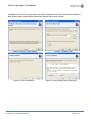
7 Install the click to call plugin
The click to call plugin client is a windows solution that can be installed through an MSI file. This
installer is available for both x86 and x64 platforms and can lead the user to configure the
Alcatel-Lucent Enterprise Services
Page 4/12