1
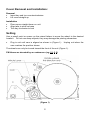
Ribbon Replacement An Acroprint PD122 Replacement Ribbon will provide the best, trouble free performance of your PD100. Warning: Ribbon ink can stain your hands and clothes. Please use extra care when handling ribbon spools (your pants will thank you). Remove cover Grasp both ribbon spools Pull spools straight out from the side of the unit The new empty ribbon spool must be placed on the forward post (Figure 3) Pull new ribbon spools apart about 3-4 inches Push new spools straight onto posts, while aligning the tab on the spool with the slot on the PD100 Remove ribbon slack by turning rear spool tabs clockwise Verify proper printing Install cover (Figure 3) 4