1
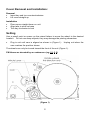
Cover Removal and Installation: Removal Insert key and turn counterclockwise Lift cover straight up Installation Place cover straight down on unit Align tabs in slots on base Turn key clockwise to lock Setting Use a pencil point or eraser on the raised letters to move the wheel to the desired location. Do not use sharp objects; they may damage the printing characters. Plug in unit until cam is aligned as shown in (Figure 1). Unplug unit when the cam reaches the position shown. The wheels can only be turned toward the front of the unit (Figure 1). PM Hours are denoted by an underscore (eg. 12, 5, 3) (Figure 1) 2