1
Instruments & Display Tools
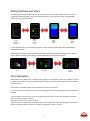
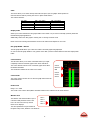
Bar-graphs
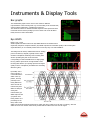
The standard bar-graphs can be used to view numerous different
representations of the incoming audio e.g. level according to the selected scale,
various loudness parameters, sum/difference and more.
The maximum number of channels viewable depends on the specific DK Meter
model and software feature package you have. Please refer to the DK Meter
family section for further information.
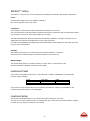
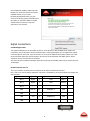
Eye Width
Range: 10% - 100%
All SDI capable DK Meters feature the Eye Width Parameter as default feature.
Inspired by cell phone reception indication, Eye Width expresses the immediate quality of the incoming SDI
signal and allows you to constantly monitor this to avoid any drop outs and instabilities.
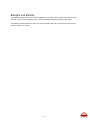
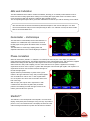
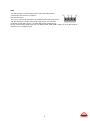
The background for the Eye width feature has its starting
point in the data eye diagram, typically used to depict
deviation in amplitude and timing of the incoming data
stream. By folding the parts of the waveform
corresponding to each individual bit into a single graph,
the eye pattern represents an average statistic of the
incoming data and the eye opening expresses the signal
quality in terms of amplitude (level difference and timing
difference (jitter).
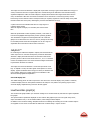
Eye Width, as the
name suggests, is
concerned with the
width of the eye
pattern, focusing
primarily on the
timing differences
which can also be
measured as jitter.
While not being an
actual jitter
measurement, Eye
Width expresses the
eye pattern max.
timing window as a
percentage of the
ideal, where 100%
width is the theoretical optimal signal with no quality loss (90% is likely to be the max. in real life), and 10%
width the worst case scenario where most products will be unable to the lock onto the signal.
22