1
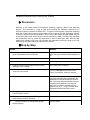
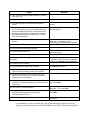
Steps
Actions
10. Verify your role as a submitter and the program is
OTAQ
Click on <Next>
11. Congratulations on the completion. You will now
receive an e-mail
Click on <Finished>
SIGNING OF DIGITAL SIGNATURE AGREEMENT
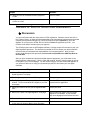
y Discussion
You are now finished with the online portion of CDX registration. Read the screen and click on
the “Finished” button. A digital signature agreement will be automatically generated and a window
containing the agreement will pop up. The OTAQ Program requires approval for use of the
dataflow, so your access to OTAQ: DC Fuel will be on hold until approved by OTAQ. Your
OTAQ account will be activated upon your approval.
The OTAQ program uses an ACES digital certificate. Click the Accept & Print button to print your
digital signature agreement. This document is needed for EPA to accept your digital certificate
and verify that you understand the responsibilities of your digital signature. After you have
printed, read and signed the agreement, fax it as soon as possible to the CDX Help Desk at
301.429.3905.
After you have accepted and printed the digital signature agreement, you will be taken to the
digital certificate voucher page. Click the “print and continue” button to print this page as well as
to navigate to your CDX homepage. You will need to keep the voucher number that appears on
your screen for later use to verify your sponsorship by the EPA and obtain your free digital
certificate.
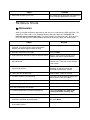
Steps
Actions
1. Click the Print and Continue button to proceed to the
Digital Signature Trust page
Click the <Print & Continue> button
2. Fax the signed agreement to the CDX Help Desk
Fax signed agreement to 301.429.3905
3. The Digital Signature Trust page will open in a new
window. The current window will navigate to you CDX
home page.
View the CDX and navigate to familiarize
yourself with the application
3. Check your email to be sure you are registered with
CDX.
Check your email
4. Return to the open The Digital Signature Trust page.
If the window has closed, enter the Digital
Signature Trust website in your browser
http://www.digsigtrust.com/retrieve-cert.html
5. Read the US Government Warning
Click <OK>
6. Enter the data on each screen until complete, continue
to click next, but choose <Back> when necessary.
Click <Next>