1
User’s Manual
DMX Ultimate Converter
EC-MUX
No user settings are provided for ECMux protocol. The DMX Ultimate Converter will communicate
properly with all EC QD-series digital dimmer racks, Strand/EC CD80AE (ECMux version) and QD
dimmer packs.
MICROPLEX
There are two different types of Microplex protocol, Microplex 1 (NSI) or Microplex 2 (Lightronics).
Choose the appropriate one for your application
KLIEGL
No user settings are provided for K96 output. The DMX Ultimate Converter will communicate
properly with all K96 and K100 digital dimmer racks. These dimmer racks incorporate a
channel/dimmer soft-patch function that must be assigned by the control console. The DMX
Ultimate Converter deals with this by transmitting a 1-to-1-patch file once, each time a valid DMX
signal is applied to its input (ie when the console is turned on or plugged in).
START ADDRESS
Use the Start Address setting to determine the start point of your output data (the default is 1). If
you set a start address of 100, the information from channel one on your input protocol will appear
on channel 100 of the output data stream. The information from channel two on your input protocol
will appear on channel 101, and so on.
6/12K ASSIGNMENTS (AMX ONLY)
Strand CD80® 6 and 12Kw dimmers occupy two AMX positions in the rack, so the output has to be
adjusted accordingly. Use this function to identify which rack slots have 6 or 12K dimmer modules.
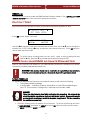
After you have selected AMX192 as an output protocol, use the X button to locate
◄ 6/12K ASSIGN ►
▲
AMX 1
▼
6/12K assignments are made for each AMX output so they have to be defined for both AMX 1 and
AMX 2. Use the T button to select which AMX line you need to configure and press OK.
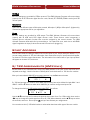
To change the existing 6/12K assignment select EDIT. You will see
SLOT#
TYPE
▲ 001 ▼ ◄ 2K ►
Use the STarrow keys to first select the desired slot number for a 6 or 12K module, then use the
WX keys to change the module type from 2K to 6/12K. When selected, use the ST keys to select
the next slot, and so on. Do not press OK until you have finished your assignments.
You can also use the 6/12K-edit function to review what slots have which type of dimmer module.
6