1
8100 Modules Series
Portable, modular platform designed for the construction,
validation and maintenance of optical fiber networks
User Manual
8100 Modules Series
Portable, modular platform designed for the construction,
validation and maintenance of optical fiber networks
User Manual
Notice Every effort was made to ensure that the information in this document
was accurate at the time of printing. However, information is subject to
change without notice, and JDSU reserves the right to provide an
addendum to this document with information not available at the time that
this document was created.
Copyright © Copyright 2006 JDSU, LLC. All rights reserved. JDSU, Enabling
Broadband and Optical Innovation, and its logo are trademarks of JDSU,
LLC. All other trademarks and registered trademarks are the property of
their respective owners. No part of this guide may be reproduced or
transmitted electronically or otherwise without written permission of the
publisher.
Trademarks JDSU is a trademark of JDSU in the United States and other countries.
Microsoft, Windows, Windows CE, Windows NT, MS-DOS, Excel, Word
and Microsoft Internet Explorer are either trademarks or registered trademarks of Microsoft Corporation in the United States and/or other countries.
Specifications, terms, and conditions are subject to change without
notice. All trademarks and registered trademarks are the property of their
respective companies.
Manual This guide is a product of JDSU's Technical Information Development
Department. This manual gives you the main information to install, start
and use the 8100 Module Series.
WEEE Directive JDSU has established processes in compliance with the Waste Electrical
Compliance and Electronic Equipment (WEEE) Directive, 2002/96/EC.
This product should not be disposed of as unsorted municipal waste and
should be collected separately and disposed of according to your
national regulations. In the European Union, all equipment purchased
from JDSU after 2005-08-13 can be returned for disposal at the end of
its useful life. JDSU will ensure that all waste equipment returned is
reused, recycled, or disposed of in an environmentally friendly manner,
and in compliance with all applicable national and international waste
legislation.
It is the responsibility of the equipment owner to return the equipment to
JDSU for appropriate disposal. If the equipment was imported by a
reseller whose name or logo is marked on the equipment, then the owner
should return the equipment directly to the reseller.
User Manual
780000102/16
v
Instructions for returning waste equipment to JDSU can be found in the
Environmental section of JDSU’s web site at www.jdsu.com. If you have
questions concerning disposal of your equipment, contact JDSU’s
WEEE Program Management team at [email protected].
vi
User Manual
780000102/16
Table of Contents
About this guide
xxi
Purpose and scope . . . . . . . . . . . . . . . . . . . . . . . . . . . . . . xxii
Assumptions . . . . . . . . . . . . . . . . . . . . . . . . . . . . . . . . . . . xxii
Technical assistance . . . . . . . . . . . . . . . . . . . . . . . . . . . . . xxii
Recycling Information . . . . . . . . . . . . . . . . . . . . . . . . . . . . xxiii
Conventions . . . . . . . . . . . . . . . . . . . . . . . . . . . . . . . . . . . . xxiii
Chapter 1
Principles of measurement
1
Principle of reflectometry measurements . . . . . . . . . . . . . . 2
Information yielded by the measurement . . . . . . . . . . . . . . . . 2
Validity of Measurement . . . . . . . . . . . . . . . . . . . . . . . . . . . . . 3
Reflectance . . . . . . . . . . . . . . . . . . . . . . . . . . . . . . . . . . . . . . 3
Principle of bi-directional measurement . . . . . . . . . . . . . . . 4
Principle of WDM / OSA analysis . . . . . . . . . . . . . . . . . . . . . 5
Measurement results . . . . . . . . . . . . . . . . . . . . . . . . . . . . . . . 6
DFB analysis . . . . . . . . . . . . . . . . . . . . . . . . . . . . . . . . . . . . . 6
PMD principle . . . . . . . . . . . . . . . . . . . . . . . . . . . . . . . . . . . . . 7
Method used to measure the PMD . . . . . . . . . . . . . . . . . . . . . 8
Principle of measurement of Chromatic Dispersion (CD
OTDR) using pulse delay method . . . . . . . . . . . . . . . . . . . . 9
Method of CD measurement used by the Base Unit . . . . . . 12
Principle of measurement of Chromatic Dispersion (CD
ODM) using phase shift method . . . . . . . . . . . . . . . . . . . . . 13
User Manual
780000102/16
vii
Table of Contents
Principle of optical power and attenuation measurements
(OFI) . . . . . . . . . . . . . . . . . . . . . . . . . . . . . . . . . . . . . . . . . . . . 13
Power measurement . . . . . . . . . . . . . . . . . . . . . . . . . . . . . . 13
Attenuation measurements (optical link loss) . . . . . . . . . . . . 14
Standards and l0 for different types of fiber . . . . . . . . . . . 15
Chapter 2
Getting started
17
Adapting MTS 5000 series plug-ins . . . . . . . . . . . . . . . . . . 18
Installing a plug-in in a receptacle and removing it . . . . . . . 18
Removing a plug-in from a receptacle . . . . . . . . . . . . . . . . . 19
Inserting a plug-in into receptacle . . . . . . . . . . . . . . . . . . . . 19
Universal connectors and adapters . . . . . . . . . . . . . . . . . . 19
Adapter types . . . . . . . . . . . . . . . . . . . . . . . . . . . . . . . . . . . . 19
Switching adapter type . . . . . . . . . . . . . . . . . . . . . . . . . . . . . 20
Cleaning the universal connector . . . . . . . . . . . . . . . . . . . . . 20
Installing a new version of the software . . . . . . . . . . . . . . 21
Where and how to obtain the new software . . . . . . . . . . . . . 21
Downloading from Internet . . . . . . . . . . . . . . . . . . . . . . . . . . 21
Installation from a PC . . . . . . . . . . . . . . . . . . . . . . . . . . . . . . 22
Installation from the harddisk of a PC . . . . . . . . . . . . . . . . . 22
Installation from the CD-ROM drive of a PC . . . . . . . . . . . . 24
Installation from Ethernet . . . . . . . . . . . . . . . . . . . . . . . . . . . 25
Installation from a CD-ROM (with MTS/T-BERD 8000 only) 26
Installation from a CompactFlash memory card (with MTS/TBERD 8000 only) . . . . . . . . . . . . . . . . . . . . . . . . . . . . . . . . . 27
Installation from a USB memory stick . . . . . . . . . . . . . . . . . 28
Chapter 3
Graphical User Interface
31
Display screen . . . . . . . . . . . . . . . . . . . . . . . . . . . . . . . . . . . 32
Top status bar . . . . . . . . . . . . . . . . . . . . . . . . . . . . . . . . . . . .
Mini-trace . . . . . . . . . . . . . . . . . . . . . . . . . . . . . . . . . . . . . . .
Signature of the measurement . . . . . . . . . . . . . . . . . . . . . . .
Main display zone . . . . . . . . . . . . . . . . . . . . . . . . . . . . . . . .
Tabs . . . . . . . . . . . . . . . . . . . . . . . . . . . . . . . . . . . . . . . . . . .
Soft keys . . . . . . . . . . . . . . . . . . . . . . . . . . . . . . . . . . . . . . .
32
33
33
33
33
34
Icons . . . . . . . . . . . . . . . . . . . . . . . . . . . . . . . . . . . . . . . . . . 34
Selection keys . . . . . . . . . . . . . . . . . . . . . . . . . . . . . . . . . . . 35
Color of the keys . . . . . . . . . . . . . . . . . . . . . . . . . . . . . . . . . 35
Using an external keyboard, mouse and screen touch
(options) . . . . . . . . . . . . . . . . . . . . . . . . . . . . . . . . . . . . . . . . 35
Virtual control buttons bar . . . . . . . . . . . . . . . . . . . . . . . . . . 35
User Manual
780000102/16
viii
Table of Contents
Equivalence between external keyboard and Base Unit . . . 36
Editing text using the external keyboard . . . . . . . . . . . . . . . 37
Functions relating to display of a trace . . . . . . . . . . . . . . . 37
Display of the results on the trace . . . . . . . . . . . . . . . . . . . . 37
Cursors . . . . . . . . . . . . . . . . . . . . . . . . . . . . . . . . . . . . . . . . . 38
Positioning the cursor . . . . . . . . . . . . . . . . . . . . . . . . . . . . . 38
Selection of the type of cursor . . . . . . . . . . . . . . . . . . . . . . . 38
Zoom and Shift functions . . . . . . . . . . . . . . . . . . . . . . . . . . . 39
Zoom function . . . . . . . . . . . . . . . . . . . . . . . . . . . . . . . . . . . 39
Shift function . . . . . . . . . . . . . . . . . . . . . . . . . . . . . . . . . . . . 39
Zoom Auto (OTDR) . . . . . . . . . . . . . . . . . . . . . . . . . . . . . . . 40
Full scale (OSA / PMD / AP) . . . . . . . . . . . . . . . . . . . . . . . . 40
Overlay trace function . . . . . . . . . . . . . . . . . . . . . . . . . . . . . 40
Overlaying several traces stored in memory . . . . . . . . . . . . 41
Display of traces in overlay . . . . . . . . . . . . . . . . . . . . . . . . . 41
Adding traces in overlay . . . . . . . . . . . . . . . . . . . . . . . . . . . . 41
Overlaying the current trace . . . . . . . . . . . . . . . . . . . . . . . . 42
Swapping overlay traces . . . . . . . . . . . . . . . . . . . . . . . . . . . 42
Changing the traces position . . . . . . . . . . . . . . . . . . . . . . . . 42
Trace resulting from the difference between two traces (OSA
module) . . . . . . . . . . . . . . . . . . . . . . . . . . . . . . . . . . . . . . . . 43
Removing a trace . . . . . . . . . . . . . . . . . . . . . . . . . . . . . . . . . 43
Removing the current trace in overlay . . . . . . . . . . . . . . . . . 43
Removing all the the traces in overlay . . . . . . . . . . . . . . . . . 43
Quitting the overlay menu . . . . . . . . . . . . . . . . . . . . . . . . . . 43
Saving when the instrument is shut down . . . . . . . . . . . . 43
Chapter 4
Reflectometry measurements
45
Selecting the function . . . . . . . . . . . . . . . . . . . . . . . . . . . . . 46
Configuring the reflectometry test . . . . . . . . . . . . . . . . . . . 46
Acquisition parameters . . . . . . . . . . . . . . . . . . . . . . . . . . . . . 47
Measurement parameters . . . . . . . . . . . . . . . . . . . . . . . . . . 50
Result screen . . . . . . . . . . . . . . . . . . . . . . . . . . . . . . . . . . . . 54
Acquisition . . . . . . . . . . . . . . . . . . . . . . . . . . . . . . . . . . . . . . 55
Real time mode . . . . . . . . . . . . . . . . . . . . . . . . . . . . . . . . . .
Quick Link Test mode . . . . . . . . . . . . . . . . . . . . . . . . . . . . . .
Expert acquisition mode . . . . . . . . . . . . . . . . . . . . . . . . . . . .
Multi-wavelength acquisition . . . . . . . . . . . . . . . . . . . . . . . .
56
59
61
61
Trace display functions . . . . . . . . . . . . . . . . . . . . . . . . . . . . 62
Displaying results on the trace . . . . . . . . . . . . . . . . . . . . . . . 62
Events . . . . . . . . . . . . . . . . . . . . . . . . . . . . . . . . . . . . . . . . . . 63
Trace/Event functions . . . . . . . . . . . . . . . . . . . . . . . . . . . . . . 63
Criteria for display of an event . . . . . . . . . . . . . . . . . . . . . . . 63
User Manual
780000102/16
ix
Table of Contents
Table of results . . . . . . . . . . . . . . . . . . . . . . . . . . . . . . . . . . . 64
Information provided for each event detected . . . . . . . . . . . 66
Modifying types of events . . . . . . . . . . . . . . . . . . . . . . . . . . . 67
Table notes . . . . . . . . . . . . . . . . . . . . . . . . . . . . . . . . . . . . . . 68
Automatic measurement and detection . . . . . . . . . . . . . . . 70
Addition of markers . . . . . . . . . . . . . . . . . . . . . . . . . . . . . . . 71
Representation of the markers . . . . . . . . . . . . . . . . . . . . . . . 71
Hints on the positioning of markers . . . . . . . . . . . . . . . . . . . 72
Deleting markers . . . . . . . . . . . . . . . . . . . . . . . . . . . . . . . . . 72
Manual measurements . . . . . . . . . . . . . . . . . . . . . . . . . . . . 72
Measurements of slope . . . . . . . . . . . . . . . . . . . . . . . . . . . . 73
Result of slope measurement . . . . . . . . . . . . . . . . . . . . . . . 73
Deleting a slope measurement . . . . . . . . . . . . . . . . . . . . . . 74
Performing splice and reflectance measurements . . . . . . . . 74
Two points method . . . . . . . . . . . . . . . . . . . . . . . . . . . . . . . 74
Five points method . . . . . . . . . . . . . . . . . . . . . . . . . . . . . . . 75
Manual measurement of ORL . . . . . . . . . . . . . . . . . . . . . . . 75
ORL on a saturated trace . . . . . . . . . . . . . . . . . . . . . . . . . . . 76
Memorization of the position of events . . . . . . . . . . . . . . . 76
Fault Locator Mode . . . . . . . . . . . . . . . . . . . . . . . . . . . . . . . 77
Function . . . . . . . . . . . . . . . . . . . . . . . . . . . . . . . . . . . . . . . .
Choosing the function . . . . . . . . . . . . . . . . . . . . . . . . . . . . .
Test configuration . . . . . . . . . . . . . . . . . . . . . . . . . . . . . . . . .
Starting the test . . . . . . . . . . . . . . . . . . . . . . . . . . . . . . . . . .
77
77
78
79
Reference Trace function . . . . . . . . . . . . . . . . . . . . . . . . . . 80
Using the reference trace function in the Result page . . . . . 81
Using the reference trace function in the explorer . . . . . . . . 82
File Management . . . . . . . . . . . . . . . . . . . . . . . . . . . . . . . . . 82
Storing OTDR measurements . . . . . . . . . . . . . . . . . . . . . . . 82
Recalling OTDR files . . . . . . . . . . . . . . . . . . . . . . . . . . . . . . 83
Chapter 5
Source option of the OTDR Modules
85
Source option . . . . . . . . . . . . . . . . . . . . . . . . . . . . . . . . . . . . 86
Activating the Source fonction . . . . . . . . . . . . . . . . . . . . . . . 86
Configuring and displaying the parameters of the source . . 86
Chapter 6
Bi-directional OTDR
87
Definition of terms used . . . . . . . . . . . . . . . . . . . . . . . . . . . 88
Description of the measurement . . . . . . . . . . . . . . . . . . . . 88
Summary of the automatic operation procedure . . . . . . . . . 89
User Manual
780000102/16
x
Table of Contents
Configuration of bi-directional measurement . . . . . . . . . . 90
Acquisition parameters . . . . . . . . . . . . . . . . . . . . . . . . . . . . .
Measurement parameters . . . . . . . . . . . . . . . . . . . . . . . . . .
Results Screen parameters . . . . . . . . . . . . . . . . . . . . . . . . .
Configuration of files parameters . . . . . . . . . . . . . . . . . . . . .
90
91
91
91
Performing a bi-directional measurement . . . . . . . . . . . . . 92
Process Display . . . . . . . . . . . . . . . . . . . . . . . . . . . . . . . . . . 92
Fiber link check . . . . . . . . . . . . . . . . . . . . . . . . . . . . . . . . . . 95
Measurement process . . . . . . . . . . . . . . . . . . . . . . . . . . . . . 95
Trace display functions . . . . . . . . . . . . . . . . . . . . . . . . . . . . 97
Origin and End traces . . . . . . . . . . . . . . . . . . . . . . . . . . . . . 98
OEO trace . . . . . . . . . . . . . . . . . . . . . . . . . . . . . . . . . . . . . . 99
OEO Result table . . . . . . . . . . . . . . . . . . . . . . . . . . . . . . . . . 99
Automatic measurement and Addition of markers in OEO
page . . . . . . . . . . . . . . . . . . . . . . . . . . . . . . . . . . . . . . . . . . . 100
Key <Del Res/Auto Meas> : . . . . . . . . . . . . . . . . . . . . . . . . 100
Addition of markers . . . . . . . . . . . . . . . . . . . . . . . . . . . . . . 100
Markers display . . . . . . . . . . . . . . . . . . . . . . . . . . . . . . . . . 100
File management . . . . . . . . . . . . . . . . . . . . . . . . . . . . . . . . 100
Storing OEO measurements . . . . . . . . . . . . . . . . . . . . . . . 100
Recalling OEO traces . . . . . . . . . . . . . . . . . . . . . . . . . . . . . 101
Test of a cable . . . . . . . . . . . . . . . . . . . . . . . . . . . . . . . . . . 101
Troubleshooting . . . . . . . . . . . . . . . . . . . . . . . . . . . . . . . . . 102
Warning/errors after pressing the key START . . . . . . . . 102
Warning/errors resulting from checking common configurations
103
Chapter 7
Optical Spectrum Measurement
105
Configuration of the instrument . . . . . . . . . . . . . . . . . . . . 106
WDM / OSA test configuration . . . . . . . . . . . . . . . . . . . . . 106
Acquisition Parameters . . . . . . . . . . . . . . . . . . . . . . . . . . . 108
Measurement parameters . . . . . . . . . . . . . . . . . . . . . . . . . .110
Parameters of display and analysis of the results . . . . . . . .113
Acquisition . . . . . . . . . . . . . . . . . . . . . . . . . . . . . . . . . . . . . 116
Trace display functions . . . . . . . . . . . . . . . . . . . . . . . . . . . 117
Display of the WDM / OSA results . . . . . . . . . . . . . . . . . . . .117
Table of results . . . . . . . . . . . . . . . . . . . . . . . . . . . . . . . . . . 120
Channel filtering . . . . . . . . . . . . . . . . . . . . . . . . . . . . . . . . . 124
Field of application . . . . . . . . . . . . . . . . . . . . . . . . . . . . . . . 124
Configuration . . . . . . . . . . . . . . . . . . . . . . . . . . . . . . . . . . . 124
Using channel filtering . . . . . . . . . . . . . . . . . . . . . . . . . . . . 125
Drift measurement . . . . . . . . . . . . . . . . . . . . . . . . . . . . . . . 125
User Manual
780000102/16
xi
Table of Contents
EDFA results analysis . . . . . . . . . . . . . . . . . . . . . . . . . . . . 127
EDFA test configuration . . . . . . . . . . . . . . . . . . . . . . . . . . . 127
EDFA measurements . . . . . . . . . . . . . . . . . . . . . . . . . . . . . 127
EDFA results . . . . . . . . . . . . . . . . . . . . . . . . . . . . . . . . . . . 128
DFB results analysis . . . . . . . . . . . . . . . . . . . . . . . . . . . . . 129
DFB test configuration . . . . . . . . . . . . . . . . . . . . . . . . . . . . 129
DFB measurements . . . . . . . . . . . . . . . . . . . . . . . . . . . . . . 130
DFB results . . . . . . . . . . . . . . . . . . . . . . . . . . . . . . . . . . . . 130
Testing ROADM networks . . . . . . . . . . . . . . . . . . . . . . . . . 131
File Management . . . . . . . . . . . . . . . . . . . . . . . . . . . . . . . . 133
Storing OSA measurements . . . . . . . . . . . . . . . . . . . . . . . . 133
Recalling OSA files . . . . . . . . . . . . . . . . . . . . . . . . . . . . . . 133
Chapter 8
Polarization Mode Dispersion Measurement
135
Recommended equipment . . . . . . . . . . . . . . . . . . . . . . . . 136
PMD test setup menu . . . . . . . . . . . . . . . . . . . . . . . . . . . . 136
Test Auto Configuration . . . . . . . . . . . . . . . . . . . . . . . . . . . 137
Manual Mode Configuration . . . . . . . . . . . . . . . . . . . . . . . 137
Acquisition parameters . . . . . . . . . . . . . . . . . . . . . . . . . . . . 138
Measurement parameters . . . . . . . . . . . . . . . . . . . . . . . . . 139
Results Screen parameters . . . . . . . . . . . . . . . . . . . . . . . . 140
Performing a PMD measurement with a 5073XXX plug-in or
OSA-XXX series module . . . . . . . . . . . . . . . . . . . . . . . . . . 141
Performing the reference . . . . . . . . . . . . . . . . . . . . . . . . . . 141
Remote operator . . . . . . . . . . . . . . . . . . . . . . . . . . . . . . . . 141
Local operator . . . . . . . . . . . . . . . . . . . . . . . . . . . . . . . . . . 142
Performing the measurement . . . . . . . . . . . . . . . . . . . . . . . 144
Performing a PMD measurement with a 81XXX plug-in or an
ODM plug-in . . . . . . . . . . . . . . . . . . . . . . . . . . . . . . . . . . . . 145
Remote operator . . . . . . . . . . . . . . . . . . . . . . . . . . . . . . . . 145
Local operator . . . . . . . . . . . . . . . . . . . . . . . . . . . . . . . . . . 145
Display of results . . . . . . . . . . . . . . . . . . . . . . . . . . . . . . . . 146
Spectrum/FFT menu key . . . . . . . . . . . . . . . . . . . . . . . . . . 146
Display of PMD results . . . . . . . . . . . . . . . . . . . . . . . . . . . . 147
Statistics results . . . . . . . . . . . . . . . . . . . . . . . . . . . . . . . . 149
Table of results . . . . . . . . . . . . . . . . . . . . . . . . . . . . . . . . . . 149
Graphics display . . . . . . . . . . . . . . . . . . . . . . . . . . . . . . . . . 149
Information messages . . . . . . . . . . . . . . . . . . . . . . . . . . . . 150
File Management . . . . . . . . . . . . . . . . . . . . . . . . . . . . . . . . 151
Storing PMD results . . . . . . . . . . . . . . . . . . . . . . . . . . . . . . 151
Recalling PMD files . . . . . . . . . . . . . . . . . . . . . . . . . . . . . . 151
PMD standards and limits . . . . . . . . . . . . . . . . . . . . . . . . . 152
User Manual
780000102/16
xii
Table of Contents
Abacus for a typical system . . . . . . . . . . . . . . . . . . . . . . . . 152
Chapter 9
Attenuation profile
155
Recommended equipment . . . . . . . . . . . . . . . . . . . . . . . . 156
AP Setup menu . . . . . . . . . . . . . . . . . . . . . . . . . . . . . . . . . 156
Acquisition parameters . . . . . . . . . . . . . . . . . . . . . . . . . . . . 157
Acquisition band . . . . . . . . . . . . . . . . . . . . . . . . . . . . . . . . 157
Averaging acquisition . . . . . . . . . . . . . . . . . . . . . . . . . . . . 158
Make Reference . . . . . . . . . . . . . . . . . . . . . . . . . . . . . . . . 158
Measurements . . . . . . . . . . . . . . . . . . . . . . . . . . . . . . . . . . 158
Results Screen . . . . . . . . . . . . . . . . . . . . . . . . . . . . . . . . . . 158
AP Measurement . . . . . . . . . . . . . . . . . . . . . . . . . . . . . . . . 159
Performing the reference . . . . . . . . . . . . . . . . . . . . . . . . . . 160
Performing a AP measurement . . . . . . . . . . . . . . . . . . . . 161
Display of AP results . . . . . . . . . . . . . . . . . . . . . . . . . . . . . 162
Trace display . . . . . . . . . . . . . . . . . . . . . . . . . . . . . . . . . . . 163
Results table . . . . . . . . . . . . . . . . . . . . . . . . . . . . . . . . . . . . 165
File Management . . . . . . . . . . . . . . . . . . . . . . . . . . . . . . . . 165
Storing Attenuation Profile measurements . . . . . . . . . . . . . 165
Recalling AP files . . . . . . . . . . . . . . . . . . . . . . . . . . . . . . . . 166
Chapter 10
CD measurements using pulse delay method
167
Configuring the instrument . . . . . . . . . . . . . . . . . . . . . . . . 168
Configuring the CD test . . . . . . . . . . . . . . . . . . . . . . . . . . . 168
Acquisition parameters . . . . . . . . . . . . . . . . . . . . . . . . . . . . 169
Parameters of analysis . . . . . . . . . . . . . . . . . . . . . . . . . . . . 170
Results Screen parameters . . . . . . . . . . . . . . . . . . . . . . . . 171
Alarms . . . . . . . . . . . . . . . . . . . . . . . . . . . . . . . . . . . . . . . . 171
1st analysis window . . . . . . . . . . . . . . . . . . . . . . . . . . . . . . 172
Min. wavelength . . . . . . . . . . . . . . . . . . . . . . . . . . . . . . . . 172
Max. wavelength . . . . . . . . . . . . . . . . . . . . . . . . . . . . . . . . 172
Inc. wavelength . . . . . . . . . . . . . . . . . . . . . . . . . . . . . . . . . 173
Normalized to km . . . . . . . . . . . . . . . . . . . . . . . . . . . . . . . 173
Unit . . . . . . . . . . . . . . . . . . . . . . . . . . . . . . . . . . . . . . . . . . 173
Making a chromatic dispersion measurement . . . . . . . . 173
Measurement process . . . . . . . . . . . . . . . . . . . . . . . . . . . . 173
Conditions of measurement . . . . . . . . . . . . . . . . . . . . . . . . 173
User Manual
780000102/16
xiii
Table of Contents
CD acquisition mode . . . . . . . . . . . . . . . . . . . . . . . . . . . . . 174
Automatic acquisition mode . . . . . . . . . . . . . . . . . . . . . . . 174
Manual acquisition mode . . . . . . . . . . . . . . . . . . . . . . . . . . 174
End of acquisition . . . . . . . . . . . . . . . . . . . . . . . . . . . . . . . 175
Choice of CD result . . . . . . . . . . . . . . . . . . . . . . . . . . . . . . 176
Return to this chosen screen . . . . . . . . . . . . . . . . . . . . . . . 176
Configuration . . . . . . . . . . . . . . . . . . . . . . . . . . . . . . . . . . . 176
Information always displayed . . . . . . . . . . . . . . . . . . . . . . . 176
Detection of end of fiber . . . . . . . . . . . . . . . . . . . . . . . . . . . 177
Functions available . . . . . . . . . . . . . . . . . . . . . . . . . . . . . . 177
Placing of markers . . . . . . . . . . . . . . . . . . . . . . . . . . . . . . . 178
Information displayed for the markers . . . . . . . . . . . . . . . . 178
Delay, dispersion and slope results . . . . . . . . . . . . . . . . . . 180
Information displayed for the results . . . . . . . . . . . . . . . . . 180
Choice of curve . . . . . . . . . . . . . . . . . . . . . . . . . . . . . . . . . 181
Functions available . . . . . . . . . . . . . . . . . . . . . . . . . . . . . . 181
Alarms . . . . . . . . . . . . . . . . . . . . . . . . . . . . . . . . . . . . . . . . 182
Measurement of CD on a section . . . . . . . . . . . . . . . . . . . . 183
Acquiring a trace for CD measurement on a section . . . . . 183
CD measurement on a section using stored traces . . . . . . 184
File Management . . . . . . . . . . . . . . . . . . . . . . . . . . . . . . . . 184
Storing CD measurements . . . . . . . . . . . . . . . . . . . . . . . . . 184
Recalling CD files . . . . . . . . . . . . . . . . . . . . . . . . . . . . . . . . 185
CD standards and limits . . . . . . . . . . . . . . . . . . . . . . . . . . 185
Source function . . . . . . . . . . . . . . . . . . . . . . . . . . . . . . . . . 186
Chapter 11
CD measurements using phase shift method
189
Selection of the CD function . . . . . . . . . . . . . . . . . . . . . . . 190
Configuring the CD test . . . . . . . . . . . . . . . . . . . . . . . . . . . 190
Acquisition parameters . . . . . . . . . . . . . . . . . . . . . . . . . . . . 191
Measurements parameters . . . . . . . . . . . . . . . . . . . . . . . . 192
Results Screen parameters . . . . . . . . . . . . . . . . . . . . . . . . 193
Alarms . . . . . . . . . . . . . . . . . . . . . . . . . . . . . . . . . . . . . . . . 193
Wavelength Range . . . . . . . . . . . . . . . . . . . . . . . . . . . . . . 193
Normalized to km . . . . . . . . . . . . . . . . . . . . . . . . . . . . . . . 194
Show Measured Points . . . . . . . . . . . . . . . . . . . . . . . . . . . 194
Show Fit Formula . . . . . . . . . . . . . . . . . . . . . . . . . . . . . . . 194
Performing a Reference measurement . . . . . . . . . . . . . . 194
Saving a reference measurement . . . . . . . . . . . . . . . . . . . 196
Loading existing reference . . . . . . . . . . . . . . . . . . . .197
Performing a Chromatic Dispersion Measurement . . . . 197
Performing a CD measurement through amplifiers . . . . 198
User Manual
780000102/16
xiv
Table of Contents
Display of CD results . . . . . . . . . . . . . . . . . . . . . . . . . . . . . 199
Functions available . . . . . . . . . . . . . . . . . . . . . . . . . . . . . . 200
File Management . . . . . . . . . . . . . . . . . . . . . . . . . . . . . . . . 202
Storing CD measurements . . . . . . . . . . . . . . . . . . . . . . . . . 202
Recalling reference or CD measurement files . . . . . . . . . . 202
CD standards and limits . . . . . . . . . . . . . . . . . . . . . . . . . . 203
Chapter 12
OFI Module
205
OFI module . . . . . . . . . . . . . . . . . . . . . . . . . . . . . . . . . . . . . 206
Selection of the OFI module . . . . . . . . . . . . . . . . . . . . . . . 206
LTS function . . . . . . . . . . . . . . . . . . . . . . . . . . . . . . . . . . . . 206
Principle of the optical power and attenuation measurements .
206
Power measurement . . . . . . . . . . . . . . . . . . . . . . . . . . . . . 206
Attenuation measurements (optical link loss) . . . . . . . . . . 207
Connections to the power meter and the source . . . . . . . . 208
Configuring the LTS . . . . . . . . . . . . . . . . . . . . . . . . . . . . . . 208
Configuring the measurement parameters of the power meter
208
Configuring the alarm parameters of the power meter . . . 210
Configuring and displaying the parameters of the source . 210
Display of results and command . . . . . . . . . . . . . . . . . . . . .211
Result of the measurement in progress . . . . . . . . . . . . . . . 211
Table of results . . . . . . . . . . . . . . . . . . . . . . . . . . . . . . . . . 212
Commands of the power meter parameters . . . . . . . . . . . 212
Making a measurement . . . . . . . . . . . . . . . . . . . . . . . . . . . 213
Power measurement . . . . . . . . . . . . . . . . . . . . . . . . . . . . . 213
Optical link loss . . . . . . . . . . . . . . . . . . . . . . . . . . . . . . . . . 213
FOX Function . . . . . . . . . . . . . . . . . . . . . . . . . . . . . . . . . . . 214
Configuration of the FOX automatic measurement . . . . . . 214
Acquisition parameters . . . . . . . . . . . . . . . . . . . . . . . . . . . 215
Results screen parameters . . . . . . . . . . . . . . . . . . . . . . . . 215
File Storage parameters . . . . . . . . . . . . . . . . . . . . . . . . . . 216
Establishing a reference . . . . . . . . . . . . . . . . . . . . . . . . . . . 216
Establishing a reference for loss measurement . . . . . . . . . 217
Taking a side by side reference . . . . . . . . . . . . . . . . . . . . . 217
Taking the reference in a loop-back mode . . . . . . . . . . . . 218
Establishing a reference for an ORL measurement . . . . . . 219
ORL Emitted power . . . . . . . . . . . . . . . . . . . . . . . . . . . . . . 219
ORL Zero adjustment . . . . . . . . . . . . . . . . . . . . . . . . . . . . 220
Measurement acquisition . . . . . . . . . . . . . . . . . . . . . . . . . . 220
Choosing the fiber to be tested . . . . . . . . . . . . . . . . . . . . . 221
Making the measurement . . . . . . . . . . . . . . . . . . . . . . . . . 221
User Manual
780000102/16
xv
Table of Contents
Identifying the distant module . . . . . . . . . . . . . . . . . . . . . . 222
Displaying results for a FOX automatic measurement . . . . 222
Sending a message . . . . . . . . . . . . . . . . . . . . . . . . . . . . . . 223
Manual ORL . . . . . . . . . . . . . . . . . . . . . . . . . . . . . . . . . . . . 224
Establishing a reference for an ORL manual measurement
Measurement acquisition . . . . . . . . . . . . . . . . . . . . . . . . . .
Making the measurement . . . . . . . . . . . . . . . . . . . . . . . . . .
Display of results for an ORL manual measurement . . . . .
225
225
225
225
File Management . . . . . . . . . . . . . . . . . . . . . . . . . . . . . . . . 226
Storing results . . . . . . . . . . . . . . . . . . . . . . . . . . . . . . . . . . 226
Recalling files . . . . . . . . . . . . . . . . . . . . . . . . . . . . . . . . . . . 227
Chapter 13
Multi Test Access Unit
229
Function of the MTAU module . . . . . . . . . . . . . . . . . . . . .
Connections . . . . . . . . . . . . . . . . . . . . . . . . . . . . . . . . . . . .
Configuration . . . . . . . . . . . . . . . . . . . . . . . . . . . . . . . . . . .
Manual mode . . . . . . . . . . . . . . . . . . . . . . . . . . . . . . . . . . .
Auto mode . . . . . . . . . . . . . . . . . . . . . . . . . . . . . . . . . . . . .
230
230
231
231
232
Configuration of the sequence of tests . . . . . . . . . . . . . . . . 233
Performing the sequence of tests . . . . . . . . . . . . . . . . . . . 234
Use of the script (specific client option) . . . . . . . . . . . . . 235
Connect the modules to the MTAU . . . . . . . . . . . . . . . . . . 235
Launching the Script . . . . . . . . . . . . . . . . . . . . . . . . . . . . . 236
Chapter 14
Broadband source BBS
241
Function of the BBS module . . . . . . . . . . . . . . . . . . . . . . . 242
Activation process . . . . . . . . . . . . . . . . . . . . . . . . . . . . . . . 242
Remote interlock connector . . . . . . . . . . . . . . . . . . . . . . . 244
Chapter 15
File management
245
File configuration menu . . . . . . . . . . . . . . . . . . . . . . . . . . 246
Managing tabs . . . . . . . . . . . . . . . . . . . . . . . . . . . . . . . . . . 246
File signature . . . . . . . . . . . . . . . . . . . . . . . . . . . . . . . . . . . 247
File information . . . . . . . . . . . . . . . . . . . . . . . . . . . . . . . . . . 247
Current directory . . . . . . . . . . . . . . . . . . . . . . . . . . . . . . . . 247
Rules for naming files . . . . . . . . . . . . . . . . . . . . . . . . . . . . 247
Name of a file . . . . . . . . . . . . . . . . . . . . . . . . . . . . . . . . . . 249
Auto store . . . . . . . . . . . . . . . . . . . . . . . . . . . . . . . . . . . . . 249
File Type . . . . . . . . . . . . . . . . . . . . . . . . . . . . . . . . . . . . . . 249
xvi
User Manual
780000102/16
Table of Contents
Fiber Description . . . . . . . . . . . . . . . . . . . . . . . . . . . . . . . . 249
Fiber ID and Fiber Number . . . . . . . . . . . . . . . . . . . . . . . . 250
Color code . . . . . . . . . . . . . . . . . . . . . . . . . . . . . . . . . . . . . 250
Fiber Nbr Increment . . . . . . . . . . . . . . . . . . . . . . . . . . . . . 250
Link description . . . . . . . . . . . . . . . . . . . . . . . . . . . . . . . . . 251
Extremities are different . . . . . . . . . . . . . . . . . . . . . . . . . . . 251
Cable Id . . . . . . . . . . . . . . . . . . . . . . . . . . . . . . . . . . . . . . . 251
Direction . . . . . . . . . . . . . . . . . . . . . . . . . . . . . . . . . . . . . . 252
Origin . . . . . . . . . . . . . . . . . . . . . . . . . . . . . . . . . . . . . . . . . 252
End Location . . . . . . . . . . . . . . . . . . . . . . . . . . . . . . . . . . . 252
Cable structure . . . . . . . . . . . . . . . . . . . . . . . . . . . . . . . . . 252
Operator . . . . . . . . . . . . . . . . . . . . . . . . . . . . . . . . . . . . . . 254
Comment . . . . . . . . . . . . . . . . . . . . . . . . . . . . . . . . . . . . . . 254
File export . . . . . . . . . . . . . . . . . . . . . . . . . . . . . . . . . . . . . 255
Buttons on the right of the screen . . . . . . . . . . . . . . . . . . . 255
Explorer Function . . . . . . . . . . . . . . . . . . . . . . . . . . . . . . . 256
Description of the explorer . . . . . . . . . . . . . . . . . . . . . . . . . 256
Storage media . . . . . . . . . . . . . . . . . . . . . . . . . . . . . . . . . . 257
Storage media built into the Base Unit . . . . . . . . . . . . . . . 257
External USB storage media . . . . . . . . . . . . . . . . . . . . . . . 257
Standard Compact Flash card (8000 platform only) . . . . . 259
Remote Base Unit and data transfer . . . . . . . . . . . . . . . . . 260
Abbreviations for storage media . . . . . . . . . . . . . . . . . . . . 260
Directory edit function . . . . . . . . . . . . . . . . . . . . . . . . . . . . 260
Selection of directories . . . . . . . . . . . . . . . . . . . . . . . . . . . 261
Edition of directories . . . . . . . . . . . . . . . . . . . . . . . . . . . . . 261
File editing function . . . . . . . . . . . . . . . . . . . . . . . . . . . . . . 261
Format of files . . . . . . . . . . . . . . . . . . . . . . . . . . . . . . . . . . 262
Easy file selection . . . . . . . . . . . . . . . . . . . . . . . . . . . . . . . 262
Multiple selection of files . . . . . . . . . . . . . . . . . . . . . . . . . . 262
Commands relating to files . . . . . . . . . . . . . . . . . . . . . . . . 263
Saving Files from the Explorer . . . . . . . . . . . . . . . . . . . . . . 264
Loading files and displaying traces . . . . . . . . . . . . . . . . . . 265
Simple loading . . . . . . . . . . . . . . . . . . . . . . . . . . . . . . . . . . 265
Load with configuration . . . . . . . . . . . . . . . . . . . . . . . . . . . 265
Load Trace + Info (with OTDR files only) . . . . . . . . . . . . . 266
Display of several traces in overlay . . . . . . . . . . . . . . . . . . 266
Link Manager Function . . . . . . . . . . . . . . . . . . . . . . . . . . . 266
Editing function . . . . . . . . . . . . . . . . . . . . . . . . . . . . . . . . . . 268
CD-Rom burning (MTS / T-BERD 8000 only) . . . . . . . . . . 269
Chapter 16
Macros
271
Calling the Macro function . . . . . . . . . . . . . . . . . . . . . . . . 272
User Manual
780000102/16
xvii
Table of Contents
Macro recording . . . . . . . . . . . . . . . . . . . . . . . . . . . . . . . . . 272
Standard macro . . . . . . . . . . . . . . . . . . . . . . . . . . . . . . . . . 272
File macro . . . . . . . . . . . . . . . . . . . . . . . . . . . . . . . . . . . . . 273
Adding interaction to your macro . . . . . . . . . . . . . . . . . . . . 274
Inserting a dialog box . . . . . . . . . . . . . . . . . . . . . . . . . . . . 274
Inserting a message . . . . . . . . . . . . . . . . . . . . . . . . . . . . . 274
Inserting a pause . . . . . . . . . . . . . . . . . . . . . . . . . . . . . . . . 274
Renaming a macro . . . . . . . . . . . . . . . . . . . . . . . . . . . . . . .
The «Overwrite Config.» setting . . . . . . . . . . . . . . . . . . . . .
Replacing a macro . . . . . . . . . . . . . . . . . . . . . . . . . . . . . . .
Removing a macro . . . . . . . . . . . . . . . . . . . . . . . . . . . . . . .
274
275
275
275
Default macro . . . . . . . . . . . . . . . . . . . . . . . . . . . . . . . . . . . 275
How to use the default macro . . . . . . . . . . . . . . . . . . . . . . 275
How to set a macro as default . . . . . . . . . . . . . . . . . . . . . . 275
Macro playback . . . . . . . . . . . . . . . . . . . . . . . . . . . . . . . . . 276
Storing a macro . . . . . . . . . . . . . . . . . . . . . . . . . . . . . . . . . 277
Chapter 17
Printer
279
Function of the printer module . . . . . . . . . . . . . . . . . . . . . 280
Exposing the printer . . . . . . . . . . . . . . . . . . . . . . . . . . . . . . 280
Releasing the printer back into the module. . . . . . . . . . . . . 281
Loading a new paper roll . . . . . . . . . . . . . . . . . . . . . . . . . . 281
Setting up the printer . . . . . . . . . . . . . . . . . . . . . . . . . . . . . 282
Printing a page . . . . . . . . . . . . . . . . . . . . . . . . . . . . . . . . . . 282
Chapter 18
Technical specifications
283
Reflectometer plug-ins . . . . . . . . . . . . . . . . . . . . . . . . . . . 284
Characteristics of reflectometry measurements . . . . . . . . . 284
Measurement of distance . . . . . . . . . . . . . . . . . . . . . . . . . 284
Measurement of attenuation . . . . . . . . . . . . . . . . . . . . . . . 284
Measurement of reflectance . . . . . . . . . . . . . . . . . . . . . . . 284
Automatic measurement . . . . . . . . . . . . . . . . . . . . . . . . . . 285
Manual Measurement . . . . . . . . . . . . . . . . . . . . . . . . . . . . 285
OTDR plug-ins measurement . . . . . . . . . . . . . . . . . . . . . .
Typical specifications of OTDR plug-ins . . . . . . . . . . . . . . .
Classes of the lasers of the OTDR plug-ins . . . . . . . . . . . .
Ranges . . . . . . . . . . . . . . . . . . . . . . . . . . . . . . . . . . . . . . . .
CWDM OTDR Modules . . . . . . . . . . . . . . . . . . . . . . . . . . .
285
286
288
289
291
Technical Specifications . . . . . . . . . . . . . . . . . . . . . . . . . . 291
Ranges for CWDM OTDR plug-ins . . . . . . . . . . . . . . . . . . 292
WDM plug-ins . . . . . . . . . . . . . . . . . . . . . . . . . . . . . . . . . . . 292
xviii
User Manual
780000102/16
Table of Contents
Typical specifications of WDM plug-ins . . . . . . . . . . . . . . . 292
Dimensions and weight of WDM plug-ins . . . . . . . . . . . . . 293
PMD plug-ins . . . . . . . . . . . . . . . . . . . . . . . . . . . . . . . . . . .
CD OTDR plug-ins . . . . . . . . . . . . . . . . . . . . . . . . . . . . . . .
ODM plug-ins . . . . . . . . . . . . . . . . . . . . . . . . . . . . . . . . . . .
ODM MR plug-ins . . . . . . . . . . . . . . . . . . . . . . . . . . . . . . . .
Information on «fiber» plug-ins 5020TF and 82LFSM2 /
82LFSM4 . . . . . . . . . . . . . . . . . . . . . . . . . . . . . . . . . . . . . . .
293
294
296
297
298
5020TF plug-in . . . . . . . . . . . . . . . . . . . . . . . . . . . . . . . . . . 298
82LFSM2 / 82LFSM4 plug-ins . . . . . . . . . . . . . . . . . . . . . . 299
MTAU plug-ins . . . . . . . . . . . . . . . . . . . . . . . . . . . . . . . . . . 300
BBS plug-ins . . . . . . . . . . . . . . . . . . . . . . . . . . . . . . . . . . . 300
OFI plug -ins . . . . . . . . . . . . . . . . . . . . . . . . . . . . . . . . . . . . 301
Standalone power meter . . . . . . . . . . . . . . . . . . . . . . . . . . 302
Warning . . . . . . . . . . . . . . . . . . . . . . . . . . . . . . . . . . . . . . . . 302
Chapter 19
Options and accessories
303
References of measurement plug-ins . . . . . . . . . . . . . . . 304
OTDR Modules . . . . . . . . . . . . . . . . . . . . . . . . . . . . . . . . .
References of CWDM plug-ins . . . . . . . . . . . . . . . . . . . . . .
WDM / PMD Modules . . . . . . . . . . . . . . . . . . . . . . . . . . . . .
CD Modules . . . . . . . . . . . . . . . . . . . . . . . . . . . . . . . . . . . .
ODM Module . . . . . . . . . . . . . . . . . . . . . . . . . . . . . . . . . . .
ODM MR Module . . . . . . . . . . . . . . . . . . . . . . . . . . . . . . . .
MTAU Modules . . . . . . . . . . . . . . . . . . . . . . . . . . . . . . . . . .
OFI Modules . . . . . . . . . . . . . . . . . . . . . . . . . . . . . . . . . . . .
BBS Modules . . . . . . . . . . . . . . . . . . . . . . . . . . . . . . . . . . .
Application Softwares . . . . . . . . . . . . . . . . . . . . . . . . . . . . .
Printer . . . . . . . . . . . . . . . . . . . . . . . . . . . . . . . . . . . . . . . . .
Launch Fiber Modules . . . . . . . . . . . . . . . . . . . . . . . . . . . .
304
306
306
307
307
307
308
308
308
308
308
309
User manual references . . . . . . . . . . . . . . . . . . . . . . . . . . 309
References of optical connectors and adapters . . . . . . . 309
Appendix A
RoHS Information
311
Concerned products : 8100 modules series . . . . . . . . . . 312
Concerned products : OTDR 8100 Modules Series . . . . 313
Concerned products : All OTDR VLR 8100 Modules Series
314
User Manual
780000102/16
xix
Table of Contents
Concerned products :PMD and WDM 8100 Modules Series
315
Index
xx
317
User Manual
780000102/16
About this guide
The MTS/TBERD series of JDSU provides a portable, modular platform
designed for the construction, validation and maintenance of optical fiber
networks.
The modules described in this document are applicable for the following
platforms:
–
MTS 8000
–
T-BERD 8000
–
MTS 6000
–
T-BERD 6000
The topics discussed in this chapter are as follows:
–
“Purpose and scope” on page xxii
–
“Assumptions” on page xxii
–
“Technical assistance” on page xxii
–
“Recycling Information” on page xxiii
–
“Conventions” on page xxiii
User Manual
780000102/16
xxi
About this guide
Purpose and scope
Purpose and scope
The purpose of this guide is to help you successfully use the MTS / TBERD features and capabilities. This guide includes task-based instructions that describe how to install, configure, use, and troubleshoot the
MTS / T-BERD. Additionally, this guide provides a complete description
of JDSU’s warranty, services, and repair information, including terms and
conditions of the licensing agreement.
Assumptions
This guide is intended for novice, intermediate, and experienced users
who want to use the MTS / T-BERD effectively and efficiently. We are
assuming that you are familiar with basic telecommunication concepts
and terminology.
Technical assistance
If you need assistance or have questions related to the use of this
product, call or e-mail JDSU’s Technical Assistance Center for customer
support.
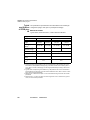
Table 1
Technical assistance centers
Region
Phone Number
Americas
Telecom Products
866 228 3762
World Wide: 301 353 1550
[email protected]
Europe, Africa, and
Mid-East
+49 (0) 7121 86 1345
(Europe)
[email protected]
+33 (0) 1 30 81 50 60
(JDSU France)
[email protected]
Asia and the Pacific
Southeast Asia, Australia, and New
Zealand
+852 2892 0990
(Hong Kong)
All others
866 228 3762
xxii
+86 10 6833 7477
(Beijing-China)
User Manual
780000102/16
[email protected]
About this guide
Recycling Information
During off-hours, you can request assistance by doing one of the
following:
–
leave a voice mail message at the Technical Assistance number in
your region
–
e-mail North American Technical Assistance Center, [email protected],
or European Technical Assistance Center, [email protected]
–
submit your question using our online Technical Assistance Request
form at www.jdsu.com.
Recycling Information
JDSU recommends that customers dispose of their instruments and
peripherals in an environnmentally sound manner. Potential methods
include reuse of parts or whole products and recycling of products
components, and/or materials.
Waste Electrical and electronic Equipment (WEEE) Directive
In the European Union, this label indicates that this product should not
be disposed of with household waste. Il should be deposited at an appropriate facility to enable recovery and recycling.
Conventions
This guide uses naming conventions and symbols, as described in the
following tables.
Table 2
Typographical conventions
Description
Example
User interface actions appear in
this typeface.
On the Status bar, click Start
Buttons or switches that you
press on a unit appear in this
TYPEFACE.
Press the ON switch.
Code and output messages
appear in this typeface.
All results okay
User Manual
780000102/16
xxiii
About this guide
Conventions
Table 2
Typographical conventions (Continued)
Description
Example
Text you must type exactly as
shown appears in this typeface.
Type: a:\set.exe in the dialog box.
Variables appear in this typeface.
Type the new hostname.
Book references appear in this
typeface.
Refer to Newton’s Telecom
Dictionary
A vertical bar | means “or”: only
one option can appear in a single command.
platform [a|b|e]
Square brackets [ ] indicate an
optional argument.
login [platform name]
Slanted brackets < > group
required arguments.
<password>
Table 3
Keyboard and menu conventions
Description
Example
A plus sign + indicates simultaneous keystrokes.
Press Ctrl+s
A comma indicates consecutive
key strokes.
Press Alt+f,s
A slanted bracket indicates
choosing a submenu from
menu.
On the menu bar, click
Start > Program Files.
Table 4
Symbol conventions
This symbol represents a general hazard.
xxiv
User Manual
780000102/16
About this guide
Conventions
This symbol represents a risk of electrical shock.
NOTE
This symbol represents a Note indicating related information or tip.
This symbol, located on the equipment or its packaging, indicates that
the equipment must not be disposed of in a land-fill site or as municipal waste, and should be disposed of according to your national regulations.
Table 5
Safety definitions
WARNING
Indicates a potentially hazardous situation which, if not avoided, could
result in death or serious injury.
CAUTION
Indicates a potentially hazardous situation which, if not avoided, may
result in minor or moderate injury.
User Manual
780000102/16
xxv
About this guide
Conventions
xxvi
User Manual
780000102/16
Chapter 1
Principles of measurement
1
This chapter gives the principles of the measurements made by the
reflectometer (OTDR) plug-ins, OSA spectrum analyzers (WDM technology) and PMD analyzers (Polarization mode dispersion).
The topics discussed in this chapter are as follows:
–
“Principle of reflectometry measurements” on page 2
–
“Principle of bi-directional measurement” on page 4
–
“Principle of WDM / OSA analysis” on page 5
–
“PMD principle” on page 7
–
“Principle of measurement of Chromatic Dispersion (CD OTDR)
using pulse delay method” on page 9
–
“Principle of measurement of Chromatic Dispersion (CD ODM)
using phase shift method” on page 13
–
“Principle of optical power and attenuation measurements (OFI)” on
page 13
–
“Standards and l0 for different types of fiber” on page 15
User Manual
780000102/16
1
Chapter 1 Principles of measurement
Principle of reflectometry measurements
Principle of reflectometry measurements
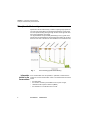
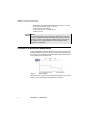
Optical time domain reflectometry consists in injecting a light pulse into
one end of the optical fiber to be analyzed and observing, at the same
end, the optical intensity passing through the fiber in the opposite direction to the propagation of the pulse.
The signal detected is exponentially diminishing in form, typical of the
phenomenon of backscattering, with superimposed peaks due to reflections from the ends of the fiber or other variations in the refractive index.
Fig. 1
Information
yielded by the
measurement
2
Trace showing typical backscattering
From a backscatter trace it is possible, in particular, to determine the
position of a section of fiber within a link. The measurement result must
reveal:
–
the attenuation
–
the location of faults, by their distance from a point of origin,
–
attenuation with respect to distance (dB/km)
–
the reflectance of a reflective event or a link.
User Manual
780000102/16
Chapter 1 Principles of measurement
Principle of reflectometry measurements
To locate faults, a reflectometer measures only time. Consequently,
group velocity must be introduced in order to determine the distance
of the location. This is done by introducing the refractive index of the
fiber into the instrument.
Validity of
Measurement
UTI-T, in recommendations G.650, G.651 and G.652, give backscatter
measurement as an alternative method for measuring attenuation, the
method of reference being the cut fiber.
The field of application of backscatter is not limited, but the conditions for
application of this method are nevertheless stipulated:
–
Reflectance
injection conditions: Fresnel reflections must be limited at fiber input.
–
a high-power source (laser) should be used.
–
receiver bandwidth should be chosen to achieve a compromise
between pulse rise time and noise level.
–
backscatter power should be represented on a logarithmic scale.
Reflectance is a value with which the coefficient of reflection of a
reflecting optical element can be quantified. It is defined as the ratio of
the power reflected by the element over the incident power.
These reflections are due to variations in refractive index all along the
optical link in certain telecommunications applications. If they are not
controlled, they may degrade the performance of the system by
perturbing the operation of the emitting laser (especially DFB lasers) or
may generate interference noise in the receiver by multiple reflections.
The reflectometer is particularly well suited to the measurement of
discrete reflectances on an optical fiber link. To calculate the coefficient
of reflection, it is necessary to measure the total amplitude of the Fresnel
reflection generated and then to apply a conversion formula to obtain the
reflectance value.
This formula takes into account:
–
the total amplitude of the reflection measured by the reflectometer.
–
the pulse width used to measure the amplitude of the reflection (in
nanoseconds)
–
the backscatter coefficient of the fiber used:
User Manual
780000102/16
3
Chapter 1 Principles of measurement
Principle of bi-directional measurement
–
typical values of the backscatter coefficient for a pulse of 1 ns and
- for a single-mode fiber:-79 dB to 1310 nm
-81 dB to 1550 nm and 1625 nm
- for a multi-mode fiber:-70 dB to 850 nm
-75 dB to 1300 nm
NOTE
To measure the widest range of reflection coefficient, it is necessary
to insert a variable optical attenuator between the reflectometer and
the link to be tested. This attenuator enables the level of the trace to
be adjusted so as to avoid saturation of the reflectometer by the
reflection to be evaluated.
Principle of bi-directional measurement
If fibers with different mode-field diameters (core size etc.) are joined, the
resulting OTDR trace waveform can show a higher backscattering level.
This is due to the increased level of backscattered signal reflected back
to the OTDR in the downstream fiber.
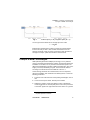
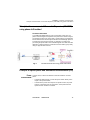
Fig. 2
Normal splice
This phenomenon can occur when jointing different types of fiber in multimode or 2 fibers with different backscattering coefficients.
4
User Manual
780000102/16
Chapter 1 Principles of measurement
Principle of WDM / OSA analysis
Fig. 3
Positive splice (A ->B) / Negative Splice (B -> A)
The sum gives the bi-directional or average splice loss value:
S1 + S2
S = ------------------2
Bi-directionnal measurement consists in performing a measurement
from the extremity of fiber A, then another measurement from the
extremity of fiber B, finally get events of both traces and calculate the
average for all slope, splice and reflectance measurements.
Principle of WDM / OSA analysis
WDM (Wavelength Division Multiplex) technology is a very effective
means of increasing the transmission of fibers, as it demands neither the
installation of new links, nor any increase in transmission speed. The
data are transmitted along the fiber at different wavelengths, each wavelength (or channel) transmitting a signal. The channels are defined
according to the the G-692 recommendations of the ITU-T.
This technology demands new measurements, since it is important,
during the installation and maintenance of WDM systems, to check the
following parameters:
1
Presence of the channels at the corresponding wavelengths, with no
drift
2
Correct channel power levels, without power variation
3
Satisfactory signal-to-noise ratio (SNR): its value is obtained by
measuring the ratio of channel peak power to the noise power level
of the ASE1 signal to the right and/or left of the carrier. As a general
1.Amplified Spontaneous Emission
User Manual
780000102/16
5
Chapter 1 Principles of measurement
Principle of WDM / OSA analysis
rule, the noise measurement point chosen is the calculated midpoint between two adjacent channels. The noise power level
measured is converted to a standard bandwidth of 0.1 nm.
The most important item of equipment for carrying out these tests on
WDM systems is the optical spectrum analyzer (OSA). It can be
connected at critical measurement points in the WDM system, to the
ends of the links or to the amplifier locations.
Measurement
results
The optical analyzer displays a spectrum representing all the channels.
The measurement results are shown in the form of a complete spectrum
analysis and a table of the parameters relating to each carrier.
The optical spectrum analyzer performs automatic detection and
measurements on each channel.
The number of channels and the composite power are shown, and for
each channel:
–
the wavelength
–
the interval between channels
–
the power level
–
the signal-to-noise ratio.
The total power of the system can also be given.
To qualify the amplifier, gain tilt and slope can be calculated. In principle,
amplification should be flat right across the WDM spectrum.
DFB analysis
In order to ensure the best BER ratio, it is sometimes necessary to be
able to test DFB lasers, widely used in DWDM technology.
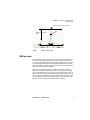
DFB measurements are the following :
6
–
SMSR
Side mode Suppression Ratio : the amplitude
difference between the main spectral component
and the largest side mode.
–
Mode Offset
Wavalength separation (expressed in nm)
between the main spectral component and the
SMSR mode.
–
Peak Amplitude
The power level of the main spectral component
of the DFB laser.
–
Bandwidth
Displayed bandwidth of the main spectral
component of the DFB laser.
User Manual
780000102/16
Chapter 1 Principles of measurement
PMD principle
Peak of the main spectral component
Bandwidth
Side Mode Supression
Ratio
Min offset
Fig. 4
Max offset
DFB measurements
PMD principle
The transmission rate and range are two of the most important parameters of fiber optics paths and must therefore be optimized. And, since
more and more paths (including those already installed) are being used
for transmitting Wavelength Division Multiplex (WDM) signals or for bit
rates of 10 Gbit/s, it is becoming all the more important to determine the
Polarization Mode Dispersion (PMD).
PMD, which is the basic property of single-mode fibers, in particular
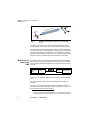
affects the magnitude of the transmission rate. It results from the difference in propagation times of the energy of a given wavelength, which is
split into two polarization layers that are at right angles to each other (as
shown in the below diagram). The main causes of this birefringence are
non-circularities of the fiber itself and external stress on the fiber (macrobending, micro-bending, twist and temperature variations).
User Manual
780000102/16
7
Chapter 1 Principles of measurement
PMD principle
span
fiber
ode
M
le
Sing
DGD
V2
V1
Fig. 5
Example of a time delay between two polarization
layers
The PMD is also referred to as mean value of all Differential Group
Delays (DGD) in picoseconds (ps) or as the DGD coefficient in ps/√km.
The mean DGD causes the transmission pulse to broaden when transmitted along the fiber, generating distortion, which in turns increases the
bit-error-rate (BER) of the optical system. The consequence is that the
PMD limits the transmission bit rate on a link. It is then important to know
the PMD values to calculate what are the bit rate limits of the links.
Method used to
measure the
PMD
The method used to measure the PMD is based on the Fixed Analyzer
Method1 which requires a broadband polarized source at one extremity,
and a polarized (variable) Optical Spectrum Analyzer (OSA) at the other
extremity.
Broadband
light source
(SLED)
Fig. 6
Fixed
Polarizer
Link under test
Rotatable
Polarizer
Optical Spectrum
Analyser (OSA)
Fixed Analyzer Method used to measure the PMD
The method used to measure PMD is the Fast Fourier Transform Method
(FFT).
From the spectrum, the mean period of the amplitude modulation is
measured.
The Fast Fourier Transform Method into a time distribution will give a
Gaussian curve and the mean DGD value is determined from this curve
(for fiber links with strong mode coupling).
1.This is standardized by the ANSI/TIA/EIA FOTP-113 Polarization Mode Dispersion Measurement for Single-Mode Optical Fibers by the Fixed Analyzer Method.
8
User Manual
780000102/16
Chapter 1 Principles of measurement
Principle of measurement of Chromatic Dispersion (CD OTDR) using pulse delay method
It is not necessary to modify the polarization angle of the analyzer when
strong mode coupling is used. For weak mode coupling, an angle could
be selected to get the maximum amplitude of the modulation.
The instrument should have a higher dynamic range than the link itself.
A 35 dB dynamic range is usually enough for most of the applications,
and 45 dB should be used for very long distance networks.
The measurement range of the PMD should be linked with the transmission rate. For WDM applications, it should be between 0.1 ps to 60 ps so
that measurement can be carried out for bit rates between 2.5 and 40
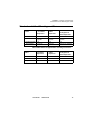
Gbit/s. The table below indicates the maximum permitted PMD values for
various bit rates.
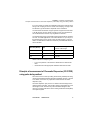
PMD coefficient (ps/√ km)
Bit rate (Gbit/s)
Maximum PMD
(ps)
400 km cable length
2.5
40
<2
10
10
< 0.5
40
2.5
< 0.125
Tables at the end of chapitre gives:
–
a more complete list of the maximum PMD values for different bit
rates.
–
information about the appropriate standards and limits for PMD.
Principle of measurement of Chromatic Dispersion (CD OTDR)
using pulse delay method
Since more and more links (including those already installed) are being
used to transmit WDM (Wavelength Division Multiplex) signals, or signals
at 10 Gbit/s, it becomes very important to determine the chromatic
dispersion (CD).
Chromatic dispersion (CD) is due to a variation with wavelength of the
refractive index of the fiber. This results in delays in propagation for some
wavelengths, which broadens the pulse transmitted along the fiber,
causing consequent distortions and increasing the Bit Error Rate (BER)
of the optical system.
User Manual
780000102/16
9
Chapter 1 Principles of measurement
Principle of measurement of Chromatic Dispersion (CD OTDR) using pulse delay method
A given speed of transmission is thus associated with a limit wavelength.
And for a fiber with offset dispersion (standard G.653 ITU-T), unequal
spacing of the channels around 1550 nm is imposed in order to avoid
fiber non-linearities, such as the mixing of four waves.
Chromatic dispersion is defined by three principal parameters:
–
delay at a given wavelength (in ps)
–
the coefficient of dispersion D expressed in ps/nm. This corresponds to the drift in delay as a function of wavelength (or to the
slope of the curve representing delay as a function of distance at a
given wavelength). It is expressed in ps/(nm.km) if it is standardized
to one km (its value is divided by the length of the fiber expressed in
km).
–
the slope S expressed in ps/(nm2.km). This corresponds to the drift
in the coefficient of dispersion as a function of wavelength (or to the
slope of the curve representing dispersion as a function of distance,
at a given wavelength).
The coefficient of dispersion standardized to one km and the slope take
into account the length of the fiber (which may be different from the
length of the cable due to the helicoidal factor). It is therefore important
to know this length with accuracy, failing which the results of the
measurement will be degraded: an error of 10% in the length of the fiber
will induce a 10% error in the dispersion measurement.
Chromatic dispersion is one of the most important characteristics of a
fiber: it depends principally on the method of manufacture. Cable manufacturers take it into account in order to produce different types of cable
designed for different applications and different needs, such as: standard
fiber, offset dispersion fiber or fiber with non-zero dispersion offset.
10
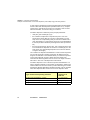
Type of fibre/Corresponding standard
Coefficient of
dispersion at
1550 nm
Single-mode standard/ITU-T G.652
+17 ps/(nm.km)
Single-mode offset dispersion/ITU-T G.653
0 ps/(nm.km)
Single-mode non-zero offset dispersion/ITU-T G.655
+3 ps/(nm.km)
User Manual
780000102/16
Chapter 1 Principles of measurement
Principle of measurement of Chromatic Dispersion (CD OTDR) using pulse delay method
2
0
Dispersion (ps/nm.km)
Dispersion (ps/nm.km)
20
ersion)
d Disp
Unshite
(
F
SMF
M
S
Disp.
tandard
G652 S
on Zero
G655 N
10
0
d SMF
n Shifte
ispersio
G653 D
10
-20
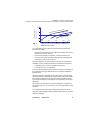
Fig. 7
1200
1300
1400
1500
λ (nm)
Typical curves of the coefficient of distortion for
different types of fibre
ITU-T standards impose measurement of the following parameters
(example with G.652):
–
wavelength corresponding to zero dispersion lambda0: this must lie
between 1300 nm and 1324 nm
–
slope S0 corresponding to lambda0: –0.093 ps/(nm2.km) max.
–
two limit values of the coefficient of dispersion at wavelengths situated between 1260 nm and 1360 nm.
Chromatic dispersion is not dependent on the time and constraints of
installation, and it is relatively insensitive to variations in temperature:
–
0.0025 ps/(nm.km.°C) for the coefficient of dispersion
–
0.0025 ps/(nm2.km.°C) for the slope
The only external parameter that can affect it is the type of modulation of
the signal itself (most type DFB lasers have no external modulation to
limit this effect).
Chromatic dispersion analyzers give the delay value of the optical link
unit as a function of wavelength. On the basis of this delay, they calculate
the coefficient of dispersion, the dispersion slope and specific values
such as the wavelength corresponding to zero dispersion and the associated slope.
The principle of measurement of chromatic dispersion is described in
document IEC 60793-1-42, as well as in ITU-T recommendations G.650
and G.652.
The calibration of the instrument is defined in document IEC 61744.
Telcordia has also published "GR-761-CORE requirements for chromatic
dispersion analyzers".
User Manual
780000102/16
11
Chapter 1 Principles of measurement
Principle of measurement of Chromatic Dispersion (CD OTDR) using pulse delay method
Method of CD
measurement
used by the
Base Unit
There are different methods for measuring chromatic dispersion.
The Base Unit measures the delay of propagation of pulses along the
fiber due to specific reflective events such as connectors (Fresnel), doing
this for four wavelengths: 1310, 1480, 1550 & 1625 nm. One of these 4
measurements is chosen as a reference for calculation of delays.
Fiber under test
λ1
λ2
Delay
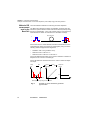
On the basis of the 4 results obtained, the Base Unit defines the curve
representing the delay as a function of wavelength by using one of the
following numerical approximation algorithms:
–
Quadratic: A+Bλ+Cλ2 (parabolic curve).
–
Sellmeier 3-term: A+Bλ2+Cλ−2
–
Sellmeier 5-term: A+Bλ2+Cλ−2+Dλ4+Eλ−4
It then calculates the drift of this curve in order to obtain the coefficient of
dispersion D as a function of wavelength.
It then calculates the drift of this last curve in order to obtain the dispersion slope.
Delay
(ps)
drift
Coeff. of
dispersion
drift D
Dispersion
slope S
S0
λ0
1310 1480
15501625 λ nm
λ0
l nm
Wavelength corresponding to zero dispersion
Fig. 8
12
User Manual
Example of curves obtained by quadratic
approximation
780000102/16
l nm
Chapter 1 Principles of measurement
Principle of measurement of Chromatic Dispersion (CD ODM) using phase shift method
Principle of measurement of Chromatic Dispersion (CD ODM)
using phase shift method
The Phase shift method
A modulated broadband light is sent over the Fiber Under Test. The
phase of the test signal is compared to the phase of the reference signal.
The measured value is the group delay, corresponding to a wavelength
interval between the reference phase and the test wavelength phase. It
is measured in the frequency domain, by detecting, recording and
processing the phase shift of The modulated signals. The fibre chromatic
dispersion is derived from the measurement of the relative group delay
using an approximation formula.
Fig. 9
CD ODM measurement using phase shift method
Principle of optical power and attenuation measurements (OFI)
Power
measurement
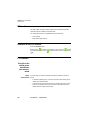
A power meter, is all that is needed to measure emitted or received
power:
–
to measure emitted power, connect the power meter directly to the
output of the optical emitter;
–
to measure the power at the input of an optical receiver, the power
meter is connected to the end of the fiber, at the point where the
optical receiver would be connected.
User Manual
780000102/16
13
Chapter 1 Principles of measurement
Principle of optical power and attenuation measurements (OFI)
Attenuation
measurements
(optical link
loss)
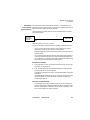
For measurement of the attenuation of power in a complete link or in
elements such as sections of fiber, connections or optical components, a
light source and a power meter are required.
This attenuation is usually deduced from the measurement of optical
power at two points:
2
1
Laser light
source of the
Base Unit
Reference
fiber
Power meter of
the Base Unit
Link under test
Attenuation A(dB) = P1 (dBm) - P2 (dBm)
To perform accurate measurements, the following conditions are vital
–
Use one of the light sources of the LTS or a light source which is
stable both in time and as a function of temperature.
–
Make sure that all connections and fibers and the receiving cell are
perfectly clean.
–
Use a reference link between the laser source and the test subject.
If several measurements are to be made under identical light injection conditions, this reference fiber must not be disconnected during
the period while measurements are taking place.
Insertion loss method
1
The power meter is first connected to the laser source via the reference fiber: P1 is measured.
2
Then the fiber to be tested is inserted between the reference fiber
and the power meter: P2 is measured.
The difference between P2 and P1 gives the attenuation of the fiber
under test.
It is preferable to use the same type of connector at both ends of the
fiber being tested, to ensure the same connection conditions for
measuring P1 and P2.
14
User Manual
780000102/16
Chapter 1 Principles of measurement
Standards and l0 for different types of fiber
Standards and λ0 for different types of fiber
Fibre
non-offset
dispersion
offset
dispersion
non-zero or
homogeneous
offset dispersion
Standard ITU/Y
ITU-T G.652
ITU-T G.653
ITU-T G.655
Standard IEC
IEC 60793-1-1
type B1
IEC 60793-1-1
type B2
IEC 60793-1-1
type B3
Standard TIA/EIA
Iva
IVb
IVb
Approximate λ0 .
1310 nm
1550 nm
1500 nm or indefinite
Most suitable method of approximation according to trace zone
Fibre
non-offset
dispersion
offset
dispersion
non-zero or
homogeneous
offset dispersion
1310 nm zone
Sellmeier 3-term
Sellmeier 5-term
Sellmeier 5-term
1550 nm zone
Sellmeier 5-term
Quadratic
Sellmeier 5-term
Complete curve
Sellmeier 5-term
Sellmeier 5-term
Sellmeier 5-term
User Manual
780000102/16
15
Chapter 1 Principles of measurement
Standards and l0 for different types of fiber
16
User Manual
780000102/16
Chapter 2
Getting started
2
The topics discussed in this chapter are as follows:
–
“Adapting MTS 5000 series plug-ins” on page 18
–
“Universal connectors and adapters” on page 19
–
“Installing a new version of the software” on page 21
User Manual
780000102/16
17
Chapter 2 Getting started
Adapting MTS 5000 series plug-ins
Adapting MTS 5000 series plug-ins
The plug-ins of the MTS 5000 series are shorter than those of the 8100
series. Before they can be used in the Base Unit, an extension must be
fitted:
–
ref. E50OTDRext for OTDR plug-ins
–
E507Xext for WDM plug-ins.
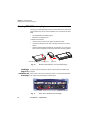
To attach this extension:
–
remove the two screws on the plug-in marked "a" below.
–
connect the extension to the rear of the plug-in and fix the screws
back in.
–
stick the adhesive label supplied with the extension on to the upper
surface of the assembly to hold the two elements securely together.
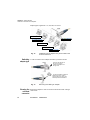
MTS 5000 series plug-in
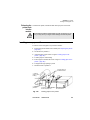
Fig. 10
Installing a
plug-in in a
receptacle and
removing it
Fixing screws a
Extensions
Mounting the extension on a MTS 5000 plug-in
A plug-in may be inserted into either of the two slots provided for the
purpose.
When a slot is vacant, it is closed by means of a cover-plate fitted with
two captive screws like those on the plug-ins.
Captive screws securing the plug-in
Fig. 11
18
User Manual
Rear view of the Base Unit (example)
780000102/16
Chapter 2 Getting started
Universal connectors and adapters
Removing a plugin from a
receptacle
Inserting a plug-in
into receptacle
The Base Unit must be switched off, and if it has a mains power supply, the adapter cable must be unplugged.
1
Completely unscrew (up to the stop) the two captive screws
securing the plug-in.
2
Carefully slide the plug-in out of its slot.
The Base Unit must be switched off, and if it has a mains power supply, the adapter cable must be unplugged.
1
Slide the plug-in into its slot.
2
When it is fully home, press against the screen-printed surface of
the plug-in while tightening the the securing screws. The screenprinted surface of the plug-in must be flush with that of the receptacle.
3
Make sure that the two large captive screws of the plug-in are
screwed fully home.
NOTE
UHD plug-ins use very powerful lasers : they must be connected
exclusively to optical connectors equiped with zirconium ferules.
Using connectors equiped with metallic ferrules could damage the
plug-in connector.
Universal connectors and adapters
Fiber Optic plug-ins may come equipped with a universal connector and
adapter selected at time of order.
Adapter types
JDSU offers 5 different adapters, all compatible with this connector,
allowing the user to switch from one adapter to another according to
which fiber type he intends to work with.
User Manual
780000102/16
19
Chapter 2 Getting started
Universal connectors and adapters
Adapter types supplied are : FC, SC, DIN, ST and LC.
FC Adapter (EUFCAD)
PC or APC Connector
DIN Adapter (EUDINAD)
LC Adapter (EULCAD)
ST Adapter (EUSTAD)
SC Adapter (EUSCAD)
Fig. 12
Switching
adapter type
5 different types of adapters may be mounted on the
universal connector
In order to switch from an adapter to another, proceed as shown.
Pull out in the direction of
the arrow in order to
release the adapter from
the lug holes
To place an adapter, position the
handle as shown in order to
engage with the the lugs, push
hard and pull the handle down
Fig. 13
Cleaning the
universal
connector
20
Removing and refitting an adapter
Remove the adapter in order to access the ferrule and clean it using a
cotton swab.
User Manual
780000102/16
Chapter 2 Getting started
Installing a new version of the software
Installing a new version of the software
When a new software version is loaded, there is a risk of re-initialization of the internal memory. Before installing the new software, it is
therefore advisable to to save the results in the memory, using the
Save function in the Memory menu called up by the FILE button.
Do not interrupt the installation process, as this could damage the
instrument.
To avoid any interruption of the installation procedure, the Base Unit
must be operating on the mains: if the procedure is started while operating on battery, a message indicates that the instrument must be
connected to the mains.
Be sure you have configured the Security mode of the equipment to
Standard, and not to Enhance in the System Page > I/O Interfaces >
Ethernet > Security (see the User Manual of the 6000 or 8000 Base
Unit).
Where and how
to obtain the
new software
Downloading
from Internet
The new version of the software can either be procured on a storage
medium (CD-ROM, USB stick memory or CompactFlash memory card)
from your JDSU Customer Service, or can be downloaded from JDSU’s
internet site: www.jdsu.com.
When the software is obtained from the Internet, it must be saved on a
storage medium before the software upgrade of the product can be
carried out. To do this, on the JDSU web site
1
Open the page of the product concerned: MTS 8000 or T-BERD
8000 Scalable Optical Test Platform
2
Click on the tab Downloads.
3
Click on the link 8000 Firmware Update
A new page opens explaining the process
4
Follow the instructions to download the exe or jds file and update
the Base Unit.
NOTE
The jds file must be downloaded if you cannot load the exe file. Once
donwloaded on your PC, the extension «.jds» must be changed to
«.exe».
User Manual
780000102/16
21
Chapter 2 Getting started
Installing a new version of the software
NOTE
Once the upgrade has been loaded from Internet, the new version
cannot be burned with the CD ROM of the MTS / T-BERD Base Unit.
Burn the CD-ROM of the PC, using CD burner softwares recommended by JDSU.
Installation
from a PC
The new versions can be installed according 2 methods:
–
from the harddisk of a PC
–
from the CD-ROM drive of a PC
Installation from 1 Connect the MTS / T-BERD Base Unit into mains with the AC plug,
and switch it on.
the harddisk of a
PC 2 Connect the MTS / T-BERD Base Unit to the PC by an Ethernet link
NOTE
Use a cross over if the Base Unit is directly connected to the PC or a
direct cable if the Base Unit is connected to the LAN.
3
On the PC, download and save the .exe upgrade from the web
(www.jdsu.com)
4
Once the transfer is completed, and in order to perform the upgrade,
the «.exe» file shall be extracted under a root of the PC. The files
extracted shall be placed under C:\ or under a drive created with the
following process:
a
Put the release under a directory, such as
C:\8000_Base_Upgrade:\
b
Open a DOS console, by selecting Windows > Start (bottom
right of the PC screen) > All programs > Accessories >
Command prompt.
c
Then type the command subst N: C:\upgrade\
d
Close the DOS console.
This command will create a virtual drive N: (N: is an example)1
5
Go to the driver, using Windows Explorer
1."N:" may be replaced by another letter if necessary and "8000_Base_Upgrade"
corresponds to the directory where the upgrade files have been unzipped.
22
User Manual
780000102/16
Chapter 2 Getting started
Installing a new version of the software
6
Double click on the .exe file: A window called "Winzip self extractor",
will appear. Check that the folder is correct i.e. the C:\ drive or the
newly created N:\ drive is appearing "Name:\" then press “Extract”. If
not, click on ”Browse” in order to select the right drive, then click on
"Extract”.
Fig. 14
WinZip Self Extractor
The message "All files extracted ok" is displayed and invites you to
click on OK.
7
Press OK.
8
Run TFTPD32.exe: note the «Server Interfaces» address which
appears in the TFTPD32 window.
Note: TFTPD32.exe is one of the extracted files
9
Run FTP server.exe. An error message will appear: click on OK.
Note: FTPServer.exe is one of the extracted files
The window «Pablo’s FTP server» is displayed. Click on the green
arrow (or select menu File > Start).
10 On the Base Unit, press the SYSTEM key, then System Setup: in
Utility > Upgrade Parameters > Server address, enter the IP
address previously noted (see "9" above).
11 Quit the System menu and then press, in succession, Expert Tools
> Software Upgrade > Upgrade via Ethernet.
The message «Verify IP address of PC server» appears.
12 Click on Continue.
The list of the software versions available on the PC is displayed
next to the versions installed on the Base Unit.
User Manual
780000102/16
23
Chapter 2 Getting started
Installing a new version of the software
More recent version on the PC than on the Base Unit
Less recent version on the PC than on the Base Unit
Identical version on the PC and on the Base Unit
13 Click on Show Prev. choice or Show Next Choice to display the
previous and next versions available.
14 Click on Confirm this Choice to start the upgrade of the selected
software(s).
or
Click on Confirm All Choices to upgrade all versions.
NOTE
The software versions list does not always appear (cf previous versions) as well as the Show Previous / Next Choice buttons and the
Confirm/Continue key. In this case, the upgrading starts automatically.
Upgrading begins. The Base Unit is automatically rebooted.
Upgrading takes several minutes. At the end, the Base Unit is automatically restarted (if the boot version is superior to version 01.16).
15 On the PC, close the two windows opened to perform the installation.
16 Once the upgrade is completed, you may remove the virtual drive (in
our example "N:") by using the command subst N: /d.
Installation from 1 Connect the Base Unit into mains with the AC plug, and switch it on.
the CD-ROM drive 2 Connect the Base Unit to the PC by an Ethernet link
of a PC
NOTE
Use a cross over if the Base Unit is directly connected to the PC or a
direct cable if the Base Unit is connected to the LAN.
3
Insert the CD-ROM in the drive of the PC.
4
On the PC, use Windows Explorer to open the CD-ROM.
Run TFTPD32.exe: note the «Server Interfaces» address which
appears in the TFTPD32 window.
Note: TFTPD32.exe is one of the extracted files
24
User Manual
780000102/16
Chapter 2 Getting started
Installing a new version of the software
5
Run FTPServer.exe. An error message will appear: click on OK.
Note: FTPServer.exe is one of the extracted files
The window «Pablo’s FTP server» is displayed. Click on the green
arrow (or select menu File > Start).
6
On the Base Unit, press the SYSTEM key, then System Setup: in
Utility > Upgrade Parameters > Server adress, enter the IP
address previously noted (see "" above).
7
Quit the SYSTEM menu and then press, in succession, Expert Tools
> Software Upgrade > Upgrade via Ethernet.
The message Verify IP address of PC server appears.
8
Click on Continue.
The list of the software versions available on the PC is displayed
next to the versions installed on the Base Unit.
9
Click on Show Prev. choice or Show Next Choice to display the
previous and next versions available.
10 Click on Confirm this Choice to start the upgrade of the selected
software(s).
or
Click on Confirm All Choices to upgrade all versions.
NOTE
The software versions list does not always appear (cf previous versions) as well as the Show Previous / Show Next Choice buttons
and the Confirm/Continue key. In this case, the upgrading starts
automatically.
Upgrading begins. The Base Unit is automatically rebooted.
Upgrading takes several minutes. At the end, the Base Unit is automatically restarted (if the boot version is superior to version 01.16).
11 On the PC, close the two windows opened to perform the installation.
Installation
from Ethernet
Before starting the software upgrade via Ethernet, make sure the IP
adress of the PC server.
1
Press, in succession, Expert Tools > Software Upgrade >
Upgrade via Ethernet.
The message Verify IP address of PC server appears.
2
Click on Continue.
User Manual
780000102/16
25
Chapter 2 Getting started
Installing a new version of the software
The list of the software versions available on the PC is displayed
next to the versions installed on the Base Unit.
3
Click on Show Prev. choice or Show Next Choice to display the
previous and next versions available.
4
Click on Confirm this Choice to start the upgrade of the selected
software(s).
or
Click on Confirm All Choices to upgrade all versions.
NOTE
The software versions list does not always appear (cf previous versions) as well as the Show Previous / Next Choice buttons and the
Confirm/Continue key. In this case, the upgrading starts automatically.
Upgrading begins. The Base Unit is automatically rebooted.
Upgrading takes several minutes. At the end, the Base Unit is automatically restarted (if the boot version is superior to version 01.16).
Installation
from a CD-ROM
(with MTS/TBERD 8000
only)
Updating from a CD-ROM can be done directly, if the Base Unit is
equipped with a CD-ROM drive.
1
Connect the Base Unit into mains with the AC plug, and switch it on.
2
Insert the CD-ROM in the drive of the Base Unit.
3
Press the SYSTEM key and then, in succession, the keys Expert
Tools > Software Upgrade > Copy from CD.
The message Insert the CD in the drive is displayed
4
Click on Confirm.
The list of the software versions available on the PC is displayed
next to the versions installed on the Base Unit.
26
5
Click on Show Previous choice or Show Next Choice to display
the previous and next versions available.
6
Click on Confirm this Choice to start the upgrade of the selected
software(s).
or
Click on Confirm All Choices to upgrade all versions.
User Manual
780000102/16
Chapter 2 Getting started
Installing a new version of the software
NOTE
The software versions list does not always appear (cf previous versions) as well as the Show Previous / Next Choice buttons and the
Confirm/Continue key. In this case, the upgrading starts automatically.
Upgrading starts. The Base Unit is automatically rebooted. The
installation process takes several minutes. At the end, the Base Unit
is automatically restarted (if the boot version is superior to version
01.16).
Installation
from a
CompactFlash
memory card
(with MTS/TBERD 8000
only)
You must be equipped with a CompactFlash memory card with a
minimum capacity of 128 Mo.
The Software Upgrade from a Compact Flash memory card is not
possible if the instrument is delivered with the Application Card
reference E80CFAPP.
1
Switch off and unplug your Base Unit.
2
Insert the CompactFlash memory card in which the new unzipped
software has been loaded, into the slot on the Base Unit provided
for this purpose.
3
Connect the Base Unit into mains with the AC plug and switch it on.
4
Press the SYSTEM button, then successively Expert tools > Software Upgrade > Copy from CF.
5
Click on Confirm.
The list of the software versions available on the PC is displayed
next to the versions installed on the Base Unit.
6
Click on Show Previous choice or Show Next Choice to display
the previous and next versions available.
7
Click on Confirm this Choice to start the upgrade of the selected
software(s).
or
Click on Confirm All Choices to upgrade all versions.
User Manual
780000102/16
27
Chapter 2 Getting started
Installing a new version of the software
NOTE
The software versions list does not always appear (cf previous versions) as well as the Show Previous / Next Choice buttons and the
Confirm/Continue key. In this case, the upgrading starts automatically.
Upgrading begins. The Base Unit is automatically rebooted.
Upgrading takes several minutes. At the end, the Base Unit is automatically restarted (if the boot version is superior to version 01.16).
Installation
from a USB
memory stick
You must be equipped with a USB memory stick with a minimum capacity
of 128 Mo.
USB memory sticks can be very different.
They differ on Hw and Sw aspects, even inside a given brand.
In particular, USB memory sticks targeting audio recording are often
formatted in very specific ways and the format is often very different
from a standard FAT.
For all these reasons, we advise users to use memory sticks provided
by JDSU.
In any case, USB memory sticks which are recognized by the MTS (a
beep is generated when plugged on the MTS) but which cannot be
read or written, should be formatted on the MTS with the Usbflash
Format utility, in Expert tools > Media utilities.
If a problem occurs with the USB stick you are using, contact your
Local Technical Assistance Center.
Before installing the upgrade, you must format the USB memory stick
(steps 1 to 5).
28
1
Insert the memory stick into one of the sockets on the Base Unit
provided for this purpose.
2
Switch on the Base Unit
3
Press the SYSTEM button
4
Successively select Expert tools > Media utilities > Usbflash
Format.
5
Confirm your choice to actually format the USB memory stick.
6
Once formated, disconnect the USB memory stcik from the Base
Unit using the key Eject USB.
User Manual
780000102/16
Chapter 2 Getting started
Installing a new version of the software
The icon
safely.
is displayed, indicating the stick can be removed
As for any media formatting, please note that all data present on the
USB memory stick will be irremediably lost.
7
Connect the USB memory stick to the PC
8
Unzip the upgrade files on the PC and transfer it to the USB memory
stick:
a
Download and save on your PC the .exe upgrade file that you
can get from the web (www.jdsu.com).
If the .jds file has been chosen, once it is downloaded on the PC, do
not forget to change its extension to ".exe".
b
Once the transfer is completed, double click on the .exe file: A
window called "Winzip self extractor", will appear. Check that the
folder is correct i.e. the USB memory stick driver is appearing
"Name:\" then press "Unzip". If not, click on "Browse" in order to
select the right USB drive.
Fig. 15
Winzip Self Extractor
A message indicating the number of files that have been unzipped
successfully will then appear.
9
c
Press "Close".
d
Then remove the USB memory stick using the appropriate
procedure for your PC
Insert the memory stick, into one of the sockets on the Base Unit
provided for this purpose.
The icon
User Manual
is displayed, indicating the stick can be used safely.
780000102/16
29
Chapter 2 Getting started
Installing a new version of the software
NOTE
A bip is emitted each time the USB memory stick is inserted or
removed from the Base Unit.
10 Press the SYSTEM button, then successively the buttons Expert
tools > Software Upgrade > Upgrade from USB.
The message Are you sure? is displayed
11 Click on Confirm.
The list of the software versions available on the PC is displayed
next to the versions installed on the Base Unit.
12 Click on Show Previous choice or Show Next Choice to display
the previous and next versions available.
13 Click on Confirm this Choice to start the upgrade of the selected
software(s).
or
Click on Confirm All Choices to upgrade all versions
14 Remove the USB stick as prompted
15 The 8000 shuts down
16 Reinsert the USB as required, in the same USB port as previously
(repetitive bips advise you to insert the stick).
NOTE
The software versions list does not always appear (cf previous versions) as well as the Show Previous / Next Choice buttons and the
Confirm/Continue key. In this case, the upgrading starts automatically.
Upgrading begins. The Base Unit is automatically rebooted.
Upgrading takes several minutes. During this stage, do not remove
the USB stick. At the end, the is automatically restarted (if the boot
version is superior to version 01.16).
30
User Manual
780000102/16
Chapter 3
Graphical User Interface
3
This chapter describes the graphical user interface of the Base Unit used
with the optical measurement plug-ins (OTDR, WDM, etc.).
The topics discussed in this chapter are as follows:
–
“Display screen” on page 32
–
“Using an external keyboard, mouse and screen touch (options)” on
page 35
–
“Functions relating to display of a trace” on page 37
–
“Overlay trace function” on page 40
–
“Saving when the instrument is shut down” on page 43
User Manual
780000102/16
31
Chapter 3 Graphical User Interface
Display screen
Display screen
The display screen is divided into a number of different zones. Starting
from the top, these are:
–
a status bar in which various icons indicate the current functions:
–
a bar displaying a scaled-down representation of the trace, showing
the zoom zone and the parameters of the measurement on display
(signature of the measurement).
–
the main part of the screen, displaying a menu or the page of
results.
–
tabs enabling the user to switch from one function to another
(OTDR, WDM, power meter, etc.), as required.
At the right-hand side of the screen, softkeys give access to the various
commands. Their action depends on the current function and configuration.
Fig. 16
Top status bar
The top status bar on the screen shows, on the right, current date and
time, and in the form of icons:
–
32
Example of display of results (with OTDR plug-in)
the type of power supply: mains or battery, and if the power supply is
on battery the level of charge (see Battery management in chapter 2
from the Base Unit manual)
User Manual
780000102/16
Chapter 3 Graphical User Interface
Display screen
Mini-trace
–
if saving is in progress, the icon
–
if the Talkset option is present and the telephone is activated, the
icon
.
.
–
if a remote screen is selected, the icon
(or
more are working on the same Base Unit).
–
if transfer of data is in progress, the icon
if two users or
.
–
if a printing process is in progress, the icon
–
if a data saving is in progress, the icon
–
if the Web Browser application is active, the icon
–
if a USB key is connedcted onto the Platform, the icon
The File menu and the Results page can include a scaled-down representation of the trace which may show the location of the zoom zone
corresponding to the main display. The part of the trace shown in the
main display is boxed on the mini-trace.
This mini-trace will only appear if the trace originated from an Base Unit.
Other Bellcore files read on this instrument do not contain the information
needed to display it.
Signature of the
measurement
A status bar repeats the parameters of the measurement, and in some
cases:
–
the position of the cursors
–
a comment
–
the name of the file when the result is recalled from a memory.
Main display
zone
The central zone of the screen can display the configuration of the instrument or the measurement, the memory explorer of the Base Unit, the
measurement results, etc. Refer to the chapter dealing with the measurement in progress.
Tabs
When the instrument performs several different functions (OTDR, WDM,
Power Meter, etc.), the various configuration or results pages are accessible from tabs. To change from one tab to another, the button selecting
the page must be pressed. To example:
–
on the Results page, to change from one tab to the other, press the
RESULTS button
User Manual
780000102/16
33
Chapter 3 Graphical User Interface
Display screen
–
on the measurement configuration page, to change from one tab to
the other, press the SETUP button
–
On the file configuration page, to change from one tab to the other,
press the FILE button.
NOTE
There is a tab for each different type of measurement: OTDR SM,
OTDR MM, OSA, Power Meter... The tab of a function is displayed if
and only if a plug-in corresponding to this type of measurement has
been inserted in the instrument, or if a file of the type of this measurement is open. If two plug-ins of the same measurement type are
present, then only one plug-in is "active", so only one tab will appear
for this measurement. To change the active plug-in, go to the SYSTEM screen and select it there.
A small icon may appear in the left corner of each tab, according to the
status of the corresponding module.
The icon signification is the following :
Soft keys
–
No icon : the function is used in a read-only mode (no module), or
the module has not been selected.
–
Gray icon : the function has been selected but the corresponding
module does not currently perform an acquisition.
–
Green icon : the function has been selected and the corresponding
module currently performs an acquisition.
The 7 softkeys at the side depend on the current configuration and the
context.
Their use is symbolized by an icon.
Icons
shows that the action is immediate when the key is pressed.
shows that the key gives access to a sub-menu.
shows that the key will quit the sub-menu.
(green direction keys) shows that the function selected by the
key will be controlled by the direction keys.
34
User Manual
780000102/16
Chapter 3 Graphical User Interface
Using an external keyboard, mouse and screen touch (options)
(green confirmation key) shows that the function selected will
be controlled by the confirmation key.
Selection keys The selection may be exclusive (only one choice possible) or non-exclusive (more than one option available at the same time):
This key offers two exclusive options. The change of function
occurs immediately, the first time the key is pressed.
This key offers two non-exclusive options. Pressing the key
repeatedly modifies the choice.
Color of the keys When a selection key is associated with direction keys or the confirmation key:
–
if the function is not selected, the key is dark blue.
–
pressing the key once selects the function. The key turns lighter in
color to show the user that the direction keys are assigned to it.
Pressing more times will modify the choice made using the key.
Using an external keyboard, mouse and screen touch
(options)
The external keyboard facilitates input of:
–
alphanumerical configuration parameters
–
comments in the File menu
–
notes in the table of results
–
editing characters
The mouse can be used instead of the direction keys to scroll through
menus and make a selection.
Connect the keyboard and mouse to the USB connectors.
Virtual control
buttons bar
It is possible to emulate hard keys with Virtual Control buttons
To display these buttons, click once on the top of the screen in the status
bar, at the same height than the date and time.
User Manual
780000102/16
35
Chapter 3 Graphical User Interface
Using an external keyboard, mouse and screen touch (options)
Fig. 17
Virtual control buttons bar
The virtual control buttons bar is displayed during a few seconds. You
may click on any of these buttons to obtain exactly the same results than
using the real buttons in the front panel of the Base Unit.
The virtual control buttons bar can not be displayed within desktop
applications (see the User Manual of the Base Unit).
NOTE
This virtual control buttons bar is especially useful when the Base Unit
screen is exported on a remote PC (see the User Manual of the Base
Unit).
Equivalence
between
external
keyboard and
Base Unit
Although it is intended primarily to replace the Edit menu of the Base
Unit, the external keyboard can replace all the buttons and keys of the
Base Unit except the ON/OFF button:
–
The menu keys to the right of the screen are replaced by the function keys F1 to F7.
–
The buttons below the screen are equivalent to Ctrl + a letter (see
table below).
–
The direction keys have the same function on the external keyboard
and on the Base Unit.
Function on the Base Unit
External keyboard
SYSTEM
Ctrl + Y
SET-UP
Ctrl + U
PRINT
1
Ctrl + P
FILE
Ctrl + F
RESULTS
Ctrl + R
START/STOP
Ctrl + S
SCRIPT (Macro)
Ctrl + M
← ↑ → ↓
Menu keys 1 to 7 (from top to bottom)
36
User Manual
780000102/16
F1 → F7
Chapter 3 Graphical User Interface
Functions relating to display of a trace
Function on the Base Unit
External keyboard
SAVE AND QUIT (EXIT)
Entrée/Enter
QUIT WITHOUT SAVING (ABORT)
Escape/Echap.
1. The print key is not available on the MTS/T-BERD 6000, however the function is
available on the Platform by pushing simultaneously left and right arrow keys.
Editing text
using the
external
keyboard
To use the external keyboard to insert a name or identification in the setup menus, or a Note in the table of results:
–
press Enter to go into the Edit menu
–
type the text
–
press Enter to leave the Edit menu.
Pressing the Esc key will close the Edit menu without saving the
text.
Functions relating to display of a trace
The trace acquired or recalled from a memory is displayed on the Results
page: see example on Figure 16 on page 32.
Various functions common to many plug-ins (OTDR, OSA etc.) can be
used to modify the display of the trace (Cursors, Zoom/Shift, Event/
Trace, Trace/Table, Full scale, etc.). The role of the direction keys and
the confirmation key will depend on the function chosen.
Display of the
results on the
trace
Each event (OTDR measurement) or channel (WDM measurement)
detected is represented under the trace by a serial number.
The results of the measurements can be written on the trace.
Depending on the options chosen in the SETUP menu on Result Screen
> Results On Trace, it is possible to show on the trace, for an OTDR
measurement:
–
"No" results,
–
or "All" the results (value and position)
–
or only the markers showing the position of the events measured
User Manual
780000102/16
37
Chapter 3 Graphical User Interface
Functions relating to display of a trace
When there is saturation for a reflective event (OTDR measurement), the
maximum value measured is displayed with the sign >. This shows that
the actual reflectance is greater than the value shown (for example, if
R >-29.5 dB is displayed, the reflectance could be -18 dB)
The reflectance of a ghost event (OTDR measurement) is displayed in
brackets on the trace.
Cursors
The vertical cursors A and B are used in the Zoom and Shift functions to
position or delete markers.
The cursors A and B are represented by vertical lines of different colors:
–
in a solid line if the cursor is selected.
–
in a dotted line if the cursor is not selected.
Positioning the When a trace is displayed, the key <Cursor A/Cursor B> can be used to
cursor select one or both cursors.
The direction keys
and
move the selected cursor(s) along the trace.
Above the trace are shown the co-ordinates of the points of intersection
of the cursors A and B with the trace, together with the distance between
the two points.
When a selected cursor touches the right or left-hand edge of the screen,
the trace starts to scroll horizontally to maintain display of this cursor.
If an unselected cursor has been moved off-screen by a zoom, it can be
brought back on to the screen by selecting it and then pressing one of
the direction keys
or . It will then appear on whichever edge of the
screen is closest to its position.
When the cursor function is selected, the keys
vertically.
and
move the trace
Selection of the Two types of cursors can be defined:
type of cursor
1
Cursor on X: only a vertical bar is present.
2
Cursor on X and Y: there is a vertical bar and a horizontal bar. The
intersection between these two bars is placed on the trace.
To display the type of cursor selected, click on Advanced. Then select
the key CursorX/CursorY to modify the current choice. Each click on this
key will alternatively insert or delete the check mark against Cursor Y.
38
User Manual
780000102/16
Chapter 3 Graphical User Interface
Functions relating to display of a trace
Zoom and Shift
functions
Zoom function The Zoom function is used to analyze part of the trace in greater detail.
In association with Event (OTDR) or Channel (WDM) it enables rapid
checking of a succession of events or channels.
The zoom is centred on the cursor selected. If the two cursors A and B
are selected, the zoom is centred midway between the two cursors.
The position of the section of trace displayed with respect to the complete
trace is represented by a red rectangle on the mini-trace at the top lefthand corner of the screen.
To define a zoom on the trace:
–
select cursor A or B and center it on the zone to be examined
–
on the Shift/Zoom key, select the Zoom function.
–
use the
or
key to increase or reduce the zoom factor.
Zooming on the different events in succession (OTDR)
–
Zoom on one of the events detected as shown above.
–
On the Trace/Event key, select the Event function
–
Use the
events.
and
keys to move the zoom on to the successive
Zooming on the different channels in succession (OSA)
–
Zoom on one of the channels as shown above.
–
On the Trace/Channel key, select the Channel function
Use the
and
keys to move the zoom on to the successive channels.
Shift function The Shift function is used to displace the displayed section of the trace
by pressing the direction keys.
The horizontal shift is performed maintaining the point of intersection
between the trace and the selected cursor at the same level, scrolling the
trace horizontally while following it vertically, so that it never goes off the
screen.
To use this function:
–
Select the zoom factor as described above.
–
Choose cursor and cursor position.
User Manual
780000102/16
39
Chapter 3 Graphical User Interface
Overlay trace function
–
On the Zoom/Shift key, select Shift.
–
Use the direction keys to shift the trace in the desired direction.
NOTE
For a Chromatic Dispersion curve, click on Config in order to display
the zoom and shift functions.
Zoom Auto (OTDR) The Zoom Auto key alows to go to an optimized display of the trace.
Full scale (OSA / To display the entire trace, with no zoom or displacement:
PMD / AP)
–
either press the Full Scale key
–
or, with Trace selected on the Trace/Event key, press the
button.
Overlay trace function
This very useful function enables up to eight traces to be displayed on
the screen at once:
–
either to compare traces acquired on a number of different fibers in
the same cable,
–
or to observe changes over time in traces taken of one and the
same fiber.
–
or to compare both curves get for each way of propagation in the o/
Back mode.
For this purpose, the Base Unit possesses an overlay memory which can
store:
40
–
the current trace, for comparison with further traces to be acquired
subsequently,
–
or reference traces previously saved on floppy disk or CD-ROM or in
the internal memory, for comparison with the current trace,
–
or traces of different wavelengths for comparative purposes
(OTDR).
User Manual
780000102/16
Chapter 3 Graphical User Interface
Overlay trace function
Fig. 18
Overlaying
several traces
stored in
memory
Example of overlaid traces
To display up to 8 traces from the memory, deleting the current trace or
traces already loaded:
1
Press the FILE button.
2
On the Menu/Explorer key, select Explorer.
3
Select the files of the traces for display (see "Multiple selection of
files" page 262).
4
Press the Load key.
5
Press View traces or Load traces + config: as the traces are
loaded, they cease to be highlighted in the list of files.
6
When loading is complete, the Results screen appears: the first
trace selected is the active trace, the other traces being overlaid.
Display of traces in – The traces are shown in different colors (the active trace is green).
overlay – Their serial numbers are repeated at the top of the screen.
–
Adding traces
in overlay
The OTDR markers are referenced on the active trace by the
symbol , and on the other traces by vertical dashes.
With one or more traces already displayed, to add further traces to the
display (the number of traces displayed cannot exceed 8):
–
Press the FILE button, and in the Explorer menu, select the files of
the traces to be added (see "Multiple selection of files" page 262).
User Manual
780000102/16
41
Chapter 3 Graphical User Interface
Overlay trace function
–
Press the Load key
–
Press the Add Traces key: as the traces are loaded, they cease to
be highlighted in the list of files.
–
When loading is complete, the new traces are displayed in overlay
with those that were already there.
NOTE
If the number of files selected exceeds the display capacity, a message gives warning that loading will be incomplete: only the trace or
traces selected first will be displayed, up to the permitted limit of 8
traces.
Overlaying the To copy the current trace into the overlay memory, proceed as follows:
current trace
–
On the RESULTS page, press the Advanced key, then Overlay, then
Set New Trace
The current trace is copied into the overlay memory: represented in
a different color, it is automatically offset with respect to the new
trace.
–
A new acquisition can then be started.
NOTE
In the case of Multi-trace display with multiple wavelength acquisition:
when the START key is pressed, all the traces displayed are deleted
to leave room for the new acquisitions.
Swapping
overlay traces
Changing the
traces position
42
Measurements can only be made on the active trace and not on overlaid
traces. To make measurements on a trace in overlay, it must first be
swapped with the active trace. To do this, press the Trace key, then the
and
keys, as many times as necessary.
Once a trace is displayed in overlay, the traces can be adjusted
according to the Y axis:
–
Y Reset: all traces are on the the same level at the intersection with
the active cursor.
–
Y Shift: Each trace is shifted from 5 dB from the other.
–
Y Exact: the traces displayed are on the same position according to
their injection level.
User Manual
780000102/16
Chapter 3 Graphical User Interface
Saving when the instrument is shut down
Trace resulting
from the
difference
between two
traces (OSA
module)
It is possible to obtain the trace corresponding to the point-by-point difference between the current trace and the trace in overlay (if only two traces
are displayed simultaneously).
To do this, press the 2 Traces Diff. key. The screen will then display the
two traces in overlay and the trace resulting from the "Difference".
Removing a
trace
Removing the It is possible to remove a trace displayed. To do this, first select it (see
current trace in previous paragraph), then press Remove Current Trace.
overlay
Removing all the To remove all the traces except the current trace, press the key Remove
the traces in Other Traces.
overlay
Quitting the
overlay menu
To quit the overlay menu, press the Exit key.
Saving when the instrument is shut down
When the instrument is switched off, all the parameters and all the traces
are saved, and will all be recalled at the next start-up.
User Manual
780000102/16
43
Chapter 3 Graphical User Interface
Saving when the instrument is shut down
44
User Manual
780000102/16
Chapter 4
Reflectometry measurements
4
Pressing the START/STOP key is all that is needed to start or stop a
measurement. However, it is necessary to configure the measurement
and the type of results desired.
This chapter describes the different stages in a reflectometry measurement made using an OTDR plug-in and the OTDR function of a 5083CD
plug-in.
The topics discussed in this chapter are as follows:
–
“Selecting the function” on page 46
–
“Configuring the reflectometry test” on page 46
–
“Acquisition” on page 55
–
“Trace display functions” on page 62
–
“Events” on page 63
–
“Table of results” on page 64
–
“Automatic measurement and detection” on page 70
–
“Addition of markers” on page 71
–
“Manual measurements” on page 72
–
“Memorization of the position of events” on page 76
–
"Fault Locator Mode" on page 77
–
“Reference Trace function” on page 80
–
“File Management” on page 82
User Manual
780000102/16
45
Chapter 4 Reflectometry measurements
Selecting the function
Selecting the function
Press the SYSTEM button. If the instrument is equipped with several plugins or if the sole module performs several functions:
–
use the direction keys
and
to select the function: the icon
under the mouse pointer is surrounded with a green frame.
–
select the function by pressing
: the icon turns orangy-yellow.
In the case a Singlemode/Multimode SRL Module is used, two icons can
be selected on the System Page:
for singlemode use or
for
multimode use.
Fig. 19
Example of SYSTEM Page with OTDR SRL Module
Configuring the reflectometry test1
To call up the test configuration window, press the SETUP button.
Dialog boxes on one and the same screen enable selection of measurement parameters, and display of results and fiber parameters.
1.if an OTDR module is installed
46
User Manual
780000102/16
Chapter 4 Reflectometry measurements
Configuring the reflectometry test
Fig. 20
OTDR SETUP screen
In these windows, the parameter selected is in video inverse. Select this
parameter by means of the direction keys
and
.
The available choices then appear on the screen; they depend on the
function selected. Make the choice by means of the direction keys
.
Acquisition
parameters
You can choose the following acquisition parameters, whatever the type
of measurement displayed on the trace.
Those measurement parameters are only linked to the next acquisition.
If the acquisition parameters are not accessible, check that the OTDR
function has really been selected (see "Selecting the function" on page
46).
–
Mode
- Expert:
User Manual
Choose the mode of detection of events:
the acquisition parameters are accessible by the
user. This mode can be configured either automatically or manually by the user (select Auto or Manual
on the key
)
780000102/16
47
Chapter 4 Reflectometry measurements
Configuring the reflectometry test
- Quick Link Test:the MTS/T-BERD 8000 starts an acquisition with
an automatic configuration making the best compromise for Pulse/Range/Resolution. When acquisition
is complete, a measurement is made and the results
are displayed.
- Fault Locator the Fault locator mode allows to detect the end of
fiber distance from the origin and, by consequence,
to detect a possible break of this fibre (see"Fault
Locator Mode" on page 77 ). It also allows to display
the total loss
–
Laser
The acquisition will be carried out on the wavelength
selected (for multiple-wavelength modules): the
possible values depend on the modules.
All: the acquisition will be carried out on all available
wavelengths.
According to the module you are using, the laser source mode is selectable using the softkey LASER SOURCE at the bottom of the OTDR setup
screen, or selecting the icon Source on the System page (for more
details about this mode, see Chapter 5 “Source option of the OTDR
Modules’ on page 85).
The Laser Source mode is not available with the UHD and SR(e)
modules.
When the Laser Source key is available on the Setup screen, press the
key and select the laser wavelength and the mode:
–
CW: continuous emission
–
270Hz / 330Hz / 1KHz / 2KHz
Fig. 21
–
48
Pulse
User Manual
Laser Source Mode
This depends on the type of OTDR module.
This parameter is exclusively configurable in Expert
mode> Manual.
780000102/16
Chapter 4 Reflectometry measurements
Configuring the reflectometry test
In the case of a multi wavelength acquisition:
–
you can define a pulse for each wavelength:
a
select each wavelength in the Laser line and define a pulse
b
Once all lasers are configrued, go back to the pulse line
and select Multi.
–
you can define a pulse for all lasers::
a
select All on the Laser line
b
select a pulse, which will be comon to all lasers
See "Typical specifications of OTDR plug-ins" on page 286.
–
Range
This depends on the type of OTDR module. The
possible range depends on the pulse length selected.
This range is given for each pulse length in the paragraph "Ranges" on page 289. This parameter is exclusively configurable in Expert mode> Manual.
The Auto parameter allows to detect automatically the range.
In Auto mode, the range is selected as a function of the end of the
fiber.
–
Resolution From 4 cm to 160 m according to module.
No calibration of the measurement. The choice offered
depends on the range and pulse selected.
In Auto mode, resolution is selected automatically
according to the last two parameters above.
High Resolution: the highest resolution is applied
High Dynamic: the highest dynamic is applied
This parameter is exclusively configurable in Expert mode>
Manual.
–
Acquisition time
- Real time:
the MTS/T-BERD 8000 performs up to ten acquisitions per second and displays the resulting trace in
real time together with an indicator of the state of the
connection. This mode makes it possible to analyze
a fiber quickly without any memory effect, and thus
to check the establishment and quality of the
connections.
NOTE
Whatever is the acquisition mode selected, an acquisition in real time
mode can be launched maintaining the START/STOP button pushed
for about 2 seconds.
User Manual
780000102/16
49
Chapter 4 Reflectometry measurements
Configuring the reflectometry test
- Manual:
Enter the acquisition time wished (from 5 s. to 5
minutes max).
- Predefined
Select one of the acquisition time predefined: 10
seconds / 20 seconds / 30 seconds / 1 minute / 2
minutes / 3 minutes.
- Auto
This mode is only available in Expert Mode, when
Auto configuration is selected.
Test Auto
The Test Auto key imposes the following parameters:
–
Acquisition parameters:
Mode: Auto
Laser: All
–
Saving parameters (see "File management" on page 245):
File naming:
Fiber[Cable] [Cable_Id][Fiber_Num] _[Lambda][direction]
Increment Fiber number: Yes
Auto Store: yes
Factory default settings
The Factory Defaults key imposes the parameters for acquisition,
measurement and display of results defined as default settings in factory.
Measurement
parameters
You can select the following measurement parameters, in the Measurements field.
Those parameters are valid for all traces present on the screen.
Detection
Choice of events to be detected:
–
Splice (Expert mode only):
All: all splices will be detected
None: no splice will be detected
or choose the threshold from which splices will be detected between
0.01 dB and 1.99 dB in steps of 0.01 dB.
Factory default value: Auto.
50
User Manual
780000102/16
Chapter 4 Reflectometry measurements
Configuring the reflectometry test
–
Reflectance (Expert mode only):
All: all reflections will be detected
None: no reflection will be detected
or choose the threshold from which reflections will be detected
between -98 and -11 in steps of 1 dB.
Factory default value: All.
NOTE
If no result is displayed after a measurement, make sure that the
parameter All is selected for the detection of splices and reflections.
–
Ghost (Expert mode only):
Choice (Yes / No / No Analysis) of whether information relating to
ghosts is to be displayed. If ghosts are displayed, the reflection icon
in the table of results appears dotted and the reflection value is
displayed in brackets on the trace, for example «(R:-50 dB)».
Factory default value: No.
NOTE
Ghosts are detected only during an automatic measurement.
–
Fiber end
–
Auto (recommended) option in which the MTS/T-BERD 8000
automatically detects the end of a fiber.
–
3 to 20 dB (in steps of 1 dB): threshold of detection of end of
fiber.
Factory default value: Auto.
–
Event After Fiber End (Expert mode only):
If yes, the events after the end of the link are detected.
Factory default value: No.
–
Total Loss (Expert mode only)
–
Before evt: on the table, for a given line, the total loss result
does not include the splice/connector loss of the corresponding
line
–
After evt: on the table, for a given line, the total loss measurement on the table does include the splice/connector loss of the
corresponding line.
With any dual or triple-wavelength measurement module, the user will
have access to the macro bend detection function in the test setup. Each
event of the selected wavelengths will then be compared.
User Manual
780000102/16
51
Chapter 4 Reflectometry measurements
Configuring the reflectometry test
–
Bend: Select the bend value (in dB), using the direction keys
and
or the numeric keypad.
Factory default value: Auto
Index of refraction
Choice of group refraction index of the whole fiber.
–
User
–
Either: define for each wavelength (1310 SM, 1360-1510 SM,
1550 SM, 1625 SM) a refraction index of 1.30000 to 1.69999.
The selection of an index alters the value of the section AB
(actual distance between cursors A and B).
NOTE
With the CWDM Module, the selection is as follows:
– For lasers 1271, 1291, 1311, 1331 and 1351, select the line 1310
SM.
– For lasers 1371 to 1511, select the line 1360 - 1510 SM
– For lasers 1531, 1551 and 1571, select the line 1550 SM
– For lasers 1591 and 1611, select the line 1625 SM.
–
–
Predefined index
–
52
or, if the actual distance between the cursors A and B is known,
enter its value under Section AB to establish the index of the
fiber. Selection of this distance causes the display of the indices.
The extreme distance values are given by the index values
(1.30000 à 1.70000).
It is possible to choose one of the predefined values given for
certain cables. The corresponding indices given in the table
below are repeated on the screen.
Wavelength (nm)
1310 SM
1475 1480 1510 1550 1625 SM
ATT SM
Corning SMF-28
Corning SMF-DS
Corning SMF-LS
Corning-LEAF
Fitel Furukawa
Lucent Truewave
SpecTran SM
Litespec
1.46600
1.46750
1.47180
1.47100
1.46890
1.47000
1.47380
1.46750
1.46600
1.46700
1.46810
1.47110
1.47000
1.46840
1.47000
1.47320
1.46810
1.46700
User Manual
780000102/16
Chapter 4 Reflectometry measurements
Configuring the reflectometry test
Fig. 22
Predefined index values (Single Mode)
Wavelength (nm)
850 MM
1300 MM
Corning 62.5
Corning 50
SpecTran 62.5
Generic 50
Generic 62.5
1.50140
1.48970
1.49600
1.49000
1.49000
1.49660
1.48560
1.49100
1.48600
1.48700
Fig. 23
Predefined index values (Multi Mode)
Scatter coefficient (not available in Fault Locator mode)
–
User
Selects for each wavelength, the backscatter coefficient of
-99 dB to -50 dB by increments of 0.1dB. Modification of
the backscatter coefficient K changes the measurements
of reflectance and ORL.
With the CWDM Module, the selection is as follows:
- For lasers 1271, 1291, 1311, 1331 and 1351, select the line 1310 SM
- For lasers 1371 to 1511, select the line 1360 - 1510 SM
- For lasers 1531, 1551 and 1571, select the line 1550 SM
- For lasers 1591 and 1611, select the line 1625 SM.
–
Auto
Backscatter coefficients are selected automatically for
each wavelength.
–
Predefined The values are automatically set by default
Wavelength (nm):
Generic 50: -66.3 for 850 MM/ -73.7 for 1300 MM
Generic 62.5: -66.1 for 850 MM / -70.3 for 1300 MM
The default values are given in the paragraph "Reflectance" on page 3.
Launch cable Start / Launch cable End
NOTE
The parameter "Launch cable at End" is only available in Expert
mode.
–
No
User Manual
All the results are displayed and referenced on the
basis of the board of the plug-in.
780000102/16
53
Chapter 4 Reflectometry measurements
Configuring the reflectometry test
–
Evt 1, 2, 3
The results relating to the launch cable are eliminated
from the table. Attenuation and distances are then
measured on the basis of the marker Evt 1, 2 or 3
selected.
–
Distance
Use the Edit Number key to enter a distance (Min= 0 /
Max=10 km / 32.81 kfeet / 6.22 miles) or affect the
active cursor value, using the Set Cursor Distance.
Factory default value: No.
Result screen
Those parameters are valid for all the traces present on the screen.
–
Alarms > Threshold
None:
The alarm function is not active.
Fail:
This menu lists possible major alarm thresholds that the
user could select. If results are above those thresholds,
they will be highlighted in red in the table of results, and
the icon
will appear at the top right of the screen.
Warning: This menu lists possible minor alarm thresholds that the
user could select. If results are between those thresholds and the "fail" thresholds, they will be highlighted in
yellow in the table of results, and the icon
will
appear at the top right of the screen
If all the results lie within the thresholds (no result is in red or yellow), the
icon will be
.
NOTE
According to the value set for Alarm > Bend max, the trace display will
get a Bend selection with the Trace/Table softkey, allowing to display
the splice differences in the table result.
–
Notes
No:
See "Table notes" on page 68
no display of notes
Notes: display of notes entered by the user
Uncertainty: display of indicators of the level of confidence in the
measurement result.
Factory default value: No.
–
54
Results on trace:
User Manual
780000102/16
Chapter 4 Reflectometry measurements
Acquisition
No:
the trace alone.
All:
the trace with results and markers.
Graphics only: the trace with markers only.
Factory default value: All.
If «All» or «Graphics only» is selected, the reflectometry trace is
displayed with a dotted vertical line set on the end of launch cable
(if the Launch Cable is defined in the SETUP menu) and a dotted vertical
line on the end of fiber
.
–
Grid
if Yes, the grid is present on the result screen
Factory default value: No.
–
Unit
Units of the distances displayed: km, kfeet, miles,
metre, feet.
–
Colors (RGB)
When overlaying several traces (see "Overlay
trace function" on page 40), you can change each
trace color.
- Active curve: allows to change the active curve
color
.
- Curve 1 to 8: allows to change the selected
curve color (from trace 1 to 8)
NOTE
To get the default color for each trace, select the trace number and
click on Colors Default.
When you change the trace color, the new color is displayed at the
right side of its value.
Acquisition
There are 4 ways to start an OTDR acquisition with the MTS/T-BERD
8000:
–
a real time mode, in which the MTS/T-BERD 8000 makes acquisitions up to ten times per second and displays the resulting trace,
together with an indication of the state of the connection in real time.
–
an automatic mode, which enables quick starting of an acquisition
followed by automatic measurement.
–
a manual mode, in which the acquisition parameters can be configured as a function of the fiber to be tested. The acquisition is
followed by automatic measurement.
User Manual
780000102/16
55
Chapter 4 Reflectometry measurements
Acquisition
–
a Fault Locator Mode, which enable to detect the distance of the
end of fiber from its origin, and consequently to detect a possible
break of the fiber (see “Fault Locator Mode” on page 77).
The mode of acquisition is selected after pressing the SETUP button, on
the Acquisition > Mode line (see "Acquisition parameters" on page 47).
In the case of the multiple-wavelength modules, the acquisition will be
started on the different wavelengths successively if the option All is
selected on the Acquisition > Laser line.
There will be no automatic detection if the acquisition has been
aborted early.
Battery saver
When running on battery, if no acquisition has been performed for two
minutes, the power supply of the module is cut off to save the battery.
Traffic detection
Traffic on the fiber under test is automatically detected and reported.
If the fiber connected to the OTDR module is active, a message indicating a signal in the fiber under test is displayed.
Press the START/STOP key to begin the measurement. A message indicates there is traffic on the fiber and asks you if you wish to continue or
not:
–
If you click on NO, the measurement is not launched.
–
If you click on YES, the measurement is performed, despite the
traffic.
NOTE
If the measurement is validated despite the traffic (key YES), the next
measurement will be automatically performed, even if traffic is still
detected on fiber.
If the measurement is cancelled (key NO), and the START/STOP
pushed another time, the box asking if you wish to continue or not is
displayed.
Real time mode
56
Acquisition in real time must not be used if a precise measurement is
required because of the high noise level, but it is sufficient for rapid optimization of a connection and for observing a fiber in process of utilization.
User Manual
780000102/16
Chapter 4 Reflectometry measurements
Acquisition
To carry out an acquisition in real time, after selection of the requisite
acquisition parameters (see "Acquisition parameters" on page 47):
–
Hold the START key down for about two seconds, to launch the
acquisition in real time, whatever is the Acquisition mode selected in
the Setup menu.
–
or choose the Real time mode of acquisition in the SETUP menu,
then press the START/STOP key.
The red Testing indicator will go on to show that real time acquisition is
in progress. The trace acquired is displayed in real time. An indicator of
the state of the connection (Good/Bad) is displayed below the trace.
NOTE
If the connection is bad, check and clean the connector / jumpers.
To terminate or interrupt an acquisition in real time mode, press the
START/STOP key.
Connection quality indicator
The connection quality indicator gives the following information:
State
Connection
Good
The connection is OK
Bad
Possible causes of a bad result:
- There are several connectors close to the external connector of the MTS/TBERD 8000.
- One of the connectors is dirty or badly connected. Replace the launch cable,
make the connection again properly or clean the connector of the OTDR or of the
jumper.
- No fiber is connected.
If the state of the connection is bad, it is still possible to carry out a
measurement, but the results will not be very reliable.
User Manual
780000102/16
57
Chapter 4 Reflectometry measurements
Acquisition
Real time display
Fig. 24
Example of acquisition in real time
During an acquisition in real time, you can modify the acquisition parameters without returning to the SETUP menu. To do this, press the Acquisition Param key: you can then use display keys to scroll through the
possible values of the various acquisition parameters.
In real time mode, only measurements relating to the cursors are
possible, but as soon as acquisition stops, automatic measurement is
possible.
The real time mode allows to make Loss, ORL or Reflectance measurement using the A & B cursors and the key None / Loss / ORL / Reflect.:
1
Position A & B cursors on the trace
2
Click as many times as necessary to get the Loss / ORL / Reflectance measurement between A & B cursors
The result is displayed under the trace.
58
User Manual
780000102/16
Chapter 4 Reflectometry measurements
Acquisition
Fig. 25
Quick Link Test
mode
Example of loss measurement between A & B cursors
The fastest way of detecting faults in your optical fiber is to use automatic
acquisition mode. The MTS/T-BERD 8000 then uses the acquisition
parameters (pulse width, range and resolution, and acquisition time) best
suited to the fiber to be tested.
NOTE
In Quick Link Test mode, since all the parameters have been reconfigured, overlay and marker locking are not possible during acquisition.
Automatic configuration of acquisition
Press the SETUP button, then:
1
on the Mode line, select Quick Link Test,
2
On the Laser line, select the wavelength of the laser (if the MTS/TBERD 8000 uses a dual-wavelength plug-in),
3
Select the Measurement and Results Screen parameters wished.
Acquisition phases in automatic mode
When the START/STOP key is pressed, an automatic configuration
procedure selects the optimum parameters, after which acquisition is
carried out in four phases:
–
Phase 1: Choice of the best range to display the whole of the fiber
under test.
User Manual
780000102/16
59
Chapter 4 Reflectometry measurements
Acquisition
–
Phase 2: Choice of the ideal pulse width and of the acquisition time
to qualify the fiber accurately; for example the one that gives the
best resolution for a given dynamic.
–
Phase 3: Display of the quality of the connection (see "Connection
quality indicator" on page 57)
–
Phase 4: The elapsed averaging time and the number of averages
calculated are displayed. When the duration of acquisition has
elapsed, the automatic measurement is carried out.
NOTE
The acquisition can be stopped at any moment by pressing the
START/STOP key. Then an automatic measurement is performed.
Elapsed
acquisition time
Fig. 26
Number of
averages calculated
Elapsed
time
Remaining
Total acquisition
acquisition time time
Example of automatic acquisition
At the end of Auto acquisition, the parameters are automatically updated
in the Acquisition menu. Moreover, a beep is emitted in case of alarm.
Auto acquisition mode deactivates the Set Event function (see "Memorization of the position of events" on page 76): the measurement is
then re-initialized.
60
User Manual
780000102/16
Chapter 4 Reflectometry measurements
Acquisition
Expert
acquisition
mode
In this mode, the MTS/T-BERD 8000 carries out a number of averagings
defined as a function of the maximum acquisition time specified in the
Acquisition menu, and then terminates the acquisition. The acquisition is
carried out with the parameters previously selected in the Acquisition
menu. It may be stopped at any time using the START/STOP key.
To configure a manual acquisition of the fiber under test, follow the procedure described below, in the SETUP menu (see "Acquisition parameters"
on page 47):
1
On the Mode line, select Expert
2
Select Manual or Auto using the key Acquis. Manual/Auto.
3
If Manual has been previously selected, select the wavelength on
the Laser line.
4
If Manual has been previously selected, on the Pulse line, select
the required pulse length from the values proposed.
5
If Manual has been previously selected, select the required Range
from the values proposed.
6
If Manual has been previously selected, select the Resolution.
7
On the Acquisition Time line, select the duration of acquisition.
8
Press the START/STOP key to start the acquisition.
The red indicator goes on to show that the MTS/T-BERD 8000 is in
process of acquisition and the screen displays the trace in process
of acquisition. The quality of the connection is displayed for a few
seconds (see ,“Connection quality indicator” on page 57) then a bar
graph shows elapsed and remaining acquisition time.
At the end of the acquisition, the trace is displayed and an automatic
measurement is started.
NOTE
To stop the acquisition, the START/STOP key may be pressed at any
time. Then an automatic measurement is carried out, but certain
events cannot be detected (a manual measurement must then be carried out).
Multiwavelength
acquisition
If the plug-in possesses several lasers, to perform successive acquisitions on all the wavelengths:
–
In the SETUP menu, on the Laser line, choose All.
–
Start the acquisition (manual or automatic) by pressing the START/
STOP button.
User Manual
780000102/16
61
Chapter 4 Reflectometry measurements
Trace display functions
–
Once the acquisition for the first wavelength is finished or to stop it
manually, click on Stop Wavelength to stop the measurement for
this wavelength and automatically start the measurement for the
following one..
The different traces appear in the same window and can be handled similarly to overlaid traces (see "Swapping overlay traces" on page 42).
Trace display functions
The trace acquired or recalled from a memory is displayed on the Results
page: see example Figure 16 on page 32.
A number of different functions can modify the display of the trace
(Cursors, Zoom/Shift, Trace/Event, Trace/Table/Summary, Full Scale,
etc.). See page 37.
See "Overlaying several traces stored in memory" on page 41 for overlay
of traces.
The reflectometry trace is displayed with a dotted vertical line set on the
end of launch cable
(if the Launch Cable is defined in the SETUP
menu) and a dotted vertical line on the end of fiber
.
NOTE
At the end of an acquisition, a beep is emitted in case of alarm.
Client specific option: Fiber identification box (TR management for
Verizon - MTS/T-BERD 6000 only)
The TR box allows to automatically identify the number of the end of fiber.
If this number is not the same as the fiber detected, the user will be
advised of this incoherence.
Displaying
results on the
trace
Each event detected is referenced under the trace by a serial number.
The results of the measurements of attenuation, reflectance and slope
can be marked on the trace.
Depending on the choice made in the SETUP menu, on Result Screen
> Results on Trace, it is possible to show on the trace:
62
–
"No" results,
–
"All" results (value and position)
–
or only the markers showing the position of the events measured
User Manual
780000102/16
Chapter 4 Reflectometry measurements
Events
When there is saturation for a reflective event, the maximum value
measured is displayed with the sign >. This shows that the actual reflectance is greater than the value shown (for example, if R >-29,5 dB is
displayed, the reflectance could be -18 dB)
The reflectance of a ghost event is displayed in brackets on the trace.
Events
NOTE
To display all the events, make sure that the detection thresholds
(Splice and Reflection) are positioned on All in the SETUP menu
>Detection.
To display the results on the trace, make sure that the option selected
in Results on Trace is All in the menu SETUP.
Trace/Event
functions
1
The Trace function is useful in a multi-trace display, as the direction
keys can then be used to select the active trace, which turns green.
2
The Event function of the MTS/T-BERD 8000 enables the cursor to
be moved on to the faults that have been measured and the results
of which are displayed on the screen.
After selecting the Event function on the Trace/Event key, pressing the
keys
, ,
or
once will move the cursor from one event to the
next. This function, in association with Zoom and Cursor, enables rapid
analysis of the fiber.
NOTE
While moving from one event to another, the value of the zoom is conserved (unless this is impossible).
Criteria for
display of an
event
An event will be displayed if its attenuation or its reflectance exceeds the
corresponding threshold selected in the SETUP menu (see "Acquisition
parameters" on page 47). Both results for an event will be displayed if
they can be calculated. The following table gives some examples of
detection of events for different threshold values.
User Manual
780000102/16
63
Chapter 4 Reflectometry measurements
Table of results
The MTS/T-BERD 8000 displays a value if
the attenuation or the reflectance has one
of the following values
E.g.
Value of the thresholds
Attenuat.(dB)
Reflect. (dB)
Attenuation
Reflectance
1
0.05
- 60
> 0.05 dB
> - 60 dB1
2
1
- 15
> 1 dB
>- 15 dB2
3
6
---
> 6 dB
1.
2.
Example: a value will be displayed at -43 dB.
Example: a value will be displayed at -14 dB but not at -20 dB.
The reflectance of an event is always measured except when the event
causes a saturated Fresnel peak or if it is drowned out by noise. In this
case, the MTS/T-BERD 8000 displays > to show that the actual reflectance exceeds the value displayed.
For example, to detect all the splices on a fiber having attenuation
greater than 0.05 dB, select the different thresholds of the events to be
detected in the menu called by the SETUP key, in the Measurements >
Detection window.
Relative measurements, using the 2 point method, can be carried out by
means of the Event function in coordination with the two cursors. For
example, you can analyze the total loss on a link with launch cable:
1
Place one of the cursors at the end of the launch cable.
2
Select the other cursor.
3
Use the Event function. The measurements displayed give the
actual distance from the start of the link and the attenuation of the
link plus the attenuation of the connection.
Table of results
NOTE
In Expert mode, to display all the events, make sure that the detection threshold selection in the SETUP menu is All.
Two types of tables of results are possible with the MTS/T-BERD 8000:
–
64
A table with a line displayed under the trace and giving the type and
characteristics of the event nearest to the cursor.
User Manual
780000102/16
Chapter 4 Reflectometry measurements
Table of results
–
A table giving the type and the characteristics of all the events
detected during the automatic measurements: the 8 lines displayed
correspond to the 8 events nearest to the cursor. The line corresponding to the event nearest to the cursor is highlighted. This highlighting moves if the cursor is moved.
At the top of the table, a line shows the generic parameters of the fiber:
numbers of events present, total ORL of the link, marker locking icon and
launch cable length (if selected).
Change of table
To obtain the 8-line table, select the Table function on the Trace/Table/
Summary key. To return to display of a single line in the table, select the
Trace function.
To display a summary of the results, for 2 traces or more in overlay, select
the Summary function. An additional window is displayed, with issue
highlighted in case of problem, including bend with singlemode, and
including propagation delay in multimode.
Fig. 27
Summary Results and Bend Table
In Summary mode, there is neither access to the events function nor
to the expert mode because the Summary function analyzes two
traces at the same time. Go back to the Table or Trace function to
have access to these functions.
To scroll through the table, if it contains more than 8 lines:
–
either select the Cursors function, and move the selected cursor
along the trace using the keys
and
User Manual
780000102/16
65
Chapter 4 Reflectometry measurements
Table of results
–
or select the Event function, and move the cursor through the table,
using the keys
and
.
Fig. 28
Information
provided for
each event
detected
Example of table of results
Each event is referenced under the trace by a serial number which is
repeated in the first column of the table. The table then shows:
–
an icon symbolizing the type of the event:
Non-reflecting attenuation (e.g. splice).
Event with reflection (e.g. connector).
Ghost reflection.
Slope of the fiber (when no fault follows the slope).
End of fiber
ORL measurement
Event marker when a measurement cannot be carried out. If
the event to be added is too close to an existing event, the icon
appears on the trace and the table, but no measurement is
carried out: to obtain the results for this event, a manual
measurement is necessary.
66
User Manual
780000102/16
Chapter 4 Reflectometry measurements
Table of results
End of launch cable: the attenuation and distances are
measured on the basis of the corresponding marker.
–
The distance of the event from the beginning of the fiber, in metres
(or kfeet or miles).
–
The attenuation due to the event, in dB.
–
The reflectance of the event, in dB (or the ORL result if an ORL
measurement has been carried out).
–
The slope before the event, in dB/km (dB/kft) if it can be measured.
–
The length of the section, that is to say the distance between the
marker of the event and the previous marker.
–
The total attenuation of the fiber (total dB loss), in dB.
The table of results is interactive, and reflects the measurements in progress. Any operation carried out on the trace is immediately entered in the
table, so that you can see the result.
Modifying types
of events
The types of events are detected automatically as a function of their
optical signature. This can sometimes lead the system astray, if reflection
from a connector is too strong (end of fiber?), if a splice has a very low
insertion loss (slope?), etc. Similarly, some types of events cannot be
recognized automatically from their signatures (for example, couplers,
multiplexers, etc.). For this reason, it is advantageous in some cases to
be able to change the type of events.
To do this:
–
In the Advanced menu select Manual measurement
–
Select the Event Code button.
The modification of types of events is only available in Expert
Mode.
User Manual
780000102/16
67
Chapter 4 Reflectometry measurements
Table of results
Fig. 29
Buttons used to modify types of events
New, more specific event types are then proposed:
Splice
Connector
Mux/Demultiplexer
Separator/Coupler
End of fiber
Ghost
Table notes
–
Position the cursor on the line for which modification of event type is
desired.
–
Click on the button corresponding to the required type of event.
With each event, it is possible to associate:
–
a note of no more than 40 characters, entered by the user
–
an indicator of uncertainty qualifying the result displayed.
NOTE
This information appears in the table, under the line relating to the
event, if it has been validated in the SETUP menu on the Notes line.
68
User Manual
780000102/16
Chapter 4 Reflectometry measurements
Table of results
Notes
For each wavelength, a maximum of 16 notes is possible.
For each note, 40 characters can be entered.
NOTE
Each note is associated with an event. Consequently, if the event is
deleted, the note will be deleted too.
To enter a note:
–
in the menu: SETUP > Result Screens > Notes, the Notes option
must be selected
–
on the Results page, in the table, select the event
–
press Advanced
–
press Notes
–
enter the text of the note in the edit menu that appears
–
press Confirm and then Exit.
In the table of results, the user can display indicators to evaluate the
uncertainty of the result. This function must be validated in the SETUP
menu, on the Notes line.
The notes are displayed under the selected event, in the results table.
Uncertainty of results
The following cases are possible:
Indicators concerning attenuation measurements
2c manual
5c manual
Result of a manual measurement between the reference and the cursor using the
2-cursors method.
Result of a manual measurement using the 5-cursors method.
The attenuation displayed is a global result for Fresnel reflections which are not
sufficiently separated.
As several events are too close together, only the attenuation of the last one is
Close evts
displayed.
Global
Indicators concerning measurements of slope
Few pts
2 points
Measurement of slope by the least square approximation method without using
many points of acquisition.
Measurement of slope by the 2-point method.
User Manual
780000102/16
69
Chapter 4 Reflectometry measurements
Automatic measurement and detection
NOTE
The SETUP menu, Notes line, enables display of notes, of uncertainties or of neither the one nor the other. Notes cannot be displayed at
the same time as uncertainties.
Automatic measurement and detection
This function is only available in Expert Mode.
Automatic mode enables rapid detection of all the faults in the trace. The
faults detected are then measured and identified on the screen by
markers. Only the results exceeding the detection threshold defined in
the SETUP menu are displayed.
NOTE
Before starting an automatic measurement, make sure that the function Lock Evts (accessible by pressing Advanced), is not activated
(the icon
must not be present in the left-hand corner under the
trace).
By means of this method of detection, you can quickly locate all the faults
in the fiber under test.
If an automatic measurement does not detect all the events, additional
manual measurements can be carried out.
To delete all the markers, press the Advanced key, then select Del Res..
When there have not been any measurements, to carry out an automatic
measurement, press Advanced then select the function Auto Mes..
The following procedure is recommended:
70
1
Fully automatic measurement: the instrument locates the events
and proceeds to the measurements.
2
Addition of markers (see “Addition of markers” on page 71) in the
cases of splices showing low attenuation and of close events. The
MTS/T-BERD 8000 then automatically measures the slope before
and after the markers selected and measures the attenuation of the
splice.
User Manual
780000102/16
Chapter 4 Reflectometry measurements
Addition of markers
3
Addition of manual measurements if necessary (in the case of very
close events). The MTS/T-BERD 8000 performs the measurements
requested by the user.
To start an automatic measurement while a measurement is already in
progress:
1
Press the Advanced key.
2
Select Del Res..
3
Select Auto Mes..
Addition of markers
Addition of markers is a function only available in Expert Mode.
To carry out a measurement, it is advisable to go into the SETUP menu
and:
–
activate the alarm thresholds in Result Screens > Alarms
–
validate display of results on the trace in Results on Trace = All.
You can place markers of events on the trace at the exact position where
you want to carry out automatic measurements.
You can also manually place markers in addition to those positioned
automatically during automatic measurement. You can then start an
automatic measurement to obtain the results on all the markers.
Representation
of the markers
The markers are represented by the symbol : if they are set during
automatic measurements or using the Set markers key.
The markers are represented by the symbol
manual measurements in Advanced mode.
if they are set during
To add markers of events:
1
Select a cursor (A or B).
2
Use the direction keys to move the cursor to the place where you
want to position a marker.
3
Press the key: Add Marker.
User Manual
780000102/16
71
Chapter 4 Reflectometry measurements
Manual measurements
Hints on the
positioning of
markers
Deleting
markers
4
An event marker
is displayed at the position of the cursor and a
measurement is carried out on the marker. Measurement of slope
before the marker starts just after the previous event (or at the end
of the dead zone at the beginning of the fiber); measurement of
slope after the marker stops just before the next marker or at the
end of the fiber.
–
Do not add markers (with the Add Marker key) after a manual
measurement, as all the results will be recalculated automatically by
the instrument.
–
If two markers are too close together, they will appear on the trace
and the table but no measurement will be carried out on the second
marker: to obtain results for this marker, a manual measurement is
necessary.
–
If you press the Add Marker key when the cursor is very close to a
marker, the latter will be deleted.
To delete a marker, move the cursor on to the marker and press the Add
Marker key. The marker selected will be deleted and a complete
measurement, without this marker, will be carried out.
To delete several markers, use the Event key to move from one marker
to the other, then press the Add Marker key as many times as necessary. The cursor will be automatically moved on to the successive
markers.
Deletion of markers can cause incorrect measurement results.
Manual measurements
Manual Measurements are only available in Expert Mode.
As soon as you have made an acquisition, with or without automatic
measurement, you can make manual measurements on any event on
the trace by means of the cursors A and B, in association with the functions of slope, detection of splice and calculation of ORL.
The manual measurements are accessible in the Results page, after
pressing the keys: Advanced, then Manual Measurement.
72
User Manual
780000102/16
Chapter 4 Reflectometry measurements
Manual measurements
Measurements
of slope
To make a manual measurement of slope, press the RESULTS button to
call up the trace and then:
–
Place the cursor A at the beginning of the section of the trace where
the slope is to be measured.
–
Place the cursor B at the end of this section.
–
Press the Advanced key, then the Manual key, then select Slope.
–
Press
: the slope of the specified trace section is displayed.
This green cross shows that an alarm threshold has not been exceeded*
Reflectance
Slope
Fig. 30
Measurement results
*: A yellow icon would indicate there is a Warning alarm (thresholds are
critical). A red cross would indicate the alarm thresholds have been
exceeded.
Result of slope The result is displayed on the screen between the two slope indicators
measurement [ and ].
The measurement results are also available in the table which you can
display in its entirety by selecting the Table function (after pressing Exit
twice to quit Advanced mode). In the table:
–
"distance" shows the distance between the beginning of the trace
and the end of the slope;
User Manual
780000102/16
73
Chapter 4 Reflectometry measurements
Manual measurements
–
"section" shows the distance between the previous event (which
may also be the beginning of the link) and the end of the slope. Thus
this section value is not equivalent to the distance between the two
slope indicators [ and ].
–
"Slope" shows the slope value in dB/km
If no result is displayed in the table:
–
the distance between the cursors A and B is too small.
Deleting a slope To delete a particular slope measurement result:
measurement
Performing
splice and
reflectance
measurements
–
superimpose the cursors A and B on the slope concerned
–
select Slope (after, if necessary, pressing Advanced and then
Manual).
–
press
: the slope of the specified trace section is deleted.
There are two methods of carrying out manual measurements of splices
on the trace: the two-cursor method and the five-cursor method.
The five-cursor method is the more accurate, as it takes into account the
difference of level between the slope before the splice and the slope after
the splice. This method should be used whenever possible.
If very close events have created a dead zone preventing the measurement of slope by the five-cursor method, it is possible to use the twocursor method. This considers the difference in level between the
cursors.
Before performing one of these measurements, go into the SETUP menu
and define the splice detection threshold (All is recommended). Also
confirm display of the results on the trace (Results on Trace= All or
Graphics only).
Two points method To perform a splice measurement by the "two-points" method, display the
Results page, then:
74
1
Place cursor A exactly on the fault, then place cursor B after the
splice that you wish to define.
2
Press the Advanced key, then Manual Measurement, then select
the function 2 Pt Loss.
3
Press
User Manual
.
780000102/16
Chapter 4 Reflectometry measurements
Manual measurements
The splice marker is placed at the point defined by the first (lefthand) cursor and the result is displayed on the screen. If the fault is
reflective, the reflectance value is also measured and displayed.
These results are added to the table of results.
If no result is displayed, it is possible that the threshold of attenuation
detection is higher than the attenuation that you are trying measure, or
else you may have selected No or Graphics only on the Results on
Trace line.
NOTE
If you try to measure a splice on a slope, the measurement is not carried out and the following error message is displayed: "Slope found
between two cursors".
Five points method To carry out a splice measurement by the "five points" method:
1
Measure the slope preceding the fault to be measured, then the
slope following it.
2
Place the cursor on the fault (between the two sections).
3
Press the Advanced key, then Manual Measurement, then select 5
Pt Loss.
4
Press
.
The splice event marker is placed on the cursor and the result is
displayed on the trace and in the table of results.
NOTE
If no result is displayed, it is possible that the display threshold of the
attenuation measurement result is higher than the attenuation that
you are trying to measure, or else, in the SETUP menu, you may have
selected Results on Trace = None or Graphics only.
NOTE
If you try to measure a splice on a slope, the measurement is not carried out and the following error message is displayed: Slope found
between two cursors.
Manual
measurement
of ORL
It is possible to carry out an ORL measurement on a part of the fiber.
Follow the following procedure to measure a part of the fiber:
1
Position the cursors A and B to delimit the section that you wish to
measure.
User Manual
780000102/16
75
Chapter 4 Reflectometry measurements
Memorization of the position of events
2
Press the Advanced key, then Manual Measurement, then select
ORL.
3
Press
defined.
Fig. 31
ORL on a
saturated trace
. The ORL will be measured for the section of trace
Result of ORL measurement
If saturation occurs during an ORL measurement, the result is given with
the sign <. This means that the actual ORL value is less than the value
displayed.
Memorization of the position of events
This function is only available in Expert Mode.
To memorize the position of events with a view to repeating the measurements at the same place during a future acquisition or on another trace,
press the Advanced key, then select Lock Evts. The event memorization icon
will appear in the title bar.
76
User Manual
780000102/16
Chapter 4 Reflectometry measurements
Fault Locator Mode
The positions memorized will then be used in the subsequent measurements, either at the end of the manual acquisition, or when a stored trace
is recalled.
NOTE
This function memorizes the markers placed on the current trace.
The following procedure is recommended to start a measurement with
markers:
1
Carry out an automatic measurement.
2
Memorize the position of the events with the Add Marker key.
3
Add the manual measurements required (keys: Advanced >
Manual Measurement).
CAUTION
If a marker is added (with the Add Marker key) after manual measurements have been performed, then all the markers on the trace will be
converted into AUTO markers and an automatic measurement will be
performed using these markers. The previous manual measurements
will be lost.
Provided the event memorization icon
is displayed, the automatic
measurement following the acquisition is carried out using the markers
which were present before the acquisition.
If you wish to make a measurement without markers, deactivate memorization of events by pressing the Free Evts key.
Fault Locator Mode
Function
Choosing the
function
The Fault locator mode is used to detect the distance of the end of fiber
from its origin. Consequently, il allows to detect a possible break of the
fiber.
1
Push the SETUP button
2
In the Acquisition parameters:
–
select the line Mode
–
Select Fault Locator with the direction keys (see "Configuring
the reflectometry test" on page 46).
User Manual
780000102/16
77
Chapter 4 Reflectometry measurements
Fault Locator Mode
Test
configuration
Fig. 32
Fault Locator Setup
To automatically set the measurement parameters, push Test Auto key.
To manually set the test in Fault Locator mode, push the SETUP button:
Laser
Fiber End
Launch Cable Start
Index of Refraction
78
User Manual
select the wavelength(s) on which measurement
will be performed.
All: measurements on all wavelengths will be
performed.
the attenuation threshold corresponael (from 2 to
20 dB). Modify the value using the direction keys
or the numeric keypad.
The Auto position is recommended.
No: No launch cable used
Distance:
Manually enter the value using the numeric
keypad, with the Edit Number key (Min= 0 km /
Max= 10km/32.81 Kfeet / 6.22 miles)
or
Set the active cursor value using the Set Cursor
Distance key.
Fiber refractive index. You can:
- choose one of the predefined value given for
some cables (see table page 53) .
- manually define a refractive index:
- either defining for each wavelength a
refractive index between 1.30000 and
1.69999. The selection of an index modify the
section AB value (real distance between the
cursors A and B).
- or, if you know the real distance between
cursors A and B, entering this value in the
Section AB line to know the refractive index
of the fiber. This distance selection allows to
display the indices. The extremes values of
780000102/16
Chapter 4 Reflectometry measurements
Fault Locator Mode
the distance are given by those of the indice
(1.30000 à 1.70000)
Bend (singlemode only)Select the bend maximum value (in dB) or
select Auto.
Unit
Distance unit (km / kfeet / miles / metre / feet)
Starting the test
Push the START/STOP button.
The test configuration starts automatically. Then a baragraph indicates
the test progress and the number of acquisitions done.
You can stop the test at any time, pushing the START/STOP button.
Once the test is finished, the instrument measures the end of fiber
distance and display it with the unit chosen. The Total Loss is also
displayed.
Fig. 33
Fault Location
NOTE
If a problem occurs during acquisition, two types of message can be
displayed on screen:
- Fiber End not found: fiber length is too long for the OTDR used etc.
- No fiber connected
Under the trace, in the blue line, are displayed:
–
the ORL value of the link
–
the Launch Cable length (if defined)
User Manual
780000102/16
79
Chapter 4 Reflectometry measurements
Reference Trace function
If one or several bends have been detected, the screen displays the 3
first macro bends detected, as well as, for each one, the distance and the
delta loss between the two wavelengths (dB).
Fig. 34
Fault location Bend.
The reflectometry trace is displayed with, in addition, a dotted vertical line
set on the end of launch cable
(if the Launch Cable is defined in the
SETUP menu) and a dotted vertical line on the end of fiber
.
The Cursor and Zoom keys are available.
As with the OTDR mode, a summary of the results can be displayed
selecting Summary with the Table/Summary key.
Save the trace pushing the FILE button. Once the trace is saved, it can
be recalled and displayed :
–
either in OTDR mode (with analysis) if the Standard Mode is
selected in the configuration menu.
–
or in Fault Locator mode (with indication on the end of fiber) if the
Fault Locator mode is selected in the configuration menu.
Reference Trace function
The reference trace function consists in defining trace(s) which will be
«blocked» on screen and used as models before acquiring or loading
other standard trace(s).
80
User Manual
780000102/16
Chapter 4 Reflectometry measurements
Reference Trace function
Using the
reference trace
function in the
Result page
Once one or several trace(s) is/are displayed, after an acquisition or
loaded from the explorer:
1
If several traces are in overlay, check the correct current trace is
selected
2
Go in the Advanced menu
3
Click on Overlay
4
Click on Set/Reset Ref. key.
The active trace becomes the reference trace;
–
its number is displayed in red
–
the icon
table.
Reference trace
Active trace
appears on the upper right hand part of the results
To define all the traces displayed as reference traces, click on Set/Reset
All Ref. key (whatever is the active trace).
Removing the reference trace(s)
To change one reference trace into a «standard» trace, select it using the
Trace/Event key, and in the Advanced > Overlay menu, click once
again on Set/Reset Ref.
To change all the reference traces displayed into «standard» traces,
whatever is the active trace, go in the Advanced > Overlay menu and
click on Set/Reset All Ref..
Performing an acquisition once one or several trace(s) is/are
defined
Three situations can occur once an acquisition is performed:
–
Only reference trace(s) is/are displayed: the trace acquired is added
to the reference ones.
–
Reference trace(s) and «standard» trace(s) are displayed: the reference trace(s) are «blocked», the standard ones are removed and
the new trace acquired is displayed with the reference one(s).
–
No reference trace(s) defined: all the «standard» traces are
removed and only the new trace acquired is displayed.
User Manual
780000102/16
81
Chapter 4 Reflectometry measurements
File Management
Using the
reference trace
function in the
explorer
A trace stored in memory can be set as reference trace before loading
one or several «standard» trace(s).
To open one or several reference trace(s):
1
Go on the File Explorer
2
Select the trace(s) to be defined as reference
3
Click on Load and select Reference = Yes on the key
4
Click on View Trace(s) or Load Trace + Config.
–
The trace(s) open(s) and its/their number(s) is/are displayed in
Reference trace
red
–
the icon
table.
Active trace
appears on the upper right hand part of the results
To open «standard» traces to be added to the reference ones:
1
Go back to the explorer
2
Select the trace(s) to be opened in the same screen as the reference traces
3
Click on Load and select Reference = No on the key
4
Click on View Trace(s) or Load Trace + Config.
–
–
The trace(s) open(s) and its/their number(s) is/are displayed in
trace (active) unless it is the active one
black Reference
Standard trace
in this case, the number turns green
the trace is displayed in green.
Reference trace
Standard trace selected
and
File Management
Storing OTDR
measurements
Once the measurements have been made, results can be stored on
different storage media.
If you had entered Auto store, then the results will be saved automatically.
If not, or if you want to store the results under another name, directory
etc.:
82
1
Click on the FILE key
2
Select Setup with the key Setup/Explorer/Link Mgr..
User Manual
780000102/16
Chapter 4 Reflectometry measurements
File Management
3
Modify the parameters you want
4
Click on Store Trace
The OTDR traces are stored with the extension ".SOR".
Recalling OTDR
files
Once a OTDR file has been stored, recall it using the Explorer:
1
Select Explorer with the key Setup/Explorer/Link Mgr..
2
Using directions keys, select the directory and then the file to open
3
Click on Load
4
Click on View Tace(s) or Load Trace + Config.
The selected file is opened
For further informations on file management, see Chapter 15 “File
management’ on page 245.
User Manual
780000102/16
83
Chapter 4 Reflectometry measurements
File Management
84
User Manual
780000102/16
Chapter 5
Source option of the OTDR
Modules
5
According to your module, the source option is available in two different
ways:
–
either by pressing the Laser Source key onto the OTDR Setup page,
and selecting the source mode (see page 48).
–
or by selecting the icon Source on the System page. This mode is
described in this chapter
This option is not available for UHD and SR(e) modules.
The topics discussed in this chapter are as follows:
–
“Source option” on page 86
User Manual
780000102/16
85
Chapter 5 Source option of the OTDR Modules
Source option
Source option
Activating the
Source fonction
The Source function is an option chosen at the time of order and incorporated into the OTDR module in the factory.
To activate the function:
Configuring
and displaying
the parameters
of the source
–
Press the SYSTEM button
–
Use the direction keys to select the Source icon
section of the OTDR Module (framed in green)
–
Press the validation key
in the
. The icon is selected
Once the source icon is selected, click on the SETUP or RESULTS button
to display the result page and to configure the source.
Fig. 35
–
Configuration of the source
Laser On / Laser Off Activation or shut-down of the laser (same
function as the START/STOP button)
When the laser is on, the icon
is displayed.
The parameters of the source can be accessed directly on the result
screen, by pressing the Source Config. soft key.
86
–
Wavelength
–
Mode
To change the wavelength when a multiwavelength source is present (depending on
option).
The wavelength value is displayed.
To vary the mode of emission of the source. Possible
modulation values are:
–
270 Hz / 330 Hz / 1 kHz / 2 kHz
–
CW (continuous emission)
–
Auto
User Manual
780000102/16
Chapter 6
Bi-directional OTDR
6
This chapter describes the different steps to perform an automatic bidirectional measurement (also called OEO measurement = Origin-EndOrigin).This measurement requires that two 8000 Base Units are
connected at each extremity of the fiber under test. Every Base Unit must
be equipped with the software option called «OEO-OTDR» and with both
optical talkset and OTDR plug-in.
It is strongly recommended that the same type of OTDR is used
(same reference) at each extremity of the fiber.
The topics discussed in this chapter are as follows:
–
“Definition of terms used” on page 88
–
“Description of the measurement” on page 88
–
“Configuration of bi-directional measurement” on page 90
–
“Performing a bi-directional measurement” on page 92
–
“Trace display functions” on page 97
–
“OEO Result table” on page 99
–
“Automatic measurement and Addition of markers in OEO page” on
page 100
–
“File management” on page 100
–
“Test of a cable” on page 101
–
“Troubleshooting” on page 102
User Manual
780000102/16
87
Chapter 6 Bi-directional OTDR
Definition of terms used
Definition of terms used
Master / Slave unit
The master unit is the Base Unit that initiates the measurement at one
extremity of the fiber.
The slave unit is the Base Unit connected on the other extremity of the
fiber, and connected to the master unit via the data connection.
Local / remote unit
These terms are used in the Process Display page (see "Process page
display (with two T-BERD 8000)" page 94). Each unit is considered
«Local» on its own screen.
NOTE
These terms are to be distinguished from the measurement direction
and extremities of the fiber (see "Fiber Description" page 249)
Description of the measurement
NOTE
The measurement principle and methods used are described in "Principle of bi-directional measurement" page 4.
Thanks to the software option OEO-OTDR, bi-directional measurement
can be fully automatic.
A minimum of two fibers is required. Two Base Units equiped with the
talkset option and an OTDR plug-in are linked at every extremity of the
fiber to test at the same time. A data connection is established between
the two talkset ports of the units via another fiber, in order to exchange
orders, configurations and measurement results.
NOTE
For automatic bidirectional OTDR testing, two units having the talset
option and the E80 bidirectional option are rquired.
88
User Manual
780000102/16
Chapter 6 Bi-directional OTDR
Description of the measurement
Example with 8000 series
Fully automatic bi-directional acquisitions can not be performed without a data connection (see «Data transfer» in the user manual of the
Base Unit, reference 8000M02 for example).
Please check that the OTDR function has been selected (see "Selecting
the function" page 46).
For best measurements and in order to qualify the fiber link and connectors, launch cables shall be inserted between the OTDR modules
and the link.
Summary of the
automatic
operation
procedure
–
Test if both units are linked to the same fiber
–
Consistency verification of the OTDR plug-in between the two units.
–
Consistency verification of acquisition configuration, measurement
and files, fiber and link definition. Then transfer of the master unit
configuration to the slave unit if necessary.
–
Acquisition start on the master unit
–
Trace transfer to the slave unit
–
Acquisition start on the slave unit
–
Trace transfer to the master unit
–
Bi-directional measurement on both units
–
Results storage in a single «.OEO» file or in two «.SOR» files.
All this test procedure is fully automatic, and all results are immediately
accessible on both units.
User Manual
780000102/16
89
Chapter 6 Bi-directional OTDR
Configuration of bi-directional measurement
Configuration of bi-directional measurement
To access the OEO configuration menu, press the button SETUP from the
Base Unit. OEO parameters are now displayed.
Please check that the OEO-OTDR tab has been selected.
Acquisition parameters are the same as for OTDR measurements (see
"Configuring the reflectometry test" page 46 for their description). Only
different or extra parameters are presented in this chapter.
Fig. 36
Acquisition
parameters
90
OEO test setup menu
Laser
Acquisition will be performed on all selected
wavelengths, as long as they are available on the remote
OTDR as well. If not, acquisition will be performed on all
wavelengths selected and common to both OTDRs.
Please see the recommendation on page 88 about using
the same type of OTDR)
Mode
Bi-directional measurement allows manual and Auto
modes only. Operation is the same as for OTDR
measurement.
User Manual
780000102/16
Chapter 6 Bi-directional OTDR
Configuration of bi-directional measurement
Measurement Launch Cable End
parameters This option allows the user to declare and describe the launch cables at
the OTDR side of the other end of the fiber.
No
No launch cable on Remote OTDR.
Evt1,2,3
Declaration of a launch cable on the remote OTDR,
distance given from selected event 1, 2 or 3. Results
related to this launch cable are eliminated from the table.
Distance
Use the Edit Number key to enter a distance (Min= 0 /
Max=1 10 km / 32.81 kfeet / 6.22 miles) or affect the
active cursor value pushing the Set Cursor Distance
button.
Default value : No
221 Box
The 221 box is used in order to link 2 fibers in one single fiber and get
simultaneously the talkset and the OTDR laser.
Select Yes if a 221 box is used between the two Base Units.
Select No if this box is not used,
If Yes is selected on one equipment, do not forget to configure
the second one to Yes as well.
If Yes has been selected, reboot both units, the local and the
remote one.
Default value : No
Results Screen
parameters
Configuration
of files
parameters
Alarms
the alarms applie to the measurements average, and not
to the measurements for each side (as it is in the
classical OTDR mode)
To access the files configuration menu of the OEO-OTDR tab, press the
button FILE.
Related parameters are then displayed.
All parameters to describe the files, the fiber and the link are proposed in
order to save all measurements. Please refer to "File configuration
menu" page 246. Only differences are presented in this chapter.
User Manual
780000102/16
91
Chapter 6 Bi-directional OTDR
Performing a bi-directional measurement
File Type
This option allows to choose to save a bi-directional measurement under
two different formats (see "File management" page 100) :
A «.OEO» file
The bi-directional measurement is saved in a single
file
Two «.SOR» files The bi-directional measurement is saved in two
different «.SOR» files
NOTE
For best use, it is recommended to use the auto file naming (with fiber
code, origin, end, lambda, fiber name and auto-store). These parameters are applied on the master Base Unit.
Performing a bi-directional measurement
Process
Display
The Process page displays the bi-directional measurement steps, the
Curve page displays the traces and results and the Summary page
displays a summary of the results in a table (and the alarms result if
alarms have been configured in the Setup page).
In order to display the Process page, make sure you are currently under
the OEO-OTDR tab, and press the key RESULTS.
The key View Curves/View Process allows to change from the Curve
page to the Process page and vice versa.
In order to select and follow the status of a measurement, go to the
Process page.
NOTE
When a measurement has been started, the slave Base Unit automatically displays the Process page.
The Process screen is divided in three zones:
1
Information zone:
–
Representation of the local Base Unit, with identification1
–
Representation of the distant Base Unit, with identification2
1.includes the serial numbers of the mainframe and module as well as available
wavelengths
92
User Manual
780000102/16
Chapter 6 Bi-directional OTDR
Performing a bi-directional measurement
2
–
Status of the data connection : grayed when the link has been
cut or the connection not yet established, yellow when the
connection is operational
–
Status of the fiber connection : this is the status of the last tested
fiber. The fiber is represented cut and is grayed if the two units
are not connected on the same fiber. If the two units are
connected on the same fiber, the link does not appear cut. When
a measurement is processed, the fiber is displayed in red
–
When the fiber connection is established, information providing
the module type and available wavelengths is displayed for both
local and distant units
User guide zone:
A blue banner is displayed in the center of the screen where operation
messages are displayed.
The icon for keeping all events in memory
is displayed in this zone if
the key Lock Evt/Free Evts is set on Lock Evt. In this case, the following
measurement is performed using those markers (see "Memorization of
the position of events" page 76)
NOTE
This function keeps markers in memory for both local trace and distance trace.
3
Measurement status zone :
When a bi-directional measurement has been launched, all the different
steps in the measurement process are presented in this zone. Each one
is detailed later in this chapter.
NOTE
The general information banner is displayed at the top of the screen
as for all other tabs. When a OEO measurement is performed, Data
and Remote mode
icons are displayed as soon as a data
connection is established.
2.requires active data connection
User Manual
780000102/16
93
Chapter 6 Bi-directional OTDR
Performing a bi-directional measurement
Fiber connection status
Data connection status
Information
zone
User guide
zone
Measuremen
t status zone
Identifier of the origin or end of the
fiber according to the direction OE
Fig. 37
Information
concerning local
Information
concerning remote
Process page display (with two T-BERD 8000)
If a 221 box is used, the upper part of the process page is represented
as show below:
Representation of the 221 Box
Fiber status
Fig. 38
Process page display with a 221 box (with two MTS
6000)
In this case, the color of the fiber represented on the information zone
changes according to the connection status:
94
–
Grey: the connection is in progress
–
Green: the connection has been correctly established
–
Red: the connection has failed
User Manual
780000102/16
Chapter 6 Bi-directional OTDR
Performing a bi-directional measurement
Fiber link check
To ensure that the two units are connected to the same fiber under test,
select Check same fiber. If the fiber is the same at both extremities, a
symbol will be displayed on the measurement status zone.
Measurement Fiber measurement
process Step 1.
–
Choose to use the markers stored in memory or not by selecting
Lock Evt or Free Evts.
NOTE
If the markers events are already defined for the link, you may select
the Lock Evt key. This implies that the unit will now perform measurements with those markers. Otherwise select Free Evts.
–
Press START to begin the measurement.
The line Check if same set up on both units becomes In progress... .
NOTE
A warning may occur if the configurations of the two units are different
(see "Warning/errors resulting from checking common configurations"
page 103).
The begin launch cable is transferred to the end launch cable, and the
end launch cable is transferred to the begin launch cable. The master
Base Unit must indeed know both extremities of the fiber and will send
the information to the slave Base Unit. The direction of the link is
defined by the master Base Unit, which transmits the opposite direction
to the slave Base Unit.
In the File configuration, each Base Unit points to its own directory. Only
the master Base Unit may save a measurement. <Auto storage> and
<File type> parameters only concern the master unit and are not compared or transferred to the slave Base Unit.
The list of lasers for which a measurement will be performed is set by
the master Base Unit. If these lasters are not all available on the slave
Base Unit, the list shall be restricted to the ones that are available.
When both menus SETUP and FILE are identical, the validation symbol
is displayed and the process goes to Step 2.
User Manual
780000102/16
95
Chapter 6 Bi-directional OTDR
Performing a bi-directional measurement
Step 2
The line <Check if same fiber for both units> becomes <In progress...>. If
the master Base Unit successfully detects the other Base Unit at the
extremity of the fiber under test, the validation symbol is displayed, and
the process proceeds to Step 3. Otherwise, the red cross
is displayed and the measurement is stopped.
Step 3
The master Base Unit performs the acquisition using the first wavelength in the list. The acquisition time selected on the Setup screen is
displayed on each Base Unit, either in the «Local» column or the
«Remote» column, depending on which Base Unit is considered. When
the measurement is terminated, the message <Completed> is displayed.
The trace is transferred to the other Base Unit.
Step 4
The slave Base Unit performs the acquisition using the same wavelength. The message acquisition time selected on the Setup screen is
displayed on each Base Unit, either in the «Local» column or the
«Remote» column, according to which Base Unit is considered. The
message <Completed> is displayed when the measurement is terminated,. The trace is transferred to the master Base Unit.
Step 5
The bi-directional measurement is completed.
NOTE
The message <Impossible measurement> is displayed if the measurement has not been able to detect the end of the fiber on any of the two
traces. The measurement must be performed once more with new
acquisition parameters or by placing markers manually on the measurement.
Step 6
Step 3, Step 4 and Step 5 are performed for each wavelength to test.
IMPORTANT
It is possible to stop the measurement at any step of the process, by
pressing the button START/STOP on the master Base Unit.
It is also possible to request from the slave Base Unit that the measurement is stopped, by pressing the button START/STOP. The master unit
receives the request via a message on the screen: <Remote asks for stop,
do you agree ?>. If Yes, the measurement is stopped, if No, the measurement resumes.
96
User Manual
780000102/16
Chapter 6 Bi-directional OTDR
Trace display functions
Trace display functions
Selection :
–
–
–
Fig. 39
Local
Remote
Bi-Directional
Butterfly representation of the bi-directional
measurement
By selecting the Curves, with the Process / Curves / Summary key, the
unit displays the traces and results like in classical OTDR mode, adding
bi-directional measurement results.
1
In the Curve page, the multi-choice key
allows to visualize
successively the local trace, the remote trace, or both superposed.
NOTE
The remote trace is reversed in order to superpose both traces in a
«butterfly fashion» (see "Butterfly representation of the bi-directional
measurement" page 97).
1.In our example, St-Etienne corresponds to the extremity connected to the local
unit, Lyon corresponds to the extremity connected to the remote unit.
User Manual
780000102/16
97
Chapter 6 Bi-directional OTDR
Trace display functions
NOTE
You may only use this key to change page when the measurement is
completed. When the measurement is completed, the Curve page
corresponding to the local Base Unit is automatically displayed (Origin if the direction of the link has been defined O->E, End if the direction of the link has been defined E->O).
Select the Summary function using the See Process/Curves/Summary
key, to visualize the results in a sumary, with the Total Loss & Total ORL
for each wavelength.
Fig. 40
Summary display with OEO traces
An additional table can be displayed under the summary, with issue highlighted, in case of problem.
Fig. 41
Origin and End
traces
98
Warning on the OEO results
Bi-directional measurement may be performed using up to 4 different
wavelengths. We can therefore analyze successively up to 4 couples of
Origin and End traces.
User Manual
780000102/16
Chapter 6 Bi-directional OTDR
OEO Result table
In order to go from one couple to another, activate the Wavelength/Evt
key, select Wavelength, and move from one trace to another using
arrows.
These traces are OTDR traces. All regular OTDR functions are proposed
to modify the display (Zoom/Shift, Cursors, Evt, Curve/Table, Full
scale,...).
Just like in OTDR mode, the user will be able to work on these traces in
order to analyze the fiber : by moving events, consulting the selected
trace associated result table, asking for an auto-measurement, adding
markers, and doing manual measurements. See "Events" page 63,
"Table of results" page 64, "Automatic measurement and detection" page
70, "Addition of markers" page 71 and "Manual measurements" page 72.
When the user comes back to OEO trace, all modifications that can
have been done on either the Origin curve or on the End curve are
now taken in account. The OEO measurement is performed again.
OEO trace
Only one couple of OE and EO traces is displayed, corresponding to one
wavelength.
If the measurement has been performed on different wavelengths, select
Wavelength on the key Wavelength/Evt in order to go from one couple
of traces to another, using arrows.
Functions such as Zoom/Shift, Cursors, Evt, Curve/Table, Full scale...
are all the same as for OTDR but the table result as well as the use of
markers are specific to OEO measurements.
OEO Result table
Bi-directional measurement results use principles described in "Principle
of bi-directional measurement" page 4.
The total loss of the fiber (on the line specifying the total number of
events) is resulting from the average between the total loss calculated in
the direction O->E and the total loss calculated in the other direction.
Three tables are available in the OEO curve page, each showing attenuation, slope and reflectance. In order to go from one table to another,
use the Advanced key followed by the Loss/Slope/Reflect. key and
select one of the three possibilities.
User Manual
780000102/16
99
Chapter 6 Bi-directional OTDR
Automatic measurement and Addition of markers in OEO page
Automatic measurement and Addition of markers in OEO page
Key <Del Res/
Auto Meas> :
When this key is activated in the EOE page, and Del Res> is selected,
OEO measurement is erased as well as OTDR measurement, for both
origin and end traces.
When Auto Meas is selected, auto-measurement is performed once
more for both origin and end traces, resulting in a new OEO measurement.
Addition of
markers
Markers display
In order to modify a marker on any of both origin and end traces, select
cursor A or B, position your cursor when you want to modify or add a
marker and press the key Set Event:
–
If there was no marker at this position, a new one is added on
both origin and end traces
–
If there was two markers, one on each of both origin and end
traces, both are deleted
–
If there was only one marker, either on the origin trace or on the
end trace, a second marker is added, on the trace when none
was present.
Markers
are available on the trace taken from the origin.
Markers
are available on the trace taken from the end.
NOTE
Acquisitions must be done with the same resolution. If not, the addition of markers can not be performed perfectly.
File management
Storing OEO
measurements
100
At the end of a bi-directional measurement, the user has the possibility
to save the origin trace as well as the end trace for each wavelength :
–
either in a single «.OEO» file,
–
or in two different «.SOR» files.
User Manual
780000102/16
Chapter 6 Bi-directional OTDR
Test of a cable
Traces may be stored manually or automatically on the master unit. They
can be stored manually on the slave unit.
If you had entered Auto Store, then the results will be saved automatically.
If not, click on FILE to access the OTDR File menu and select the right
format.
Then, press the Store Trace key.
Recalling OEO Recalling a «.OEO» file:
traces If the OEO software option is available, loading a «.OEO» file with the
Load key followed by View Trace key will open automatically the OEOOTDR tab in order to display the OEO trace.
Recalling two «.SOR» files:
Wether the OEO software option is available or not, if the two «.SOR»
files corresponding to a bi-directional measurement are selected, the key
Load Bi-dir. appears. The OEO trace is then displayed.
NOTE
If both traces are not compatible (not performed using the same
wavelength and pulse width), a error message is displayed <Acquisition parameters for these two files are different ! >
For further information on File management, see Chapter 15 “File
management on page 245’
Test of a cable
In order to test a full cable, it is first necessary to make a OEO reference
trace, where all fiber events have been marked on both origin and end
traces. This trace may be obtained by requesting an auto-measurement
after which markers may be added, or by performing a manual measurement.
The next step consists in memorizing all markers, by selecting Lock Evts
in the Process page.
User Manual
780000102/16
101
Chapter 6 Bi-directional OTDR
Troubleshooting
NOTE
If the auto mode was set for the referencing, it is recommended to
change to manual mode for the next fibers. This will ensure that setup
parameters used for all the fibers will be the same than those used for
the reference trace.
Finally, a bi-directional automatic measurement is performed for each
fiber. Results are stored in either one «.OEO» file or two «.SOR» files.
Troubleshooting
Warning/errors
after pressing
the key START
102
Error message
Possible
problem
Possible solution
No data link. Activate connection
before START
No data connection
Go back to System
page to establish a
connection
No tab OEOOTDR on remote
8000 Unit
No software option
OEO-OTDR on
remote Base Unit
Bi-directional measurement impossible if
no software option on
remote Base Unit
Remote 8000
Unit not ready
OTDR resource
has not been
selected
Go back to the System page on the
remote 8000 Unit to
select the OTDR function
No resource for
remote 8000 Unit
OTDR resource is
already being
used
Stop measurement on
remote 8000 Unit to
free the resource
No response from
remote 8000 Unitt
Data link problem
Check the data connection
User Manual
780000102/16
Chapter 6 Bi-directional OTDR
Troubleshooting
Warning/errors
resulting from
checking
common
configurations
Message
Action possible
No common laser: acquisition is impossible
Select a Base Unit equiped with
the same type OTDR plug-in
Lasers are different. Do you
want to continue?
Yes : measurement will occur
using selected lasers common to
both Base Units.
No: measurement is stopped.
Acquisition configs are different. Transfer config to
remote?
Yes : the SETUP configuration is
transferred and applied on the
remote Base Unit.
No : no configuration transfer, the
measurement is stopped.
File configs are different.
Transfer config to remote?
Yes : the FILE configuration is
transferred and applied to the
remote Base Unit.
No: no configuration transfer, the
measurement is stopped.
Acquisition and files configs
are different. Transfer config
to remote?
Yes: The SETUP and FILE configurations are transferred and
applied on the remote Base Unit.
No: no configuration transfer, the
measurement is stopped
User Manual
780000102/16
103
Chapter 6 Bi-directional OTDR
Troubleshooting
104
User Manual
780000102/16
Chapter 7
Optical Spectrum
Measurement
7
This chapter describes the different stages in carrying out a spectrum
analysis of an optical signal, or analyzing effects from an optical amplifier
(EDFA type), by a Base Unit equipped with a 507XXX series module (and
a 507Ext extension card) or with a 81WDM / 81WDMPMD module or with
the OSA-XXX series.
The OSA-XXX are only available on MTS / T-BERD 8000 platforms.
The topics discussed in this chapter are as follows:
–
“Configuration of the instrument” on page 106
–
“WDM / OSA test configuration” on page 106
–
“Acquisition” on page 116
–
“Trace display functions” on page 117
–
“Table of results” on page 120
–
“Channel filtering” on page 124
–
“Drift measurement” on page 125
–
“EDFA results analysis” on page 1271
–
“DFB results analysis” on page 129
–
“Testing ROADM networks” on page 131
–
“File Management” on page 133
1.Erbium Doped Fiber Amplifier
User Manual
780000102/16
105
Chapter 7 Optical Spectrum Measurement
Configuration of the instrument
Configuration of the instrument
After connecting the fiber to be tested to the optical connector, you must
select the OSA module (see the Base Unit manual).
WDM / OSA test configuration
To configure the Base Unit in preparation for an OSA test on a fiber, press
the SETUP button.
The various measurement parameters are proposed:
NOTE
With OSA-320 two auto modes are available: Test Auto WDM mode
and Test Auto I-OSNR mode.
1
Configuration of acquisition in Test Auto mode
Parameter
Test Auto WDM
Test Auto I-OSNR
(only OSA-320)
Acquisition settings
Sweep
single
Averaging acquisition
I-OSNR sensitivity
No
Not available
Not available
Low (Fast)
Resolution
Full
Measurements settings
Type
WDM
Channel detection
I-OSNR
permanent
Signal threshold
Auto
Min channel spacing
Std 50GHz
OSNR
OSNR method
left & right
Auto
S<->N distance
Auto
Not available
Noise acq BW
106
std 0.100nm
Splitter compensation
No
Tilt&Slope Gain
No
User Manual
780000102/16
Chapter 7 Optical Spectrum Measurement
WDM / OSA test configuration
Results screen settings
Grid
default = last value used
Alarms
No
Wavelength range
Auto
Table notes
No
nm
Unit
Configuration of the file set-up (see Chapter 15)
2
Filenaming
[Cable_id][Fiber_Num][Test_Poin ][Direction]
Auto Store
Yes
Nb Fiber Increment
Yes
or define your own configuration
The parameter to be modified must be selected by means of the direction
keys
. The possible options then appear on the screen: make your
choice using the direction keys
and .
The various parameters proposed are defined below.
Fig. 42
User Manual
Configuration for optical spectrum measurements
780000102/16
107
Chapter 7 Optical Spectrum Measurement
WDM / OSA test configuration
Acquisition
Parameters
NOTE
With 507XXX series and 81XXX series modules, a warning message
appears and the signal is cut off when the power of a channel is
greater than 10 dBm or when the composite power of the input signal
is greater than 20 dBm.
Input port
This line only appears when the OSA 303 module is used.
The choices are:
–
A: acquisition on port A
–
B: acquisition on port B
–
A+B : : acquisition on both ports
Acquisition band (only appears when 81WDMPMD module is used)
–
OESCL
Acquisition will be performed on full band.
–
SCL
Acquisition will only be performed on S, C and L bands.
Sweeps
–
Continuous:
there will be a measurement with refreshment of the
trace and real time display of results
–
Single:
there will be one single measurement and the
display of its results
–
Statistics
in this mode, the number of samples concerned by
statistics must be entered (next parameter).
–
Filtering:
only appears for OSA-modules with channel
isolation / drop option (OSA-XX1 and OSA-302)
–
Drift:
for measuring power, wavelength and signal to noise
ratio over time.
The number of sweeps and the wait time between
the sweeps need to be set.
NOTE
For Drift measurements a Grid needs to be defined and the Channel
Detection parameter is set to Grid.
108
User Manual
780000102/16
Chapter 7 Optical Spectrum Measurement
WDM / OSA test configuration
I-OSNR sensitivity: (only valid for OSA-320)
This parameter defines the resolution of the polarization nulling routine
for true in-band OSNR measurement.
–
Low(fast):
low sensitivity mode for fast measurements,
recommended for ROADM system testing at data
rates up to 12.5Gbps and OSNR values ≤ 25dB
–
Medium
recommended for data rates of ≥ 40Gbps and OSNR
≥ 22 dB, or for data rates up to 12.5Gbps and OSNR
≥ 25dB.
–
High
recommended for data rates of ≥ 40Gbps and OSNR
≥ 22 dB
Averaging
No, Low, Medium, High
This function can reduce the noise level of a value up to 5 dB. When the
acquisition is averaged, a bar graph showing the state of advancement
of the averaging is displayed at the bottom right of the screen.
Resolution
–
Full maximum resolution of the filter (value depends on specification of OSA-XXX module).
–
0.1/0.2/0.3/0.4 or 0.5 nm for 507XXX series and 81XXX series plugins.
–
0.1/0.2/0.3/0.4/0.5, 1, 2 or 5 nm for modules OSA-XXX.
Number of sweeps
In Statistics mode, this must be selected between 2 and 1000.
Long Term
NOTE
A long term measurement can be done only if the Sweep parameter
is on Statistic mode.
–
No,
–
Manual
the measurement is done manually, once the key Stop
Wait is pressed
–
Period
the measurement is automatically done, after the wait
period selected (see hereunder).
User Manual
780000102/16
109
Chapter 7 Optical Spectrum Measurement
WDM / OSA test configuration
Wait Period
The Wait Period parameter allows to enter a wait period before the
measurement start (only active if Long Term is positioned on <Period>)
–
Measurement
parameters
Increments of 5 seconds up to 1 minute, then increments of 1
minute up to 10 minutes, then increments of 5 minutes up to 60
minutes; then increment of 1 hour up to 24 hours.
Those parameters are only linked to the current active fiber.
Type
–
I-OSNR
(only valid for OSA-320)
Module is used for measuring the 'true' in-band OSNR
by using the polarization nulling method. This mode is
recommended for OSNR measurements in ROADM
based networks. See "Testing ROADM networks" p 131.
–
WDM
Module is used to measure the optical spectrum of an
optical signal. Standard WDM results are displayed in
the results table. (See "Display of the WDM / OSA
results" p 117)
–
EDFA
Module is used to analyze results from an EDFA. EDFA
results are displayed in the results table. (See "EDFA
results analysis" p 127)
–
DFB
Module is used to analyze results from a DFB. DFB
results are displayed in the results table (See "DFB
results analysis" p 129)
Channel Detection1
–
Grid
The grid serves as a detection reference: it must
therefore be Regular, Manual, ITU DWDM or ITU
CWDM.. The choice of grid takes priority over the
choice Channel Selection. For example, it is not
possible to choose Channel selection = Grid, if the
1.Attention: all modification of these parameters has immediate repercussions on
the trace and entails the loss of the measurement statistics.
110
User Manual
780000102/16
Chapter 7 Optical Spectrum Measurement
WDM / OSA test configuration
option selected for the grid is «Without» or
«Conventional».
–
Permanent Automatic detection of the channel on each acquisition.
In this mode the channels are always detected without
making a reference measurement.
NOTE
At the end of an acquisition in permanent mode, it is possible to create a grid on the basis of the channels detected. To do this, press the
key Create Grid in the SETUP menu.
Signal threshold 1
Threshold of detection of channels (see "Channel detection threshold" p
118).
–
Auto.
the threshold is determined automatically.
–
Manual
from -79.9 to +10 dBm.
Use direction keys or Edit Number to modify values (Min=80 dBm /
Max=10.0 dBm)
NOTE
Modification of the parameters Channel selection and Signal
threshold will only modify the results if the WDM module present is
the one that was used for the acquisition.
Min. Channel spacing: (only available in OSA-xxx)
Defines the minimum spacing of two adjacent optical channels in the
system.
This parameter is also used to set the range for integration to measure
the accurate total signal power of an optical channel. (see table contents
page 120) The window for channel power integration will be ±1/2 the min.
channel spacing setting left and right to the channel center frequency.
The measurement result will be displayed in the WDM table as 'Level' in
dBm.
SNR parameters
To modify these parameters, go to the OSNR line. A sub-menu then
appears proposing the following options:
User Manual
780000102/16
111
Chapter 7 Optical Spectrum Measurement
WDM / OSA test configuration
–
WDM mode settings
–
SNR method 1Side of the peak where the point of reference for
noise measurement is taken (left, right, average left and right,
worst case of left and right).
–
S<->N distance:Distance between the peak of the channel and
the point of reference for the noise.
- Auto: distance determined according to spacing of channels.
- Manual: enter a value: 0.2/ 0.4/0.8 nm from the peak if the unit
is nm or 25 GHz, 50 GHz,100 GHz from the peak if the unit is
THz.
–
I-OSNR mode settings (only available for OSA-320 in I-OSNR
mode)
- OSNR method: Auto evaluation for mixed filter shaped ROADM
networks
Flat Top evaluation for flat top filter shaped ROADM networks
- Noise Acq. Bandwidth: Reference bandwidth used for the
acquisition of noise:
- standard 100 pm
- values lie between 10 pm and 10 000 pm.
Splitter compensation
When the measurement is made by the intermediary of a separator (also
known as a splitter), it is possible to compensate for the loss introduced
by this element and to display the value measured before or after it.
Go to the Splitter compensation line to display a sub-menu proposing
the following options
–
Value1
Yes: activation of compensation and choice of its value
using the keys
and : or the numeric keypad : from 1
to 30 dB (by increments of 1) or 1 to 99% (by increments
of 0.1%).
–
Unit
Choice of compensation in dB or as a percentage of the
value measured.
For example, with a 10 dB splitter, the results will be
augmented by 10 dB. The trace will be offset upwards by
10 dB. A channel measured at -30 dB will be displayed 20 dB.
1.Attention: all modification of these parameters has immediate repercussions on
the trace and entails the loss of the measurement statistics.
112
User Manual
780000102/16
Chapter 7 Optical Spectrum Measurement
WDM / OSA test configuration
Tilt & Slope Gain
–
Parameters of
display and
analysis of the
results
No/Yes
Validates measurement and display of the max.
difference in gain (in dB) and slope of the gain (in dB per
nm or by THz) above the trace.
Those parameters are valid for all traces present on the screen.
Grid
Go to the Grid line to access the Grid sub-menu. Select the Type line to
see the different choices and modify them if required.
Five possible types of grid are proposed with different corresponding
values, some of which are fixed or non-applicable, others editable.
The type «Conventional» and the option «Without» do not give access to
the parameters of the Grid sub-menu; the others give access to certain
options, as shown in the table of the figure.
Table 1
Grid menu options for each type of grid
ITU CWDM
ITU DWDM
Regular
Manual
Grid name
Editable
Editable
Editable
Editable
ITU standard
G.694.2
G.692
N/A
N/A
Editable, from
1270 to 1630
nm, by increments of 20 nm
Editable, from
1528.77 to 1560.61
nm, by increments
corresponding to
the channel spacing selected
Editable from
1260 to 1650
nm, by increments of 0.01
nm.
N/A
First ITU
channel
(with display
in nm)
User Manual
780000102/16
113
Chapter 7 Optical Spectrum Measurement
WDM / OSA test configuration
Table 1
Grid menu options for each type of grid
ITU CWDM
ITU DWDM
Regular
Manual
20 nm
Editable, from 25 to
200 GHz
Editable from
20 to 1000 GHz
by increments
of 1 at each
click, of 10 if
key is held
down
N/A
Editable, from 1
to 19 by increments of 1
Editable, from 1 to
21 by increments of
1
Editable, from 1
to 56 by increments of 1
Editable from
1 to 256
Sub-menu
accessible to
display the
wavelengths of
each channel,
name the band,
and name each
channel
Sub-menu accessible to display the
wavelengths of
each channel,
name the band,
and name each
channel
Sub-menu
accessible to
display the
wavelengths of
each channel,
name the band,
and name each
channel
Sub-menu
accessible to
display the
wavelengths
of each channel, name the
band, and
name each
channel
Channel
spacing
Number of
channels
Define
channels
NOTE
The maximum real number of channels for ITU grids depends on the
value selected for the first channel and the spacing between the channels.
NOTE
It is possible to display the grid with the <View Grid> key. A table then
appears showing the channel number, the name of the channel, the
reference wavelength and the alarm thresholds for delta F, min. P,
max. P and min. SNR.
Alarms
When Channel Selection is positioned on Grid, it is possible to activate
an alarm system. This system is based on a system of thresholds. Any
measurement results that exceed these thresholds are displayed in red
in the table, and the icon
appears at the top right of the screen. If all
the results are within the thresholds (no result is in red), the icon
becomes
.
114
User Manual
780000102/16
Chapter 7 Optical Spectrum Measurement
WDM / OSA test configuration
To activate the alarm system, go to the <Alarms> line and select "Active".
Thresholds can then be set (using the direction keys or numeric keypad),
to global level or to the level of each channel:
1
<Global alarms>
–Number of channels: Yes/No
–Max. variation level1: No or threshold modifiable from 0.1 to 60 dB
–Max. SNR variation2: No or threshold modifiable from 0.1 to 60 dB
–Max composite p. 3: No or threshold modifiable from -59.9 dBm to
+20 dBm
2
<Channel alarms>
–
Max channel offset4:
–
Min. Level (channel)5 Yes/No
–
Max. Level (channel)6 Yes/No
–
Min. SNR 7:
Yes/No
–
Channel number:
From «001» to the max. number of channels.
–
Value of channel:Display of the wavelength of the channel number
selected
–
Delta F8:
9
Yes/No
From 0 to 2 THz (2 THz is the default value)
–
Min. P :
From -80 dBm to +9.9 dBm (below max. threshold)
–
Max. P10:
From -79.9 dBm to +10 dBm (above min.
threshold)
–
Min. SNR:
From 0 to 50 dB
1.Max. acceptable variation between max. power and min. power on all channels
2.Max. acceptable variation between max. SNR and min. SNR on all channels
3.Maximum composite power
4.Wavelength drift. Selection of the alarm on the basis of the value of delta F
5.The values are then defined in Min. P
6.The values are then defined in Max. P
7.The values are then defined in Min. SNR
8.Delta of frequency
9.Minimum power
10.Maximum power
User Manual
780000102/16
115
Chapter 7 Optical Spectrum Measurement
Acquisition
Wavelength range
Parameter to set the display wavelength range.
NOTE
The OSA-xx modules always perform a measurement scan over the
full wavelength range.
This parameter just sets the wavelength range to be displayed as a trace
–
Mode Auto
display automatically zooms into the the wavelength
range where optical channels are present
–
Full
full wavelength range
–
C+L Band
C+L band wavelength range
–
C Band
C band wavelength range
–
Start/ End
manually selectable start / end wavelengths
–
Center / Span
manually selectable center /span.
Table Notes
Here the display can be configured and it can be specified whether or not
it is possible to enter a note for each channel (see"Table notes" p 123).
–
Select Manual to enter manually a note for each channel in the
results table.
–
Select ITU-Ch to automatically enter the ITUchannel on each
channel displayed in the results table.
Units
Here the units of the x axis can be selected:
–
Frequency in THz
–
Wavelength in nm
Acquisition
To start a measurement press START key. The OSA-XXX will scan over
the entire wavelength range and the measurement result will be
displayed in graphical and tabular format.
1
Fast acquisition (not available for OSA-xxx modules): press the
START key and hold it down for some time.
2
116
Normal acquisition: press the START key briefly.
User Manual
780000102/16
Chapter 7 Optical Spectrum Measurement
Trace display functions
Only «Normal acquisition» mode operates with modules OSA-XXX.
When acquisition is complete, an automatic measurement is performed.
Trace display functions
The trace acquired or recalled from a memory is displayed on the Results
page: see example Figure 16 on page 32.
A range of functions enable modifications to the display of the trace
(Cursors, Zoom/Shift, Event/Trace, Trace/Table, Full scale, etc.). See
"Functions relating to display of a trace" p 37. See "Overlaying several
traces stored in memory" p 41 for overlay of traces.
Display of the
WDM / OSA
results
The results window, obtained by pressing the RESULTS button, shows
different zones displaying, from top to bottom:
–
the mini-trace in the upper part of the screen, accompanied by the
principal characteristics of the acquisition and of the file if the result
is stored in memory.
–
the trace results associated with cursors A and B
–
the trace proper (see "Trace display functions" p 117).
–
the table of results (see "Table of results" p 120).
The trace represents power (in dBm) as a function of frequency (in THz)
or wavelength (in nm). The channels detected are represented by peaks.
NOTE
If several acquisitions are performed, the trace displayed is the one
corresponding to the last acquisition.
Successive zooms on the different channels
–
Zoom on one of the channels as shown previously.
–
Press the Trace>/<Channel key
–
Use the
and
channels.
keys to move the zoom on to the successive
<Trace> /<Table> key
This key offers a choice from the following displays:
–
Trace alone:main display of the trace with a single line of the table at
the foot of the page.
User Manual
780000102/16
117
Chapter 7 Optical Spectrum Measurement
Trace display functions
–
Trace + Table:display of trace, reduced in size but followed by 5 to 8
lines of the table of results.
–
Table:
Mini-trace display
display of the table alone
Distance S to N
Number of acquisitions
Wavelengths and power at
point of trace referenced
by cursors A and B
File name
Alarm result
Fiber Number
Channel
Wavelength and power
difference between cursors A and B
Number of the channel
Fig. 43
Example of OSA test result (with grid)
Channel detection threshold
On the trace, some peaks corresponding to noise could be mistaken for
channels. It is therefore necessary to fix a power threshold level: only
peaks that exceed this threshold will be considered as channels and
included in the table of results.
To display or modify this threshold, press the SETUP key, then select
Signal threshold. Modify the value to position it on Auto1 or fix a
threshold value.
Display of a grid
The display window of the trace can include a grid to facilitate verification
of the position of the channels. Several grids are possible (see the
chapter "Parameters of display and analysis of the results" p 113)
1.The "Auto" value is obtained by continuing to reduce the value of the threshold
below the minimum value of -79.9 dBm
118
User Manual
780000102/16
Chapter 7 Optical Spectrum Measurement
Trace display functions
Display of total power between cursors
To display on the trace the total power between the two cursors A and B:
–
Place the cursors at the desired positions.
–
Press the Advanced key, then Total Power A<--->B.
–
The space between the trace and the two cursors is greyed out and
the power is displayed in the form "P=-4.95dBm".
–
Pressing the key Total Power A<-->B a second time removes the
result of the total power measurement.
Display of gain Tilt (delta) and gain slope results
The Base Unit can display two additional results:
–
The gain tilt, that is to say the difference between the max.and min.
values of the peaks of the complete signal spectrum between the
cursors.
–
The gain slope measured by a method using a least squares algorithm.
To display these results above the channels:
–
Confirm Delta Gain & Slope in the SETUP menu.
–
Place the cursors at the desired position.
–
Press the Advanced key, then Tilt/Slope A<->B.
The gain tilt is displayed in dB. Gain slope is traced and its value is
displayed in dB/THz or dB/nm according to the units selected.
User Manual
780000102/16
119
Chapter 7 Optical Spectrum Measurement
Table of results
Fig. 44
Display of total power, gain tilt and slope of the gain
between the cursors
Table of results
Lines
According to the choice made in the SETUP menu, the table of results
may include:
–
either a line for each channel detected (if Channel Selection =
Permanent)
–
or a line for each graduation, (if Channel Selection = Grid and a grid
is selected)
Type of display
The table may be displayed in a single line, on half of the screen or the
whole screen as a function of the <Trace>/<Table> key (see "<Trace> /
<Table> key" p 117)
Contents of the table without statistics
In the absence of statistics (see "Measurement parameters" p 110) the
parameters given for each channel are:
120
User Manual
780000102/16
Chapter 7 Optical Spectrum Measurement
Table of results
1
the number of the channel
2
the frequency or the channel wavelength according to the unit
selected
3
the spacing between the channels in THz or in nm
4
the level of the channel in dBm
For 507xxx series and 81xxx series this parameter indicates the
peak channel power level
For OSA-xxx this parameter indicates the calculated total channel
power level achieved by mathematical power integration over ± ½
min channel spacing around the channel center frequency.(see
“Min. Channel spacing: (only available in OSA-xxx)” on page 111).
This power level may be different to the peak power level indicated
by marker evaluation in the graphical trace.
NOTE
The power integration method is used to avoid wrong channel power
measurement with modulated signals having a larger bandwidth than
the optical filter resolution bandwidth of the OSA.
5
The noise level in dBm (for all modules except OSA-320)
Indicates the noise level measured left and right of the peak of the
optical channel (out-of-band noise measurement). The noise level is
normalized to the selected noise acquisition bandwidth (see noise
acq. Bandwidth setting)
NOTE
The noise level depends on the noiseacquisition bandwidth so the
noise level may be different to the result in the graphical trace.
NOTE
For OSA-320 in I-OSNR measurement mode the noise level is calculated based on the polarization nulling method indicating the noise
level at the channel transmission wavelength (in-band noise measurement).
6
The optical signal to noise ratio for the channel in dB.
In WDM mode this parameter indicates the out of band SNR result
based on the out-of-band noise measurement.
User Manual
780000102/16
121
Chapter 7 Optical Spectrum Measurement
Table of results
NOTE
For OSA-320 with I-OSNR setting this parameter indicates the "true"
I-OSNR (in-band OSNR) measured with the polarization nulling
method.
7
The ratio between the power of the channel and the composite
power in %.
Contents of the table with statistics
When selecting the Statistics measurement mode and multiple acquisitions are performed, statistics are calculated on the results. To display
these results in the table, press the Table Contents key, then Statistics.
Different Statistics keys are available to choose the content of the table
display for each channel.
The following statistics can be selected: wavelength or frequency statistics, power statistics, and SNR statistics.
The display will give current value, average value, max. value, min. value
and standard deviation, or delta between min and max (selectable).
In the mode Statistics Mixed the table will show a mixture of statistical
results: current, min. and max of wavelength or frequency, and current,
min. and max of the power levels.
Channel sort
The channels can be classified in the table in ascending order of
frequency (or wavelength), level or SNR.
To modify this order:
–
Press the Table Contents key, then Sort.
–
Press Freq Sort (or Wavel. Sort according to the units selected),
Level Sort or SNR Sort.
Successive addressing of channels according to the sort type
selected
On the trace and in the table, it is possible to move the cursor from one
channel to the next in the selected sort order. To do this,:
122
–
Use the key Cursor A>/<Cursor B to choose the cursor A or B to
be used on the trace.
–
Press the Channel key
User Manual
780000102/16
Chapter 7 Optical Spectrum Measurement
Table of results
–
Press
and
channel:
to move the cursor to the following or preceding
Table notes
A note of not more than 40 characters, entered by the user, may be associated with each channel.
NOTE
Each note is associated with a channel. Consequently, if the channel
is deleted, the note the will be deleted too.
NOTE
These notes appear in the table only if they have been validated in the
SETUP menu on the Table notes line (Result screen). Similarly, this
option must be confirmed in order to be able to create a note.
To enter a note:
–
In the table, select the channel.
–
Press the Table Contents key, then press Notes.
–
Enter the text of the note and confirm its creation.
–
Press the Exit key to return to the previous menu if necessary.
NOTE
The table notes are not stored in the measurement results.
Displaying relative results
By default, the table gives the results in absolute values. To obtain these
results in relative values with respect to a reference channel:
–
Press the Table Contents key, then Relative>/<Absolute to select
Relative.
–
Move the cursor on to the channel that is to serve as the reference.
–
Press the Define Ref. Channel key. The results are recalculated
with respect to this channel of reference.
NOTE
On quitting this menu, the table automatically reverts to the display of
absolute values.
User Manual
780000102/16
123
Chapter 7 Optical Spectrum Measurement
Channel filtering
Channel filtering
Field of
application
This option is only available for OSA-XX1 and OSA-XX3 modules.
It is used to filter out one particular channel and extract it via a port called
the "drop port".
NOTE
For Dual Port OSA-210 and OSA-303 only the input port B can extract
a channel to the drop port.
Configuration
To obtain filtering of a given canal to the drop port, go into theSETUP
menu of the OSA module. Choose Acquisition, then Sweeps and select
Filtering.
The options of the acquisition menu then change and offer:
Choice of channel
In the Choice of Channel option, either a value may be entered manually
or the current value from the table can be taken.
–
Manual: A new line appears above choice of channel, in which
the required value can be entered.
–
Table:
The value of the current selection in the results table is
used automatically. To vary this selection, go the the result screen
and use Table contents.
Channel value
Here the manual value of the filtering to be performed can be entered
using the direction keys
and . or the numeric keypad
Tracking
Activating the tracking function will make the internal tunable filter follow
slow wavelength changes of optical sources and transmitters providing
stable output power.
The information «Locked» appears as long as the channel remains
within the tolerance limits of the instrument. If the channel strays outside
the tolerance band, the information «Unlocked» appears.
124
User Manual
780000102/16
Chapter 7 Optical Spectrum Measurement
Drift measurement
Using channel
filtering
After setting sweep mode (in the acquisition menu of the SETUP screen)
on Filtering, press the START/STOP button to start or stop filtering of the
signal.
Drift measurement
The OSA-xxx modules provide a Drift measurement application to
perform multiple measurements and display the recorded results in a
graphical format (trace) over the time.
This can be used to monitor the drift of power, wavelength and SNR of
optical systems or components. This is important to measure the drift of
non temperature stabilized transmitter in CWDM networks.
NOTE
A Drift measurement can only be done at predefined wavelengths or
frequencies, for this reason a reference Grid needs to be defined and
the Channel Detection parameter is set to Grid.
The following parameters need to be set for Drift measurements:
–
Number of Sweeps: defines the number of sweeps (1 to 10.000)
–
Wait Period
Defines the time between the measurements.
Similar to Wait Period of Long Term
application (see page 110)
NOTE
Wait period specifies the time between start of one measurement and
start of the next measurement and includes the instrument measurement time
All channels defined by the channel Grid can be monitored simultaneously with the drift application. To show the monitored measurement
parameter use the Trace/Channel/Drift button in the result screen.
This button has a toggle function with the following selections:
–
Trace: in Trace mode the up/down cursor change the active trace in
a multiple trace display
–
Channel: in Channel mode the up/down cursor change the channel
to be displayed over time.
–
Drift: activates the drift display showing the selected parameter over
time
User Manual
780000102/16
125
Chapter 7 Optical Spectrum Measurement
Drift measurement
Activating the Drift display will show the following screen:
Fig. 45
Exemple of drift measurement, wavelength over
time
In the Drift display the measurement result is shown in a graphical format
(trace over time / scans) and a tabular format. The table shows the
following parameters:
–
Channel number
–
Wavelength or Frequency of the displayed channel
number of the displayed channel
–
Ref
–
AVG
average value of wavelength, power or SNR
–
Min
Minimum of wavelength, power or SNR
–
Max
Maximum of wavelength, power or SNR
–
Sdev or Delta:
standard deviation or delta (Min/ max) of
wavelength, power or SNR
reference value of wavelength, power or SNR
All Zoom and Shift functions are available in Drift mode.
By using the cursor A it is possible to get access to each measured data
point. The Start value as well as the actual cursor position including the
time information is shown in the blue field of the table.
NOTE
If the channel power drifts to a power level below the channel detection threshold the measurement will indicate "No Signal"
126
User Manual
780000102/16
Chapter 7 Optical Spectrum Measurement
EDFA results analysis
EDFA results analysis
This feature applies only to instruments OSA-XXX series.
The results analysis of an EDFA consists in performing two spectrum
analysis: one before the signal is amplified and another one after the
signal is amplified. Both traces are further compared, providing the
resulting power gain and noise figure.
EDFA test
configuration
To configure the Base Unit in preparation for an EDFA test, press the
SETUP button.
In the Measurements section, set Type on «EDFA».
Other SETUP parameters are the same for EDFA as for WDM measurements. Refer to "WDM / OSA test configuration" p 106 for a complete
description.
NOTE
If your Base Unit is equipped with an OSA201, you may use the two
ports to test before and after the EDFA. In this case, make sure you
select «Port A+B» for Input Port.
EDFA Measurement procedure, using one port :
measurements If only one port is selected, the Base Unit is ready to perform the «Acq.
in» (signal before being amplified by EDFA).
–
Connect your Base Unit to your fiber before the EDFA.
–
Click START/STOP to perform the first acquisition.
–
Switch to Acq. Out.
–
Connect your Base Unit to your fiber after the EDFA.
–
Click START/STOP to perform the second acquisition.
Results appear automatically in the table.
User Manual
780000102/16
127
Chapter 7 Optical Spectrum Measurement
EDFA results analysis
Select which trace to view
Fig. 46
Select which acquisition you are working on
EDFA measurements
Measurement procedure, using two ports :
If two ports are selected, the Base Unit will perform both «Acq. In» and
«Acq. Out» in one step.
–
Connect your Base Unit to your fiber before the EDFA on port A and
your fiber after the EDFA on port B.
–
Click START/STOP to perform both acquisitions.
Results appear automatically in the table.
EDFA results
A table is displayed (see "EDFA measurements" p 128) showing for each
channel:
–
S. In:Signal power before EDFA (expressed in dBm)
–
N. In:Noise level before EDFA (expressed in dBm)
–
S. Out:Signal power after EDFA (expressed in dBm)
–
N. Out:Noise level after EDFA (expressed in dBm)
–
Gain:Power gain from EDFA (expressed in dB)
–
NF:Noise figure from EDFA (expressed in dB)
<Channel> allows to move the cursor from one channel to another, both
in the trace and in the table of results.
128
User Manual
780000102/16
Chapter 7 Optical Spectrum Measurement
DFB results analysis
Saving EDFA results
Results are not saved in a file. Nevertheless, both traces may be stored
as regular WDM traces.
To save your files:
–
Select Acq. In to save the first file
–
Click on FILE, select name and Store Trace
–
Click on RESULTS to come back to the previous screen
–
Proceed the same way for Acq. Out.
Loading EDFA results
Results are not saved in a file. Nevertheless, both traces may be
reloaded as regular WDM traces. Results will be automatically recalculated.
–
Select Acq. In before loading your first file
–
Click on FILE and Explorer to select your file
–
Load and view your trace
The first trace is now loaded for <Acq. In>.
–
Select Acq. Out before loading the second file and proceed the
same way to load the second file.
Results appear automatically in the table.
DFB results analysis
This feature only applies to instruments OSA-XXX.
DFB results analysis allows to characterize DFB lasers, by giving the
corresponding SMSR, Offset and bandwidth values (see the measurement principles in "DFB analysis" p 6).
DFB test
configuration
To configure the Base Unit in preparation for an DFB test, press the setup
button.
In the Measurements section, set Type on DFB.
A new DFB sub-menu is offered while other Setup parameters are the
same for DFB as for WDM measurements. Refer to "WDM / OSA test
configuration" p 106 for a complete description.
User Manual
780000102/16
129
Chapter 7 Optical Spectrum Measurement
DFB results analysis
DFB (sub-menu)
–
Bandwidth level
Level (expressed in dBc) where the main
component bandwidth should be calculated
–
Min SMSR
Minimum offset value to consider to find the Side
Mode
–
Max SMSR
Maximum offset value to consider to find the Side
Mode
DFB Measurement procedure:
measurements – Use a patchcord to connect your DFB laser source to an input port
of the OSA-XXX module on the Base Unit.
–
Power on the DFB laser source.
–
Click START/STOP to perform the acquisition.
The trace and corresponding results appear automatically after a few
seconds.
Select which DFB you are working on
Fig. 47
DFB measurements
Cursors A and B are automatically positioned on the first DFB laser,
respectively on the max SMSR and the pick of the main component.
DFB results
130
A table is displayed (see "DFB measurements" p 130) showing for each
DFB:
User Manual
780000102/16
Chapter 7 Optical Spectrum Measurement
Testing ROADM networks
–
Channel:
–
Wavelen: Wavelength (expressed in nm) of the DFB main
component
Number of DFB laser detected
–
Level:
Peak amplitude (expressed in dBm)
–
SMSR:
Side Mode Suppression Ratio (expressed in dBc)
–
Mode off: Mode Offset (expressed in nm)
–
BW @ level:Calculated bandwidth (expressed in nm) according to
the bandwidth level (expressed in dBc) defined in the setup menu.
When the <Channel> key is selected, use the arrow keys
and
to
move the cursor from one DFB pick to another1, both in the trace and in
the table of results.
Saving DFB results
DFB Results are not saved in a file. Nevertheless, the trace may be
stored as a regular WDM trace.
To save your files:
–
Click on FILE, select name and Store Trace
–
Click on RESULTS to come back to the previous screen
Loading DFB results
Results are not saved in a file. Nevertheless, the trace may be reloaded
as a regular WDM trace. Make sure Type> is set on DFB in the setup
menu to recalculate DFB results.
Results appear automatically in the table.
Testing ROADM networks
In ROADM networks, each channel may traverse different routes, optical
amplifiers, and add-drop filters, resulting in different OSNR for each
channel. Conventional OSA measurements are unreliable, as they indicate OSNR values that are too high: up to 10dB above the true OSNR.
Using the in-band OSNR method (I-OSNR) of OSA-320 will provide the
true OSNR value in ROADM based networks.
1.In case several DFB lasers are characterized at the same time
User Manual
780000102/16
131
Chapter 7 Optical Spectrum Measurement
Testing ROADM networks
Fig. 48
ROADM network test
With OSA-320 it is possible to measure the "true" in-band OSNR using
the polarization splitting technique.
Here is a test setup for in-band OSNR testing
Example:
–
OSNR measured with in-band OSA-320 at terminal site (1) provides
value of 14dB
–
Service failed as the OSNR is < 20 dB
Fig. 49
Test setup for In-band OSNR testing
How to locate the failure?
Perform the following tests at EDFA monitor access points (2-5):
–
Check per channel input and output power of EDFA
=> input power must be in the system specified range
–
Check power uniformity
=> Equal power levels for all channels at EDFA output
–
132
Compare OSNR from EDFA to EDFA
User Manual
780000102/16
Chapter 7 Optical Spectrum Measurement
File Management
=> OSNR may decrease because of the amplifier noise figure NF
(type 3-4 dB) per EDFA
–
Locate and exchange optical amplifier
File Management
Storing OSA
measurements
If Auto store has been selected, then results will be saved automatically.
If not, or if you want to save the results under another name, directory
etc.:
1
Click on FILE key
2
Select Setup with the Setup/Explorer key
3
Modify the parameters you want
4
Click on Store Trace
The trace is saved with the extension ".OSA"
Recalling OSA
files
Once an OSA file has been stored, recall it using the Explorer:
1
Select Explorer with the key Setup/Explorer.
2
Using directions keys, select the directory and then the file to open
3
Click on Load
4
Click on View Tace(s) or Load Trace + Config.
The selected file is opened
For further informations on file management, see Chapter 15 “File
management”.
User Manual
780000102/16
133
Chapter 7 Optical Spectrum Measurement
File Management
134
User Manual
780000102/16
Chapter 8
Polarization Mode Dispersion
Measurement
8
This chapter describes the different steps in carrying out a PMD
measurement with a Base Unit equipped with a 5073PMD or
5073WDMPA plug-in (and with a 507XExt extension card), with a
81PMD / 81WDMPMD module or with the OSA-XXX series1 or an ODM
Module.
The topics discussed in this chapter are as follows:
–
"Recommended equipment" on page 136
–
"PMD test setup menu" on page 136
–
"Performing a PMD measurement with a 5073XXX plug-in or OSAXXX series module" on page 141
–
"Performing a PMD measurement with a 81XXX plug-in or an ODM
plug-in" on page 145
–
"Display of results" on page 146
–
"Statistics results" on page 149
–
“File Management” on page 151
–
"PMD standards and limits" on page 152
It is assumed that you are familiar with the operation of the Base Unit, the
OBS-55 (Optical Broadband Source) or BBS2A (BroadBand Source) and
the OVP-15 (Optical Variable Polarizer) options.
1.Equipped with PMD test kit option
User Manual
780000102/16
135
Chapter 8 Polarization Mode Dispersion Measurement
Recommended equipment
Recommended equipment
To perform a PMD measurement, the following equipment is recommended:
–
Base Unit with a module or plug-in as mentioned above, and associated optical connectors.
–
OVP-15 Optical Variable Polarizer ± 90° with associated optical
connectors, for 5073XXX plug-ins and OSA-XXX series modules1.
–
OBS-55 Optical Broadband Source, output power level 0 dBm with
associated optical connectors, or E81BBS2A optical Broadband
Sources.
–
Visual Fault Locator (VFL) with associated optical connector.
–
Fiber scope with associated optical connectors.
–
Cleaning kit.
–
Two jumpers with associated optical connectors.
–
One coupler.
–
Communication tool (either GSM or telephone, or optical talk set).
NOTE
A description and methods used to measure the Polarization Mode
Dispersion (PMD) is described in "PMD principle" on page 7.
NOTE
The PMD value obtained by the fixe analyzer method is the mean
PMD value, also designated as «expected PMD value».
PMD test setup menu
After connecting the fiber to be tested and all the equipment is switched
on and ready for use, you will then need to set up the Base Unit to
perform a PMD measurement.
To access the PMD test setup menu, press the SETUP button on the
Base Unit. The different measurement parameters are displayed.
1.81XXX plug-ins offer an integrated polarizer, therefore don’t require an OVP-15.
136
User Manual
780000102/16
Chapter 8 Polarization Mode Dispersion Measurement
PMD test setup menu
You may:
–
either choose the default values by pressing the Test Auto key.
–
either define your own configuration.
Test Auto In Test Auto configuration, the setups below are provided.
Configuration
Setup menu
ACQUISITION
–
Sweep : Single
–
Averaging acquisition: Auto
–
Make reference : No1
–
Reference date
–
Long term: No
MEASURES
–
Coupling : Strong
File Menu
–
Filenaming: Auto : [Cable_Id][Fiber_Num][Direction]
–
Autostore: Yes
–
Fiber Nbr Increment: Yes
Manual Mode In manual mode, you can set your own parameters.
Configuration
Fig. 50
PMD Test setup menu (Expert Mode)
1.Does not concern 81XXX plug-ins.
User Manual
780000102/16
137
Chapter 8 Polarization Mode Dispersion Measurement
PMD test setup menu
NOTE
The key Copy Setup for all is displayed when the PMD function is
selected on the ODM module, as well as one or several other functions of this module. Il allows to apply the PMD configuration to the
other selected function(s) of the ODM module.
Acquisition
parameters
NOTE
When the composite power of the input signal is higher than 20 dBm,
a warning is displayed and the signal is cut off.
Acquisition band (only appears when 81WDMPMD module is used)
OESCL
Acquisition will be performed on the full band.
SCL
Acquisition will only be performed on S, C and L bands.
Sweep
Continue
There is a continuous measurement with a trace refresh
and a real-time display of the results.
Single
There will only be one measurement and display of the
result.
Statistics
A set of measurements can be performed providing
statistics or results. This mode also gives access to the
two following parameters (Long Termand Number of
sweeps).
Averaging acquisition
(to improve the dynamic range of the unit)
No
No average of the acquisition sample to be performed.
Low
Low averaging (4 samples).
Medium
Medium averaging (16 samples).
High
High averaging (32 samples).
Auto
The average low, medium or high measurement is
automatically selected during the reference.
NOTE
An increase of the averaging can improve the dynamic range to up to
5 dB.
138
User Manual
780000102/16
Chapter 8 Polarization Mode Dispersion Measurement
PMD test setup menu
Number of sweeps
Number of acquisitions from 2 to 1000.
Long term
Wait period between two consecutive samples, in statistics mode:
None
samples are displayed one after the other;
Manual:
requires the user to press the Stop Wait button to start
the next sample. This mode is used for example, if you
wish to set the polarizer value between each acquisition.
Period:
A new line Wait becomes available when Yes is selected.
Wait Period
The Wait Period parameter allows to enter a wait period before the
measurement start (onlyactive if Long Term is positioned on Period)
–
Increments of 5 seconds up to 1 minute, then increments of 1
minute up to 10 minutes, then increments of 5 minutes up to 60
minutes; then increment of 1 hour up to 24 hours.
Measurement Known Length
parameters No
Yes
If you do not know the fiber length, select No
If you know the fiber length, select Yes.
Fiber length
If Yes has been selected on the previous line, click on Edit Number to
enter a value for the fiber length: Min=0.100 km / Max=20000 km
The fiber length must be set to provide the PMD coefficient.
If the fiber length is not known, then the results table will not display the
1st and 2nd order coefficient values (see Figure 56 on page 147).
Distance Unit
When the fiber length is manually entered, choose the distance unit
–
Km
–
Kfeet Distance unit defined in kilofeet.
Distance unit defined in kilometers.
–
Miles Distance unit defined in miles.
User Manual
780000102/16
139
Chapter 8 Polarization Mode Dispersion Measurement
PMD test setup menu
Coupling
Strong
For classical, long single-mode fibers
Weak
For polarization-maintained fibers and components. A
weak coupling includes three peaks for a Fast Fourier
Transform Method (FFT).
If the softkey PMD is set to Standard mode, any measurement will be set
to the strong mode Coupling and the wavelength range to Auto.
The Expert mode is to be used with measurement through EDFA. When
selected, the Expert mode allows to set the wavelength range:
- Measurement Band: Auto / C Band / L Band / C+ L Band / Manual
When Manual is selected, the Measurement Start and End must be set
(in nm).
In manual mode, the user will have to define the starting value of
measurement and the ending value (in nm).
Results Screen Alarms
parameters None
Active
None selected. Selecting this option removes access to
the Auto Values and Bit rate info. options (they will
disappear from the screen).
To include any survey alarms. The following fields are
then enabled.
Auto Values
No
Threshold values are entered manually.
Yes
Threshold values are automatically calculated and
adjusted in accordance with the selected information
from the Bit rate info. table. This option gives access to
the lines PMD Delay and PMD Coeff.
Bit rate info.
A table to the right of this option appears when the Bit rate info. is
selected. This table lists the available PMD standards that can be used.
To make a choice, use the direction arrow keys
and . For further
information about PMD standards, refer to the table on page 152.
140
User Manual
780000102/16
Chapter 8 Polarization Mode Dispersion Measurement
Performing a PMD measurement with a 5073XXX plug-in or OSA-XXX series module
Délais
–
PMD Delay
Maximum delay before an alarm signal.
–
PMD Coeff.
Maximum PMD coefficient before an alarm
signal.
–
PMD2 Delay
Maximum second order PMD delay before an
alarm signal. (Only appears if Coupling is set on
Strong
–
PMD2 Coeff.
Maximum second order PMD coefficient before
an alarm signal.
Delay and coefficient values for PMD and PMD2 can be modified with the
directions keys or using the Edit Number key.
Parameters available in the File Menu are identical to those for other file
types (see "File configuration menu" on page 246).
Performing a PMD measurement with a 5073XXX plug-in or
OSA-XXX series module
It is recommended before performing a PMD measurement, at least once
a day, to carry out a reference measurement of the broadband source.
The fiber under test is connected to the OBS-55, or E81BBS2A and Base
Unit by test cables.
On the measurement examples below, only the OBS-55 will be
described. But it can easily be replaced by the E81BBS2A.
Performing the
reference
To do this, use the following process:
Remote operator 1 Remove the protection cap on the OBS-55 and then connect the
connector to the fiber link under test.
2
Press the ON/OFF button to switch on the OBS-55 broadband
source.
Keep pressure on the ON/OFF button until the > 2s PERM LED
lights up.
The CW LED lights up while the green 1550 nm LED will flash for a
few seconds before being steadily lighted.
User Manual
780000102/16
141
Chapter 8 Polarization Mode Dispersion Measurement
Performing a PMD measurement with a 5073XXX plug-in or OSA-XXX series module
Local operator 1 Remove the dust cap from the Signal Input optical socket situated
on the rear panel of the Base Unit to connect the fiber link you have
connected to the OBS-55 via the two jumpers and coupler as shown
in the below diagram.
Fiber under test
Coupler
Jumper
Jumpers
OBS-55
(example)
Signal input socket
situated on the
OSA module
Fig. 51
2
Select the PMD function in the Instrument Setup menu. To do this,
press the SETUP button, then select the PMD function, and press
the key
.
Fig. 52
142
Reference measurement
Selection of the PMD function (8000 series
example)
3
Press the button RESULTS to display the auto-calibration status. A
bargraph informs of the progression state of the calibration at the
bottom of the screen. Wait for the calibration to be fully completed
before continuing.
4
Press the button SETUP to access to the Base Unit configuration
menu for PMD. Use the keys
and
. to move the cursor to the
different parameters and the keys
and
to modify a value.
User Manual
780000102/16
Chapter 8 Polarization Mode Dispersion Measurement
Performing a PMD measurement with a 5073XXX plug-in or OSA-XXX series module
5
Check that the option Make Reference is set to Yes in the configuration menu.
NOTE
When a reference is performed, acquisition parameters are not taken
in account, except for those concerning averaging.
6
Press the button START/STOP to start the reference of the broadband source. To display the results, press the button RESULTS.
Once the reference is correct, PMD measurement may take place.
Fig. 53
Example of a correct reference for a broadband
source
A bargraph shows if the source power level will allow to perform
PMD measurements correctly.
Weak
Strong
If the reference measurement does not provide a correct result, check
the following points:
Error message
Possible problem
Possible solution
Acquisition impossible
Hit any key to continue
Auto-calibration is not
completed
Wait for the calibration to be terminated
User Manual
780000102/16
143
Chapter 8 Polarization Mode Dispersion Measurement
Performing a PMD measurement with a 5073XXX plug-in or OSA-XXX series module
Error message
Possible problem
Possible solution
Signal level too low !
Check source and connections
Hit any key to continue
The OBS-55 is not
switched on
Press the ON/OFF button to switch on
the OBS-55, verify if Make reference
is still set to Yes, then repeat step 6
The OBS-55 battery is
too low
Check if the LOW-BATT red led is
lighted. If yes, then recharge the battery.
Defective connections
Check that the cables are properly
connected, and the notches on the
connectors are correctly aligned.
Performing the
measurement
When the reference measurement of the broadband source has been
completed, the polarizer replaces the coupler.
Use the following procedure to make a measurement:
144
1
Remove the two protection caps on the OVP-15.
2
Disconnect the coupler and connect the cables to the OVP-15.
Either connector on the OVP-15 can be used.
3
Set the OVP-15 polarization angle to 0º (any polarization angle
would be acceptable, however it is preferable not to change it).
4
Press the SETUP button to access the Base Unit configuration
menus.
5
Select the appropriate PMD test setup according to your application
as earlier defined in this chapter.
6
Press the START/STOP button to see the results within a few
seconds.
7
Repeat the PMD measurement for every fiber to be tested (it will
have to be connected to the OBS-55).
User Manual
780000102/16
Chapter 8 Polarization Mode Dispersion Measurement
Performing a PMD measurement with a 81XXX plug-in or an ODM plug-in
Fiber under test
Jumper
Jumper
...
OBS-55
λ = 1260...1600 nm
OVP-15
POLARIZATION ANGLE
0o
-90o
+90o
Optical
Variable Polarizer
OVP-15
Signal input socket on the OSA plug-in
Fig. 54
PMD measurement with an external polarizer
Performing a PMD measurement with a 81XXX plug-in or an
ODM plug-in
The 81XXX and the ODM plug-ins are equiped with an internal polarizer
which is automatically switched on and off during referencing. The reference is therefore done automatically by the Base Unit.
Remote
operator
1
Remove the protection cap on the OBS-55 and then connect the
connector to the fiber link under test.
2
Press the ON/OFF button to switch on the OBS-15 broadband
source.
Keep pressure on the ON/OFF button until the «> 2s PERM» LED
lights up.
The CW LED lights up while the green «1550 nm» LED will flash for
a few seconds before being steadily lighted.
Local operator
1
Remove the dust cap from the Signal Input optical socket situated
on the rear panel of the Base Unit to connect the fiber link you have
connected to the OBS-55 as shown in the below diagram.
User Manual
780000102/16
145
Chapter 8 Polarization Mode Dispersion Measurement
Display of results
2
Select the PMD function in the Instrument Setup menu.
3
Press the SETUP button to access the Base Unit configuration
menus.
4
Select the appropriate PMD test setup according to your application
as earlier defined in this chapter.
5
Press the START/STOP button to see the results within a few
seconds.
6
Repeat the PMD measurement for every fiber to be tested (it will
have to be connected to the OBS-55).
Fiber under test
OBS-55
Jumper
Jumper
Signal input
socket on the
ODM plug-in
Fig. 55
PMD measurement with an ODM plug-in
Display of results
Spectrum/FFT
menu key
146
The key Spectrum / FFT enables you to display:
–
either the spectrum representing the power (in dBm) according to
the frequency (in THz or wavelength in nm according to setup
configuration).
–
or the FFT curve and PMD information (delay & coefficient)
according to the Fast Fourier Transform Method. The FFT trace
represents the PMD delay in ps.
User Manual
780000102/16
Chapter 8 Polarization Mode Dispersion Measurement
Display of results
Display of PMD
results
The PMD results screen presents zones from the top to bottom
displaying:
–
the file name (if the result is stored in the memory).
–
characteristics specific to PMD test: module name, number of acquisitions used for the statistics (Acq), wavelength range (1525-1610),
fiber number (N:), fiber length in defined unit, date and time of acquisition.
–
the trace (with the scale and the method in the right top corner).
–
the results associated with cursors A and/or B (according to their
selection).
–
a message giving the acquisition in progress status or requesting to
make the next step.
–
the table of results: PMD delay and coefficient, PMD2 delay and
coefficient. This table has only one line if statistics have not been
selected when configuring the acquisition in the PMD TEST SETUP
menu (see "Sweep" on page 138).
Fiber
Length
Number of Coupling
acquisitions
Cable Identification
File Name
Alarm
indicator
Spectrum/
FFT
PMD delay in
picoseconds
Fig. 56
User Manual
PMD second
order delay
PMD second
order coefficient
PMD
Coefficient
Example of a result obtained with the FFT method
780000102/16
147
Chapter 8 Polarization Mode Dispersion Measurement
Display of results
NOTE
When several acquisitions are performed, the trace resulting from the
last acquisition is displayed.
PMD trace with FFT method
The trace represents the delay distribution trace (in ps).
The results are displayed in black when no alarm is defined, in green if
alarms are within the threshold defined in the Setup menu and in red if
the alarms exceed the thresholds defined.
Cursor (within Spectrum display)
To move the cursor(s) on the trace, press the Cursor menu key, then use
the direction arrow keys
and
or
and
. The coordinates of
each cursor intersection with the trace are indicated underneath the
trace:
Zoom (within Spectrum display)
In order to zoom in on the trace, press the Zoom/Shift menu key to
display Zoom, then use the direction arrow keys to zoom in either horizontally or vertically.
The zoom of the display is made around the selected cursor(s).
NOTE
To reset the zoom and see the full trace, press Full scale.
NOTE
In FFT display mode, data is displayed with an automatically calculated zoom.
Trace shifting (within Spectrum display)
To shift the trace horizontally or vertically, press the Zoom/Shift menu
key, then use the direction arrow keys to make the required shift.
148
User Manual
780000102/16
Chapter 8 Polarization Mode Dispersion Measurement
Statistics results
Statistics results
Statistics can be performed on a series of samples defined by the time
between two consecutive samples (Wait period) and the number of
samples. The choice of these parameters must be done in the PMD
SETUP menu (Acquisition mode): see "Acquisition parameters" on
page 138.
To display the statistic results press the RESULTS button.
Table of results
Graphics
display
When the statistics are activated, the results are in a table giving for the
four parameters (PMD delay and coefficient, PMD2 delay and coefficient): current value, average value, min value, max. value and standard
deviation (Sdev). The statistic results in the table are automatically
updated with each acquisition.
When Statistic mode is selected, the button Spectrum/FFT becomes
Spectrum/FFT/Drift/Barchart.
This button allows therefore to display alternatively two new windows :
–
The trace showing the delay drift during the acquisition time
Fig. 57
Example of drift
In Drift mode, the cursor can be moved on each measurement by clicking
on the key Previous Acq. or Next Acq..
–
The histogram providing the delay value for each acquisition
User Manual
780000102/16
149
Chapter 8 Polarization Mode Dispersion Measurement
Statistics results
Fig. 58
Information
messages
Example of histogram
Under the trace, at the right-hand corner a message indicates the current
status of the trace or proposes the step to do next (by clicking on Stop
wait).
Signal acquisition
This message indicates that an acquisition is in the process of being
carried out.
To stop an acquisition, whatever the mode is used, press the START/
STOP button.
Then, press either the button SETUP to go back to the Base Unit configuration menu or press the button START/STOP to start a new identical
acquisition.
Next measurement
After each acquisition in the Statistic mode and when Long term has
bee set on Period or Manual, this message requests that you select
Stop Wait. The Base Unit then displays Signal Acquisition. Push the
START/STOP button to stop the cycle if necessary.
Ready to make cycle
This message appears after a acquisition cycle is terminated, when you
are in statistic mode. Press START/STOP to start a new cycle.
Ready to make Measure
The message is displayed after the completion of a Single mode acquisition sample or a Reference measurement. Either, press the SETUP
button to return to the Base Unit configuration menu or START/STOP
150
User Manual
780000102/16
Chapter 8 Polarization Mode Dispersion Measurement
File Management
button to start the same acquisition sample. This message is also
displayed in continued mode, if the button START/STOP has been used
to stop and restart a measurement.
Waiting bargraph
When Statistic mode is used and Long term is set to Period, a bargraph
displays on the right of the results, the remaining time before the next
acquisition.
File Management
Storing PMD
results
If you had entered Auto store, then the results will be saved automatically.
If not, or if you want to store the results under another name, directory
etc.:
1
Click on the FILE key
2
Select Setup with the key Setup/Explorer.
3
Modify the parameters you want
4
Click on Store Trace
The PMD traces are stored with the extension ".PMD".
Recalling PMD
files
Once a PMD file has been stored, recall it using the Explorer:
1
Select Explorer with the key Setup/Explorer.
2
Using directions keys, select the directory and then the file to open
3
Click on Load
4
Click on View Tace(s) or Load Trace + Config.
The selected file is opened
For further informations on file management, see Chapter 15 “File
management”.
User Manual
780000102/16
151
Chapter 8 Polarization Mode Dispersion Measurement
PMD standards and limits
PMD standards and limits
Table 1
List of the appropriate standards and limits for PMD.
Standards
Description
Limits
ITU-T G.650
Definition and test methods for the relevant parameters of single-mode fibers
PMD method is provided
ITU-T G.652
Characteristics of a single-mode optical
fiber cable
PMD Coefficient < 0.5 ps/
square (km) at 1550 nm
ITU-T G.653
Characteristics of a dispersion-shifted single-mode optical fiber cable
PMD Coefficient < 0.5 ps/
square (km) at 1550 nm
ITU-T G.655
Characteristics of a non-zero dispersionshifted single-mode optical fiber cable
PMD Coefficient < 0.5 ps/
square (km) at 1550 nm
ITU-T G.69
chapter 6.3.2.3
Optical interfaces for single channel STM64, STM-256 systems and other SDH
systems with optical amplifiers
No specified limit.
Refer to cable/fiber properties
Limit of the second order coefficient: PMD2 <0.2 ps/nm.km
Some organizations and standards are stating that 10% of the bit rate for
the PMD delay can be tolerated for a system without disturbing the
network performance by more than 1 dB loss, at 1550 nm, with NRZ
coding:
Bit Rate
Per Channel
SDH
SONET
Equivalent
Time-slot
PMD Delay
Limit
PMD Coefficient
For 400 km
2.5 Gbit/s
STM-16
OC-48
401 ps
40 ps
<2
10 Gbit/s
STM-64
OC-192
100 ps
10 ps
<0.5
40 Gbit/s
STM-256
OC-768
25.12 ps
2.5 ps
<0.125
10G Ethernet
Ethernet
-
5 ps
0.25
Abacus for a
typical system
-
You will find below the abacus for a typical system, giving the maximum
distance as a function of PMD coefficient, for given transmission bit rates.
This abacus is provided with the following assumptions:
–
152
the PMD is considered to be Maxwelliam,
User Manual
780000102/16
Chapter 8 Polarization Mode Dispersion Measurement
PMD standards and limits
–
NRZ coding is used,
–
1550 nm lasers are used,
–
a maximum power penalty of 1 dB is acceptable,
–
a BER is typically between 10-9 and 10-12.
With this in mind, the following formula could be applied (L is the distance
in km, B the bit rate in Gbit/s, PMD the PMD value in ps/km1/2):
L (km)= 104 x 1/(B x PMD)
Maximum Distance vs PMD coefficient and Data
Bit Rate
100000
Distance (km)
10000
2.5
2.5 Gbit/s
Gbit/s
1000
STM16/OC-48
10
10 Gbit/s
Gbit/s
STM64/OC-192
100
40
40 Gbit/s
Gbit/s
10
1
0,01
0,1
1
PMD ( ps/km
Fig. 59
User Manual
10
1/2
)
STM128/OC-74
100
A.C.
Abacus for a typical system (maximum distance as a
function of PMD coefficient, for standard bit rates)
780000102/16
153
Chapter 8 Polarization Mode Dispersion Measurement
PMD standards and limits
154
User Manual
780000102/16
Chapter 9
Attenuation profile
9
This chapter describes the different steps in carrying out a Attenuation
Profile (AP) measurement with a Base Unit equipped with a
81WDMPMD (full-band plug-in) or an ODM Module.
The topics discussed in this chapter are as follows:
–
"Recommended equipment" on page 156
–
"AP Setup menu" on page 156
–
"AP Measurement" on page 159
–
"Performing a AP measurement" on page 161
–
"Display of AP results" on page 162
–
“File Management” on page 165
It is assumed that you are familiar with the operation of the Base Unit and
the Optical Broadband Source you are using.
User Manual
780000102/16
155
Chapter 9 Attenuation profile
Recommended equipment
Recommended equipment
To perform a AP measurement, the following equipment is recommended:
–
Base Unit with a plug-in or module as referenced above, and associated optical connector.
–
OBS-55 or BBS2A1, or any other Optical Broadband Source with
associated optical connectors.
–
Fiber scope with associated optical connectors.
–
Cleaning kit.
–
Two jumpers with associated optical connectors.
–
One coupler.
–
Communication tool (either GSM or telephone, or optical talk set).
AP Setup menu
After connecting the fiber to be tested and all the equipment is switched
on and ready for use, you will then need to set up the Base Unit to
perform an AP measurement.
To access the Attenuation Profile setup menu, press the SETUP button
on the Base Unit. The different measurement parameters are displayed.
To modify a parameter, use the direction arrow keys
et
. The
possible options will then be displayed. To change an option, use the
direction arrow keys
and
to make a choice.
Fig. 60
Configuration menu for AP test
The different parameters proposed are described below.
1.The OBS-55 Optical Broadband Source covers S+C+L bands. The 81BBS2A
covers the OESCL bands.
156
User Manual
780000102/16
Chapter 9 Attenuation profile
AP Setup menu
You may:
–
either choose the default values by pressing the Test Auto key
–
either define your own configuration.
NOTE
The key Copy Setup for all is displayed when the AP function is
selected on the ODM module, as well as one or several other functions of this module. Il allows to apply the AP configuration to the
other selected function(s) of the ODM module.
Test Auto configuration
Setup Menu
Acquisition:
–
Averaging acquisition: No
Results Screen:
–
Wavelength range: full
–
Normalized to km: No
File menu
–
File naming: Auto
–
Auto store: Yes
Fiber Nb Increment: Yes
In standard mode, you can set the parameters below.
Acquisition
parameters
NOTE
When the composite power of the input signal is higher than 20 dBm,
a warning is displayed and the signal is cut off
Acquisition band – OESCL
–
SCL
Full band will be considered for acquisition.
Only S, C & L bands will be considered for acquisition.
NOTE
In cas e of SCL source, the measurement will be performed exclusively on SCL band
User Manual
780000102/16
157
Chapter 9 Attenuation profile
AP Setup menu
Averaging Only considered for measurement, not for reference, it is used to improve
acquisition the dynamic range of the unit:
–
No
No average of the acquisition sample to be performed.
–
Low
Low averaging (4 samples).
–
Medium
Medium averaging (16 samples).
–
High
High averaging (32 samples).
NOTE
An increase of the averaging can improve the dynamic range to up to
5 dB.
Make Reference – Yes:
–
Option to select if you wish to perform a reference
before performing the AP measurement.
No:
Default option. The instrument automatically sets back
to this option after the reference has been performed.
The date of the last reference is displayed below this field.
Measurements Known Length
No
If you do not know the fiber length, select No
Yes
If you know the fiber length, select Yes.
Fiber length
If Yes has been selected on the previous line, click on Edit number to
use the numeric keypad, or use the direction keys, to modify the fiber
length (Min = 0.100 km / Max = 300 km).
If the fiber length is not known, then the results table will not display the
Spectral attenuation values, in Profile mode (see Figure 64 on
page 163).
Unit
Select the distance unit: km / kfeet / miles.
Results Screen Wavelength Range
158
–
Full
–
S+C+L Band Displays results along S, C + L bands.
–
C+L Band
User Manual
Displays results along the full band
Displays results along C + L bands.
780000102/16
Chapter 9 Attenuation profile
AP Measurement
–
Manual
Displays results between 2 user defined wavelengths.
The user must then select the wavelength to <start>
with and the wavelength to <end> with.
–
ITUCWDM
Displays the ITU-T G.694.2 CWDM channels exclusively
–
ITUDWDM
Displays the ITU-T G.694.1 DWDM channels exclusively
With ITUDWDM parameter, spacing of channels can be fixed at: 25
GHz, 50 GHz, 100 GHz or 200 GHz.
–
Telecom
Displays 4 wavelengths: 1310 / 1480 / 1550 / 1625 nm
Modify Inc.Wavelength if necessary in the mode edition menu. This
parameter is used to define how many points shall be considered in the
table and spectrum analysis.
Normalized to km
–
No
The AP result shall be provided in dB.
–
Yes
The AP result shall be provided id dB/km (result calculated according to fiber length and total attenuation).
AP Measurement
On the measurement examples below, only the OBS-55 will be
described. However, it can be easily replaced by E81BBS2A.
1
Select the AP function in the Instrument SYSTEM menu. To do this,
press the SYSTEM button, then select the AP function, and press the
key
.
Fig. 61
2
AP icon selected
Press the button RESULTS to display the auto-calibration status. A
bargraph tuning informs of the progression state of the calibration
at the bottom of the screen. Wait for the calibration to be fully
completed before continuing.
User Manual
780000102/16
159
Chapter 9 Attenuation profile
AP Measurement
3
Performing the
reference
Press the button SETUP to access to the Base Unit configuration
menu for Spectrum analysis. Use the keys
and
to move the
cursor to the different parameters and the keys
and
to modify
a value.
It is recommended before performing an AP measurement, at least once
a day, to carry out a reference measurement of the broadband source.
To make a reference, connect your OBS-55 or BBS to your Base Unit just
like shown on figure below.
Jumper
Coupler
Jumper
OBS-55
Signal input socket
situated on the
ODM module
Fig. 62
1
Reference measurement
Check that the option Make Reference is set to Yes in the configuration menu.
NOTE
When a reference is performed, acquisition parameters are not taken
in account.
2
160
Press the button START/STOP to start the reference of the broadband source. To display the results, press the button RESULTS.
Once the reference is correct, AP measurement may take place.
User Manual
780000102/16
Chapter 9 Attenuation profile
Performing a AP measurement
Fig. 63
Example of a reference for a broadband source
A bargraph shows if the source power level will allow to perform AP
measurements correctly. Weak
Strong
If the reference measurement does not provide a correct result,
check the following points
Error message
Possible problem
Possible solution
Acquisition impossible
Hit any key to continue
Auto-calibration is not
completed
Wait for the calibration to be terminated
Signal level too low !
Check source and connections.
Hit any key to continue.
The OBS-55 (or other
source) is not switched
on
Press the ON/OFF button to switch on
the source, verify if <Make reference> is
still set to <Yes>, then repeat step 2
The OBS-55 (or other
source) battery is too low
Check if the LOW-BATT red led is
lighted. If yes, then recharge the battery.
Defective connections
Check that the cables are properly connected, and the notches on the connectors are correctly aligned.
Performing a AP measurement
When the reference measurement of the broadband source has been
completed, use the following procedure to make a measurement:
1
Disconnect the coupler and connect each end to each extremity of
the fiber.
2
Press the SETUP button to access the Base Unit configuration
menu.
User Manual
780000102/16
161
Chapter 9 Attenuation profile
Display of AP results
3
Select the appropriate AP test setup according to your application
as earlier defined in "AP Setup menu" on page 156.
4
Press the START/STOP button to see the results within a few
seconds.
5
Repeat the AP measurement for every fiber to be tested (it will have
to be connected to the OBS-55).
Fiber under test
Jumper
Jumper
OBS-55
Signal input socket on
the ODM plug-in
NOTE
You may modify the fiber length without performing a measurement
again. The AP result pro kilometer will be recalculated automatically.
Display of AP results
The AP results screen presents different zones (see: "Example of a AP
result (Showing profile)" on page 163).
162
User Manual
780000102/16
Chapter 9 Attenuation profile
Display of AP results
Trace display
Fiber Length
Wavelength range
Current selected wavelength
Fig. 64
Profile attenuation
(dB/km)
File name
Total loss (dB) Results table
Example of a AP result (Showing profile)
NOTE
When several acquisitions are performed, the trace resulting from the
last acquisition is displayed.
Spectrum/Profile
For a reference measurement, only the spectrum is available.
For a AP measurement, two different graphs may be visualized.
The first graph shows the final spectrum (see figure "Example of a spectrum view after a measurement" on page 164).
User Manual
780000102/16
163
Chapter 9 Attenuation profile
Display of AP results
.
Fig. 65
Example of a spectrum view after a measurement
The second graph, the attenuation profile, shows the difference between
the final spectrum and the reference spectrum of the broadband source
(see figure "Example of a AP result (Showing profile)" on page 163).
You may switch from the «Profile» view to the final «Spectrum» view
using the button Spectrum/Profile.
NOTE
The Trace - Table and Wavelength functions are available exclusively with the Profile mode.
Zoom
In order to zoom in on the trace, press the Zoom/Shift menu key to
display Zoom, then use the direction arrow keys to zoom in either horizontally or vertically.
The zoom of the display is made around the selected cursor(s).
NOTE
To reset the zoom and see the full trace, press Full scale.
Trace shifting
To shift the trace horizontally or vertically, press the Zoom/Shift menu
key to display Shift, then use the direction arrow keys to make the
required shift.
164
User Manual
780000102/16
Chapter 9 Attenuation profile
File Management
Cursor
To move the cursor(s) on the trace, press the Cursor menu key, then use
the direction arrow keys
and
or
and
. The coordinates of
each cursor intersection with the trace are indicated underneath the
trace.
Wavelength
To move the cursor from one wavelength to the next one, press the
Wavelength menu key and use the arrow keys
and
or and .
The cursor will move both on the trace and in the table (if the trace and/
or the results table is displayed).
Results table Trace/Table
Enables the display on the trace and/or the results table.
8 lines of the results can be displayed below the trace, or 20 lines with no
trace.
The results table shows for each wavelength (calculated using the wavelength range and the incrementation parameter as seen in "Wavelength
Range" on page 158), the attenuation profile in dB/km and the total loss
in dB.
File Management
Storing
Attenuation
Profile
measurements
If you had entered Auto store, then the results will be saved automatically.
If not, or if you want to store the results under another name, directory
etc.:
1
Click on the FILE key
2
Select Setup with the key Setup/Explorer.
3
Modify the parameters you want
4
Click on Store Trace
The Attenuation Profile traces are stored with the extension ".AP".
User Manual
780000102/16
165
Chapter 9 Attenuation profile
File Management
Recalling AP
files
Once an AP file has been stored, recall it using the Explorer:
1
Select Explorer with the key Setup/Explorer.
2
Using directions keys, select the directory and then the file to open
3
Click on Load
4
Click on View Tace(s) or Load Trace + Config.
The selected file is opened
For further informations on file management, see Chapter 15 “File
management”
166
User Manual
780000102/16
Chapter 10
CD measurements using
pulse delay method
10
The 5083CD module (+ the 50otdrExt extension ) makes available three
functions:
–
CD analyzer,
–
Reflectometer,
–
Laser source.
The OTDR function is described in "Reflectometry measurements" on
page 45.
The source function is described in the chapter "Source function" on
page 186.
The Chromatic Dispersion analyzer function is described in all the rest of
this chapter. The topics discussed in this chapter are as follows:
–
"Configuring the instrument" on page 168
–
"Configuring the CD test" on page 168
–
"Making a chromatic dispersion measurement" on page 173
–
“File Management” on page 184
–
"CD standards and limits" on page 185
–
"Source function" on page 186
User Manual
780000102/16
167
Chapter 10 CD measurements using pulse delay method
Configuring the instrument
Configuring the instrument
After connecting the fiber under test to the optical connector of the
5083CD module of the Base Unit, you must select the CD function. To do
this, press the SYSTEM button. If the instrument is equipped with more
than one plug-in, or if the sole plug-in provides more than one function:
–
use the direction keys
and
, to select the function: the icon
under the cursor is framed in green.
–
select the function by pressing
: the icon turns orange-yellow.
Configuring the CD test
To configure a chromatic dispersion measurement on a fiber, press the
SETUP button. The different measurement parameters will be displayed.
You have two choices: press the Test Auto to obtain the default configuration, or define your own configuration.
Parameters chosen by automatic configuration:
Laser:
All
Mode:
Auto
Analysis window
Auto (automatically positionned on the end
of fiber)
Time of measurement:
00:25
Reference wavelength:
1550 nm
Index:
1.465
Measurement zone:
link
Approximation formula:
Sellmeier 5T
Type of fiber:
Standard
1st analysis window:
Dispersion
Lower wavelength:
1255.0 nm
Upper wavelength:
1650.0 nm
Inc. wavelength :
5 nm
Standardized to 1km :
Yes
Unit
km
To define your own configuration, choose the parameter to be modified,
using the direction keys, then choose the option for this parameter with
the keys
and
.
168
User Manual
780000102/16
Chapter 10 CD measurements using pulse delay method
Configuring the CD test
Fig. 66
Configuration of CD test
The configuration parameters of the CD test are described below.
Acquisition Laser
parameters Choose to carry out the acquisition :
–
either on one of the 4 wavelengths proposed: 1310, 1480, 1550 or
1625 nm
–
or on all the wavelengths (All).
Mode
Choose the mode of acquisition:
Manual :
Acquisition carried out on an analysis window of
width 500 m positioned manually in the end of fiber
zone or on a Fresnel (its position must be defined by
the following “Analysis window” parameter).
End of fiber:
End of fiber
measurement.
Auto:
After automatic detection of the end of the fiber, a
CD measurement is taken on all four wavelengths.
detected
by
a
reflectometry
Analysis window
In manual mode, enter the distance of the reflective event to be analyzed
(Fresnel), corresponding, for example, to the end of the fiber. The parametrization value will correspond to the center of the analysis window.
Measurement time
Choose the duration of acquisition between 25 seconds and 10 minutes.
User Manual
780000102/16
169
Chapter 10 CD measurements using pulse delay method
Configuring the CD test
If the acquisition is performed on a single wavelength, this is the acquisition time for that wavelength.
If the acquisition is performed on all 4 wavelengths, it is the total acquisition time for all the wavelengths, bearing in mind that:
–
1/5 of this time is dedicated to acquisitions on wavelengths 1480,
1550, 1625 nm,
–
2/5 of this timed is dedicated to acquisition on 1310 nm, as this
demands a higher number of averagings.
If the acquisition is done in auto mode, the time shown does not take into
account the time of detection of fiber ends (30 seconds)
Parameters of Ref. wavelength
analysis Choose one of the 4 wavelengths: the result of the measurement for this
wavelength will be the reference for calculation of delays obtained for the
other wavelengths.
Index of Refraction
Choose the group index N of the fiber from values lying between 1.30000
and 1.70000.
NOTE
This index value is unique, and is not attached to a wavelength. It is
used for all acquisitions carried out on the CD tab and is saved with
the trace.
NOTE
It is advisable to use the index at 1550 nm, to obtain a correct end of
fiber measurement.
Measurement zone
Select the method of measurement of chromatic dispersion:
170
Link
Measurement of the whole link from one end.
Section
Measure one section from an extremity, making two
acquisitions on each extremity of the section See
"Measurement of CD on a section" on page 183.
User Manual
780000102/16
Chapter 10 CD measurements using pulse delay method
Configuring the CD test
Approximation formula
Select the delay approximation formula to be used for generation of the
dispersion and slope curves:
Please refer to ITU-T G.650.1 or IEC 60793 1-42 for further information.
Quadratic
A+Bλ+Cλ2. Recommended for G.653 fibers, in the
1550 nm area.
Sellmeier 3-term
A+Bλ2+Cλ−2. Recommended for G.652 fibers in the
1310 nm area.
Sellmeier 5-term
A+Bλ2+Cλ-2+Dλ4+Eλ-4. Recommended in all other
cases, including non-homogeneous fibers.
(see "Most suitable method of approximation according to trace
zone" on page 15).
Fiber Type
Choose the fiber type you want to measure: Standard / Special.
Select Special for a link having a fiber section with shifted dispersion.
For the other cases, select Standard.
Results Screen
parameters
Alarms None
None selected. Selecting this option removes
access to the Auto Values and Bit rate info. options
(they will disappear from the screen).
Active
To include any survey alarms. The following fields
are then enabled.
Auto Values: Yes
Threshold values and analysis band are automatically calculated and
adjusted in accordance with the selected information from the Bit rate
info. table.
Bit rate info.
User Manual
A table to the right of this option appears when Auto
Values is set to Yes. This table lists the available
transport rates that can be used. To make a choice,
use the direction arrow keys
and .
780000102/16
171
Chapter 10 CD measurements using pulse delay method
Configuring the CD test
Auto values: No
Threshold values are entered manually: select the analysis band and the
max dispersion threshold.
Analysis Band
This option appears when Auto Values is set to No.
Select 1550 nm or C+L band. The max dispersion
threshold will be considered only on that channel or
band.
Disp. Max (ps/nm) This option appears when Auto Values is set to No.
Select here the max dispersion threshold (from <200
to < 90000 ps/nm).
NOTE
Max. dispersion threshold is always considered on non normalized
dispersion values.
The results are given in the form of curves (delay, dispersion, slope) and
a table of results (of which 8 lines are displayed if the Table function is
selected).
1st analysis This parameter can be change exclusively if Auto Mode has been
window selected in the acquisition parameters/
Choose the curve which will by displayed automatically at the end of the
acquisition:
Markers:
reflectometry curves with markers
Dispersion:
dispersion curve
Min. wavelength Lower limit of the wavelength displayed on the curve and in the table:
–
from 1255.0 nm to 1640.0 nm
Max. wavelength Upper limit of the wavelength displayed on the curve and in the table:
–
172
from 1265.0 nm to 1650.0 nm
User Manual
780000102/16
Chapter 10 CD measurements using pulse delay method
Making a chromatic dispersion measurement
Inc. wavelength Choose wavelength difference between two results memorized in the
table.
Normalized to km Yes
–
from 0.10 to 50 nm
–
the number of results memorized depends on the limit values
and the value of the increment chosen:
- max. 512 results.
The dispersion value obtained is standardized to 1 km (that is
to say, divided by the length of the fiber expressed in km).
Unit Select the unit to be used: km / kfeet / miles / metre / feet.
Making a chromatic dispersion measurement
Measurement
process
This measurement is made in 3 stages:
1
Detection of end of fiber by a reflectometry measurement. This
stage is indispensable if the length of the fiber is not known.
2
Placing of markers on the End of fiber event: a second reflectometry
measurement in the end of fiber zone is made for the 4 wavelengths
(1310, 1480, 1550, 1625 nm).
The result is 4 Fresnels on which the markers are placed. One of the
Fresnels having been chosen as the reference, the delay or
advance of the others is measured with respect to this.
3
Conditions of
measurement
Calculation of dispersion on the basis of the position of the markers
(see "Method of CD measurement used by the Base Unit" on page
12).
To carry out a measurement of chromatic dispersion on an optical link,
using the OTDR method of the Base Unit, it is necessary to have a
reflective element such as a connector at the end of the fiber.
If the end of fiber is detected, but no reflective event is seen during the
phase of positioning of the markers, then a 0 dB termination connector
should be placed at the end of the fiber (this connector is supplied as an
User Manual
780000102/16
173
Chapter 10 CD measurements using pulse delay method
Making a chromatic dispersion measurement
accessory with the CD module). It increases the end of fiber Fresnel peak
amplitude and thus enables the measurement. The limit of automatic
detection is about 24 dB for the attenuation of the link (120 km at 0.2 dB/
km at 1550 nm). In manual mode, it is about 30 dB.
Measurements of chromatic dispersion are generally made with 4
markers at 1310, 1480, 1550 and 1625 nm. However, if only three
markers can be positioned, the measurement can still be made, though
with reduced accuracy. In this case, the message “Measurement 3
lambdas” is displayed.
To optimize the measurements, it is advisable not to place the markers
on saturated Fresnels . If this happens, a message appears. It is then
advisable to add an on-line attenuator.
CD acquisition
mode
The measurement of chromatic dispersion can use two modes of acquisition: automatic and manual.
Automatic To make a CD measurement quickly, the automatic mode of acquisition
acquisition mode is the easiest. It enables the Base Unit to be automatically configured
with the optimum parameters of acquisition for the link under test. The 3
stages of the measurement described above are then carried out automatically.
To start an automatic acquisition:
–
in the Configuration CD test menu, choose Mode = Auto.
–
press the START/STOP button.
Manual acquisition The user can obtain the results step by step by using one of the following
mode two methods:
End of fiber detection mode
This mode must be used if the end of fiber has not been correctly
detected or if the user wants to test part of the link. It measures the length
of the fiber before carrying out the CD measurement. To select this mode:
–
174
In the Configuration CD test menu, choose Mode = End of
Fiber,
User Manual
780000102/16
Chapter 10 CD measurements using pulse delay method
Making a chromatic dispersion measurement
–
Press the START/STOP button. The Base Unit then automatically displays the result screen and the test progress bar.
–
A the end of the acquisition, on the OTDR trace, the cursor automatically positions itself on the end of fiber.
–
If you consider that the marker is correctly placed on the end of
fiber, press the Start CD Measure key to start the CD measurement.
–
If you consider that the marker is not correctly placed on the end
of fiber (or the event to be analyzed), adjust its position and then
press Change Window to memorize this position. Press the
Start Measure key to start the CD measurement.
If an OTDR acquisition is in progress, the key START CD
MEASURE is not displayed.
Manual mode
This mode must be used if the acquisition does not allow the placing of
markers on one or more of the four OTDR traces, due to insufficient
dynamic. To select it, in the Configuration CD test menu:
–
choose Mode = Manual,
–
augment the acquisition time to enable correct detection of the
end of the fiber or the reflective event to be analyzed.
–
press the START/STOP button to start the CD measurement
NOTE
If the reflective events are drowned in noise, it is advisable to use termination connectors. See "Typical specifications of CD OTDR plugins" on page 294.
End of acquisition After an acquisition on the 4 wavelengths (or after recall of CD results
memorized), the result screen displays the traces acquired:
User Manual
780000102/16
175
Chapter 10 CD measurements using pulse delay method
Making a chromatic dispersion measurement
Fig. 67
Traces acquired
Choice of CD The Delay, Dispersion and Slope keys give access to the correresult sponding results, which depend on the zone of measurement, the
formula of approximation and the upper wavelength and lower wavelength selected in the Configuration CD TEST menu. See "Delay, dispersion and slope results" on page 180.
Return to this To return to the choice of CD result to be displayed, press the Exit key.
chosen screen
Configuration To operate on these traces (positioning markers, zoom, shift, etc.) press
the Config. key: see "Placing of markers" on page 178.
Information
always
displayed
176
Whatever the mode of acquisition chosen, the following information is
always displayed on the result screen:
–
Wavelength
–
Name of file (if stored)
–
Fiber number
–
The information associated with cursors A and B: the A and B horizontal and vertical values, the A-B horizontal and vertical difference,
as an absolute value.
User Manual
780000102/16
Chapter 10 CD measurements using pulse delay method
Making a chromatic dispersion measurement
–
Detection of
end of fiber
The alarm indicator
or
if Alarms is active.
This mode must be used if the end of fiber has not been correctly
detected in auto mode (see "End of fiber detection mode" on page 174).
The screen obtained after the acquisition (or after pressing the RESULTS
button), displays the information seen in the paragraph "Information
always displayed" on page 176, together with:
–
the OTDR detection trace
–
a zone at the bottom of the screen giving the distance of the end of
fiber and the position of the center of the future analysis window.
–
the OTDR detection mini-trace to the left of the bar
Fig. 68
Detection of end of fiber
Functions <Start CD measure> To start the CD measurement.
available
If an OTDR acquisition is in progress, the key START CD
MEASURE is not displayed.
User Manual
780000102/16
177
Chapter 10 CD measurements using pulse delay method
Making a chromatic dispersion measurement
<Cursor A/Cursor B> To displace cursor A and/or B: use the Cursor key
(Cursor A/Cursor B) to select the cursor or
cursors, then use the keys
and .
<Zoom/Shift>
To shift the trace horizontally or vertically: press
this key to display Shift, then use the keys
and
until the desired shift is attained.
<Change window>
You can change the position of the analysis
window, centered on the cursor, in which a
Fresnel peak is present (due to a connector, for
example). To do this, position the cursor, then
press the Change window key to confirm your
choice. The message “Analysis window centered
at x.xx km” is updated.
Placing of markers After acquisition on the 4 wavelengths, if the markers have not been
automatically placed on the basis of the result screen, press the Config.
key to position them manually.
Wavelength of the active trace
Fig. 69
Placing markers
Information The configuration screen of the markers displays the general information
displayed for the (see "Information always displayed" on page 176) together with the informarkers mation specific to the positioning of the markers:
–
178
The OTDR traces displayed in a window and showing markers
User Manual
780000102/16
Chapter 10 CD measurements using pulse delay method
Making a chromatic dispersion measurement
–
The distance with respect to the origin of each marker for each
trace.
–
The difference of each marker from the reference marker.
–
The OTDR mini-trace to the left of the bar.
–
Specific keys with which the markers can be modified.
To position a marker:
–
Select the trace on which you wish to position the marker by
pressing the Select Lambda key repeatedly until its wavelength
is displayed in the bar.
–
To position the marker automatically at the summit of the reflective event of the active trace, press the key Auto Marker.
–
To position the marker manually, place the active cursor at the
desired position, then press Manual Marker.
Functions available
<Lambda>
Activates one of the 4 traces : the wavelength of the
active trace is shown at the top left of the screen.
<Zoom/Shift>
To shift the trace horizontally or vertically, press this
key to show <Shift>, then use the keys
and
until the desired shift is obtained.
<Cursor A/Cursor B> To displace cursor A and/or B press the key to
show <Cursor A/Cursor B>), then use the keys
and . The wavelengths on which the cursors are
positioned are displayed in the bar of the trace,
together with the difference in wavelength and power
between the cursors.
<Auto Marker>
Places the marker automatically at the peak of the
reflective event of the active trace.
<Manual Marker> Places the marker on the active cursor.
If cursors A and B are both selected, the marker will
not be moved.
If the cursor is close to the marker, the latter will be
deleted.
<Set Ref.>:
This key is grayed unless the zone of measurement
chosen in the configuration menu is “Section”. See
"Measurement of CD on a section" on page 183.
<Exit>
Returns to the preceding result selection screen
(Delay, Dispersion, Slope).
User Manual
780000102/16
179
Chapter 10 CD measurements using pulse delay method
Making a chromatic dispersion measurement
Delay,
dispersion and
slope results
These results depend on the choices made in the configuration menu:
upper and lower wavelengths, incrementation step and standardization
to 1 km.
Information The result screen obtained after pressing one of the keys <Delay>,
displayed for the <Dispersion> or <Slope> displays the same standard information (see
results "Information always displayed" on page 176), together with the following
information:
–
The curve requested (delay, dispersion or slope) is displayed
–
A line of characteristics specific to the measurement of slope, delay
and dispersion is displayed above the trace:
–
–
Lref: Length of the fiber at the reference wavelength
–
Fit: Formula of approximation used
The first seven lines of the table. By selecting Table with the Trace/
Table key, 20 lines of the of results are displayed with no trace.
On the upper blue banner of the table, are displayed the values for
L0 (Dispersion wavelength zero) and So (Slope associated with L0)
Fig. 70
180
User Manual
Measurement of dispersion
780000102/16
Chapter 10 CD measurements using pulse delay method
Making a chromatic dispersion measurement
Choice of curve
–
If the delay curve was requested, it will be possible to change
over to the dispersion curve and add the slope curve to it (Click
on Add Slope).
–
If the dispersion curve was requested, it will be possible to add
the slope curve and change over to the delay curve.
–
If the slope curve was requested, it will be possible to add the
dispersion curve and change over to the delay curve.
When a curve is added, the screen is divided so that both curves can be
displayed.
NOTE
If the table is displayed first, it will disappear when the curve is added.
If it is desired to display or redisplay the table after addition of the
slope curve, the latter must first be erased by clicking on Exit or
Delete Slope.
Fig. 71
Functions <Add Slope>
available
User Manual
Example of display of two curves
(or <Add Disp.> depending on the first trace
displayed)
The screen is divided into two parts for the
simultaneous display of the dispersion and slope
curves.
780000102/16
181
Chapter 10 CD measurements using pulse delay method
Making a chromatic dispersion measurement
<Delete Slope>
(or <Delete Disp.>)
Returns to the display of the dispersion (or the slope)
alone.
<Trace/Table>
Displays the trace alone, the table alone or both,
depending on the boxes marked. When both are
requested, the size of the trace is reduced so as to
display 8 lines of results in the table.
<Cursor A/Cursor B> The cursor or cursors selected are displaced
along the trace by means of the and
keys. The
displacement step is as defined in the configuration
menu of the CD test (Results /Inc. Wavelength). The
result corresponding to the position of the cursor on
the trace is highlighted in the table.
<Wavelength>
When the function is activated, the
and
keys
cause the table of results (which may contain up to
512 lines) to scroll across the screen. The active
cursor then follows this displacement on the trace.
Result linked to cursor
Fig. 72
Displacement of cursor
Scrolling of the table
Example of display of the table
Alarms Results lying outside the thresholds selected by the user in the Alarm
field (Max dispersion), will be displayed in red in the table, and the icon
will appear at the top right of the screen. If all the results lie within
the thresholds (no result is in red), the icon becomes
.
182
User Manual
780000102/16
Chapter 10 CD measurements using pulse delay method
Making a chromatic dispersion measurement
Measurement of
CD on a section
The CD method, provided by the Base Unit, allows to measure the CD
not only of the entire link, but also of sections of the fiber. This feature
may be useful if 2 different types of fibers are used on one link.
To make such a measurement, the section must be separated by specific
events, such as reflective events (or Fresnel) like connectors.
The different measurements must be performed with the same module.
Acquiring a trace The process to measure the CD results of a section located between
for CD event X and Y, is as follows:
measurement on a
– Select in the SETUP menu: Measure area = Section.
section
–
Select for the window analysis, the distance to the X event.
–
Perform a CD measurement
–
Save the trace (FILE key, see “File Management” on page 184)
–
Select for the window analysis, the distance to the Y event
(SETUP menu).
–
Perform a new CD measurement.
–
Load the trace having the CD results up to the X event by
pressing Load followed by Load Measure Ref. in the File
menu.
You may now see the CD results for the specific section.
Origin
Fig. 73
User Manual
CD measurement on a section
780000102/16
183
Chapter 10 CD measurements using pulse delay method
File Management
The key RAZ Section orig. allows to reset to zero the origin of the
section.
The key Copy Section orig. allows to copy the origin of the section.
CD measurement The process to measure the CD results of a section located between 2
on a section using events X and Y, is as follows:
stored traces
– Load the trace containing the CD results up to the Y event, by
pressing Load followed by View Trace in the file menu.
–
Select in the CD SETUP menu: Measure area = Section
–
Load the trace having the CD results up to the X event by
pressing Load followed by Load Measure Ref. in the File
menu.
When storing the trace, all those parameters will be taken into account
and stored.
If the link is too long to make a CD measurement from one single
extremity, a bidirectional measurement can be done.
To do so, the fibre must have specific elements (for example, reflective
events or Fresnels) such as the connectors, measurable from the link
extremities.
Measure uses two acquisitions, which must be realised with the same
CD module.
File Management
Storing CD
measurements
If you had entered Auto store, then the results will be saved automatically.
If not, or if you want to store the results under another name, directory
etc.:
1
Click on the FILE key
2
Select Setup with the key Setup/Explorer.
3
Modify the parameters you want
4
Click on Store Trace
The Chromatic Dispersion traces are stored with the extension ".CD".
184
User Manual
780000102/16
Chapter 10 CD measurements using pulse delay method
CD standards and limits
Recalling CD
files
Once a CD file has been stored, recall it using the Explorer:
1
Select Explorer with the key Setup/Explorer.
2
Using directions keys, select the directory and then the file to open
3
Click on Load
4
Click on View Tace(s) or Load Trace + Config.
The selected file is opened
For further informations on file management, see Chapter 15 “File
management”.
CD standards and limits
Measurements of chromatic dispersion are only necessary in the
following cases:
–
Adaptation of of existing networks to transmission speeds of 10
Gbits/s or more.
–
Installation of new fiber networks for transmission speeds of 10
Gbits/s or more.
–
Qualification of fibers and components by manufacturers.
The conditions required for measurements of CD are invariably linked to
transmission speeds per channel and at the corresponding distance.
Chromatic dispersion is also an important parameter for fibers with offset
dispersion (ITU-T G.653), as the zero dispersion wavelength must not be
in the range of the channels (this would generate 4 mixed waves, and
would oblige consequent irregular spacing between channels).
Standards relating to chromatic dispersion
Standard
ITU-T G.650.1
TIA/EIA FOTP175-B
Description
Definition and test methods for linear, deterministic
attributes of singlemode fiber and cable.
Measurement Methods and Test Procedures -Chromatic Dispersion
Calculation charts available
A typical calculation chart can be used to give the limit dispersion as a
function of the speed of transmission per channel.
User Manual
780000102/16
185
Chapter 10 CD measurements using pulse delay method
Source function
Calculation chart is provided by the ITU standards. Penalty gives the
maximum cumulative chromatic dispersion for an attenuation of 1 dB, as
a function of the speed R, given in Gbit/s. This calculation chart corresponds approximately to the formula: D < 105/R2.
Transmission
speed
SDH
SONET
Total permissible dispersion at 1550 nm
for a given link (not standardized to 1 km)
2.5 Gbit/s
STM-16
OC-48
12000 to 16000 ps/nm
10 Gbit/s
STM-64
OC-192
800 to 1000 ps/nm
40 Gbit/s
STM-256
OC-768
60 to 100 ps/nm
10G Ethernet
Ethernet
-
738 ps/nm
Standards such as G.dsn from ITU-T aim to provide more accurate calculation charts.
These calculation charts are given for information only. They depend on
the spectral pass-band of the optical signal transmitted, the modulation,
and the sensitivity of the receiver.
If the limits of chromatic dispersion are attained, then appropriate
compensators can be incorporated along the link to neutralize its effect.
These compensators introduce negative delay values to bring the
system back within the permissible limits of CD. Telcordia gives their
specifications in the document entitled «GR-2854-CORE Generic
Requirements for Fiber Optic Dispersion Compensators».
Source function
The CD module can also be used as a light source.
In this case, connect the fiber into which you wish to inject the light from
the source to the output connector of the CD plug-in.
To configure the CD plug-in as a light source:
1
Go into the SETUP menu of the OTDR tab of the CD plug-in.
2
Select Mode: Source
All the menus of the OTDR are then grayed out except the laser line.
186
User Manual
780000102/16
Chapter 10 CD measurements using pulse delay method
Source function
3
On the Laser line, select the wavelength desired for the source (the
4 wavelengths used for CD are available to choose from).
4
Press the START/STOP key to start or stop the laser.
User Manual
780000102/16
187
Chapter 10 CD measurements using pulse delay method
Source function
188
User Manual
780000102/16
Chapter 11
CD measurements using
phase shift method
11
The Chromatic Dispersion analyzer function using phase shift method is
available thanks to the ODM module (Optical Dispersion Measurement)
and is described in this chapter.
Topics discussed in this chapter are as follows:
–
"Selection of the CD function" on page 190
–
"Configuring the CD test" on page 190
–
"Performing a Reference measurement" on page 194
–
"Performing a Chromatic Dispersion Measurement" on page 197
–
"Display of CD results" on page 199
–
“File Management” on page 202
–
"CD standards and limits" on page 203
User Manual
780000102/16
189
Chapter 11 CD measurements using phase shift method
Selection of the CD function
Selection of the CD function
You must select the CD function from the ODM Module. To do this, press
the SYSTEM button. The ODM plug-in provides more than one function.
–
Select the CD icon using the direction keys
framed in green.
–
Select the function by pressing
Fig. 74
and
: the icon is
: the icon turns yellow.
Selection of the CD function
A bargraph tuning informs of the progression state of the calibration
at the bottom of the screen. Wait for the calibration to be fully
completed before continuing.
Configuring the CD test
To configure a chromatic dispersion measurement on a fiber, press the
SETUP button. The different measurement parameters will be displayed.
You have two choices: press the Test Auto to obtain the default configuration, or define your own configuration.
Parameters chosen by automatic configuration:
Known Length
No
Approximation formula:
Sellmeier 5T if the ODM module is used
with a BBS2A on the OESCL band
Sellmeier 3T when the ODM modules are
operating on the SCL bands.
Auto chooses the best formula depending
on the acquisition band
190
Amplified Link:
No (refer to “Performing a CD
measurement through amplifiers” on
page 198)
Normalized to km
Yes
User Manual
780000102/16
Chapter 11 CD measurements using phase shift method
Configuring the CD test
Show Measured points
No
Show Fit Formula
No
Saving parameters (see Chapter 15 “File management”):
–
Auto Store: Yes
–
Increment Fiber Number: Yes
To define your own configuration, choose the parameter to be modified,
using the direction keys, then choose the option for this parameter with
the keys
and
.
Fig. 75
Configuration of CD test (with ODM Module)
The configuration parameters of the CD test are described below.
NOTE
The key Copy Setup for all is displayed when the CD function is
selected on the ODM module, as well as one or several other functions of this module. Il allows to apply the CD configuration to the
other selected function(s) of the ODM module.
Acquisition Last Reference / BBS Type / BBS Serial Number
parameters These parameters provide the relevant information related to the Broadband source (BBS) referencing..
These parameters cannot be modified as they are automatically generated after a reference measurement (see "Performing a Reference
measurement" on page 194).
User Manual
780000102/16
191
Chapter 11 CD measurements using phase shift method
Configuring the CD test
Measurements Known Length
parameters No
Yes
If you do not know the fiber length, select No
If you know the fiber length, select Yes.
Fiber Length
If Yes has been selected in the preceeding parameter, enter here the
fiber length: Min.: 1 km / Max: 20000 km
If the fiber length is not known, the values for Dispersion Coefficient will
not be displayed in the results table.
Distance Unit
When the fiber length is manually entered, choose the distance unit: km
/ kfeet / miles.
Approx. formula
Select the approximation formula to be used for generation of the dispersion and slope curves:
Please refer to ITU-T G.650.1 or IEC 60793 1-42 for further information.
Quadratic
A+Bλ+Cλ2. Recommended for G.653 fibers, in the
1550 nm area.
Sellmeier 3-term
A+Bλ2+Cλ−2. Recommended for G.652 fibers in the
1310 nm area.
Sellmeier 5-term
A+Bλ2+Cλ-2+Dλ4+Eλ-4. Recommended in all other
cases, including non-homogeneous fibers.
Select the approximation formula Sellmeier 3-term when the
ODM Module is used with an OBS-550.
Lambda Log
A+Bλ+C.ln (λ).
(see "Most suitable method of approximation according to trace zone" on
page 15).
You can also configured automatically the approximation formula which
will be used by selecting Auto.
Amplified link
Selet Yes or No wether an amplified link is used or not for the test (see
“Performing a CD measurement through amplifiers” on page 198)
192
User Manual
780000102/16
Chapter 11 CD measurements using phase shift method
Configuring the CD test
Results Screen
parameters
Alarms None
No alarm management.
Active
Enable the Pass/Fail evaluation according to the
defined thresholds (see below).
Auto Values: Yes
The maximum dispersion tolerance is automatically set according to the
bit rate information.
Bit rate info.
List all available rates, . To select one, use the
direction arrow keys
and .
See "CD standards and limits" on page 203 for ore information about bit
rate info. parameter.
Auto values: No
Threshold value is entered manually: select the maximum dispersion
threshold (ps/nm): from -1 to < 10000 ps/nm.
NOTE
Max. dispersion threshold is always considered for non normalized
dispersion values.
The Pass/Fail indication is provided in the result display (trace summary
and results table).
Wavelength Range Mode
This parameter enables to set the displayed wavelength range.
–
Full
–
S+C+L Band From 1460 to 1625 nm.
From 1260 to 1640 nm
–
C+L Band
–
C Band
From 1530 to 1565 nm
–
ITUCWDM
Displays the ITU-T G.694.2 CWDM channels exclusively
–
ITUDWDM
Displays the ITU-T G.694.1 DWDM channels exclusively
From 1530 to 1625 nm.
With ITUDWDM parameter, spacing of channels can be fixed at: 25
GHz, 50 GHz, 100 GHz or 200 GHz.
User Manual
780000102/16
193
Chapter 11 CD measurements using phase shift method
Performing a Reference measurement
–
Manual
Normalized to km – No
–
Yes
Displays results between 2 user defined wavelengths.
The user must then select the inf. wavelength to "start”
with and the sup. wavelength to "end" with.
Total CD results of the link in ps/nm.
CD results normalized to 1km, calculated according to
fiber length.
Show Measured Enables to displayed the acquisition points on the Delay curve (reprePoints sented by black crosses).
–
Yes
All the measurement points will be displayed.
–
No
The points will not be visible
Show Fit Formula Displays the resulting approximation equation on the upper left side of
the trace display.
–
Yes
Equation is displayed.
–
No
Equation is not visible.
Performing a Reference measurement
It is recommended before performing a CD measurement, at least once
a day, to carry out a reference measurement of the broadband source.
To perform a reference, connect your Broadband source (OBS-550 or
81BBS2A) to the ODM module as shown below.
Coupler
Jumper
Jumper
Signal input
socket situated on
the ODM module
Fig. 76
194
User Manual
CD Reference measurement
780000102/16
Chapter 11 CD measurements using phase shift method
Performing a Reference measurement
1
Activate the source on the distant Base Unit., and select CD function.
Select
Fig. 77
2
81BBS2A module activation
In the CD Setup page, press the Acq. Ref. sofkey.
If ODM module with the CD function is used for the first time,
clicking on the SETUP button directly opens the Reference setup
page.
Fig. 78
3
Setup CD Reference Measurement
In Make Reference, select Yes using the direction keys
and
The line BBS Serial Number turns active.
4
Enter a serial number for the broadband source used.
5
Press the button START/STOP to start the reference of the broadband source.
A bargraph as this one
end of the acquisition.
is displayed until the
Once the reference is correct, the message Valid Reference is
displayed in green, and the information about this reference is
displayed in the upper blue part of the screen: date and time of
reference acquisition / BBS type and serial number.
User Manual
780000102/16
195
Chapter 11 CD measurements using phase shift method
Performing a Reference measurement
Reference
information
Reference
validity
Fig. 79
Example of a correct reference with measured
points displayed
If the reference measurement does not provide a correct result, check
the following points:
Error message
Possible problem
Possible solution
Acquisition impossible
Hit any key to continue
Auto-calibration is not
completed
Wait for the calibration to be completed
Signal level too low !
Check source and connections
Hit any key to continue
The source is not switched
on
Press the Source ON/ Source OFF
button to switch on the source, verify if
Make reference is still set to Yes, then
repeat step 3
The Source battery is too
low
Check if the LOW-BATT red led is
lighted. If yes, then recharge the battery.
Defective connections
The CD mode has not
been selected on the
source
Check that the cables are properly connected, and the notches on the connectors are correctly aligned.
Saving a
reference
measurement
When the reference measurement of the broadband source has been
completed, you can save the result on the hardidsk or disk of the Base
Unit used (8000 or 6000 Platform).
Proceed as follow:
196
User Manual
780000102/16
Chapter 11 CD measurements using phase shift method
Performing a Chromatic Dispersion Measurement
1
Click on the FILE button
2
Select Setup
3
Enter a filename for this reference, or click on Default Filename to
apply a name by default to the reference measurement.
The file has the extension ".OCD", but differs from the CD measurement result files as it only contains the reference points (the information on the upper part of the screen are different). See "Storing CD
measurements" on page 202).
Loading
existing
reference
The last reference acquisition performed with the Base Unit may be
different than the reference used by the curve actually open.
In this case, the Acquisition Ref. menu will be different than the Curve
Menu, in the Reference setup page.
Fig. 80
Acquisition Reference and Curve Reference
You can replace one reference by the other, using specific softkeys:
- Load Ref From Trace: the reference which has been used for the curve
actually open will be used for the next acquisitions.
- Update Trace With Ref.: apply the acquisition reference parameters to
the load open curve.
Performing a Chromatic Dispersion Measurement
Once the reference measurement is correctly performed:
1
Connect the source and the ODM module at each end of the fiber
under test
2
Press the SETUP button to access the CD configuration menu.
User Manual
780000102/16
197
Chapter 11 CD measurements using phase shift method
Performing a CD measurement through amplifiers
3
Select the appropriate CD test setup according to your application
as earlier defined in "Configuring the CD test" on page 190.
4
Press the START/STOP button to perform CD measurement.
A bargraph as this one
end of the acquisition.
is displayed until the
Fiber under test
Jumper
Jumper
BBS
Signal input socket on
the ODM plug-in
Fig. 81
Connections for the CD Measurement, using phase
shift method
NOTE
You may modify the fiber length at any time without performing a measurement again. The CD result per kilometer will be recalculated automatically.
Performing a CD measurement through amplifiers
Once the reference measurement is correctly performed:
1
Connect the source and the ODM module at each end of the fiber
under test. When dealing with amplifiers optical level attenuators
(OLA55 1 and OLA55 2) have to be positioned between the source
and the amplifier and between the amplifier and the CD tester.
JDSU recommends to:
198
User Manual
780000102/16
Chapter 11 CD measurements using phase shift method
Display of CD results
–
setup the attenuator OLA55 1 so that the power level received by
the amplifier is 10 dB lower than the in-service power level.
–
setup the attenuator OLA55 2 so that the maximum received power
level by the CD tester equals -10dBm max
Amplified Network
81BBS2A or
OLA55 2
OLA55 1
OBS-500/550
Psource=Pi - 10dB
81DISPAP or
81MRDISPAP
Ptester=- 10dBm max
1
Press the SETUP button to access the CD configuration menu.
2
Select the appropriate CD test setup according to your application
as earlier defined in “Configuring the CD test” on page 190.
3
Select Yes for Amplified link (It will limit the acquisition band from
1530 nm to 1565 nm).
4
Press the START/STOP button to perform CD measurement
Display of CD results
Once the acquisition is completed, the result curve is automatically
displayed. It is always the Delay curve which is displayed first.
Fit Formula
Alarm
Measured
points
Normalized
to km
Fig. 82
User Manual
Delay Curve
780000102/16
199
Chapter 11 CD measurements using phase shift method
Display of CD results
The appeareance of the delay curve may be different according to the
parameters defined in the CD Setup Menu.
In the figure 78, the following parameters have been configured:
- Alarms
Active (within the threshold defined)
- Normalized to km
Yes
- Show Measured Points
Yes
- Show Fit Formula
Yes
NOTE
If the parameter "Normalized to km" is set to No, the result table will
not display the Dispersion Coef (ps/nm.km) values.
Functions Delay / Dispersion / Slope key
available Once the delay curve is displayed, you can move to the Dispersion, then
the Slope Curve, using the Delay / Dispersion / Slope key.
Fig. 83
Example of the Slope display
Trace/Table key
This key enables to display either the trace and table (when the two
boxes are marked) or the table only.
200
User Manual
780000102/16
Chapter 11 CD measurements using phase shift method
Display of CD results
Fig. 84
Example of Table display
The results table shows for each wavelength (calculated using the wavelength range and the approximation formula, configured in the CD setup
menu):
–
the delay
–
the dispersion
–
the Dispersion Coefficient (if Normalized to km is set to Yes in the
Setup menu. If not, this column is empty).
–
the Slope
The blue line at the top of the table displays the following information:
–
The Bit Rate Info. used for the Pass/Fail indication
–
L0: zero dispersion wavelength
–
So: Slope at L0
Wavelength key
To move the cursor from one wavelength to the next one, press the
Wavelength key and use the arrow keys
and
or
and . The
cursor will move both on the trace and in the table.
User Manual
780000102/16
201
Chapter 11 CD measurements using phase shift method
File Management
File Management
Storing CD
measurements
If you had configured Auto store, then the results will be saved automatically.
If not, or if you want to store the results under another name, directory
etc.:
1
Click on the FILE key
2
Select Setup with the key Setup/Explorer/Fiber Info.
3
Modify the parameters you want
4
Click on Store Trace softkey
The Chromatic Dispersion results are stored with the extension ".ocd".
The Reference measurement and the CD measurement files have both
the extension ".ocd" but can be differentiated by the information
displayed in the File signature, on upper part of the screen:
Reference File Signature
Measurement File Signature
Fig. 85
Recalling
reference or CD
measurement
files
File Signature for Reference and CD measurement
Once a CD file has been stored, it can be recalled using the Explorer:
1
Select Explorer with the key Setup/Explorer/Fiber Info..
2
Using directions keys, select the directory and then the file to open
3
Click on Load
4
Click on View Tace(s) or Load Trace + Config. to open a measurement file. Click on Open Ref to open a reference file.
For further informations on file management, see Chapter 15 “File
management”
202
User Manual
780000102/16
Chapter 11 CD measurements using phase shift method
CD standards and limits
CD standards and limits
Measurements of chromatic dispersion are only necessary in the
following cases:
–
Adaptation of of existing networks to transmission speeds of 10
Gbits/s or more.
–
Installation of new fiber networks for transmission speeds of 10
Gbits/s or more.
–
Qualification of fibers and components by manufacturers.
The conditions required for measurements of CD are invariably linked to
transmission speeds per channel and at the corresponding distance.
Chromatic dispersion is also an important parameter for fibers with offset
dispersion (ITU-T G.653), as the zero dispersion wavelength must not be
in the range of the channels (this would generate 4 mixed waves, and
would oblige consequent irregular spacing between channels).
Standards relating to chromatic dispersion
Standard
Description
Definition and test methods for linear, deterministic
attributes of singlemode fiber and cable.
Measurement Methods and Test Procedures -Chromatic Dispersion
ITU-T G.650.1
TIA/EIA FOTP-175-B
Calculation charts available
A typical calculation chart can be used to give the limit dispersion as a
function of the speed of transmission per channel.
Calculation chart is provided by the ITU standards. Penalty gives the
maximum cumulative chromatic dispersion for an attenuation of 1 dB, as
a function of the speed R, given in Gbit/s. This calculation chart corresponds approximately to the formula: D < 105/R2.
Transmission
speed
SDH
SONET
Total permissible dispersion at 1550 nm
for a given link (not standardized to 1 km)
2.5 Gbit/s
STM-16
OC-48
12000 to 16000 ps/nm
10 Gbit/s
STM-64
OC-192
800 to 1000 ps/nm
User Manual
780000102/16
203
Chapter 11 CD measurements using phase shift method
CD standards and limits
Transmission
speed
SDH
SONET
Total permissible dispersion at 1550 nm
for a given link (not standardized to 1 km)
40 Gbit/s
STM-256
OC-768
60 to 100 ps/nm
10G Ethernet
Ethernet
-
738 ps/nm
Standards such as G.dsn from ITU-T aim to provide more accurate calculation charts.
These calculation charts are given for information only. They depend on
the spectral pass-band of the optical signal transmitted, the modulation,
and the sensitivity of the receiver.
If the limits of chromatic dispersion are attained, then appropriate
compensators can be incorporated along the link to neutralize its effect.
These compensators introduce negative delay values to bring the
system back within the permissible limits of CD. Telcordia gives their
specifications in the document entitled «GR-2854-CORE Generic
Requirements for Fiber Optic Dispersion Compensators».
204
User Manual
780000102/16
Chapter 12
OFI Module
12
This chapter describes the functions of the OFI module (Optical Fiber
Installation) and its use.
The topics discussed in this chapter are as follows:
–
“OFI module” on page 206
–
“Selection of the OFI module” on page 206
–
“LTS function” on page 206
–
“FOX Function” on page 214
–
"Manual ORL" page 224
–
“File Management” on page 226
User Manual
780000102/16
205
Chapter 12 OFI Module
OFI module
OFI module
The OFI module is used to make insertion loss measurements, ORL
measurements and distance measurements.
The following functions are available with the OFI Module:
–
Loss Test Set
–
FOX (Fiber Optic eXpert)
Selection of the OFI module
Push the SYSTEM button.
Select the icon
to start the LTS function, and / or the icon
to start
the FOX function, or the icon
to start the ORL function, using the key
.
LTS function
Principle of the
optical power
and attenuation measurements
Power A power meter, is all that is needed to measure emitted or received
measurement power:
206
–
to measure emitted power, connect the power meter directly to the
output of the optical emitter;
–
to measure the power at the input of an optical receiver, the power
meter is connected to the end of the fiber, at the point where the
optical receiver would be connected.
User Manual
780000102/16
Chapter 12 OFI Module
LTS function
Attenuation For measurement of the attenuation of power in a complete link or in
measurements elements such as sections of fiber, connections or optical components, a
(optical link loss) light source and a power meter are required.
This attenuation is usually deduced from the measurement of optical
power at two points:
2
1
Laser light
source of the
Base Unit
Reference
fiber
Link under test
Power meter of
the Base Unit
Attenuation A(dB) = P1 (dBm) - P2 (dBm)
To perform accurate measurements, the following conditions are vital
–
Use one of the light sources of the LTS or a light source which is
stable both in time and as a function of temperature.
–
Make sure that all connections and fibers and the receiving cell are
perfectly clean.
–
Use a reference link between the laser source and the test subject.
If several measurements are to be made under identical light injection conditions, this reference fiber must not be disconnected during
the period while measurements are taking place.
Insertion loss method
1
The power meter is first connected to the laser source via the reference fiber: P1 is measured.
2
Then the fiber to be tested is inserted between the reference fiber
and the power meter: P2 is measured.
The difference between P2 and P1 gives the attenuation of the fiber
under test.
It is preferable to use the same type of connector at both ends of the
fiber being tested, to ensure the same connection conditions for
measuring P1 and P2.
Accuracy of measurements
–
A high degree of accuracy is often required. It is then necessary to
perform a preliminary calibration without the fiber under test to eliminate the losses due to connections as far as this is possible. To do
this, use the «Reference Value» function.
User Manual
780000102/16
207
Chapter 12 OFI Module
LTS function
–
For measurements in the laboratory, where both ends of the fiber
are on the same site, the repeatability of attenuation measurements
is better than 0.1 dB. For measurements in the field, where the two
ends are on different sites, variations from one measurement to
another are of the order of ± 0.2 dB (using a relative measurement).
Connections to
the power
meter and the
source
FOX connector
Fig. 86
Power meter
connector
Optical connectors
The type of optical connector used for the power meter is UPP (Universal
Push Pull), which is compatible with all diameter 2.5 mm connectors (FC,
SC, ST, DIN, E2000, etc.).
NOTE
The source connection is the same as the FOX port.
Configuring the
LTS
To activate the function:
–
Press the SYSTEM button
–
Use the direction keys to select the LTS icon
(framed in
green) and press the confirmation key
: the icon in the frame
will turn yellow.
The effect of this action will be to bring the power meter into use, but not
to activate the source.
Configuring the The measurement parameters can be accessed with the SETUP key.
measurement
parameters of the
power meter
208
User Manual
780000102/16
Chapter 12 OFI Module
LTS function
Fig. 87
Configuration of power measurement
Wavelength
Selecting wavelength:
- Auto: the wavelength of the input signal will be
automatically detected and selected to perform
the measurement.
850, 980, 1300, 1310, 1420, 1450, 1480, 1490,
1510, 1550 or 1625 nm: measurement performed
at specified wavelength.
- User: choice of wavelength on the next line in
the menu.
User choice
(if the User option was selected in the Lambda
line) selection of the wavelength between 800
nm and 1650 nm, in 1 nm steps, by means of the
direction keys
and .
Beep on modulation
Select wether a sound must be emitted or not
when a modulation occured (Yes / No).
Unit
Unit of power displayed:
- Watt, dBm for displaying absolute power
- dB for displaying a result relative to a reference
(link loss)
Reference level
If dB units were chosen in the previous line,
selection of the reference value for the
wavelength selected. Using the direction keys,
first choose the wavelength, then press the > key
to access choice of the value (+XXX.XX), then
confirm this value with the validation key
.
This reference is also automatically available, in the Results page,
using the Set as Reference key.
Attenuator compensation Choice of level to be applied to the
wavelength chosen for measurement to
compensate for the loss due to the external
attenuator (+XX.XX dB). First use the direction
keys to choose the wavelength, then press > to
access choice of value, then confirm this value
by pressing the validation key
.
User Manual
780000102/16
209
Chapter 12 OFI Module
LTS function
NOTE
To copy a Reference Level or a Attenuator Compensator on all wavelengths, select the reference wavelength and click on Update for All
Wavel..
Configuring the Alarm
alarm parameters
of the power meter
Activation of the Alarm function : any result below
the lower threshold or above the upper threshold
will be displayed in red on the Results page.
Lower and upper thresholds :
Choice of lower and upper thresholds for each
available wavelength, from -60 to +40 dBm
(selected with the direction keys).
NOTE
To copy one value of the Lower or/and Upper threshold for all wavelengths, select the reference value and click Update for All Wavel..
NOTE
A continuous push on the direction keys, increments the value by 10
dBm.
Configuring and
displaying the
parameters of the
source
Source
Fig. 88
Source configuration
When the laser is on, the icon
210
User Manual
780000102/16
is displayed.
Chapter 12 OFI Module
LTS function
The parameters of the source can be accessed directly on the results
screen of the LTS module, by pressing the Source Configuration soft
key.
Wavelength
To change the wavelength when a multi-wavelength
source is present (depending on option).
Mode
To vary the mode of emission of the source. Possible
modulation values are:
The wavelength value is displayed.
–
270 Hz
–
330 Hz
–
1 kHz
–
2 kHz
– Auto (the sources emit on determined
frequencies to enable the power meter to
detect the wavelength used automatically)
– Twintest (cyclical emission on all available
wavelengths for a few seconds on each
wavelength), compatible with the JDSU OLP
5/6/15/16/18.
– CW (continuous emission)
The mode used is displayed, above the icon
Power
.
In CW mode, you can choose the emitted power:
- either the nominal value: -3.5 dB
- or an attenuation of -3 or -6 dBm, with regard to this
nominal value, to get a power of 6.5 dBm or of 9.5
dBm.
For all the other modes (270Hz / 330Hz / 1kHz / 2
kHz / Auto / Twintest), select one of the following
emitted power: -12.5 , -9.5, -6.5 dBm.
Display of
results and
command
The results page called up by the RESULTS button, gives the information
relating to the measurement in progress, results previously saved and
the commands available for measurement and saving.
Result of the The power measured by the power meter is displayed in large characmeasurement in ters, in the units selected in the SETUP menu, together with:
progress – the mode of transmission of the signal measured: continuous (CW)
or modulated to a frequency of 270Hz, 330Hz, 1KHz, or 2KHz.
User Manual
780000102/16
211
Chapter 12 OFI Module
LTS function
–
the wavelength of the signal measured.
–
the reference level expressed in dB.
–
the level of Attenuation Compensation.
Table of results For one and the same fiber, the power meter displays a table of 9 results
corresponding to the different possible wavelengths. The table shows the
power measured in dBm, the relative power (in dB) and the reference
level in dBm (if units = dB), together with the mode.
A measurement result is displayed in the table when the Keep Result
softkey is pressed.
The Clear Table softkey orders deletion of all the results displayed in the
table.
If the Alarm function has been activated, any result that exceeds the
selected thresholds appears in red in the table. Otherwise, results are
shown in the table in green.
When the instrument is switched off, results present in the table are
saved.
Results
of the
power meter
Fig. 89
Results and commands of the LTS
Commands of the When the LTS function is selected, the following softkeys are available
power meter on the results page:
parameters <Set as reference> Selects the current result as reference value to
measure the attenuation of a link. This reference
is displayed under the measurement result until a
new reference value is chosen.
212
User Manual
780000102/16
Chapter 12 OFI Module
LTS function
Making a measurement
<Zero>
Adjustment of the Zero value when the power
meter’s optical input is closed with a plug.
<Keep Result>
Saves the result on the corresponding line of the
table.
<Clear Table>
Deletes all the results recorded in the table.
The power meter is started up as soon as the LTS function
vated in the SETUP menu.
is acti-
NOTE
Power measurement is automatically updated in consequence. The
value «<-60 dB» is displayed when the laser is switched off and if the
source output is looped on to the power meter input.
If the OFI module’s source is used, the START/STOP key must be used
to start or stop emission of light.
Power – Connect the light source to be tested to the rear connector (see
"Connections to the power meter and the source" page 208).
measurement
–
In the SETUP menu, choose the units dBm, dB or Watts.
–
Press the START/STOP key to start the laser.
The result will appear in the results page and can be memorized in
the table (see "Table of results" page 212).
–
Press the START/STOP key to stop the laser.
Optical link loss Setting the zero value of the power meter
It is important to set the zero of the power meter before making any
measurements where accuracy is required, as the noise from the photodiode fluctuates over time and with variations in temperature.
1
Fix the plug over the optical input of the power meter so that no light
can reach the photodiode of the power meter. If the zero adjustment
is made without this plug, an error message may be displayed, as
the photodiode will detect too much light.
2
In the Results page, press the Zero soft key.
Carrying out the reference measurement
1
Fix the adapter corresponding to the jumper to the optical connector
of the power meter.
User Manual
780000102/16
213
Chapter 12 OFI Module
FOX Function
2
Connect the jumper between the input of the power meter and the
output of the source.
3
Configure the same wavelength on the source and the power meter.
The power measured is displayed in the results page of the LTS.
4
Press the Set as Reference soft key to save the result displayed as
reference value.
Measurements on the fiber under test
After defining the reference value, proceed as follows to make the
measurement:
1
Fix the jumpers and connectors needed to connect the fiber to be
tested between the source output and the power meter input.
2
In the set-up menu, select dB units.
3
The power displayed in the Power Meter window corresponds to the
optical loss of the link tested. It can be displayed in the table (see
"Table of results" page 212).
FOX1 Function
The FOX function is used to make automatical, bidirectional optical
power measurements and / or ORL measurements at one or several
wavelengths.
This function is also used to make a distance measurement of the link
under test.
Two Base Unit are required, each one equipped with an OFI module at
each end of the fiber.
The OFI module 81xx is also compatible with the OFI-2000.
With the FOX function , the two Base Units can communicate and send
messages to each other.
Configuration
of the FOX
automatic measurement
Two types of parameters can be modified in the FOX configuration of the
OFI.
–
The Acquisition parameters
–
The results screen parameters.
1.Fiber Optic eXpert
214
User Manual
780000102/16
Chapter 12 OFI Module
FOX Function
FOX parameters
Fig. 90
Acquisition – Laser
parameters
–
All / 1550 / 1310 / 1625 / 1550 + 1310 / 1550 +
1625 / 1310 + 1625
Measurements Loss / Loss + ORL / Loss + Length / Loss + ORL +
Length
NOTE
The acquisition and measurement parameters can change according
to the OFI plug-in used.
Results screen – Index Of Refraction
parameters
– Preset index
–
1550 SM
Preset Index
1550 SM
User
from 1.30000 to 1.70000
Corning SMF-28
1.46810
Lucent Truewave
1.47320
SpecTran SM
1.46810
Litespec
1.46700
ATT SM
1.46700
Fitel Furukawa
1.47000
Corning SMF-DS
1.47110
Corning SMF-LS
1.47000
Corning Leaf
1.46840
E-SMF
1.46450
–
Unit
–
Alarms
km / kfeet / miles
No
Active ; used to set alarms.
User Manual
780000102/16
215
Chapter 12 OFI Module
FOX Function
–
Loss: enter the loss threshold for each wavelength (in dB).
–
ORL: enter an ORL threshold for each wavelength (in dB).
–
Delay: enter a delay time (in µs).
–
Length: indicative value, changes according to the delay time
and the fiber index.
To change the alarms values, use the direction keys
numeric keypad.
File Storage – Filenaming
parameters – Auto Store
–
and
or the
[Cable_Id][Fiber_Num][Fiber_Code]
Yes (cannot be modified)
Fiber Nbr Increment Yes (cannot be modified)
In the FOX function:
–
the measurement results are automatically saved
–
the fiber number is automatically incremented.
To display the fiber to be tested, push the START/STOP button in the
results page of the FOX function (see "Choosing the fiber to be tested"
page 221).
Establishing a
reference
Before making a power, a ORL and / or distance measurement with the
FOX function of the OFI module , you have to take references.
1
On the RESULTS page, push the References button.
Different references can be taken:
–
–
For a loss measurement
–
Side by Side reference
–
Loopback reference
For an ORL measurement
–
Power emitted reference
–
Zero ORL
NOTE
As the ORL is an option, establishing a reference for this measurement is not automatically available with the OFI module.
216
User Manual
780000102/16
Chapter 12 OFI Module
FOX Function
Establishing a
reference for
loss measurement
Before any measurement, you must establish references.
Two methods can be used to take references: taking a side by side reference and taking the reference in a loop-back mode.
Taking a side by
side reference
NOTE
This reference can only be performed when the two Base Unit are at
the same location.
1
On the RESULTS page, push the References key.
2
Push the Loss Side/Side key.
3
Link the FOX connectors of the two Base Units by using two
jumpers.
4
Push on Go key.
Go
Reference date.
Type and serial number
of the distant instrument
Fig. 91
Taking a side by side reference (8000 series
example)
Once the references are taken, the reference screen is updated for
the wavelengths available on the distant instrument. It indicates the
type of reference used.
The date of the reference as well as the type and serial number of
the distant instrument are indicated on the first line of the table.
If the reference is correct, disconnect the jumpers at the middle point, in
order to insert the fiber to be tested.
User Manual
780000102/16
217
Chapter 12 OFI Module
FOX Function
If the reference taken is not correct, take a new reference.
If the reference measurements are too weak, a warning is displayed.
Clean all connections to improve the reference measurements.
The reference is only valid if the jumpers are not disconnected from
the Base Unit.
Taking the
reference in a loopback mode
NOTE
This reference can be made wether the Base Units are on the same
site or not.
1
Connect the optical output of the source (FOX port) to the optical
input of the power meter by means of a jumper.
2
Push the References key.
3
Push the Loss Loopback key.
4
Push the Go key.
Go
Fig. 92
Taking a reference in a loop-back mode
Once the reference is taken, the reference table is updated for the
wavelengths available on the local instrument. It indicates the type
of reference used.
218
User Manual
780000102/16
Chapter 12 OFI Module
FOX Function
The date of the reference as well as the type and serial number of
the local instrument are indicated on the first line of the table.
If the reference is correct, disconnect the jumper in order to connect the
fiber to be tested.
If the reference is not correct, take a new reference.
Establishing a
reference for an
ORL measurement
Two steps must be carried out to take a reference for a ORL measurement:
1
Power emitted reference
2
Zero ORL adjustment
Follow the order given above to take the reference. They are not two
different processes but two steps necessary to establish a reference
for an ORL measurement
NOTE
As ORL is an option, establishing a reference for this measurement is
not automatically available with the OFI module.
ORL Emitted 1 Link the FOX port to the power meter input port via a jumper.
power 2 Click on ORL Power Emitted
3
Click on the Go key. The power measurement from the laser signal
emitted is completed.
Go
Fig. 93
User Manual
Establishing a reference for an ORL measurement
780000102/16
219
Chapter 12 OFI Module
FOX Function
Once the reference has been taken, the reference screen is
updated for the wavelengths available on the local instrument. It
indicates the type of reference used.
As the Zero mesurement as not yet been done, the first line of the
table displays the message Ref ORL : Incomplete.
ORL Zero Once the Power Emitted measurement has been carried out, the Zero
adjustment adjustment can be performed:
1
Disconnect the jumper from the external power meter and wrap this
jumper, still connected to the FOX port, around the mandrel (6 to 7
times).
2
Click on ORL Zero
3
Push the Go key
Go
Fig. 94
Adjustement of the ORL Zero
Once the reference has been taken, the reference screen is
updated for the wavelengths available on the local instrument. It
indicates the type of reference used.
Once the two references are complete, the date as well as the type
and serial number of the local instrument are displayed on the first line
of the table.
If not, the message Ref ORL : Incomplete is displayed.
Measurement
acquisition
220
Before making an automatic FOX measurement, check that:
–
both Base Units (local and distant) as well as the OFI module on
each instrument are powered on and the FOX function selected.
User Manual
780000102/16
Chapter 12 OFI Module
FOX Function
–
the FOX function is correctly configured (SETUP menu).
–
each end of the fiber is correctly connected to the module.
–
the fiber and jumpers are in good condition.
To display the fiber measurement page, push the RESULTS key.
The page displays:
–
Both instruments connected to the link (local and distant).
–
The Results table with the last measurement made.
–
The tested fiber parameters
Choosing the fiber Once the results page is displayed, push the START/STOP button.
to be tested
The details of the next fiber to be tested are displayed.
Fig. 95
Details of the following fiber to be tested
To test a different fiber to the one displayed, select the new fiber
according to its number or its color code.
Use the direction keys
the fiber to be tested.
and
to change the number or color code of
Changing the fiber number involves a modification of the color code
and vice versa.
Making the Before making the measurement, check that the reference measuremeasurement ments are correct (see "Establishing a reference" page 216).
Push the START/STOP button once more to start the measurement of the
selected fiber.
The results are displayed as the sequence progresses, on both Base
Units.
During the measurement, the soft keys on the right of the screen are
inactive.
Once the measurement has finished, the Base Unit beeps to signal the
end of the sequence. The beep differs, depending on wether the
measurement has completed correctly or according to the measurement/
alarm status.
User Manual
780000102/16
221
Chapter 12 OFI Module
FOX Function
Identifying the
distant module
Before making a measurement, you can check presence of the distant
module.
Once the results page is displayed, click on Identify distant.
The distant module identification is made automatically.
Distant
Module
Fig. 96
Distant module Identification
Data from the distant instrument is displayed: The serial number and the
operator name on this instrument.
Check this data before making a measurement or taking a reference.
Displaying
results for a
FOX automatic
measurement
The measurement results are displayed as the sequence progresses, on
both Base Units.
During the measurement, the following icon is displayed and the keys on
the right of the screen are inactive.
Once the measurement has finished:
222
–
the icon turns grey
–
keys are active.
–
the Base Unit beeps to signal the end of the measurement.
User Manual
780000102/16
Chapter 12 OFI Module
FOX Function
Fig. 97
Result of a FOX automatic measurement
The data displayed in the table can vary according to the acquisiton
parameters (see "Configuration of the FOX automatic measurement"
page 214).
Sending a message
When two Base Units are connected at each end of the fiber, via their
FOX port, they can send messages to each other.
Two types of messages are available:
–
predefined messages (10)
–
User-definable messages(4)
The message sent by one Base Unit will be displayed on the screen of
the other Base Unit.
To send a message to the distant Base Unit:
In the Results page, push the Send Message key.
Fig. 98
User Manual
Messages that can be sent to the distant Base Unit
780000102/16
223
Chapter 12 OFI Module
Manual ORL
A menu with the 14 messages available is displayed.
Select the message to be sent using the direction keys
and
.
To enter a user message, select one of the last 4 messages (called User
message 1 / 2 / 3 / 4) and push the direction key
.
The edition keypad is displayed.
Enter the text you want and push the Valid key on the keypad or on the
screen.
Push the Send Message or Select key.
On the distant Base Unit, the message is displayed with the icon
.
Press any key to delete the message.
NOTE
If the link is not established between the two Base Unit, the following
error message is displayed: «No acknowledge received for the SMS
sent».
Manual ORL
The OFI module can be equipped with the ORL function (option), which
allows to make an ORL manual measurement .
However, before making this measurement, the references have to be
established once the ORL tab has been selected on the OFI module or
on the Base Unit, in the SYSTEM page.
Fig. 99
Selection of the ORL function
The functions LTS, FOX and ORL can be selected at the same time
on the OFI module.
However, the LTS and ORL functions from the Base Unit cannot be
selected simultaneously.
224
User Manual
780000102/16
Chapter 12 OFI Module
Manual ORL
Establishing a
reference for an
ORL manual
measurement
Two steps must be carried out to take a reference for an ORL manual
measurement:
1
Power emitted reference: see "ORL Emitted power" page 219
2
Zero ORL adjustment: see "ORL Zero adjustment" page 220
Follow the order given above to take the reference. They are not two
different processes but two steps necessary to establish a reference
for an ORL manual measurement
Establishing references is only valid for a specific module or function.
For example, the references for an ORL automatic measurement are
only available for the FOX function (a new reference must be redone
for an ORL manual measurement.).
Moreover, the Manual ORL references made with the Base Unit are
not valid with an OFI module.
NOTE
As ORL manual is an option, establishing a reference for this measurement is not automatically available with the OFI module.
Measurement
acquisition
Making the
measurement
The page displays:
–
The results screen with the wavelength and the ORL references
established.
–
The table where are saved the ORL measurements.
Before making the measurement, check that the reference measurements are correct (see "Establishing a reference for an ORL manual
measurement" page 225).
Push the START/STOP key to start the measurement.
Display of
results for an
ORL manual
measurement
To display the fiber measurement page, push the RESULTS key.
For each wavelength, push the key Keep Result to display the result in
the table.
The Clear Table softkey orders deletion of all the results displayed in the
table.
User Manual
780000102/16
225
Chapter 12 OFI Module
File Management
If the Alarm function has been activated, any result that exceeds the
selected thresholds appears in red in the table.
Fig. 100
Results for an ORL manual measurement
Once all the results are displayed, click on the FILE button to save the file
in a directory.
File Management
Storing results
Although each measurement is automatically stored (for FOX results
only), it is possible to save the results under a different file name, directory etc.
Once the results are displayed:
1
Push the FILE button
2
Select Setup with the key Setup/Explorer
3
Modify the parameter you want in the FILE configuration menu
4
Click on the Store Trace key
The FOX files are saved with the extension «.FOX».
The LTS files are saved with the extension «.LTS».
The ORL files are saved with the extension «.ORL»
226
User Manual
780000102/16
Chapter 12 OFI Module
File Management
With the LTS and ORL results, two files are saved :
The first file is to be used with the Base Unit and allows all LTS measurements results to be retrieved. It is saved with the extension
«.LTS» or «.ORL».
The second file is an ASCII file using tabulations to separate values. It
is saved with the extension «.txt» and cannot be opened by the Base
Unit. It has been designed to be used with a spreadsheet program on
a PC where it allows all LTS measurement results to be retrieved and
formatted in a customized table.
For more details on file management, see "File management" page 245.
Recalling files
To recall a LTS, FOX or ORL file:
1
Go to the Explorer
2
Select the directory
3
Select the file to load
4
Click on Load
5
Click on View Trace(s) or Load Trace + Config..
The selected file is opened
User Manual
780000102/16
227
Chapter 12 OFI Module
File Management
228
User Manual
780000102/16
Chapter 13
Multi Test Access Unit
13
This chapter describes the function of the MTAU (Multi Test Access Unit)
module and its use.
The topics discussed in this chapter are as follows:
–
"Function of the MTAU module" on page 230
–
"Connections" on page 230
–
"Configuration" on page 231
–
"Manual mode" on page 231
–
"Auto mode" on page 232
–
"Use of the script (specific client option)" on page 235
The main application of this module is to be used together with the 8000
platform.
User Manual
780000102/16
229
Chapter 13 Multi Test Access Unit
Function of the MTAU module
Function of the MTAU module
The MTAU is a passive module (switch) used to route the signals from
the different measurement plug-ins to one and the same fiber.
The advantage is to be able, for example, to make all the characterization
measurements (insertion loss, reflectometry, chromatic dispersion, spectrum and polarization measurements) with a single Base Unit1 without
ever disconnecting the fiber.
Connections
The MTAU plug-ins offer a common port with 4 ports A, B,C and D.
The fiber to be tested must be connected to the common port .
The other ports are connected to the measurement plug-ins, e.g. OTDR,
CD, OSA, PMD, or an external instrument.
Two Base Units can be used at each end of the link under test for
maximum efficiency and to carry out the largest number of tests in both
directions.
NOTE
The MTAU is not directional. It is possible to use the common port
either as an input or as an output.
Inputs for connection to
the different plug-ins
Output: fiber under test
Fig. 101
MTAU plug-in with 1 common & 4 ports
1.Equipped with suitable plug-ins, for example an OTDR/CD plug-in and a WDM/
PMD plug-in.
230
User Manual
780000102/16
Chapter 13 Multi Test Access Unit
Configuration
Configuration
To use the MTAU function, go into the SYSTEM menu and select the icon
using the key
.
Then go into the SETUP or RESULTS menu (the same page is displayed
for this plug-in) to access the screen from which the the input channels
can be switched.
The screen displays a diagram of the input and outputs to the switching
device.
Switching button
Common port
Port A
Fig. 102
Port B
Port D
Port C
Manual mode for the MTAU plug-in
Manual mode
To switch each output, use the button Port A/Port B/Port C/Port D. Each
click on this button switches the next output port.
The active port and the link to the common port are shown green, while
the other ports remain grey.
NOTE
To optimize manipulation, always use the RESULTS key to change
over from this screen to the screen corresponding to each measurement.
User Manual
780000102/16
231
Chapter 13 Multi Test Access Unit
Auto mode
Auto mode
The auto mode offers the best way to test a full cable. The purpose is to
set a sequence of operations, which will be performed for each fiber, one
after the other with no need to modify the configuration or to go to each
measurement tab. All operations can be handled from the MTAU tab.
NOTE
The switch between measurement (if necessary) is automatic. Nevertheless launching each measurement remains the user responsibility,
as some extra equipment might be needed (ex broadband source for
PMD).
Select Auto on the key Manual/Auto to switch to auto mode or vice et
versa.
Icons representing
available functions
Fig. 103
Links showing
that OTDR will
be performed on
port A, PMD and
AP on port C
Auto mode for the MTAU plug-in
Different icons appear at the top of the screen, showing different available functions. According to your Base Unit configuration, you may have
all the following functions available :
232
–
OTDR
–
PMD
–
CD
–
AP
–
OSA
User Manual
780000102/16
Chapter 13 Multi Test Access Unit
Auto mode
Configuration
of the sequence
of tests
1
Make sure you select all necessary functions in the SETUP menu.
NOTE
Icons for selected functions appear in yellow, icons for available but
unselected functions appear in grey.
2
Go to each tab if necessary to make sure all setup values are
correct for each selected function.
3
Select the Function Cursor key, and choose which function you
wish to configure in the list of icons.
4
Select the Port Cursor key, and choose which port is connected to
the corresponding function.
5
Click on the key
to validate the association. A solid link will be
drawn between the function and the port you selected (see the
figure "Auto mode for the MTAU plug-in" on page 232).
6
Go back to step ’3’ for the next function if necessary.
NOTE
It is not possible to affect the same function to different ports.
NOTE
Functions that are offered by the same physical module may only be
connected to the same port.
When the sequence is completely configured, you can view which function is connected to which port thanks to all the solid links (see the figure
"Auto mode for the MTAU plug-in" on page 232).
Various link colors are offered to differentiate each port :
–
light blue for port A
–
red for port B
–
pink for port C
–
dark blue for port D
IMPORTANT
If a function used in the sequence configuration is deselected in the
SYSTEM page, the configuration automatically deletes the corresponding link but keeps the rest of the configuration in memory. Reselecting the function does not automatically recreate the link.
User Manual
780000102/16
233
Chapter 13 Multi Test Access Unit
Auto mode
NOTE
The last configuration is saved in the Base Unit and may be retrieved
after a complete reboot, unless the hardware configuration has
changed (for example if a new module is inserted).
Performing the
sequence of
tests
1
Connect the fiber to test to the MTAU common port.
2
Click on START/STOP to start the sequence.
3
A message is displayed requesting to confirm you wish to start the
measurement, such as «Start SM-OTDR measurement ?».
Answering No cancels all the sequence but keeps the configuration
in memory.
Answering Yes starts the first measurement.
4
After each measurement is done, a new message follows if another
measurement is configured in the sequence such as in step 3
5
The sequence is terminated when no more message is displayed
and the led from the MTAU tab changes from . to . Go back to
step ’1’ with a new fiber.
The order of the sequence will take in consideration the order in which
the sequence is displayed on screen, starting with the ports order, then
with the functions order. In our example, the sequence will measure
successively OTDR, OSA then PMD.
Some messages may appear during the sequence to request specific
actions necessary for the measurement (just like «check source» appears
before a PMD measurement).
The focus is on the active function and the link becomes green.
Even though this is not necessary, it is possible to go to the measurement
corresponding tab when a function is being used, and see the results of
the acquisition.
If a function is deselected in the SETUP page while the sequence is
launched, the sequence is automatically updated and continues if the
function was not currently used, or is immediately stopped otherwise.
In this last case, an error message is displayed indicating that the
function has been deselected.
If you wish to stop a measurement but not the sequence, go to the corresponding measurement tab and click on START/STOP.
234
User Manual
780000102/16
Chapter 13 Multi Test Access Unit
Use of the script (specific client option)
Use of the script (specific client option)
To use the Script function, external keyboard and mouse are
mandatory (see "Using an external keyboard, mouse and screen
touch (options)" on page 35).
Two specific scripts have been performed for specific clients.
Those scripts are always used with the MTAU module. The aim is to
make sequences of test one after the other according to the modules set
into the 8000 Base-Unit.
Connect the
modules to the
MTAU
To perform a sequence of tests, when you have a MTAU module, you
must also be equipped with the following other modules:
–
OTDR Module (Event characterization)
–
OFI Module (Bi-directional IL/ORL)
–
ODM Module (Chromatic Dispersion / PMD / Attenuation profile)
–
BBS Module (Broadband Source)
1
Connect all test functions to the MTAU module as described
2
Connect the fiber under test to the common port
Video Inspec- ODM
tion Scope
(CD/PMD/AP)
BBS2A
T-BERD 8000 Base Unit A
D
C
B
A
Keyboard
(USB port)
Com
OTDR
Fig. 104
User Manual
OFI (IL/ORL)
MTAU 4: Multi-Test Access unit
allowing a single connection/
disconnection of the fiber under
test for multiple measurements
Jumper A
Fiber under test
COM port: Connect to fiber
under test.
Connections
780000102/16
235
Chapter 13 Multi Test Access Unit
Use of the script (specific client option)
This function requires use of separate broadband light source at
the far end.
Launching the
Script
1
Push the SCRIPT key to access the menu
2
Select the Link characterization script
3
Press START to launch it.
Fig. 105
Page Script
4
The script will allow to select within the test functions available in the
8000 platform.
5
Using a keyboard, enter the Job configuration (cable commissioning, ring…) and link documentation.
Available test
functions
Job & Link
description
Fig. 106
236
User Manual
Test Sequence configuration
780000102/16
Chapter 13 Multi Test Access Unit
Use of the script (specific client option)
6
The contents of the summary table, which is always available, will
depend on the available test functions, the user will be able to define
the fields to display by using the key Select results to display.
Fig. 107
7
Press START and define from which end the test will start.
Fig. 108
8
9
Summary table contents
Start the test sequence
Inspect before you connect the fiber to test
–
Inspect
–
Clean
–
Inspect again
Connect the fiber and press the SCRIPT button when inspection is
done.
10 Validate each start of measurement: OTRD / IL/ORL / PMD / AP /
CD.
User Manual
780000102/16
237
Chapter 13 Multi Test Access Unit
Use of the script (specific client option)
Total test time: 3 minutes per fiber
11 In the following screen, click on Yes to move to next fiber to test
Fig. 109
Move to next fiber
12 Once all measurements are performed, results are summarized in
the overview table and the distant unit can start testing. Click on Ok.
13 Once all the measurements are performed, the result table is
displayed
Fig. 110
The results summary is filled in with the last 5 fiber measurements and
the user can scroll up and down to view the other fibers tested.
The data are automatically saved in one directory.
238
User Manual
780000102/16
Chapter 13 Multi Test Access Unit
Use of the script (specific client option)
Fig. 111
Directory automatically generated
All raw OTDR, CD, PMD and AP traces are saved (5 per fiber: 1310
OTDR, 1550 OTDR, PMD).
The test set automatically creates a *.txt file which saves Loss, ORL, CD,
PMD and AP results in pre-formatted columns. This file can be opened
on a PC with a spreadsheet program (e.g. Excel...)
Job Information
OTDR Results
CD Results
PMD Results
AP Results
Fig. 112
User Manual
Example of txt file opened via Excel
780000102/16
239
Chapter 13 Multi Test Access Unit
Use of the script (specific client option)
240
User Manual
780000102/16
Chapter 14
Broadband source BBS
14
This chapter describes the function of the BBS (Broadband Source)
module and its use.
The topics discussed in this chapter are as follows:
–
“Function of the BBS module” on page 242
–
“Activation process” on page 242
–
“Remote interlock connector” on page 244
User Manual
780000102/16
241
Chapter 14 Broadband source BBS
Function of the BBS module
Function of the BBS module
The BBS is a broadband source, covering several wavelength ranges
(from 1260 to 1640 nm with the BBS2A). It is used to measure the attenuation profiles, the chromaticn dispersion and the PMD of optical fibers
(with a connection to an ODM module).
Activation process
To use the BBS function, go into the SYSTEM menu and select the BBS
icon
using the key
.
1
Go into the SETUP or RESULTS menu (the same page is displayed
for this plug-in) to access the screen of the BBS module.
2
Press the SOURCE ON key.
3
Entrer the password 4877, using the direction keys
4
Press the CONFIRM button to valid the password.
Password
4877
Valid
Fig. 113
Validate the password
The laser is on and the screen displays the icon
5
242
Press the SOURCE OFF / ON key to activate the laser.
User Manual
780000102/16
.
Chapter 14 Broadband source BBS
Activation process
NOTE
To lock the instrument, simply un-select the BBS module. Any user
coming next will be prompted for a password when the module will be
re-selected.
After powering down the unit, you will also be prompted for the password.
Fig. 114
Configuration of the BBS2A
6
Select the type of measurement to be performed with the BBS
Module: CD, PMD or AP.
7
If a CD measurement is selected, the key Full Band/SCL Band is
displayed and allow to select the band: Full band or only S+C+L
Band.
8
Make the connections of the BBS with the module.
Fiber under test
BBS
Jumper
Jumper
Signal input
socket on the
ODM plug-in
Fig. 115
Example of the BBS connection with an ODM
Module
The BBS is ready for a CD, AP or PMD measurement. See
Chapter 8 on page 135, Chapter 9 on page 155 and Chapter 11 on
page 189 to configure and perform the measurement.
User Manual
780000102/16
243
Chapter 14 Broadband source BBS
Remote interlock connector
Remote interlock connector
The BBS module has been equipped with a remote interlock connector
(SMB type) on its front pannel. This is to protect the user from injury when
using class IIIb light sources.
The use of a Remote Interlock system is specified with class IIIb sources
by 21 CFR 1040.10 (USA).
If the short circuit at the SMB connector is opened, the broadband light
source is switched off immediately and cannot be switched on until it is
closed again.
NOTE
Note that the BBS modules are of class 1M under the IEC 60825-1:
2001 international standard.
Remote interlock
connector
Fig. 116
244
User Manual
Remote interlock connector
780000102/16
Chapter 15
File management
15
The topics discussed in this chapter are as follows:
–
“File configuration menu” on page 246
–
“Explorer Function” on page 256
–
“Link Manager Function” on page 266
–
“CD-Rom burning (MTS / T-BERD 8000 only)” on page 269
Without any module into the MTS / T-BERD, the files cannot be
loaded and traces cannot be displayed or saved (see User
Manual of the 8000 / 6000 Platform).
User Manual
780000102/16
245
Chapter 15 File management
File configuration menu
File configuration menu
This menu is used to configure various parameters common to the whole
of a cable.
–
Press the FILE button. The following File menu appears.
Fig. 117
Managing tabs
File Menu (example with OTDR plug-in)
Tabs give access to the File menu of each application (OTDR, OSA,
Power Meter, etc.) present in the modules and plug-ins of the instrument.
It is possible to open a file even if the corresponding plug-in is not present
in the instrument (e.g. OSA file without OSA plug-in). A new tab then
temporarily manages this application.
When several different applications (corresponding to modules or plugins for different measurements) are managed by the Base Unit, pressing
the FILE key several times in succession changes from one tab to
another to give access to the file configuration of the desired application
(e.g. OTDR, OSA, etc.). See "Tabs" on page 33.
246
User Manual
780000102/16
Chapter 15 File management
File configuration menu
File signature
The acquisition parameters of the trace contained in the selected file are
displayed at the top of the screen together with a small-scale representation of the trace (provided it was acquired on a MTS / T-BERD Base
Unit) (see "Mini-trace" on page 33).
Laser
Mini-trace
Plug-in used
Fig. 118
Fiber number
Color code
Pulse
width
Refraction index
Name of the file
Resolution
Acquisition
time
Extremity info
Date of the acquisition
of the signal
Direction of
measurement
Example of signature of an OTDR file (in the File
Menu)
File information
Current directory The Dir. line of the menu shows the directory in which the traces will be
stored.
This line can also be used to change the active storage medium directory. To do this, launch the directory editor by means of the key: .
The directory edited must exist, otherwise it will not be taken
into account. Change of medium and the creation and/or deletion of directories can only be done through the file explorer
or link manager (see "Explorer Function" on page 256 or "Link
Manager Function" on page 266)
When recalling a trace, fiber parameters are shown in the signature,
but not necessarily in the FILE menu. The FILE menu is used to edit
parameters for the current or next acquisition, or to modify the signature of a stored trace only.
Rules for naming In the name of the file, it is possible to program automatic inclusion of
files parameters such as the name of the fiber, fiber code, identifiers (of the
cable, its origin, its end) or the measurement parameters (direction, resolution, wavelength, pulse length).
User Manual
780000102/16
247
Chapter 15 File management
File configuration menu
The <Filenaming> line shows the current filenaming rules and can be
used to modify them.
To edit or modify these rules:
1
Go to to the Filenaming line
2
Press
3
Move around in the edit screen using the direction keys
4
Select the desired characters and parameters
5
Confirm each parameter or character selected by clicking on
6
Select Enter or Cancel to quit the edit screen (according to whether
the modifications are to be applied or not).
Fig. 119
to call up the edit menu
Editing filenaming parameters
The key DEFAULT FILENAME is displayed when the line Filenaming is
selected, and allows to apply the file default name to the trace opened.
Example of filenaming:
File parameters
Filenaming rules selected
Filename obtained
Resolution = 16 cm
Fiber number = 1
ABC[Resolution]Fiber_[Fiber_Code]
ABC16_cmFiber_1
A file name can consist of up to 40 characters. However, beyond a
certain length, the names will be truncated in the display on the Base
Unit, the end being replaced by «...».
248
User Manual
780000102/16
Chapter 15 File management
File configuration menu
Name of a file After an acquisition, and as long as the result has not been saved, the
line below Filenaming gives the name made up in accordance with the
filenaming rules.
If the file has been recalled from a memory, the line below Filenaming
shows its name irrespective of whether it respects the current filenaming
rules.
This name can then be modified by calling up the edit menu using the
button . If a modification is then made to the filenaming rules, the file
name will not be modified. To return to a name made up in accordance
with the filenaming rules, simply delete the existing name.
Editing the name enables the trace to be saved in a new file (with a
new name), but it cannot rename the existing file (this function is possible in the Explorer menu - see "Storage media" on page 257). Thus
the new name will not be taken into account until the trace is saved
again.
Auto store If this option is validated, the trace or traces resulting from each acquisition are automatically saved according to the filenaming rules.
File Type When two OTDR traces or more are displayed in overlay you can choose
to save them in one single file or several files:
Sor files
each trace will be saved, with the .sor extension.
Example: if 3 traces are displayed in overlay, and File type is set on .sor
files, than 3 files with the extension .sor will be saved.
One msor file
all the traces opened in overlay will be saved in one
single file, with the .msor extension
Example: if 3 traces are displayed in overlay, and the File Type parameter is set on One msor file, then one single file will be saved, with the
extension .msor.
Fiber
Description
This paragraph gives the fiber information for the extremity defined in
Direction. If the direction is O->E, then the fiber information concerns the
origin. If the direction is E->O, it concerns the extremity.
NOTE
The information entered in the Fiber information window concerns the
editing and/or modifications of the cable and fiber parameters. When
a trace is recalled without recalling its configuration, the parameters of
this trace will be present only in its signature.
User Manual
780000102/16
249
Chapter 15 File management
File configuration menu
Fiber ID and Fiber The Fiber Id menu consists of an alphanumerical part entered by means
Number of the edit menu, followed by the fiber number. This number is automatically incremented or decremented as a function of the fiber code.
Color code The color code corresponds either to the fiber number, or to a color code,
according to the choice made in Cable structure> Color Coding.
If a color code is selected, it can consist of the codes for the tube, the
ribbon and the fiber itself. Its composition is defined in Cable Structure>
Cable Content.
Fiber Nbr In Fiber Nbr Increment mode, the fiber code is automatically increIncrement mented at each new file-save.
Incrementation is done as a function of:
–
the max. number of fibers, tubes and ribbons defined in Cable
Structure (Max Tubes, Max Ribbon, Max Fibers)
–
the composition of the color code, always incrementing first the
fiber number, then the ribbon number, then (if applicable) the
tube number
–
the choices made, for each color code, in Cable Structure
(Tube Coding, Ribbon Coding, Fiber Coding) and in Code Definition (see "Cable structure" on page 252).
The fiber number may be incremented or decremented directly with keys
and . or using the numeric keypad
NOTE
The Fiber Code and the fiber number concatenated with Fiber Name
are interdependent: they are incremented or decremented at the
same time. However, the fiber number remains a number only, while
the fiber code is alphanumerical. Whether it includes a color code or
not (see "Cable structure" on page 252), it may be composed of one,
two or three parts (see figure page 251).
250
User Manual
780000102/16
Chapter 15 File management
File configuration menu
Fiber and cable parameters used in the example:
Fiber Name: ’Fiberx’
Cable Content: ’Tube/Fiber’
Max Tube: 12
Max Fiber: 24
Coding used for the fiber and the tube: TIA
Fiber N
Fiber N+1
Color Code
Yes
No
Yes
No
<Fiber Name>
Fiberx24
Fiberx24
Fiberx25
Fiberx25
<Fiber Code>
Bl/Aq-
1/24
Gold/Bl
2/1
Fig. 120
Link
description
Example of incrementation of fiber code
The information entered in the Link Description window concerns the
editing and/or the modifications of the cable and fiber parameters. When
a trace is recalled without recall of the configuration, the parameters of
this trace will be present only in its signature.
Extremities are In some cases, it is interesting to save different information for the origin
different and the extremity of the cable.
If this option is validated, it is possible, after selecting the extremity to be
edited in the Cable Structure menu, to modify the values specific to the
cable (cable name, color coding, content of the coding), for each of these
extremities. See chapter "Cable structure" on page 252)
To display/modify the data specific to the fiber (name and code), it is
necessary to change direction temporarily. In the "O->E" direction, the
information on the origin can be edited, and in the "E->O" direction, that
on the extremity.
Cable Id This parameter allows to enter an identification of the cable, using the
Edition menu.
This parameter is available if the previous one, Extremities are different,
is set to No.
User Manual
780000102/16
251
Chapter 15 File management
File configuration menu
Direction The direction shows if the acquisition has been made from the origin to
the extremity (O->E) or from the extremity to the origin (E->O). Changing
direction makes it possible, when different extremities are handled, to
see the parameters of the fiber for the other extremity.
Origin The name of the origin of the link may be entered here.
End Location The name of the extremity of the link may be entered here.
Cable structure This line opens a sub-menu, all the parameters of which can be different
for each extremity.
Fig. 121
Cable structure menu
NOTE
The Cable Structure window is specific to an extremity. Each structure keeps its own parameters by default. Modifications made to the
one are not automatically applied to the other. Thus, after the values
relating to the origin have been modified, it is normal not to find these
same values entered for the extremity.
252
View extremity
If extremities are declared as different (see
"Extremities are different" on page 251), this
parameter allows to navigate between the Extremity
and Origin parameters.
Cable Id
If the extremities are different, you can specify the
cable identification for the origin and the extremity.
Color Coding
Choice of whether or not to apply a color coding to
the fiber. This choice is made at link level, as all the
fibers of a given link, for a given extremity, will be
coded the same way. This choice modifies the result
User Manual
780000102/16
Chapter 15 File management
File configuration menu
of the <Fiber Code> line. See "Fiber Nbr Increment"
on page 250.
Cable content
Shows how the color code is to be used (see figure
"Cable structure menu" on page 252):
–
<Fiber>
–
<Ribbon/Fiber>: The color code of the fiber is preceded by that
of the ribbon, and separated by a ’/’ (example:
’Bl/Or’)
–
<Tube/Fiber>:
–
<Tube/Ribbon/Fiber>:
–
: Only the color code of the fiber is proposed
(example: ’Gold’)
The color code of the fiber is preceded by that
of the tube, and separated by a ’/’ (example:
’Br/Or’)
The color code of the fiber is preceded by that
of the tube, then by that of the ribbon; the three
being separated by a ’/’ (example: ’Br/Bl/Or’).
See "Fiber Nbr Increment" on page 250.
Max tube
Shows the maximum number of tubes in the cable
for the extremity selected. This information
influences the automatic coding of the fiber. See
"Fiber Nbr Increment" on page 250.
Max ribbon
Shows the maximum number of ribbons in the cable
for the extremity selected. This information
influences the automatic coding of the fiber. See
"Fiber Nbr Increment" on page 250
Max fiber
Shows the maximum number of fibers in the cable
for the extremity selected. This information
influences the automatic coding of the fiber. See
"Fiber Nbr Increment" on page 250
NOTE
Certain parameters are not valid in the configuration selected. Thus, if
no tube is selected in Cable Content, all the lines relating to the tube
concept will be deactivated (grayed out in the menu).
Tube Coding, Ribbon Coding, Fiber Coding
The lines Tube Coding, Ribbon Coding and Fiber
Coding enable selection of the color coding of the
tube, the ribbon and the fiber from 5 different codes
described below: TIA, USER 1, USER 2, USER 3
and USER 4.
Code Definition
User Manual
The Code Definition line opens a sub-menu, with
which the different color codes possible on the
780000102/16
253
Chapter 15 File management
File configuration menu
instrument can be displayed and modified (see
figure "Color code definition" on page 254).
Five different codes can be managed by the Base Unit, including a standard code.
The standard code (TIA) may be displayed but it cannot be modified.
The other codes, called by default USER1, USER2, USER3 and USER4,
can be entirely personalized.
–
Edited code
selects the code for display or modification.
–
Copy name
to give a new name to the code selected, press
the
key, which calls up the edit menu.
–
View codes
displays the color codes 1 to 12, 13 to 24 or 25
to 36.
–
Code 1..23
Use the arrow
sary.
Fig. 122
Operator Use the arrow
to modify the codes if neces-
Color code definition
to enter the name of the operator carrying out the
measurement.
Comment In contrast to the other data in this menu, the comment is specific to a
fiber, and not to the whole cable. This line is thus used to enter a new
comment and not to display it. The comment appears at the top of the
screen, with the other parameters of the fiber (see figure "Example of
signature of an OTDR file (in the File Menu)" on page 247).
This comment will remain available for the next acquisition, unless it is
deleted. It is also saved when a trace is saved with a comment.
254
User Manual
780000102/16
Chapter 15 File management
File configuration menu
File export
This sub-menu appears when the option <mail> has been configured
with one media, for example Ethernet, in the system setup menu (see the
base manual of the Base Unit, reference 8000M02 for example.)
To send a mail, you must have filled the 2 following fields :
Mail to
Use the arrow key
to enter in the edition window,
and enter the name of the recipient.
Subject
Using the same key, enter the subject of the mail or
a comment if necessary.
Buttons on the Saving traces
right of the
screen
Fig. 123
Save
These buttons are used to save one or more traces/
–
Store Trace: allows to save the current trace opened.
–
Store all Traces: allows to store all the traces displayed in overlay
(OTDR and OSA only) in one single file.
The softkey Next Trace is used to activate the menu of the following
trace, in an overlay configuration (OTDR and OSA only).
NOTE
If you want to store traces on CD-ROM and if no CD is set into the
MTS / T-BERD 8000, or if the CD is write protected, then the following
message is displayed: Selected Storage device not present or write protected. Please select another
device.
User Manual
780000102/16
255
Chapter 15 File management
Explorer Function
To copy the configuration on to all the tabs <Copy Setup for all>
Fig. 124
Copy Setup For All
The button Copy Setup For all applies the configuration modifications
made in the File menu displayed into the File menus of the other applications managed by the base (appearing in the other tabs).
Explorer Function
Fig. 125
Setup / Explorer
To access the Explorer function, after pressing the FILE button, press the
Setup/Explorer/Link Mgr. key.
Description of
the explorer
The explorer is used to select the storage medium, and to create or
rename directories and files:
–
The left-hand part presents the storage architecture. Use the
keys
and
to move around among all the media and their
respective directories.
–
The right-hand part displays all the files present in the directory
selected.
The direction keys can be used to move horizontally between the two
parts and vertically within each zone.
At the top of the screen, the file signature selected is repeated (see
"Example of signature of an OTDR file (in the File Menu)" on page 247).
256
User Manual
780000102/16
Chapter 15 File management
Explorer Function
Free space available
on the selected media
Fig. 126
Storage media
Example of explorer
For saving or recalling data, the Base Unit offers a wide choice of media,
both built-in and external.
Free space on selected media is clearly displayed at the bottom of the
left panel.
Storage media
built into the Base
Unit
–
An internal memory
–
A hard disk (or high capacity storage), on option. If this option is
selected, then the hard disk replaces the internal memory.
–
A 3 1/2 in. floppy disk drive, on option (8000 platform only)
–
A CD-RW drive, on option (8000 platform only)
External USB The Base Unit is equipped with 2 USB ports as standard. One of these
storage media can be used to connect an external storage medium, in particular a USB
memory stick.
NOTE
Although two USB ports are present, it is not possible to use simultaneously more than one external USB storage medium.
High capacity USB stick such as 2Go or higher are not recommended.
User Manual
780000102/16
257
Chapter 15 File management
Explorer Function
USB memory stick connection
Insert the USB memory stick in one 8000/6000 Base Unit's USB port.
A beep is emitted to confirm the successful insertion and recognition
of a USB memory stick.
Then, the icon
, is displayed in the upper banner to inform the
user the USB stick is ready to be used.
Do not connect a USB memory stick while a USB printer is printing.
If the 8000/6000 Base Unit does not emit a beep, disconnect and reconnect the USB memory stick (do not perform this action too quickly - wait
5 seconds between the disconnection and reconnection).
If after several trials, no beep is emitted, two problems can be considered:
–
A previous USB memory stick has not been properly disconnected.
Go to “USB memory stick disconnection” on page 259
–
the USB memory stick is not detected by the Base Unit: use another
USB memory stick or transfer data via Ethernet (see user manual of
the 6000 or 8000 Base Unit to access the internal memory via a
PC).
In case of errors, the icon
is displayed:
–
The stick is not formatted
–
The stick has been removed without prior EJECT USB key use and
some applications are still using it.
If the size of the free space is not correct, the USB memory stick must
be formatted:
a
Press the SYSTEM button
b
Successively select Expert Tools>Media Utilities>Usbflash
Format
c
Confirm your choice to format the USB memory stick
d
Once formatted, disconnect and reconnect the USB memory
stick
As for any media formatting, please note that all data present on
the USB memory stick will be irremediably lost.
258
User Manual
780000102/16
Chapter 15 File management
Explorer Function
When a file is moved in the explorer of the Base Unit, the end of
the move on the screen does not mean that writing of data into
the memory is complete. Some data may still be in a writing
process if the storage unit is removed prematurely.
USB memory stick disconnection
Before disconnecting the USB memory stick, always select a storage
device different from usbflash (select disk for example) in the explorer.
Make sure you no longer have any running applications using the
usbflash storage media.
The user must push the EJECT USB key, which is available in File >
Explorer or Link Manager, but also in Expert Tools > Media Utilities.
The icon becomes
to indicate it can be removed safely. In this state,
the USB stick cannot be used anymore.
The USB memory stick can then be disconnected from the Base Unit's
USB port.
The disconnection of the USB memory stick produces one beep.
NOTE
If the Base Unit operates on battery and is switched off before the
USB memory stick is properly disconnected, all the applications using
the usbflash storage media will be automatically turned off and the
USB memory stick can be disconnected afterwards without any problem.
NOTE
If the 8000/6000 Base Unit is on mains and is switched off before the
USB memory stick is properly disconnected, the Base Unit needs to
be completely switched off (using the ON/OFF button and main plug
unplugged).
Standard Compact The Base Unit is equipped as standard with a slot in which a Compact
Flash card (8000 Flash card can be inserted.
platform only)
The Compact Flash card must be inserted before switching on the
instrument. It is strongly recommended that this medium should not
be withdrawn or reinserted while the instrument is switched on.
User Manual
780000102/16
259
Chapter 15 File management
Explorer Function
Remote Base Unit During a data transfer (with the option Data/Talkset), the distant Base
and data transfer Unit hard drive connected by the fiber is displayed as a storage media.
File and directory edition features may all be used in the same manner
with this storage media as with the other ones.
Abbreviations for The abbreviations used in the explorer for the different storage media
storage media are:
Abbreviation
Storage medium
harddisk
Hard disk
disk
Internal flash memory (if no hard disk)
floppy
Floppy disk1
cdrom
CD-ROM1
usbflash
USB memory stick
cflash
Compact Flash memory card1
masterdisk
Hard drive from the remote Base Unit which
initiated the connection
slavedisk
Hard drive from the remote Base Unit which
accepted the connection
1. Only with MTS/T-BERD 8000
Remote hard drives are seen with different names, according to which
one has initiated the connection. Nevertheless, possible actions on
these disks are all the same. There are no master/slave relations for
data exchange.
Directory edit
function
260
The editing functions are similar to those of other explorers. The directories are at the top left of the screen. If the cursor is in this part, the functions proposed by the keys are specific to the management of the
directories.
User Manual
780000102/16
Chapter 15 File management
Explorer Function
Selection of If the cursor is in the left-hand part of the screen:
directories
–
the direction keys can be used to select a directory.
–
the
key opens the directory selected and closes it when
pressed a second time.
Do not confuse "Selected" with "Active". A directory may be displayed
in video inverse, to show that it is the current working directory. If it
does not have a broken red line round it, it is not active.
Active: working directory
Fig. 127
Selected: the cursor is here
Broken red line around
Selected / Active File
Edition of When a directory is selected, the keys offer the following functions:
directories
<Create Directory> Creation of a new directory. An editor enables entry
of its name.
<Rename Dir.>
Renames the directory selected. An editor enables
replacement of its current name.
<Edit>
Opens a new menu providing functions for editing
the directories: Copy, Cut, Paste, Delete and
Merge.
NOTE
A whole directory with its contents can be copied into another directory or on to another storage medium.
File editing
function
The right-hand part of the screen can be used to work on the files in the
directory selected.
A table gives the list of the files in the directory, showing for each one: its
name, size, type and date of creation.
For files recognized by the Base Unit, the types are symbolized by icons.
User Manual
780000102/16
261
Chapter 15 File management
Explorer Function
OSA file (.OSA extension)
OTDR file (.SOR extension)
OEO file (.OEO extension)
PMD file (.PMD extension)
CD OTDR file (.CD extension)
AP file (.AP extension)
LTS file (.LTS extension)
ORL file (.ORL extension)
CD ODM file (.OCD extension)
Format of files OTDR files that can be read by the Base Unit are type Bellcore 1.0, 1.1
and 2.0.
Other files that can be read by the Base Unit are specific to this instrument.
To read other formats, use JDSU’s FiberTrace or FiberCable software.
Easy file selection The direction keys are used to position the cursor on the file to be
selected.
Multiple selection It is possible to select several files simultaneously to move them, delete,
of files print, or copy them on to another medium or to display the corresponding
traces in overlay (see "Display of several traces in overlay" on page 266).
To do this, press
after each selection. The files selected appear in
video inverse. To deselect a file, place the cursor on the name of the file
and press the key
again.
NOTE
If a mouse is used, click on a file to select it, and click again to deselect it.
To select a list of files using the keys of the Platform:
262
1
Select and validate the first file of the list (red display)
2
Set the cursor on the last file of the list (blue display)
User Manual
780000102/16
Chapter 15 File management
Explorer Function
3
Press the right direction key
Fig. 128
to select all the files from the list
List of files selected
If no file has been selected by the
is positioned is taken as selected.
key, the file where the cursor
On the other hand, if a file has been selected with the
the cursor is on another file, the latter is not selected!
key, and
Commands When a file is selected, the keys offer the following functions:
relating to files
<Load>
Opens the sub-menu for display of traces. See chapter
"Loading files and displaying traces" on page 265
<Select all>
Direct selection of all the files in the directory. After this
key has been pressed, its name changes to <Deselect
All> so that the operation can be cancelled if necessary.
<Edit>
Displays a sub-menu to copy, cut, paste, delete,
rename or merge one or more files.
Using the Merge key, with the txt files.
When saving a Manual ORL or LTS measurement result, in addition to
the .LTS and .ORL file, a txt file is automatically saved for each measurement type ’(see “File Management” > "Storing results" on page 226).
The key Merge is used to merge several txt files from Manual ORL and
LTS measurements into one txt file, putting together the results of both
measurement types.
–
In the explorer, select the txt files generated with the LTS and
Manual ORL measurements you want.
–
Click on Merge key
The file merged_files.txt is automatically saved in the same directory
as the one where the ORL and LTS txt files have been selected.
User Manual
780000102/16
263
Chapter 15 File management
Explorer Function
NOTE
The file merged_files.txt can be renamed once it is saved.
Saving Files
from the
Explorer
264
<Sort>
Opens a sub-menu with which the files in the
directory can be sorted by name, size, type or date.
<Send by mail>
This option appears if <Mail> has been defined with
a media in the system setup menu. The subject and
the recipient of the mail are those set in the file setup
menu (see "File export" on page 255). Comments
may be added. This option allows to send files by email. After a few seconds, a message is displayed to
inform the user that the mail has been sent
successfully.
When the explorer is displayed, the active trace for the selected tab is
displayed in the File Signature.
You can then save the active trace:
1
Select a directory by clicking once on it
2
Click on Store to save the active trace or click on Next Trace to
change the file signature on the top part of the screen and to save
the next trace from traces in overlay
3
Click on Save.
4
If you wish, click on FILE button to display the Explorer page for
another application and save, using the same method, the active
trace from this application.
User Manual
780000102/16
Chapter 15 File management
Explorer Function
Displayed when two active
overlaid traces are open.
The trace dexcribed in the file signature will be saved in the directory selected (in this example:
Demo Curves)
Fig. 129
Saving active trace from the explorer
This will open automatically the edition keypad, in order to give a
filename for the active trace.
Loading files
and displaying
traces
To access the functions for loading one or more files, select the file(s) in
the explorer and press Load. Several options are then available:
Simple loading The key View Trace(s) enables simple loading of traces, using the
current parameters of the Base Unit. The current trace is then replaced
with this new trace.
Load with The key Load Trace+Config will display the traces, recalling the configconfiguration uration recorded in the file. Thus the zooms, cursors and parameters
present at the time of acquisition will be used for the display.
This function also enables to recall and set the parameters defined in the
screens corresponding respectively to the FILE and SETUP keys.
It is then possible to perform an acquisition under the same conditions as
those of the trace recalled.
–
If the Base Unit was equipped with a different module from the
current one when the trace was acquired, certain configuration
parameters cannot be updated. A message warns the user of this.
User Manual
780000102/16
265
Chapter 15 File management
Link Manager Function
–
If several traces are selected, the configuration used will be that of
the first trace.
–
If the number of traces added and the number of traces present is
greater than 8, then the last traces added will not all be taken into
account.
The configuration cannot be recalled if the trace was not originally
created by a Base Unit.
Load Trace + Info The OTDR traces can also be loaded without the parameters defined in
(with OTDR files the screen displayed via the SETUP key.
only) The key LOAD TRACE + INFO will then display the OTDR traces, recalling
exclusively the File information, such as the fiber name and number,
direction, extremities etc. See Figure 117 on page 246.
Display of several Up to 8 traces in the same application (OTDR, OSA, etc.) can be
traces in overlay displayed simultaneously in overlay.
To obtain a display of multiple traces, two methods are possible:
–
Select all the files to be loaded at the same time (see chapter
"Multiple selection of files" on page 262)
–
Add a trace at the same interval as those already displayed by
means of the Add Trace(s) key.
Link Manager Function
The Link Manager function is available using the LINK MGR. key and
allows to display the explorer with all the link information for the active
application.
Click as many times as necessary on the key MENU / EXPLORER / LINK
MGR.to select FIBER INFO. and display the corresponding files for the
active tab.
NOTE
The Fiber Info. function is only available with the OTDR, CD, OSA,
PMD, AP and FOX functions.
266
User Manual
780000102/16
Chapter 15 File management
Link Manager Function
For exemple, if the Link Mgr. function is selected in the tab OTDR, only
the link information from the OTDR files will be displayed (wether in multimode or singlemode).
Tab
selected
Fig. 130
Link Manager. function (with OTDR files only)
According to the application selected, the fiber information available are
different. The table below describes the fiber information displayed for
each selected tab:
NOTE
The files in the Link Manager window can be sorted according each
column available for a tab.
Table 2
Param.
Fiber Information displayed
OTDR
& OEO
CD OTDR
CD ODM
OSA
PMD
1st
Alarm status (icon) & Fiber number
2nd
Direction
AP
FOX
3rd
Lambda
Length
Length
Nb Channel
Length
Length
Length
4th
Total
Loss
L0
L0
Power Max.
Delay 1
AP@
1310 nm
L1310
5th
Fiber
Length
S0
S0
Power Min.
Coeff. 1
AP@
1650 nm
L1550
6th
Nb of
Event
Dispersion
at 1550 nm
Dispersion
at 1550 nm
OSNR Max
Delay 2
AP@
1625 nm
L1625
User Manual
780000102/16
267
Chapter 15 File management
Link Manager Function
Table 2
Fiber Information displayed
OTDR
& OEO
CD OTDR
CD ODM
OSA
PMD
AP
FOX
7th
Max
Splice
-
Coeff at
1550 nm
OSNR Min.
Coeff 2
-
O1310
8th
Total
ORL
-
-
-
-
-
O1550
9th
-
-
-
-
-
-
OP162
5
Param.
Editing function
The same editing functions as those from the Explorer are available with
the Link Manager function:
–
Directory: Copy (or cut) / Paste; Rename, Delete, (see “Directory
edit function” on page 260) and burn on CD (see “CD-Rom burning
(MTS / T-BERD 8000 only)” on page 269).
–
File(s): Copy / Cut, Rename, Delete (see “File editing function” on
page 261) except the merging function (as this is used with txt files).
Moreover, the Edit menu from the Fiber Info. function allows to export the
whole directory, with the files corresponding to the active tab, in a txt file.
To export a directory:
1
Select the Link Manager function
2
Select the tab corresponding to the files you want to use
3
Select the directory to open
4
Select one file from the list
5
Click on EDIT > EXPORT
The txt file is automatically generated, in the same directory as the
one selected for the export.
The name by default for the txt file is: fiber_info_”name of application selected”.txt. For exemple, for the export of the Fiber Information from the OTDR application, the txt file will be called:
fiber_info_otdr.txt
This txt file is made of two parts:
–
268
The Header, with general information: the equipment used and its
serial number, the date and time of export, the location of the file,
and the number of files exported.
User Manual
780000102/16
Chapter 15 File management
CD-Rom burning (MTS / T-BERD 8000 only)
–
The table, countaining all the fibers information coming from the files
of the active tab.
Filename
Header of
the txt file
Recall of the Fiber Information displayed on
the 8000 Base Unit
(except alarm status)
Fig. 131
Exemple of a directory exported in a txt file (open
with Excel)
CD-Rom burning (MTS / T-BERD 8000 only)
1
Go to the file explorer
2
Select the directory and/or the files to burn on the CD
3
Click on Edit
4
Click on Copy or Cut
If you cut the file(s) to save it to on the CD, they will not be on the
Base Unit anymore.
5
Click on CD-R tools
User Manual
780000102/16
269
Chapter 15 File management
CD-Rom burning (MTS / T-BERD 8000 only)
6
If the CD-Rom is a CD-RW with data to be erased first, click on
Erase CD-RW, otherwise go to step 8
7
A dialog box request to confirm that you want to erase existing data.
Click Yes to continue
A new message is displayed to inform you that all data is being
erased on the CD-RW.
8
Click on Burn CD or Burn and Close CD, according to whether you
wish to close the session of your CD or not.
A new dialog box is displayed, asking you to check that the CD-Rom
door is securely closed.
A message is displayed to indicate that you need to wait, the CDRom is being burnt.
9
A last message appears a few minutes later to let you know that the
CD-Rom has now been successfully burnt Click on any key to
remove the message.
10 You may now securely remove the CD-Rom.
270
User Manual
780000102/16
Chapter 16
Macros
16
The macro function allows to store series of user actions, in order to play
them back automatically.
The macro function is operational only while the Base Unit is used under
the context of «fiber optic applications», meaning used with one of the
following application selected: OTDR, OSA, CD, PMD, AP, LTS...
Actions in the SYSTEM page will not be recorded.
A file macro may also be operational with no active modules, as long as
«Standalone results» for fiber optics is used, and concerned files are
fiber optics files.
The topics discussed in this chapter are as follows:
–
“Calling the Macro function” on page 272
–
“Macro recording” on page 272
–
“Default macro” on page 275
–
“Macro playback” on page 276
–
“Storing a macro” on page 277
User Manual
780000102/16
271
Chapter 16 Macros
Calling the Macro function
Calling the Macro function
This function is accessible via the button SCRIPT, in the front of the Base
Unit.
10 various macros may be created and used.
Once you click on the button SCRIPT, you see the list of all the 10 macro
positions. Each number from 1 to 10, displays the name of the macro
stored at that position, or displays «(Empty)» in case that particular spot
is free.
Fig. 132
List of Macros
Macro recording
The Base Unit offers two different types of macro: Standard and File.
For both types, it is required to:
Select and activate all necessary modules before starting the macro
recording
Never press the SYSTEM key during macro recording
Standard macro
This macro type shall be used to automate functions or operation mode.
To create a new standard macro:
272
User Manual
780000102/16
Chapter 16 Macros
Macro recording
1
Select a free position. A sub-menu automatically appears.
2
Change the Macro type if necessary to set it on Standard.
3
Click on the soft key Learn. You arrive directly to the Results page.
You can now see the icon
at the top of the screen. You are
now ready to record.
4
Perform all actions you wish to record in your macro.
5
Click on SCRIPT when you are done, and select End Macro. You
macro has now been saved.
6
Enter the name of your new macro in the text editor and confirm.
NOTE
All events are recorded wether you use the Base Unit buttons, the soft
keys, the touchscreen, a mouse, or an external keyboard.
NOTE
The speed of your actions is not really relevant. See "Macro playback"
page 276
File macro
This macro type shall be used to perform a template for multiple files.
To create a new file macro:
1
Select a free position. A sub-menu automatically appears.
2
Change the Macro type if necessary to set it on File.
3
Click on the soft key Learn. You arrive directly to the FILE page. You
can read the message Load file to start learning at the top of the
screen.
4
Select the file you want to work with to perform all actions.
5
Load and view the corresponding trace. You can now see the icon
at the top of the screen indicating that you are ready now to
record.
6
Perform all actions you wish to record in your macro.
7
Click on SCRIPT when you are done, and select End Macro. You
macro has now been saved.
8
Enter the name of your new macro in the text editor and confirm.
Notes for standard macros also apply for file macros.
User Manual
780000102/16
273
Chapter 16 Macros
Macro recording
Adding
interaction to
your macro
You may insert in your macro, a special dialog box, a message or a
pause. These features will be very useful to you. They will give you some
time to switch to another fiber if necessary, let you play a macro to a
partial state and stop, or simply just bring your attention after or before a
specific action is performed.
To access all these features, click on SCRIPT during the learning process
of a macro, just like if it was done. Several soft keys will become available.
Inserting a dialog Click on the soft key Insert Dialog Box. The dialog box editor is
box displayed. Enter the content of your dialog box and press confirm when
you are done.
Inserting a Click on the soft key Insert Message. The Message text editor is
message displayed. Enter the content of your message and press confirm when
you are done.
NOTE
Dialog boxes and messages serve different purposes when the macro
is played back. A message will just appear to bring your attention to a
specific point and wait until you are ready to continue. A dialog box
will give you the choice between continuing to play the macro, or
aborting it, letting you partially play a macro in some cases.
Inserting a pause Click on the soft key Insert Pause. This action will automatically make
the macro wait for a user action.
NOTE
During playback, you can see the icon
when a pause is encountered. Press any key to restart the playback.
Renaming a
macro
274
Whether you just created a new macro or you wish to modify the name
of an existing macro, you may edit the name and change it as much as
you want.
1
Select the macro and select Name on the sub-menu.
2
Click on
3
Click on Confirm to accept your new name.
User Manual
to open the text editor, and type your name.
780000102/16
Chapter 16 Macros
Default macro
The «Overwrite
Config.» setting
Both your actions and the actual configuration are saved when you
create a new macro. So when you play a macro back, you have the
choice between:
1
Playing all actions and keeping the actual configuration
Your actions are fairly independent of the configuration, and you don’t
wish to modify the current configuration: set Overwrite Config. on No.
2
Playing all actions and restoring the original configuration
Your actions are very dependant of the configuration, for example in case
you need to do some measurements where you wish to keep all the
acquisition parameters the same: set Overwrite Config. on Yes. This
setting will also allow to make sure all necessary modules are selected
in the SYSTEM page before the macro is started.
It is strongly recommended to use the second method where all configuration is restored before playing the macro. Only experienced
users might decide to do otherwise for different reasons.
Replacing a
macro
Select an existing macro and click on the soft key Learn.
Removing a
macro
Select an existing macro and click on the soft key Remove.
A message will be displayed, asking you if you really wish to overwrite
the macro. Click Yes if you wish to continue.
A message will be displayed, asking you if you really wish to delete the
selected macro. Click Yes if you wish to continue.
Default macro
How to use the
default macro
How to set a
macro as
default
It is possible to set one macro as default. This is very useful if for
example, you wish to perform one macro several times in a row. Double
clicking on the button SCRIPT will automatically play the default macro.
Select Default Macro, and choose in the sub-menu, which macro you
wish to set as default.
As an alternative, you may also select a macro and press the soft key Set
as default.
User Manual
780000102/16
275
Chapter 16 Macros
Macro playback
Macro 2 is set as default
Alternatively, set any other macro
as default using this button
Fig. 133
Default button
Macro playback
To play the default macro, you may directly double click on SCRIPT.
To play another macro, go to the macro screen (Click on SCRIPT once),
and select the macro you wish to play. Then press the soft key Play.
During all the play back of the macro, you can see the icon
top of the screen.
at the
NOTE
This icon changes to
when the playback is suspended by a
pause event, waiting for the user to restart the process (see "Inserting
a pause" page 274).
All actions recorded in your macro are now performed.
The speed of the playback is not the same as the speed of the recording. All actions except for acquisitions, will appear faster, but will remain
slow enough to let you see what is currently performed. Acquisition
times remain the same as during the recording.
276
User Manual
780000102/16
Chapter 16 Macros
Storing a macro
NOTE
Don’t forget to add interactive events during your macro recording if
you need a pause, a specific message or simply to be able to abort
the macro at a certain stage if necessary.
Touching a button on the Base Unit will automatically cause the macro
playback to abort, except for restarting the playback, interrupted by a
pause event.
.
NOTE
For a File macro, you may select several files before you call the
Macro function.
Script (specific option)
According the configuration of the MTS/T-BERD 8000, this one can be
equipped with a Script function, available on the same page as the macro
page. To use the script, a MTAU module is mandatory, see “Use of the
script (specific client option)” on page 235.
Storing a macro
The Base Unit lets you save macros as files on the hard disk or other
storage media.
To store a macro, select it and click on the soft key Store. It will automatically store it in the current directory.
NOTE
If you wish to store your macro at a specific place on your storage
media, make sure you use the file explorer to set that place as your
current directory.
To reload this macro later on, go to the file explorer and load the file. The
macro will automatically take the first available place in the list of your 10
macros.
The macro can not be loaded if no macro position is available.
User Manual
780000102/16
277
Chapter 16 Macros
Storing a macro
278
User Manual
780000102/16
Chapter 17
Printer
17
This chapter describes the function, the configuration and use of the
Printer module.
This module is only applicable to the 8000 series platform.
The topics discussed in this chapter are as follows:
–
“Function of the printer module” on page 280
–
“Loading a new paper roll” on page 281
–
“Setting up the printer” on page 282
–
“Printing a page” on page 282
User Manual
780000102/16
279
Chapter 17 Printer
Function of the printer module
Function of the printer module
The printer module 82PRINTER brings an internal printer to the Base
Unit.
The printer itself may be completely integrated in the Base Unit module,
or may be fully exposed.
Exposing the
printer
In order to load a new paper roll (see "Loading a new paper roll" page
281) or to see clearly the printer normally hidden within the printer
module, you may «expose» the internal printer.
Locking screws
Lever to release
module
Fig. 134
Exposing the printer out of the module
To expose the printer out of the module:
1
Unscrew the locking screws on each side of the module.
2
Pull on these screws to lift the printer up until you reach the
maximum exposed position and hear the click of the lever.
NOTE
You may use the printer in the same manner, whether it is fully integrated in its module or exposed as shown in the figure.
280
User Manual
780000102/16
Chapter 17 Printer
Loading a new paper roll
Releasing the
printer back
into the
module.
To release the printer, hold the module while you push on the lever.
It is important to hold the module while you push on the lever. If you
don’t, you may stuck your finger and/or damage the internal printer.
Loading a new paper roll
In order to load a new paper roll, proceed as follows:
1
Expose the printer outside of its module (see "Exposing the printer"
page 280)
2
Set the lever to position A
3
Insert the paper roll as shown on figure "Loading paper in the
printer" page 281)
4
Fold the paper to ease loading
5
Ensure paper is enrolled as shown on figure "Loading paper in the
printer" page 281)
6
Pull paper through opening in panel
7
Reset the lever to position C
5 -Ensure paper is
unrolled as shown
4 -Fold the
paper to ease
loading
2- Lever in
position A
Fig. 135
User Manual
3 - Push in opposite direction
to insert the paper roll
Spare paper roll may
be inserted here
Loading paper in the printer
780000102/16
281
Chapter 17 Printer
Setting up the printer
Setting up the printer
The printer must be correctly configured in the setup menu: Printer must
be set to Internal or Internal compressed.
The Printer icon must be activated in the SYSTEM screen, such as shown
in figure "Printer activated" page 282.
For both these requirements, you may refer to the Base Unit manual.
Fig. 136
Printer activated
Printing a page
Before printing a page, make sure you remove the cover and push it back
until it holds open.
Press PRINT. The page currently displayed will be printing. You can see
the icon
at the top of the screen, until the page is finished to be
printed.
Paper used with internal printer is thermo-sensitive and photo-sensitive: Keep your printed documents away from heat and light.
282
User Manual
780000102/16
Chapter 18
Technical specifications
18
This chapter shows the technical specifications of the plug-ins, of the
Base Unit, and options and accessories available.
The topics discussed in this chapter are as follows:
–
“Reflectometer plug-ins” on page 284
–
“WDM plug-ins” on page 292
–
“PMD plug-ins” on page 293
–
“CD OTDR plug-ins” on page 294
–
“ODM plug-ins” on page 296
–
“ODM MR plug-ins” on page 297
–
“Information on «fiber» plug-ins 5020TF and 82LFSM2 / 82LFSM4”
on page 298
–
“MTAU plug-ins” on page 300
–
“BBS plug-ins” on page 300
–
“OFI plug -ins” on page 301
–
“Warning” on page 302
User Manual
780000102/16
283
Chapter 18 Technical specifications
Reflectometer plug-ins
Reflectometer plug-ins
Characteristics
of reflectometry
measurements
Measurement of – Dual cursor
distance – Distance displayed takes into account the calibration of the refractive index of the fiber.
–
Index adjustable from 1,30000 to 1,70000 in steps of 0,00001
–
Resolution of display : 1 cm max.
–
Resolution of cursor : 1 cm max.
–
Spacing of measurement points: from 4 cm, with up to 128 000
acquisition points .
–
Accuracy : ± 1m± sampling resolution ±10-5 x distance
(excluding errors of calibration of refractive index of the fiber).
Measurement of – Dual cursor
attenuation – Resolution of display: 0,001 dB
–
Resolution of cursor : 0,001 dB
–
Linearity : ± 0,05 dB /dB ± 0,05 dB for SR, SRe, and UHD plug-ins.
± 0.03 dB/dB for LR, VLR, VSRE, MR, SRL and CWDM
plug-ins
Measurement of – Resolution of display: 0,01 dB
reflectance – Accuracy : ± 4 dB.
± 2 dB for LR, VLR, VSRE1, MR, SRL and CWDM plugins
1.Specified for pluse 1 µs
284
User Manual
780000102/16
Chapter 18 Technical specifications
Reflectometer plug-ins
Automatic – Automatic measurement of all the elements of the signal. Slope
measurement by least squares or 2 points of measurement.
measurement
–
Display threshold of faults :
- 0 to 5.99 dB in steps of 0.01 dB for event thresholds
- 11 to -99 dB in steps of 1 dB for the reflectance
- 0 to 1.99 dB/km in steps of 0.001 dB/km for slope.
–
Display of slope and attenuation for a segment of fiber.
–
Display of the position of a fault and of attenuation.
–
Display of the reflectance of the fault.
–
Display of ORL
Manual – Measurement of slope between the cursors.
Measurement – Measurement of attenuation between two segments of fiber.
OTDR plug-ins
measurement
–
Measurement of reflectance of a reflecting element.
–
Measurement of ORL between the two cursors.
–
Measurement of splice by 2 or 5 points method
Weight : approx. 500 g (1.1 lbs)
Dimensions (in mm, without front panel) - w x h x d: 120 x 27 x 211
User Manual
780000102/16
285
Chapter 18 Technical specifications
Reflectometer plug-ins
Typical The specifications provided below are valid wathever the wavelength
specifications configuration (single, dual, triple or quadruple wavelength).
of OTDR plug- Multi-mode modules
ins Typical values, measured at 25°C, unless otherwise indicated:
Plug-ins Multimode
81xxMM
Central Wavelength1
min IEC Dynamic
Range2
81xxSRL
850
± 20 nm
1300
± 20 nm
850 nm
± 20 nm
1300 nm
± 20 nm
min 20 dB
min 18 dB
min 20 dB
min 18 dB
25 dB
23 dB
24 dB
24 dB
Typical RMS3
Dynamic Range
Distance Range
Up to 80 km
Up to 80 km
Pulse width
3 ns to 200 ns
3 ns to 300 ns
Event Dead
Zone4
1.5 m
0.5 m
5m
2m
Attenuation dead
zone5
1. Laser at 50 ns and 25°C.
2. Guaranteed value corresponding to the one-way difference (in dB) between the level of
back-diffusion extrapolated at the beginning of the fiber and the level containing 98% of
noise, after 3 minutes of averaging, with the largest pulsewidth (according to IEC 61749
standard).
3. Typical value corresponding to the difference (in dB) between the level of back-diffusion
extrapolated at the beginning of the fiber and the RMS noise level, after 3 minutes of averaging, with the largest pulsewidth.
4. Measured at 1.5 dB below the peak of a non-saturated reflecting event with the shortest
pulsewidth
5. Measured at +/- 0.5 dB on the basis of a linear regression from a reflectance of type FC/
UPC, with the shortest pulsewidth.
286
User Manual
780000102/16
Chapter 18 Technical specifications
Reflectometer plug-ins
Single-mode modules
Plug-ins Monomode
Plug-ins
Short distance
Ultra High
Dynamic
Long
distance
Very Long
Range
Long Range
Medium
Range
Very Short
Range
8114/15/26
SR/SRe
8115/26/36/29
UHD
81xx VLR
81xx LR
81xx MR
81xxVSRE
1310 ± 20 nm
1550 ± 20 nm
1310 ± 20 nm
1550 ± 20 nm
1625 ± 10 nm
1310 ± 20 nm
1383 ± 2 nm
1490 ± 15 nm
1550 ± 20 nm
1625 ± 15 nm
1310 ± 20 nm
1490 ± 15 nm
1550 ± 20 nm
1625 ± 10 nm
1310 ± 20 nm
1490 ± 15 nm
1550 ± 20 nm
1625 ± 10 nm
1310 ± 20 nm
1550 ± 20 nm
min 27,5 dB
min 25 dB
min 42 dB
min 45 dB
min 42 dB
min 40dB
min 39 dB
min 37 dB
min 38.5 dB
min 38 dB
min 39 dB
min 37 dB
min 37 dB
min 37 dB
min 36 dB
min 36 dB
min 33,5 dB
min 33,5 dB
min 28 dB
min 26,5 dB
Typical RMS
Dynamic Range3
SR: 35 / 33 dB
SRe: 34 / 32 dB
45.5 dB
50 dB
45.5 dB4
45 db
44 dB
42 dB
43 db
42 dB
43 dB
40 dB
41 dB
41 dB
40 dB
40 dB
38 dB
37 dB
32 dB
30 dB
Distance Range
up to 260 km
up to 380 km
up to 380 km
up to 380 km
up to 380 km
up to 260 km
10 ns
to 10 μs
10 ns to 20 μs
3ns to 20 µs
3 ns to 20 µs
3 ns to 20 µs
10 ns to 10 µs
Event Dead Zone5
3m
4,5 m
0,8 m
0.8 m6
0.8 m6
2,5 m
Attenuation Dead
Zone7
25 m
15 m
4m
4 m6
4 m6
8m
Continuous Wave
Output Power
-
-
0 dBm
0 dBm
-3.5 dBm
-3.5 dBm
Modulated wave output power (Auto,
270/330/1k/2k Hz)
-
-
-
-
-6.5 dBm
-6.5 dBm
Central
Wavelength1
min IEC Dynamic
2
Pulse width
1. Laser at 10 μs and 25° C
2. Guaranteed value corresponding to the one-way difference (in dB) between the level of back-diffusion extrapolated at the beginning of the fiber and the level containing 98% of noise, after 3 minutes of averaging, with the
largest pulsewidth (according to IEC 61749 standard).
3. Typical value corresponding to the difference (in dB) between the level of back-diffusion extrapolated at the
beginning of the fiber and the RMS noise level , after 3 minutes of averaging, with the largest pulsewidth.
4. at 20 μs pulse width with Non Zero Dispersion Fibers in single wavelength configuration.
5. EDZ measured at 1.5 dB below the peak of a non-saturated reflecting event at shortest pulsewidth.
6. at 1310 nm
7. ADZ measured at +/+/- 0.5 dB on the basis of a linear regression from a reflectance of type FC/UPC (-55 dB) at
shortest pulsewidth.
User Manual
780000102/16
287
Chapter 18 Technical specifications
Reflectometer plug-ins
Multi/Single mode SRL module
Multimode / Singlemode SRL Plug-in
Central Wavelength
850 / 1300 nm± 20 nm1
1310 / 1550 / 1625 nm± 20 nm 2
Min IEC Dynamic3
20 / 18 dB
36 / 33,5 / 33,5 dB
Typical RMS Dynamic Range4
24 / 24 dB
40 / 38 / 37 dB
Distance Range
Up to 80 km
Up to 380 km
Pulse width
3 ns to 300 ns
3 ns to 20 µs
0.5 m
0.8 m
2m
4m
Continuous Wave Output Power
-
- 3,5 dBm
Modulated wave output power
(Auto, 270/330/1k/2k Hz)7
-
- 6.5 dBm
Event Dead Zone5
Attenuation Dead
Zone6
1. Laser at 50 ns and 25° C
2. Laser at 10 µs and 25° C
3. Guaranteed value corresponding to the one-way difference (in dB) between the level of back-diffusion
extrapolated at the beginning of the fiber and the level containing 98% of noise, after 3 minutes of averaging, with the largest pulsewidth (according to IEC 61749 standard).
4. Typical value corresponding to the difference (in dB) between the level of back-diffusion extrapolated at
the beginning of the fiber and the RMS noise level , after 3 minutes of averaging, with the largest
pulsewidth.
5. EDZ measured at 1.5 dB below the peak of a non-saturated reflecting event at shortest pulsewidth.
6. ADZ measured at +/- 0.5 dB on the basis of a linear regression from a reflectance of type FC/PC (-55
dB) at shortest pulsewidth.
7. Not available for E8156SRL
Classes of the
lasers of the
OTDR plug-ins
288
EN 60825-1, Ed.
1.2, 2001-08
FDA21CFR§
1040.10
Multimode MM at 850 nm
Multimode MM at 1300 nm
Class 1M
Class 1
Single-mode SR,SRe,VSRE
Singlemode UHD at 1310 nm
Singlemode UHD at 1550 &
1625 nm
Singlemode LR, & VLR
- at 1310 and 1383nm
- at 1490, 1550 and 1625 nm
Class 1
Class 1M
Class 1
Class 1
Class 1
Class 1
Class 1
Class 1
Class 1M
Class 1
Class 1
Class 1
Module Standard
User Manual
780000102/16
Chapter 18 Technical specifications
Reflectometer plug-ins
Module Standard
EN 60825-1, Ed.
1.2, 2001-08
FDA21CFR§
1040.10
Class 1
Class 1
Class 1M
Class 1M
Single-mode MR
Multimode SRL
Multimode / Singlemode SRL
Ranges Ranges for MM plug-ins
0.5 km
1 km
2 km
5 km
10 km
20 km
40 km
80 km
3 ns
20 ns
50 ns
X
X
X
X
X
X
X
X
X
X
X
X
X
X
X
X
X
X
X
X
200 ns
X
X
X
X
X
X
X
Ranges for SRL Multimode Plug-ins
0.5 km
1 km
2 km
5 km
10 km
20 km
40 km
80 km
3 ns
10 ns
30 ns
X
X
X
X
X
X
X
X
X
X
X
X
X
X
X
X
100 ns
300 ns
X
X
X
X
X
X
X
X
X
X
X
Ranges for SR and SRe modules
10 ns
2 km
5 km
10 km
20 km
x
x
x
x
User Manual
30 ns
x
x
x
x
100 ns
300 ns
x
x
x
x
x
x
x
780000102/16
1 μs
3 μs
x
x
x
10 μs
289
Chapter 18 Technical specifications
Reflectometer plug-ins
10 ns
40 km
80 km
140 km
260 km
30 ns
x
100 ns
300 ns
x
x
x
x
x
x
1 μs
3 μs
x
x
x
x
x
x
10 μs
x
x
x
x
Ranges for UHD plug-ins
10 ns
30 ns
100 ns
300 ns
1 μs
x
x
x
x
x
x
x
x
x
x
x
x
x
x
x
x
x
x
x
x
x
x
x
x
x
x
x
x
x
x
5 km
10 km
20 km
40 km
80 km
140 km
260 km
380 km
3 μs
10 μs
20 μs
x
x
x
x
x
x
x
x
x
x
x
x
x
x
x
x
Ranges for LR / VLR / MR / SRL Singlemode plug-ins
300 ns
1 μs
x
x
x
x
x
x
x
x
x
x
x
3 ns
30 ns
100 ns
5 km
x
x
10 km
20 km
40 km
80 km
140 km
260 km
380 km
x
x
x
x
x
x
x
3 μs
10 μs
20 μs
x
x
x
x
x
x
x
x
x
x
x
x
x
x
x
x
x
x
x
x
Ranges for VSRE plug-ins
10 ns
30 ns
1 km
x
x
2 km
5 km
x
x
x
x
x
x
290
100 ns
User Manual
300 ns
x
780000102/16
1 μs
3 μs
10 μs
Chapter 18 Technical specifications
Reflectometer plug-ins
10 km
20 km
40 km
80 km
260 km
1 μs
3 μs
10 μs
10 ns
30 ns
100 ns
300 ns
x
x
x
x
x
x
x
x
x
x
x
x
x
x
x
x
x
x
x
x
x
x
x
x
x
x
x
CWDM OTDR
Modules
Technical Typical values, measured at 25°C, unless otherwise indicated:
Specifications
81xxCWDM
Central Wavelength
1
Typical RMS Dynamic Range2
81xxCWDM
1551 ± 5 nm
1571 ± 5 nm
1591 ± 5 nm
1611 ± 5 nm
1471 ± 5 nm
1491 ± 5 nm
1511 ± 5 nm
1531 ± 5 nm
42dB
42dB
42dB
42dB
42dB
42dB
42dB
42dB
Distance Range
up to 380 km
Pulse width
3ns to 20 µs
Event Dead Zone3
Attenuation Dead Zone
0,8 m4
5
4m
Laser safety Class (21 CFR)
Class 1
Continuous Wave Output
Power
-3.5 dBm
Modulated wave output power
(Auto, 270/330/1k/2k Hz)
-6.5 dBm
1. Laser at 10 μs and 25° C
2. Typical value corresponding to the difference (in dB) between the level of
back-diffusion extrapolated at the beginning of the fiber and the RMS noise
level , after 3 minutes of averaging, with the largest pulsewidth.
3. EDZ measured at 1.5 dB below the peak of a non-saturated reflecting event
at shortest pulsewidth.
4. at 1310 nm
5. ADZ measured at +/- 0.5 dB on the basis of a linear regression from a reflectance of type FC/UPC (-55 dB) at shortest pulsewidth.
User Manual
780000102/16
291
Chapter 18 Technical specifications
WDM plug-ins
Ranges for CWDM
OTDR plug-ins
300 ns
1 μs
x
x
x
x
x
x
x
x
x
x
x
x
x
x
x
x
x
x
x
x
x
x
x
x
x
x
x
x
x
3 ns
30 ns
x
x
x
x
x
x
x
x
x
x
5 km
10 km
20 km
40 km
80 km
140 km
260 km
380 km
100 ns
3 μs
10 μs 20 μs
x
WDM plug-ins
Typical
specifications
of WDM plugins
Typical specifications, measured at 25°C, unless otherwise indicated
Plug-in 81WDM Module
S+C+L
Plug-in 81WDMPMD Module
O+E+S+C+L
1485-1640 nm
1260-1640 nm
Wavelength
Range
Duration of sweep (in real time)
1.5 s
Accuracy 1
3s
± 10 pm
Resolution of display
1 pm
Minimum interval between channels
10 GHz (80 pm)
Optical Bandwidth (FWHM)2
30 pm
Power
Range of display
- 90 dBm at + 30 dBm
Resolution of display
0,01 dB
Channel measurement range3
- 79 dBm at + 10 dBm
Noise floor4
-86 dBm
Max. permissible power,
before signal cut off:
- total
- per channel
+ 20 dBm
+ 10 dBm
292
User Manual
780000102/16
Chapter 18 Technical specifications
PMD plug-ins
Plug-in 81WDM Module
S+C+L
Accuracy in power 5
± 0,5 dB max
Linearity6
± 0,2 dB
Flatness7
± 0,2 dB
Dependence on polarization
± 0,05 dB
ORL (Optical Return Loss)
± 0,15 dB
35 dB
ORR (Optical Rejection Ratio)8
1.
2.
3.
4.
5.
6.
7.
8.
Plug-in 81WDMPMD Module
O+E+S+C+L
35 dB at 50 GHz from the carrier
40 dB at 100 GHz from the carrier
from -40 dBm to +5 dBm, in the range of 1525-1620 nm
in the range of 1525-1570 nm
@ 1550 nm, with averaging, -75 dBm without averaging
@ 1550 nm, with averaging, -81 dBm without averaging
at -30 dBm and 1550 nm, excluding the uncertainty relating to the input connector .
@ 1590 nm from 0 to -40 dBm
in the range of 1525 nm - 1620 nm (reference : 1550 nm)
on the basis of the peak of a single carrier, on the band 1530 nm - 1605 nm, at 0 dBm and with
max. resolution
Dimensions
and weight of
WDM plug-ins
Weight : approx. 500 g (1.1 lbs)
Dimensions (in mm, without front panel) : Width : 120 / Height :27 /
Length : 211
PMD plug-ins
Typical values, measured at 25°C, unless specified otherwise.
Plug-in
81PMD
Measurement time1
6 seconds
(independent of the PMD value)
Dynamic range
81WDMPMD
Up to 45 dB
DGD
Measurement range
0.080 ps to 60 ps2
Type B Uncertainty
± 0.020 ps / + 2% PMD3
0.025 ps3
Repeatability
1. within 1485-1640 nm, without averaging
2. up to 150 ps for weak coupling
3. weak coupling for 0.1 ps to 60 ps DGD range, up to 35 dB budget loss traceable to NPL standard
User Manual
780000102/16
293
Chapter 18 Technical specifications
CD OTDR plug-ins
CD OTDR plug-ins
Typical specifications of CD OTDR plug-ins
Typical values, measured at 25°C, unless otherwise specified.
CD specifications
5083 CD OTDR plug-in
Measurement time: Manual / Auto
throughout the wavelength range
from 40 s
Dynamic1
Minimum
up to 120 km
distance2
10 km
Wavelength
1255 to 1650 nm
Absolute accuracy of wavelength
Repeatability of dispersion
+/- 0.1 nm
coefficient3
Dispersion range
+/- 0.2 ps/(nm*km)
0.1 ps at 100 ps/(nm*km)
Repeatability of dispersion slope
+/- 1%
1. with automatic measurement and termination connector, 3-point measurement
2. on a non-saturated Fresnel
3. at 1550 nm, on a G652 fiber 75 km long
Source specifications
Wavelength (DFB lasers)
5083 CD OTDR plug-in
1310 ± 5 nm
1480 ± 5 nm
Spectrum width
1625 ± 5 nm
< 10 pm
Power stability over 24 h1
Output power, calibrated
± 0,10 dB
1.5 dBm
Output power, Variable
3 dBm
User Manual
3 dBm
-10 dB with respect to calibrated power
1. after 15 minutes pre-heating
294
1550 ± 5 nm
780000102/16
3 dBm
Chapter 18 Technical specifications
CD OTDR plug-ins
Laser class of source of CD OTDR plug-in
At 1310, 1480, 1550, 1625 nm: laser class 1.
OTDR Specifications
5083 CD OTDR plug-in
Wavelength (DFB lasers)
IEC dynamic (guaranteed)
Dynamic RMS (typical)
2
1310 ± 5 nm
1
1480± 5 nm
35 dB
33 dB
39 dB
38 dB
Distance
1550± 5 nm
1625 ± 5 nm
32,5 dB
33 dB
37 dB
37 dB
380 km
10 ns to 20 μs
Pulse width
Dead Zone
- Event (EDZ)3
- Attenuation (ADZ)4
6 m.
30 m
1. Guaranteed value corresponding to the one-way difference (in dB) between the level of back-diffusion
extrapolated at the beginning of the fiber and the level containing 98% of noise, after 3 minutes of
averaging, with the largest pulsewidth (according to IEC 61749 standard).
2. Typical value corresponding to the difference (in dB) between the level of back-diffusion extrapolated
at the beginning of the fiber and the RMS noise level, after 3 minutes of averaging. with the largest
pulsewidth
3. EDZ measured at 1.5 dB below the peak of a non-saturated reflecting event at shortest pulsewidth.
4. ADZ measured at +/- 0.5 dB on the basis of a linear regression from a reflectance of type FC/UPC (-55
dB) at shortest pulsewidth.
User Manual
780000102/16
295
Chapter 18 Technical specifications
ODM plug-ins
ODM plug-ins
Specifications of ODM (Optical Dispersion Measurement) plug-ins
Typical values1, measured at 25°C, unless otherwise specified.
Chromatic Dispersion specifications
80km G652
Wavelength Acquisition Range
10km G655
1260 - 1640 nm
Wavelength Uncertainty
+/- 0.1 nm
Minimum length
1 km
Dynamic Range
45 dB
55 dB2
Zero dispersion wavelength uncertainty
+/- 1.5nm
Zero dispersion wavelength repeatability3
Dispersion Uncertainty
4, 5
0.1 nm
+/- 0.05 ps/nm.km
Dispersion Repeatability 3, 4
+/- 0.1 ps/nm.km
0.005ps/nm.km
Slope at Zero Wavelength Repeatability 3
0.5%
Measurement Time
0.1%
From 40s to 80s
1. With Broadband Source module E81BBS2A unless specified
2. With handheld Broadband Source OBS550 in High Dynamic mode
3. Repeatibility refers to the typical one-sigma standard deviation value, obtained for system cycling
over 20 measurements
4. 1530-1570nm band
5. Excluding reference fiber uncertainties
Polarization Mode Dispersion
Dynamic Range1
58 dB
65 dB2
DGD Measurement range3
0.08 to 130 ps
DGD Type B uncertainty 4
+/- 0.02 ps +/- 2% PMD
DGD Repeatability 4
Measurement Time
1.
2.
3.
4.
5.
296
5
0.025 ps
16 seconds, independant of PMD value
With averaging
With handheld Broadband Source OBS550 in High Dynamic mode
Up to 60ps in strong mode coupling
Weak coupling for 0.1 ps to 60 ps DGD range, up to 35 dB budget loss - traceable to NPL standard
minimum value without averaging
User Manual
780000102/16
Chapter 18 Technical specifications
ODM MR plug-ins
Attenuation Profile
Dynamic Range1
Measurement Uncertainty
(80 km fiber G652)
55 dB
60 dB2
+/-0.006dB/km @1310nm
+/-0.003dB/km @1550nm
+/-0.004dB/km @1625nm
Measurement Time 3
6 seconds
1. With averaging
2. With handheld Broadband Source OBS550 in High Dynamic mode
3. Minimum value without averaging
ODM MR plug-ins
Typical specifications of ODM MR plug-ins
Typical values1, measured at 25°C, unless otherwise specified.
Chromatic Dispersion specifications
80km G652
10km G655
Wavelength Acquisition Range
1435 - 1640 nm
Wavelength Display Range
1260 - 1640 nm
Wavelength Uncertainty
+/- 0.1 nm
Minimum length
1 km
Dynamic Range
33 dB
Zero dispersion wavelength uncertainty
n/a
+/- 4.5 nm
Zero dispersion wavelength repeatability2
n/a
0.4 nm
Dispersion Uncertainty
3,4
+/- 0.06 ps/nm.km
+/- 0.3 ps/nm.km
Dispersion Repeatability 2,3
0.02 ps/nm.km
Measurement Time
From 10s to30s
1. With Broadband Source wavelength type OBS500 (1460 - 1625 nm)
2. Repeatibility refers to the typical one-sigma standard deviation value, obtained for system cycling
over 20 measurements
3. 1530-1570nm band
4. Excluding reference fiber uncertainties
User Manual
780000102/16
297
Chapter 18 Technical specifications
Information on «fiber» plug-ins 5020TF and 82LFSM2 / 82LFSM4
Polarization Mode Dispersion
Dynamic Range1
45 dB
DGD Measurement range2
0.08 to 130 ps
DGD Type B uncertainty 3
+/- 0.02 ps +/- 2% PMD
DGD Repeatability
3
0.025 ps
Measurement Time4
1.
2.
3.
4.
8 seconds, independant of PMD value
With averaging
Up to 60ps in strong mode coupling
Weak coupling for 0.1 ps to 60 ps DGD range, up to 35 dB budget loss - traceable to NPL standard
Minimum value without averaging
Attenuation Profile
Dynamic Range
45 dB
Wavelength Uncertainty
Measurement uncertainty
+/-0.1 nm
+/-0.003dB/km @1550nm
+/-0.004dB/km @1625nm
Measurement Time1
3 seconds
1. Measured with 80km G.652 fiber
Information on «fiber» plug-ins 5020TF and 82LFSM2 /
82LFSM4
5020TF plug-in
The 5020 TF single-mode and multi-mode modules contain two reels of
fiber for use with a reflectometer. They are intended for training and
demonstration and can be used as launch cable.
Port 1
Fig. 137
298
User Manual
Port 2
Port 3
Port 4
Front panel of a «fiber» plug-in (ex 5020TF/SM)
780000102/16
Chapter 18 Technical specifications
Information on «fiber» plug-ins 5020TF and 82LFSM2 / 82LFSM4
NOTE
As these plug-ins are not test instruments, they are not supplied with
a certificate of calibration.
Module 5020TF/MM
(Multimode)
Module 5020TF/SM
(Single-mode)
Type of fiber used
Corning MM
Corning SMF 28
Recommended group
indices
1.50140 @ 850nm ;
1.49660 @ 1310nm
1.46750 @ 1310nm ;
1.46810 @ 1550/1625nm
Length of fiber 1
Length of fiber 2
300 ± 30 m
300 ± 30 m
466 ± 23 m
1000 ± 50 m
0.5 dB 1
Attenuation of connectors
1.Guaranteed at 1625 nm except for port 1 of fiber 2, connectors cleaned, in good conditions.
Recommendations for using fiber 2 (long fiber)
The attenuation per unit length of fiber 2 may be higher near port 1 :
82LFSM2 /
82LFSM4 plugins
–
when measuring a dead zone it is preferable to connect the reflectometer to port 4.
–
when measuring insertion loss of a connector situated after the
launch cable, it is preferable to connect the reflectometer to port 1.
82LFSM2 / 82LFSM4 plug-ins contain one reel of singlemode fiber with
two jumpers, to be used as a launch or receive cable with an OTDR.
These plug-ins can also be used for demonstration and training purpose.
NOTE
As these plug-ins are not test instruments, they are not supplied with
a certificate of calibration.
82LFSM2
Type of fiber used
82LFSM4
Corning SMF 28 or SMF 28e
Recommended group indices
1.4677 @ 1310nm and 1.4682 @ 1550/1625nm
Length of fiber
2 km -0.02/+0.11 km
Attenuation of connectors
< 0.5
4 km -0.03/+0.21 km
dB1
1. Connectors cleaned, in good conditions
User Manual
780000102/16
299
Chapter 18 Technical specifications
MTAU plug-ins
MTAU plug-ins
All specifications are given at 25°C, excluding connectors.
Plug-in
81MTAU2
Wavelength range (nm)
Insertion Loss (max dB)
81MTAU4
1260 - 1640 nm
1 dB
1.5 dB
Return Loss (max dB)
50 dB
PDL1 (max dB)
0.1 dB
2
Repeatability (max dB)
0.01 dB
1. Polarization Dependent Loss
2. At constant temperature and polarization
BBS plug-ins
Specifications, measured at 25°C, unless otherwise mentioned.
Broadband Source New Generation
Parameter
Wavelength range
1260 - 1640 nm
Minimum spectral density (dBm / 0,1 nm)
-40 1
Typical Output power (dBm)
12.52
Power consumption (Wh)
Operating temperature range (°C)
1. over 1260 - 1630 nm wavelength range, AP mode
2. AP Mode
300
81BBS2A
User Manual
780000102/16
10
-5 to +40°C
Chapter 18 Technical specifications
OFI plug -ins
OFI plug -ins
Bi-directional loss specifications.
Specifications, measured at 25°C
NOTE
This applies to the 81xx OFI modules.
To ensure optimal use (bi-directional measurement and communication), two units are required.
Source function (also valid for
source mode)
81xx OFI Module
Laser type
Class 1 laser
Wavelength at 25° C
1310+/-20 nm, 1490+/-3 nm,
1550+/-30 nm, 1625+/-5 nm
Nominal output level into 9/125 µm
fiber (CW mode)
- 3.5 dBm
Modulated output level
3 dB lower
Level stability
Short term 15 min (ΔT = +/- 0.3 K)1
+/- 0.02 dB
Long term 8 hours (ΔT = +/- 3 K)1
+/- 0.2 dB
1. After 15 min warm up
Bidirectional loss function
(FOX port)
81xx OFI Module
Dynamic range
60 dB
1
Accuracy
Loop back
Side-by-side
+/-0.25 dB without optical connection uncertainty
+/-0.15 dB without optical connection uncertainty
Display resolution
0.01 dB
Type of detector
InGaAs
Type of fiber
9 µm
Precision of length measurement
+/- 1.5% (3 to 200 km)
1. After 15 minutes warm up.
User Manual
780000102/16
301
Chapter 18 Technical specifications
Warning
Optical Return Loss
81xx OFI Module
ORL measurement
display range
Up to 65 dB
For wavelengths 1310 nm, 1490 nm, 1550 nm and 1625 nm:
- 60 dB with APC connector type
Display resolution
0.01 dB
Accuracy
+/- 0,5 dB typical (from +14 to 50 dB with APC connector)
Standalone
power meter
Standalone powermeter
functions
81xx OFI Module
Wavelength range (adjustable per 1 nm)
800 to1650 nm
Selectable wavelength
850 / 980 / 1300 / 1310 / 1420 /
1450 / 1480 / 1490 / 1510 / 1550 /
1625 nm and one user-defined
Auto-λ detection (if signals are
emitted by a JDSU source)
850 / 1310 / 1490 / 1550 / 1625 nm
Detected modulation
270 Hz, 330 Hz, 1 kHz, 2 kHz
Power Level
Standard
High Power
Display range
+10 to -60 dBm
+26 to -55 dBm
Accuracy
+/- 0.2 dB (+5 dBm to
-50 dBm)
+/- 0.25 dB (+23 dBm
to -50 dBm)
Detector type
Ge
Display resolution
Type of fiber
Filtered InGaAs, 2 mm
0,01 dB
9 µm to 50 µm
Warning
Warning for 82PRINTER module, 81WDM, 81PMD, 81WDMPMD and
UHD and VLR plug-ins:
These are class A products. In a domestic environment, theses products
may cause radio interference, in which case the user may be required to
take adequate measures.
302
User Manual
780000102/16
Chapter 19
Options and accessories
19
This chapter describes all the accessories and options available with the
MTS / T-BERD series.
The topics discussed in this chapter are as follows:
–
“References of measurement plug-ins” on page 304
–
“User manual references” on page 309
–
“References of optical connectors and adapters” on page 309
User Manual
780000102/16
303
Chapter 19 Options and accessories
References of measurement plug-ins
References of measurement plug-ins
OTDR Modules1 Multimode Module
Multimode plug-ins
Reference
Multimode High Resolution 850/1300 nm
E8123MM
Short Range LAN 25dB 850 nm
E8111SRL
Short Range LAN 23 dB 1300 nm
E8112SRL
Short Range LAN 25/23 dB 850/1300 nm
E8123SRL
Singlemode Module
SRe plug-ins
Reference
Short distance 34 dB 1310 nm
E8114SRe
Short distance 32 dB 1550 nm
E8115SRe
Short distance 34/32 dB 1310/1550 nm
E8126SRe
SR plug-ins
Reference
Short distance 33 dB 1310 nm
E8115SR
Short distance 35 dB 1550 nm
E8114SR
Short distance 35/33 dB 1310/1550 nm
E8126SR
UHD plug-ins
Reference
Ultra long distance 1550 nm
E8115UHD
Ultra long distance 1310/1550 nm
E8126UHD
Ultra long distance 1550/1625 nm
E8129UHD
Ultra long distance 1310/1550/1625 nm
E8136UHD
OTDR plug-in for calibration reports
Reference
OTDR plug-in for calibration ratios
E81OTDRCR
1. Supplied with its manual E8100M0X ( X depends on language)
Specify optical connector of each OTDR plug-in
*Oblique universal connector not available on 812XMM OTDR plug-ins
304
User Manual
780000102/16
Chapter 19 Options and accessories
References of measurement plug-ins
VLR plug-in
Reference
Very Long Range 42 dB 1625 nm OTDR plug-in
E8117VLR
Very Long Range 42 dB 1625 nm OTDR plug-in with filter
E8117RVLR
Very Long Range 42 dB 1490 nm OTDR plug-in
E8118VLR49
Very Long Range 43 dB 1550 nm OTDR plug-in
E8115VLR
Very Long Range 44 dB 1383 nm OTDR plug-in
E8118VLR38
Very Long Range 45 dB 1310 nm OTDR plug-in
E8114VLR
Very Long Range 43/42 dB 1550/1625 nm OTDR plug-in
E8129VLR
Very Long Range 45/43 dB 1310/1550 nm OTDR plug-in
E8126VLR
Very Long Range 45/43/42 dB 1310/1550/1625 nm OTDR plug-in
E8136VLR
Very Long Range 45/42/43 dB 1310/1490/1550 nm OTDR plug-in
E8138VLR49
Very Long Range 45/44/43/42 dB 1310/1383/1550/1625 nm OTDR plug-in
E8148VLR38
LR plug-ins
Reference
Long Range 40 dB 1490 nm OTDR plug-in
E8118LR49
Long Range 41 dB 1625 nm OTDR plug-in with filter
E8117RLR
Long Range 41 dB 1625 nm OTDR plug-in
E8117LR
Long Range 41 dB 1550 nm OTDR plug-in
E8115LR
Long Range 43 dB 1310 nm OTDR plug-in
E8114LR
Long Range 41/41 dB 1550/1625 nm OTDR plug-in
E8129LR
Long Range 43/41 dB 1310/1550 nm OTDR plug-in
E8126LR
Long Range 43/40/41 dB 1310/1490/1550 nm OTDR plug-in
E8138LR49
Long Range 43/41/41 dB 1310/1550/1625 nm OTDR plug-in
E8136LR
Source Option for OTDR singlemode plug-in
Source Option for Singlemode plug-ins
1
Reference
E81OTDRLS
1. Not available with UHD and SR(e) plug-ins
MR plug-ins
Reference
Medium range 37dB 1625 nm OTDR plug-in
E8117MR
Medium range 38 dB 1550 nm OTDR plug-in
E8115MR
Medium range 40 dB 1310 nm OTDR plug-in
E8114MR
Medium range 38/37dB 1550/1625 nm OTDR plug-in
E8129MR
User Manual
780000102/16
305
Chapter 19 Options and accessories
References of measurement plug-ins
MR plug-ins
Reference
Medium range 40/38 dB 1310/1550 nm OTDR plug-in
E8126MR
Medium range 40/38/37dB 1310/1550/1625 nm OTDR plug-in
E8136MR
Medium range 40/40/39 dB 1310/1490/1550 nm OTDR plug-in
E8138MR49
VSRE plug-ins
Reference
Low range 26 dB 1550 nm OTDR plug-in
E8115VSRE
Low range 28/26 dB 1310/1550 nm OTDR plug-in
E8126VSRE
SRL Singlemode/Multimode plug-ins
Reference
Short Range LAN 25/23/40/38 dB 850/1300/1310/1550 nm OTDR plug-in
E8146SRL
Short Range LAN 25/23/40/38/37 dB 850/1300/1310/1550/1625 nm OTDR
plug-in
E8156SRL
References of
CWDM plug-ins
WDM / PMD
Modules
306
CWDM plug-ins
Reference
CWDM OTDR plug-in module 1551/1571/
1591/1611nm with in-service testing capability
E8140OTDRCWDM1
CWDM OTDR plug-in module 1471/1491/
1511/1531nm with in-service testing capability
E8140OTDRCWDM2
CWDM OTDR plug-in module 1271/1291/
1311/1331nm with in-service testing capability
E8140OTDRCWDM5
Source Option for CWDM OTDR
Reference
Source Option for CWDM OTDR plug-ins
E81OTDRLS
PMD plug-ins
Reference
PMD Plug-in Band S+C+L
E81PMD
PMD + AP + WDM plug-in Band O+E+S+C+L
E81WDMPMD
WDM plug-ins
Reference
WDM plug-in Band S+C+L
E81WDM
User Manual
780000102/16
Chapter 19 Options and accessories
References of measurement plug-ins
PMD accessories
Reference
Optical variable polarizer (not necessary for 81XXX plug-ins)
EOVP-15
Broadband source for PMD, AP and CD measurements
EOBS550
CD Modules
CD plug-ins
Reference
OTDR/CD module 1310/1480/1550/1625 - 35 dB
E5083 CD +
E50otdrExt
CD options
Reference
Sources 1310/1480/1550/1625 DFB
E508X/LS
CD accessories
Reference
Termination connector FC/PC & APC
ETERM/CD/FC
Termination connector SC/PC & APC
ETERM/CD/SC
Termination connector ST/PC & APC
ETERM/CD/ST
Termination connector E2000/HR&HRL
ETERM/CD/E2000
ODM Module
ODM plug-in1
Reference
Combined long range CD, PMD and AP measurement
- 1260 - 1640 nm
E81DISPAP
Long Range Chromatic Dispersion Module - 1260 1640 nm
E81CD
1. Select one of the following Broadband Source: EOBS550 or E81BBS2A
ODM MR
Module
ODM MR plug-in1
Reference
ODM MR Medium Range plug-in
E81MRDISPAP
1. To be used with the Broadband Source: EOBS500
User Manual
780000102/16
307
Chapter 19 Options and accessories
References of measurement plug-ins
MTAU Modules
MTAU plug-ins, 8100 series
Multi Test Access Unit for 4 test
Reference
modules1
E81MTAU4
1. Connector type must be specified.
OFI Modules
OFI plug-ins
Reference
1310/1550nm OFI plug-in module - standard power
E8126OFI1
1310/1550nm OFI plug-in module - high power
E8126OFI2
1310/1550/1625nm OFI plug-in module - standard power
E8136OFI1
1310/1550/1625nm OFI plug-in module - high power
E8136OFI2
1310/1490/1550nm OFI plug-in module - standard power
E8132OFI1
1310/1490/1550nm OFI plug-in module - high power
E8132OFI2
OFI Module option
ORL option for OFI plug-in module with mandrel
Reference
E81OFIORL
BBS Modules
BBS plug ins
Reference
BroadBand Source plug-in 1260-1640nm
E81BBS2A
Application
Softwares
Application software
Reference
Optical Fiber Trace Software for post-analysis
EOFS100
Optical Fiber Cable Software Cable for Acceptance report generation
EOFS200
Printer
308
Internal Printer modules, 8100 series
Reference
Internal Printer Module
E82PRINTER
User Manual
780000102/16
Chapter 19 Options and accessories
User manual references
Launch Fiber
Modules
Launch fiber modules for OTDR demo and test 1
Reference
Launch cable singlemode (1 fiber G652 - 2km)
E82LFSM2
Launch cable singlemode (1 fiber G652 - 4 km)
E82LFSM4
1. Two optical connectors must be specified when ordering each launch fiber
module.
User manual references
User manuals for MTS/T-BERD plug-ins
Reference
User manual for modules, 8100 series (French)
E8100M01
User manual for modules, 8100 series (English)
E8100M02
User manual for modules, 8100 series (German)
E8100M03
References of optical connectors and adapters
Optical connectors for plug-ins1
OTDR Single-mode and WDM Fixed Connector
Reference
FC/PC Connector
EFCPC
FC/APC Connector (only for single-mode)
EFCAPC
E2000 Connector (only for single-mode)
EE2000
E2000/HRL Connector (only for single-mode)
EE2000HRL
1. A Connector (fixed or universal) must be specified at time of order
Front Panel Optical connectors for plug-ins1
Multi-mode SRL OTDR
Reference
Universal PC Connector with FC adapter
EUNIPCFCMM
Universal PC Connector with SC adapter
EUNIPCSCMM
Universal PC Connector with ST adapter
EUNIPCSTMM
User Manual
780000102/16
309
Chapter 19 Options and accessories
References of optical connectors and adapters
Front Panel Optical connectors for plug-ins1
Multi-mode SRL OTDR
Universal PC Connector with DIN adapter
Reference
EUNIPCDINMM
1. A Connector (fixed or universal) must be specified at time of order of the
plug-in
Front Panel Optical Connectors for plug-ins1
Single-mode Universal OTDR and WDM Connector
Reference
Universal PC Connector with FC adapter
EUNIPCFC
Universal PC Connector with SC adapter
EUNIPCSC
Universal PC Connector with ST adapter
EUNIPCST
Universal PC Connector with DIN adapter
EUNIPCDIN
Universal PC Connector with LC adapter
EUNIPCLC
Universal APC Connector for SM only with FC adapter
EUNIAPCFC
Universal APC Connector for SM only with SC adapter
EUNIAPCSC
Universal APC Connector for SM only with ST adapter
EUNIAPCST
Universal APC Connector for SM only with DIN adapter
EUNIAPCDIN
Universal APC Connector for SM only with LC adapter
EUNIAPCLC
1. A connector (fixed or universal) must be specified at time of order of the plug-in
Additional Adapters for Universal Connectors1
Reference
Universal FC Adapter
EUFCAD
Universal SC Adapter
EUSCAD
Universal ST Adapter
EUSTAD
Universal DIN Adapter
EUDINAD
Universal LC adapter
EULCAD
1. Interchangeable in the field
310
User Manual
780000102/16
Appendix A
RoHS Information
A
This appendix describes the RoHS (Restriction of Hazardous
Substances) information, which are mandatory requirements from China.
The RoHS directive consists in the restriction on the use of certain
hazardous substances in electrical or electronic equipment sold or used
in the European Union, after July 1, 2006. These substances are: lead,
mercury, cadmium, hexavalent chromium, polyubrominated biphenyls,
and polybrominated diphenyl ethers.
The follwoing chapters are described:
–
“Concerned products : 8100 modules series” on page 312
–
“Concerned products : OTDR 8100 Modules Series” on page 313
–
“Concerned products : All OTDR VLR 8100 Modules Series” on
page 314
–
“Concerned products :PMD and WDM 8100 Modules Series” on
page 315
User Manual
780000102/16
311
Appendix A RoHS Information
Concerned products : 8100 modules series
Concerned products : 8100 modules series
Nb 8000 series
“China R oH S”
电子信息产品污染控制管理办法
(信息产业部第 39 号)
此附录提供”China RoHS”要求的产品环境使用期限和有毒有害物质名称及含量。此附录适用于主
机和它的附件。
产品名称:XXXXXX
环保使用期限
此标识标注在主要产品上表示此产品或它的附件中含有有毒有害物质 (详细信
息见下表)
标志中间的数字代表至生产日期起的环保最大使用年限。正常使用情况下,有
毒有害物质不会发生突变或外泄。这个期限不适用消耗品,例如电池。
正常的操作情况请参考产品的使用手册
生产日期请参考产品的校准证明正本
有毒有害 物质名 称及含 量表 识格式
有 毒有 害物 质或元 素
部件名称
主机
印刷电路板
内部布线
显示屏
键盘
电池
电源单元
机电部件
硬盘
光模块
金 属外壳部件和夹具
塑料外壳部件
标签
附件
外部电缆和适配器
光驱
操 作手册和印刷资料
软包和 硬包
其他附件
6+
铅 (Pb)
汞 (Hg)
镉(Cd)
六价铬 (CR )
多溴联苯(PBB)
O
X
O
O
O
O
O
O
O
O
O
O
O
O
O
O
O
O
O
O
O
O
O
O
O
O
O
O
O
O
O
O
O
O
O
O
O
O
O
O
O
O
O
O
O
O
O
O
O
O
O
O
O
O
O
O
O
O
O
O
O
O
O
O
O
O
O
O
O
O
O
O
O
O
O
O
O
O
O
O
O
O
O
O
O
O
O
O
O
O
O
O
O
O
O
O: 表示该有毒有害物质 在该部件所有均质材 料中的含量均在 SJ/T11363-2006.
X: 表示 该有毒有害物质至少在 该部件的某一均质材 料中的含量超出 SJ/T11363-2006.
312
User Manual
780000102/16
多溴二苯醚
(PBDE)
O
O
O
O
O
O
O
O
O
O
O
O
O
O
O
O
O
O
O
Appendix A RoHS Information
Concerned products : OTDR 8100 Modules Series
Concerned products : OTDR 8100 Modules Series
8111MM, 8112MM, 8114(DR/HD/SR/SRE/UHD/VHD), 8115(DR/HD/SR/
SRE/UHD/VHD), 8117(HD/HD-RC/VHD/VHD-RC), 8123MM, 8126(DR/
HD/SR/SRE/UHD/VHD), 8129(UHD/VHD), 8136(HD/UHD), 81BBS(1/
2), 815MTAU(2/3), 82PRINTER
“China RoHS”
电子信息产品污染控制管理办法
(信息产业部第 39 号)
此附录提供”China RoHS”要求的产品环境使用期限和有毒有害物质名称及含量。此附录适用于主机和它
的附件。
产品名称:XXXXXX
环保使用期限
此标识标注在主要产品上表示此产品或它的附件中含有有毒有害物质 (详细信息见下
表)
标志中间的数字代表至生产日期起的环保最大使用年限。正常使用情况下,有毒有害
物质不会发生突变或外泄。这个期限不适用消耗品,例如电池。
正常的操作情况请参考产品的使用手册
生产日期请参考产品的校准证明正本
有毒有害物质名称及含量表识格式
有毒有害物质或元素
部件名称
主机
印刷电路板
内部布线
显示屏
键盘
电池
电源单元
机电部件
硬盘
光模块
金属外壳部件和夹具
塑料外壳部件
标签
附件
外部电缆和适配器
光驱
操作手册和印刷资料
软包和硬包
其他附件
6+
铅 (Pb)
汞 (Hg)
镉(Cd)
六价铬(CR )
多溴联苯(PBB)
O
X
O
O
O
O
O
O
O
O
O
O
O
O
O
O
O
O
O
O
O
O
O
O
O
O
O
O
O
O
O
O
O
O
O
O
O
O
O
O
O
O
O
O
O
O
O
O
O
O
O
O
O
O
O
O
O
O
O
O
O
O
O
O
O
O
O
O
O
O
O
O
O
O
O
O
O
O
O
O
O
O
O
O
O
O
O
O
O
O
O
O
O
O
O
多溴二苯醚
(PBDE)
O
O
O
O
O
O
O
O
O
O
O
O
O
O
O
O
O
O
O
O: 表示该有毒有害物质在该部件所有均质材料中的含量均在 SJ/T11363-2006.
X: 表示该有毒有害物质至少在该部件的某一均质材料中的含量超出 SJ/T11363-2006.
User Manual
780000102/16
313
Appendix A RoHS Information
Concerned products : All OTDR VLR 8100 Modules Series
Concerned products : All OTDR VLR 8100 Modules Series
8118 VLR(24/38/45/48/49/65), 8118R VLR65, 8128 VLR65, 8138
VLR(24/38/49), 8148 VLR(24/38/49)
“China RoHS”
电子信息产品污染控制管理办法
(信息产业部第 39 号)
此附录提供”China RoHS”要求的产品环境使用期限和有毒有害物质名称及含量。此附录适用于主
机和它的附件。
产品名称:XXXXXX
环保使用期限
此标识标注在主要产品上表示此产品或它的附件中含有有毒有害物质 (详细信
息见下表)
标志中间的数字代表至生产日期起的环保最大使用年限。正常使用情况下,有
毒有害物质不会发生突变或外泄。这个期限不适用消耗品,例如电池。
正常的操作情况请参考产品的使用手册
生产日期请参考产品的校准证明正本
有毒有害物质名称及含量表识格式
有毒有害物质或元素
部件名称
主机
印刷电路板
内部布线
显示屏
键盘
电池
电源单元
机电部件
硬盘
光模块
金属外壳部件和夹具
塑料外壳部件
标签
附件
外部电缆和适配器
光驱
操作手册和印刷资料
软包和硬包
其他附件
6+
铅 (Pb)
汞 (Hg)
镉(Cd)
六价铬(CR )
多溴联苯(PBB)
O
O
O
O
O
O
O
O
O
X
O
O
O
O
O
O
O
O
O
O
O
O
O
O
O
O
O
O
O
O
O
O
O
O
O
O
O
O
O
O
O
O
O
O
O
O
O
O
O
O
O
O
O
O
O
O
O
O
O
O
O
O
O
O
O
O
O
O
O
O
O
O
O
O
O
O
O
O
O
O
O
O
O
O
O
O
O
O
O
O
O
O
O
O
O
O: 表示该有毒有害物质在该部件所有均质材料中的含量均在 SJ/T11363-2006.
X: 表示该有毒有害物质至少在该部件的某一均质材料中的含量超出 SJ/T11363-2006.
314
User Manual
780000102/16
多溴二苯醚
(PBDE)
O
O
O
O
O
O
O
O
O
O
O
O
O
O
O
O
O
O
O
Appendix A RoHS Information
Concerned products :PMD and WDM 8100 Modules Series
Concerned products :PMD and WDM 8100 Modules Series
81PMD, 81WDM, 81WDMPMD
“China RoHS”
电子信息产品污染控制管理办法
( 信 息 产 业 部 第 39 号 )
此 附 录 提供 ”China RoHS”要 求 的产 品 环境 使 用 期限 和 有 毒有 害 物质 名 称及含 量 。 此附 录 适 用 于 主
机 和 它 的 附 件。
产 品 名 称: XXXXXX
环 保 使用 期限
此 标 识 标注 在 主要 产 品上表 示 此 产品 或 它 的 附 件中含 有 有 毒有 害 物质 ( 详 细 信
息 见 下 表)
标 志 中 间的 数 字代 表 至生产 日 期 起的 环 保 最 大 使用年 限 。 正常 使 用情 况 下,有
毒 有 害 物质 不 会发 生 突变或 外 泄 。这 个 期 限 不 适用消 耗 品 ,例 如 电池 。
正 常 的 操作 情 况请 参 考产品 的 使 用手 册
生 产 日 期请 参 考产 品 的校准 证 明 正本
有毒有害物质名称及含量表识格式
有毒有害物质或元素
部件名称
主机
印刷电路板
内部布线
显示屏
键盘
电池
电源单元
机电部件
硬盘
光模块
金属外壳部件和夹具
塑料外壳部件
标签
附件
外部电缆和适配器
光驱
操作手册和印刷资料
软包和硬包
其他附件
6+
铅 (Pb)
汞 (Hg)
镉 (Cd)
六 价 铬 (CR )
多 溴 联 苯 (PBB)
O
X
O
O
O
O
O
O
O
X
O
O
O
O
O
O
O
O
O
O
O
O
O
O
O
O
O
O
O
O
O
O
O
O
O
O
O
O
O
O
O
O
O
O
O
O
O
O
O
O
O
O
O
O
O
O
O
O
O
O
O
O
O
O
O
O
O
O
O
O
O
O
O
O
O
O
O
O
O
O
O
O
O
O
O
O
O
O
O
O
O
O
O
O
O
多溴二苯醚
(PBDE)
O
O
O
O
O
O
O
O
O
O
O
O
O
O
O
O
O
O
O
O: 表 示 该 有 毒 有 害 物 质 在 该 部 件 所 有 均 质 材 料 中 的 含 量 均 在 SJ/T11363-2006.
X: 表 示 该 有 毒 有 害 物 质 至 少 在 该 部 件 的 某 一 均 质 材 料 中 的 含 量 超 出 SJ/T11363-2006.
User Manual
780000102/16
315
Appendix A RoHS Information
Concerned products :PMD and WDM 8100 Modules Series
316
User Manual
780000102/16
Index
Bi-directionnal OTDR
principle of measurement 4
A
Accessories 303
Adapter
reference 309
switch 20
types 19
Attenuation 14, 69, 207
Attenuation profile
acquisition parameters 157
configuration 156
measurement 159
measurement parameters 158
measurement procedure 161
results display 162
results table 165
B
Backscatter coefficient 4
Battery
on microprocessor board 21
BBS
activation 242
function 242
remote interlock connector 244
C
CD
acquisition parameters 169, 191
analysis parameters 170
auto acquisition 174
Configuration 168, 190
detection end of fiber 177
end of acquisition 175
manual acquisition 174
measurement conditions 173
measurement on section 183
measurement process 173
placing markers 178
results sreen parameters 171,
193
source function 186
standards and limits 185, 203
CD ODM
Acquisition 197
Configuration 190
File Management 202
Reference Measurement 194
Results 199
CD-ROM burning 260
Channel filtering (OSA) 124
Bend 52
Coefficient of dispersion 10, 11, 12
User Manual
780000102/16
317
Index
Coefficient of reflection 3, 4
test 79
Commands
external keyboard 35
Fibers
standards 15
CompactFlash 27
File
configuration 246
expedition 255
naming 247
Connection
quality 57
Connectors
references 309
Cursor
2 cursors method 74
5 cursors method 75
movement 38
resolution 284
selection 38
G
Ghosts 55
I
Index of refraction
specifications 284
D
Data transfer 260
DFB
analysis 6
configuration 129
measurements 130
results 130
Distance
specif. OTDR measurement 284
E
EDFA
configuration 127
measurement 127
results 128
Event
macro 273, 276
Event CD 173, 175, 179
Event OTDR 63
icons 66
External Keyboard 35
L
Launch cable 53
Lower & upper thresholds (OFI) 210
M
Macro
adding interaction 274
calling 272
Default 275
File 273
overwrite 275
Playback 276
recording 272
renaming 274
Standard 272
Mail
file expedition 255
OFI,FOX function 223
F
Markers (OTDR) 70
addition 71
delete 72
hints 72
representation 71
Fault Locator
Bend 79, 80
configuration 78
function 77
Measurement
attenuation (specif.) 284
distance (specif.) 284
principle 1
User Manual
780000102/16
318
Index
connection 208
Unit
of power 209
reflectance (specif.) 284
reflectometry (specif.) 284
Memory
see File
Options 303
Modules
BBS (specif.) 300
CD (specif.) 294, 297
fibers 298
MTAU (specif.) 300
OTDR range 289
PMD (specif.) 293
WDM (specif.) 292
MTAU
auto mode 232
configuration 231
manual mode 231
sequence test
configuration 233
perform 234
O
OFI
Attenuator ext. (powermeter) 209
FOX 214
configuration 214
distant module 222
measurement acquisition 220
results display 222
send message 223
taking ref. loss 217
taking ref. ORL 219
Zero adjustment ORL 220
LTS
attenuation measurement 14,
207
Configuration 208
Connection 208
insertion loss measurement
14, 207
power measurement 13, 206
source configuration 210
Manual ORL 224
Measurement acquisition 225
reference 225
results 225
Power meter
measurements 214
ref. measurement 213
zero setting 213
Source
User Manual
780000102/16
ORL
manual measurement (OFI) 224
measurement (OTDR) 75
on saturated trace (OTDR) 76
OTDR
acquisition parameters 47
automatic acquisition 59
Configuration 46
manual acquisition 61
manual measurement
ORL 75
manual measurements 72
measurement of slope 73
measurement of splice and reflectance 74
measurement parameters 50
multi-wavelength acquisition 61
principle of measurement 2
Real time acquisition 56
results screen parameters 54
table of results 64
contents 66
notes 68
uncertainty 69
OTDR Bi-dir.
acquisition parameters 90
adding markers 100
cable test 101
file management 100
measurement parameters 91
OEO results 99
OEO traces 99
Origin and end traces 98
performing measurement 92
troubleshooting 102
Overlay traces
adding 41
display 41
removing 43
Overlaying traces
WDM 124
P
PMD
abacus 152
319
Index
acquisition parameters 138
configuration 136
Display of results 147
graphic display 149
information messages 150
local operator 142
measurement parameters 139
Measurement procedure 144
method used 8
principle of measurement 7
reference measurement 141
remote operator 141
results screen parameters 140
Spectrum/FFT 146
standards and limits 152
statistics 149
PMD coefficient 9
Printer
exposing 280
loading paper 281
module function 280
printing page 282
setting 282
T
Table Notes
OTDR 54
Technical specifications 283
Threshold
OTDR
fiber end 51
reflections 51
splice 50
U
Universal connector
cleaning 20
USB memory stick 28
User manual
references 309
W
Wavelength
WDM specifications 292
R
Ref. power (power meter) 213
Reference trace 80
Reflectance
definition 3
result in OTDR table 67
specif. measurement 284
S
Script 235, 277
Shift 39
Attenuation Profile 164
CD 178, 179
CD trace 178, 179
PMD 148
Signal threshold WDM) 111
Source
display 86
Source option 86
User Manual
780000102/16
WDM/OSA
acquisition parameters 108
Configuration 106
difference between 2 traces
(OSA) 43
display param. and analysis
alarms 114
grid 113
measurement parameters 110
results display 118
SNR parameters 111
Table results
notes 123
table results 120
Z
Zoom
Attenuation Profile 164
CD 179
OTDR 63
PMD 148
WDM/OSA 117
320
Test and Measurement Regional Sales
North America
Toll Free: 1 800 638 2049
Tel: +1 240 404 2999
Fax:+1 240 404 2195
Latin America
Tel: +55 11 5503 3800
Fax:+55 11 5505 1598
Asia Pacific
Tel: +852 2892 0990
Fax:+852 2892 0770
EMEA
Tel: +49 7121 86 2222
Fax:+49 7121 86 1222
8100M02/UM/07-09/AE
Rev. 16, 07-09
English
www.jdsu.com