1
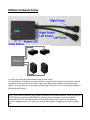
3) If you only have 1 Jebao pump, connect the pump to the LEFT cable and the AC adapter to the LEFT
power jack. The RIGHT power jack and cable is not used.
Single Supply Operation
The JBWave is preset from the factory to operate with two power adapters. If you have the twins
controller with the single power supply, you need to open up the JBWave case and set a jumper for
single supply operation.
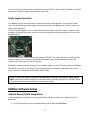
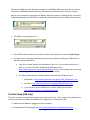
The box snap fits together with no screws. Disconnect all cables and power. Hold the bottom of the
enclosure and grab the top with your other hand while slightly squeezing and pull up. The top cover
should snap off.
You will see a jumper on the circuit board marked “OFF/ON”. The jumper will be in the OFF position.
Slide the jumper up and remove it. Now slide the jumper back in at the ON position, where the
jumper is over the center pin and the right pin.
Reconnect the pump cables and plug the twins power supply into the LEFT power jack on the JBWave
(The RIGHT power jack is not used). The pumps will start up and begin an alternating wave action
every 5 seconds, with speeds of 60% (Max) and 0% (Min).
WARNING: DO NOT ATTEMPT TO USE ONE OF THE SINGLE JEBAO AC ADAPTERS TO POWER BOTH
PUMPS. Doing so will cause the adapter to overheat and fail, possibly causing a fire. The ON position
of the jumper should only be used with the twins power supply.
JBWave Software Setup
Android Phone/Tablet Setup Guide
If you purchased the Android version you will need an Android smartphone or tablet with built-in
Bluetooth.
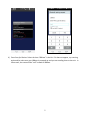
1) Go to the Google Play Store and download/install an app called BlueTerm.
3