1
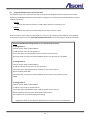
6.2.2 Assigning Ports Manually
Local Network
Network Camera 192.168.1.21 / Port 8080
Internet Service
Provider
Internet
Broadband
Router
Terminal
192.168.1.22
ADSL Modem
Public IP
210.20.34.23
Port 8080
For the
Network
Camera
Remote Location
Company Web Server
192.168.1.23
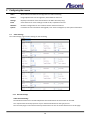
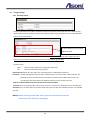
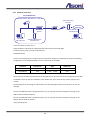
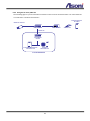
In this case what we have here is:
Public IP Address 210.20.34.23, assigned by the Internet Service Provider (ISP), but we will be using Port
9999 for accessing the camera from the Internet.
The Network Camera, with a local IP of 192.168.1.22, using port 8080 to get access to the camera through
the Local Network.
Broadband router
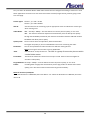
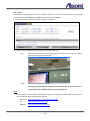
Since we are sharing only one single Internet connection through our Local Network, the Port Forwarding
configuration in our Broadband Router for the camera will be as follows:
Private IP
Private Port
Type
Public Port
192.168.1.22
8080
● TCP ○ UDP
8080
192.168.1.22
554
● TCP ○ UDP
554
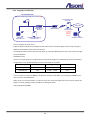
In this case we are using Port 8080 for the Network Camera at 192.168.1.22, and using Port 8080 for the
Internet access at 210.20.34.23.
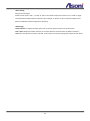
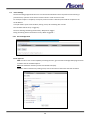
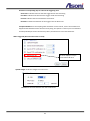
When we are in a remote location, in order to access our camera through Internet, we have to specify the
Public Port when typing the Public IP Address as the figure below
http://210.20.34.23:8080/
50