1
RME1-AI User Manual - Analog Variables Acquisition Module
Exemys
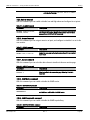
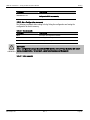
Table 8 - PASSWORD Command
Command
Description
PASSWORD:password
Changes the access key for remote configuration (TCP command console or
configuration Web Page). The key word must not have more than 10
characters
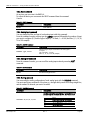
D.2.2. Host Name Command
With this command you can change the device’s name. So that as the device works with the
NBNS protocol, it will be possible to connect to the device (TCP console or web page) through its
name instead of its IP address.
Table 9 - HOSTNAME Command
Command
Description
HOSTNAME:name
Changes device’s name. The name must not have more than 15 characters.
D.2.3. NetConfig Command
With this command you can change the network configuration parameters (IP address, netmask
and gateway).With the NETCONFIG command the device will be restarted to produce the
changes. If the console is run from a Telnet session, the communication with the device will be
interrupted. You will have to reopen the TCP session using the new IP address.
Table 10 - NETCONFIG Command
Command
Description
NETCONFIG:IP_addr,NETMASK
Changes network configuration parameters. Netmask and IP
address equal to 0.0.0.0 enables DHCP
D.2.4. Factory Reset command
At any time, the RME1-AI administrator can reset the original manufacturer’s configuration. This
option can be executed through the command console with the FACTRESET command, this way
you will have the original configuration.
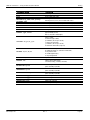
Table 11 - FACTRESET Command
www.exemys.com
Command
Description
FACTRESET
Resets the original manufacturer’s configuration.
Rev. 3
Page 42