1
List of Figures
List of Figures
.
.
.
.
.
.
.
.
.
.
.
.
.
.
.
.
.
.
.
.
.
.
.
.
.
.
.
.
.
.
.
.
.
.
.
.
.
.
.
.
.
.
.
.
.
.
.
.
.
.
.
.
.
.
.
.
.
.
.
.
.
.
.
.
.
.
.
.
T
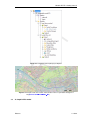
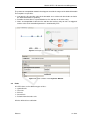
Example of an RTC-model in the project explorer . . . . . . .
Example of a flow chart . . . . . . . . . . . . . . . . . . . .
Example of the properties window for a Time rule . . . . . . .
D-RTC modelling concept and data flow . . . . . . . . . . . .
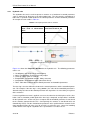
Components and basic concept of the flowchart . . . . . . . .
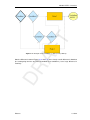
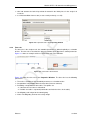
Example minimal controlflow . . . . . . . . . . . . . . . . .
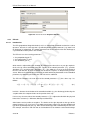
Example minimal controlflow with a condition . . . . . . . . .
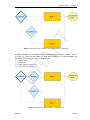
Example of two conditions that combined form an AND trigger
Example of two conditions that combined form an OR trigger .
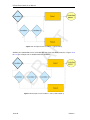
Example of three conditions: 1 AND (2 OR 3) . . . . . . . . .
Example of three conditions: 1 OR (2 AND 3) . . . . . . . . .
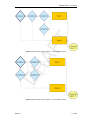
Example of four conditions: 4 OR (1 AND 2 AND 3) . . . . . .
Example of four conditions: 1 AND 2 AND (3 OR 4) . . . . . .
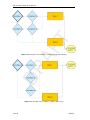
Example of four conditions: (1 OR 2) AND (3 OR 4) . . . . . .
Example of four conditions: (1 AND (3 OR 4)) OR (2 AND 4) .
Example of four conditions: 4 AND (1 OR 2 OR 3) . . . . . .
Example of four conditions: (1 AND 2) OR (3 AND 4) . . . . .
.
.
.
.
.
.
.
.
.
.
.
.
.
.
.
.
.
.
.
.
.
.
.
.
.
.
.
.
.
.
.
.
.
.
.
.
.
.
.
.
.
.
.
.
.
.
.
.
.
.
.
.
.
.
.
.
.
.
.
.
.
.
.
.
.
.
.
.
DR
AF
2.1
2.2
2.3
2.4
2.5
2.6
2.7
2.8
2.9
2.10
2.11
2.12
2.13
2.14
2.15
2.16
2.17
3
4
4
5
7
8
8
8
9
9
10
10
11
11
12
12
13
15
3.21
Integrated model default properties . . . . . . . . . . . . . . . . . . . .
Integrated model, settings for a coupled simulation with D-RTC and D-Flow 1D
. . . . . . . . . . . . . . . . . . . . . . . . . . . . . . . . . . . . . . . .
Integrated model in the project Explorer . . . . . . . . . . . . . . . . . . . .
Example water flow model schematisation with an OpenStreet background
map (http://openstreetmap.org) . . . . . . . . . . . . . . . . . . . . .
Options for default controlgroups . . . . . . . . . . . . . . . . . . . . . . .
Empty controlgroup . . . . . . . . . . . . . . . . . . . . . . . . . . . . . .
Minimum flow chart with a Time Rule . . . . . . . . . . . . . . . . . . . . .
Project Explorer after a coupled simulation with D-RTC and D-Flow 1D. . . .
Table and chart view D-RTC output . . . . . . . . . . . . . . . . . . . . . .
Sideview with water level, discharge and crest level of the structure . . . . . .
Flowchart for example with two controlled parameters for one weir. . . . . . .
Structure selected on the map view of simulation output . . . . . . . . . . . .
Select output coverage . . . . . . . . . . . . . . . . . . . . . . . . . . . .
Crest level, crest width and water level over time for the weir. A point in time
has been selected in the diagram, the corresponding line is selected in the table.
Chart properties window, the chart title “Simulation results” has been added. .
D-Flow 1D network with two weirs. . . . . . . . . . . . . . . . . . . . . . .
D-Flow 1D network with one weir and a single observation point upstream. . .
Flowchart with a Hydro Condition and a Time Rule. The rule is connected with
the true-output of the condition. . . . . . . . . . . . . . . . . . . . . . . . .
Data origin for the structure . . . . . . . . . . . . . . . . . . . . . . . . . .
Flowchart with two Hydro conditions in an AND combination combined with a
Time rule. . . . . . . . . . . . . . . . . . . . . . . . . . . . . . . . . . . .
Flowchart with two Hydro conditions in an OR combination and a Time rule. . .
4.1
4.2
4.3
4.4
4.5
4.6
4.7
Example of a flowchart with a hydro condition
A hydro condition in the Properties Window
Example of a flowchart with a time condition
A time condition in the Properties Window .
A hydraulic rule in the flowchart . . . . . . .
A hydraulic rule in the Properties Window .
A time rule in the flowchart . . . . . . . . .
30
30
31
31
32
33
33
3.1
3.2
3.3
3.4
3.5
3.6
3.7
3.8
3.9
3.10
3.11
3.12
3.13
3.14
3.15
3.16
3.17
3.18
3.19
3.20
Deltares
.
.
.
.
.
.
.
.
.
.
.
.
.
.
.
.
.
.
.
.
.
.
.
.
.
.
.
.
.
.
.
.
.
.
.
.
.
.
.
.
.
.
.
.
.
.
.
.
.
.
.
.
.
.
.
.
.
.
.
.
.
.
.
.
.
.
.
.
.
.
.
.
.
.
.
.
.
.
.
.
.
.
.
.
.
.
.
.
.
.
.
.
.
.
.
.
.
.
.
.
.
.
.
.
.
.
.
.
.
.
.
.
.
.
.
.
.
.
.
16
17
17
18
18
19
20
20
21
21
22
22
23
23
24
24
25
25
26
27
v