1
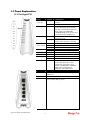
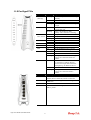
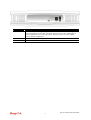
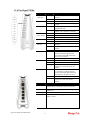
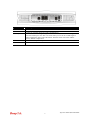
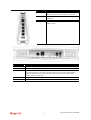
1.1.4 For Vigor2710VDn
LED
Status
Explanation
ACT
(Activity)
Blinking
The router is powered on and
running normally.
The router is powered off.
Wireless access point is ready.
It will blink while wireless traffic
goes through.
The router is ready to access
Internet through DSL link.
Slowly: The modem is ready.
Quickly: The connection is training.
The port is connected.
The port is disconnected.
The data is transmitting.
A USB device is connected and
active.
The data is transmitting.
DECT phone is in use
DECT phone is idle or off.
A DECT phone call comes.
The phone connected to this port is
off-hook.
The phone connected to this port is
on-hook.
A phone call comes.
A PSTN phone call comes (in and
out). However, when the phone call
is disconnected, the LED will be off
about six seconds later.
There is no PSTN phone call.
The WPS is on.
The WPS is off.
Waiting for wireless client sending
requests for connection or DECT
handset about two minutes.
DECT Pairing and WPS: Press
and hold the button for more than 2
seconds then you could try to
register DECT phone with 2710
within 2 minutes.
DECT Paging: Press once. All
handsets will have beep sound,
press the button again or press any
key on any handset will stop the
beep sound.
The WPS is off.
Waiting for wireless client sending
requests for connection about 2
minutes.
WLAN
Off
On
Blinking
DSL
On
Blinking
On
Off
Blinking
On
LAN
1/2/3/4
USB
Blinking
On
Off
Blinking
On
DECT
Phone
Off
Blinking
On
Line
Off
On
Off
Blinking
WPS
DECT
Pairing/Pag
ing / WPS
Button
On
Off
Blinking
Vigor 2710 Series Quick Start Guide
8