1
UPS SNMP HTTP AGENT
Chapter 5 Managing USHA/UPS via SNMP
Setting SNMP parameters in USHA
Before using USHA in SNMP environment, the IP address, gateway must be
configured properly. See Chapter 2 for details.
SNMP Access Control Setting
USHA supports SNMP protocol. You can use SNMP NMS to manage UPS through
the network. The IP address of the workstation must be entered in the USHA write
access table to prevent unauthorized users from configuring USHA via HTTP or
SNMP protocols.
Note: If you do not enter the IP address of the workstation to the Access
Control Table (via Serial Port or Telnet) or the SNMP/HTTP Access
Control (via Web Browser) in USHA, the SNMP NMS can only view the
UPS status; it will not be able to perform any configuration on USHA/UPS.
(See Pg. 19 Access Control Table Setting and Pg. 39 SNMP/HTTP Access
Control for details.)
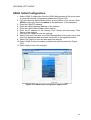
SNMP Trap Receivers Setting
See Pg. 40 SNMP Trap Receivers for details.
Set up SNMP Manager Software
1. Add the MIB file of USHA in the USHA CD-ROM to the MIB database of the
SNMP manager.
2. Search for USHA in the network
3. To access the USHA SNMP agent, use ‘public’ for the GET community
string and the Read/Write password (default is admin) for the SET
community string.
GET Community string: public
SET Community string: admin
For more information, see the MIB file on the USHA CD-ROM.
54