1
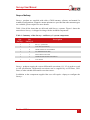
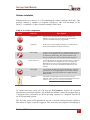
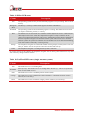
Table 9. SDNav LED states
Colour
Description
Off
The operating system has not yet booted and the program is not yet running. This occurs at
start-up.
Red-green
flash
The Survey+ is asleep. Contact OxTS support for further information.
Red flash
The operating system has booted and the program is running. The GNSS receiver has not
yet output a valid time, position, or velocity.
Red
The GNSS receiver has locked-on to satellites and has adjusted its clock to valid time (the
1PPS output will now be valid). The strapdown navigator is ready to initialise. If the
vehicle is travelling faster than the value set for “Initialisation speed” during configuration
then the strapdown navigator will initialise and the system will become active. On dual
antenna systems the system will initialise once the GNSS receiver has determined heading,
even if the vehicle is stationary or moving slowly.
Orange
The strapdown navigator has initialised and data is being output, but the system is not realtime yet. It takes 10 s for the system to become real-time after start up.
Green
The strapdown navigator is running and the system is real-time.
In current versions of the software the strapdown navigator will not leave green and return to any other
state. This may change in future releases.
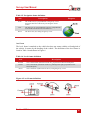
Table 10. Pos/Head LED states (single antenna systems)
Colour
Off
Red flash
Red
Description
The GNSS receiver is not sending data.
(Start-up only). The GNSS receiver is sending data to the Survey+. This is an operational
check for the GNSS receiver.
The GNSS receiver has a standard position solution (SPS).
Orange
The GNSS receiver has a differential solution (DGPS) or a kinematic floating position
solution (20 cm accuracy).
Green
The GNSS receiver has a kinematic integer position solution (2 cm accuracy).
26
Oxford Technical Solutions