1
Getting started
venture6-13 Page 10 Sunday, August 20, 2000 12:51 PM
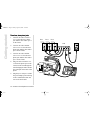
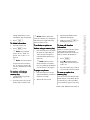
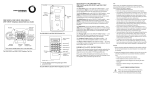
Three lines, three phone jacks
1. Connect one end of a silver 6wire cord to the line 1 phone
jack and the other end to port 1
on the CAM.
2.
Connect one end of another
silver 6-wire cord to the line 2
phone jack and the other end to
port 2 on the CAM.
3.
Connect one end of another
silver 6-wire cord to the line 3
phone jack and the other end to
port 3 on the CAM.
4.
Plug one end of a black 8-wire
cord into the phone port on the
CAM, run the cord through the
stand and plug the other end into
the CAM port on the back of the
phone.
5.
Plug the power adapter cord into
the power adapter port on the top
of the CAM and the other end
into an electrical outlet.
10 Venture 3-Line Telephone User Guide
line 1
line 3
line 2
CAM
1
2
3
5
4