1
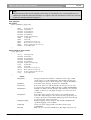
DCN Next Generation Delegate Database
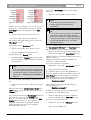
string with up to 19 characters. (Can be omitted.)
company name
string with up to 19 characters. (Can be omitted.)
street
string with up to 40 characters. (Can be omitted.)
ZIP code
string with up to 9 characters. (Can be omitted.)
city
string with up to 19 characters. (Can be omitted.)
E mail address
string with up to 19 characters. (Can be omitted.)
fax number
string with up to 19 characters. (Can be omitted.)
phone number
string with up to 19 characters. (Can be omitted.)
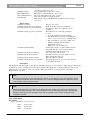
The delegate ID is a unique number, the other fields
correspond directly to the entry fields in the Delegate
Database application.
Delegate ID is required, but the other fields may be
left blank or can be omitted all together.
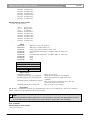
Example:
1,Doe,John,A1,My group,United
States,Dr.,English,,12345678,123,Voting,NoMicro
This is the entry for Dr. John Doe, sitting at seat A1.
He is from the United States, belongs to group “My
group” and has English as audio language. Display
language is as default. His card code is 12345678
with PIN code 123. He has voting but no
microphone authorization, and all other fields are
omitted and thus left as default. The DCN Next
Generation system holds a subset of six different
languages. If another language, other than the six
available, is present in the import file this delegate’s
display language will be English. These abbreviations
are DCN Next Generation language version
independent.
en | 13
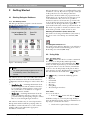
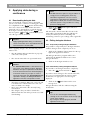
details for that delegate. Screen cards are
stored by the DCN system in a names file.
The data fields contained within the ‘Conference Data’
dialogue box can be divided into three categories:
•
User-specified
•
User-selected
•
System-specified
There are two user-specified fields: ‘Last Name’ and
‘First Name’. The only restriction on entries in these
fields is the number of characters; maximum 40 for
‘Last Name’ and 14 for ‘First Name’.
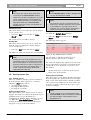
There are five user-selected fields: ‘Country’,
‘Interpretation’, ‘User Display’, ‘Group’, ‘Title’.
Entries in these fields must be selected from a list of
options offered by the system. However, all lists
except User Display can be edited or updated. For
more details on editing lists, please refer to ‘Editing
screen-card fields’ on page 14.
There are four system-specified fields: ‘Seat Number’,
‘Pin Code’, ‘Card Code’ and ‘Vote Weight’.
•
The seat number is a unique number that
identifies the delegate unit to the system.
•
The PIN code is an identification number that
the delegate has to enter into his/her delegate
unit before gaining access to conferencing
facilities.
•
The card code is a numerical code, invisible to
the user that identifies a delegate’s ID-card to the
system. A card code is shared by a card and a
delegate unit, but is otherwise unique. A delegate
must insert his/her card into the delegate unit to
gain access to conferencing facilities.
i
Note
The address of the card code on the chip card
is configurable. The default address is 25. To
change the default value, the following line
must be added in the DCNNG.INI file:
3.3 Entering delegate data
Delegate data is classed either as conference data or
personal data. Conference data is information that is
directly related to the conference in which the
delegate is participating. Personal data is additional
information that is not-conference related. All data is
entered into the screen card via the main window.
[Startup]
DataStart= #
where
#
i
i
Note
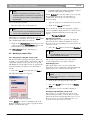
The Read Card push button allows you to
automatically read the code on an ID-card with
the ID-card encoder.
Note
A screen card is what is displayed in the main
window of Delegate Database, and is used to
store data on delegates. Each delegate has a
separate screen card, with text boxes, edit
fields and check boxes for specifying the
is the specified address of the
card code.
•
The vote weight facility increases the voting
power of delegates by assigning a value greater
than one to their vote. This is often used in
shareholder meetings. It is possible to specify a
Bosch Security Systems B.V. | 2004 December | 9922 141 70421