1
16
2.2.1
AKARI FTS Toolkit Manual
plotch
The plotch option is used to select a specific channel for the adjustment
of the ZPD of every scan, used in “check drv cb”. A channel which detects sufficient photons with high S/N is recommended. For large extended
sources the default channels (channel 23 for SW and channel 7 for LW) are
recommended, so it is not necessary to set this option. For point or small
extended sources, a channel in which the sources are detected should be
set: plotch = 28 or 29 and plotch = 4 or 5 for SW and LW observations,
respectively, with AOT parameters of FIS03;*;*;1, plotch = 54 or 55 and
plotch = 23 for SW and LW observations, respectively, with AOT parameters of FIS03;*;*;2, and plotch = 32 or 33 (or 53) and plotch = 7 for SW
and LW observations, respectively, with AOT parameters of FIS03;*;*;0.
2.2.2
rampcorr
The ramp curve correction table is selected by rampcorr option. By default,
the correction table in the toolkit for FTS observations, which is recommended for most data, is used. This option accepts either an integer 1, 2, 3
or a string of a ccf filename.
1 : Make a correction table using the data itself. This is required for very
bright objects.
2 : Apply correction table for survey mode data. Not recommended (test
purpose).
3 : No correction. Not recommended (test purpose).
ccf file name (string) : select specific ramp curve correction table. See below.
Processing with rampcorr=1, generates a ramp curve correction table
file named “***ramptbl.ccf”. Once a correction table is made for one observation, the user can use it every time by specifying the file as rampcorr=“***ramptbl.ccf ” instead of making the correction table again.
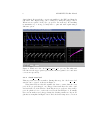
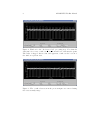
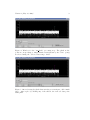
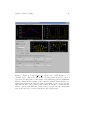
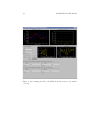
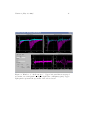
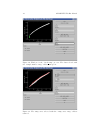
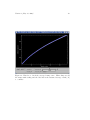
If rampcorr = 1 is selected, the ”check ramp” monitor window appears
(Figure 10). All ramp curves (far from the centerburst) used to make a
correction table are plotted in the top-left window. Unsuitable ramp curve
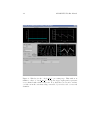
data should be flagged in this step. A channel is selected using the [channel]
slider. There are two additional sets of sliders, ”ramp curve range” and
”sample number range”. The former is used to remove a ramp curve, and
the latter is used to remove data of the same sample number from all ramps.