1
20.
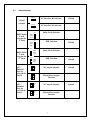
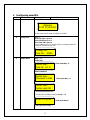
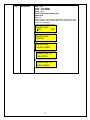
Enable PinProx
Key – *997
Press Key
Enter Key- 0, 1 or 3
then Key – #
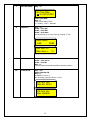
Enable disable PinProx by using following
0 = No PinProx
1 = Reader 1 PinProx
2 = Reader 2 PinProx
3 = Reader 1 & 2 PinProx
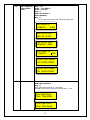
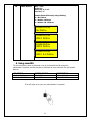
Enable PinProx
No PinProx
Enable PinProx
RDR 1 PinProx
Enable PinProx
RDR 2 PinProx
Enable PinProx
RDR 1 & 2 PinProx
5. Using smartXS.
The user enrollment process is performed in one of the SmartXS Unit OR through the
administrator’s computer, and the card data is distributed to other controllers over the SmartXS
Network.
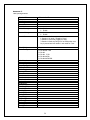
LED STATUS
BUZZER STATUS
DESCRIPTION
LED FLASHES RED
LED FLASHSES GREEN
SHORT BEEP
LONG BEEP
USER NOT FOUND
ACCESS GRANTED
If the LED lights up in green, the authentication is successful.
21