1
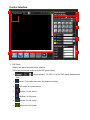
4. Audio, analog clock and digital clock
5. Background picture:
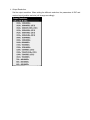
6. Default layout and Custom layout:
¾
Default layout: Use factory preloaded video
layouts.
¾
Custom layout: Use custom pre-saved video layouts.
Here you can adjust the size and position of the output screen. If you want to save the
layout, click the right mouse button to save this layout to the SPLITMUX.
7. Window selection and input mapping
For each display window, user can assign arbitrary video input here. Besides, user also can
adjust the order of windows.
11