1
Table of Contents
Introduction _______________________________________________________________________________ 3
Course Structure & Sequencing ____________________________________________________________________ 3
Contents for Dynamic Japanese 1 _____________________________________________________________ 5
General Study Tips _________________________________________________________________________ 6
Getting Started _____________________________________________________________________________ 8
How to do the first lesson, Names and Places __________________________________________________________ 8
How to do the second lesson, Numbers and Times: ____________________________________________________ 10
How to do Kana Practice _________________________________________________________________________ 11
How to do the Dictations and Fill-Ins _______________________________________________________________ 12
Dictations _____________________________________________________________________________________ 12
Fill-Ins ________________________________________________________________________________________ 14
Appendices _______________________________________________________________________________ 15
Introduction
Welcome to Dynamic Japanese! This introductory course in spoken Japanese is based on classroom proven
instructional strategies and techniques. Dynamic Japanese maximizes the effectiveness of multimedia by
focusing on the key skill necessary to acquire any language: listening. Each disc contains many hours of
listening practice with native speaker models, plus a variety of listening tasks and follow-up exercises. The
language is carefully chosen and sequenced to ensure comprehension at each level while at the same time
remaining natural.
With DynEd's unique interactive design, students can study at their own pace. At any point in the program
students have instant access to repetition, an English translation, Japanese text display, and glossary screens
that provide additional information about vocabulary and language points of particular importance. Students
may also record their own voice as many times as they like and compare it with the native speaker models.
Course Structure & Sequencing
Dynamic Japanese I is the first of three levels. Each level is divided into two parts, Discs 1 and 2. Normally,
each Disc requires a minimum of 40 hours of study and practice. Completion of all six discs will take the
learner from beginner to intermediate proficiency in spoken Japanese.
The course builds in a spiral from the most basic personal information of name and nationality, to family and
living situations, to daily schedule and routines, and continues on so that students can communicate in ever
increasing detail about themselves and the world around them.
The language sequencing is based on the following:
Short term memory: For students to process and repeat a phrase, they must first be able to hold it in short
term memory. Intensive listening practice and repetition of short phrases is necessary to build the ability to
hold longer phrases in memory.
Language concepts: The grammar and vocabulary items chosen must aid students in communicating the
basic concepts necessary to talk about themselves and the world around them. These concepts include
number, time, frequency, duration, manner, means, object, beneficiary, etc.... The sequencing of these
language concepts should lead to an ability to go from general information to more detailed information.
Spiral sequencing: To aid the student in language acquisition, key vocabulary and grammar should be
constantly reviewed and practiced, even as new material is introduced.
Comprehensible input: For language acquisition to occur, the input language must be understood. For this
reason, in addition to the visual support provided by the graphics in each lesson, an oral translation is
provided for each sentence, along with glossary support.
Context: All language must be presented in context. Each context should support the language, and should
be adaptable to the student's own life and situation.
Dynamic Japanese has been designed to work well with other more traditional courses. Unlike text based
courses, the main focus of Dynamic Japanese is on listening and speaking. Though the Japanese writing
system is introduced and used throughout, students may need to use an additional text as a supplement. For
more in-depth information on Japanese grammar and situations, several excellent textbooks can also be
recommended. (See General Study Tips, below)
Contents for Dynamic Japanese 1
Disc 1
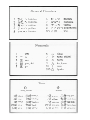
Names & Places: This first lesson begins with very short phrases that are useful for expressing basic
personal information: name, nationality, gender, country, place of origin and spatial location. Also included
are useful phrases for introductions. Basic grammatical patterns are used throughout, supplemented by
glossary notes.
Numbers & Times: Intensive listening practice with numbers and times help tune the ear to the Japanese
sound system.
Jobs & Family: The jobs, families, and living situations of three characters are presented and contrasted.
New grammatical patterns and useful vocabulary are introduced.
Kana Practice: This lesson gives practice with the Japanese hiragana writing system.
Dictations: Reviews previous material while focusing on important vocabulary, grammar, and kana
recognition.
Fill-Ins: Gap-filling exercises provide intensive reading, grammar, and vocabulary practice.
Disc 2
Family Schedule: Family relationships are extended as we focus on a Japanese family of four. The daily
schedule of each character is presented, including times, daily activities, and days of the week.
Matrix Vocabulary: This highly interactive lesson introduces a wide variety of useful vocabulary relating
to: seasons, times of day, weather, times of life, and types of people.
Matrix Game: An interactive game format based on the Matrix Vocabulary. Try to improve your score until
you have learned every word!
Likes & Dislikes: A character talks about what foods he likes. He then talks about his other interests, what
he can and can't do, including sports, and how well he does them.
Dictations: Reviews previous material while focusing on important vocabulary, grammar, and kana
recognition.
Fill-Ins: Gap filling exercises for intensive reading practice and review .
General Study Tips
1.First, learn how to use the program. Familiarize yourself with the Control Bar. This information is in the
DynEd User's Guide.
Use each button, and get familiar with the mouse. If you hear an instruction in Japanese, use the translation
button to hear it in English. Go slowly. Use the pause button, the repeat button, and the translation button
untilyou are confident. It generally takes time to familiarize your ear to the sounds and rhythms of
Japanese.
2.Use the pause button
whenever you need time to answer a question or to stop and think. If you
don't do this, the program may time out and exit you from the lesson. You are in control, but only if you use
the mouse to click on the control buttons. You will always have plenty of time if you get into the habit of
using the pause button. Once you do this, the learning experience will be enjoyable.
3.Study for 20-30 minutes at a time. If you are a beginner, concentrate on the first 15-20 sentences only.
Don't try to go through an entire lesson. Each lesson will require several hours of intensive study, practice,
and review. If you go too fast, you will become frustrated and overwhelmed by the language. Please pace
yourself. For most students the first CD of Dynamic Japanese will require a minimum of 40 hours of study
and intensive practice.
4.If you don't understand something, use the translation button.
Most instructions are given in
Japanese. Please use the translation for these instructions until you begin to understand the Japanese.
5.If you cannot read hiragana and katakana, don't attempt the Dictation and Fill-in units until you have
mastered all the other lessons, including the Kana practice lesson. The dictations and fill-ins will require
effort, but will be worth it once you can do them. They should be reviewed periodically.
6.Find a good textbook to use as a reference and to help you learn the grammar and writing system. The main
focus of Dynamic Japanese is listening. Though the Glossary provides some help with the grammar, the
more difficult points will require a good textbook or a teacher.
Some excellent textbooks are:
Japanese for Busy People (Kodansha International),
Japanese For Everyone (Gakken),
Business Japanese (Nissan Motor Co., Ltd.), and
Situational Functional Japanese (Bonjinsha)
General Comments
Learning a language is like learning how to play a musical instrument. It is a skill that must be acquired over
time, through constant practice and repetition. The more time you spend in each lesson, the more you will
learn. As with learning to play an instrument, practice time must be focused to be effective. Each time you
study you should have a purpose or goal for that practice session. This helps you to concentrate and facilitates
long-term acquisition of the language. Each lesson will normally require several hours of study, practice, and
review.
It is important to study each of part of a lesson several times, before going on to the next part or section.
Getting Started
How to do the first lesson, Names and Places
If you don't know how to get into the lesson, please look at the DynEd User Manual.
When you start the first lesson, follow this procedure to familiarize yourself with the program.
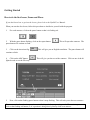
1.
For each sentence, click on the pause button so that it is flashing red.
2. With the pause button flashing, click on the repeat button.
pause button will continue to flash.
This will repeat the sentence. The
3. Click on the American flag.
continue to flash.
This will give you an English translation. The pause button will
4. Click on the ABC button.
lighted words to see the Glossary.
This will give you the text of the sentence. Click on one of the hi-
5.
Next, click on the flashing pause button so that it stops flashing. This will take you to the next sentence.
Please remember that when the pause button is flashing red, the program is paused. To continue, you must
click on the flashing red button, or, if a question is being asked, you may click on an answer.
6. Repeat the above series of steps for each new sentence. To go back, click on the rewind button, or exit the
lesson. (See DynEd Controls in the User's Guide)
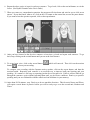
7. When you come to a comprehension question, the program will time down and wait for you to click on an
answer. If you don't know what to do, click on the <?> button on the control bar, next to the pause button.
If you want to hear the question repeated, click on the repeat button.
8. After you have listened to the first few sentences a few times, go back and repeat each sentence. To go
back, keep clicking on the rewind button until you are at the first sentence.
9. To record your voice, click on the record button
button
to hear your recording.
which will turn red. Then click on the monitor
To compare your recording with the Japanese native speaker, click on the repeat button, and then the
monitor button. Repeating each sentence is an excellent way to improve both your listening and your
speaking. If a sentence is too long, try repeating just the first or last part of it. If this is still too difficult, go
through the sentences again without repeating them until you feel more confident. Don't try to practice
speaking until you are comfortable with the sounds and can hold them in your memory.
10. After about 20-30 minutes, stop. Don't try to do too much the first time. This first unit, Names and Places,
will require several hours of practice before you will be ready to go on to the second unit, Numbers and
Times.
How to do the second lesson, Numbers and Times:
1. Begin with the numbers. Click on each number and listen. Do this several times, for each number.
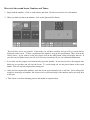
2. When you think you know the numbers, click on the Question Box button:
This will allow you to test yourself. In this mode you will hear a number, and you will see several choices
displayed on the screen. To hear a repetition of the number, click on the repeat button. Then, click on the
correct choice. If you wish to see the text, please click on the ABC button, which will display the text. If
you click on a hi-lighted word, you will see a Glossary screen that will give you additional information.
3. If you time out, the program will automatically repeat the number. If you time out twice, the program may
think you are not there and will exit the lesson. To avoid timing out, use the pause button or the repeat
button. This will stop the program from timing out.
4. After you have mastered the numbers, enter the lesson again and study how to tell time. Since telling time
requires a knowledge of numbers, this lesson reviews your knowledge of the numbers while you study how
to tell time.
5. This lesson is excellent listening practice and should be repeated often.
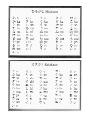
How to do Kana Practice
1.Click on each word and listen. Do this several times, for each word. You may wish to use the ABC button
for text support.
2.Listen to each word, then say it. Practice reading each word.
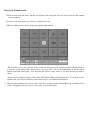
3.When you think you are ready, click on the Question Box button:
This will allow you to test yourself. In this mode you will hear a word, and the program will time down as
it waits for you to indicate the correct answer. For more time, click on the pause button or use the repeat
button to hear the word again. You may hear the word as many times as you wish before you make a
choice.
If you wish to see the text, please click on the ABC button, which will display the text. If you click on a hilighted word, you will see a Glossary screen that will give you additional information.
4. When you have mastered one set of words, click the <+> button on the Control Bar to go to another set of
words. Altogether, there are six sets of 14 words, or 84 words in total.
How to do the Dictations and Fill-Ins
These lessons review the language from the previous lessons. They also require a reading knowledge of
hiragana. To prepare for these lessons, please do the Kana practice lesson first until you are able to recognize
the words written in hiragana. You may also wish to review all the previous lessons with the text support
turned on. To do this, go to the Control Panel menu and turn on the text support. This will allow you to see
the text display as you review the lessons.
Dictations
In the Dictation lesson you will first hear the sentences presented in order. Then the screen will change and
you will see a group of 15 words displayed at the top of the screen. In the Control Bar, you will see the
numbers 1-4 displayed.
To do the dictation, follow these steps:
1. Click on the number 1 in the control bar. You will then hear the first sentence, and it will be displayed on
the screen with a number of blanks spaces where words are missing.
2. Click on the repeat button to hear the sentence again. This will also pause the program so that you have
plenty of time.
3. Look at the words at the top of the screen. Your task is to find which word goes in each blank. Then click
on your choice on it until it turns red. Next, click on the space in the sentence where you want the word to
go. When you do this, the word will appear in the blank space. If you have made a mistake you may
change your choice by putting another word in the same place.
4. Continue this process until you have finished the first sentence.
5. Click on the number 2 in the control bar, and follow the same procedure.
6. When you have completed all four sentences, click on SCORE in the Control Bar. This will check your
answers and give you a score.
7. If your score is less than 65%, you will have a chance to do the dictation again.
8. If you score is more than 65%, you will hear each sentence again, and the sentences will be reentered on the
screen. Your errors will be indicated by colored text, and you will have the chance to correct them.
9. For example, to correct an error in sentence 1, click on the number 1 in the control bar and listen to the
sentence. Then find the correct answer, click on it, and use it to replace the incorrect word. If your choice
is correct, the color of the word will turn white.
10. When you have finished correcting your errors in the dictation, click on END in the Control Bar. You will
then have a chance to repeat the same dictation or move on to a different dictation. You may also decide to
exit the
11. lesson and return to the main menu. Remember to use the translation button if you do not understand the
instructions.
Fill-Ins
This lesson will help you focus on important grammar and vocabulary items from the previous lessons.
1. Read each sentence and note the blank space. Try to decide what word should go in the blank.
2. Look at the group of 5 words displayed on the screen. Decide which of these words can go in the blank.
3. Click on your choice.
4. You will generally have two chances to get the correct answer. Then the program will show you the correct
answer.
5. To find out more about the answer, click on the hi-lighted word in the answer, and a Glossary screen will
appear which may help you better understand the answer.
6. Try doing all the fill-ins in sequence by clicking on the numbers in the choice menu. Then, click on the
Question Box
button, and you will have a chance to test yourself by doing the same problems in a
random order. Good luck.
7. These problems will need to be reviewed often, as they are important.
Appendices