1
1 - Introduction
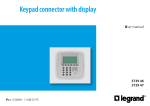
■ The navigation keypad
■ The display
During normal operation the display presents the following
information:
OK
State:
- Winter (heating)
- Summer (cooling)
Key to confirm the selection
displayed or the data entered
Example
11:26
01-10-2008
Time
Date
Key to cancel the selection and
return to the previous page; keep
pressed to quit the Main menu
Mode of
operation
Name of the
program
being
Scroll keys
Depending on the mode of operation set, the display shows the
following icons:
scroll the list of items in the
menu
Example
11:26
Selection keys
can select functions which in
some menus appear in the last
line
01-10-2008
One or more zones in OFF
One or more zones in MANUAL
One or more zones in ANTIFREEZE or HEAT PROTECTION
7