1
o
o
o
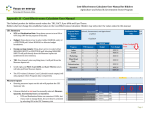
exist in the list you must first add it; in that case please refer to the relevant
chapter of the manual: Environmental Parameters.
Type the emission rate of the environmental parameter and press Tab.
Examples of emission rates can be found at the existing processes.
The value (in g/tn) will be automatically calculated according to the data
entered in the Details section of the form. For explanation on the
calculations please refer to the relevant chapter of the manual: Explanation
of calculations.
Enter as many environmental parameters as you want for the specific
process.
To save the data, press the ‘Save’ button.
To close the form, press the ‘Close’ button.
If you made changes to the values and you press the ‘Close’ button without pressing the
‘Save’ button, the following message appears:
Press ‘Yes’ to discard all modifications.
Press ‘No’ to return to the form.
Page | 25