1
Navigation Buttons
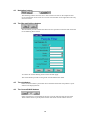
In form view at the base of the screen, there is a horizontal scroll bar containing buttons that are used to
aid navigation through data.
Go to last record
Go to next record
Go to specific record (user types which one in box shown)
Go to previous record
Go to first record
One-to-many Relationship
A one-to-many relationship is the most common type of relationship in a relational database. In a oneto-many relationship, a record in Table A can have more than one matching record in Table B, but a
record in Table B can only have one matching record in Table A. A typical example of this kind of
relationship is that between Training Registrar and Trainees in the SPREP Database; a Training may
have one or more Trainees associated with it, but in order for a Trainee to be stored in the database, it
must be linked to a Training.
One-to-one Relationship
In a one-to-one relationship, a record in Table A can have no more than one matching record in Table
B, and vice verse. This kind of relationship is unusual, but an example might be of a database
containing employee salary details, with one table containing personal details such as name and address
etc, and the other table containing the person's name, manager and current salary; in this instance there
would be a one-to-one relationship between the two tables.
Query
Queries enable the user to retrieve data from their database that matches certain conditions or criteria;
the data that is retrieved depends on the structure of the query. Queries are an efficient way of viewing
related data from several different tables at once.
Read-only
In the SPREP Database, some forms are set to be 'read-only' meaning the data cannot be altered, but
only viewed on screen.
Record Selector
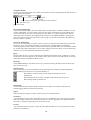
Within a data entry form, the left-hand side of the form often has a small box containing different
symbols denoting the status of a record in the database, i.e.
Record that is currently being viewed, which has already been saved
New Record
Record edited but not yet saved - changes can be undone by pressing ‘Esc’
Record being edited by another user
Relationship
An association between common fields (columns) in two tables. For example, the People and
PeopleLanguage tables are related on People ID.
Report
Output of data from a query or table in Microsoft Access in document form.
Scroll Bars
A typical Windows-style control, which aids the user to view different parts of the screen or navigate
their way through a combo box. Scroll bars can either be vertical, appearing at the right-hand side of
the screen, or horizontal, appearing at the base of the screen.
Security
A set of features used to specify or restrict the access that specified users or user groups have to data
and objects in a database.
13