1
Source
Each form, report, query and every individual field on each of these objects has this property, referring
to which underlying table or part of a table its data is derived from.
Switchboard
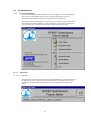
The initial screen that the user is presented with after logging onto SPREP Database. It is from this
screen that they navigate their way around the system.
Tab Order
The order in which the cursor moves from one field to the next on a form on pressing the Tab or Enter
key.
Table
The fundamental structure of a relational database management system. In Microsoft Access, a table is
an object that stores data in records (rows) and fields (columns). The data is usually based on one
particular category, or ‘entity.’
Text Box
A control that provides a place to enter or view text in a form or report.
Validation Rule
A rule that sets limits or conditions on what can be entered in one or more fields. Validation rules can
be set for a field, record or control on a form. The rule is checked when the focus moves from one field
or control to the next. Microsoft Access displays a different message whenever the rule is violated.
Wizards
A Microsoft Access tool that asks the user questions and creates an object according to his or her
responses; for example, tables, queries, reports, forms, and controls on forms such as buttons and
combo boxes can all be created quickly using Wizards.
14