1
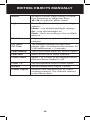
CONFIGURATION SETTING Configuration Settings (EZ Scan) To access configuration settings, select Settings from the main menu, and press . • Default Vals – Restores default settings. • Simple Display – Limits displayed information. • Default SL – Sets the default Scanlist. • Priority Mode – Enables Priority mode. • Priority Time – Time between priority scans. • Enable Record – Turns on the record feature. • Search Record – when active unit records transmissions found while searching. • G Atten Mode – Enables Global Attenuation. • G Atten On – Activates Global Attenuation. • Search Dg AGC – Applies Digital AGC to found digital transmissions. • G AGC Mode – Enables Global AGC. • G AGC On – Activates Global AGC. • Scan Sets Opt - Turns on Scan Set Feature. • Sounds – Sets EZ Scan beeps and alert sounds. • Alerts – Controls audio alerts. • Key Beeps – Enables or disables key tones. • Beep Volume – Sets key tone volume. • Alert Volume – Object volume. • Contrast – Sets the LCD contrast. • LiteMode - Sets the backlight mode to On, Normal, Key, Ignore or Stealth. • LiteTime – Backlight duration. • LiteLevel – Controls backlight brightness. • Knob Dflt - Selects SQ or VOL. • Knob T/out - Selects time from levels 1-10. • Welcome Text 1-5 – Sets the text displayed on five lines of the display when the WS1095 is first turned on. • Skip - Programmed to “lockout” will permanently locks out an object when the SKIP button is pressed. • Blink Time 1-2 – Controls the amount of time each item is displayed. • Show Radio ID – Displays the Radio ID for trunked systems, if available. Tag Only. 58