1
ROTARY ENCODER
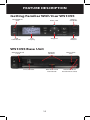
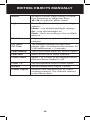
ATT Key
The Attenuator ATT key provides front panel control
of the radio’s attenuator function. Pressing the ATT key
cycles between per object attenuation mode, Global
attenuation mode, and Global attenuation on.
SKY Key
When pressed, the SKY key provides instant access to
NOAA Weather Radio broadcasts, and is used to access
Dedicated SAME Weather Alert Receiver mode, which
allows the WS1095 to remain silent while monitoring
for severe weather conditions in the area you specify
by entering NOAA SAME codes. Pressing the SKY
key a second time selects the SKYWARN Scanlist for
monitoring and temporarily disables all other Scanlists.
Skywarn requires one - time programming.
Rotary Encoder
The WS1095 is equipped with a multi-function control
knob, mounted on the top-right of the remote head.
You can turn the knob right and left, and press it to click.
The rotary encoder functions are “context sensitive”.
You can select the desired rotary encoder operating
mode (volume or squelch) in the Settings menu under
Knob Dflt. Set the desired rotary encoder timeout time
in seconds in the Settings menu under Knob T/Out.
Factory default function is volume control during
scanning. Pressing the knob once temporarily changes
to squelch control. After 5 seconds (settable) of
inactivity the knob reverts to its default function.
In squelch mode the default function is to scroll
through squelch levels while scanning. Pressing the
knob once temporarily changes to volume control. After
5 seconds (settable) of inactivity the knob reverts to its
default function.
16