1
ViaLite quick start guide
www.vialite.com
Standard Optical Connectors and Fibres
Ensure that all mating connectors are matched types.
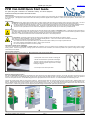
To connect SC/APC optical connectors, remove the connector protective cover. Align the connector keyway slot in the adaptor to the key of the plug. Gently push
the plug into the adapter until a click is heard and the connector locks. To disconnect, grip the body of the plug and gently pull the plug from the adaptor, replace the
protective cover.
To connect E2000/APC optical connectors. Gently push the plug into the adapter until a click is heard and the connector locks. To disconnect, depress the lever of
the plug and withdraw the connector. The protective cover engages and disengages automatically.
To connect LC/APC optical connectors, remove the connector protective cover. Gently push the plug into the adapter until a click is heard and the connector locks.
To disconnect, depress the lever of the plug and withdraw the connector, replace the protective cover.
All PPM FC/APC equipment use narrow key FC/APC connectors, these are not compatible with wide key FC/APC. To connect FC/APC optical connectors, remove
the protective cover and align the white ceramic centre ferrule on the cable connector with the mating receptacle. There is a key on the side of the ferrule, which
must match the keyway slot in the receptacle shroud. When they are aligned, gently push the plug home and finger tighten the knurled collet nut onto the threaded
receptacle. Disconnection is the reverse of connection; replace the protective covers on both the receptacle and the cable plug.
Minimum Bend Radius of a simplex patch cable is typically 30mm, at this radius there will be a very small increase in loss due to the bend (~0.05dB)
Connecting and Disconnecting RF Connectors
This product uses a range of RF connectors. Please ensure that RF connections are made with correctly matched connectors and cable impedances. Failure to do so
may result in damage to the connectors and loss of performance. SMA RF connectors should only be connected with a calibrated SMA torque spanner. BNC
connectors are available in both 50 and 75 ohms.
RF Module Input/Outputs Levels
RF inputs and outputs should not be exposed to DC voltage levels in excess of ±36V.
Absolute maximum no damage RF input level is +13dBm (some units will tolerate more, see handbook).
Absolute maximum no damage RF level applied to an RF output is +13dBm.
Some transmitter modules are pre-configured to have a DC voltage present on the RF input connector, to drive low noise amplifiers and similar equipment. Check
module handbook and description for more details. All receiver modules will create a 1-2Vpeak DC transient from the RF output at start up into a 50Ω load
(approximately 5V into a 1MΩ load). This may cause failure in some very sensitive spectrum analyzers or similar equipment. All modules have AC coupled inputs and/or
outputs and will be sensitive to large transients (>5V) applied to either input or output. This may result in permanent damage to the units, particularly to low frequency
units. Contact PPM for more details. Some receiver modules are equipped with DC loads on their outputs, please see module handbook.
19 Inch Rack Installation
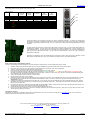
The ViaLiteHD 19” Rack Case is designed to fit 19” cabinets. Two options are available that occupy a height of either 1U or 3U; both have flanges for cabinet mounting.
The 3U rack case provides mounting for 16 modules, 13 general purpose slots (1-13), 1 dedicated controller slot (14) and 2 dedicated power supply slots (15,16). The
3U Rack Case must be used with at least one plug-in HPS Power Supply Module, power inputs are situated at the rear of the rack with one dedicated power connection
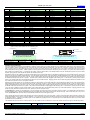
per module. The backplane contains 9-way D-type data connectors for each module position 1-13; this provides user access to module data. The rack case provides
two 50 way connectors (SCSI-3 Har-mik® female) that give access to power, alarm and rack data. The mating SCSI-3 connector can be terminated with either a ribbon
or individual round cable, contact PPM for more details. The pin-outs of these connectors are given in the following section. Either power supply position can be used;
the power supplies are designed to current share, if more than 1 is fitted. If power supplies are operating in redundant configuration, there should be a minimum load of
20 watts to ensure that both power supplies are active, below this level one power supply may be in idle mode. A dummy load board can be supplied, to fit into any of
the unused slots.
The 1U rack case provides 3 slots and 1 power supply draw. These slots can be factory configured either for 3 general purpose slots (1-3) or for 2 general purpose slots
(1-2) plus 1 controller slot (3). The 1U rack case provides two 25 way standard density D connectors that give access to power, alarm, module data and rack data. The
pin-outs of these connectors are given in the following section.
Controller Front
RJ45 Ethernet
Interface
Hot swappable
modules
Test Port A
Test Port B
Status LED1
Status LED2
Status LED3
Handle Release
Button
PSU Status LED
Guide Pin
Handle
Slot 1-13
General Purpose
Modules
Removable
Fan Cassette
Fan Power
Connector
Blindmate
Plates
Blindmate
Optical
Interface
Controller Craft Port
Slot 14
Controller Reset
Controller
Slots 15-16
Button
Module
Power Supply
Controller Optical
Modules
Interface (Optional)
Module Data Connector
Mounting flange
Fully Enclosed Fan
Controller Rear
2xRJ45 Ethernet
Interface
Rack Connector J1
Rack Connector J4
PSU Power Connection
IEC60320/C13
Hxx-QS-HB-2 VialiteHD Quick Start Guide
Blindmate
RF
Interface
Standard
Modules
Page 2
Standard
Optical
Interface
Standard
RF
Interface
CR2896