1
2.
EXPLANATION OF FUNCTIONS
All the functions of the automatic pay station are explained below.
2.1
COLLECTION FROM SINGLE-STAY USERS
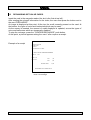
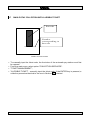
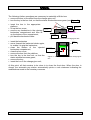
Insert the ticket in the slot (on the left, the second one from the top). A picture appears
indicating, at the top, the amount payable and, at the bottom, the types of coins and
banknotes which can be used for paying. (For use of the value coupon, see chapter 2.2).
The types of money crossed out cannot be temporarily used for paying - these are the
reasons why this can happen:
1. according to "maximum change dispensing", the pay station will not accept the largest
denominations. Example: maximum change dispensing = 10 euros (configurable); stay
amount = 5 euros; banknote denominations of over 10 euros are not acceptable, and,
therefore, they will be crossed out, as they would dispense more than 10 euros
change;
2. mixed cash box absent;
3. the pay station cannot return the money if the operation is cancelled:
-
because the hoppers are empty
-
because the hoppers are absent;
4. the banknotes may not be usable because the banknote reader is out of service;
5. coins normally directed to the mixed cash box may be unusable because the mixed
cash box is absent, or because the cash reserves are insufficient to execute the
"cancel operation" command: the mixed cash box does not have any channels leading
to the change tray, or, even if the reserves are sufficient, the change-giver units are
partly or totally out of service.
6. a certain type of coin or banknote may not be usable because the monetary reserves
are insufficient to give the change, or because, although the reserves may be
sufficient, the change-giver units are partly or totally out of service.
Whenever a coin or banknote is inserted, the video picture is updated, in order to show
the remaining amount to be paid. Even the coins or banknotes which are temporarily
disabled, can vary for the reasons we mentioned above.
CONTROLLER AUTOMATIC PAY STATION - USER MANUAL
5