1
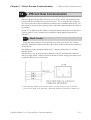
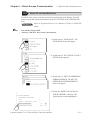
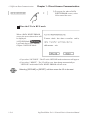
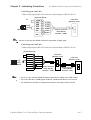
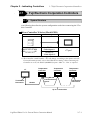
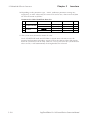
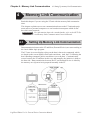
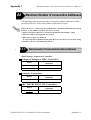
Chapter 4 - Memory Link Communication 4.1 Setting Up memory Link Communication
4.1.2
!
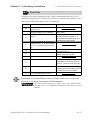
Important
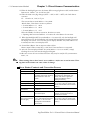
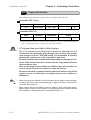
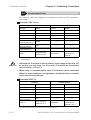
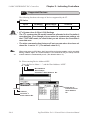
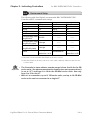
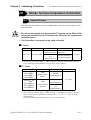
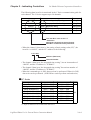
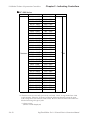
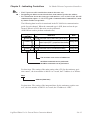
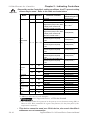
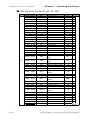
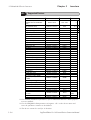
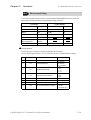
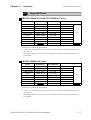
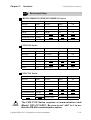
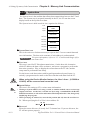
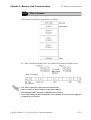
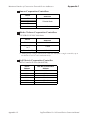
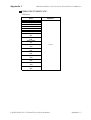
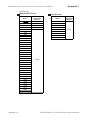
Contents and Range of System Data Area
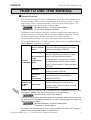
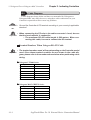
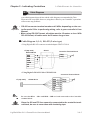
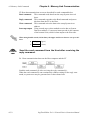
When you wish to turn the LT’s display OFF, use the Screen Display
ON/OFF bit. Do not use the Control area’s Backlight OFF bit. Be aware
that this feature's system Data Area settings and range used during
Memory Link Communication will differ from the settings used with
Direct Access Communication.
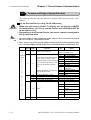
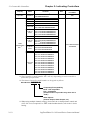
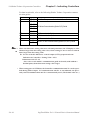
Address
1
Detail
Status
Function
*1
Bit
Particulars
0 to 2 Reserved
3
Writes a set value *2
4 to 9 Reserved
10 Backlight Alarm *3
11 to 15 Reserved
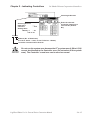
2
3
Error Status
Each bit changes according to the LT
0, 1
2
Unused
System ROM/RAM
error function. When an error occurs, the
corresponding bit will turn on.
3
4
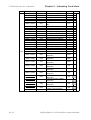
Screen Memory Checksum
SIO Framing *4
* A bit that has turned on remains on until
the power is turned off and back on, or
5
6
SIO Parity *4
SIO Overrun *4
until RUN mode is re-entered from
OFFLINE mode. or details and the
handling process about the Error Status
contents, refer to the Section 1.1.3.
7, 8
9
Unused
Initialization of Internal Memory Checksum Necessary
10 Timer Lock Error
11 to 15 Unused
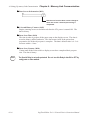
4
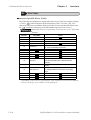
Clock Data
(Year)
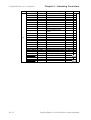
0 to 7 Stores the last 2 digits of the Calendar year as 2 BCD digits
"Year / Month / Day /
Hour / Minute " Data is 8 to 15 Unused
5
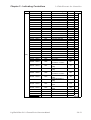
Clock Data
(Month)
stored in BCD's 2digits. 0 to 7 Stores 01 to 12 (Month) as 2 BCD digits
(E.g.) 98/02/01 17:15 8 to 15 Unused
6
Clock Data
(Day)
0 to 7 Stores 00 to 31 (Day) as 2 BCD digits
8 to 15 Unused
7
Clock Data
(Hour)
0 to 7 Stores 00 to 23 (Hour) as 2 BCD digits
8 to 15 Unused
8
Clock Data
(Minute)
0 to 7 Stores 00 to 59 (Minute) as 2 BCD digits
8 to 15 Unused
10
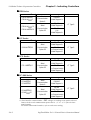
Interrupt Output If you Write in word data, the bottom 8 bits will be output as an interuput code after touching
(Touch OFF) OFF.However FFh will not be output.
11
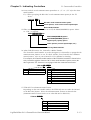
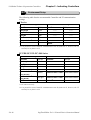
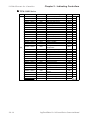
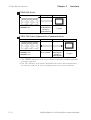
Control *5
0
1
2, 3
4
5
6
Backlight *6
Buzzer ON
Reserved
Buzzer 0:Output, 1:No Output *7
Reserved
Interrupt Output when touching panel to turn the display ON.
(Interrupt Code:FFh) 0: Disabled 1: Enabled *8
7 to 15 Reserved
LogiTouch Editor Ver.1.0 External Device Connection Manual
4-1-3