1
8
MATCHING GELS
In MelView you may accept to match gels with single pairs or multiple pairs.
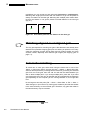
Matching with single pairs means that one feature in a gel will be paired to
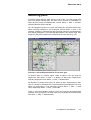
exactly one feature in the other gel. Matching with multiple pairs means allowing that one feature in one gel be paired to several features in the other gel
(Fig. 8-1).
Figure 8-1. One feature paired to two features in the other gel
Matching aligned or unaligned gels
The only prerequisite for matching two gels is that features have already been
detected and quantified. Aligning gels prior to matching is optional, but in many
cases the matching process will be faster and will produce better and more
accurate results, especially with distorted gel images (see Aligning gels on
page 7-1).
Automatic matching
To match two or more gels, select them using the Select tool or one of the
Select → Gels menu options. Choose Process → Match → Match Gels. MelView will first request that you designate the reference gel among the selected
gels. Pick one of the gels, then click OK. You will then be asked whether you
wish to allow multiple pairs. If you accept multiple pairs, press OK. If you want
only single pairs, then click No. All gels will then be matched with the reference
gel. Depending on the computer you are running MelView on, this might take
time.
Do not forget to save the pairs (File → Save → Save Pairs, or File → Save →
Save Changes, or just Control1-S). Saving pairs creates a pairs file that resides
in the same directory as the matched gels. Therefore, only gels that reside in
the same directory may be matched.
1. On the Macintosh, use
8-2
The Melanie II User Manual
instead.