1
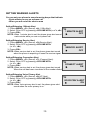
SETTING WARNING ALERTS
You can set your phone to sound warning beeps that indicate:
- Each minute you are on a phone call
- When you are out of the service area
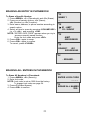
Setting/Releasing 1 Minute Alert
1. Press <MENU>, <5> (Sound), <4> (1 Min Alert).
2. Select ON or OFF by pressing <VOLUME KEY>(or <*>,<#>).
3. Press <OK>.
NOTE: When 1 minute alert is set, the phone gives alert sound
each minute while you are on a phone call.
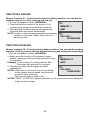
Setting/Releasing Service Alert
1. Press <MENU>, <5> (Sound), <5>(Service Alert).
2. Select ON or OFF by pressing <VOLUME KEY>
(or <*>, <#>).
3. Press <OK>.
NOTE: When service alert is set, the phone gives alert sound
when the phone is acquiring or loses the service signal.
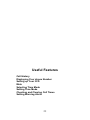
Setting/Releasing Connection Alert
1. Press <MENU>, <5> (Sound), <7> (Connect Alert).
2. Select ON or OFF by pressing <VOLUME KEY>
(or <*>, <#>).
3. Press <OK>.
NOTE: When service alert is set, the phone gives alert sound
When the call has been connected to the number dialed.
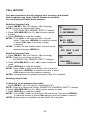
Setting/Releasing Voice Privacy Alert
1. Press <MENU>, <5> (Sound), <8>(VP Alert).
2. Select ON or OFF by pressing <VOLUME KEY>
(or <*>, <#>).
3. Press <OK>.
NOTE: When Voice privacy alert is set, the phone gives alert
sound when the voice privacy is on.
30
1 MINUTE ALERT
▶
OFF
SERVICE ALERT
▶
OFF
CONNECT ALERT
▶
ON
VOICE PRIV ALERT
▶
ON