1
Chapter 8: Integrating third-party systems
Overview
A third-party system is an external system which can communicate with
Forcefield using the Forcefield third-party system protocol.
The third-party system must be assigned a type in Databases > Third Party >
System Types, and is optionally assigned a sub-type in Databases > Third Party
> System Sub Types.
A third-party sends events to Forcefield. The third-party device must be assigned
a type in Databases > Third Party > Device Types.
Forcefield supports up to 99 types of third-party system (nine types may be
connected simultaneously).
Each third-party system can have up to:
•
99 system sub-types
•
99 device types
•
a total of 65,535 devices
System security
Both the third-party system (Databases > Third Party > System) and third-party
devices (Databases > Third Party > Devices) are assigned a member in order for
the normal member partitioning to occur.
The third-party system is assigned a Forcefield operator login and password
(Operators > Operators) in order to control access.
The third-party system’s operator record is assigned an access (Operators >
Access) in order to control by member group and timezone which events are to
be sent to the third-party system.
Communications
Forcefield communicates with third-party systems via serial RS-232 or TCP/UDP.
Only one third-party system is allowed per communications channel.
In order to control the amount of data that Forcefield sends to a third-party
system, a buffer depth setting is provided on the Admin > Configuration >
Configuration screen. Older data will overflow the buffer and be discarded, and
only recent data will be sent to the third-party system. The buffer depth is global
to all third-party systems used by Forcefield.
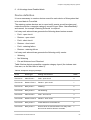
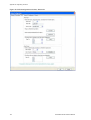
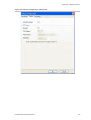
The following communication parameters are programmed in Databases > Third
Party > System:
•
80
ACK Timeout: Both Forcefield and the third-party system must acknowledge
data transmission within the ack timeout time.
Forcefield External Interfaces Manual