1
PCM-4823/4823L
486-Based Single Board
Computer with SVGA/LCD
and Ethernet Interface
Copyright Notice
This document is copyrighted, 1997. All rights are reserved. The
original manufacturer reserves the right to make improvements to
the products described in this manual at any time without notice.
No part of this manual may be reproduced, copied, translated or
transmitted in any form or by any means without the prior written
permission of the original manufacturer. Information provided in
this manual is intended to be accurate and reliable. However, the
original manufacturer assumes no responsibility for its use, nor for
any infringements upon the rights of third parties which may result
from its use.
Acknowledgements
VIA is a trademark of VIA Technology, Inc.
AMD is a trademark of Advanced Micro Devices, Inc.
Award is a trademark of Award Software International, Inc.
Cyrix is a trademark of Cyrix Corporation.
IBM, PC/AT, PS/2 and VGA are trademarks of International
Business Machines Corporation.
Intel and Pentium are trademarks of Intel Corporation.
Microsoft Windows® is a registered trademark of Microsoft Corp.
SMC is a trademark of Standard Microsystems Corporation.
RTL is a trademark of Realtek Semi-Conductor Co., Ltd.
C&T is a trademark of Chips and Technologies, Inc.
UMC is a trademark of United Microelectronics Corporation.
All other product names or trademarks are properties of their
respective owners.
Part No. 2006482300 1st Edition
Printed in Taiwan March 1998
Packing list
Before you begin installing your card, please make sure that the
following materials have been shipped:
• 1 PCM-4823/4823L All-in-One Single Board Computer
• 1 utility disk with system BIOS, VGA BIOS utility programs
• 3 SVGA driver disks (PCM-4823 only)
• 1 Ethernet driver disk
• 1 3.5" IDE flat cable
• 1 keyboard/mouse cable
• 1 secondary serial port cable (RS-232/422/485)
• 1 parallel cable
• 1 floppy cable
If any of these items are missing or damaged, contact your distributor or sales representative immediately.
Contents
Chapter 1 General Information ....................................... 1
1.1 Introduction .................................................................... 2
1.2 Features .......................................................................... 3
1.3 Specifications .................................................................. 4
1.3.1 Standard SBC functions .............................................. 4
1.3.2 Local-bus flat panel/VGA interface (PCM-4823 only) 5
1.3.3 Ethernet interface ........................................................ 5
1.3.4 Mechanical and environmental .................................... 5
1.4 Board layout and dimensions ....................................... 6
Chapter 2 Installation ..................................................... 7
2.1 Jumpers and connectors .............................................. 8
2.2 Locating jumpers ......................................................... 10
2.3 Locating connectors .................................................... 11
2.4 Setting jumpers ............................................................ 12
2.4.1 PCM-4823 Jumper Settings ........................................ 13
2.5 Safety precautions ....................................................... 14
2.6 Installing DRAM (SIMMs) ....................................... 15
2.6.1 Installing SIMMs ........................................................ 15
2.7 IDE hard drive connector (CN7) .............................. 16
2.7.1 Connecting the hard drive ........................................... 16
2.8 Keyboard and PS/2 connector (CN13) ..................... 17
2.9 Power connector (CN11) ............................................ 17
2.9.1 Main power connector, +5V, +12V (CN11) ............... 17
2.10 IR connector (CN8) .................................................. 17
2.11 Serial ports (CN12, CN9) ......................................... 18
2.11.1 COM1 RS-232 port (CN12) ..................................... 18
2.11.2 COM2 RS-232/422/485 selection (CN9) .................. 18
2.12 VGA interface connections ...................................... 19
2.12.1 CRT display connector (CN14) ................................ 19
2.12.2 Flat panel display connector (CN6) .......................... 19
2.13 Ethernet interface connections ............................... 20
2.13.1 10Base-T RJ-45 connector (CN10) ........................ 20
Chapter 3 Software Configuration ............................... 21
3.1 Introduction .................................................................. 22
3.2 Utility disk .................................................................... 22
3.3 VGA display software configuration ......................... 24
3.4 Connections for four standard LCDs ....................... 25
3.4.1 Connections to Sharp LM64183P
(640 x 480 DSTN MONO LCD) .............................. 25
3.4.2 Connections to PLANAR EL
(640 x 480 AD4 EL) .................................................. 26
3.4.3 Connections to Toshiba LTM10C042
(640 x 480 TFT Color LCD)....................................... 27
3.4.4 Connections to Sharp LM64C142
(640 x 480 DSTN Color LCD) ................................... 28
3.5 Ethernet interface configuration ................................ 29
Chapter 4 Award BIOS Setup...................................... 31
4.1 System test and initialization ..................................... 32
4.1.1 System configuration verification ............................... 32
4.2 Award BIOS setup ....................................................... 33
4.2.1 Entering setup ............................................................. 33
4.2.2 Standard CMOS setup ................................................ 34
4.2.3 BIOS features setup ................................................... 35
4.2.4 CHIPSET features setup ........................................... 36
4.2.5 Power management setup .......................................... 37
4.2.6 Load BIOS defaults ....................................................38
4.2.7 *Load setup defaults................................................... 39
4.2.8 Change password ....................................................... 40
4.2.9 Security option ............................................................ 41
4.2.10 Auto detect hard disk ................................................ 42
4.2.11 Save & exit setup ...................................................... 42
4.2.12 Exit without saving ....................................................42
Chapter 5 SVGA Setup ............................................... 43
5.1 Before you begin ......................................................... 44
5.2 Installation .................................................................... 45
5.3 Simultaneous display mode ........................................ 45
5.4 Sleep mode ................................................................... 45
5.5 Driver installation (Windows 3.1 & DOS) ............... 46
5.5.1 Necessary prerequisites ............................................. 46
5.5.2 Before you begin ........................................................ 46
5.5.3 Windows setup ............................................................ 46
5.5.4 Changing display drivers in Windows ......................... 47
5.5.5 Changing color schemes ............................................. 47
5.5.6 DOS setup .................................................................. 48
5.5.7 Changing display drivers in DOS ................................ 48
5.5.8 Panning drivers ........................................................... 49
5.5.9 Linear acceleration drivers ......................................... 49
5.6 Windows 95 drivers setup procedure ...................... 50
5.7 Windows NT drivers setup procedure ..................... 50
5.7.1 Step 1 .......................................................................... 50
5.7.2 Step 2 .......................................................................... 50
5.7.3 Step 3 .......................................................................... 51
5.8 OS/2 drivers setup procedure ................................... 51
5.8.1 Preliminary steps ........................................................ 51
5.8.2 Installing from diskette ................................................ 51
5.8.3 Selecting monitor type ................................................ 53
5.8.4 Selecting screen resolution/refresh rate ..................... 53
5.8.5 Installation notes ......................................................... 54
Appendix A Pin Assignments ...................................... 55
A.1 CRT display connector (CN14) .................................... 56
A.2 Flat panel display connector (CN6) .............................. 56
A.3 COM2 RS-232/422/485 serial port (CN9) ................... 57
A.4 Keyboard and mouse connnector (CN13) ................... 57
A.5 Main power connector (CN11) .................................... 58
A.6 IDE hard drive connector (CN7) ................................. 58
A.7 COM1 RS-232 serial port (CN12) ............................... 59
A.8 Ethernet connector (CN10) .......................................... 59
A.9 Peripheral power connector (CN1) .............................. 60
A.10 Floppy drive connector (CN2) .................................... 60
A.11 Parallel port connector (CN4) .................................... 61
A.12 IR connector (CN8) ................................................... 62
A.13 System I/O ports ......................................................... 63
A.14 DMA channel assignments ........................................64
A.15 Interrupt assignments ................................................. 64
A.16 1st MB memory map .................................................. 65
Appendix B Installing PC/104 Modules ........................ 67
B.1 Installing PC/104 modules ........................................ 68
Appendix C DOC 2000 Installation Guide .................... 71
C.1 DiskOnChip® 2000 quick installation guide .......... 72
C.1.1 DiskOnChip® 2000 installation instructions ................72
C.1.2 Additional information and assistance ........................ 73
CHAPTER
General
Information
1
This chapter gives background information on the PCM-4823/4823L.
Sections include:
• Card specifications
• Card layout and dimensions
1.1 Introduction
The PCM-4823/4823L is the ultimate cost-effective solution for
limited space applications. It offers all the functions of an ATcompatible industrial computer on a single board and only occupies the space of a 3 1/2" hard drive. The PCM-4823/4823L
comes with an embedded high-performance 5x86 processor and
audio on-board. For maximum performance, the PCM-4823/
4823L also supports an EDO/FPM DRAM SIMM socket that can
accept up to 32 MB memory.
On-board features include an Ethernet interface, support for a VLBus Enhanced IDE interface with up to Mode 3 transfer protocol,
one parallel port, two serial ports (RS-232 and RS-232/422/485)
with DB-9 connector as COM1 and a mini-DIN PS/2 keyboard/
mouse interface. A local bus SVGA/LCD display controller (LCD,
EL and CRT displays) allows LCD screen resolutions up to 1024 x
768 and CRT resolutions up to 1280 x 1024 @ 16 colors
(PCM-4823 only).
The PCM-4823/4823L complies with the "Green Function"
standard and supports three types of power saving features:
Normal, Doze, and Sleep modes.
The display type configuration is done through software. A single
Flash chip holds the system BIOS and the VGA BIOS. This
minimizes the number of chips and eases configuration. You can
change the display BIOS simply by programming the Flash chip.
If you need any additional functions, the PCM-4823/4823L has a
PC/104 connector for future upgrades.
2
PCM-4823/4823L User's Manual
1.2 Features
• Ultra-compact size single board computer as small as a 3 1/2" hard disk
drive (145 mm x 102 mm)
• On-board AMD DX5-133 (5x86-133) CPU
• Up to 32 MB on-board EDO/Fast Page-mode DRAM
• Local-bus SVGA display controller (LCD, EL and CRT displays), flat
panel type configured by programming the Flash chip (PCM-4823)
• On-board 16-bit Ethernet interface
• Supports M-Systems DiskOnChip® 2000 Flash memory
• Built-in VL-Bus Enhanced IDE (AT bus) hard disk drive interface
• On-board mini-DIN PS/2 keyboard/mouse connector
• Two serial ports: one RS-232, one RS-232/422/485 or infared selectable
(uses 16C550 UARTs with 16 byte FIFO)
• Upgradeable through PC/104 module
• Green engine with sleep mode and low power consumption
• Single +5 V power supply
Chapter 1 General Information
3
1.3 Specifications
1.3.1 Standard SBC functions
• CPU: Embedded AMD DX5-133 (5x86-133) processor
• BIOS: AWARD 128 KB Flash memory
• Chipset: VIA VT82C496G
• System memory: One 72-pin SIMM sockets (accepts 1 MB, 2 MB, 4
MB, 8 MB, 16 MB and 32 MB). Supports FPM or EDO DRAM from 1
MB to 32 MB.
• Enhanced IDE hard disk drive interface: Supports up to two IDE
(VL-bus) hard disks. BIOS auto-detect and PIO Mode 3 transfer
protocol
• Serial ports: One serial RS-232 port, one serial RS-232/422/485 port.
Two 16550 serial UARTs
• Parallel port: One parallel port, supports SPP/EPP/ECP mode
• Infrared port: Shared with COM2. Transfer rate up to 115 kbps.
• Keyboard/mouse connector: Mini-DIN connector supports standard
PC/AT keyboard and a PS/2 mouse
• Power management: Supports power saving modes including Normal/
Doze/Sleep modes. APM 1.1 compliant
• Supports M-Systems' DiskOnChip® 2000 Flash disk up to 72 MB
4
PCM-4823/4823L User's Manual
1.3.2 Local-bus flat panel/VGA interface (PCM-4823)
• Chipset: C&T 65550
• Display memory: 1 MB DRAM
• Display type: Supports CRT and flat panel (EL, LCD and gas plasma
flat panel) displays. Can display CRT and flat panel simultaneously
• Flat panel display mode: Panel resolution supports up to 1024 x 768.
• CRT display mode: Non-interlaced CRT monitors resolutions up to
1280 x 1024 @ 16 colors.
1.3.3 Ethernet interface
• Chipset: RTL 8019AS
• I/O address switchless setting
• Software compatible with NE1000 and NE2000
• Built-in boot ROM
1.3.4 Mechanical and environmental
• Dimension: 5.9" (L) x 4.2" (W) (145 mm x 102 mm)
• Power supply voltage: +5 V (4.75 V to 5.25 V)
• Max. power requirements: +5 V @ 2 A (typical)
• Operating temperature: 32° F to 140° F (0° C to 60° C)
• Weight: 0.65 kg (weight of total package)
Chapter 1 General Information
5
1.4 Board layout and dimensions
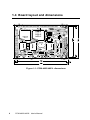
Figure 1-1: PCM-4823/4823L dimensions
6
PCM-4823/4823L User's Manual
CHAPTER
2
Installation
This chapter tells how to set up the PCM-4823/
4823L hardware, including instructions on
setting jumpers and connecting peripherals,
switches and indicators. Be sure to read all the
safety precautions before you begin the installation procedure.
2.1 Jumpers and connectors
Connectors on the board link it to external devices such as hard
disk drives, a keyboard or expansion bus connectors. In addition,
the board has a number of jumpers that allow you to configure your
system to suit your application.
The table below lists the function of each of the board jumpers and
connectors:
Table 2-1: PCM-4823/4823L jumpers
Label
J2
J3
J4
J6
8
Function
DOC 2000 address setting
LCD power selector
Clear CMOS
COM2 selector
PCM-4823/4823L User's Manual
Table 2-2: PCM-4823/4823L connectors
Label
CN1
CN2
CN3
CN4
CN5
CN6
CN7
CN8
CN9
CN10
CN11
CN12
CN13
CN14
J5
Function
Power connector (-5 V, -12 V)
Floppy disk connector
PC/104 connector
Parallel port connector
PC/104 connector
Flat panel connector
Hard disk connector
IR connector (infrared)
COM2 connector
Ethernet connector
Power connector (+5 V, +12 V)
COM1 connector
PS/2 keyboard + PS/2 mouse
CRT display connector
Reset switch
Chapter 2 Installation
9
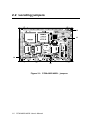
2.2 Locating jumpers
J3
J2
J4
J6
Figure 2-1: PCM-4823/4823L jumpers
10
PCM-4823/4823L User's Manual
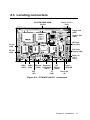
2.3 Locating connectors
EDO/FPM DRAM SIMM
Socket
Power -5/-12 V
(CN1)
Floppy Disk
(CN2)
Parallel Port
(CN4)
IDE Hard
Disk (CN7)
PC/104
(CN5)
Flat Panel
Display (CN6)
PC/104
(CN3)
Power +5/
+12 V
(CN11)
COM1 COM2
(CN12) (CN9)
Ethernet Keyboard/
Power/
CRT
(CN10) PS/2 Mouse Display
HDD LED
(CN13)
(CN14)
NET
IR
Reset SW
LED
(CN8)
(J5)
Figure 2-2: PCM-4823/4823L connectors
Chapter 2 Installation
11
2.4 Setting jumpers
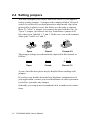
You may configure your card to match the needs of your application by setting jumpers. A jumper is the simplest kind of electrical
switch. It consists of two metal pins and a small metal clip (often
protected by a plastic cover) that slides over the pins to connect
them. To "close" a jumper, you connect the pins with the clip. To
"open” a jumper you remove the clip. Sometimes a jumper will
have three pins, labeled 1, 2, and 3. In this case you would connect
either pins 1 and 2 or 2 and 3.
1
Open
Closed
2
3
Closed 2-3
The jumper settings are schematically depicted in this manual as
follows:
1 2 3
Open
Closed
Closed 2-3
A pair of needle-nose pliers may be helpful when working with
jumpers.
If you have any doubts about the best hardware configuration for
your application, contact your local distributor or sales representative before you make any changes.
Generally, you simply need a standard cable to make most connections.
12
PCM-4823/4823L User's Manual
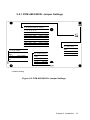
2.4.1 PCM-4823/4823L Jumper Settings
3 2 1
J2: DOC2000 Address Setting
1-2
close
close
*close
close
open
open
open
open
Pins
3-4
close
close
open
open
close
close
open
open
Address
5-6
close
open
close
open
close
open
close
open
C800 ~ C9FF
CC00 ~ CDFF
D000 ~ D1FF
D400 ~ D5FF
D800 ~ D9FF
DC00 ~ DDFF
E000 ~ E1FF
OFF
1 3 5
2 4 6
J3: LCD Power
Closed
Pins
1-2
*2 - 3
J4: Clear CMOS
Closed
Pins
1-2
*2 - 3
On
Result
J6: COM2 Selector
Clear CMOS
3.6 V Battery
1
2
3
Closed
Pins
*1 - 2
3-4
5-6
Voltage
3.3 V
5V
Result
RS-232
RS-422
RS-485
5 3 1
6 4 2
* default setting
Figure 2-3 PCM-4823/4823L Jumper Settings
Chapter 2 Installation
13
2.5 Safety precautions
Warning! Always completely disconnect the power cord
from your board whenever you are working on it.
Do not make connections while the power is on
because sensitive electronic components can be
damaged by the sudden rush of power.
Caution!
14
Always ground yourself to remove any static
charge before touching the board. Modern
electronic devices are very sensitive to static
electric charges. Use a grounding wrist strap at
all times. Place all electronic components on a
static-dissipative surface or in a static-shielded
bag when they are not in the chassis.
PCM-4823/4823L User's Manual
2.6 Installing DRAM (SIMMs)
You can install anywhere from 1 MB to 32 MB of on-board
DRAM memory using 1, 2, 4, 8, 16 or 32 MB 72-pin SIMMs
(Single In-Line Memory Modules). DRAM access time ≤ 60 ns.
2.6.1 Installing SIMMs
NOTE:
The modules can only fit into a socket one way
and their gold pins must point down into the
SIMM socket.
The procedure for installing SIMMs appears below. Please follow
these steps carefully.
1. Ensure that all power supplies to the system are switched Off.
2. Install the SIMM card. Install the SIMM so that its gold pins
point down into the SIMM socket.
3. Slip the SIMM into the socket at a 45 degree angle and
carefully fit the bottom of the card against the connectors.
4. Gently push the SIMM into a perpendicular position until the
clips on the ends of the SIMM sockets snap into place.
5. Check to ensure that the SIMM is correctly seated and all
connector contacts touch. The SIMM should not move around
in its socket.
Chapter 2 Installation
15
2.7 IDE hard drive connector (CN7)
The built-in Enhanced IDE (Integrated Device Electronics)
controller supports up to two IDE devices, including CD-ROM
drives, tape backup drives, a large hard disk drive and other IDE
devices. It also supports faster data transfer rates and allows the
IDE hard disk drive to exceed 528 MB.
2.7.1 Connecting the hard drive
Connecting drives is done in a daisy-chain fashion and requires one
of two cables, depending on the drive size. 1.8" and 2.5" drives
need a 1 x 44-pin to 2 x 44-pin flat-cable connector. 3.5" drives use
a 1 x 44-pin to 2 x 40-pin connector.
Wire number 1 on the cable is red or blue, and the other wires are
gray.
1. Connect one end of the cable to CN7. Make sure that the red
(or blue) wire corresponds to pin 1 on the connector, which is
labeled on the board (on the right side).
2. Plug the other end of the cable to the Enhanced IDE hard drive,
with pin 1 on the cable corresponding to pin 1 on the hard
drive. (See your hard drive's documentation for the location of
the connector.)
Connect a second drive as described above.
Unlike floppy drives, IDE hard drives can connect to either end of
the cable. If you install two drives, you will need to set one as the
master and one as the slave by using jumpers on the drives. If you
install just one drive, set it as the master.
16
PCM-4823/4823L User's Manual
2.8 Keyboard and PS/2 mouse connector
(CN13)
The PCM-4823/4823L board provides a mini-DIN keyboard
connector which supports both a keyboard and a PS/2 style mouse.
In most cases, especially in embedded applications, a keyboard is
not used. The standard PC/AT BIOS will report an error or fail
during power-on self test (POST) after a reset if the keyboard is
not present. The PCM-4823/4823L board's BIOS standard setup
menu allows you to select "All, But Keyboard" under the "Halt
On" selection. This allows no-keyboard operation in embedded
system applications without the system halting under POST
(power-on-self-test).
2.9 Power connector (CN11)
2.9.1 Main power connector, +5V, +12V (CN12)
Supplies main power to the PCM-4823/4823L (+5 V) and devices
that require +12 V.
2.10 IR connector (CN8)
This connector supports the optional wireless infrared transmitting
and receiving module. This module mounts on the system case.
You must configure the setting through BIOS setup.
Chapter 2 Installation
17
2.11 Serial ports (CN12, CN9)
The PCM-4823/4823L offers two serial ports: one RS-232 and one
RS-232/422/485. These ports let you connect to serial devices (a
mouse, printers, etc.) or a communication network.
2.11.1 COM1 RS-232 port (CN12)
The serial port connectors are mounted on the bottom edge of the
card. The 9-pin, D-SUB connector to the left of the card is the RS232 port.
2.11.2 COM2 RS-232/422/485 selection (CN9)
The secondary port located above COM1, consists of a 14-pin,
dual-in-line, male header and can be configured to operate in RS232, RS-422, or RS-485 mode. This is done via J7.
Table 2-4: COM2 selection (J7)
*RS-232
RS-422
RS-485
5
3
1
5
3
1
5
3
1
6
4
2
6
4
2
6
4
2
J7
* default setting
The IRQ and address range for both ports are fixed. However if
you wish to disable the port or change these parameters later, you
can do this in the system BIOS setup. The table below shows the
settings for the PCM-4823/4823L board's ports.
Table 2-5: PCM-4825/4825L Serial port default settings
Port
COM1
COM2
18
Address
3F8, 3E8
2F8, 2E8
PCM-4823/4823L User's Manual
Interrupt
IRQ4
IRQ3
Default
3F8
2F8
2.12 VGA interface connections
The PCM-4823/4823L board's SVGA interface can drive conventional CRT displays and is capable of driving a wide range of flat
panel displays, including electroluminescent (EL), gas plasma,
passive LCD and active LCD displays. The card has two connectors to support these displays, one for standard CRT VGA monitors
and one for flat panel displays.
2.12.1 CRT display connector (CN14)
CN15 is a 15-pin, D-SUB connector commonly used for conventional CRT displays.
Pin assignments for CRT display connector CN15 are detailed in
Appendix A.
2.12.2 Flat panel display connector (CN6)
CN6 consists of a 44-pin, dual-in-line header.
The PCM-4823/4823L provides a bias control signal on CN6
which can be used to control the LCD bias voltage. It is recommended that the LCD bias voltage not be applied to the panel until
the logic supply voltage (+5 V) and panel video signals are stable.
Under normal operation the control signal (ENAVEE) is active
high. When the PCM-4823/4823L board's power is applied, the
control signal is low until just after the relevant flat panel signals
are present.
Configuration of the LCD type is done completely via the software
utility. You do not have to set any jumpers. Refer to Chapter 3 for
software setup details.
Refer to Chapter 3 for details on connecting the four standard
LCD's: Sharp LM64183P, Toshiba LTM10C042, Sharp 64C142,
and Planar EL Display.
Chapter 2 Installation
19
2.13 Ethernet interface connections
The PCM-4823/4823L is equipped with a high performance 16-bit
Ethernet interface which is fully compliant with IEEE 802.3
10 Mbps CSMA/CD standards. It is supported by all major
network operating systems and is 100% Novell NE-2000 compatible.
2.13.1 10Base-T RJ-45 connector (CN10)
10Base-T connections are made via the on-board RJ-45 connector.
20
PCM-4823/4823L User's Manual
CHAPTER
Software
Configuration
3
This chapter details the software configuration information. It shows you how to
configure the card to match your application requirements. Award system BIOS is
covered in Chapter 4.
Sections include:
• LCD display configuration
• Connections for four standard LCDs
3.1 Introduction
The PCM-4823/4823L system BIOS and custom drivers are
located in a 128 KB, 32-pin Flash ROM device, designated U2. A
single Flash chip holds the system BIOS and VGA BIOS. The
display type can be configured via software. This method minimizes the number of chips and eases configuration. You can change the
display BIOS simply by reprogramming the Flash chip.
3.2 Utility disk
The PCM-4823/4823L is supplied with a software utility disk. This
disk contains the necessary file for setting up the VGA display.
Directories and files on the disk are as follows:
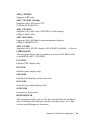
README.DOC
AWDFLASH.EXE
4823_SYS.BIN
4823_CRT.BIN
4823_TFT.BIN
4823_STN.BIN
4823_MON.BIN
4823_EL.BIN
CBROM.EXE
CT.COM
FP.COM
SM.COM
ON.COM
OFF.COM
RSET8019.EXE
Figure 3-1: Contents of the PCM-4823/4823L utility disk
AWDFLASH.EXE
This program allows you to write the VGA BIOS files to the BIOS
Flash ROM. The VGA files all come ready formatted for the
PCM-4823/4823L with .BIN extensions. See README.DOC.
These files support various CRT and flat panel displays. They are
custom written and are available upon request.
4823_SYS.BIN
This binary file contains the system BIOS.
22
PCM-4823/4823L User's Manual
4823_CRT.BIN
Supports CRT only.
4823_TFT.BIN (default)
Supports 640 x 480 color TFT
(Toshiba LTM10C042).
4823_STN.BIN
Supports 640 x 480 color STN DD 8/16-bit displays
(Sharp LM64C142).
4823_MON.BIN
Supports 640 x 480 dual scan monochrome displays
(Sharp LM64P8X/837).
4823_EL.BIN
Supports 640 x 480 EL displays (PLANAR EL640480 - A Series).
CBROM.EXE
This program allows you to combine your own VGA BIOS with
system BIOS (4823_SYS.BIN).
CT.COM
Enables CRT display only
EP.COM
Enables panel display only
SM.COM
Enables both displays at the same time
ON.COM
Switches to normal display mode
OFF.COM
Switches to sleep mode
RSET8019.EXE
This program enables you to view the current Ethernet configuration, reconfigure the Ethernet interface (medium type, etc.), and
execute useful diagnostic functions.
Chapter 3 Software Configuration
23
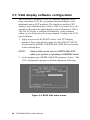
3.3 VGA display software configuration
The PCM-4823 on-board VGA/LCD interface supports a wide
range of popular LCD, EL, gas plasma flat panel displays and
traditional analog CRT monitors. The interface can drive CRT
displays with resolutions up to 1280 x 1024 in 16 colors. It is also
capable of driving color panel displays with resolutions of 1024 x
768. The LCD type is configured completely via the software
utility, so you do not have to set any jumpers. Configure the LCD
type as follows:
1. Apply power to the PCM-4823 with a color TFT display
attached. This is the default setting for the PCM-4823/4823L.
Ensure that the AWDFLASH.EXE and *.BIN files are located
in the working drive.
NOTE:
Ensure that you do not run AWDFLASH.EXE
while your system is operating in EMM386 mode.
2. At the prompt, type AWDFLASH.EXE and press <Enter>. The
VGA configuration program will then display the following:
Figure 3-2: BIOS VGA setup screen
24
PCM-4823/4823L User's Manual
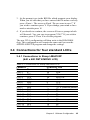
3. At the prompt, type in the BIN file which supports your display.
When you are sure that you have entered the file name correctly
press <Enter>. The screen will ask “Do you want to save?” If
you wish to continue press Y. If you change your mind or have
made a mistake press N.
4. If you decide to continue, the screen will issue a prompt which
will then ask “Are you sure to program (Y/N)?” If you wish to
continue, press Y. Press N to exit the program.
The new VGA configuration will then write to the ROM BIOS
chip. This configuration will remain the same until you run the
AWDFLASH.EXE program and change the settings.
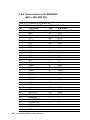
3.4 Connections for four standard LCDs
3.4.1 Connections to Sharp LM64183P
(640 x 480 DSTN MONO LCD)
Table 3-1: Connections for Sharp LM64183P LCD
LM64P83
Pin
CN1-1
CN1-2
CN1-3
CN1-4
CN1-5
CN1-6
CN1-7
CN1-8
CN1-9
CN1-10
CN1-11
CN1-12
CN1-13
CN1-14
CN1-15
Pin name
S
CP1
CP2
DISP
VDD
VSS
VEE
DU0
DU1
DU2
DU3
DL0
DL1
DL2
DL3
PCM-4823 CN6
Pin
Pin name
36
FLM
38
LP
35
SHFCLK
5
+5 V
6
+5 V
3
GND
-17 V (external power)
12
P3
11
P2
10
P1
9
P0
16
P7
15
P6
14
P5
13
P4
Chapter 3 Software Configuration
25
3.4.2 Connections to PLANAR EL
(640 x 480 AD4 EL)
Table 3-2: Connections for Planar EL
PLANAR
Pin
1
2
3
4
5
6
7
8
9
10
11
12
13
14
15
16
17
18
19
20
21
22
23
24
25
26
27
28
29
30
31,32
33
34
26
640 x 480 AD4
Pin name
GND
DO
GND
D1
GND
D2
NC
D3
NC
D4
NC
D5
NC
D6
GND
D7
GND
VCLK
GND
/BLANK
GND
HS
NC
VS
NC
SELFTST
COLMAP
ENABLE
RESERVED
/LOWPOW
NC
RESERVED
NC
PCM-4823/4823L User's Manual
PCM-4823 CN6
Pin
Pin name
3
GND
21
P12
3
GND
22
P13
3
GND
23
P14
—
—
24
P15
—
—
17
P8
—
—
18
P9
—
—
19
P10
4
GND
20
P11
4
GND
42
ASHFCLK
4
GND
—
—
8
GND
37
M
—
—
36
FLM
—
—
39
GND
39
GND
—
—
—
—
—
—
—
—
—
—
—
—
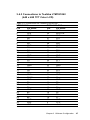
3.4.3 Connections to Toshiba LTM10C042
(640 x 480 TFT Color LCD)
Table 3-3: Connections for Toshiba LTM10C042
LTM10C042
Pin
Pin name
1
GND
2
CLK
3
GND
4
R0
5
R1
6
R2
7
GND
8
R3
9
R4
10
R5
11
GND
12
G0
13
G1
14
G2
15
GND
16
G3
17
G4
18
G5
19
GND
20
ENAB
21
GND
22
B0
23
B1
24
B2
25
GND
26
B3
27
B4
28
B5
29
GND
30
VDD
31
VDD
PCM-4823 CN6
Pin
Pin name
3
GND
35
SHFCLK
4
GND
27
P18
28
P19
29
P20
8
GND
30
P21
31
P22
32
P23
33
GND
19
P10
20
P11
21
P12
33
GND
22
P13
23
P14
24
P15
34
GND
37
M
34
GND
11
P2
12
P3
13
P4
39
GND
14
P5
15
P6
16
P7
39
GND
5
+5 V
6
+5 V
Chapter 3 Software Configuration
27
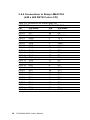
3.4.4 Connections to Sharp LM64C142
(640 x 480 DSTN Color LCD)
Table 3-4: Connections for Sharp LM64C142
LM64C142
Pin
Pin name
CN1-1
YD
CN1-2
LP
CN1-3
XCX
CN1-4
DISP
CN1-5
VDD
CN1-6
VSS
CN1-7
VEE
CN1-8
DU0
CN1-9
DU1
CN1-10 DU2
CN1-11
DU3
CN1-12 DU4
CN1-13 DU5
CN1-14 DU6
CN1-15 DU7
CN2-1
VSS
CN2-2
DL0
CN2-3
DL1
CN2-4
DL2
CN2-5
DL3
CN2-6
DL4
CN2-7
DL5
CN2-8
DL6
CN2-9
DL7
CN2-10 VSS
28
PCM-4823/4823L User's Manual
PCM-4823 CN6
Pin
Pin name
36
FLM
38
LP
35
SHFCLK
5
+5 V
6
+5 V
3
GND
+27 V(external power)
20
P11
19
P10
18
P9
17
P8
12
P3
11
P2
10
P1
9
P0
4
GND
24
P15
23
P14
22
P13
21
P12
16
P7
15
P6
14
P5
13
P4
8
GND
3.5 Ethernet Interface Configuration
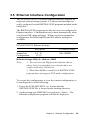
The PCM-4823/4823L's on-board Ethernet interface supports all
major network operating systems. I/O adress and interrupts are
easily configured via the RSET8019.EXE program included on the
utility disk.
The RSET8019.EXE program provides two ways to configure the
Ethernet interface. Configuration can be done automatically when
you choose PNP (plug and play). When you choose jumperless
configuration, the following IRQ and I/O address settings are
available.
PCM-4823/4823L Ethernet Settings
Jumperless
Configuration
IRQ option
I/O address range
2, 5, 10
11, 15
200-300EFH
Default Settings: IRQ=5; Address=300H
Note:
1. You can select an IRQ from the Options shown
above, but be certain that your selection does not
conflict with other I/O devices.
2. When Boot ROM is installed, the RSET8019.EXE
program does not support PNP mode configuration.
To execute the configuration, to view the current configuration, or
to run diagnostics do the following:
1. Power the PCM-4823/4823L on. Ensure that the
RSET8019.EXE file is located in the working directory.
2. At the prompt type RSET8019.exe and press <Enter>. The
Ethernet configuration program will then be displayed.
Chapter 3 Software Configuration
29
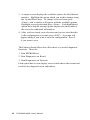
3. A simple screen displays the available options for the Ethernet
interface. Highlight the option which you wish to change using
the Up and Down keys. To change a selected item press
<Enter>, and a window will appear with the available options.
Highlight your selection and press <Enter>. Each highlighted
option has a helpful message guide displayed at the bottom of
the screen for additional information.
4. After you have made your selections and you are sure that this
is the configuration you want, press <ESC>. A prompt will
appear asking if you want to save the configuration. Press Y
if you want to save.
The Ethernet Setup Menu also offers three very useful diagnostic
functions. These are:
1. Run EEPROM test.
2. Run Diagnostics on Board.
3. Run Diagnostics on Network
Each option has its own display screen which shows the format and
result of any diagnostic tests undertaken.
30
PCM-4823/4823L User's Manual
CHAPTER
Award BIOS Setup
4
This chapter describes how to set BIOS
configuration data.
4.1 System test and initialization
These routines test and initialize board hardware. If the routines
encounter an error in during the tests, you will either hear a few
short beeps or see an error message on the screen. There are two
kinds of errors: fatal and non-fatal. The system can usually continue
the boot up sequence with non-fatal errors. Non-fatal error
messages usually appear on the screen along with the following
instructions:
press <F1> to RESUME
Write down the message and press the F1 key to continue the
bootup sequence.
4.1.1 System configuration verification
These routines check the current system configuration against the
values stored in the card’s CMOS memory. If they don’t match, the
program outputs an error message. You will then need to run the
BIOS setup program to set the configuration information in memory.
There are three situations in which you will need to change the CMOS
settings:
1. You are starting your system for the first time
2. You have changed the hardware attached to your system
3. The CMOS memory has lost power and the configuration information has been erased.
The PCM-4823/4823L board's CMOS memory has an integrated
lithium battery backup. The battery backup should last ten years in
normal service, but when it finally runs down, you will need to
replace the complete unit.
32
PCM-4823/4823L User's Manual
4.2 Award BIOS setup
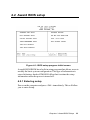
Figure 4-1: BIOS setup program initial screen
Award's BIOS ROM has a built-in setup program that allows users to
modify the basic system configuration. This type of information is
stored in battery-backed CMOS RAM so that it retains the setup
information when the power is turned off.
4.2.1 Entering setup
Power on the computer and press <Del> immediately. This will allow
you to enter Setup.
Chapter 4 Award BIOS Setup
33
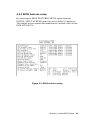
4.2.2 Standard CMOS setup
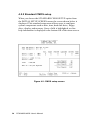
When you choose the STANDARD CMOS SETUP option from
the INITIAL SETUP SCREEN menu, the screen shown below is
displayed. This standard setup menu allows users to configure
system components such as date, time, hard disk drive, floppy
drive, display, and memory. Once a field is highlighted, on-line
help information is displayed in the bottom left of the menu screen.
Figure 4-2: CMOS setup screen
34
PCM-4823/4823L User's Manual
4.2.3 BIOS features setup
By choosing the BIOS FEATURES SETUP option from the
INITIAL SETUP SCREEN menu, the screen below is displayed.
This sample screen contains the manufacturer's default values for the
PCM-4823/4823L.
Figure 4-3: BIOS features setup
Chapter 4 Award BIOS Setup
35
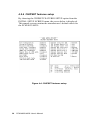
4.2.4 CHIPSET features setup
By choosing the CHIPSET FEATURES SETUP option from the
INITIAL SETUP SCREEN menu, the screen below is displayed.
This sample screen contains the manufacturer’s default values for
the PCM-4823/4823L.
LAN Card Boot ROM
: Disable
Figure 4-4: CHIPSET features setup
36
PCM-4823/4823L User's Manual
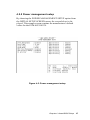
4.2.5 Power management setup
By choosing the POWER MANAGEMENT SETUP option from
the INITIAL SETUP SCREEN menu, the screen below is displayed. This sample screen contains the manufacturer's default
values for the PCM-4823/4823L.
Figure 4-5: Power management setup
Chapter 4 Award BIOS Setup
37
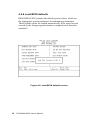
4.2.6 Load BIOS defaults
BIOS DEFAULTS contains the default system values, which are
the appropriate system parameters for minimum performance.
These default values are loaded automatically if the stored record
created by the Setup program becomes corrupted (and, therefore,
unusable).
Figure 4-6: Load BIOS defaults screen
38
PCM-4823/4823L User's Manual
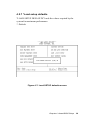
4.2.7 *Load setup defaults
"LOAD SETUP DEFAULTS" loads the values required by the
system for maximum performance.
*: Default
Figure 4-7: Load SETUP defaults screen
Chapter 4 Award BIOS Setup
39
4.2.8 Change password
To change the password, choose the PASSWORD SETTING
option form the Setup main menu and press <Enter>.
1. If the CMOS is bad or this option has never been used, there is
default password which is stored in the ROM. The screen will
display the following messages:
Enter Password:
Press <Enter>.
2. If the CMOS is good or this option has been used to change the
default password, the user is asked for the password stored in
the CMOS. The screen will display thefollowing message:
Confirm Password:
Enter the current password and press <Enter>.
3. After pressing <Enter> (ROM password) or the current password
(user-defined), you can change the password stored in the
CMOS. The password can be at most 8 characters long.
Remember - to enable this feature, you must first select either
Setup or System in the BIOS FEATURES SETUP.
40
PCM-4823/4823L User's Manual
4.2.9 Security option
Access to the BIOS setup can be controlled using a password. A
password will control access to the BIOS setup according to two
differing options:
System password: The system will not boot and access to Setup
will be denied unless the correct password is entered at the prompt.
Setup password: The system will boot, but access to Setup will be
denied unless the correct password is entered at the prompt.
To disable security, first enter the BIOS setup and select the
PASSWORD SETTING option in the main menu. When prompted to
enter a password, press the <ENTER> key without entering a
password, then save the new settings. This will will disable security.
Now when you boot you will not be prompted for a password - you
will enter setup directly.
If you lose or forget your password, the following steps restore
default settings:
1. Power off the system.
2. Set jumper J4, connecting pins 1-2 for at least 3 seconds to
clear CMOS entries.
3. Set jumper J4, connecting pins 2-3.
4. Power on the system.
5. Press the Del key to access CMOS settings. Modify the settings
as desired, save, and exit.
Chapter 4 Award BIOS Setup
41
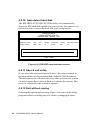
4.2.10 Auto detect hard disk
The IDE HDD AUTO DETECTION utility can automatically
detect the IDE hard disk installed in your system. You can use it to
self-detect and/or correct the hard disk type configuration.
ROM ISA BIOS
CMOS SETUP UTILITY
AWARD SOFTWARE, INC.
HARD DISK TYPE
SIZE
CYLS.
HEADS
PRECOMP
LANDZ
SECTORS MODE
Primary master:
(MB)
790
15
65535
789
57
Select Secondary Slave Option (N=Skip): N
ESC = SKIP
Figure 4-8: IDE HDD auto detection screen
4.2.11 Save & exit setup
If you select this option and press <Enter>, the values entered in
the setup utilities will be recorded in the chipset's CMOS memory.
The microprocessor will check this every time you turn your system
on and compare this to what it finds as it checks the system. This
record is required for the system to operate.
4.2.12 Exit without saving
Selecting this option and pressing <Enter> lets you exit the Setup
program without recording any new values or changing old ones.
42
PCM-4823/4823L User's Manual
CHAPTER
SVGA Setup
5
The PCM-4823/4823L features an onboard flat panel/VGA interface. This
chapter provides instructions for installing
and operating the software drivers on the
included display driver diskette.
5.1 Before you begin
To facilitate the installation of the enhanced display device drivers
and utility software, you should read the instructions in this chapter
carefully. The enhanced display drivers for the PCM-4823/4823L
board are located on the software installation diskette. You must
install the drivers and utility software by using the supplied SETUP
program for DOS drivers
Note:
The files on the software installation diskette are
compressed. Do not attempt to install the drivers
by copying the files manually. You must use the
supplied SETUP program to install the drivers.
Before you begin, it is important to note that most display drivers
need to have the relevant software application already installed in
the system prior to installing the enhanced display drivers. In
addition, many of the installation procedures assume that you are
familiar with both the relevant software applications and operating
system commands. Review the relevant operating system commands and the pertinent sections of your application software's
user's manual before performing the installation.
44
PCM-4823/4823L User's Manual
5.2 Installation
Disk 1:
Windows 3.1 driver
Disk 2:
Windows 95, Windows NT drivers
Disk 3:
OS/2 drivers
5.3 Simultaneous display mode
The 65550 VGA BIOS supports monochrome LCD, EL, color TFT
and STN LCD flat panel displays. It also supports interlaced and
non-interlaced analog monitors (VGA color and VGA
mono-chrome) in high-resolution modes while maintaining
complete IBM VGA compatibility. Digital monitors (i.e. MDA,
CGA, and EGA) are NOT supported. Multiple frequency (multisync) monitors are supported as analog monitors.
Both CRT and panel displays can be used simultaneously. The
PCM-4823/4823L can be set in one of three configurations: on a
CRT, on a flat panel display, or on both simultaneously. The system
is initially set to simultaneous display mode. In the utility diskette,
there are three .COM files which can be used to select the display.
Simply type the filename at the DOS prompt:
CT.COM Enables CRT display only
FP.COM Enables panel display only
SM.COM Enables both displays at the same time.
5.4 Sleep mode
The utility diskette contains two files that support sleep mode.
Simply type the filename at the DOS prompt:
ON.COM switches to normal display mode.
OFF.COM switches to sleep mode.
Chapter 5 SVGA Setup
45
5.5 Driver installation (Windows 3.1 & DOS)
5.5.1 Necessary prerequisites
The instructions in this manual assume that you understand
elementary concepts of MS-DOS and the IBM Personal Computer.
Before you attempt to install any driver or utility you should: know
how to copy files from a floppy disk to a directory on the hard
disk, understand the MS-DOS directory structure, and know how to
format a floppy disk. If you are uncertain about any of these
concepts, please refer to the DOS or Windows user reference
guides for more information before you proceed with the installation.
5.5.2 Before you begin
Before you begin installing software drivers, you should make a
backup copy of the display driver diskette and store the original in
a safe place. The display driver diskette contains drivers for several
versions of certain applications. You must install the correct
version in order for the driver to work properly so make sure you
know which version of the application you have.
5.5.3 Windows setup
These drivers are designed to work with Microsoft Windows 3.1.
You may install these drivers through Windows or in DOS.
Step 1: Install Windows as you normally would for a VGA display.
Run Windows to make sure that it is working correctly.
Step 2: Place the display driver diskette in drive A. In Windows
Program Manager, choose File from the Options Menu. Then from
the pull-down menu, choose Run . . . . At the command line
prompt, type A:\SETUP. Press the <ENTER> key or click OK to
begin the installation. At this point the setup program locates the
directory where Windows is installed. For proper operation, the
drivers must be installed in the Windows subdirectory. Press
<ENTER> to complete the installation. Once completed, the
46
PCM-4823/4823L User's Manual
Display Driver Control Panel appears on the screen. This Control
Panel allows you to select and load the installed drivers.
Another method of installing these drivers is through the File
Manager. Click on Drive A:. Then double-click on SETUP.EXE to
begin installation.
5.5.4 Changing display drivers in Windows
To change display drivers in Windows, select the Windows Setup
icon from the Main window. You will be shown the current setup
configuration. Select Change System Settings from the Option
menu. Click on the arrow at the end of the Display line. You will be
shown a list of display drivers. Click on the driver you want. Then
click on the OK button. Follow the directions to complete the
setup.
5.5.5 Changing color schemes
After you change display drivers, you may notice that the color
scheme used by Windows looks strange. This is because different
drivers have different default colors. To change the color scheme,
select the Control Panel from the Main window. Select the Color
icon. You will be shown the current color scheme. Choose a new
color scheme and click the OK button.
Chapter 5 SVGA Setup
47
5.5.6 DOS setup
Step 1: Install Windows as you normally would for a VGA display.
Run Windows to make sure that it is working correctly. Then exit
Windows.
Step 2: Place the display driver diskette in drive A. Type A:
<ENTER> to make this the default drive. Type SETUP <ENTER>
to run the driver SETUP program. Press any key to get to the
applications list. Using the arrow keys, select Windows Version 3.1
and press the <ENTER> key. Press the <ENTER> key to select
All Resolutions, and then press <END> to begin the installation.
At this point you will be asked for the path to your Windows
system directory (default C:\WINDOWS). When the installation is
complete, press any key to continue. Press <ESC> followed by Y
to exit to DOS.
Step 3: Change to the directory where you installed Windows
(usually C:\WINDOWS).
Step 4: Type SETUP <ENTER> to run the Windows Setup
program. It will show the current Windows configuration. Use the
up arrow key to move to the Display line and press <ENTER>. A
list of display drivers will be shown. Use the arrow keys to select
one of the drivers starting with an asterisk (*) and press <ENTER>.
Step 5: Follow the directions on the screen to complete the setup.
In most cases, you may press <ENTER> to accept the suggested
option. When Setup is done, it will return to DOS. Type WIN
<ENTER> to start Windows with the new display driver.
5.5.7 Changing display drivers in DOS
To change display drivers from DOS, change to the Windows
directory and run Setup, repeating steps 4 and 5 from the previous
page. Besides the special display drivers marked by an asterisk (*),
you should be able to use the following standard drivers:
48
VGA
640x480, 16 colors
Super VGA
800x600, 16 colors
PCM-4823/4823L User's Manual
5.5.8 Panning drivers
Special panning drivers are provided to allow high-resolution
modes to be displayed on a flat panel or CRT. These drivers will
show a section of a larger screen and will automatically pan, or
scroll, the screen horizontally and vertically when the mouse
reaches the edge of the display.
5.5.9 Linear acceleration drivers
A special high-performance linear acceleration driver is provided
for 256-color modes. This driver may require special hardware and
may not be supported on all systems.
Chapter 5 SVGA Setup
49
5.6 Windows 95 drivers setup procedure
1. Boot system with VGA or SuperVGA driver.
2. Select properties from a menu after right button press.
3. Select display.
4. Select Change Display.
5. Select Change Monitor.
6. Select Change Adapter.
7. Select Have Disk.
5.7 Windows NT drivers setup procedure
5.7.1 Step 1
1.Install Windows NT as you normally would for a VGA display.
2.First click the Start button,choose Settings and click on Control
Panel.
3.Choose the Display icon and click on the icon.
4.In the Display Properties window, click on the Settings tab.
5.Click on Change Display Type. In the Change Display Type
window, click on the Change button under Adapter Type. This
will bring up the Select Device window.
5.7.2 Step 2
1.In the Select Device window, click on Have Disk. Enter source
directory where the Windows NT driver files are located.
2.Press <ENTER> and the name of the Chips and Technologies
Video Accelerator driver will appear in the Models list box.
Select a driver, then click OK or press enter.
3.A warning panel about Third Party drivers will appear. Click the
Yes button to finish installation.
4.Once the installation is complete, the system must be shut down
and restarted.
50
PCM-4823/4823L User's Manual
5.7.3 Step 3
1.Upon restarting your computer, select the desired display settings
from the Display property dialog box.
2.Click on Test to test the newly selected graphics mode. A color
test screen should appear, followed by the Testing Mode window.
3.Click on Yes to continue. Click on Apply to switch to the new
graphics mode.
4.Since graphics modes are changed dynamically with NT 4.0, you
need not shutdown and restart to give effect to the new screen
settings.
5.8 OS/2 drivers setup procedure
5.8.1 Preliminary steps
The following steps must be performed before you install the
65550/554 display driver:
1. OS/2 DOS support must be installed.
2. If you previously installed SVGA support, you must reset the
system to VGA mode. VGA is the default video mode enabled
when OS/2 is installed.
To restore VGA mode, use Selective Install and select VGA for
Primary Display. For more information on this procedure, see the
section on Changing Display Adapter Support in the OS/2 User's
Guide.
5.8.2 Installing from diskette
To install this driver, do the following steps:
1. Open an OS/2 full screen or window session.
2. Place the 65550 Display Driver Diskette in drive A.
3. At the OS/2 command prompt, type the following commands to
copy the files to the OS/2 drive:
Chapter 5 SVGA Setup
51
Type:
A: <ENTER> to make this the default drive.
SETUP A: C: <ENTER>
where A: is the floppy disk drive and C: is the hard drive
When the setup program is completed, you will need to perform a
shutdown and then restart the system in order for changes to take
effect.
A log of the information output during the install can be found in
<root>:\OS2\INSTALL\DISPLAY.LOG
4. After restarting the system, perform the following steps:
1. Open the OS/2 System folder.
2. Open the System Setup folder.
3. Open the Display Driver Install Object
This step will execute the Display Driver Installation (DSPINSTL)
utility program to finish installation of the new drivers.
4. When the Display Driver Install window appears, select
Primary Display and then select OK.
5. When The Primary Display Driver List window appears,
select “Chips and Technologies 65550/554” from the list
of adapter types, then select OK to install the video driver.
6. When the installation is complete, you will need to
shutdown and then restart the system for the changes to
take effect. Make sure to remove the install diskette
before restarting the system.
When the system has restarted, the display driver will be initialized
for 640x480x256 color, 60 Hz refresh. To switch to a different
video resolution, color depth or refresh rate, follow the steps
below.
52
PCM-4823/4823L User's Manual
5.8.3 Selecting monitor type
Monitor type is initially set to DEFAULT. This DEFAULT setting
may not allow you to select all resolution/refresh combinations that
are available for your monitor. The following steps can be performed to select monitor type. This section applies only after
installation, or when a different monitor is used.
1. Open the OS/2 System folder.
2. Open the System Setup folder.
3. Open the System object.
4. When the System - Settings notebook appears, select the Screen
tab. This will take you to page 2 of the settings.
5. On Screen page 2, select your monitor type from the Display
Name list. If your monitor is not listed, select DEFAULT. Return
to Screen page 1.
It may be necessary to restart your system to have all refresh rate
options available.
5.8.4 Selecting screen resolution/refresh rate
To switch to a different video resolution, color depth or refresh
rate, follow the steps below.
1. Open the OS/2 System folder.
2. Open the System Setup folder.
3. Open the System object.
4. From the selection windows provided, select a new Screen
Resolution and Screen refresh rate.
Please note, Refresh rates, other than 60 Hz, are only valid when
the display is switched to CRT only display mode.
5. Close the System-Settings notebook.
6. Perform a shutdown and restart for the changes to take effect.
Chapter 5 SVGA Setup
53
5.8.5 Installation notes
1. During the installation of this driver, DISPLAY.LOG and
DSPINSTL.LOG files are created in \OS2\INSTALL directory.
These files identify the OS/2 system files that were updated and
indicate whether the installation was successful. The
DISPLAY.LOG file also contains a string which identifies the
version of driver that was installed. This information may be
important when reporting an installation problem.
2. During installation, DSPINSTL will invoke the SVGA Configuration program SVGA.EXE to determine the hardware configuration, and create the file \OS2\INSTALL\SVGADATA.PMI. If
this file is not created, the adapter will not be supported. When
this step is done, the display will be blanked, and you may see a
series of flashes on the display, and what appears to be a “corrupted” display. This is normal, as the configuration process is
doing Video BIOS mode sets to determine which screen resolutions BIOS supports. This configuration information is then used
to provide the System-Settings Resolution and Refresh selections.
54
PCM-4823/4823L User's Manual
APPENDIX
Pin Assignments
A
This appendix contains information of a
detailed or specialized nature. It includes:
•
•
•
•
•
•
•
•
•
•
•
•
CRT display connector
Flat panel display connector
Main power connector
RS-232/422/485 serial port connector
Keyboard and mouse connector
Peripheral power connector
IDE connector
RS-232 serial port connector
Ethernet RJ-45 connector
Floppy connector
Parallel connector
IR connector
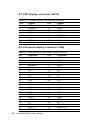
A.1 CRT display connector (CN14)
Tabler A-1: PCM-4823/4823L CRT display connector
Pin
1
2
3
4
5
6
7
8
Signal
RED
GREEN
BLUE
N/C
GND
GND
GND
GND
Pin
9
10
11
12
13
14
15
Signal
N/C
GND
N/C
N/C
H-SYNC
V-SYNC
N/C
A.2 Flat panel display connector (CN6)
Table A-2: PCM-4823/4823L flat panel display connector
Pin
1
3
5
7
9
11
13
15
17
19
21
23
25
27
29
31
33
35
37
39
41
43
56
Function
+12 V
GND
Vcc
ENAVEE
P0
P2
P4
P6
P8
P10
P12
P14
P16
P18
P20
P22
GND
SHFCLK
M
GND
GND
ENAVDD
PCM-4823/4823L User's Manual
Pin
2
4
6
8
10
12
14
16
18
20
22
24
26
28
30
32
34
36
38
40
42
44
Function
+12 V
GND
Vcc
GND
P1
P3
P5
P7
P9
P11
P13
P15
P17
P19
P21
P23
GND
FLM
LP
ENABKL
ASHFCLK
Vcc
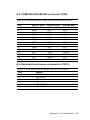
A.3 COM2 RS-232/422/485 serial port (CN9)
Table A-3: PCM-4823/4823L COM2 RS-232/422/485 series port
Pin
1
2
3
4
5
6
7
8
9
10
11
12
13
14
RS-232 port
DCD
DSR
RxD
RTS
TxD
CTS
DTR
RI
GND
N/C
N/C
N/C
N/C
N/C
RS-422 port
N/C
N/C
N/C
N/C
N/C
N/C
N/C
N/C
N/C
N/C
TxD+
TxDRxD+
RxD-
RS-485 port
N/C
N/C
N/C
N/C
N/C
N/C
N/C
N/C
N/C
N/C
DATA+
DATAN/C
N/C
A.4 Keyboard and mouse connnector (CN13)
Table A-4: PCM-4823/4823L keyboard and mouse connector
Pin
1
2
3
4
5
6
Signal
KB DATA
MS DATA
GND
VCC
KB CLOCK
MS CLOCK
Appendix A Pin Assignments
57
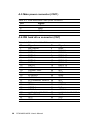
A.5 Main power connector (CN11)
Table A-5: PCM-4823/4823L main power connector
Pin
1
2
3
4
Signal
+12 V
GND
GND
+5 V
A.6 IDE hard drive connector (CN7)
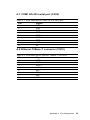
Table A-6: PCM-4823/4823L IDE hard drive connector
Pin
1
3
5
7
9
11
13
15
17
19
21
23
25
27
29
31
33
35
37
39
41
43
58
Signal
IDE RESET
DATA 7
DATA 6
DATA 5
DATA 4
DATA 3
DATA 2
DATA 1
DATA 0
SIGNAL GND
N/C
IO WRITE
IO READ
IO CHANNEL READY
N/C
IRQ14
ADDR 1
ADDR 0
HARD DISK SELECT 0
IDE ACTIVE
VCC
GND
PCM-4823/4823L User's Manual
Pin
2
4
6
8
10
12
14
16
18
20
22
24
26
28
30
32
34
36
38
40
42
44
Signal
GND
DATA 8
DATA 9
DATA 10
DATA 11
DATA 12
DATA 13
DATA 14
DATA 15
N/C
GND
GND
GND
N/C
GND
IOCS16
N/C
ADDR 2
HARD DISK SELECT 1
GND
VCC
N/C
A.7 COM1 RS-232 serial port (CN12)
Table A-7: PCM-4823/4823L COM1 RS-232 serial port
Pin
1
2
3
4
5
6
7
8
9
Signal
DCD
RxD
TxD
DTR
GND
DSR
RTS
CTS
RI
A.8 Ethernet 10Base-T connector (CN10)
Table A-8: PCM-4823/4823L Ethernet 10Base-T connector
Pin
1
2
3
4
5
6
7
8
Signal
XMT+
XMTRCV+
N/C
N/C
RCVN/C
N/C
Appendix A Pin Assignments
59
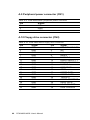
A.9 Peripheral power connector (CN1)
Table A-9: PCM-4823/4823L peripheral power connector
Pin
3
2
1
Signal
-5 V
GND
-12 V
A.10 Floppy drive connector (CN2)
Table A-10: PCM-4823/4823L floppy drive connector
Pin
1
3
5
7
9
11
13
15
17
19
21
23
25
27
29
31
33
60
Signal
GND
GND
GND
GND
GND
GND
GND
GND
GND
GND
GND
GND
GND
GND
GND
GND
GND
PCM-4823/4823L User's Manual
Pin
2
4
6
8
10
12
14
16
18
20
22
24
26
28
30
32
34
Signal
DENSITY SELECT
N/C
N/C
INDEX
MOTOR 0
DRIVE SELECT 1
DRIVE SELECT 0
MOTOR 1
DIRECTION
STEP
WRITE DATA
WRITE GATE
TRACK 0
WRITE PROTECT
READ DATA
HEAD SELECT
DISK CHANGE
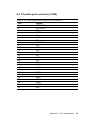
A.11 Parallel port connector (CN4)
Table A-11: PCM-4823/4823L parallel port connector
Pin
1
2
3
4
5
6
7
8
9
10
11
12
13
14
15
16
17
18
19
20
21
22
23
24
25
26
Signal
\STROBE
\AUTOFD
D0
ERR
D1
\INIT
D2
\SLCTINI
D3
GND
D4
GND
D5
GND
D6
GND
D7
GND
\ACK
GND
BUSY
GND
PE
GND
SLCT
N/C
Appendix A Pin Assignments
61
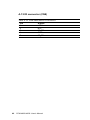
A.12 IR connector (CN8)
Table A-12: PCM-4823/4823L IR connector
Pin
1
2
3
4
5
62
Signal
+5 V
N/C
IR_RX
GND
IR_TX
PCM-4823/4823L User's Manual
A.13 System I/O ports
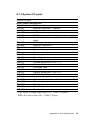
System I/O ports
Addr. range (Hex)Device
000-01F
DMA controller
020-021
Interrupt controller 1, master
022-023
Chipset address
040-05F
8254 timer
060-06F
8042 (keyboard Controller)
070-07F
Real-time clock, non-maskable interrupt (NMI)
mask
080-09F
DMA page register,
0A0-0BF
Interrupt controller 2
0C0-0DF
DMA controller
0F0
Clear math co-processor
0F1
Reset math co-processor
0F8-0FF
Math co-processor
1F0-1F8
Fixed disk
200-207
Game I/O
278-27F
Parallel printer port 2 (LPT 3)
2F8-2FF
Serial port 2
300-31F
Prototype card
360-36F
Reserved
378-37F
Parallel printer port 1 (LPT 2)
380-38F
SDLC, bisynchronous 2
3A0-3AF
Bisynchronous 1
3B0-3BF
Monochrome display and printer adapter(LPT1)
3C0-3CF
Reserved
3D0-3DF
Color/graphics monitor adapter
3F0-3F7
Diskette controller
3F8-3FF
Serial port 1
* PNP audio I/O map range from 220 ~ 250H (16 bytes)
MPU-401 select from 300 ~ 330H (2 bytes)
Appendix A Pin Assignments
63
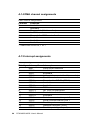
A.14 DMA channel assignments
DMA channel assignments
Channel
0
1
2
3
4
5
6
7
Function
Available
Available
Floppy disk (8-bit transfer)
Available
Cascade for DMA controller 1
Available
Available
Available
* Audio DMA select 0, 1 or 3
A.15 Interrupt assignments
Interrupt assignments
Priority
1
2
3
4
5
6
7
8
9
10
11
12
13
14
15
16
64
Interrupt#
NMI
IRQ 0
IRQ 1
IRQ 2
IRQ 8
IRQ 9
IRQ 10
IRQ 11
IRQ 12
IRQ 13
IRQ 14
IRQ 15
IRQ 3
IRQ 4
IRQ 5
IRQ 6
IRQ 7
PCM-4823/4823L User's Manual
Interrupt source
Parity error detected
Interval timer
Keyboard
Interrupt from controller 2 (cascade)
Real-time clock
Cascaded to INT 0A (IRQ 2)
Available
Available
PS/2 mouse
INT from co-processor
Fixed disk controller
Available
Serial communication port 2
Serial communication port 1
Parallel port
Diskette controller (FDC)
Parallel port 1 (print port)
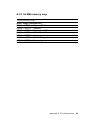
A.16 1st MB memory map
1st MB memory map
Addr. range (Hex)Device
F000h - FFFFh System ROM
C800h - EFFFh Unused
C000h - C7FFh Expansion ROM
B800h - BFFFh CGA/EGA/VGA text
B000h - B7FFh Unused
A000h - AFFFh EGA/VGA graphics
0000h - 9FFFh Base memory
* D000 - D400H DOC 2000
Appendix A Pin Assignments
65
66
PCM-4823/4823L User's Manual
APPENDIX
Installing PC/104
Modules
B
This appendix gives instructions for
installing PC/104 modules.
B.1 Installing PC/104 modules
The PCM-4823/4823L's PC/104 connectors give you the flexibility
to attach PC/104 modules.
Installing these modules on the PCM-4823/4823L is quick and simple.
The following steps show how to mount the PC/104 modules:
1. Remove the PCM-4823/4823L from your system paying particular attention to the safety instructions already mentioned
above.
2. Make any jumper or link changes required to the CPU card now.
Once the PC/104 module is mounted you may have difficulty in
accessing these.
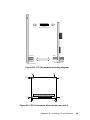
3. Normal PC/104 modules have male connectors and mount
directly onto the main card. (Refer to the diagram on the
following page.)
4. Mount the PC/104 module onto the CPU card by pressing the
module firmly but carefully onto the mounting connectors.
5. Secure the PC/104 module onto the CPU card using the four
mounting spacers and screws.
68
PCM-4823/4823L User's Manual
PC/104
Mounting Support
Female
PCM-4825/4825L
Male
PC/104 module
Figure B-1: PC/104 module mounting diagram
8.9
82.5
95.9
90.8
90.8
5.1
5.1
0
5.1
0
85.1
90.2
Figure B-2: PC/104 module dimensions (mm) (±0.1)
Appendix B Installing PC/104 Modules
69
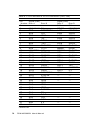
Table B-1: PCA-4823/4823L PC/104 connectors (CN3, CN5)
Pin
Signal (CN3)
Number Row A
Row B
Signal (CN5)
Row C
Row D
0
1
2
3
4
5
6
7
8
9
10
11
12
13
14
15
16
17
18
19
20
21
22
23
24
25
26
27
28
29
30
31
32
0V
SBHE*
LA23
LA22
LA21
LA20
LA19
LA18
LA17
MEMR*
MEMW*
SD8
SD9
SD10
SD11
SD12
SD13
SD14
SD15
KEY
—
—
—
—
—
—
—
—
—
—
—
—
—
—
IOCHCHK*
SD7
SD6
SD5
SD4
SD3
SD2
SD1
SD0
IOCHRDY
AEN
SA19
SA18
SA17
SA16
SA15
SA14
SA13
SA12
SA11
SA10
SA9
SA8
SA7
SA6
SA5
SA4
SA3
SA2
SA1
SA0
0V
—
0V
RESETDRV
+5V
IRQ9
-5V
DRQ2
-12V
ENDXFR*
+12 V
N/C
SMEMW*
SMEMR*
IOW*
IOR*
DACK3*
DRQ3
DACK1*
DRQ1
REFRESH*
SYSCLK
IRQ7
IRQ6
IRQ5
IRQ4
IRQ3
DACK2*
TC
BALE
+5V
OSC
0V
0V
*active low
70
PCM-4823/4823L User's Manual
0V
MEMCS16*
IOCS16*
IRQ10
IRQ11
IRQ12
IRQ15
IRQ14
DACK0*
DRQ0
DACK5*
DRQ5
DACK6*
DRQ6
DACK7*
DRQ7
+5V
MASTER*
0V
0V
—
—
—
—
—
—
—
—
—
—
—
—
—
APPENDIX
C
DOC® 2000 Installation
Guide
This appendix contains information on the
DiskOnChip® 2000 quick installation
guide. It includes:
• DiskOnChip® 2000 installation instructions
• Additional information and assistance
Appendix C DOC 2000 Installation Guide
71
C.1 DiskOnChip® 2000 quick installation guide
C.1.1 DiskOnChip® 2000 installation instructions
1. Make sure the target platform is powered OFF.
2. Plug the DiskOnChip® 2000 device into its socket. Verify the
direction is correct (pin 1 of the DiskOnChip® 2000 is aligned with
pin 1 of the socket).
3. Power up the system.
4. During power up you may observe the messages displayed by
the DiskOnChip® 2000 when its drivers are automatically loaded
into the system's memory.
5. At this stage the DiskOnChip® 2000 can be accessed as any disk
in the system.
6. If the DiskOnChip® 2000 is the only disk in the system, it will
appear as the first disk (drive C: in DOS).
7. If there are more disks besides the DiskOnChip® 2000, the
DiskOnChip® 2000 will appear by default as the last drive, unless
it was programmed as the first drive. (Please refer to the
DiskOnChip® 2000 utilities user manual.)
8. If you want the DiskOnChip® 2000 to be bootable:
a - Copy the operating system files into the DiskOnChip® by
using the standard DOS command (for example: sys d:).
b - The DiskOnChip® should be the only disk in the systems or
would be configured as the first disk in the system (c:) using the
DUPDATE utility.
DUPDATE D /S: DOC104.EXB /FIRST
DUPDATE C /S: DOC104.EXB
72
PCM-4823/4823L User's Manual
(set as c:)
(set as d:)
C.1.2 Additional information and assistance
1. Visit M-Systems Web site at www.m-sys.com where you can find
Utilities Manual, Data Sheet and Application Notes. In addition,
you can find the latest DiskOnChip® 2000 S/W Utilities.
2. Contact your dealer for technical support if you need additional
assistance, and have the following information ready:
• Product name and serial number.
• Description of your computer hardware (manufacturer, model,
attached devices, etc.)
• Description of your software (operating system, version,
application software, etc.)
• A complete description of the problem.
• The exact wording of any error messages.
Appendix C DOC 2000 Installation Guide
73
74
PCM-4823/4823L User's Manual