1
Fejl! Brug fanen Startside til at anvende Überschrift 1 på teksten, der skal vises her.
21
• Using the Loading Switch:
a. Open the door.
b. Press and hold the loading switch until the spit disk reaches the desired position and
then release the loading switch.
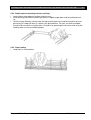
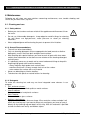
c. Load the spits using pliers as shown in item 5.3.1 – 5.3.3.
d. Repeat Steps b and c until all splits have been loaded and then close the door.
• Using the Function Switch:
a. Open the door.
b. Turn the function switch to WARMING to rotate the spit disk to the desired position and
then turn the function switch to LOADING to stop the rotation.
c. Load the spits using pliers as shown in item 5.3.1 – 5.3.3.
d. Repeat Steps b and c until all spits have been loaded and then close the door.
e. Turn function switch to OFF.
Set the desired temperature using the temperature control.
•
• Rotisserie will now cook until the operator turns the function swtich to WARMING, which will
keep the spits rotating and the quartz lamp will remain on.
•
The products can be unloaded using the same procedure as when they were loaded.
•
Turn the function switch to OFF to turn the rotisserie completely off.
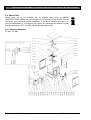
5.3 Component Function and Location
5.3.1 Components
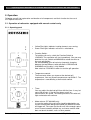
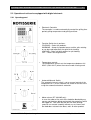
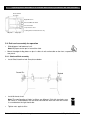
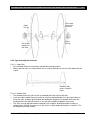
• Shaft and disk assembly is used to mount and rotate the products.
• Rotisseries are equipped with either an electronic or computer control. The operation of these
controls will be explained separately in this section.
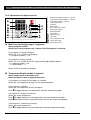
• Automatic/Manual Switch is used to place the rotisserie in either the automatic or manual mode.
MANUAL MODE:
When the rotisserie is in the manual mode the temperature is contolled
by the temperature control and cook time is timed by the operator.
AUTOMATIC MODE: When the rotisserie is in the automatic mode the cook time and tempe
rature are controlled by the electronic or computer control.
• Function Switch has 3 positions:
COOKING: cooks the product.
WARMING: Keeps the produst warm and the spits rotating or can be used to position the spit
disk for loading.
LOADING:
Stops spit disk rotation for spit loading.
• Temperature Control is used to set the temperature when the automatic/manual switch is in the
manual mode.
• Loading switch is used to rotate the spit disk to the desired position for loading.
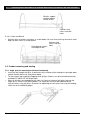
• Drip Pan is used to catch drippings from the products being grilled. The drip pan slides out of
the unit.
Printed: 12/2012 Subject to change!
TopLineUserManual