1
SerVision SVClientCE User Guide
Overview of the Interface
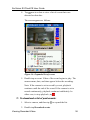
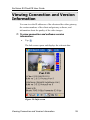
When SVClientCE has been started and you connect to a gateway,
live video from the gateway is displayed in the Main screen. The
first time you connect to a gateway, video from the camera
connected to camera connector #1 on the gateway is displayed. In
subsequent connections, the display reverts to the camera from
which video was displayed when the last connection to that
gateway ended. The name of the camera is displayed below the
video, and a list of devices – cameras and sensors – connected to
the gateway appears below the video.
Version number
SVClientCE icon
Video
display
Camera
name
List of
devices
Toolbar
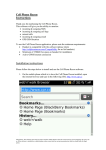
Figure 8: Live video displayed in the Main screen
Overview of the Interface
21