1
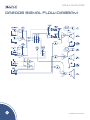
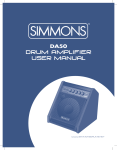
DA200S
front panel
5
1
2
3
4
6
7
1 Drum Inputs: These are 1/4” input jacks (left and
2
right). When using a mono signal, plug into the Left/Mono
Jack.
Aux Input: This 1/4” stereo jack is used for connecting
any pre-EQ source such as a click track, additional digital
instruments, devices, drum pad MPC machines, etc. The
volume of the Aux Input is controlled by the Aux
Volume control.
3 Drum Volume: This controls the volume level of
the Drum Inputs to the power amplifier.
4
Aux Volume: This controls the volume level of
the Aux Input.
5 Equalization Section: These control the overall
tone of the DA200S drum amplifier.
6 Low: This controls frequencies centered
at 50Hz with a +/-12 dB sweep.
7 Mid: This controls frequencies centered
8
9
10
11
12 13
8 High: This controls frequencies centered
at 10 kHz with a +/-12 dB sweep.
9 Sub: This controls the volume of the low
frequency sub-woofer.
10 Master: This controls the overall volume
of the amplifier
11 Line In: This is a 1/8” stereo line input.
It bypasses the EQ tone controls and feeds straight
into the power amplifier, perfect for CD or MP3
players. Use the volume and tone controls on
your external device to control the audio signal.
12 Headphone Jack: This is a 1/8” stereo output
jack. It combines all inputs from your drums, Aux
Input, and Line In. Use it to monitor your drums during
live performances. It will turn off internal speakers,
but will not affect signal outputs.
13 Power “On” Indicator
at 800Hz with a +/-12 dB sweep.
www.simmonsdrums.net
5