1
Table of Contents
Introduction ........................................................................................................ 3
Warnings and Safety Precautions .................................................................... 4
Limited Warranty ................................................................................................ 6
Features and Benefits ........................................................................................ 8
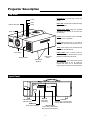
Projector Description ........................................................................................ 9
Top View .......................................................................................................... 9
Input Panel ...................................................................................................... 9
Projector Placement and Offset Information ................................................ 10
Ceiling Mount Configuration.......................................................................... 10
Floor Mount Configuration ............................................................................ 10
DHD Controller Description ............................................................................ 11
Front Panel .................................................................................................... 11
Rear Panel .................................................................................................... 12
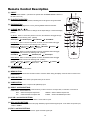
Remote Control Description ............................................................................ 13
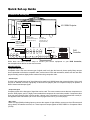
Quick Set-up Guide .......................................................................................... 14
Connection Example .................................................................................... 14
Overall Functional Description........................................................................ 16
Menu Description and Navigation .................................................................. 16
Main Menu .................................................................................................... 17
Opening Screen ............................................................................................ 17
Input Source .................................................................................................. 17
Aspect Ratio ..................................................................................................18
Picture ............................................................................................................18
Input Selection................................................................................................20
ISF Presets ....................................................................................................20
Information .................................................................................................... 20
Basic Troubleshooting Tips..............................................................................21
RS-232 Communications ..................................................................................23
RS-232 Commands ........................................................................................24
Specifications.................................................................................................... 26
1