1
Sentinal DTS Multiplexer User Guide MUX-UM1.0
Page 17
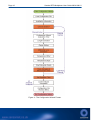
The following section describes the additional sections of the Configuration Wizard when using the
Multiplexer. It should be noted that stages 3 to 11 must be completed for each active channel.
Before running the Configuration Wizard with the Multiplexer it is recommended that users are
familiar with the use of the Configuration Wizard for a single fibre installation as described in the
Sentinel DTS user guide.
THE CONFIGURATION WIZARD STAGE 3 – CHANNEL ACTIVATION
The third stage of the Configuration Wizard when using the Multiplexer is to activate selected
channels for distributed temperature sensing. This allows the user to decide which channels are
active whenever this configuration file is used.
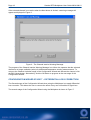
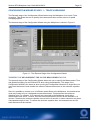
The third stage of the Configuration Wizard using the Multiplexer is shown in Figure 5.
Figure 5 - The Third Stage of the Configuration Wizard.
CHANNEL ACTIVATION
To activate the displayed channel for distributed temperature sensing, click the Channel Active
button. The green LED within the Channel Active button will illuminate indicating that the channel
has been activated.
To progress to the next stage of the Configuration Wizard, click the Next button.