1
regardless of ownership status, and might also want to be notified when any incident is
marked as Not-Reproducible.
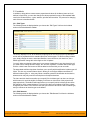
You can set any of these conditions by changing the drop-down list and/or check-boxes and
clicking the appropriate <Update> button.
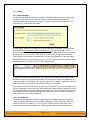
3.4.3. Edit Workflow Step
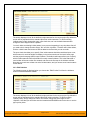
When you click on the incident status name link from either of the previous screens, you are
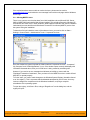
taken to the workflow step details screen:
The top part of the screen is the “workflow browser” which illustrates how the step relates to the
workflow as a whole. It displays the current incident status in the middle, with the possible
originating and destination transitions listed to either side. Clicking on either workflow transition
name will take you to the appropriate workflow transition details page. This allows you to click
through the whole workflow from start to finish without having to return to the workflow details
page.
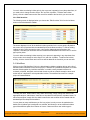
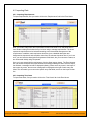
This page allows you to define the behavior of the various incident fields (i.e. those that are a
standard part of SpiraTest such as Priority) and incident custom properties for this particular step
in the workflow. You can set each of the fields/custom properties as being active and/or required
for each step in the workflow. Note that you cannot set a field/property as being required and
inactive since this would prevent a user from ever updating the incident. For example, when an
incident is in the New status, you might make the owner field inactive (since a detector shouldn’t
need to know who will ultimately own it), when it gets to the Open status, you might make the field
active, and when it gets to the Assigned status, you might make it active and required. This
allows you to tailor the information gathered to the appropriate place in the workflow.
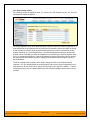
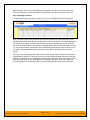
To actually make these changes, all you need to do is select the appropriate checkboxes in the
list of fields and custom properties and click the corresponding <Update> button.
© Copyright 2006-2008, Inflectra Corporation
Page 28 of 53
This document contains Inflectra proprietary information