1
Spread Spectrum Wireless Data Transceiver User Manual
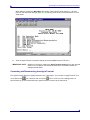
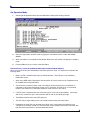
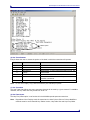
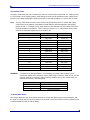
When Setup is invoked, the Main Menu will display in the HyperTerminal dialog box. All three
LED’s on the transceiver will light green * * * and stay green as long as the transceiver is in the
Setup mode.
9.
Save the HyperTerminal connection settings by selecting Save from the File menu.
IMPORTANT NOTE:
Whenever a change is made to the HyperTerminal settings in an open terminal
session, the connection must be disconnected then reconnected before the
settings will take effect.
Connecting and Disconnecting from HyperTerminal
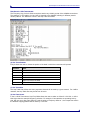
The HyperTerminal dialog box displays several icons in the toolbar. To reconnect to HyperTerminal, click
on the Disconnect
icon, and then click on the Call
icon to reconnect. If the settings have not
been saved they must be reselected when HyperTerminal reconnects to the transceiver.
LUM0002AF Rev B
Version 6.3
16