1
2 Operation
! ATTENTION
!
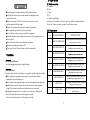
Ensure the supply voltage consistent with host labeled voltage.
Don't put other electrical power cord connect this equipment power
input and output line.
Before connecting 110-240V AC, please ensure the power switch
socket connected with the ground.
Ensure safety, please choose the power socket of high quality.
This equipment's ground wire is yellow-green color.
Prevent collision when you move or install this equipment.
When the equipment stop working is hot, please touch the equipment after 10
mintues cooling.
Turn off the power before you mounting the equipment.
Maximum operating temperature is 45℃
Please keep at least 0.5 meter distance with the combustibles.
2.1 Button operation
A. Function
B. Enter
C. Down
D. Up
E. Liquid Crystal Display
Instructions: Press button A will cycle out of seven different functional effects.
Press B or C button to correct the value. Press D button to enter.
2.2 Display menu
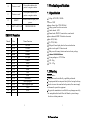
NO.
ENGLIGSH DISPLAY
1
DMX512 ADDRESS 001
2
3
1.3 Installation
Horizontal installation:
Fixed the hanging frame in place, adjustable angle.
Hang installation:
Warning: Ensure that the installation site is completely suitable,safety and reliable.
When installing the equipment,keep at least 0.3 meter distance with the
combustibles (decorated things, etc) .
Fix the clamp on the equipment hanger, then fix the equipment in the right place.
Installation place must be able to bear more than ten times of the equipment
weight. Test whether the installation site deformed or not in one hour.
Hanging the equipment in the air, usually use a safety rope, which must be
able to bear more than ten times of the equipment weight.
able to bear more than ten times of the equipment weight.
2
4
5
6
7
8
9
INTRODUCTIONS
Press up/down button to adjust the address
code, press enter to save
Press up/down button to adjust red
ADJ RED LIGHT 255
brightness, press enter to save
Press up/down button to adjust green
ADJ GREEN LIGHT 255
brightness, press enter to save
Press up/down button to adjust blue
ADJ BLUE LIGHT 255
brightness, press enter to save
Press up/down button to adjust white
ADJ WHITE LIGHT 255
brightness, press enter to save
Press up/down button to select built-in
SIDE PROGRAM 01
program, press enter to save
Press up/down button to select built-in
ADJUST SPEED 16
program speed, press enter to save
Press up/down button to set the distance of
SET FOCUS
focus, press enter to save
Press up/down button to enter sound control
TEST MODE
and auto mode
3