1
User Manual
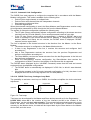
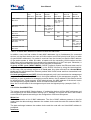
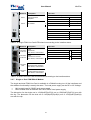
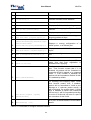
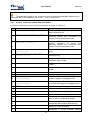
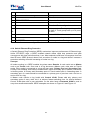
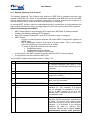
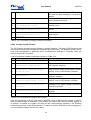
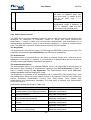
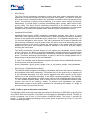
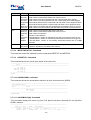
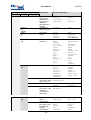
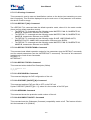
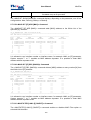
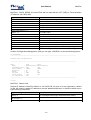
Mode
ACCESS
Default VLAN
(set with VLAN command)
Untagged traffic outside of the modem.
VLAN1-VLAN8, OTHER
(set with ALLOW command)
Not taken into account
TRUNK
VLAN tag is added on ingress, removed
on egress.
Not taken into account
Tagged traffic outside of the modem.
MIXED
Untagged traffic outside of the modem.
VLAN tag is added on ingress, removed
on egress.
MiniFlex
VLAN tag is not modified on egress and
ingress.
Tagged traffic outside of the modem for VLANs
not equal to default VLAN.
VLAN tag is not modified on egress and
ingress.
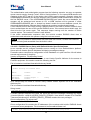
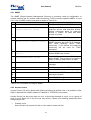
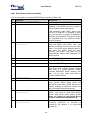
Table 3.9 Access, Trunk and Mixed Mode
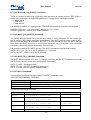
SHDSL line card devices always transmit Ethernet packets over DSL or E1 interfaces with the
VLAN format. It means that data packets coming from Access ports are first transformed into
Ethernet packets with VLAN format (adding standard VLAN number and QoS priority level) and
after this transmitted over any line interface.
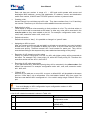
There is a special case when having the same MAC address on different VLANs and PBVLANs.
Normally, there should not be two devices on the network sharing the same VLAN. But IEEE
802.1Q VLANs as well as port-based VLANs allow creating separate logical networks on one
physical network. Thus, in different VLANs or PBVLANs there could be devices sharing the
same MAC address. On SHDSL line cards, however, there is a hardware limitation preventing
all VLAN+PBVLAN combinations from having different address databases, and therefore,
allowing same MAC address to be used on all VLAN&PBVLAN combinations is possible in the
modem configuration. But, knowing which configurations are valid will allow using modems in all
really vital configurations. There are two rules.
1. For separately managed VLANs 1-8. Each VLAN has its own MAC address table, and thus
device with MAC address ABC in each of these 8 VLANs will not conflict with any device
with MAC address ABC in any other VLAN. But the limitation here is the use of port-based
VLANs. MAC address database is shared among all PBVLANs for VLAN1-8. Therefore a
device with MAC address XYZ, VLAN1, PBVLAN A, will conflict with device with MAC
address XYZ, VLAN1, PBVLAN B.
2. For all other VLANs. Here, every PBVLAN has its own MAC address table, but different
VLANs on one PBVLAN share the same database. A device with the MAC address XYZ,
VLAN(any other), PBVLAN A, will not conflict with a device having the MAC address XYZ,
VLAN(any other), PBVLAN B. But the device with the MAC address ABC, VLAN(any other),
PBVLAN A, will conflict with the device having the MAC address ABC, VLAN(any other+1),
PBVLAN A.
24