1
ST-6
Instruction Booklet
5.Malfunction Messages
ITEM
DESCRIPTIONS
Operation
Feature
Take the connector pin (KEY) of controller as determinant
signal, then converts it into digital codes.
Usage
Condition
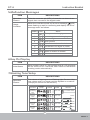
When the controller sends out an error message,
(LED)
starts flashing to wait for confirming and display the "Error
message code" as follows.
flashing
LCD
code
Status
1
Battery needs charging soon.
2
Low voltage, needs charging now
3
Over voltage
4
Over current
5
Park Brake is lost or faulted
6
Accelerator not aligns in center
7
Accelerator is broken or faulted
8
Motor is broken or faulted
9
Others
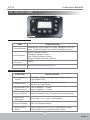
6.Key On Display
ITEM
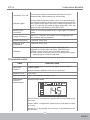
Initial Status
DESCRIPTIONS
When scooter power on, the backlight and all LCD segments
will be tuned on for 3 seconds, then switch to the default
working mode automatically.
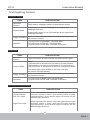
7.Warning Tone Setup
ITEM
Operation
Feature
DESCRIPTIONS
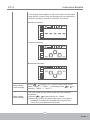
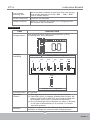
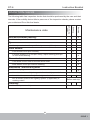
The volume of warning tones of Parking light, Reverse, Horn,
Low voltage and Turn signal could be adjusted or turned off.
(except you cannot turn off the Horn)
Function
Buttons
(A+B)
Status
Initial
Parking
LightWarning
Tone
Less Loud
Reverse
Warning
Tone
Less Loud
Volume
of Horn
Loud
Low Voltage
Warning
Tone
Less Loud
Turn Light
Warning
Tone
Less Loud
Volume
>> Increase volume
<< Decrease volume
Volume
Loud
Less Loud
Normal
Quiet
Silent
21
ISSUE 1